3M CONSTRUCTION and HOME IMPROVEMENT MARKETS DIVISION WTC90543 Electronic Hearing Protector User Manual 90543 4DC P INS 0 4580 1 IPM

3M CONSTRUCTION & HOME IMPROVEMENT MARKETS DIVISION Electronic Hearing Protector 90543 4DC P INS 0 4580 1 IPM

Users Manual
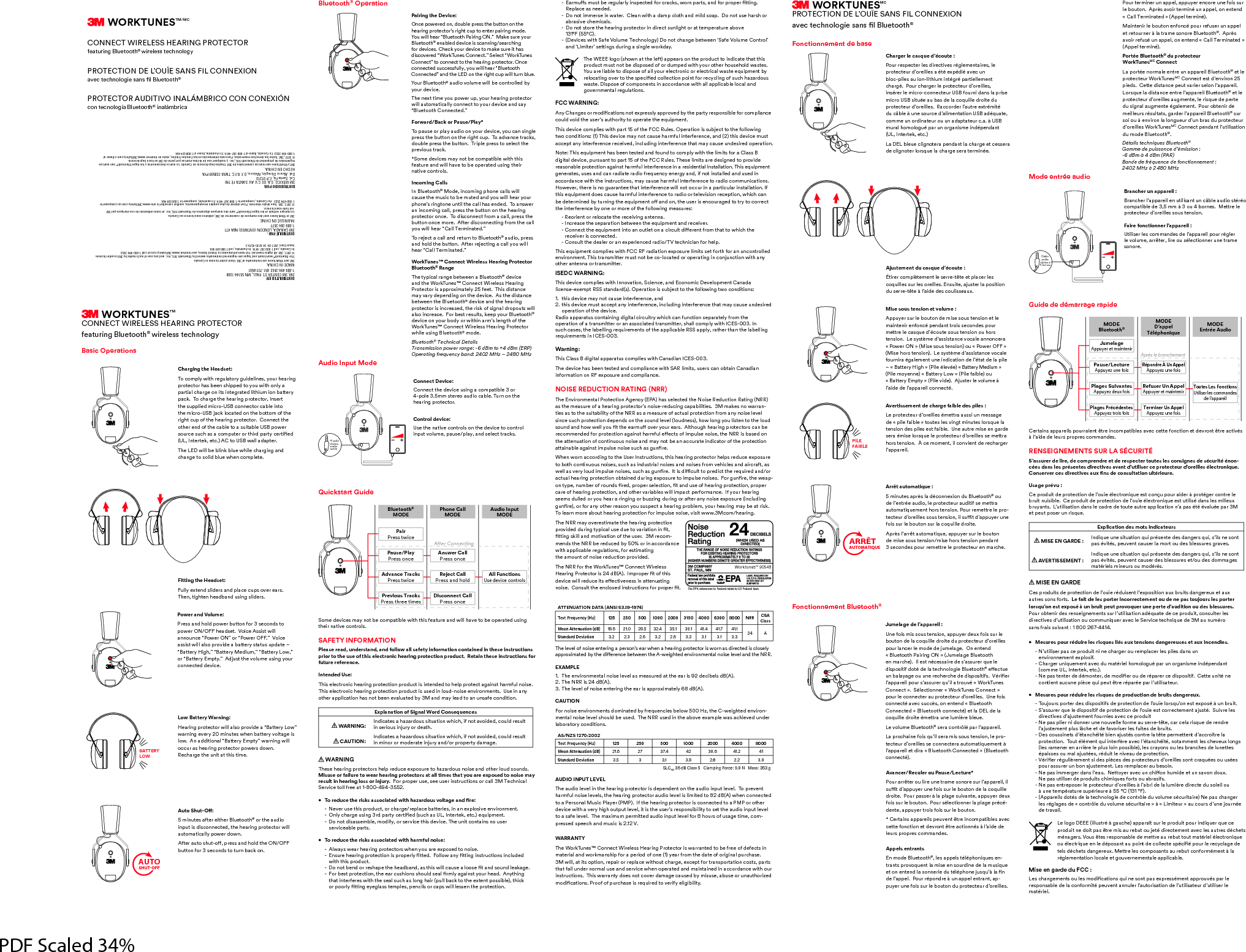
WORKTUNESTM/MCCONNECT WIRELESS HEARING PROTECTOR featuring Bluetooth® wireless technologyPROTECTION DE L’OUÏE SANS FIL CONNEXION 1F53D538>?<?795C1>Cɥ<<E5D??D8®PROTECTOR AUDITIVO INALÁMBRICO CON CONEXIÓN con tecnología Bluetooth® inalámbricaWORKTUNESTMCONNECT WIRELESS HEARING PROTECTORfeaturing Bluetooth® wireless technologyBasic OperationsCharging the Headset:To comply with regulatory guidelines, your hearing protector has been shipped to you with only a partial charge on its integrated lithium ion battery pack.  To charge the hearing protector, insert the supplied micro-USB connector cable into the micro-USB jack located on the bottom of the right cup of the hearing protector.  Connect the other end of the cable to a suitable USB power C?EB35CE381C13?=@ED5B?BD89B4@1BDI35BD9ɥ54%O>D5BD5;5D3D?%#G1<<141@D5BThe LED will be blink blue while charging and change to solid blue when complete.Fitting the Headset:Fully extend sliders and place cups over ears.   Then, tighten headband using sliders.Power and Volume:Press and hold power button for 3 seconds to  power ON/OFF headset.  Voice Assist will  announce “Power ON” or “Power OFF.”  Voice  assist will also provide a battery status update – “Battery High,” “Battery Medium,” “Battery Low,”  or “Battery Empty.”  Adjust the volume using your connected device.BATTERY LOWLow Battery Warning:Hearing protector will also provide a “Battery Low” warning every 20 minutes when battery voltage is low.  An additional “Battery Empty” warning will occur as hearing protector powers down.   Recharge the unit at this time. AUTOSHUT-OFFED?#8EDɢ5 minutes after either Bluetooth® or the audio  input is disconnected, the hearing protector will automatically power down. 6D5B1ED?C8ED?ɢ@B5CC1>48?<4D85 button for 3 seconds to turn back on.Bluetooth® OperationPairing the Device:Once powered on, double press the button on the  hearing protector’s right cup to enter pairing mode.   You will hear “Bluetooth Pairing ON.”  Make sure your Bluetooth® enabled device is scanning/searching for devices. Check your device to make sure it has discovered “WorkTunes Connect.” Select “WorkTunes Connect” to connect to the hearing protector. Once connected successfully, you will hear “Bluetooth  Connected” and the LED on the right cup will turn blue.Your Bluetooth® audio volume will be controlled by your device.The next time you power up, your hearing protector will automatically connect to your device and say “Bluetooth Connected.”Forward/Back or Pause/Play*To pause or play audio on your device, you can single press the button on the right cup.  To advance tracks, double press the button.  Triple press to select the previous track.*Some devices may not be compatible with this  feature and will have to be operated using their native controls.Incoming CallsIn Bluetooth® Mode, incoming phone calls will  cause the music to be muted and you will hear your phone’s ringtone until the call has ended.  To answer an incoming call, press the button on the hearing protector once.  To disconnect from a call, press the button once more.  After disconnecting from the call you will hear “Call Terminated.”To reject a call and return to Bluetooth® audio, press and hold the button.  After rejecting a call you will hear “Call Terminated.”WorkTunes™ Connect Wireless Hearing Protector Bluetooth® RangeThe typical range between a Bluetooth® device and the WorkTunes™ Connect Wireless Hearing Protector is approximately 25 feet.  This distance may vary depending on the device.  As the distance between the Bluetooth® device and the hearing protector is increased, the risk of signal dropouts will also increase.  For best results, keep your Bluetooth® device on your body or within arm’s length of the WorkTunes™ Connect Wireless Hearing Protector while using Bluetooth® mode.Bluetooth® Technical DetailsTransmission power range: -6 dBm to +4 dBm (ERP)Operating frequency band: 2402 MHz – 2480 MHzAudio Input Mode4-polestereoaudiocable   Connect Device:Connect the device using a compatible 3 or  4-pole 3.5mm stereo audio cable. Turn on the  hearing protector. Control device:Use the native controls on the device to control input volume, pause/play, and select tracks.Quickstart GuideBluetooth®  MODEPhone Call  MODEAudio Input MODEPair Press twicePause/Play Press onceAnswer Call Press onceAdvance Tracks Press twiceReject Call Press and holdAll Functions Use device controlsPrevious Tracks Press three timesDisconnect Call Press onceAfter ConnectingSome devices may not be compatible with this feature and will have to be operated using their native controls.SAFETY INFORMATIONPlease read, understand, and follow all safety information contained in these instructions prior to the use of this electronic hearing protection product.  Retain these instructions for future reference.Intended Use:This electronic hearing protection product is intended to help protect against harmful noise.  This electronic hearing protection product is used in loud-noise environments.  Use in any other application has not been evaluated by 3M and may lead to an unsafe condition. Explanation of Signal Word Consequences  WARNING:   Indicates a hazardous situation which, if not avoided, could result in serious injury or death. CAUTION:  Indicates a hazardous situation which, if not avoided, could result in minor or moderate injury and/or property damage. WARNINGThese hearing protectors help reduce exposure to hazardous noise and other loud sounds.  Misuse or failure to wear hearing protectors at all times that you are exposed to noise may result in hearing loss or injury.  For proper use, see user instructions or call 3M Technical Service toll free at 1-800-494-3552. ɟ $?B54E35D85B9C;C1CC?391D54G9D881J1B4?ECF?<D1751>4ɥB5  -  Never use this product, or charge/replace batteries, in an explosive environment.  ><I381B75EC9>7ǩB4@1BDI35BD9ɥ54CE381C%>D5BD5;5D35AE9@=5>D  -  Do not disassemble, modify, or service this device. The unit contains no user  serviceable parts.•  To reduce the risks associated with harmful noise:  -  Always wear hearing protectors when you are exposed to noise. >CEB5851B9>7@B?D53D9?>9C@B?@5B<IɥDD54?<<?G1>IɥDD9>79>CDBE3D9?>C9>3<E454 with this product.  ?>?D25>4?BB5C81@5D85851421>41CD89CG9<<31EC51<??C5ɥD1>4C?E>4<51;175 ?B25CD@B?D53D9?>D8551B3EC89?>CC8?E<4C51<ɥB=<I1719>CDI?EB8514>ID89>7 D81D9>D5B65B5CG9D8D85C51<CE381C<?>7819B@E<<213;D?D855HD5>D@?CC92<5D893; ?B@??B<IɥDD9>75I57<1CCD5=@<5C@5>39<C?B31@CG9<<<5CC5>D85@B?D53D9?> 1B=EɢC=ECD25B57E<1B<I9>C@53D546?B3B13;CG?B>@1BDC1>46?B@B?@5BɥDD9>7 Replace as needed.  -  Do not immerse in water.  Clean with a damp cloth and mild soap.  Do not use harsh or abrasive chemicals.  -  Do not store the hearing protector in direct sunlight or at temperature above  ǧǩǧǹǫǫǹ 5F935CG9D8#165&?<E=5$538>?<?7I?>?D381>7525DG55>Ō#165&?<E=5?>DB?<ō1>4Ō9=9D5BōC5DD9>7C4EB9>71C9>7<5G?B;41I$85'<?7?C8?G>1DD85<56D1@@51BC?>D85@B?4E3DD?9>4931D5D81DD89Cproduct must not be disposed of or dumped with your other household wastes. )?E1B5<912<5D?49C@?C5?61<<I?EB5<53DB?>93?B5<53DB931<G1CD55AE9@=5>D2IB5<?31D9>7?F5BD?D85C@539ɥ543?<<53D9?>@?9>D6?BB53I3<9>7?6CE3881J1B4?ECwaste. Dispose of components in accordance with all applicable local and  governmental regulations.FCC WARNING:>I81>75C?B=?49ɥ31D9?>C>?D5H@B5CC<I1@@B?F542ID85@1BDIB5C@?>C92<56?B3?=@<91>353?E<4F?94D85EC5BōC1ED8?B9DID??@5B1D5D855AE9@=5>DThis device complies with part 15 of the FCC Rules. Operation is subject to the following DG?3?>49D9?>Cǧ$89C45F935=1I>?D31EC581B=6E<9>D5B65B5>351>4ǨD89C45F935=ECDaccept any interference received, including interference that may cause undesired operation.?D5$89C5AE9@=5>D81C255>D5CD541>46?E>4D?3?=@<IG9D8D85<9=9DC6?B1<1CCdigital device, pursuant to part 15 of the FCC Rules. These limits are designed to provide B51C?>12<5@B?D53D9?>1719>CD81B=6E<9>D5B65B5>359>1B5C945>D91<9>CD1<<1D9?>$89C5AE9@=5>D75>5B1D5CEC5C1>431>B1491D5B149?6B5AE5>3I5>5B7I1>496>?D9>CD1<<541>4EC549>accordance with the instructions, may cause harmful interference to radio communications. However, there is no guarantee that interference will not occur in a particular installation. If D89C5AE9@=5>D4?5C31EC581B=6E<9>D5B65B5>35D?B149??BD5<5F9C9?>B535@D9?>G893831>2545D5B=9>542IDEB>9>7D855AE9@=5>D?ɢ1>4?>D85EC5B9C5>3?EB1754D?DBID?3?BB53Dthe interference by one or more of the following measures:  - Reorient or relocate the receiving antenna. >3B51C5D85C5@1B1D9?>25DG55>D855AE9@=5>D1>4B5359F5B ?>>53DD855AE9@=5>D9>D?1>?ED<5D?>139B3E9D49ɢ5B5>D6B?=D81DD?G8938D85 receiver is connected.  - Consult the dealer or an experienced radio/TV technician for help.$89C5AE9@=5>D3?=@<95CG9D8"B1491D9?>5H@?CEB5<9=9DCC5D6?BD86?B1>E>3?>DB?<<54environment. This transmitter must not be co-located or operating in conjunction with any other antenna or transmitter.ISEDC WARNING:This device complies with Innovation, Science, and Economic Development Canada  <935>C55H5=@D"##CD1>41B4C@5B1D9?>9CCE2:53DD?D856?<<?G9>7DG?3?>49D9?>C1.  this device may not cause interference, and2.  this device must accept any interference, including interference that may cause undesired operation of the device.Radio apparatus containing digital circuitry which can function separately from the  operation of a transmitter or an associated transmitter, shall comply with ICES-003. In  CE3831C5CD85<125<<9>7B5AE9B5=5>DC?6D851@@<9312<5"##1@@<IB1D85BD81>D85<125<<9>7B5AE9B5=5>DC9>#ǦǦǩWarning:This Class B digital apparatus complies with Canadian ICES-003.The device has been tested and compliance with SAR limits, users can obtain Canadian  information on RF exposure and compliance.NOISE REDUCTION RATING (NRR)$85>F9B?>=5>D1< B?D53D9?>75>3I 81CC5<53D54D85?9C5"54E3D9?>"1D9>7""as the measure of a hearing protector’s noise-reducing capabilities.  3M makes no warran-ties as to the suitability of the NRR as a measure of actual protection from any noise level C9>35CE38@B?D53D9?>45@5>4C?>D85C?E>4<5F5<<?E4>5CC8?G<?>7I?E<9CD5>D?D85<?E4C?E>41>48?GG5<<I?EɥDD8551B=Eɢ?F5BI?EB51BC<D8?E78851B9>7@B?D53D?BC31>25B53?==5>4546?B@B?D53D9?>1719>CD81B=6E<5ɢ53DC?69=@E<C5>?9C5D85""9C21C54?>the attenuation of continuous noise and may not be an accurate indicator of the protection 1DD19>12<51719>CD9=@E<C5>?9C5CE381C7E>ɥB5When worn according to the User Instructions, this hearing protector helps reduce exposure to both continuous noises, such as industrial noises and noises from vehicles and aircraft, as G5<<1CF5BI<?E49=@E<C5>?9C5CCE381C7E>ɥB5D9C49ɣ3E<DD?@B5493DD85B5AE9B541>4?B13DE1<851B9>7@B?D53D9?>?2D19>544EB9>75H@?CEB5D?9=@E<C5>?9C5C?B7E>ɥB5D85G51@-?>DI@5>E=25B?6B?E>4CɥB54@B?@5BC5<53D9?>ɥD1>4EC5?6851B9>7@B?D53D9?>@B?@5Bcare of hearing protection, and other variables will impact performance.  If your hearing seems dulled or you hear a ringing or buzzing during or after any noise exposure (including 7E>ɥB5?B6?B1>I?D85BB51C?>I?ECEC@53D1851B9>7@B?2<5=I?EB851B9>7=1I251DB9C;To learn more about hearing protection for impulse noise, visit www.3Mcom/hearing.The NRR may overestimate the hearing protection @B?F94544EB9>7DI@931<EC54E5D?F1B91D9?>9>ɥDɥDD9>7C;9<<1>4=?D9F1D9?>?6D85EC5BǩB53?=-mends the NRR be reduced by 50% or in accordance with applicable regulations, for estimating  the amount of noise reduction provided.The NRR for the WorkTunes™ Connect Wireless 51B9>7 B?D53D?B9CǨǪ4=@B?@5BɥD?6D89C45F935G9<<B54E359DC5ɢ53D9F5>5CC9>1DD5>E1D9>7>?9C5?>CE<DD855>3<?C549>CDBE3D9?>C6?B@B?@5BɥDATTENUATION DATA (ANSI S3.19-1974)Test Frequency (Hz)  125 250 500 1000 2000 3150 4000 6300 8000 NRR CSA ClassMean Attenuation (dB) 18.6 21.0 28.5 32.4 35.1 39.1 41.4 41.7 41.1 24 AStandard Deviation 3.2 2.3 2.6 3.2 2.6 3.3 3.1 3.1 3.3The level of noise entering a person’s ear when a hearing protector is worn as directed is closely 1@@B?H9=1D542ID8549ɢ5B5>3525DG55>D85G5978D545>F9B?>=5>D1<>?9C5<5F5<1>4D85""EXAMPLEǧ $855>F9B?>=5>D1<>?9C5<5F5<1C=51CEB541DD8551B9CǯǨ453925<C4Ǩ$85""9CǨǪ4ǩ$85<5F5<?6>?9C55>D5B9>7D8551B9C1@@B?H9=1D5<IǬǮ4CAUTION?B>?9C55>F9B?>=5>DC4?=9>1D542I6B5AE5>395C25<?GǫǦǦJD85G5978D545>F9B?>-mental noise level should be used.  The NRR used in the above example was achieved under laboratory conditions.AS/NZS 1270:2002Test Frequency (Hz)  125 250 500 1000 2000 4000 8000Mean Attenuation (dB) 21.6 27 37.4 42 38.6 41.2 41Standard Deviation 3.5 33.1 3.8 2.6 2.2 3.8SLC80 36 dB Class 5   Clamping Force: 9.8 N   Mass: 353 gAUDIO INPUT LEVELThe audio level in the hearing protector is dependent on the audio input level.  To prevent 81B=6E<>?9C5<5F5<CD85851B9>7@B?D53D?B1E49?<5F5<9C<9=9D54D?ǮǨ4G85>3?>>53D54D?1 5BC?>1<EC93 <1I5B  6D85851B9>7@B?D53D?B9C3?>>53D54D?1  ?B?D85Bdevice with a very high output level, it is the user’s responsibility to set the audio input level to a safe level.  The maximum permitted audio input level for 8 hours of usage time, com-pressed speech and music is 2.12 V.WARRANTYThe WorkTunes™ Connect Wireless Hearing Protector is warranted to be free of defects in =1D5B91<1>4G?B;=1>C89@6?B1@5B9?4?6?>5ǧI51B6B?=D8541D5?6?B979>1<@EB381C5 3M will, at its option, repair or replace without charge, except for transportation costs, parts that fail under normal use and service when operated and maintained in accordance with our instructions.  This warranty does not cover damage caused by misuse, abuse or unauthorized =?49ɥ31D9?>C B??6?6@EB381C59CB5AE9B54D?F5B96I5<97929<9DIWORKTUNESMCPROTECTION DE L’OUÏE SANS FIL CONNEXION1F53D538>?<?795C1>Cɥ<<E5D??D8®Fonctionnement de baseCharger le casque d’écoute :Pour respecter les directives réglementaires, le  protecteur d’oreilles a été expédié avec un  bloc-piles au ion-lithium intégré partiellement chargé.  Pour charger le protecteur d’oreilles,  insérer le micro-connecteur USB fourni dans la prise =93B?%#C9DE51E21C45<13?AE9<<54B?9D54Eprotecteur d’oreilles.  Raccorder l’autre extrémité 4E32<5E>5C?EB354ō1<9=5>D1D9?>%#14AE1D5comme un ordinateur ou un adaptateur c.a. à USB mural homologué par un organisme indépendant %>D5BD5;5D3La DEL bleue clignotera pendant la charge et cessera 453<97>?D5B<?BCAE5<1381B75C5B1D5B=9>5Ajustement du casque d’écoute :Étirer complètement le serre-tête et placer les  3?AE9<<5CCEB<5C?B59<<5C>CE9D51:ECD5B<1@?C9D9?>du serre-tête à l’aide des coulisseaux.Mise sous tension et volume :Appuyer sur le bouton de mise sous tension et le maintenir enfoncé pendant trois secondes pour =5DDB5<531CAE54ō3?ED5C?ECD5>C9?>?E8?BCtension.  Le système d’assistance vocale annoncera U ?G5Ba9C5C?ECD5>C9?>?EU ?G5Ba9C58?BCD5>C9?>5CICD=54ō1CC9CD1>35F?31<5fournira également une indication de l’état de la pile ŊU1DD5BI978a 9<5<5F5U1DD5BI549E=a  9<5=?I5>>5U1DD5BI?Ga 9<56192<5?E U1DD5BI=@DIa 9<5F945:ECD5B<5F?<E=5l’aide de l’appareil connecté.PILE FAIBLE Avertissement de charge faible des piles :Le protecteur d’oreilles émettra aussi un message 45U@9<56192<5aD?ED5C<5CF9>7D=9>ED5C<?BCAE5<1tension des piles est faible.  Une autre mise en garde C5B1=9C5<?BCAE5<5@B?D53D5EB4ō?B59<<5CC5=5DDB1hors tension.  À ce moment, il convient de recharger l’appareil. ARRÊTAUTOMATIQUE Arrêt automatique :5 minutes après la déconnexion du Bluetooth® ou de l’entrée audio, le protecteur auditif se mettra 1ED?=1D9AE5=5>D8?BCD5>C9?> ?EBB5=5DDB5<5@B?-D53D5EB4ō?B59<<5CC?ECD5>C9?>9<CEɣD4ō1@@EI5BE>56?9CCEB<52?ED?>CEB<13?AE9<<54B?9D5@BC<ō1BBD1ED?=1D9AE51@@EI5BCEB<52?ED?> de mise sous tension/mise hors tension pendant  3 secondes pour remettre le protecteur en marche.Fonctionnement Bluetooth®Jumelage de l’appareil :Une fois mis sous tension, appuyer deux fois sur le 2?ED?>45<13?AE9<<54B?9D54E@B?D53D5EB4ō?B59<<5Cpour lancer le mode de jumelage.  On entend  « Bluetooth Pairing ON » (Jumelage Bluetooth  5>=1B385<5CD>35CC19B545Cō1CCEB5BAE5<5dispositif doté de la technologie Bluetooth®5ɢ53DE5E>21<1I175?EE>5B5385B3854549C@?C9D96C&B9ɥ5B<ō1@@1B59<@?EBCō1CCEB5BAEō9<1DB?EFU'?B;$E>5CConnect ».  Sélectionner « WorkTunes Connect » pour le connecter au protecteur d’oreilles.  Une fois connecté avec succès, on entend « Bluetooth  ?>>53D54a<E5D??D83?>>53D5D<145<13?AE9<<54B?9D5=5DDB1E>5<E=9B52<5E5Le volume Bluetooth® sera contrôlé par l’appareil.1@B?3819>56?9CAEō9<C5B1=9CC?ECD5>C9?><5@B?-D53D5EB4ō?B59<<5CC53?>>53D5B11ED?=1D9AE5=5>Dl’appareil et dira « Bluetooth Connected » (Bluetooth 3?>>53DAvancer/Reculer ou Pause/Lecture*Pour arrêter ou lire une trame sonore sur l’appareil, il CEɣD4ō1@@EI5BE>56?9CCEB<52?ED?>45<13?AE9<<5droite.  Pour passer à la plage suivante, appuyer deux fois sur le bouton.  Pour sélectionner la plage précé-dente, appuyer trois fois sur le bouton.* Certains appareils peuvent être incompatibles avec cette fonction et devront être actionnés à l’aide de leurs propres commandes.Appels entrantsEn mode Bluetooth®<5C1@@5<CD<@8?>9AE5C5>-DB1>DC@B?F?AE5>D<1=9C55>C?EB49>545<1=EC9AE55D?>5>D5>4<1C?>>5B954ED<@8?>5:ECAEō<1ɥ>de l’appel.  Pour répondre à un appel entrant, ap-puyer une fois sur le bouton du protecteur d’oreilles.  Pour terminer un appel, appuyer encore une fois sur le bouton.  Après avoir terminé un appel, on entend  U1<<$5B=9>1D54a@@5<D5B=9>Maintenir le bouton enfoncé pour refuser un appel et retourner à la trame sonore Bluetooth®.  Après avoir refusé un appel, on entend « Call Terminated » @@5<D5B=9>Portée Bluetooth® du protecteur  WorkTunesMC ConnectLa portée normale entre un appareil Bluetooth® et le protecteur WorkTunesMC Connect est d’environ 25 pieds.  Cette distance peut varier selon l’appareil.  ?BCAE5<149CD1>355>DB5<ō1@@1B59<<E5D??D8® et le @B?D53D5EB4ō?B59<<5C1E7=5>D5<5B9CAE545@5BD5du signal augmente également.  Pour obtenir de meilleurs résultats, garder l’appareil Bluetooth® sur soi ou à environ la longueur d’un bras du protecteur d’oreilles WorkTunesMC Connect pendant l’utilisation du mode Bluetooth®.Détails techniques Bluetooth®Gamme de puissance d’émission :  -6 dBm à 4 dBm (PAR)Bande de fréquence de fonctionnement :  2 402 MHz à 2 480 MHzMode entrée audioCâble audio stéréo à4 bornesBrancher un appareil :Brancher l’appareil en utilisant un câble audio stéréo compatible de 3,5 mm à 3 ou 4 bornes.  Mettre le protecteur d’oreilles sous tension.  Faire fonctionner l’appareil :Utiliser les commandes de l’appareil pour régler le volume, arrêter, lire ou sélectionner une trame sonore.Guide de démarrage rapideMODE  Bluetooth® MODE D’appel  TéléphoniqueMODE Entrée AudioJumelage Appuyer et maintenirPause/Lecture Appuyez une foisRépondre À Un Appel Appuyez une foisPlages Suivantes Appuyez deux foisRefuser Un Appel Appuyer et maintenir Toutes Les Fonctions Utiliser les commandes de l’appareilPlages Précédentes Appuyez trois foisTerminer Un Appel Appuyez une foisAprès le branchementCertains appareils pourraient être incompatibles avec cette fonction et devront être activés  à l’aide de leurs propres commandes.RENSEIGNEMENTS SUR LA SÉCURITÉS’assurer de lire, de comprendre et de respecter toutes les consignes de sécurité énon-cées dans les présentes directives avant d’utiliser ce protecteur d’oreilles électronique.  ?>C5BF5B35C49B53D9F5C1EHɥ>C453?>CE<D1D9?>E<DB95EB5Usage prévu :5@B?4E9D45@B?D53D9?>45<ō?E5<53DB?>9AE55CD3?>E@?EB1945B@B?D75B3?>DB5<52BE9D>E9C92<55@B?4E9D45@B?D53D9?>45<ō?E5<53DB?>9AE55CDED9<9C41>C<5C=9<95EHbruyants.  L’utilisation dans le cadre de toute autre application n’a pas été évaluée par 3M  5D@5ED@?C5BE>B9CAE5Explication des mots indicateurs MISE EN GARDE :     >49AE5E>5C9DE1D9?>AE9@BC5>D545C41>75BCAE9Cō9<C>5C?>Dpas évités, peuvent causer la mort ou des blessures graves.  AVERTISSEMENT  :  >49AE5E>5C9DE1D9?>AE9@BC5>D545C41>75BCAE9Cō9<C>5C?>Dpas évités, peuvent causer des blessures et/ou des dommages matériels mineurs ou modérés. MISE EN GARDECes produits de protection de l’ouïe réduisent l’exposition aux bruits dangereux et aux  autres sons forts.  Le fait de les porter incorrectement ou de ne pas toujours les porter  lorsqu’on est exposé à un bruit peut provoquer une perte d’audition ou des blessures.   ?EB?2D5>9B45CB5>C597>5=5>DCCEB<ōED9<9C1D9?>14AE1D54535@B?4E9D3?>CE<D5B<5C 49B53D9F5C4ōED9<9C1D9?>?E3?==E>9AE5B1F53<5#5BF935D538>9AE545ǩ1E>E=B? sans frais suivant : 1 800 267-4414. •  Mesures pour réduire les risques liés aux tensions dangereuses et aux incendies.  -  N’utiliser pas ce produit ni ne charger ou remplacer les piles dans un  environnement explosif. 81B75BE>9AE5=5>D1F534E=1DB95<8?=?<?7E@1BE>?B71>9C=59>4@5>41>D 3?==5%>D5BD5;5D3 5@1CD5>D5B454=?>D5B45=?49ɥ5B?E45B@1B5B3549C@?C9D965DD5E>9D>5 3?>D95>D1E3E>5@935AE9@5EDDB5B@1B5@1B<ōED9<9C1D5EB•  Mesures pour réduire les risques de production de bruits dangereux. $?E:?EBC@?BD5B45C49C@?C9D96C45@B?D53D9?>45<ō?E5<?BCAEō?>5CD5H@?CE>2BE9D #ō1CCEB5BAE5<549C@?C9D9645@B?D53D9?>45<ō?E55CD3?BB53D5=5>D1:ECD#E9FB5<5Cdirectives d’ajustement fournies avec ce produit 5@1C@<95B>94?>>5BE>5>?EF5<<56?B=51EC5BB5DD531B35<1B9CAE545B5>4B5 l’ajustement plus lâche et de favoriser les fuites de bruits.  -  Des coussinets d’étanchéité bien ajustés contre la tête permettent d’accroître la  @B?D53D9?>$?ED<=5>DAE99>D5B6B51F53<ōD1>389D>?D1==5>D<5C385F5EH<?>7C<5CB1=5>5B5>1BB9B5<5@<EC<?9>@?CC92<5<5C3B1I?>C?E<5C2B1>385C45<E>5DD5Cépaisses ou mal ajustées, réduit le niveau de protection. &B9ɥ5BB7E<9B5=5>DC945C@935C45C@B?D53D5EBC4ō?B59<<5CC?>D3B1AE5C?EEC5Cpour assurer un bon ajustement. Les remplacer au besoin. 5@1C9==5B75B41>C<ō51E5DD?I5B1F53E>389ɢ?>8E=9455DE>C1F?>4?EH 5@1CED9<9C5B45@B?4E9DC389=9AE5C6?BDC?E12B1C96C  -  Ne pas entreposer le protecteur d’oreilles à l’abri de la lumière directe du soleil ou  E>5D5=@B1DEB5CE@B95EB5ǫǫǹǧǩǧǹ @@1B59<C4?DC45<1D538>?<?795453?>DB<54EF?<E=5C3EB9D19B55@1C381>75B les réglages de « contrôle du volume sécuritaire » à « Limiteur » au cours d’une journée de travail.5<?7?9<<ECDB71E3851@@1B1DCEB<5@B?4E9D@?EB9>49AE5BAE535produit ne doit pas être mis au rebut ou jeté directement avec les autres déchets =>175BC&?ECD5CB5C@?>C12<545=5DDB51EB52EDD?ED=1DB95<<53DB?>9AE5?E<53DB9AE55><54@?C1>D1E@?9>D453?<<53D5C@39ɥ@?EB<5B53I3<17545tels déchets dangereux. Mettre les composants au rebut conformément à la réglementation locale et gouvernementale applicable.Mise en garde du FCC :5C381>75=5>DC?E<5C=?49ɥ31D9?>CAE9>5C?>D@1C5H@B5CC=5>D1@@B?EFC@1B<5responsable de la conformité peuvent annuler l’autorisation de l’utilisateur d’utiliser le matériel.DISTRIBUIDO POR: 3M MÉXICO, S.A. DE C.V. AV. SANTA FÉ 190  Col. Santa Fé, C.P. 01210 Del. Álvaro Obregón, México, D.F. R.F.C. TMM-720509 PYAHECHO EN CHINA.3M y WorkTunes son marcas comerciales de 3M. Usadas bajo licencia en Canadá.  La marca denominativa y los logos Bluetooth® son marcas  registradas de propiedad de Bluetooth SIG, Inc. y cualquier uso de dichas marcas por parte de 3M se hace bajo licencia.© 2017, 3M. Todos los derechos reservados.  Para más información en los Estados Unidos, visite en Internet www.3MSafety.com  o llame al  1-800-494-3552. En Canadá, llame al 1-800-267-4414. En Australia, llame al 1 800 024 464.DISTRIBUTED BY:  3M, 3M CENTER ST. PAUL, MN 55144-1000  1-800-494-3552  651-737-6501MADE IN CHINA.3M and WorkTunes are trademarks of 3M. Used under license in Canada. The Bluetooth® word mark and logos are registered trademarks owned by Bluetooth SIG, Inc. and any use of such marks by 3M is under license.© 2017, 3M. All rights reserved.  For more information in United States, see Internet www.3MSafety.com or call 1-800-494-3552.  In Canada, call 1-800-267-4414. In Australia, call 1 800 024 464. Issue Date: 2017-04  34-8720-4579-3DISTRIBUÉ PAR : 3M CANADA, LONDON (ONTARIO) N6A 4T1 1-800-364-3577FABRIQUÉ EN CHINE.3M et WorkTunes sont des marques de commerce de 3M, utilisées sous licence au Canada.La marque verbale et les logos Bluetooth® sont des marques déposées de Bluetooth SIG, Inc.  et toute utilisation de ces marques par 3M  est faite sous licence.© 2017, 3M. Tous droits réservés.  Pour obtenir de plus amples renseignements, veuillez consulter le site www.3MSafety.com  ou composer le  1-800-494-3552.  Au Canada, composer le 1-800-267-4414. En australie,  composer le 1 800 024 464. 24Worktunes™ 90543The EPA references to Federal relate to US Federal laws.PDF Scaled 34%

Navigation menu