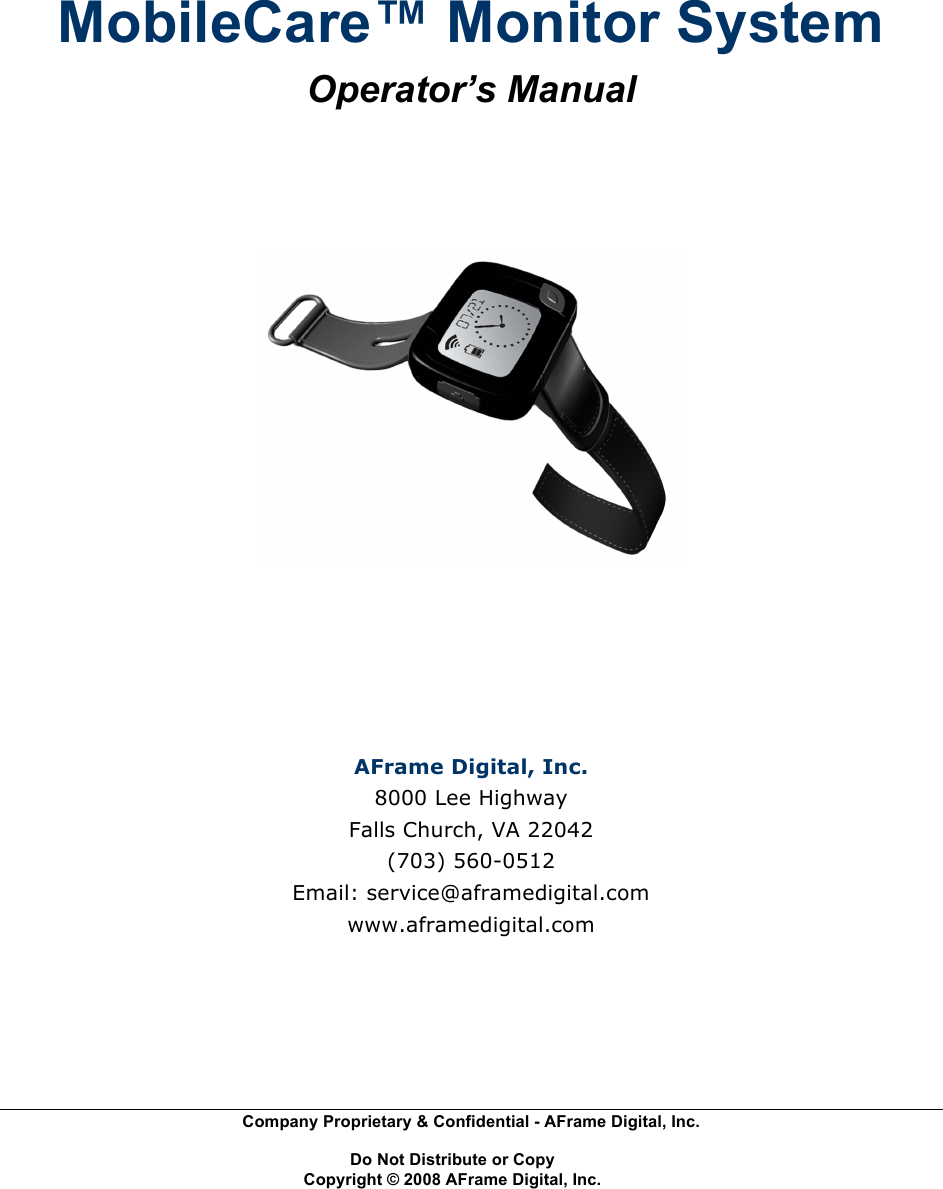
AFrame Digital WG2 MobileCare Monitor User Manual Operator s Manual AFrame MCM

AFrame Digital, Inc. MobileCare Monitor Operator s Manual AFrame MCM

Contents

Updated Manual

 Company Proprietary & Confidential - AFrame Digital, Inc.    Do Not Distribute or Copy   Copyright © 2008 AFrame Digital, Inc.   MobileCare™ Monitor System Operator’s Manual     AFrame Digital, Inc. 8000 Lee Highway Falls Church, VA 22042 (703) 560-0512 Email: service@aframedigital.com www.aframedigital.com
    MobileCare™ Monitor Operator’s Manual i Company Proprietary & Confidential - AFrame Digital, Inc.    Do Not Distribute or Copy   Copyright © 2008 AFrame Digital, Inc.  Table of Contents Table of Contents.........................................................................................................i!Warnings and Contraindications ................................................................................. ii!Contraindications..................................................................................................... ii!Warnings ................................................................................................................. ii!Cautions ................................................................................................................. iii!Precautions while using MobileCare™ Monitor.......................................................... iv!About this manual .......................................................................................................v!Audience .................................................................................................................v!What you will find in this manual .............................................................................v!Symbols used in this manual.................................................................................. vi!Conventions used in this manual ........................................................................... vi!Assumptions........................................................................................................... vi!1.0 Introduction ...........................................................................................................1!2.0 System Overview ..................................................................................................3!2.1 How the MobileCare™ Monitor System Works .................................................4!2.2 Overview of myPHD™ ......................................................................................5!2.3 Compliance to Electromagnetic Compatibility Standard ...................................6!3.0 Operating Procedures...........................................................................................7!3.1 Using myPHD™ ................................................................................................7!3.1.1 Wearing myPHD™ .....................................................................................7!3.1.2 MyPHD™ Batteries.....................................................................................8!3.1.3 Using myPHD™ Buttons ............................................................................8!3.1.4 Checking for Out-of-range Status ...............................................................9!3.1.5 Verifying the Battery Charge.....................................................................10!3.1.6 Sending Emergency Alerts to Caregivers.................................................10!3.1.7 Using the Privacy Button to Temporarily Disable Alerts ...........................12!3.1.8 Impact Sensing and Falls .........................................................................14!3.1.9 Canceling Alerts........................................................................................14!3.1.10 Interpreting Display Messages ...............................................................15!3.2!Using the Charger........................................................................................16!3.3 Using the CareStation™ Software ..................................................................17!4.0 Security ...........................................................................................................18!5.0 Troubleshooting...............................................................................................19!5.1 Troubleshooting myPHD™ and Battery ..........................................................19!5.2 Troubleshooting PANDA .................................................................................19!Appendix A — Warranty ...........................................................................................20!Appendix B — Service ..............................................................................................21!Appendix C — Declarations......................................................................................22!!
    MobileCare™ Monitor Operator’s Manual ii Company Proprietary & Confidential - AFrame Digital, Inc.    Do Not Distribute or Copy   Copyright © 2008 AFrame Digital, Inc.  Warnings and Contraindications   Contraindications  • Do not use the device in a Magnetic Resonance Imaging (MRI) environment. • Do not use this device in an explosive atmosphere or in the presence of flammable anesthetics or gases. • This device is not defibrillation proof per IEC 60601-1:1990 clause 17h.   Warnings  • Use within its designated range. • This device is intended only as an adjunct in patient assessment. It must be used in conjunction with other methods of assessing clinical signs and symptoms. • This device should not be used adjacent to or stacked with other equipment. If adjacent or stacked use cannot be avoided the device should be observed carefully to verify normal operation. • Need for Spectrum Management:  The MobileCare™ Monitor (MCM) system operates in the 2.4GHz Industrial, Scientific and Medical (ISM) band of radio frequencies.  In the United States, this band is regulated by the FCC as unlicensed radio spectrum.  Users of this spectrum are no guaranteed interference free communications.  Note that an RF site survey must be performed by AFrame Digital Inc., or an authorized agent to ensure proper operation of the MCM system at a particular location.  Certain 2.4GHz devices such as cordless phones, video transmitters, and some wireless computers are known to cause unacceptable interference when operating on the same channel as the MCM system.  Users must minimize use of other RF devices in proximity to the MCM system to ensure proper functioning.
    MobileCare™ Monitor Operator’s Manual iii Company Proprietary & Confidential - AFrame Digital, Inc.    Do Not Distribute or Copy   Copyright © 2008 AFrame Digital, Inc.   Cautions  • Inspect the device at least every 6 to 8 hours to ensure correct device alignment and skin integrity. Patient sensitivity to the device may vary due to medical status or skin condition. • Factors that may degrade the performance or affect the accuracy of the measurement, include the following: -  excessive light, such as sunlight or direct home lighting -  excessive motion -  moisture in the device -  improperly applied device • Do not sterilize, autoclave, or immerse this device in liquid. • Do not use caustic or abrasive cleaning agents or any cleaning products containing ammonium chloride. • This equipment complies with IEC 60601-1-2:2004 for electromagnetic compatibility for medical electrical equipment and/or systems. This standard is designed to provide reasonable protection against harmful interference in a typical medical installation. However, because of the proliferation of radio-frequency transmitting equipment and other sources of electrical noise in health care and other environments, it is possible that high levels of such interference due to close proximity or the strength of a source might disrupt the performance of this device. Medical electrical equipment needs special precautions regarding EMC, and all equipment must be installed and put into service according to the EMC information specified in this manual.  • Portable and mobile RF communications equipment can affect medical electrical equipment. • Batteries may leak or explode if used or disposed of improperly. Do not remove or attempt to change the batteries in any manner. This is only to be performed by an AFrame Digital authorized representative. • Follow local, state, and national governing ordinances and recycling instructions regarding disposal or recycling of the device and device components, including batteries. • In compliance with the European Directive on Waste Electrical and Electronic Equipment (WEEE) 2002/96/EC, do not dispose of this product as unsorted municipal waste. This device contains WEEE materials. Please contact your distributor regarding take-back or recycling of the device.
    MobileCare™ Monitor Operator’s Manual iv Company Proprietary & Confidential - AFrame Digital, Inc.    Do Not Distribute or Copy   Copyright © 2008 AFrame Digital, Inc.  Precautions while using MobileCare™ Monitor  Read this manual carefully before using the MobileCare™ Monitor System or its associated components. Follow these precautions: • Do not use the MobileCare™ Monitor System as a substitute for usual and customary resident supervision. The MobileCare™ Monitor System is intended to assist caregivers in providing proper care to individuals. • Discontinue use of myPHD™ if the patient demonstrates any allergic reaction or other intolerance to the device. • General operation of the MobileCare™ Monitor System may be affected if used in a strong electromagnetic field environment. • Do not use the system if any component is damaged. • Caution the residents against causing impacts to myPHD™. Intended or unintended impact of myPHD™ may trigger alerts. • Do not immerse the MobileCare™ Monitor or its components in water or any other liquid. • Do not use caustic or abrasive cleaning agents for the MobileCare™ Monitor or its components. • Do not remove any covers or open any of the components of the MobileCare™ Monitor System. There are no operator serviceable parts within the MobileCare™ Monitor System. • Follow local governing ordinances and recycling instructions regarding disposal or recycling of the MobileCare™ Monitor and its components, including batteries. • Batteries may leak or explode if used or disposed of improperly.
    MobileCare™ Monitor Operator’s Manual v Company Proprietary & Confidential - AFrame Digital, Inc.    Do Not Distribute or Copy   Copyright © 2008 AFrame Digital, Inc.  About this manual   Audience  The MobileCare™ Monitor Operator’s Manual is intended for the operators of MobileCare™ Monitor and its components, that is, the residents, caregivers, nurses, and administrative staff of the care giving facility.   What you will find in this manual  This manual describes — •  How the MobileCare™ Monitor System works. •  How to use the myPHD™ wristwatch to send alerts. •  How to use the CareStation™ software to respond to alerts.  Use the following table to quickly find information in this manual:  To find out about: Go to: How the MobileCare™ Monitor System works 2.0 System Overview How to use myPHD™ and the CareStation™ software 3.0 Operating Procedures The security of the MobileCare™ Monitor System 4.0 Security How to solve problems with the functioning of myPHD™ and PANDA  5.0 Troubleshooting The warranty details, service facilities, and declarations of the MobileCare™ Monitor System Appendices
    MobileCare™ Monitor Operator’s Manual vi Company Proprietary & Confidential - AFrame Digital, Inc.    Do Not Distribute or Copy   Copyright © 2008 AFrame Digital, Inc.  Symbols used in this manual  The following symbols have been used in this manual:   WARNING: Warnings alert you about instructions or procedures that could be hazardous, if not followed properly.  NOTE: Notes point out something important or useful.   Conventions used in this manual  The following conventions are used in this manual.  This type of text: Is used for: Bold Button names  Italics Emphasis   Assumptions  •  We assume that the MobileCare™ Monitor System is already installed by a qualified representative of AFrame and is running on your facility’s network.  •  This guide is intended for the operators of the MobileCare™ Monitor System, that is, the caregivers, nurses, and administrative staff of the care giving facility.
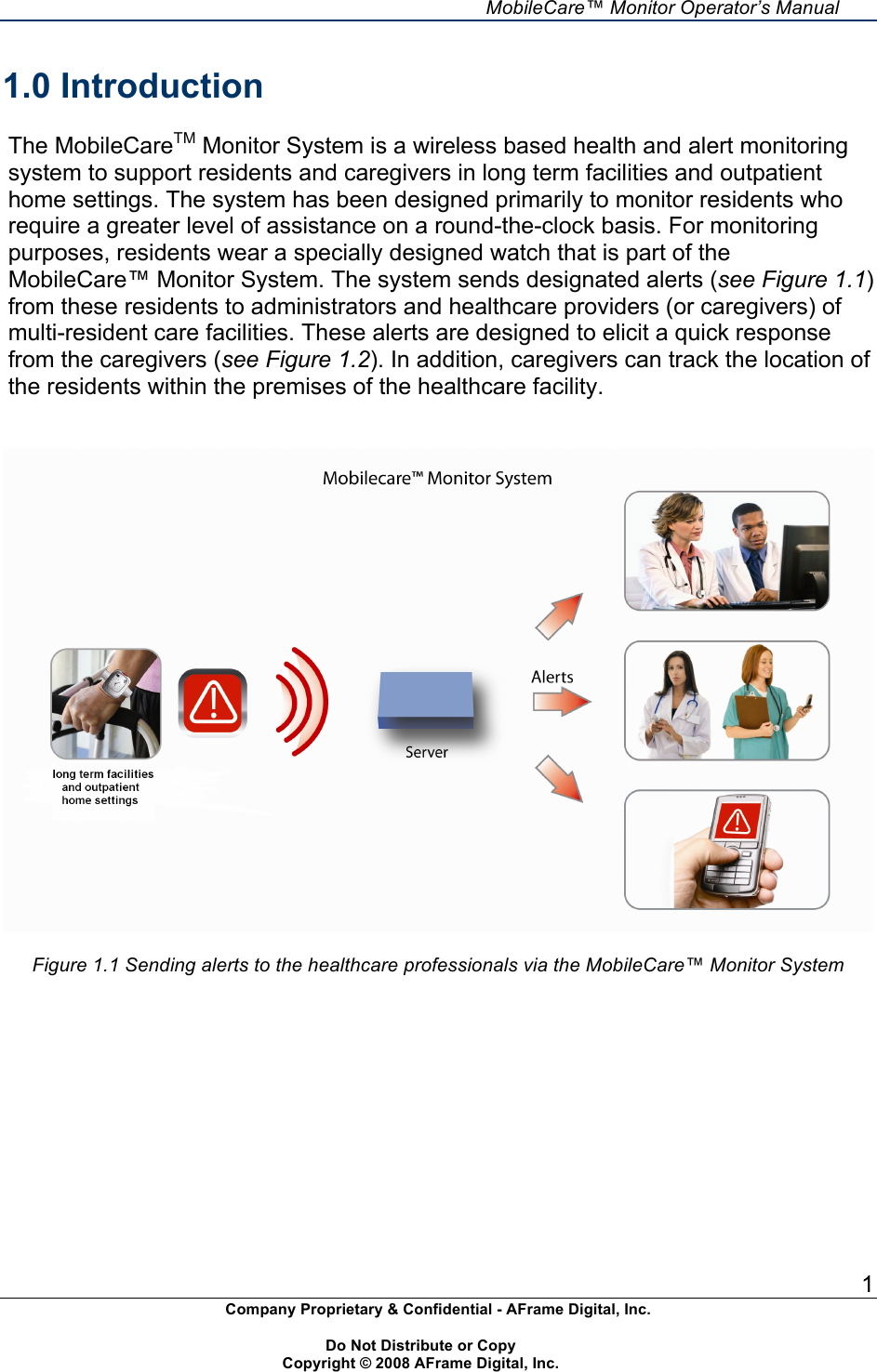
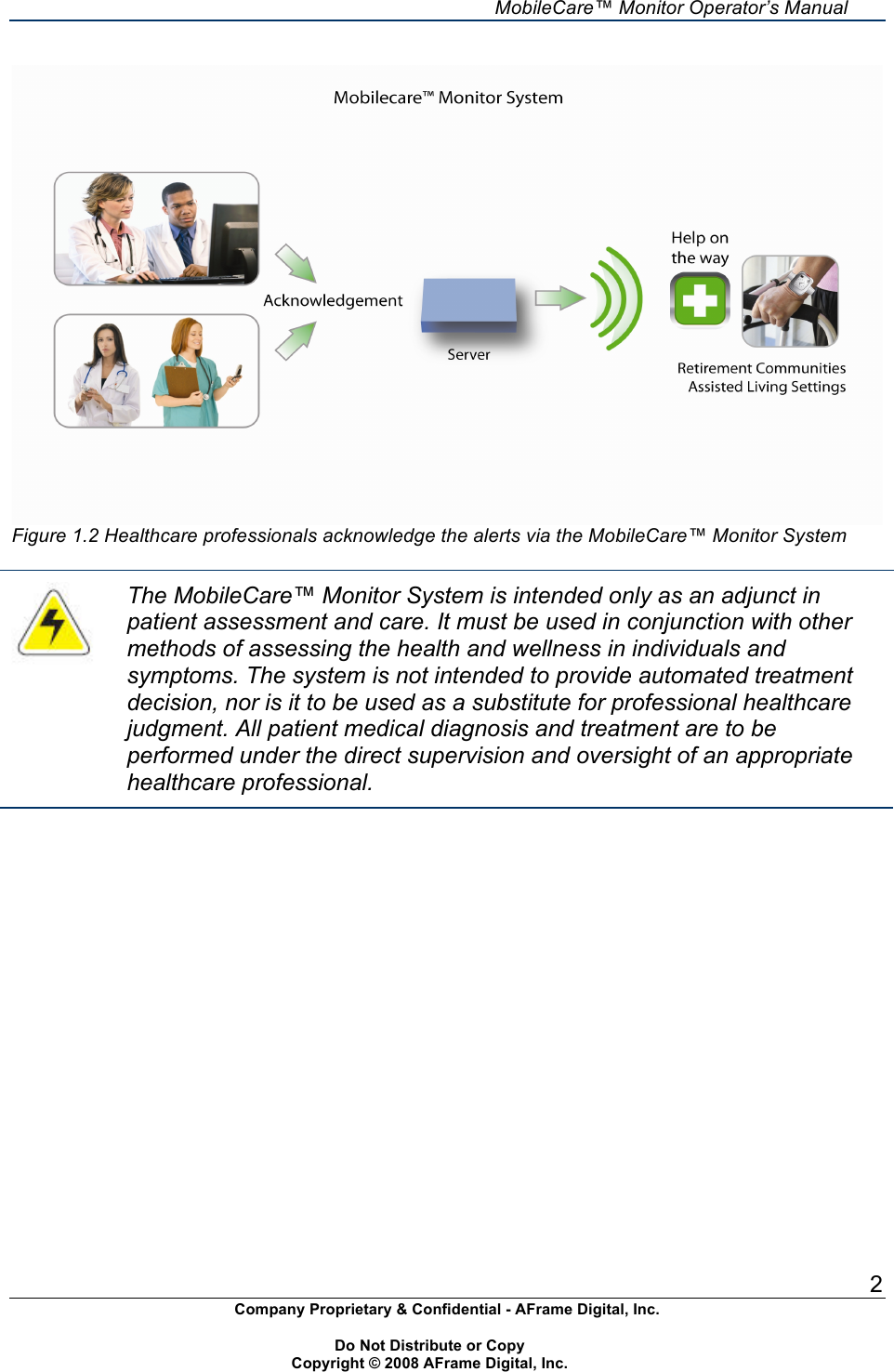
    MobileCare™ Monitor Operator’s Manual 1 Company Proprietary & Confidential - AFrame Digital, Inc.    Do Not Distribute or Copy   Copyright © 2008 AFrame Digital, Inc.  1.0 Introduction  The MobileCareTM Monitor System is a wireless based health and alert monitoring system to support residents and caregivers in long term facilities and outpatient home settings. The system has been designed primarily to monitor residents who require a greater level of assistance on a round-the-clock basis. For monitoring purposes, residents wear a specially designed watch that is part of the MobileCare™ Monitor System. The system sends designated alerts (see Figure 1.1) from these residents to administrators and healthcare providers (or caregivers) of multi-resident care facilities. These alerts are designed to elicit a quick response from the caregivers (see Figure 1.2). In addition, caregivers can track the location of the residents within the premises of the healthcare facility.     Figure 1.1 Sending alerts to the healthcare professionals via the MobileCare™ Monitor System
    MobileCare™ Monitor Operator’s Manual 2 Company Proprietary & Confidential - AFrame Digital, Inc.    Do Not Distribute or Copy   Copyright © 2008 AFrame Digital, Inc.   Figure 1.2 Healthcare professionals acknowledge the alerts via the MobileCare™ Monitor System   The MobileCare™ Monitor System is intended only as an adjunct in patient assessment and care. It must be used in conjunction with other methods of assessing the health and wellness in individuals and symptoms. The system is not intended to provide automated treatment decision, nor is it to be used as a substitute for professional healthcare judgment. All patient medical diagnosis and treatment are to be performed under the direct supervision and oversight of an appropriate healthcare professional.
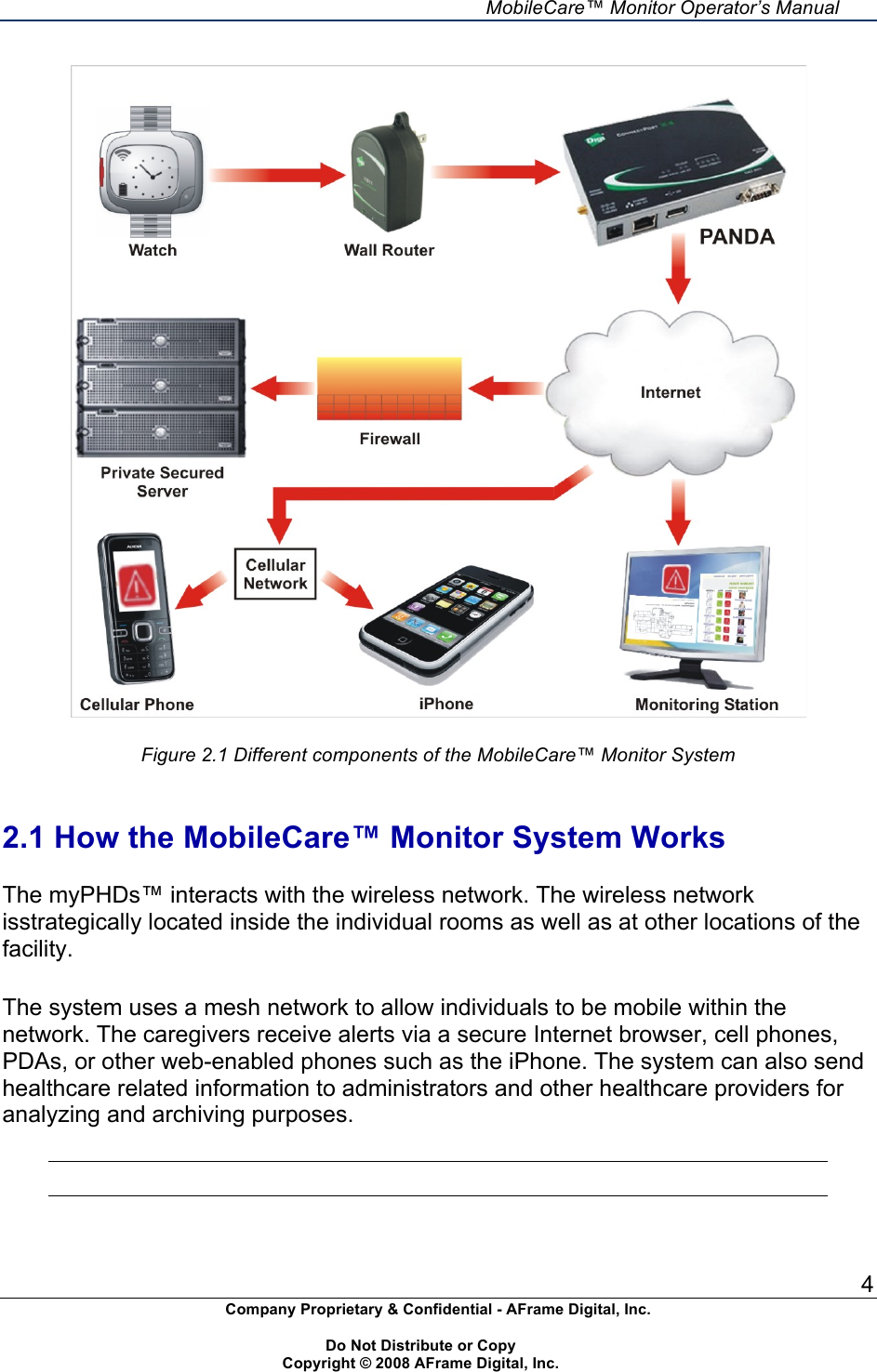
    MobileCare™ Monitor Operator’s Manual 3 Company Proprietary & Confidential - AFrame Digital, Inc.    Do Not Distribute or Copy   Copyright © 2008 AFrame Digital, Inc.  2.0 System Overview  The MobileCare™ Monitor System helps healthcare professionals and caregivers to provide wireless monitoring services for independent and ambulatory residents in long term care facilities and outpatient home settings. The MobileCare™ Monitor System is capable of monitoring residents on a continuous basis (24x7). The system is primarily designed to monitor alerts from these individuals and transmit this data to servers for storage and processing. The main applications of the MobileCare™ Monitor System are:  •  Residents can send emergency and assistance needed alerts to caregivers. •  Caregivers can keep track of the location of the residents within the premises. •  Caregivers are provided impact detection alerts.  The user interface between a monitored individual and the MobileCare™ Monitor System is a wireless personal help device (myPHD™) or “watch” that is worn on an individual’s wrist. This watch is a non-intrusive and form-friendly portable alerting device that transmits data wirelessly to a gateway and server via a wireless mesh network.  The MobileCare™ Monitor System consists of the following components (see Figure 2.1): • Personal Help Device or myPHD™ (also called watch) • Wireless Network Secure Server  • CareStation™ Software
    MobileCare™ Monitor Operator’s Manual 4 Company Proprietary & Confidential - AFrame Digital, Inc.    Do Not Distribute or Copy   Copyright © 2008 AFrame Digital, Inc.    Figure 2.1 Different components of the MobileCare™ Monitor System   2.1 How the MobileCare™ Monitor System Works  The myPHDs™ interacts with the wireless network. The wireless network  isstrategically located inside the individual rooms as well as at other locations of the facility.  The system uses a mesh network to allow individuals to be mobile within the network. The caregivers receive alerts via a secure Internet browser, cell phones, PDAs, or other web-enabled phones such as the iPhone. The system can also send healthcare related information to administrators and other healthcare providers for analyzing and archiving purposes.
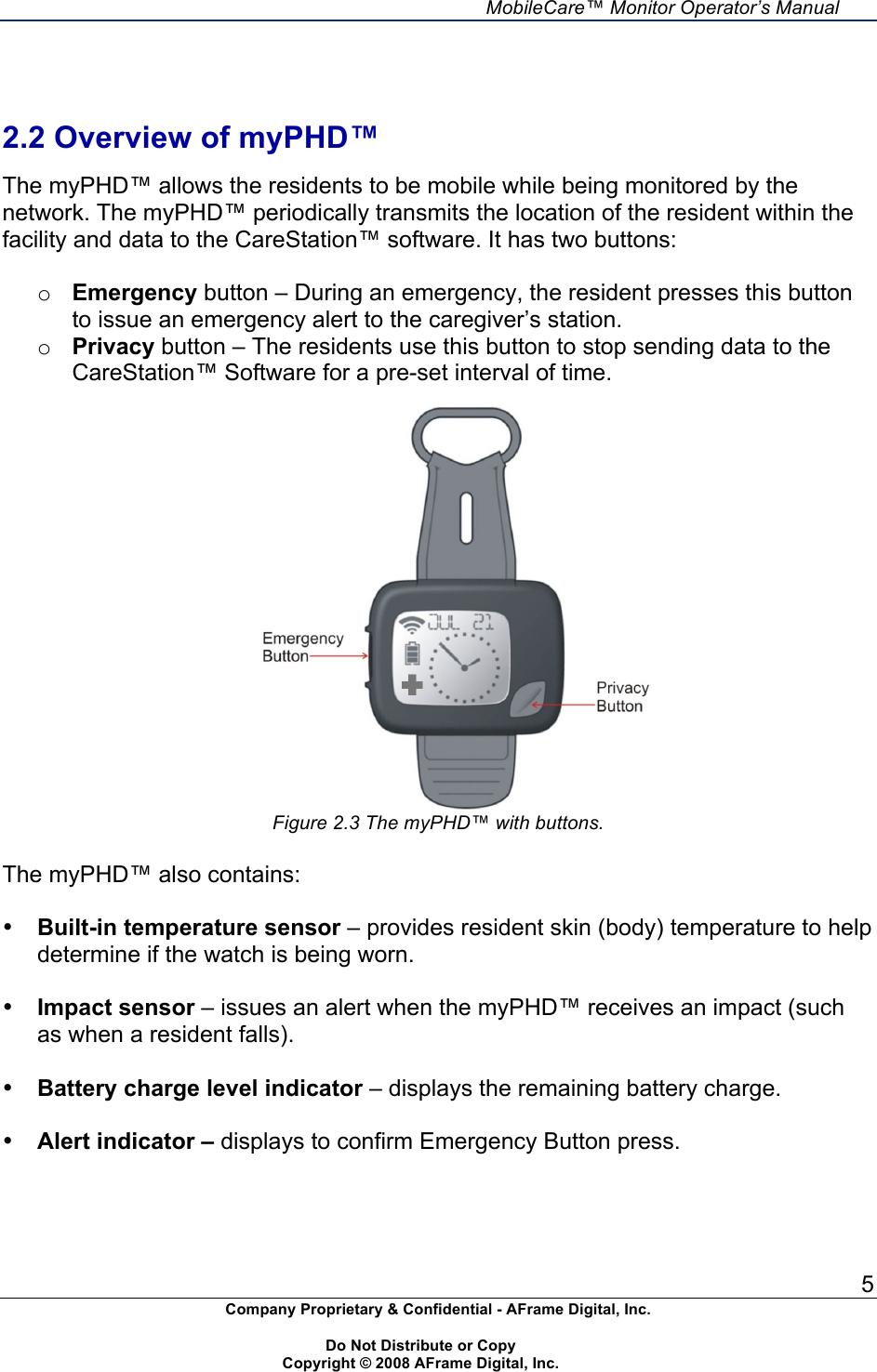
    MobileCare™ Monitor Operator’s Manual 5 Company Proprietary & Confidential - AFrame Digital, Inc.    Do Not Distribute or Copy   Copyright © 2008 AFrame Digital, Inc.    2.2 Overview of myPHD™  The myPHD™ allows the residents to be mobile while being monitored by the network. The myPHD™ periodically transmits the location of the resident within the facility and data to the CareStation™ software. It has two buttons:  o Emergency button – During an emergency, the resident presses this button to issue an emergency alert to the caregiver’s station. o Privacy button – The residents use this button to stop sending data to the CareStation™ Software for a pre-set interval of time.   Figure 2.3 The myPHD™ with buttons.  The myPHD™ also contains:  • Built-in temperature sensor – provides resident skin (body) temperature to help determine if the watch is being worn.  • Impact sensor – issues an alert when the myPHD™ receives an impact (such as when a resident falls).  • Battery charge level indicator – displays the remaining battery charge.  • Alert indicator – displays to confirm Emergency Button press.
    MobileCare™ Monitor Operator’s Manual 6 Company Proprietary & Confidential - AFrame Digital, Inc.    Do Not Distribute or Copy   Copyright © 2008 AFrame Digital, Inc.   Ensure that the myPHD™ is positioned properly on the monitored individual’s wrist.   2.3 Compliance to Electromagnetic Compatibility Standard  The MobileCare™ Monitor System complies with International Standard EN 60601-1-2:2004 for electromagnetic compatibility (EMC) for medical electrical equipment or systems, or both. This standard is designed to provide reasonable protection against harmful interference in a typical medical installation.
    MobileCare™ Monitor Operator’s Manual 7 Company Proprietary & Confidential - AFrame Digital, Inc.    Do Not Distribute or Copy   Copyright © 2008 AFrame Digital, Inc.  3.0 Operating Procedures  This chapter provides instructions on how to wear and operate the myPHD™, interpret the messages displayed in the panel, and trigger and send emergency alerts. This chapter explains the features of the CareStation™ Software and the procedure to respond to alerts, detect the location of residents, and view the historical data of the residents.  MyPHD™ is the only component of the MobileCareTM Monitor System operated by the residents. Before using myPHDs™, the operator must ensure the proper installation of all components of the MobileCare™ Monitor System.    The components of the MobileCare™ Monitor System should not be installed by the operator. These components (such as the routers, the gateway, and the server) must be installed by the representatives of AFrame Digital, Inc. who are trained in the proper installation techniques.   3.1 Using myPHD™ This section explains how to: •  Wear myPHD™ and use the various options. •  Check for out-of-range status. •  Send emergency alerts using myPHD™. •  Analyze the messages displayed by myPHD™.   The myPHD™ is the key component of the MobileCare™ Monitor System to be worn and operated by the residents or patients. Hence, the operators must ensure that they thoroughly understand the operating procedures of myPHD™.   3.1.1 Wearing myPHD™  The myPHD™ alerting device resembles a watch and should be worn like a wristwatch. The watch should be worn continuously. The myPHD™ has built-in sensors that determine if the device is being worn. The server constantly monitors these details and raises an alert if a resident removes the myPHD™ from his/her wrist.    The myPHD™ alerting device should not be exposed to water.
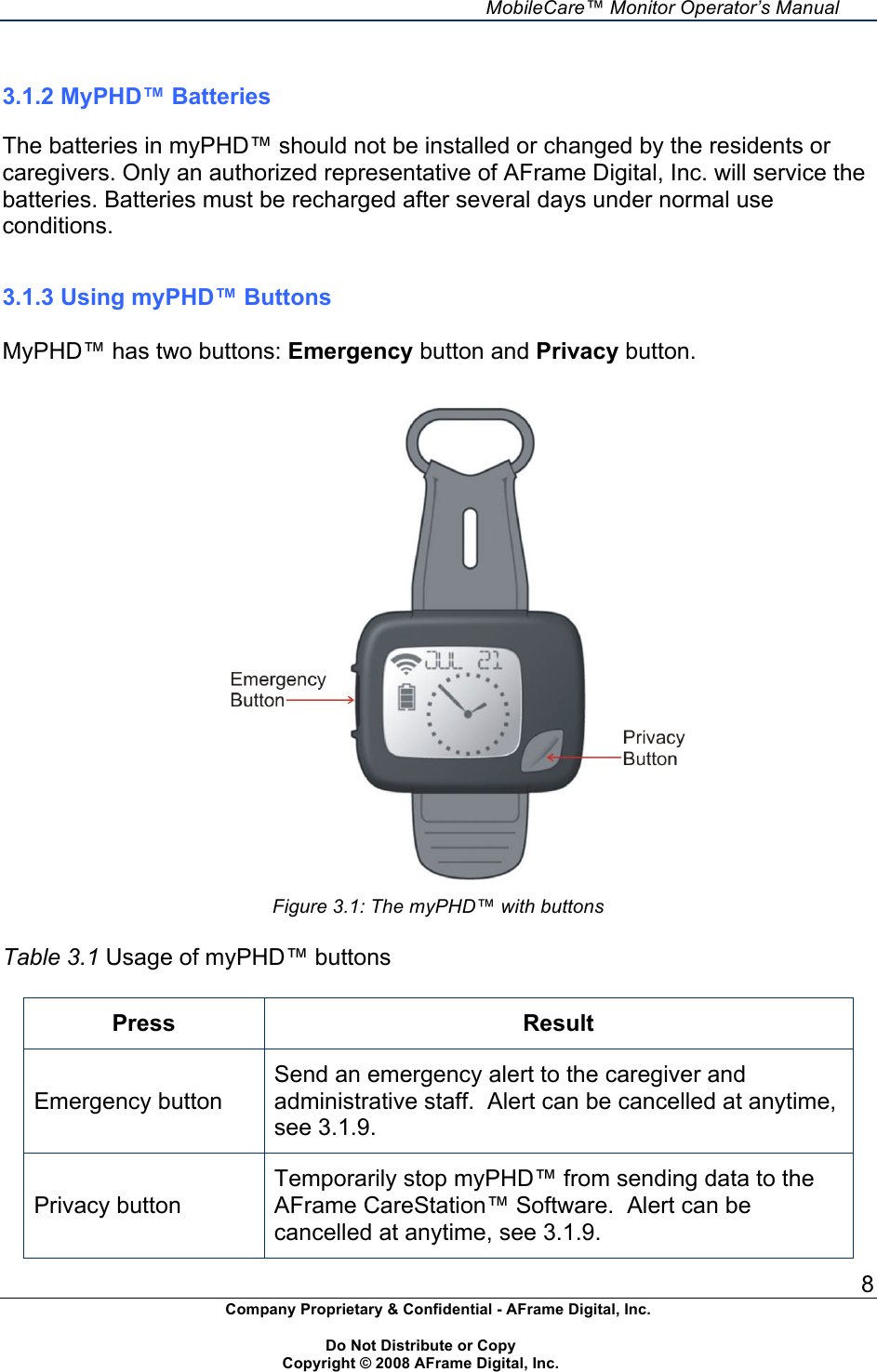
    MobileCare™ Monitor Operator’s Manual 8 Company Proprietary & Confidential - AFrame Digital, Inc.    Do Not Distribute or Copy   Copyright © 2008 AFrame Digital, Inc.   3.1.2 MyPHD™ Batteries  The batteries in myPHD™ should not be installed or changed by the residents or caregivers. Only an authorized representative of AFrame Digital, Inc. will service the batteries. Batteries must be recharged after several days under normal use conditions.   3.1.3 Using myPHD™ Buttons  MyPHD™ has two buttons: Emergency button and Privacy button.   Figure 3.1: The myPHD™ with buttons  Table 3.1 Usage of myPHD™ buttons  Press Result Emergency button Send an emergency alert to the caregiver and administrative staff.  Alert can be cancelled at anytime, see 3.1.9. Privacy button Temporarily stop myPHD™ from sending data to the AFrame CareStation™ Software.  Alert can be cancelled at anytime, see 3.1.9.
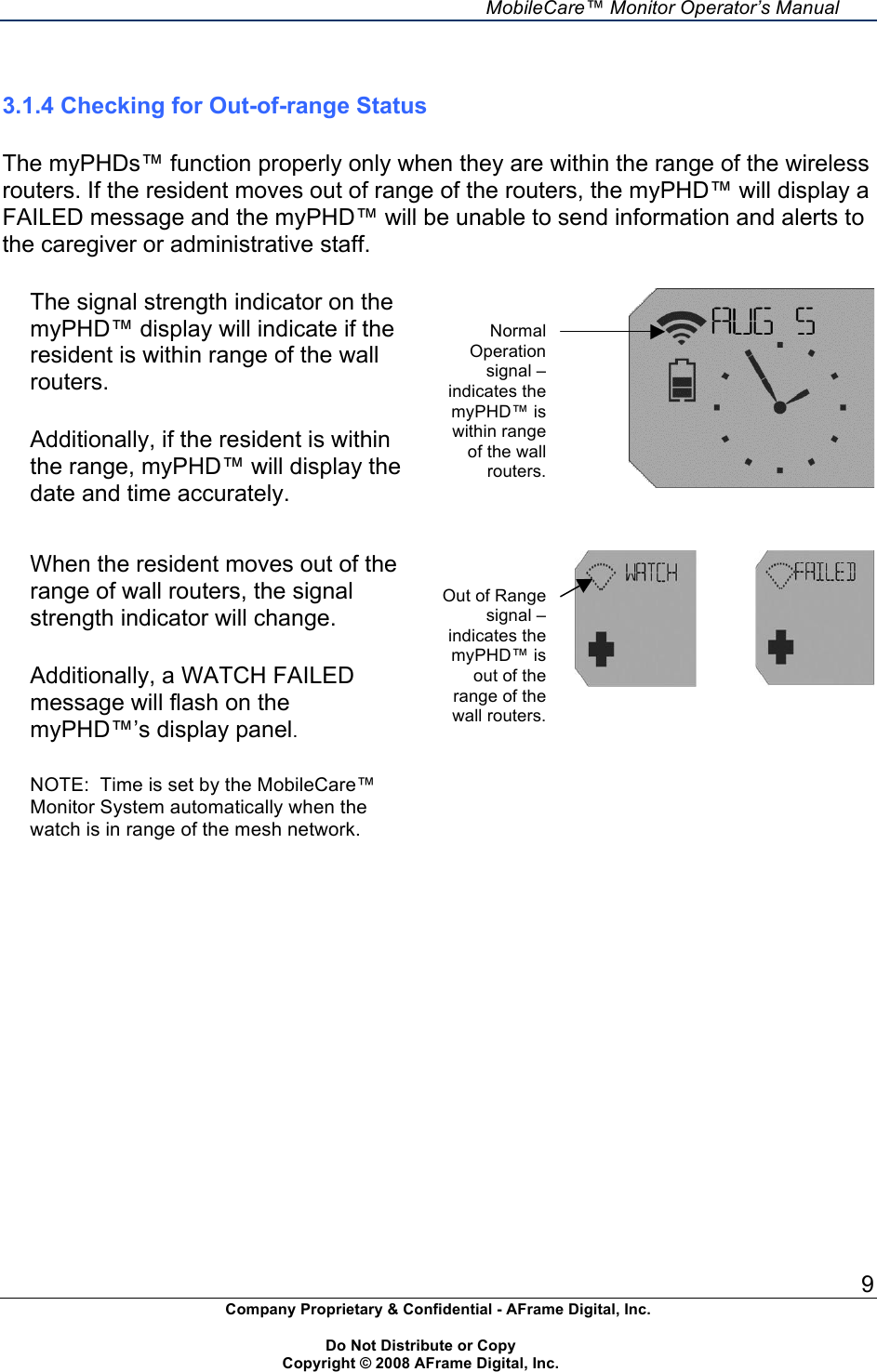
    MobileCare™ Monitor Operator’s Manual 9 Company Proprietary & Confidential - AFrame Digital, Inc.    Do Not Distribute or Copy   Copyright © 2008 AFrame Digital, Inc.   3.1.4 Checking for Out-of-range Status  The myPHDs™ function properly only when they are within the range of the wireless routers. If the resident moves out of range of the routers, the myPHD™ will display a FAILED message and the myPHD™ will be unable to send information and alerts to the caregiver or administrative staff.  The signal strength indicator on the myPHD™ display will indicate if the resident is within range of the wall routers.  Additionally, if the resident is within the range, myPHD™ will display the date and time accurately.     When the resident moves out of the range of wall routers, the signal strength indicator will change.  Additionally, a WATCH FAILED message will flash on the myPHD™’s display panel.  NOTE:  Time is set by the MobileCare™ Monitor System automatically when the watch is in range of the mesh network.            Normal Operation signal – indicates the myPHD™ is within range of the wall routers. Out of Range signal –indicates the myPHD™ is out of the range of the wall routers.
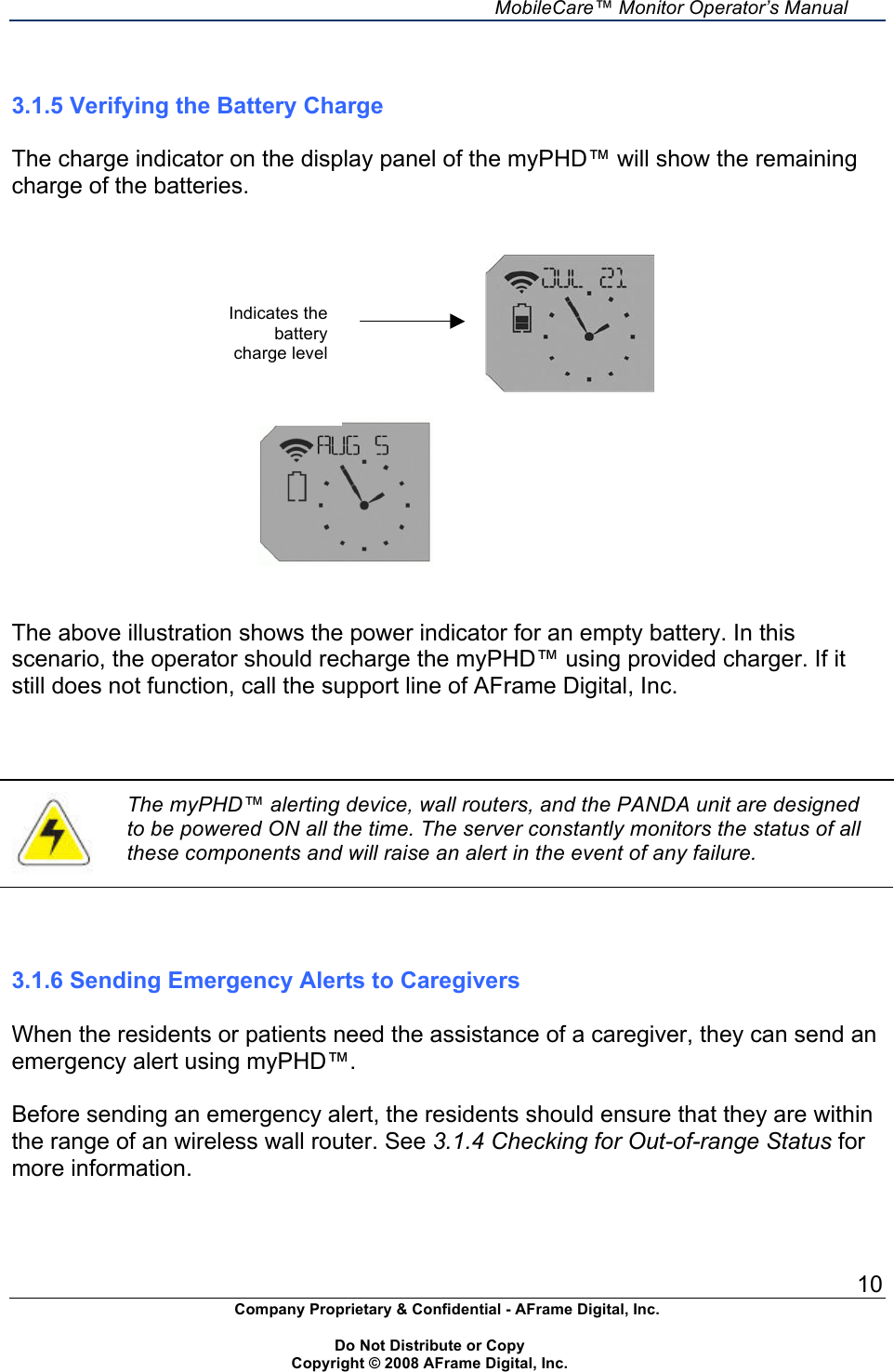
    MobileCare™ Monitor Operator’s Manual 10 Company Proprietary & Confidential - AFrame Digital, Inc.    Do Not Distribute or Copy   Copyright © 2008 AFrame Digital, Inc.                                                                        3.1.5 Verifying the Battery Charge  The charge indicator on the display panel of the myPHD™ will show the remaining charge of the batteries.                                               The above illustration shows the power indicator for an empty battery. In this scenario, the operator should recharge the myPHD™ using provided charger. If it still does not function, call the support line of AFrame Digital, Inc.     The myPHD™ alerting device, wall routers, and the PANDA unit are designed to be powered ON all the time. The server constantly monitors the status of all these components and will raise an alert in the event of any failure.    3.1.6 Sending Emergency Alerts to Caregivers  When the residents or patients need the assistance of a caregiver, they can send an emergency alert using myPHD™.  Before sending an emergency alert, the residents should ensure that they are within the range of an wireless wall router. See 3.1.4 Checking for Out-of-range Status for more information. Indicates the battery charge level
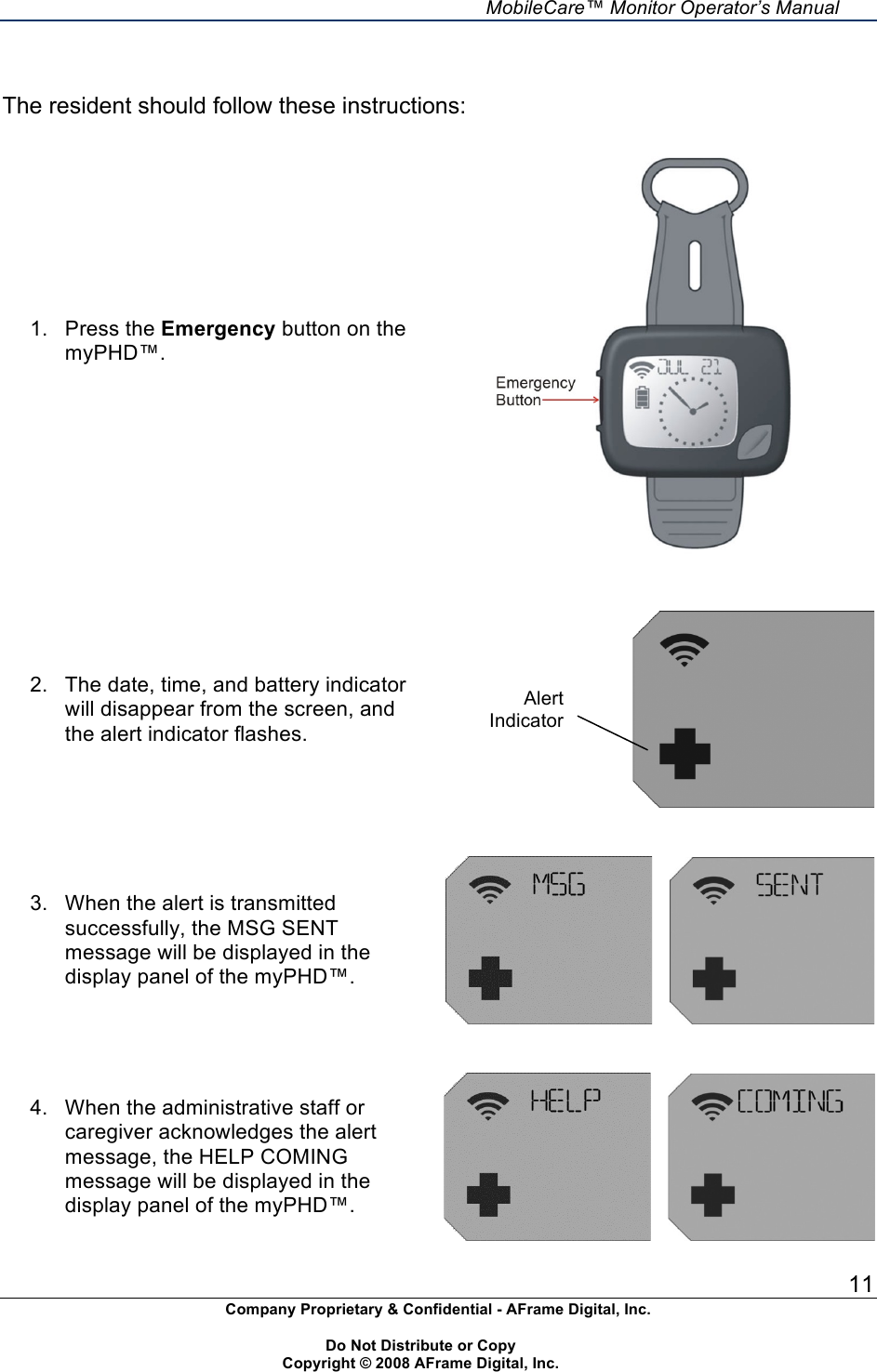
    MobileCare™ Monitor Operator’s Manual 11 Company Proprietary & Confidential - AFrame Digital, Inc.    Do Not Distribute or Copy   Copyright © 2008 AFrame Digital, Inc.   The resident should follow these instructions: 1.  Press the Emergency button on the myPHD™.       2.  The date, time, and battery indicator will disappear from the screen, and the alert indicator flashes.      3.  When the alert is transmitted successfully, the MSG SENT message will be displayed in the display panel of the myPHD™.          4.  When the administrative staff or caregiver acknowledges the alert message, the HELP COMING message will be displayed in the display panel of the myPHD™.        Alert Indicator
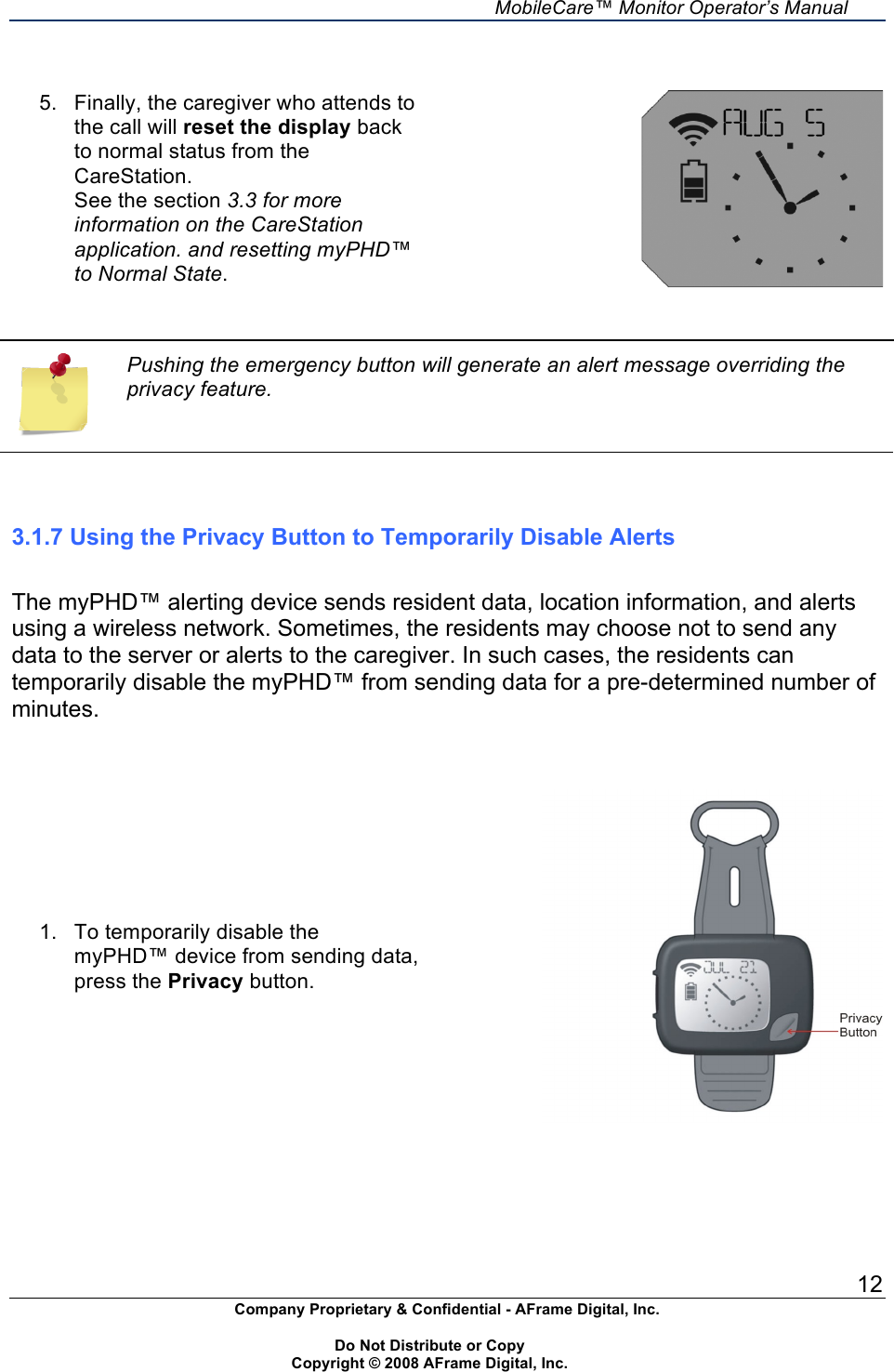
    MobileCare™ Monitor Operator’s Manual 12 Company Proprietary & Confidential - AFrame Digital, Inc.    Do Not Distribute or Copy   Copyright © 2008 AFrame Digital, Inc.    5.  Finally, the caregiver who attends to the call will reset the display back to normal status from the CareStation. See the section 3.3 for more information on the CareStation application. and resetting myPHD™ to Normal State.     Pushing the emergency button will generate an alert message overriding the privacy feature.    3.1.7 Using the Privacy Button to Temporarily Disable Alerts  The myPHD™ alerting device sends resident data, location information, and alerts using a wireless network. Sometimes, the residents may choose not to send any data to the server or alerts to the caregiver. In such cases, the residents can temporarily disable the myPHD™ from sending data for a pre-determined number of minutes.   1.  To temporarily disable the myPHD™ device from sending data, press the Privacy button.
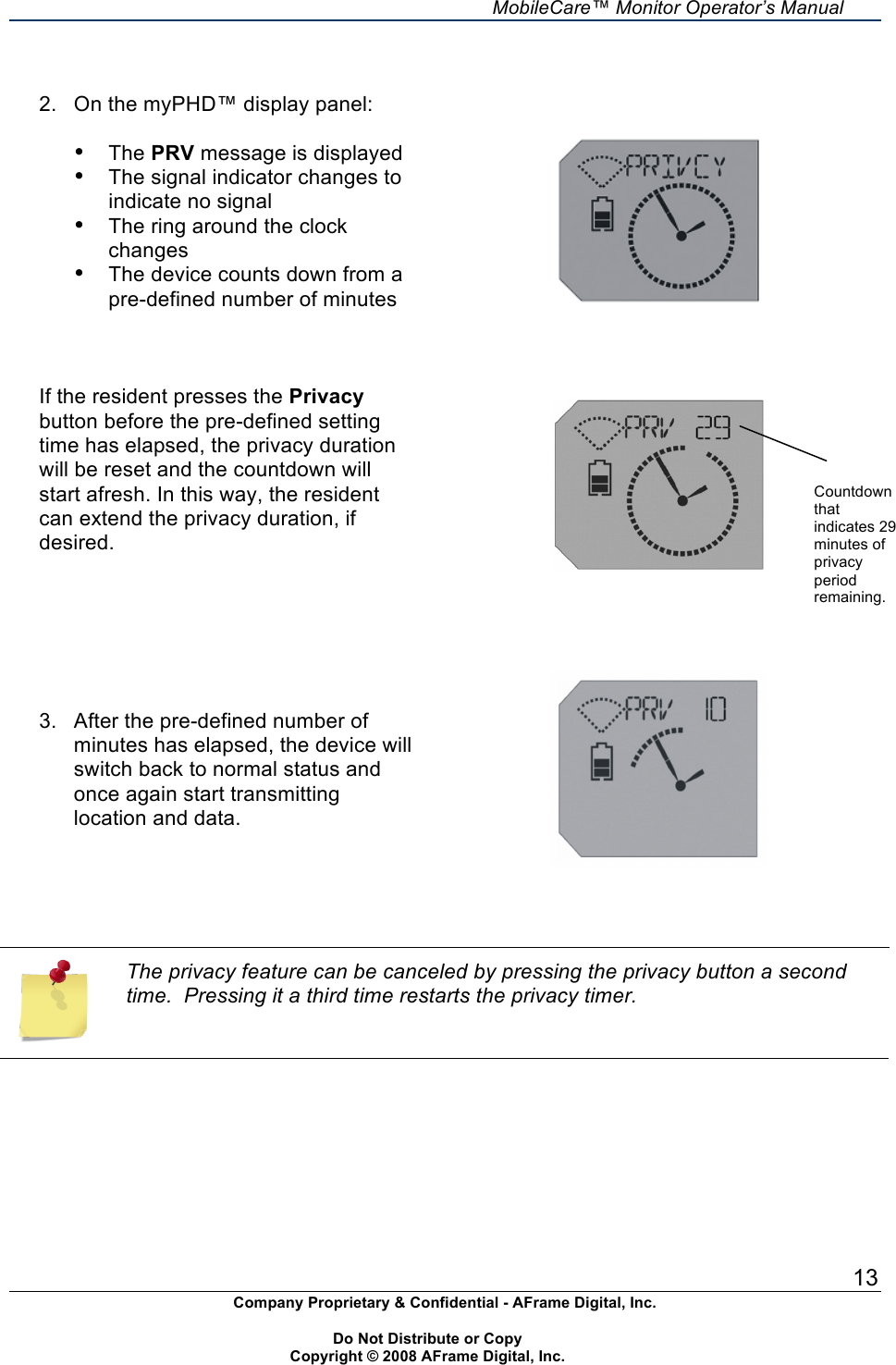
    MobileCare™ Monitor Operator’s Manual 13 Company Proprietary & Confidential - AFrame Digital, Inc.    Do Not Distribute or Copy   Copyright © 2008 AFrame Digital, Inc.   2.  On the myPHD™ display panel:  • The PRV message is displayed • The signal indicator changes to indicate no signal • The ring around the clock changes • The device counts down from a pre-defined number of minutes    If the resident presses the Privacy button before the pre-defined setting time has elapsed, the privacy duration will be reset and the countdown will start afresh. In this way, the resident can extend the privacy duration, if desired.              3.  After the pre-defined number of minutes has elapsed, the device will switch back to normal status and once again start transmitting location and data.      The privacy feature can be canceled by pressing the privacy button a second time.  Pressing it a third time restarts the privacy timer.       Countdown that indicates 29 minutes of privacy period remaining.
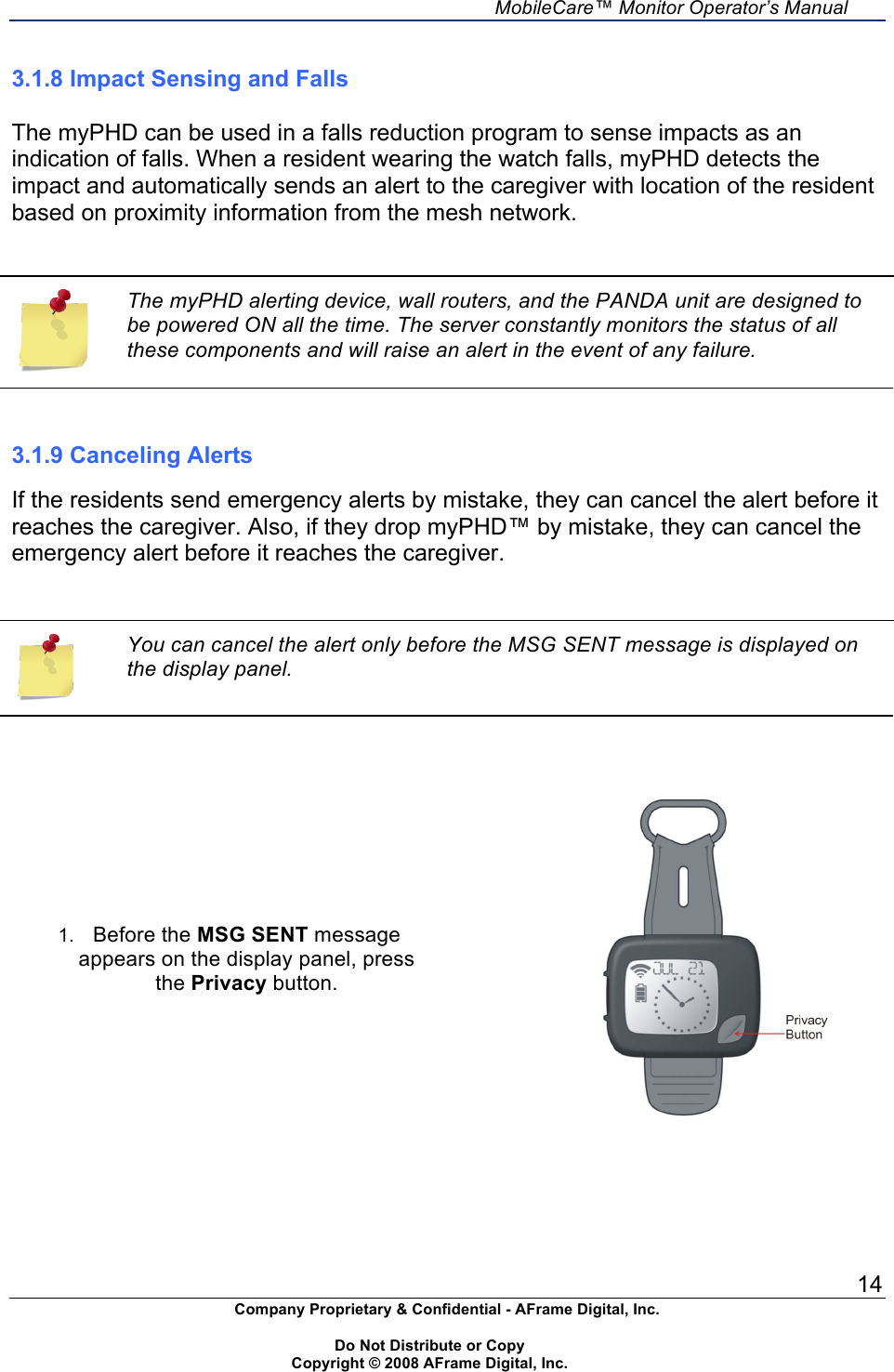
    MobileCare™ Monitor Operator’s Manual 14 Company Proprietary & Confidential - AFrame Digital, Inc.    Do Not Distribute or Copy   Copyright © 2008 AFrame Digital, Inc.  3.1.8 Impact Sensing and Falls  The myPHD can be used in a falls reduction program to sense impacts as an indication of falls. When a resident wearing the watch falls, myPHD detects the impact and automatically sends an alert to the caregiver with location of the resident based on proximity information from the mesh network.   The myPHD alerting device, wall routers, and the PANDA unit are designed to be powered ON all the time. The server constantly monitors the status of all these components and will raise an alert in the event of any failure.   3.1.9 Canceling Alerts  If the residents send emergency alerts by mistake, they can cancel the alert before it reaches the caregiver. Also, if they drop myPHD™ by mistake, they can cancel the emergency alert before it reaches the caregiver.     You can cancel the alert only before the MSG SENT message is displayed on the display panel.    1. Before the MSG SENT message appears on the display panel, press the Privacy button.
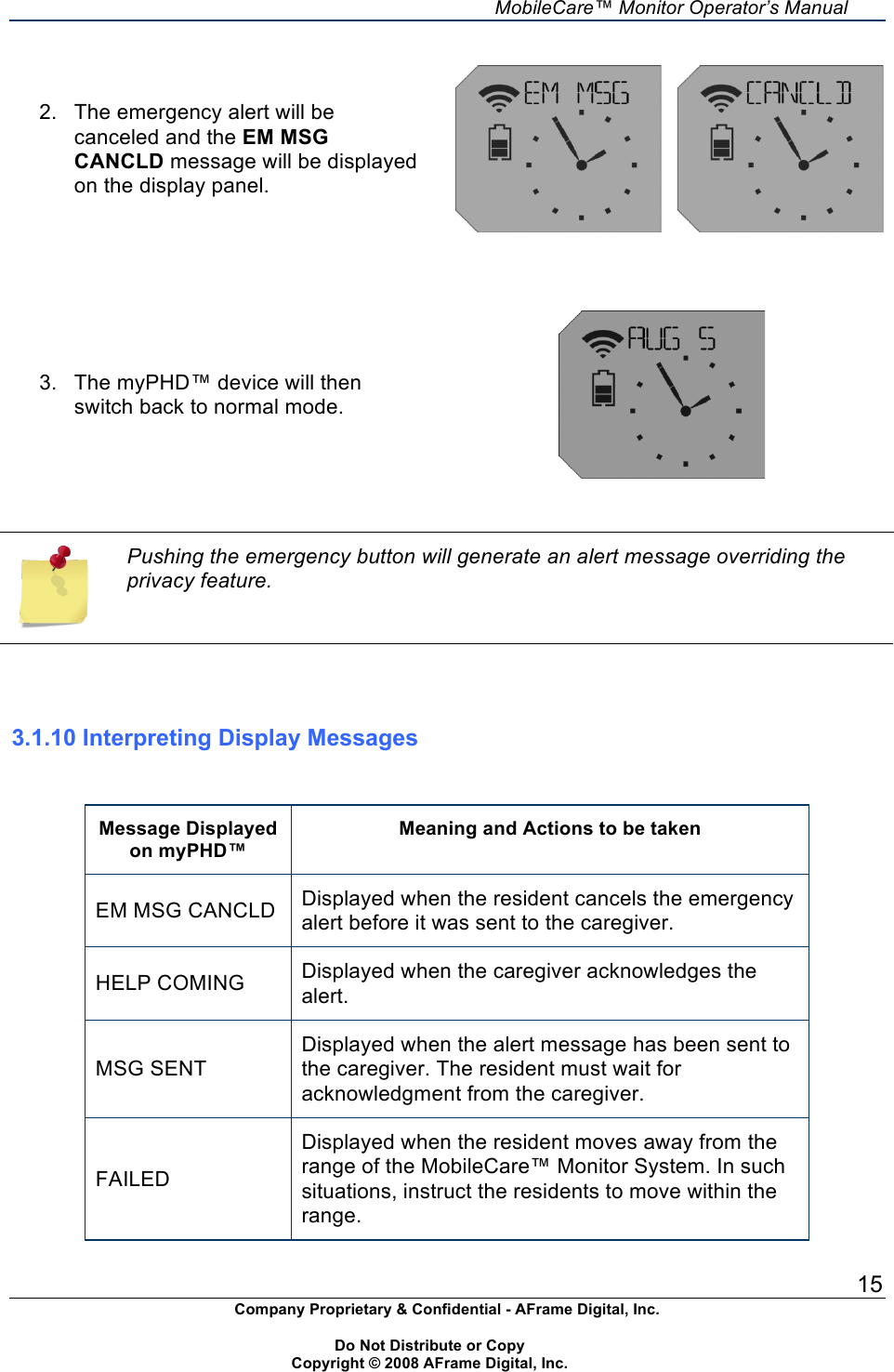
    MobileCare™ Monitor Operator’s Manual 15 Company Proprietary & Confidential - AFrame Digital, Inc.    Do Not Distribute or Copy   Copyright © 2008 AFrame Digital, Inc.  2.  The emergency alert will be canceled and the EM MSG CANCLD message will be displayed on the display panel.            3.  The myPHD™ device will then switch back to normal mode.     Pushing the emergency button will generate an alert message overriding the privacy feature.    3.1.10 Interpreting Display Messages   Message Displayed on myPHD™ Meaning and Actions to be taken EM MSG CANCLD Displayed when the resident cancels the emergency alert before it was sent to the caregiver. HELP COMING Displayed when the caregiver acknowledges the alert.  MSG SENT Displayed when the alert message has been sent to the caregiver. The resident must wait for acknowledgment from the caregiver. FAILED Displayed when the resident moves away from the range of the MobileCare™ Monitor System. In such situations, instruct the residents to move within the range.
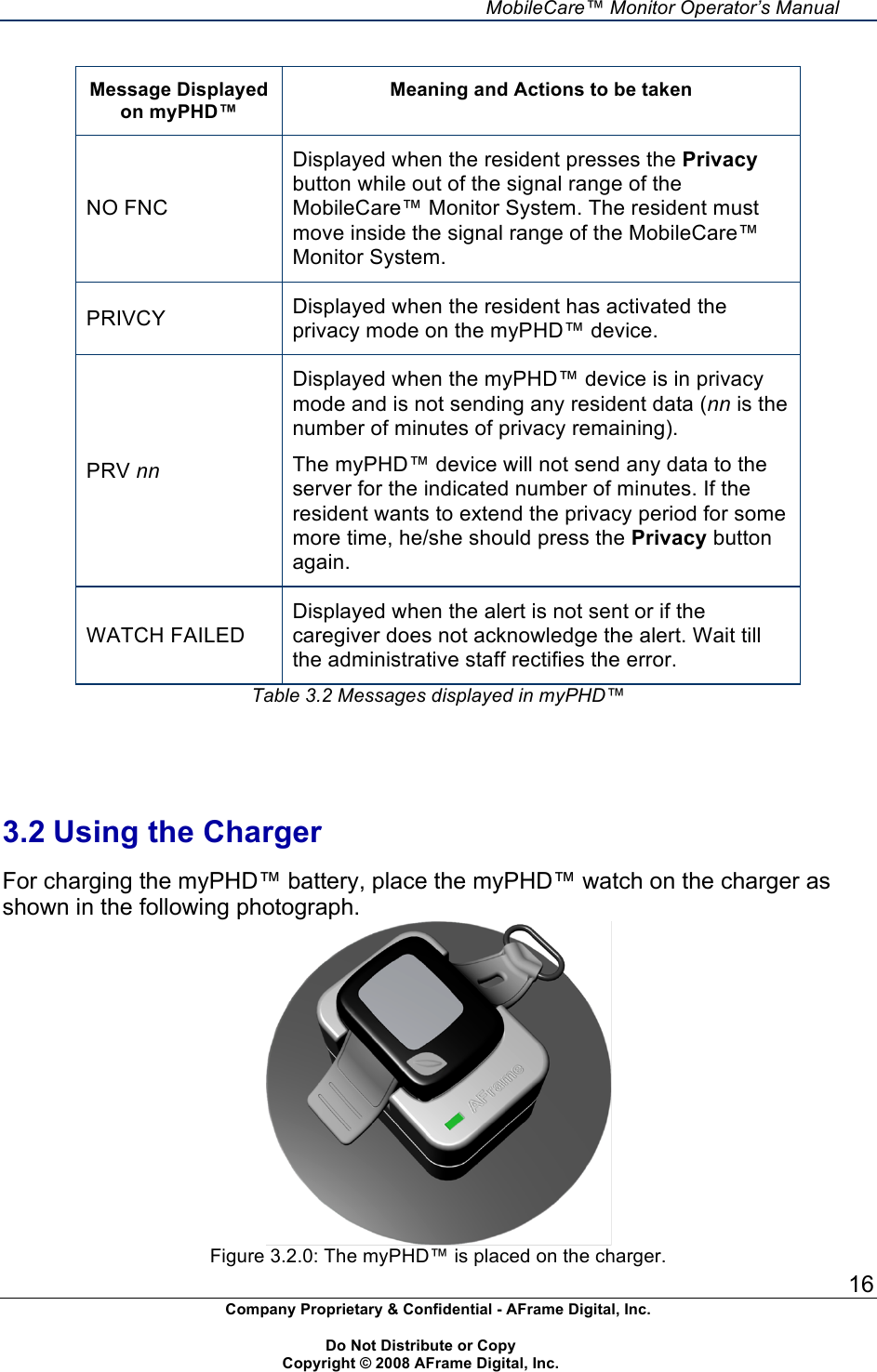
    MobileCare™ Monitor Operator’s Manual 16 Company Proprietary & Confidential - AFrame Digital, Inc.    Do Not Distribute or Copy   Copyright © 2008 AFrame Digital, Inc.  Message Displayed on myPHD™ Meaning and Actions to be taken NO FNC Displayed when the resident presses the Privacy button while out of the signal range of the MobileCare™ Monitor System. The resident must move inside the signal range of the MobileCare™ Monitor System. PRIVCY Displayed when the resident has activated the privacy mode on the myPHD™ device. PRV nn Displayed when the myPHD™ device is in privacy mode and is not sending any resident data (nn is the number of minutes of privacy remaining). The myPHD™ device will not send any data to the server for the indicated number of minutes. If the resident wants to extend the privacy period for some more time, he/she should press the Privacy button again. WATCH FAILED Displayed when the alert is not sent or if the caregiver does not acknowledge the alert. Wait till the administrative staff rectifies the error. Table 3.2 Messages displayed in myPHD™     3.2 Using the Charger  For charging the myPHD™ battery, place the myPHD™ watch on the charger as shown in the following photograph.   Figure 3.2.0: The myPHD™ is placed on the charger.
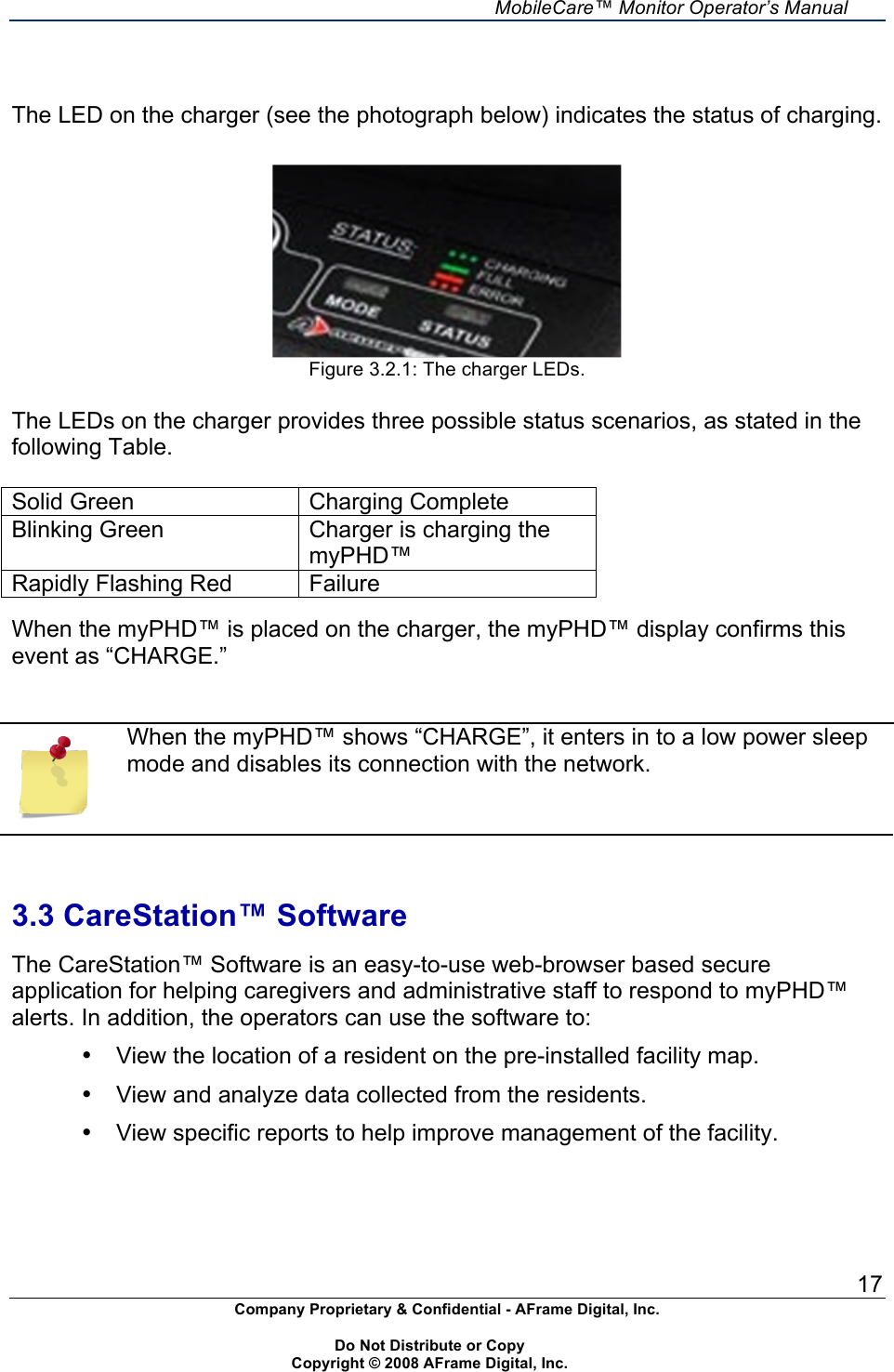
    MobileCare™ Monitor Operator’s Manual 17 Company Proprietary & Confidential - AFrame Digital, Inc.    Do Not Distribute or Copy   Copyright © 2008 AFrame Digital, Inc.    The LED on the charger (see the photograph below) indicates the status of charging.    Figure 3.2.1: The charger LEDs.  The LEDs on the charger provides three possible status scenarios, as stated in the following Table.   Solid Green Charging Complete Blinking Green  Charger is charging the myPHD™ Rapidly Flashing Red  Failure  When the myPHD™ is placed on the charger, the myPHD™ display confirms this event as “CHARGE.”    When the myPHD™ shows “CHARGE”, it enters in to a low power sleep mode and disables its connection with the network.    3.3 CareStation™ Software  The CareStation™ Software is an easy-to-use web-browser based secure application for helping caregivers and administrative staff to respond to myPHD™ alerts. In addition, the operators can use the software to: •  View the location of a resident on the pre-installed facility map. •  View and analyze data collected from the residents. •  View specific reports to help improve management of the facility.
    MobileCare™ Monitor Operator’s Manual 18 Company Proprietary & Confidential - AFrame Digital, Inc.    Do Not Distribute or Copy   Copyright © 2008 AFrame Digital, Inc.    4.0 Security  The AFrame System incorporates best-practice security controls designed to protect against both anticipated and unanticipated security threats.
    MobileCare™ Monitor Operator’s Manual 19 Company Proprietary & Confidential - AFrame Digital, Inc.    Do Not Distribute or Copy   Copyright © 2008 AFrame Digital, Inc.   5.0 Troubleshooting  This section describes the troubleshooting procedure for both myPHD™ and PANDA.   5.1 Troubleshooting myPHD™ and Battery  For the proper working of myPHD™, ensure that: •  Battery is properly charged. •  Unit is functioning. •  Alert is generated when the Emergency button is pressed. •  Light indicators are working.   5.2 Troubleshooting PANDA  For the proper working of PANDA, ensure that: •  Power cord is plugged correctly. •  Network activity light of the Ethernet port is blinking. •  Power is ON. •  Network activity light is ON. •  Internet access is functioning properly. •  Check for interference from other RF devices, such as cordless phones, defective microwaves ovens, wireless security cameras, or other interfering devices.  For further assistance call (703) 560-0512 or email to support@aframedigital.com.
    MobileCare™ Monitor Operator’s Manual 20 Company Proprietary & Confidential - AFrame Digital, Inc.    Do Not Distribute or Copy   Copyright © 2008 AFrame Digital, Inc.  Appendix A — Warranty  AFRAME DIGITAL, INCORPORATED (AFRAME) warrants to the purchaser, for a one year period from the date of initial purchase or service subscription each MobileCareTM Monitor 2100 (MobileCare™ Monitor 2100). AFRAME shall repair or replace any MobileCare™ Monitor 2100 found to be defective in accordance with this warranty, free of charge, for which AFRAME has been notified by the purchaser by serial number that there is a defect, provided said notification occurs within the applicable warranty period.  This warranty shall be the sole and exclusive remedy by the purchaser hereunder for any MobileCare™ Monitor 2100 delivered to the purchaser which is found to be defective in any manner whether such remedies be in contract, tort, or by law. This warranty excludes cost of delivery to and from AFRAME. All repaired units shall be received by the purchaser at AFRAME’s place of business. For any MobileCare™ Monitor 2100 sent to AFRAME for warranty repair that is found to be within specification, the purchaser agrees to pay $100.00 (US Dollars) to defray costs of handling and testing. The MobileCare™ Monitor 2100 is a precision electronic instrument and must be repaired by knowledgeable and specifically trained AFRAME personnel only. Accordingly, any sign or evidence of opening the MobileCare™ Monitor 2100 or any of its components, field service by non-AFRAME personnel, tampering, or any kind of misuse or abuse of the MobileCare™ Monitor 2100, shall void the warranty in its entirety.  DISCLAIMER/EXCLUSIVITY OF WARRANTY: THE EXPRESS WARRANTY SET FORTH IN THIS MANUAL IS EXLCUSIVE AND NO OTHER WARRANTY OF ANY KIND WHETHER STATUTORY, WRITTEN, ORAL, OR IMPLIED INCLUDING WARRANTY OF FITNESS FOR A PARTICULAR PURPOSE OR SETTING SHALL APPLY.  The standard rates and charges in effect will be levied on all non-warranty work.
    MobileCare™ Monitor Operator’s Manual 21 Company Proprietary & Confidential - AFrame Digital, Inc.    Do Not Distribute or Copy   Copyright © 2008 AFrame Digital, Inc.  Appendix B — Service  The MobileCareTM Monitor and its components are precision electronic instruments and must be repaired only by trained AFrame representatives. Any sign or evidence of opening the system, service by non-AFrame personnel, tampering, or any kind of misuse or abuse of the system, shall void the warranty in its entirety.  For additional technical information contact AFrame’s Customer Support department at:  AFrame Digital, Inc. 8000 Lee Highway Falls Church, VA 22042 (703) 560-0512 Email: service@aframedigital.com www.aframedigital.com  The standard rates and charges in effect will be levied on all non-warranty work.
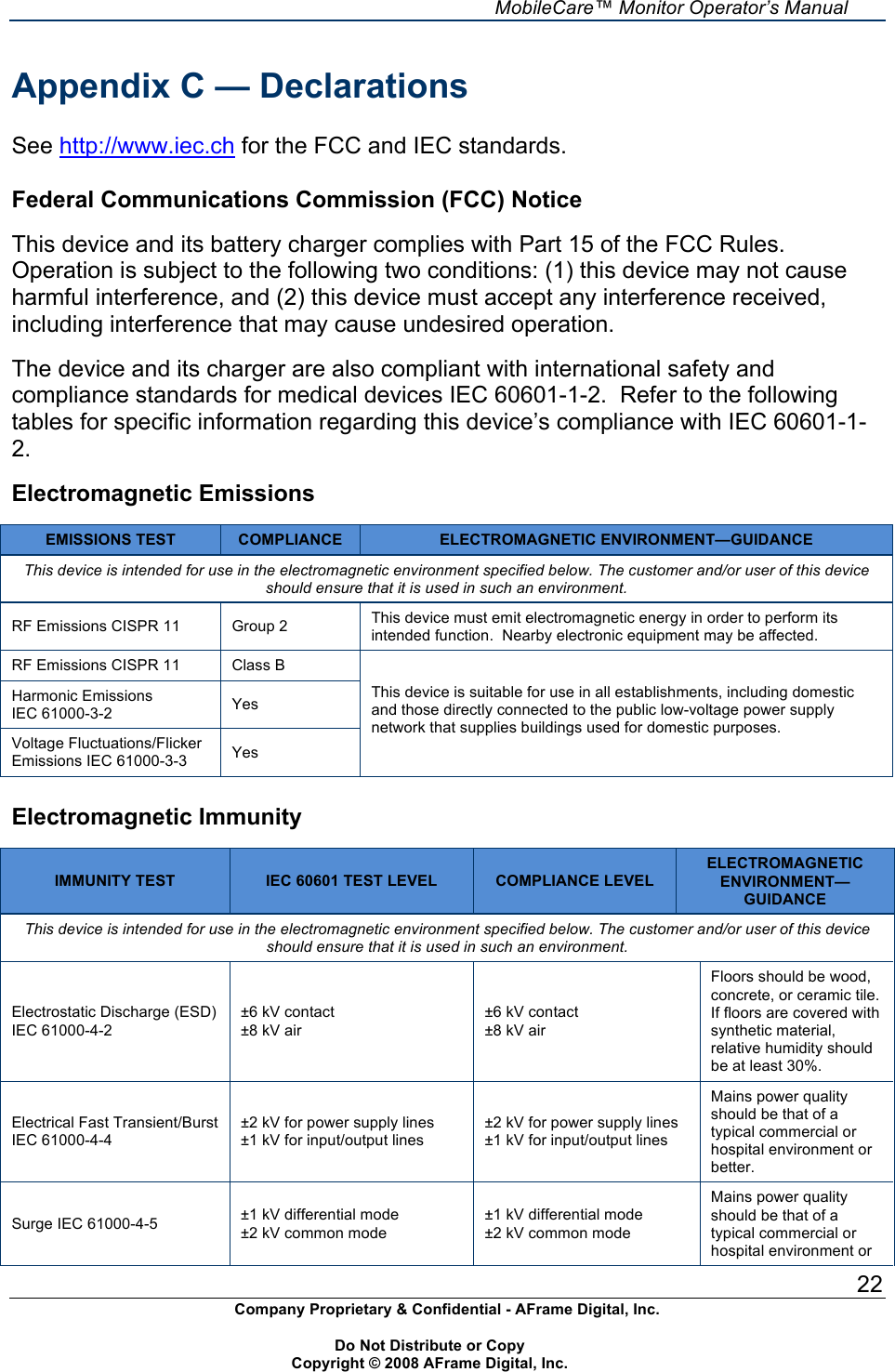
    MobileCare™ Monitor Operator’s Manual 22 Company Proprietary & Confidential - AFrame Digital, Inc.    Do Not Distribute or Copy   Copyright © 2008 AFrame Digital, Inc.  Appendix C — Declarations  See http://www.iec.ch for the FCC and IEC standards.  Federal Communications Commission (FCC) Notice  This device and its battery charger complies with Part 15 of the FCC Rules. Operation is subject to the following two conditions: (1) this device may not cause harmful interference, and (2) this device must accept any interference received, including interference that may cause undesired operation.  The device and its charger are also compliant with international safety and compliance standards for medical devices IEC 60601-1-2.  Refer to the following tables for specific information regarding this device’s compliance with IEC 60601-1-2.  Electromagnetic Emissions  EMISSIONS TEST COMPLIANCE ELECTROMAGNETIC ENVIRONMENT—GUIDANCE This device is intended for use in the electromagnetic environment specified below. The customer and/or user of this device should ensure that it is used in such an environment. RF Emissions CISPR 11 Group 2 This device must emit electromagnetic energy in order to perform its intended function.  Nearby electronic equipment may be affected. RF Emissions CISPR 11 Class B Harmonic Emissions IEC 61000-3-2 Yes Voltage Fluctuations/Flicker Emissions IEC 61000-3-3 Yes This device is suitable for use in all establishments, including domestic and those directly connected to the public low-voltage power supply network that supplies buildings used for domestic purposes.  Electromagnetic Immunity  IMMUNITY TEST IEC 60601 TEST LEVEL COMPLIANCE LEVEL ELECTROMAGNETIC ENVIRONMENT—GUIDANCE This device is intended for use in the electromagnetic environment specified below. The customer and/or user of this device should ensure that it is used in such an environment. Electrostatic Discharge (ESD) IEC 61000-4-2 ±6 kV contact ±8 kV air ±6 kV contact ±8 kV air Floors should be wood, concrete, or ceramic tile.  If floors are covered with synthetic material, relative humidity should be at least 30%. Electrical Fast Transient/Burst IEC 61000-4-4 ±2 kV for power supply lines ±1 kV for input/output lines ±2 kV for power supply lines ±1 kV for input/output lines Mains power quality should be that of a typical commercial or hospital environment or better. Surge IEC 61000-4-5 ±1 kV differential mode ±2 kV common mode ±1 kV differential mode ±2 kV common mode Mains power quality should be that of a typical commercial or hospital environment or
    MobileCare™ Monitor Operator’s Manual 23 Company Proprietary & Confidential - AFrame Digital, Inc.    Do Not Distribute or Copy   Copyright © 2008 AFrame Digital, Inc.  IMMUNITY TEST IEC 60601 TEST LEVEL COMPLIANCE LEVEL ELECTROMAGNETIC ENVIRONMENT—GUIDANCE better. Voltage dips, short interruptions, and voltage variations on power supply input lines IEC 61000-4-11 ±5% VT (>95% dip in VT) for 0.5 cycle  ±40% VT (60% dip in VT) for 5 cycles ±70% VT (30% dip in VT) for 25 cycles <5% VT (>95% dip in VT) for 5 sec.   ±5% VT (>95% dip in VT) for 0.5 cycle  ±40% VT (60% dip in VT) for 5 cycles ±70% VT (30% dip in VT) for 25 cycles <5% VT (>95% dip in VT) for 5 sec. Mains power quality should be that of a typical commercial or hospital environment or better. Power Frequency (50/60 Hz) Magnetic Field IEC 61000-4-8 3 A/m 3 A/m Power frequency magnetic fields should be at levels characteristic of a typical location in a typical commercial or hospital environment or better NOTE: UT is the AC mains voltage before application of the test level.  Guidance and Manufacturer’s Declaration—Electromagnetic Immunity IMMUNITY TEST IEC 60601 TEST LEVEL COMPLIANCE LEVEL ELECTROMAGNETIC ENVIRONMENT—GUIDANCE This device is intended for use in the electromagnetic environment specified below. The customer and/or user of this device should ensure that it is used in such an environment. Portable and mobile RF communications equipment should be used no closer to any part of the device, including cables, than the recommended separation distance calculated from the equation applicable to the frequency of the transmitter. Conducted RF IEC 61000-4-6   Radiated RF IEC 61000-4-3 3 Vrms 150 kHz to 14MHz   3V/m 30 MHz to 1.0 GHz 3 Vrms 150 kHz to 14MHz   [3] V/m Recommended Separation Distance       d = 1.17 √P  80 MHz to 800 MHz          d = 1.2 √P  800 MHz to 2.5 GHz         d = 2.3 √P  where P is the maximum output power rating of the transmitter in watts (W) according to the transmitter manufacturer and d is the recommended separation distance in meters (m).  Field strengths from fixed RF transmitters, as determined by an electromagnetic site surveya, should be less than the compliance level in each frequency range.b  Interference may occur in the vicinity of equipment marked with the following symbol:      a. Field strengths from fixed transmitters, such as base stations for radio (cellular/cordless) telephones and land mobile radios, amateur radio, AM and FM radio broadcast and TV broadcast cannot be predicted theoretically with accuracy. To assess the electromagnetic environment due to fixed RF transmitters, an electromagnetic site survey should be considered. If the measured field strength in the location in which the device is used exceeds the applicable RF compliance level above, the device should be observed to verify normal operation. If abnormal performance is observed, additional measures may be necessary, such as reorienting or relocating the device. b. Over the frequency range 150 kHz to 80 MHz, field strengths should be less than [3] V/m. NOTES:
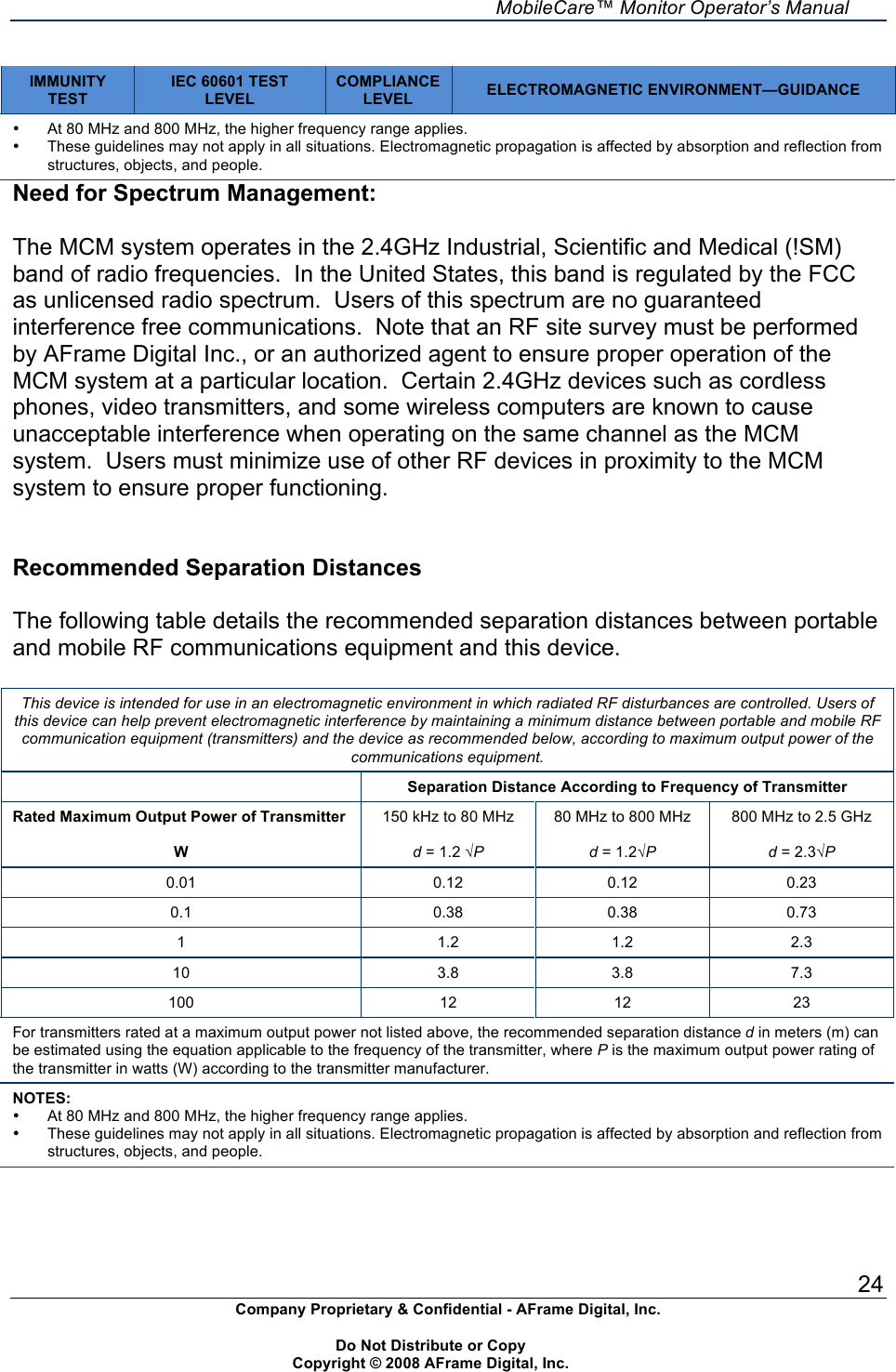
    MobileCare™ Monitor Operator’s Manual 24 Company Proprietary & Confidential - AFrame Digital, Inc.    Do Not Distribute or Copy   Copyright © 2008 AFrame Digital, Inc.  IMMUNITY TEST IEC 60601 TEST LEVEL COMPLIANCE LEVEL ELECTROMAGNETIC ENVIRONMENT—GUIDANCE •  At 80 MHz and 800 MHz, the higher frequency range applies. •  These guidelines may not apply in all situations. Electromagnetic propagation is affected by absorption and reflection from structures, objects, and people. Need for Spectrum Management:    The MCM system operates in the 2.4GHz Industrial, Scientific and Medical (!SM) band of radio frequencies.  In the United States, this band is regulated by the FCC as unlicensed radio spectrum.  Users of this spectrum are no guaranteed interference free communications.  Note that an RF site survey must be performed by AFrame Digital Inc., or an authorized agent to ensure proper operation of the MCM system at a particular location.  Certain 2.4GHz devices such as cordless phones, video transmitters, and some wireless computers are known to cause unacceptable interference when operating on the same channel as the MCM system.  Users must minimize use of other RF devices in proximity to the MCM system to ensure proper functioning.   Recommended Separation Distances  The following table details the recommended separation distances between portable and mobile RF communications equipment and this device.  This device is intended for use in an electromagnetic environment in which radiated RF disturbances are controlled. Users of this device can help prevent electromagnetic interference by maintaining a minimum distance between portable and mobile RF communication equipment (transmitters) and the device as recommended below, according to maximum output power of the communications equipment.  Separation Distance According to Frequency of Transmitter Rated Maximum Output Power of Transmitter  W 150 kHz to 80 MHz  d = 1.2 √P 80 MHz to 800 MHz  d = 1.2√P 800 MHz to 2.5 GHz  d = 2.3√P 0.01 0.12 0.12 0.23 0.1 0.38 0.38 0.73 1 1.2 1.2 2.3 10 3.8 3.8 7.3 100 12 12 23 For transmitters rated at a maximum output power not listed above, the recommended separation distance d in meters (m) can be estimated using the equation applicable to the frequency of the transmitter, where P is the maximum output power rating of the transmitter in watts (W) according to the transmitter manufacturer. NOTES: •  At 80 MHz and 800 MHz, the higher frequency range applies. •  These guidelines may not apply in all situations. Electromagnetic propagation is affected by absorption and reflection from structures, objects, and people.

Navigation menu