AKUVOX IT82X Indoor Monitor User Manual Akuvox IT82

AKUVOX (XIAMEN) NETWORKS CO., LTD. Indoor Monitor Akuvox IT82

User Manual

1IT82SeriesIndoorMonitorUserManual
 Content1ProductionOverview.................................................................41.1ProductionDescription.......................................................................................................41.2TechnicalSpecification........................................................................................................61.3ButtonInstruction...............................................................................................................61.4Dimension...........................................................................................................................71.5EquipmentAppearanceAndInterfaceDescription.............................................................81.6Installation...........................................................................................................................91.7InstallationConsiderations................................................................................................101.8EquipmentPackaging........................................................................................................112Setting....................................................................................122.1Maininterfaceinstruction.................................................................................................122.2Network.............................................................................................................................122.2.1DHCP......................................................................................................................122.2.2StaticIP...................................................................................................................132.3RegisterAccount...............................................................................................................142.4Display...............................................................................................................................152.4.1Brightness...............................................................................................................152.4.2Sleep.......................................................................................................................162.4.3ScreenSaver...........................................................................................................172.4.4ScreenClean...........................................................................................................172.5Sound................................................................................................................................182.5.1Volume...................................................................................................................182.5.2Ringtones...............................................................................................................182.5.3NotificationSound..................................................................................................182.6Time..................................................................................................................................182.7SystemInfo........................................................................................................................192.8Language...........................................................................................................................202.9Reboot...............................................................................................................................212.10Reset................................................................................................................................222.11Folder..............................................................................................................................223Function..................................................................................243.1Makeacall........................................................................................................................243.1.1CallSIP....................................................................................................................243.1.2Callresident............................................................................................................253.1.3CallfromCallLog....................................................................................................253.1.4CallfromContacts..................................................................................................253.1.5CallCenter..............................................................................................................273.2Receiveacall.....................................................................................................................27
 3.3Answeracall.....................................................................................................................283.4Rejectacall.......................................................................................................................293.5Contacts.............................................................................................................................293.5.1Newcontacts..........................................................................................................293.5.2Modifythecontact.................................................................................................303.5.3Deletethecontact..................................................................................................313.6Calllog...............................................................................................................................313.6.1Modifythecalllog..................................................................................................313.6.2Deletethelog.........................................................................................................323.7Capture..............................................................................................................................323.8Message............................................................................................................................323.9LiveView...........................................................................................................................333.10Unlock..............................................................................................................................333.11SOS..................................................................................................................................343.12Security............................................................................................................................354Website...................................................................................384.1Weblogin..........................................................................................................................384.2Status................................................................................................................................394.2.1Basic.......................................................................................................................394.3Account.............................................................................................................................404.3.1Basic.......................................................................................................................404.3.2Advance..................................................................................................................424.4Network.............................................................................................................................474.4.1Basic.......................................................................................................................474.4.2Advance..................................................................................................................474.5Phone................................................................................................................................484.5.1Time/Language......................................................................................................484.5.2CallFeature............................................................................................................494.5.3Audio......................................................................................................................534.5.4Video......................................................................................................................544.6PhoneBook........................................................................................................................554.6.1LocalBook..............................................................................................................554.6.2CallLog...................................................................................................................574.7Upgrade.............................................................................................................................584.7.1Basic.......................................................................................................................584.7.2Advance..................................................................................................................594.8Security..............................................................................................................................624.8.1Basic.......................................................................................................................624.8.2Advance..................................................................................................................63
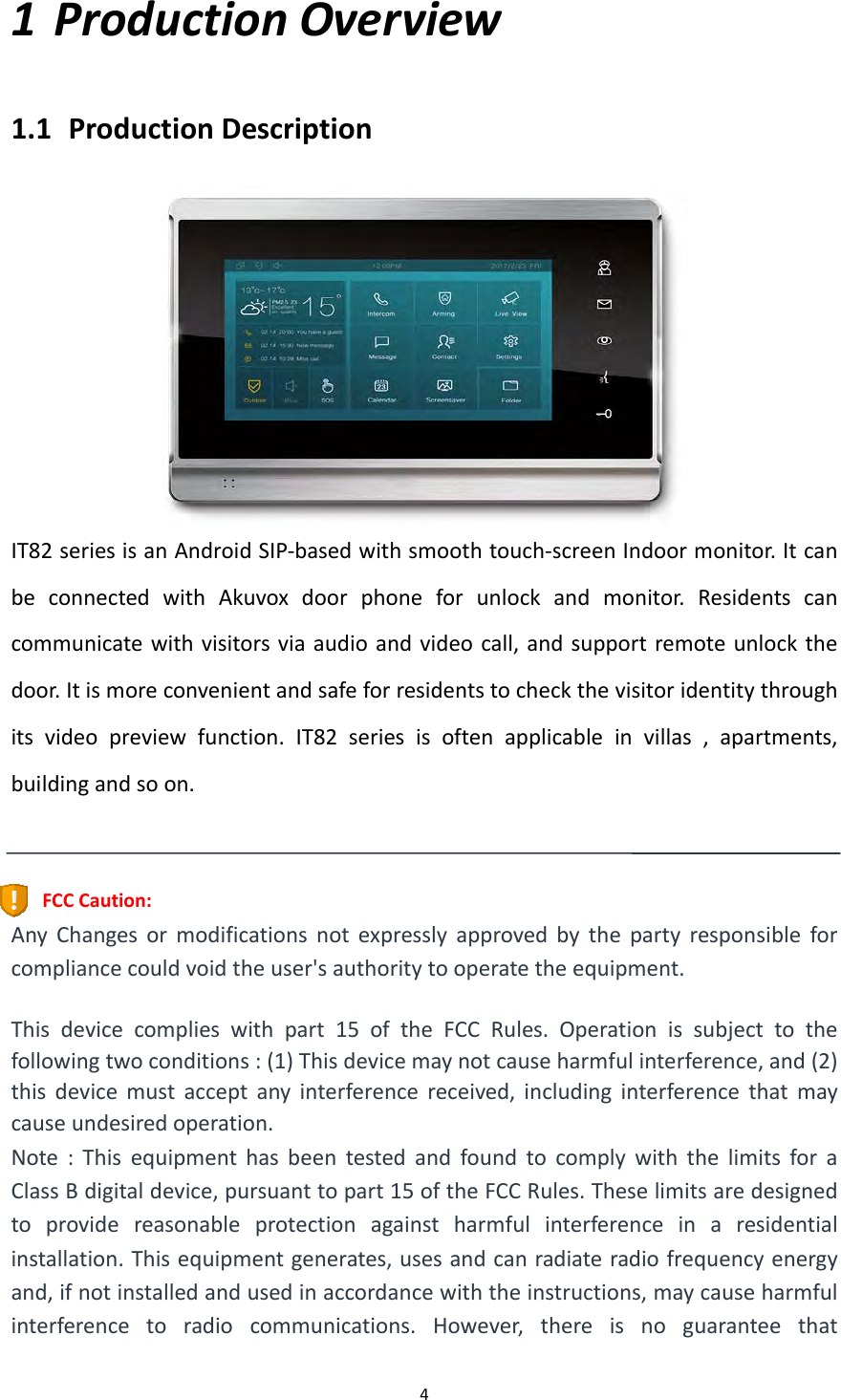
 41 ProductionOverview1.1 ProductionDescriptionIT82seriesisanAndroidSIP‐basedwithsmoothtouch‐screenIndoormonitor.ItcanbeconnectedwithAkuvoxdoorphoneforunlockandmonitor.Residentscancommunicatewithvisitorsviaaudioandvideocall,andsupportremoteunlockthedoor.Itismoreconvenientandsafeforresidentstocheckthevisitoridentitythroughitsvideopreviewfunction.IT82seriesisoftenapplicableinvillas,apartments,buildingandsoon.FCCCaution:AnyChangesormodificationsnotexpresslyapprovedbythepartyresponsibleforcompliancecouldvoidtheuser'sauthoritytooperatetheequipment.Thisdevicecomplieswithpart15oftheFCCRules.Operationissubjecttothefollowingtwoconditions:(1)Thisdevicemaynotcauseharmfulinterference,and(2)thisdevicemustacceptanyinterferencereceived,includinginterferencethatmaycauseundesiredoperation.Note:ThisequipmenthasbeentestedandfoundtocomplywiththelimitsforaClassBdigitaldevice,pursuanttopart15oftheFCCRules.Theselimitsaredesignedtoprovidereasonableprotectionagainstharmfulinterferenceinaresidentialinstallation.Thisequipmentgenerates,usesandcanradiateradiofrequencyenergyand,ifnotinstalledandusedinaccordancewiththeinstructions,maycauseharmfulinterferencetoradiocommunications.However,thereisnoguaranteethat
 5interferencewillnotoccurinaparticularinstallation.Ifthisequipmentdoescauseharmfulinterferencetoradioortelevisionreception,whichcanbedeterminedbyturningtheequipmentoffandon,theuserisencouragedtotrytocorrecttheinterferencebyoneormoreofthefollowingmeasures:—Reorientorrelocatethereceivingantenna.—Increasetheseparationbetweentheequipmentandreceiver.—Connecttheequipmentintoanoutletonacircuitdifferentfromthattowhichthereceiverisconnected.—Consultthedealeroranexperiencedradio/TVtechnicianforhelp.FCCRadiationExposureStatement:ThisequipmentcomplieswithFCCradiationexposurelimitssetforthforanuncontrolledenvironment.Thistransmittermustnotbeco‐locatedoroperatinginconjunctionwithanyotherantennaortransmitter.Thisequipmentshouldbeinstalledandoperatedwithminimumdistance20cmbetweentheradiator&yourbody.
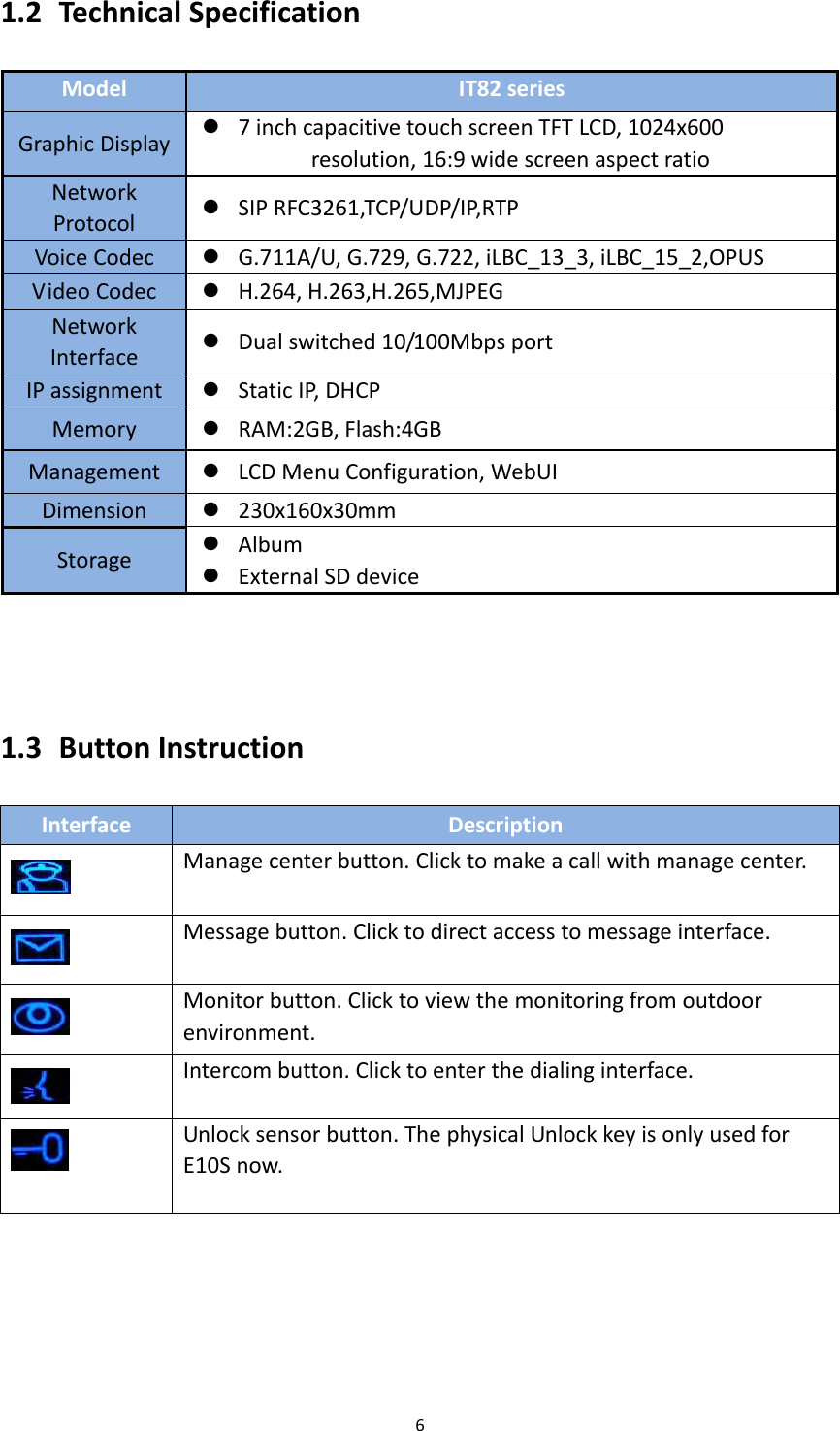
61.2 TechnicalSpecificationModelIT82seriesGraphicDisplay 7inchcapacitivetouchscreenTFTLCD,1024x600resolution,16:9widescreenaspectratioNetworkProtocol SIPRFC3261,TCP/UDP/IP,RTPVoiceCodec G.711A/U,G.729,G.722,iLBC_13_3,iLBC_15_2,OPUSVideoCodec H.264,H.263,H.265,MJPEGNetworkInterface Dualswitched10/100MbpsportIPassignment StaticIP,DHCPMemory RAM:2GB,Flash:4GBManagement LCDMenuConfiguration,WebUIDimension 230x160x30mmStorage Album ExternalSDdevice1.3 ButtonInstructionInterfaceDescriptionManagecenterbutton.Clicktomakeacallwithmanagecenter.Messagebutton.Clicktodirectaccesstomessageinterface.Monitorbutton.Clicktoviewthemonitoringfromoutdoorenvironment.Intercombutton.Clicktoenterthedialinginterface.Unlocksensorbutton.ThephysicalUnlockkeyisonlyusedforE10Snow.
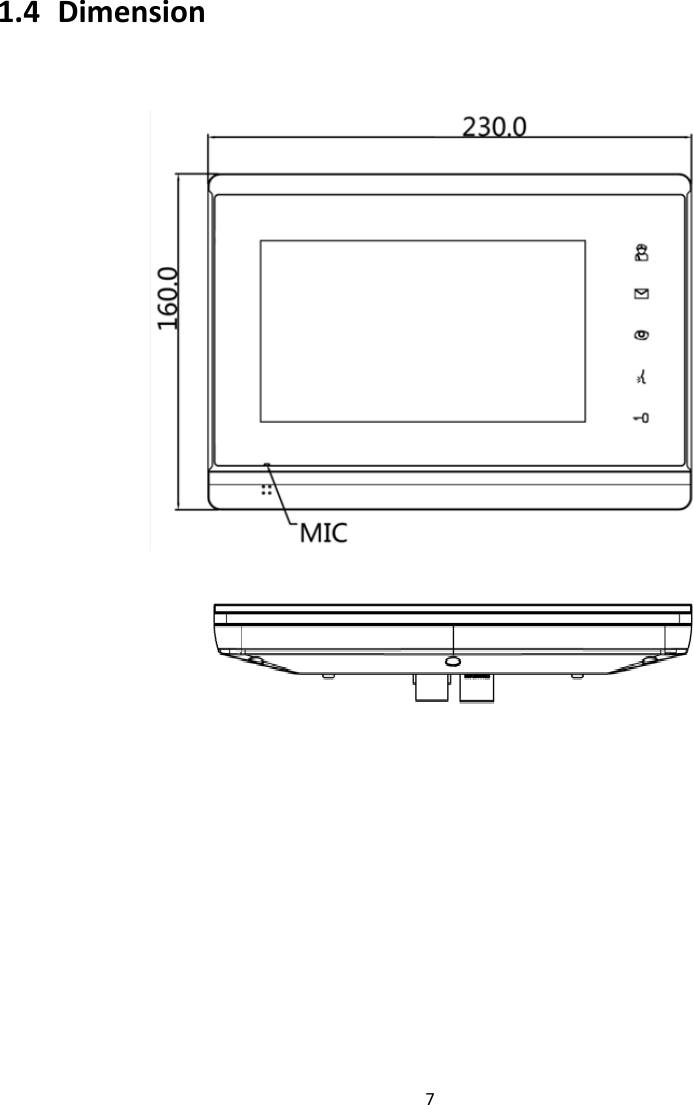
71.4 Dimension 
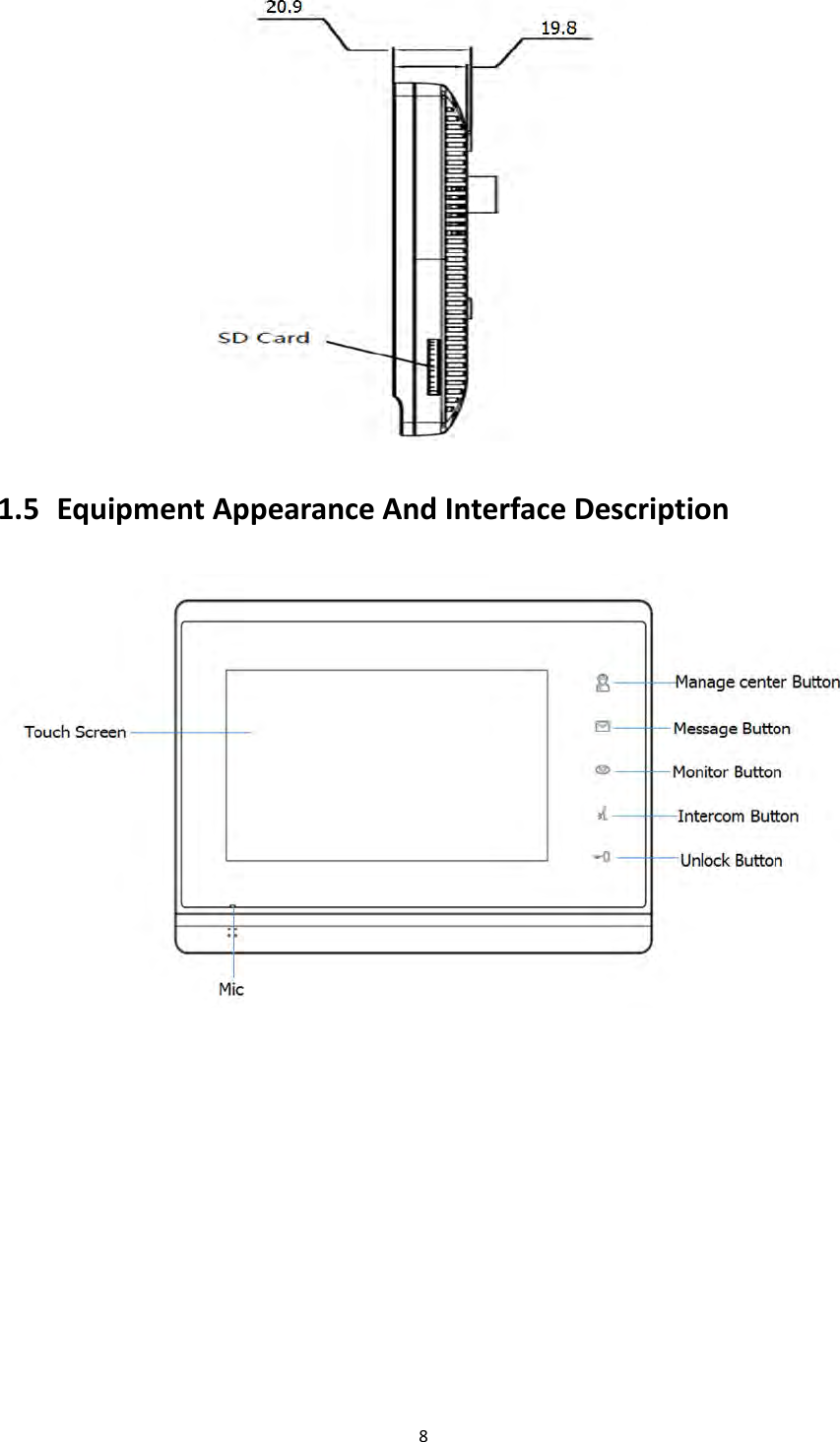
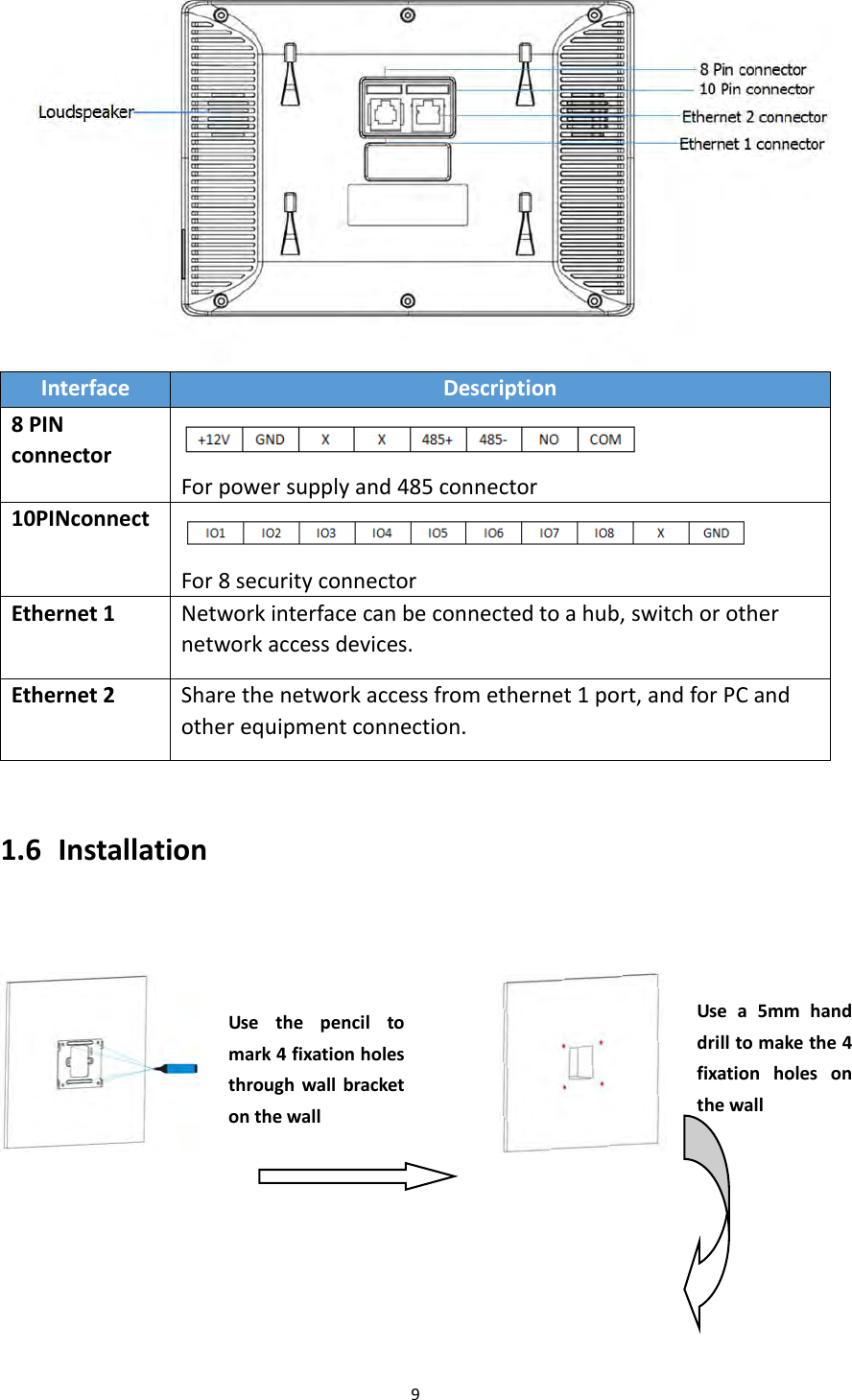
81.5 EquipmentAppearanceAndInterfaceDescription
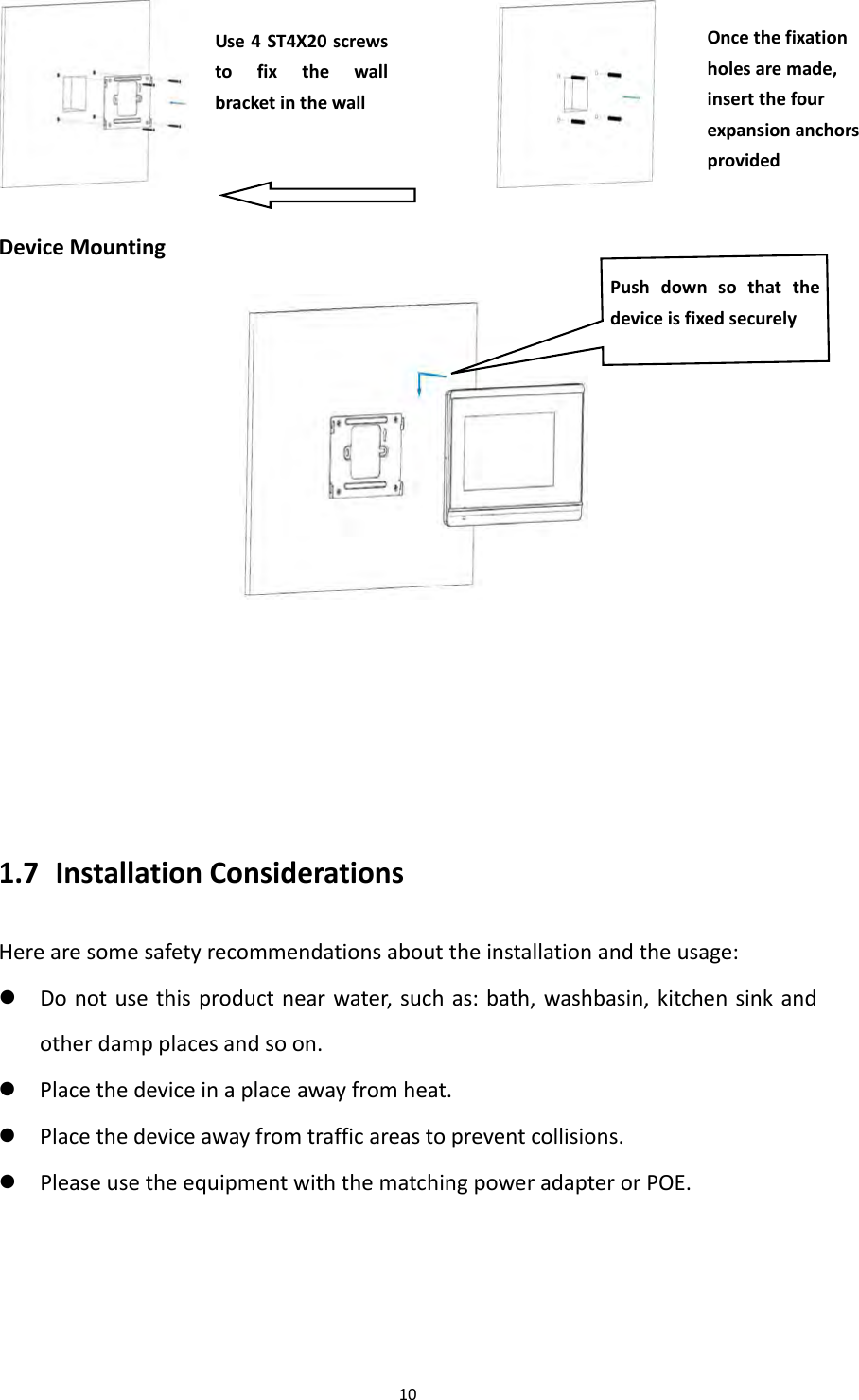
9InterfaceDescription8PINconnectorForpowersupplyand485connector10PINconnectFor8securityconnectorEthernet1Networkinterfacecanbeconnectedtoahub,switchorothernetworkaccessdevices.Ethernet2Sharethenetworkaccessfromethernet1port,andforPCandotherequipmentconnection.1.6 Installation Usethepenciltomark4fixationholesthroughwallbracketonthewallUsea5mmhanddrilltomakethe4fixationholesonthewall
10 DeviceMounting 1.7 InstallationConsiderationsHerearesomesafetyrecommendationsabouttheinstallationandtheusage: Donotusethisproductnearwater,suchas:bath,washbasin,kitchensinkandotherdampplacesandsoon. Placethedeviceinaplaceawayfromheat. Placethedeviceawayfromtrafficareastopreventcollisions. PleaseusetheequipmentwiththematchingpoweradapterorPOE.Oncethefixationholesaremade,insertthefourexpansionanchorsprovidedUse4ST4X20screwstofixthewallbracketinthewallPushdownsothatthedeviceisfixedsecurely
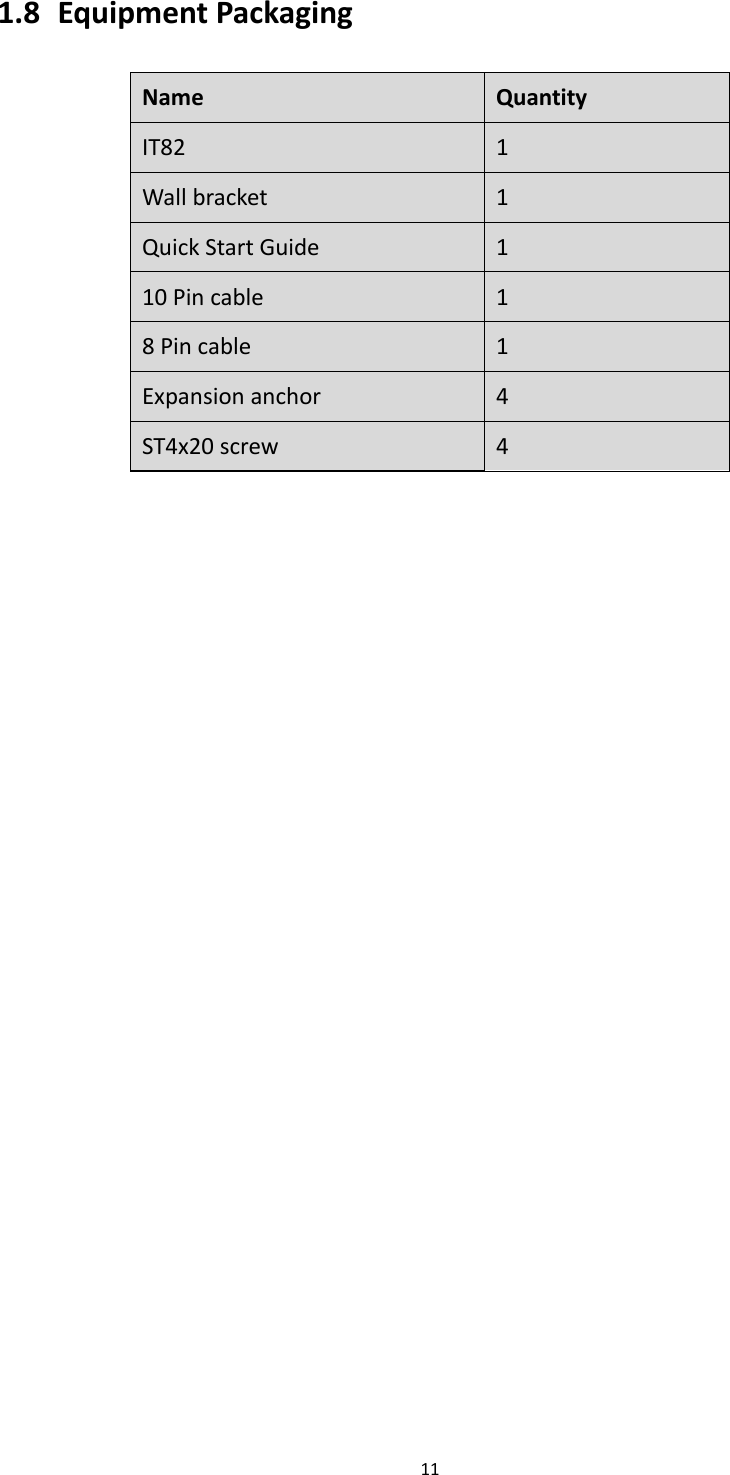
111.8 EquipmentPackagingNameQuantityIT821Wallbracket 1QuickStartGuide110Pincable18Pincable1Expansionanchor 4ST4x20screw 4
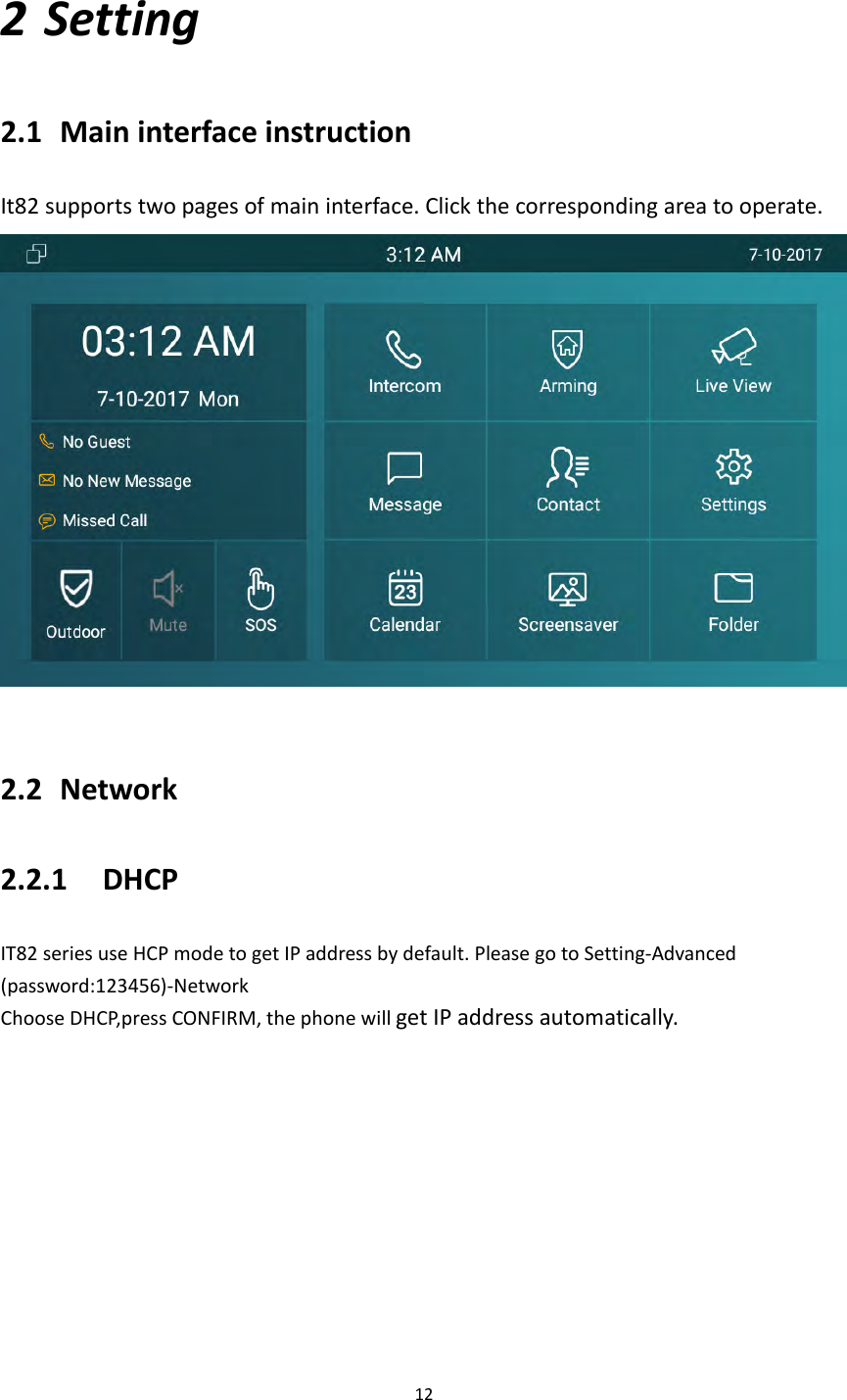
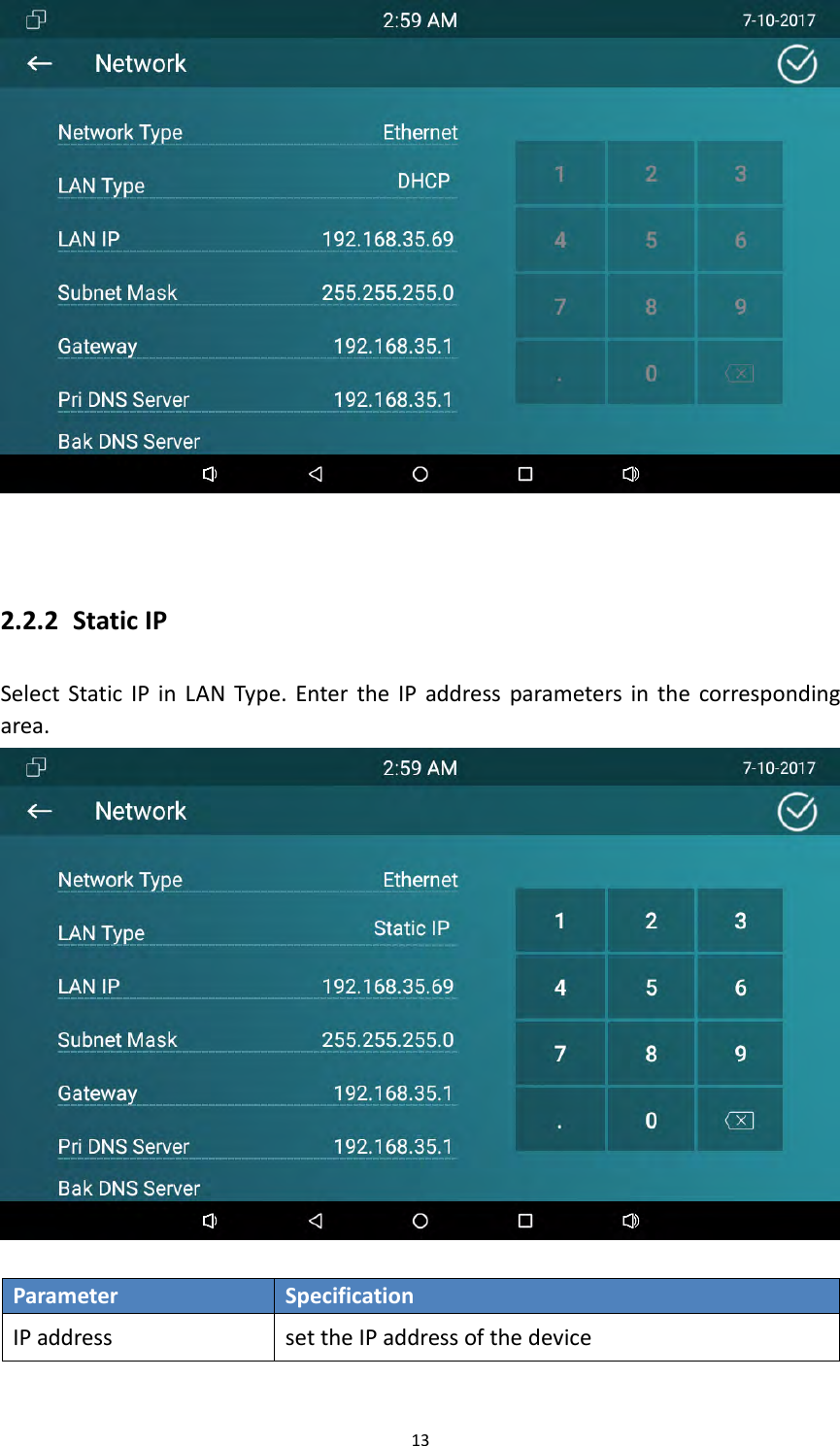
122 Setting2.1 MaininterfaceinstructionIt82supportstwopagesofmaininterface.Clickthecorrespondingareatooperate.2.2 Network2.2.1 DHCPIT82seriesuseHCPmodetogetIPaddressbydefault.PleasegotoSetting‐Advanced(password:123456)‐NetworkChooseDHCP,pressCONFIRM,thephonewillgetIPaddressautomatically.
132.2.2 StaticIPSelectStaticIPinLANType.EntertheIPaddressparametersinthecorrespondingarea.ParameterSpecificationIPaddresssettheIPaddressofthedevice
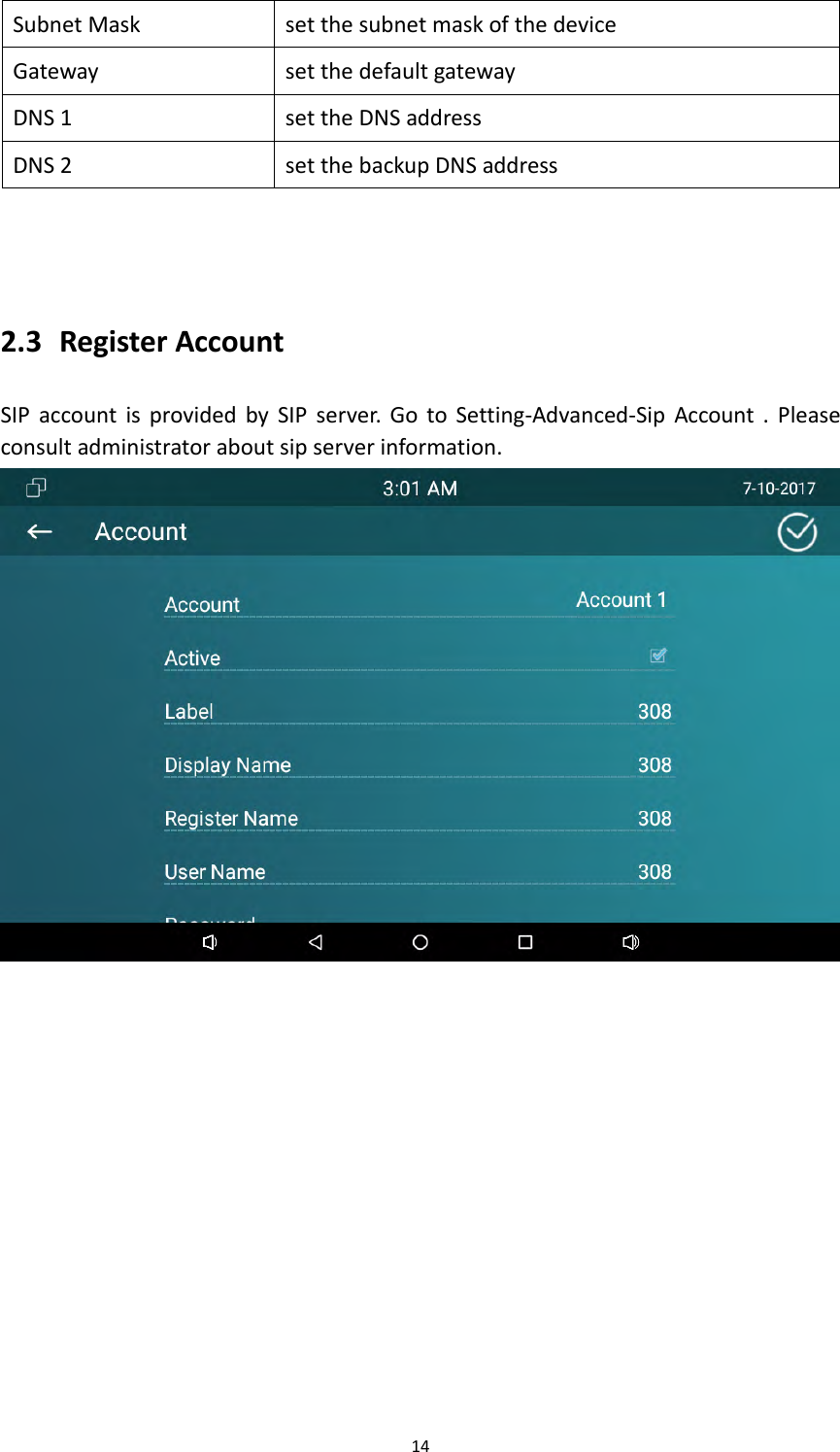
14SubnetMasksetthesubnetmaskofthedeviceGatewaysetthedefaultgatewayDNS1settheDNSaddressDNS2setthebackupDNSaddress2.3 RegisterAccountSIPaccountisprovidedbySIPserver.GotoSetting‐Advanced‐SipAccount.Pleaseconsultadministratoraboutsipserverinformation.
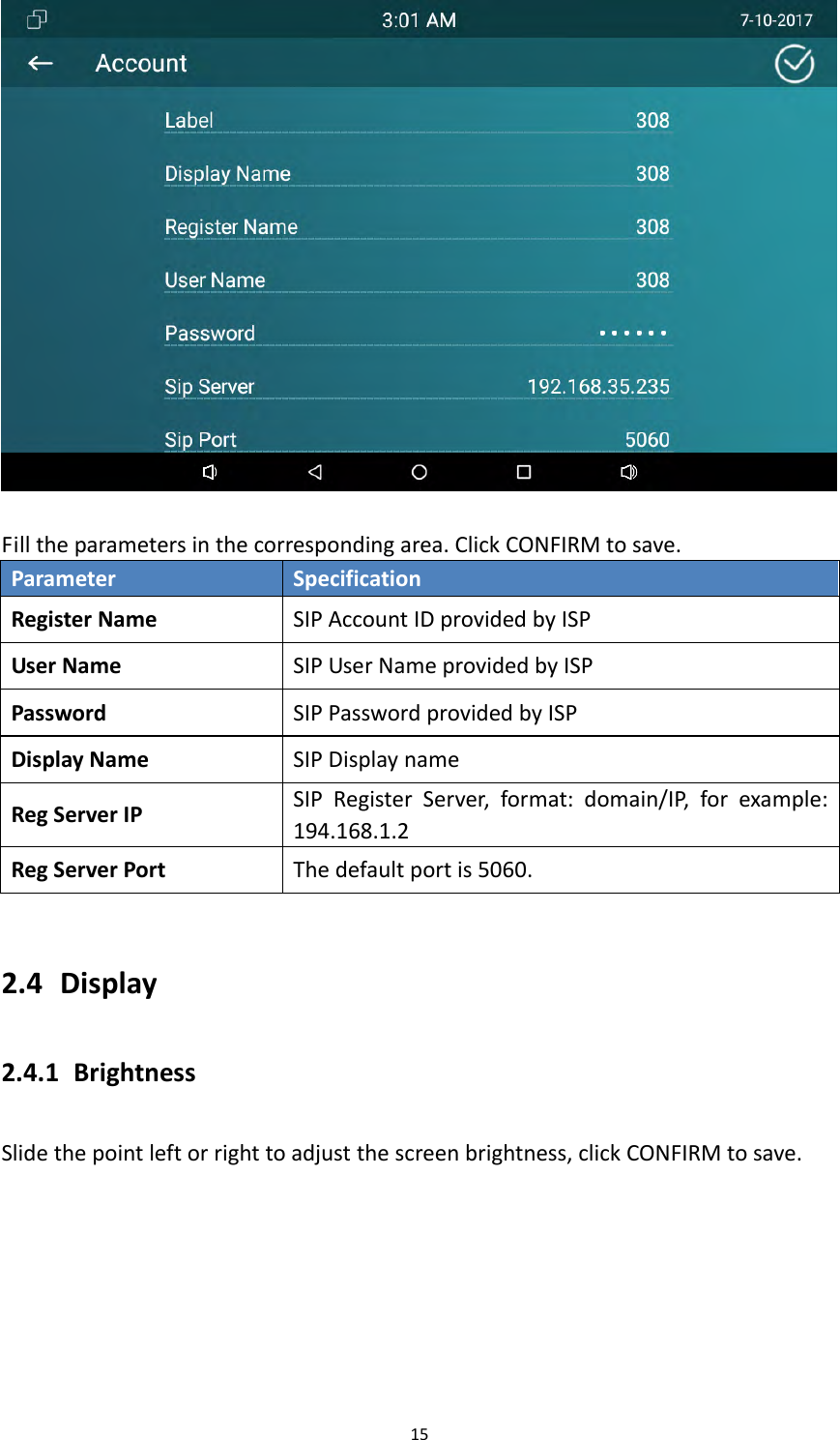
15Filltheparametersinthecorrespondingarea.ClickCONFIRMtosave.ParameterSpecificationRegisterNameSIPAccountIDprovidedbyISPUserNameSIPUserNameprovidedbyISPPasswordSIPPasswordprovidedbyISPDisplayNameSIPDisplaynameRegServerIPSIPRegisterServer,format:domain/IP,forexample:194.168.1.2RegServerPortThedefaultportis5060.2.4 Display2.4.1 BrightnessSlidethepointleftorrighttoadjustthescreenbrightness,clickCONFIRMtosave.
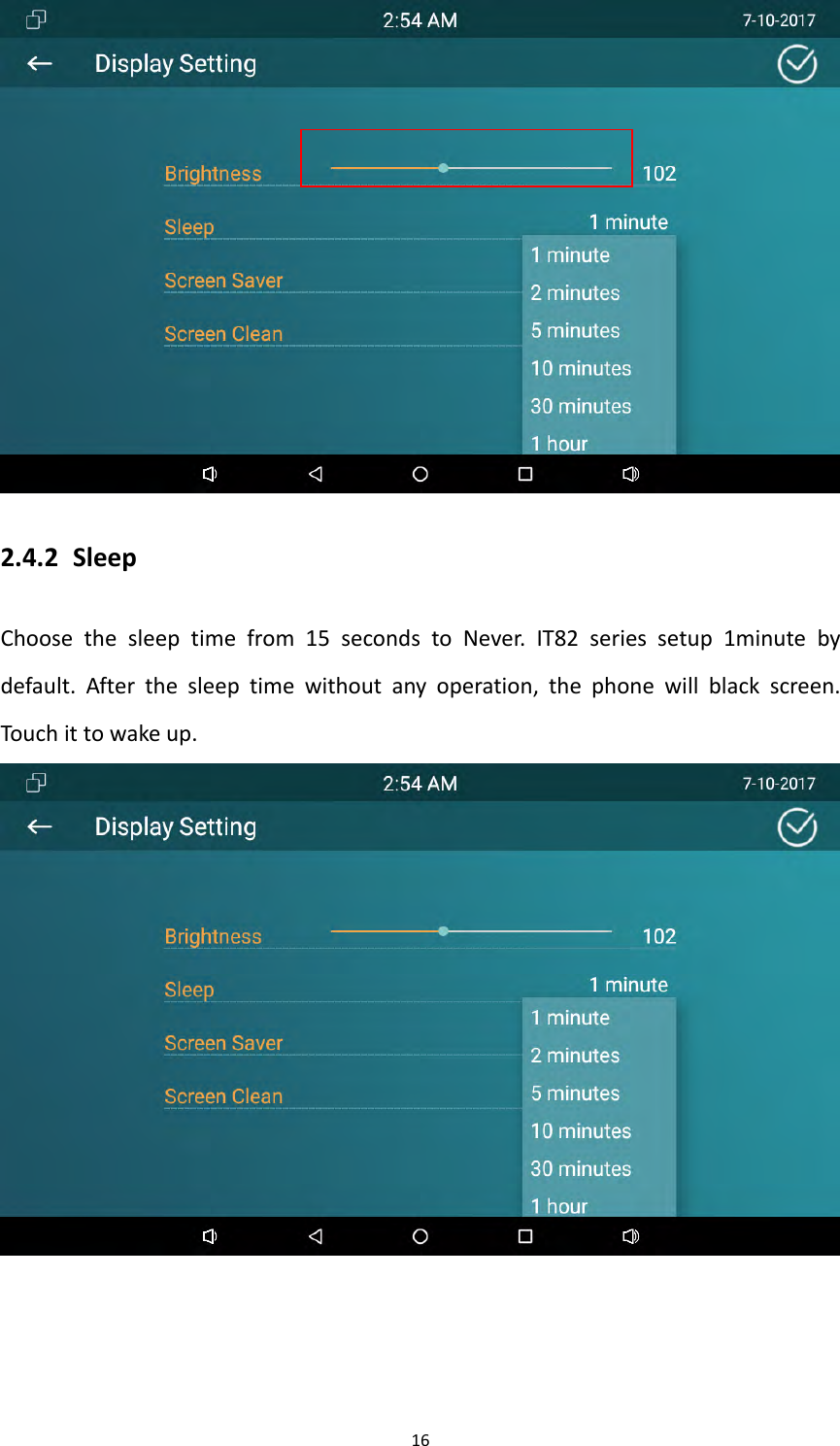
162.4.2 SleepChoosethesleeptimefrom15secondstoNever.IT82seriessetup1minutebydefault.Afterthesleeptimewithoutanyoperation,thephonewillblackscreen.Touchittowakeup.
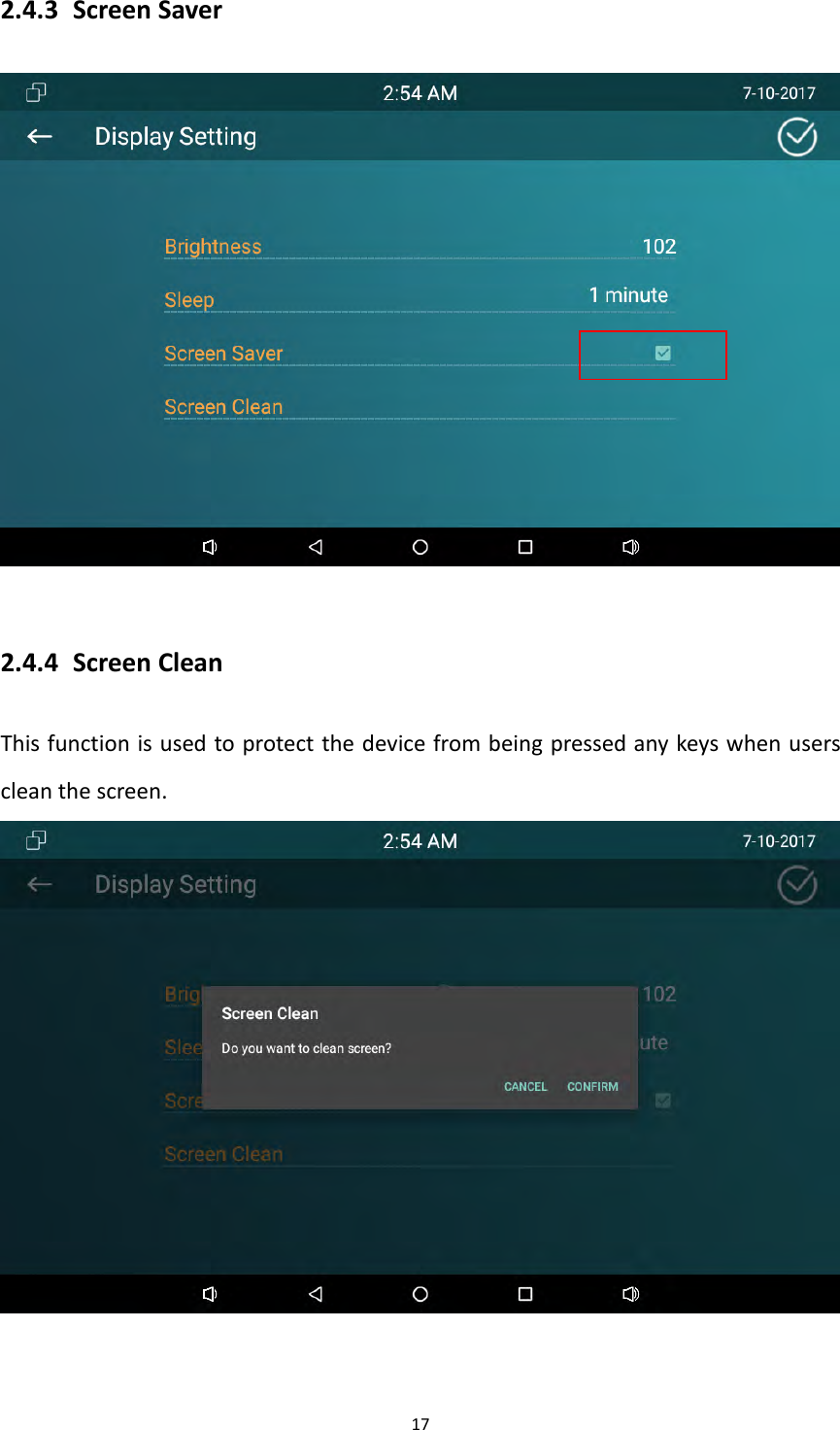
172.4.3 ScreenSaver2.4.4 ScreenCleanThisfunctionisusedtoprotectthedevicefrombeingpressedanykeyswhenuserscleanthescreen.
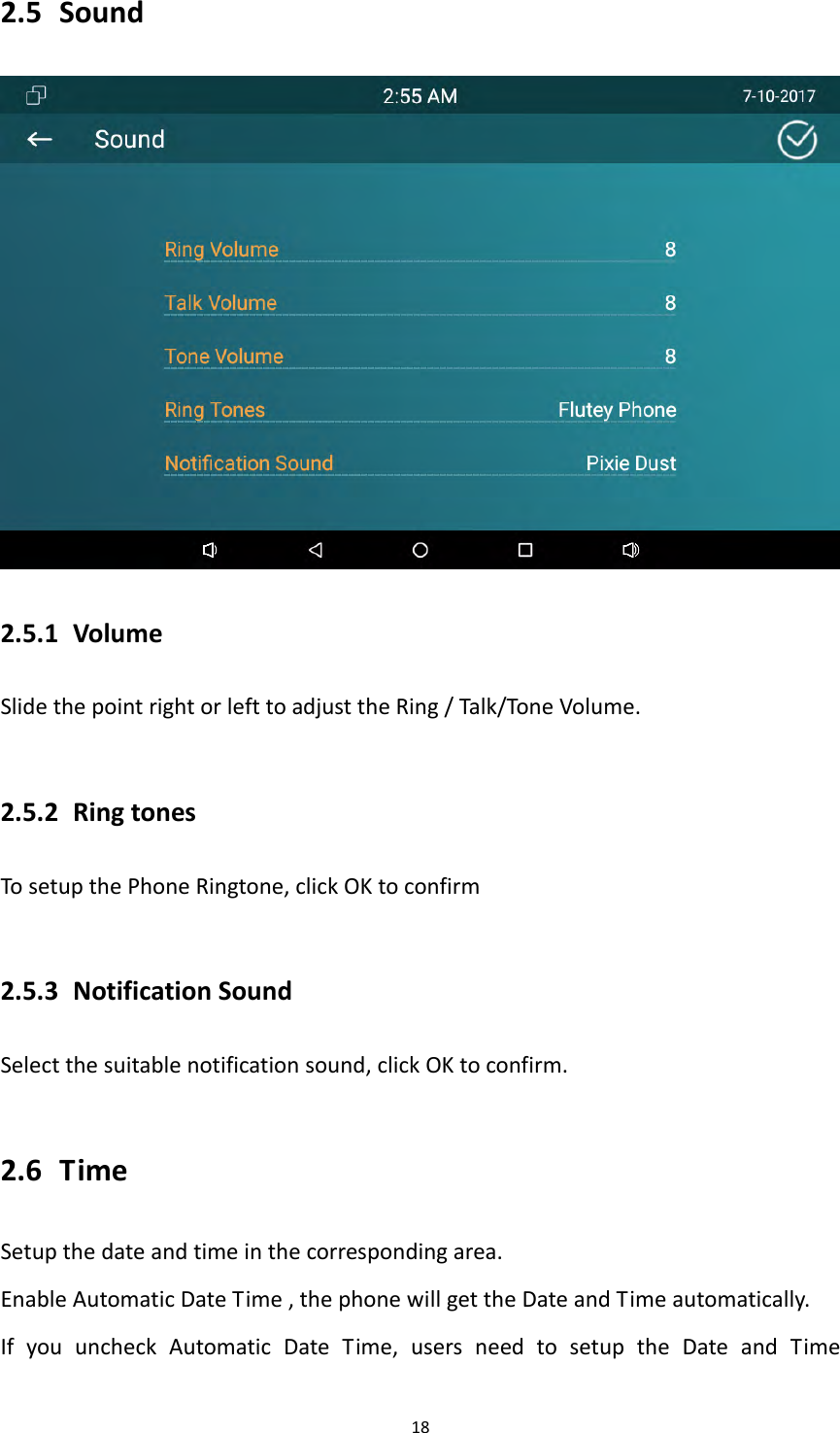
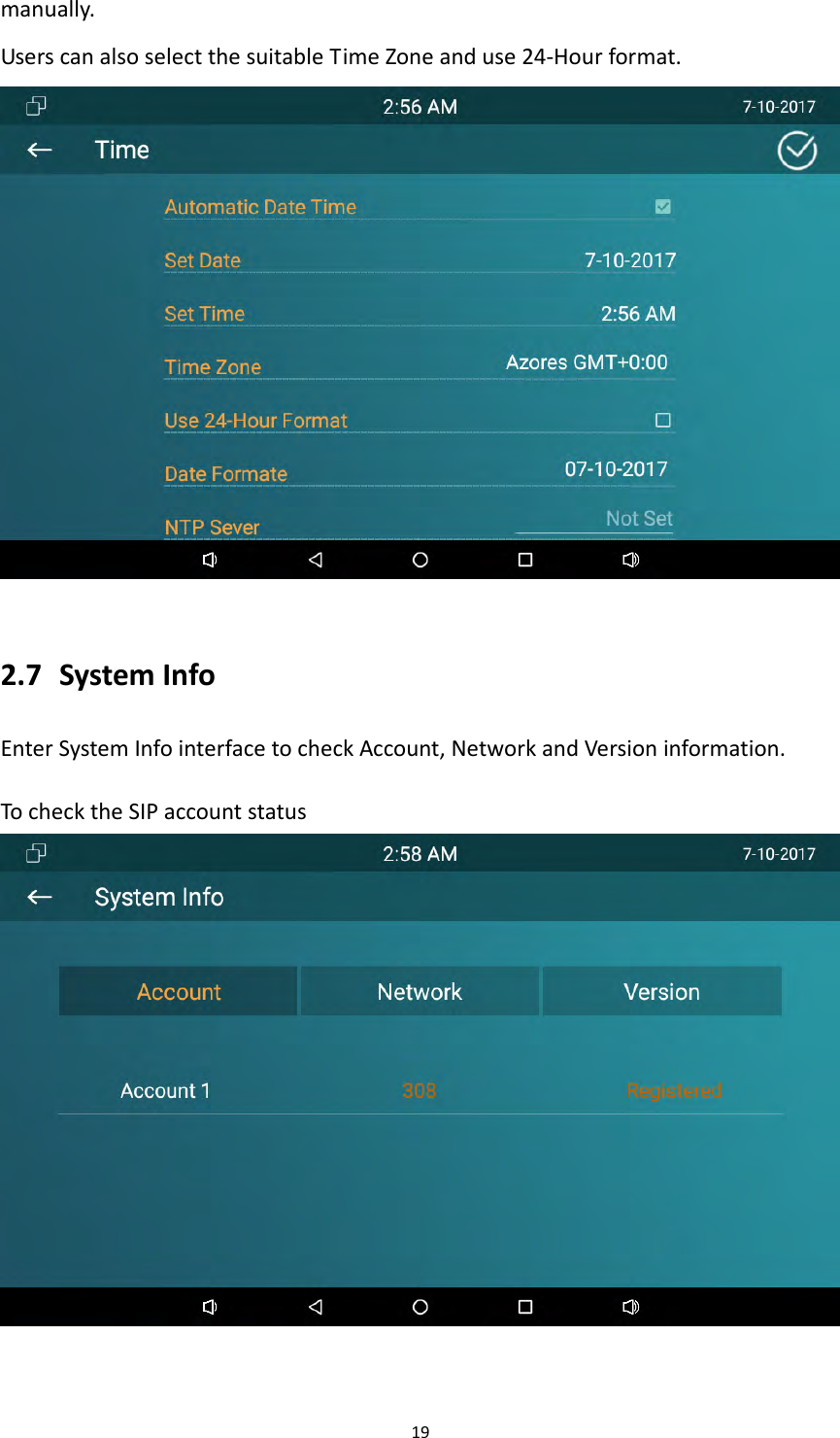
182.5 Sound2.5.1 VolumeSlidethepointrightorlefttoadjusttheRing/Talk/ToneVolume.2.5.2 RingtonesTosetupthePhoneRingtone,clickOKtoconfirm2.5.3 NotificationSoundSelectthesuitablenotificationsound,clickOKtoconfirm.2.6 TimeSetupthedateandtimeinthecorrespondingarea.EnableAutomaticDateTime,thephonewillgettheDateandTimeautomatically.IfyouuncheckAutomaticDateTime,usersneedtosetuptheDateandTime
19manually.UserscanalsoselectthesuitableTimeZoneanduse24‐Hourformat.2.7 SystemInfoEnterSystemInfointerfacetocheckAccount,NetworkandVersioninformation.TochecktheSIPaccountstatus
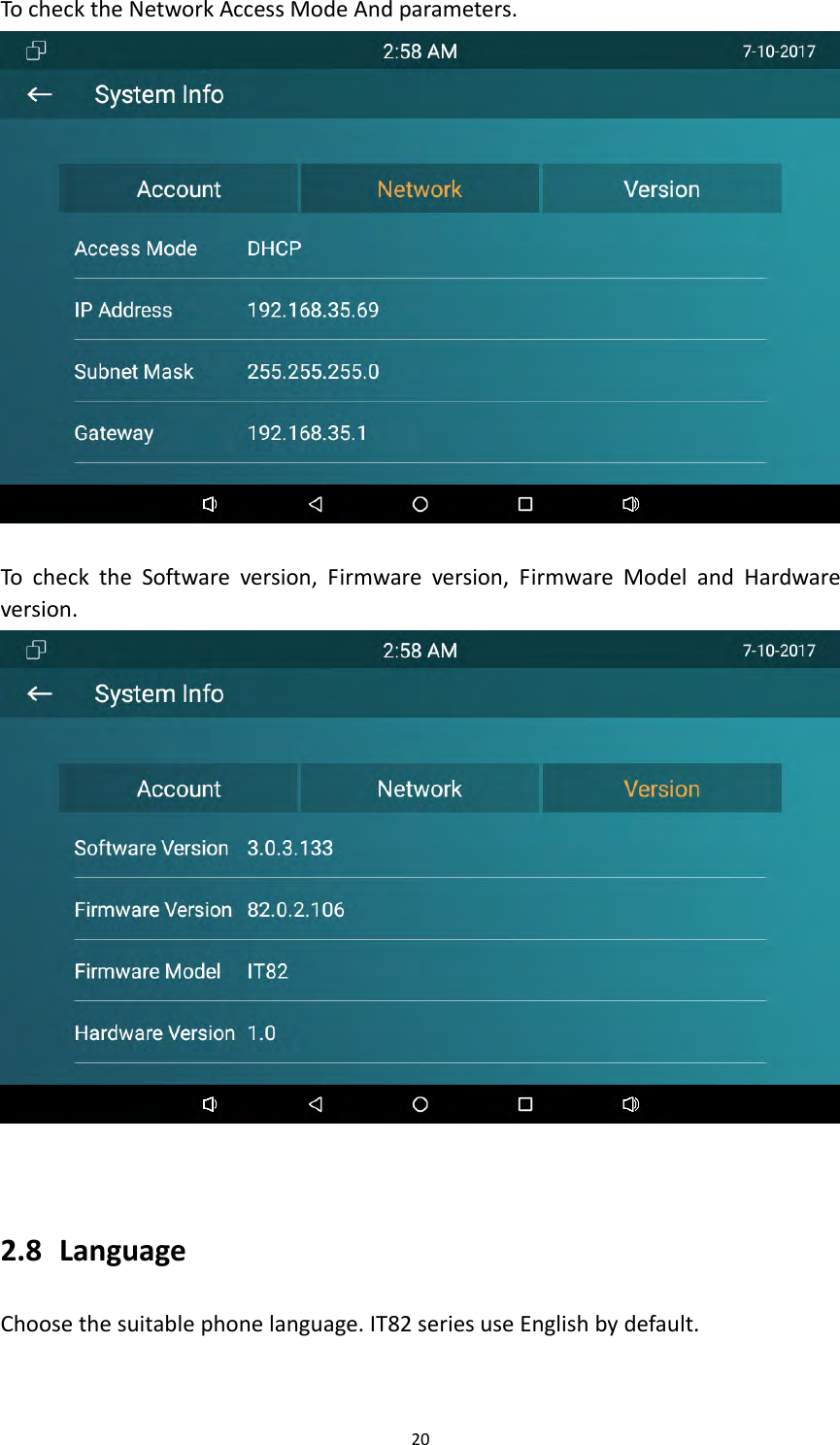
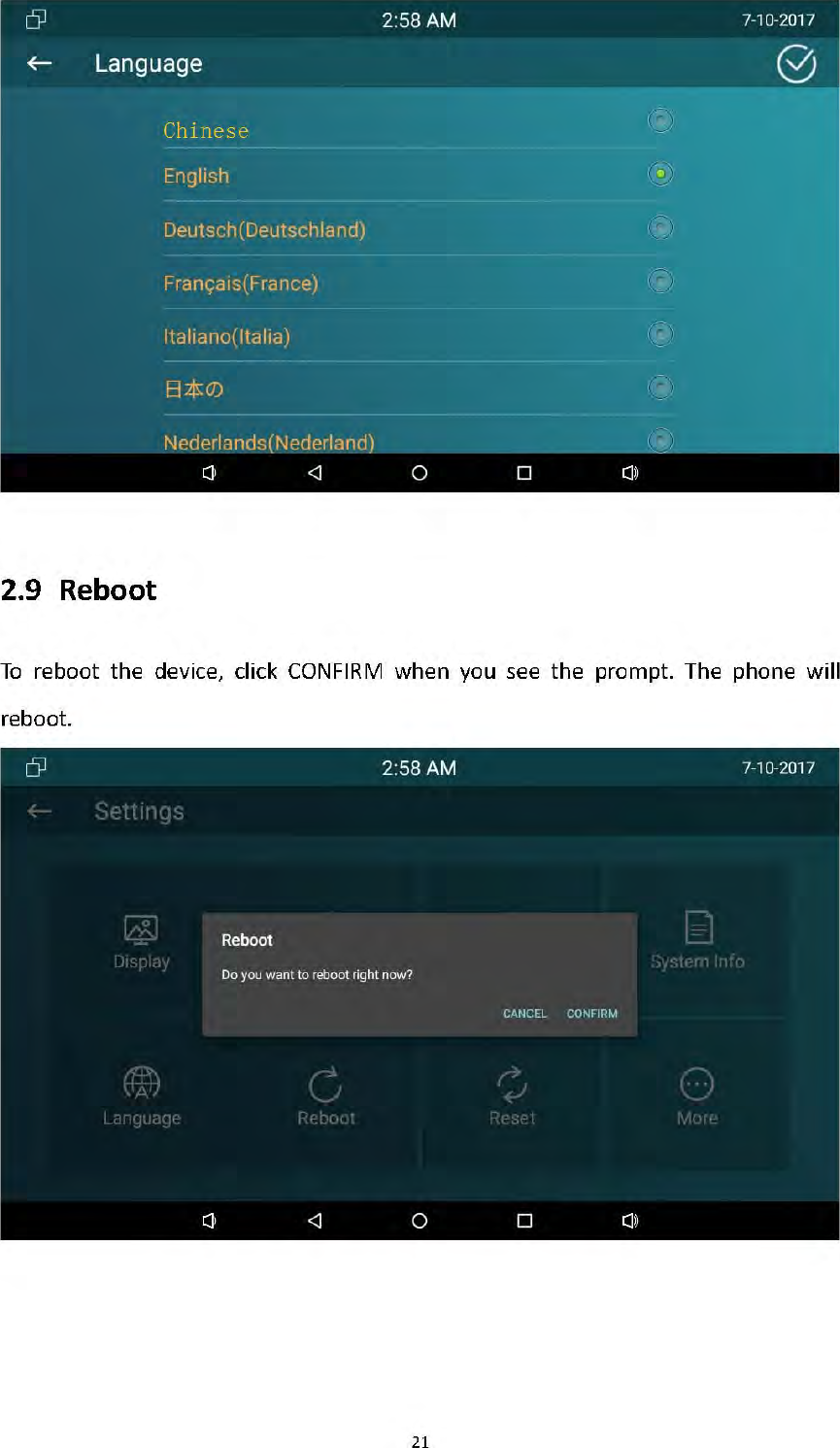
20TochecktheNetworkAccessModeAndparameters.TochecktheSoftwareversion,Firmwareversion,FirmwareModelandHardwareversion.2.8 LanguageChoosethesuitablephonelanguage.IT82seriesuseEnglishbydefault.
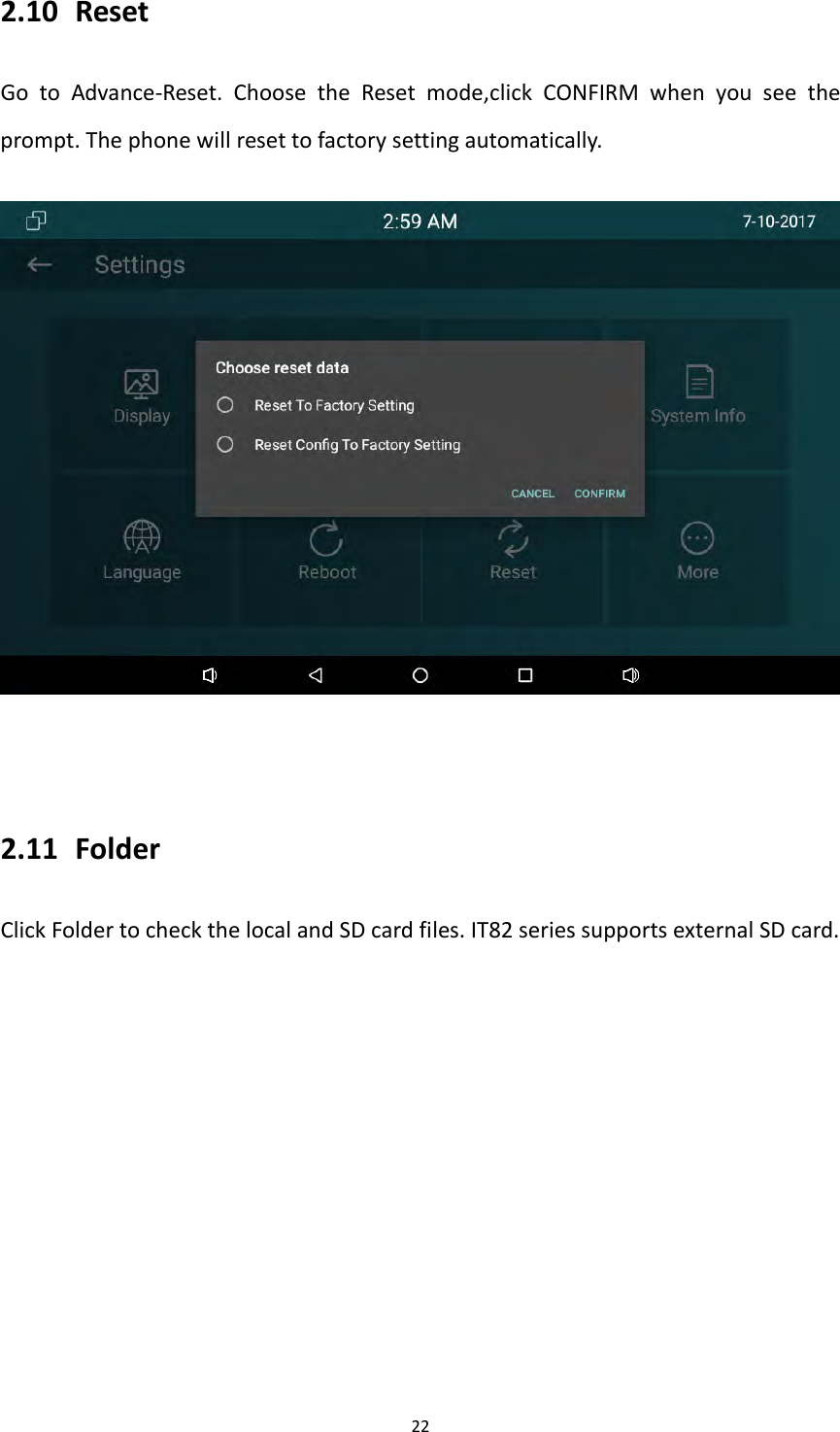
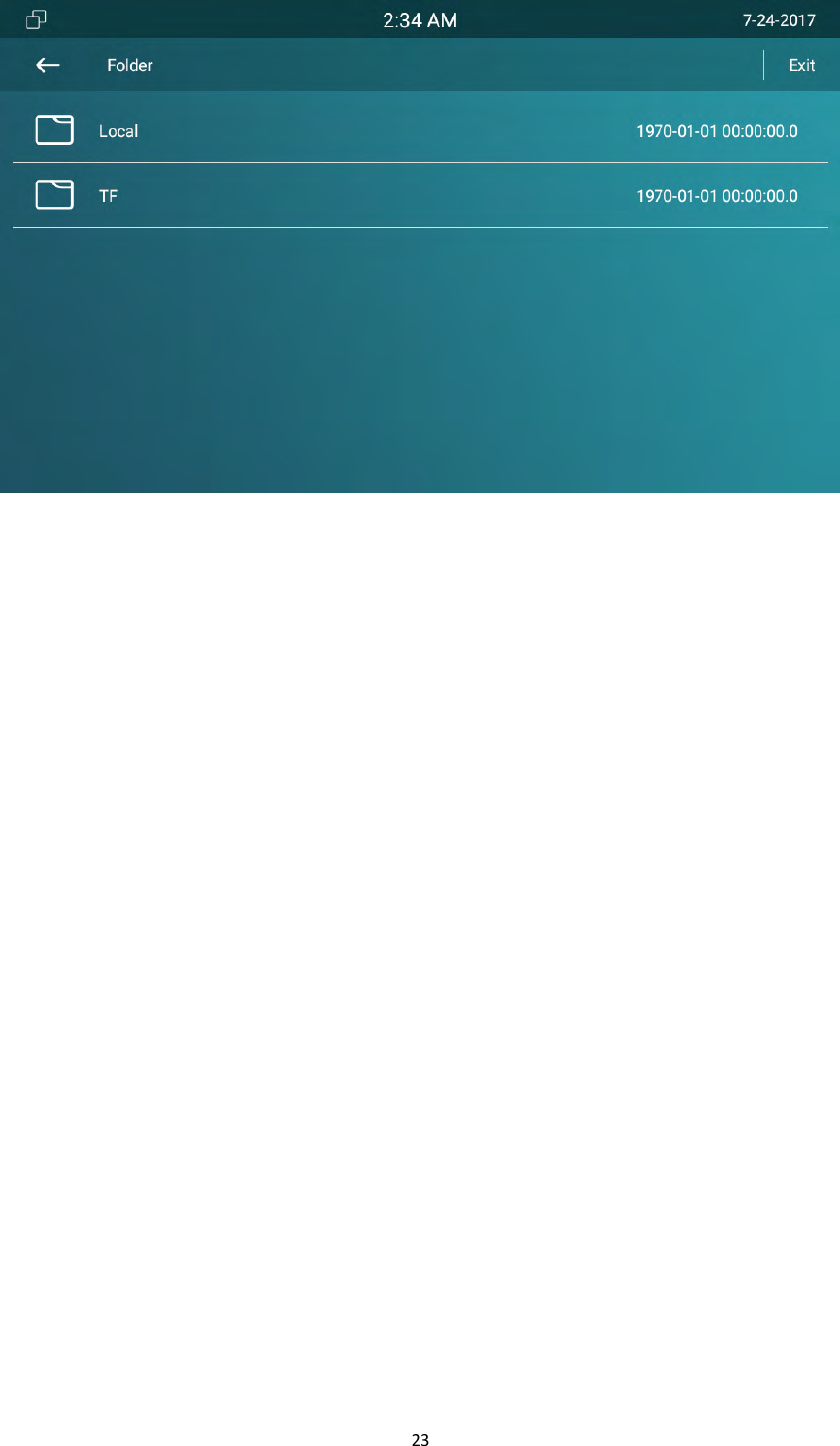
222.10 ResetGotoAdvance‐Reset.ChoosetheResetmode,clickCONFIRMwhenyouseetheprompt.Thephonewillresettofactorysettingautomatically.2.11 FolderClickFoldertocheckthelocalandSDcardfiles.IT82seriessupportsexternalSDcard.
23
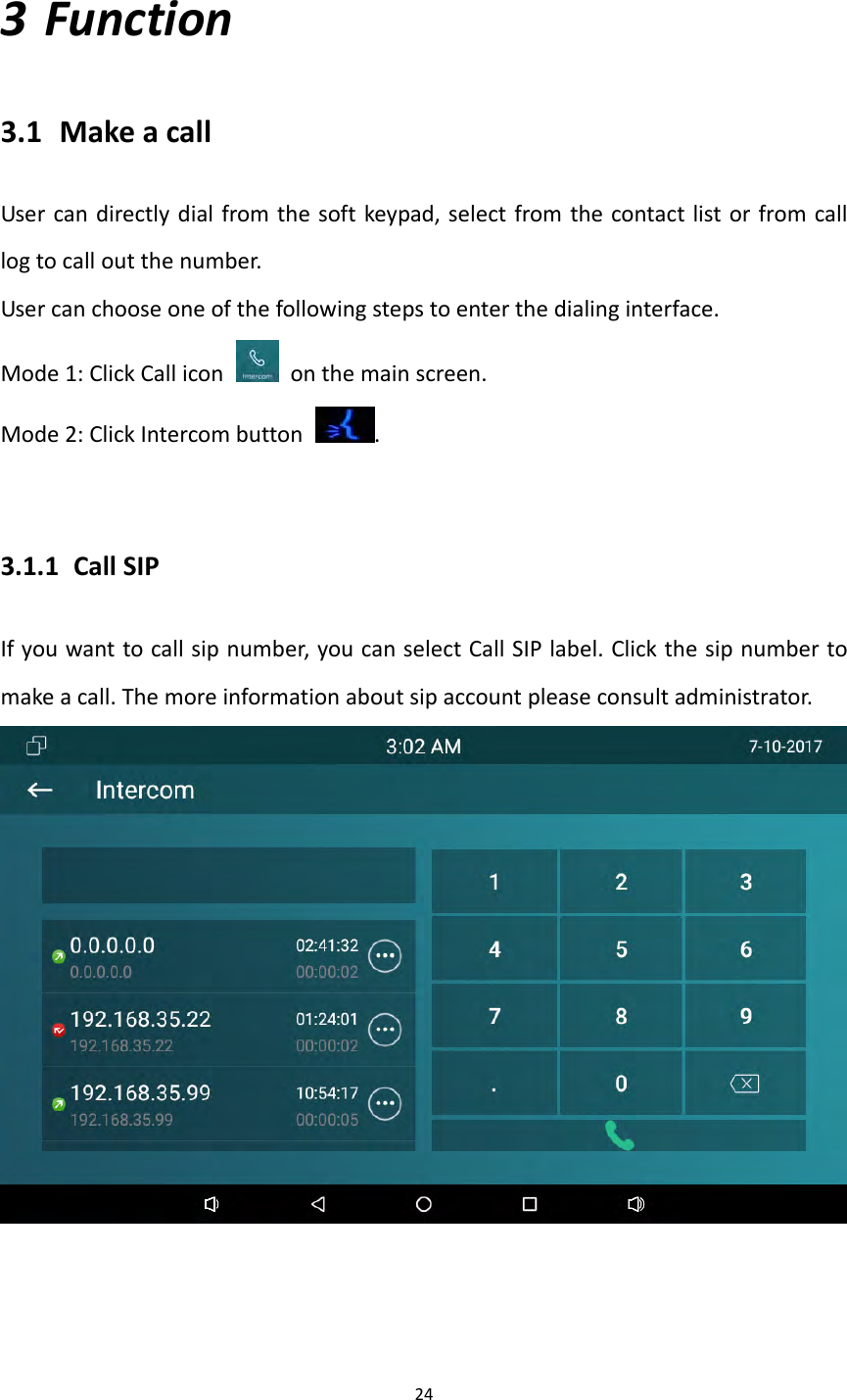
243 Function3.1 MakeacallUsercandirectlydialfromthesoftkeypad,selectfromthecontactlistorfromcalllogtocalloutthenumber.Usercanchooseoneofthefollowingstepstoenterthedialinginterface.Mode1:ClickCallicon  onthemainscreen.Mode2:ClickIntercombutton.3.1.1 CallSIPIfyouwanttocallsipnumber,youcanselectCallSIPlabel.Clickthesipnumbertomakeacall.Themoreinformationaboutsipaccountpleaseconsultadministrator.
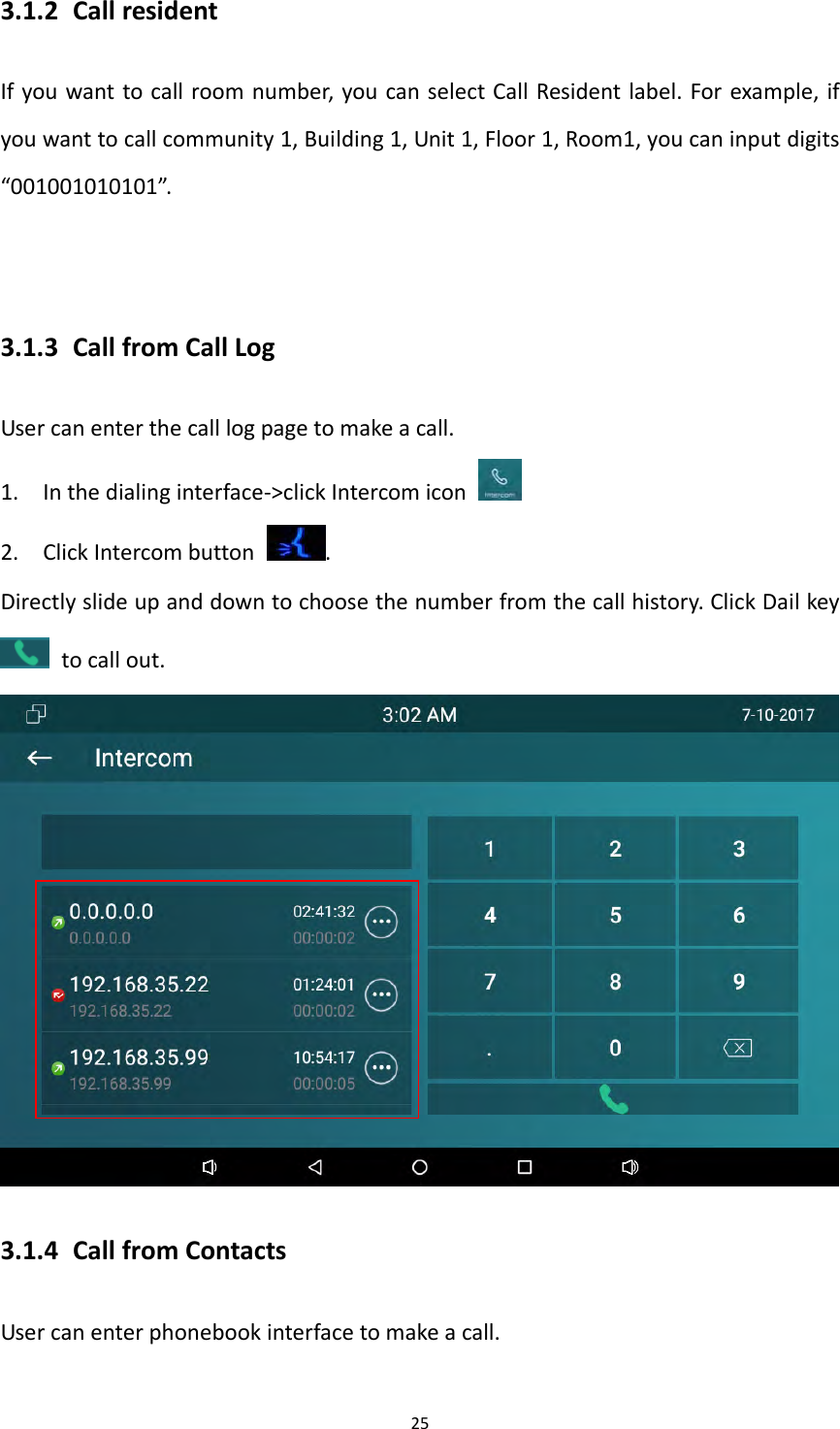
253.1.2 CallresidentIfyouwanttocallroomnumber,youcanselectCallResidentlabel.Forexample,ifyouwanttocallcommunity1,Building1,Unit1,Floor1,Room1,youcaninputdigits“001001010101”.3.1.3 CallfromCallLogUsercanenterthecalllogpagetomakeacall.1. Inthedialinginterface‐>clickIntercomicon2. ClickIntercombutton.Directlyslideupanddowntochoosethenumberfromthecallhistory.ClickDailkeytocallout.3.1.4 CallfromContactsUsercanenterphonebookinterfacetomakeacall.
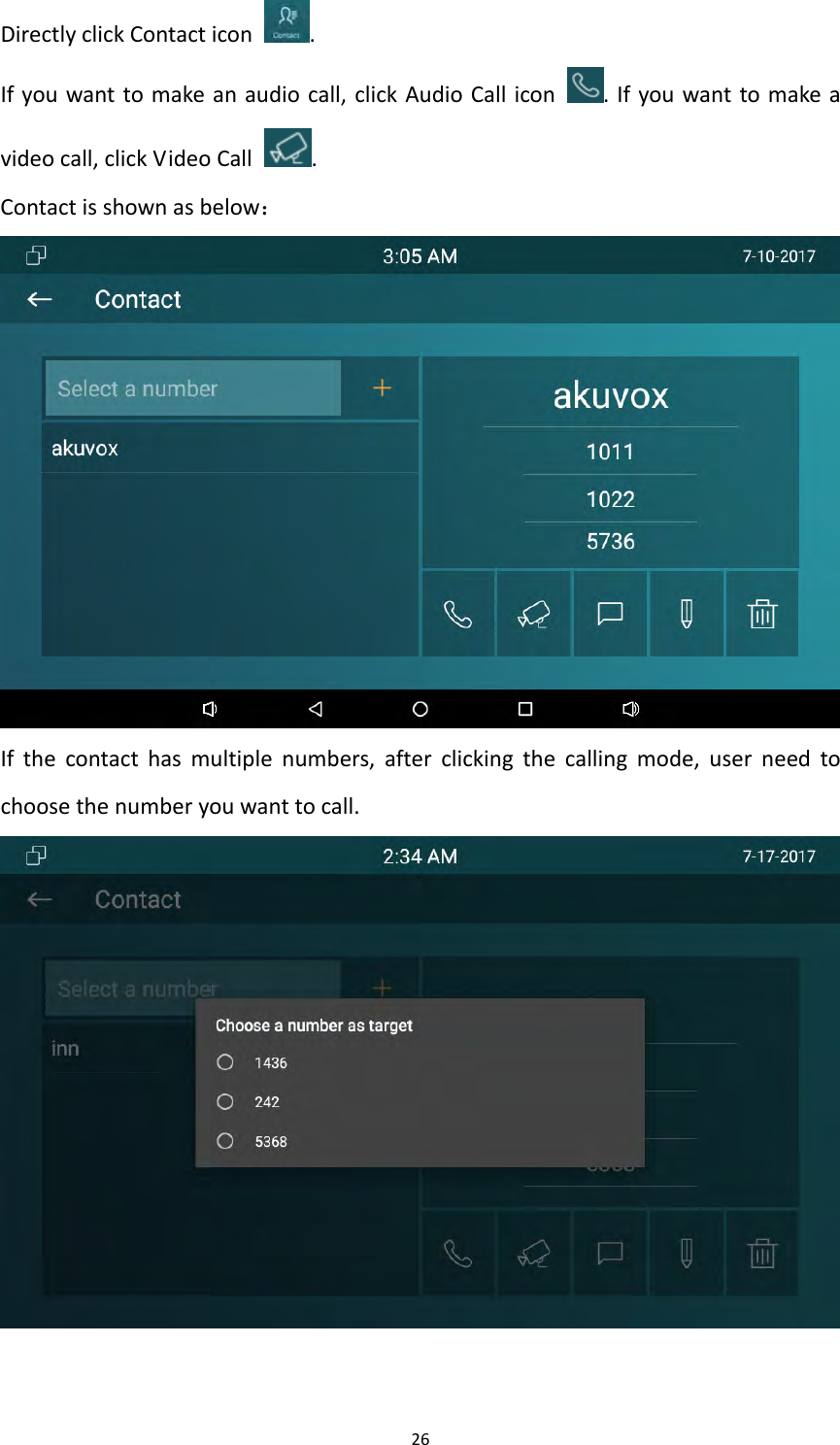
26DirectlyclickContacticon.Ifyouwanttomakeanaudiocall,clickAudioCallicon.Ifyouwanttomakeavideocall,clickVideoCall.Contactisshownasbelow:Ifthecontacthasmultiplenumbers,afterclickingthecallingmode,userneedtochoosethenumberyouwanttocall.
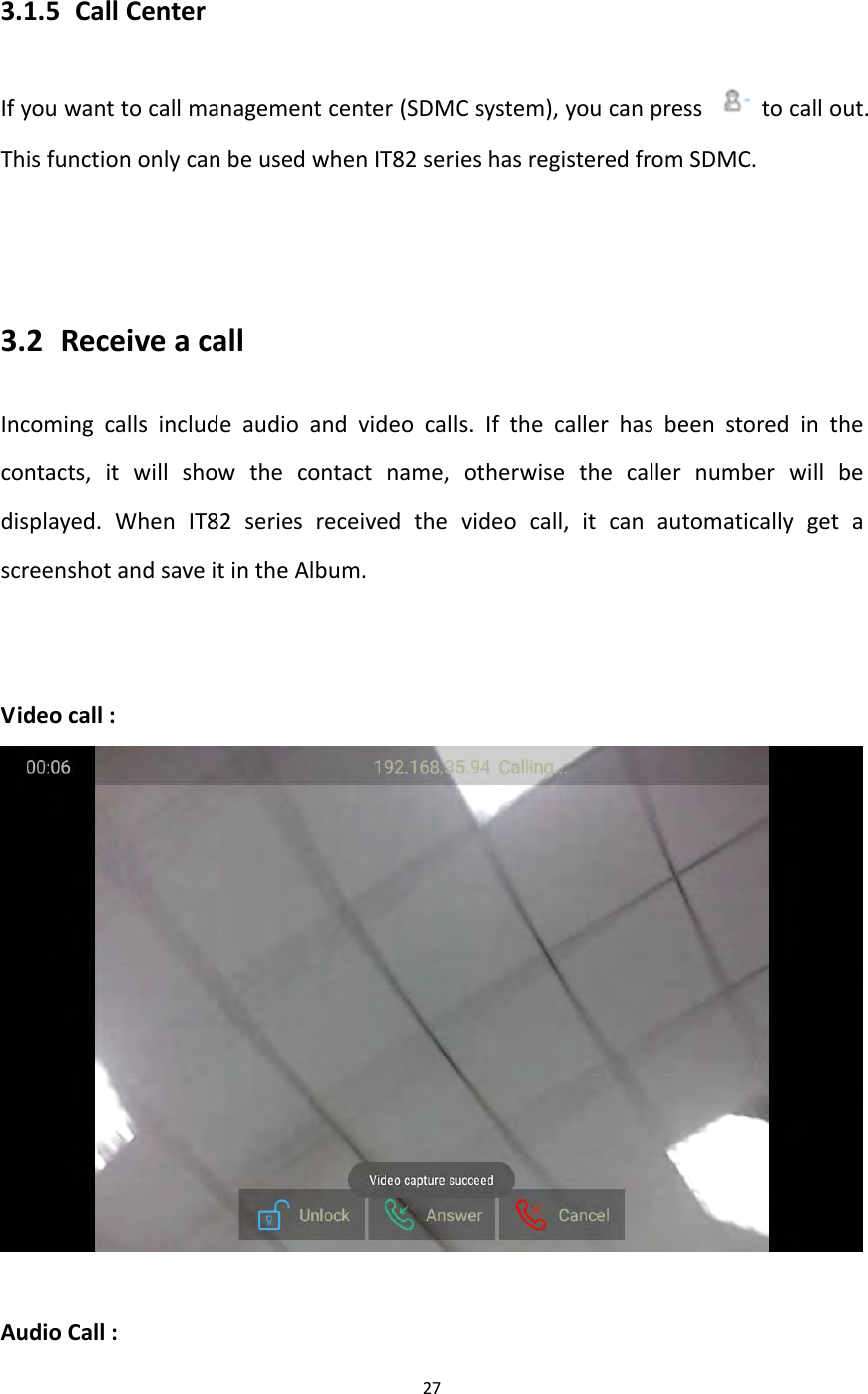
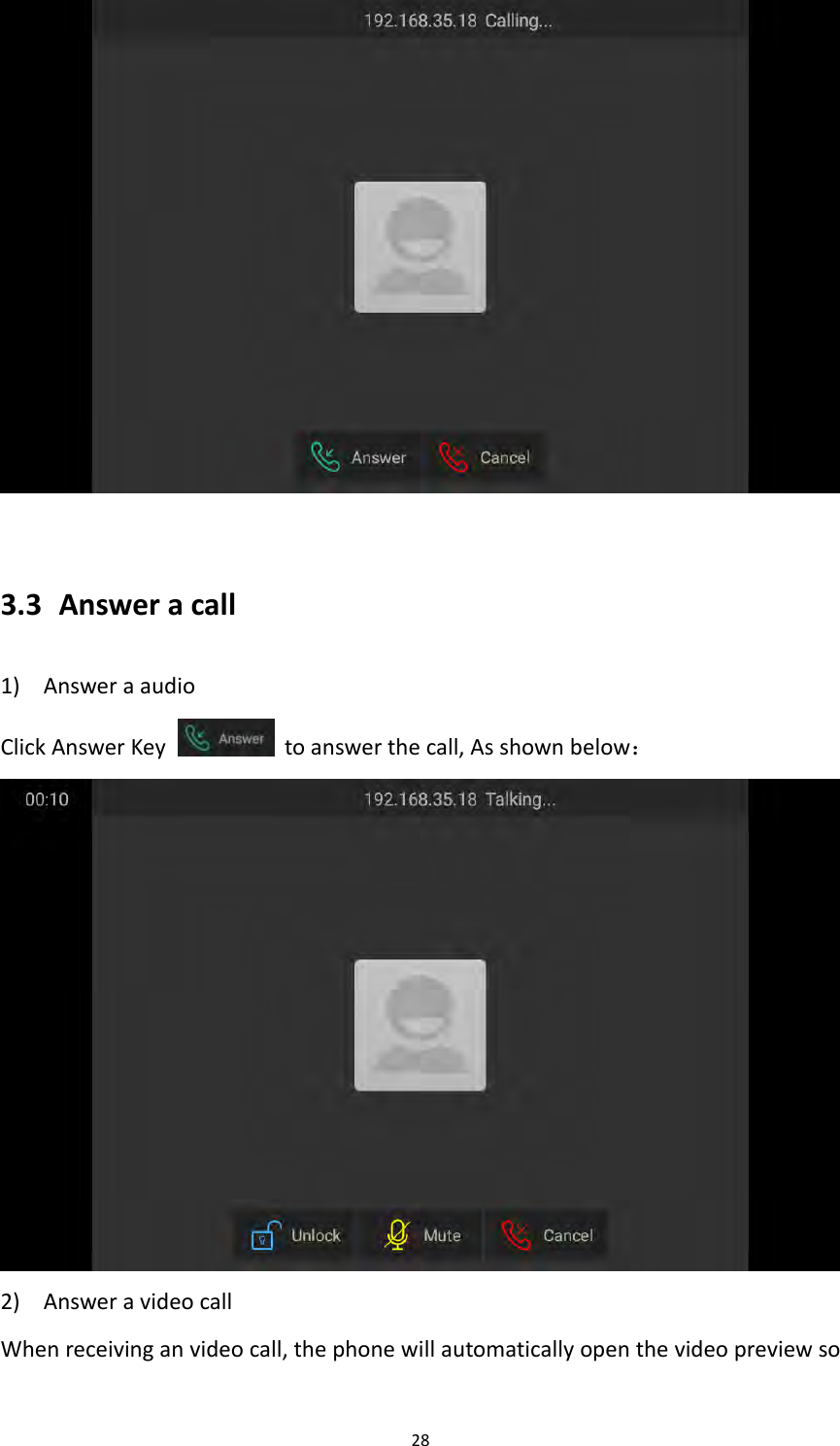
273.1.5 CallCenterIfyouwanttocallmanagementcenter(SDMCsystem),youcanpress  tocallout.ThisfunctiononlycanbeusedwhenIT82serieshasregisteredfromSDMC.3.2 ReceiveacallIncomingcallsincludeaudioandvideocalls.Ifthecallerhasbeenstoredinthecontacts,itwillshowthecontactname,otherwisethecallernumberwillbedisplayed.WhenIT82seriesreceivedthevideocall,itcanautomaticallygetascreenshotandsaveitintheAlbum.Videocall:AudioCall:
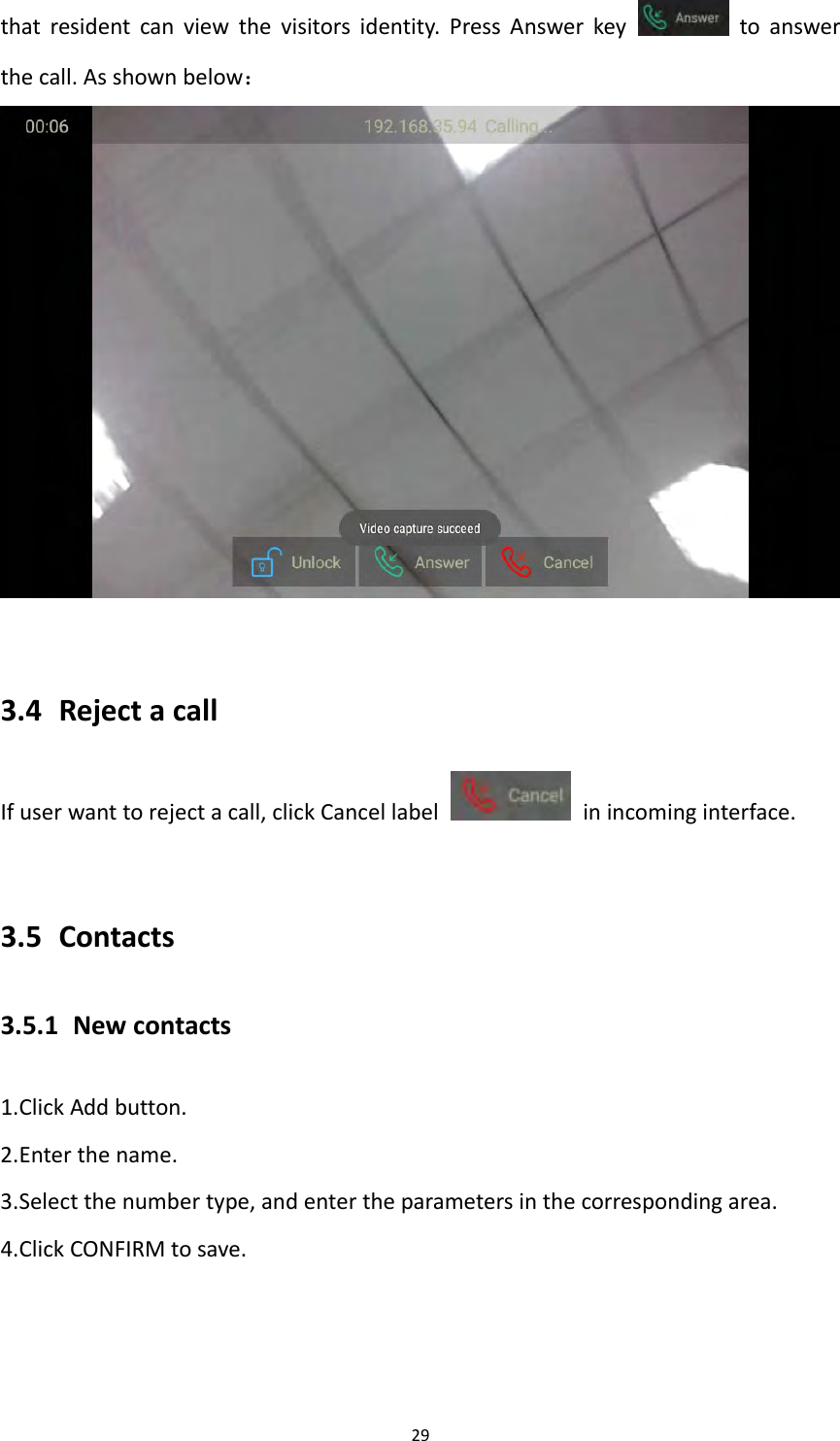
283.3 Answeracall1) AnsweraaudioClickAnswerKeytoanswerthecall,Asshownbelow:2) AnsweravideocallWhenreceivinganvideocall,thephonewillautomaticallyopenthevideopreviewso
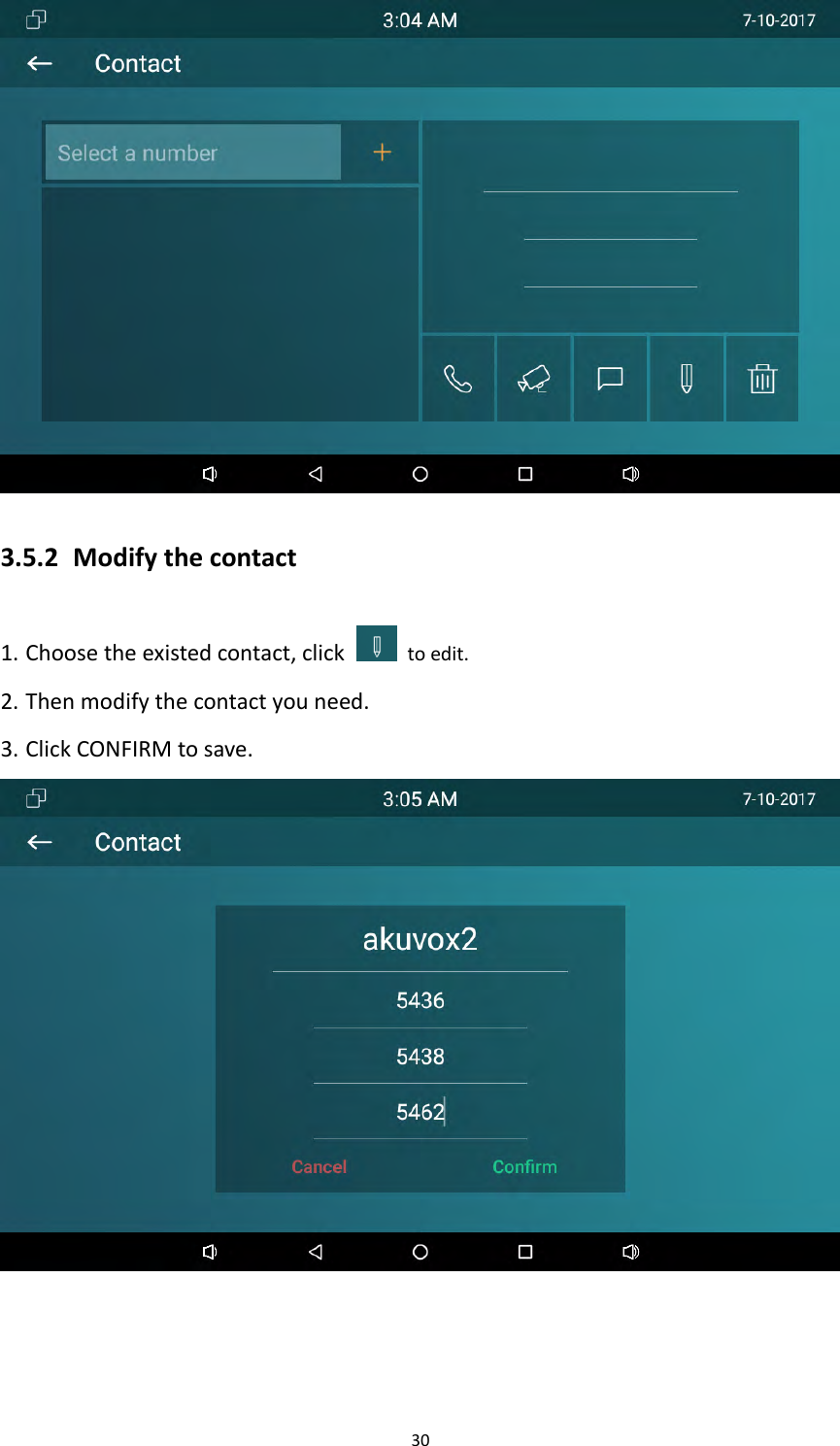
29thatresidentcanviewthevisitorsidentity.PressAnswerkeytoanswerthecall.Asshownbelow:3.4 RejectacallIfuserwanttorejectacall,clickCancellabel  inincominginterface.3.5 Contacts3.5.1 Newcontacts1.ClickAddbutton.2.Enterthename.3.Selectthenumbertype,andentertheparametersinthecorrespondingarea.4.ClickCONFIRMtosave.
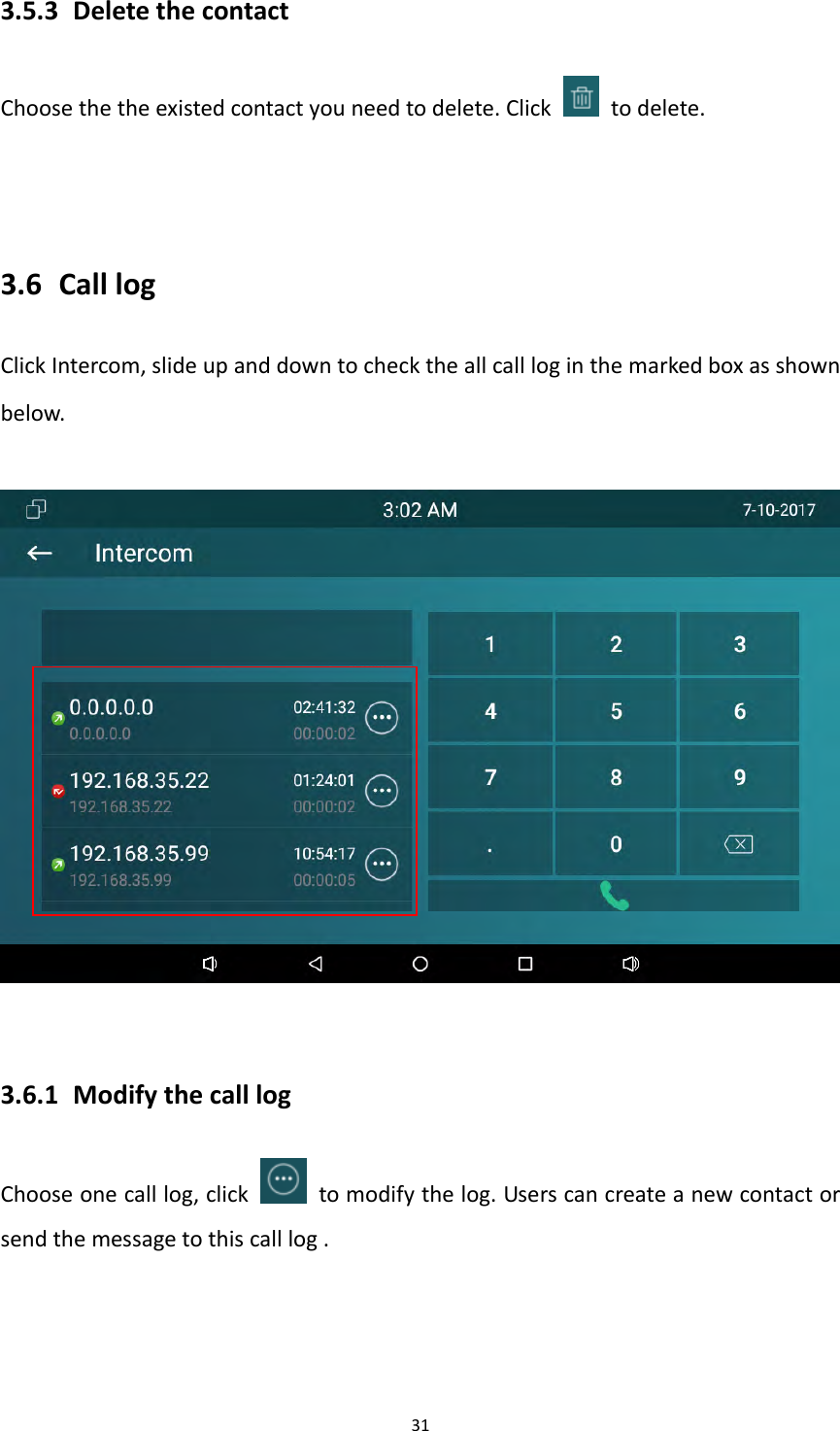
303.5.2 Modifythecontact1. Choosetheexistedcontact,clicktoedit.2. Thenmodifythecontactyouneed.3. ClickCONFIRMtosave.
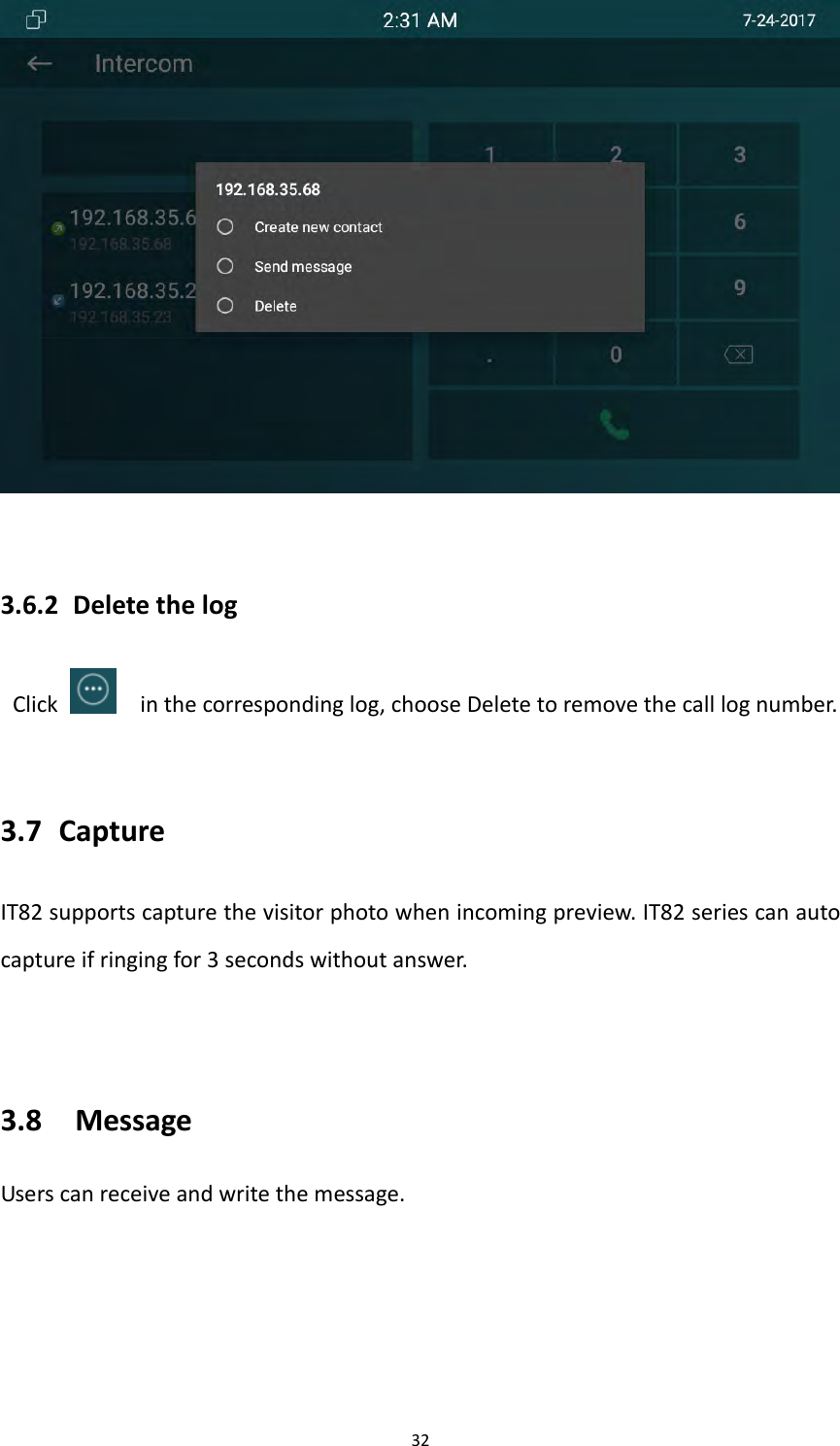
313.5.3 DeletethecontactChoosethetheexistedcontactyouneedtodelete.Click  todelete.3.6 CalllogClickIntercom,slideupanddowntochecktheallcallloginthemarkedboxasshownbelow.3.6.1 ModifythecalllogChooseonecalllog,click  tomodifythelog.Userscancreateanewcontactorsendthemessagetothiscalllog.
323.6.2 DeletethelogClickinthecorrespondinglog,chooseDeletetoremovethecalllognumber.3.7 CaptureIT82supportscapturethevisitorphotowhenincomingpreview.IT82seriescanautocaptureifringingfor3secondswithoutanswer.3.8 MessageUserscanreceiveandwritethemessage.
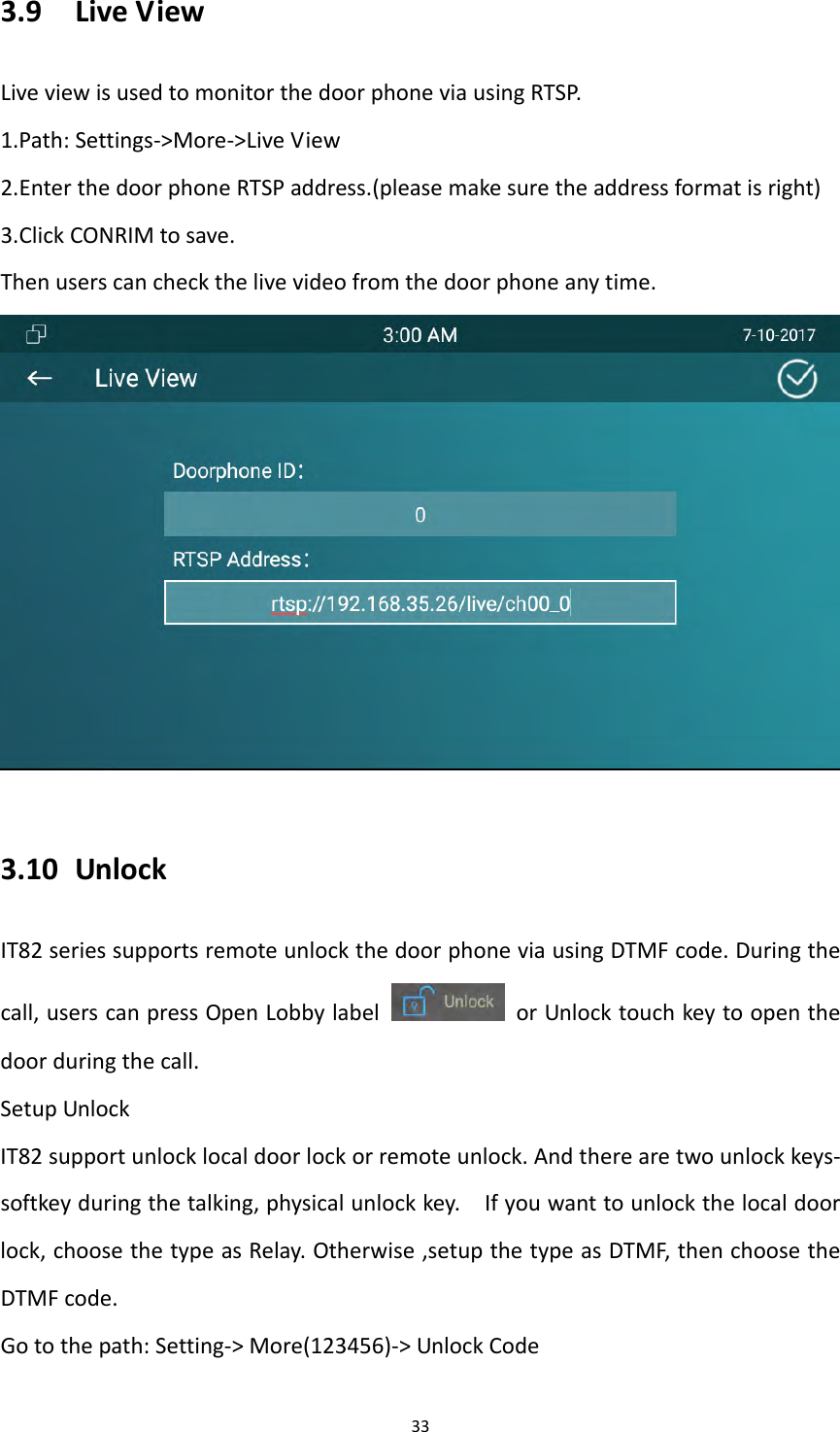
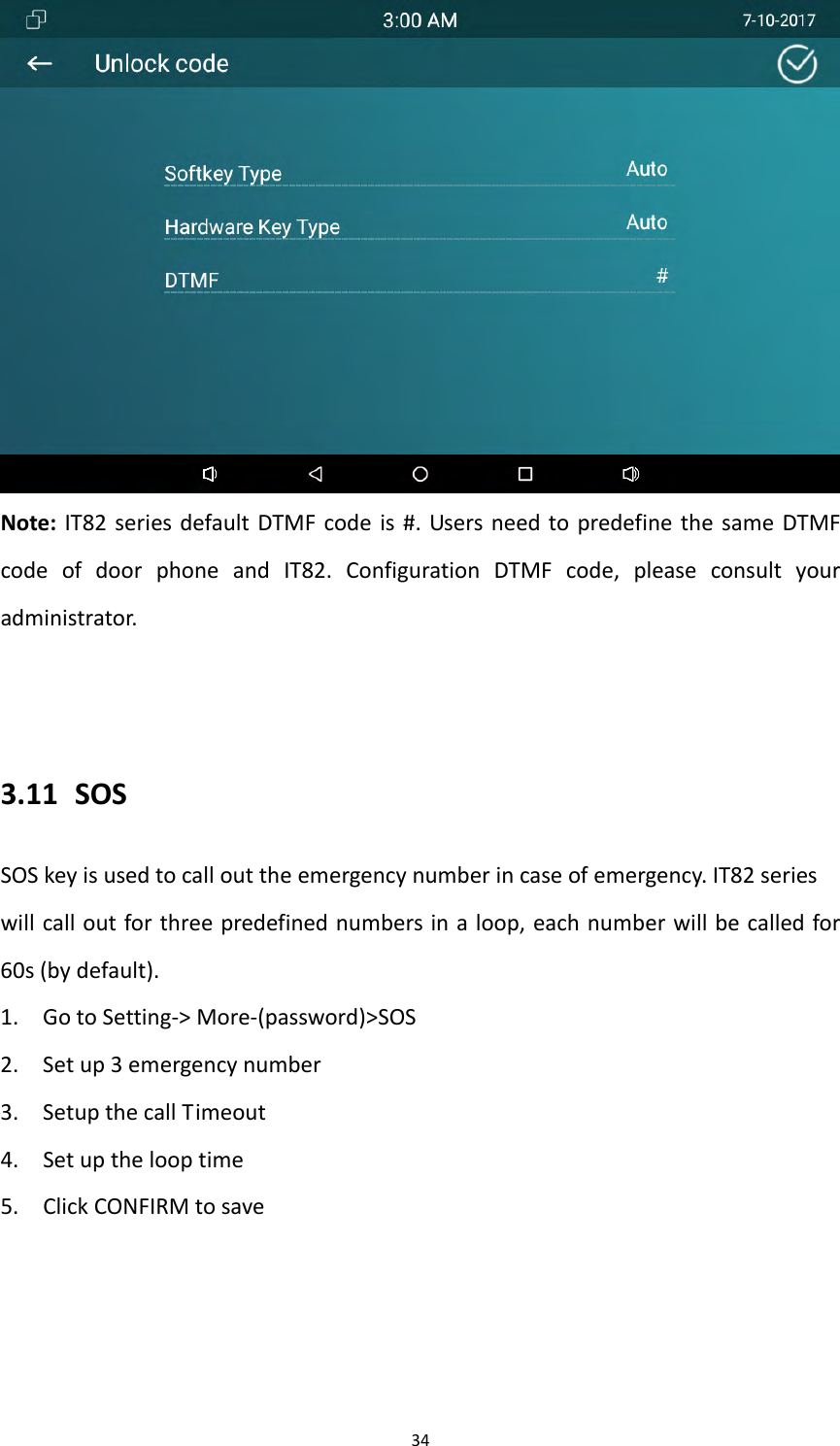
333.9 LiveViewLiveviewisusedtomonitorthedoorphoneviausingRTSP.1.Path:Settings‐>More‐>LiveView2.EnterthedoorphoneRTSPaddress.(pleasemakesuretheaddressformatisright)3.ClickCONRIMtosave.Thenuserscancheckthelivevideofromthedoorphoneanytime.3.10 UnlockIT82seriessupportsremoteunlockthedoorphoneviausingDTMFcode.Duringthecall,userscanpressOpenLobbylabel  orUnlocktouchkeytoopenthedoorduringthecall.SetupUnlockIT82supportunlocklocaldoorlockorremoteunlock.Andtherearetwounlockkeys‐softkeyduringthetalking,physicalunlockkey.Ifyouwanttounlockthelocaldoorlock,choosethetypeasRelay.Otherwise,setupthetypeasDTMF,thenchoosetheDTMFcode.Gotothepath:Setting‐>More(123456)‐>UnlockCode
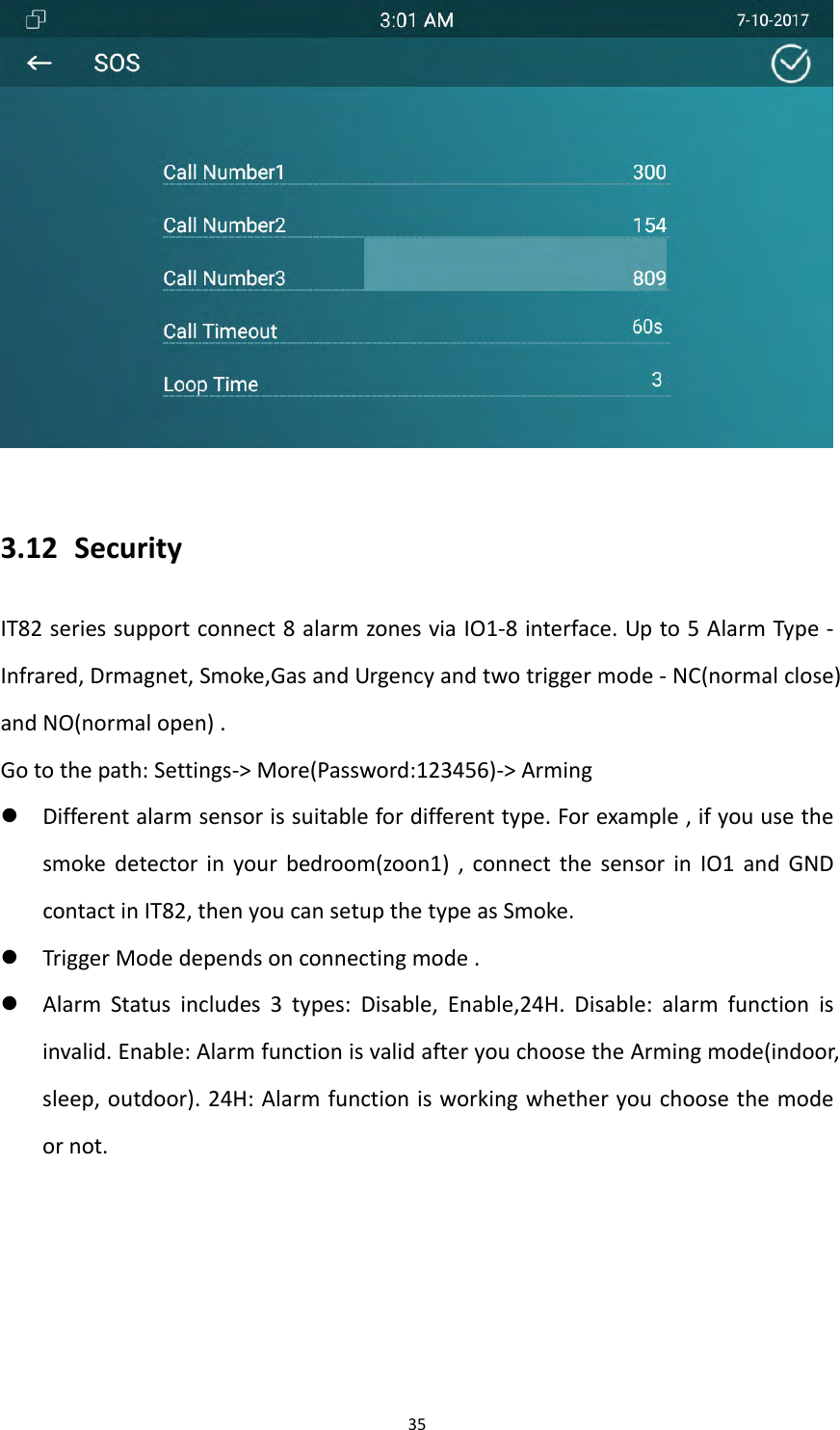
34Note:IT82seriesdefaultDTMFcodeis#.UsersneedtopredefinethesameDTMFcodeofdoorphoneandIT82.ConfigurationDTMFcode,pleaseconsultyouradministrator.3.11 SOSSOSkeyisusedtocallouttheemergencynumberincaseofemergency.IT82serieswillcalloutforthreepredefinednumbersinaloop,eachnumberwillbecalledfor60s(bydefault).1. GotoSetting‐>More‐(password)>SOS2. Setup3emergencynumber3. SetupthecallTimeout4. Setupthelooptime5. ClickCONFIRMtosave
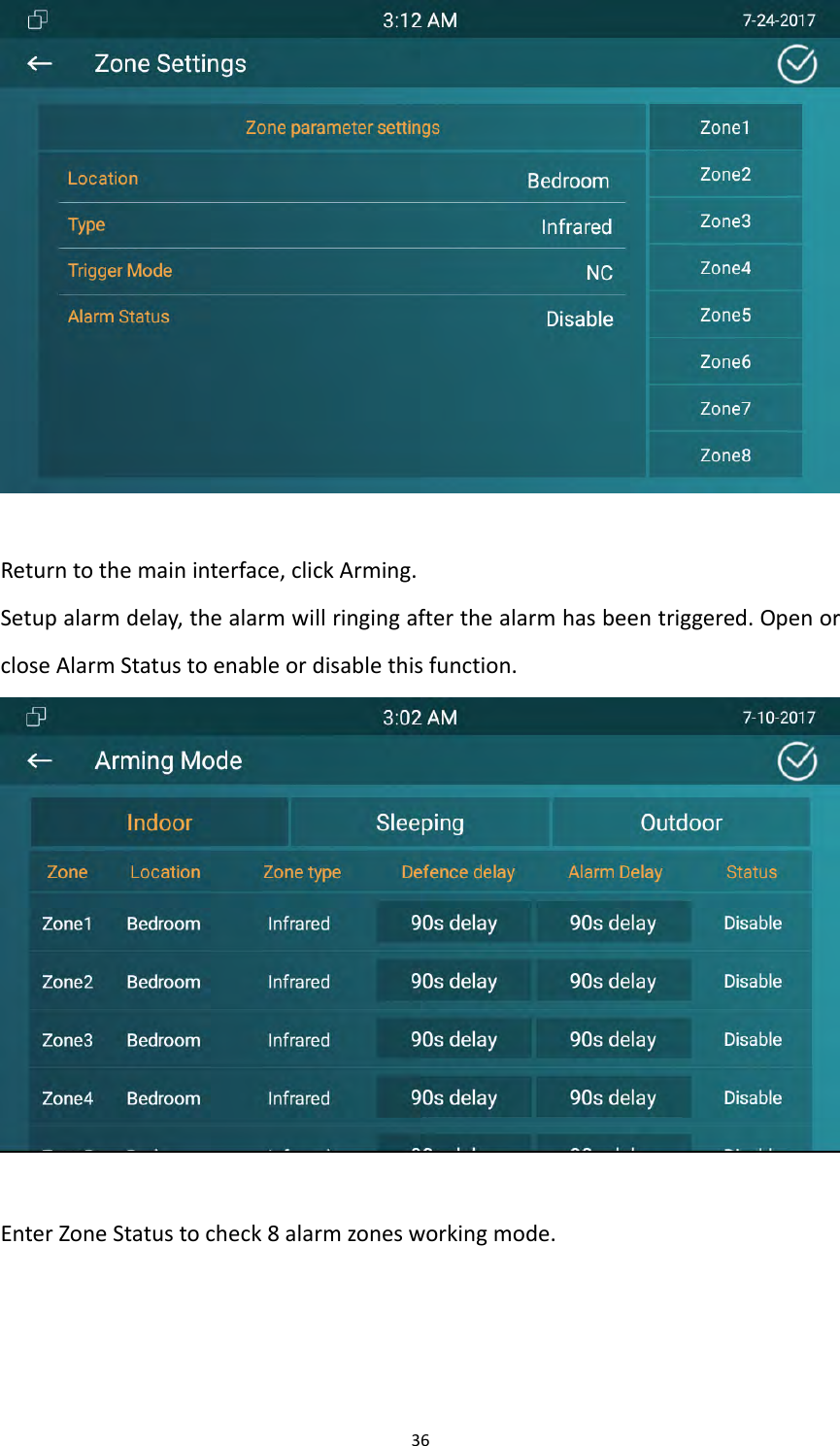
353.12 SecurityIT82seriessupportconnect8alarmzonesviaIO1‐8interface.Upto5AlarmType‐Infrared,Drmagnet,Smoke,GasandUrgencyandtwotriggermode‐NC(normalclose)andNO(normalopen).Gotothepath:Settings‐>More(Password:123456)‐>Arming Differentalarmsensorissuitablefordifferenttype.Forexample,ifyouusethesmokedetectorinyourbedroom(zoon1),connectthesensorinIO1andGNDcontactinIT82,thenyoucansetupthetypeasSmoke. TriggerModedependsonconnectingmode. AlarmStatusincludes3types:Disable,Enable,24H.Disable:alarmfunctionisinvalid.Enable:AlarmfunctionisvalidafteryouchoosetheArmingmode(indoor,sleep,outdoor).24H:Alarmfunctionisworkingwhetheryouchoosethemodeornot.
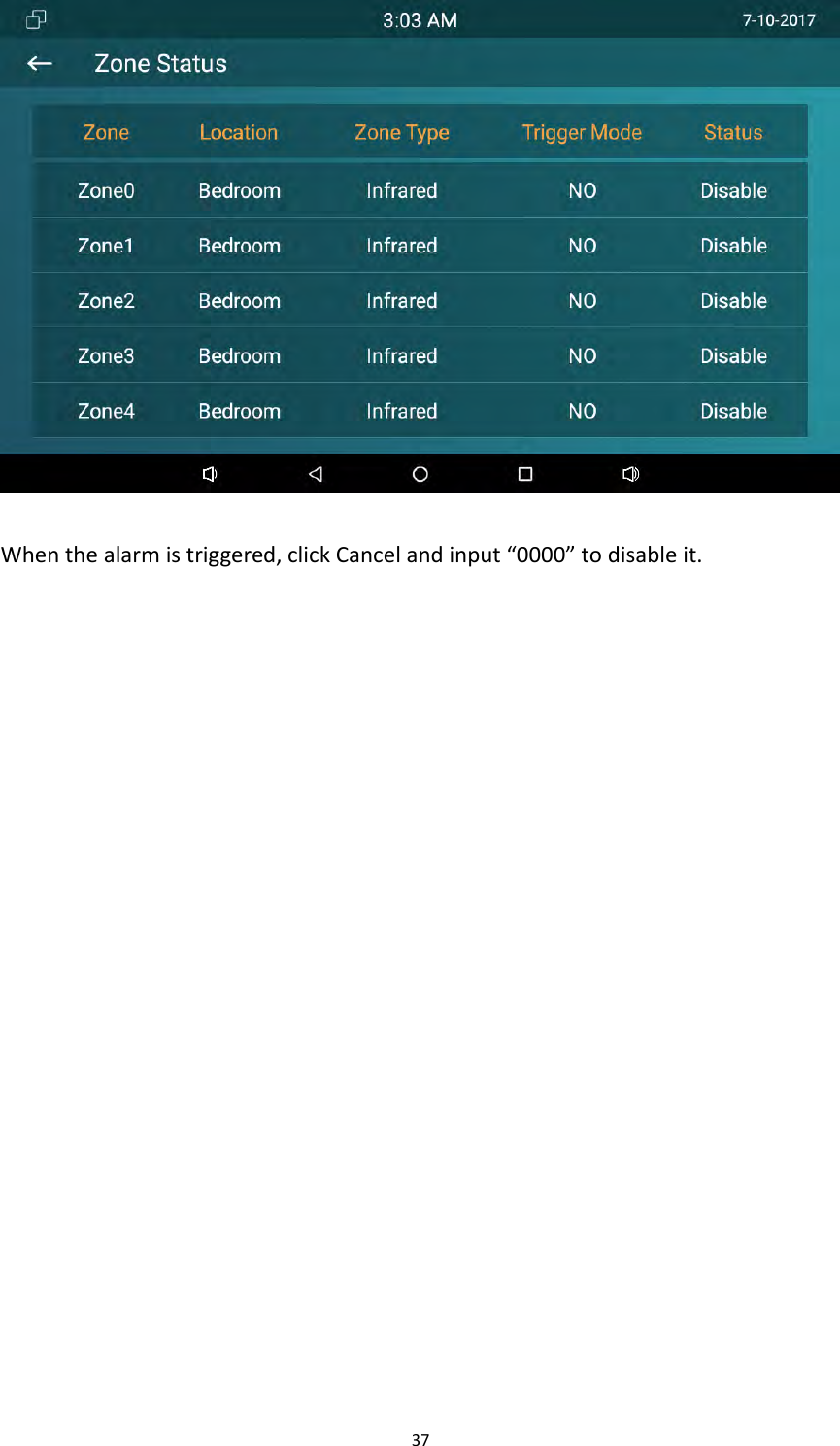
36Returntothemaininterface,clickArming.Setupalarmdelay,thealarmwillringingafterthealarmhasbeentriggered.OpenorcloseAlarmStatustoenableordisablethisfunction.EnterZoneStatustocheck8alarmzonesworkingmode.
37Whenthealarmistriggered,clickCancelandinput“0000”todisableit.
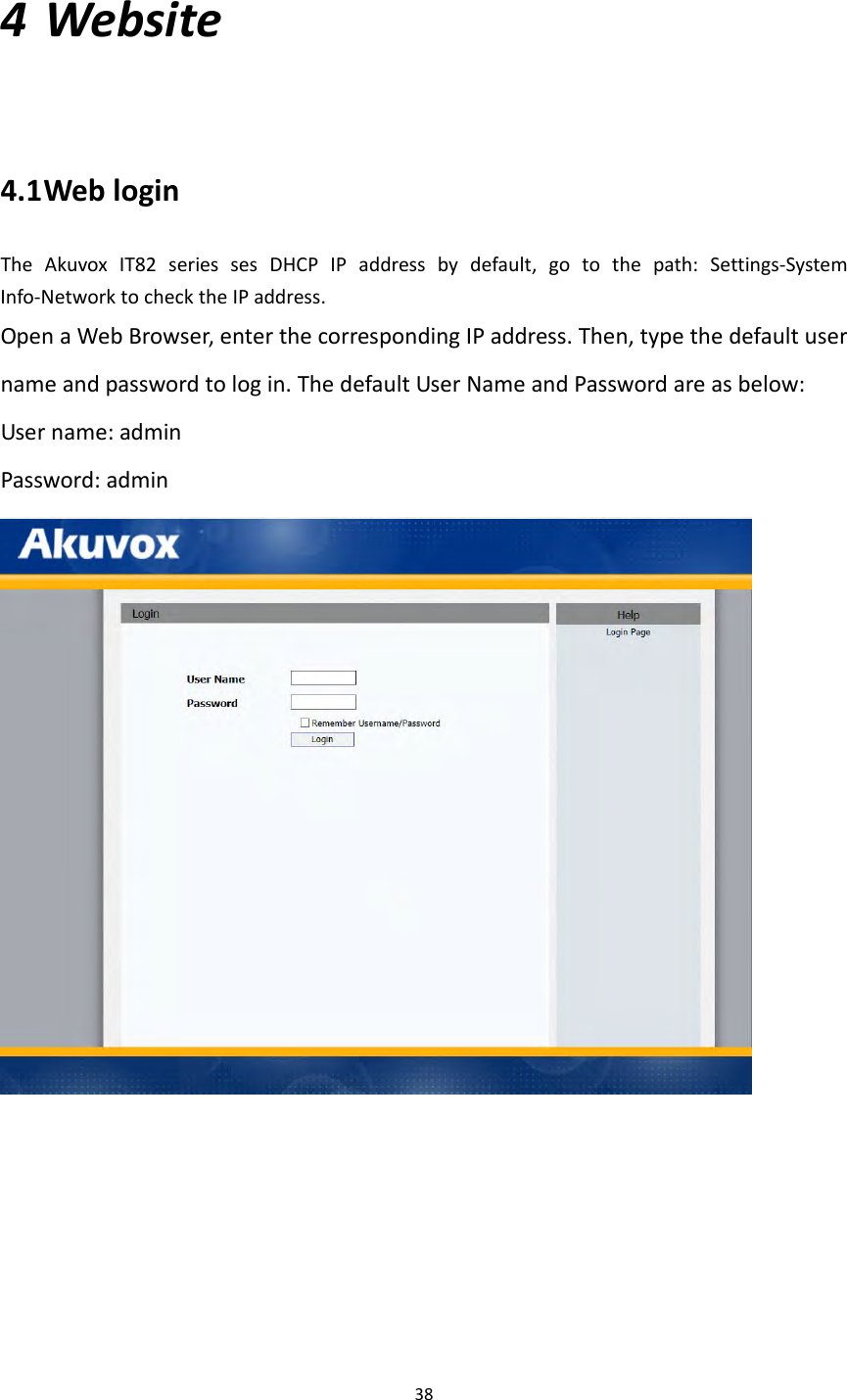
384 Website4.1 WebloginTheAkuvoxIT82seriessesDHCPIPaddressbydefault,gotothepath:Settings‐SystemInfo‐NetworktochecktheIPaddress.OpenaWebBrowser,enterthecorrespondingIPaddress.Then,typethedefaultusernameandpasswordtologin.ThedefaultUserNameandPasswordareasbelow:Username:adminPassword:admin
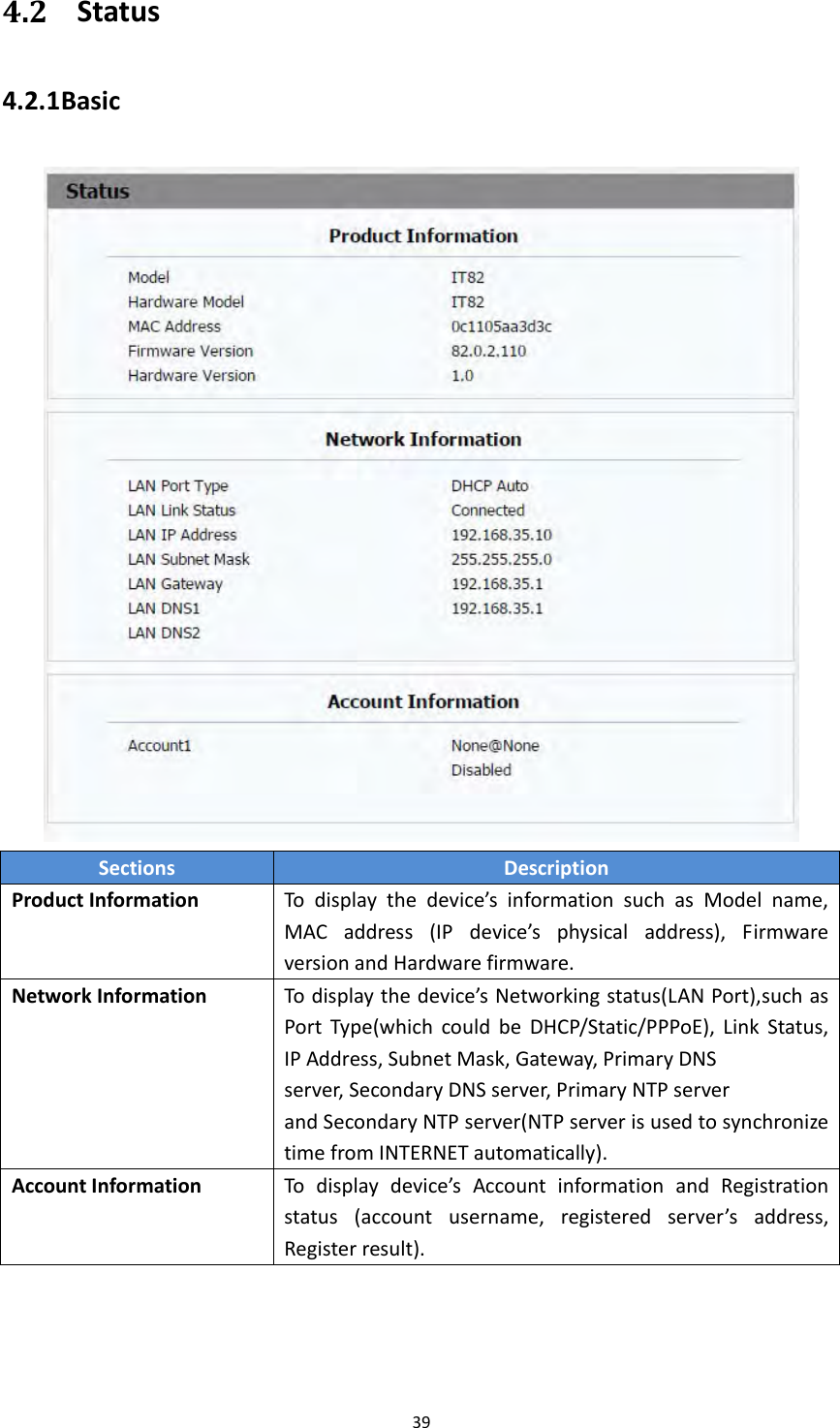
394.2 Status4.2.1 BasicSectionsDescriptionProductInformationTodisplaythedevice’sinformationsuchasModelname,MACaddress(IPdevice’sphysicaladdress),FirmwareversionandHardwarefirmware.NetworkInformationTodisplaythedevice’sNetworkingstatus(LANPort),suchasPortType(whichcouldbeDHCP/Static/PPPoE),LinkStatus,IPAddress,SubnetMask,Gateway,PrimaryDNSserver,SecondaryDNSserver,PrimaryNTPserverandSecondaryNTPserver(NTPserverisusedtosynchronizetimefromINTERNETautomatically).AccountInformationTodisplaydevice’sAccountinformationandRegistrationstatus(accountusername,registeredserver’saddress,Registerresult).
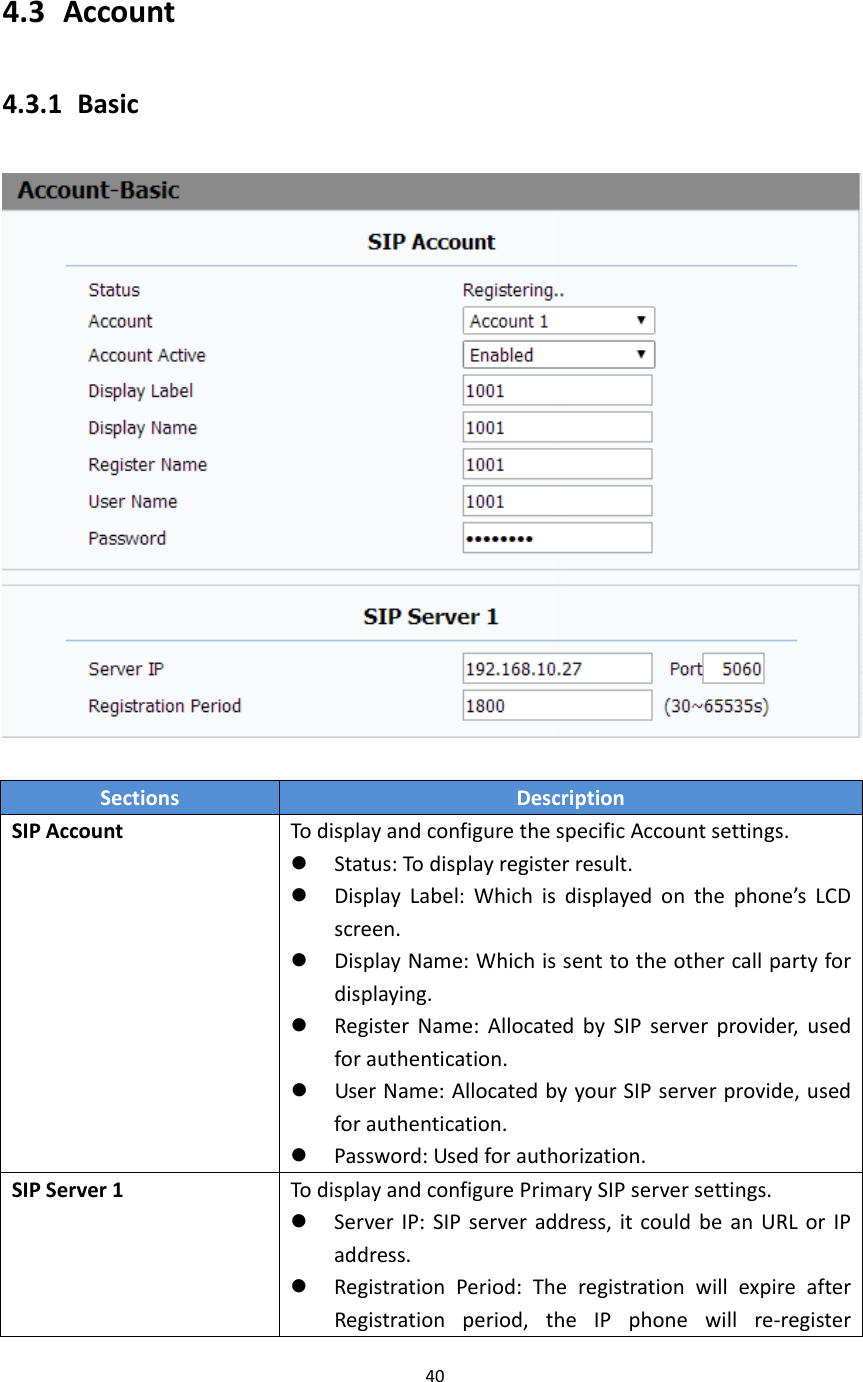
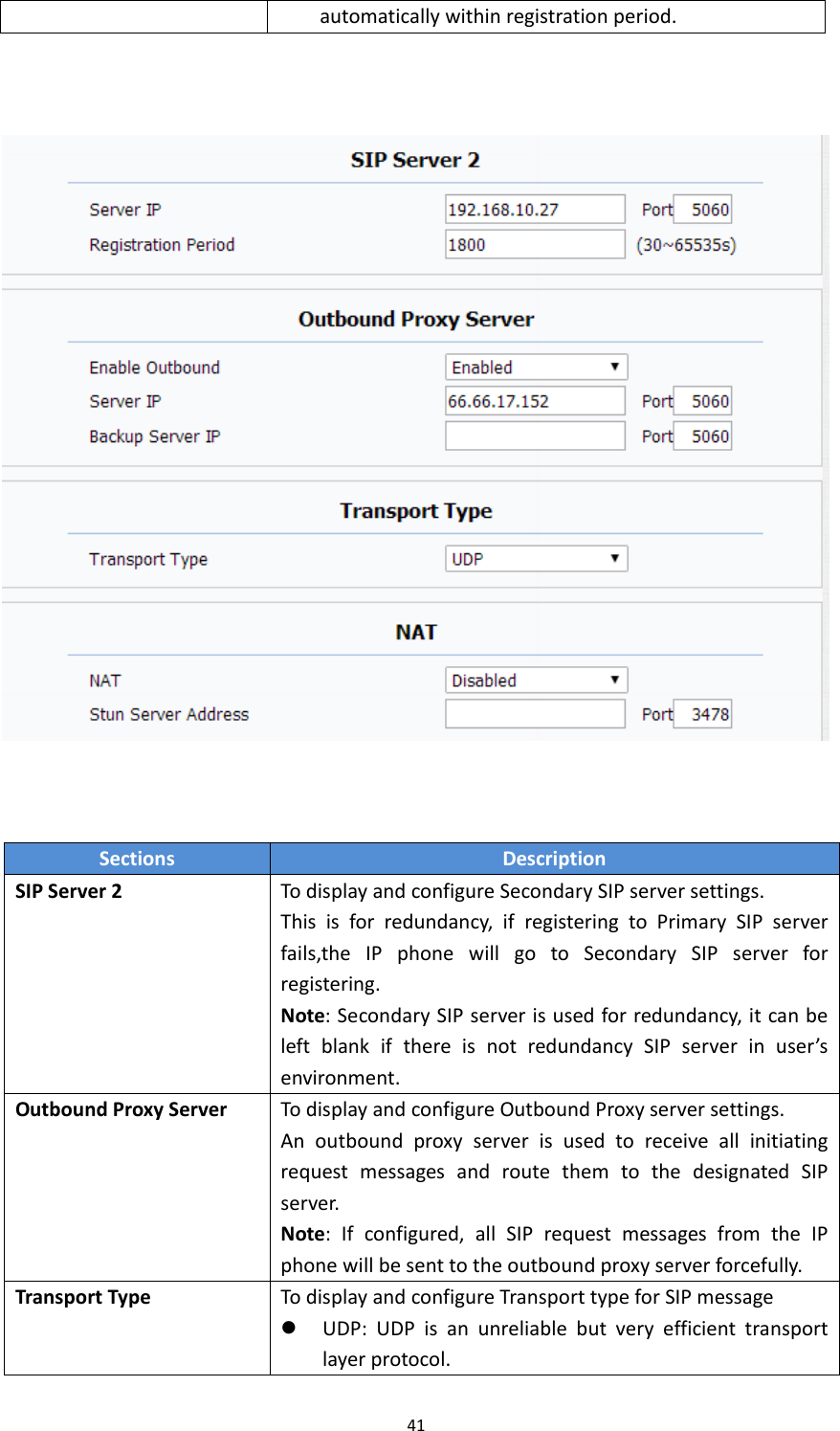
404.3 Account4.3.1 BasicSectionsDescriptionSIPAccountTodisplayandconfigurethespecificAccountsettings. Status:Todisplayregisterresult. DisplayLabel:Whichisdisplayedonthephone’sLCDscreen. DisplayName:Whichissenttotheothercallpartyfordisplaying. RegisterName:AllocatedbySIPserverprovider,usedforauthentication. UserName:AllocatedbyyourSIPserverprovide,usedforauthentication. Password:Usedforauthorization.SIPServer1TodisplayandconfigurePrimarySIPserversettings. ServerIP:SIPserveraddress,itcouldbeanURLorIPaddress. RegistrationPeriod:TheregistrationwillexpireafterRegistrationperiod,theIPphonewillre‐register
41SectionsDescriptionSIPServer2TodisplayandconfigureSecondarySIPserversettings.Thisisforredundancy,ifregisteringtoPrimarySIPserverfails,theIPphonewillgotoSecondarySIPserverforregistering.Note:SecondarySIPserverisusedforredundancy,itcanbeleftblankifthereisnotredundancySIPserverinuser’senvironment.OutboundProxyServerTodisplayandconfigureOutboundProxyserversettings.AnoutboundproxyserverisusedtoreceiveallinitiatingrequestmessagesandroutethemtothedesignatedSIPserver.Note:Ifconfigured,allSIPrequestmessagesfromtheIPphonewillbesenttotheoutboundproxyserverforcefully.TransportTypeTodisplayandconfigureTransporttypeforSIPmessage UDP:UDPisanunreliablebutveryefficienttransportlayerprotocol.automaticallywithinregistrationperiod.
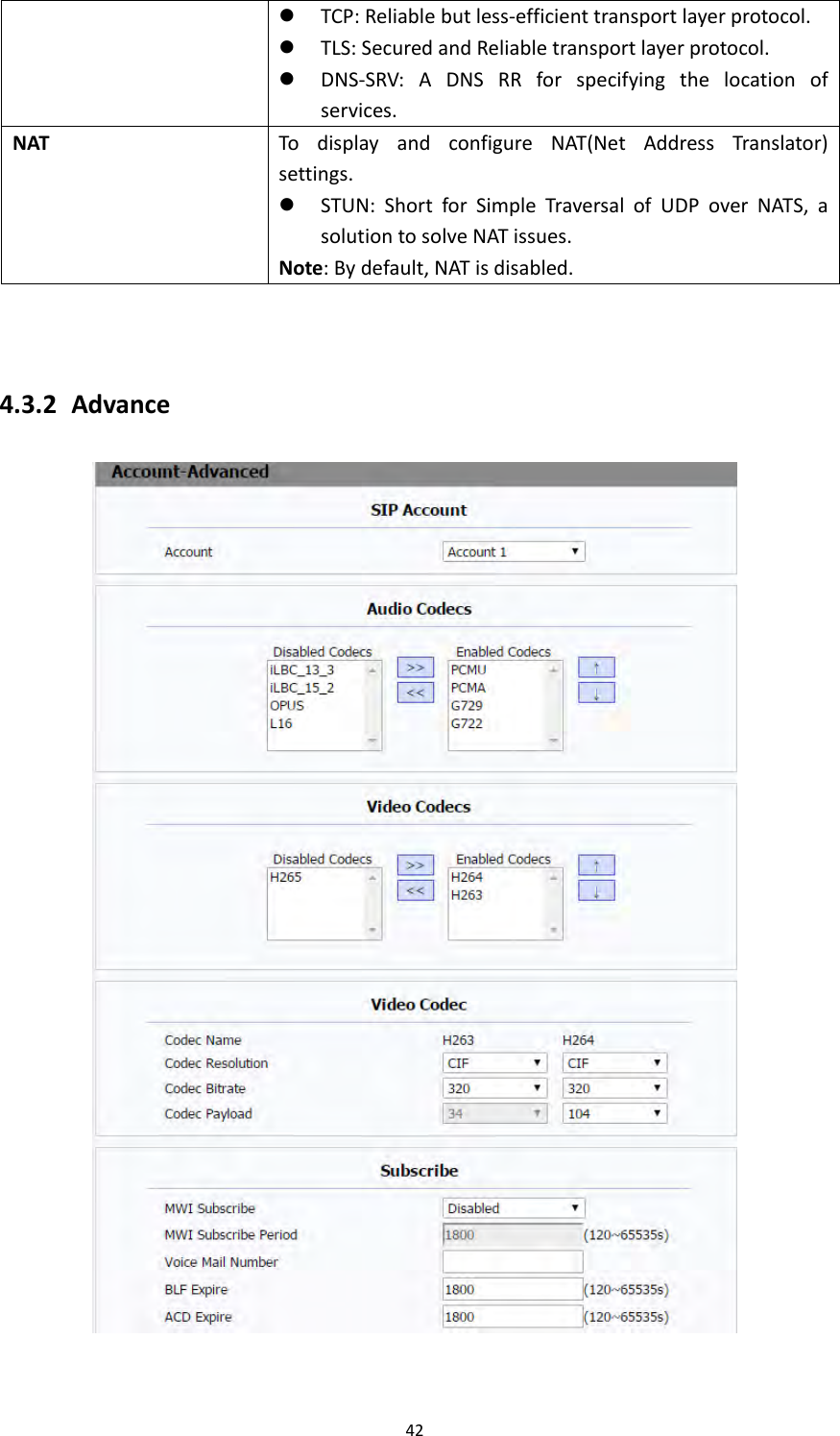
42 TCP:Reliablebutless‐efficienttransportlayerprotocol. TLS:SecuredandReliabletransportlayerprotocol. DNS‐SRV:ADNSRRforspecifyingthelocationofservices.NATTodisplayandconfigureNAT(NetAddressTranslator)settings. STUN:ShortforSimpleTraversalofUDPoverNATS,asolutiontosolveNATissues.Note:Bydefault,NATisdisabled.4.3.2 Advance
43SectionsDescriptionSIPAccountTodisplaycurrentAccountsettingsortoselectwhichaccounttodisplay.AudioCodecsTodisplayandconfigureavailable/unavailablecodecslist.Codecmeanscoder‐decoderwhichisusedtotransferanalogsignaltodigitalsignalorviceversa.FamiliarcodecsarePCMU(G711U),PCMA(G711A),G722(wide‐bandthcodecs),G729andsoon.VideoCodecsToconfigurethevideoquality. CodecName:ThedefaultvideocodecisH264. CodecResolution:ItcansupportQCIF,CIF,VGA,4CIF,720P. CodecBitrate:Thelowestbitrateis128,thehighestbitrateis2048. Codecpayload:From90‐119.SubscribeTodisplayandconfigureMWI,BLF,ACDsubscriptionsettings. MWI:MessageWaitingIndicatorwhichisusedtoindicatewhetherthereisunreadnewvoicemessage. BLF:BLFisshortforBusyLampFieldwhichisusedtomonitorthedesignatedextensionstatus. ACD:AutomaticCallDistributionisoftenusedinofficesforcustomerservice,suchascallcenter.ThesettinghereistonegotiatewiththeserveraboutexpiretimeofACDsubscription.
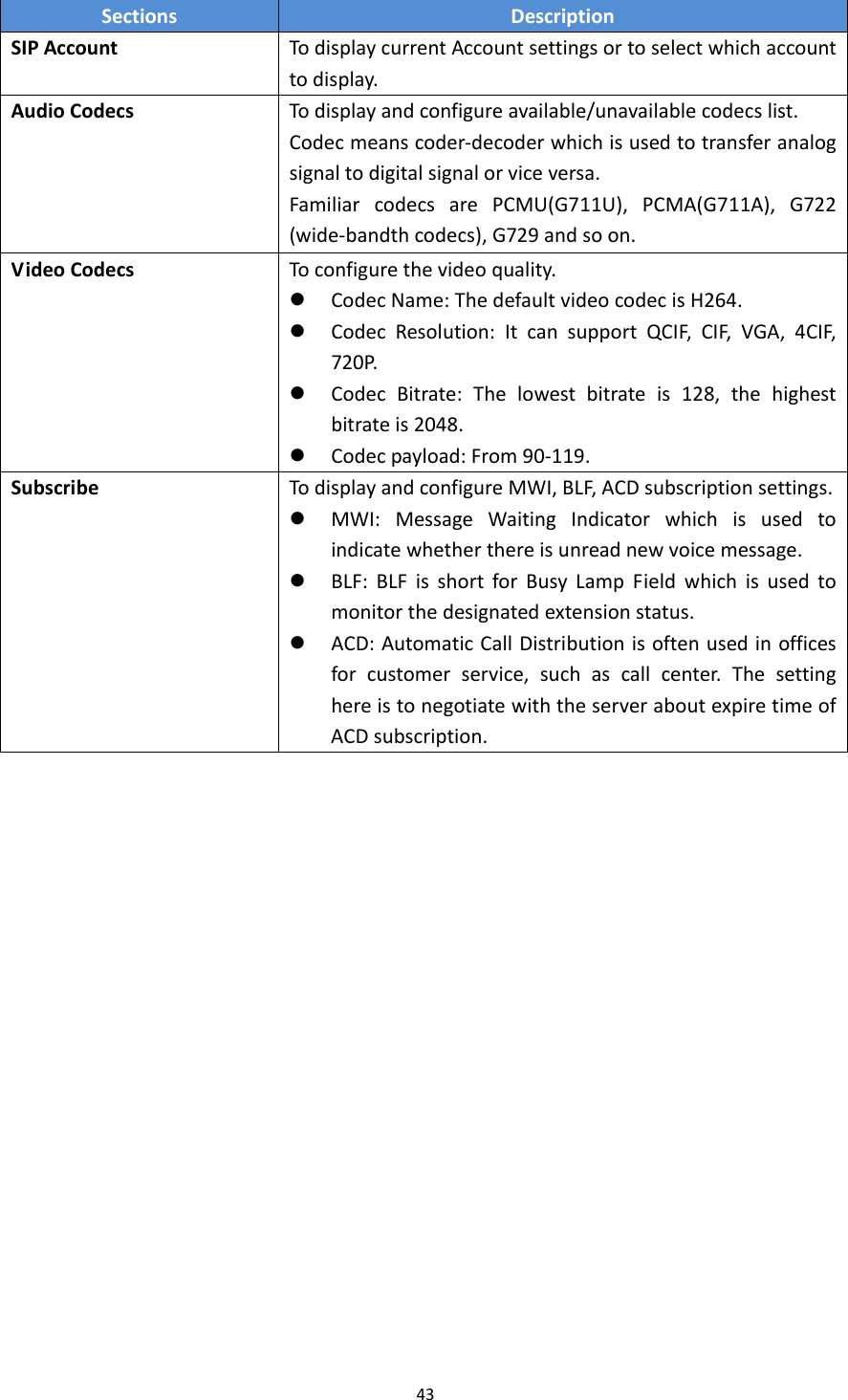
44SectionsDescriptionDTMFTodisplayandconfigureDTMFsettings. Type:SupportInband,Info,RFC2833ortheircombination. HowToNotifyDTMF:OnlyavailablewhenDTMFTypeisInfo. DTMFPayload:ToconfigurepayloadtypeforDTMF.Note:Bydefault,DTMFtypeisRFC2833whichisthestandard.TypeInbandusesinbandfrequencytoindicateDTMFtonewhichismostusedtobecompatibletotraditionaltelephoneserver.TypeInfousesSIPInfomessagetoindicateDTMFmessage.CallTodisplayandconfigurecall‐relatedfeatures. MaxLocalSIPPort:Toconfiguremaximumlocalsipportfordesignatedaccount. MinLocalSIPPort:To configureminimumlocalsipportfordesignatedaccount. CallerIDHeader:ToconfigurewhichCallerIDformattofetchfordisplayingonPhoneUI. AutoAnswer:Ifenabled,IPphonewillbeauto‐answeredwhenthereisanincomingcallfordesignatedaccount. Ringtones:Choosetheringtoneforeachaccount. ProvisioningResponseACK:100%reliabilityforall
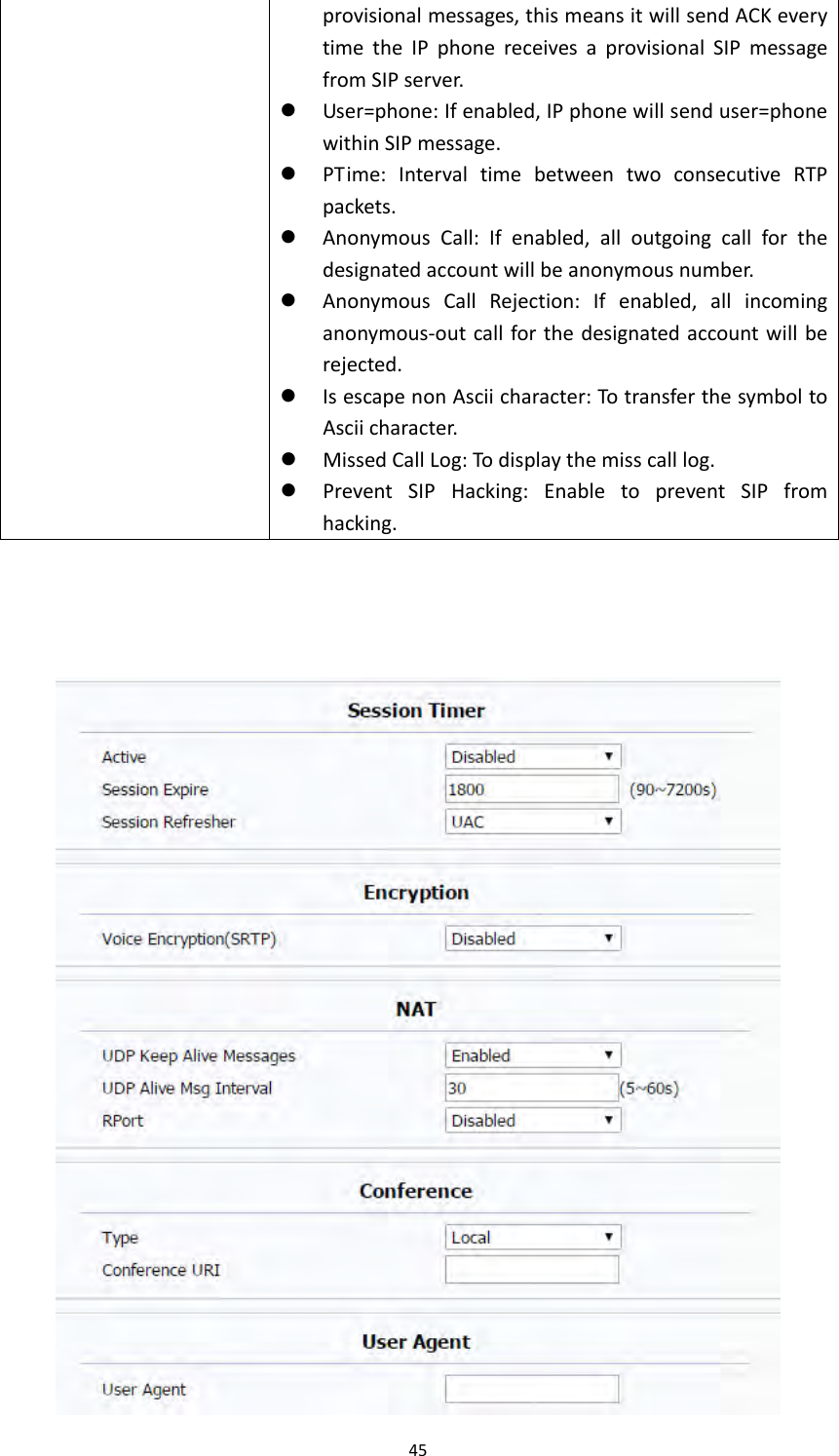
45provisionalmessages,thismeansitwillsendACKeverytimetheIPphonereceivesaprovisionalSIPmessagefromSIPserver. User=phone:Ifenabled,IPphonewillsenduser=phonewithinSIPmessage. PTime:IntervaltimebetweentwoconsecutiveRTPpackets. AnonymousCall:Ifenabled,alloutgoingcallforthedesignatedaccountwillbeanonymousnumber. AnonymousCallRejection:Ifenabled,allincominganonymous‐outcallforthedesignatedaccountwillberejected. IsescapenonAsciicharacter:TotransferthesymboltoAsciicharacter. MissedCallLog:Todisplaythemisscalllog. PreventSIPHacking:EnabletopreventSIPfromhacking.
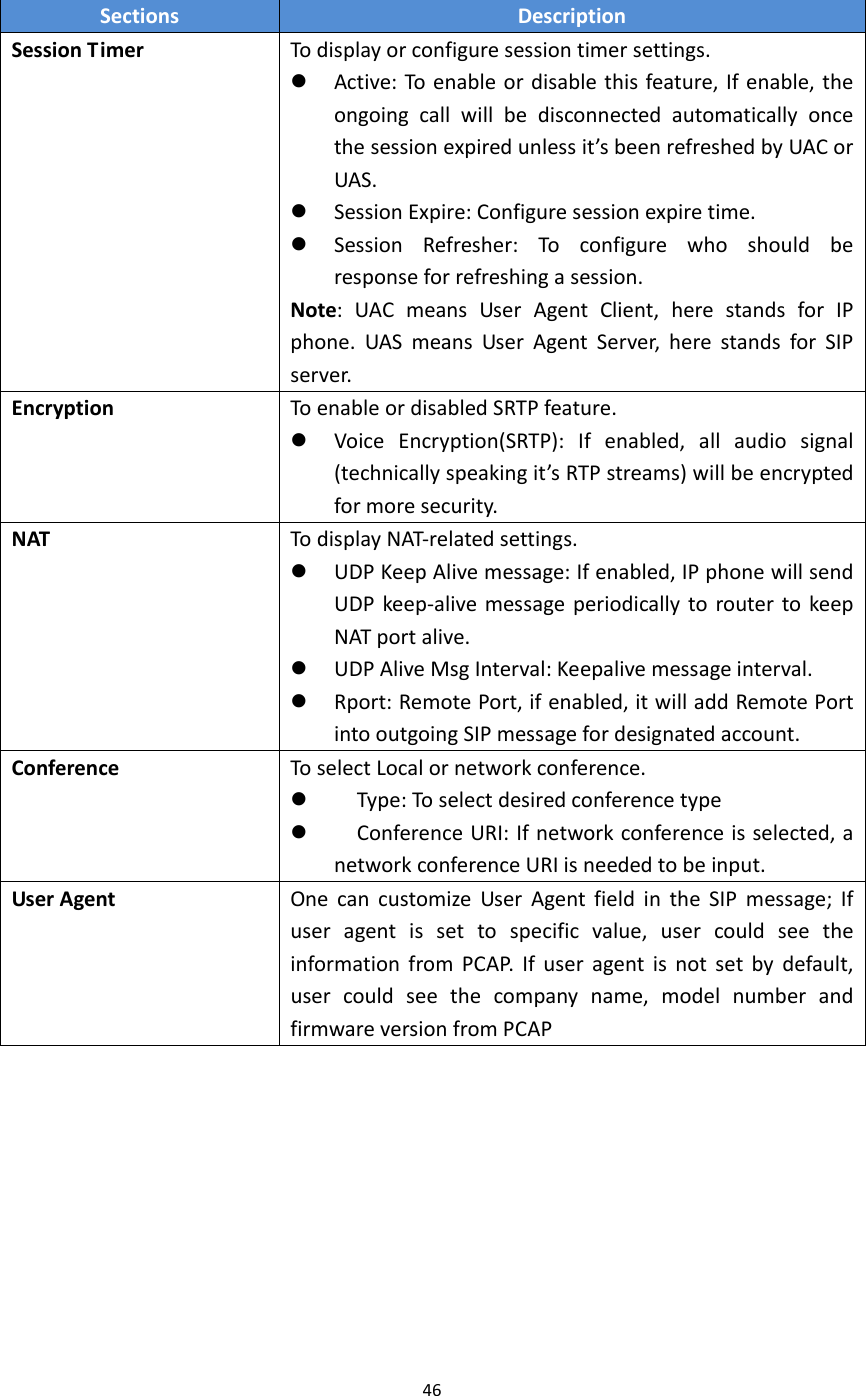
46SectionsDescriptionSessionTimerTodisplayorconfiguresessiontimersettings. Active:Toenableordisablethisfeature,Ifenable,theongoingcallwillbedisconnectedautomaticallyoncethesessionexpiredunlessit’sbeenrefreshedbyUACorUAS. SessionExpire:Configuresessionexpiretime. SessionRefresher:Toconfigurewhoshouldberesponseforrefreshingasession.Note:UACmeansUserAgentClient,herestandsforIPphone.UASmeansUserAgentServer,herestandsforSIPserver.EncryptionToenableordisabledSRTPfeature. VoiceEncryption(SRTP):Ifenabled,allaudiosignal(technicallyspeakingit’sRTPstreams)willbeencryptedformoresecurity.NATTodisplayNAT‐relatedsettings. UDPKeepAlivemessage:Ifenabled,IPphonewillsendUDPkeep‐alivemessageperiodicallytoroutertokeepNATportalive. UDPAliveMsgInterval:Keepalivemessageinterval. Rport:RemotePort,ifenabled,itwilladdRemotePortintooutgoingSIPmessagefordesignatedaccount.ConferenceToselectLocalornetworkconference. Type:Toselectdesiredconferencetype ConferenceURI:Ifnetworkconferenceisselected,anetworkconferenceURIisneededtobeinput.UserAgentOnecancustomizeUserAgentfieldintheSIPmessage;Ifuseragentissettospecificvalue,usercouldseetheinformationfromPCAP.Ifuseragentisnotsetbydefault,usercouldseethecompanyname,modelnumberandfirmwareversionfromPCAP
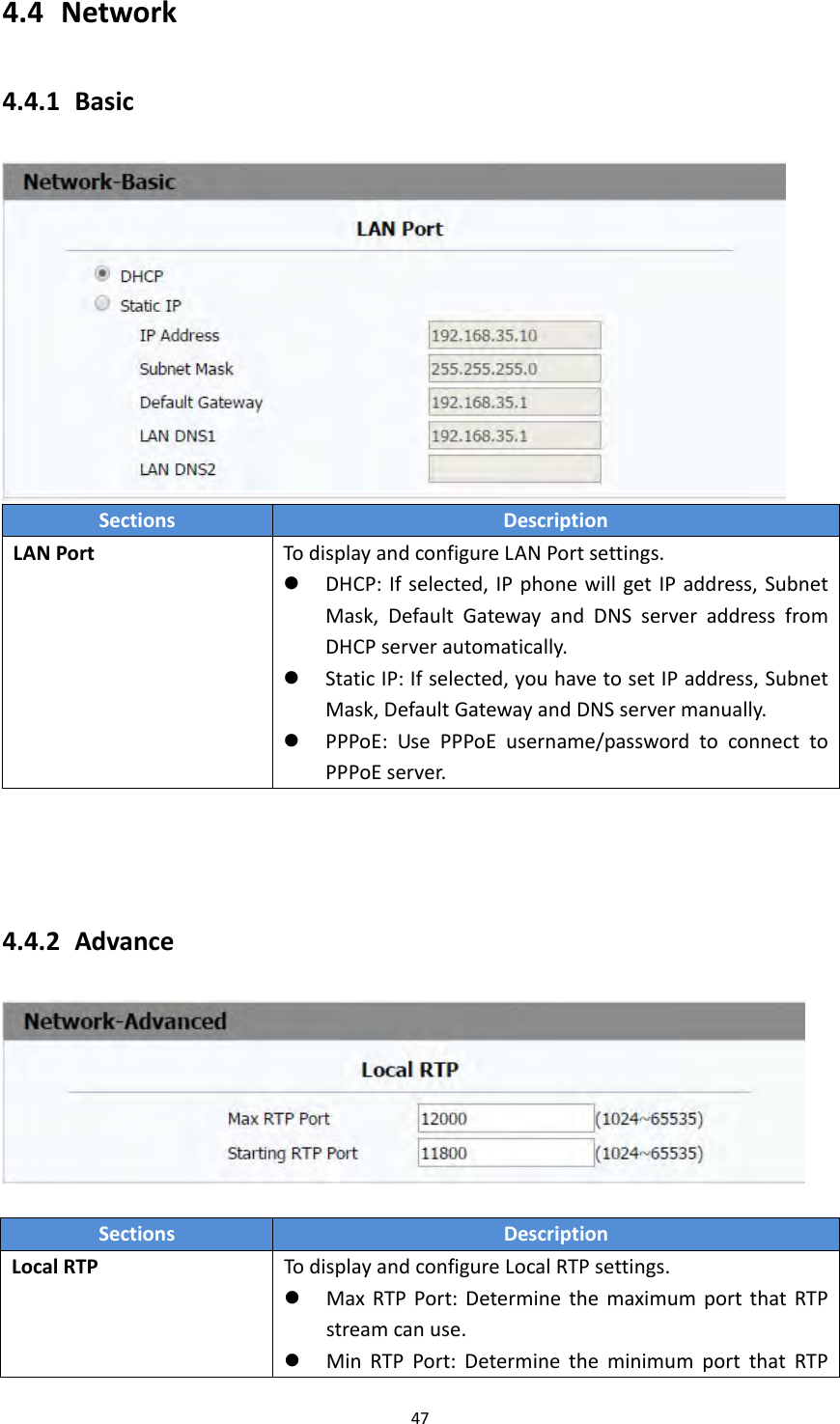
474.4 Network4.4.1 BasicSectionsDescriptionLANPortTodisplayandconfigureLANPortsettings. DHCP:Ifselected,IPphonewillgetIPaddress,SubnetMask,DefaultGatewayandDNSserveraddressfromDHCPserverautomatically. StaticIP:Ifselected,youhavetosetIPaddress,SubnetMask,DefaultGatewayandDNSservermanually. PPPoE:UsePPPoEusername/passwordtoconnecttoPPPoEserver.4.4.2 AdvanceSectionsDescriptionLocalRTPTodisplayandconfigureLocalRTPsettings. MaxRTPPort:DeterminethemaximumportthatRTPstreamcanuse. MinRTPPort:DeterminetheminimumportthatRTP
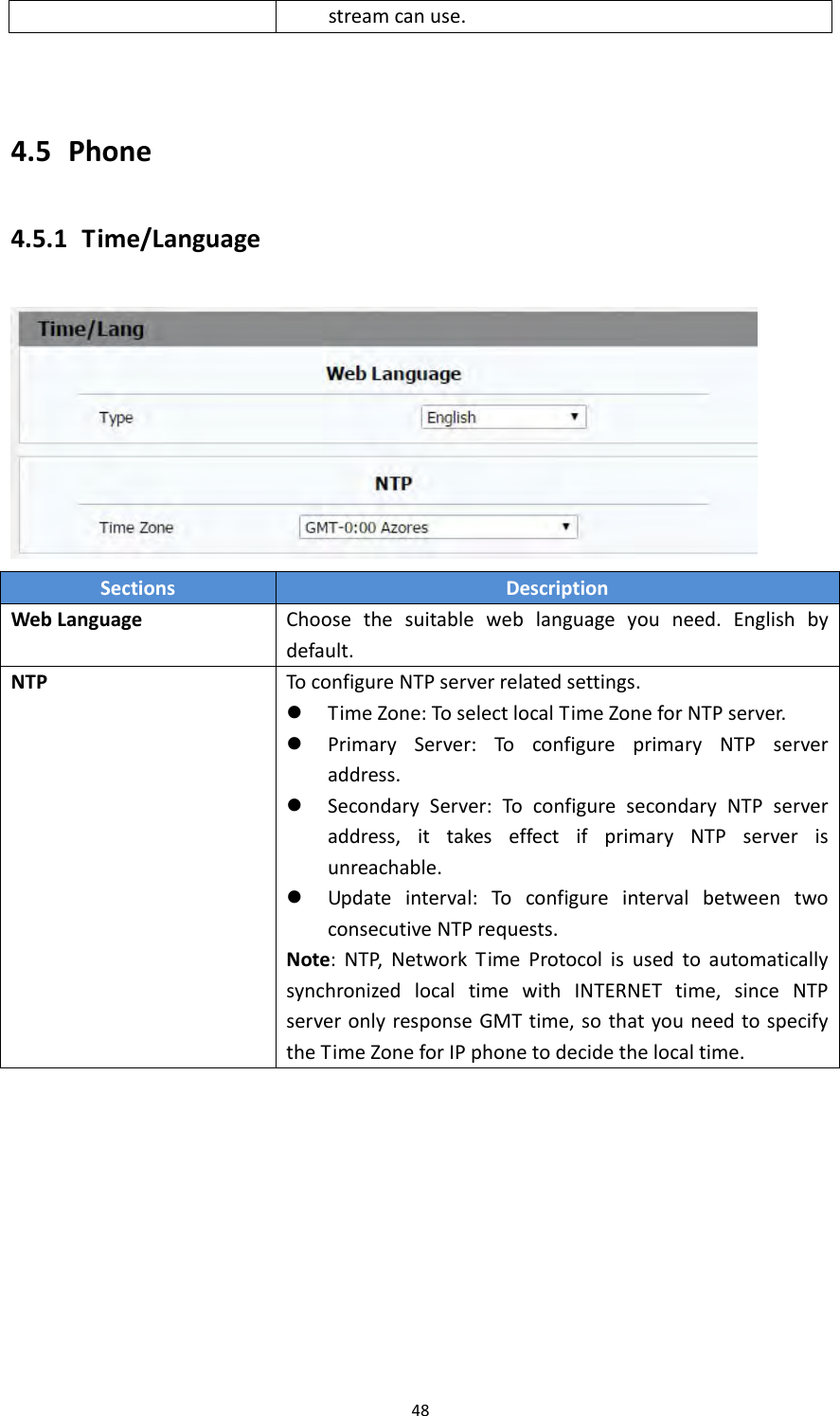
484.5 Phone4.5.1 Time/LanguageSectionsDescriptionWebLanguageChoosethesuitableweblanguageyouneed.Englishbydefault.NTPToconfigureNTPserverrelatedsettings. TimeZone:ToselectlocalTimeZoneforNTPserver. PrimaryServer:ToconfigureprimaryNTPserveraddress. SecondaryServer:ToconfiguresecondaryNTPserveraddress,ittakeseffectifprimaryNTPserverisunreachable. Updateinterval:ToconfigureintervalbetweentwoconsecutiveNTPrequests.Note:NTP,NetworkTimeProtocolisusedtoautomaticallysynchronizedlocaltimewithINTERNETtime,sinceNTPserveronlyresponseGMTtime,sothatyouneedtospecifytheTimeZoneforIPphonetodecidethelocaltime.streamcanuse.
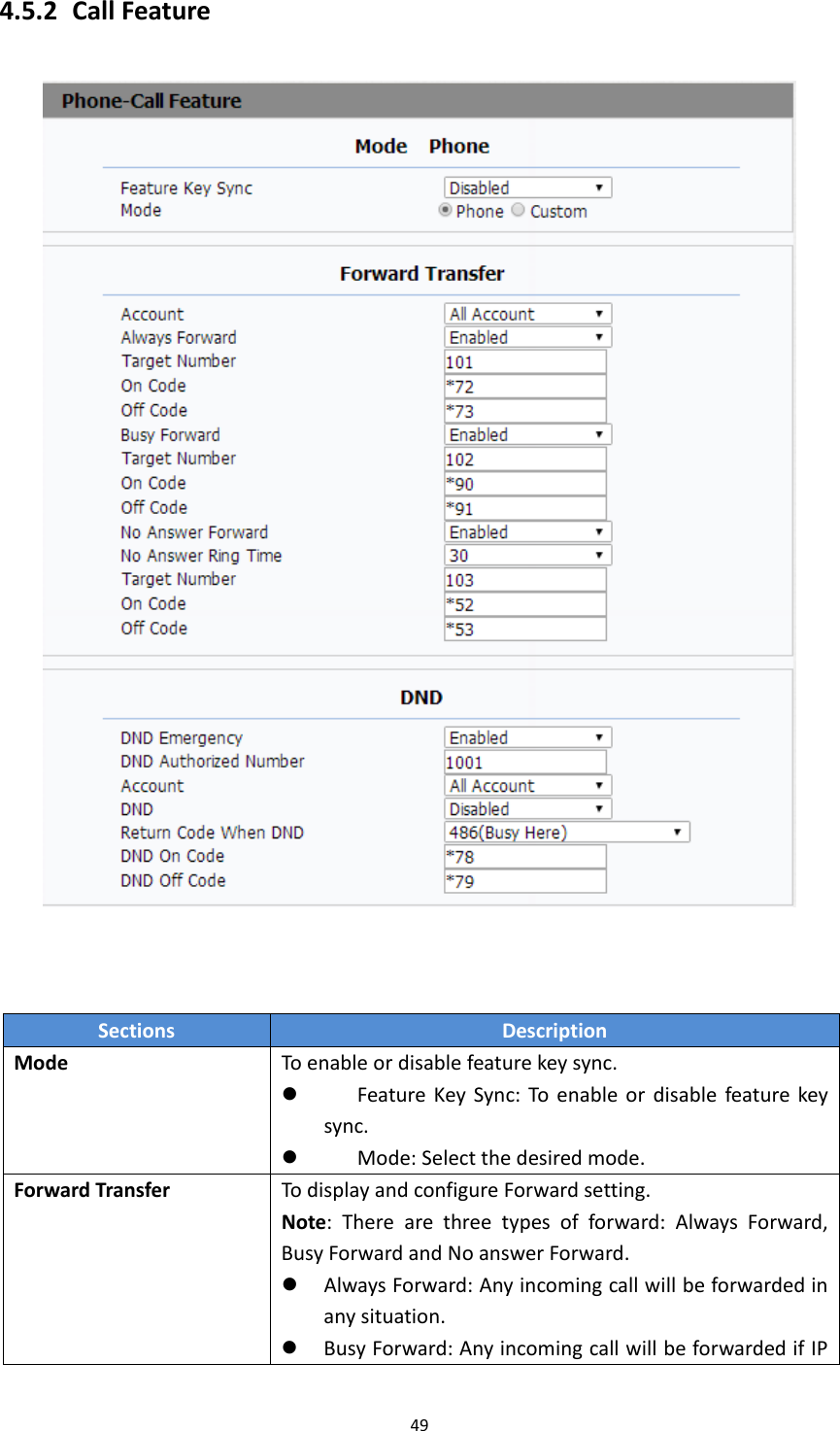
494.5.2 CallFeatureSectionsDescriptionModeToenableordisablefeaturekeysync. FeatureKeySync:Toenableordisablefeaturekeysync. Mode:Selectthedesiredmode.ForwardTransferTodisplayandconfigureForwardsetting.Note:Therearethreetypesofforward:AlwaysForward,BusyForwardandNoanswerForward. AlwaysForward:Anyincomingcallwillbeforwardedinanysituation. BusyForward:AnyincomingcallwillbeforwardedifIP
50phoneisbusy. NoanswerForward:Anyincomingcallwillbeforwardedifit’snoanswerafteraspecifictime.DNDDND(DoNotDisturb)allowsIPphonestoignoreanyincomingcalls. DNDEmergency:thephonefromtheAuthorizednumbercanstillbereceivedafterenablethisfunction. DNDAuthorizedNumber:SetupauthorizednumbersforDNDEmergency. Account:SelectanaccountforDND DND:Disablebydefault. ReturnCodewhenDND:DeterminewhatresponsescodeshouldbesentbacktoserverwhenthereisanincomingcallifDNDon. DNDOnCode:TheCodeusedtoturnonDNDonserver’sside,ifconfigured,IPphonewillsendaSIPmessagetoservertoturnonDNDonserversideifyoupressDNDwhenDNDisoff. DNDOffCode:TheCodeusedtoturnoffDNDonserver’sside,ifconfigured,IPphonewillsendaSIPmessagetoservertoturnoffDNDonserversideifyoupressDNDwhenDNDison.
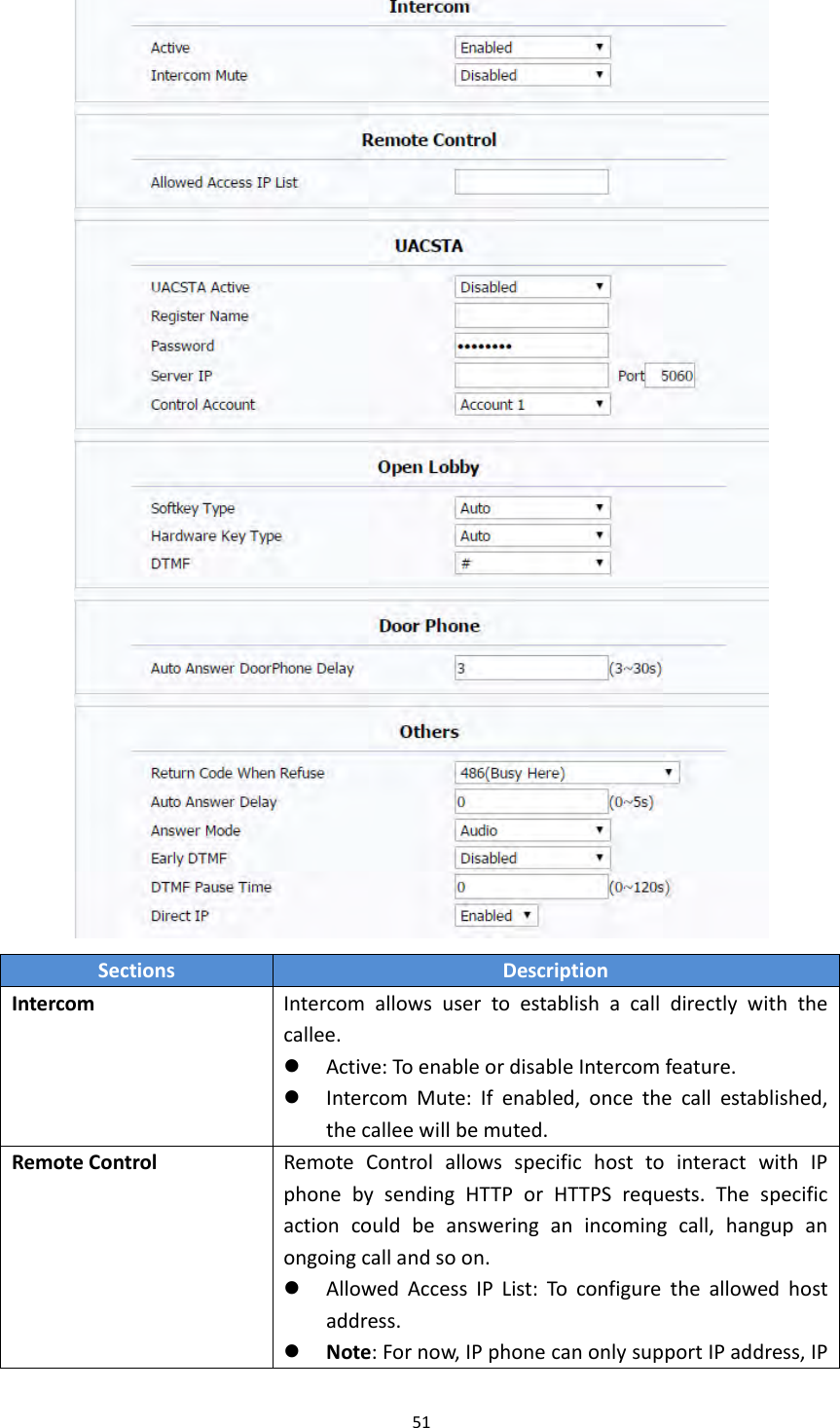
51SectionsDescriptionIntercomIntercomallowsusertoestablishacalldirectlywiththecallee. Active:ToenableordisableIntercomfeature. IntercomMute:Ifenabled,oncethecallestablished,thecalleewillbemuted.RemoteControlRemoteControlallowsspecifichosttointeractwithIPphonebysendingHTTPorHTTPSrequests.Thespecificactioncouldbeansweringanincomingcall,hangupanongoingcallandsoon. AllowedAccessIPList:Toconfiguretheallowedhostaddress. Note:Fornow,IPphonecanonlysupportIPaddress,IP
52addresslistandIPaddresspatternasallowedhostsUACSTAUsingCSTAforSIPphoneuseragents.Itcancontrolsomefeaturesofcalling.UACSTAisusedtosendECMA‐323(CSTAXML)informationduringSIPcalling.ThedefaultstatusisdisabledOpenLobbyUsercanchoosewhichtypesyouneedforeachkey.AkuvoxIT82supports2typestounlock‐DTMFandRelay.DTMFisusedtounlockthelobbydoorremotly,Relayisusedtoopenthelocaldoor.Softkey:Duringthetalking,usercanpressUnlockkeytoopenthedoor.HardwareKey:Usercanalsopresshardwarekeytounlockthedoor.DTMF:IfyouchooseDTMFcodeforoneunlockkey.PleasesetuptheDTMFcode.DoorPhoneWhenthereisanincomingcallfromdoorphone,setupthedelayautoanswertime,IT82serieswillautoanswerthecallafterthetimeout.Note:ifyouenableAutoAnswerfunction,thisfeaturewillbenotavailable.Others ReturnCodeWhenRefuse:AllowsusertoassignspecificcodeasreturncodetoSIPserverwhenanincomingcallisrejected. AutoAnswerDelay:Toconfiguredelaytimebeforeanincomingcallisautomaticallyanswered. AutoAnswerMode:Tosetvideooraudiomodeforautoanswerbydefault. EarlyDTMF:EnableordisableearlyDTMFfunction DirectIP:DirectIPcallwithoutSIPproxy.
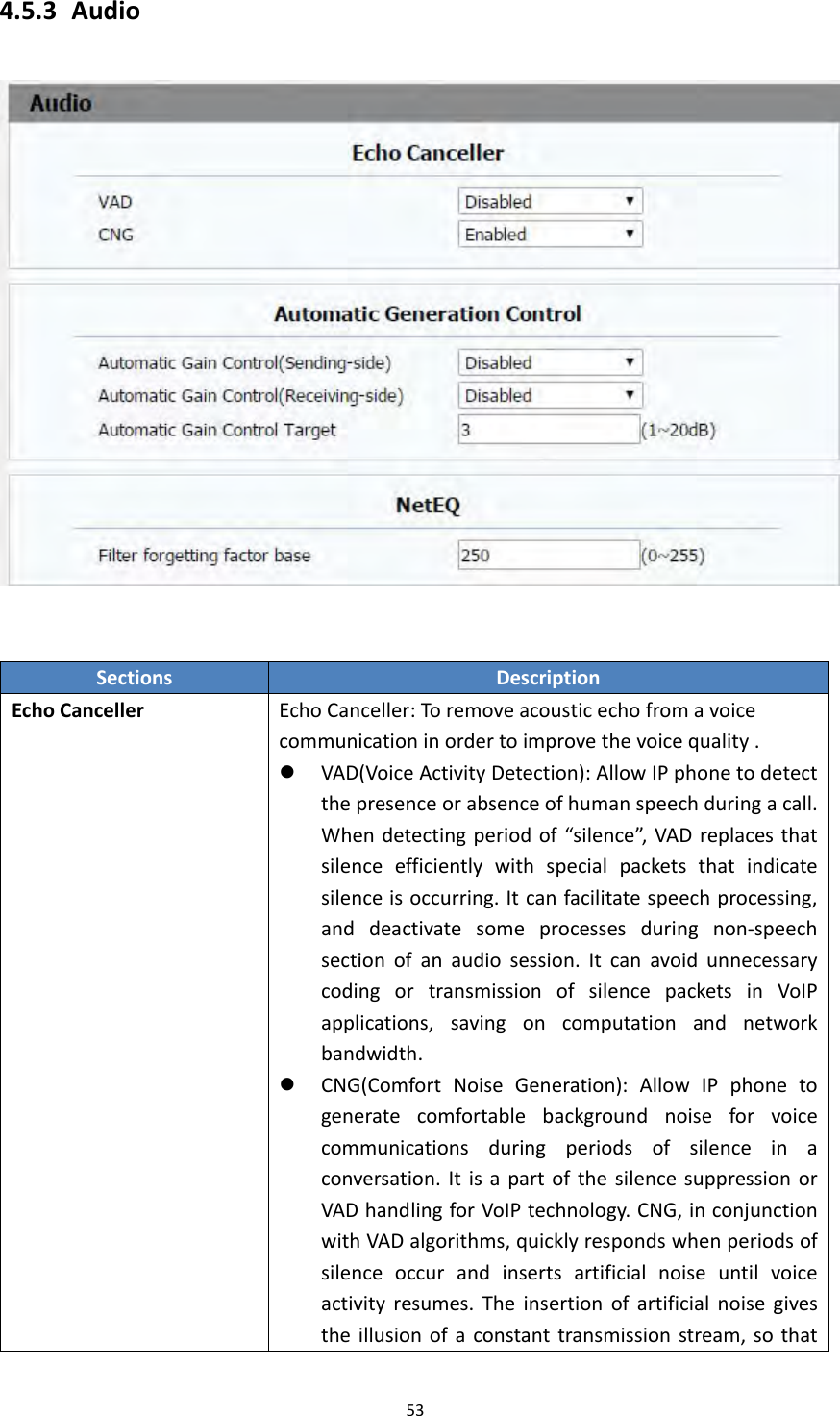
534.5.3 AudioSectionsDescriptionEchoCancellerEchoCanceller:Toremoveacousticechofromavoicecommunicationinordertoimprovethevoicequality. VAD(VoiceActivityDetection):AllowIPphonetodetectthepresenceorabsenceofhumanspeechduringacall.Whendetectingperiodof“silence”,VADreplacesthatsilenceefficientlywithspecialpacketsthatindicatesilenceisoccurring.Itcanfacilitatespeechprocessing,anddeactivatesomeprocessesduringnon‐speechsectionofanaudiosession.ItcanavoidunnecessarycodingortransmissionofsilencepacketsinVoIPapplications,savingoncomputationandnetworkbandwidth. CNG(ComfortNoiseGeneration):AllowIPphonetogeneratecomfortablebackgroundnoiseforvoicecommunicationsduringperiodsofsilenceinaconversation.ItisapartofthesilencesuppressionorVADhandlingforVoIPtechnology.CNG,inconjunctionwithVADalgorithms,quicklyrespondswhenperiodsofsilenceoccurandinsertsartificialnoiseuntilvoiceactivityresumes.Theinsertionofartificialnoisegivestheillusionofaconstanttransmissionstream,sothat
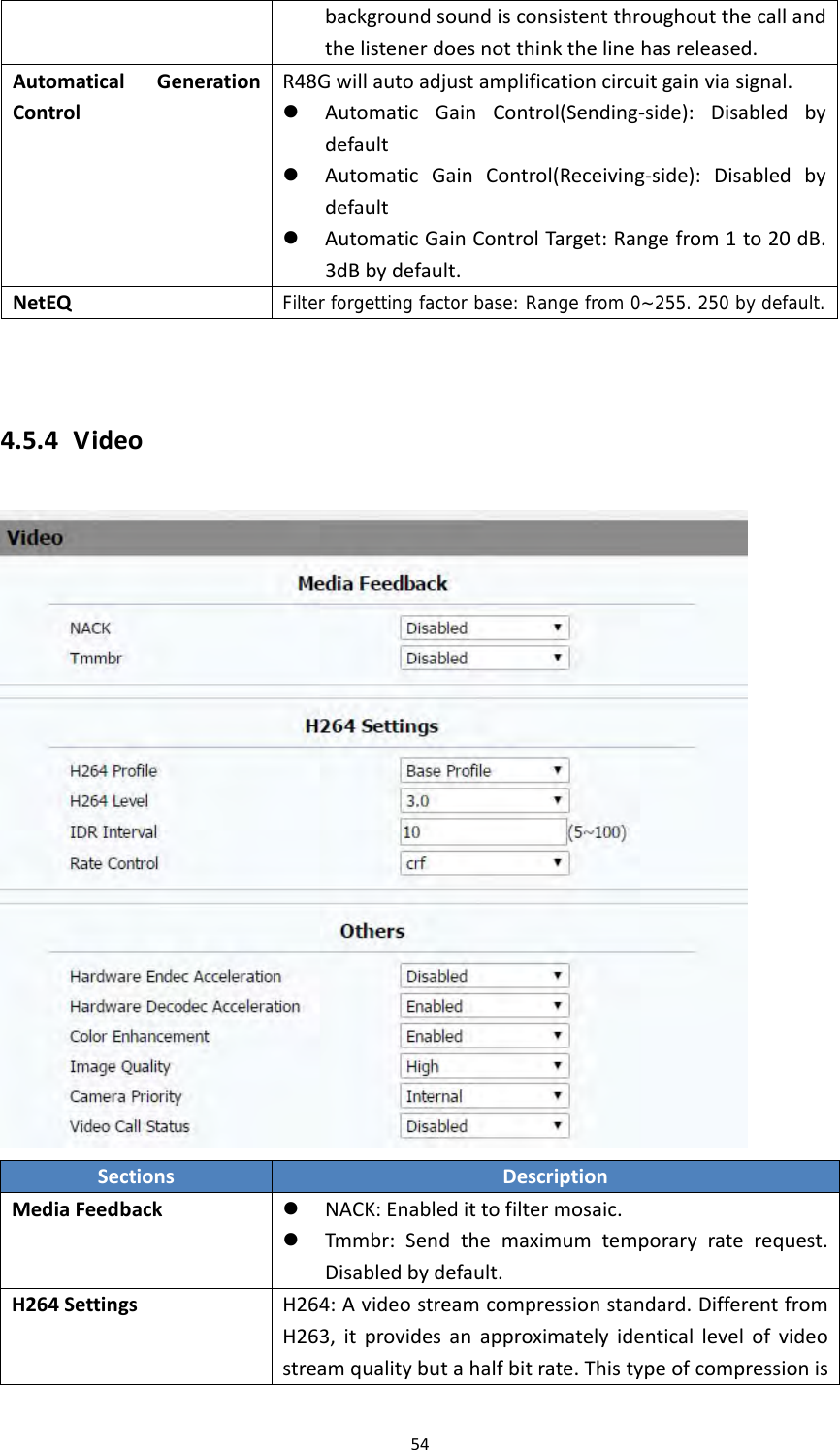
54backgroundsoundisconsistentthroughoutthecallandthelistenerdoesnotthinkthelinehasreleased.AutomaticalGenerationControlR48Gwillautoadjustamplificationcircuitgainviasignal. AutomaticGainControl(Sending‐side):Disabledbydefault AutomaticGainControl(Receiving‐side):Disabledbydefault AutomaticGainControlTarget:Rangefrom1to20dB.3dBbydefault.NetEQFilter forgetting factor base: Range from 0~255. 250 by default.4.5.4 VideoSectionsDescriptionMediaFeedback NACK:Enabledittofiltermosaic. Tmmbr:Sendthemaximumtemporaryraterequest.Disabledbydefault.H264SettingsH264:Avideostreamcompressionstandard.DifferentfromH263,itprovidesanapproximatelyidenticallevelofvideostreamqualitybutahalfbitrate.Thistypeofcompressionis
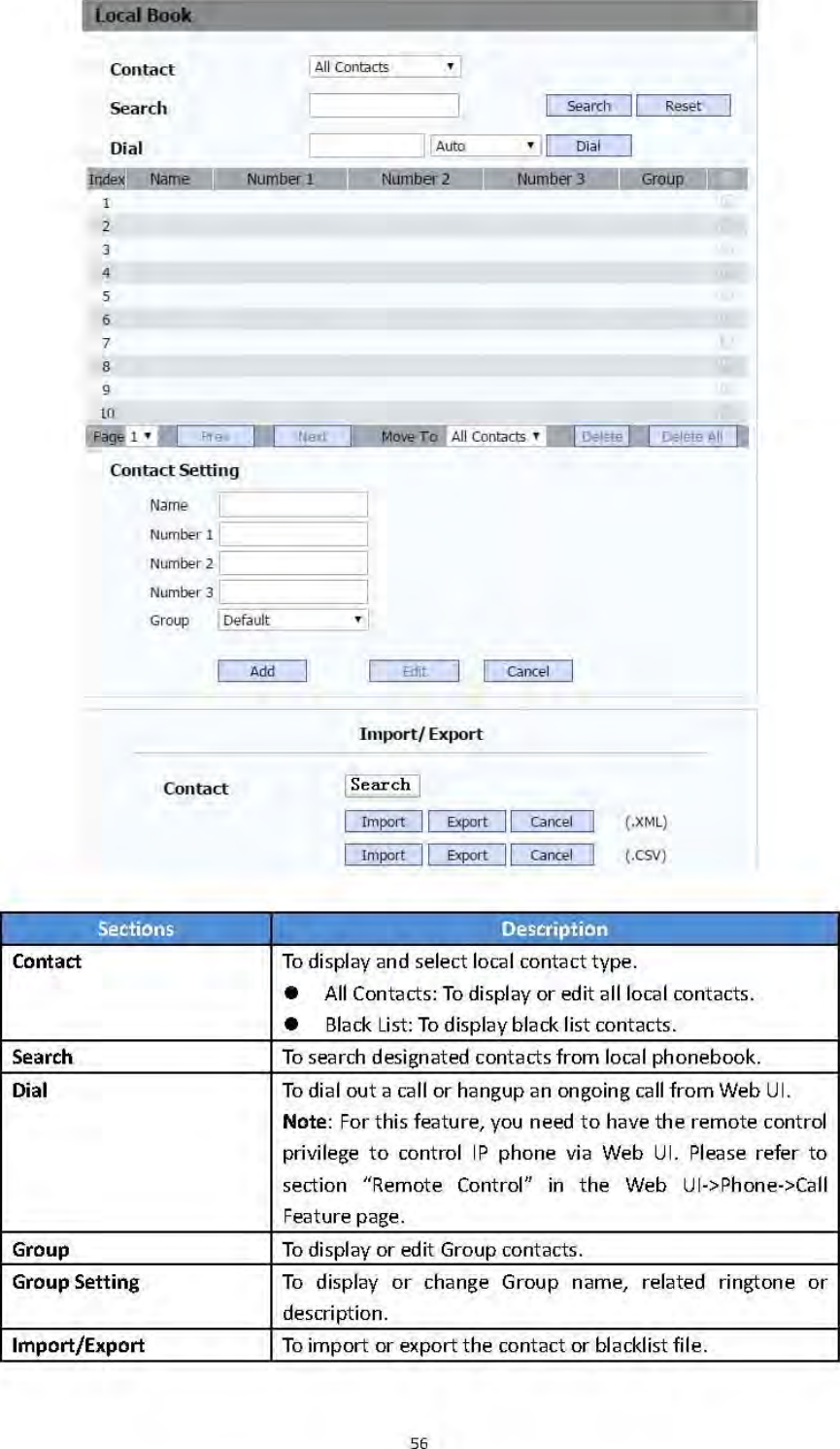
55sometimescalledMPEG‐4part10.TosetupcorrespondingH264videoparameters. H264Profile:Thereare4modes‐Base、Main、High、Extendprofile.Differentprofilesmakesdifferentcodingfunctionandvideoquality. H264Level:DifferentprofileshascorrespondingLevelvalue. IDRInterval:IDRmeansInstantaneousDecodingRefresh.Itisusedtocontroltheprocessofcodinganddecoding. RateControl:ChooseoneH264videorate.Others HardwareEndecAcceleration:Thisfunctionisusedtosolvetheimageissue.UsercanenabletheHardwareEndecAccelerationwhenyouneed. HardwareDecodecAcceleration:Disabledbydefault. ColorEnhancement:Toincreasethephonedisplaycolor.Enabledbydefault. ImageQuality:UsercanselectLow,MiddleorHighmode. CameraPriority:IT82seriescanconnectextracamera.IfR48Ghas2cameras,pleasesetupthepriorityforexternalcameraorinternalone.  VideoCallStatus 4.6 PhoneBook4.6.1 LocalBook
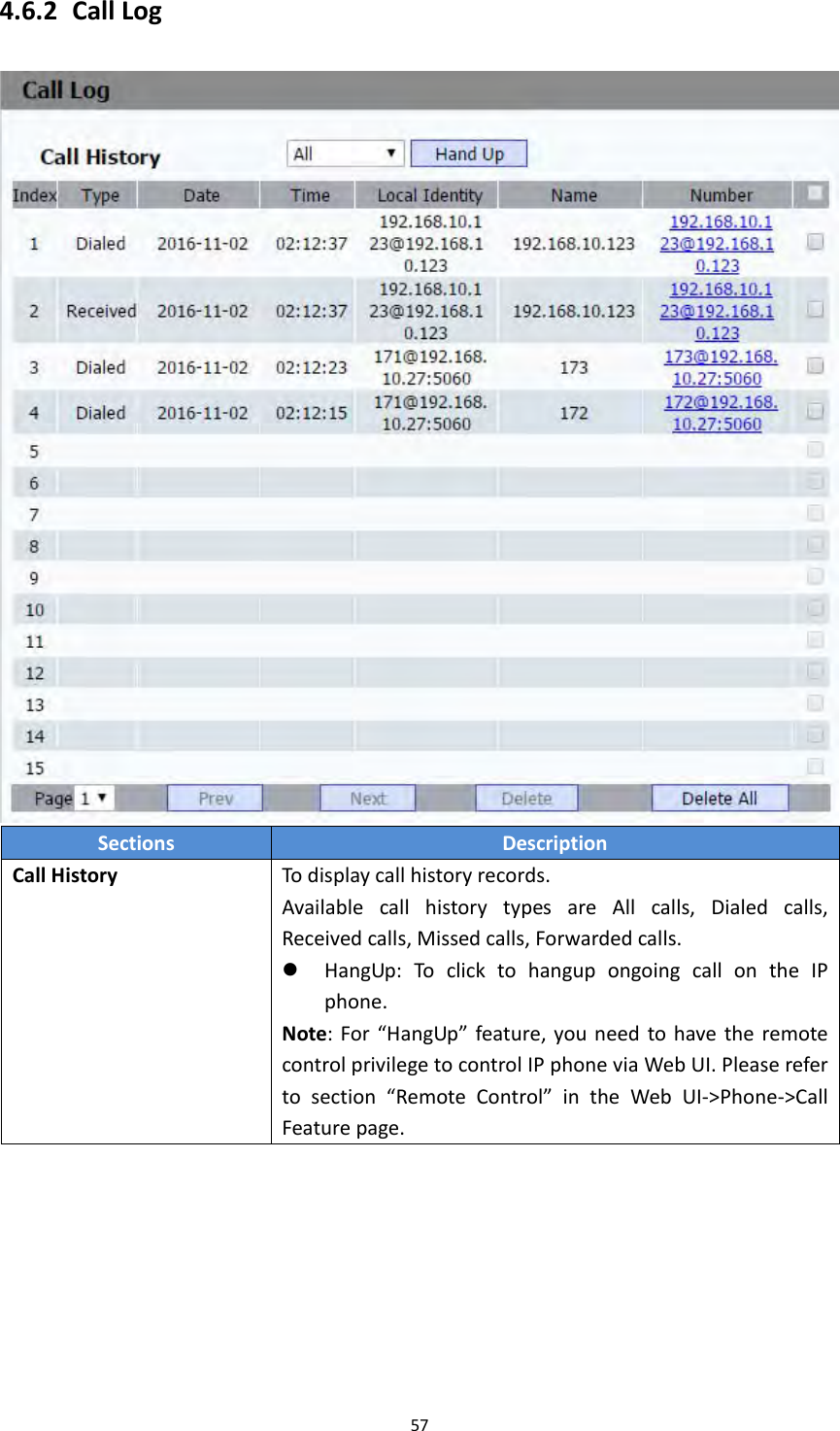
574.6.2 CallLogSectionsDescriptionCallHistoryTodisplaycallhistoryrecords.AvailablecallhistorytypesareAllcalls,Dialedcalls,Receivedcalls,Missedcalls,Forwardedcalls. HangUp:ToclicktohangupongoingcallontheIPphone.Note:For“HangUp”feature,youneedtohavetheremotecontrolprivilegetocontrolIPphoneviaWebUI.Pleaserefertosection“RemoteControl”intheWebUI‐>Phone‐>CallFeaturepage.
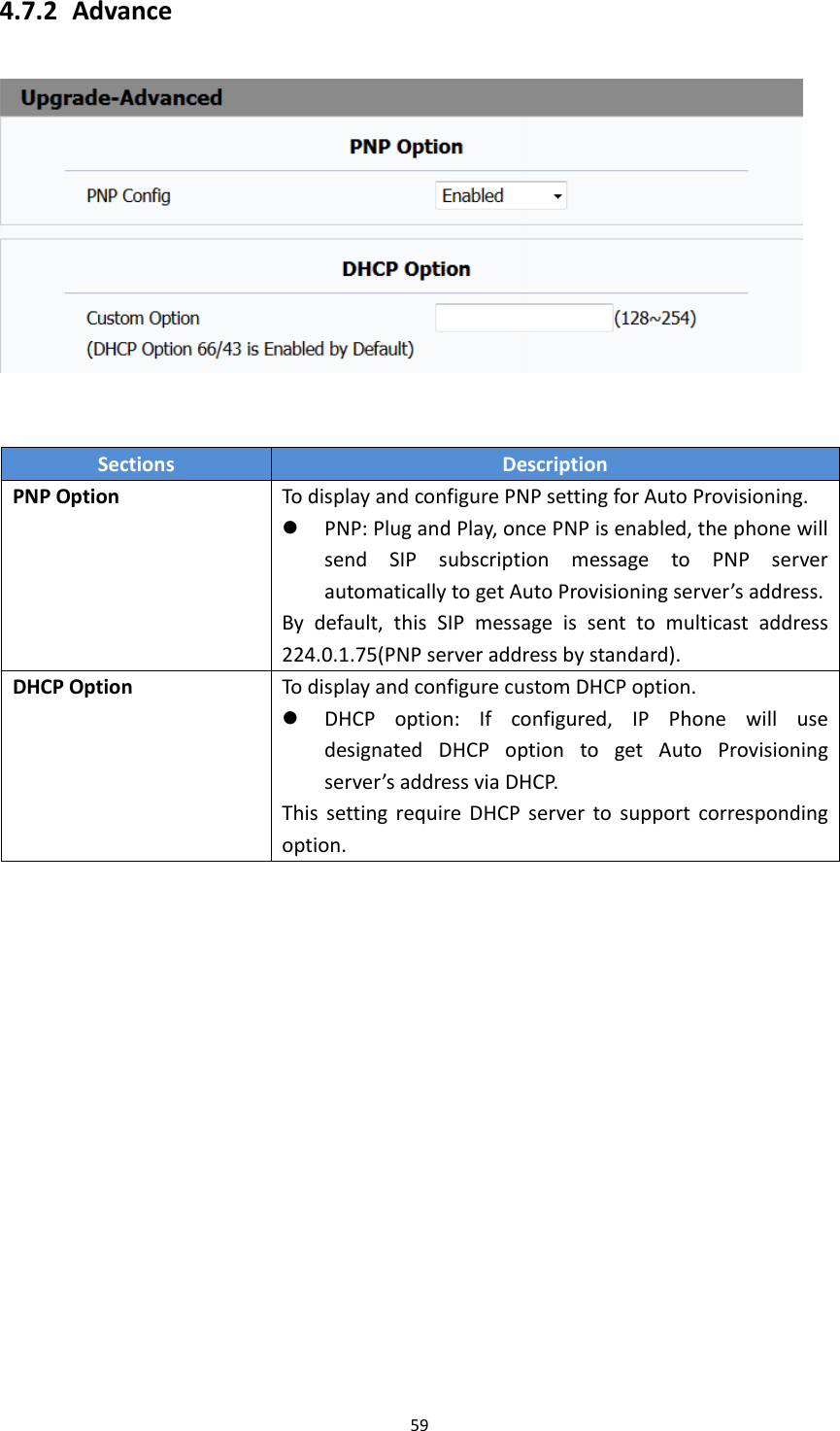
594.7.2 AdvanceSectionsDescriptionPNPOptionTodisplayandconfigurePNPsettingforAutoProvisioning. PNP:PlugandPlay,oncePNPisenabled,thephonewillsendSIPsubscriptionmessagetoPNPserverautomaticallytogetAutoProvisioningserver’saddress.Bydefault,thisSIPmessageissenttomulticastaddress224.0.1.75(PNPserveraddressbystandard).DHCPOptionTodisplayandconfigurecustomDHCPoption. DHCPoption:Ifconfigured,IPPhonewillusedesignatedDHCPoptiontogetAutoProvisioningserver’saddressviaDHCP.ThissettingrequireDHCPservertosupportcorrespondingoption.
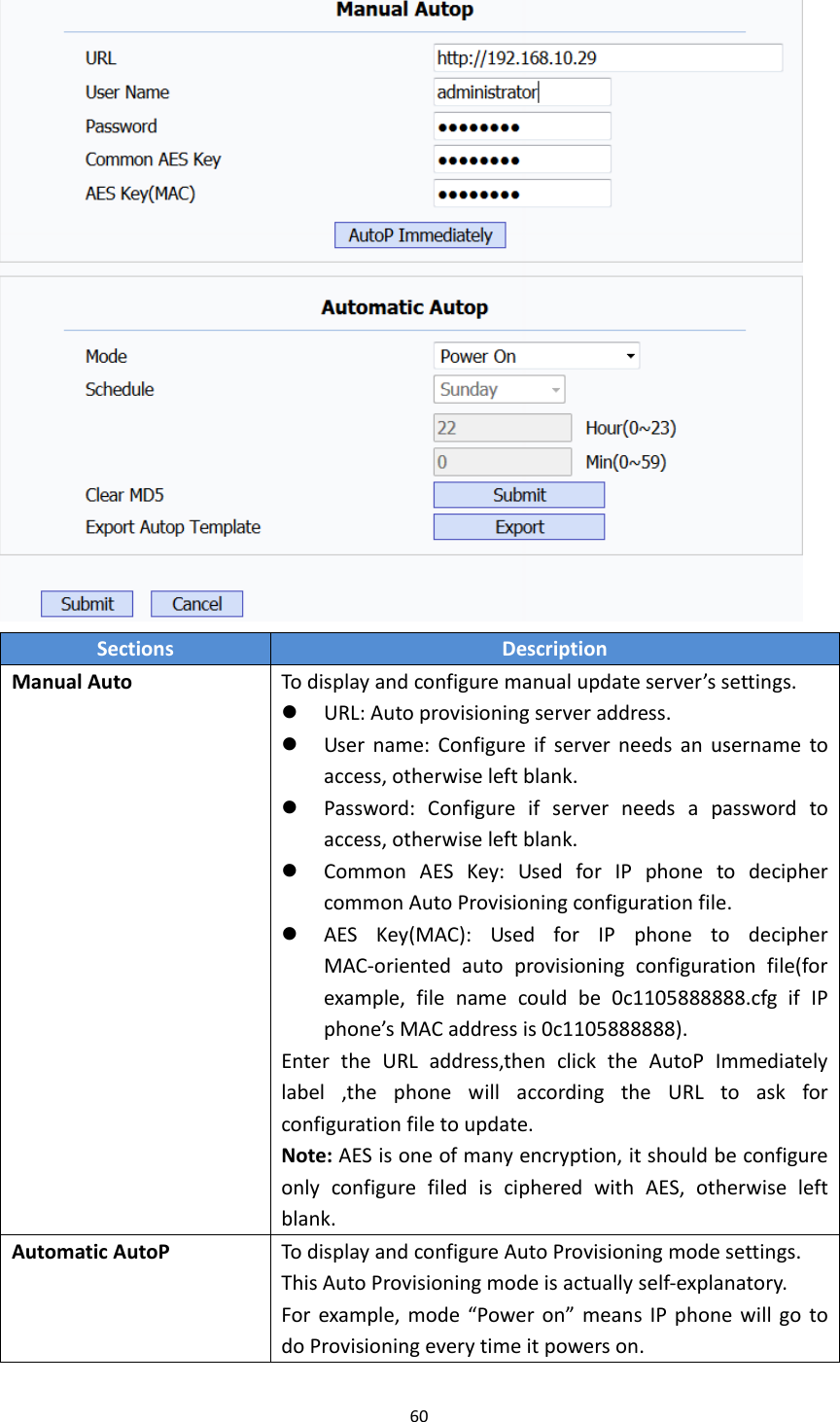
60SectionsDescriptionManualAutoTodisplayandconfiguremanualupdateserver’ssettings. URL:Autoprovisioningserveraddress. Username:Configureifserverneedsanusernametoaccess,otherwiseleftblank. Password:Configureifserverneedsapasswordtoaccess,otherwiseleftblank. CommonAESKey:UsedforIPphonetodeciphercommonAutoProvisioningconfigurationfile. AESKey(MAC):UsedforIPphonetodecipherMAC‐orientedautoprovisioningconfigurationfile(forexample,filenamecouldbe0c1105888888.cfgifIPphone’sMACaddressis0c1105888888).EntertheURLaddress,thenclicktheAutoPImmediatelylabel,thephonewillaccordingtheURLtoaskforconfigurationfiletoupdate.Note:AESisoneofmanyencryption,itshouldbeconfigureonlyconfigurefilediscipheredwithAES,otherwiseleftblank.AutomaticAutoPTodisplayandconfigureAutoProvisioningmodesettings.ThisAutoProvisioningmodeisactuallyself‐explanatory.Forexample,mode“Poweron”meansIPphonewillgotodoProvisioningeverytimeitpowerson.
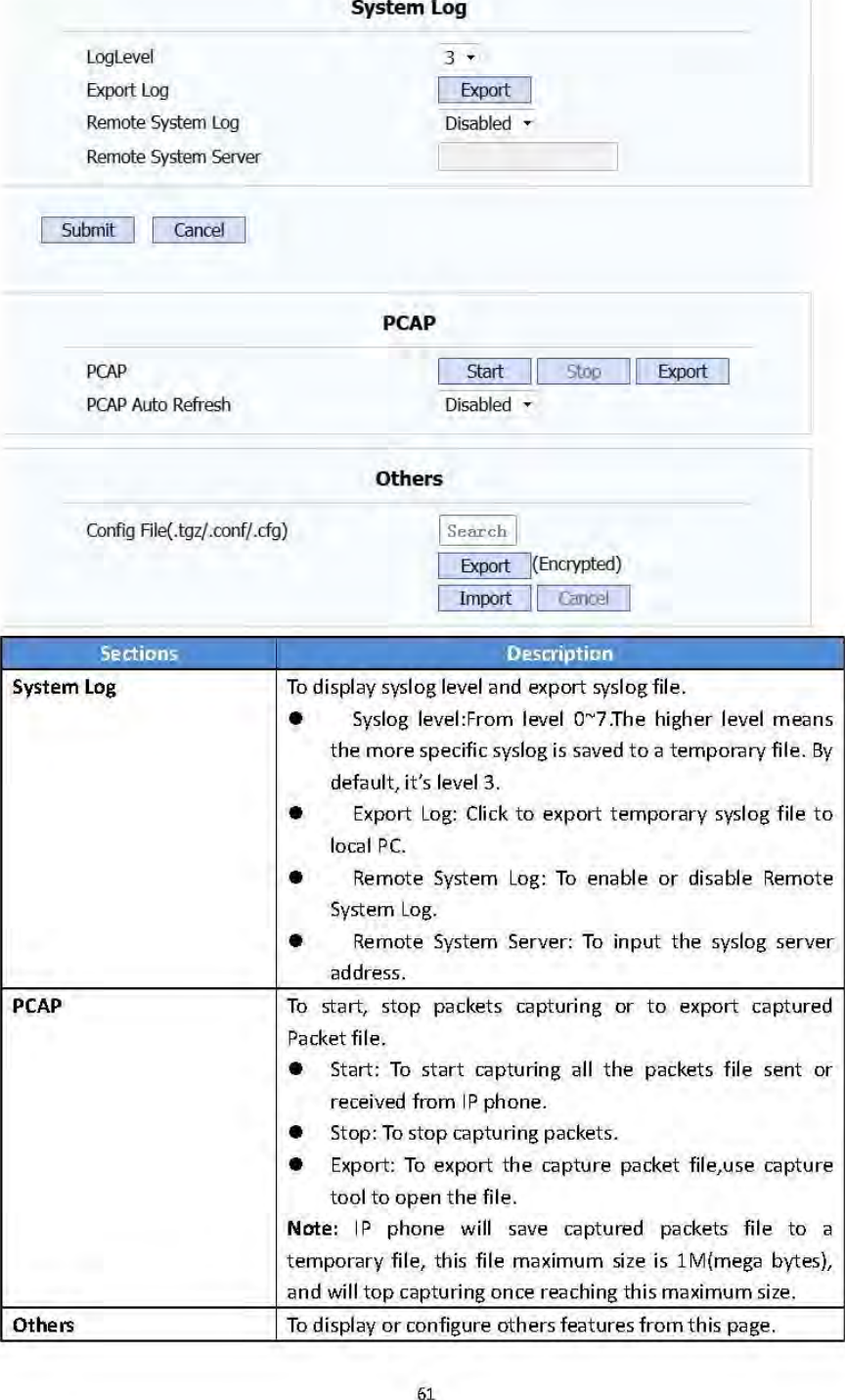
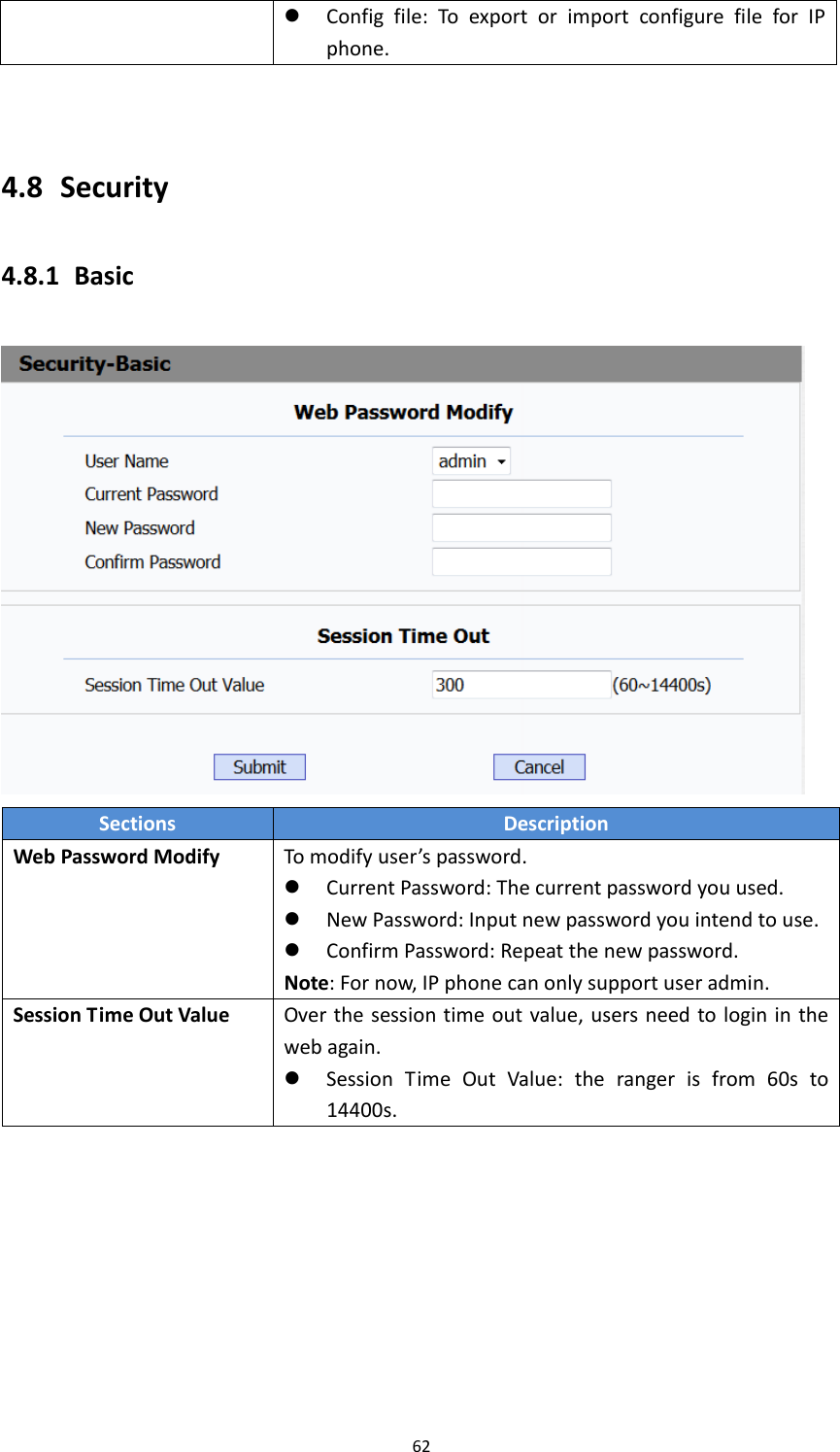
62 Configfile:ToexportorimportconfigurefileforIPphone.4.8 Security4.8.1 BasicSectionsDescriptionWebPasswordModifyTomodifyuser’spassword. CurrentPassword:Thecurrentpasswordyouused. NewPassword:Inputnewpasswordyouintendtouse. ConfirmPassword:Repeatthenewpassword.Note:Fornow,IPphonecanonlysupportuseradmin.SessionTimeOutValueOverthesessiontimeoutvalue,usersneedtologininthewebagain. SessionTimeOutValue:therangerisfrom60sto14400s.
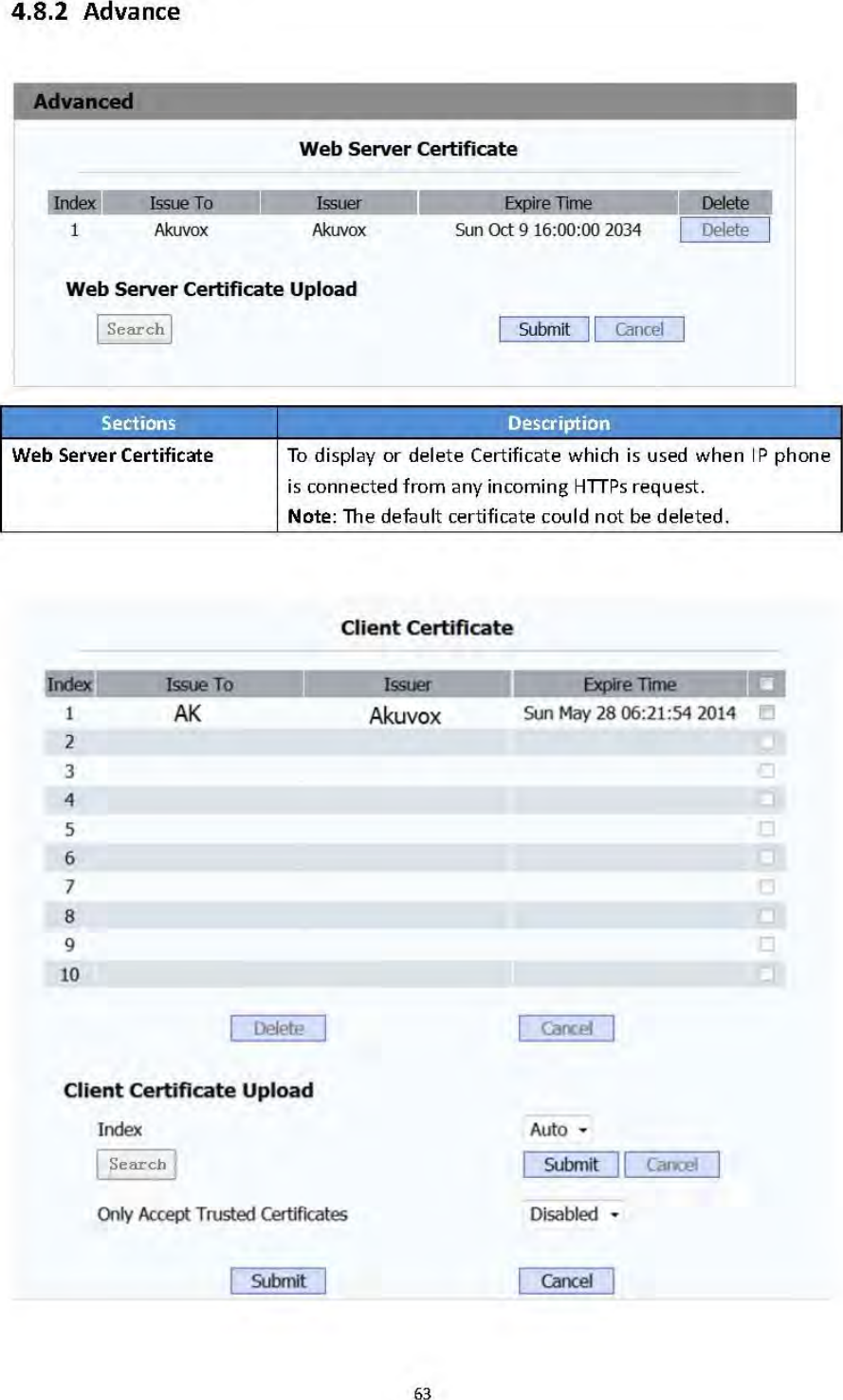
64SectionsDescriptionWebServerCertificateUploadTouploadacertificatefilewhichwillbeusedasservercertificate.ClientCertificateTodisplayordeleteCertificateswhichisusedwhenIPphoneisconnectingtoanyHTTPsserver.ClientCertificateUploadTouploadcertificatefiles,thisisusedasclientcertificate. OnlyAccepttrustedCertificates:Ifthisoptionisenabled,onlytrustedcertificateswillbeaccepted.

Navigation menu