ARCTIC S111BT S111BT Bluetooth Speaker with embedded battery User Manual manual S111 BT 140401 r4

ARCTIC (HK) Ltd. S111BT Bluetooth Speaker with embedded battery manual S111 BT 140401 r4

User manual

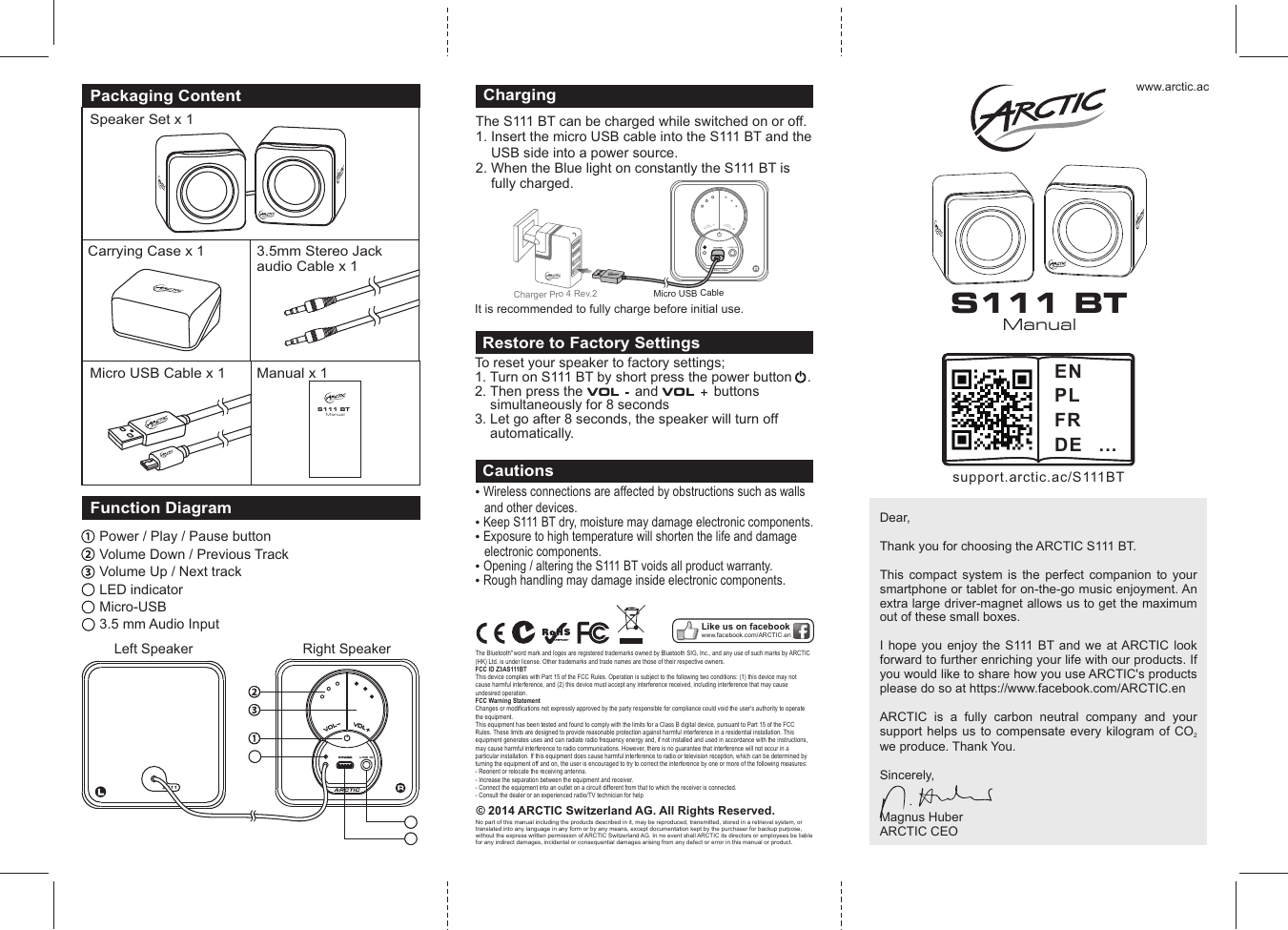
www.arctic.acPackaging ContentSpeaker Set x 1Carrying Case x 1Micro USB Cable x 1 Manual x 1ManualS111 BT© 2014 ARCTIC Switzerland AG. All Rights Reserved.No part of this manual including the products described in it, may be reproduced, transmitted, stored in a retrieval system, or translated into any language in any form or by any means, except documentation kept by the purchaser for backup purpose, without the express written permission of ARCTIC Switzerland AG. In no event shall ARCTIC its directors or employees be liable for any indirect damages, incidental or consequential damages arising from any defect or error in this manual or product. Wireless connections are affected by obstructions such as walls and other devices. Keep S111 BT dry, moisture may damage electronic components.  Exposure to high temperature will shorten the life and damage electronic components.  Opening / altering the S111 BT voids all product warranty.  Rough handling may damage inside electronic components. CautionsLike us on facebookwww.facebook.com/ARCTIC.enDear, Thank you for choosing the ARCTIC S111 BT.This  compact  system  is  the  perfect  companion  to  your smartphone or tablet for on-the-go music enjoyment. An extra large driver-magnet allows us to get the maximum out of these small boxes. I hope you enjoy  the  S111  BT and  we  at ARCTIC  look forward to further enriching your life with our products. If you would like to share how you use ARCTIC's products please do so at https://www.facebook.com/ARCTIC.enARCTIC  is  a  fully  carbon  neutral  company  and  your support helps  us to  compensate  every  kilogram  of CO  2we produce. Thank You.Sincerely, Magnus HuberARCTIC CEO3.5mm Stereo Jackaudio Cable x 1To reset your speaker to factory settings;1. Turn on S111 BT by short press the power button    .2. Then press the VOL - and VOL + buttons       simultaneously for 8 seconds 3. Let go after 8 seconds, the speaker will turn off      automatically.Restore to Factory SettingsARCTICLINE INVVOOLLVVOOLLFunction DiagramPower / Play / Pause buttonVolume Down / Previous TrackVolume Up / Next trackLS111Left Speaker Right Speaker4456LED indicatorMicro-USB 3.5 mm Audio Input56ManualS111 BTsupport.arctic.ac/S111BTENPLFRDE ...The S111 BT can be charged while switched on or off. 1. Insert the micro USB cable into the S111 BT and the     USB side into a power source.2. When the Blue light on constantly the S111 BT is     fully charged.ChargingARCTICLINE INVOLVOLM bicro USB Ca le rrCha ger P o 4 Rev.2 It is recommended to fully charge before initial use.® The Bluetooth word mark and logos are registered trademarks owned by Bluetooth SIG, Inc., and any use of such marks by ARCTIC (HK) Ltd. is under license. Other trademarks and trade names are those of their respective owners.FCC ID Z3AS111BTThis device complies with Part 15 of the FCC Rules. Operation is subject to the following two conditions: (1) this device may not cause harmful interference, and (2) this device must accept any interference received, including interference that may cause undesired operation.FCC Warning StatementChanges or modifications not expressly approved by the party responsible for compliance could void the user's authority to operate the equipment.This equipment has been tested and found to comply with the limits for a Class B digital device, pursuant to Part 15 of the FCC Rules. These limits are designed to provide reasonable protection against harmful interference in a residential installation. This equipment generates uses and can radiate radio frequency energy and, if not installed and used in accordance with the instructions, may cause harmful interference to radio communications. However, there is no guarantee that interference will not occur in a particular installation. If this equipment does cause harmful interference to radio or television reception, which can be determined by turning the equipment off and on, the user is encouraged to try to correct the interference by one or more of the following measures:- Reorient or relocate the receiving antenna.- Increase the separation between the equipment and receiver.- Connect the equipment into an outlet on a circuit different from that to which the receiver is connected.- Consult the dealer or an experienced radio/TV technician for help
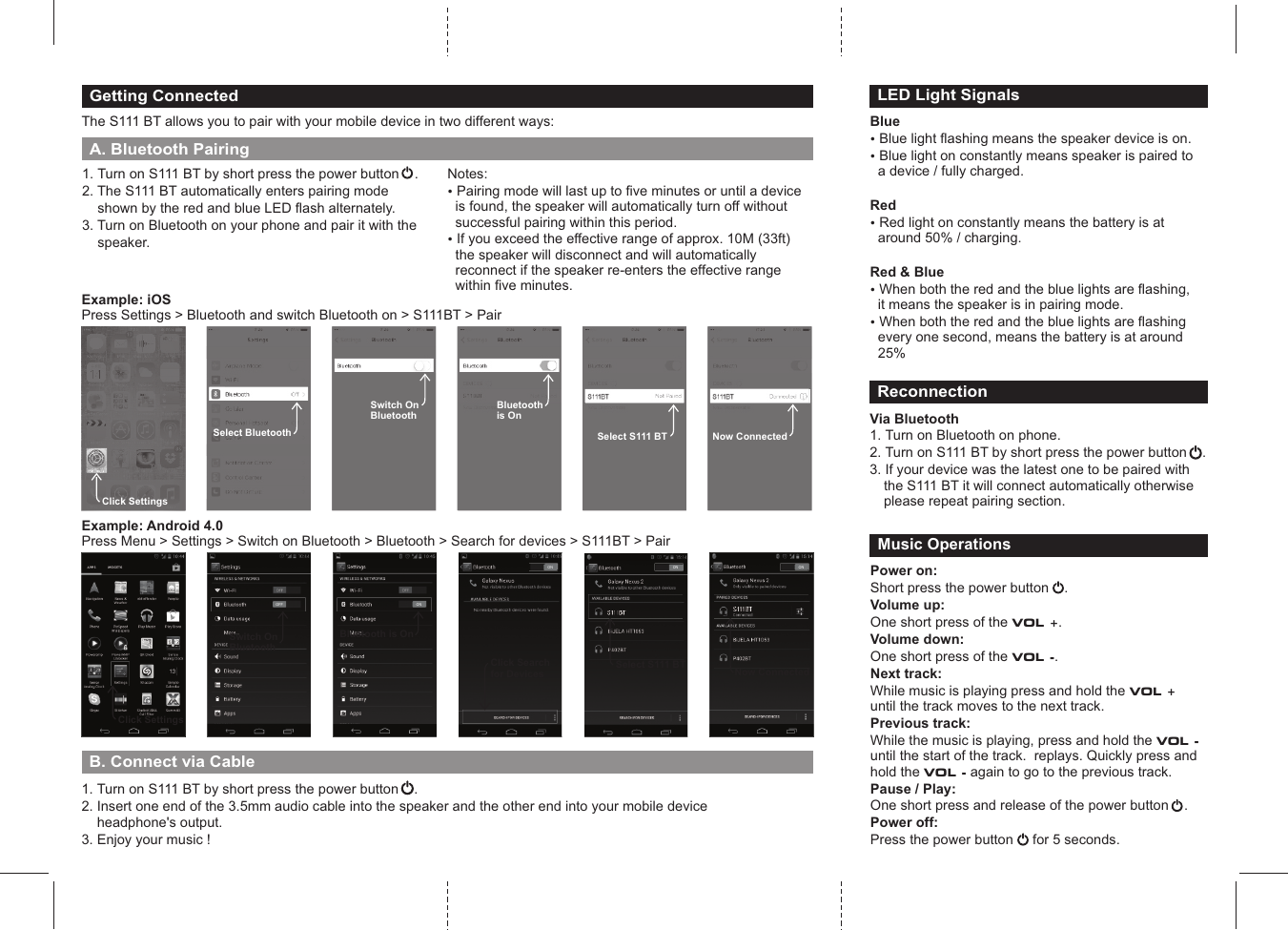
1. Turn on S111 BT by short press the power button2. The S111 BT automatically enters pairing mode     shown by the red and blue LED flash alternately. 3. Turn on Bluetooth on your phone and pair it with the     speaker.    .Getting ConnectedThe S111 BT allows you to pair with your mobile device in two different ways:Notes: ? Pairing mode will last up to five minutes or until a device is found, the speaker will automatically turn off without successful pairing within this period.? If you exceed the effective range of approx. 10M (33ft) the speaker will disconnect and will automatically reconnect if the speaker re-enters the effective range within five minutes. A. Bluetooth PairingClick SettingsONClick Searchfor DevicesONBluetooth is OnOFFSwitch On BluetoothExample: iOSPress Settings > Bluetooth and switch Bluetooth on > S111BT > PairClick SettingsSelect BluetoothSwitch On BluetoothBluetoothis OnNow ConnectedSelect S111 BTExample: Android 4.0Press Menu > Settings > Switch on Bluetooth > Bluetooth > Search for devices > S111BT > PairONSelect S111 BTONNow ConnectedBlue? Blue light flashing means the speaker device is on.? Blue light on constantly means speaker is paired to a device / fully charged.Red? Red light on constantly means the battery is at around 50% / charging.Red & Blue? When both the red and the blue lights are flashing, it means the speaker is in pairing mode.? When both the red and the blue lights are flashing every one second, means the battery is at around 25%LED Light SignalsReconnectionVia Bluetooth1. Turn on Bluetooth on phone.2. Turn on S111 BT by short press the power button    .3. If your device was the latest one to be paired with the S111 BT it will connect automatically otherwise please repeat pairing section.Power on:Short press the power button      Volume up:One short press of the VOL +. Volume down:One short press of the VOL -.Next track: While music is playing press and hold the VOL +  until the track moves to the next track.Previous track:While the music is playing, press and hold the VOL - until the start of the track.  replays. Quickly press and hold the VOL - again to go to the previous track.Pause / Play:One short press and release of the power button    .     Power off:Press the power button     for 5 seconds.         .Music OperationsB. Connect via Cable 1. Turn on S111 BT by short press the power button    .2. Insert one end of the 3.5mm audio cable into the speaker and the other end into your mobile device     headphone's output.3. Enjoy your music !

Navigation menu