ASKA ELECTRONICS X5 Bluetooth Headphone User Manual 410 1G000002F5G 3

ASKA ELECTRONICS CO., LIMITED Bluetooth Headphone 410 1G000002F5G 3

User Manual

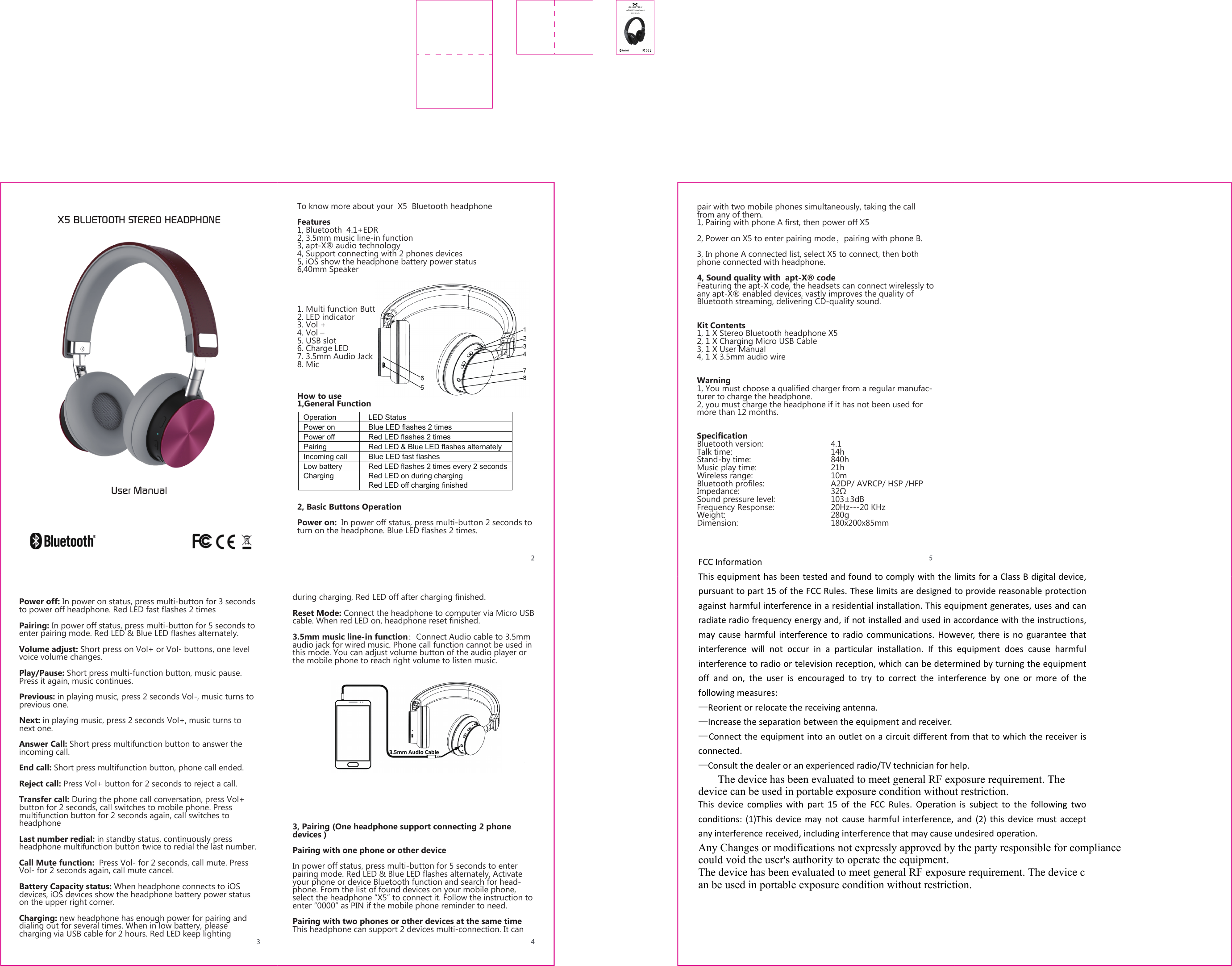
Operation    LED Status Power on    Blue LED flashes 2 times Power off    Red LED flashes 2 times Pairing    Red LED & Blue LED flashes alternately   Incoming call    Blue LED fast flashes Low battery    Red LED flashes 2 times every 2 seconds Charging    Red LED on during charging   Red LED off charging finished X5 BLUETOOTH STEREO HEADPHONEUser ManualTo know more about your  X5  Bluetooth headphoneFeatures1, Bluetooth  4.1+EDR2, 3.5mm music line-in function3, apt-X® audio technology 4, Support connecting with 2 phones devices  5, iOS show the headphone battery power status6,40mm Speaker1. Multi function Button2. LED indicator3. Vol +4. Vol –5. USB slot6. Charge LED7. 3.5mm Audio Jack8. MicHow to use1,General Function2, Basic Buttons OperationPower on:  In power off status, press multi-button 2 seconds to turn on the headphone. Blue LED flashes 2 times.Power off: In power on status, press multi-button for 3 seconds to power off headphone. Red LED fast flashes 2 timesPairing: In power off status, press multi-button for 5 seconds to enter pairing mode. Red LED & Blue LED flashes alternately.Volume adjust: Short press on Vol+ or Vol- buttons, one level voice volume changes.Play/Pause: Short press multi-function button, music pause. Press it again, music continues.Previous: in playing music, press 2 seconds Vol-, music turns to previous one.Next: in playing music, press 2 seconds Vol+, music turns to next one.Answer Call: Short press multifunction button to answer the incoming call.End call: Short press multifunction button, phone call ended.Reject call: Press Vol+ button for 2 seconds to reject a call.Transfer call: During the phone call conversation, press Vol+ button for 2 seconds, call switches to mobile phone. Press multifunction button for 2 seconds again, call switches to headphone  Last number redial: in standby status, continuously press headphone multifunction button twice to redial the last number.Call Mute function:  Press Vol- for 2 seconds, call mute. Press Vol- for 2 seconds again, call mute cancel.Battery Capacity status: When headphone connects to iOS devices, iOS devices show the headphone battery power status on the upper right corner.Charging: new headphone has enough power for pairing and dialing out for several times. When in low battery, please charging via USB cable for 2 hours. Red LED keep lighting during charging, Red LED off after charging finished.Reset Mode: Connect the headphone to computer via Micro USB cable. When red LED on, headphone reset finished.3.5mm music line-in function:Connect Audio cable to 3.5mm audio jack for wired music. Phone call function cannot be used in this mode. You can adjust volume button of the audio player or the mobile phone to reach right volume to listen music.3, Pairing (One headphone support connecting 2 phone devices )Pairing with one phone or other deviceIn power off status, press multi-button for 5 seconds to enter pairing mode. Red LED & Blue LED flashes alternately, Activate your phone or device Bluetooth function and search for head-phone. From the list of found devices on your mobile phone, select the headphone “X5” to connect it. Follow the instruction to enter “0000” as PIN if the mobile phone reminder to need. Pairing with two phones or other devices at the same timeThis headphone can support 2 devices multi-connection. It can pair with two mobile phones simultaneously, taking the call from any of them.1, Pairing with phone A first, then power off X5 2, Power on X5 to enter pairing mode,pairing with phone B.3, In phone A connected list, select X5 to connect, then both phone connected with headphone.4, Sound quality with  apt-X® codeFeaturing the apt-X code, the headsets can connect wirelessly to any apt-X® enabled devices, vastly improves the quality of Bluetooth streaming, delivering CD-quality sound.Kit Contents1, 1 X Stereo Bluetooth headphone X52, 1 X Charging Micro USB Cable3, 1 X User Manual4, 1 X 3.5mm audio wireWarning 1, You must choose a qualified charger from a regular manufac-turer to charge the headphone.2, you must charge the headphone if it has not been used for more than 12 months.SpecificationBluetooth version:     4.1Talk time:   14h Stand-by time:   840hMusic play time:      21h Wireless range:   10mBluetooth profiles:     A2DP/ AVRCP/ HSP /HFPImpedance:      32ΩSound pressure level:     103±3dBFrequency Response:    20Hz---20 KHzWeight:    280gDimension:   180x200x85mmFCC InformationThis equipment has been tested and found to comply with the limits for a Class B digital device,pursuant to part 15 of the FCC Rules. These limits are designed to provide reasonable protectionagainst harmful interference in a residential installation. This equipment generates, uses and canradiate radio frequency energy and, if not installed and used in accordance with the instructions,may cause harmful interference to radio communications. However, there is no guarantee thatinterference will not occur in a particular installation. If this equipment does cause harmfulinterference to radio or television reception, which can be determined by turning the equipmentoff and on, the user is encouraged to try to correct the interference by one or more of thefollowing measures:—Reorient or relocate the receiving antenna.—Increase the separation between the equipment and receiver.—Connect the equipment into an outlet on a circuit different from that to which the receiver isconnected.—Consult the dealer or an experienced radio/TV technician for help.       The device has been evaluated to meet general RF exposure requirement. The device can be used in portable exposure condition without restriction.This device complies with part 15 of the FCC Rules. Operation is subject to the following twoconditions: (1)This device may not cause harmful interference, and (2) this device must acceptany interference received, including interference that may cause undesired operation.Any Changes or modifications not expressly approved by the party responsible for compliance could void the user's authority to operate the equipment.The device has been evaluated to meet general RF exposure requirement. The device can be used in portable exposure condition without restriction.

Navigation menu