ASSALOY KOREA Unilock ML52RA Digital Cabinet Lock User Manual

ASSA ABLOY KOREA Co., Ltd Unilock Digital Cabinet Lock Users Manual

User Manual

           Copyright ⓒ 2017. Lab-T, Inc.     User Manual
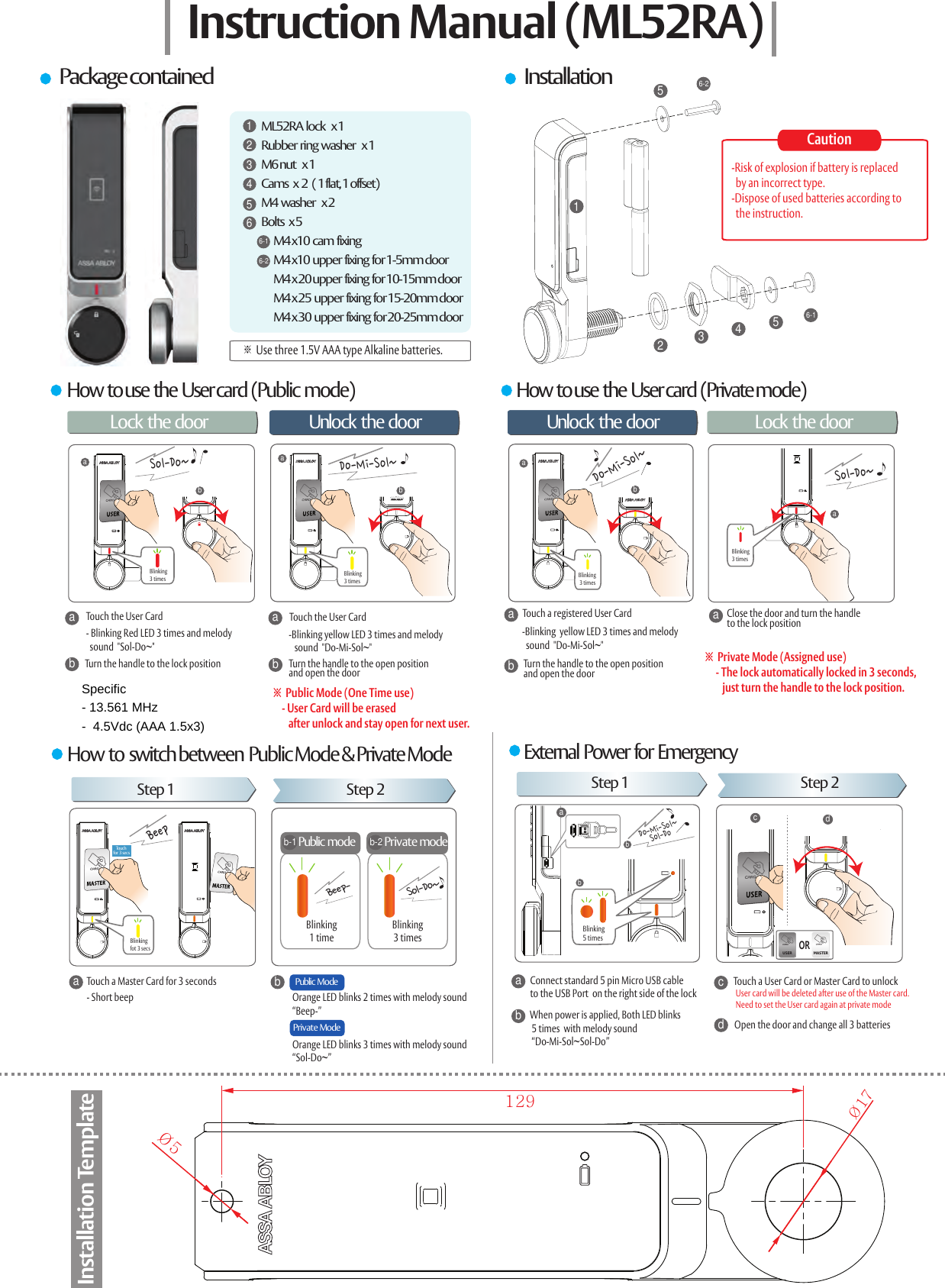
How  to use  the  User card  (Public  mode)Step 1 Step 2BeepBeep-Public  ModeaTouch a Master Card for 3 secondsa- Short beepababaMASTERUSERPublic modeSol-Do~cdbTouch for  3 sec sOR123456-156-2ML52RA  lock    x 1Rubber  ring  washer    x 1M6 nut    x 1Cams   x  2   ( 1 flat, 1 offset)M4  washer    x 2Bolts   x 5         M4 x10  cam  fixing         M4 x10  upper  fixing  for 1-5mm door        M4 x 20 upper  fixing  for 10-15mm door        M4 x 25  upper  fixing  for 15-20mm door        M4 x 30  upper  fixing  for 20-25mm door1234566-16-2Instruction Manual (ML52RA)Package contained InstallationHow  to use  the  User card  (Private mode)Lock the door 문을 열때 문을 잠글 때Unlock  the door Unlock  the door Lock the doorTouch the User Carda- Blinking Red LED 3 times and melody   sound  "Sol-Do~"bTurn the handle to the lock position-Blinking yellow LED 3 times and melody   sound  "Do-Mi-Sol~"bTouch the User CardaTurn the handle to the open positionand open the door※  Public Mode (One Time use)    - User Card will be erased        after unlock and stay open for next user.Touch a registered User CardTurn the handle to the open positionand open the doorabClose the door and turn the handle to the lock positiona※  Private Mode (Assigned use)     - The lock automatically locked in 3 seconds,         just turn the handle to the lock position. -Blinking  yellow LED 3 times and melody   sound  "Do-Mi-Sol~"How  to  switch between  Public Mode & Private Mode External  Power  for  EmergencyStep 1 Step 2bPrivate ModeOrange LED blinks 2 times with melody sound “Beep-”Orange LED blinks 3 times with melody sound “Sol-Do~”dacb Connect standard 5 pin Micro USB cable  to the USB Port  on the right side of the lockWhen power is applied, Both LED blinks  5 times  with melody sound  “Do-Mi-Sol~Sol-Do”Touch a User Card or Master Card to unlockOpen the door and change all 3 batteriesUser card will be deleted after use of the Master card.Need to set the User card again at private modeb-1Private modeb-2Sol-Do~Blinking3 timesDo-Mi-Sol~Blinking3 timesDo-Mi-Sol~Sol-Do~Blinking 3 timesBlinking3 timesBlinkingfot 3 secsBlinking1 timeBlinking3 timesabbDo-Mi-Sol~Sol-DoBlinking5 timesØ5Ø17129Installation TemplateCaution-Risk of explosion if battery is replaced   by an incorrect type.-Dispose of used batteries according to  the instruction.※ Use three 1.5V AAA type Alkaline batteries.Specific - 13.561 MHz  -  4.5Vdc (AAA 1.5x3)
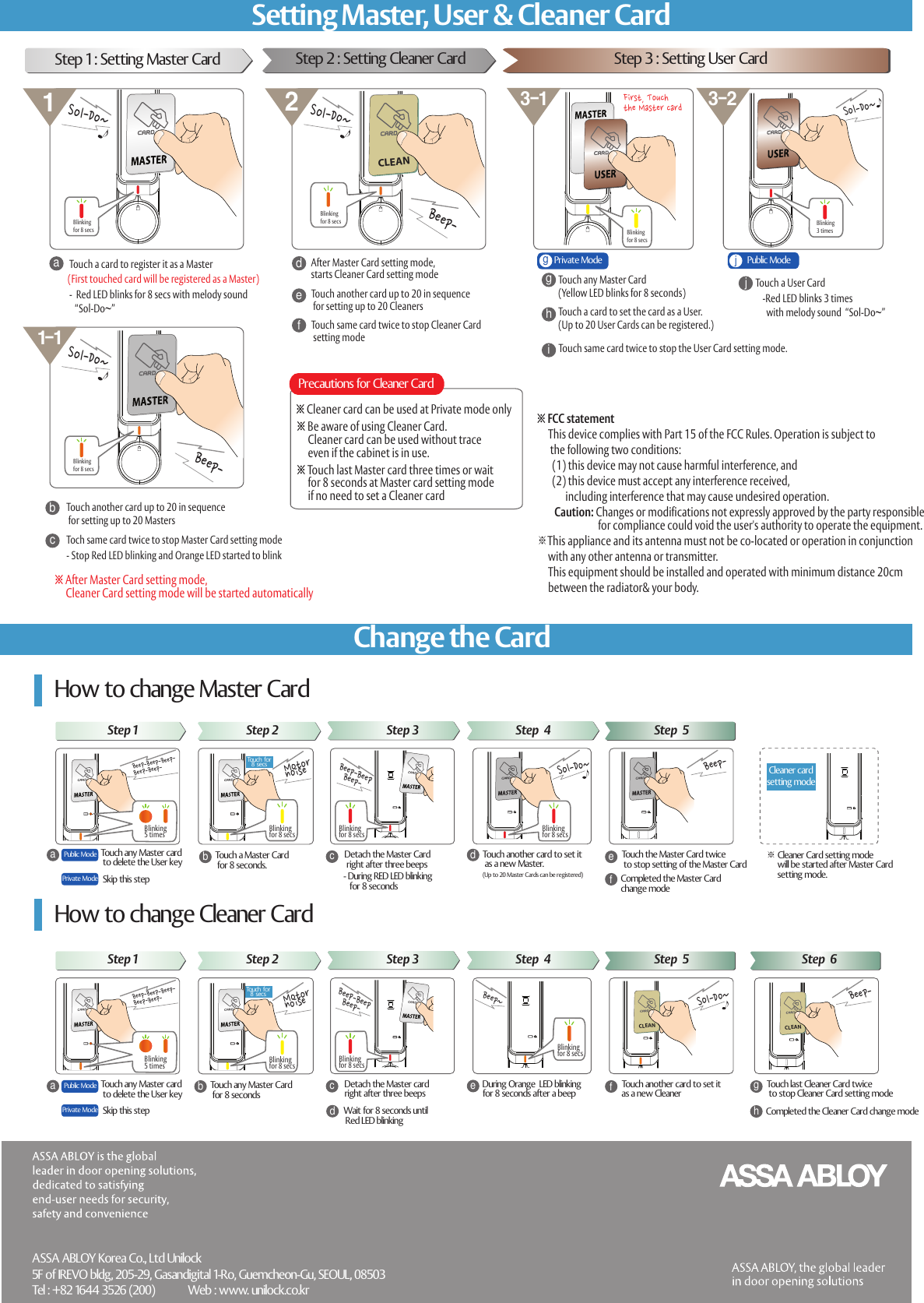
CLEANTouch a Master Card  for 8 seconds.Detach the Master Card  right after three beepsdacTouch another card to set it   as a new Master.(Up to 20 Master Cards can be registered)f※ Cleaner Card setting mode      will be started after Master Card      setting  mode.How to change Master Card※ After Master Card setting mode,      Cleaner Card setting mode will be started automaticallyTouch a card to register it as a Master-  Red LED blinks for 8 secs with melody sound    “Sol-Do~”ab※ Cleaner card can be used at Private mode onlyAfter Master Card setting mode, starts Cleaner Card setting mode Touch same card twice to stop the User Card setting mode. cTouch another card up to 20 in sequence  for setting up to 20 MastersTouch another card up to 20 in sequence  for setting up to 20 CleanersToch same card twice to stop Master Card setting modeStep 1 : Setting Master CardTouch a User CardTouch any Master Card (Yellow LED blinks for 8 seconds)behTouch any Master card to delete the User keyMotor noiseTouch for8 secs- During RED LED blinking    for 8 secondsBeep-BeepBeep-Cleaner  cardsetting  modeTouch the Master Card twice  to stop setting of the Master CardSol-Do~Completed the Master Card chang e modeBeep-Touch any Master Card  for 8 secondsDetach the Master card right after three beepsdacDuring  Orange  LED blinking for 8 seconds after a beepfbeWait  for 8 seconds until  Red LED blinkingTouch another card to set it  as a new CleanerBeep~gTouch last Cleaner Card twice to stop Cleaner Card setting modeCompleted the  Cleaner  Card change modeBeep-(First touched card will be registered as a Master)CLEANSol-Do~dggFirst, Touch the Master cardhjjCLEANBeep-Beep-Sol-Do~3-1 3-2211-1※ Touch last Master card three times or wait     for 8 seconds at Master card setting mode      if no need to set a Cleaner cardPrecautions for Cleaner CardTouch a card to set the card as a User. (Up to 20 User Cards can be registered.)ASSA ABLOY Korea Co., Ltd Unilock5F of IREVO bldg, 205-29, Gasandigital 1-Ro, Guemcheon-Gu, SEOUL, 08503Tel : +82 1644 3526 (200)            Web : www. unilock.co.kr- Stop Red LED blinking and Orange LED started to blinkefTouch same card twice to stop Cleaner Card setting modeStep 2 : Setting  Cleaner Card Step 3 : Setting User CardiPublic  ModePrivate Mode-Red LED blinks 3 times   with melody sound  “Sol-Do~”Step 1 Step 2 Step 3 Step  4 Step  5How  to change Cleaner CardPublic  ModePrivate Mode Skip this stepStep 1 Step 2 Step 3 Step  4 Step  5 Step  6Touch any Master card to delete the User keyPublic  ModePrivate Mode Skip this stepBlinkingfor 8 secsSol-Do~Blinkingfor 8 secsBlinkingfor 8 secsSol-Do~Blinkingfor 8 secsBlinking3 timesBeep-Beep-Beep-Beep-Beep-Blinking5 timesBlinking5 timesBeep-Beep-Beep-Beep-Beep-Blinkingfor 8 secs Blinkingfor 8 secs Blinkingfor 8 secsBeep-BeepBeep-Sol-Do~Blinkingfor 8 secs Blinkingfor 8 secsBlinkingfor 8 secsTouch for8 secsMotor noiseChange the CardSetting Master, User & Cleaner Card※ Be aware of using Cleaner Card.     Cleaner card can be used without trace      even if the cabinet is in use.※ FCC statement     This device complies with Part 15 of the FCC Rules. Operation is subject to       the following two conditions:       (1) this device may not cause harmful interference, and        (2) this device must accept any interference received,              including interference that may cause undesired operation.         Caution: Changes or modifications not expressly approved by the party responsible                            for compliance could void the user's authority to operate the equipment.※This appliance and its antenna must not be co-located or operation in conjunction      with any other antenna or transmitter.       This equipment should be installed and operated with minimum distance 20cm      between the radiator& your body.

Navigation menu