ATEN Technology IOGEAR GHE225U EXTERNAL USB 2.0 HARD DRIVE User Manual 2

ATEN Technology, Inc., dba IOGEAR EXTERNAL USB 2.0 HARD DRIVE 2

USERS MANUAL

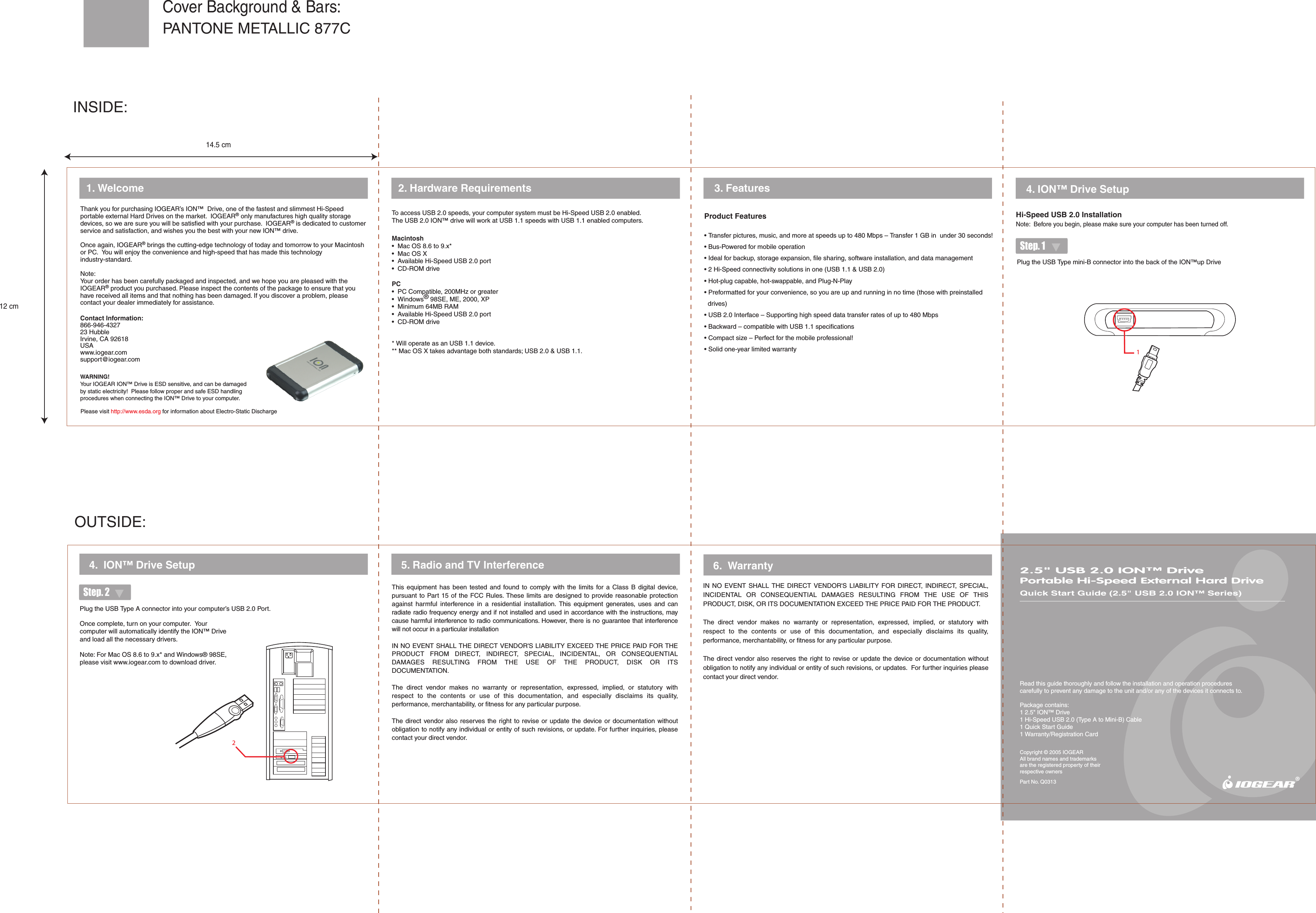
WARNING!Your IOGEAR ION™ Drive is ESD sensitive, and can be damaged by static electricity!  Please follow proper and safe ESD handling procedures when connecting the ION™ Drive to your computer.12Please visit http://www.esda.org for information about Electro-Static Discharge2.5" USB 2.0 ION™ DrivePortable Hi-Speed External Hard DriveQuick Start Guide (2.5" USB 2.0 ION™ Series)Read this guide thoroughly and follow the installation and operation procedures carefully to prevent any damage to the unit and/or any of the devices it connects to.Package contains:1 2.5" ION™ Drive1 Hi-Speed USB 2.0 (Type A to Mini-B) Cable1 Quick Start Guide1 Warranty/Registration CardCopyright © 2005 IOGEARAll brand names and trademarks are the registered property of their respective ownersPart No. Q03132. Hardware Requirements  4. ION™ Drive Setup1. Welcome5. Radio and TV Interference4.  ION™ Drive SetupThis  equipment  has  been  tested  and  found  to  comply  with  the  limits  for  a  Class  B  digital  device, pursuant to Part 15 of the FCC Rules. These limits are designed to provide reasonable protection against  harmful  interference  in  a  residential  installation.  This  equipment  generates,  uses  and  can radiate radio frequency energy and if not installed and used in accordance with the instructions, may cause harmful interference to radio communications. However, there is no guarantee that interference will not occur in a particular installationIN NO EVENT SHALL THE DIRECT VENDOR'S LIABILITY EXCEED THE PRICE PAID FOR THE PRODUCT  FROM  DIRECT,  INDIRECT,  SPECIAL,  INCIDENTAL,  OR  CONSEQUENTIAL DAMAGES  RESULTING  FROM  THE  USE  OF  THE  PRODUCT,  DISK  OR  ITS DOCUMENTATION.The  direct  vendor  makes  no  warranty  or  representation,  expressed,  implied,  or  statutory  with respect  to  the  contents  or  use  of  this  documentation,  and  especially  disclaims  its  quality, performance, merchantability, or fitness for any particular purpose.The direct  vendor also  reserves the right to  revise or update  the device or  documentation without obligation to notify any individual or entity of such revisions, or update. For further inquiries, please contact your direct vendor. 6.  WarrantyIN  NO  EVENT  SHALL  THE DIRECT  VENDOR'S  LIABILITY  FOR  DIRECT,  INDIRECT,  SPECIAL, INCIDENTAL  OR  CONSEQUENTIAL  DAMAGES  RESULTING  FROM  THE  USE  OF  THIS PRODUCT, DISK, OR ITS DOCUMENTATION EXCEED THE PRICE PAID FOR THE PRODUCT.The  direct  vendor  makes  no  warranty  or  representation,  expressed,  implied,  or  statutory  with respect  to  the  contents  or  use  of  this  documentation,  and  especially  disclaims  its  quality, performance, merchantability, or fitness for any particular purpose.The direct vendor also  reserves the right  to revise  or  update the device or documentation without obligation to notify any individual or entity of such revisions, or updates.  For further inquiries please contact your direct vendor.Product Features• Transfer pictures, music, and more at speeds up to 480 Mbps – Transfer 1 GB in  under 30 seconds!• Bus-Powered for mobile operation• Ideal for backup, storage expansion, file sharing, software installation, and data management• 2 Hi-Speed connectivity solutions in one (USB 1.1 & USB 2.0)• Hot-plug capable, hot-swappable, and Plug-N-Play• Preformatted for your convenience, so you are up and running in no time (those with preinstalled      drives)• USB 2.0 Interface – Supporting high speed data transfer rates of up to 480 Mbps• Backward – compatible with USB 1.1 specifications• Compact size – Perfect for the mobile professional!• Solid one-year limited warranty3. FeaturesHi-Speed USB 2.0 InstallationNote:  Before you begin, please make sure your computer has been turned off.Step. 2Step. 1®Contact Information:866-946-432723 HubbleIrvine, CA 92618 USAwww.iogear.comsupport@iogear.comThank you for purchasing IOGEAR’s ION™  Drive, one of the fastest and slimmest Hi-Speed portable external Hard Drives on the market.  IOGEAR® only manufactures high quality storage devices, so we are sure you will be satisfied with your purchase.  IOGEAR® is dedicated to customer service and satisfaction, and wishes you the best with your new ION™ drive.Once again, IOGEAR® brings the cutting-edge technology of today and tomorrow to your Macintosh or PC.  You will enjoy the convenience and high-speed that has made this technology industry-standard.Note:Your order has been carefully packaged and inspected, and we hope you are pleased with the IOGEAR® product you purchased. Please inspect the contents of the package to ensure that you have received all items and that nothing has been damaged. If you discover a problem, please contact your dealer immediately for assistance.Once complete, turn on your computer.  Your computer will automatically identify the ION™ Drive and load all the necessary drivers.Note: For Mac OS 8.6 to 9.x* and Windows® 98SE, please visit www.iogear.com to download driver.Plug the USB Type mini-B connector into the back of the ION™up DriveTo access USB 2.0 speeds, your computer system must be Hi-Speed USB 2.0 enabled.  The USB 2.0 ION™ drive will work at USB 1.1 speeds with USB 1.1 enabled computers.Macintosh•  Mac OS 8.6 to 9.x*•  Mac OS X•  Available Hi-Speed USB 2.0 port•  CD-ROM drivePC•  PC Compatible, 200MHz or greater•  Windows® 98SE, ME, 2000, XP•  Minimum 64MB RAM•  Available Hi-Speed USB 2.0 port•  CD-ROM drive* Will operate as an USB 1.1 device.** Mac OS X takes advantage both standards; USB 2.0 & USB 1.1.Plug the USB Type A connector into your computer’s USB 2.0 Port.OUTSIDE:INSIDE:PANTONE METALLIC 877CCover Background & Bars:14.5 cm12 cm
 NOTE:   THE MANUFACTURER IS NOT RESPONSIBLE FOR ANY RADIO OR TV INTERFERENCE CAUSED BY UNAUTHORIZED MODIFICATIONS TO THIS EQUIPMENT.   SUCH MODIFICATIONS COULD VOID THE USER'S AUTHORITY TO OPERATE THE EQUIPMENT.   NOTE: This equipment has been tested and found to comply with the limits for a Class B digital device, pursuant to part 15 of the FCC Rules.  These limits are designed to provide reasonable protection against harmful interference in a residential installation.   This equipment generates, uses and can radiate radio frequency energy and, if not installed and used in accordance with the instructions, may cause harmful interference to radio communications.   However, there is no guarantee that interference will not occur in a particular installation.  If this equipment does cause harmful interference to radio or television reception, which can be determined by turning the equipment off and on, the user is encouraged to try to correct the interference by one or more of the following measures: - Reorient or relocate the receiving antenna. - Increase the separation between the equipment and receiver. -Connect the equipment into an outlet on a circuit different from that to which the receiver is connected. -Consult the dealer or an experienced radio/TV technician for help.

Navigation menu