ATEN Technology IOGEAR GUWA200 Wireless USB Host Adapter User Manual User s manual with product spec ADT Revise 0703

ATEN Technology, Inc., dba IOGEAR Wireless USB Host Adapter User s manual with product spec ADT Revise 0703

User manual rev

 1       Wireless USB Host Adapter  User’s Guide   Revision A                    Author : Binson Tseng                                     Date : 08/08/2007
 2  Table of Contents    1.  Introduction.................................................................................................................... 3 2.  System Description........................................................................................................ 4 2.1. UWB PHY............................................................................................... 5 2.2. UWB MAC.............................................................................................. 5 2.3. SPI Flash................................................................................................... 5 3.  Hardware Interfaces....................................................................................................... 6 3.1.  USB Interface..................................................................................................... 6 4.  Document History.......................................................................................................... 6 5.  Radiation Exposure Statement....................................................................................... 6 6.  Interference Statement ................................................................................................... 7 7.  Coordination Requirements ........................................................................................... 7
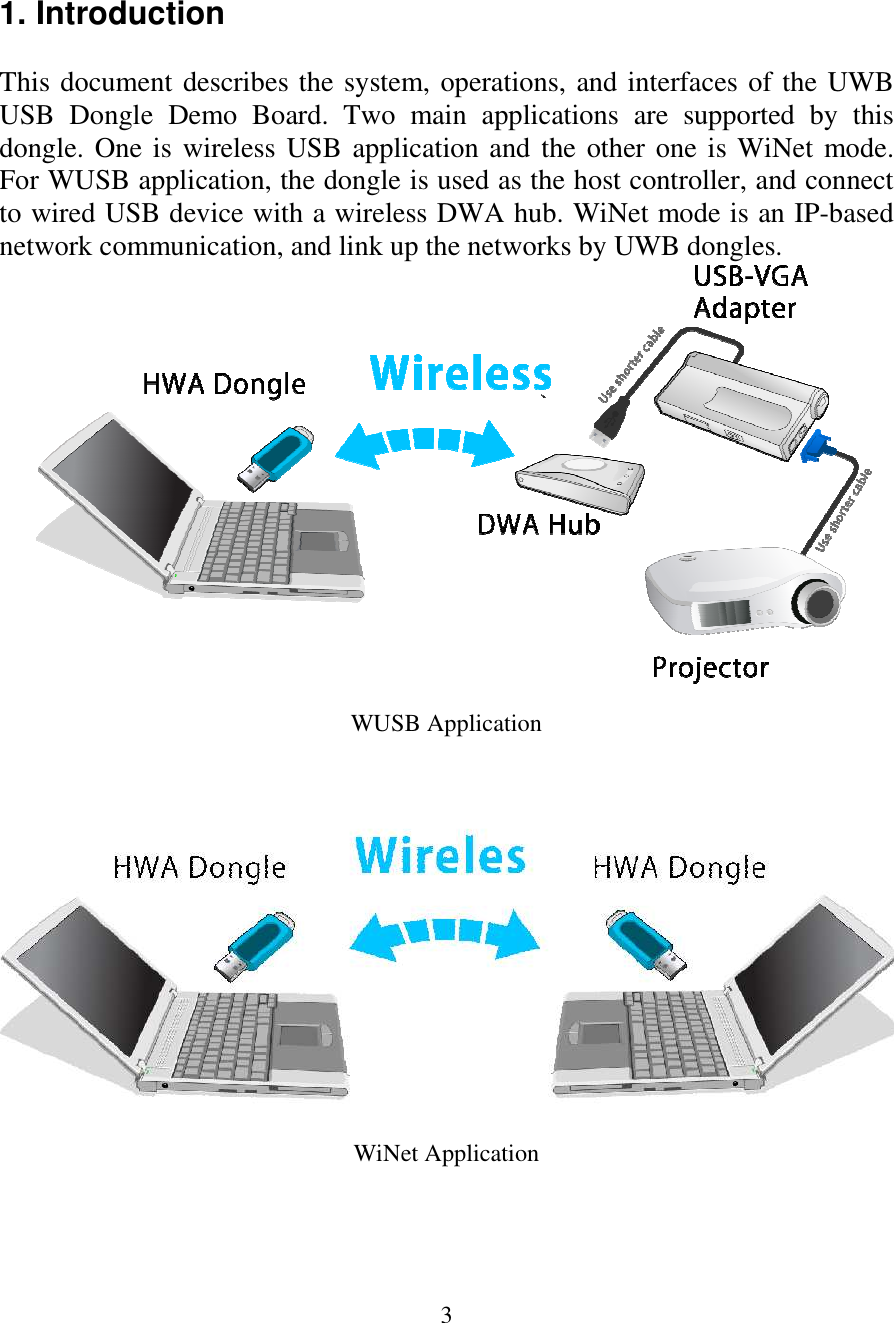
 3  1. Introduction  This document describes the system, operations, and interfaces of the UWB USB  Dongle  Demo  Board.  Two  main  applications  are  supported  by  this dongle. One is  wireless USB application and the other one is WiNet mode. For WUSB application, the dongle is used as the host controller, and connect to wired USB device with a wireless DWA hub. WiNet mode is an IP-based network communication, and link up the networks by UWB dongles.                 WUSB Application WiNet Application
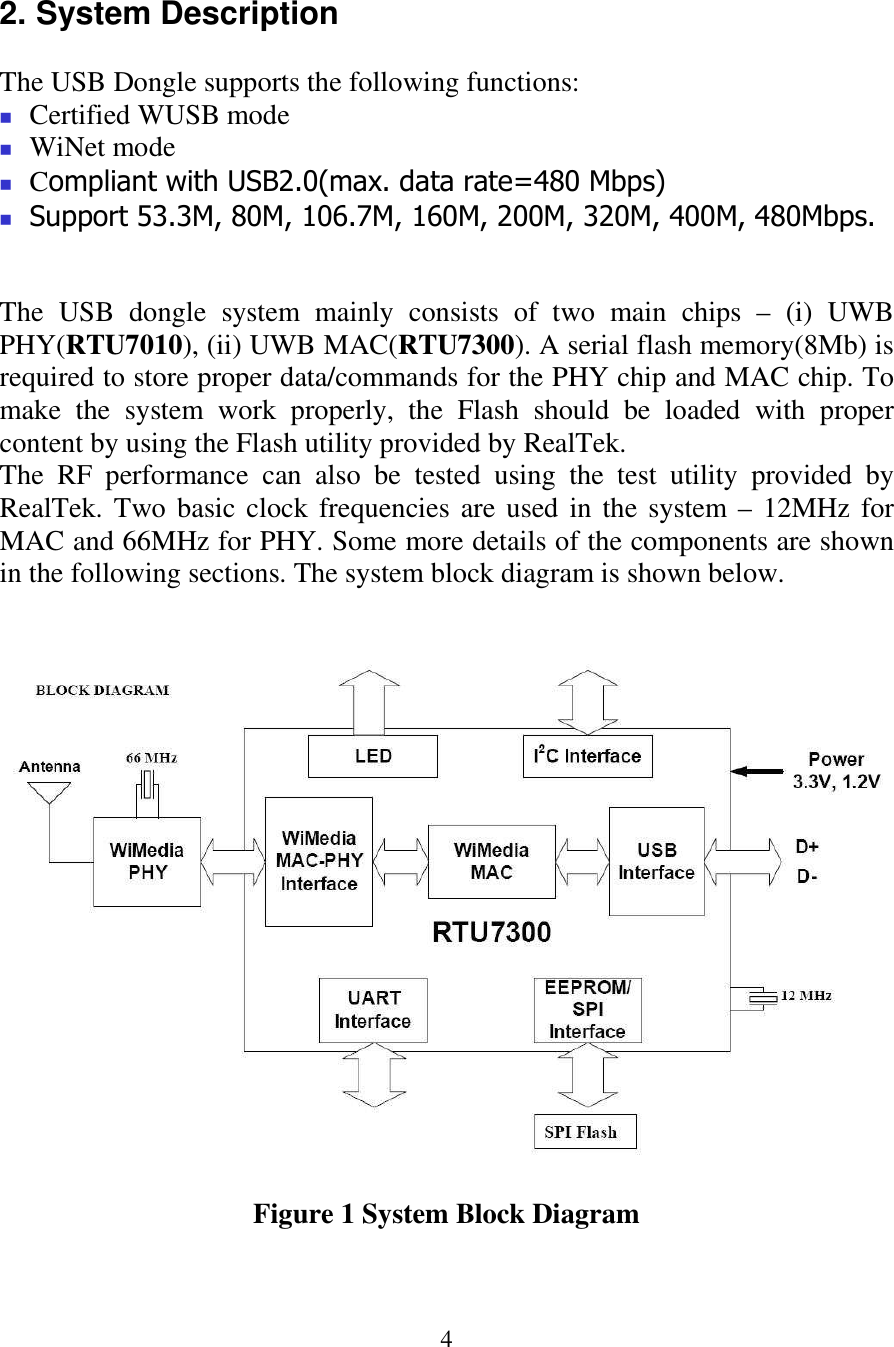
 4  2. System Description  The USB Dongle supports the following functions:  Certified WUSB mode  WiNet mode  Compliant with USB2.0(max. data rate=480 Mbps)  Support 53.3M, 80M, 106.7M, 160M, 200M, 320M, 400M, 480Mbps.   The  USB  dongle  system  mainly  consists  of  two  main  chips  –  (i)  UWB PHY(RTU7010), (ii) UWB MAC(RTU7300). A serial flash memory(8Mb) is required to store proper data/commands for the PHY chip and MAC chip. To make  the  system  work  properly,  the  Flash  should  be  loaded  with  proper content by using the Flash utility provided by RealTek.  The  RF  performance  can  also  be  tested  using  the  test  utility  provided  by RealTek. Two basic clock frequencies are used in the system – 12MHz for MAC and 66MHz for PHY. Some more details of the components are shown in the following sections. The system block diagram is shown below.    Figure 1 System Block Diagram
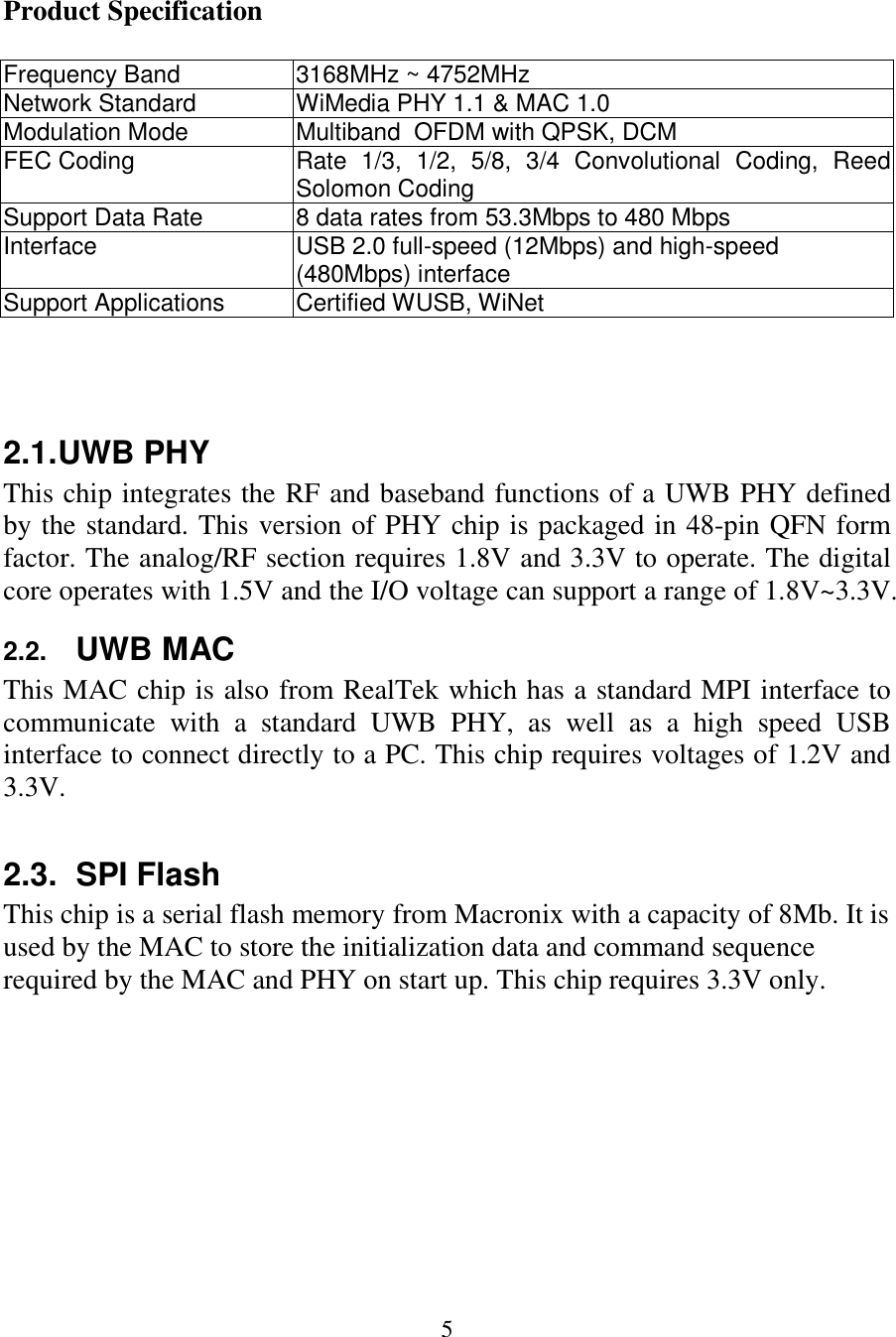
 5  Product Specification  Frequency Band  3168MHz ~ 4752MHz Network Standard  WiMedia PHY 1.1 & MAC 1.0 Modulation Mode  Multiband  OFDM with QPSK, DCM FEC Coding  Rate  1/3,  1/2,  5/8,  3/4  Convolutional  Coding,  Reed Solomon Coding  Support Data Rate  8 data rates from 53.3Mbps to 480 Mbps Interface  USB 2.0 full-speed (12Mbps) and high-speed (480Mbps) interface Support Applications  Certified WUSB, WiNet    2.1. UWB PHY This chip integrates the RF and baseband functions of a UWB PHY defined by the standard. This version of PHY chip is packaged in 48-pin QFN form factor. The analog/RF section requires 1.8V and 3.3V to operate. The digital core operates with 1.5V and the I/O voltage can support a range of 1.8V~3.3V.  2.2. UWB MAC This MAC chip is also from RealTek which has a standard MPI interface to communicate  with  a  standard  UWB  PHY,  as  well  as  a  high  speed  USB interface to connect directly to a PC. This chip requires voltages of 1.2V and 3.3V.  2.3.  SPI Flash This chip is a serial flash memory from Macronix with a capacity of 8Mb. It is used by the MAC to store the initialization data and command sequence required by the MAC and PHY on start up. This chip requires 3.3V only.
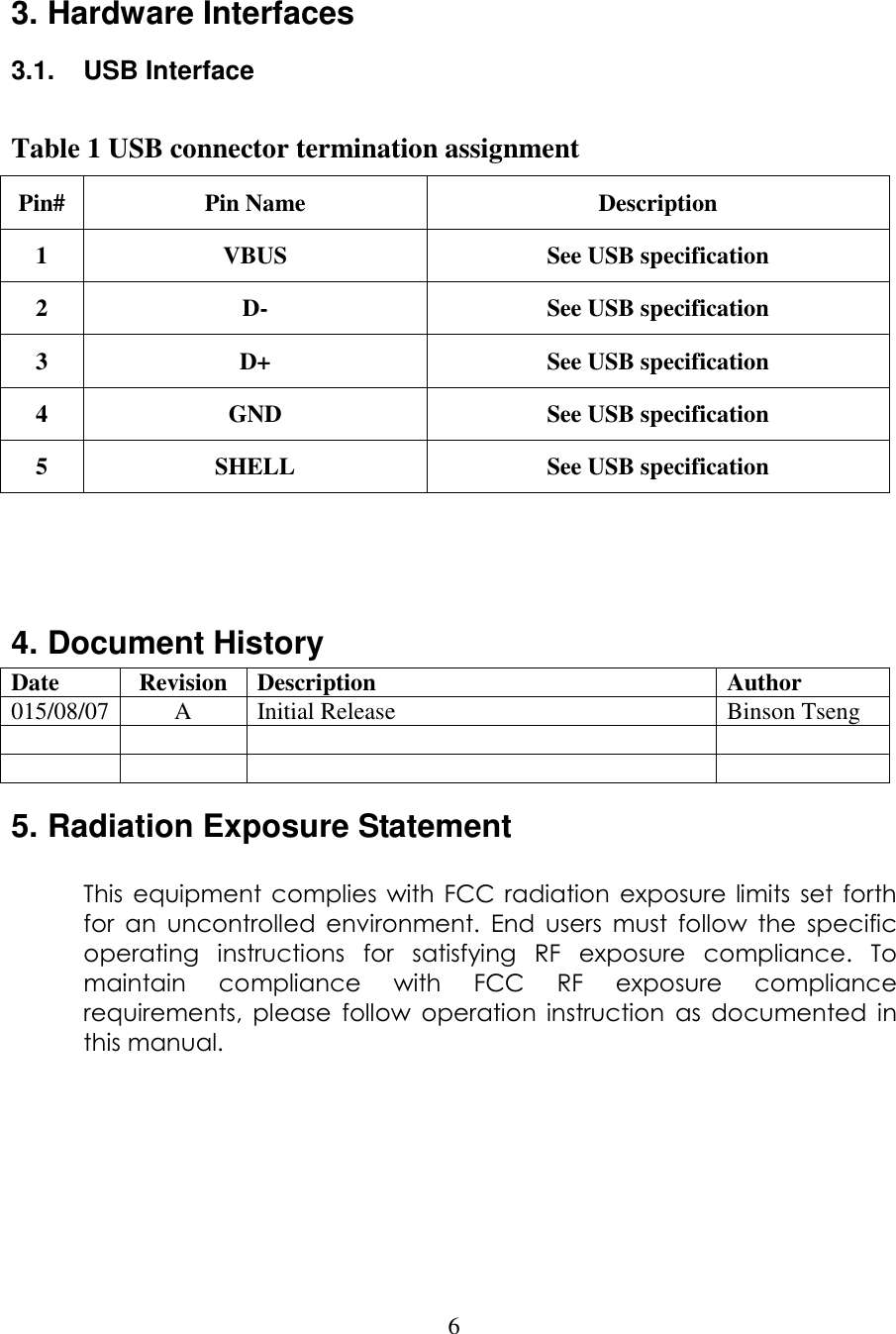
 6  3. Hardware Interfaces 3.1.  USB Interface  Table 1 USB connector termination assignment Pin# Pin Name  Description 1  VBUS  See USB specification 2  D-  See USB specification 3  D+  See USB specification 4  GND  See USB specification 5  SHELL  See USB specification    4. Document History Date  Revision  Description  Author 015/08/07 A  Initial Release  Binson Tseng               5. Radiation Exposure Statement  This  equipment complies  with FCC  radiation  exposure  limits  set  forth for  an  uncontrolled  environment.  End  users  must  follow  the  specific operating  instructions  for  satisfying  RF  exposure  compliance.  To maintain  compliance  with  FCC  RF  exposure  compliance requirements,  please  follow  operation  instruction  as  documented  in this manual.
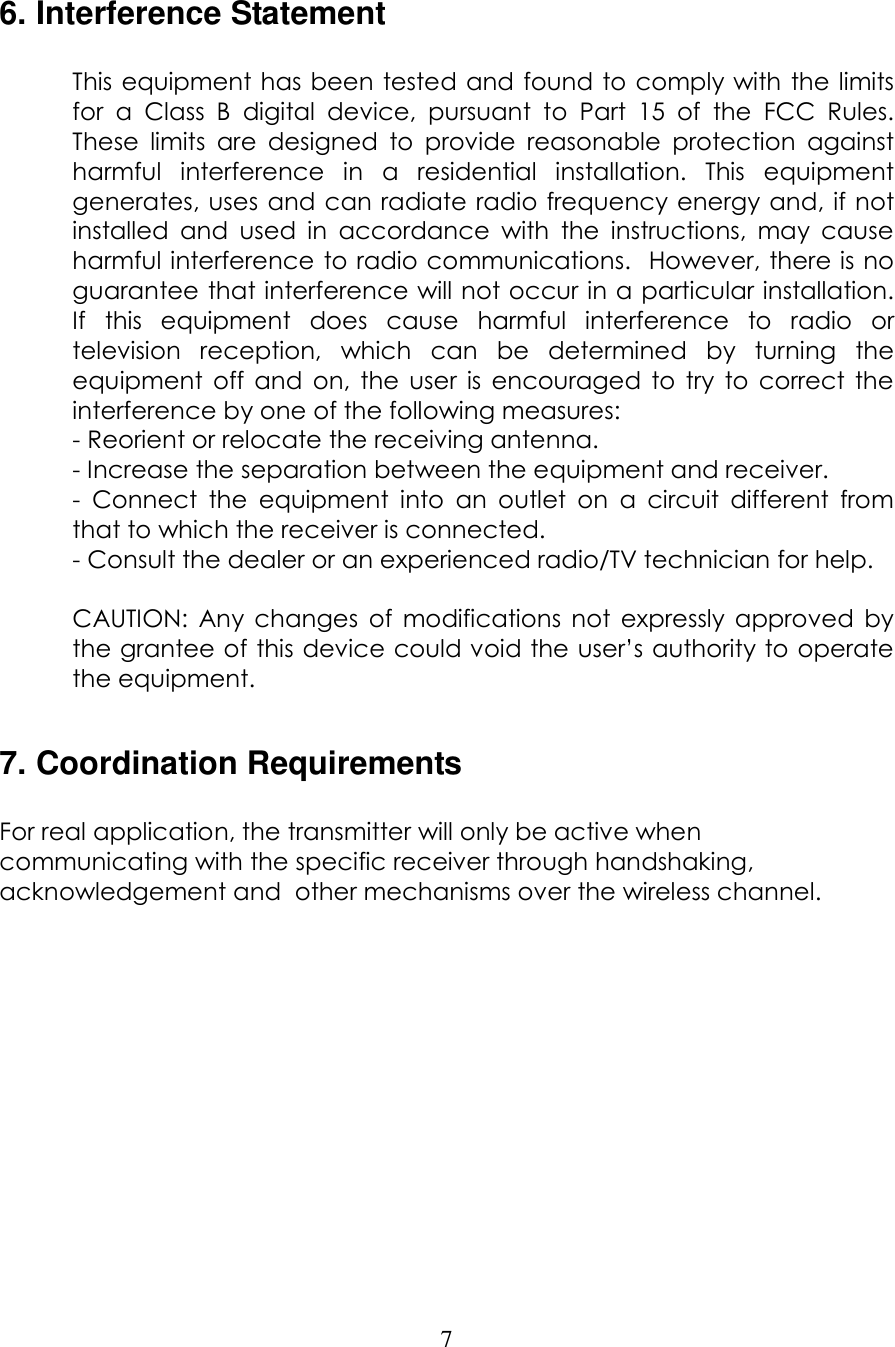
 7  6. Interference Statement  This equipment has been tested and found to comply with the limits for  a  Class  B  digital  device,  pursuant  to  Part  15  of  the  FCC  Rules.  These  limits  are  designed  to  provide  reasonable  protection  against harmful  interference  in  a  residential  installation.  This  equipment generates, uses  and can radiate radio frequency energy and, if not installed  and  used  in  accordance  with  the  instructions,  may  cause harmful interference to radio communications.  However, there is no guarantee that interference will not occur in a particular installation.  If  this  equipment  does  cause  harmful  interference  to  radio  or television  reception,  which  can  be  determined  by  turning  the equipment  off  and  on,  the  user  is  encouraged  to  try  to  correct  the interference by one of the following measures: - Reorient or relocate the receiving antenna. - Increase the separation between the equipment and receiver. -  Connect  the  equipment  into  an  outlet  on  a  circuit  different  from that to which the receiver is connected. - Consult the dealer or an experienced radio/TV technician for help.  CAUTION:  Any  changes  of  modifications  not  expressly  approved  by the grantee of this device could void the user’s authority to operate the equipment.  7. Coordination Requirements  For real application, the transmitter will only be active when communicating with the specific receiver through handshaking, acknowledgement and  other mechanisms over the wireless channel.
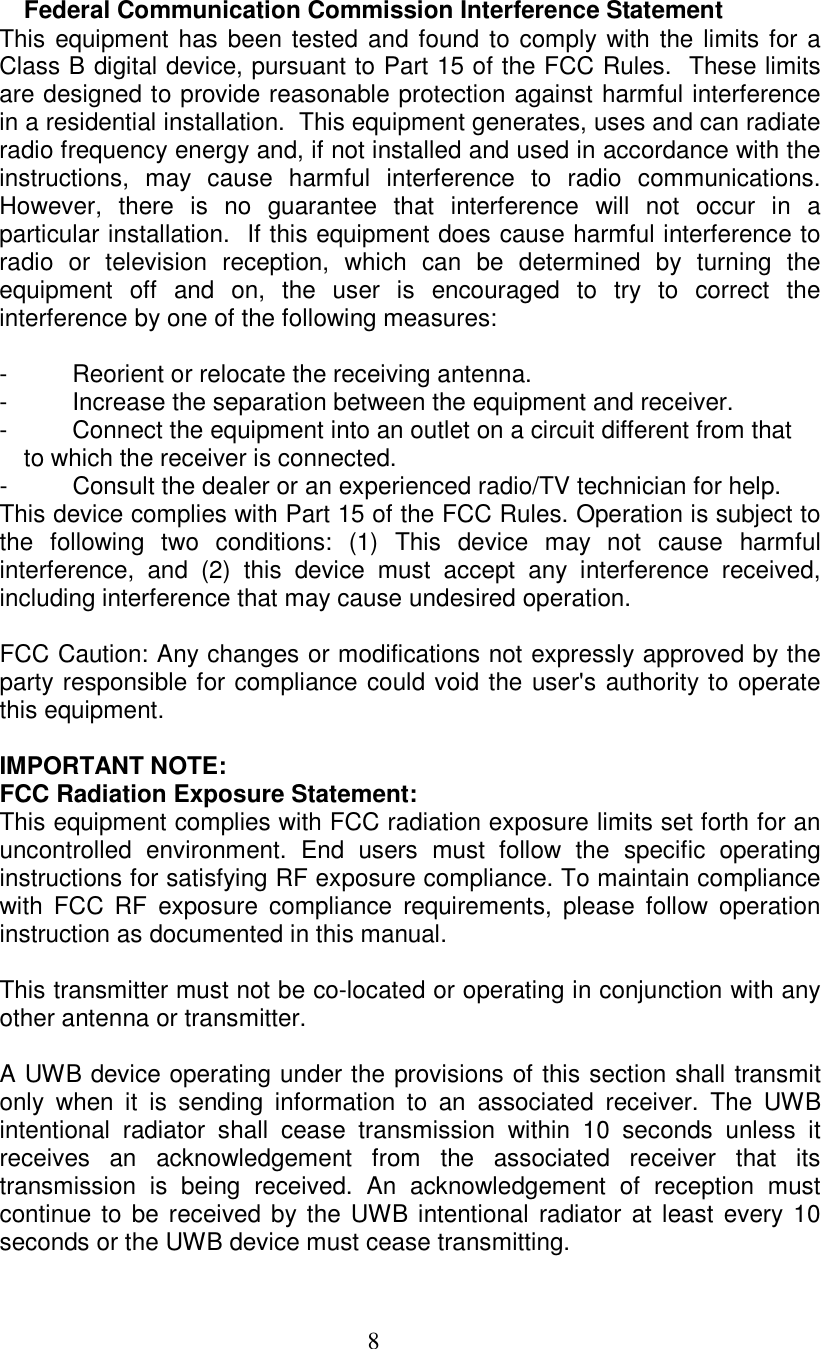
 8  Federal Communication Commission Interference Statement This equipment has been tested and found to comply with the limits for a Class B digital device, pursuant to Part 15 of the FCC Rules.  These limits are designed to provide reasonable protection against harmful interference in a residential installation.  This equipment generates, uses and can radiate radio frequency energy and, if not installed and used in accordance with the instructions,  may  cause  harmful  interference  to  radio  communications.  However,  there  is  no  guarantee  that  interference  will  not  occur  in  a particular installation.  If this equipment does cause harmful interference to radio  or  television  reception,  which  can  be  determined  by  turning  the equipment  off  and  on,  the  user  is  encouraged  to  try  to  correct  the interference by one of the following measures:  -  Reorient or relocate the receiving antenna. -  Increase the separation between the equipment and receiver. -  Connect the equipment into an outlet on a circuit different from that to which the receiver is connected. -  Consult the dealer or an experienced radio/TV technician for help. This device complies with Part 15 of the FCC Rules. Operation is subject to the  following  two  conditions:  (1)  This  device  may  not  cause  harmful interference,  and  (2)  this  device  must  accept  any  interference  received, including interference that may cause undesired operation.  FCC Caution: Any changes or modifications not expressly approved by the party responsible for compliance could void the user's authority to operate this equipment.  IMPORTANT NOTE: FCC Radiation Exposure Statement: This equipment complies with FCC radiation exposure limits set forth for an uncontrolled  environment.  End  users  must  follow  the  specific  operating instructions for satisfying RF exposure compliance. To maintain compliance with  FCC  RF  exposure  compliance  requirements,  please  follow  operation instruction as documented in this manual.  This transmitter must not be co-located or operating in conjunction with any other antenna or transmitter.  A UWB device operating under the provisions of this section shall transmit only  when  it  is  sending  information  to  an  associated  receiver.  The  UWB intentional  radiator  shall  cease  transmission  within  10  seconds  unless  it receives  an  acknowledgement  from  the  associated  receiver  that  its transmission  is  being  received.  An  acknowledgement  of  reception  must continue to  be received by the UWB intentional radiator at least every 10 seconds or the UWB device must cease transmitting.
 9  Per  FCC  regulations,  an  intentional  radiator  may  only  transmit  when communicating with an associated receiver. This continuous transmit mode is for evaluation purpose only.  In end-user applications, this handled through handshaking, acknowledgements, negotiation of the communication channel, and other mechanisms that ensure the transmitter is active when communicating with a receiver.

Navigation menu