AUTOEQUIPS TECH CM11W Digital Wireless System User Manual

AUTOEQUIPS TECH CO., LTD. Digital Wireless System Users Manual

Users Manual

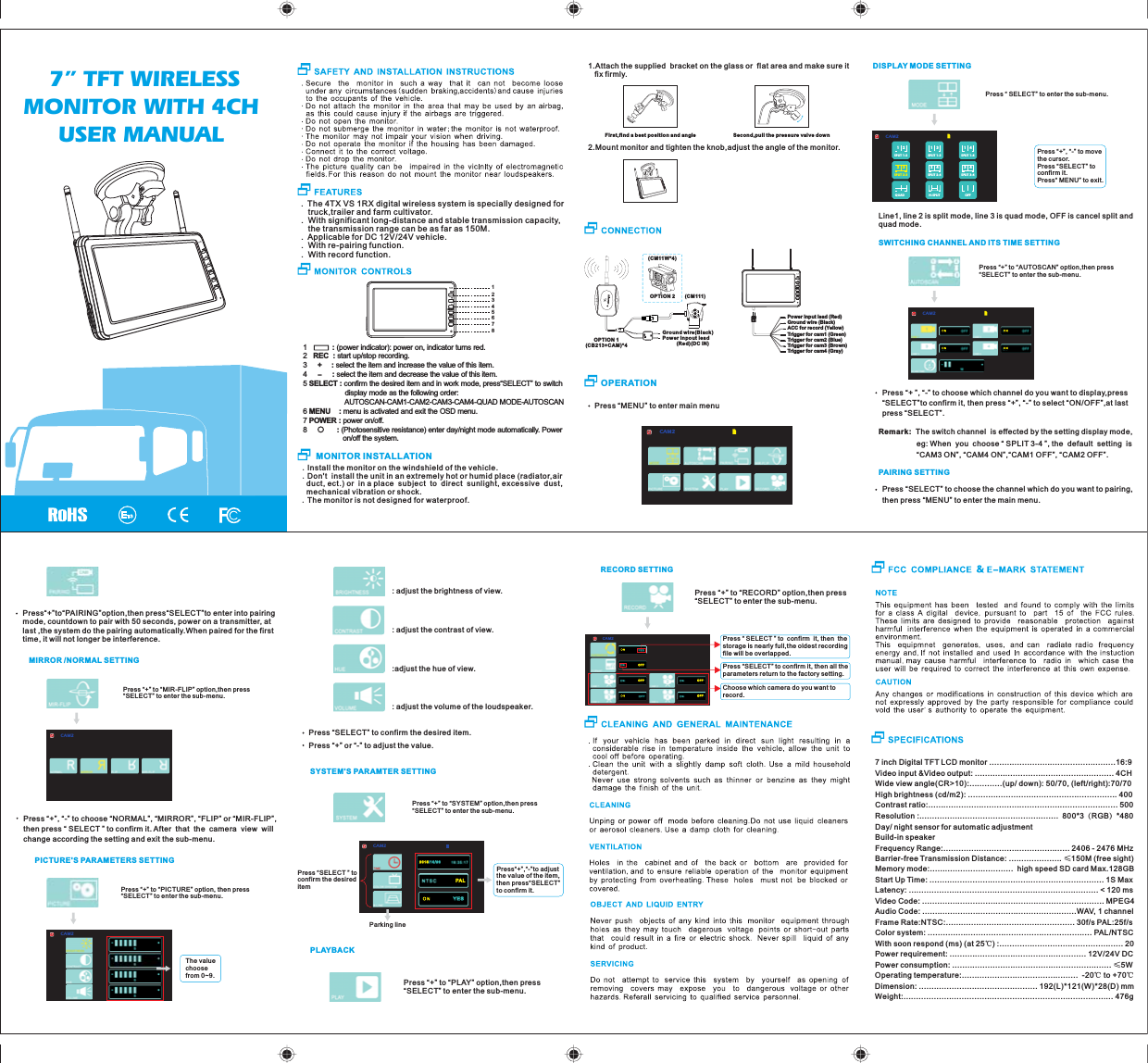
.Install the monitor on the windshield of the vehicle..Don't  install the unit in an extremely hot or humid place (radiator,air   duct, ect.) or  in a place  subject  to  direct  sunlight, excessive  dust,  mechanical vibration or shock..The monitor is not designed for waterproof.7 inch Digital TFT LCD monitor ..................................................16:9Video input &Video output: ....................................................... 4CHWide view angle(CR>10):.............(up/ down): 50/70, (left/right):70/70    High brightness (cd/m2): ........................................................... 400Contrast ratio:........................................................................... 500Resolution :.......................................................  800*3(RGB)*480Day/ night sensor for automatic adjustmentBuild-in speakerFrequency Range:.................................................. 2406 - 2476 MHzBarrier-free Transmission Distance: ..................... ≤150M (free sight)Memory mode:.................................  high speed SD card Max.128GBStart Up Time: ..................................................................... 1S MaxLatency: ........................................................................... < 120 msVideo Code: ........................................................................ MPEG4Audio Code: .............................................................WAV, 1 channelFrame Rate:NTSC:................................................... 30f/s PAL:25f/sColor system: ................................................................. PAL/NTSCWith soon respo nd (ms) (at 25℃) :................................................. 20Power requirement: ...................................................... 12V/24V DCPower consumption: ............................................................... ≤5WOperating temperature:..............................................  -20℃ to +70℃Dimension: ............................................... 192(L)*121(W)*28(D) mmWeight:................................................................................... 476g 7” TFT WIRELESS MONITOR WITH 4CH USER MANUAL.  The 4TX VS 1RX digital wireless system is specially designed for    truck,trailer and farm cultivator..  With significant long-distance and stable transmission capacity,    the transmission range can be as far as 150M..  Applicable for DC 12V/24V vehicle..  With re-pairing function..  With record function.-1            : (power indicator): power on, indicator turns red.2   REC  : start up/stop recording. 3     +  : select the item and increase the value of this item.4            : select the item and decrease the value of this item.5 SELECT : confirm the desired item and in work mode, press“SELECT” to switch                     display mode as the following order:                                                     AUTOSCAN-CAM1-CAM2-CAM3-CAM4-QUAD MODE-AUTOSCAN6 MENU    : menu is activated and exit the OSD menu. 7 POWER : power on/off.8      : (Photosensitive resistance) enter day/night mode automatically. Power                    on/off the system.    MONITOR INSTALLATIONPress “MENU” to enter main menuOPERATION1.Attach the supplied  bracket on th e glass or  flat area and make sure it    fix firmly.First,find a best pos it io n an d angle Second,pull the pressure valve down2.Mount monitor and tighten the knob,adjust the angle of the monitor.Ground wire(Black)Power inpout lead          (Red)(DC IN)(CM111 )OPTION 2(CM11W*4)      OPTION 1CB213+CAM)*4(CAM2DISPLAY MODE SETTINGLine1, line 2 is split mode, line 3 i s quad mode, OFF is canc el split and quad mode.SWITCHING CHANNEL AND ITS TIME SETTINGCAM2Press “+” to “AUTOSCAN” option,then press“SELECT” to enter the sub-menu.Remark:  The switch channel  i s effected by the setting display mode,                   eg: When  y ou  choose “ SPLIT 3-4 ”, the  default  setting  is                   “CAM3 ON ”, “CAM4 ON”,“CAM1 OFF”, “CAM2 OFF”.Press “+ ”, “-” to choose which channel do you want to display,press “SELECT”to confirm it, then press “+”, “-” to select “ON/OFF”,at last press “SELECT”.PAIRING SETTINGPress “SELECT” to choose the channel which do you want to pairing, then press “MENU” to enter the main men u.Press“+”to“PAIRING”option,then press“SELECT”to enter into pairing mode, countdown to pair with 50 seconds, power on a transmitter, at last ,the system do the pairing automatically.When paired for the first time, it will not longer be interference.MIRROR /NORMAL SETTINGCAM2Press “+” to “MI R-F LIP ” opt ion ,th en press “SELECT” to enter the sub-menu.Press “+”, “-” to choose “NORMAL”, “MIRROR”, “FLIP” or “MIR-FLIP”, then press “ SELECT ” to confirm it. After  that  the  came ra  view  will change according the setting and exit the sub-menu.PICTURE'S PARAMETERS SETTINGPress “+” to “PICTURE” option, then press “SELECT” to enter the sub-menu.The value choose from 0~9.CAM2: adjust the brightness of view.: adjust the contrast of view.:adjust the hue o f view.: adjust the volume of the loudspeaker.Press “SELECT” to confirm the desired item. Press “+” or “-” to adjust the value.Press “+” to “SYSTEM” option,then press “SELECT” to enter the sub-menu.PLAYBACKPress “+” to “PLAY” option,t hen press “SELECT” to enter the sub-menu.RECORD SETTINGPress “+” to “RECORD” option,then press “SELECT” to enter the sub-menu.CAM2OF FOF FOF FOF FPress “ SELECT ” to  confirm  it, the n  the storage is nearly full,the oldest recording file will be overlapped.Press “SELECT” to confirm it, then all the parameters retu rn to t he fa cto ry se tting.Choose which camera do you want to record.12SPLIT 1-213SPLIT 1-314SPLIT 1-424SPLIT 2-423SPLIT 2-334SPLIT 3-4OFFH-SPLITQUADCAM2Press “ SELECT” to en ter t he su b-menu.Press “+”, “-” to move the cursor.Press “SELECT” toconfirm it.Press“ MENU” to exit.SELECT12345678SELECTSELECTSYSTEM'S PARAMTER SETTINGPress“+”,“-”to adjust the value of the item , then press“SELECT” to confirm it. Press “SELECT ” toconfirm the desired itemParking lineCAM2PA L2015/1 0 / 2 6Y E SSELECTPower input lead (Red)Ground wire (Black)ACC for record (Yellow)Trigger for cam1 (Green)Trigger for cam2 (Blue)Trigger for cam3 (Brown)Trigger for cam4 (Gray)
 FCC Radiation Exposure Statement:  This equipment complies with FCC radiation exposure limits set forth for an uncontrolled environment. This equipment should be installed and operated with minimum distance 20cm between the radiator & your body.  FCC Warning  This device complies with Part 15 of the FCC Rules. Operation is subject to the following two conditions: (1) This device may not cause harmful interference, and (2) this device must accept any interference received, including interference that may cause undesired operation.  NOTE: Any changes or modifications to this unit not expressly approved by the party responsible for compliance could void the user's authority to operate the equipment.

Navigation menu