Acuity Lighting ACWIFI001 Wireless Light Module User Manual 122016

Acuity Brands Lighting, Inc. Wireless Light Module Users Manual 122016

Users Manual 122016

ROAM/SSG – A Division of Acuity Brands    2ADCB-ACWIFI001User’s Manual             THIS DOCUMENT IS ROAM/SSG PROPRIETARY   Page 1/13      2ADCB-ACWIFI001 User’s Manual
ROAM/SSG – A Division of Acuity Brands    2ADCB-ACWIFI001User’s Manual             THIS DOCUMENT IS ROAM/SSG PROPRIETARY   Page 2/13 REVISION HISTORY  Date Version Description Author 6/6/2016 1.0 Initial Draft Kayvon Movahed 9/26/2016 1.2 FCC ID and antenna fixed Kayvon Movahed 11/30/2016 1.3 Block Diagram Kayvon Movahed 12/15/2016 1.4 FCC ID typo fixed Kayvon Movahed 12/16/16 1.5 FCC and IC Compliance statements added Kayvon Movahed
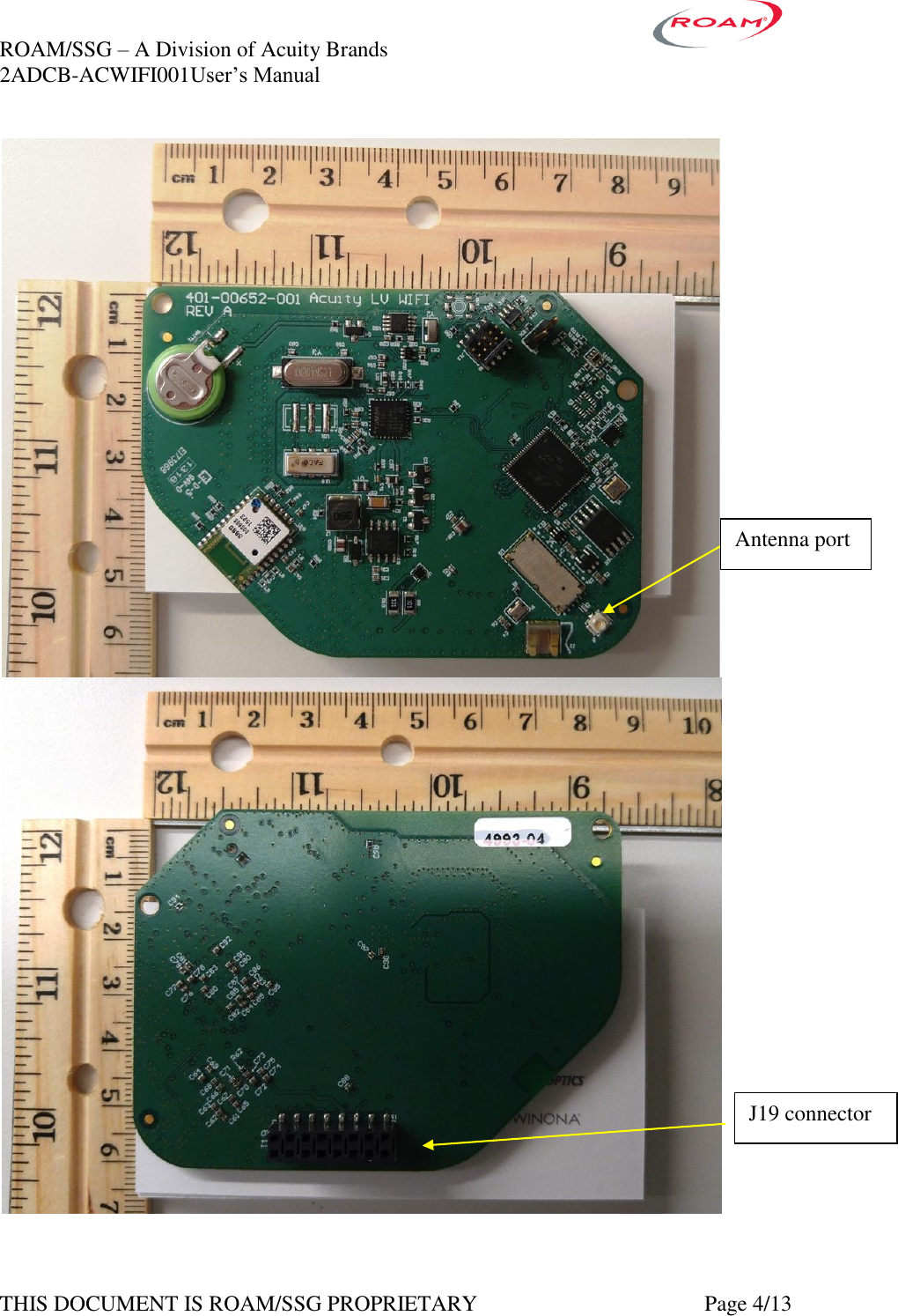
ROAM/SSG – A Division of Acuity Brands    2ADCB-ACWIFI001User’s Manual             THIS DOCUMENT IS ROAM/SSG PROPRIETARY   Page 3/13  Background  The 2ADCB -ACWIFI001 radio module is intended for installation in wireless streetlight controls applications.  The module has onboard regulated 3.3Vdc supply.   The module assembly comes with two different antennas; Laid MAF95310 Mini NanoBlade Flex with the gain of 2.79 dBi @ 2.4 GHz and 3.38 dBi @ 5 GHz, and Laird DCF5151C-FNM 1dBi @ 2.4GHz and 2.4 dBi at 5.0GHz.   Each variant is physically and electrically identical except for the antenna implementation.  Caution: the module assembly may not be used with other antenna types or with antennas of higher gain.  Modem User’s Manual (not accessible to end-users).  1. Overview of the Radio Modem Hardware The 2ADCB -ACWIFI001 modem is an 802.11 wireless module that allows wireless communication using a standard asynchronous serial data stream. The main features of the 2ADCB -ACWIFI001 radio modem are presented in the figures below.  FCC ID label will be applied to the shield at a later date.
ROAM/SSG – A Division of Acuity Brands    2ADCB-ACWIFI001User’s Manual             THIS DOCUMENT IS ROAM/SSG PROPRIETARY   Page 4/13    Antenna port J19 connector
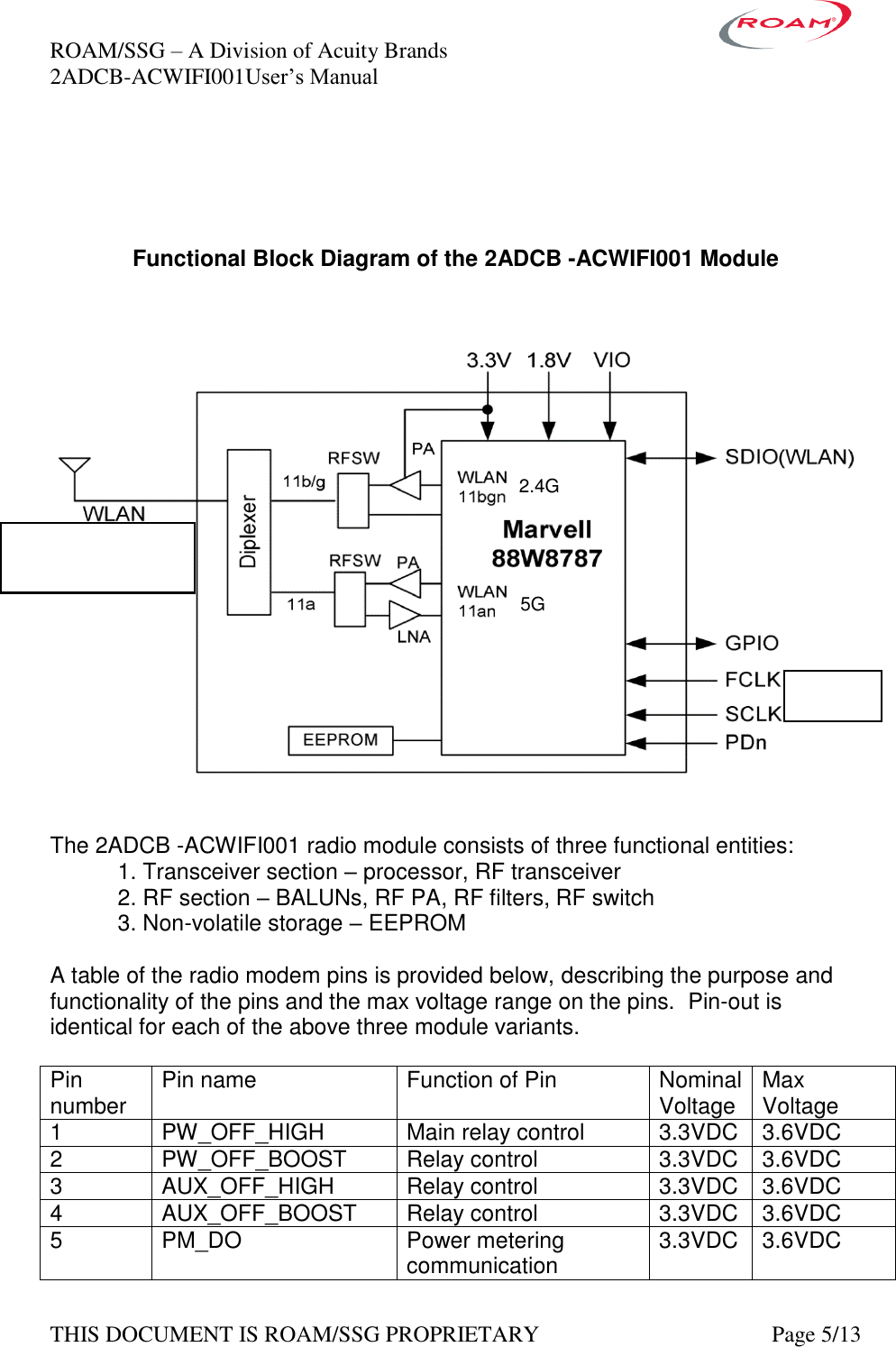
ROAM/SSG – A Division of Acuity Brands    2ADCB-ACWIFI001User’s Manual             THIS DOCUMENT IS ROAM/SSG PROPRIETARY   Page 5/13     Functional Block Diagram of the 2ADCB -ACWIFI001 Module      The 2ADCB -ACWIFI001 radio module consists of three functional entities:   1. Transceiver section – processor, RF transceiver   2. RF section – BALUNs, RF PA, RF filters, RF switch   3. Non-volatile storage – EEPROM  A table of the radio modem pins is provided below, describing the purpose and functionality of the pins and the max voltage range on the pins.  Pin-out is identical for each of the above three module variants.  Pin number Pin name Function of Pin Nominal Voltage Max Voltage 1 PW_OFF_HIGH Main relay control 3.3VDC 3.6VDC 2 PW_OFF_BOOST Relay control 3.3VDC 3.6VDC 3 AUX_OFF_HIGH Relay control 3.3VDC 3.6VDC 4 AUX_OFF_BOOST Relay control 3.3VDC 3.6VDC 5 PM_DO Power metering communication  3.3VDC 3.6VDC 32MHz 2405- 2472MHz  5180-5825MHz 5G  2.4G
ROAM/SSG – A Division of Acuity Brands    2ADCB-ACWIFI001User’s Manual             THIS DOCUMENT IS ROAM/SSG PROPRIETARY   Page 6/13 6 GND Ground 3.3VDC 3.6VDC 7 PM_TXD Power metering communication  3.3VDC 3.6VDC 8 PM_RXD Power metering communication  3.3VDC 3.6VDC 9 PWR Power input 3.3VDC 3.3VDC 3.6VDC 10 PWR Power input 3.3VDC 3.3VDC 3.6VDC 11 PMW1 0-10V dim control  3.3VDC 3.6VDC 12 PM_RST Power metering communication  3.3VDC 3.6VDC 13 MCUDBGRX UART debug RX 3.3VDC 3.6VDC 14 MCUDBGTX UART debug TX 3.3VDC 3.6VDC 15 GND DC communication Ground 3.3VDC 3.6VDC 16 YAMAR_DATA_PWR DC communication Line 3.3VDC 3.6VDC    2. Operation of the 2ADCB -ACWIFI001 Radio Modem Communication with the 2ADCB -ACWIFI001 radio modem happens through serial port. The baud rate is set to be 115200, 8N1.  2.1. Getting started Open an instance of terminal software on a serial port with the above settings and connect to the RF modem. Any command is single line followed by enter command. Format of command is: command param1 param2 … <enter> At startup pushing the enter key a few times is necessary until the reception of the prompt string.  This device is always a WIFI client. The device will scan for AP starting from channel 1 to 11 then it will continue on 5GHz band. The default key and password is: XeraL2/kentspeed. This can be change after the device is connected.    PTS Commands description:  help sdk-version xlog-info xlog-level [<new_level>] xlog-prefix [<element> ...]
ROAM/SSG – A Division of Acuity Brands    2ADCB-ACWIFI001User’s Manual             THIS DOCUMENT IS ROAM/SSG PROPRIETARY   Page 7/13 x-rtc-get x-rtc-set <tm_sec> x-rtc-usecs [<tm_usec>] x-rtc-dump xlog-dump xlog-dump-event xlog-dump-prev xlog-set-event x-dim <channel> [<value> [<rate up> [<rate down>]]] x-dimmer <channel> <value> x-adctest <channel> x-swinfo x-ldump x-timesync x-sens-list x-sens-read x-sens-read-ext x-alarm-set <type> <severity> [text...] x-alarm-dump x-alarm-short x-mem-dump <addr> <len> x-poke <addr32> <val32> x-flash-erase <dev> <addr> <len> x-flash-dump <dev> <addr> <len> x-eeprom-dump <addr> <len> x-otafw <url> x-fwflip x-mem x-rs-tx x-rs-rx x-get-mac x-reboot x-wdttout x-get-tasks x-get-stacks x-debug 0|1 x-sd-dbg 0|1 x-psm-backup-module <dest_mod> <src_mod> [<erase?>] x-psm-erase-module <module_name> x-psm-format-module <module_name> x-psm-delete-var <module_name> <var_name> x-corrupt-module <module_name> x-psm-dump-hex <module_name>
ROAM/SSG – A Division of Acuity Brands    2ADCB-ACWIFI001User’s Manual             THIS DOCUMENT IS ROAM/SSG PROPRIETARY   Page 8/13 x-cfgget <var_name> x-cfgset <var_name> <value> x-atimer-info psm-register <module> <partition-key> psm-get <module> <variable> psm-set <module> <variable> <value> psm-del <module> <variable> psm-erase psm-dump <partition_no> psm-get-free-space <module> wlan-scan wlan-add <profile_name> ssid <ssid> bssid... wlan-remove <profile_name> wlan-list wlan-connect <profile_name> wlan-disconnect wlan-stat wlan-info wlan-address wlan-mac wlan-set-regioncode wlan-get-regioncode wlan-gethostbyname <hostname> pm-wifi-pdn-enter (see pm-wifi-pdn-enter -h for details) pm-wifi-pdn-exit iwpriv Support for iwpriv commands x-keyring-dump x-cal-dump x-cal-read x-cal-write x-energy-reset x-cs5480-dump x-cs5480-read x-cs5480-write x-cs5480-inst x-cs5480-calmode x-gps-dump x-gps-reset x-gps-stdby [<0|1>] x-ymr <mode> x-ymr-pwr [0|1] x-ymr-freq [0|1] x-ymr-stats [0]
ROAM/SSG – A Division of Acuity Brands    2ADCB-ACWIFI001User’s Manual             THIS DOCUMENT IS ROAM/SSG PROPRIETARY   Page 9/13 x-ymr-sof <node> x-nh-sens x-nh-stats x-nh-ver x-nh-fwdl x-nh-md <addr> <nb> x-nh-peek <addr> x-nh-peek8 <addr> x-nh-poke <addr> <val> x-nh-poke8 <addr> <val> x-pwr-dump x-pwr-aux-enable [0|1]
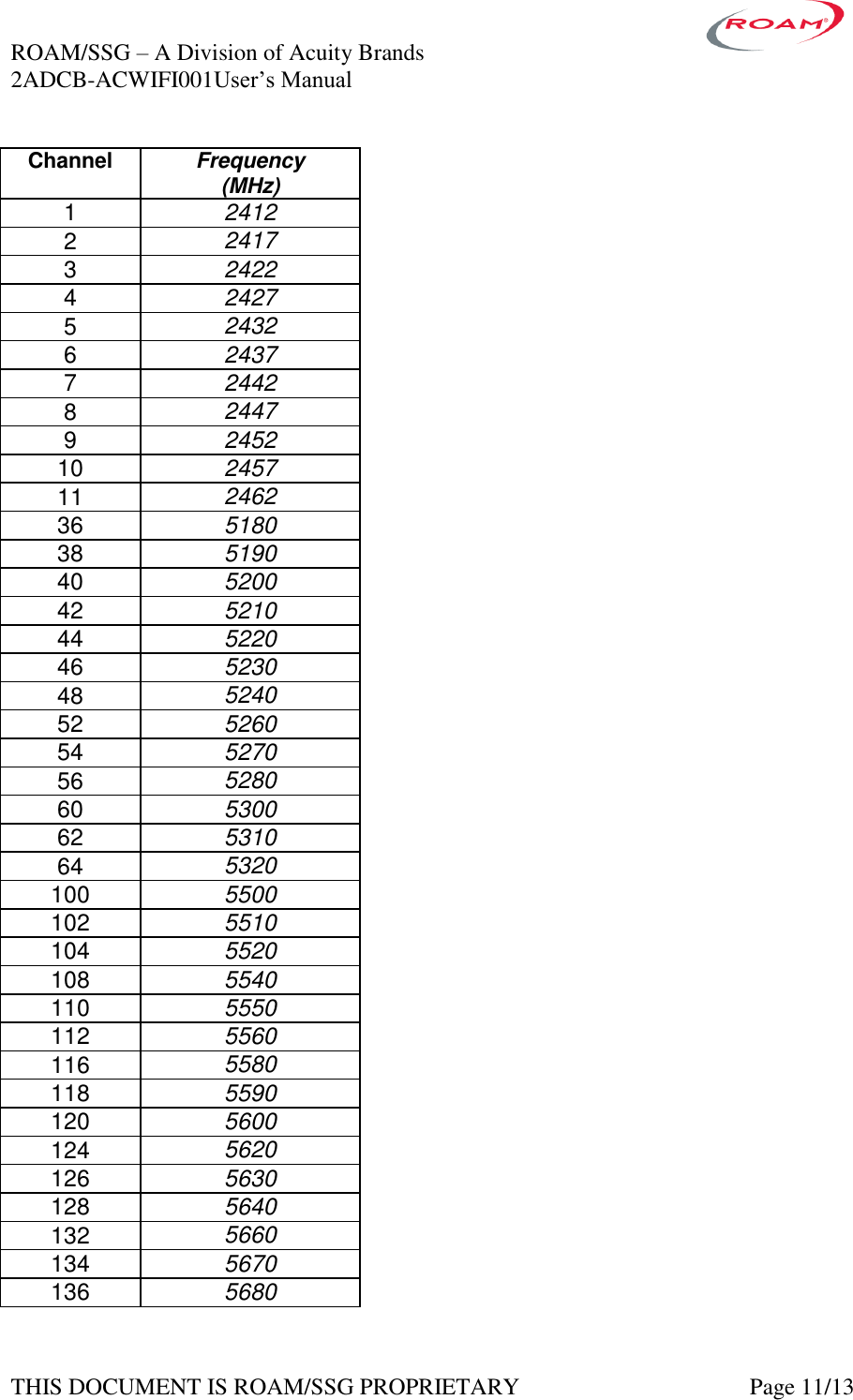
ROAM/SSG – A Division of Acuity Brands    2ADCB-ACWIFI001User’s Manual             THIS DOCUMENT IS ROAM/SSG PROPRIETARY   Page 10/13   3. Antenna Information To maintain compliance with FCC Rules and Regulations, only the following antenna types with gains no higher than what is indicated may be used with this product:  For 2.4 Ghz Operation:   Flex Trace, max gain: 2.79 dBi Omni, max gain: 1.0 dBi   For 5 Ghz Operation: Flex Trace, max gain: 3.38 dbi Omni, max gain: 2.4 dBi   4. RF Exposure Limit Warning To comply with FCC’s RF exposure limits for general population / uncontrolled exposure, the antenna(s) used for this transmitter must be installed to provide a separation distance of at least 20cm from all persons and must not be co-located or operating in conjunction with any other antenna or transmitter.  Pour se conformer aux limites d'exposition aux RF  pour la population générale / incontrôlée l'exposition, l'antenne (s) utilisée pour ce transmetteur doit être installé pour Prévu distance de séparation d'au moins 20cm de toutes les personnes et ne doit pas être situé ou opérant en conjonction avec une autre antenne ou émetteur.  5. Compliance Statement (Part 15.19) This Device complies with Part 15 of the FCC Rules. Operation is subject to the following two conditions: 1. This device may not cause harmful interference, and 2. This device must accept any interference received, including interference that may cause undesired operation.  2ADCB -ACWIFI001 Frequency Selection The 2ADCB -ACWIFI001 can select an unoccupied portion of the spectrum at startup. The module also uses DFS to avoid interfering with Radar signal in 5 GHz to 5.8 GHz band. The series uses a set of channels as defined by the IEEE 802.15.11 / standards which span a range from 2405 to 2475 MHz and 5170 MHz to 5825MHz. See below for the list of between channels:
ROAM/SSG – A Division of Acuity Brands    2ADCB-ACWIFI001User’s Manual             THIS DOCUMENT IS ROAM/SSG PROPRIETARY   Page 11/13 Channel Frequency (MHz) 1 2412 2 2417 3 2422 4 2427 5 2432 6 2437 7 2442 8 2447 9 2452 10 2457 11 2462 36 5180 38 5190 40 5200 42 5210 44 5220 46 5230 48 5240 52 5260 54 5270 56 5280 60 5300 62 5310 64 5320 100 5500 102 5510 104 5520 108 5540 110 5550 112 5560 116 5580 118 5590 120 5600 124 5620 126 5630 128 5640 132 5660 134 5670 136 5680
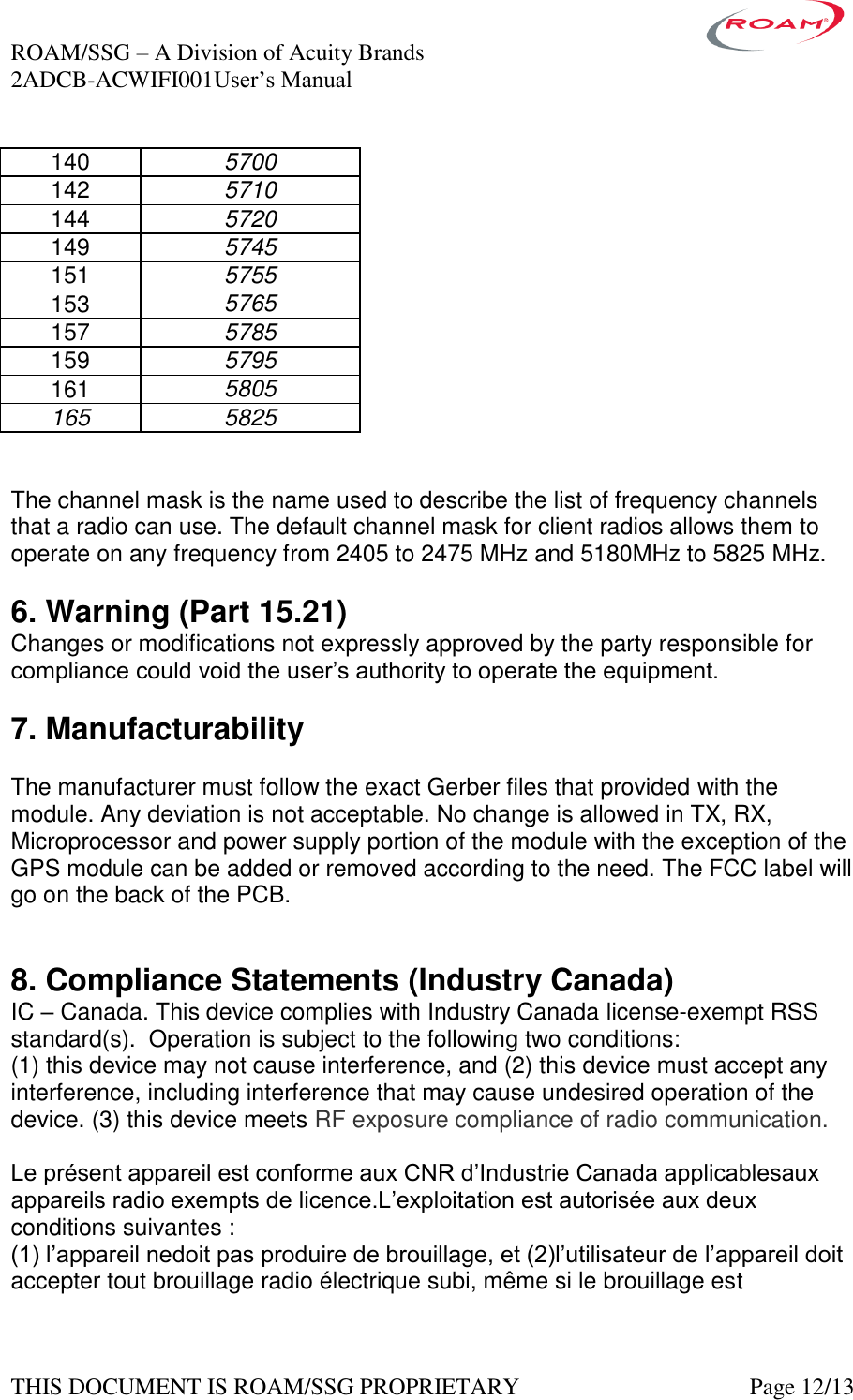
ROAM/SSG – A Division of Acuity Brands    2ADCB-ACWIFI001User’s Manual             THIS DOCUMENT IS ROAM/SSG PROPRIETARY   Page 12/13 140 5700 142 5710 144 5720 149 5745 151 5755 153 5765 157 5785 159 5795 161 5805 165 5825   The channel mask is the name used to describe the list of frequency channels that a radio can use. The default channel mask for client radios allows them to operate on any frequency from 2405 to 2475 MHz and 5180MHz to 5825 MHz.  6. Warning (Part 15.21) Changes or modifications not expressly approved by the party responsible for compliance could void the user’s authority to operate the equipment.  7. Manufacturability  The manufacturer must follow the exact Gerber files that provided with the module. Any deviation is not acceptable. No change is allowed in TX, RX, Microprocessor and power supply portion of the module with the exception of the GPS module can be added or removed according to the need. The FCC label will go on the back of the PCB.    8. Compliance Statements (Industry Canada) IC – Canada. This device complies with Industry Canada license-exempt RSS standard(s).  Operation is subject to the following two conditions: (1) this device may not cause interference, and (2) this device must accept any interference, including interference that may cause undesired operation of the device. (3) this device meets RF exposure compliance of radio communication.  Le présent appareil est conforme aux CNR d’Industrie Canada applicablesaux appareils radio exempts de licence.L’exploitation est autorisée aux deux conditions suivantes : (1) l’appareil nedoit pas produire de brouillage, et (2)l’utilisateur de l’appareil doit accepter tout brouillage radio électrique subi, même si le brouillage est
ROAM/SSG – A Division of Acuity Brands    2ADCB-ACWIFI001User’s Manual             THIS DOCUMENT IS ROAM/SSG PROPRIETARY   Page 13/13 susceptible d’encompromettre le fonctionnement.(3) Cet appareil répond à la conformité des communications radio.  For operation in the band 5150–5250 MHz , this device is only for indoor use to reduce the potential for harmful interference to co-channel mobile satellite systems.  The maximum antenna gain permitted for devices in the bands 5250-5350 MHz and 5470-5725 MHz shall be such that the equipment still complies with the e.i.r.p. limit (see antenna information above).  The maximum antenna gain permitted for devices in the band 5725-5850 MHz shall be such that the equipment still complies with the e.i.r.p. limits specified for point-to-point and non-point-to-point operation as appropriate (see antenna information above).   Be advised that high-power radars are allocated as primary users (i.e. priority users) of the bands 5250-5350 MHz and 5650-5850 MHz and that these radars could cause interference and/or damage to LE-LAN devices.   9. LABELING  Notice:  the final product into which the module is installed must bear a visible label stating that the product “contains FCC ID: 2ADCB-ACWIFI001” and “contains IC: 6715A-ACWIFI001.”    The product should also be labeled: “for indoor use only.”

Navigation menu