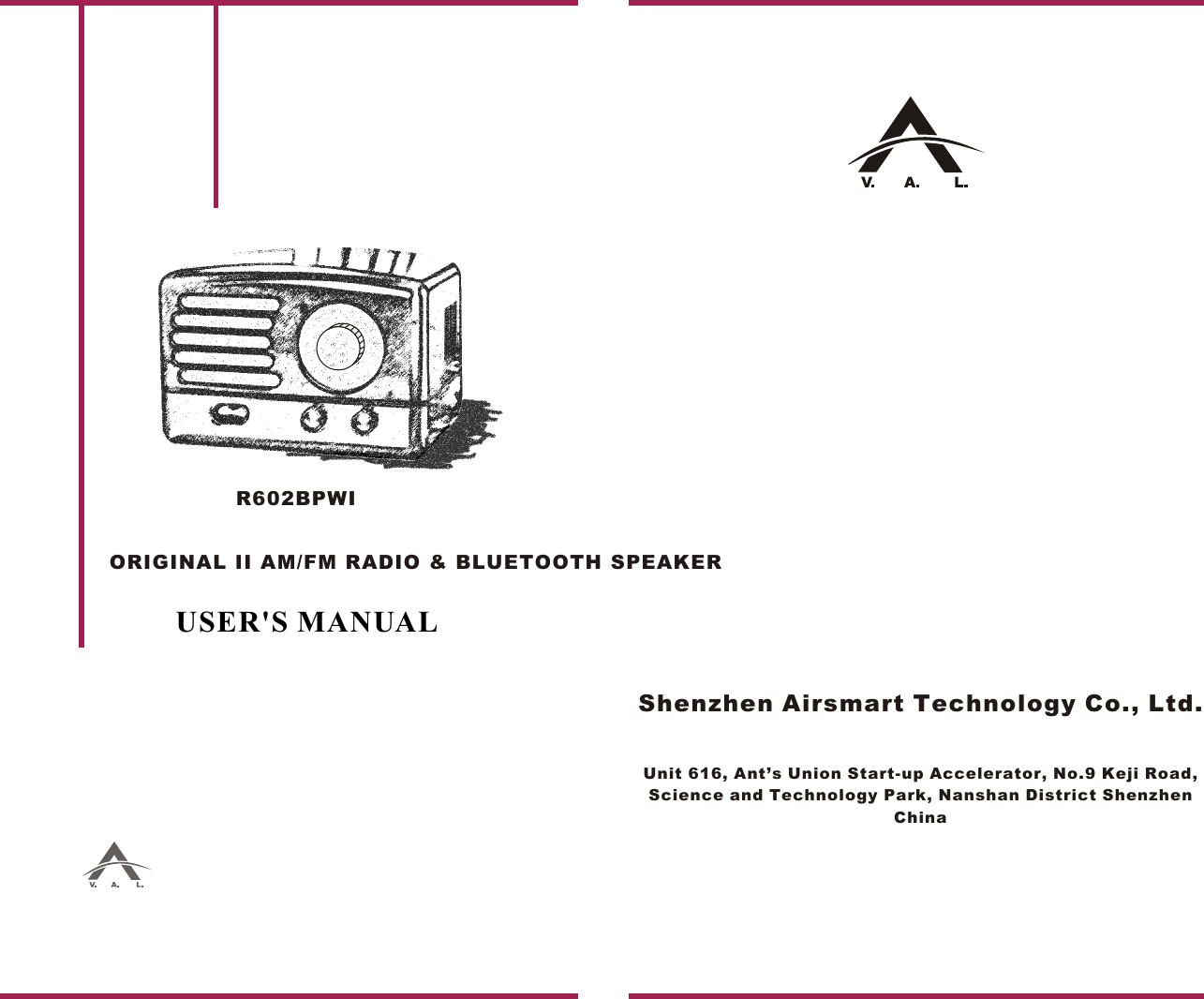
Airsmart Technology R602 ORIGINAL II AM/FM RADIO & BLUETOOTH SPEAKER User Manual

Shenzhen Airsmart Technology Co.,Ltd. ORIGINAL II AM/FM RADIO & BLUETOOTH SPEAKER

User manual

R602BPWIUSER'S MANUALShenzhen Airsmart Technology Co., Ltd.Unit 616, Ant’s Union Start-up Accelerator, No.9 Keji Road, Science and Technology Park, Nanshan District Shenzhen ChinaORIGINAL II AM/FM RADIO & BLUETOOTH SPEAKER
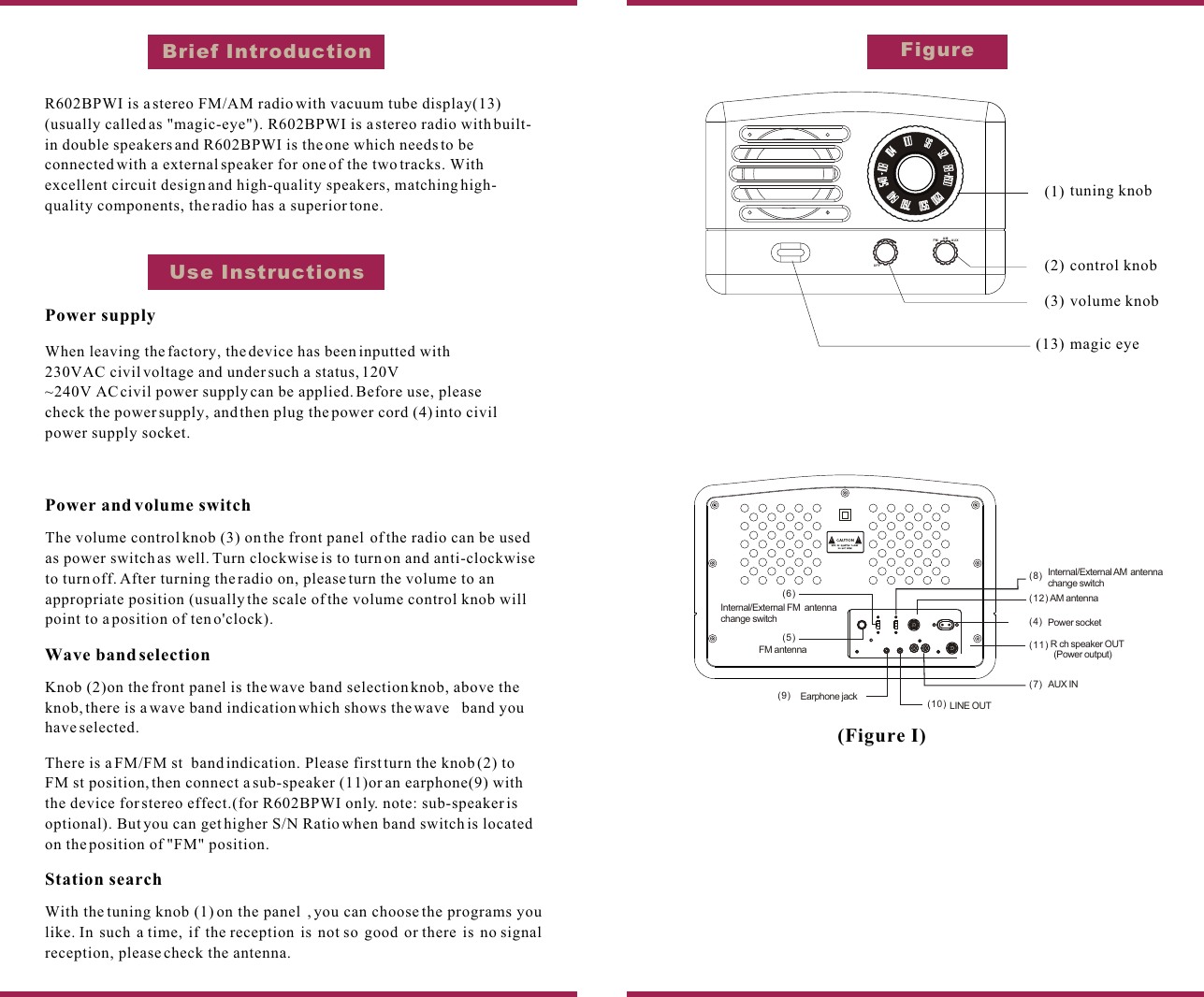
FigureBrief IntroductionUse Instructions OFFAMtuning knobcontrol knobvolume knobmagic eye(1)(2)(3)(13)FM AUX(Figure I)R602BPWI is a stereo FM/AM radio with vacuum tube display(13)(usually called as "magic-eye"). R602BPWI is a stereo radio with built-in double speakers and R602BPWI is the one which needs to be connected with a external speaker for one of the two tracks. With excellent circuit design and high-quality speakers, matching high-quality components, the radio has a superior tone.Power supplyWhen leaving the factory, the device has been inputted with 230VAC civil voltage and under such a status, 120V~240V AC civil power supply can be applied. Before use, please check the power supply, and then plug the power cord (4) into civil power supply socket.Power and volume switchThe volume control knob (3) on the front panel  of the radio can be used as power switch as well. Turn clockwise is to turn on and anti-clockwise to turn off. After turning the radio on, please turn the volume to an appropriate position (usually the scale of the volume control knob will point to a position of ten o'clock).Wave band selectionKnob (2)on the front panel is the wave band selection knob, above the knob, there is a wave band indication which shows the wave   band you have selected.There is a FM/FM st  band indication. Please first turn the knob (2) to FM st position, then connect a sub-speaker (11)or an earphone(9) with the device for stereo effect.(for R602BPWI only. note: sub-speaker is optional). But you can get higher S/N Ratio when band switch is located on the position of "FM" position.Station searchWith the tuning knob (1) on the panel  , you can choose the programs you like. In such a time, if the reception is not so good or there is no signal reception, please check the antenna.LINE OUT¸¨ÖúÊäÈë½Ó¿ÚR ch speaker OUT(Power output)µçÔ´ÈëÏß×ùAM antennaPower socketEarphone jackInternal/External FM  antenna change switchInternal/External AM  antenna change switchFM antennaAUX IN(4)(12)(8)(11)(7)(10)(9)(5)(6)
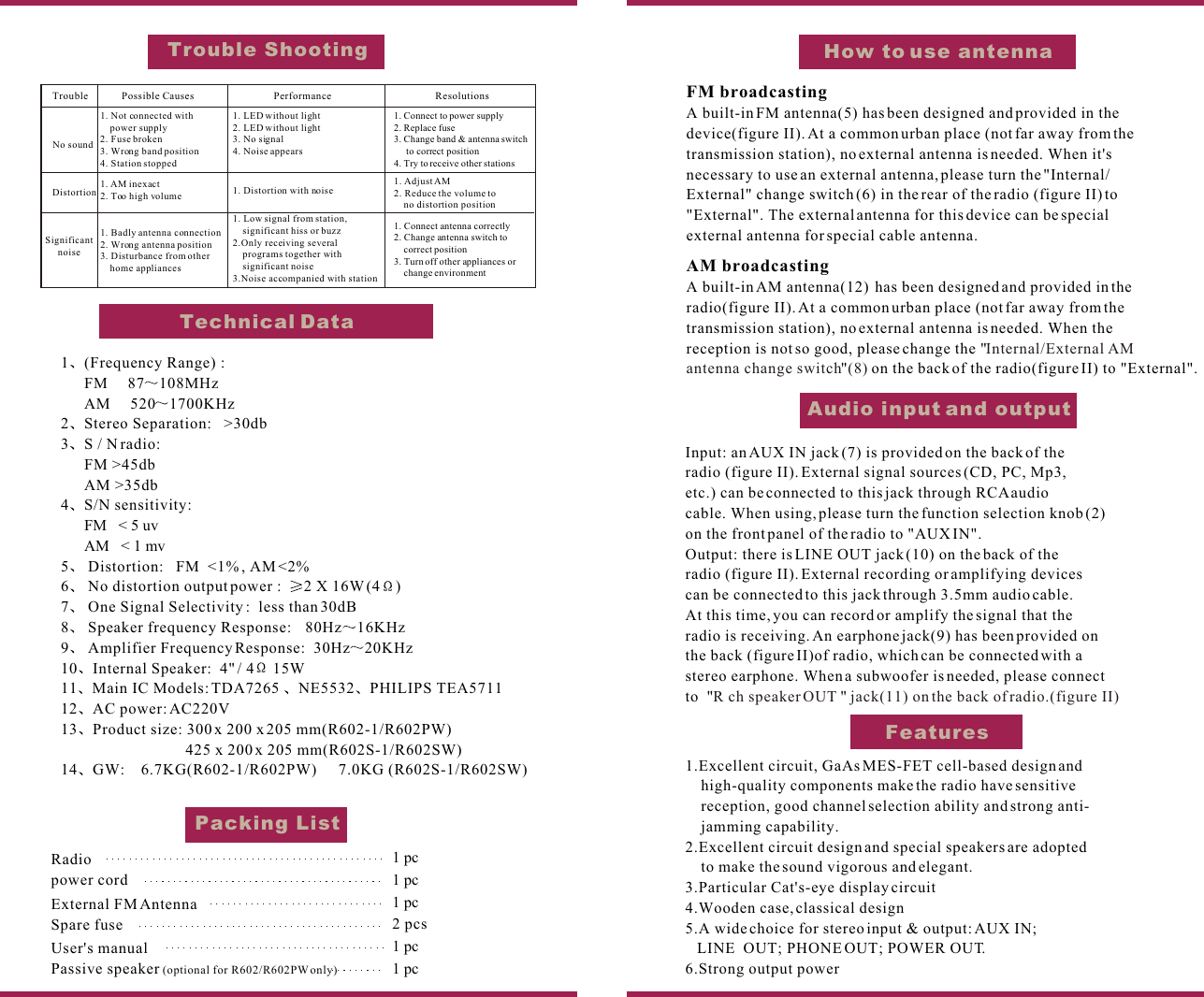
FeaturesHow to use antennaFM broadcastingA built-in FM antenna(5) has been designed and provided in the device(figure II). At a common urban place (not far away from the transmission station), no external antenna is needed. When it's necessary to use an external antenna, please turn the "Internal/External" change switch (6) in the rear of the radio (figure II) to "External". The external antenna for this device can be special external antenna for special cable antenna.AM broadcastingA built-in AM antenna(12)  has been designed and provided in the radio(figure II). At a common urban place (not far away from the transmission station), no external antenna is needed. When the reception is not so good, please change the ""  on the back of the radio(figure II) to "External".Internal/External AM  antenna change switch (8)Audio input and outputInput: an AUX IN jack (7) is provided on the back of the radio (figure II). External signal sources (CD, PC, Mp3, etc.) can be connected to this jack through RCA audio cable. When using, please turn the function selection knob (2) on the front panel of the radio to "AUX IN". Output: there is LINE OUT jack (10) on the back of the radio (figure II). External recording or amplifying devices can be connected to this jack through 3.5mm audio cable. At this time, you can record or amplify the signal that the radio is receiving. An earphone jack(9) has been provided on the back (figure II)of radio, which can be connected with astereo earphone. When a subwoofer is needed, please connect to  "  "  R ch speaker OUT  jack(11) on the back of radio.(figure II)1 (Frequency Range) :      FM     87 108MHz      AM     520 1700KHz2 Stereo Separation:   >30db3 S / N radio:        FM >45db      AM >35db4 S/N sensitivity:      FM   < 5 uv      AM   < 1 mv5  Distortion:   FM  <1% , AM <2%6  No distortion output power :   2 X 16W (4 )7  One Signal Selectivity :  less than 30dB8  Speaker frequency Response:    80Hz 16KHz9  Amplifier Frequency Response:  30Hz 20KHz10 Internal Speaker:  4" / 4  15W11 Main IC Models: TDA7265  NE5532 PHILIPS TEA571112 AC power: AC220V13 Product size: 300 x 200 x 205 mm(R602-1/R602PW)425 x 200 x 205 mm(R602S-1/R602SW) 14 GW:    6.7KG(R602-1/R602PW)      7.0KG (R602S-1/R602SW)              Trouble ShootingTechnical DataPacking ListRadiopower cord            External FM Antenna           Spare fuseUser's manual  1 pc2 pcs1 pc1 pc1 pc1.Excellent circuit, GaAs MES-FET cell-based design andhigh-quality components make the radio have sensitivereception, good channel selection ability and strong anti-    jamming capability.2.Excellent circuit design and special speakers are adoptedto make the sound vigorous and elegant.3.Particular Cat's-eye display circuit4.Wooden case, classical design5.A wide choice for stereo input & output: AUX IN; LINE  OUT; PHONE OUT; POWER OUT.6.Strong output power Passive speaker (optional for R602/R602PW only) 1 pcTrouble Possible Causes Performance ResolutionsNo sound1. Not connected with power supply 2. Fuse broken 3. Wrong band position4. Station stopped1. LED without light 2. LED without light3. No signal 4. Noise appears1. Connect to power supply 2. Replace fuse 3. Change band & antenna switchto correct position4. Try to receive other stationsDistortion 1. AM inexact2. Too high volume1. Badly antenna connection2. Wrong antenna position3. Disturbance from other home appliances 1. Distortion with noise1. Adjust AM2. Reduce the volume tono distortion position1. Connect antenna correctly2. Change antenna switch to correct position3. Turn off other appliances or change environment1. Low signal from station,significant hiss or buzz2.Only receiving several programs together with significant noise3.Noise accompanied with stationSignificant noise
This equipment has been tested and found to comply with thelimits for a Class B digital device, pursuant to part 15 of theFCC Rules. These limits are designed to provide reasonableprotection against harmful interference in a residentialinstallation.This equipment generates, uses and can radiateradio frequency energy and, if not installed and used inaccordance with the instructions, may cause harmfulinterference to radio communications. However,there is no guarantee that interference will not occur ina particular installation. If this equipment does causeharmful interference to radio or television eception,which can be determined by turning the equipmentoff and on, the user is encouraged to try to correct theinterference by one or more of the following measures:o Reorient or relocate the receiving antenna.o Increase the separation between the equipment and receiver.o Connect the equipment into an outlet on a circuit differentfrom that to which the receiver is connected.o Consult the dealer or an experienced radio/TV technician for help.Caution: Any changes or modi?cations to this device not explicitlyapproved by manufacturer could void your authority to operate thisequipment.This device complies with part 15 of the FCC Rules. Operationis subject to the following two conditions: (1) This device maynot cause harmful interference, and (2) this device must acceptany interference received, including interference that may causeundesired operation.The device has been evaluated to meet general RFexposure requirement. The device can be used inportable exposure condition without restriction.-English Warning Statement:"This device complies with Industry Canada licence-exemptRSS standard(s). Operation is subject to the following two conditions:(1)ÿthis device may not cause interference, and (2) this device mustaccept any interference, including interference that may causeundesired operation of the device."The digital apparatus complies with Canadian CAN ICES-3 (B)/NMB-3(B).-French Warning Statement:"Le prÿent appareil est conforme aux CNR d'Industrie CanadaApplicables aux appareils radio exempts de licence. L'exploitationest autorisÿ aux deux conditions suivantes : (1) l'appareil ne doitpas produire de brouillage, et (2) l'utilisateur de l'appareil doitaccepter tout brouillage radioÿectrique subi, meme si lebrouillage est susceptible d'en compromettre le fonctionnement."The device complies with RF specifications.This equipment complies with IC radiation exposure limits setforth for an uncontrolled environment and meets RSS-102 ofthe IC radio frequency (RF) Exposure rules. This equipment has very low levels of RF energy that are deemed to complywithout testing of specifc absorption ratio (SAR).Cet équipementest conforme aux limites d'exposition aux rayonnements énoncéespour un environnement non contr?lé et respecte les règles d'expositionaux fréquences radioélectriques (RF) CNR-102 de l'IC. Cet équipementémet une énergie RF très faible qui est considérée conforme sansevaluation du débit d'absorption spécifque (DAS).Cet appareil numérique de la classe B est conforme à la norme NMB-003 du Canada.ISED warning statementsFCCC warning

Navigation menu