Ansen Electronics Co W209TX Remote Sensor User Manual IS W2101 NEW

Ansen Electronics Co Remote Sensor IS W2101 NEW

User manual Rev1

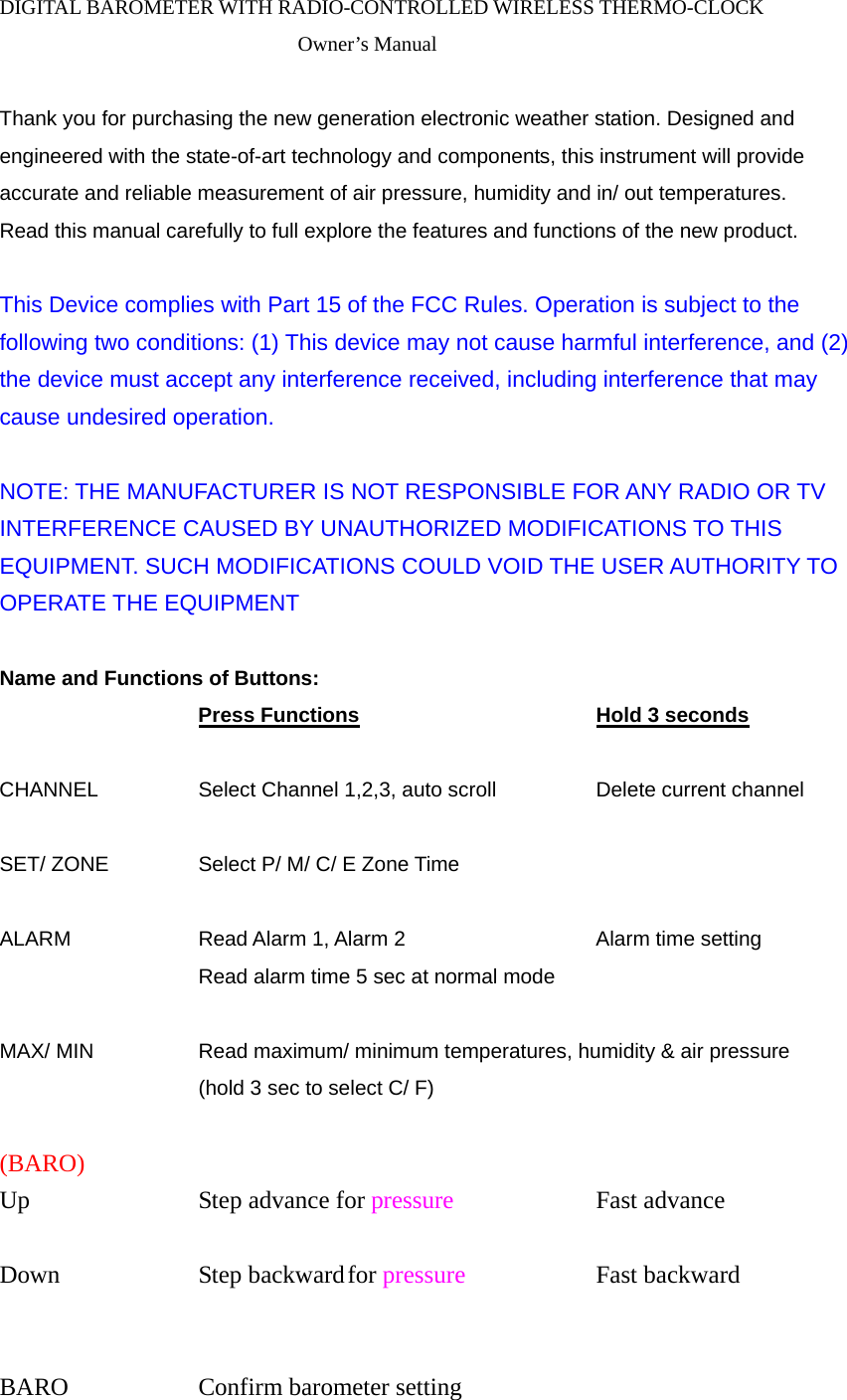
DIGITAL BAROMETER WITH RADIO-CONTROLLED WIRELESS THERMO-CLOCK Owner’s Manual  Thank you for purchasing the new generation electronic weather station. Designed and engineered with the state-of-art technology and components, this instrument will provide accurate and reliable measurement of air pressure, humidity and in/ out temperatures. Read this manual carefully to full explore the features and functions of the new product.  This Device complies with Part 15 of the FCC Rules. Operation is subject to the following two conditions: (1) This device may not cause harmful interference, and (2) the device must accept any interference received, including interference that may cause undesired operation.    NOTE: THE MANUFACTURER IS NOT RESPONSIBLE FOR ANY RADIO OR TV INTERFERENCE CAUSED BY UNAUTHORIZED MODIFICATIONS TO THIS EQUIPMENT. SUCH MODIFICATIONS COULD VOID THE USER AUTHORITY TO OPERATE THE EQUIPMENT  Name and Functions of Buttons:     Press Functions      Hold 3 seconds  CHANNEL     Select Channel 1,2,3, auto scroll   Delete current channel  SET/ ZONE    Select P/ M/ C/ E Zone Time      ALARM   Read Alarm 1, Alarm 2     Alarm time setting        Read alarm time 5 sec at normal mode  MAX/ MIN     Read maximum/ minimum temperatures, humidity & air pressure         (hold 3 sec to select C/ F)    (BARO) Up     Step advance for pressure   Fast advance  Down     Step backward for pressure   Fast backward                BARO   Confirm barometer setting
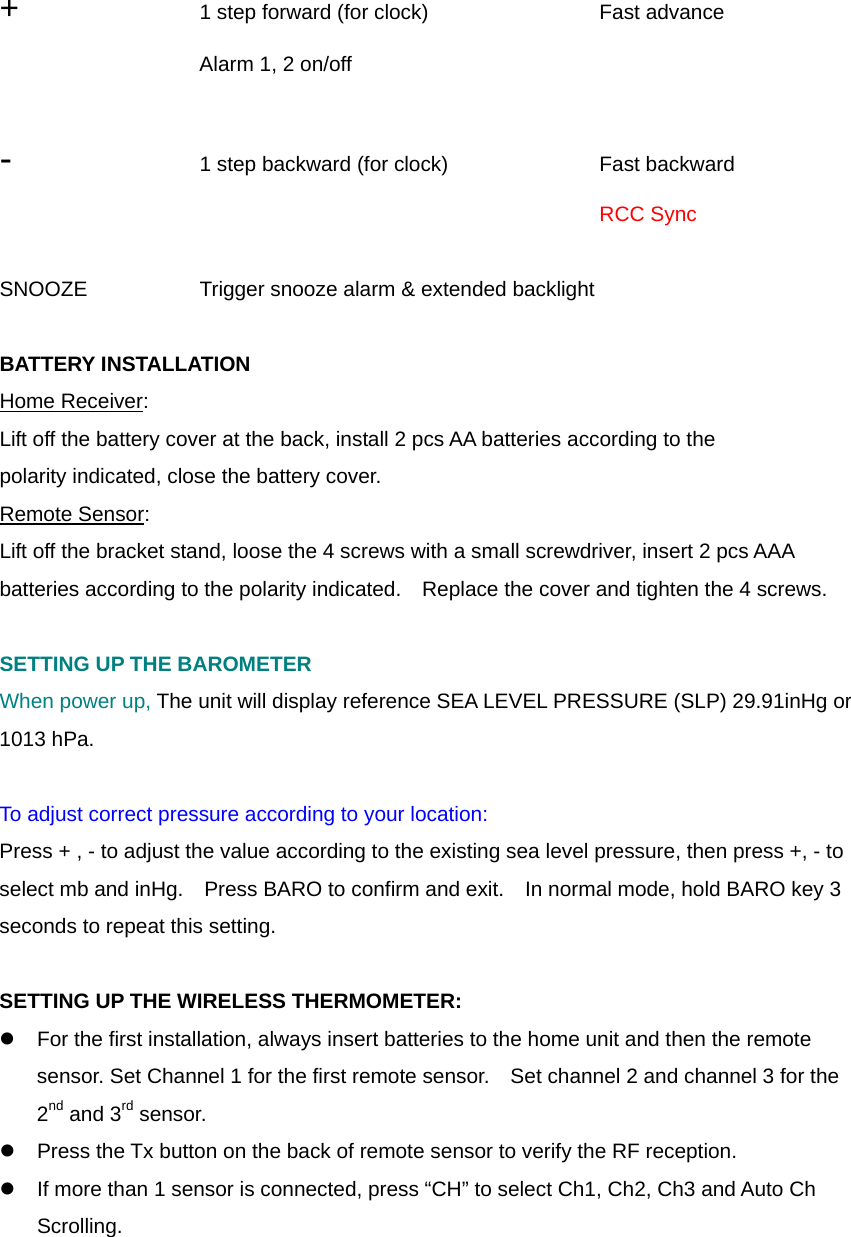
 +     1 step forward (for clock)    Fast advance    Alarm 1, 2 on/off         -    1 step backward (for clock)    Fast backward           RCC Sync  SNOOZE      Trigger snooze alarm & extended backlight      BATTERY INSTALLATION Home Receiver: Lift off the battery cover at the back, install 2 pcs AA batteries according to the polarity indicated, close the battery cover. Remote Sensor: Lift off the bracket stand, loose the 4 screws with a small screwdriver, insert 2 pcs AAA batteries according to the polarity indicated.    Replace the cover and tighten the 4 screws.  SETTING UP THE BAROMETER When power up, The unit will display reference SEA LEVEL PRESSURE (SLP) 29.91inHg or 1013 hPa.  To adjust correct pressure according to your location: Press + , - to adjust the value according to the existing sea level pressure, then press +, - to select mb and inHg.    Press BARO to confirm and exit.    In normal mode, hold BARO key 3 seconds to repeat this setting.  SETTING UP THE WIRELESS THERMOMETER: z  For the first installation, always insert batteries to the home unit and then the remote sensor. Set Channel 1 for the first remote sensor.    Set channel 2 and channel 3 for the 2nd and 3rd sensor.   z  Press the Tx button on the back of remote sensor to verify the RF reception. z  If more than 1 sensor is connected, press “CH” to select Ch1, Ch2, Ch3 and Auto Ch Scrolling.
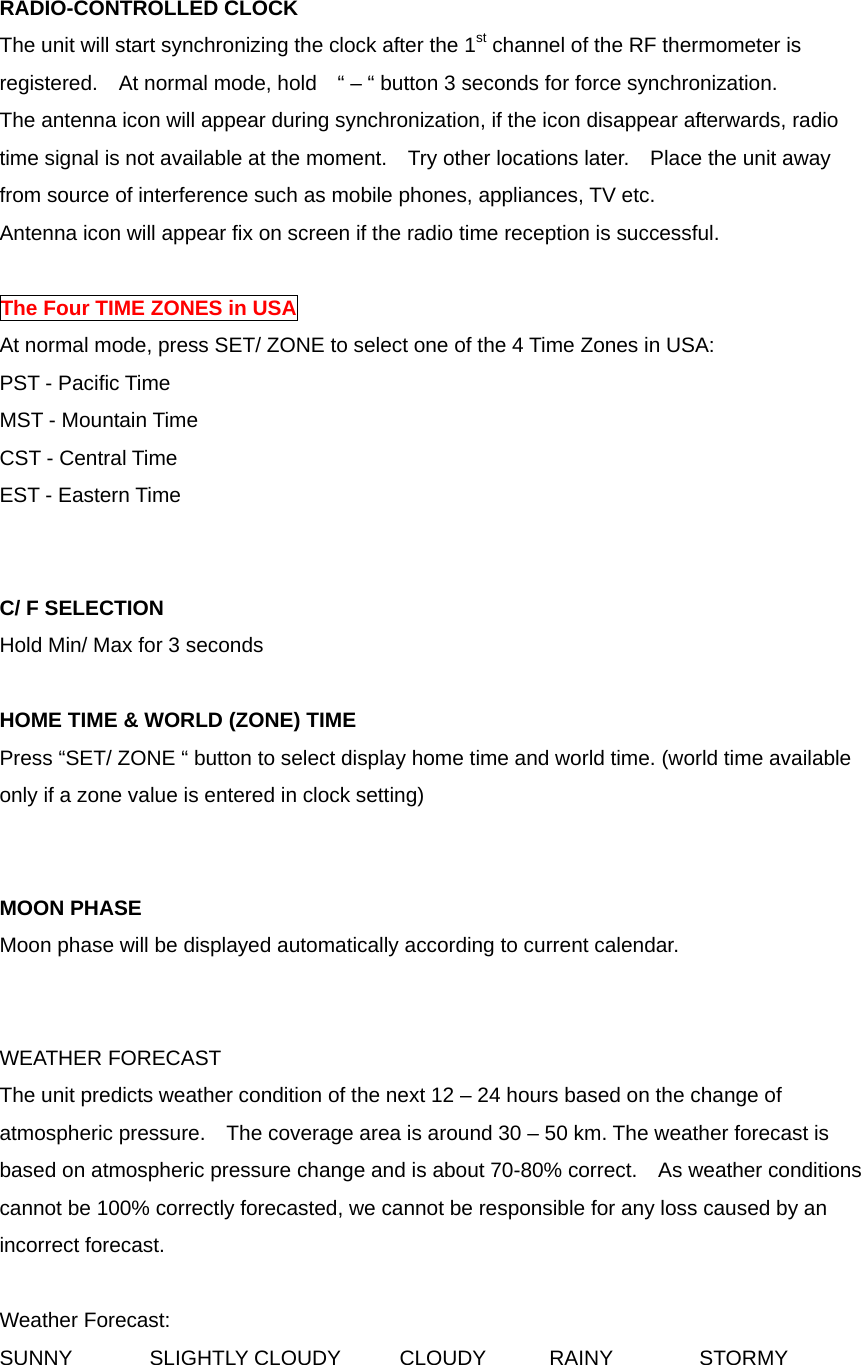
RADIO-CONTROLLED CLOCK The unit will start synchronizing the clock after the 1st channel of the RF thermometer is registered.    At normal mode, hold    “ – “ button 3 seconds for force synchronization. The antenna icon will appear during synchronization, if the icon disappear afterwards, radio time signal is not available at the moment.    Try other locations later.    Place the unit away from source of interference such as mobile phones, appliances, TV etc. Antenna icon will appear fix on screen if the radio time reception is successful.    The Four TIME ZONES in USA At normal mode, press SET/ ZONE to select one of the 4 Time Zones in USA: PST - Pacific Time MST - Mountain Time CST - Central Time EST - Eastern Time   C/ F SELECTION Hold Min/ Max for 3 seconds  HOME TIME & WORLD (ZONE) TIME Press “SET/ ZONE “ button to select display home time and world time. (world time available only if a zone value is entered in clock setting)   MOON PHASE Moon phase will be displayed automatically according to current calendar.   WEATHER FORECAST The unit predicts weather condition of the next 12 – 24 hours based on the change of atmospheric pressure.    The coverage area is around 30 – 50 km. The weather forecast is based on atmospheric pressure change and is about 70-80% correct.  As weather conditions cannot be 100% correctly forecasted, we cannot be responsible for any loss caused by an incorrect forecast.  Weather Forecast: SUNNY  SLIGHTLY CLOUDY  CLOUDY  RAINY  STORMY
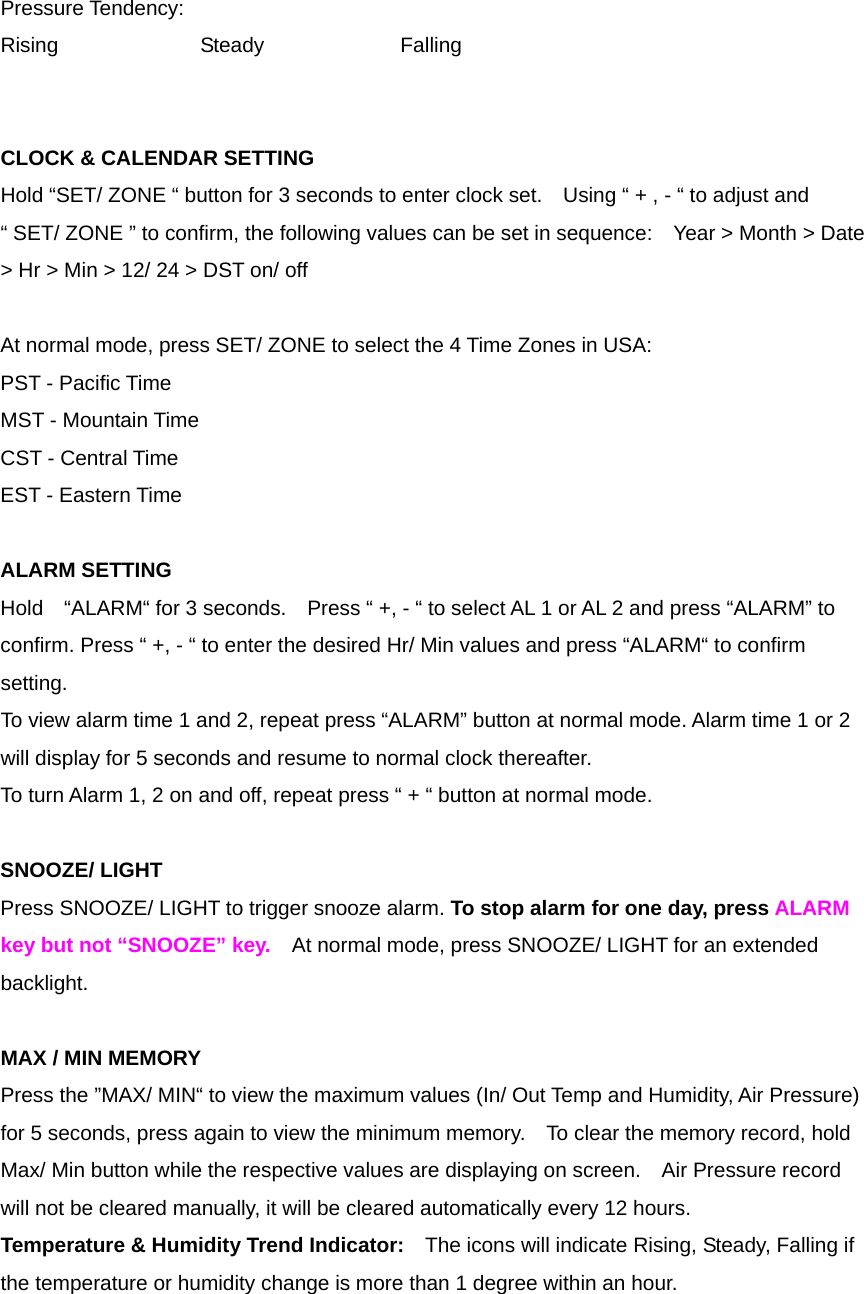
Pressure Tendency: Rising   Steady   Falling   CLOCK & CALENDAR SETTING   Hold “SET/ ZONE “ button for 3 seconds to enter clock set.    Using “ + , - “ to adjust and “ SET/ ZONE ” to confirm, the following values can be set in sequence:    Year > Month > Date > Hr > Min > 12/ 24 > DST on/ off   At normal mode, press SET/ ZONE to select the 4 Time Zones in USA: PST - Pacific Time MST - Mountain Time CST - Central Time EST - Eastern Time  ALARM SETTING Hold    “ALARM“ for 3 seconds.    Press “ +, - “ to select AL 1 or AL 2 and press “ALARM” to confirm. Press “ +, - “ to enter the desired Hr/ Min values and press “ALARM“ to confirm setting. To view alarm time 1 and 2, repeat press “ALARM” button at normal mode. Alarm time 1 or 2 will display for 5 seconds and resume to normal clock thereafter. To turn Alarm 1, 2 on and off, repeat press “ + “ button at normal mode.  SNOOZE/ LIGHT Press SNOOZE/ LIGHT to trigger snooze alarm. To stop alarm for one day, press ALARM key but not “SNOOZE” key.  At normal mode, press SNOOZE/ LIGHT for an extended backlight.  MAX / MIN MEMORY Press the ”MAX/ MIN“ to view the maximum values (In/ Out Temp and Humidity, Air Pressure) for 5 seconds, press again to view the minimum memory.    To clear the memory record, hold Max/ Min button while the respective values are displaying on screen.    Air Pressure record will not be cleared manually, it will be cleared automatically every 12 hours. Temperature & Humidity Trend Indicator:    The icons will indicate Rising, Steady, Falling if the temperature or humidity change is more than 1 degree within an hour.
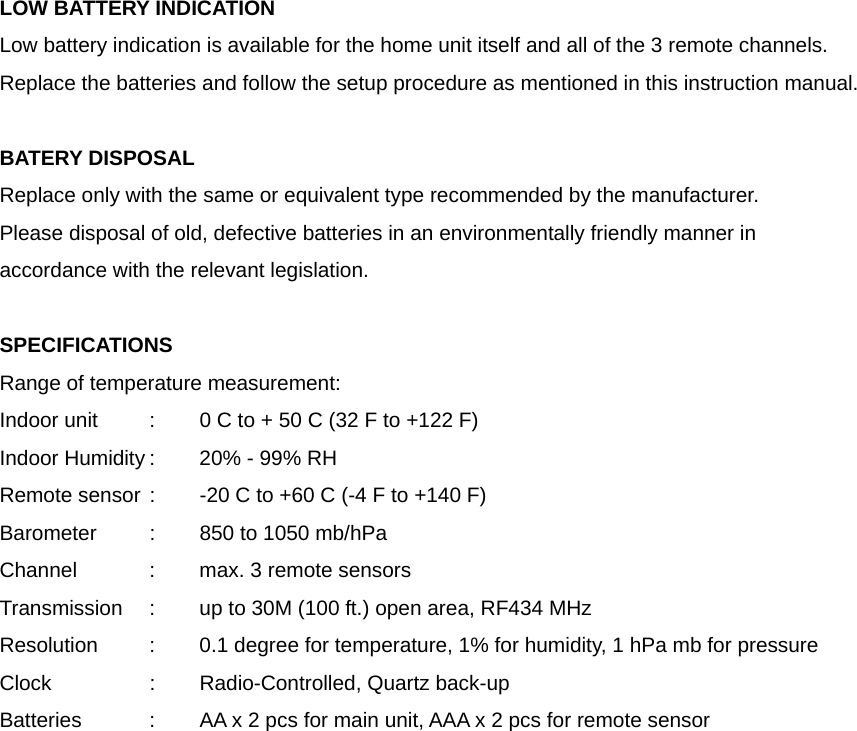
LOW BATTERY INDICATION Low battery indication is available for the home unit itself and all of the 3 remote channels. Replace the batteries and follow the setup procedure as mentioned in this instruction manual.  BATERY DISPOSAL Replace only with the same or equivalent type recommended by the manufacturer. Please disposal of old, defective batteries in an environmentally friendly manner in accordance with the relevant legislation.  SPECIFICATIONS Range of temperature measurement: Indoor unit   :  0 C to + 50 C (32 F to +122 F) Indoor Humidity :  20% - 99% RH Remote sensor :  -20 C to +60 C (-4 F to +140 F) Barometer   :  850 to 1050 mb/hPa Channel    :  max. 3 remote sensors Transmission    :  up to 30M (100 ft.) open area, RF434 MHz Resolution   :  0.1 degree for temperature, 1% for humidity, 1 hPa mb for pressure Clock    :    Radio-Controlled, Quartz back-up     Batteries    :  AA x 2 pcs for main unit, AAA x 2 pcs for remote sensor

Navigation menu