Apprion APP2X001 Wireless Access Point User Manual IONizer Reference Guide

Apprion, Inc. Wireless Access Point IONizer Reference Guide

4100 Series Manual
Apprion Proprietary and Confidential     IONizer 4100 Series Hardware Installation Guide          Apprion Incorporated  March 2009
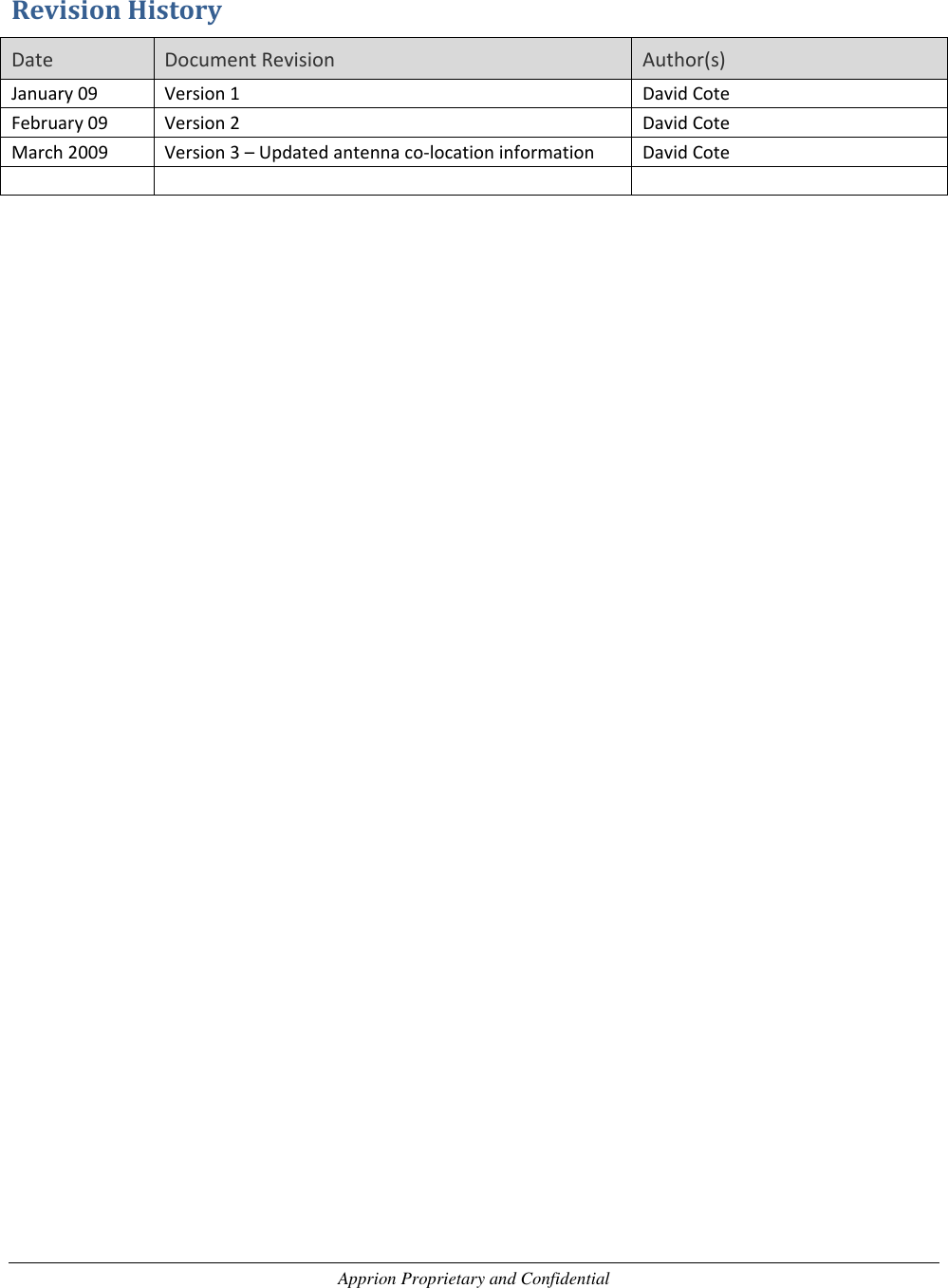
Apprion Proprietary and Confidential  Revision History Date Document Revision Author(s) January 09 Version 1 David Cote February 09 Version 2 David Cote March 2009 Version 3 – Updated antenna co-location information David Cote
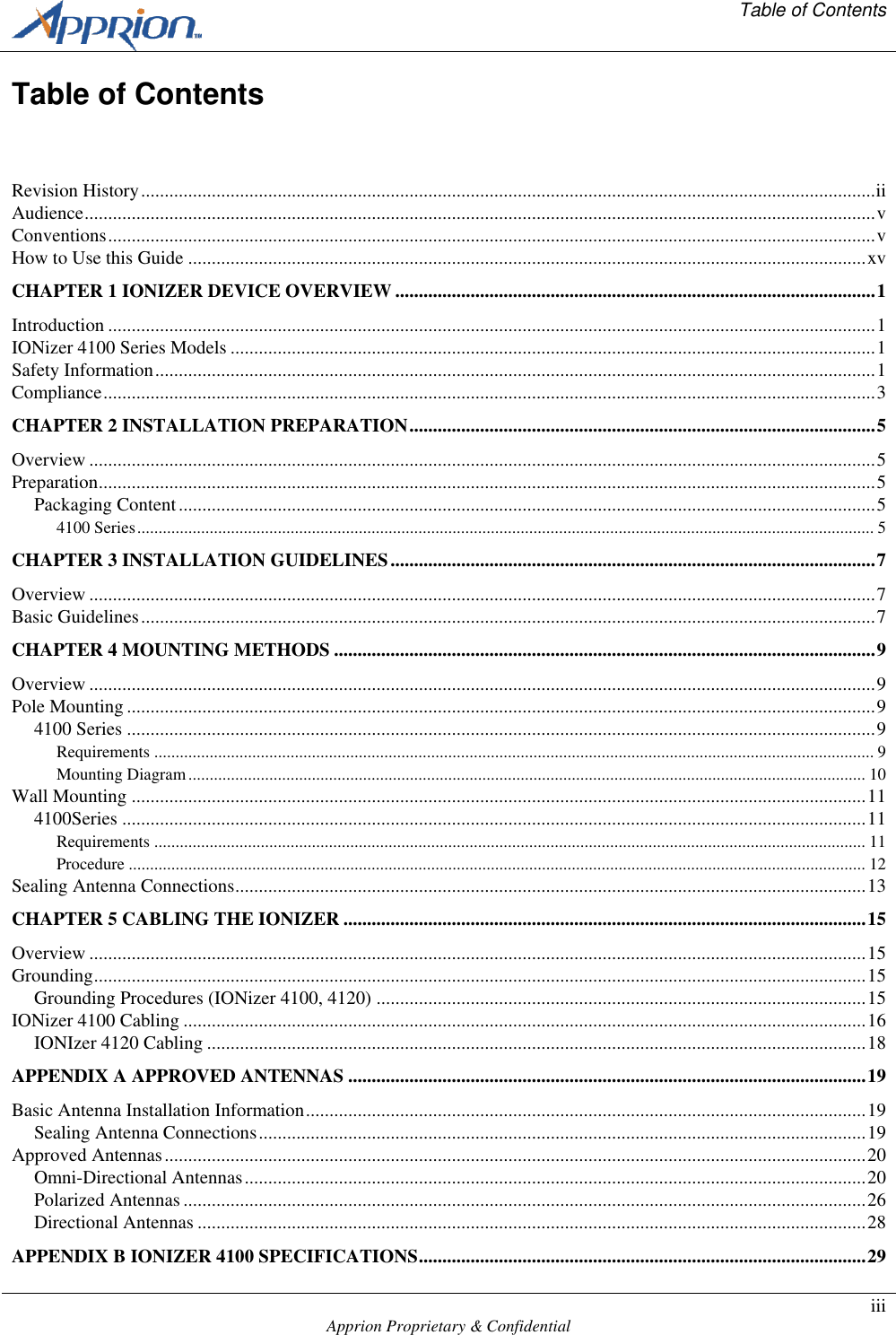
  Table of Contents    Apprion Proprietary & Confidential iii  Table of Contents  Revision History ............................................................................................................................................................ ii Audience ........................................................................................................................................................................ v Conventions ................................................................................................................................................................... v How to Use this Guide ................................................................................................................................................ xv CHAPTER 1 IONIZER DEVICE OVERVIEW ...................................................................................................... 1 Introduction ................................................................................................................................................................... 1 IONizer 4100 Series Models ......................................................................................................................................... 1 Safety Information ......................................................................................................................................................... 1 Compliance .................................................................................................................................................................... 3 CHAPTER 2 INSTALLATION PREPARATION ................................................................................................... 5 Overview ....................................................................................................................................................................... 5 Preparation ..................................................................................................................................................................... 5 Packaging Content .................................................................................................................................................... 5 4100 Series ............................................................................................................................................................................. 5 CHAPTER 3 INSTALLATION GUIDELINES ....................................................................................................... 7 Overview ....................................................................................................................................................................... 7 Basic Guidelines ............................................................................................................................................................ 7 CHAPTER 4 MOUNTING METHODS ................................................................................................................... 9 Overview ....................................................................................................................................................................... 9 Pole Mounting ............................................................................................................................................................... 9 4100 Series ............................................................................................................................................................... 9 Requirements ......................................................................................................................................................................... 9 Mounting Diagram ............................................................................................................................................................... 10 Wall Mounting ............................................................................................................................................................ 11 4100Series .............................................................................................................................................................. 11 Requirements ....................................................................................................................................................................... 11 Procedure ............................................................................................................................................................................. 12 Sealing Antenna Connections ...................................................................................................................................... 13 CHAPTER 5 CABLING THE IONIZER ............................................................................................................... 15 Overview ..................................................................................................................................................................... 15 Grounding .................................................................................................................................................................... 15 Grounding Procedures (IONizer 4100, 4120) ........................................................................................................ 15 IONizer 4100 Cabling ................................................................................................................................................. 16 IONIzer 4120 Cabling ............................................................................................................................................ 18 APPENDIX A APPROVED ANTENNAS .............................................................................................................. 19 Basic Antenna Installation Information ....................................................................................................................... 19 Sealing Antenna Connections ................................................................................................................................. 19 Approved Antennas ..................................................................................................................................................... 20 Omni-Directional Antennas .................................................................................................................................... 20 Polarized Antennas ................................................................................................................................................. 26 Directional Antennas .............................................................................................................................................. 28 APPENDIX B IONIZER 4100 SPECIFICATIONS ............................................................................................... 29
Table of Contents        Page iv  Apprion Proprietary & Confidential   Specifications .............................................................................................................................................................. 29
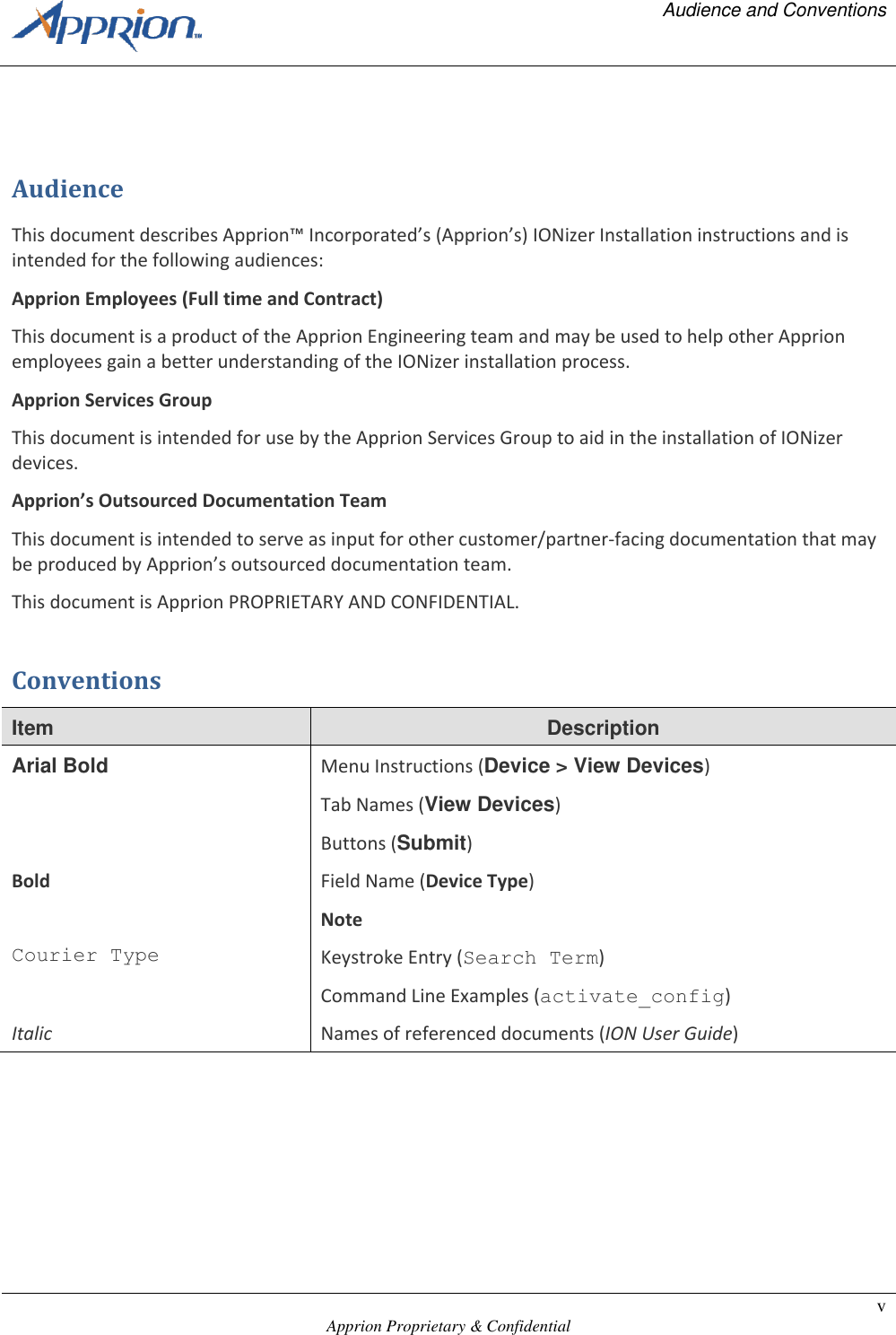
  Audience and Conventions    Apprion Proprietary & Confidential v   Audience This document describes Apprion™ Incorporated’s (Apprion’s) IONizer Installation instructions and is intended for the following audiences: Apprion Employees (Full time and Contract) This document is a product of the Apprion Engineering team and may be used to help other Apprion employees gain a better understanding of the IONizer installation process. Apprion Services Group This document is intended for use by the Apprion Services Group to aid in the installation of IONizer devices. Apprion’s Outsourced Documentation Team This document is intended to serve as input for other customer/partner-facing documentation that may be produced by Apprion’s outsourced documentation team. This document is Apprion PROPRIETARY AND CONFIDENTIAL. Conventions Item Description Arial Bold Menu Instructions (Device > View Devices) Tab Names (View Devices) Buttons (Submit) Bold Field Name (Device Type) Note Courier Type Keystroke Entry (Search Term) Command Line Examples (activate_config) Italic Names of referenced documents (ION User Guide)
  How to Use This Guide    Apprion Proprietary & Confidential xv  How to Use this Guide This guide provides basic instructions on how to install and wire an IONizer device.  You should real ALL chapters for important information before attempting the installation.
  Chapter 1 – IONizer Device Overview    Apprion Proprietary and Confidential Page 1   Chapter 1 IONizer Device Overview Introduction This guide provides information on how to install Apprion™ IONizer devices.  The IONizer provides an integrated set of modular hardware and software services that facilitate creation, control and monitoring of secure device networks for the modern plant.  The IONizer is a wireless transceiver that serves as the center point of an independent wireless network, or as the connection point between wireless and wired networks.  Designed for the industrial applications market, IONizer models are IEEE 802.11a/b/g/i/j compliant depending on the radios installed.  This platform is specifically designed to address the wireless connectivity needs of high-security industrial environments. All IONizer devices are remotely configured and all can take on one or more forms within the network.  This means that each IONizer can be configured to suit client requirements. This guide deals with installation only.  Configuration instructions are provided in the IONizer Reference Guide. IONizer 4100 Series Models These devices are designed for use in Class I, Division 1, hazardous locations as defined in  the National Electrical Code (NFPA 70:2005), particularly NEC Article 500.5 (B)(1).  All wiring (and conduit connections) to the unit must conform to the recommended practices in NEC Article 501.10 (A).  The IONizers in this series come in different configurations.  All IONizer s use 48V Power over Ethernet (PoE) or 24V external power.  In addition, the 4120 come with embedded WiHART configurations. Configurations are based on model number.  Models in this series include:  IONizer 4100-200 (Single Radio)  IONizer 4100-220 (Two Radios)  IONizer 4120-200 (Single Radio, Embedded WiHART)  IONizer 4120-220 (Two Radios, Embedded WiHART)  Safety Information The FCC, with its action in Docket 96-8 has adopted a safety standard for human exposure to radio frequency (RF) electromagnetic energy emitted by FCC certified equipment.  When used with approved Apprion antennas, the IONizer 4100 products meet the uncontrolled environmental limits found in OET-
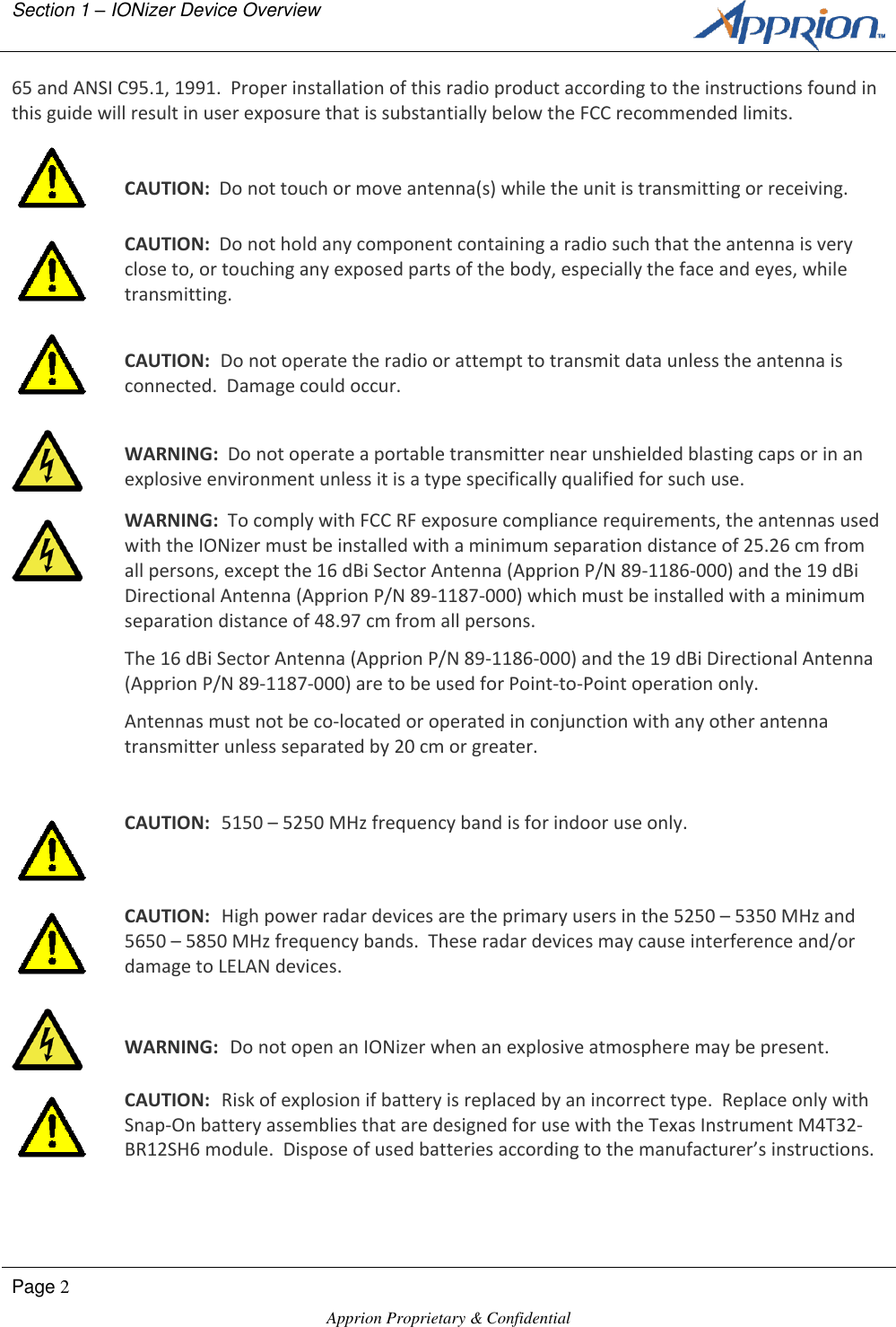
Section 1 – IONizer Device Overview        Page 2  Apprion Proprietary & Confidential   65 and ANSI C95.1, 1991.  Proper installation of this radio product according to the instructions found in this guide will result in user exposure that is substantially below the FCC recommended limits.   CAUTION:  Do not touch or move antenna(s) while the unit is transmitting or receiving.  CAUTION:  Do not hold any component containing a radio such that the antenna is very close to, or touching any exposed parts of the body, especially the face and eyes, while transmitting.   CAUTION:  Do not operate the radio or attempt to transmit data unless the antenna is connected.  Damage could occur.   WARNING:  Do not operate a portable transmitter near unshielded blasting caps or in an explosive environment unless it is a type specifically qualified for such use.  WARNING:  To comply with FCC RF exposure compliance requirements, the antennas used with the IONizer must be installed with a minimum separation distance of 25.26 cm from all persons, except the 16 dBi Sector Antenna (Apprion P/N 89-1186-000) and the 19 dBi Directional Antenna (Apprion P/N 89-1187-000) which must be installed with a minimum separation distance of 48.97 cm from all persons. The 16 dBi Sector Antenna (Apprion P/N 89-1186-000) and the 19 dBi Directional Antenna (Apprion P/N 89-1187-000) are to be used for Point-to-Point operation only. Antennas must not be co-located or operated in conjunction with any other antenna transmitter unless separated by 20 cm or greater.   CAUTION:  5150 – 5250 MHz frequency band is for indoor use only.  CAUTION:  High power radar devices are the primary users in the 5250 – 5350 MHz and 5650 – 5850 MHz frequency bands.  These radar devices may cause interference and/or damage to LELAN devices.   WARNING:  Do not open an IONizer when an explosive atmosphere may be present.  CAUTION:  Risk of explosion if battery is replaced by an incorrect type.  Replace only with Snap-On battery assemblies that are designed for use with the Texas Instrument M4T32-BR12SH6 module.  Dispose of used batteries according to the manufacturer’s instructions.
  Chapter 1 – IONizer Device Overview    Apprion Proprietary and Confidential Page 3  Compliance This equipment has been tested and found to comply with the European Telecommunications Standard ETS 300 328.  This standard covers Wideband Data Transmission Systems referred to in CEPT recommendation T/R 10.01.  This type of equipment is designed to provide reasonable protection against harmful interference when the equipment is operated in a commercial environment.  This equipment generates, uses, and can radiate radio frequency energy and, if not installed in accordance with the instruction guide, may cause harmful interference to radio communications. This equipment complies with Part 15 of the FCC Rules.  Operation is subject to the following two conditions:  (1) This device may not cause harmful interference, and (2) This device must accept any interference received, including interference that may cause undesired operation.
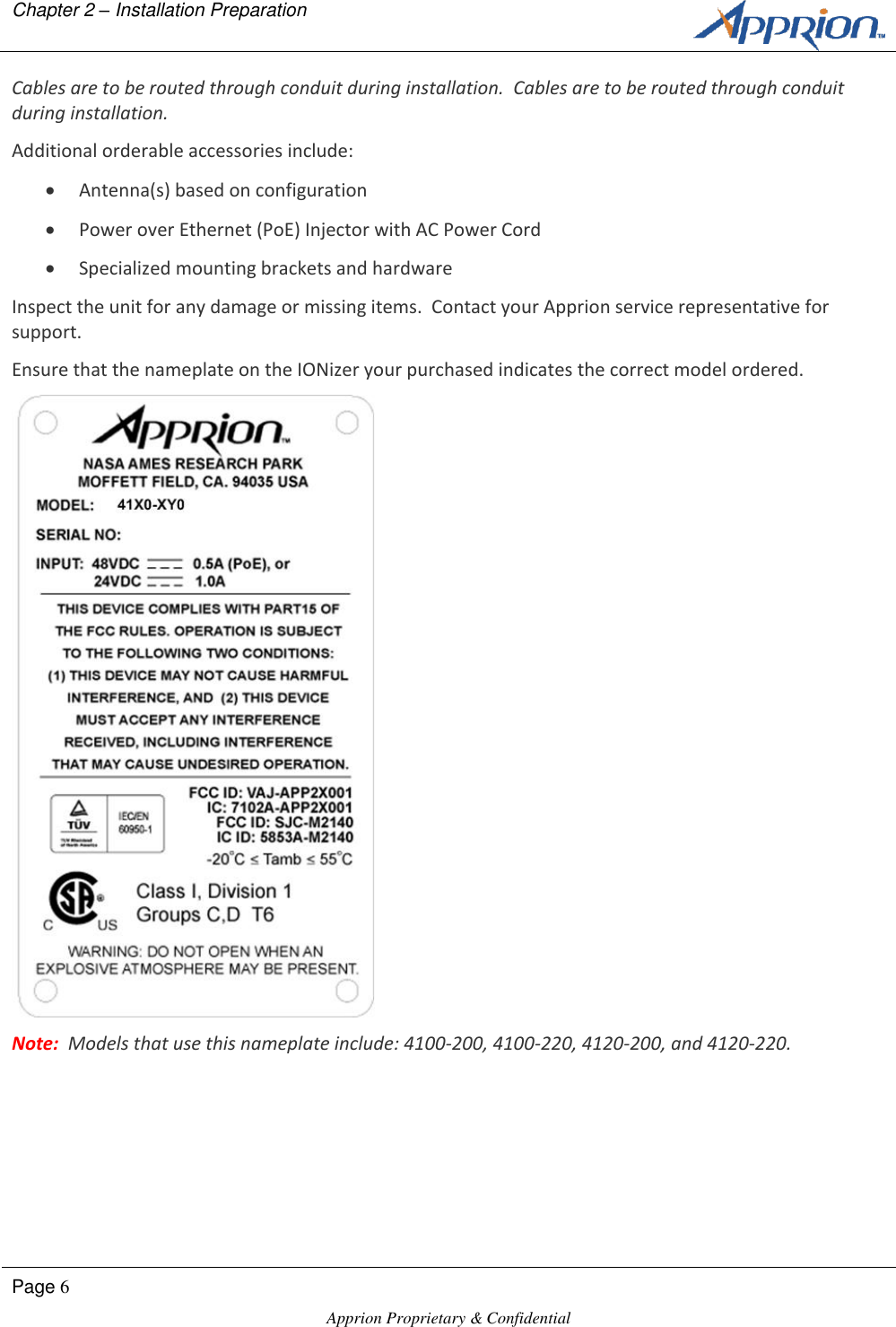
  Chapter 2 – Installation Preparation    Apprion Proprietary and Confidential Page 5  Chapter 2 Installation Preparation Overview This chapter describes the installation process and what you’ll need to successfully mount and connect an IONizer at your site. Preparation The IONizers come packaged in specialized shipping containers, each designed for the type of IONizer ordered. Packaging Content Contents of the package depend on the IONizer purchased.  4100 Series  IONizer 4100 or 4120  Wire nuts (for 24 VDC installation)   Manual  Product Registration and Warranty Cards Note:  IONizer 4100 Series devices have internally connected WAN and LAN cables routed out of the unit’s conduit opening.  In addition, the 4100 and 4120 units will also have two 24v power wires protruding from the same opening.  The excess cables are bunched and tie-wrapped prior to shipping.
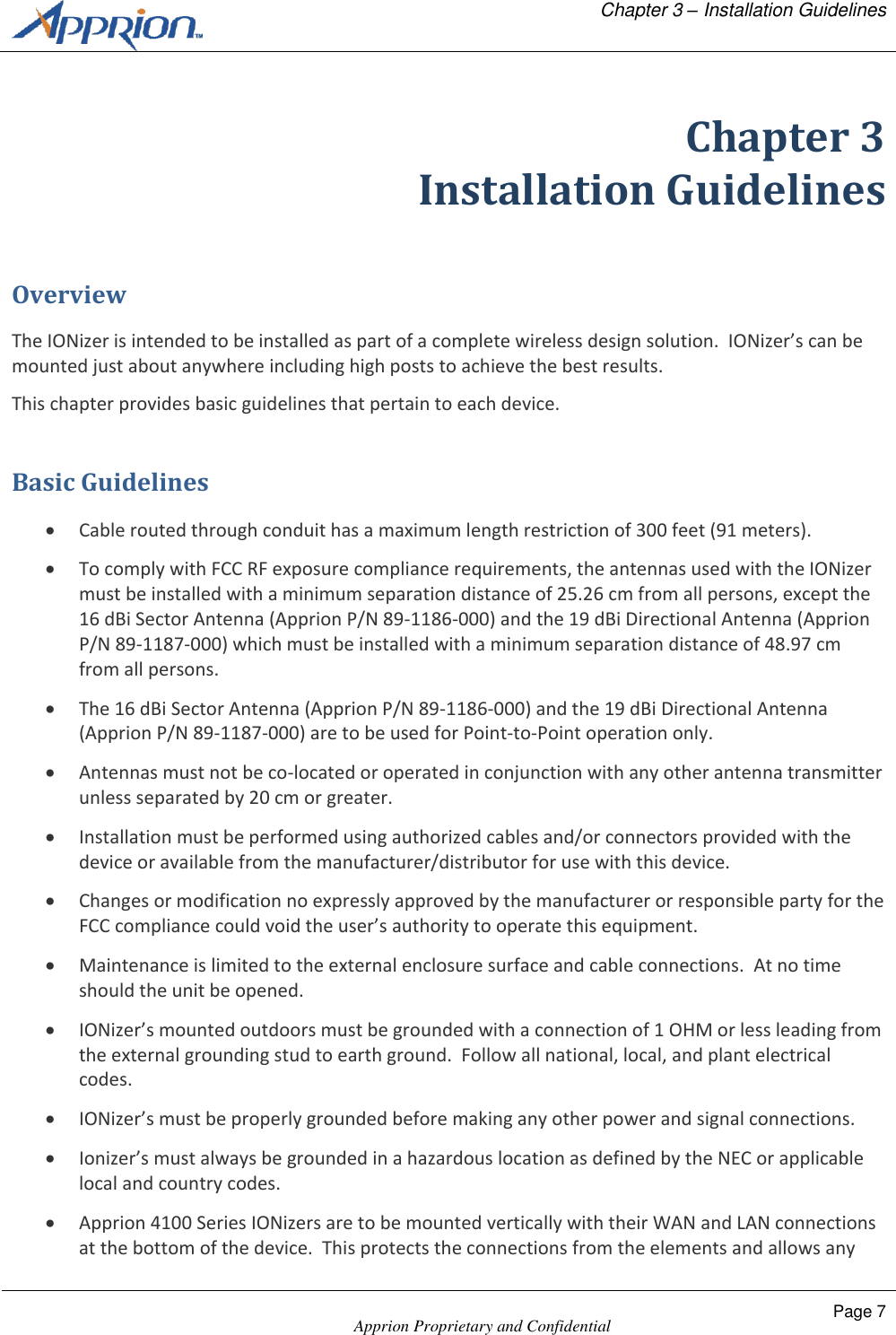
Chapter 2 – Installation Preparation        Page 6  Apprion Proprietary & Confidential   Cables are to be routed through conduit during installation.  Cables are to be routed through conduit during installation. Additional orderable accessories include:  Antenna(s) based on configuration  Power over Ethernet (PoE) Injector with AC Power Cord   Specialized mounting brackets and hardware Inspect the unit for any damage or missing items.  Contact your Apprion service representative for support. Ensure that the nameplate on the IONizer your purchased indicates the correct model ordered.  Note:  Models that use this nameplate include: 4100-200, 4100-220, 4120-200, and 4120-220.
  Chapter 3 – Installation Guidelines    Apprion Proprietary and Confidential Page 7  Chapter 3 Installation Guidelines Overview The IONizer is intended to be installed as part of a complete wireless design solution.  IONizer’s can be mounted just about anywhere including high posts to achieve the best results. This chapter provides basic guidelines that pertain to each device. Basic Guidelines  Cable routed through conduit has a maximum length restriction of 300 feet (91 meters).  To comply with FCC RF exposure compliance requirements, the antennas used with the IONizer must be installed with a minimum separation distance of 25.26 cm from all persons, except the 16 dBi Sector Antenna (Apprion P/N 89-1186-000) and the 19 dBi Directional Antenna (Apprion P/N 89-1187-000) which must be installed with a minimum separation distance of 48.97 cm from all persons.  The 16 dBi Sector Antenna (Apprion P/N 89-1186-000) and the 19 dBi Directional Antenna (Apprion P/N 89-1187-000) are to be used for Point-to-Point operation only.  Antennas must not be co-located or operated in conjunction with any other antenna transmitter unless separated by 20 cm or greater.  Installation must be performed using authorized cables and/or connectors provided with the device or available from the manufacturer/distributor for use with this device.  Changes or modification no expressly approved by the manufacturer or responsible party for the FCC compliance could void the user’s authority to operate this equipment.  Maintenance is limited to the external enclosure surface and cable connections.  At no time should the unit be opened.  IONizer’s mounted outdoors must be grounded with a connection of 1 OHM or less leading from the external grounding stud to earth ground.  Follow all national, local, and plant electrical codes.  IONizer’s must be properly grounded before making any other power and signal connections.  Ionizer’s must always be grounded in a hazardous location as defined by the NEC or applicable local and country codes.  Apprion 4100 Series IONizers are to be mounted vertically with their WAN and LAN connections at the bottom of the device.  This protects the connections from the elements and allows any
Chapter 2 – Installation Preparation        Page 8  Apprion Proprietary & Confidential   lettering to be properly viewed.  On 4100 models, connectors must be at the bottom to allow the protective door to be opened properly.  External antenna connections should be protected from lightning surges via a lightning arrestor device.  Install Apprion’s approved male to female N-Type connector lightning arrestor (P/N 74-1282-000) with the protected direction towards the IONizer and the surge direction towards the detachable antenna.  The lightning arrestor must be properly grounded with a recommended 6AWG wire (green/yellow striped color code recommended) crimped to the supplied compression ring tongue terminal.  Use the proper hardware stack-up sequence per the part’s enclosed instructions.  Screw on type antennas and surge protectors are to have their connections covered with a vulcanizing silicon UV resistant tape after assembly.  This protects the components from corrosion and protects the enclosure from water ingress.
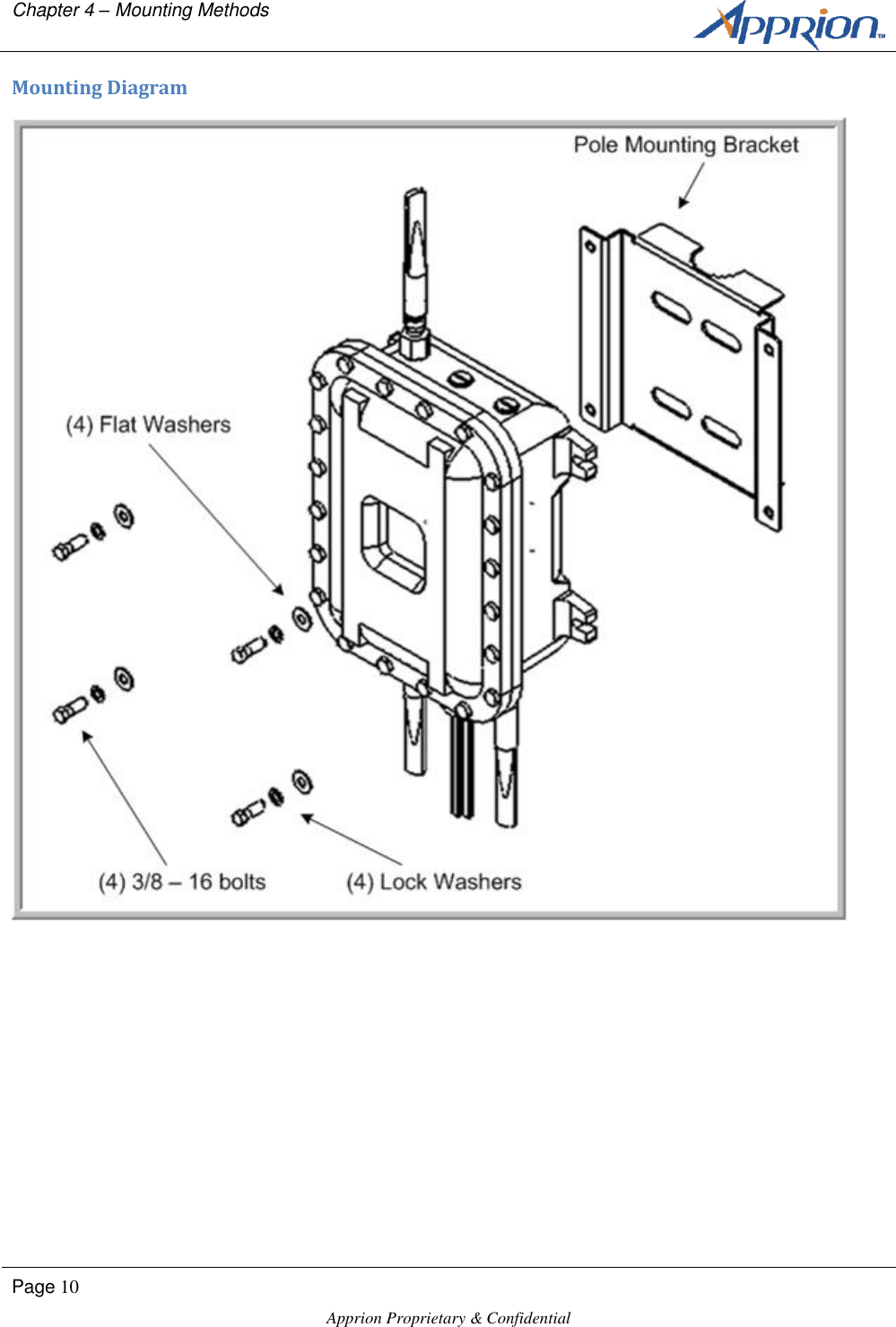
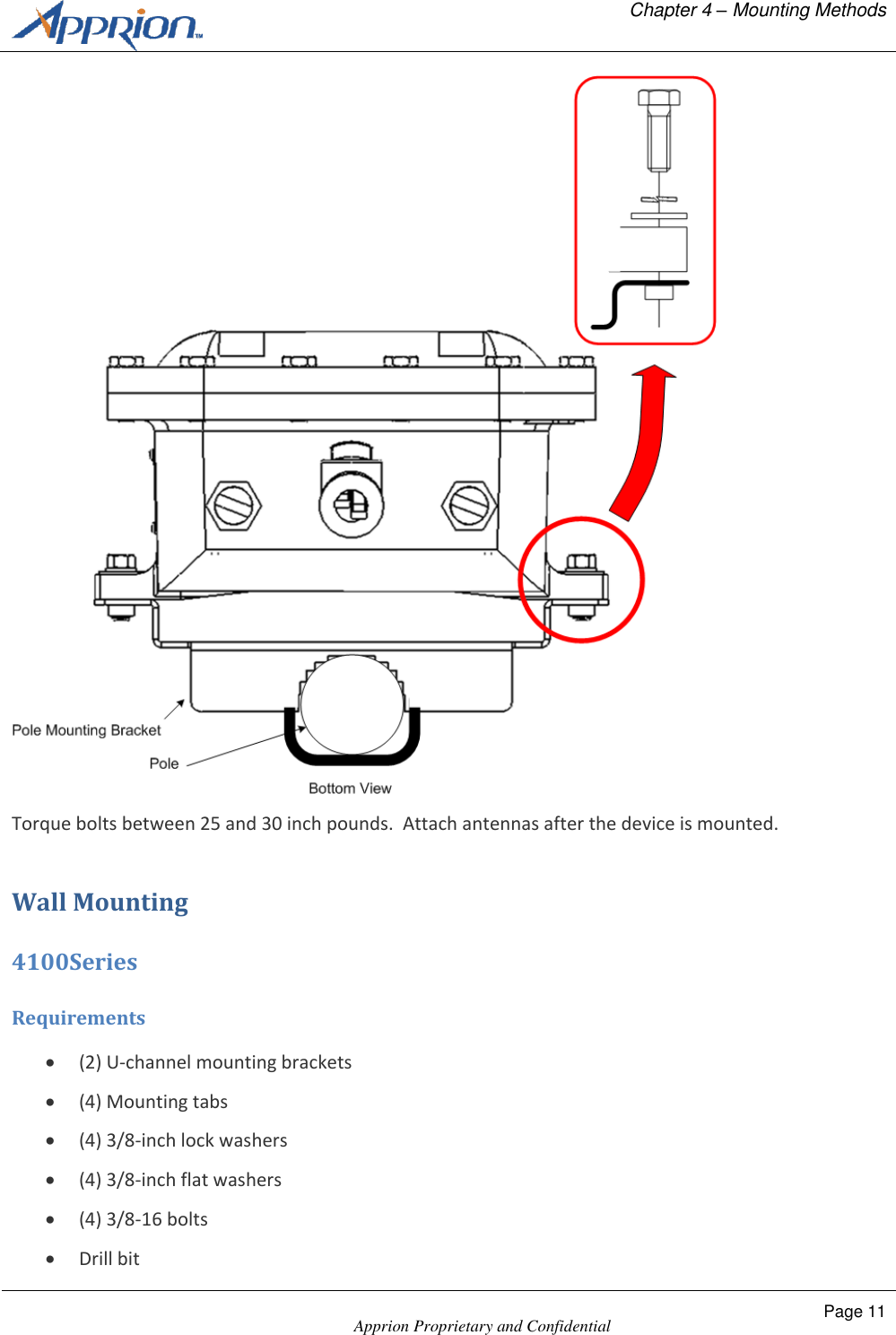
  Chapter 4 – Mounting Methods    Apprion Proprietary and Confidential Page 9  Chapter 4 Mounting Methods Overview This chapter describes various mounting methods.  Your actual installation will dictate the actual way your device is mounted. Pole Mounting 4100 Series Requirements  3/8-inch torque wrench  ½-inch socket head  (2) 3/8-inch U-bolts with hardware  (4) 3/8-inch flat head washers  (4) 3/8-inch lock washers  (4) 3/8-16 bolts The IONizer 4100 Series units can be mounted on a vertical pole up to 2.0 inches in diameter using an separately orderable pole mounting bracket.  The pole mounting bracket is shipped with all of the necessary hardware.  Important:  The pole mounting bracket must be secured to the pole prior to connecting the IONizer to the bracket.  The bracket is secured to the pole using two U-bolts and supplied hardware. Once the pole mounting bracket is mounted to the pole, mount the IONizer to the bracket as shown.  Make sure the device is in the correct orientation with the connectors on the bottom facing the ground.
Chapter 4 – Mounting Methods        Page 10  Apprion Proprietary & Confidential   Mounting Diagram
  Chapter 4 – Mounting Methods    Apprion Proprietary and Confidential Page 11   Torque bolts between 25 and 30 inch pounds.  Attach antennas after the device is mounted. Wall Mounting 4100Series Requirements  (2) U-channel mounting brackets  (4) Mounting tabs  (4) 3/8-inch lock washers  (4) 3/8-inch flat washers  (4) 3/8-16 bolts  Drill bit
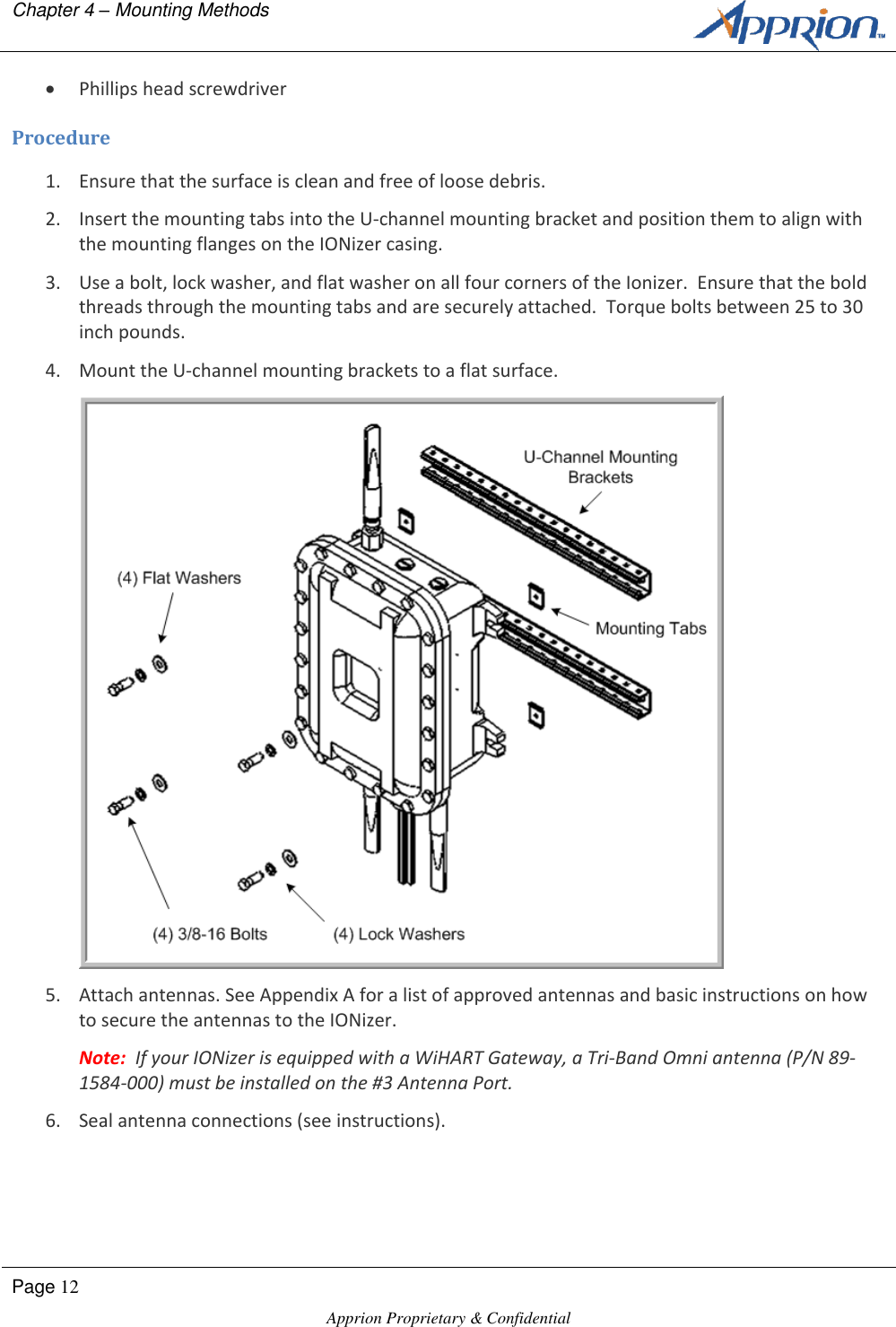
Chapter 4 – Mounting Methods        Page 12  Apprion Proprietary & Confidential    Phillips head screwdriver Procedure 1. Ensure that the surface is clean and free of loose debris. 2. Insert the mounting tabs into the U-channel mounting bracket and position them to align with the mounting flanges on the IONizer casing. 3. Use a bolt, lock washer, and flat washer on all four corners of the Ionizer.  Ensure that the bold threads through the mounting tabs and are securely attached.  Torque bolts between 25 to 30 inch pounds. 4. Mount the U-channel mounting brackets to a flat surface.  5. Attach antennas. See Appendix A for a list of approved antennas and basic instructions on how to secure the antennas to the IONizer. Note:  If your IONizer is equipped with a WiHART Gateway, a Tri-Band Omni antenna (P/N 89-1584-000) must be installed on the #3 Antenna Port. 6. Seal antenna connections (see instructions).
  Chapter 4 – Mounting Methods    Apprion Proprietary and Confidential Page 13  Sealing Antenna Connections Antenna connections should be sealed to protect them from exterior harsh environments.  Use a self-amalgamating poly isobutylene tape, which over a period of time adheres to itself and forms a single amalgameted rubber molding that conforms to the shape of the item its covering.  Once the tape is in place for several hours, the rubber molding is resistant to water and most solvents.  It remains stable over a wide temperature range and degrades very slowly in sunlight.  The tape can be removed by cutting it away with a sharp knife.
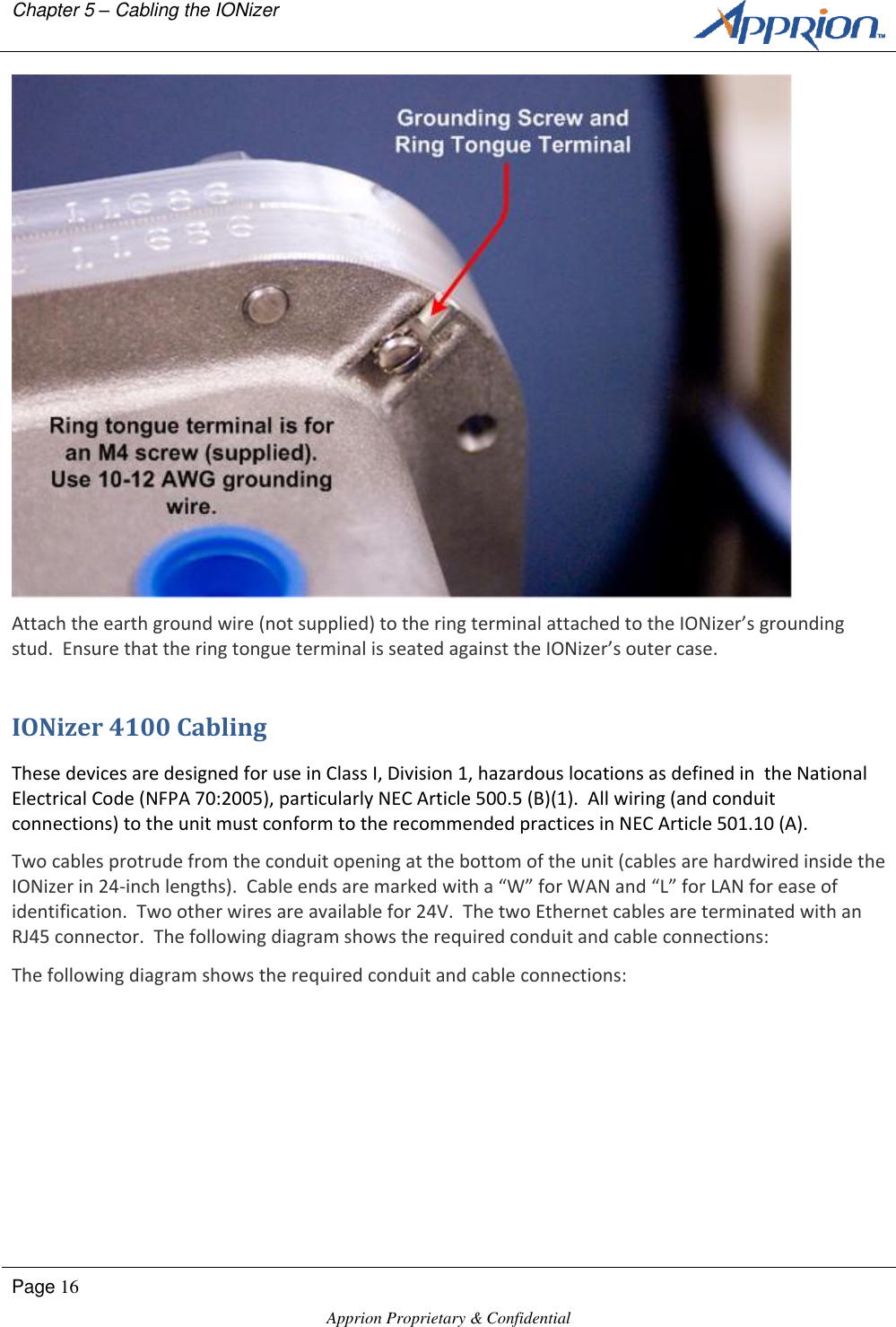
  Chapter 5 – Cabling the IONizer    Apprion Proprietary and Confidential Page 15  Chapter 5 Cabling the IONizer Overview How you cable the IONizer depends on the model you purchased.  The 4100 Series IONizers are designed for hazardous locations and therefore have different cabling requirements such as running cable through conduit.  Other models are designed to house WiHART gateways.  This chapter describes the cabling requirements for each model. Grounding All IONizers must be properly grounded before making power and signal connections.  Apprion recommends a UL Listed #10 AWG wire that is suitable for this purpose, and a ring tongue terminal, Panduit P/N P10-8R or equivalent.  The terminal is to be crimped to the wire using the correct crimping tool as recommended by the terminal manufacturer.  The torque rating on the nut is 8 to 10 inch pounds.  The wire should be kept as short as possible while using grounding practices that are compliant with local codes and practices. Note:  Ensure that the connection to a proper earth ground is made by certified and authorized personnel.  The ground must conform to all applicable codes and regulations.  The materials required to connect to a proper earth ground are defined by local conditions and must be procured locally to ensure that the correct safety environment is achieved. Grounding Procedures (IONizer 4100, 4120) The grounding connection is in the same location on all 4100 Series IONizers.
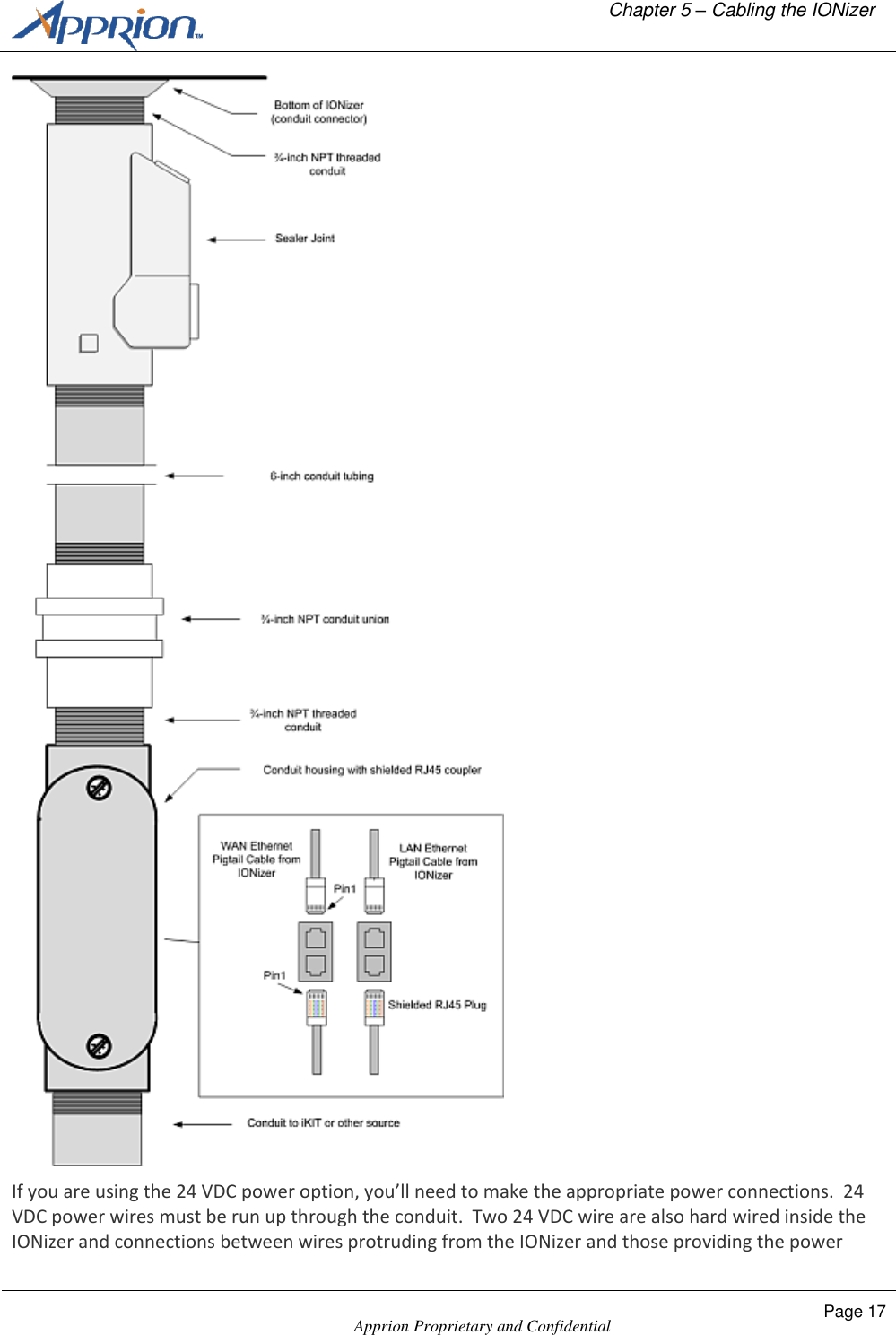
Chapter 5 – Cabling the IONizer        Page 16  Apprion Proprietary & Confidential    Attach the earth ground wire (not supplied) to the ring terminal attached to the IONizer’s grounding stud.  Ensure that the ring tongue terminal is seated against the IONizer’s outer case. IONizer 4100 Cabling These devices are designed for use in Class I, Division 1, hazardous locations as defined in  the National Electrical Code (NFPA 70:2005), particularly NEC Article 500.5 (B)(1).  All wiring (and conduit connections) to the unit must conform to the recommended practices in NEC Article 501.10 (A).  Two cables protrude from the conduit opening at the bottom of the unit (cables are hardwired inside the IONizer in 24-inch lengths).  Cable ends are marked with a “W” for WAN and “L” for LAN for ease of identification.  Two other wires are available for 24V.  The two Ethernet cables are terminated with an RJ45 connector.  The following diagram shows the required conduit and cable connections: The following diagram shows the required conduit and cable connections:
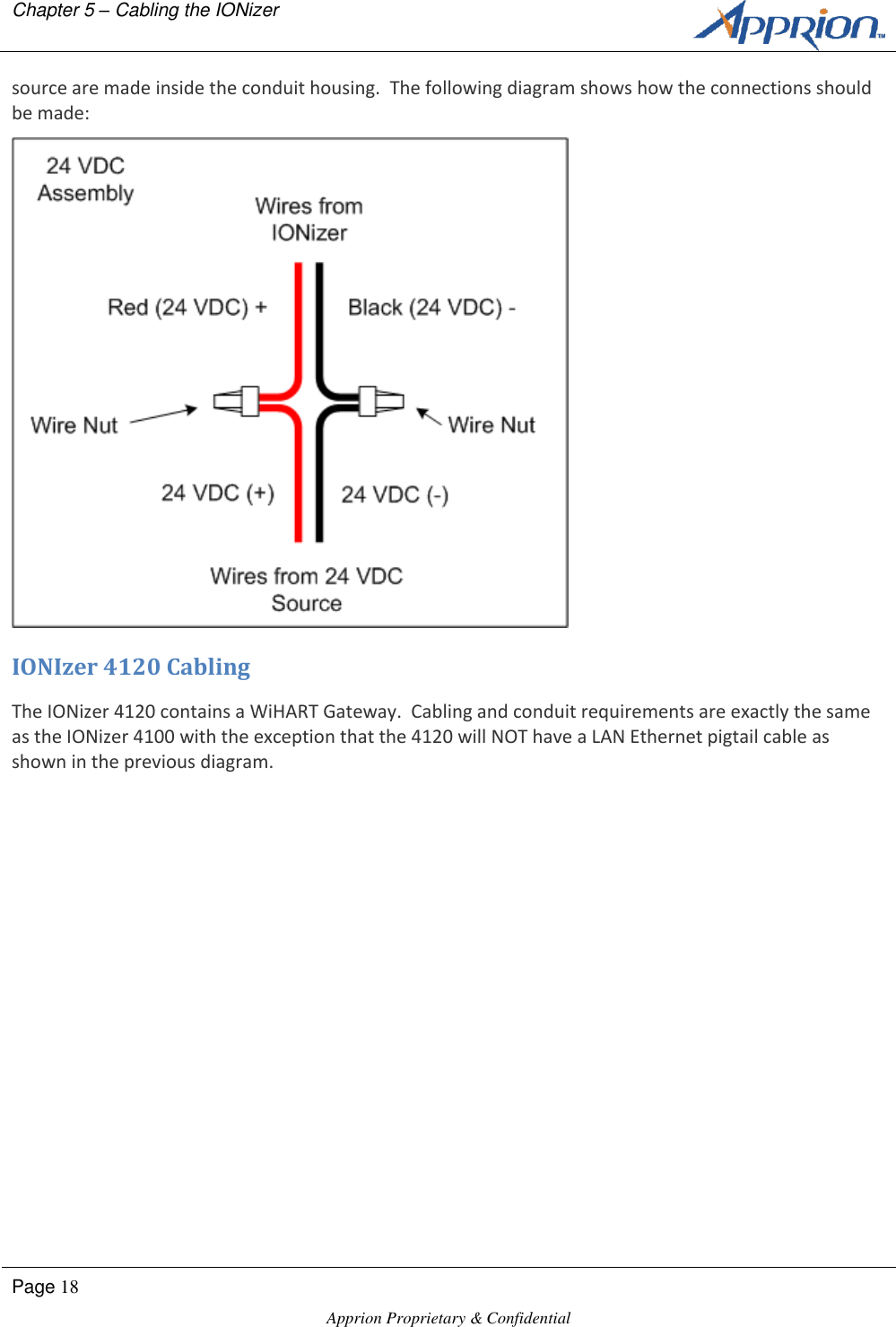
  Chapter 5 – Cabling the IONizer    Apprion Proprietary and Confidential Page 17   If you are using the 24 VDC power option, you’ll need to make the appropriate power connections.  24 VDC power wires must be run up through the conduit.  Two 24 VDC wire are also hard wired inside the IONizer and connections between wires protruding from the IONizer and those providing the power
Chapter 5 – Cabling the IONizer        Page 18  Apprion Proprietary & Confidential   source are made inside the conduit housing.  The following diagram shows how the connections should be made:  IONIzer 4120 Cabling The IONizer 4120 contains a WiHART Gateway.  Cabling and conduit requirements are exactly the same as the IONizer 4100 with the exception that the 4120 will NOT have a LAN Ethernet pigtail cable as shown in the previous diagram.
  Appendix A– Approved Antennas    Apprion Proprietary and Confidential Page 19  Appendix A Approved Antennas Basic Antenna Installation Information  Screw on antennas until hand-tight.  The IONizer supports various antenna types.  Antennas that ship with the units are based on orders  Unauthorized antennas may cause damage to the device  To comply with FCC RF exposure compliance requirements, the antennas used with the IONizer must be installed with a minimum separation distance of 25.26 cm from all persons, except the 16 dBi Sector Antenna (Apprion P/N 89-1186-000) and the 19 dBi Directional Antenna (Apprion P/N 89-1187-000) which must be installed with a minimum separation distance of 48.97 cm from all persons.  The 16 dBi Sector Antenna (Apprion P/N 89-1186-000) and the 19 dBi Directional Antenna (Apprion P/N 89-1187-000) are to be used for Point-to-Point operation only.  Antennas must not be co-located or operated in conjunction with any other antenna transmitter unless separated by 20 cm or greater.  Installation must be performed using authorized cables and/or connectors provided with the device or available from the manufacturer/distributor for use with this device.  Changes or modifications not expressly approved by the manufacturer or responsible party for this FCC compliance could void the user’s authority to operate this equipment   When installing authorized antennas, make sure that the N-Type connector is free of dirt and moisture.  The installer should properly ground themselves to minimize the chance of electrostatic discharge or arc. WARNING:  Potential electrostatic charging hazard. CAUTION: During all servicing and maintenance activities, the antennas must be handled with extreme caution to minimize possible electrostatic discharge (ESD) and arcing events.   CAUTION:  Antennas installed with IONizer 4100 models should be mounted in a location where they are not subjected to winds in order to minimize the build-up of charge and potential arcing of the antennas. Sealing Antenna Connections Antenna connections should be sealed to protect them from exterior harsh environments.  Use a self-amalgamating poly isobutylene tape, which over a period of time adheres to itself and forms a single amalgameted rubber molding that conforms to the shape of the item its covering.  Once the tape is in
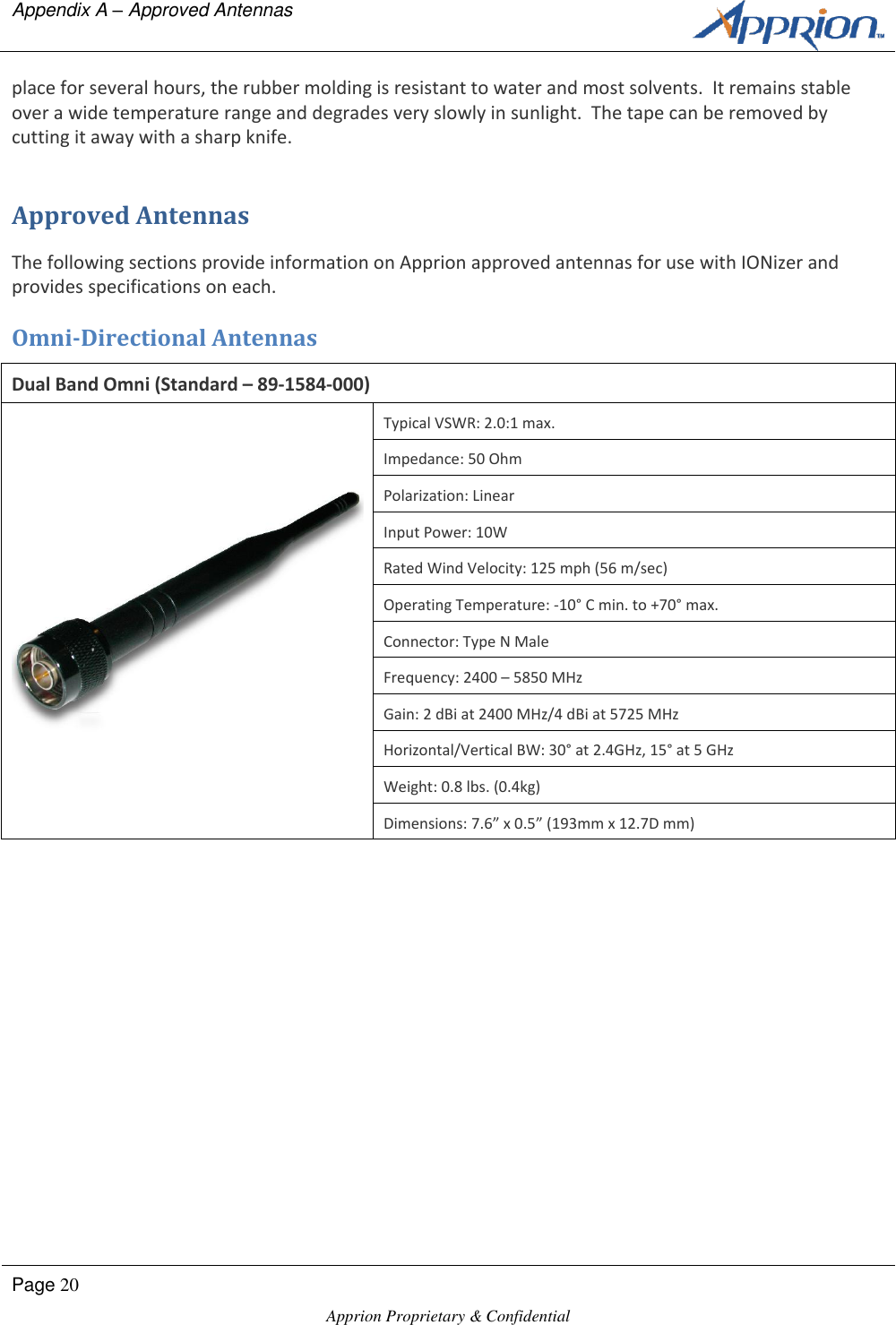
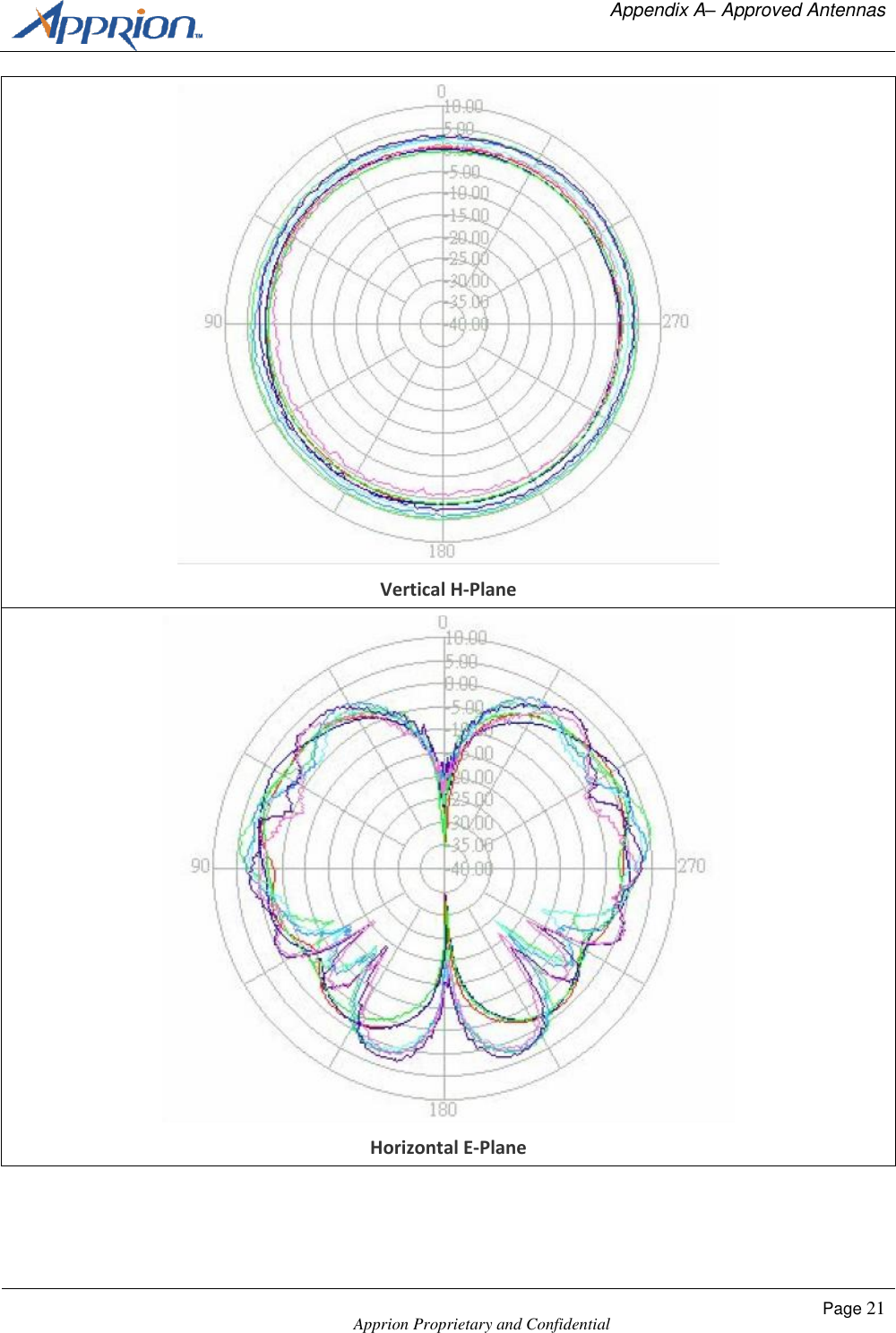
Appendix A – Approved Antennas      Page 20  Apprion Proprietary & Confidential   place for several hours, the rubber molding is resistant to water and most solvents.  It remains stable over a wide temperature range and degrades very slowly in sunlight.  The tape can be removed by cutting it away with a sharp knife. Approved Antennas The following sections provide information on Apprion approved antennas for use with IONizer and provides specifications on each.  Omni-Directional Antennas Dual Band Omni (Standard – 89-1584-000)  Typical VSWR: 2.0:1 max. Impedance: 50 Ohm Polarization: Linear Input Power: 10W Rated Wind Velocity: 125 mph (56 m/sec) Operating Temperature: -10° C min. to +70° max. Connector: Type N Male Frequency: 2400 – 5850 MHz Gain: 2 dBi at 2400 MHz/4 dBi at 5725 MHz Horizontal/Vertical BW: 30° at 2.4GHz, 15° at 5 GHz Weight: 0.8 lbs. (0.4kg) Dimensions: 7.6” x 0.5” (193mm x 12.7D mm)
  Appendix A– Approved Antennas    Apprion Proprietary and Confidential Page 21   Vertical H-Plane  Horizontal E-Plane
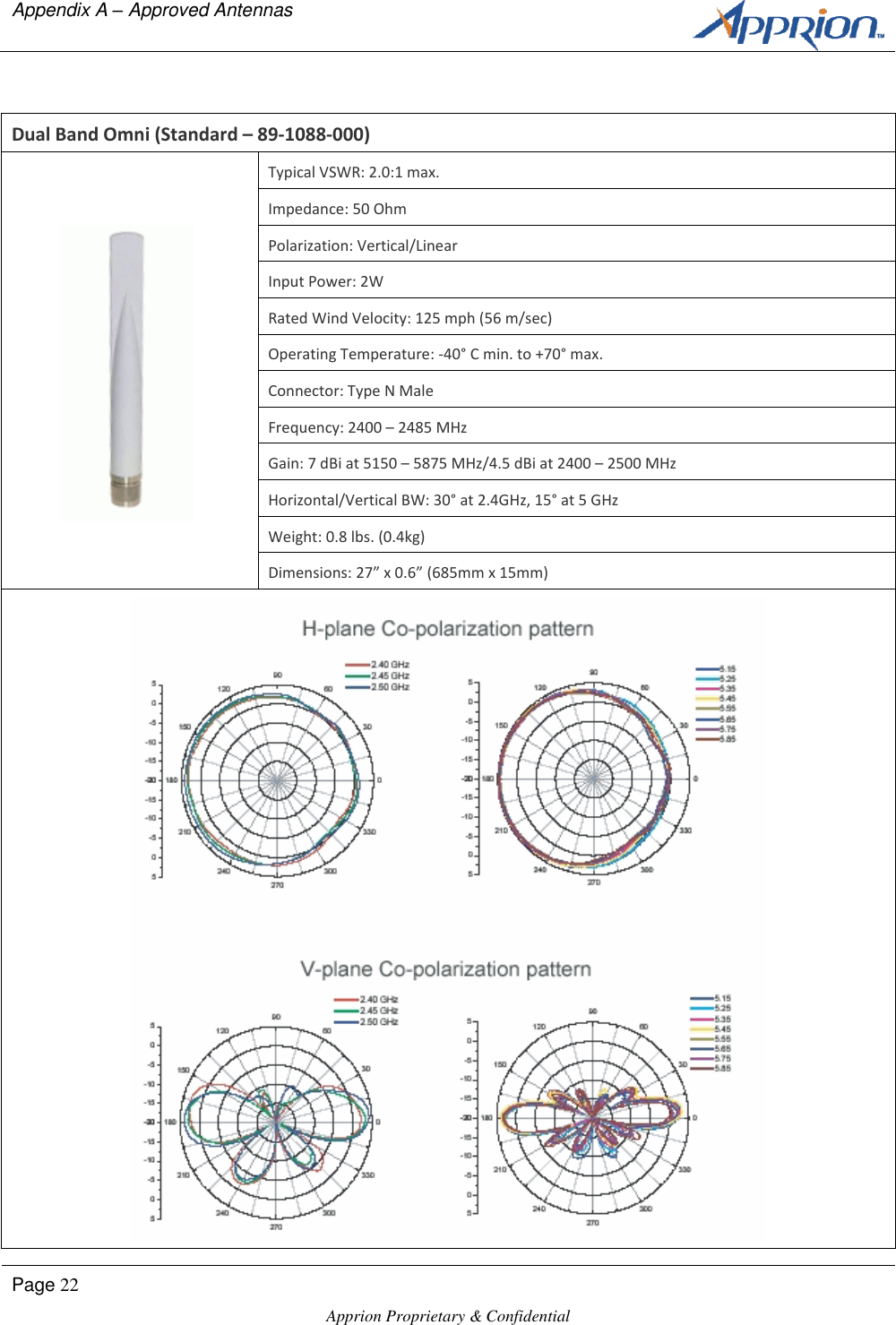
Appendix A – Approved Antennas      Page 22  Apprion Proprietary & Confidential    Dual Band Omni (Standard – 89-1088-000)  Typical VSWR: 2.0:1 max. Impedance: 50 Ohm Polarization: Vertical/Linear Input Power: 2W Rated Wind Velocity: 125 mph (56 m/sec) Operating Temperature: -40° C min. to +70° max. Connector: Type N Male Frequency: 2400 – 2485 MHz Gain: 7 dBi at 5150 – 5875 MHz/4.5 dBi at 2400 – 2500 MHz Horizontal/Vertical BW: 30° at 2.4GHz, 15° at 5 GHz Weight: 0.8 lbs. (0.4kg) Dimensions: 27” x 0.6” (685mm x 15mm)
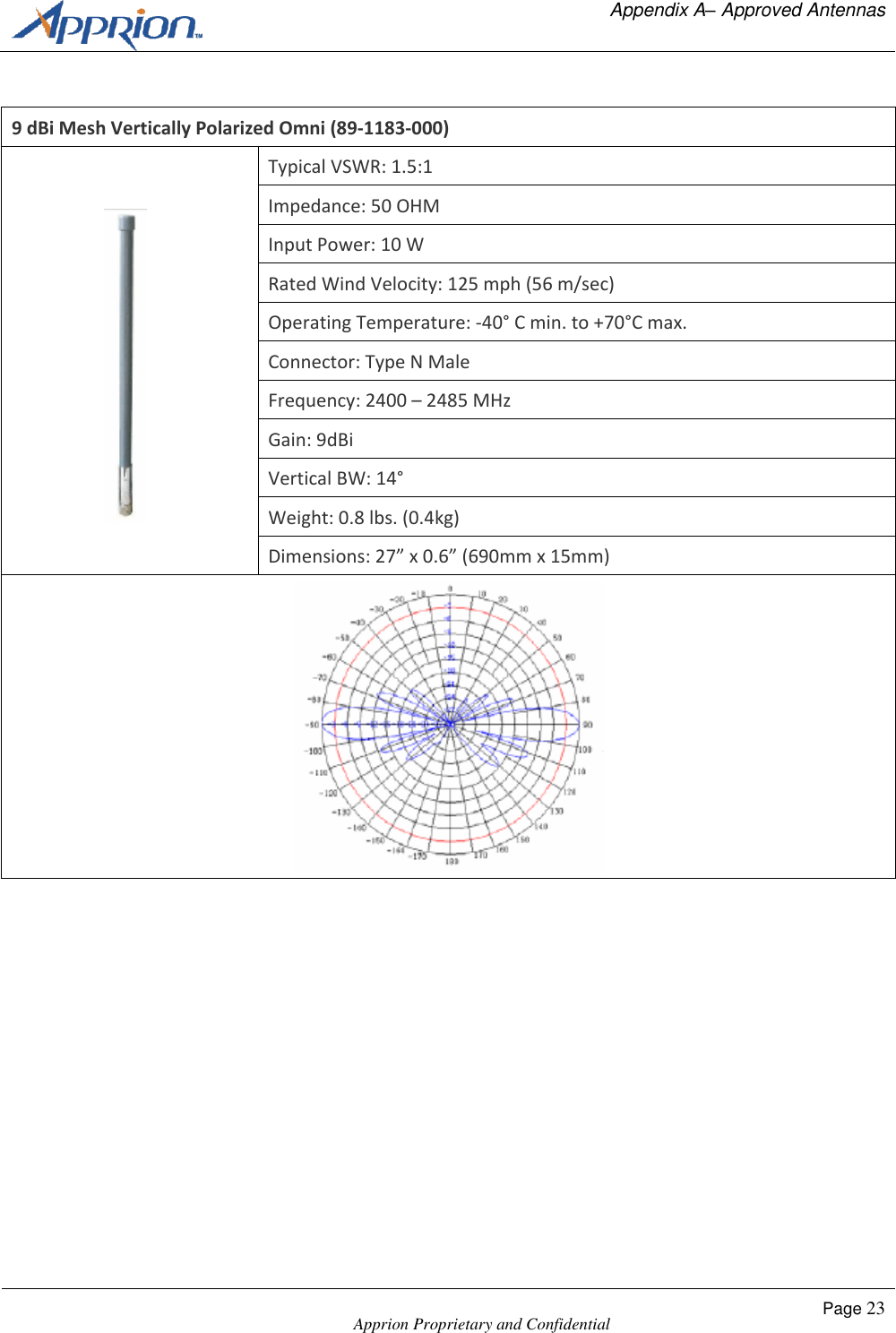
  Appendix A– Approved Antennas    Apprion Proprietary and Confidential Page 23   9 dBi Mesh Vertically Polarized Omni (89-1183-000)  Typical VSWR: 1.5:1 Impedance: 50 OHM Input Power: 10 W Rated Wind Velocity: 125 mph (56 m/sec) Operating Temperature: -40° C min. to +70°C max. Connector: Type N Male Frequency: 2400 – 2485 MHz Gain: 9dBi Vertical BW: 14° Weight: 0.8 lbs. (0.4kg) Dimensions: 27” x 0.6” (690mm x 15mm)
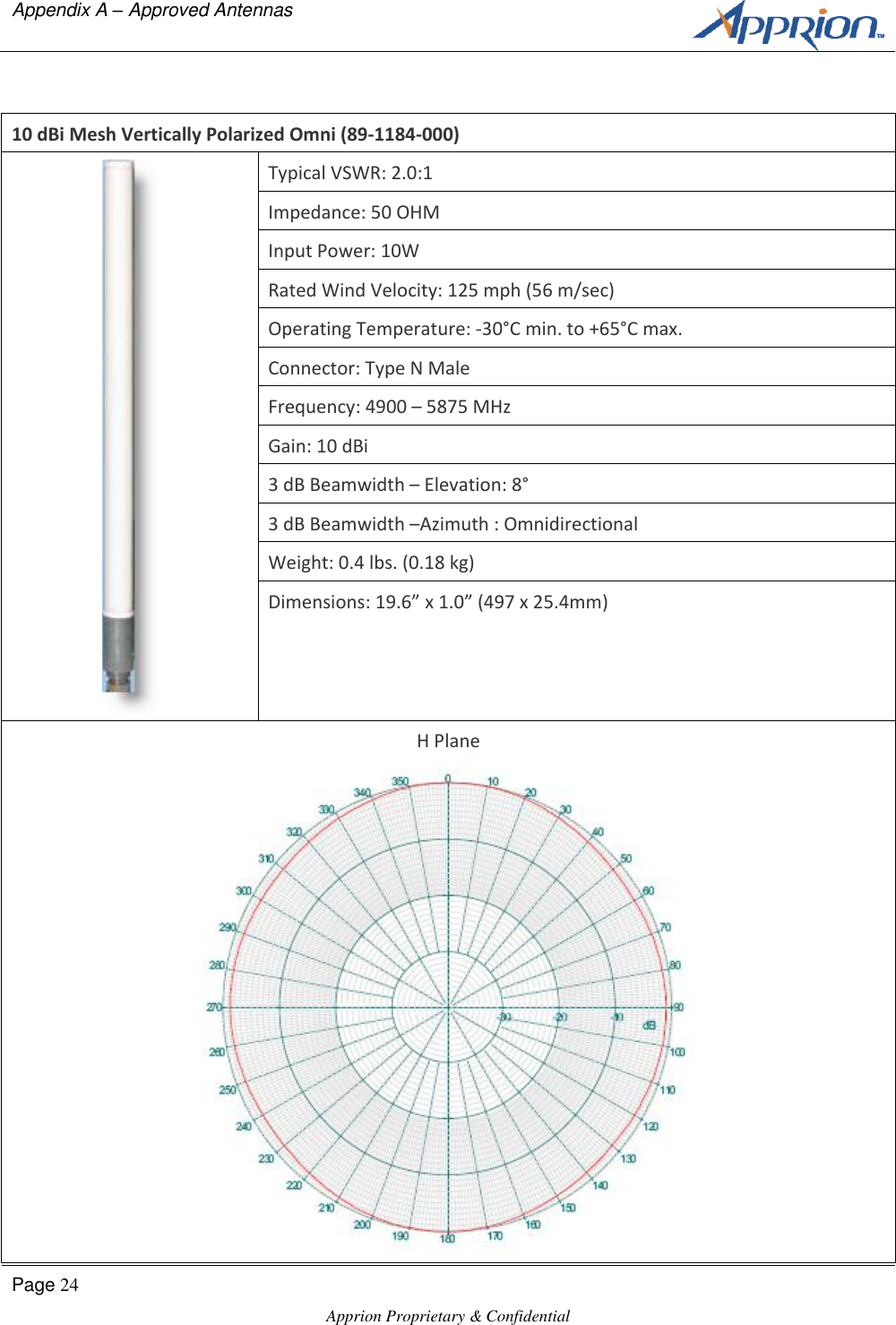
Appendix A – Approved Antennas      Page 24  Apprion Proprietary & Confidential    10 dBi Mesh Vertically Polarized Omni (89-1184-000)  Typical VSWR: 2.0:1 Impedance: 50 OHM Input Power: 10W Rated Wind Velocity: 125 mph (56 m/sec) Operating Temperature: -30°C min. to +65°C max. Connector: Type N Male Frequency: 4900 – 5875 MHz Gain: 10 dBi 3 dB Beamwidth – Elevation: 8° 3 dB Beamwidth –Azimuth : Omnidirectional Weight: 0.4 lbs. (0.18 kg) Dimensions: 19.6” x 1.0” (497 x 25.4mm) H Plane
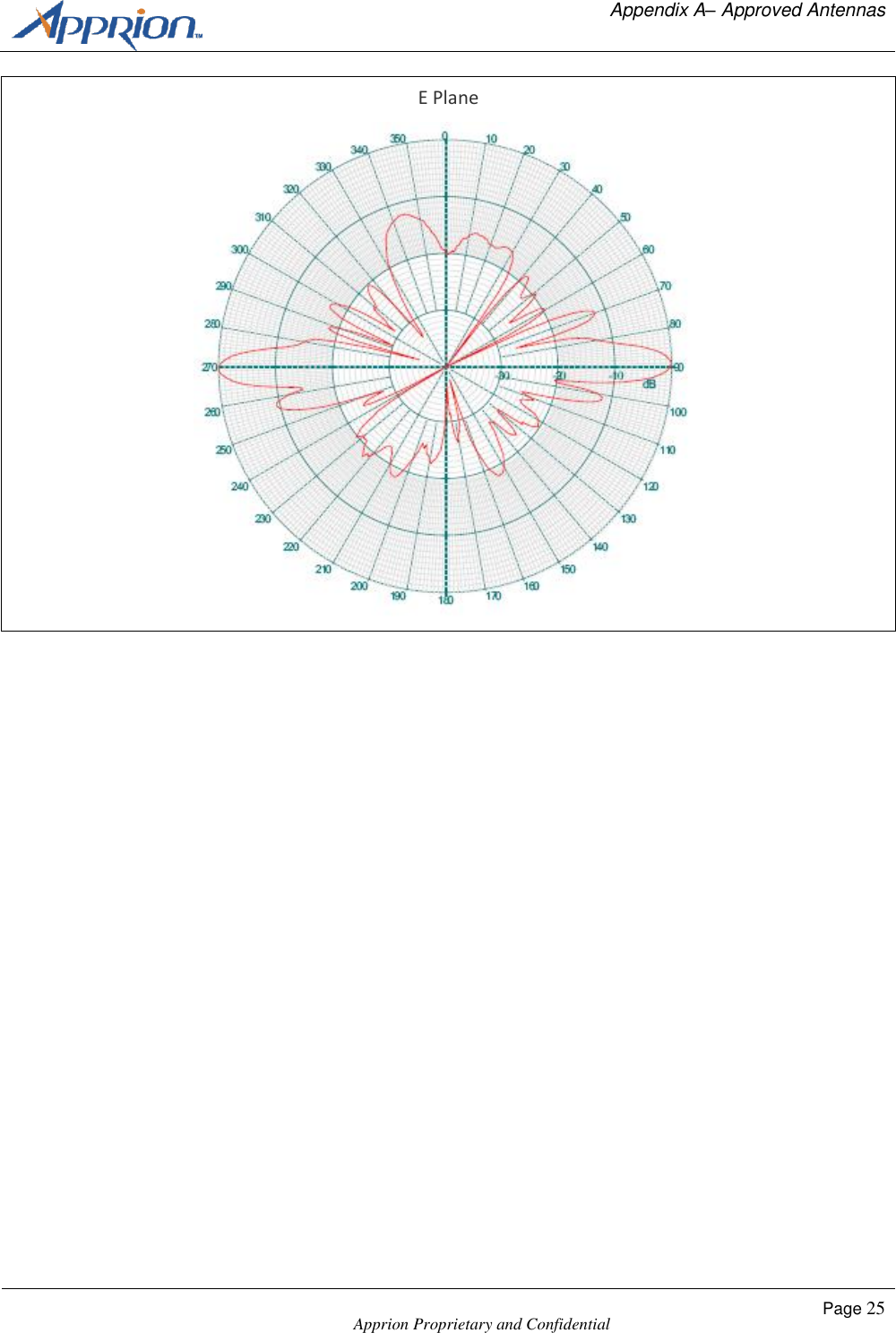
  Appendix A– Approved Antennas    Apprion Proprietary and Confidential Page 25  E Plane
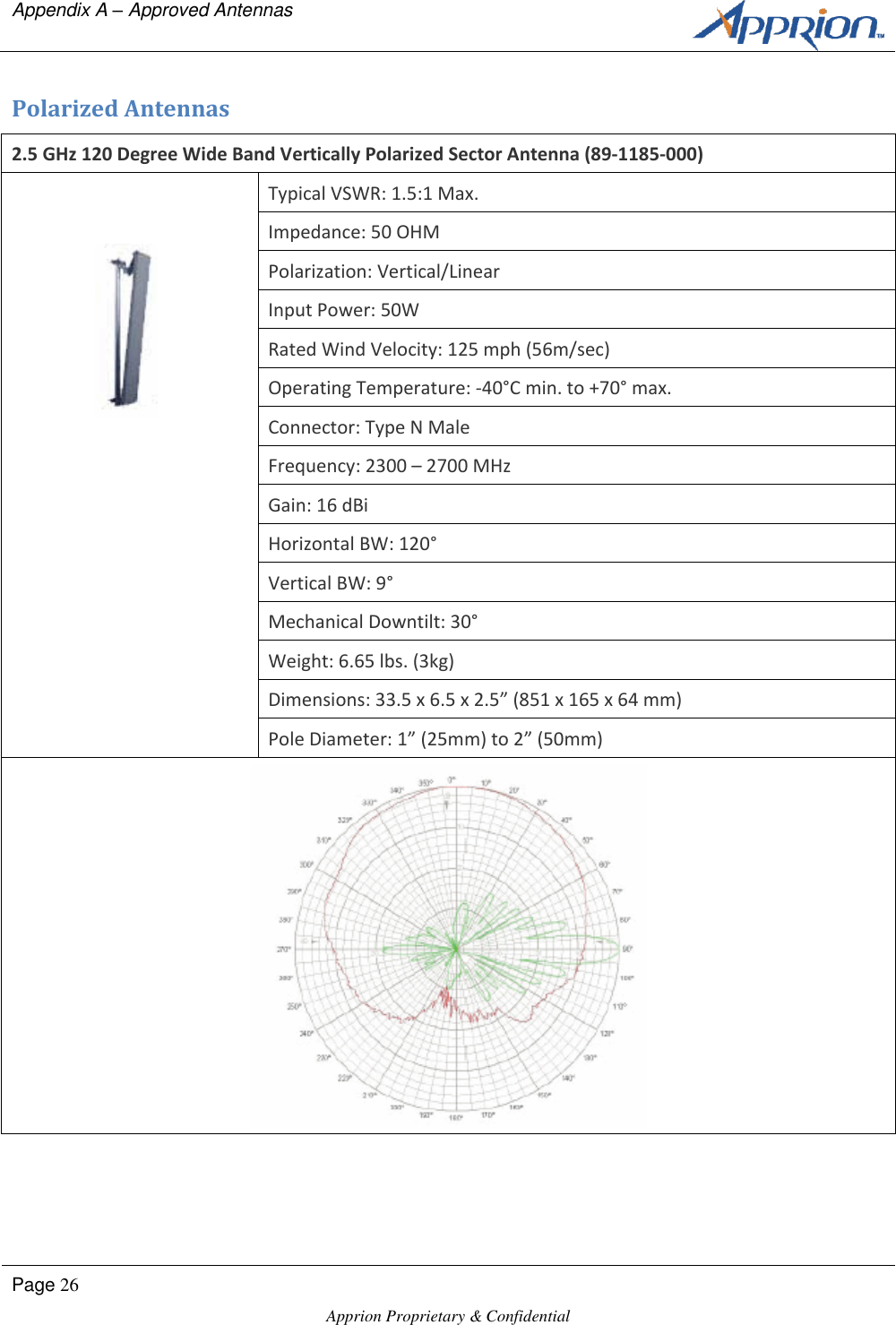
Appendix A – Approved Antennas      Page 26  Apprion Proprietary & Confidential   Polarized Antennas 2.5 GHz 120 Degree Wide Band Vertically Polarized Sector Antenna (89-1185-000)  Typical VSWR: 1.5:1 Max. Impedance: 50 OHM Polarization: Vertical/Linear Input Power: 50W Rated Wind Velocity: 125 mph (56m/sec) Operating Temperature: -40°C min. to +70° max. Connector: Type N Male Frequency: 2300 – 2700 MHz Gain: 16 dBi Horizontal BW: 120° Vertical BW: 9° Mechanical Downtilt: 30° Weight: 6.65 lbs. (3kg) Dimensions: 33.5 x 6.5 x 2.5” (851 x 165 x 64 mm) Pole Diameter: 1” (25mm) to 2” (50mm)
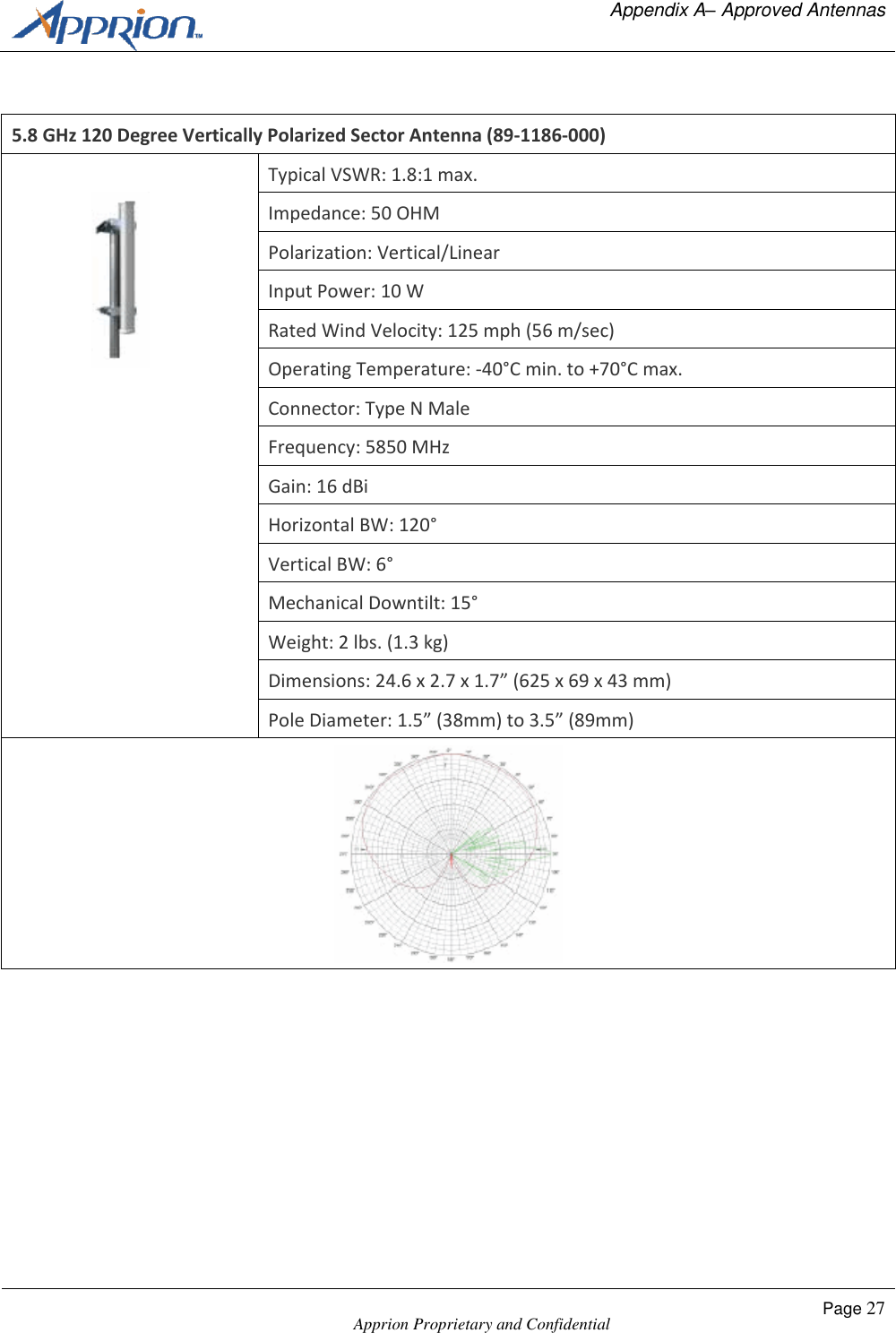
  Appendix A– Approved Antennas    Apprion Proprietary and Confidential Page 27   5.8 GHz 120 Degree Vertically Polarized Sector Antenna (89-1186-000)  Typical VSWR: 1.8:1 max. Impedance: 50 OHM Polarization: Vertical/Linear Input Power: 10 W Rated Wind Velocity: 125 mph (56 m/sec) Operating Temperature: -40°C min. to +70°C max. Connector: Type N Male Frequency: 5850 MHz Gain: 16 dBi Horizontal BW: 120° Vertical BW: 6° Mechanical Downtilt: 15° Weight: 2 lbs. (1.3 kg) Dimensions: 24.6 x 2.7 x 1.7” (625 x 69 x 43 mm) Pole Diameter: 1.5” (38mm) to 3.5” (89mm)
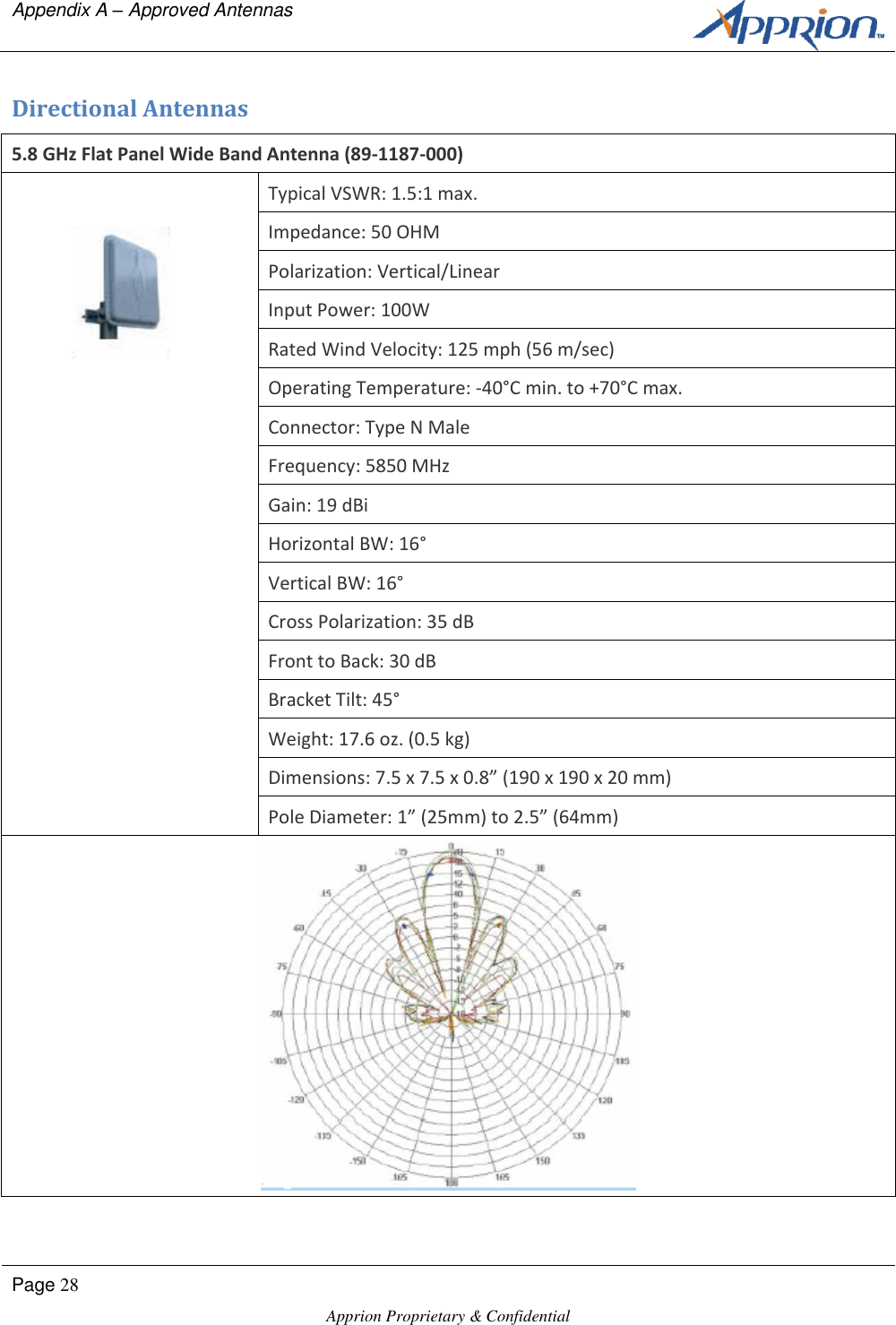
Appendix A – Approved Antennas      Page 28  Apprion Proprietary & Confidential   Directional Antennas 5.8 GHz Flat Panel Wide Band Antenna (89-1187-000)  Typical VSWR: 1.5:1 max. Impedance: 50 OHM Polarization: Vertical/Linear Input Power: 100W Rated Wind Velocity: 125 mph (56 m/sec) Operating Temperature: -40°C min. to +70°C max. Connector: Type N Male Frequency: 5850 MHz Gain: 19 dBi Horizontal BW: 16° Vertical BW: 16° Cross Polarization: 35 dB Front to Back: 30 dB Bracket Tilt: 45° Weight: 17.6 oz. (0.5 kg) Dimensions: 7.5 x 7.5 x 0.8” (190 x 190 x 20 mm) Pole Diameter: 1” (25mm) to 2.5” (64mm)
  Appendix B – IONizer Specifications    Apprion Proprietary and Confidential Page 29   Appendix B IONizer 4100 Specifications Specifications This appendix lists the IONizer hardware specifications.  Platform Specifications Custom Intel XScale-IXDP465 533 MHz with DDR1-266 SDRAM 128 MB RAM/64 MB Flash On-chip Programmable Network Process Engine (NPE) On-chip Cryptography Unit On-chip MII 10/100 Ethernet MACs On-chip IEEE 1588 Hardware Assist IEEE 802.11 a/b/g mini-PCI Modules (Typical) Expansion (12C/SSP/2xHSS/2x921K UARTs/USB2) Mechanical Size: IONizer 4100: 15.38 inches (390.6mm) x 11.38 inches (289mm) x 6.25 inches (158.7mm) Weight: IONizer 4100: 40 lbs. (18.14 kg) 45 lbs. (20.41 kg shipping weight) Housing: IONizer 4100: Explosion Proof Copper-free Aluminum Alloy Enclosure NEMA Type 4 (IP66) Rated  Operating Temperature Range: IONizer 4100/4300 Series: -20C to +55C Power Specifications: 48 VDC PoE or 24V power connection Maximum Power: 24W Safety Certifications: CSAus Listed to UL60950-1 (with UL50 considerations for outdoor use)
Appendix B – IONizer Specifications      Page 30  Apprion Proprietary & Confidential   cCSA Certified to CSA C22.2 No. 60950-1 (with CSA C22.2 No. 94 considerations for outdoor use) TUV Mark to EN60950-1 (with IEC60950-22 considerations for outdoor use), and Low Voltage Directive (LVD) under CE Mark Hazardous Location Certifications: IONizer 4100: Class I, Division 1 CSA Listed to UL 1203 for use in Class I, Division 2 (Zone 1), Groups C, D. CSA Certified to CSA 22.2 No. 30 for use in Class I, Division 2 (Zone 1), Groups C, D Radio Certifications: FCC U-NII (Part 15) EN 300 328-2 (w/R&TTE Article 3.2 consideration) EN 301 893 (w/R&TTE Article 3.2 consideration) EN 301 489 (w/R&TTE Article 3.2 consideration) European Union Directive Info: EC Declaration of Conformity for all European directives for this product can be found on the Apprion website at www.apprion.com.  A hard copy may be obtained by contacting your local sales representative.

Navigation menu