Arkon Resources SF280 WIRELESS STEREO MUSIC ADAPTER User Manual March 15 2004

Arkon Resources Inc WIRELESS STEREO MUSIC ADAPTER March 15 2004

USERS MANUAL

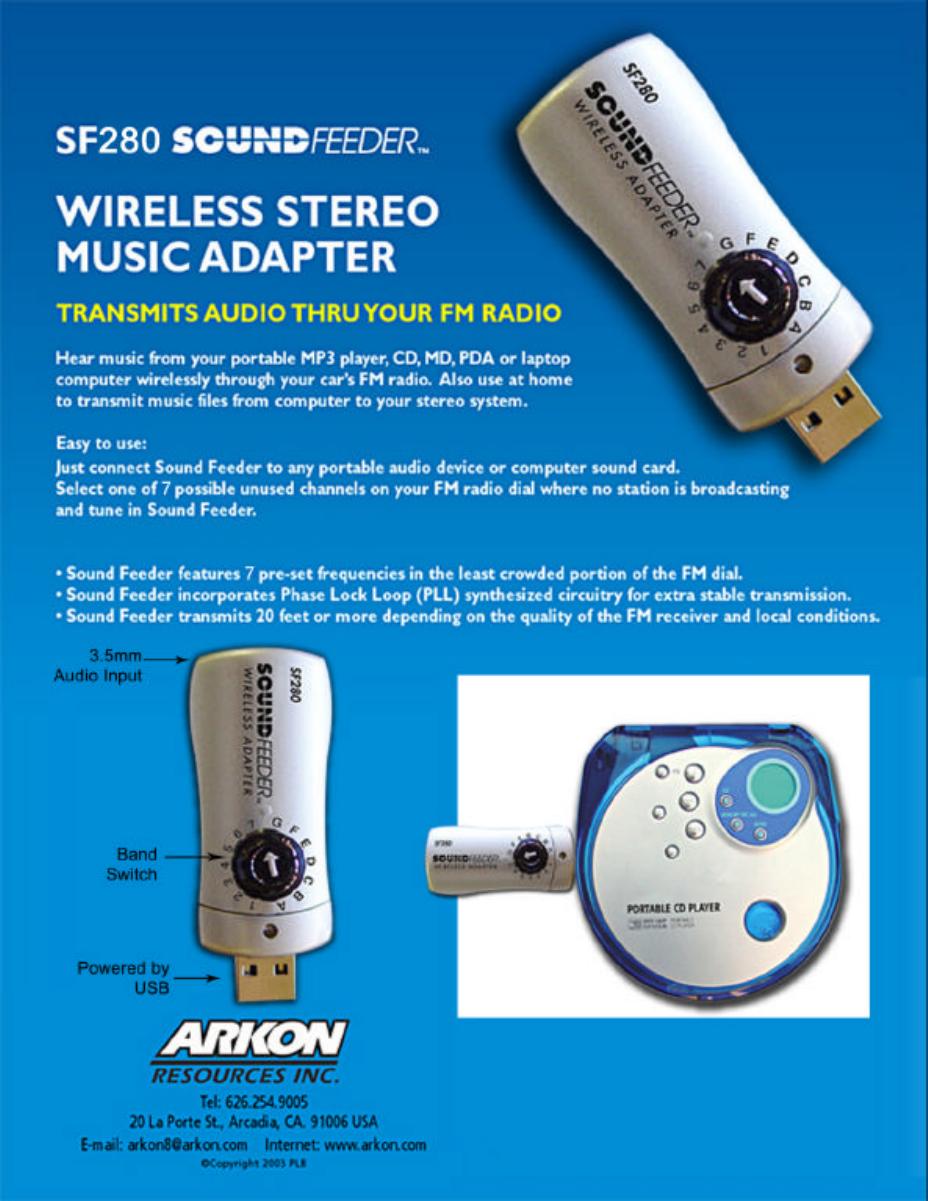
 Owners Manual For SOUND FEEDER SF280 Mini USB Wireless Music Adapter  I. INTRODUCTION SF280 SOUND FEEDER Mini USB Wireless Adapter is a multi-purpose, USB-powered FM stereo music transmitter suitable for use with many types of consumer audio equipment. Use SF280 to transmit the music from your portable music player—including laptop computer, PDA, MP3 player, compact disc player, etc.—to any nearby FM receiver, whether in the car or at home.    II.  SET UP & OPERATION  1.  Select a suitable transmission frequency for your area.  We suggest you start with one of the frequencies in the 88-89MHz-band area since these stations are more likely to be unused in your area.  Turn the frequency switch on the Sound Feeder to point to the letter or number that corresponds to the desired frequency listed on the backside of the Sound Feeder. 2. Then insert the Sound Feeder into the USB slot on the Car power adapter and insert the car power adapter into the lighter socket of a vehicle. 3.  Then use the audio cord provided to connect the Sound Feeder to the headphone jack or line out jack of your portable music player. 4.  Turn on your music player and make sure it has a medium (disc, tape, etc.) or an electronic file to produce sound.  5.  Turn on your FM radio to medium volume and set it to the FM frequency your have selected in step 1 above.  You should hear your music played over the FM radio.  If you find that another broadcaster is already using the frequency you selected in step 1 above, then select another frequency.  III. OPERATING TIPS        Once you have discovered the best transmitting frequency for your area, you can make a note of the frequency and then directly tune to that frequency in the future or store this frequency as one of your preset stations.  If you drive to another city and are listening to Sound Feeder, you may encounter interference from a radio station in that city that is using the same frequency that you are.  If that is the case, you may need to select another frequency out of the total of 12 possible frequencies.
VI. FCC WARNING  NOTE: This equipment has been tested and found to comply with the limits for Class B digital device, pursuant to part 15 of the FCC Rules. These limits are designed to provide reasonable protection against harmful interference in a residential installation. This equipment generates, uses and can radiate radio frequency energy and, if not installed in accordance with instructions, may cause harmful interference to radio communications. However, there is no guarantee that interference will not occur in a particular installation. If this equipment does cause harmful interference to radio or television reception, which can be determined by turning the equipment off and on, the user is encouraged to try to correct the interference by one or more of the following measures: •  Reorient or relocate the receiving antenna •  Increase the separation between the equipment and receiver •  Connect the equipment into an outlet on a circuit different from that to which the receiver is connected •  Consult the dealer or an experienced radio/TV technician for help. •  Shielded interface cables must be used in order to comply with the emission limits.  THIS PRODUCT COMPLIES WITH PART 15 OF THE FCC RULES.  OPERATION IS SUBJECT TO THE FOLLOWING TWO CONDITIONS; (1) THIS DEVICE MAY NOT CAUSE HARMFUL INTERFERENCE, AND (2) THIS DEVICE MUST ACCEPT ANY INTERFERENCE RECEIVED, INCLUDING INTERFERENCE THAT MAY CAUSE UNDESIRED OPERATION.  CAUTION: CHANGES OR MODIFICATIONS NOT EXPRESSLY APPROVED BY THE PARTY RESPONSIBLE FOR COMPLIANCE COULD VOID THE USER’S AUTHORITY TO OERATE THE EQUIPMENT.  ARKON RESOUCRES, INC. 20 La Porte St. Arcadia, CA 91006 Tel: 626-254-9005 www.arkon.com

Navigation menu