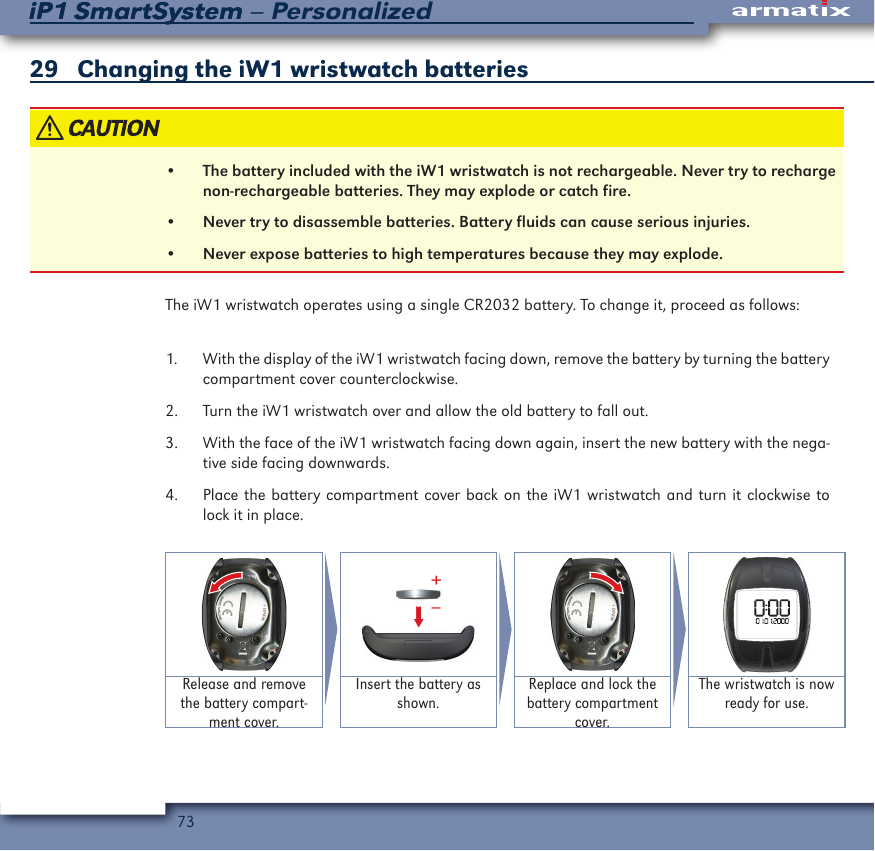
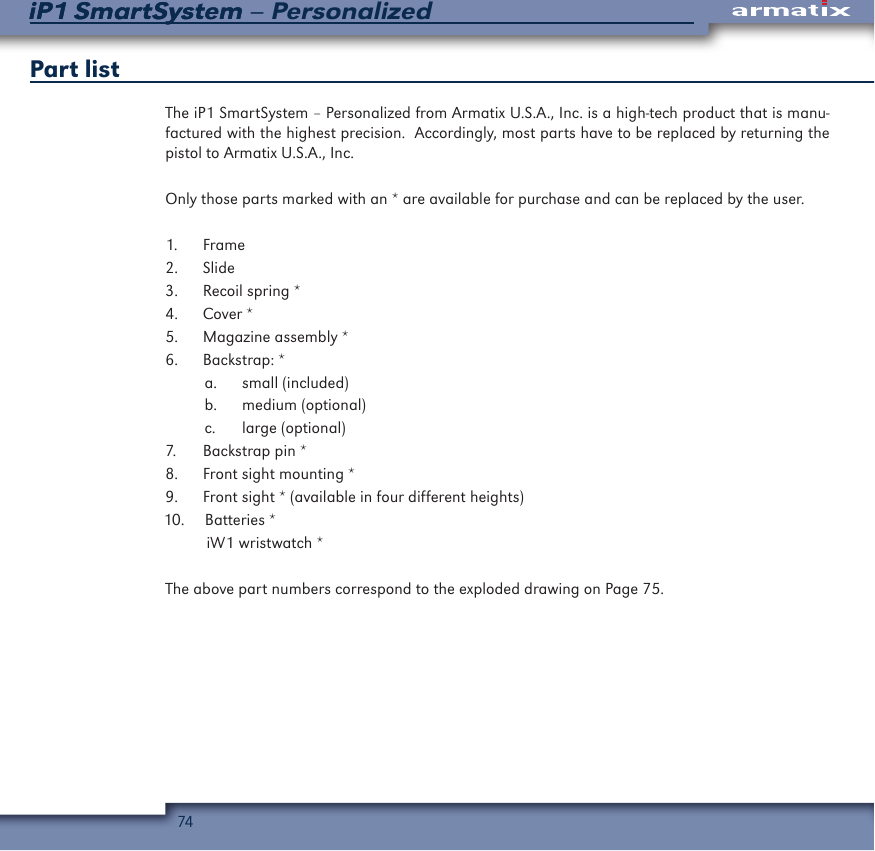
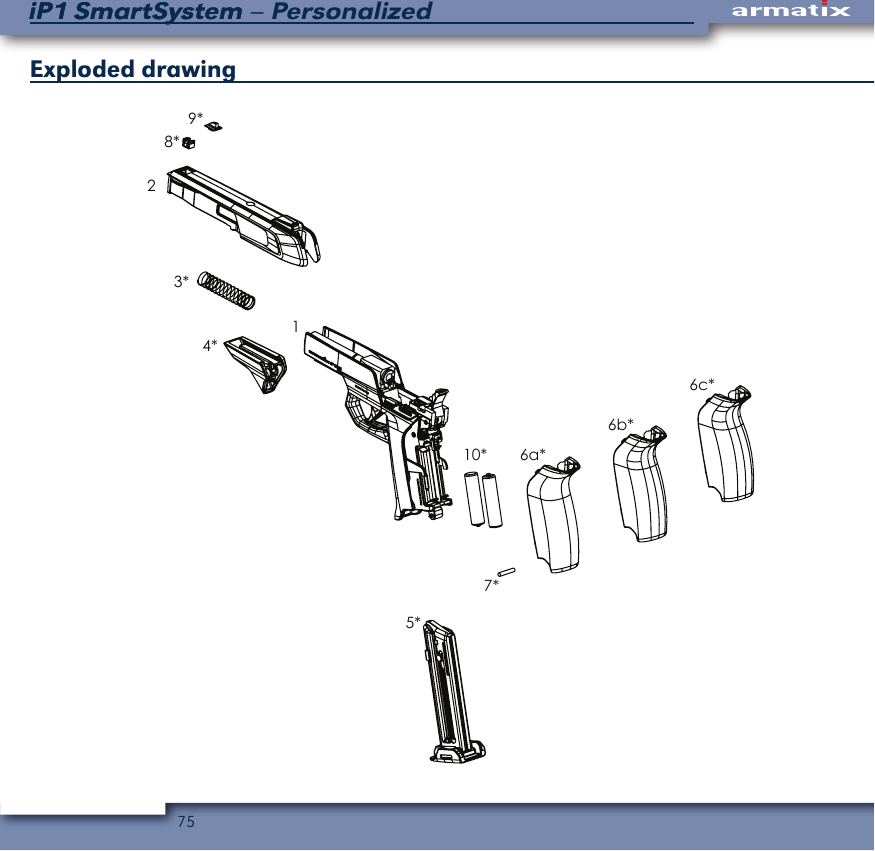
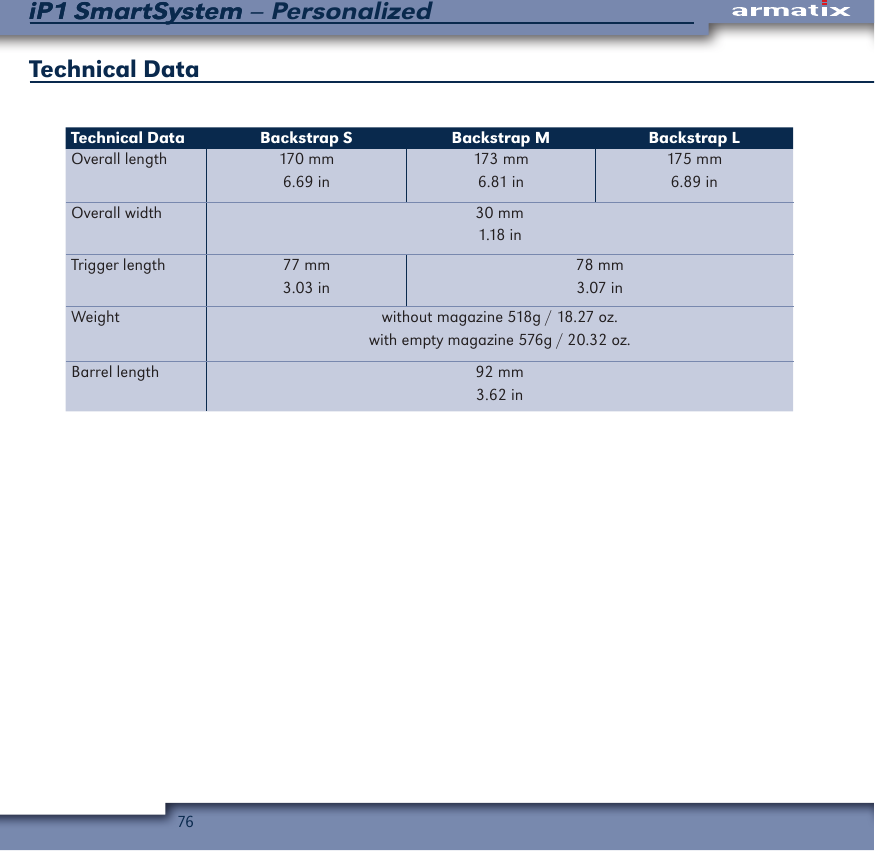
Armatix SMARTIS1A iS1 Smart System - USB stick User Manual

Armatix GmbH iS1 Smart System - USB stick

user manual

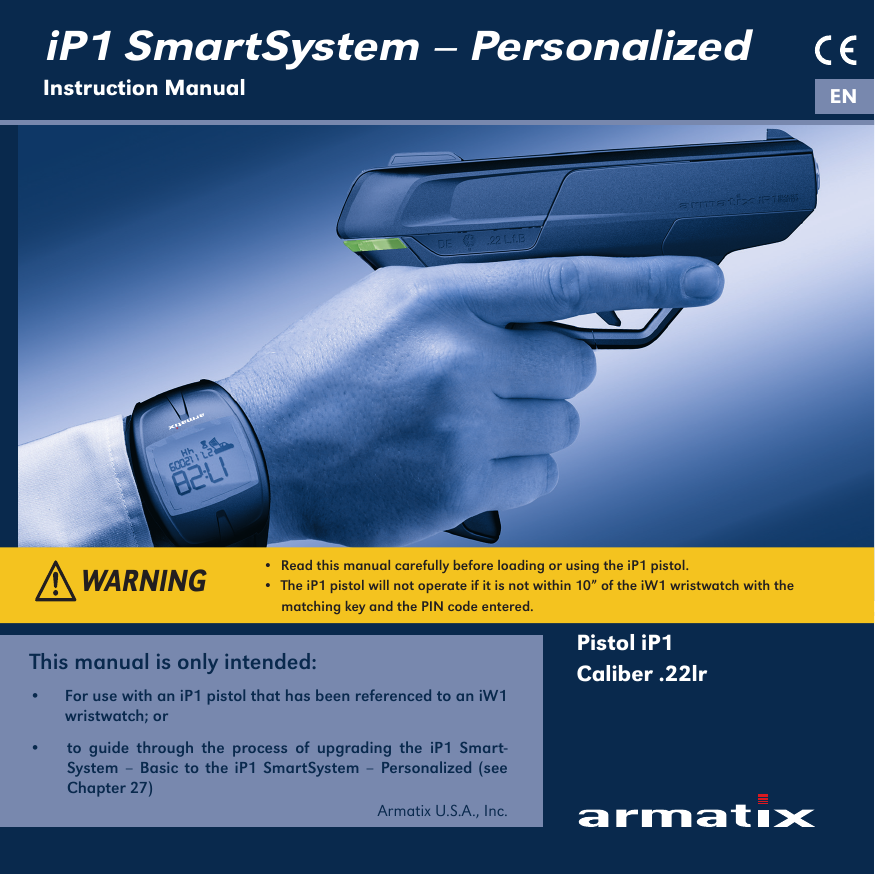
iP1 SmartSystem – PersonalizedInstruction Manual ENPistol iP1Caliber .22lrThis manual is only intended: •  For use with an iP1 pistol that has been referenced to an iW1 wristwatch; or  •  to guide through the process of upgrading the iP1 Smart-System – Basic to the iP1 SmartSystem – Personalized (see Chapter 27)Armatix U.S.A., Inc. •  Read this manual carefully before loading or using the iP1 pistol.•  The iP1 pistol will not operate if it is not within 10” of the iW1 wristwatch with the     matching key and the PIN code entered.WARNING
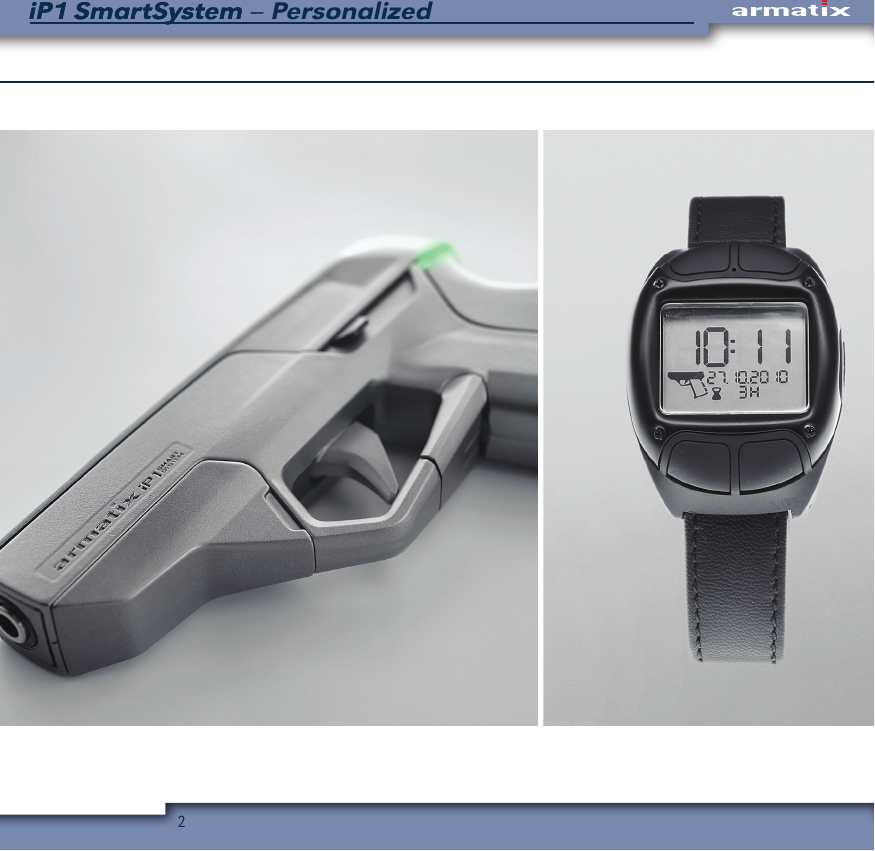
2iP1 SmartSystem – PersonalizediP1 SmartSystem
3iP1 SmartSystem – Personalized
4iP1 SmartSystem – PersonalizediP1 SmartSystemSafety precautionsRead this manual and the warnings contained in it before loading or using the iP1 pistol. This manual explains the function and the handling of the iP1 SmartSystem — Personalized and warns of the potential dangers, including death and serious personal injury, that can result from use of the iP1 pistol. This manual should always accompany the iP1 SmartSystem — Personalized and be transferred with it if it is sold or otherwise made availebal to another person.Even if you are an experienced shooter, you must READ THIS ENTIRE MANUAL CAREFULLY before loading or firing the iP1 pistol because it represents the first commercially available “personalized” firearm and has several unique features and operating requirements not present in other firearms. This manual gives basic instructions on the proper handling and functioning of the iP1 pistol. Your safety and the safety of others depend on you following the instructions and warnings in this manual and the constant use of safe firearms practices. If you are unfamiliar with firearms, take a course in the safe handling of firearms run by a qualified firearms instructor, your local gun club, or a similar qualified organization.Safety warning symbolsThis manual contains several safety warnings and instructions preceded with:                                                        These signal words are designed to draw your attention to important safety information.                      Indicates a hazardous situation which, if not avoided, could result in death or serious injury.                     Indicates a hazardous situation, which, if not avoided, could result in minor or moderate injury.                     Addresses safety practices not related to personal injury.
5iP1 SmartSystem – PersonalizediP1 SmartSystemGeneral safety precautions•  Failure to follow the safety information and safety instructions in this manual could result in death, serious personal injury and/or property damage.•  The iP1 pistol is intended for target shooting only and will not function if it is not within 10” of the referenced iW1 wristwatch and the PIN code entered, or it or the referenced iW1 wristwatch do not have sufficient battery power, or communication between them is blocked. It should not be relied upon for purposes of self-defense.•  Always deactivate the iP1 pistol when you are finished using it to help prevent it from being misused by third parties.•  Always seek a doctor’s advice if you are taking medication to be sure that you are able to shoot and handle a firearm safely. •  Never drink alcoholic beverages or take drugs before or while shooting. Your vision and judgment could be seriously impaired, making your firearm handling unsafe.•  If the iP1 pistol or any other firearm is carelessly or improperly handled, you could cause a negligent discharge, which could result in death, serious personal injury and/or property damage.•  Always handle the iP1 pistol as if it is loaded so that you never fire negligently.•  Never point the iP1 pistol at anything you do not intend to shoot.•  Never pull the trigger or put your finger on the trigger or in the trigger guard until you have made the decision to fire.•  Never take anyone’s word that a firearm is unloaded; always check for yourself, with the firearm pointed in a safe direction and your finger off of the trigger and outside of the trigger guard.
6iP1 SmartSystem – PersonalizediP1 SmartSystem•  Always make sure the iP1 pistol is unloaded and that the slide is locked open in the rear-ward position with the magazine taken out before handing it to another person.•  Never alter or modify the iP1 pistol because this could cause it to malfunction and create a dangerous condition.•  If the iP1 pistol is dropped or forcefully struck, it could be damaged and may not function properly. Have it inspected by Armatix U.S.A., Inc. before continuing to use it.•  Do not expose the iP1 pistol to high heat or moisture because they could damage its elec-tronic elements and prevent it from functioning properly.•  Never carry the iP1 pistol out of a suitable holster with a cartridge loaded in the chamber.•  Always store and transport the iP1 pistol unloaded and locked in a suitable container, such as the included pistol case, out of the reach and sight of children or other unauthorized persons. The personalized nature of the iP1 pistol is not an excuse for the failure to follow safe firearm storage practices.•  Never store or transport ammunition or the synced iW1 wristwatch together with the PIN-Card and the valid PIN codes of the iP1 SmartSystem in the same container as the iP1 pistol. The PIN-Card and the valid PIN codes of the iP1 SmartSystem must always be stored separately and out of the reach and sight of children or other unauthorized persons.
7iP1 SmartSystem – PersonalizediP1 SmartSystemMost ammunition contains lead in the projectile and/or primer. Firing the iP1 pistol in a poorly ventilated area can lead to the exposure to lead. Always wash your hands after handling am-munition, firing the iP1 pistol, and/or performing preventive maintenance on the iP1 pistol to minimize your exposure to lead.Do not dry fire the iP1 pistol (pull the trigger and allow the hammer to fall on an empty cham-ber) because this will result in premature wear. To practice pulling the trigger, use snap caps or dummy rounds.
8iP1 SmartSystem – PersonalizediP1 SmartSystemBefore it left the factory, the iP1 pistol was tested, carefully inspected, and packaged. Armatix U.S.A., Inc. cannot control what happens to the pistol after it leaves the factory, therefore, care-fully examine the iP1 pistol when you acquire it to ensure that it is unloaded and undamaged. If you do not understand any of the warnings and instructions in this manual or have any problems operating the iP1 pistol, contact Armatix U.S.A., Inc.’s customer service/warranty department at 1-855-477-1972 or customerservice@armatix.us. If you need another copy of this manual, contact Armatix U.S.A., Inc.Manufactured by:                                              Imported and distributed in the United States by:Armatix GmbH                                                    Armatix U.S.A., Inc.Feringastraße 4                                                   23121 Coltrane Avenue85774 Unterföhring Germany                            Newhall, CA 91321Tel.: +49 89 / 4 27 29 79 – 0                              Tel.: 855-477-1972Email: info@armatix.de                                        Email: customerservice@armatix.usWebpage: www.armatix.de                                 Webpage: www.armatix.usThe Upto Date version of the instruction manual can also be downloaded at www.armatix.us.
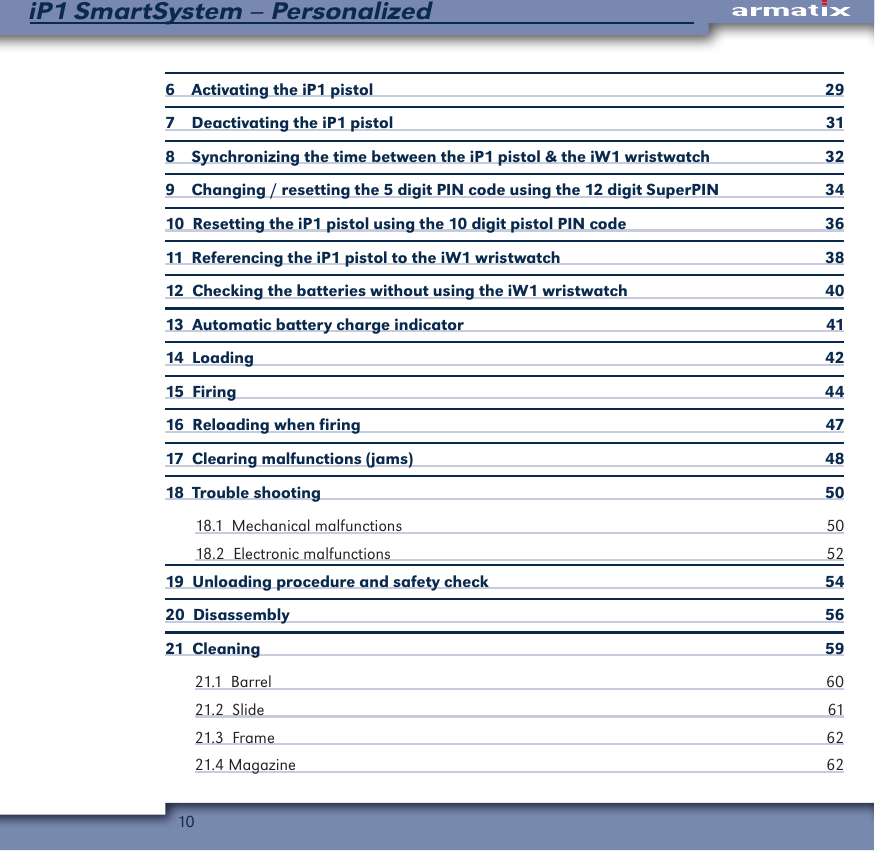
9iP1 SmartSystem – PersonalizedTable of Contents1 Introduction  122  Main Features of the iP1 Pistol  132.1  The iP1  142.1.1  Frame with LED and interchangeable backstraps  142.1.2  Slide with loaded chamber indicator (LCI)  142.1.3   Trigger with trigger switch   152.1.4  Slide release lever  162.1.5  Magazine release lever  162.1.6 Sights  163   Functioning of the iP1 SmartSystem – Personalized  174  Components of the iP1 SmartSystem – Personalized  185   Operation of the iW1 wristwatch  195.1  Display elements  195.1.1  Scrolling through the individual function menus of the iW1 wristwatch 215.1.2  Background lighting  235.2  Standard display  235.2.1  Setting the time and date  245.2.2  Alarm clock  265.2.3  Stopwatch  275.2.4  Pistol menu  28
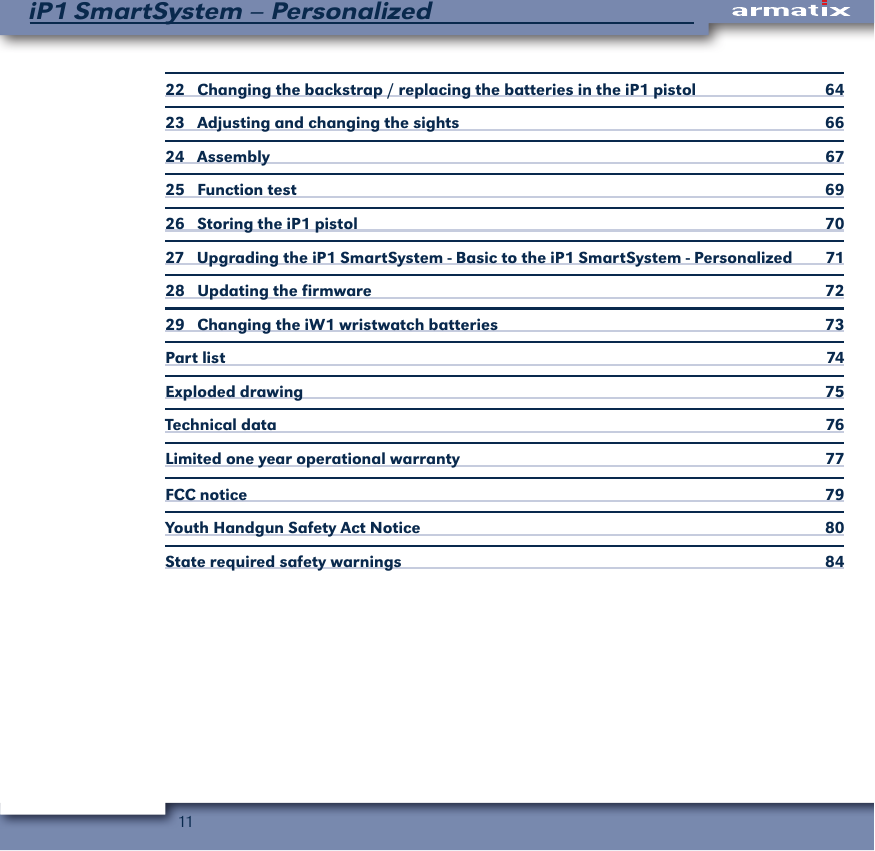
10iP1 SmartSystem – Personalized6    Activating the iP1 pistol  297    Deactivating the iP1 pistol  318    Synchronizing the time between the iP1 pistol & the iW1 wristwatch  329    Changing / resetting the 5 digit PIN code using the 12 digit SuperPIN  3410  Resetting the iP1 pistol using the 10 digit pistol PIN code  3611  Referencing the iP1 pistol to the iW1 wristwatch  3812  Checking the batteries without using the iW1 wristwatch  4013  Automatic battery charge indicator  4114  Loading  4215  Firing  4416  Reloading when firing   4717  Clearing malfunctions (jams)  4818  Trouble shooting   5018.1  Mechanical malfunctions  5018.2  Electronic malfunctions  5219  Unloading procedure and safety check  5420  Disassembly  5621  Cleaning  5921.1  Barrel                                                                                                                                     60 21.2  Slide  6121.3  Frame  6221.4 Magazine  62
11iP1 SmartSystem – Personalized22   Changing the backstrap / replacing the batteries in the iP1 pistol  6423   Adjusting and changing the sights  6624   Assembly  6725   Function test   6926   Storing the iP1 pistol  7027   Upgrading the iP1 SmartSystem - Basic to the iP1 SmartSystem - Personalized  7128    Updating the firmware  7229    Changing the iW1 wristwatch batteries   73Part list   74Exploded drawing  75Technical data  76Limited one year operational warranty   77FCC notice  79Youth Handgun Safety Act Notice  80State required safety warnings  84
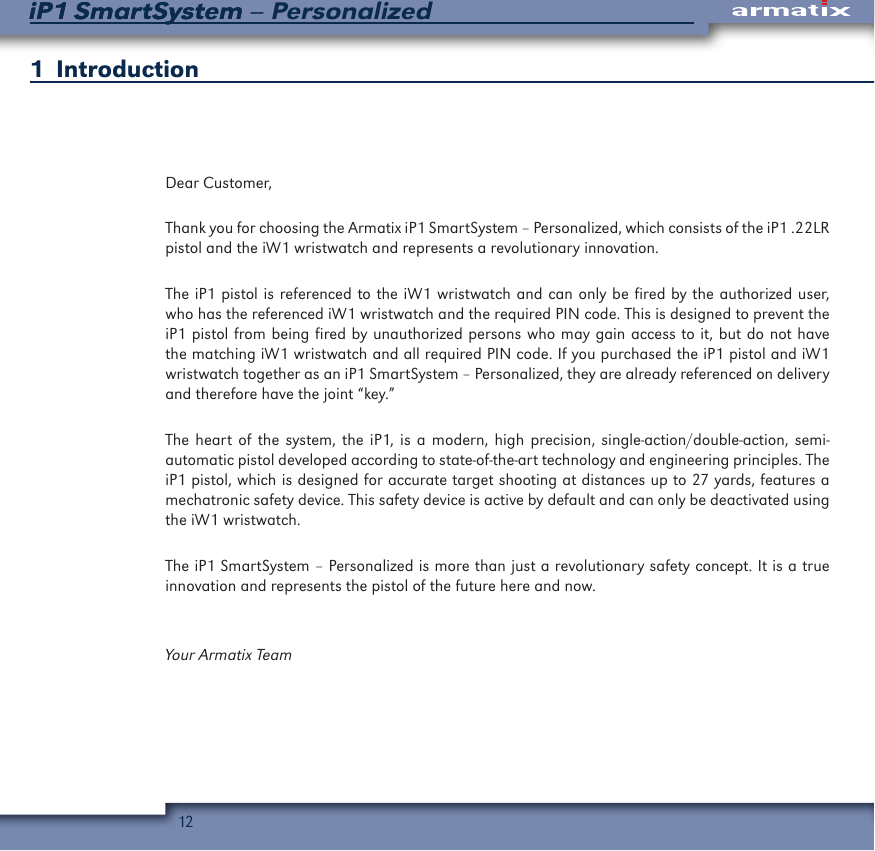
12iP1 SmartSystem – PersonalizediP1 SmartSystem1  IntroductionDear Customer,Thank you for choosing the Armatix iP1 SmartSystem – Personalized, which consists of the iP1 .22LR pistol and the iW1 wristwatch and represents a revolutionary innovation. The iP1 pistol is referenced to the iW1 wristwatch and can only be fired by the authorized user, who has the referenced iW1 wristwatch and the required PIN code. This is designed to prevent the iP1 pistol from being fired by unauthorized persons who may gain access to it, but do not have the matching iW1 wristwatch and all required PIN code. If you purchased the iP1 pistol and iW1 wristwatch together as an iP1 SmartSystem – Personalized, they are already referenced on delivery and therefore have the joint “key.”The heart of the system, the iP1, is a modern, high precision, single-action/double-action, semi-automatic pistol developed according to state-of-the-art technology and engineering principles. The iP1 pistol, which is designed for accurate target shooting at distances up to 27 yards, features a mechatronic safety device. This safety device is active by default and can only be deactivated using the iW1 wristwatch.  The iP1 SmartSystem – Personalized is more than just a revolutionary safety concept. It is a true innovation and represents the pistol of the future here and now.Your Armatix Team
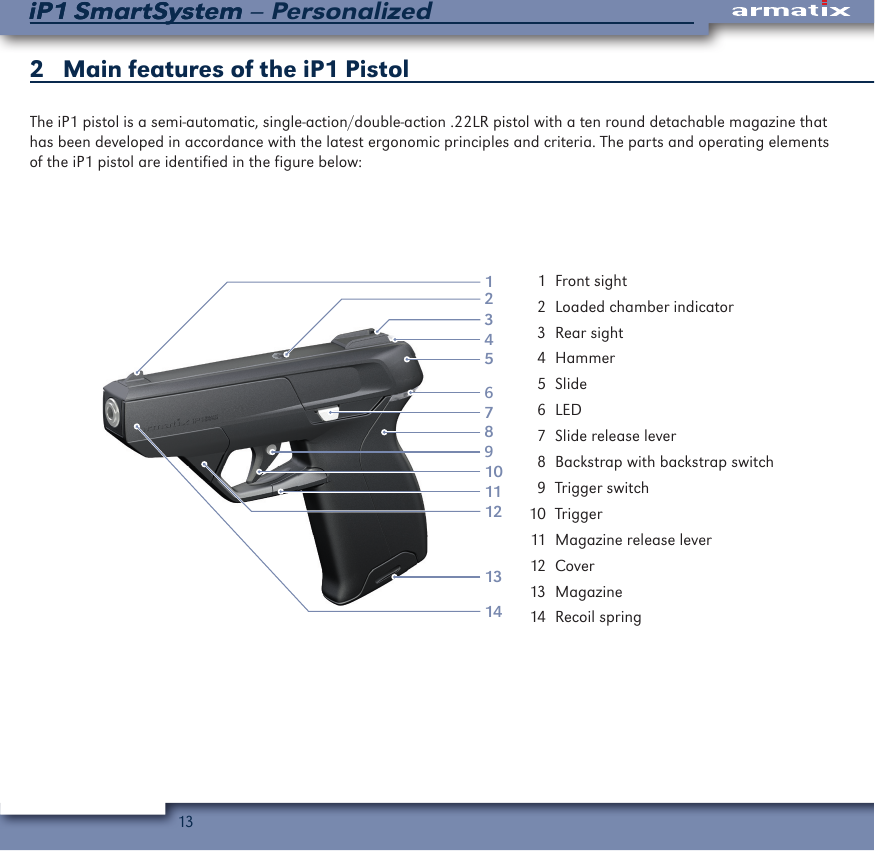
13iP1 SmartSystem – PersonalizediP1 SmartSystem2   Main features of the iP1 PistolThe iP1 pistol is a semi-automatic, single-action/double-action .22LR pistol with a ten round detachable magazine that has been developed in accordance with the latest ergonomic principles and criteria. The parts and operating elements of the iP1 pistol are identified in the figure below:1143456789101112132  1  Front sight  2  Loaded chamber indicator  3  Rear sight  4 Hammer  5 Slide  6 LED  7  Slide release lever  8  Backstrap with backstrap switch  9  Trigger switch 10  Trigger 11  Magazine release lever 12  Cover 13  Magazine 14  Recoil spring
14iP1 SmartSystem – PersonalizediP1 SmartSystem1.1   The  iP11.1.1    Frame with LED and interchangeable backstraps The frame features interchangeable backstraps in three different sizes to properly fit the hands of different users. The iP1 pistol comes with the small backstrap installed. Medium and large back-straps are available as options and can easily be changed by the user. The backstrap is linked to the backstrap switch, which is activated to communicate with the iW1 wristwatch when the backstrap is squeezed towards the front of the iP1 pistol. Depending on the status of the iP1 pistol, the LED will light up in different colors when the backstrap is squeezed towards the front of the pistol:•  Green signals that the iP1 pistol is ready to be fired.•  Blue signals that the magazine has not been inserted or has not been inserted correctly.•  Red signals that the iP1 pistol is not activated and cannot be fired.1.1.2  Slide with loaded chamber indicator (LCI)The slide has a loaded chamber indicator (LCI) to comply with the laws of certain states. The upper opening of the slide serves as a loaded chamber indicator (LCI) by allowing the user to look inside the chamber to see whether or not a cartridge is loaded.  Although the iP1 pistol has a loaded chamber indicator (LCI) you should never solely rely on it or your memory to determine whether the iP1 pistol is loaded or unloaded. Always retract the slide by grasping it at the indented area at the rear of the slide and pulling it fully to the rear and then visually and physically (with your finger) check to make sure there is not a cartridge in the chamber.
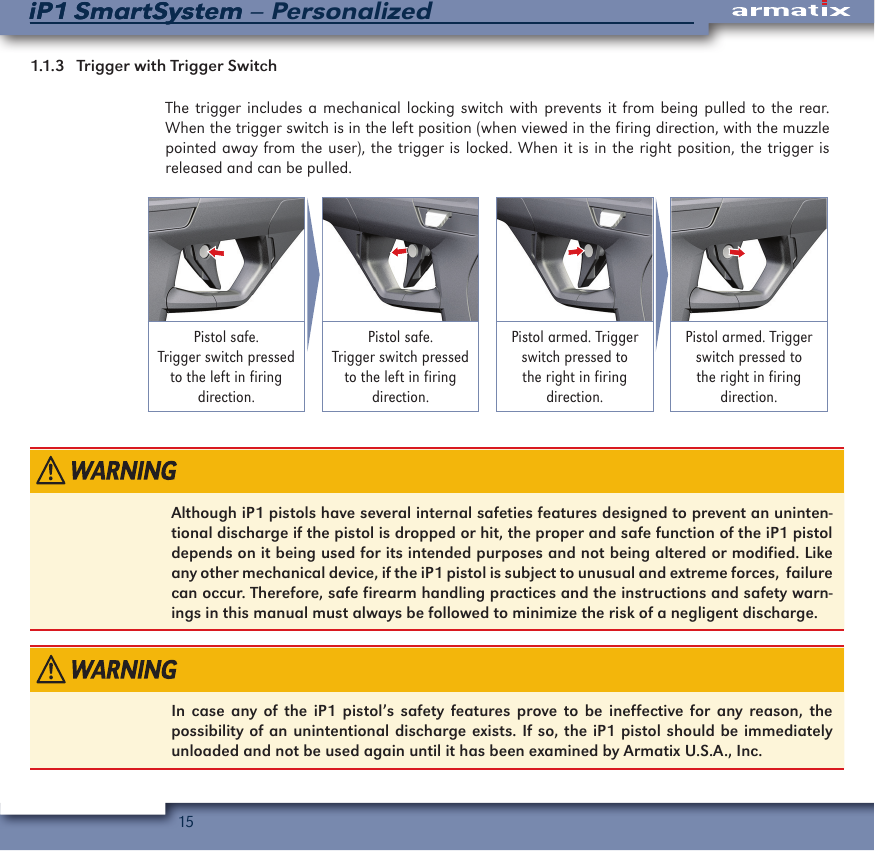
15iP1 SmartSystem – PersonalizediP1 SmartSystem1.1.3   Trigger with Trigger Switch The trigger includes a mechanical locking switch with prevents it from being pulled to the rear. When the trigger switch is in the left position (when viewed in the firing direction, with the muzzle pointed away from the user), the trigger is locked. When it is in the right position, the trigger is released and can be pulled.Pistol safe. Trigger switch pressed to the left in firing direction.Pistol safe. Trigger switch pressed to the left in firing direction.Pistol armed. Trigger switch pressed to the right in firing direction.Pistol armed. Trigger switch pressed to the right in firing direction.Although iP1 pistols have several internal safeties features designed to prevent an uninten-tional discharge if the pistol is dropped or hit, the proper and safe function of the iP1 pistol depends on it being used for its intended purposes and not being altered or modified. Like any other mechanical device, if the iP1 pistol is subject to unusual and extreme forces,  failure can occur. Therefore, safe firearm handling practices and the instructions and safety warn-ings in this manual must always be followed to minimize the risk of a negligent discharge.In case any of the iP1 pistol’s safety features prove to be ineffective for any reason, the possibility of an unintentional discharge exists. If so, the iP1 pistol should be immediately unloaded and not be used again until it has been examined by Armatix U.S.A., Inc.
16iP1 SmartSystem – PersonalizediP1 SmartSystem1.1.4  Slide Release LeverWhen the last round in the magazine is fired, the slide release lever will hold the slide locked in the rearward position to signal that the magazine is empty. When the slide is pulled back with an empty magazine in place, it will also be held in the rearward position by the slide release lever.  In addition, when there is no magazine inserted, the slide release lever can be manually pushed up to lock the slide in the fully rearward position.1.1.5  Magazine Release LeverThe magazine release lever is located beneath the trigger guard and is designed for use by both right handed and left handed shooters. To remove the magazine, simply press down on the maga-zine lever from either the right or left side.1.1.6  SightsThe front sight is available in four different heights and can easily be changed by the user. The rear sight features a trapezoidal recess to simplify centering the front sight.
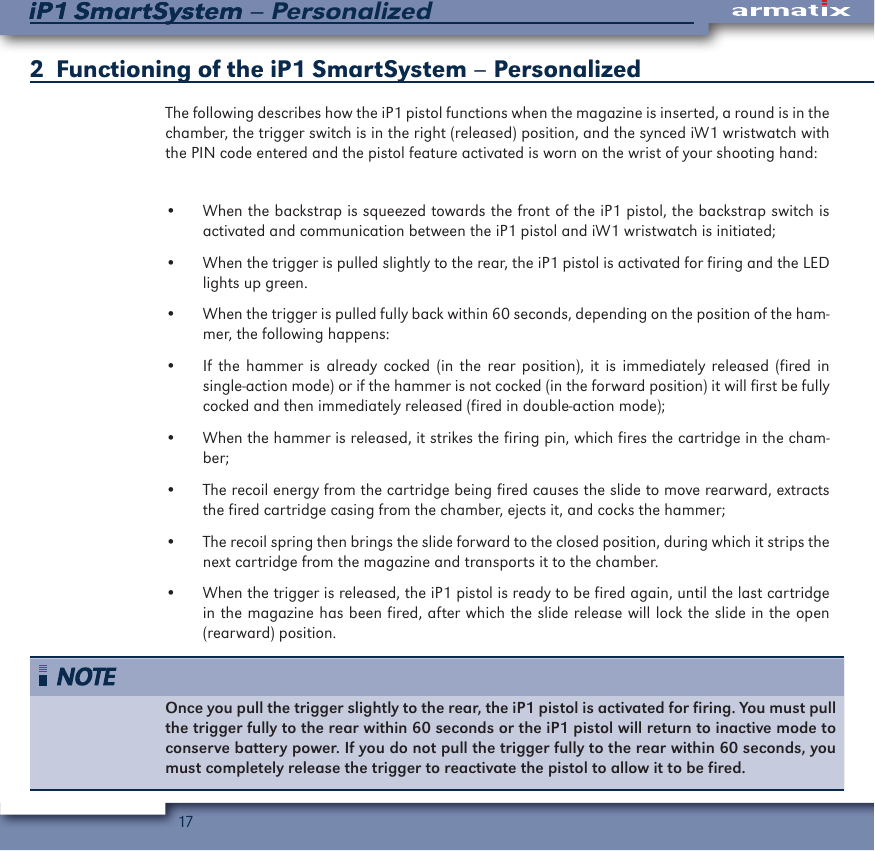
17iP1 SmartSystem – PersonalizediP1 SmartSystem2   Functioning of the iP1 SmartSystem – PersonalizedThe following describes how the iP1 pistol functions when the magazine is inserted, a round is in the chamber, the trigger switch is in the right (released) position, and the synced iW1 wristwatch with the PIN code entered and the pistol feature activated is worn on the wrist of your shooting hand:•  When the backstrap is squeezed towards the front of the iP1 pistol, the backstrap switch is activated and communication between the iP1 pistol and iW1 wristwatch is initiated;•  When the trigger is pulled slightly to the rear, the iP1 pistol is activated for firing and the LED  lights up green.•  When the trigger is pulled fully back within 60 seconds, depending on the position of the ham-mer, the following happens:•  If the hammer is already cocked (in the rear position), it is immediately released (fired in single-action mode) or if the hammer is not cocked (in the forward position) it will first be fully cocked and then immediately released (fired in double-action mode);•  When the hammer is released, it strikes the firing pin, which fires the cartridge in the cham-ber;•  The recoil energy from the cartridge being fired causes the slide to move rearward, extracts the fired cartridge casing from the chamber, ejects it, and cocks the hammer;•  The recoil spring then brings the slide forward to the closed position, during which it strips the next cartridge from the magazine and transports it to the chamber.•  When the trigger is released, the iP1 pistol is ready to be fired again, until the last cartridge in the magazine has been fired, after which the slide release will lock the slide in the open            (rearward) position.Once you pull the trigger slightly to the rear, the iP1 pistol is activated for firing. You must pull the trigger fully to the rear within 60 seconds or the iP1 pistol will return to inactive mode to conserve battery power. If you do not pull the trigger fully to the rear within 60 seconds, you must completely release the trigger to reactivate the pistol to allow it to be fired.
18iP1 SmartSystem – PersonalizediP1 SmartSystem3  Components of the iP1 SmartSystem – PersonalizedScope of supply•  iP1 pistol with magazine•  iW1 wristwatch (already referenced to the iP1 pistol)•  Lockable storage/transportation case•  Printed instruction manual•  PIN-card•  1/10” diameter punch•  2 AAA batteries for the iP1 pistol•  1 CR2032 battery (already installed in the iW1 wristwatch)•  Warranty card•  Target: showing the grouping of the shots from the iP1 pistol
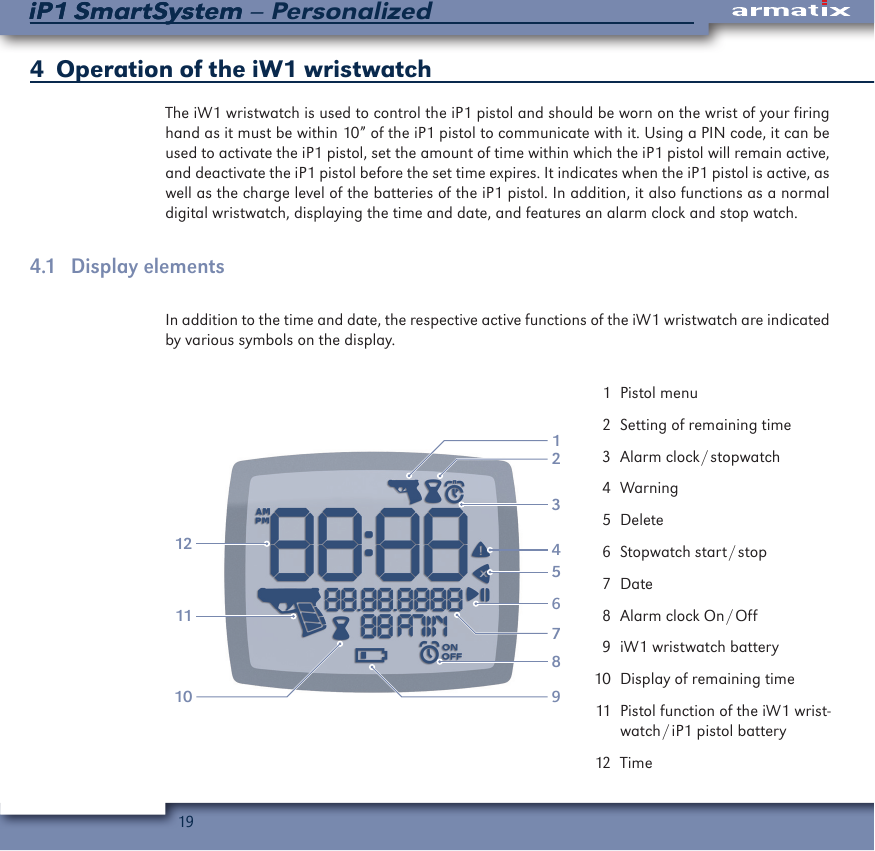
19iP1 SmartSystem – PersonalizediP1 SmartSystem4   Operation of the iW1 wristwatchThe iW1 wristwatch is used to control the iP1 pistol and should be worn on the wrist of your firing hand as it must be within 10” of the iP1 pistol to communicate with it. Using a PIN code, it can be used to activate the iP1 pistol, set the amount of time within which the iP1 pistol will remain active, and deactivate the iP1 pistol before the set time expires. It indicates when the iP1 pistol is active, as well as the charge level of the batteries of the iP1 pistol. In addition, it also functions as a normal digital wristwatch, displaying the time and date, and features an alarm clock and stop watch.4.1  Display elementsIn addition to the time and date, the respective active functions of the iW1 wristwatch are indicated by various symbols on the display.213101112564897  1  Pistol menu  2  Setting of remaining time  3  Alarm  clock / stopwatch  4 Warning  5 Delete  6  Stopwatch  start / stop  7 Date  8  Alarm  clock  On / Off  9  iW1 wristwatch battery 10  Display of remaining time 11  Pistol function of the iW1 wrist-watch / iP1  pistol  battery 12  Time
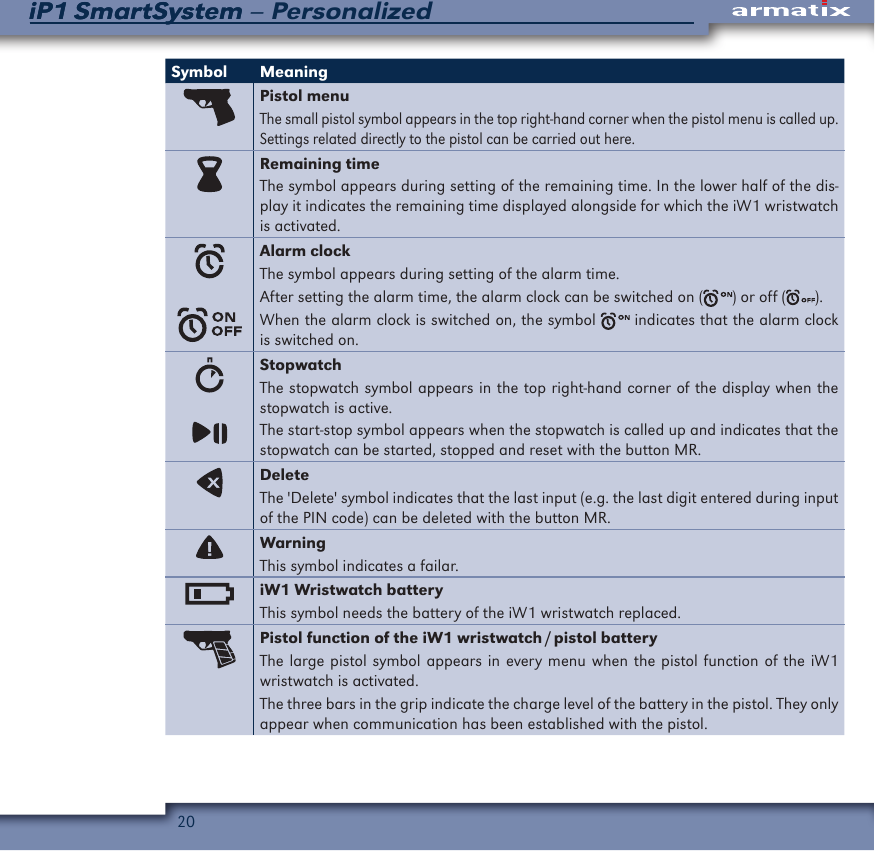
20iP1 SmartSystem – PersonalizediP1 SmartSystemSymbol MeaningPistol menuThe small pistol symbol appears in the top right-hand corner when the pistol menu is called up. Settings related directly to the pistol can be carried out here.Remaining timeThe symbol appears during setting of the remaining time. In the lower half of the dis-play it indicates the remaining time displayed alongside for which the iW1 wristwatch is activated.Alarm clockThe symbol appears during setting of the alarm time.After setting the alarm time, the alarm clock can be switched on ( ) or off ( ).When the alarm clock is switched on, the symbol   indicates that the alarm clock is switched on.StopwatchThe stopwatch symbol appears in the top right-hand corner of the display when the stopwatch is active.The start-stop symbol appears when the stopwatch is called up and indicates that the stopwatch can be started, stopped and reset with the button MR.DeleteThe 'Delete' symbol indicates that the last input (e.g. the last digit entered during input of the PIN code) can be deleted with the button MR.WarningThis symbol indicates a failar.iW1 Wristwatch batteryThis symbol needs the battery of the iW1 wristwatch replaced.Pistol function of the iW1 wristwatch / pistol batteryThe large pistol symbol appears in every menu when the pistol function of the iW1 wristwatch is activated.The three bars in the grip indicate the charge level of the battery in the pistol. They only appear when communication has been established with the pistol.
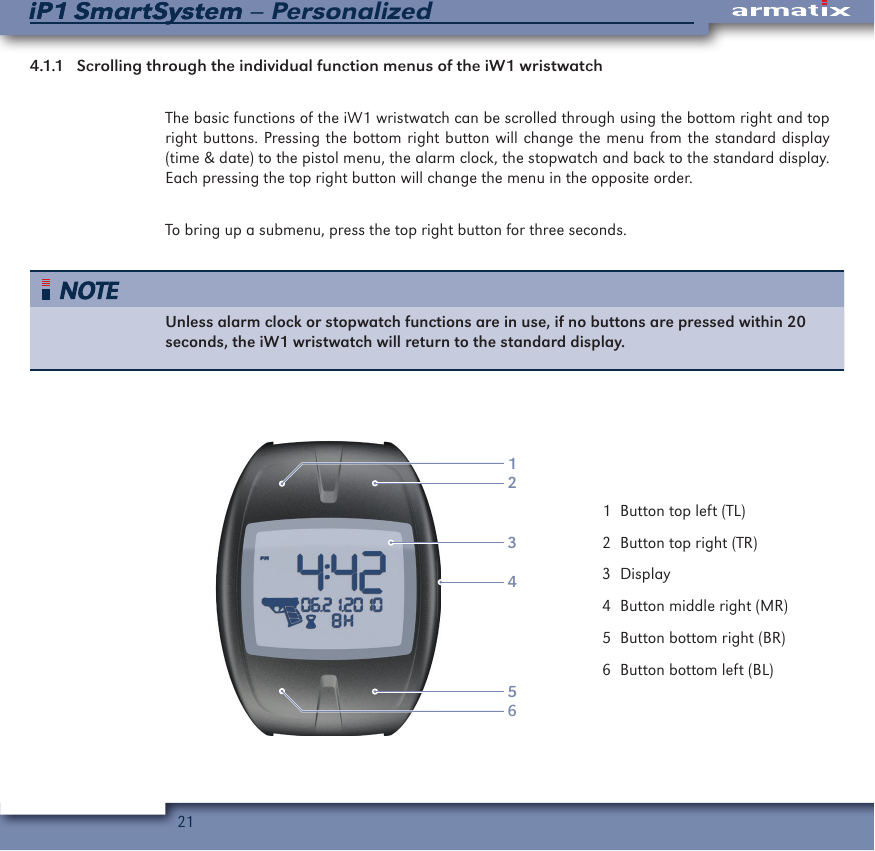
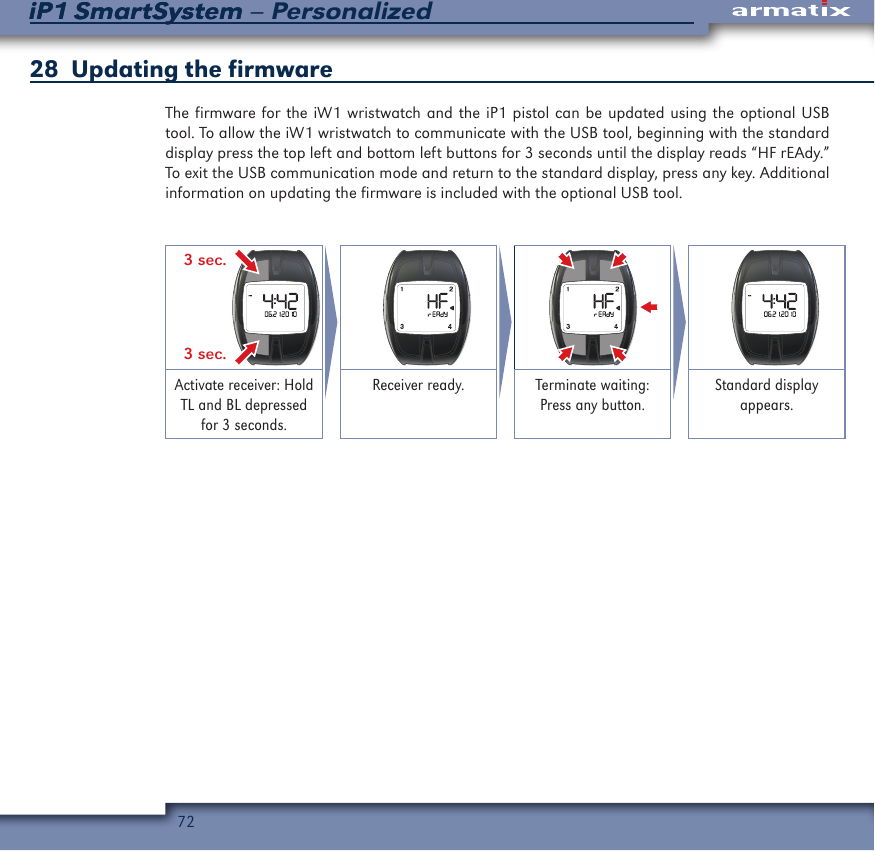
21iP1 SmartSystem – PersonalizediP1 SmartSystem4.1.1  Scrolling through the individual function menus of the iW1 wristwatchThe basic functions of the iW1 wristwatch can be scrolled through using the bottom right and top right buttons. Pressing the bottom right button will change the menu from the standard display (time & date) to the pistol menu, the alarm clock, the stopwatch and back to the standard display. Each pressing the top right button will change the menu in the opposite order. To bring up a submenu, press the top right button for three seconds.Unless alarm clock or stopwatch functions are in use, if no buttons are pressed within 20 seconds, the iW1 wristwatch will return to the standard display.123456  1  Button top left (TL)  2  Button top right (TR)  3 Display  4  Button middle right (MR)  5  Button bottom right (BR)  6  Button bottom left (BL)
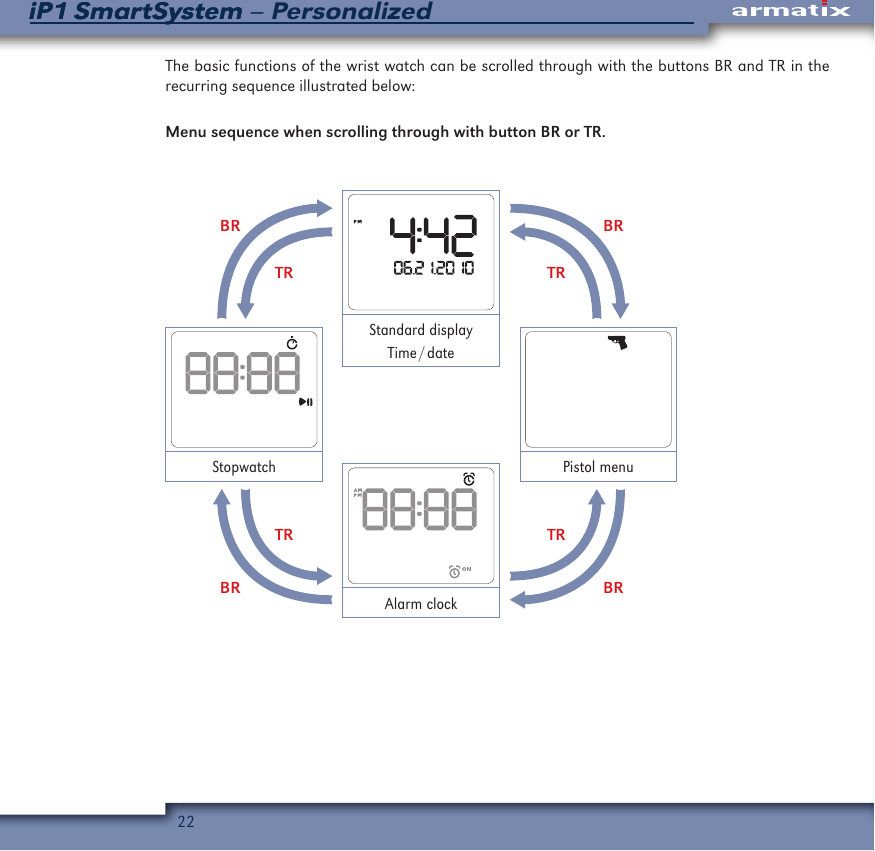
22iP1 SmartSystem – PersonalizediP1 SmartSystemThe basic functions of the wrist watch can be scrolled through with the buttons BR and TR in the recurring sequence illustrated below:Menu sequence when scrolling through with button BR or TR.BRBRTRTRTRTRBRBRStandard displayTime / datePistol menuAlarm clockStopwatch
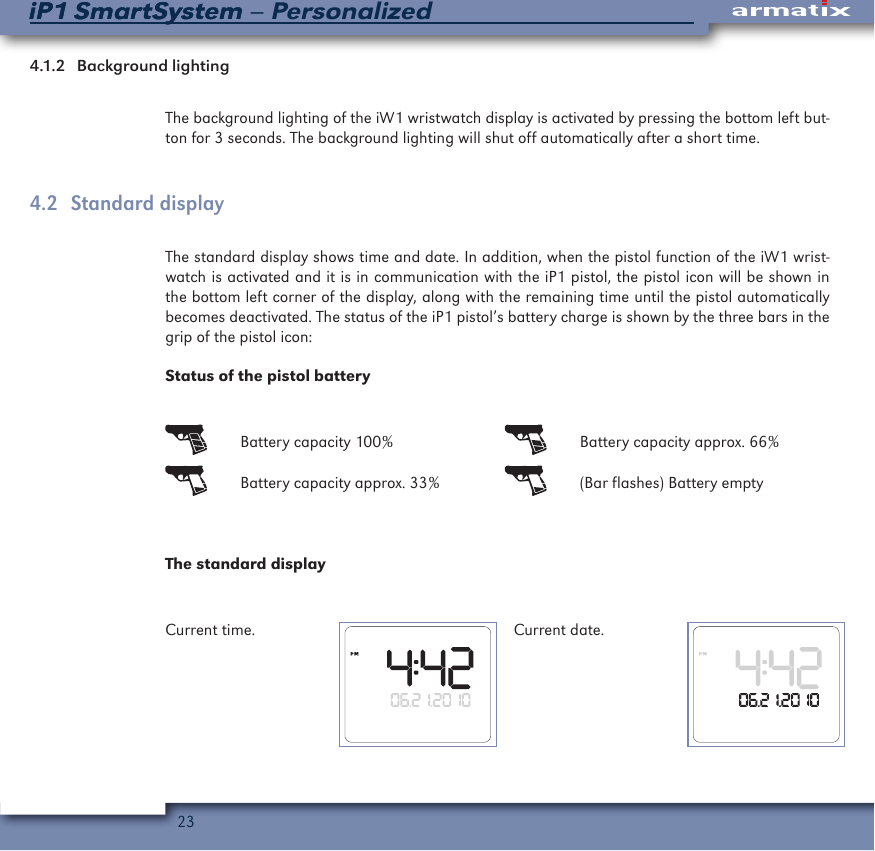
23iP1 SmartSystem – PersonalizediP1 SmartSystem4.1.2   Background  lightingThe background lighting of the iW1 wristwatch display is activated by pressing the bottom left but-ton for 3 seconds. The background lighting will shut off automatically after a short time.4.2  Standard displayThe standard display shows time and date. In addition, when the pistol function of the iW1 wrist-watch is activated and it is in communication with the iP1 pistol, the pistol icon will be shown in the bottom left corner of the display, along with the remaining time until the pistol automatically becomes deactivated. The status of the iP1 pistol’s battery charge is shown by the three bars in the grip of the pistol icon:Status of the pistol battery  Battery capacity 100%   Battery capacity approx. 66%  Battery capacity approx. 33%   (Bar flashes) Battery emptyThe standard displayCurrent time. Current date.
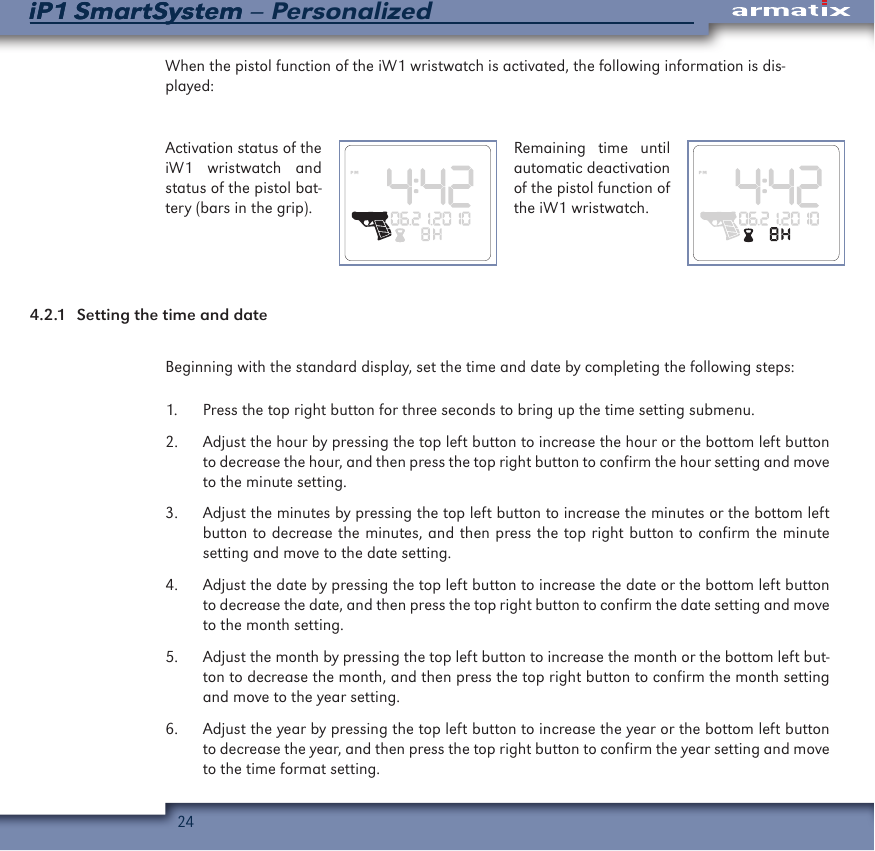
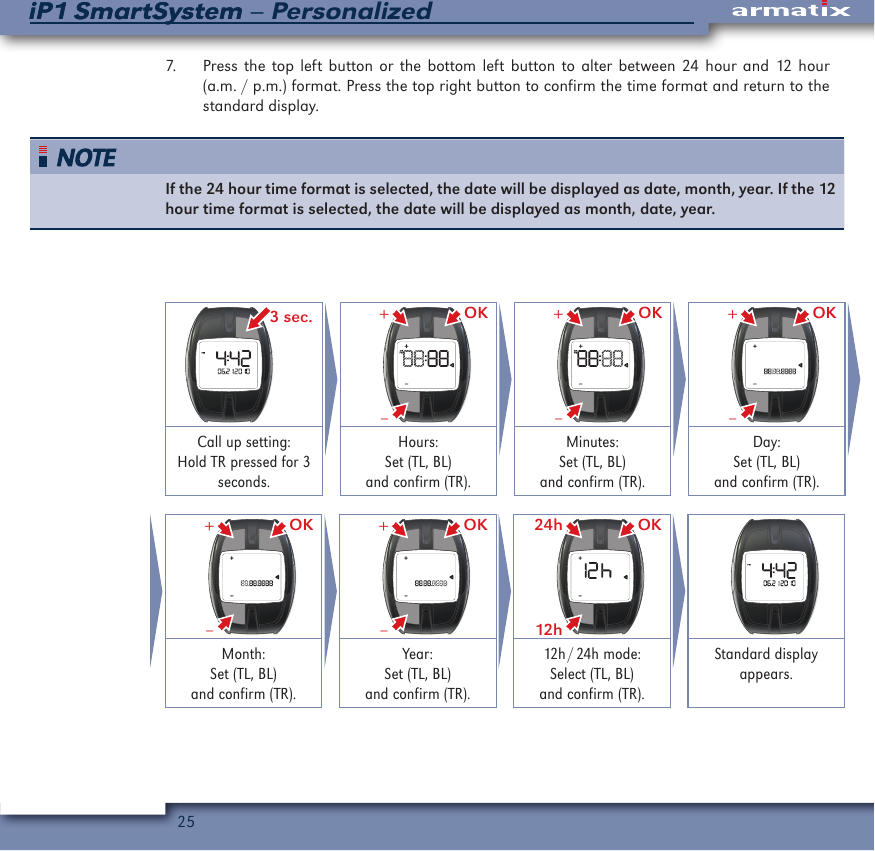
24iP1 SmartSystem – PersonalizediP1 SmartSystemWhen the pistol function of the iW1 wristwatch is activated, the following information is dis-played:Activation status of the iW1 wristwatch and status of the pistol bat-tery (bars in the grip).Remaining time until automatic deactivation of the pistol function of the iW1 wristwatch.4.2.1  Setting the time and dateBeginning with the standard display, set the time and date by completing the following steps:1.  Press the top right button for three seconds to bring up the time setting submenu.2.  Adjust the hour by pressing the top left button to increase the hour or the bottom left button to decrease the hour, and then press the top right button to confirm the hour setting and move to the minute setting.3.  Adjust the minutes by pressing the top left button to increase the minutes or the bottom left button to decrease the minutes, and then press the top right button to confirm the minute setting and move to the date setting.4.  Adjust the date by pressing the top left button to increase the date or the bottom left button to decrease the date, and then press the top right button to confirm the date setting and move to the month setting.5.  Adjust the month by pressing the top left button to increase the month or the bottom left but-ton to decrease the month, and then press the top right button to confirm the month setting and move to the year setting.6.  Adjust the year by pressing the top left button to increase the year or the bottom left button to decrease the year, and then press the top right button to confirm the year setting and move to the time format setting.
25iP1 SmartSystem – PersonalizediP1 SmartSystem7.  Press the top left button or the bottom left button to alter between 24 hour and 12 hour (a.m. / p.m.) format. Press the top right button to confirm the time format and return to the standard display. If the 24 hour time format is selected, the date will be displayed as date, month, year. If the 12 hour time format is selected, the date will be displayed as month, date, year. 3 sec. OK–+ OK–+ OK–+Call up setting: Hold TR pressed for 3 seconds.Hours:Set (TL, BL)and confirm (TR).Minutes:Set (TL, BL)and confirm (TR).Day:Set (TL, BL)and confirm (TR). OK–+ OK–+ OK12h24h Month:Set (TL, BL)and confirm (TR).Year:Set (TL, BL)and confirm (TR).12h / 24h  mode:Select (TL, BL)and confirm (TR).Standard display appears.
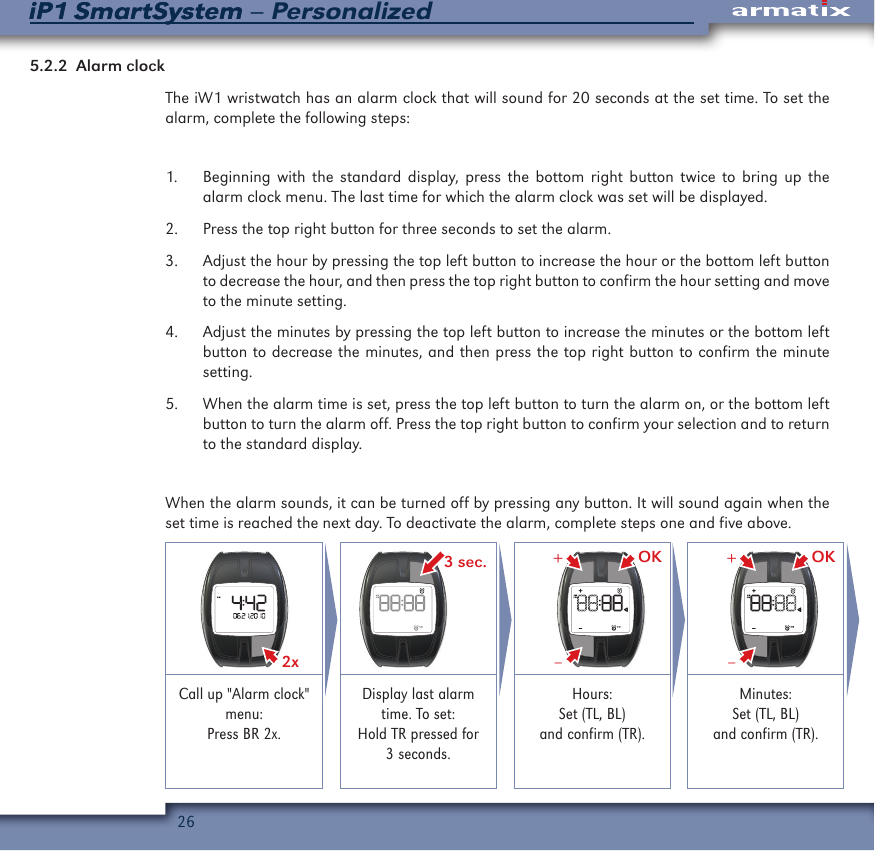
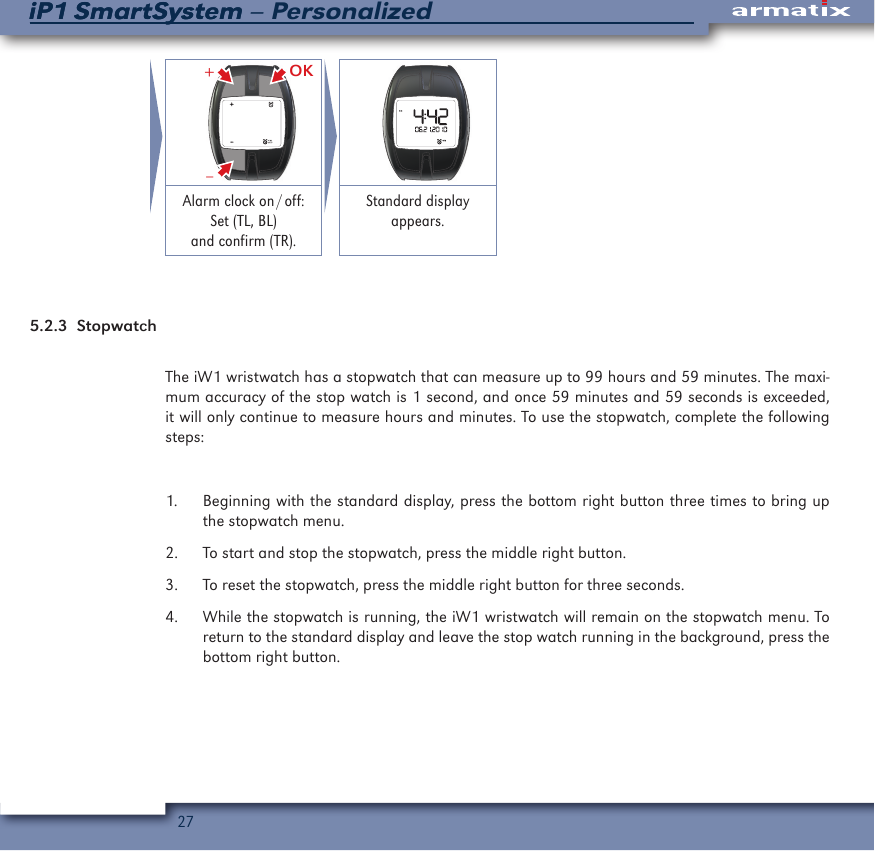
26iP1 SmartSystem – PersonalizediP1 SmartSystem5.2.2  Alarm clockThe iW1 wristwatch has an alarm clock that will sound for 20 seconds at the set time. To set the alarm, complete the following steps:1.  Beginning with the standard display, press the bottom right button twice to bring up the alarm clock menu. The last time for which the alarm clock was set will be displayed. 2.  Press the top right button for three seconds to set the alarm.3.  Adjust the hour by pressing the top left button to increase the hour or the bottom left button to decrease the hour, and then press the top right button to confirm the hour setting and move to the minute setting.4.  Adjust the minutes by pressing the top left button to increase the minutes or the bottom left button to decrease the minutes, and then press the top right button to confirm the minute setting.5.  When the alarm time is set, press the top left button to turn the alarm on, or the bottom left button to turn the alarm off. Press the top right button to confirm your selection and to return to the standard display.When the alarm sounds, it can be turned off by pressing any button. It will sound again when the set time is reached the next day. To deactivate the alarm, complete steps one and five above.2x  3 sec. OK–+ OK–+Call up "Alarm clock" menu:Press BR 2x.Display last alarm time. To set:Hold TR pressed for 3 seconds.Hours:Set (TL, BL)and confirm (TR).Minutes:Set (TL, BL)and confirm (TR).
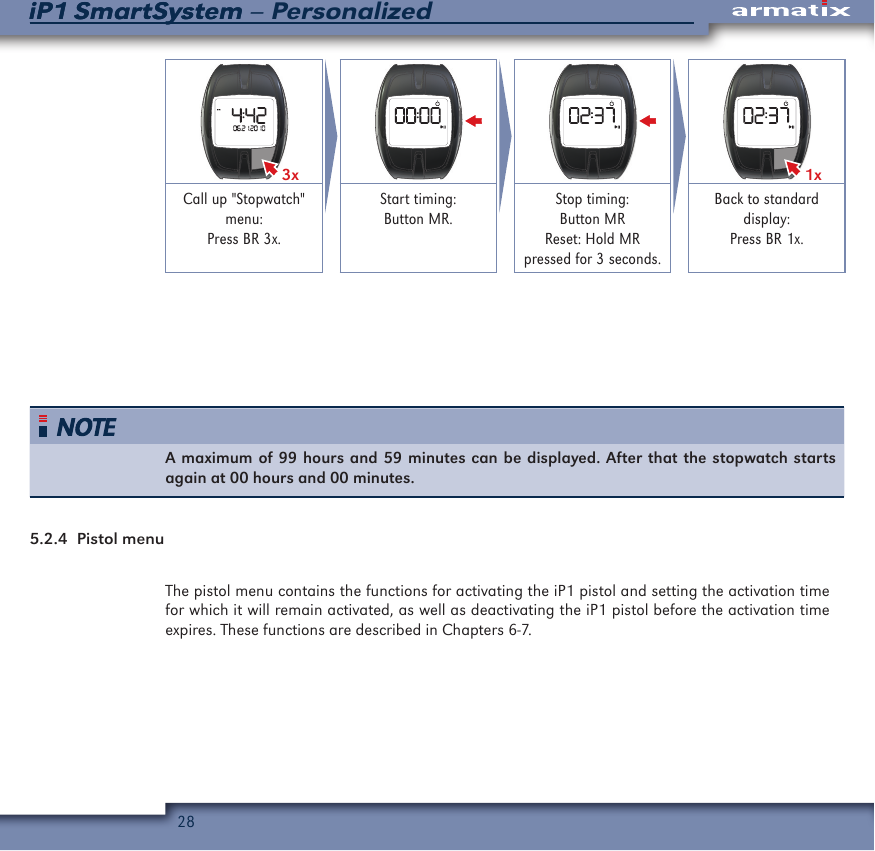
27iP1 SmartSystem – PersonalizediP1 SmartSystem OK–+ Alarm  clock  on / off:Set (TL, BL)and confirm (TR).Standard display appears.5.2.3 StopwatchThe iW1 wristwatch has a stopwatch that can measure up to 99 hours and 59 minutes. The maxi-mum accuracy of the stop watch is 1 second, and once 59 minutes and 59 seconds is exceeded, it will only continue to measure hours and minutes. To use the stopwatch, complete the following steps:1.  Beginning with the standard display, press the bottom right button three times to bring up the stopwatch menu. 2.  To start and stop the stopwatch, press the middle right button.3.  To reset the stopwatch, press the middle right button for three seconds.4.  While the stopwatch is running, the iW1 wristwatch will remain on the stopwatch menu. To return to the standard display and leave the stop watch running in the background, press the bottom right button.
28iP1 SmartSystem – PersonalizediP1 SmartSystem3x 1xCall up "Stopwatch" menu:Press BR 3x.Start timing: Button MR.Stop timing: Button MRReset: Hold MRpressed for 3 seconds.Back to standard display:Press BR 1x.A maximum of 99 hours and 59 minutes can be displayed. After that the stopwatch starts again at 00 hours and 00 minutes.5.2.4  Pistol menuThe pistol menu contains the functions for activating the iP1 pistol and setting the activation time for which it will remain activated, as well as deactivating the iP1 pistol before the activation time expires. These functions are described in Chapters 6-7.
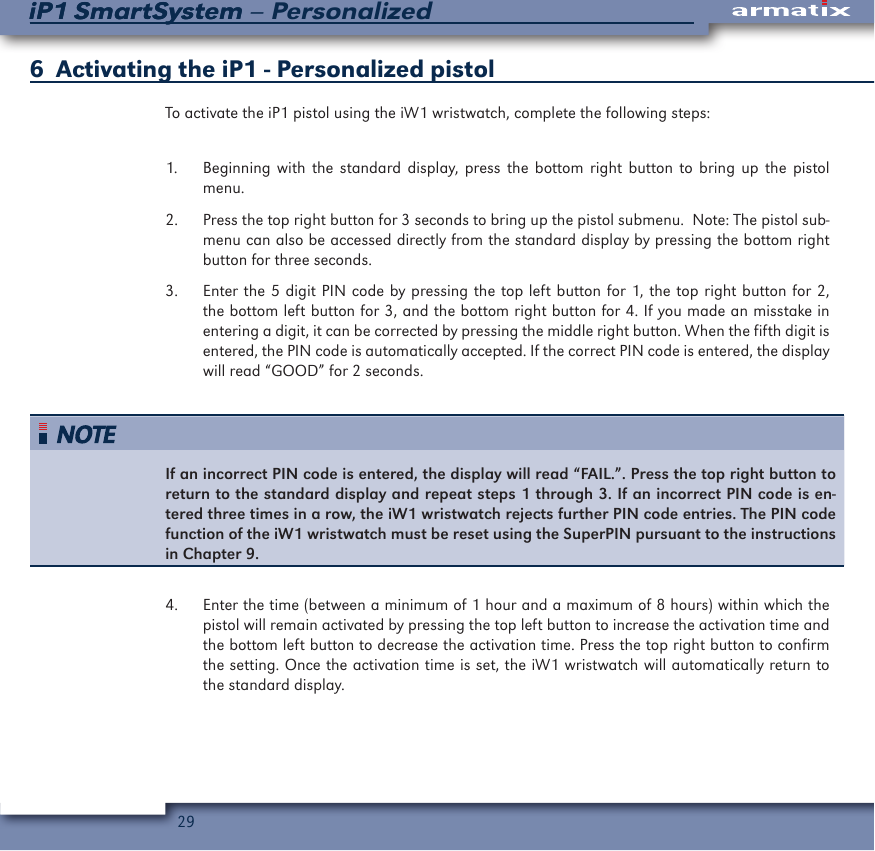
29iP1 SmartSystem – PersonalizediP1 SmartSystem6  Activating the iP1 - Personalized pistolTo activate the iP1 pistol using the iW1 wristwatch, complete the following steps:1.  Beginning with the standard display, press the bottom right button to bring up the pistol menu.2.  Press the top right button for 3 seconds to bring up the pistol submenu.  Note: The pistol sub-menu can also be accessed directly from the standard display by pressing the bottom right button for three seconds.3.  Enter the 5 digit PIN code by pressing the top left button for 1, the top right button for 2, the bottom left button for 3, and the bottom right button for 4. If you made an misstake in entering a digit, it can be corrected by pressing the middle right button. When the fifth digit is entered, the PIN code is automatically accepted. If the correct PIN code is entered, the display will read “GOOD” for 2 seconds.If an incorrect PIN code is entered, the display will read “FAIL.”. Press the top right button to return to the standard display and repeat steps 1 through 3. If an incorrect PIN code is en-tered three times in a row, the iW1 wristwatch rejects further PIN code entries. The PIN code function of the iW1 wristwatch must be reset using the SuperPIN pursuant to the instructions in Chapter 9.4.  Enter the time (between a minimum of 1 hour and a maximum of 8 hours) within which the pistol will remain activated by pressing the top left button to increase the activation time and the bottom left button to decrease the activation time. Press the top right button to confirm the setting. Once the activation time is set, the iW1 wristwatch will automatically return to the standard display.
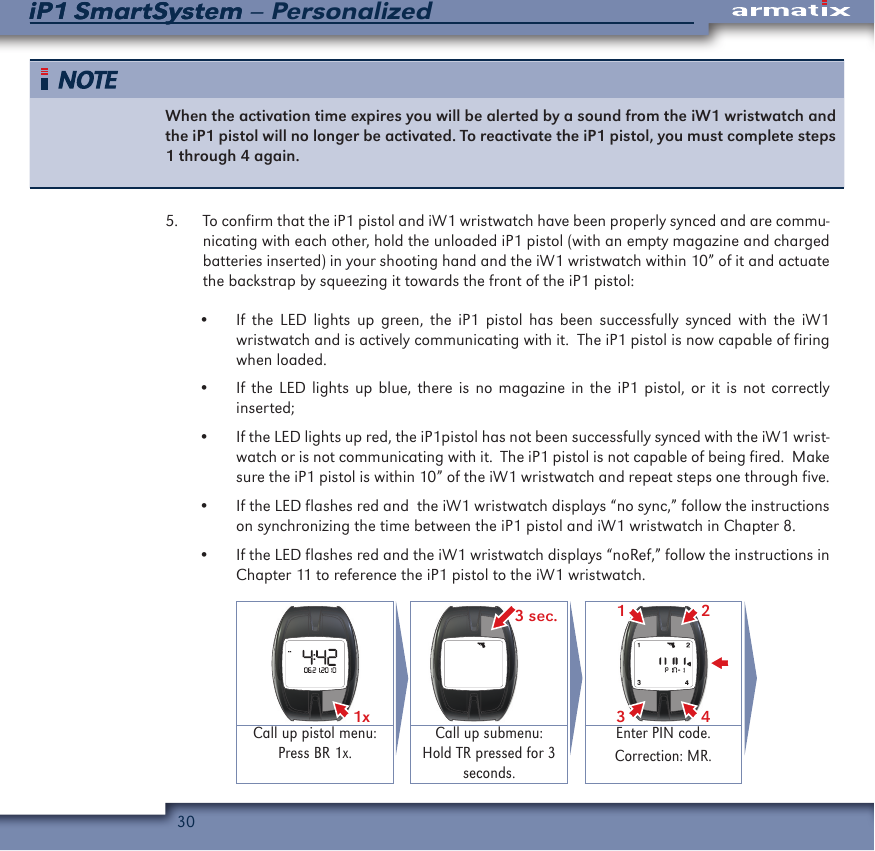
30iP1 SmartSystem – PersonalizediP1 SmartSystemWhen the activation time expires you will be alerted by a sound from the iW1 wristwatch and the iP1 pistol will no longer be activated. To reactivate the iP1 pistol, you must complete steps 1 through 4 again. 5.  To confirm that the iP1 pistol and iW1 wristwatch have been properly synced and are commu-nicating with each other, hold the unloaded iP1 pistol (with an empty magazine and charged batteries inserted) in your shooting hand and the iW1 wristwatch within 10” of it and actuate the backstrap by squeezing it towards the front of the iP1 pistol:•  If the LED lights up green, the iP1 pistol has been successfully synced with the iW1 wristwatch and is actively communicating with it.  The iP1 pistol is now capable of firing when loaded.•  If the LED lights up blue, there is no magazine in the iP1 pistol, or it is not correctly inserted;•  If the LED lights up red, the iP1pistol has not been successfully synced with the iW1 wrist-watch or is not communicating with it.  The iP1 pistol is not capable of being fired.  Make sure the iP1 pistol is within 10” of the iW1 wristwatch and repeat steps one through five.•  If the LED flashes red and  the iW1 wristwatch displays “no sync,” follow the instructions on synchronizing the time between the iP1 pistol and iW1 wristwatch in Chapter 8.•  If the LED flashes red and the iW1 wristwatch displays “noRef,” follow the instructions in Chapter 11 to reference the iP1 pistol to the iW1 wristwatch.1x  3 sec. 2431Call up pistol menu:Press BR 1x.Call up submenu:Hold TR pressed for 3 seconds.Enter PIN code.Correction: MR.
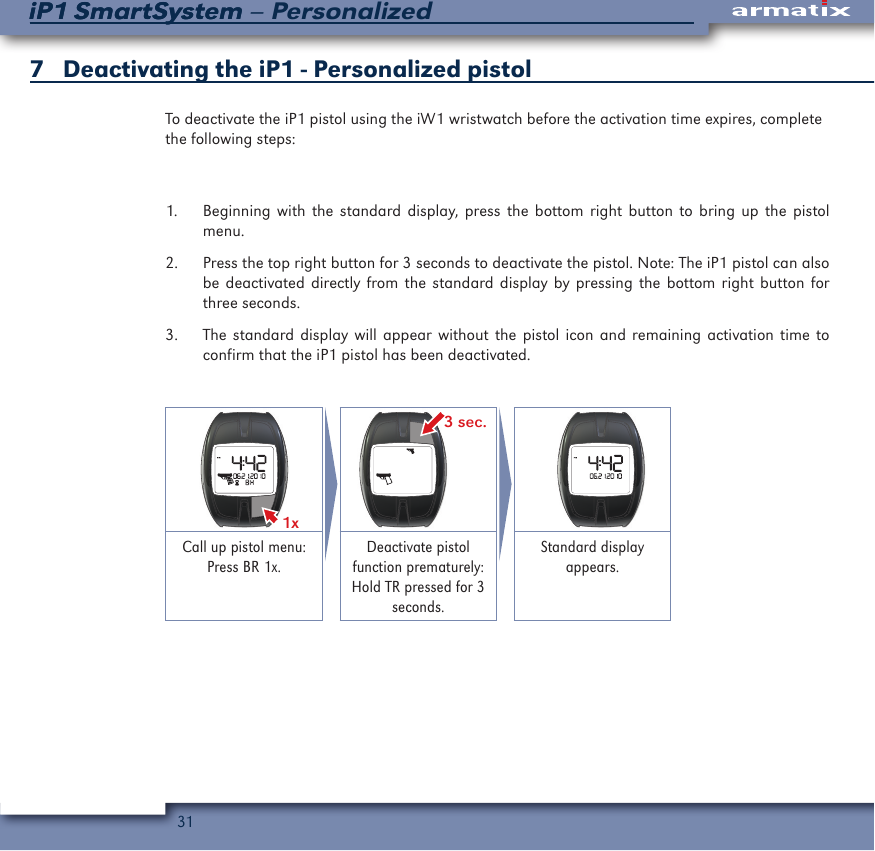
31iP1 SmartSystem – PersonalizediP1 SmartSystem7   Deactivating the iP1 - Personalized pistolTo deactivate the iP1 pistol using the iW1 wristwatch before the activation time expires, complete the following steps:1.  Beginning with the standard display, press the bottom right button to bring up the pistol menu.2.  Press the top right button for 3 seconds to deactivate the pistol. Note: The iP1 pistol can also be deactivated directly from the standard display by pressing the bottom right button for three seconds.3.  The standard display will appear without the pistol icon and remaining activation time to confirm that the iP1 pistol has been deactivated.1x  3 sec. Call up pistol menu:Press BR 1x.Deactivate pistol function prematurely: Hold TR pressed for 3 seconds.Standard display appears.
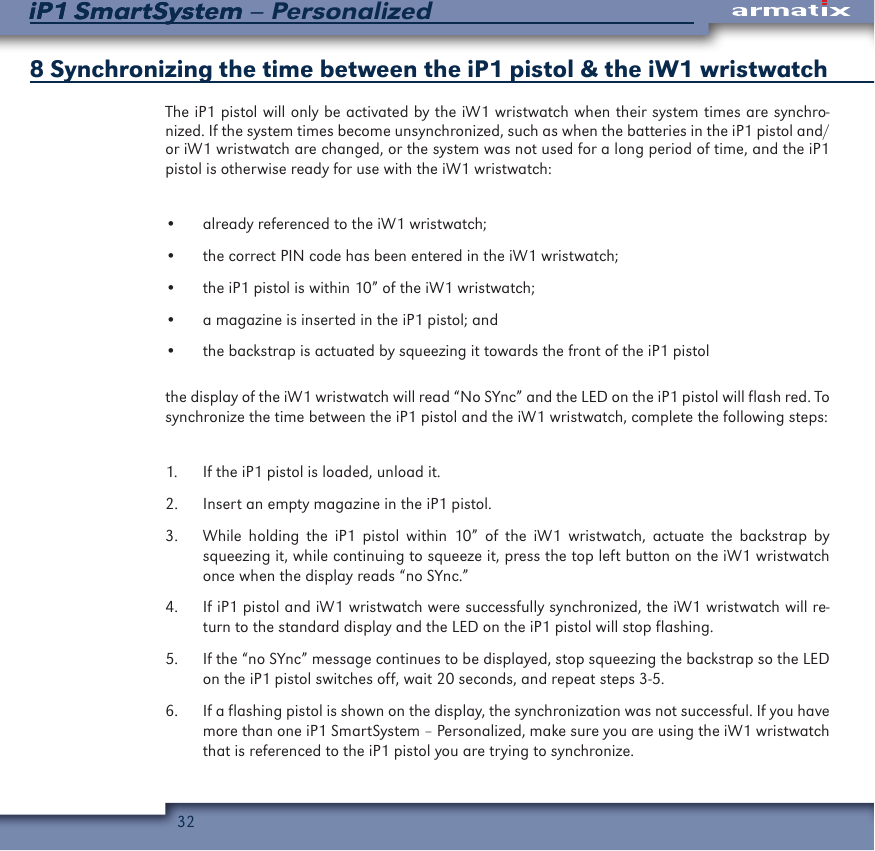
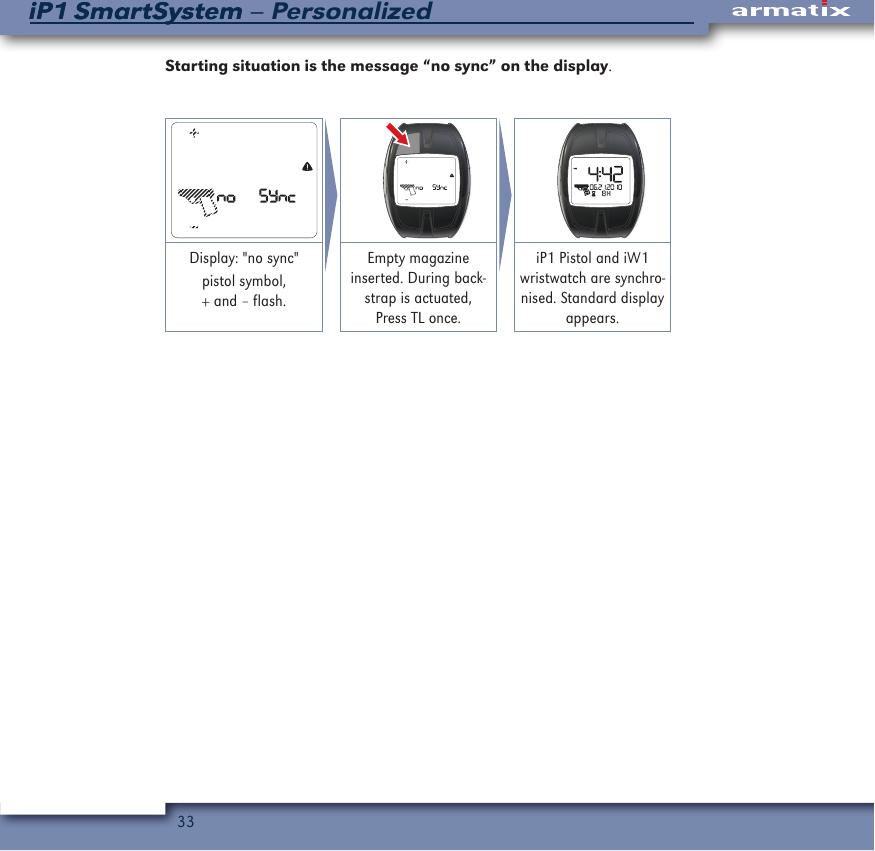
32iP1 SmartSystem – PersonalizediP1 SmartSystem8 Synchronizing the time between the iP1 pistol & the iW1 wristwatch The iP1 pistol will only be activated by the iW1 wristwatch when their system times are synchro-nized. If the system times become unsynchronized, such as when the batteries in the iP1 pistol and/or iW1 wristwatch are changed, or the system was not used for a long period of time, and the iP1 pistol is otherwise ready for use with the iW1 wristwatch:•  already referenced to the iW1 wristwatch;•  the correct PIN code has been entered in the iW1 wristwatch;•  the iP1 pistol is within 10” of the iW1 wristwatch; •  a magazine is inserted in the iP1 pistol; and•  the backstrap is actuated by squeezing it towards the front of the iP1 pistolthe display of the iW1 wristwatch will read “No SYnc” and the LED on the iP1 pistol will flash red. To synchronize the time between the iP1 pistol and the iW1 wristwatch, complete the following steps:1.  If the iP1 pistol is loaded, unload it.2.  Insert an empty magazine in the iP1 pistol.3.  While holding the iP1 pistol within 10” of the iW1 wristwatch, actuate the backstrap by squeezing it, while continuing to squeeze it, press the top left button on the iW1 wristwatch once when the display reads “no SYnc.”4.  If iP1 pistol and iW1 wristwatch were successfully synchronized, the iW1 wristwatch will re-turn to the standard display and the LED on the iP1 pistol will stop flashing.5.  If the “no SYnc” message continues to be displayed, stop squeezing the backstrap so the LED on the iP1 pistol switches off, wait 20 seconds, and repeat steps 3-5.6.  If a flashing pistol is shown on the display, the synchronization was not successful. If you have more than one iP1 SmartSystem – Personalized, make sure you are using the iW1 wristwatch that is referenced to the iP1 pistol you are trying to synchronize.
33iP1 SmartSystem – PersonalizediP1 SmartSystemStarting situation is the message “no sync” on the display.    Display: "no sync"pistol symbol,+ and – flash.Empty magazine inserted. During back-strap is actuated, Press TL once.iP1 Pistol and iW1 wristwatch are synchro-nised. Standard display appears.
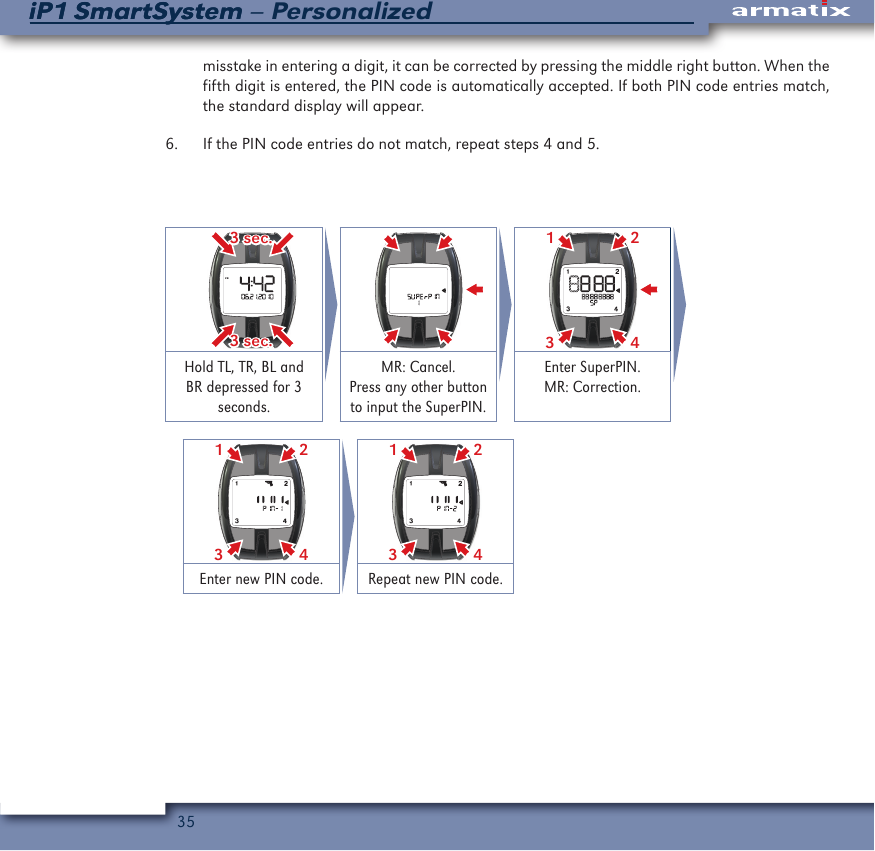
34iP1 SmartSystem – PersonalizediP1 SmartSystem9  Changing / resetting the 5 digit PIN code using the 12 digit SuperPINIf the PIN code entry was deactivated because an incorrect PIN code was entered three times in a row when attempting to activate the iP1 pistol, or you want to change the PIN code, you can define a new PIN code using the iW1 wristwatch and the 12 digit SuperPIN by completing the following steps:1.  Beginning with the standard display, press the bottom right, bottom left, top right, and top left buttons at the same time for 3 seconds, until “SUPErPIN” is shown on the display. 2.  Press the middle right button to cancel, or any other button to begin entering the SuperPIN.3.  Enter the 12 digit SuperPIN by pressing the top left button for 1, the top right button for 2, the bottom left button for 3, and the bottom right button for 4. If you make an error in entering a digit, it can be corrected by pressing the middle right button. After the last digit of the Super-PIN has been entered and the SuperPIN is correct, the display will read “PIN-1.”If an incorrect SuperPIN is entered, the iW1 wristwatch will return to the standard display. Repeat steps 1 through 3. If the incorrect SuperPIN is entered three times in a row, you will have to wait ten minutes in the SuperPIN menu before attempting to enter the SuperPIN again.4.  Enter the new 5 digit PIN code you have selected by pressing the top left button for 1, the top right button for 2, the bottom left button for 3, and the bottom right button for 4. If you make an error in entering a digit, it can be corrected by pressing the middle right button. When the fifth digit is entered, the PIN code is automatically accepted and the display will change to “PIN-2.”5.  Re-enter the 5 digit PIN code you have selected by pressing the top left button for 1, the top right button for 2, the bottom left button for 3, and the bottom right button for 4. If you make a
35iP1 SmartSystem – PersonalizediP1 SmartSystemmisstake in entering a digit, it can be corrected by pressing the middle right button. When the fifth digit is entered, the PIN code is automatically accepted. If both PIN code entries match, the standard display will appear.6.  If the PIN code entries do not match, repeat steps 4 and 5. 3 sec.3 sec.2431Hold TL, TR, BL and BR depressed for 3 seconds.MR: Cancel.Press any other button to input the SuperPIN.Enter SuperPIN.MR: Correction.2431 2431Enter new PIN code. Repeat new PIN code.
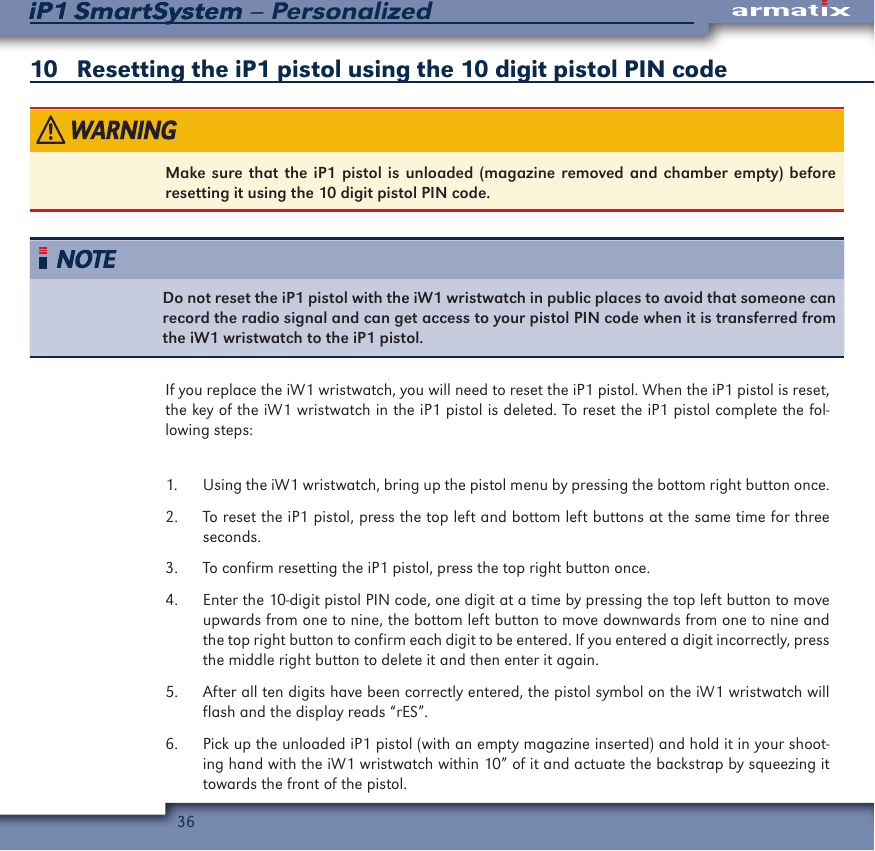
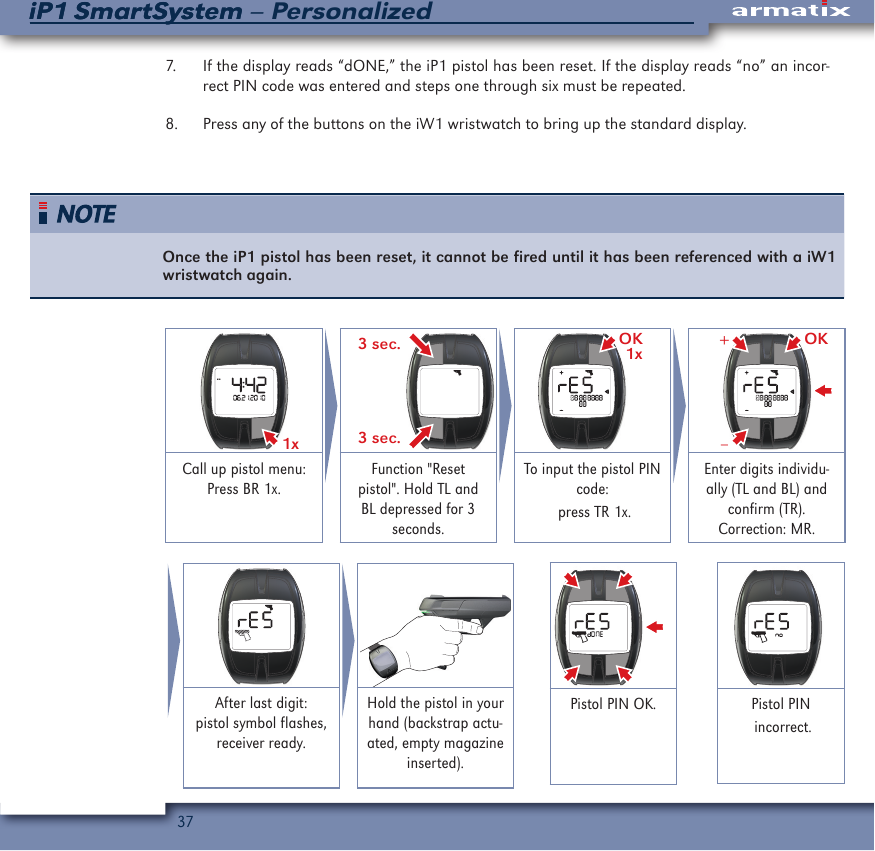
36iP1 SmartSystem – PersonalizediP1 SmartSystem 10   Resetting the iP1 pistol using the 10 digit pistol PIN codeMake sure that the iP1 pistol is unloaded (magazine removed and chamber empty) before resetting it using the 10 digit pistol PIN code.Do not reset the iP1 pistol with the iW1 wristwatch in public places to avoid that someone can record the radio signal and can get access to your pistol PIN code when it is transferred from the iW1 wristwatch to the iP1 pistol.If you replace the iW1 wristwatch, you will need to reset the iP1 pistol. When the iP1 pistol is reset, the key of the iW1 wristwatch in the iP1 pistol is deleted. To reset the iP1 pistol complete the fol-lowing steps:1.  Using the iW1 wristwatch, bring up the pistol menu by pressing the bottom right button once.2.  To reset the iP1 pistol, press the top left and bottom left buttons at the same time for three seconds.3.  To confirm resetting the iP1 pistol, press the top right button once.4.  Enter the 10-digit pistol PIN code, one digit at a time by pressing the top left button to move upwards from one to nine, the bottom left button to move downwards from one to nine and the top right button to confirm each digit to be entered. If you entered a digit incorrectly, press the middle right button to delete it and then enter it again.5.  After all ten digits have been correctly entered, the pistol symbol on the iW1 wristwatch will flash and the display reads “rES”. 6.  Pick up the unloaded iP1 pistol (with an empty magazine inserted) and hold it in your shoot-ing hand with the iW1 wristwatch within 10” of it and actuate the backstrap by squeezing it towards the front of the pistol.
37iP1 SmartSystem – PersonalizediP1 SmartSystem7.  If the display reads “dONE,” the iP1 pistol has been reset. If the display reads “no” an incor-rect PIN code was entered and steps one through six must be repeated.8.  Press any of the buttons on the iW1 wristwatch to bring up the standard display.Once the iP1 pistol has been reset, it cannot be fired until it has been referenced with a iW1 wristwatch again. 1x  3 sec.3 sec.OK1x OK–+Call up pistol menu:Press BR 1x.Function "Reset pistol". Hold TL and BL depressed for 3 seconds.To input the pistol PIN code: press TR 1x.Enter digits individu-ally (TL and BL) and confirm (TR).Correction: MR.After last digit: pistol symbol flashes, receiver ready.Hold the pistol in your hand (backstrap actu-ated, empty magazine inserted).Pistol PIN OK. Pistol PIN incorrect.
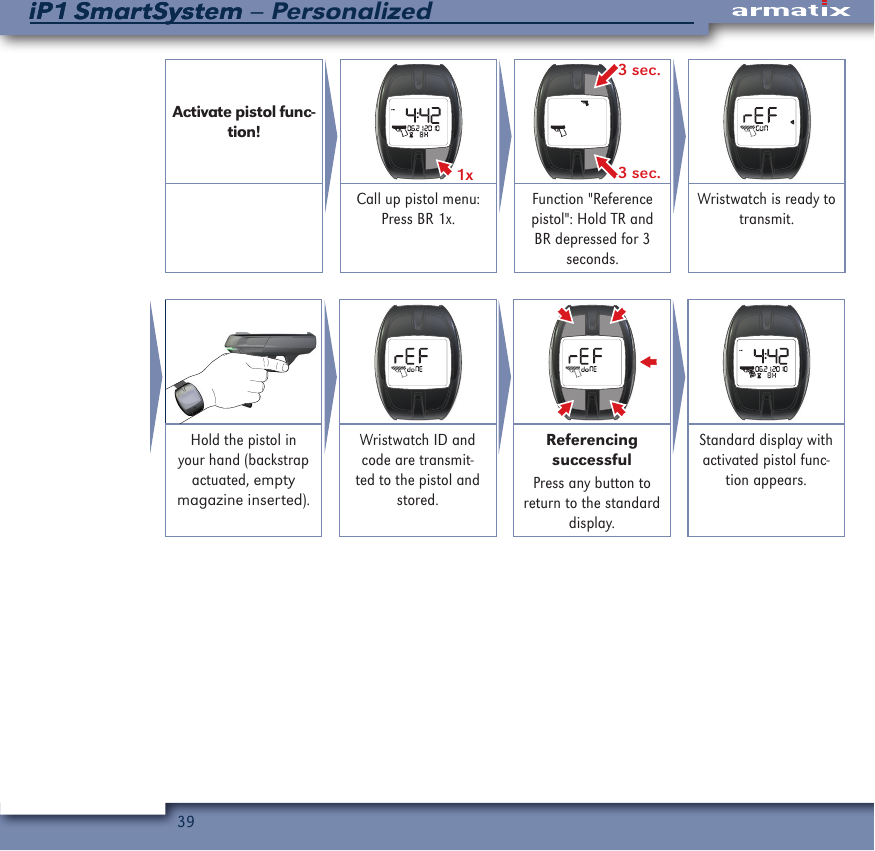
38iP1 SmartSystem – PersonalizediP1 SmartSystem11  Referencing the iP1 pistol to the iW1 wristwatchMake sure that the iP1 pistol is unloaded (magazine removed and chamber empty) before referencing it to the iW1 wristwatch.Before referencing the iP1 pistol to the iW1 wristwatch, you need to enter the PIN code in the iW1 wristwatch pursuant to the instructions on activating the pistol. If purchased as a iP1 SmartSystem — Personalized, the iP1 pistol was already referenced to the iW1 wristwatch when it was manufac-tured. In this case is it only necessary to reference the iP1 pistol to the iW1 wristwatch if the iP1 pistol has been reset.Do not reset the iP1 pistol with the iW1 wristwatch in public places to avoid that someone can record the radio signal and can get access to your pistol PIN code when it is transferred from the iW1 wristwatch to the iP1 pistol.To reference the iP1 pistol to the iW1 wristwatch, complete the following steps:1.  Using the iW1 wristwatch, bring up the pistol menu by pressing the bottom right button once.2.  Press the top right and bottom right buttons at the same time for three seconds, until the display reads “rEF GUN.”3.  Pick up the unloaded iP1 pistol (with an empty magazine inserted) and hold it in your shoot-ing hand with the iW1 wristwatch within 10” of it and actuate the backstrap by squeezing it towards the front of the iP1 pistol to transmit the iW1 wristwatch’s ID and key to the iP1 pistol.4.  If the display reads “rEF doNE” the iP1 pistol has been successfully referenced to the iW1 wristwatch.  If the display reads “rEF no” repeat steps one through three.5.  Press any of the buttons on the iW1 wristwatch to bring up the standard display.
39iP1 SmartSystem – PersonalizediP1 SmartSystemActivate pistol func-tion!1x  3 sec.3 sec.Call up pistol menu:Press BR 1x.Function "Reference pistol": Hold TR and BR depressed for 3 seconds.Wristwatch is ready to transmit.Hold the pistol in your hand (backstrap actuated, empty magazine inserted).Wristwatch ID and code are transmit-ted to the pistol and stored.Referencing successfulPress any button to return to the standard display.Standard display with activated pistol func-tion appears.
40iP1 SmartSystem – PersonalizediP1 SmartSystem12   Checking the batteries without using the iW1 wristwatchUnless the iP1 pistol is in storage, check the battery charge level at least once a month and replace batteries if necessary.To check the battery charge level without using the iW1 wristwatch, remove the magazine and grip the frame, and briefly squeeze the backstrap towards the front of the iP1 pistol and release it.  About five second after you stop squeezing the backstrap, the iP1 pistol will signal the status of its batteries through the LED indicator:•  One green flash = the batteries have enough power.•  One red flash = the batteries are low on power and should be replaced soon.•  Two red flashes = the batteries are very low on power and must be immediately replaced  because the iP1 may not function reliably.
41iP1 SmartSystem – PersonalizediP1 SmartSystem13   Automatic battery charge indicatorFive seconds after the backstrap of the iP1 is released, the iP1 performs an electronic function check, including checking the battery power.  If the batteries are very low, and must be changed im-mediately to ensure reliable functioning of the iP1 pistol, it will be shown through the LED indicator, about four seconds after the backstrap is squeezed the next time, as follows:•  If the LED is lit up in green or blue, it will flash red twice.•  If the LED is lit up in red, it will quickly flash off and on twice.
42iP1 SmartSystem – PersonalizediP1 SmartSystem14   LoadingUse of improper ammunition could cause death or serious personal injury, and/or property damage. Only use high quality commercially manufactured .22 LR ammunition that meets SAAMI or CIP standards.Identify the particular type of ammunition that Armatix recommends for use in the iP1 pistol.To load the magazine, press each cartridge into the magazine from the front, with the cartridge bottom first, against the force of the magazine spring. A maximum of ten .22LR cartridges can be loaded into the magazine.Insert the magazine into the magazine well until the magazine catch locks into place.1.2. CLICKRelease and remove the magazine.Grip the magazine, pull the slide at the same time when filling.Insert the ammunition as shown, max. 10x caliber .22lr.Push in the magazine completely.If the slide is in the forward position, hold the iP1 pistol with your firing hand and, while keep-ing your finger off the trigger and outside of the trigger guard, grasp the rear of the slide at the indented area with your other hand and pull the slide fully back and then release it, allowing it to return to the fully forward position. (Note: If you have difficulties locking the magazine, pull back the slide and hold it in the rearward position while inserting the magazine). or
43iP1 SmartSystem – PersonalizediP1 SmartSystemIf the slide is locked in the rearward position, either press the slide stop lever down to release the slide and return it to the fully forward position, or grasp the rear of the slide at the indented area with your other hand and pull the slide fully back and then release it, allowing it to return to the fully forward position.
44iP1 SmartSystem – PersonalizediP1 SmartSystem15   Firing• •  Always make sure that the cover is locked before firing the iP1 pistol.  If it is not correctly installed, the pistol will still fire, but the slide will not be locked which could lead to seri-ous personal injury and/or damage to the iP1 pistol.•  The iP1 pistol will not operate if it is not within 10” of the referenced iW1 wristwatch and the PIN code entered.•  Before firing the iP1 pistol, run a clean patch through the barrel, from the chamber end, using the cleaning rod. Repeat this procedure until the patch comes out of the barrel with no gun oil or cleaner-lubricant-preservative on it because any obstruction in the barrel could prevent the iP1 pistol from firing properly and result in death or serious personal injury and/or damage to the iP1 pistol.•  Always be sure that the barrel of the iP1 pistol is clear of obstructions before firing it.  Remove any obstructions before firing the iP1 pistol so that it will function safely and correctly.  Any obstruction in the barrel could prevent the pistol from firing properly and result in death or serious personal injury and/or damage to the pistol.•  In case of a failure to fire, continue to hold the iP1 pistol pointed towards the target for at least 30 seconds.  If a hangfire (slow ignition) has occurred, the cartridge should fire within approximately 30 seconds. If the cartridge has not fired, remove the magazine, eject the cartridge from the chamber and examine its primer. If the firing pin indenta-tion is light or non-existent, stop using the iP1 pistol and have it examined by Armatix U.S.A., Inc. If the firing pin indentation on the primer appears normal (compared to similar previously fired cartridges) the cartridge may be defective. Separate the car-tridge from other live ammunition and empty cases, reload the iP1 pistol and resume firing. (Note: Dispose of misfired cartridges in accordance with the ammunition manu-facturer’s instructions).•  Never use the iP1 pistol if it fails to function properly, and never force the slide closed on a jammed cartridge because it could cause the cartridge to explode.
45iP1 SmartSystem – PersonalizediP1 SmartSystem•  Never pull the trigger if the slide does not fully close to prevent a possible out of bat-tery firing. If this happens, unload the iP1 pistol as described in Chapter 19, examine the round that was in the chamber, and check the chamber to ensure that there are no obstructions or debris in it.•  Always wear safety glasses when firing the iP1 pistol to protect your eyes.•  Always wear ear protection when firing the iP1 pistol to protect your hearing.•  Always be sure that your backstop is adequate to stop and contain bullets before firing so that you do not hit anything outside of the shooting range area.  A bullet could travel through or past your target as far as 1.5 miles.  If in doubt, do not shoot.•  Never shoot at a hard surface, such as a rock, or a liquid surface, such as water, be-cause a bullet may ricochet and travel in any direction, striking you or someone else.•  Always put a responsible and competent person in charge to maintain safety, discipline and control when a group is firing at a range, to reduce the likelihood of a negligent discharge.•  Always carry the iP1 pistol unloaded with the slide locked open in the rearward position while on a range until preparing to fire.  Always keep the iP1 pistol pointed towards the backstop when loading, firing, and unloading it.•  When ready to fire be sure that the area behind the slide is clear (check your thumb) and do not hold the iP1 pistol near your body, because the slide will move forcefully rearward when the pistol is fired. (Note: When firing with a two-hand grip, the thumb of the weak hand should be on the weak hand side of the iP1 pistol, never behind the slide).•  Always keep yourself and others clear of the ejection port because spent cartridges are hot and are ejected with enough force to cause injury. Never touch the slide or barrel immediately after firing because they may be hot and could cause burns.
46iP1 SmartSystem – PersonalizediP1 SmartSystem•  Never place your fingers in the ejection port because they could be injured by the move-ment of the slide.•  Never fire the iP1 pistol near an animal unless it is trained to accept that noise. An ani-mal’s startled reaction could injure it, or cause it to injure you or someone else.When the iP1 pistol is loaded with a cartridge in the chamber, the magazine is correctly inserted, your synced iW1 wristwatch with the matching PIN code correctly entered is worn on the wrist of your shooting hand, and the batteries in both the iP1 pistol and iW1 wristwatch have an adequate charge, the iP1 pistol can be fired by completing the following steps:1.  Hold the iP1 pistol with your firing hand and support it with your other hand.2.  Squeeze the backstrap towards the front of the iP1 pistol to actuate it.3.  Aim at the target.4.  Push the trigger switch fully to the right.5.  Place your index finger on the trigger and pull it to its rearmost position and then release it completely. (NOTE: In order to make sure that the system is ready for firing the following round, the trigger must be released completely after every single shot.)Once you pull the trigger slightly to the rear, the iP1 pistol is activated for firing.  You must pull the trigger fully to the rear within 60 seconds or the iP1 pistol will return to inactive mode to conserve battery power. If you do not pull the trigger fully to the rear within 60 seconds after you first begin pulling it, you must completely release the trigger to reactivate the pistol to allow it to be fired.After firing the last cartridge in the magazine, the slide will remain locked open in the rearward position.
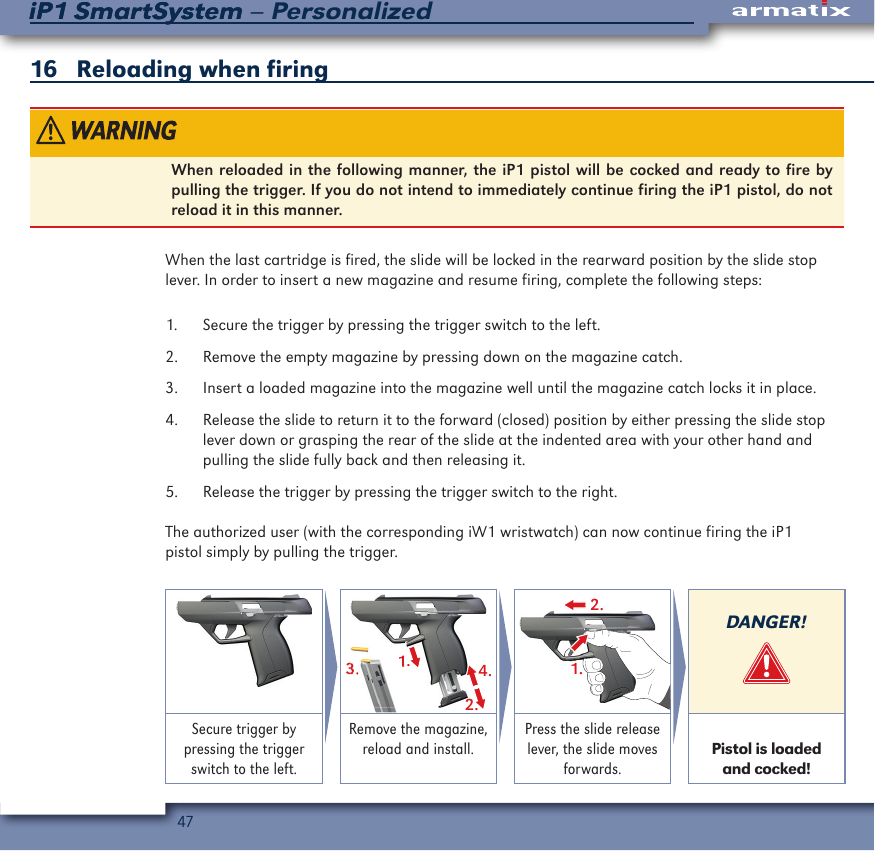
47iP1 SmartSystem – PersonalizediP1 SmartSystem16   Reloading when firing When reloaded in the following manner, the iP1 pistol will be cocked and ready to fire by pulling the trigger. If you do not intend to immediately continue firing the iP1 pistol, do not reload it in this manner.When the last cartridge is fired, the slide will be locked in the rearward position by the slide stop lever. In order to insert a new magazine and resume firing, complete the following steps:1.  Secure the trigger by pressing the trigger switch to the left. 2.  Remove the empty magazine by pressing down on the magazine catch. 3.  Insert a loaded magazine into the magazine well until the magazine catch locks it in place.4.  Release the slide to return it to the forward (closed) position by either pressing the slide stop lever down or grasping the rear of the slide at the indented area with your other hand and pulling the slide fully back and then releasing it.5.  Release the trigger by pressing the trigger switch to the right.The authorized user (with the corresponding iW1 wristwatch) can now continue firing the iP1 pistol simply by pulling the trigger.1.2.4.3.1.3.3.2.1.DANGER!Secure trigger by pressing the trigger switch to the left.Remove the magazine, reload and install.Press the slide release lever, the slide moves forwards. Pistol is loaded and cocked!
48iP1 SmartSystem – PersonalizediP1 SmartSystem17   Clearing malfunctions (jams)In case of a failure to fire, continue to hold the iP1 pistol pointed towards the target for at least 30 seconds. If a hangfire (slow ignition) has occurred, the cartridge should fire within approximately 30 seconds. If the cartridge has not fired, remove the magazine, eject the cartridge from the chamber and examine its primer. If the firing pin indentation is light or non-existent, stop using the iP1 pistol and have it examined by Armatix U.S.A., Inc. If the firing pin indentation on the primer appears normal (compared to similar previously fired cartridges) the cartridge may be defective. Separate the cartridge from other live ammuni-tion and empty cases, reload the iP1 pistol and resume firing.Dispose of misfired cartridges in accordance with the ammunition manufacturer’s instruc-tions.•  If an unfired cartridge hangs up, jams or binds while being chambered, do not attempt to force it into the chamber by pushing or striking the slide to attempt to close it be-cause this could cause the cartridge to burst resulting in fragments of the cartridge flying out of the ejection port with sufficient force to cause death or serious personal injury and/or property damage.•  Always wear safety glasses when attempting to remove a jammed cartridge to protect your eyes.•  Use of improper ammunition could cause death or serious personal injury and/or prop-erty damage. Only use high quality commercially manufactured .22 LR ammunition that meets SAAMI or CIP standards.
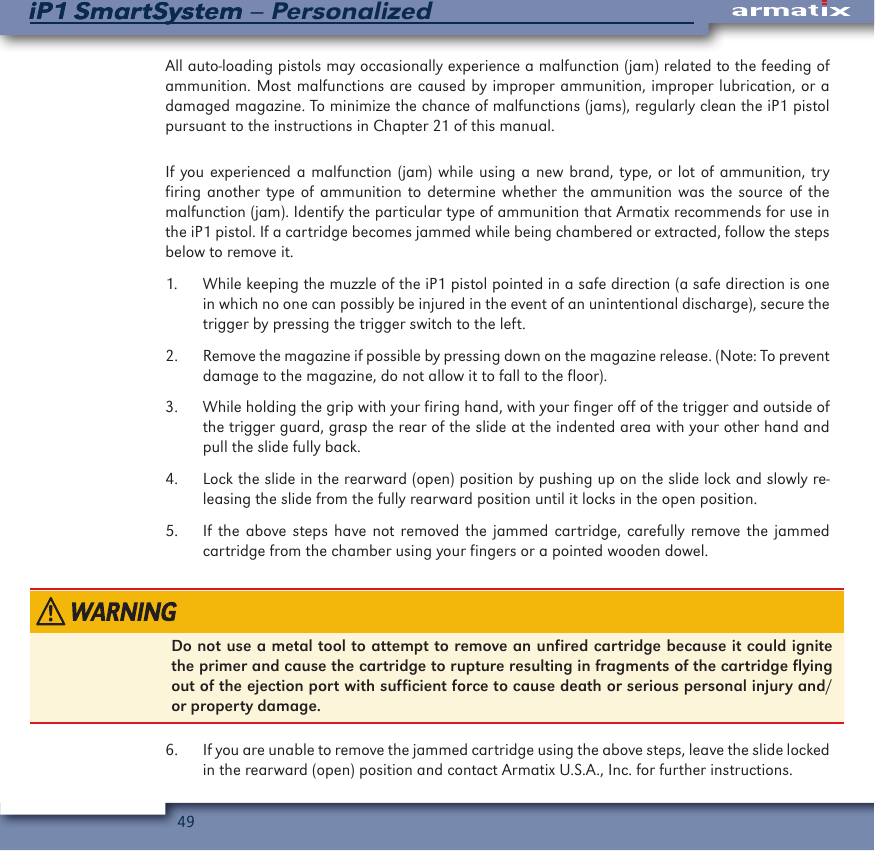
49iP1 SmartSystem – PersonalizediP1 SmartSystemAll auto-loading pistols may occasionally experience a malfunction (jam) related to the feeding of ammunition. Most malfunctions are caused by improper ammunition, improper lubrication, or a damaged magazine. To minimize the chance of malfunctions (jams), regularly clean the iP1 pistol pursuant to the instructions in Chapter 21 of this manual.  If you experienced a malfunction (jam) while using a new brand, type, or lot of ammunition, try firing another type of ammunition to determine whether the ammunition was the source of the malfunction (jam). Identify the particular type of ammunition that Armatix recommends for use in the iP1 pistol. If a cartridge becomes jammed while being chambered or extracted, follow the steps below to remove it.1.  While keeping the muzzle of the iP1 pistol pointed in a safe direction (a safe direction is one in which no one can possibly be injured in the event of an unintentional discharge), secure the trigger by pressing the trigger switch to the left.2.  Remove the magazine if possible by pressing down on the magazine release. (Note: To prevent damage to the magazine, do not allow it to fall to the floor).3.  While holding the grip with your firing hand, with your finger off of the trigger and outside of the trigger guard, grasp the rear of the slide at the indented area with your other hand and pull the slide fully back.4.  Lock the slide in the rearward (open) position by pushing up on the slide lock and slowly re-leasing the slide from the fully rearward position until it locks in the open position.5.  If the above steps have not removed the jammed cartridge, carefully remove the jammed cartridge from the chamber using your fingers or a pointed wooden dowel.Do not use a metal tool to attempt to remove an unfired cartridge because it could ignite the primer and cause the cartridge to rupture resulting in fragments of the cartridge flying out of the ejection port with sufficient force to cause death or serious personal injury and/or property damage.6.  If you are unable to remove the jammed cartridge using the above steps, leave the slide locked in the rearward (open) position and contact Armatix U.S.A., Inc. for further instructions.
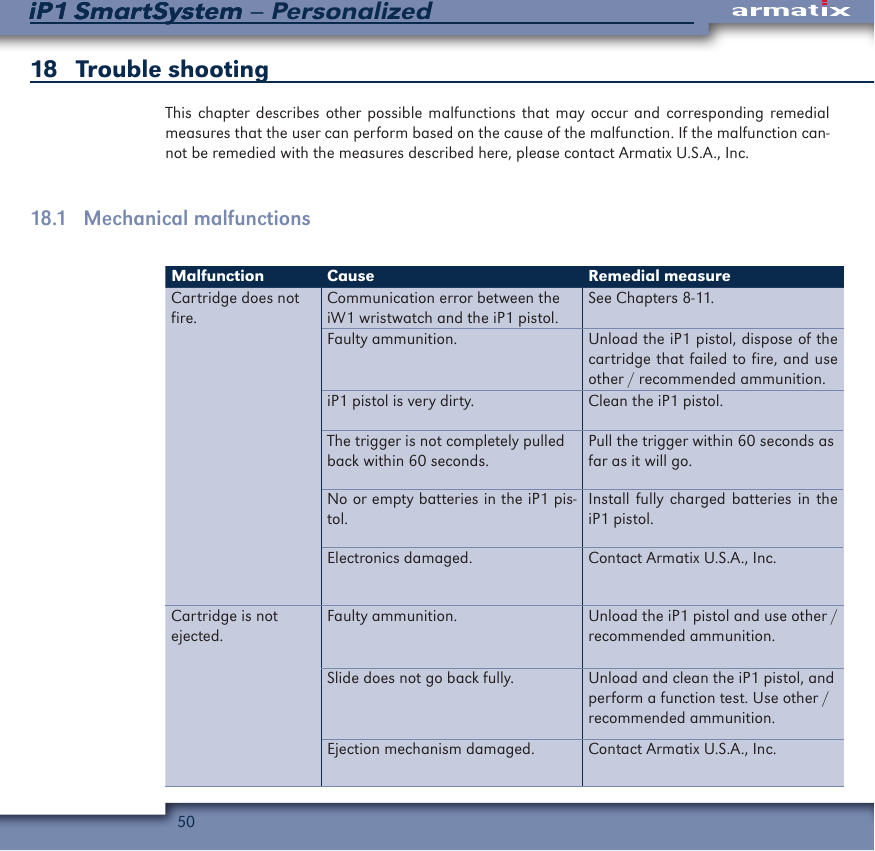
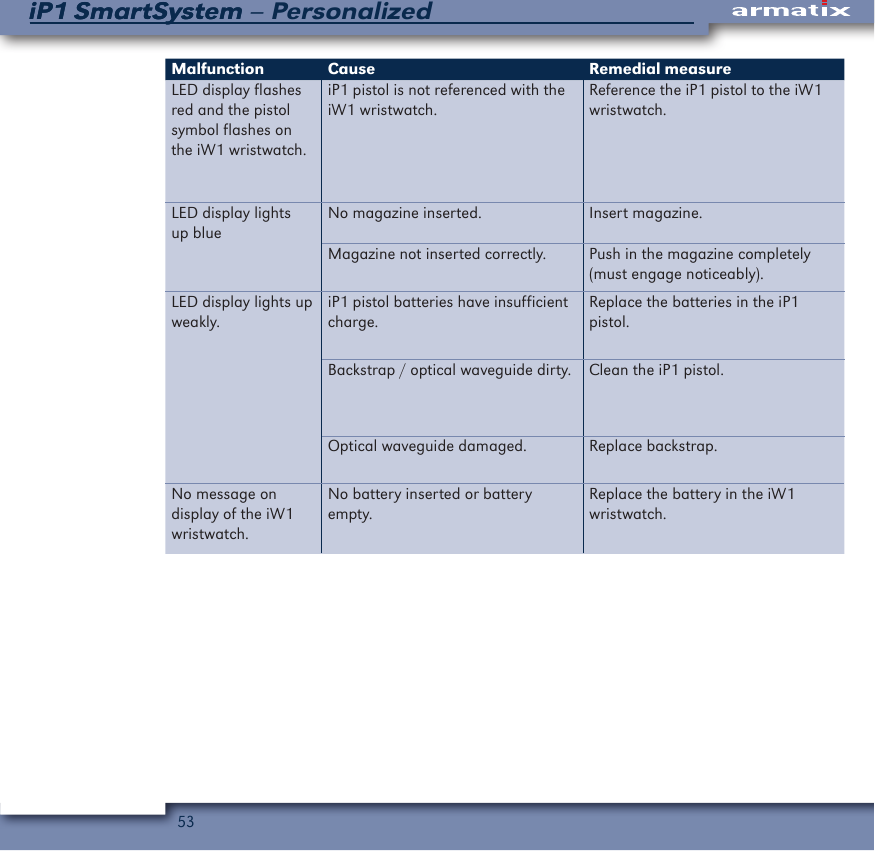
50iP1 SmartSystem – PersonalizediP1 SmartSystem18   Trouble shooting This chapter describes other possible malfunctions that may occur and corresponding remedial measures that the user can perform based on the cause of the malfunction. If the malfunction can-not be remedied with the measures described here, please contact Armatix U.S.A., Inc.18.1   Mechanical malfunctionsMalfunction Cause Remedial measureCartridge does not fire.Communication error between the iW1 wristwatch and the iP1 pistol.See Chapters 8-11.Faulty ammunition. Unload the iP1 pistol, dispose of the cartridge that failed to fire, and use other / recommended ammunition.iP1 pistol is very dirty. Clean the iP1 pistol. The trigger is not completely pulled back within 60 seconds.Pull the trigger within 60 seconds as far as it will go.No or empty batteries in the iP1 pis-tol.Install fully charged batteries in the iP1 pistol.Electronics damaged. Contact Armatix U.S.A., Inc.Cartridge is not ejected.Faulty ammunition. Unload the iP1 pistol and use other / recommended ammunition.Slide does not go back fully. Unload and clean the iP1 pistol, and perform a function test. Use other / recommended ammunition.Ejection mechanism damaged. Contact Armatix U.S.A., Inc.
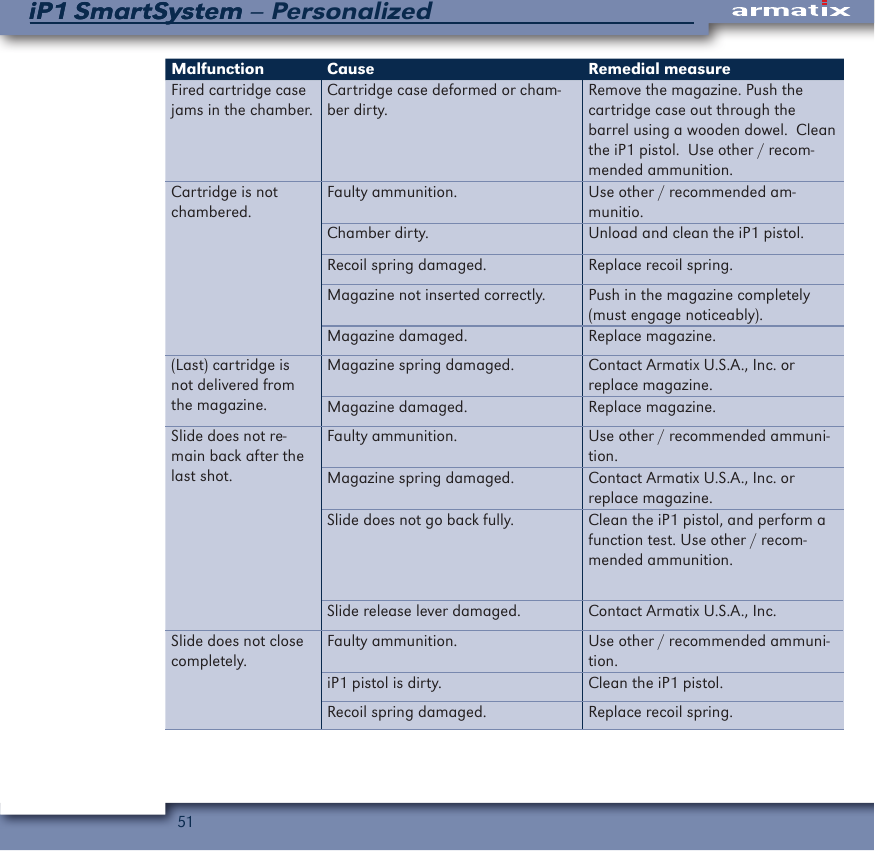
51iP1 SmartSystem – PersonalizediP1 SmartSystemMalfunction Cause Remedial measureFired cartridge case jams in the chamber.Cartridge case deformed or cham-ber dirty.Remove the magazine. Push the cartridge case out through the barrel using a wooden dowel.  Clean the iP1 pistol.  Use other / recom-mended ammunition.Cartridge is not chambered.Faulty ammunition. Use other / recommended am-munitio. Chamber dirty. Unload and clean the iP1 pistol.Recoil spring damaged. Replace recoil spring.Magazine not inserted correctly. Push in the magazine completely (must engage noticeably).Magazine damaged. Replace magazine.(Last) cartridge is not delivered from the magazine.Magazine spring damaged. Contact Armatix U.S.A., Inc. or replace magazine.Magazine damaged. Replace magazine.Slide does not re-main back after the last shot.Faulty ammunition. Use other / recommended ammuni-tion.Magazine spring damaged. Contact Armatix U.S.A., Inc. or replace magazine.Slide does not go back fully. Clean the iP1 pistol, and perform a function test. Use other / recom-mended ammunition.Slide release lever damaged. Contact Armatix U.S.A., Inc.Slide does not close completely.Faulty ammunition. Use other / recommended ammuni-tion.iP1 pistol is dirty. Clean the iP1 pistol. Recoil spring damaged. Replace recoil spring.
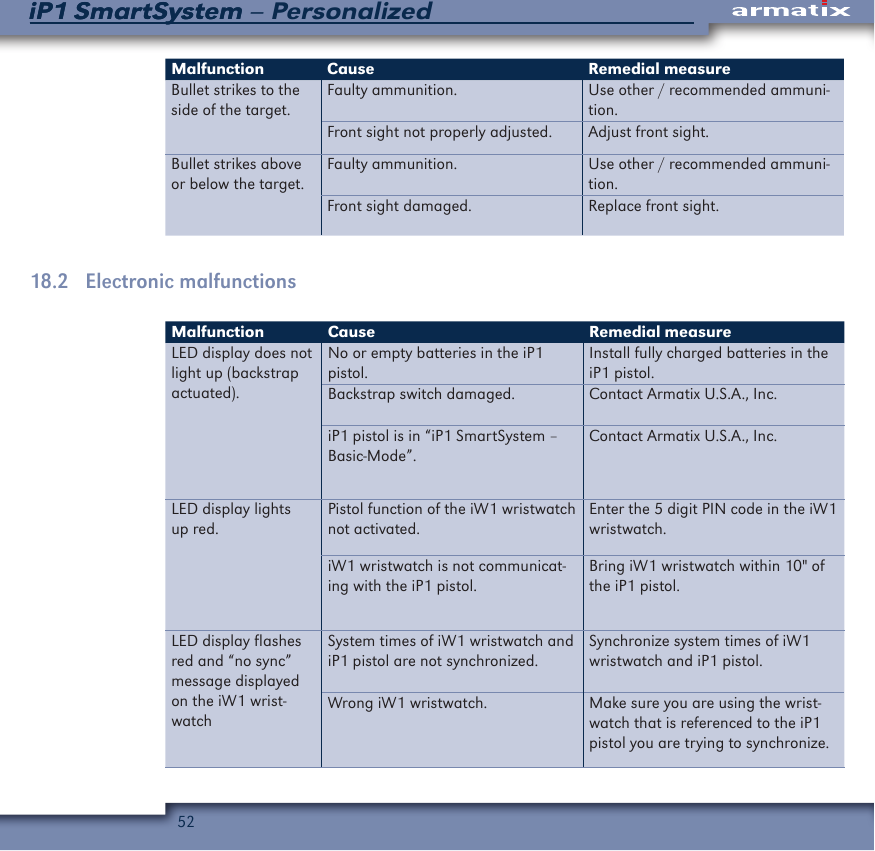
52iP1 SmartSystem – PersonalizediP1 SmartSystemMalfunction Cause Remedial measureBullet strikes to the side of the target.Faulty ammunition. Use other / recommended ammuni-tion.Front sight not properly adjusted. Adjust front sight.Bullet strikes above or below the target.Faulty ammunition. Use other / recommended ammuni-tion.Front sight damaged. Replace front sight.18.2   Electronic malfunctionsMalfunction Cause Remedial measureLED display does not light up (backstrap actuated).No or empty batteries in the iP1 pistol.Install fully charged batteries in the iP1 pistol.Backstrap switch damaged. Contact Armatix U.S.A., Inc.iP1 pistol is in “iP1 SmartSystem – Basic-Mode”.Contact Armatix U.S.A., Inc.LED display lights up red.Pistol function of the iW1 wristwatch not activated.Enter the 5 digit PIN code in the iW1 wristwatch.iW1 wristwatch is not communicat-ing with the iP1 pistol.Bring iW1 wristwatch within 10" of the iP1 pistol.LED display flashes red and “no sync” message displayed on the iW1 wrist-watchSystem times of iW1 wristwatch and iP1 pistol are not synchronized.Synchronize system times of iW1 wristwatch and iP1 pistol.Wrong iW1 wristwatch. Make sure you are using the wrist-watch that is referenced to the iP1 pistol you are trying to synchronize.
53iP1 SmartSystem – PersonalizediP1 SmartSystemMalfunction Cause Remedial measureLED display flashes red and the pistol symbol flashes on the iW1 wristwatch.iP1 pistol is not referenced with the iW1 wristwatch.Reference the iP1 pistol to the iW1 wristwatch.LED display lights up blueNo magazine inserted. Insert magazine.Magazine not inserted correctly. Push in the magazine completely (must engage noticeably).LED display lights up weakly.iP1 pistol batteries have insufficient charge.Replace the batteries in the iP1 pistol.Backstrap / optical waveguide dirty. Clean the iP1 pistol.Optical waveguide damaged. Replace backstrap.No message on display of the iW1 wristwatch.No battery inserted or battery empty.Replace the battery in the iW1 wristwatch.
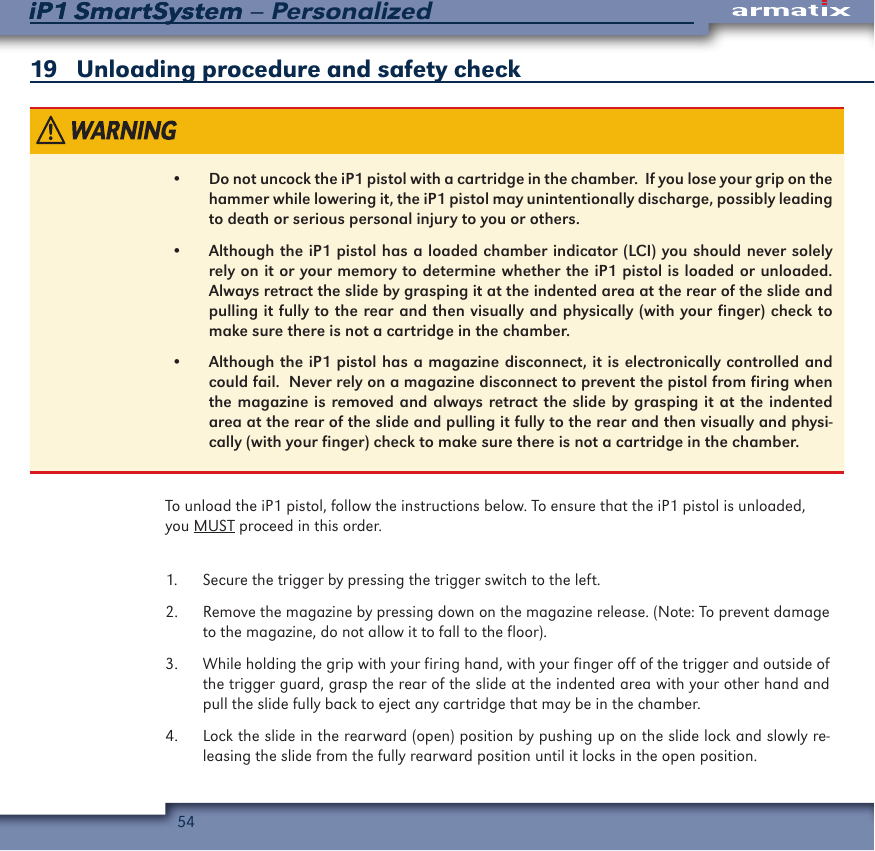
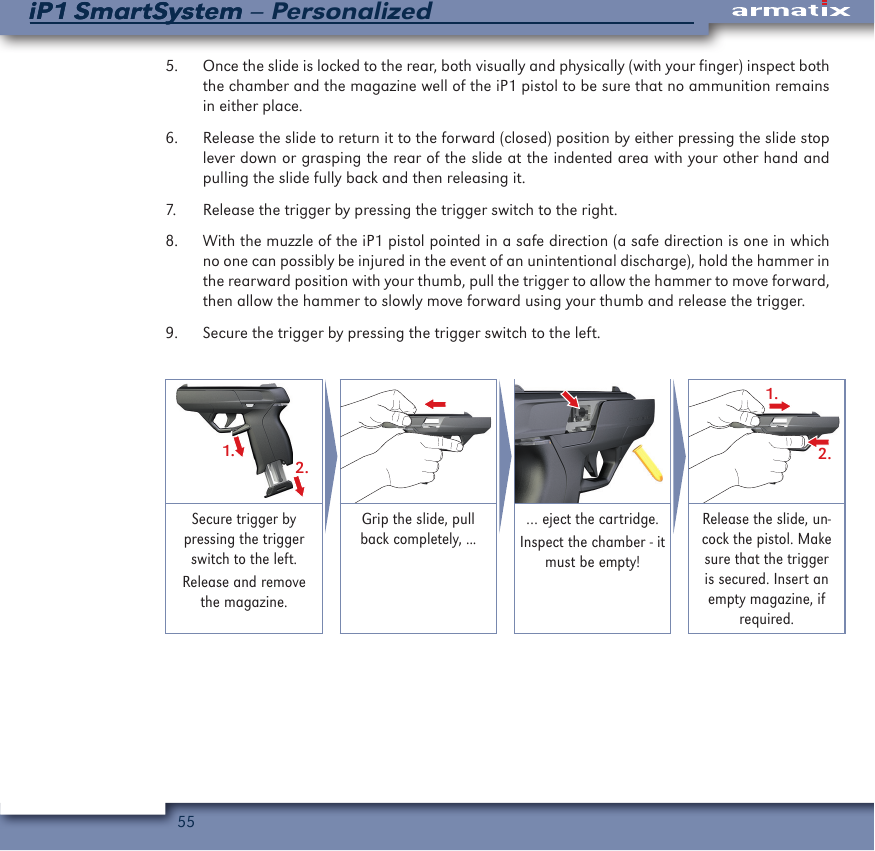
54iP1 SmartSystem – PersonalizediP1 SmartSystem19   Unloading procedure and safety check•  Do not uncock the iP1 pistol with a cartridge in the chamber.  If you lose your grip on the hammer while lowering it, the iP1 pistol may unintentionally discharge, possibly leading to death or serious personal injury to you or others.•  Although the iP1 pistol has a loaded chamber indicator (LCI) you should never solely rely on it or your memory to determine whether the iP1 pistol is loaded or unloaded.  Always retract the slide by grasping it at the indented area at the rear of the slide and pulling it fully to the rear and then visually and physically (with your finger) check to make sure there is not a cartridge in the chamber.•  Although the iP1 pistol has a magazine disconnect, it is electronically controlled and could fail.  Never rely on a magazine disconnect to prevent the pistol from firing when the magazine is removed and always retract the slide by grasping it at the indented area at the rear of the slide and pulling it fully to the rear and then visually and physi-cally (with your finger) check to make sure there is not a cartridge in the chamber.To unload the iP1 pistol, follow the instructions below. To ensure that the iP1 pistol is unloaded, you MUST proceed in this order.1.  Secure the trigger by pressing the trigger switch to the left. 2.  Remove the magazine by pressing down on the magazine release. (Note: To prevent damage to the magazine, do not allow it to fall to the floor).3.  While holding the grip with your firing hand, with your finger off of the trigger and outside of the trigger guard, grasp the rear of the slide at the indented area with your other hand and pull the slide fully back to eject any cartridge that may be in the chamber.4.  Lock the slide in the rearward (open) position by pushing up on the slide lock and slowly re-leasing the slide from the fully rearward position until it locks in the open position.
55iP1 SmartSystem – PersonalizediP1 SmartSystem5.  Once the slide is locked to the rear, both visually and physically (with your finger) inspect both the chamber and the magazine well of the iP1 pistol to be sure that no ammunition remains in either place.6.  Release the slide to return it to the forward (closed) position by either pressing the slide stop lever down or grasping the rear of the slide at the indented area with your other hand and pulling the slide fully back and then releasing it.7.  Release the trigger by pressing the trigger switch to the right.8.  With the muzzle of the iP1 pistol pointed in a safe direction (a safe direction is one in which no one can possibly be injured in the event of an unintentional discharge), hold the hammer in the rearward position with your thumb, pull the trigger to allow the hammer to move forward, then allow the hammer to slowly move forward using your thumb and release the trigger.9.  Secure the trigger by pressing the trigger switch to the left.1.2.1.2.Secure trigger by pressing the trigger switch to the left.Release and remove the magazine.Grip the slide, pull back completely, ...… eject the cartridge.Inspect the chamber - it must be empty! Release the slide, un-cock the pistol. Make sure that the trigger is secured. Insert an empty magazine, if required.
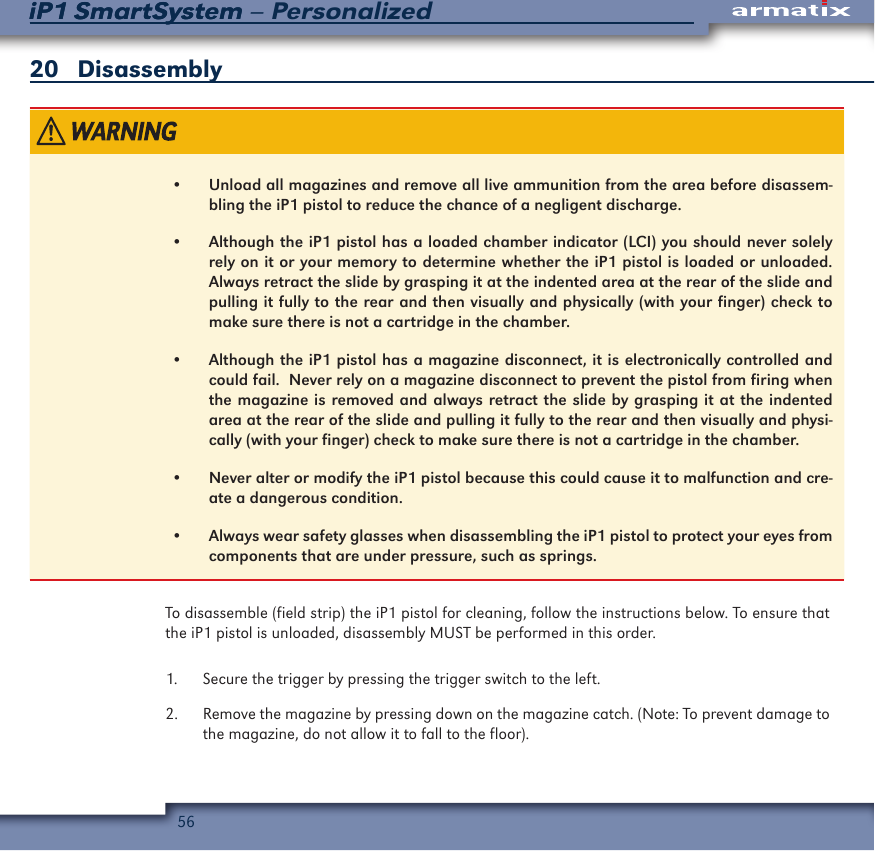
56iP1 SmartSystem – PersonalizediP1 SmartSystem20   Disassembly•  Unload all magazines and remove all live ammunition from the area before disassem-bling the iP1 pistol to reduce the chance of a negligent discharge.•  Although the iP1 pistol has a loaded chamber indicator (LCI) you should never solely rely on it or your memory to determine whether the iP1 pistol is loaded or unloaded.  Always retract the slide by grasping it at the indented area at the rear of the slide and pulling it fully to the rear and then visually and physically (with your finger) check to make sure there is not a cartridge in the chamber.•  Although the iP1 pistol has a magazine disconnect, it is electronically controlled and could fail.  Never rely on a magazine disconnect to prevent the pistol from firing when the magazine is removed and always retract the slide by grasping it at the indented area at the rear of the slide and pulling it fully to the rear and then visually and physi-cally (with your finger) check to make sure there is not a cartridge in the chamber.•  Never alter or modify the iP1 pistol because this could cause it to malfunction and cre-ate a dangerous condition.•  Always wear safety glasses when disassembling the iP1 pistol to protect your eyes from components that are under pressure, such as springs.To disassemble (field strip) the iP1 pistol for cleaning, follow the instructions below. To ensure that the iP1 pistol is unloaded, disassembly MUST be performed in this order.1.  Secure the trigger by pressing the trigger switch to the left. 2.  Remove the magazine by pressing down on the magazine catch. (Note: To prevent damage to the magazine, do not allow it to fall to the floor).
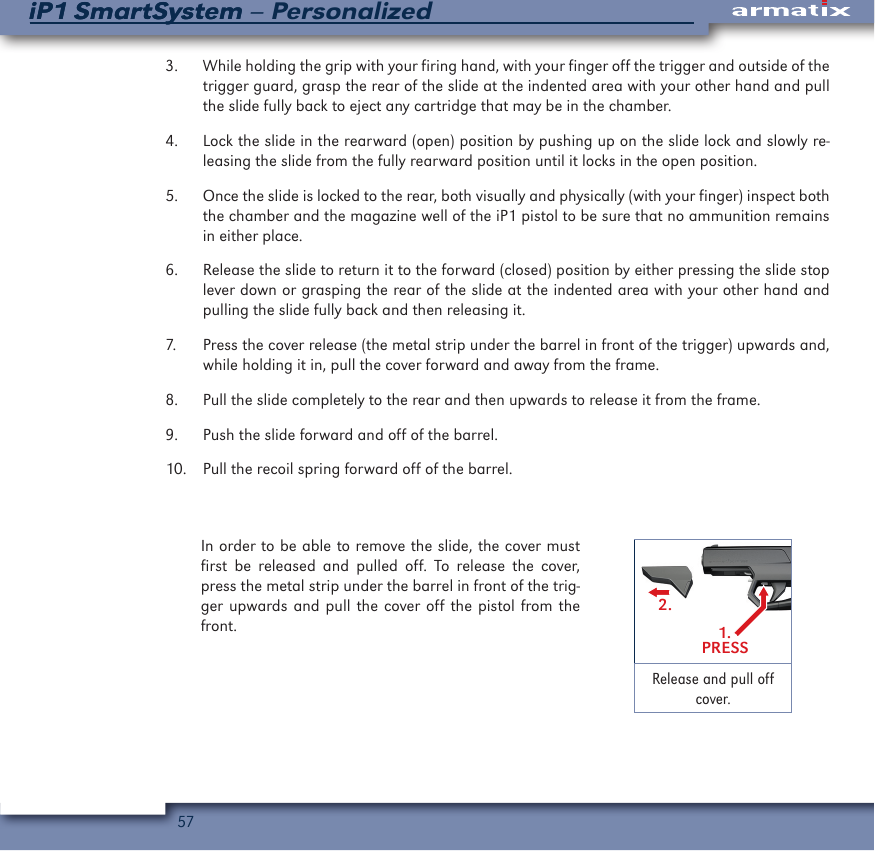
57iP1 SmartSystem – PersonalizediP1 SmartSystem3.  While holding the grip with your firing hand, with your finger off the trigger and outside of the trigger guard, grasp the rear of the slide at the indented area with your other hand and pull the slide fully back to eject any cartridge that may be in the chamber.4.  Lock the slide in the rearward (open) position by pushing up on the slide lock and slowly re-leasing the slide from the fully rearward position until it locks in the open position.5.  Once the slide is locked to the rear, both visually and physically (with your finger) inspect both the chamber and the magazine well of the iP1 pistol to be sure that no ammunition remains in either place.6.  Release the slide to return it to the forward (closed) position by either pressing the slide stop lever down or grasping the rear of the slide at the indented area with your other hand and pulling the slide fully back and then releasing it.7.  Press the cover release (the metal strip under the barrel in front of the trigger) upwards and, while holding it in, pull the cover forward and away from the frame.8.  Pull the slide completely to the rear and then upwards to release it from the frame.9.  Push the slide forward and off of the barrel.10.  Pull the recoil spring forward off of the barrel. In order to be able to remove the slide, the cover must first be released and pulled off. To release the cover, press the metal strip under the barrel in front of the trig-ger upwards and pull the cover off the pistol from the front. 1.PRESS2.Release and pull off cover.
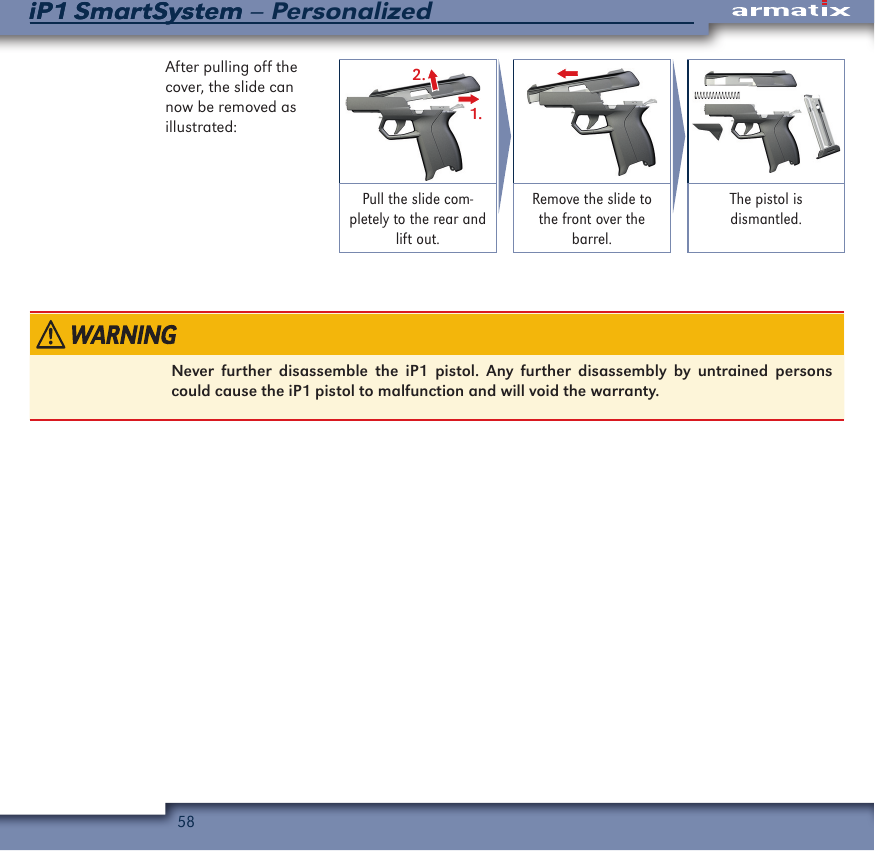
58iP1 SmartSystem – PersonalizediP1 SmartSystemAfter pulling off the cover, the slide can now be removed as illustrated:2.1.Pull the slide com-pletely to the rear and lift out.Remove the slide to the front over the barrel.The pistol is dismantled.Never further disassemble the iP1 pistol. Any further disassembly by untrained persons could cause the iP1 pistol to malfunction and will void the warranty.
59iP1 SmartSystem – PersonalizediP1 SmartSystem21   Cleaning•  Always be sure that the barrel of the iP1 pistol is clear of obstructions before firing it.  Remove any obstructions before firing the iP1 pistol so that it will function safely and correctly. Any obstruction in the barrel could prevent the pistol from firing properly and result in death or serious personal injury and/or damage to the iP1 pistol.•  Although the iP1 pistol has a magazine disconnect, it is electronically controlled and could fail. Never rely on a magazine disconnect and always retract the slide by grasping it at the indented area at the rear of the slide and pulling it fully to the rear and then visually and physically (with your finger) check to make sure there is not a cartridge in the chamber.•  Always wear safety glasses when cleaning the iP1 pistol to protect your eyes from clean-ing materials.•  Always make sure that no ammunition is located in the area where you clean the iP1 pistol. Cleaning solvents can affect the primer and powder in ammunition and cause it to malfunction.  This could result in a bullet being pushed into the barrel of the iP1 pistol and getting stuck. Firing another round with a bullet stuck in the barrel could cause the barrel to burst and result in death or serious personal injury and/or damage to the iP1 pistol.•  The frame of the iP1 pistol contains sensitive electric components.  Leave the backstrap installed on the frame when cleaning the iP1 pistol to protect its internal electronic components. Be careful not to spill gun cleaning solvent, gun oil, or cleaner-lubricant-preservative on it because they could damage the electronics and prevent the iP1 pistol from functioning.•  As with any semi-automatic pistol, the iP1 pistol should be disassembled before cleaning it. Cleaning without field stripping, by merely locking the slide to the rear and inserting the cleaning rod from the muzzle, can cause dirt, oil and solvents to build up inside the iP1 pistol causing malfunctions.
60iP1 SmartSystem – PersonalizediP1 SmartSystemOnly use commercially available gun solvent and gun oil or a cleaner-lubricant-preservative.  Use of improper cleaning fluids could damage the iP1 pistol.Regular cleaning and care of the iP1 pistol is important to prolong its serve life by reducing wear and helping to ensure its functional safety. You should clean the iP1 pistol:•  before firing it for the first time; and•  after every 250 rounds fired in an extended shooting session; and•  after each session in which you fire it; and•  at least every six months; and•  anytime it is exposed to the elements, becomes wet, etc.To clean the iP1 pistol, first disassemble it into its five main components, the frame, slide, recoil spring, cover, and magazine, pursuant to the instructions in Chapter 20.  21.1 BarrelClean the barrel as follows:1.  Wet a cleaning patch with a gun cleaning solvent or a cleaner-lubricant-preservative and run it through the barrel, from the chamber end, several times using a cleaning rod.2.  Wet a bristled cleaning brush with gun cleaning solvent or a cleaner-lubricant-preservative and run it back and forth in the barrel, from the chamber end, using a cleaning rod.3.  Wet a new cleaning patch with gun oil or a cleaner-lubricant-preservative and run it through the barrel once, from the chamber end, with the cleaning rod and examine it. If it is not clean, repeat steps two and three until the patch remains clean after being run through the barrel.
61iP1 SmartSystem – PersonalizediP1 SmartSystem4.  Before firing the iP1 pistol, run a clean patch through the barrel, from the chamber end, using the cleaning rod. Repeat this procedure until the patch comes out of the barrel with no gun oil or cleaner-lubricant-preservative on it.If you will be storing the iP1 pistol, do not perform step 4 until you are ready to use it.5.  Wet a nylon bristle brush with gun cleaning solvent or a cleaner-lubricant-preservative and thoroughly brush the outside of the barrel to remove any dirt or residue.6.  Wipe the outside of the barrel dry with a clean patch and examine it.  If it is not clean, repeat steps five and six until the patch remains clean.21.2   SlideClean the slide as follows: 1.  Wet a nylon bristle brush with gun cleaning solvent or a cleaner-lubricant-preservative and thoroughly brush the running surfaces where the slide matches with the frame.2.  Wipe the running surfaces where the slide matches with the guide rails of the frame with a clean patch and examine it. If it is not clean, repeat steps one and two until the patch remains clean.3.  Wet a nylon bristle brush with gun oil or a cleaner-lubricant-preservative and, while holding the slide with the muzzle end facing down, brush the breech face and the area under the extractor.4.  While holding the slide with the muzzle end facing down, wipe the breech face and the area under the extractor with a clean patch and examine it. If it is not clean, repeat steps three and four until the patch remains clean.5.  Check all other exposed areas of the slide for cleanliness. If any dirt or debris is found, remove it with gun cleaning solvent or a cleaner-lubricant-preservative using a nylon bristle brush or a clean patch.
62iP1 SmartSystem – PersonalizediP1 SmartSystem6.  Wipe the exposed areas of the slide that you have cleaned in step 5 with a clean patch and examine it. If it is not clean, repeat steps five and six until the patch remains clean.21.3   FrameCheck the frame for cleanliness. If necessary, clean the frame as follows:1.  Wipe exposed parts of the frame with a clean patch that has been slightly dampened with gun cleaning solvent or a cleaner-lubricant-preservative.2.  Wipe the exposed areas of the frame with a clean patch and examine it.  If it is not clean, repeat steps one and two until the patch remains clean.21.4   MagazineInspect the magazine for dirt or visible damage. If necessary, clean the magazine as follows:1.  Wipe the outside of the magazine and the feed lips with a clean patch that has been slightly dampened with gun cleaning solvent or a cleaner-lubricant-preservative.2.  Wipe the outside of the magazine and the feed lips with a clean patch and examine it. If it is not clean, repeat steps one and two until the patch remains clean.After you have cleaned the iP1 pistol, lubricate it as follows:1.  Slightly dampen a clean patch with gun oil or a cleaner-lubricant-preservative and wipe the outside of the barrel, the inside of the slide, and the outside of the magazine.2.  Spread one drop of gun oil or a cleaner-lubricant-preservative along the running surfaces of the slide where it matches with the guide rails of the frame.
63iP1 SmartSystem – PersonalizediP1 SmartSystemYour iP1 pistol is designed to operate properly with only a small amount of lubrication. Do not over-lubricate the iP1 pistol because too much lubricant can collect unburned powder and other debris and prevent the iP1 pistol from functioning properly.After you have finished cleaning and lubricating the iP1 pistol, and before you assemble it, you should inspect the barrel for lead build up, bulges, cracks or obstructions and inspect the frame and slide for any corrosion or visible damage.Do not use a cracked, bulged, or obstructed barrel.  Contact Armatix U.S.A., Inc. for instruc-tions on having it replaced.Check the magazine to make sure the follower and lips are not damaged.  Press down on the fol-lower with your fingertip and release it to make sure it springs back up and does not catch in the magazine tube.
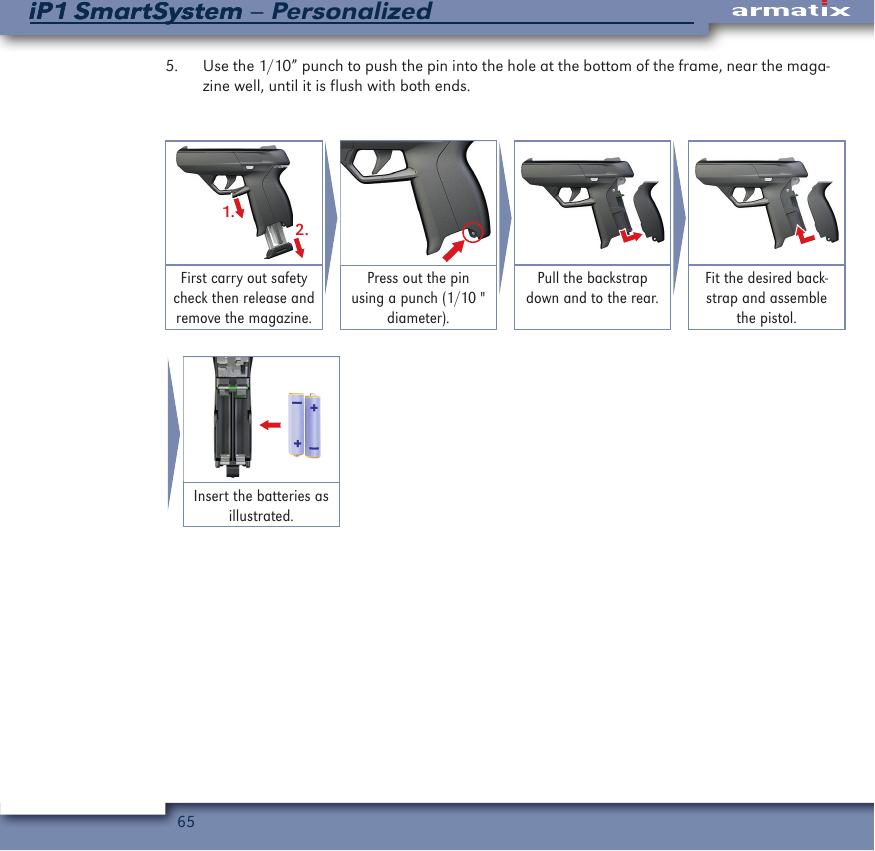
64iP1 SmartSystem – PersonalizediP1 SmartSystem22   Changing the backstrap / replacing the batteries in the iP1 pistolMake sure that the iP1 pistol is unloaded (magazine removed and chamber empty) before changing the backstrap or replacing the batteries.•  The batteries included with the iP1 pistol are not rechargeable. Never try to recharge non-rechargeable batteries. They may explode or catch fire.•  Never try to disassemble batteries. Battery fluids can cause serious injuries.•  Never expose batteries to high temperatures because they may explode.•  Never use mixed batteries in the iP1 pistol.  The brand and charge status must be identi-cal.The iP1 pistol comes with interchangeable backstraps to vary the circumference of the frame. The iP1 pistol comes with the small backstrap installed, but it can be replaced with the medium or large backstraps by completing the following steps:1.  Use the 1/10” punch to push the pin at the bottom of the frame, near the magazine well, fully out.2.  Pull the backstrap down a few millimeters, then to the back and away from the iP1 pistol.3.  If changing the batteries, remove the two AAA batteries and replace them with new ones.  Note: When viewed from the rear (muzzle pointed away from you) the battery on the left will be installed with the positive side facing down and the battery on the right will be installed with the positive side facing up).4.  Place the desired backstrap against the rear of the frame and push it up towards the slide.
65iP1 SmartSystem – PersonalizediP1 SmartSystem5.  Use the 1/10” punch to push the pin into the hole at the bottom of the frame, near the maga-zine well, until it is flush with both ends.1.2.First carry out safety check then release and remove the magazine.Press out the pin using a punch (1/10 " diameter).Pull the backstrap down and to the rear.Fit the desired back-strap and assemble the pistol.Insert the batteries as illustrated.
66iP1 SmartSystem – PersonalizediP1 SmartSystem23   Adjusting and changing the sightsMake sure that the iP1 pistol is unloaded (magazine removed and chamber empty) before adjusting or changing the sights.The front sight is held in place by the front sight mounting. The point of impact can be changed hori-zontally by adjusting the front sight. Front sights are available in four different heights to change the point of impact vertically.To adjust the point of impact horizontally (right or left), use a suitable tool, such as the 1/10” punch or a screwdriver, to move the front sight to either the right or to the left in the mounting. (Note: The front sight is securely attached to the front sight mounting and has to be pushed strongly to move it. Securing the unloaded iP1 pistol is a vise will make it easier to adjust the front sight). To replace the front sight, complete the following steps:1.  Remove the slide pursuant to the instructions in Chapter 20.2.  Remove the front sight mounting with front sight from the seat from the inside using the 1/10” diameter punch.3.  Push the front sight to the side and out of the front sight mounting.4.  Push the new front sight into the mounting from the side.5.  Press the front sight mounting with front sight into the seat from above until it noticeably engages.6.  Assemble the slide onto the iP1 pistol pursuant to the instructions in Chapter 24.After replacing the front sight, it will be necessary to adjust it horizontally to ensure the proper point of impact.
67iP1 SmartSystem – PersonalizediP1 SmartSystem24   AssemblyAlways wear safety glasses when reassembling the iP1 pistol to protect your eyes from springs. To assemble the iP1 pistol, follow the instructions below.1.  Push the recoil spring onto the barrel.2.  Holding the frame in your firing hand, with your finger off of the trigger and outside of the trigger guard, place the slide on top of the frame and over the recoil spring and pull the slide back over the barrel as far as it will go, and then push it down onto the guide rails of the frame and push it forward in the guide rails of the frame.3.  Align the cover with the grooves on the frame and push it towards the back of the iP1 pistol until it locks into place.Always make sure that the cover is locked in place when assembling the iP1 pistol. If it is not correctly installed, the iP1 pistol will still fire, but the slide will not be locked in place which could lead to serious personal injury and/or damage to the iP1 pistol.
68iP1 SmartSystem – PersonalizediP1 SmartSystemPush the recoil spring onto the barrel.Push the slide over the spring and pull back over the barrel.Pull the slide back as far as it will go and place onto the guide.Push the slide forward in the guide.CLICKCLICKPush on the cover until it engages.Push in the magazine completely.The pistol is assembled.
69iP1 SmartSystem – PersonalizediP1 SmartSystem25   Function test Make sure that the iP1 pistol is unloaded (both chamber and magazine empty) before per-forming a function test.  After assembling the iP1 pistol or remedying a malfunction, you should perform a function test to ensure that it is operating correctly by completing the following steps:1.  Insert an empty magazine into the magazine well and make sure that it noticeably locks into place.2.  Pull the slide back as far as it will go and release it to make sure that it is held in the open position by the slide release lever.3.  Press down on the magazine release and make sure that the magazine falls free of the maga-zine well. (Note: To prevent damage to the magazine, do not allow it to fall to the floor).4.  Press down on the slide release lever and make sure that the slide moves fully forward.5.  With your finger off of the trigger and outside of the trigger guard, retract and release the slide several times to make sure it moves freely.6.  Make sure the trigger switch is in the right (released) position and, with the muzzle of the iP1 pistol pointed in a safe direction (a safe direction is one in which no one can possibly be injured in the event of an unintentional discharge), pull the trigger fully to the rear to make sure that the hammer is cocked and released.7.  Take your finger off of the trigger and allow it to come fully forward.8.  Move the trigger switch to the left (locked) position and make sure that it noticeably engages.9.  With the muzzle of the iP1 pistol pointed in a safe direction (a safe direction is one in which no one can possibly be injured in the event of an unintentional discharge), pull the trigger fully to the rear to make sure that the hammer is NOT cocked and released.
70iP1 SmartSystem – PersonalizediP1 SmartSystem26   Storing the iP1 pistol•  Always make sure the iP1 pistol is unloaded (both chamber and magazine empty) and the hammer is in the forward (uncocked) position before storing it.•  Always store and transport the iP1 pistol unloaded and locked in a suitable container, such as the included pistol case, out of the reach and sight of children or other unau-thorized persons.  The personalized nature of the iP1 pistol is not an excuse for the failure to follow safe firearm storage practices.•  Never store or transport ammunition or the synced iW1 wristwatch together with the PIN-Card and the valid PIN codes of the iP1 SmartSystem in the same container as the iP1 pistol. The PIN-Card and the valid PIN codes of the iP1 SmartSystem must always be stored separately and out of the reach and sight of children or other unauthorized persons.If the pistol function of the iW1 wristwatch is active, deactivate it pursuant to the instructions in Chapter 7 before storing the iP1 pistol.If you have not cleaned the iP1 pistol since last firing it, clean it pursuant to the instructions in Chapter 21.Insert your unloaded iP1 pistol in the included pistol case and store it separately from the iW1 wristwatch and ammunition, out of the reach and sight of children or other unauthorized persons, in a place where it will not become wet or be subjected to high temperatures. (Note: If the iP1 pistol is to be stored for an extended period of time, the batteries should be removed pursuant to the instructions in Chapter 22.)During storage, the iP1 pistol should be unpacked, inspected and cleaned every six months to protect it from corrosion.
71iP1 SmartSystem – PersonalizediP1 SmartSystem27   Upgrading the iP1 SmartSystem - Basic to the iP1 SmartSystem - PersonalizedMake sure that the iP1 pistol is unloaded (both chamber and magazine empty) and the ham-mer is in the forward (uncocked) position before performing the upgrade procedure.An iP1 SmartSystem – Basic can be upgraded to the iP1 SmartSystem – Personalized and synced with an iW1 wristwatch. (Note: After you have synced the iP1 pistol to an iW1 wristwatch, it can not be restored to the original iP1 SmartSystem – Basic configuration.)To upgrade the iP1 SmartSystem – Basic to the iP1 SmartSystem – Personalized, proceed as follows:1.  First, delete the information stored in the iP1 pistol by resetting it as described in Chapter 10. Resetting the iP1 also configures it to operate in Personalized mode.2.  Second, enter the 5-digit PIN code to your iW1 wristwatch as described in Chapter 6.3.  Third, reference the iP1 pistol to the iW1 wristwatch, as described in Chapter 11.Now you are able to use the additional safety features of the SmartSystem - Personalized.
72iP1 SmartSystem – PersonalizediP1 SmartSystem28   Updating the firmwareThe firmware for the iW1 wristwatch and the iP1 pistol can be updated using the optional USB tool. To allow the iW1 wristwatch to communicate with the USB tool, beginning with the standard display press the top left and bottom left buttons for 3 seconds until the display reads “HF rEAdy.”  To exit the USB communication mode and return to the standard display, press any key. Additional information on updating the firmware is included with the optional USB tool. 3 sec.3 sec.    Activate receiver: Hold TL and BL depressed for 3 seconds.Receiver ready. Terminate waiting: Press any button.Standard display appears.
73iP1 SmartSystem – PersonalizediP1 SmartSystem29    Changing the iW1 wristwatch batteries •  The battery included with the iW1 wristwatch is not rechargeable. Never try to recharge non-rechargeable batteries. They may explode or catch fire.•  Never try to disassemble batteries. Battery fluids can cause serious injuries.•  Never expose batteries to high temperatures because they may explode.The iW1 wristwatch operates using a single CR2032 battery. To change it, proceed as follows:1.  With the display of the iW1 wristwatch facing down, remove the battery by turning the battery compartment cover counterclockwise.2.  Turn the iW1 wristwatch over and allow the old battery to fall out.3.  With the face of the iW1 wristwatch facing down again, insert the new battery with the nega-tive side facing downwards.4.  Place the battery compartment cover back on the iW1 wristwatch and turn it clockwise to lock it in place.–+Release and remove the battery compart-ment cover.Insert the battery as shown.Replace and lock the battery compartment cover.The wristwatch is now ready for use.
74iP1 SmartSystem – PersonalizediP1 SmartSystemPart listThe iP1 SmartSystem – Personalized from Armatix U.S.A., Inc. is a high-tech product that is manu-factured with the highest precision.  Accordingly, most parts have to be replaced by returning the pistol to Armatix U.S.A., Inc. Only those parts marked with an * are available for purchase and can be replaced by the user.1.  Frame2.  Slide3.  Recoil spring *4.  Cover *5.  Magazine assembly *6.  Backstrap: *a.  small (included)b.  medium (optional)c.  large (optional)7.  Backstrap pin *8.  Front sight mounting *9.  Front sight * (available in four different heights)10.   Batteries *iW1 wristwatch *The above part numbers correspond to the exploded drawing on Page 75.
75iP1 SmartSystem – PersonalizediP1 SmartSystemExploded drawing123*4*5*6a*6b*6c*7*8*9*10*
76iP1 SmartSystem – PersonalizediP1 SmartSystemTechnical Data  Technical Data Backstrap S Backstrap M Backstrap LOverall length 170 mm6.69 in173 mm6.81 in175 mm6.89 inOverall width 30 mm1.18 inTrigger length 77 mm3.03 in78 mm3.07 inWeight without magazine 518g / 18.27 oz.with empty magazine 576g / 20.32 oz.Barrel length 92 mm3.62 in
77iP1 SmartSystem – PersonalizediP1 SmartSystemLimited one year operational warranty Subject to the terms, conditions and limitations outlined below, Armatix U.S.A., Inc. guarantees the iP1 SmartSystem — Personalized against defects in materials and workmanship that adversely affect its operation for a period of one (1) year from the date of its original purchase by the initial consumer. This warranty only becomes effective if activated by the original consumer purchaser within 30 days of the purchase date, by completing and returning the warranty card included with the iP1 SmartSystem — Personalized.  Armatix U.S.A., Inc. reserves the right, at its sole discretion, to accept proof of purchase in lieu of a completed warranty card.To make a claim under this warranty, contact Armatix U.S.A., Inc. at: 23121 Coltrane Avenue, Ne-whall, CA 91321, customerservice@armatix.us or (855) 477-1972 for instructions on how to return the iP1 SmartSystem — Personalized. Do not return the iP1 SmartSystem — Personalized for service without prior authorization.Limitations of warranty The warranty will be void if any of the following occur:1.  the instructions in the Instruction Manual are not followed;2.  the iP1 SmartSystem — Personalized or any of its parts are altered or modified from their original state;3.  damage is caused by misuse, abuse or improper maintenance; or4.  the iP1 SmartSystem — Personalized is disassembled beyond the instructions in Chapter 20 of the Instruction Manual.There are no warranties which extend beyond the description on the face hereof.
78iP1 SmartSystem – PersonalizediP1 SmartSystemThe sole and exclusive remedy pursuant to this warranty is the repair or replacement of the iP1 SmartSystem — Personalized, at the sole discretion of Armatix U.S.A., Inc.The implied warranties of merchantability and fitness for a particular purpose are expressly disclaimed.All disclaimers and limitations of liability shall still apply even if the limited remedy of repair and replacement fails of its essential purpose.In states where permitted, Armatix U.S.A., Inc. assumes no liability for incidental or conse-quential damage or for incidental expenses. Any action against Armatix U.S.A., Inc. based on an alleged breach of this warranty must be brought within one (1) year of the claimed breach.Armatix U.S.A., Inc.’s liability for breach of warranty shall be limited to repair or replacement of the iP1 SmartSystem — Personalized, at the sole discretion of Armatix U.S.A., Inc.Manufactured by:                                              Imported and distributed in the United States by:Armatix GmbH                                                   Armatix U.S.A., Inc.Feringastraße 4                                                  23121 Coltrane Avenue85774 Unterföhring Germany                           Newhall, CA 91321Tel.: +49 89 / 4 27 29 79 – 0                             Tel.: 855-477-1972Email: info@armatix.de                                      Email: customerservice@armatix.usWebpage: www.armatix.de                                Webpage: www.armatix.us
79iP1 SmartSystem – PersonalizediP1 SmartSystemFCC Notice This device complies with Part 15 of the FCC Rules. Operation is subject to the following two condi-tions: 1. This device may not cause harmful interference, and 2. this device must accept any inter-ference received, including interference that may cause undesired operation. Changes or modifica-tions not expressly approved by the party responsible for compliance could void the user’s authority to operate the equipment.
80iP1 SmartSystem – PersonalizediP1 SmartSystemYouth Handgun Safety Act Notice(1)  The misuse of handguns is a leading contributor to juvenile violence and fatalities.(2)  Safely storing and securing firearms away from children will help prevent the unlawful posses-sion of handguns by juveniles, stop accidents, and save lives.(3)  Federal law prohibits, except in certain limited circumstances, anyone under 18 years of age from knowingly possessing a handgun, or any person from selling, delivering, or otherwise transferring a handgun to a person under 18.(4)  A knowing violation of the prohibition against selling, delivering, or otherwise transferring a handgun to a person under the age of 18 is, under certain circumstances, punishable by up to 10 years in prison.FEDERAL LAWThe Gun Control Act of 1968, 18 U.S.C. Chapter 44, provides in pertinent part as follows:18 U.S.C. § 922(x)(1)  It shall be unlawful for a person to sell, deliver, or otherwise transfer to a person who the transferor knows or has reasonable cause to believe is a juvenile–(A) a handgun; or (B) ammunition that is suitable for use only in a handgun. (2)  It shall be unlawful for any person who is a juvenile to knowingly possess–(A) a handgun; or (B) ammunition that is suitable for use only in a handgun.
81iP1 SmartSystem – PersonalizediP1 SmartSystem(3)  This subsection does not apply to–(A) a temporary transfer of a handgun or ammunition to a juvenile or to the possession or use of a handgun or ammunition by a juvenile if the handgun and ammunition are possessed and used by the juvenile–(i) in the course of employment, in the course of ranching or farming related to activities at the residence of the juvenile (or on property used for ranching or farming at which the ju-venile, with the permission of the property owner or lessee, is performing activities related to the operation of the farm or ranch), target practice, hunting, or a course of instruction in the safe and lawful use of a handgun; (ii) with the prior written consent of the juvenile’s parent or guardian who is not prohibited by Federal, State, or local law from possessing a firearm, except– (I) during transportation by the juvenile of an unloaded handgun in a locked container directly from the place of transfer to a place at which an activity described in clause (i) is to take place and transportation by the juvenile of that handgun, unloaded and in a locked container, directly from the place at which such an activity took place to the transferor; or (II) with respect to ranching or farming activities as described in clause (i), a juvenile may possess and use a handgun or ammunition with the prior written approval of the juvenile’s parent or legal guardian and at the direction of an adult who is not prohib-ited by Federal, State or local law from possessing a firearm; (iii) the juvenile has the prior written consent in the juvenile’s possession at all times when a handgun is in the possession of the juvenile; and (iv) in accordance with State and local law; (B) a juvenile who is a member of the Armed Forces of the United States or the National Guard who possesses or is armed with a handgun in the line of duty;
82iP1 SmartSystem – PersonalizediP1 SmartSystem(C) a transfer by inheritance of title (but not possession) of a handgun or ammunition to a juvenile; or (D) the possession of a handgun or ammunition by a juvenile taken in defense of the juvenile or other persons against an intruder into the residence of the juvenile or a residence in which the juvenile is an invited guest. (4)  A handgun or ammunition, the possession of which is transferred to a juvenile in circumstanc-es in which the transferor is not in violation of this subsection shall not be subject to perma-nent confiscation by the Government if its possession by the juvenile subsequently becomes unlawful because of the conduct of the juvenile, but shall be returned to the lawful owner when such handgun or ammunition is no longer required by the Government for the purposes of investigation or prosecution.(5)  For purposes of this subsection, the term “juvenile” means a person who is less than 18 years of age.(6)  (A) In a prosecution of a violation of this subsection, the court shall require the presence of a juvenile defendant’s parent or legal guardian at all proceedings.(B) The court may use the contempt power to enforce subparagraph (A).(C) The court may excuse attendance of a parent or legal guardian of a juvenile defendant at a proceeding in a prosecution of a violation of this subsection for good cause shown.18 U.S.C. § 924(a)(6)(A)  (i) A juvenile who violates section 922(x) shall be fined under this title, imprisoned not more than 1 year, or both, except that a juvenile described in clause (ii) shall be sentenced to proba-tion on appropriate conditions and shall not be incarcerated unless the juvenile fails to comply with a condition of probation.
83iP1 SmartSystem – PersonalizediP1 SmartSystem(ii) A juvenile is described in this clause if–(I) the offense of which the juvenile is charged is possession of a handgun or ammunition in violation of section 922(x)(2); and (II) the juvenile has not been convicted in any court of an offense (including an offense under section 922(x) or a similar State law, but not including any other offense consisting of conduct that if engaged in by an adult would not constitute an offense) or adjudicated as a juvenile delinquent for conduct that if engaged in by an adult would constitute an offense.  (B)  A person other than a juvenile who knowingly violates section 922(x)–(i) shall be fined under this title, imprisoned not more than 1 year, or both; and (ii) if the person sold, delivered, or otherwise transferred a handgun or ammunition to a juvenile knowing or having reasonable cause to know that the juvenile intended to carry or otherwise possess or discharge or otherwise use the handgun or ammunition in the commission of a crime of violence, shall be fined under this title, imprisoned not more than 10 years, or both.
84iP1 SmartSystem – PersonalizediP1 SmartSystemState required safety warningsThe following warnings are required by certain jurisdictions:California“Children are attracted to and can operate firearms that can cause severe injuries or death. Prevent child access by always keeping guns locked away and unloaded when not in use. If you keep a loaded firearm where a child obtains and improperly uses it, you may be fined or sent to prison.”“A los niños los atraen las armas de fuego y las pueden hacer funcionar. Ellos pueden causarses lesions graves y la muerte. Evite que los niños tengan accesso a las armas de fuego guardándolas siempre con llave y descargadas cuando no las esté utlizando. Si usted tiene una arma de fuego cargada en un lugar en que un niño tiene acceso a ella y la usa indebidamente, le pueden dar una multa o enviarlo a la cárcel.”Connecticut“UNLAWFUL STORAGE OF A LOADED FIREARM MAY RESULT IN IMPRISONMENT OR FINE.”Florida“IT IS UNLAWFUL, AND PUNISHABLE BY IMPRISONMENT AND FINE, FOR ANY ADULT TO STORE OR LEAVE A FIREARM IN ANY PLACE WITHIN THE REACH OR EASY ACCESS OF A MINOR UNDER 18 YEARS OF AGE OR TO KNOWINGLY SELL OR OTHERWISE TRANSFER OWNERSHIP OR POSSES-SION OF A FIREARM TO A MINOR OR A PERSON OF UNSOUND MIND.”ADVERTENCIAWARNING
85iP1 SmartSystem – PersonalizediP1 SmartSystemMaine“ENDANGERING THE WELFARE OF A CHILD IS A CRIME. IF YOU LEAVE A FIREARM AND AMMU-NITION WITHIN EASY ACCESS OF A CHILD, YOU MAY BE SUBJECT TO FINE, IMPRISONMENT OR BOTH. KEEP FIREARMS AND AMMUNITION LOCKED UP. USE TRIGGER LOCKS.”MarylandWARNING: “Children can operate firearms which may cause death or serious injury. It is a crime to store or leave a loaded firearm in any location where an individual knew or should have known that an unsupervised minor would gain access to the firearm. Store your firearm responsibly!”Massachusetts“WARNING FROM THE MASSACHUSETTS ATTORNEY GENERAL:  This handgun is not equipped with a device that fully blocks use by unauthorized users. More than 200,000 firearms like this one are stolen from their owners every year in the United States. In addition, there are more than a thousand suicides each year by younger children and teenagers who get access to firearms. Hundreds more die from accidental discharge. It is likely that many more children sustain serious wounds, or inflict such wounds accidentally on others. In order to limit the chance of such misuse, it is imperative that you keep this weapon locked in a secure place and take reasonable preventive steps necessary to limit the possibility of theft or accident. Failure to take reasonable preventive steps may result in innocent lives being lost, and in some circumstances may result in your liability for these deaths.”“IT IS UNLAWFUL TO STORE OR KEEP A FIREARM, RIFLE, SHOTGUN OR MACHINE GUN IN ANY PLACE UNLESS THAT WEAPON IS EQUIPPED WITH A TAMPER-RESISTANT SAFETY DEVICE OR IS STORED OR KEPT IN A SECURELY LOCKED CONTAINER.”New Jersey:“IT IS A CRIMINAL OFFENSE TO LEAVE A LOADED FIREARM WITHIN EASY ACCESS OF A MINOR.”New York City:“THE USE OF A LOCKING DEVICE OR SAFETY LOCK IS ONLY ONE ASPECT OF RESPONSIBLE FIRE-
86iP1 SmartSystem – PersonalizediP1 SmartSystemARMS STORAGE. FOR INCREASED SAFETY, FIREARMS SHOULD BE STORED UNLOADED AND LOCKED IN A LOCATION THAT IS BOTH SEPARATE FROM THEIR AMMUNITION AND INACCES-SIBLE TO CHILDREN AND OTHER UNAUTHORIZED PERSONS.”North Carolina:“IT IS UNLAWFUL TO STORE OR LEAVE A FIREARM THAT CAN BE DISCHARGED IN A MANNER THAT A REASONABLE PERSON SHOULD KNOW IS ACCESSIBLE TO A MINOR.”Texas:“IT IS UNLAWFUL TO STORE, TRANSPORT, OR ABANDON AN UNSECURED FIREARM IN A PLACE WHERE CHILDREN ARE LIKELY TO BE AND CAN OBTAIN ACCESS TO THE FIREARM.”Wisconsin:“IF YOU LEAVE A LOADED FIREARM WITHIN THE REACH OR EASY ACCESS OF A CHILD YOU MAY BE FINED OR IMPRISONED OR BOTH IF THE CHILD IMPROPERLY DISCHARGES, POSSESSES, OR EXHIBITS THE FIREARM.”State laws and regulations concerning firearms change constantly. Please check with your local federally licensed firearm dealer or state police for additional laws and regulations re-garding the storage and use of firearms in your state.
87iP1 SmartSystem – PersonalizediP1 SmartSystemManufactured by:                                           Imported and distributed in the United States by:Armatix GmbH                                                                                                       Armatix U.S.A., Inc.Feringastraße 4                                                                                               23121 Coltrane Avenue85774 Unterföhring Germany                                                                               Newhall, CA 91321Tel.: +49 89 / 4 27 29 79 – 0                                                                                  Tel.: 855-477-1972Email: info@armatix.de                                                                Email: customerservice@armatix.usWebpage: www.armatix.de                                                                       Webpage: www.armatix.usDespite the greatest care taken in the compilation of this instruction manual, data can change even at short notice. Therefore Armatix U.S.A., Inc. cannot guarantee the currentness, correctness, and/or completeness of the information contained in this instruction manual. The current version of this instruction manual can be downloaded at www.armatix.usCopyright 2014: Armatix U.S.A., Inc. All rights reserved. Content, text, illustra-tions, diagrams and the layout of this instruction manual are protected by copyright laws and other intellectual property rights. This instruction manual may not be cop-ied, distributed, or modified without the prior written approval of Armatix U.S.A., Inc.
Armatix U.S.A., Inc. 23121 Coltrane Ave Newhall, CA. 91321USATel.:   1-855-477-1972E-Mail:   customerservice@armatix.usWebpage:   www.armatix.us© Armatix U.S.A ., Inc. | V2014 - 01

Navigation menu