Ascalade Technologies B187R26H 1.9GHz DECT USB/POTS TELEPHONE-HANDSET User Manual master QSG VOIP321 qxp

Ascalade Technologies, Inc. 1.9GHz DECT USB/POTS TELEPHONE-HANDSET master QSG VOIP321 qxp

Contents

USERS MANUAL 2

www.philips.com/faqs/dect3Some of the following information may not apply to your particular product; however, when using telephone equipment, basic safety precautions should always be followed to reduce the risk of fire, electric shock and injury to persons, including the following:1. Read and understand all instructions.2. Follow all warnings and instructions marked on the product.3. Unplug this product from the wall outlet before cleaning. Do not use liquid cleaners or aerosol cleaners. Use a damp cloth for cleaning.4. Telephones should not be used while you are in a bathtub,shower or pool. Immersion of the telephone or handset inwater could cause an electrical shock.5. Slots and openings in the cabinet back or bottom are provided for ventilation, to protect it from overheating. These openings must not be blocked or covered. The openings should never be blocked by placing the product on the bed, sofa, rug, or other similar surface. This product should not be placed in a built-in installation unless proper ventilation is provided.6. This product should be operated only from the type of power source indicated on the marking label. If you are not sure of the type of power supply to your home, consult your dealer or local power company.7. Do not allow anything to rest on the power cord. Do not locate this product where the cord will be abused by persons walking on it.8. Do not overload wall outlets and extension cords as this can result in the risk of fire or electric shock.9. Never push objects of any kind into this product throughcabinet slots as they may touch dangerous voltage points orshort out parts that could result in a risk of fire or electricshock. Never spill liquid of any kind on the product.10. To reduce the risk of electric shock, do not disassemble this product, but take it to a qualified service personnel when service or repair work is required. Opening or removing covers may expose you to dangerous voltages or other risks. Incorrect  reassembly can cause electric shock when the appliance is subsequently used.11. Do not expose the product to extreme temperatures such as areas near a hot radiator or stove or in a hot car.12. Do not place lighted candles, cigarettes, cigars, etc., on the telephone.13. Never touch uninsulated telephone wires or terminals unless the telephone line has been disconnected at the network interface.14. Never install or modify telephone wiring during a lightning storm.15. Never install telephone jacks in wet locations unless the jack is specifically designed for wet locations.16. Use caution when installing or modifying telephone lines to prevent electrical shock and/or fire.17. Unplug this product from the wall outlet and refer servicing to qualified service personnel under the following conditions:A. When the power supply cord or plug is damaged or frayed.B. If the product has been exposed to rain or water.C. If the product does not operate normally by following the operating instructions.D. If the product’s cabinet has been damaged.E. If the product exhibits a distinct change in performance.18. Avoid using a telephone (other than a cordless type) during an electrical storm. There may be a remote risk of electric shock from lightning.19. Do not use the telephone to report a gas leak in the vicinity of the leak.20. Do not place this product on an unstable cart, stand or table.The product may fall, causing serious damage to the product.IF YOUR PRODUCT UTILIZES BATTERIES, THE FOLLOWING ADDITIONAL PRECAUTIONS SHOULD BE OBSERVED:1. Use only the type and size of battery(ies) specified in the user manual.2. Do not dispose of the battery(ies) in fire. They may explode. Check with local codes for possible special disposal instructions.3. Do not open or mutilate the battery(ies). Released electrolyte is corrosive and may cause damage to the eyes or skin. It may be toxic if swallowed.4. Exercise care in handling battery(ies) in order not to short out the battery(ies) with conducting materials such as rings, bracelets, and keys. The battery(ies) or conductor may overheat and cause burns.5. Do not attempt to recharge the battery(ies) provided with or identified for use with this product that are not intended to be charged. The battery(ies) may leak corrosive electrolyte or explode.6. Do not attempt to rejuvenate the battery(ies) provided with or identified for use with this product by heating them. Sudden release of the battery(ies) electrolyte may occur causing burns or irritation to eyes or skin.7. When replacing battery(ies), all batteries should be replaced at the same time. Mixing fresh and discharged batteries couldincrease internal cell pressure and rupture the dischargedbattery(ies). (Applies to products employing more than oneseparately replaceable primary battery.)8. When inserting battery(ies) into this product, the proper polarity or direction must be observed. Reverse insertion of battery(ies) can cause charging, and that may result in leakage or explosion.9. Remove battery(ies) from this product if storing over 30 days because the battery(ies) could leak and damage the product.10. Discard “dead” battery(ies) as soon as possible since “dead’ batteries are more likely to leak in a product.11. Do not store this product, or the battery(ies) provided with or  identified for use with this product, in high-temperature areas.Batteries that are stored in a freezer or refrigerator for thepurpose of extending shelf life should be protected fromcondensation during storage and defrosting. Batteries should be stabilized at room temperature prior to use after cold storage.12. If your product uses rechargeable battery(ies), charge thebattery(ies) only in accordance with the instructions andlimitation specified in the User Manual.SAVE  THESE INSTRUCTIONSENVIRONMENT AND SAFETYImportant Safety Instructions
www.philips.com/faqs/dect41    Environment and safetySafety information:  This telephone is not designed for making emergency telephone calls when the power fails.  An alternative should be made available for access to emergency calling.Power requirements:  The product requires an electrical supply of 120 volts, single phase alternating current, excluding IT installations defined in standard UL 60950.Battery requirements:  The handset requires power source of two rechargeable NiMH batteries, size AAA 1.2V 650mAh (HR11/45).WARNING!  The electrical network is classified as dangerous according to criteria in the standard UL 60950. The only way to power down this product is by unplugging the power supply from the electrical outlet. Ensure the electrical outlet is located close to the apparatus and is always easily accessible.Telephone connection:  The voltage on the network is classified as TNV-3 (Telecommunication Network Voltages, as defined in the standard UL 60950). Following a power cut, the call in progress is lost.CAUTION: Users should ensure for their own protection that the electrical ground connections of the power utility, telephone lines and internal metallic water pipe system, if present, are connected together.  This precaution may be particularly important in rural areas.Environmental care:  Please remember to observe the local regulations regarding the disposal of your packaging materials, exhausted batteries and old phone and where possible promote their recycling.Because the phone works by sending radio signals between the base unit and the handset, wearers of hearing aids may experience interference in the form of a humming noise.We advise that this phone should not be used near intensive care medical equipment, nor by persons with pacemakers.Your phone can interfere with electrical equipment such as answering machines, TV and radio sets, clock radios and computers if placed too close. It is recommended that you position the base unit at least one meter from such appliances.CAUTION         Use only the mains adapter supplied with this telephone.  Incorrect adapter polarity or voltage can seriously damage the unit. Base adapter                                    Charger adapterInput:  120 VAC 60 Hz                                   Input:  120 VAC 60 HzOutput:  9 VDC 300 mA                           Output:  9 VDC 150 mA CAUTION RISK OF EXPLOSION IF BATTERY IS REPLACED BY AN INCORRECT TYPE.  Never use non-rechargeable batteries; use recommended type supplied with this telephone.  NiMH batteries must be disposed of in accordance with the applicable waste disposal regulations.FCC CERTIFICATION NUMBER IS LOCATED ON THE CABINET BOTTOMThe term “IC:” before the certification number signifies that Industry Canada technical specifications were met.  This certification means that the equipment meets certain radio communications and operational requirements.environment and safety
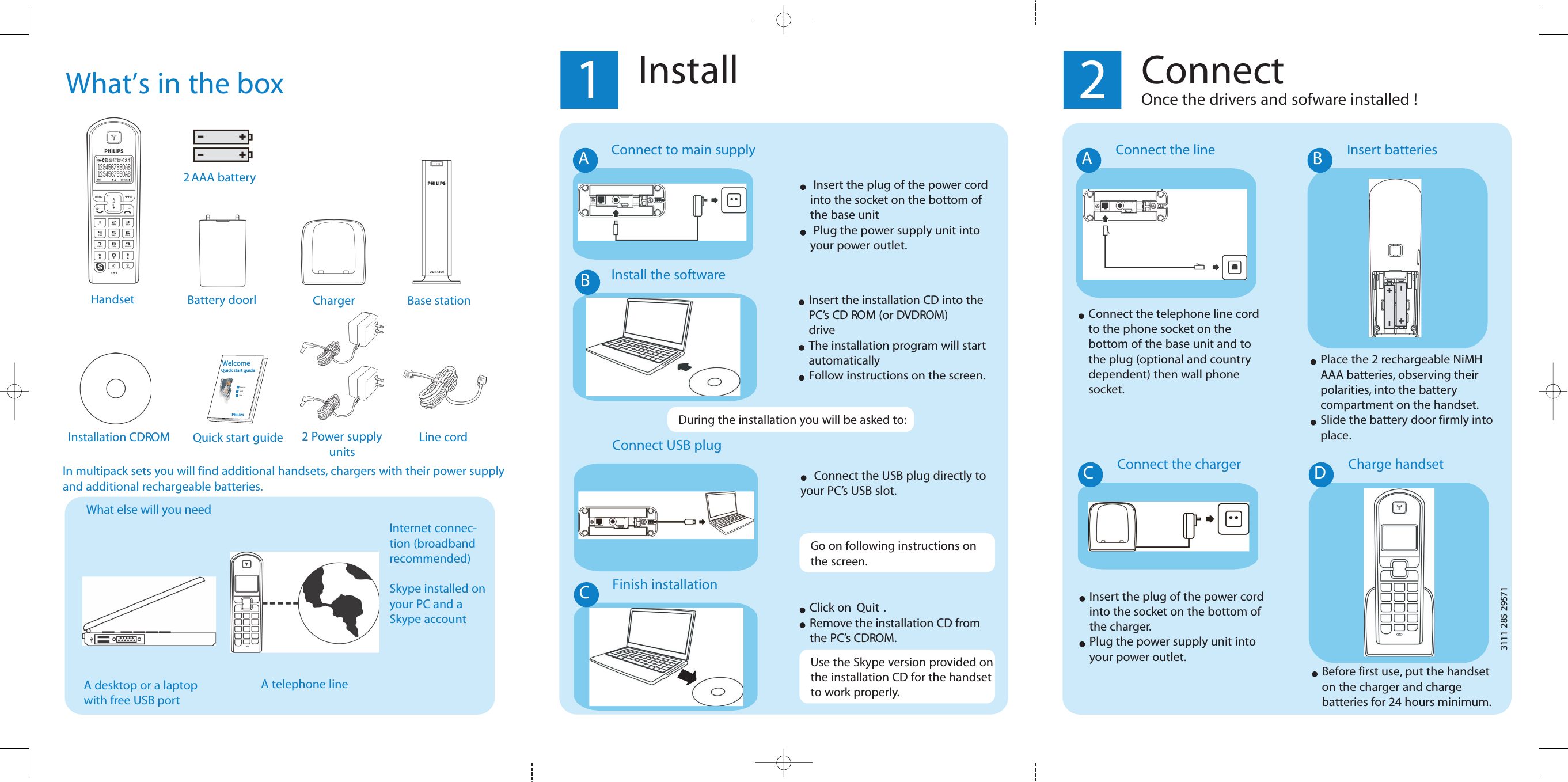
What’s in the boxWhat else will you needHandset Charger2 Power supplyunitsQuick start guide123ConnectInstallEnjoyWelcomeQuick start guideInstallation CDROMInternet connec-tion (broadbandrecommended)Skype installed onyour PC and aSkype accountA desktop or a laptopwith free USB port1InstallInstall the softwareInsert the installation CD into the PC’s CD ROM (or DVDROM) driveThe installation program will start automaticallyFollow instructions on the screen.2ConnectOnce the drivers and sofware installed !Connect the lineAConnect the telephone line cord to the phone socket on the bottom of the base unit and to the plug (optional and country dependent) then wall phone socket.17592 582 1113Battery doorl2 AAA batteryBase stationLine cordInsert batteriesBPlace the 2 rechargeable NiMH AAA batteries, observing their polarities, into the battery compartment on the handset.Slide the battery door firmly into place.Connect the chargerCInsert the plug of the power cord into the socket on the bottom of the charger.Plug the power supply unit into your power outlet.Charge handsetDBefore first use, put the handset on the charger and charge batteries for 24 hours minimum.A telephone lineIn multipack sets you will find additional handsets, chargers with their power supplyand additional rechargeable batteries.During the installation you will be asked to:Connect USB plugConnect the USB plug directly toyour PC’s USB slot.Finish installationCUse the Skype version provided onthe installation CD for the handsetto work properly.Click on  Quit .Remove the installation CD from the PC’s CDROM.Go on following instructions on the screen.Connect to main supplyInsert the plug of the power cord into the socket on the bottom of the base unitPlug the power supply unit into your power outlet.AB
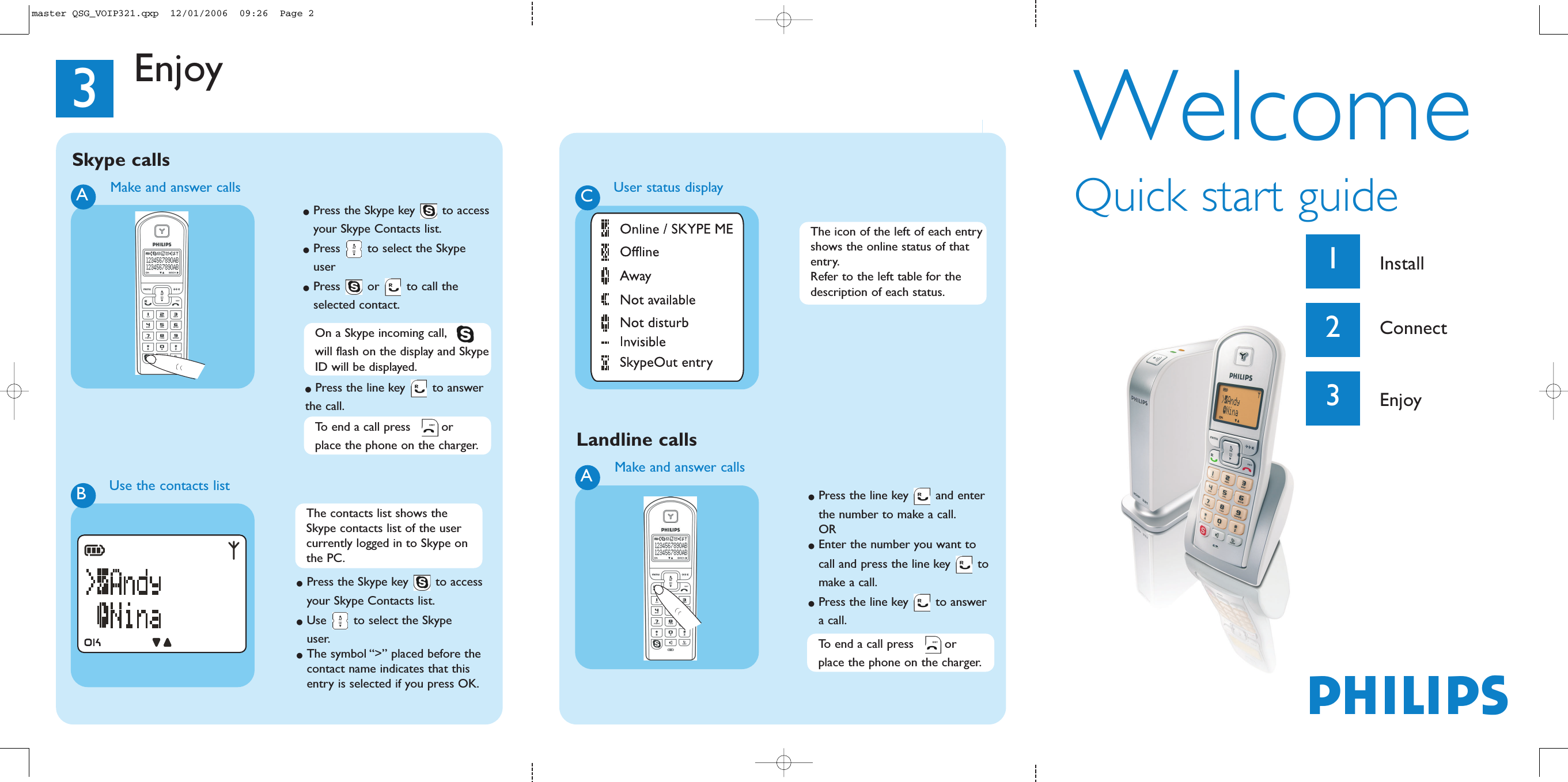
WelcomeQuick start guide1Install2Connect3EnjoyPhilipsMake and answer callsA●Press the line key  and enter the number to make a call.OR●Enter the number you want to call and press the line key  to make a call.●Press the line key  to answer a call.3EnjoyTo end a call press  or place the phone on the charger.Landline callsMake and answer callsA●Press the Skype key  to accessyour Skype Contacts list.●Press  to select the Skype user●Press or to call the selected contact.Use the contacts listB●Press the Skype key  to access your Skype Contacts list.●Use  to select the Skype user.●The symbol “>” placed before the contact name indicates that this entry is selected if you press OK.Skype callsCUser status displayOn a Skype incoming call,will flash on the display and SkypeID will be displayed.●Press the line key  to answer the call.The contacts list shows the Skype contacts list of the user currently logged in to Skype on the PC.The icon of the left of each entryshows the online status of that entry.Refer to the left table for the description of each status.To end a call press  or place the phone on the charger.master QSG_VOIP321.qxp  12/01/2006  09:26  Page 2
www.philips.com/faqs/dect34Equipment Approval InformationYour telephone equipment is approved for connection to the Public Switched Telephone Network and is in compliance with parts 15 and 68, FCC Rules and Regulations and the Technical Requirements for Telephone Terminal Equipment published by ACTA.Notification to the local telephone company On the bottom of this equipment is a label indicating, among other information, the US number and Ringer Equivalence Number (REN) for the equipment. You must, upon request, provide this information to your telephone company.The REN is useful in determining the number of devices you may connect to your telephone line and still have all of these devices ring when your telephone number is called. In most (but not all) areas, the sum of the RENs of all devices connected to one line should not exceed 5. To be certain of the number of devices you may connect to your line as determined by the REN, you should contact your local telephone company.A plug and jack used to connect this equipment to the premises wiring and telephone network must comply with the applicable FCC Part 68 rules and requirements adopted by the ACTA. A compliant telephone cord and modular plug is provided with this product. It is designed to be connected to a compatible modular jack that is also compliant. See installation instructions for details.Notes • This equipment may not be used on coin service provided by the telephone company.• Party lines are subject to state tariffs, and therefore, you may not be able to use your own telephone equipment if you are on a party line. Check with your local telephone company.• Notice must be given to the telephone company upon permanent disconnection of your telephone from your line.• If your home has specially wired alarm equipment connected to the telephone line, ensure the installation of this product does not disable your alarm equipment. If you have questions about what will disable alarm equipment, consult your telephone company or a qualified installer.Rights of the Phone CompanyShould your equipment cause trouble on your line which may harm the telephone network, the telephone company shall, where practicable, notify you that temporary discontinuance of service may be required. Where prior notice is not practicable and the circumstances warrant such action, the telephone company may temporarily discontinue service immediately. In case of such temporary discontinuance, the telephone company must:(1) promptly notify you of such temporary discontinuance; (2) afford you the opportunity to correct the situation; and (3) inform you of your right to bring a complaint to the Commission pursuant to procedures set forth in Subpart E of Part 68, FCC Rules and Regulations.The telephone company may make changes in its communications facilities, equipment, operations or procedures where such action is required in the operation of its business and not inconsistent with FCC Rules and Regulations. If these changes are expected to affect the use or performance of your telephone equipment, the telephone company must give you adequate notice, in writing, to allow you to maintain uninterrupted service.
www.philips.com/faqs/dect35Interference InformationThis device complies with Part 15 of the FCC Rules. Operation is subject to the following two conditions: (1) This device may not cause harmful interference; and (2) This device must accept any interference received, including interfer-ence that may cause undesired operation.This equipment has been tested and found to comply with the limits for a Class B digital device, pursuant to Part 15 of the FCC Rules. These limits are designed to provide reasonable protection against harmful interference in a residential installation.This equipment generates, uses, and can radiate radio frequency energy and, if not installed and used in accordance with the instructions, may cause harmful interference to radio communications. However, there is no guarantee that interfer-ence will not occur in a particular installation. If this equipment does cause harmful interference to radio or television reception, which can be determined by turning the equipment off and on, the user is encouraged to try to correct the interference by one or more of the following measures:• Reorient or relocate the receiving antenna (that is, the antenna for radio or television that is “receiving” the interference).• Reorient or relocate and increase the separation between the telecommunications equipment and receiving antenna.• Connect the telecommunications equipment into an outlet on a circuit different from that to which the receiving antenna is connected.If these measures do not eliminate the interference, please consult your dealer or an experienced radio/television tech-nician for additional suggestions. Also, the Federal Communications Commission has prepared a helpful booklet, “How To Identify and Resolve Radio/TV Interference Problems.” This booklet is available from the U.S. Government Printing Office, Washington, D.C. 20402. Please specify stock number 004-000-00345-4 when ordering copies.NoiseElectrical pulse noise is present at one time or another.  This is most intense during electrical storms.  Certain kinds of electrical equipment, such as light dimmers, fluorescent bulbs, motors, fans, etc., also generate pulse noise.  Because radio frequencies are susceptible to this, you may on occasion hear pulse noise through the receiver.  This is usually only a minor annoyance and should not be interpreted as a defect of the unit.FCC RF Radiation Exposure StatementThis equipment complies with FCC RF radiation exposure limits set forth for an uncontrolled environment. This equip-ment should be installed and operated with a minimum distance of 20 centimeters between the radiator and your body. This transmitter must not be co-located or operating in conjunction with any other antenna or transmitter.For hand held operation, this phone has been tested and meets the FCC RF exposure guidelines. Use of other acces-sories may not ensure compliance with FCC RF exposure guidelines.Hearing Aid Compatibility (HAC)This telephone system meets FCC and Industry Canada standards for Hearing Aid Compatibility.
www.philips.com/faqs/dect36PrivacyPrivacy of communications may not be ensured when using this telephone.Additional InformationI.C. NoticeTerminal EquipmentNOTICE: This equipment meets the applicable Industry Canada Terminal Equipment Technical Specifications.This is confirmed by the registration number. The abbreviation, IC, before the registration number signifies that registra-tion was performed based on a Declaration of Conformity indicating that Industry Canada technical specifications were met. It does not imply that Industry Canada approved the equipment.NOTICE: The Ringer Equivalence Number (REN) for this terminal equipment is marked on the equipment itself. The REN assigned to each terminal equipment provides an indication of the maximum number of terminals allowed to be connected to a telephone interface. The termination on an interface may consist of any combination of devices subject only to the requirement that the sum of the Ringer Equivalence Numbers of all the devices does not exceed five.Radio EquipmentThe term “IC:” before the radio certification number only signifies that Industry Canada technical specifications were met.Operation is subject to the following two conditions: (1) this device may not cause interference, and (2) this device must accept any interference, including interference that may cause undesired operation of the device. Do not attempt to repair or modify this equipmentRepairs to certified equipment should be made by an authorized maintenance facility designated by the supplier.  Any repairs or alterations made by the user to the equipment may render the equipment void in product warranty and compliance.  This could also void the user’s authority to operate the equipment.    Service CentersUSAPhilips Consumer ElectronicsP.O. Box 671539Marietta, GA 30006-0026Phone: 1-888-PHILIPS (744-5477)Phone: 1-800-363-7278 (English)Phone: 1-800-661-6162 (Francais)CANADAPhilips - Consumer Service Division4977 Levy StreetVille St. Lurent,Quebec H4R 2N9Phone: 1-800-363-7278 (English)Phone: 1-800-661-6162 (Francais)

Navigation menu