Avalan Wireless Systems orporated AW900G2LP MOD090-LP User Manual

Avalan Wireless Systems Incorporated MOD090-LP

User Manual

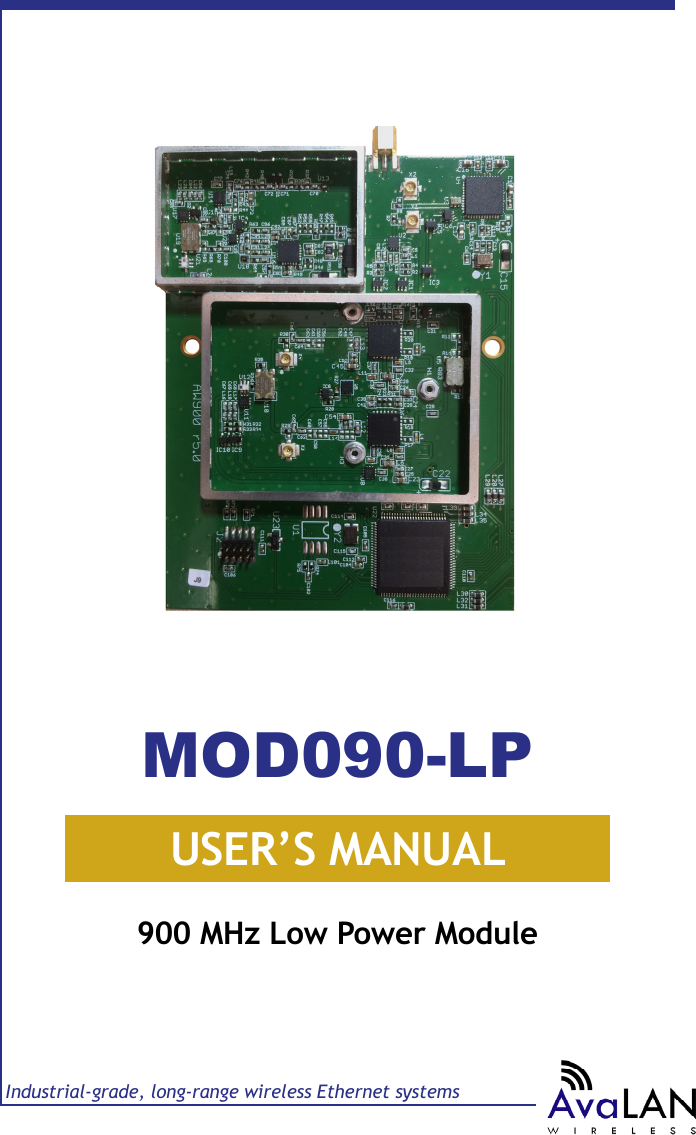
USER’S MANUALIndustrial-grade, long-range wireless Ethernet systems900 MHz Low Power ModuleMOD090-LP
MOD090-LP User’s ManualPAGE 2Technical support (650) 384-0000 www.avalanwireless.com© 2017 by AvaLAN Wireless Systems Inc. All rights reserved.Revision 02.09.2017127 Jetplex CircleMadison, AL 35758Sales: (866) 533-6216Technical Support: (650) 384-0000Customer Service: (650) 641-3011Fax: (650) 249-3591Thank you for your purchase of the MOD090-LP 900 MHz Radio Module.Firmware and software described in this manual may be downloaded from www.avalanwireless.com/downloads.htm. (You can also nd a pdf of the latest version of this manual.)If you have any questions when conguring your AvaLAN system, the best place to get answers is to visit www.avalanwireless.com. If more assistance is needed, send email to support@avalanwireless.com. To speak to a live technician, please call technical support at the number below during normal business hours.
PAGE 3Technical support (650) 384-0000 www.avalanwireless.comMOD090-LPUser’s ManualTable of ContentsTechnical Summary . . . . . . . . . . . . . . . . . . . . . . . 4Module Physical Interface . . . . . . . . . . . . . . . . . .  5Module SPI Interfaces . . . . . . . . . . . . . . . . . . . . . 5Module UART Interface . . . . . . . . . . . . . . . . . . . . . 11Module Command Set . . . . . . . . . . . . . . . . . . . . . 12Programming Examples . . . . . . . . . . . . . . . . . . . . 25Implementation Block Diagrams . . . . . . . . . . . . . .  28FCC and IC Certication . . . . . . . . . . . . . . . . . . . . . 30
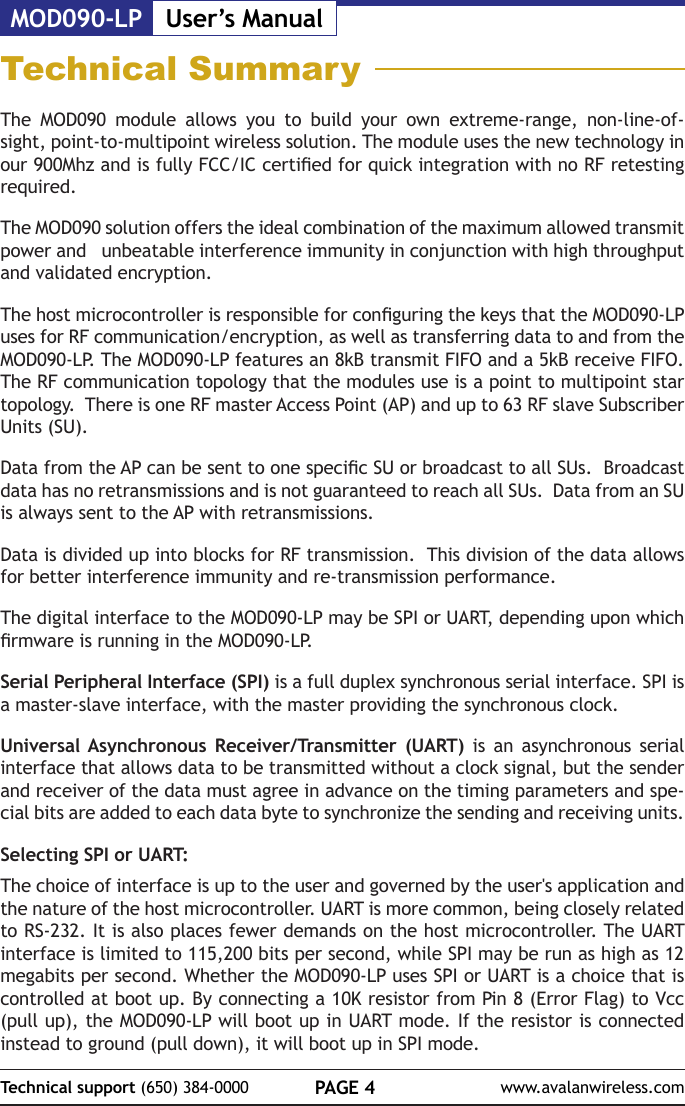
MOD090-LP User’s ManualPAGE 4Technical support (650) 384-0000 www.avalanwireless.comTechnical SummaryThe MOD090 module allows you to build your own extreme-range, non-line-of-sight, point-to-multipoint wireless solution. The module uses the new technology in our 900Mhz and is fully FCC/IC certied for quick integration with no RF retesting required.  The MOD090 solution offers the ideal combination of the maximum allowed transmit power and   unbeatable interference immunity in conjunction with high throughput and validated encryption.The host microcontroller is responsible for conguring the keys that the MOD090-LP uses for RF communication/encryption, as well as transferring data to and from the MOD090-LP. The MOD090-LP features an 8kB transmit FIFO and a 5kB receive FIFO. The RF communication topology that the modules use is a point to multipoint star topology.  There is one RF master Access Point (AP) and up to 63 RF slave Subscriber Units (SU).Data from the AP can be sent to one specic SU or broadcast to all SUs.  Broadcast data has no retransmissions and is not guaranteed to reach all SUs.  Data from an SU is always sent to the AP with retransmissions.Data is divided up into blocks for RF transmission.  This division of the data allows for better interference immunity and re-transmission performance.The digital interface to the MOD090-LP may be SPI or UART, depending upon which rmware is running in the MOD090-LP.Serial Peripheral Interface (SPI) is a full duplex synchronous serial interface. SPI is a master-slave interface, with the master providing the synchronous clock.Universal Asynchronous Receiver/Transmitter (UART) is an asynchronous serial interface that allows data to be transmitted without a clock signal, but the sender and receiver of the data must agree in advance on the timing parameters and spe-cial bits are added to each data byte to synchronize the sending and receiving units. Selecting SPI or UART:The choice of interface is up to the user and governed by the user's application and the nature of the host microcontroller. UART is more common, being closely related to RS-232. It is also places fewer demands on the host microcontroller. The UART interface is limited to 115,200 bits per second, while SPI may be run as high as 12 megabits per second. Whether the MOD090-LP uses SPI or UART is a choice that is controlled at boot up. By connecting a 10K resistor from Pin 8 (Error Flag) to Vcc (pull up), the MOD090-LP will boot up in UART mode. If the resistor is connected instead to ground (pull down), it will boot up in SPI mode.
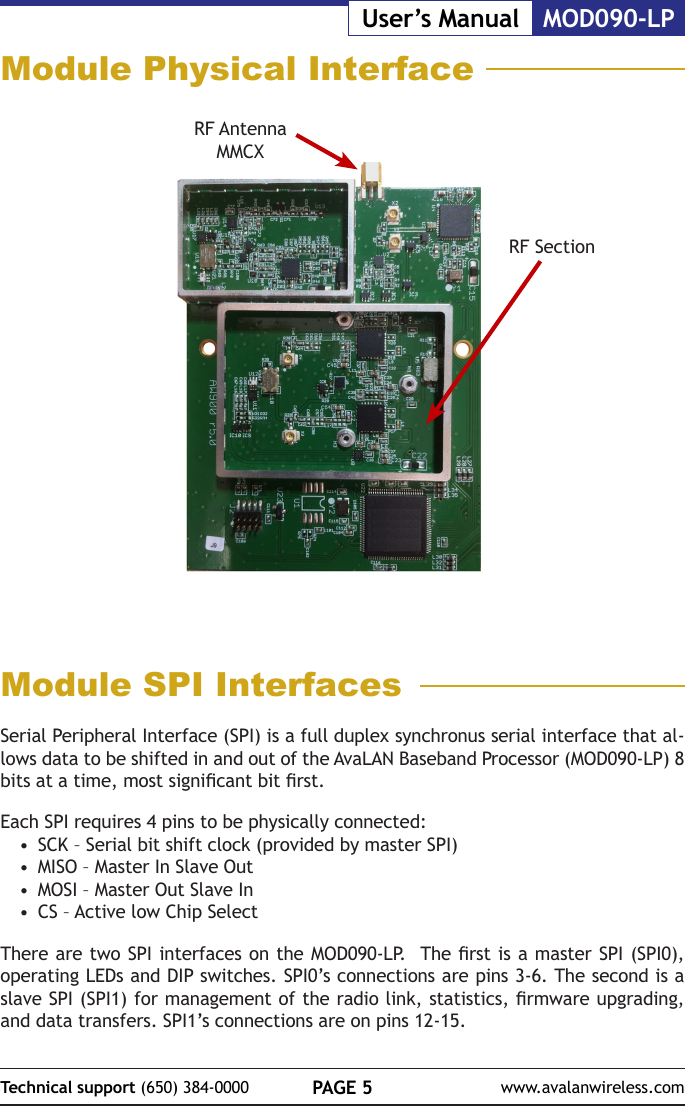
PAGE 5Technical support (650) 384-0000 www.avalanwireless.comMOD090-LPUser’s ManualModule Physical InterfaceRF Antenna MMCXModule SPI InterfacesSerial Peripheral Interface (SPI) is a full duplex synchronus serial interface that al-lows data to be shifted in and out of the AvaLAN Baseband Processor (MOD090-LP) 8 bits at a time, most signicant bit rst.Each SPI requires 4 pins to be physically connected:•  SCK – Serial bit shift clock (provided by master SPI)•  MISO – Master In Slave Out•  MOSI – Master Out Slave In•  CS – Active low Chip Select There are two SPI interfaces on the MOD090-LP.  The rst is a master SPI (SPI0), operating LEDs and DIP switches. SPI0’s connections are pins 3-6. The second is a slave SPI (SPI1) for management of the radio link, statistics, rmware upgrading, and data transfers. SPI1’s connections are on pins 12-15.RF Section
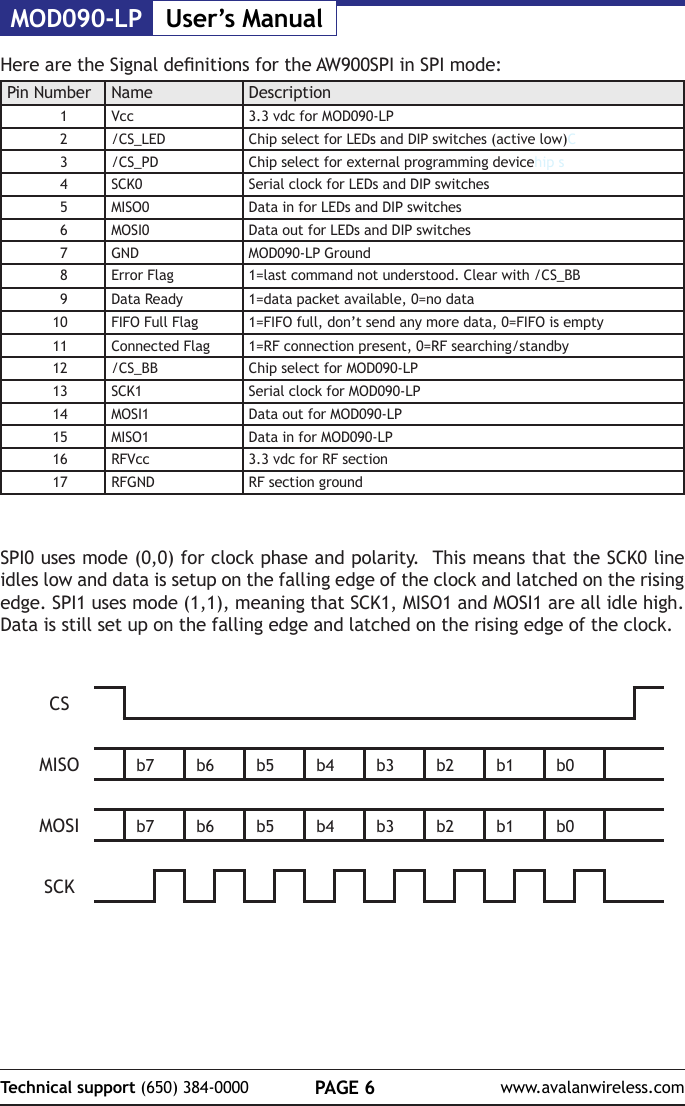
MOD090-LP User’s ManualPAGE 6Technical support (650) 384-0000 www.avalanwireless.comHere are the Signal denitions for the AW900SPI in SPI mode:Pin Number Name Description1Vcc 3.3 vdc for MOD090-LP2/CS_LED Chip select for LEDs and DIP switches (active low)C3/CS_PD Chip select for external programming devicehip s4SCK0 Serial clock for LEDs and DIP switches5MISO0 Data in for LEDs and DIP switches6MOSI0 Data out for LEDs and DIP switches7GND MOD090-LP Ground8Error Flag 1=last command not understood. Clear with /CS_BB9Data Ready 1=data packet available, 0=no data10 FIFO Full Flag 1=FIFO full, don’t send any more data, 0=FIFO is empty11 Connected Flag 1=RF connection present, 0=RF searching/standby12 /CS_BB Chip select for MOD090-LP13 SCK1 Serial clock for MOD090-LP14 MOSI1 Data out for MOD090-LP15 MISO1 Data in for MOD090-LP16 RFVcc 3.3 vdc for RF section17 RFGND RF section groundSPI0 uses mode (0,0) for clock phase and polarity.  This means that the SCK0 line idles low and data is setup on the falling edge of the clock and latched on the rising edge. SPI1 uses mode (1,1), meaning that SCK1, MISO1 and MOSI1 are all idle high. Data is still set up on the falling edge and latched on the rising edge of the clock.  CSMISO b7 b6 b5 b4 b3 b2 b1 b0MOSI b7 b6 b5 b4 b3 b2 b1 b0SCK
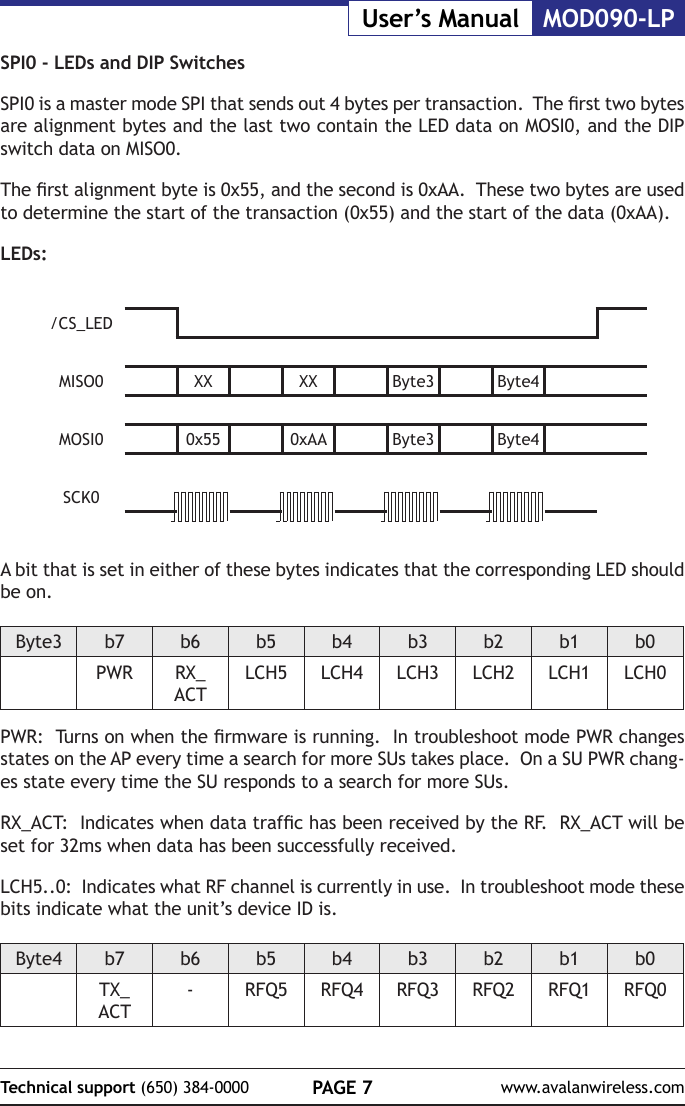
PAGE 7Technical support (650) 384-0000 www.avalanwireless.comMOD090-LPUser’s ManualSPI0 - LEDs and DIP SwitchesSPI0 is a master mode SPI that sends out 4 bytes per transaction.  The rst two bytes are alignment bytes and the last two contain the LED data on MOSI0, and the DIP switch data on MISO0.The rst alignment byte is 0x55, and the second is 0xAA.  These two bytes are used to determine the start of the transaction (0x55) and the start of the data (0xAA).LEDs:/CS_LEDMISO0 XX XX Byte3 Byte4MOSI0 0x55 0xAA Byte3 Byte4SCK0                             A bit that is set in either of these bytes indicates that the corresponding LED should be on.Byte3 b7 b6 b5 b4 b3 b2 b1 b0PWR RX_ACTLCH5 LCH4 LCH3 LCH2 LCH1 LCH0PWR:  Turns on when the rmware is running.  In troubleshoot mode PWR changes states on the AP every time a search for more SUs takes place.  On a SU PWR chang-es state every time the SU responds to a search for more SUs.RX_ACT:  Indicates when data trafc has been received by the RF.  RX_ACT will be set for 32ms when data has been successfully received.LCH5..0:  Indicates what RF channel is currently in use.  In troubleshoot mode these bits indicate what the unit’s device ID is.Byte4 b7 b6 b5 b4 b3 b2 b1 b0TX_ACT-RFQ5 RFQ4 RFQ3 RFQ2 RFQ1 RFQ0
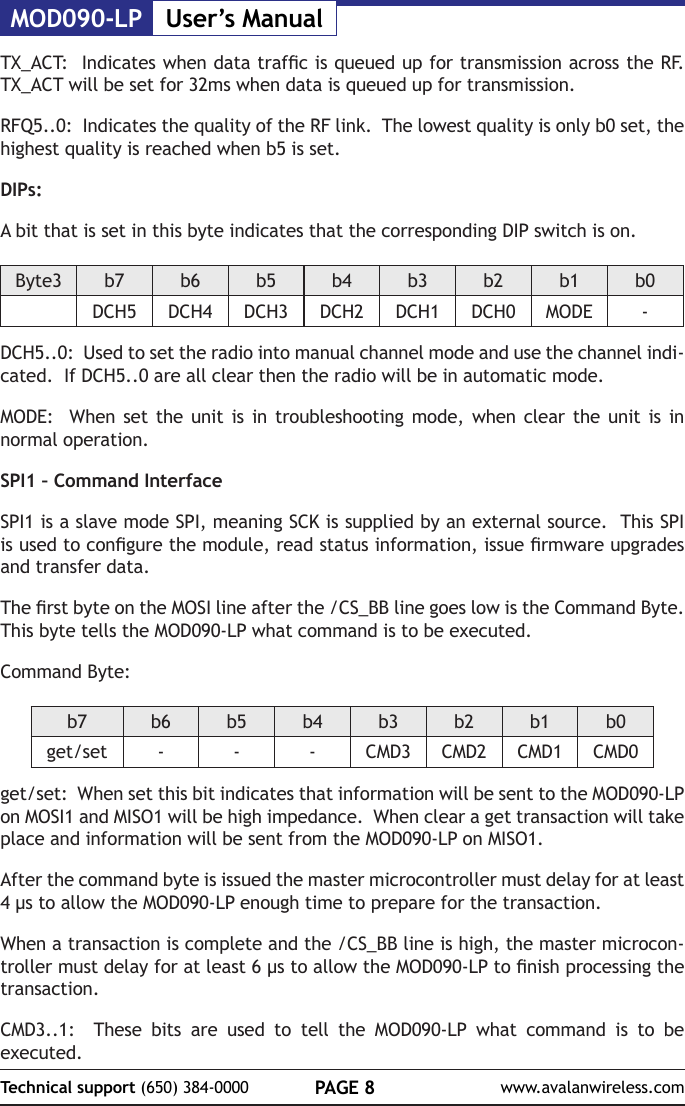
MOD090-LP User’s ManualPAGE 8Technical support (650) 384-0000 www.avalanwireless.comTX_ACT:  Indicates when data trafc is queued up for transmission across the RF.  TX_ACT will be set for 32ms when data is queued up for transmission.RFQ5..0:  Indicates the quality of the RF link.  The lowest quality is only b0 set, the highest quality is reached when b5 is set.DIPs:A bit that is set in this byte indicates that the corresponding DIP switch is on.Byte3 b7 b6 b5 b4 b3 b2 b1 b0DCH5 DCH4 DCH3 DCH2 DCH1 DCH0 MODE -DCH5..0:  Used to set the radio into manual channel mode and use the channel indi-cated.  If DCH5..0 are all clear then the radio will be in automatic mode.MODE:  When set the unit is in troubleshooting mode, when clear the unit is in normal operation.SPI1 – Command InterfaceSPI1 is a slave mode SPI, meaning SCK is supplied by an external source.  This SPI is used to congure the module, read status information, issue rmware upgrades and transfer data.The rst byte on the MOSI line after the /CS_BB line goes low is the Command Byte.  This byte tells the MOD090-LP what command is to be executed.Command Byte:b7 b6 b5 b4 b3 b2 b1 b0get/set - - - CMD3 CMD2 CMD1 CMD0get/set:  When set this bit indicates that information will be sent to the MOD090-LP on MOSI1 and MISO1 will be high impedance.  When clear a get transaction will take place and information will be sent from the MOD090-LP on MISO1.After the command byte is issued the master microcontroller must delay for at least 4 µs to allow the MOD090-LP enough time to prepare for the transaction.  When a transaction is complete and the /CS_BB line is high, the master microcon-troller must delay for at least 6 µs to allow the MOD090-LP to nish processing the transaction.CMD3..1:  These bits are used to tell the MOD090-LP what command is to be executed.
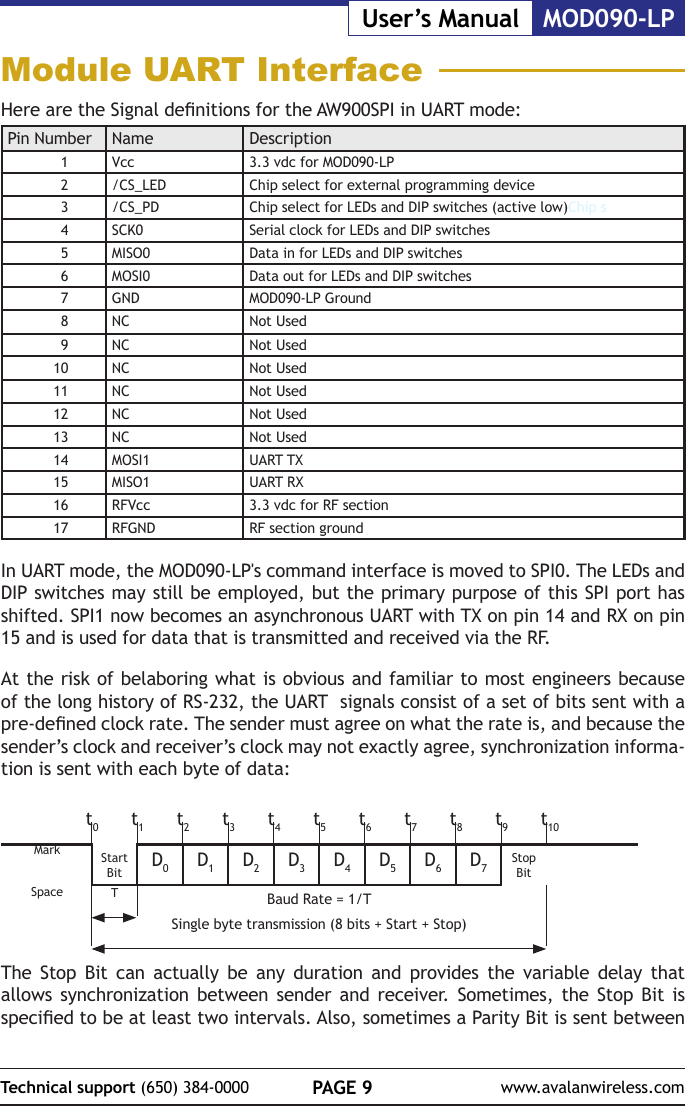
PAGE 9Technical support (650) 384-0000 www.avalanwireless.comMOD090-LPUser’s ManualModule UART InterfaceHere are the Signal denitions for the AW900SPI in UART mode:Pin Number Name Description1Vcc 3.3 vdc for MOD090-LP2/CS_LED Chip select for external programming device3/CS_PD Chip select for LEDs and DIP switches (active low)Chip s4SCK0 Serial clock for LEDs and DIP switches5MISO0 Data in for LEDs and DIP switches6MOSI0 Data out for LEDs and DIP switches7GND MOD090-LP Ground8NC Not Used9NC Not Used10 NC Not Used11 NC Not Used12 NC Not Used13 NC Not Used14 MOSI1 UART TX15 MISO1 UART RX16 RFVcc 3.3 vdc for RF section17 RFGND RF section groundIn UART mode, the MOD090-LP's command interface is moved to SPI0. The LEDs and DIP switches may still be employed, but the primary purpose of this SPI port has shifted. SPI1 now becomes an asynchronous UART with TX on pin 14 and RX on pin 15 and is used for data that is transmitted and received via the RF.At the risk of belaboring what is obvious and familiar to most engineers because of the long history of RS-232, the UART  signals consist of a set of bits sent with a pre-dened clock rate. The sender must agree on what the rate is, and because the sender’s clock and receiver’s clock may not exactly agree, synchronization informa-tion is sent with each byte of data:Start Bit D0D1D2D3D4D5D6D7Stop BitTBaud Rate = 1/TSingle byte transmission (8 bits + Start + Stop)The Stop Bit can actually be any duration and provides the variable delay that allows synchronization between sender and receiver. Sometimes, the Stop Bit is specied to be at least two intervals. Also, sometimes a Parity Bit is sent between t0t1t2t3t4t5t6t7t8t9t10MarkSpace
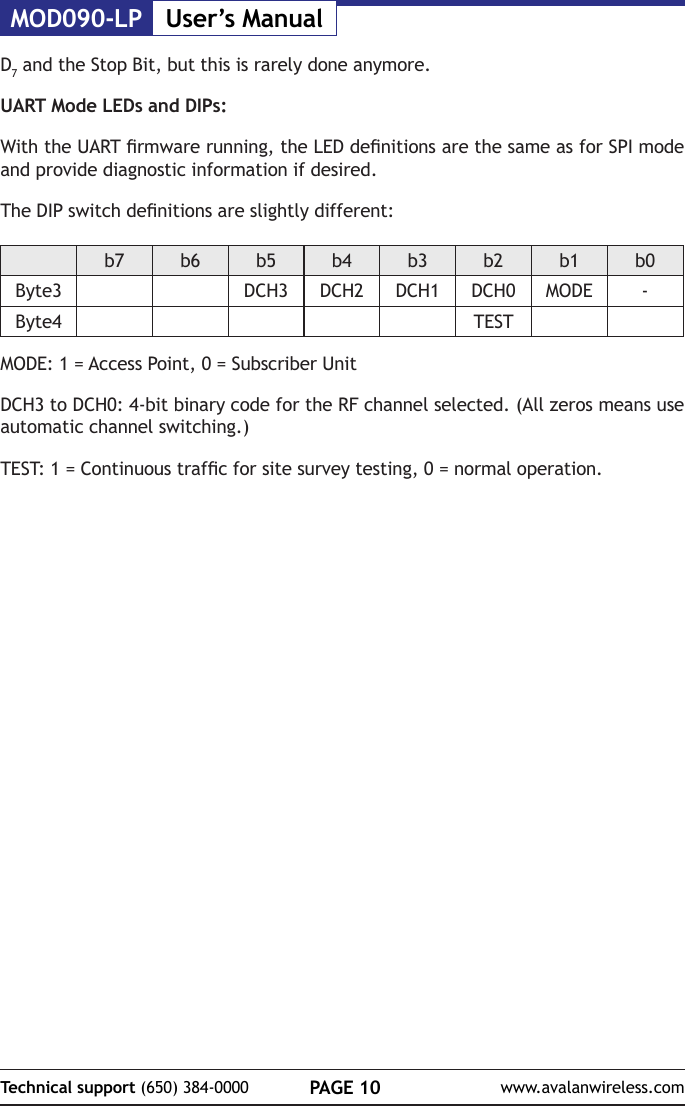
MOD090-LP User’s ManualPAGE 10Technical support (650) 384-0000 www.avalanwireless.comD7 and the Stop Bit, but this is rarely done anymore.UART Mode LEDs and DIPs:With the UART rmware running, the LED denitions are the same as for SPI mode and provide diagnostic information if desired.The DIP switch denitions are slightly different:b7 b6 b5 b4 b3 b2 b1 b0Byte3 DCH3 DCH2 DCH1 DCH0 MODE -Byte4 TESTMODE: 1 = Access Point, 0 = Subscriber UnitDCH3 to DCH0: 4-bit binary code for the RF channel selected. (All zeros means use automatic channel switching.)TEST: 1 = Continuous trafc for site survey testing, 0 = normal operation.
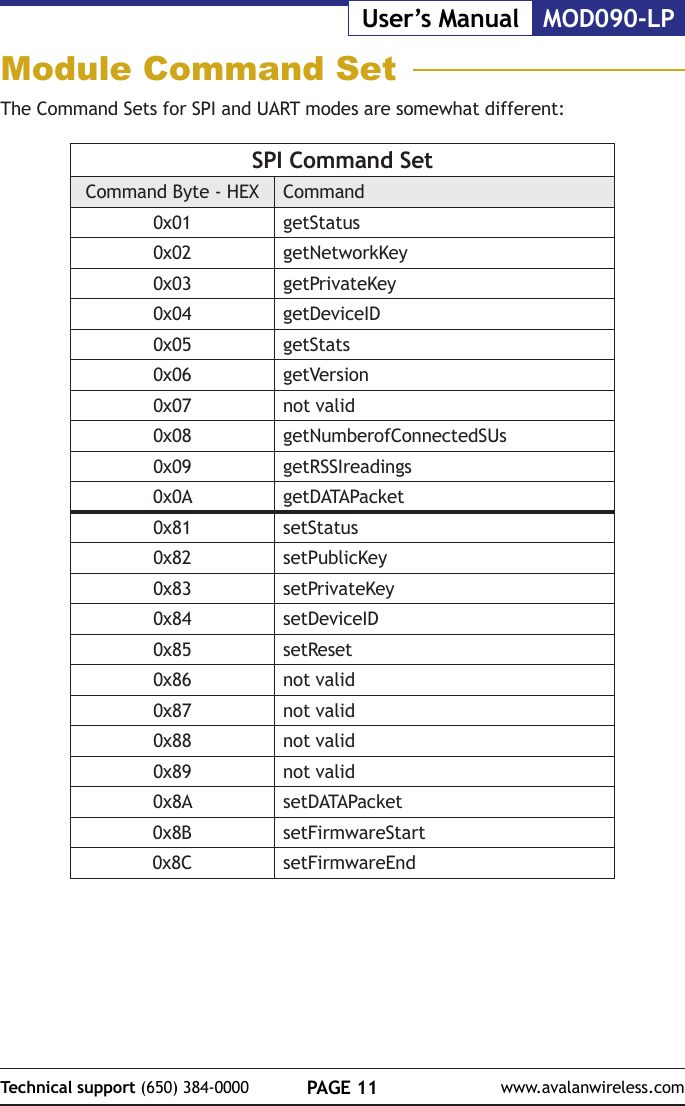
PAGE 11Technical support (650) 384-0000 www.avalanwireless.comMOD090-LPUser’s ManualThe Command Sets for SPI and UART modes are somewhat different:SPI Command SetCommand Byte - HEX Command0x01 getStatus0x02 getNetworkKey0x03 getPrivateKey0x04 getDeviceID0x05 getStats0x06 getVersion0x07 not valid0x08 getNumberofConnectedSUs0x09 getRSSIreadings0x0A getDATAPacket0x81 setStatus0x82 setPublicKey0x83 setPrivateKey0x84 setDeviceID0x85 setReset0x86 not valid0x87 not valid0x88 not valid0x89 not valid0x8A setDATAPacket0x8B setFirmwareStart0x8C setFirmwareEndModule Command Set
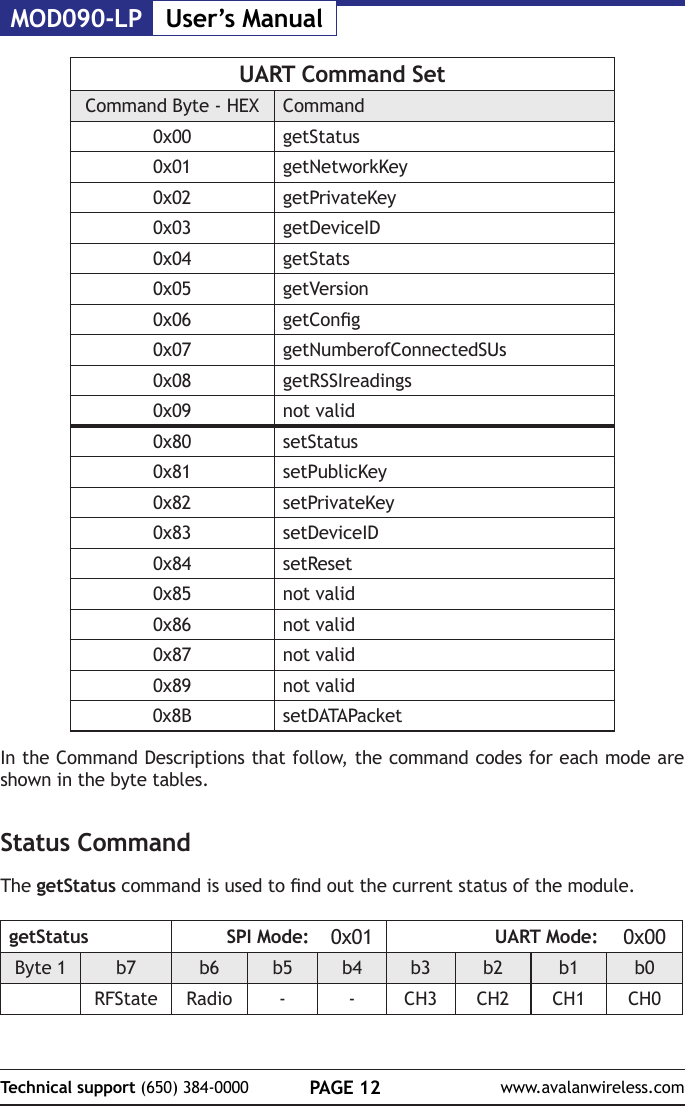
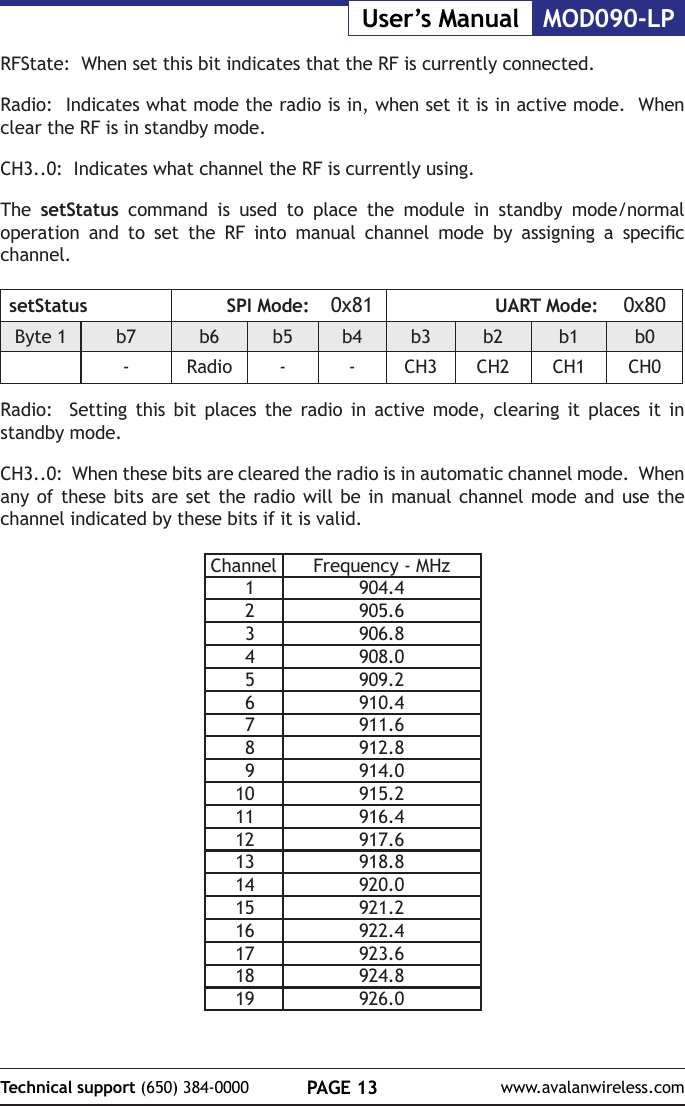
MOD090-LP User’s ManualPAGE 12Technical support (650) 384-0000 www.avalanwireless.comUART Command SetCommand Byte - HEX Command0x00 getStatus0x01 getNetworkKey0x02 getPrivateKey0x03 getDeviceID0x04 getStats0x05 getVersion0x06 getCong0x07 getNumberofConnectedSUs0x08 getRSSIreadings0x09 not valid0x80 setStatus0x81 setPublicKey0x82 setPrivateKey0x83 setDeviceID0x84 setReset0x85 not valid0x86 not valid0x87 not valid0x89 not valid0x8B setDATAPacketIn the Command Descriptions that follow, the command codes for each mode are shown in the byte tables.Status CommandThe getStatus command is used to nd out the current status of the module.getStatus SPI Mode: 0x01 UART Mode: 0x00Byte 1 b7 b6 b5 b4 b3 b2 b1 b0RFState Radio - - CH3 CH2 CH1 CH0
PAGE 13Technical support (650) 384-0000 www.avalanwireless.comMOD090-LPUser’s ManualRFState:  When set this bit indicates that the RF is currently connected.Radio:  Indicates what mode the radio is in, when set it is in active mode.  When clear the RF is in standby mode.CH3..0:  Indicates what channel the RF is currently using.The  setStatus command is used to place the module in standby mode/normal operation  and  to  set  the  RF  into  manual  channel  mode  by  assigning  a  specic channel.setStatus SPI Mode: 0x81 UART Mode: 0x80Byte 1 b7 b6 b5 b4 b3 b2 b1 b0-Radio - - CH3 CH2 CH1 CH0Radio:  Setting this bit places the radio in active mode, clearing it places it in standby mode.CH3..0:  When these bits are cleared the radio is in automatic channel mode.  When any of these bits are set the radio will be in manual channel mode and use the channel indicated by these bits if it is valid.Channel Frequency - MHz1904.42905.63906.84908.05909.26910.47911.68912.89914.010 915.211 916.412 917.613 918.814 920.015 921.216 922.417 923.618 924.819 926.0
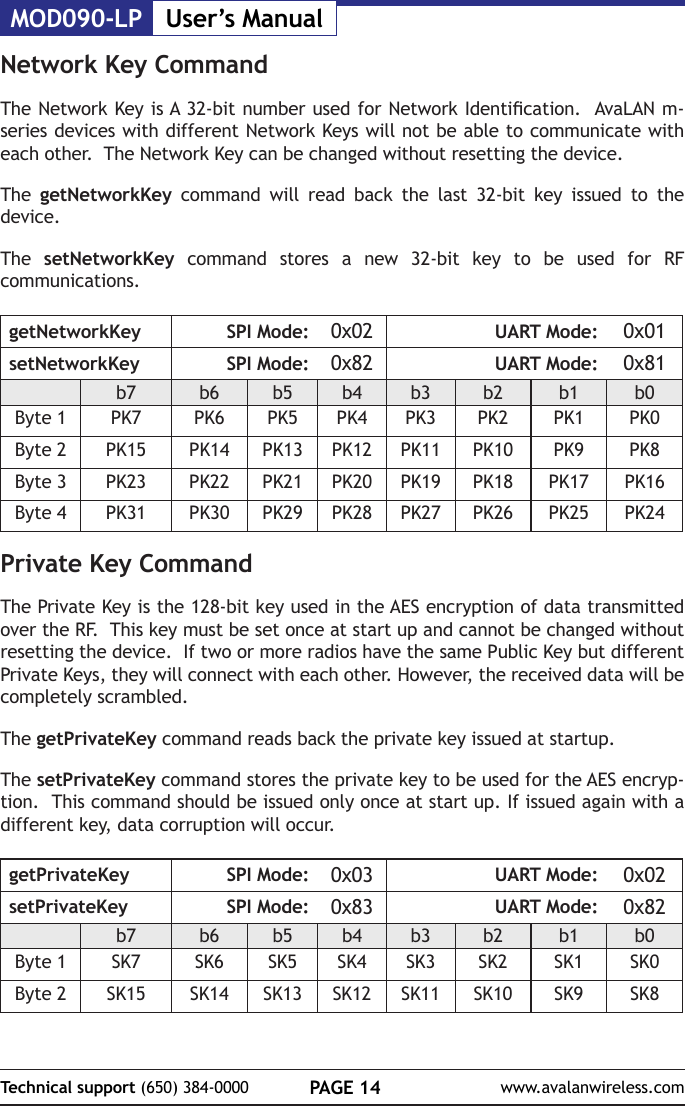
MOD090-LP User’s ManualPAGE 14Technical support (650) 384-0000 www.avalanwireless.comNetwork Key CommandThe Network Key is A 32-bit number used for Network Identication.  AvaLAN m-series devices with different Network Keys will not be able to communicate with each other.  The Network Key can be changed without resetting the device.The  getNetworkKey command will read back the last 32-bit key issued to the device.The  setNetworkKey command stores a new 32-bit key to be used for RF communications.getNetworkKey SPI Mode: 0x02 UART Mode: 0x01setNetworkKey SPI Mode: 0x82 UART Mode: 0x81b7 b6 b5 b4 b3 b2 b1 b0Byte 1 PK7 PK6 PK5 PK4 PK3 PK2 PK1 PK0Byte 2 PK15 PK14 PK13 PK12 PK11 PK10 PK9 PK8Byte 3 PK23 PK22 PK21 PK20 PK19 PK18 PK17 PK16Byte 4 PK31 PK30 PK29 PK28 PK27 PK26 PK25 PK24Private Key CommandThe Private Key is the 128-bit key used in the AES encryption of data transmitted over the RF.  This key must be set once at start up and cannot be changed without resetting the device.  If two or more radios have the same Public Key but different Private Keys, they will connect with each other. However, the received data will be completely scrambled. The getPrivateKey command reads back the private key issued at startup.The setPrivateKey command stores the private key to be used for the AES encryp-tion.  This command should be issued only once at start up. If issued again with a different key, data corruption will occur.getPrivateKey SPI Mode: 0x03 UART Mode: 0x02setPrivateKey SPI Mode: 0x83 UART Mode: 0x82b7 b6 b5 b4 b3 b2 b1 b0Byte 1 SK7 SK6 SK5 SK4 SK3 SK2 SK1 SK0Byte 2 SK15 SK14 SK13 SK12 SK11 SK10 SK9 SK8
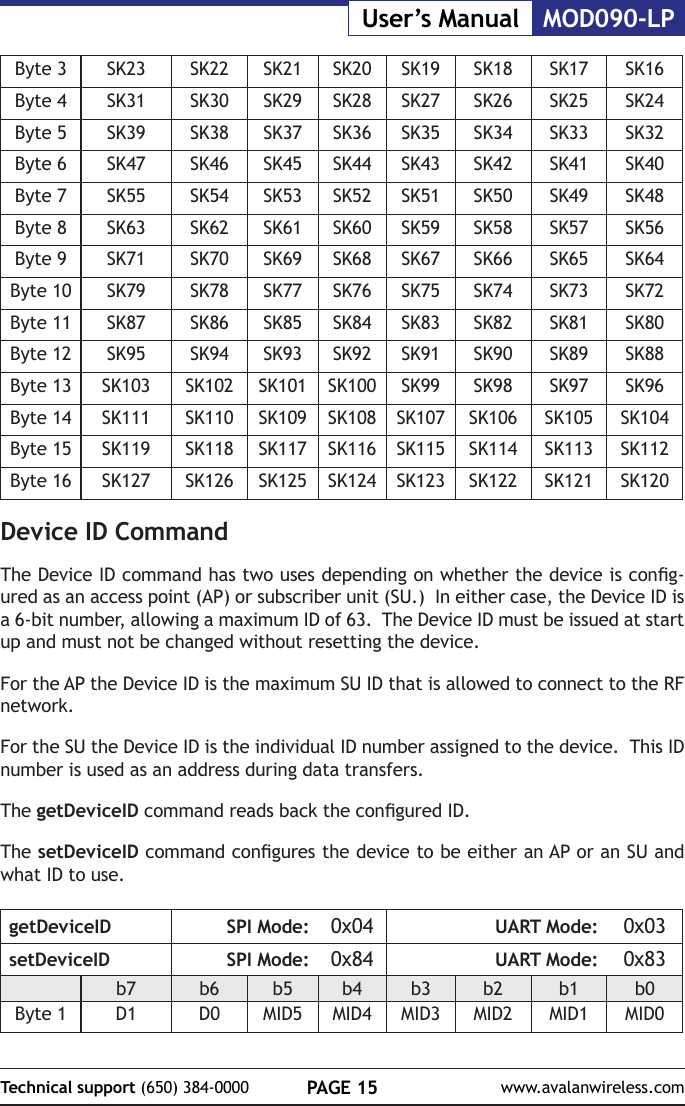
PAGE 15Technical support (650) 384-0000 www.avalanwireless.comMOD090-LPUser’s ManualByte 3 SK23 SK22 SK21 SK20 SK19 SK18 SK17 SK16Byte 4 SK31 SK30 SK29 SK28 SK27 SK26 SK25 SK24Byte 5 SK39 SK38 SK37 SK36 SK35 SK34 SK33 SK32Byte 6 SK47 SK46 SK45 SK44 SK43 SK42 SK41 SK40Byte 7 SK55 SK54 SK53 SK52 SK51 SK50 SK49 SK48Byte 8 SK63 SK62 SK61 SK60 SK59 SK58 SK57 SK56Byte 9 SK71 SK70 SK69 SK68 SK67 SK66 SK65 SK64Byte 10 SK79 SK78 SK77 SK76 SK75 SK74 SK73 SK72Byte 11 SK87 SK86 SK85 SK84 SK83 SK82 SK81 SK80Byte 12 SK95 SK94 SK93 SK92 SK91 SK90 SK89 SK88Byte 13 SK103 SK102 SK101 SK100 SK99 SK98 SK97 SK96Byte 14 SK111 SK110 SK109 SK108 SK107 SK106 SK105 SK104Byte 15 SK119 SK118 SK117 SK116 SK115 SK114 SK113 SK112Byte 16 SK127 SK126 SK125 SK124 SK123 SK122 SK121 SK120Device ID CommandThe Device ID command has two uses depending on whether the device is cong-ured as an access point (AP) or subscriber unit (SU.)  In either case, the Device ID is a 6-bit number, allowing a maximum ID of 63.  The Device ID must be issued at start up and must not be changed without resetting the device.For the AP the Device ID is the maximum SU ID that is allowed to connect to the RF network.For the SU the Device ID is the individual ID number assigned to the device.  This ID number is used as an address during data transfers.The getDeviceID command reads back the congured ID.The setDeviceID command congures the device to be either an AP or an SU and what ID to use.getDeviceID SPI Mode: 0x04 UART Mode: 0x03setDeviceID SPI Mode: 0x84 UART Mode: 0x83b7 b6 b5 b4 b3 b2 b1 b0Byte 1 D1 D0 MID5 MID4 MID3 MID2 MID1 MID0
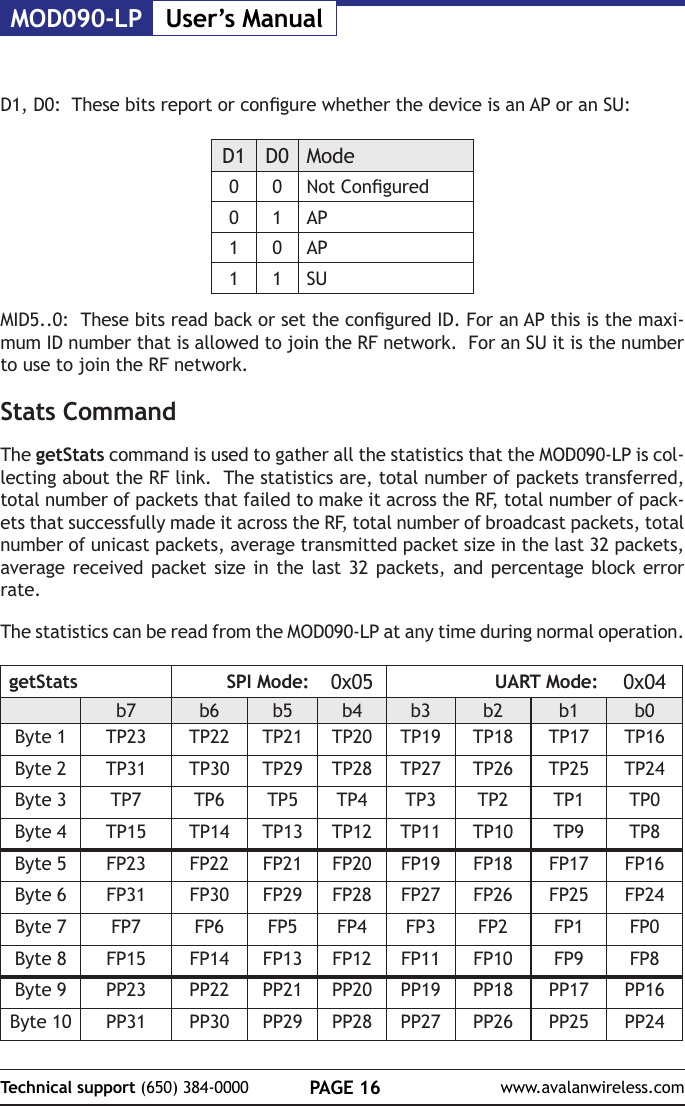
MOD090-LP User’s ManualPAGE 16Technical support (650) 384-0000 www.avalanwireless.comD1, D0:  These bits report or congure whether the device is an AP or an SU:D1 D0 Mode0 0 Not Congured0 1 AP1 0 AP1 1 SUMID5..0:  These bits read back or set the congured ID. For an AP this is the maxi-mum ID number that is allowed to join the RF network.  For an SU it is the number to use to join the RF network.Stats CommandThe getStats command is used to gather all the statistics that the MOD090-LP is col-lecting about the RF link.  The statistics are, total number of packets transferred, total number of packets that failed to make it across the RF, total number of pack-ets that successfully made it across the RF, total number of broadcast packets, total number of unicast packets, average transmitted packet size in the last 32 packets, average received packet size in the last 32 packets, and percentage block error rate.The statistics can be read from the MOD090-LP at any time during normal operation.getStats SPI Mode: 0x05 UART Mode: 0x04b7 b6 b5 b4 b3 b2 b1 b0Byte 1 TP23 TP22 TP21 TP20 TP19 TP18 TP17 TP16Byte 2 TP31 TP30 TP29 TP28 TP27 TP26 TP25 TP24Byte 3 TP7 TP6 TP5 TP4 TP3 TP2 TP1 TP0Byte 4 TP15 TP14 TP13 TP12 TP11 TP10 TP9 TP8Byte 5 FP23 FP22 FP21 FP20 FP19 FP18 FP17 FP16Byte 6 FP31 FP30 FP29 FP28 FP27 FP26 FP25 FP24Byte 7 FP7 FP6 FP5 FP4 FP3 FP2 FP1 FP0Byte 8 FP15 FP14 FP13 FP12 FP11 FP10 FP9 FP8Byte 9 PP23 PP22 PP21 PP20 PP19 PP18 PP17 PP16Byte 10 PP31 PP30 PP29 PP28 PP27 PP26 PP25 PP24
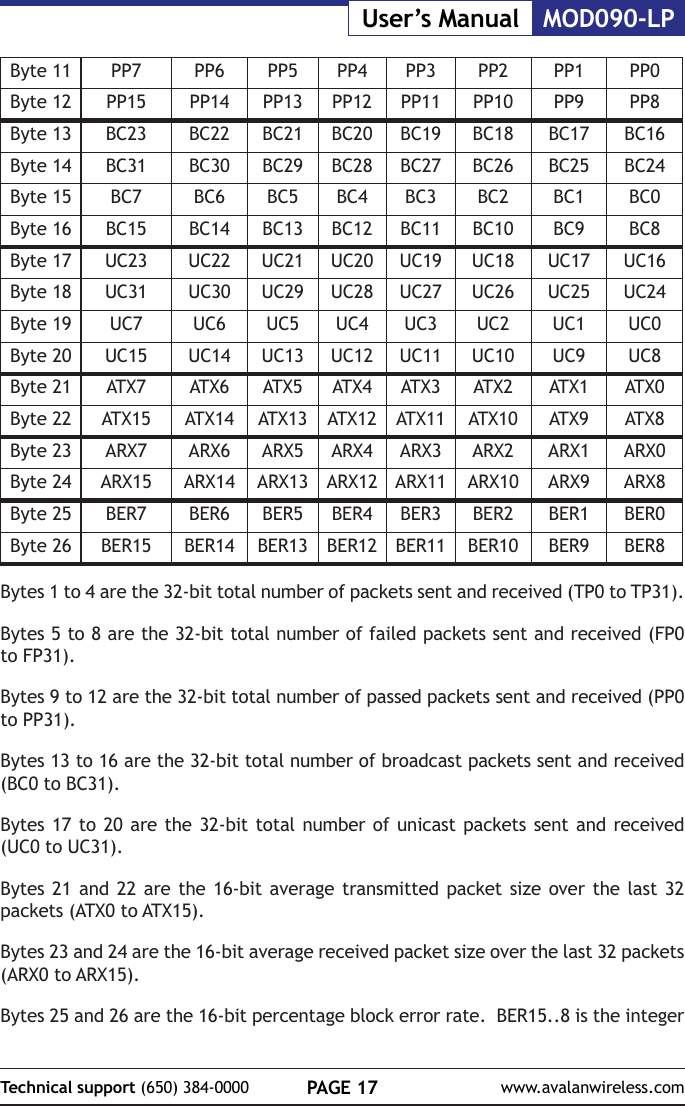
PAGE 17Technical support (650) 384-0000 www.avalanwireless.comMOD090-LPUser’s ManualByte 11 PP7 PP6 PP5 PP4 PP3 PP2 PP1 PP0Byte 12 PP15 PP14 PP13 PP12 PP11 PP10 PP9 PP8Byte 13 BC23 BC22 BC21 BC20 BC19 BC18 BC17 BC16Byte 14 BC31 BC30 BC29 BC28 BC27 BC26 BC25 BC24Byte 15 BC7 BC6 BC5 BC4 BC3 BC2 BC1 BC0Byte 16 BC15 BC14 BC13 BC12 BC11 BC10 BC9 BC8Byte 17 UC23 UC22 UC21 UC20 UC19 UC18 UC17 UC16Byte 18 UC31 UC30 UC29 UC28 UC27 UC26 UC25 UC24Byte 19 UC7 UC6 UC5 UC4 UC3 UC2 UC1 UC0Byte 20 UC15 UC14 UC13 UC12 UC11 UC10 UC9 UC8Byte 21 ATX7 ATX6 ATX5 ATX4 ATX3 ATX2 ATX1 ATX0Byte 22 ATX15 ATX14 ATX13 ATX12 ATX11 ATX10 ATX9 ATX8Byte 23 ARX7 ARX6 ARX5 ARX4 ARX3 ARX2 ARX1 ARX0Byte 24 ARX15 ARX14 ARX13 ARX12 ARX11 ARX10 ARX9 ARX8Byte 25 BER7 BER6 BER5 BER4 BER3 BER2 BER1 BER0Byte 26 BER15 BER14 BER13 BER12 BER11 BER10 BER9 BER8Bytes 1 to 4 are the 32-bit total number of packets sent and received (TP0 to TP31).Bytes 5 to 8 are the 32-bit total number of failed packets sent and received (FP0 to FP31).Bytes 9 to 12 are the 32-bit total number of passed packets sent and received (PP0 to PP31).Bytes 13 to 16 are the 32-bit total number of broadcast packets sent and received (BC0 to BC31).Bytes 17 to 20 are the 32-bit total number of unicast packets sent and received (UC0 to UC31).Bytes 21 and 22 are the 16-bit average transmitted packet size over the last 32 packets (ATX0 to ATX15).Bytes 23 and 24 are the 16-bit average received packet size over the last 32 packets (ARX0 to ARX15).Bytes 25 and 26 are the 16-bit percentage block error rate.  BER15..8 is the integer
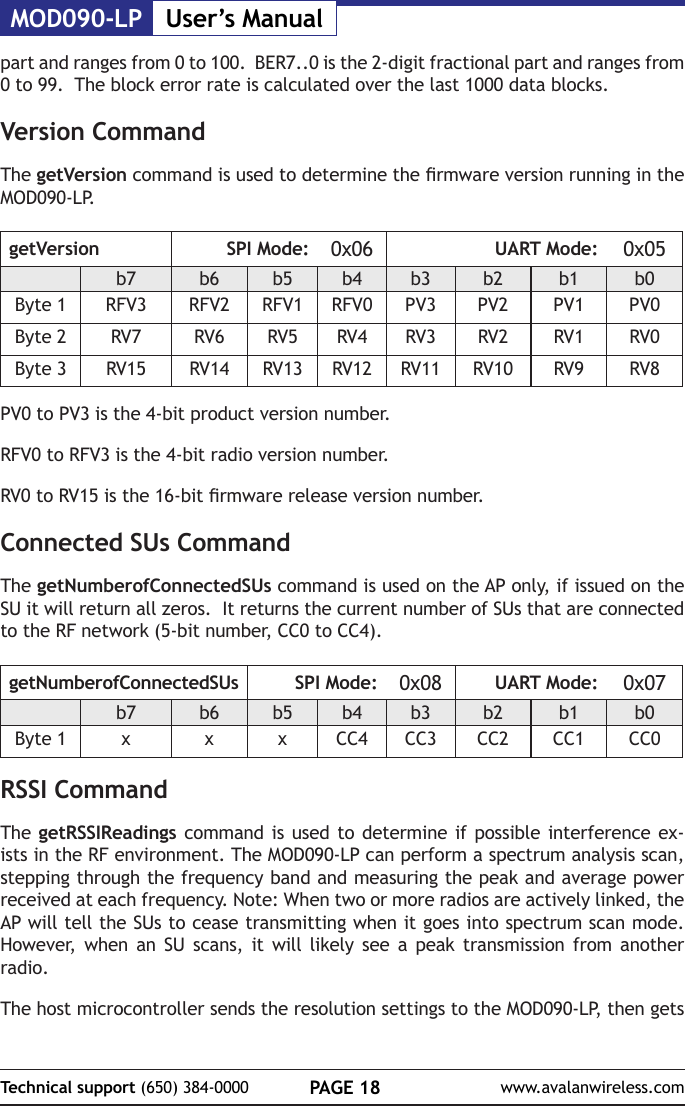
MOD090-LP User’s ManualPAGE 18Technical support (650) 384-0000 www.avalanwireless.compart and ranges from 0 to 100.  BER7..0 is the 2-digit fractional part and ranges from 0 to 99.  The block error rate is calculated over the last 1000 data blocks.Version CommandThe getVersion command is used to determine the rmware version running in the MOD090-LP.getVersion SPI Mode: 0x06 UART Mode: 0x05b7 b6 b5 b4 b3 b2 b1 b0Byte 1 RFV3 RFV2 RFV1 RFV0 PV3 PV2 PV1 PV0Byte 2 RV7 RV6 RV5 RV4 RV3 RV2 RV1 RV0Byte 3 RV15 RV14 RV13 RV12 RV11 RV10 RV9 RV8PV0 to PV3 is the 4-bit product version number.RFV0 to RFV3 is the 4-bit radio version number.RV0 to RV15 is the 16-bit rmware release version number.Connected SUs CommandThe getNumberofConnectedSUs command is used on the AP only, if issued on the SU it will return all zeros.  It returns the current number of SUs that are connected to the RF network (5-bit number, CC0 to CC4).getNumberofConnectedSUs SPI Mode: 0x08 UART Mode: 0x07b7 b6 b5 b4 b3 b2 b1 b0Byte 1 x x x CC4 CC3 CC2 CC1 CC0RSSI CommandThe getRSSIReadings command is used to determine if possible interference ex-ists in the RF environment. The MOD090-LP can perform a spectrum analysis scan, stepping through the frequency band and measuring the peak and average power received at each frequency. Note: When two or more radios are actively linked, the AP will tell the SUs to cease transmitting when it goes into spectrum scan mode. However, when an SU scans, it will likely see a peak transmission from another radio.The host microcontroller sends the resolution settings to the MOD090-LP, then gets
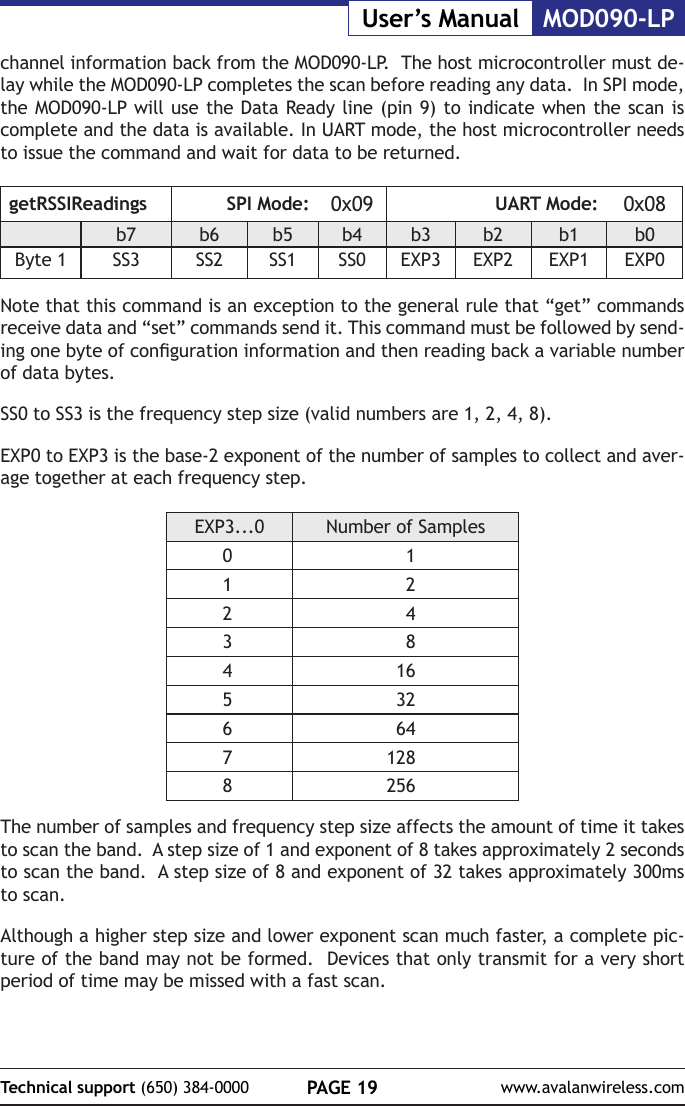
PAGE 19Technical support (650) 384-0000 www.avalanwireless.comMOD090-LPUser’s Manualchannel information back from the MOD090-LP.  The host microcontroller must de-lay while the MOD090-LP completes the scan before reading any data.  In SPI mode, the MOD090-LP will use the Data Ready line (pin 9) to indicate when the scan is complete and the data is available. In UART mode, the host microcontroller needs to issue the command and wait for data to be returned.getRSSIReadings SPI Mode: 0x09 UART Mode: 0x08b7 b6 b5 b4 b3 b2 b1 b0Byte 1 SS3 SS2 SS1 SS0 EXP3 EXP2 EXP1 EXP0Note that this command is an exception to the general rule that “get” commands receive data and “set” commands send it. This command must be followed by send-ing one byte of conguration information and then reading back a variable number of data bytes.SS0 to SS3 is the frequency step size (valid numbers are 1, 2, 4, 8).EXP0 to EXP3 is the base-2 exponent of the number of samples to collect and aver-age together at each frequency step.EXP3...0 Number of Samples0 11 22 43 841653266471288256The number of samples and frequency step size affects the amount of time it takes to scan the band.  A step size of 1 and exponent of 8 takes approximately 2 seconds to scan the band.  A step size of 8 and exponent of 32 takes approximately 300ms to scan.  Although a higher step size and lower exponent scan much faster, a complete pic-ture of the band may not be formed.  Devices that only transmit for a very short period of time may be missed with a fast scan.
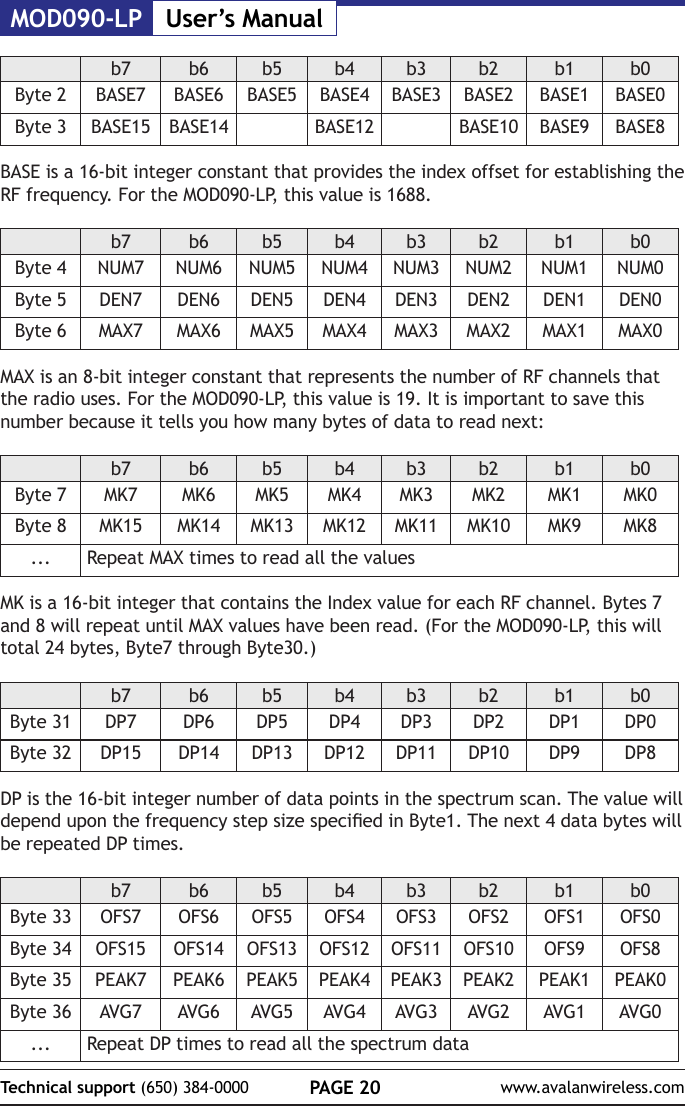
MOD090-LP User’s ManualPAGE 20Technical support (650) 384-0000 www.avalanwireless.comb7 b6 b5 b4 b3 b2 b1 b0Byte 2 BASE7 BASE6 BASE5 BASE4 BASE3 BASE2 BASE1 BASE0Byte 3 BASE15 BASE14 BASE12 BASE10 BASE9 BASE8BASE is a 16-bit integer constant that provides the index offset for establishing the RF frequency. For the MOD090-LP, this value is 1688.b7 b6 b5 b4 b3 b2 b1 b0Byte 4 NUM7 NUM6 NUM5 NUM4 NUM3 NUM2 NUM1 NUM0Byte 5 DEN7 DEN6 DEN5 DEN4 DEN3 DEN2 DEN1 DEN0Byte 6 MAX7 MAX6 MAX5 MAX4 MAX3 MAX2 MAX1 MAX0MAX is an 8-bit integer constant that represents the number of RF channels that the radio uses. For the MOD090-LP, this value is 19. It is important to save this number because it tells you how many bytes of data to read next:b7 b6 b5 b4 b3 b2 b1 b0Byte 7 MK7 MK6 MK5 MK4 MK3 MK2 MK1 MK0Byte 8 MK15 MK14 MK13 MK12 MK11 MK10 MK9 MK8... Repeat MAX times to read all the valuesMK is a 16-bit integer that contains the Index value for each RF channel. Bytes 7 and 8 will repeat until MAX values have been read. (For the MOD090-LP, this will total 24 bytes, Byte7 through Byte30.)b7 b6 b5 b4 b3 b2 b1 b0Byte 31 DP7 DP6 DP5 DP4 DP3 DP2 DP1 DP0Byte 32 DP15 DP14 DP13 DP12 DP11 DP10 DP9 DP8DP is the 16-bit integer number of data points in the spectrum scan. The value will depend upon the frequency step size specied in Byte1. The next 4 data bytes will be repeated DP times.b7 b6 b5 b4 b3 b2 b1 b0Byte 33 OFS7 OFS6 OFS5 OFS4 OFS3 OFS2 OFS1 OFS0Byte 34 OFS15 OFS14 OFS13 OFS12 OFS11 OFS10 OFS9 OFS8Byte 35 PEAK7 PEAK6 PEAK5 PEAK4 PEAK3 PEAK2 PEAK1 PEAK0Byte 36 AVG7 AVG6 AVG5 AVG4 AVG3 AVG2 AVG1 AVG0... Repeat DP times to read all the spectrum data
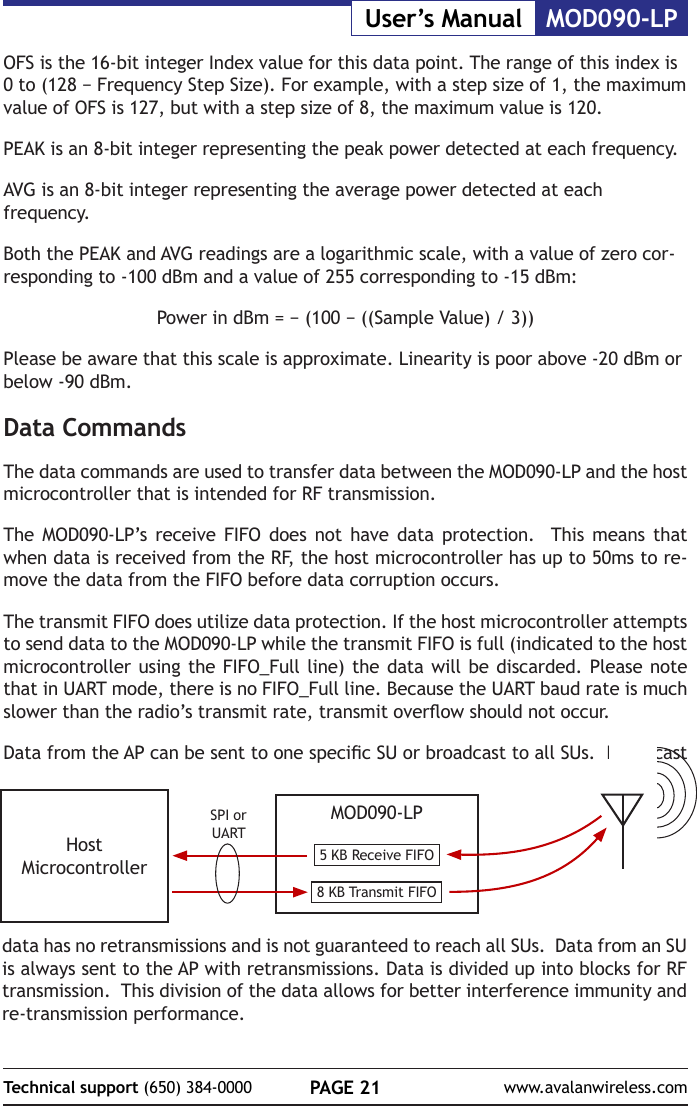
PAGE 21Technical support (650) 384-0000 www.avalanwireless.comMOD090-LPUser’s ManualOFS is the 16-bit integer Index value for this data point. The range of this index is 0 to (128 − Frequency Step Size). For example, with a step size of 1, the maximum value of OFS is 127, but with a step size of 8, the maximum value is 120.PEAK is an 8-bit integer representing the peak power detected at each frequency.AVG is an 8-bit integer representing the average power detected at each frequency.Both the PEAK and AVG readings are a logarithmic scale, with a value of zero cor-responding to -100 dBm and a value of 255 corresponding to -15 dBm:Power in dBm = − (100 − ((Sample Value) / 3))Please be aware that this scale is approximate. Linearity is poor above -20 dBm or below -90 dBm.Data CommandsThe data commands are used to transfer data between the MOD090-LP and the host microcontroller that is intended for RF transmission.The MOD090-LP’s receive FIFO does not have data protection.  This means that when data is received from the RF, the host microcontroller has up to 50ms to re-move the data from the FIFO before data corruption occurs.The transmit FIFO does utilize data protection. If the host microcontroller attempts to send data to the MOD090-LP while the transmit FIFO is full (indicated to the host microcontroller using the FIFO_Full line) the data will be discarded. Please note that in UART mode, there is no FIFO_Full line. Because the UART baud rate is much slower than the radio’s transmit rate, transmit overow should not occur. Data from the AP can be sent to one specic SU or broadcast to all SUs.  Broadcast MOD090-LP5 KB Receive FIFO8 KB Transmit FIFOHost MicrocontrollerSPI or UARTdata has no retransmissions and is not guaranteed to reach all SUs.  Data from an SU is always sent to the AP with retransmissions. Data is divided up into blocks for RF transmission.  This division of the data allows for better interference immunity and re-transmission performance.
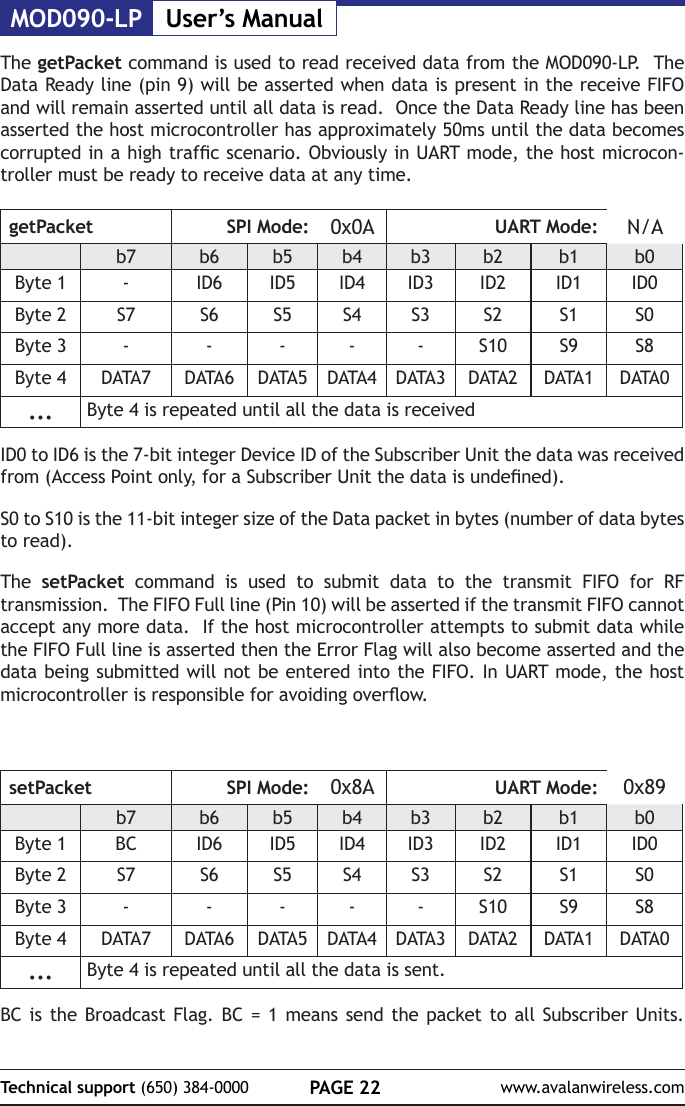
MOD090-LP User’s ManualPAGE 22Technical support (650) 384-0000 www.avalanwireless.comThe getPacket command is used to read received data from the MOD090-LP.  The Data Ready line (pin 9) will be asserted when data is present in the receive FIFO and will remain asserted until all data is read.  Once the Data Ready line has been asserted the host microcontroller has approximately 50ms until the data becomes corrupted in a high trafc scenario. Obviously in UART mode, the host microcon-troller must be ready to receive data at any time.getPacket SPI Mode: 0x0A UART Mode: N/Ab7 b6 b5 b4 b3 b2 b1 b0Byte 1 -ID6 ID5 ID4 ID3 ID2 ID1 ID0Byte 2 S7 S6 S5 S4 S3 S2 S1 S0Byte 3 - - - - - S10 S9 S8Byte 4 DATA7 DATA6 DATA5 DATA4 DATA3 DATA2 DATA1 DATA0... Byte 4 is repeated until all the data is receivedID0 to ID6 is the 7-bit integer Device ID of the Subscriber Unit the data was received from (Access Point only, for a Subscriber Unit the data is undened).S0 to S10 is the 11-bit integer size of the Data packet in bytes (number of data bytes to read).The  setPacket command is used to submit data to the transmit FIFO for RF transmission.  The FIFO Full line (Pin 10) will be asserted if the transmit FIFO cannot accept any more data.  If the host microcontroller attempts to submit data while the FIFO Full line is asserted then the Error Flag will also become asserted and the data being submitted will not be entered into the FIFO. In UART mode, the host microcontroller is responsible for avoiding overow.setPacket SPI Mode: 0x8A UART Mode: 0x89b7 b6 b5 b4 b3 b2 b1 b0Byte 1 BC ID6 ID5 ID4 ID3 ID2 ID1 ID0Byte 2 S7 S6 S5 S4 S3 S2 S1 S0Byte 3 - - - - - S10 S9 S8Byte 4 DATA7 DATA6 DATA5 DATA4 DATA3 DATA2 DATA1 DATA0... Byte 4 is repeated until all the data is sent.BC is the Broadcast Flag. BC = 1 means send the packet to all Subscriber Units.
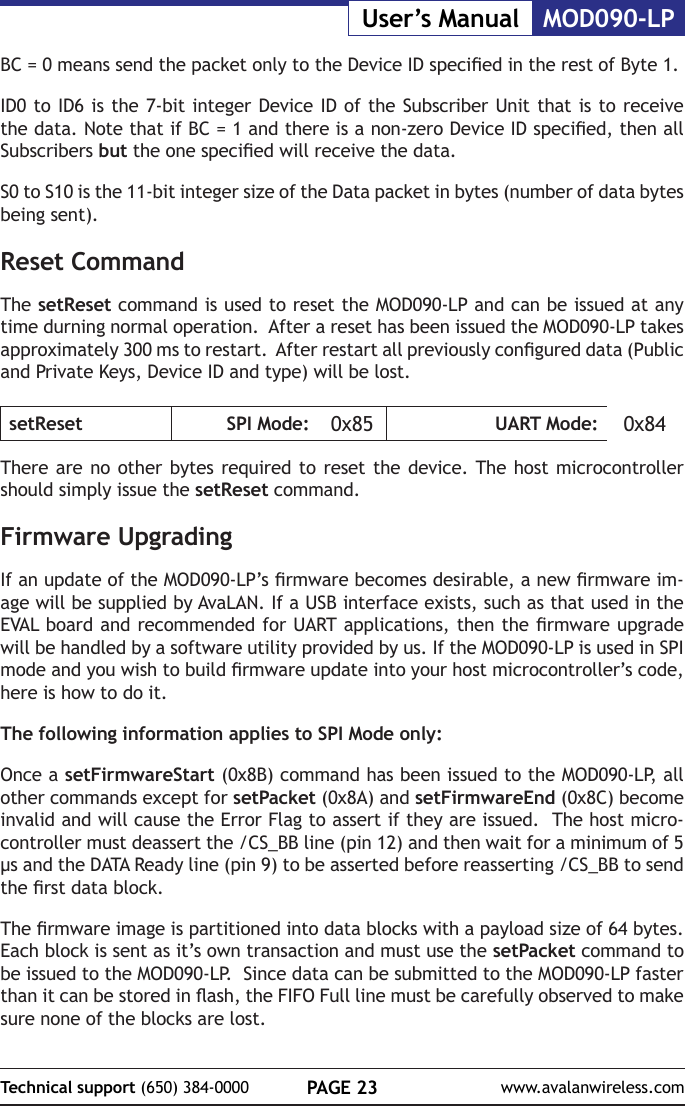
PAGE 23Technical support (650) 384-0000 www.avalanwireless.comMOD090-LPUser’s ManualBC = 0 means send the packet only to the Device ID specied in the rest of Byte 1. ID0 to ID6 is the 7-bit integer Device ID of the Subscriber Unit that is to receive the data. Note that if BC = 1 and there is a non-zero Device ID specied, then all Subscribers but the one specied will receive the data.S0 to S10 is the 11-bit integer size of the Data packet in bytes (number of data bytes being sent).Reset CommandThe setReset command is used to reset the MOD090-LP and can be issued at any time durning normal operation.  After a reset has been issued the MOD090-LP takes approximately 300 ms to restart.  After restart all previously congured data (Public and Private Keys, Device ID and type) will be lost.setReset SPI Mode: 0x85 UART Mode: 0x84There are no other bytes required to reset the device. The host microcontroller should simply issue the setReset command.Firmware UpgradingIf an update of the MOD090-LP’s rmware becomes desirable, a new rmware im-age will be supplied by AvaLAN. If a USB interface exists, such as that used in the EVAL board and recommended for UART applications, then the rmware upgrade will be handled by a software utility provided by us. If the MOD090-LP is used in SPI mode and you wish to build rmware update into your host microcontroller’s code, here is how to do it.The following information applies to SPI Mode only:Once a setFirmwareStart (0x8B) command has been issued to the MOD090-LP, all other commands except for setPacket (0x8A) and setFirmwareEnd (0x8C) become invalid and will cause the Error Flag to assert if they are issued.  The host micro-controller must deassert the /CS_BB line (pin 12) and then wait for a minimum of 5 µs and the DATA Ready line (pin 9) to be asserted before reasserting /CS_BB to send the rst data block.The rmware image is partitioned into data blocks with a payload size of 64 bytes.  Each block is sent as it’s own transaction and must use the setPacket command to be issued to the MOD090-LP.  Since data can be submitted to the MOD090-LP faster than it can be stored in ash, the FIFO Full line must be carefully observed to make sure none of the blocks are lost.
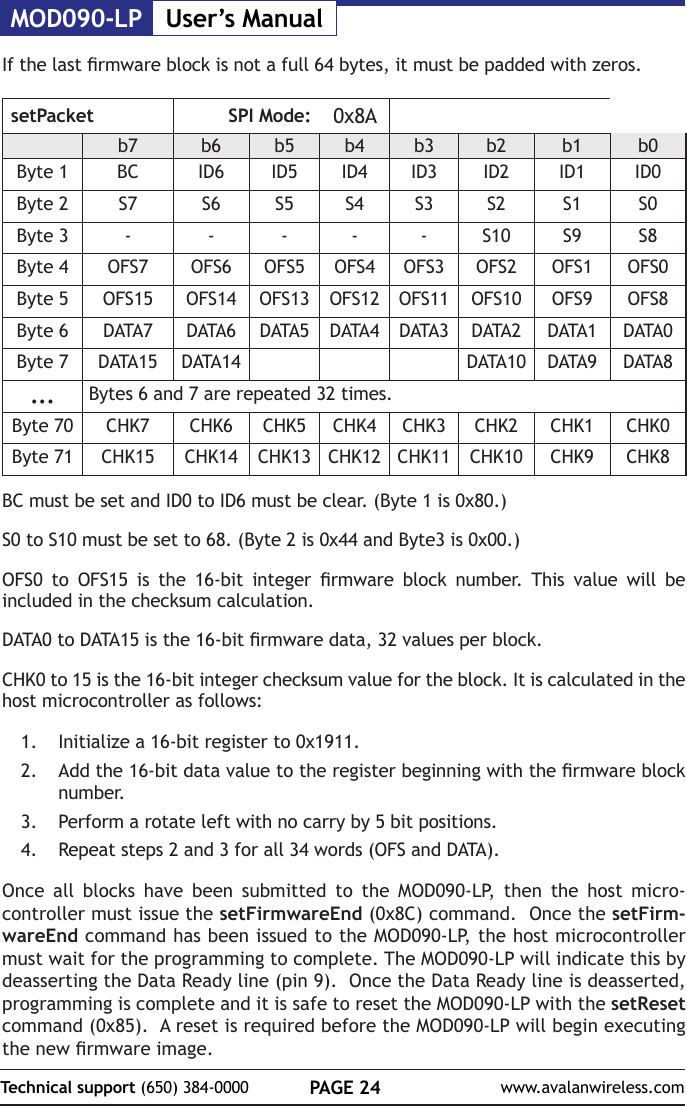
MOD090-LP User’s ManualPAGE 24Technical support (650) 384-0000 www.avalanwireless.comIf the last rmware block is not a full 64 bytes, it must be padded with zeros.setPacket SPI Mode: 0x8Ab7 b6 b5 b4 b3 b2 b1 b0Byte 1 BC ID6 ID5 ID4 ID3 ID2 ID1 ID0Byte 2 S7 S6 S5 S4 S3 S2 S1 S0Byte 3 - - - - - S10 S9 S8Byte 4 OFS7 OFS6 OFS5 OFS4 OFS3 OFS2 OFS1 OFS0Byte 5 OFS15 OFS14 OFS13 OFS12 OFS11 OFS10 OFS9 OFS8Byte 6 DATA7 DATA6 DATA5 DATA4 DATA3 DATA2 DATA1 DATA0Byte 7 DATA15 DATA14 DATA10 DATA9 DATA8... Bytes 6 and 7 are repeated 32 times.Byte 70 CHK7 CHK6 CHK5 CHK4 CHK3 CHK2 CHK1 CHK0Byte 71 CHK15 CHK14 CHK13 CHK12 CHK11 CHK10 CHK9 CHK8BC must be set and ID0 to ID6 must be clear. (Byte 1 is 0x80.)S0 to S10 must be set to 68. (Byte 2 is 0x44 and Byte3 is 0x00.)OFS0  to  OFS15  is  the  16-bit  integer  rmware  block  number.  This  value  will  be included in the checksum calculation.DATA0 to DATA15 is the 16-bit rmware data, 32 values per block.CHK0 to 15 is the 16-bit integer checksum value for the block. It is calculated in the host microcontroller as follows:1.  Initialize a 16-bit register to 0x1911.2.  Add the 16-bit data value to the register beginning with the rmware block number.3.  Perform a rotate left with no carry by 5 bit positions.4.  Repeat steps 2 and 3 for all 34 words (OFS and DATA).Once all blocks have been submitted to the MOD090-LP, then the host micro-controller must issue the setFirmwareEnd (0x8C) command.  Once the setFirm-wareEnd command has been issued to the MOD090-LP, the host microcontroller must wait for the programming to complete. The MOD090-LP will indicate this by deasserting the Data Ready line (pin 9).  Once the Data Ready line is deasserted, programming is complete and it is safe to reset the MOD090-LP with the setReset command (0x85).  A reset is required before the MOD090-LP will begin executing the new rmware image.
PAGE 25Technical support (650) 384-0000 www.avalanwireless.comMOD090-LPUser’s ManualProgramming ExamplesNote that these examples apply to SPI mode.Initialization ExampleTo initialize the MOD090-LP follow these steps:1.  At startup delay for 300 ms to allow the MOD090-LP enough time to initialize.2.  Assert /CS_BB (drive the line low) and issue setNetworkKey (0x82) com-mand and delay for 4 µs.3.  Send 3 bytes with 24-bit Network Key value.4.  Deassert /CS_BB (drive the line high) and delay for 6 µs.5.  Assert /CS_BB and issue setPrivateKey (0x83) command and delay for 4 µs.6.  Send 16 bytes with 128-bit Private Key value.7.  Deassert /CS_BB and delay for 6 µs.8.  Assert /CS_BB and issue setDeviceID (0x84) command and delay for 4 µs.9.  Send one byte indicating what type of device and ID number.10.  Deassert /CS_BB and delay for 6 µs.11.  Assert /CS_BB and issue setStatus (0x81) command and delay for 4 µs.12.  Send one byte with bit 6 set to take radio out of standby mode.13.  Deassert /CS_BB.14.  Wait for Connected Flag to be setThe MOD090-LP is now initialized and connected, ready to send and receive data.Send Data Example (AP Side)1.  If Connected Flag is clear or FIFO Full Flag is set then end.2.  Else assert /CS_BB (drive line low) and issue setPacket (0x8A) command and delay for 4 µs.3.  Send rst byte indicating if a broadcast packet or a unicast packet.4.  Send two bytes indicating data size in bytes.5.  Send all data bytes6.  Deassert /CS_BB (drive line high) and delay for 6 µs.
MOD090-LP User’s ManualPAGE 26Technical support (650) 384-0000 www.avalanwireless.comGet Data Example (AP Side)1.  If Data Ready Flag is set assert /CS_BB (drive line low) and issue getPacket (0x0A) command and delay for 4 µs.2.  Gets rst byte to determine what SU sent the packet.3.  Get next two bytes to determine the packet size in bytes.4.  Get all data bytes5.  Deassert /CS_BB (drive line high) and delay for 6 µs.6.  If Data Ready is still set then repeat all steps.RSSI Example1.  Assert /CS_BB (drive line low) and issue getRSSIreadings (0x09) command and delay for 4 µs.2.  Send rst byte to tell MOD090-LP what step size and number of samples to use.3.  Get two bytes to determine the Base Frequency multiplier.4.  Get two bytes to determine the Numerator and Denominator for frequency calculations.5.  Get one byte to determine how many channel markers there are.6.  Get all channel markers.7.  Wait for Data Ready to be set.8.  Get two bytes to determine the number of data points to be read.9.  Get four bytes for Step Number, Peak Power, and Average Power.10.  Repeat step 9 for all data points.11.  Deassert /CS_BB (drive line high) and delay for 6 µs.
PAGE 27Technical support (650) 384-0000 www.avalanwireless.comMOD090-LPUser’s ManualFirmware Update Example1.  Assert /CS_BB (drive line low) and issue setFirmwareStart (0x8B) command and deassert /CS_BB (drive line high).2.  Delay for 5 µs.3.  Wait for Data Ready to be asserted.4.  While FIFO Full is set wait.5.  Assert /CS_BB and issue setPacket (0x8A) command and delay for 4 µs.6.  Send rst byte as 0x807.  Send next two bytes as 0x44 and 0x00 respectively, for packet size of 68.8.  Send two bytes to indicate Firmware block offset of following payload.9.  Send 64 payload bytes.10.  Send two bytes for checksum.11.  Delay 4 µs then check Error Flag.12.  If Error Flag is clear then deassert /CS_BB and delay for 4 µs.  Prepare next Firmware block and loop to Step 4.13.  Else if Error Flag is set then deassert /CS_BB and delay for 4 µs.  Loop to Step 4.14.  Repeat steps 4 to 13 until all rmware blocks have been sent.15.  Once all blocks have been sent assert /CS_BB and issue setFirmwareEnd (0x8C) command and deassert /CS_BB.16.  While Data Ready ag is set wait.17.  Assert /CS_BB and issue setReset (0x85) command and deassert /CS_BB.
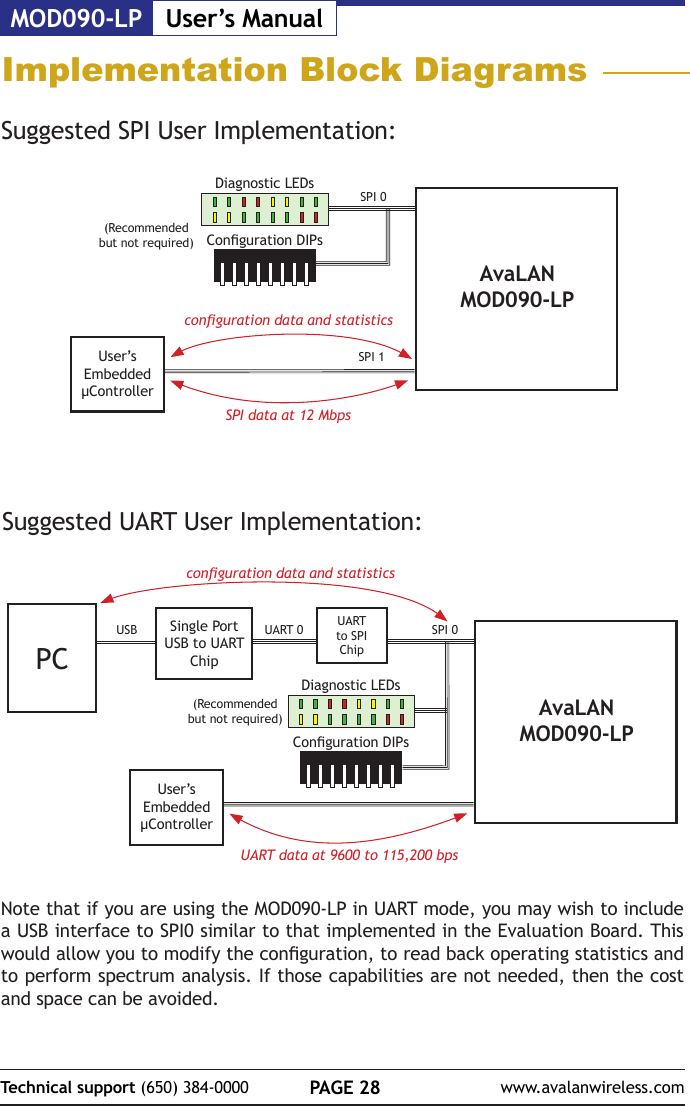
MOD090-LP User’s ManualPAGE 28Technical support (650) 384-0000 www.avalanwireless.comSuggested UART User Implementation:Diagnostic LEDsConguration DIPsPCSingle Port USB to UART ChipUART to SPI ChipUSB UART 0 SPI 0UART data at 9600 to 115,200 bpsconguration data and statisticsUser’s Embedded µController(Recommended but not required)Suggested SPI User Implementation:Diagnostic LEDsConguration DIPsAvaLAN MOD090-LPSPI 0SPI data at 12 Mbpsconguration data and statisticsUser’s Embedded µControllerSPI 1(Recommended but not required)Note that if you are using the MOD090-LP in UART mode, you may wish to include a USB interface to SPI0 similar to that implemented in the Evaluation Board. This would allow you to modify the conguration, to read back operating statistics and to perform spectrum analysis. If those capabilities are not needed, then the cost and space can be avoided.Implementation Block DiagramsAvaLAN MOD090-LP
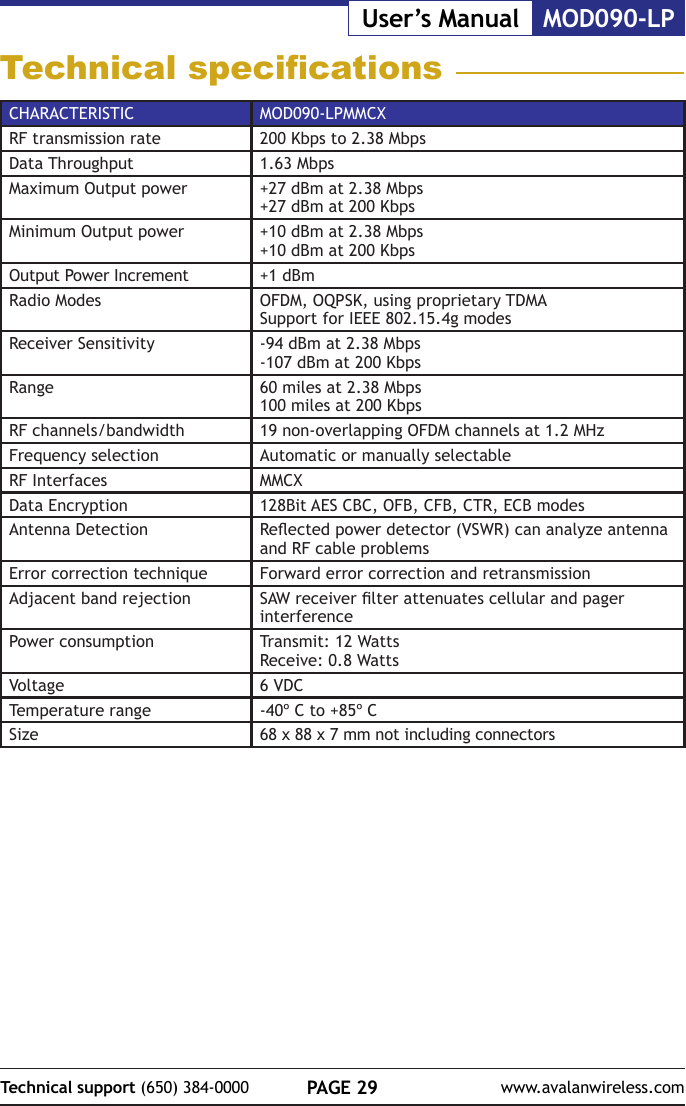
PAGE 29Technical support (650) 384-0000 www.avalanwireless.comMOD090-LPUser’s ManualTechnical specicationsCHARACTERISTIC MOD090-LPMMCXRF transmission rate 200 Kbps to 2.38 MbpsData Throughput 1.63 MbpsMaximum Output power +27 dBm at 2.38 Mbps+27 dBm at 200 KbpsMinimum Output power +10 dBm at 2.38 Mbps+10 dBm at 200 KbpsOutput Power Increment +1 dBmRadio Modes OFDM, OQPSK, using proprietary TDMASupport for IEEE 802.15.4g modes Receiver Sensitivity -94 dBm at 2.38 Mbps-107 dBm at 200 KbpsRange 60 miles at 2.38 Mbps100 miles at 200 Kbps RF channels/bandwidth 19 non-overlapping OFDM channels at 1.2 MHzFrequency selection Automatic or manually selectableRF Interfaces MMCXData Encryption 128Bit AES CBC, OFB, CFB, CTR, ECB modesAntenna Detection Reected power detector (VSWR) can analyze antenna and RF cable problemsError correction technique Forward error correction and retransmissionAdjacent band rejection SAW receiver lter attenuates cellular and pager interferencePower consumption Transmit: 12 Watts    Receive: 0.8 WattsVoltage 6 VDCTemperature range -40º C to +85º CSize 68 x 88 x 7 mm not including connectors
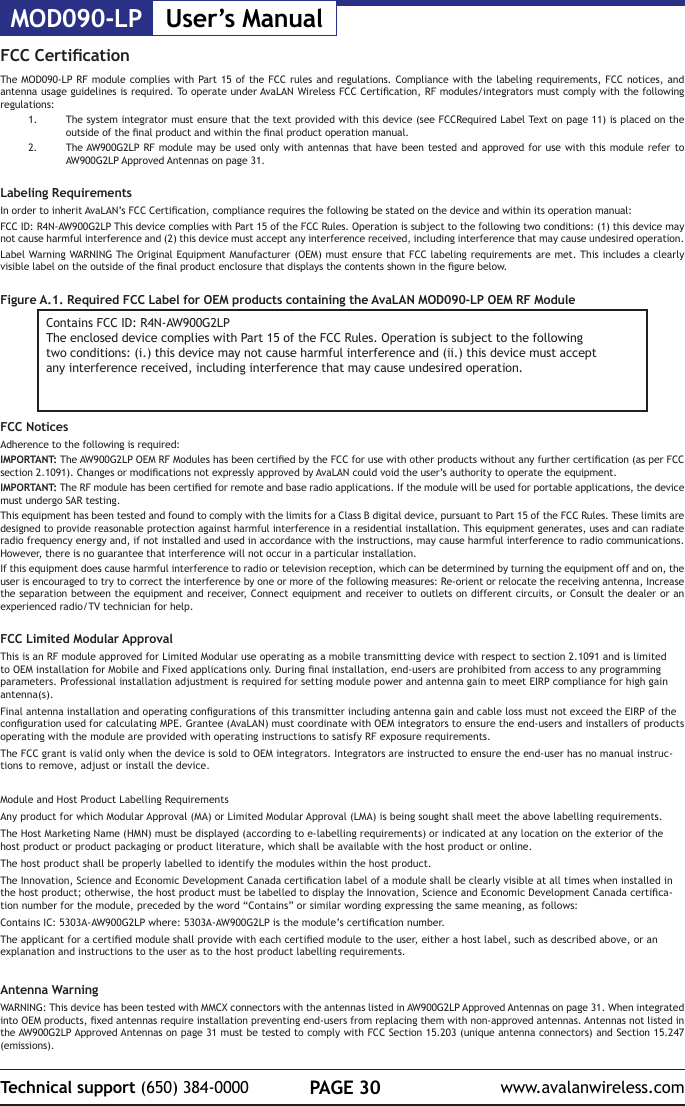
MOD090-LP User’s ManualPAGE 30Technical support (650) 384-0000 www.avalanwireless.comFCC CerticationThe MOD090-LP RF module complies with Part 15 of the FCC rules and regulations. Compliance with the labeling requirements, FCC notices, and antenna usage guidelines is required. To operate under AvaLAN Wireless FCC Certication, RF modules/integrators must comply with the following regulations:1.  The system integrator must ensure that the text provided with this device (see FCCRequired Label Text on page 11) is placed on the outside of the nal product and within the nal product operation manual.2.  The AW900G2LP RF module may be used only with antennas that have been tested and approved for use with this module refer to AW900G2LP Approved Antennas on page 31.Labeling RequirementsIn order to inherit AvaLAN’s FCC Certication, compliance requires the following be stated on the device and within its operation manual:FCC ID: R4N-AW900G2LP This device complies with Part 15 of the FCC Rules. Operation is subject to the following two conditions: (1) this device may not cause harmful interference and (2) this device must accept any interference received, including interference that may cause undesired operation.Label Warning WARNING The Original Equipment Manufacturer (OEM) must ensure that FCC labeling requirements are met. This includes a clearly visible label on the outside of the nal product enclosure that displays the contents shown in the gure below.Figure A.1. Required FCC Label for OEM products containing the AvaLAN MOD090-LP OEM RF ModuleContains FCC ID: R4N-AW900G2LPThe enclosed device complies with Part 15 of the FCC Rules. Operation is subject to the followingtwo conditions: (i.) this device may not cause harmful interference and (ii.) this device must acceptany interference received, including interference that may cause undesired operation.FCC NoticesAdherence to the following is required:IMPORTANT: The AW900G2LP OEM RF Modules has been certied by the FCC for use with other products without any further certication (as per FCC section 2.1091). Changes or modications not expressly approved by AvaLAN could void the user’s authority to operate the equipment.IMPORTANT: The RF module has been certied for remote and base radio applications. If the module will be used for portable applications, the device must undergo SAR testing. This equipment has been tested and found to comply with the limits for a Class B digital device, pursuant to Part 15 of the FCC Rules. These limits are designed to provide reasonable protection against harmful interference in a residential installation. This equipment generates, uses and can radiate radio frequency energy and, if not installed and used in accordance with the instructions, may cause harmful interference to radio communications. However, there is no guarantee that interference will not occur in a particular installation.If this equipment does cause harmful interference to radio or television reception, which can be determined by turning the equipment off and on, the user is encouraged to try to correct the interference by one or more of the following measures: Re-orient or relocate the receiving antenna, Increase the separation between the equipment and receiver, Connect equipment and receiver to outlets on different circuits, or Consult the dealer or an  experienced radio/TV technician for help. FCC Limited Modular Approval This is an RF module approved for Limited Modular use operating as a mobile transmitting device with respect to section 2.1091 and is limited to OEM installation for Mobile and Fixed applications only. During nal installation, end-users are prohibited from access to any programming parameters. Professional installation adjustment is required for setting module power and antenna gain to meet EIRP compliance for high gain antenna(s).Final antenna installation and operating congurations of this transmitter including antenna gain and cable loss must not exceed the EIRP of the conguration used for calculating MPE. Grantee (AvaLAN) must coordinate with OEM integrators to ensure the end-users and installers of products operating with the module are provided with operating instructions to satisfy RF exposure requirements.The FCC grant is valid only when the device is sold to OEM integrators. Integrators are instructed to ensure the end-user has no manual instruc-tions to remove, adjust or install the device.Module and Host Product Labelling RequirementsAny product for which Modular Approval (MA) or Limited Modular Approval (LMA) is being sought shall meet the above labelling requirements.The Host Marketing Name (HMN) must be displayed (according to e-labelling requirements) or indicated at any location on the exterior of the host product or product packaging or product literature, which shall be available with the host product or online.The host product shall be properly labelled to identify the modules within the host product.The Innovation, Science and Economic Development Canada certication label of a module shall be clearly visible at all times when installed in the host product; otherwise, the host product must be labelled to display the Innovation, Science and Economic Development Canada certica-tion number for the module, preceded by the word “Contains” or similar wording expressing the same meaning, as follows:Contains IC: 5303A-AW900G2LP where: 5303A-AW900G2LP is the module’s certication number.The applicant for a certied module shall provide with each certied module to the user, either a host label, such as described above, or an explanation and instructions to the user as to the host product labelling requirements.Antenna WarningWARNING: This device has been tested with MMCX connectors with the antennas listed in AW900G2LP Approved Antennas on page 31. When integrated into OEM products, xed antennas require installation preventing end-users from replacing them with non-approved antennas. Antennas not listed in the AW900G2LP Approved Antennas on page 31 must be tested to comply with FCC Section 15.203 (unique antenna connectors) and Section 15.247 (emissions).
PAGE 31Technical support (650) 384-0000 www.avalanwireless.comMOD090-LPUser’s ManualWARNING: WARNING: The FCC requires that all spread spectrum devices operating within the Unlicensed radio frequency bands must limit themselves to a maximum radiated power of 4 Watts EIRP. Failure to observe this limit is a violation of our warranty terms, and shall void the user’s authority to operate the equipment. This can be stated as follows:RF power - cable loss + antenna gain <= 36 dBm EIRPFixed Base Station and Mobile ApplicationsAvaLAN Modules are pre-FCC approved for use in xed base station and mobile applications. When the antenna is mounted at least 21.05 cm (8”) from nearby persons, the application is considered a mobile application.Portable Applications and SAR TestingWhen the module will be used closer than 21.05 cm to nearby persons, then the application is considered “portable” and requires an additional test be performed on the nal product. This test is called the Specic Absorption Rate (SAR) testing and measures the emissions from the module and how they affect the person.RF Exposure(This statement must be included as a CAUTION statement in OEM product manuals.) WARNING: This equipment is approved only for mobile and base station transmitting devices. Antenna(s) used for this transmitter must be installed to provide a separation distance of at least 21.05 cm from all persons and must not be co-located or operating in conjunction with any other antenna or transmitter.To fulll FCC Certication requirements:1. Integrator must ensure required text [Figure 1] is clearly placed on the outside of the nal product.2. AW900G2LP Module may be used only with Approved Antennas that have been tested with this module. IC RSS-102 RF Exposure statement:This system has been evaluated for RF Exposure per RSS-102 and is in compliance with the limits specied by Health Canada Safety Code 6. The system must be installed at a minimum separation distance from the antenna to a general bystander of 31.2 cm to maintain compliance with the General Population limits.L’exposition aux radiofréquences de ce système a été évaluée selon la norme RSS-102 et est jugée conforme aux limites établies par le Code de sécurité 6 de Santé Canada. Le système doit être installé à une distance minimale de 31.2 cm séparant l’antenne d’une personne présente en conformité avec les limites permises d’exposition du grand public.Antenna Pattern Type GainOmni directional Monopole ≤ 6dBiDirectional Yagi ≤ 15dBiDirectional Panel ≤ 10dBiType certied AntennasIC (Industry Canada) CerticationThis device complies with Industry Canada licence-exempt RSS standard(s). Operation is subject to the following two conditions: (1) this device may not cause interference, and (2) this device must accept any interference, including interference that may cause undesired operation of the device.Le présent appareil est conforme aux CNR d'Industrie Canada applicables aux appareils radio exempts de licence. L'exploitation est autorisée aux deux conditions suivantes: (1) l'appareil ne doit pas produire de brouillage, et (2) l'utilisateur de l'appareil doit accepter tout brouillage radioélectrique subi, même si le brouillage est susceptible d'en compromettre le fonctionnement.Contains Model AW900G2LP Radio, IC: 5303A-AW900G2LPIntegrator is responsible for its product to comply with IC ICES-003 & FCC Part 15, Sub. B - Unintentional Radiators. ICES-003 is the same as FCC Part 15 Sub. B and Industry Canada accepts FCC test report or CISPR 22 test report for compliance with ICES-003.Transmitters with Detachable Antennas This radio transmitter (IC: 1846A-XLRP) has been approved by Industry Canada to operate with the antenna types listed in AW900G2LP Approved Antennas abov with the maximum permissible gain and required antenna impedance for each antenna type indicated. Antenna types not included in this list, having a gain greater than the maximum gain indicated for that type, are strictly prohibited for use with this device.Le présent émetteur radio (IC: 1846A-XLRP) a été approuvé par Industrie Canada pour fonctionner avec les types d'antenne énumérés ci?dessous et ayant un gain admissible maximal et l'impédance requise pour chaque type d'antenne. Les types d'antenne non inclus dans cette liste, ou dont le gain est supérieur au gain maximal indiqué, sont strictement interdits pour l'exploitation de l'émetteur.Detachable AntennaUnder Industry Canada regulations, this radio transmitter may operate using only an antenna of a type and maximum (or lesser) gain approved for the transmitter by Industry Canada. To reduce potential radio interference to other users, the antenna type and its gain should be so chosen that the equivalent isotropically radiated power (e.i.r.p.) is not more than that necessary for successful communication.Conformément à la réglementation d'Industrie Canada, le présent émetteur radio peutfonctionner avec une antenne d'un type et d'un gain maximal (ou inférieur) approuvépour l'émetteur par Industrie Canada. Dans le but de réduire les risques de brouillageradioélectrique à l'intention des autres utilisateurs, il faut choisir le type d'antenne etson gain de sorte que la puissance isotrope rayonnée équivalente (p.i.r.e.) ne dépassepas l'intensité nécessaire àl'établissement d'une communication satisfaisante.

Navigation menu