B and W Electronics Development 14BWSH1 Sports Bluetooth Headset User Manual Wirelesss Buds Manual

Shenzhen B&W; Electronics Development Limited Sports Bluetooth Headset Wirelesss Buds Manual

Users Manual

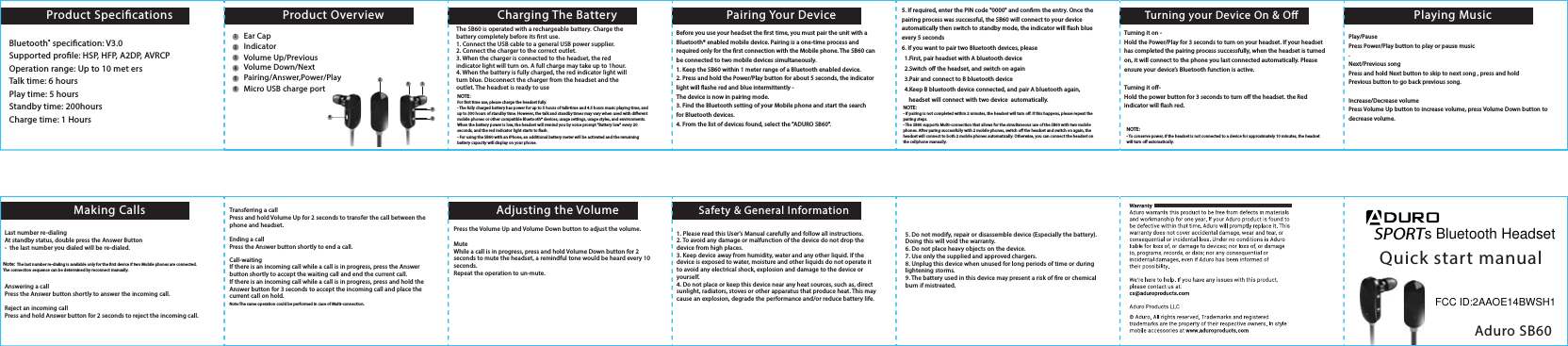
The SB60 is operated with a rechargeable battery. Charge the battery completely before its rst use. 1. Connect the USB cable to a general USB power supplier. 2. Connect the charger to the correct outlet.3. When the charger is connected to the headset, the red indicator light will turn on. A full charge may take up to 1hour.4. When the battery is fully charged, the red indicator light will turn blue. Disconnect the charger from the headset and the outlet. The headset is ready to useNOTE:For rst time use, please charge the headset fully. - The fully charged battery has power for up to 5 hours of talk-time and 4.5 hours music playing time, and up to 300 hours of standby time. However, the talk and standby times may vary when used with dierent mobile phones or other compatible Bluetooth® devices, usage settings, usage styles, and environments. When the battery power is low, the headset will remind you by voice prompt "Battery low" every 20 seconds, and the red indicator light starts to ash.- For using the SB60 with an iPhone, an additional battery meter will be activated and the remaining battery capacity will display on your phone.NOTE:- If pairing is not completed within 2 minutes, the headset will turn o. If this happens, please repeat the pairing steps.- The SB60 supports Multi-connection that allows for the simultaneous use of the SB60 with two mobile phones. After paring successfully with 2 mobile phones, switch o the headset and switch on again, the headset will connect to both 2 mobile phones automatically. Otherwise, you can connect the headset on the cellphone manually. NOTE:- To conserve power, if the headset is not connected to a device for approximately 10 minutes, the headset will turn o automatically.SPORTQuick start manualAduro SB60Product SpecicationsMaking Calls Adjusting the Volume Safety & General InformationCharging The Battery Pairing Your Device Playing MusicTurning your Device On & OProduct OverviewBluetooth® specication: V3.0Supported prole: HSP, HFP, A2DP, AVRCPOperation range: Up to 10 met ersTalk time: 6 hoursPlay time: 5 hoursStandby time: 200hoursCharge time: 1 HoursBefore you use your headset the rst time, you must pair the unit with a Bluetooth® enabled mobile device. Pairing is a one-time process and required only for the rst connection with the Mobile phone. The SB60 can be connected to two mobile devices simultaneously. 1. Keep the SB60 within 1 meter range of a Bluetooth enabled device.     2. Press and hold the Power/Play button for about 5 seconds, the indicator light will ashe red and blue intermittently - The device is now in pairing mode.3. Find the Bluetooth setting of your Mobile phone and start the search for Bluetooth devices. 4. From the list of devices found, select the "ADURO SB60".5. If required, enter the PIN code "0000" and conrm the entry. Once the pairing process was successful, the SB60 will connect to your device automatically then switch to standby mode, the indicator will ash blue every 5 seconds6. If you want to pair two Bluetooth devices, please   1.First, pair headset with A bluetooth device  2.Switch o the headset, and switch on again   3.Pair and connect to B bluetooth device  4.Keep B bluetooth device connected, and pair A bluetooth again,     headset will connect with two device  automatically.  Turning it on -Hold the Power/Play for 3 seconds to turn on your headset. If your headset has completed the pairing process successfully, when the headset is turned on, it will connect to the phone you last connected automatically. Please ensure your device’s Bluetooth function is active. Turning it o-Hold the power button for 3 seconds to turn o the headset. the Red indicator will ash red. Play/Pause Press Power/Play button to play or pause music.Next/Previous songPress and hold Next button to skip to next song , press and holdPrevious button to go back previous song.Increase/Decrease volumePress Volume Up button to increase volume, press Volume Down button to decrease volume.Last number re-dialingAt standby status, double press the Answer Button -  the last number you dialed will be re-dialed.Note: The last number re-dialing is available only for the rst device if two Mobile phones are connected. The connection sequence can be determined by reconnect manually. Answering a callPress the Answer button shortly to answer the incoming call. Reject an incoming callPress and hold Answer button for 2 seconds to reject the incoming call. Transferring a callPress and hold Volume Up for 2 seconds to transfer the call between the phone and headset. Ending a callPress the Answer button shortly to end a call.Call-waitingIf there is an incoming call while a call is in progress, press the Answer button shortly to accept the waiting call and end the current call.If there is an incoming call while a call is in progress, press and hold the Answer button for 3 seconds to accept the incoming call and place the current call on hold.Note:The same operation could be performed in case of Multi-connection. Press the Volume Up and Volume Down button to adjust the volume. MuteWhile a call is in progress, press and hold Volume Down button for 2 seconds to mute the headset, a remindful tone would be heard every 10 seconds. Repeat the operation to un-mute.5. Do not modify, repair or disassemble device (Especially the battery). Doing this will void the warranty.6. Do not place heavy objects on the device.7. Use only the supplied and approved chargers.8. Unplug this device when unused for long periods of time or during lightening storms.9. The battery used in this device may present a risk of re or chemical burn if mistreated.1. Please read this User's Manual carefully and follow all instructions.2. To avoid any damage or malfunction of the device do not drop the device from high places.3. Keep device away from humidity, water and any other liquid. If the device is exposed to water, moisture and other liquids do not operate it to avoid any electrical shock, explosion and damage to the device or yourself.4. Do not place or keep this device near any heat sources, such as, direct sunlight, radiators, stoves or other apparatus that produce heat. This may cause an explosion, degrade the performance and/or reduce battery life.21412        3456653Ear CapIndicatorVolume Up/PreviousVolume Down/NextPairing/Answer,Power/PlayMicro USB charge ports Bluetooth HeadsetFCC ID:2AAOE14BWSH1
This device complies with part 15 of the FCC rules. Operation is subject to the following two conditions:        (1) this device may not cause harmful interference, and        (2) this device must accept any interference received, including interference that may cause undesired operation.  Changes or modifications to this unit not expressly approved by the party responsible for compliance could void the user's authority to operate the equipment.

Navigation menu