BEA orporated 10BR2900 2 relay logic module and wireless receiver in the ISM band (902MHz-928MHz) User Manual

BEA Incorporated 2 relay logic module and wireless receiver in the ISM band (902MHz-928MHz) Users Manual

Users Manual

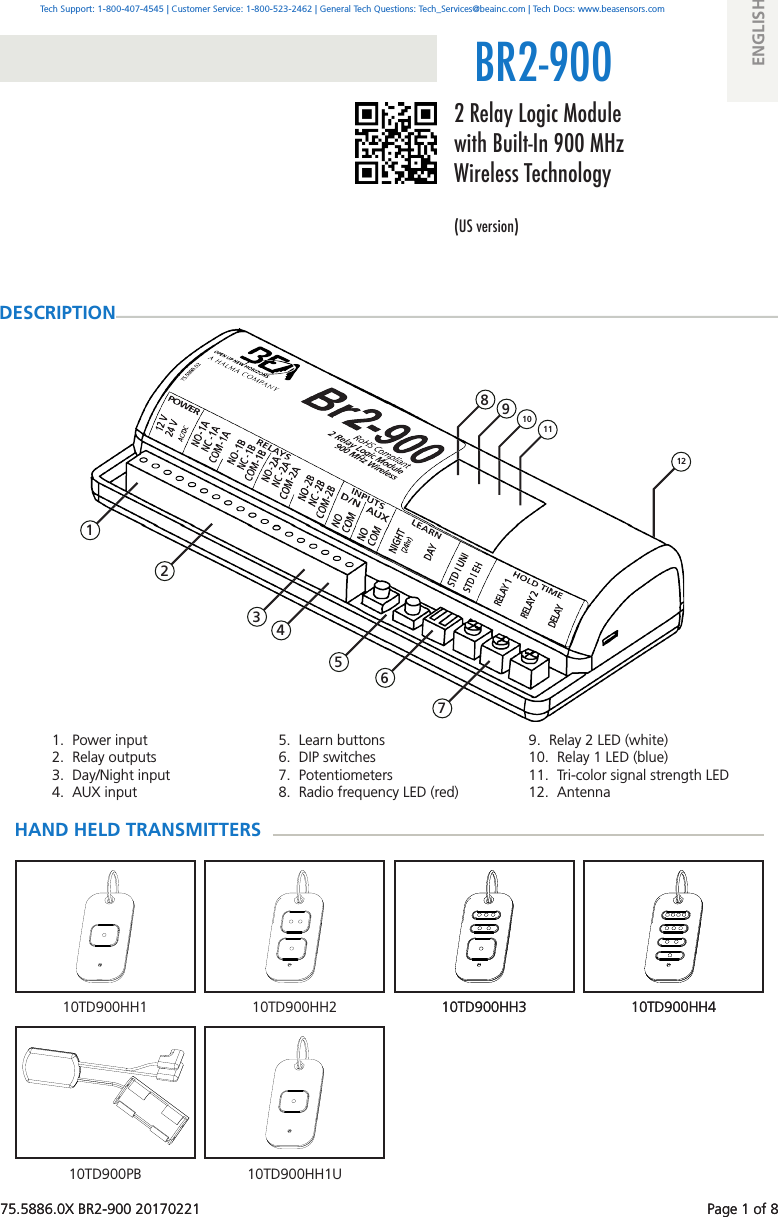
75.5886.0X BR2-900 20170221    Page 1 of 81.  Power input2.  Relay outputs3.  Day/Night input4.  AUX input5.  Learn buttons 6.  DIP switches7.  Potentiometers8.  Radio frequency LED (red) 1 2 12BR2-9009.  Relay 2 LED (white) 10.  Relay 1 LED (blue)11.  Tri-color signal strength LED12.  Antenna 3 4 11 10 9 810TD900HH410TD900HH310TD900HH2 10TD900HH410TD900HH310TD900HH110TD900PB 10TD900HH1U 5 6 775.5886.0X BR2-900 20170221    Page 1 of 82 Relay Logic Module with Built-In 900 MHz Wireless Technology(US version)DESCRIPTIONTech Support: 1-800-407-4545 | Customer Service: 1-800-523-2462 | General Tech Questions: Tech_Services@beainc.com | Tech Docs: www.beasensors.comENGLISHHAND HELD TRANSMITTERS
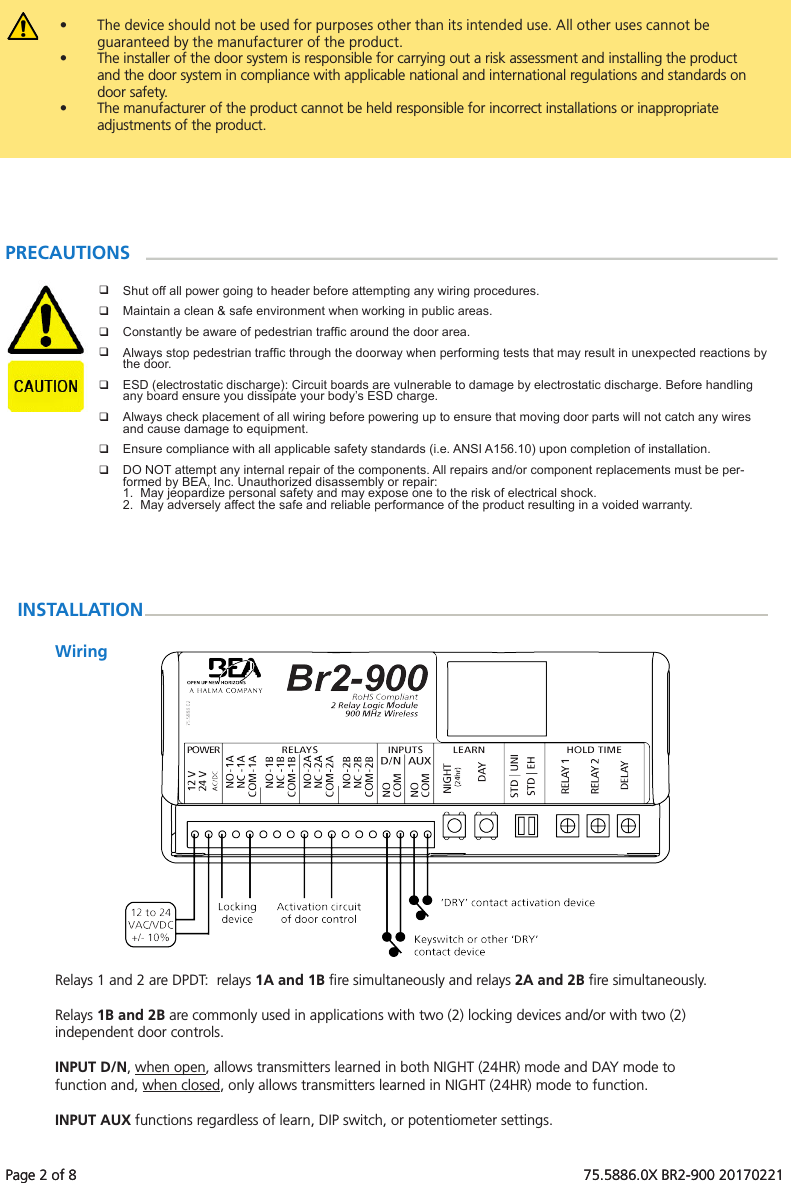
Page 2 of 8   75.5886.0X BR2-900 20170221Page 2 of 8   75.5886.0X BR2-900 20170221•  The device should not be used for purposes other than its intended use. All other uses cannot be guaranteed by the manufacturer of the product.  •  The installer of the door system is responsible for carrying out a risk assessment and installing the product and the door system in compliance with applicable national and international regulations and standards on door safety. •  The manufacturer of the product cannot be held responsible for incorrect installations or inappropriate adjustments of the product.Shut off all power going to header before attempting any wiring procedures.Maintain a clean & safe environment when working in public areas.Constantly be aware of pedestrian trafc around the door area.Always stop pedestrian trafc through the doorway when performing tests that may result in unexpected reactions by the door.ESD (electrostatic discharge): Circuit boards are vulnerable to damage by electrostatic discharge. Before handling any board ensure you dissipate your body’s ESD charge.Always check placement of all wiring before powering up to ensure that moving door parts will not catch any wires and cause damage to equipment.Ensure compliance with all applicable safety standards (i.e. ANSI A156.10) upon completion of installation.DO NOT attempt any internal repair of the components. All repairs and/or component replacements must be per-formed by BEA, Inc. Unauthorized disassembly or repair:1.  May jeopardize personal safety and may expose one to the risk of electrical shock.2.  May adversely affect the safe and reliable performance of the product resulting in a voided warranty.PRECAUTIONSINSTALLATIONWiringRelays 1 and 2 are DPDT:  relays 1A and 1B fire simultaneously and relays 2A and 2B fire simultaneously.  Relays 1B and 2B are commonly used in applications with two (2) locking devices and/or with two (2) independent door controls.INPUT D/N, when open, allows transmitters learned in both NIGHT (24HR) mode and DAY mode to function and, when closed, only allows transmitters learned in NIGHT (24HR) mode to function.INPUT AUX functions regardless of learn, DIP switch, or potentiometer settings.
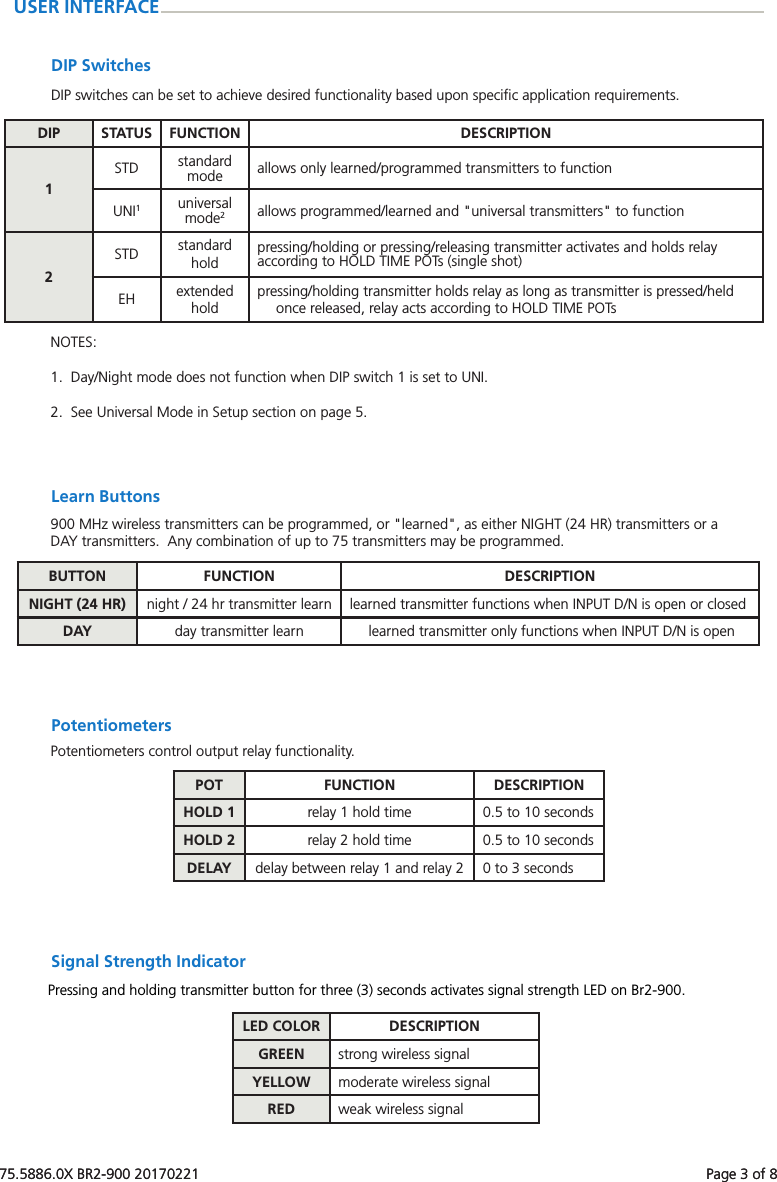
75.5886.0X BR2-900 20170221    Page 3 of 875.5886.0X BR2-900 20170221    Page 3 of 8USER INTERFACEDIP SwitchesDIP STATUS FUNCTION DESCRIPTION1STD standard mode allows only learned/programmed transmitters to functionUNI1universal mode2allows programmed/learned and "universal transmitters" to function2STD standard holdpressing/holding or pressing/releasing transmitter activates and holds relay according to HOLD TIME POTs (single shot)EH extended holdpressing/holding transmitter holds relay as long as transmitter is pressed/heldonce released, relay acts according to HOLD TIME POTsNOTES:1.  Day/Night mode does not function when DIP switch 1 is set to UNI.2.  See Universal Mode in Setup section on page 5.DIP switches can be set to achieve desired functionality based upon specific application requirements.PotentiometersPOT FUNCTION DESCRIPTIONHOLD 1 relay 1 hold time 0.5 to 10 secondsHOLD 2 relay 2 hold time 0.5 to 10 secondsDELAY delay between relay 1 and relay 2 0 to 3 secondsPotentiometers control output relay functionality.Learn ButtonsBUTTON FUNCTION DESCRIPTIONNIGHT (24 HR) night / 24 hr transmitter learn learned transmitter functions when INPUT D/N is open or closedDAY day transmitter learn learned transmitter only functions when INPUT D/N is open900 MHz wireless transmitters can be programmed, or "learned", as either NIGHT (24 HR) transmitters or a DAY transmitters.  Any combination of up to 75 transmitters may be programmed.Pressing and holding transmitter button for three (3) seconds activates signal strength LED on Br2-900.Signal Strength IndicatorLED COLOR DESCRIPTIONGREEN strong wireless signalYELLOW moderate wireless signalRED weak wireless signal
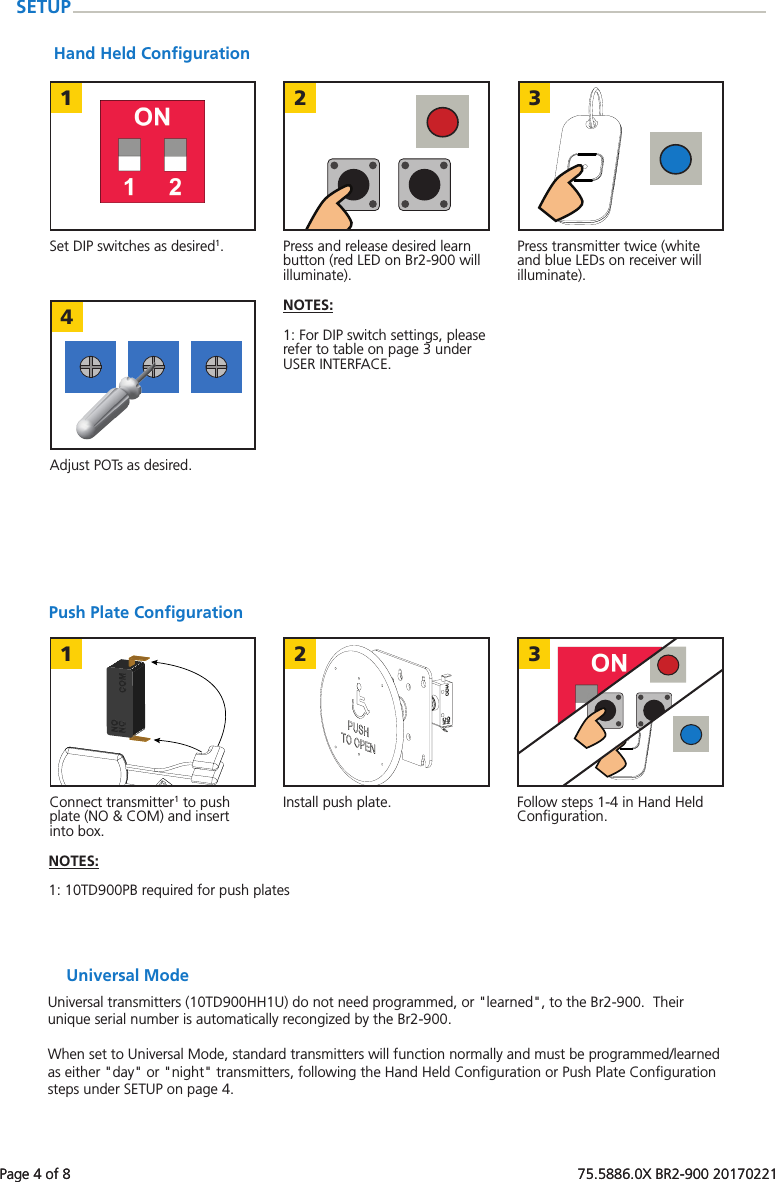
Page 4 of 8   75.5886.0X BR2-900 20170221123421 3Page 4 of 8   75.5886.0X BR2-900 20170221Push Plate ConfigurationConnect transmitter1 to push plate (NO & COM) and insert into box.Follow steps 1-4 in Hand Held Configuration.Install push plate.NOTES:  1: 10TD900PB required for push platesSETUPUniversal ModeUniversal transmitters (10TD900HH1U) do not need programmed, or "learned", to the Br2-900.  Their unique serial number is automatically recongized by the Br2-900.When set to Universal Mode, standard transmitters will function normally and must be programmed/learned as either "day" or "night" transmitters, following the Hand Held Configuration or Push Plate Configuration steps under SETUP on page 4.Hand Held ConfigurationSet DIP switches as desired1. Press transmitter twice (white and blue LEDs on receiver will illuminate).Press and release desired learn button (red LED on Br2-900 will illuminate).Adjust POTs as desired.NOTES:  1: For DIP switch settings, please refer to table on page 3 under USER INTERFACE.
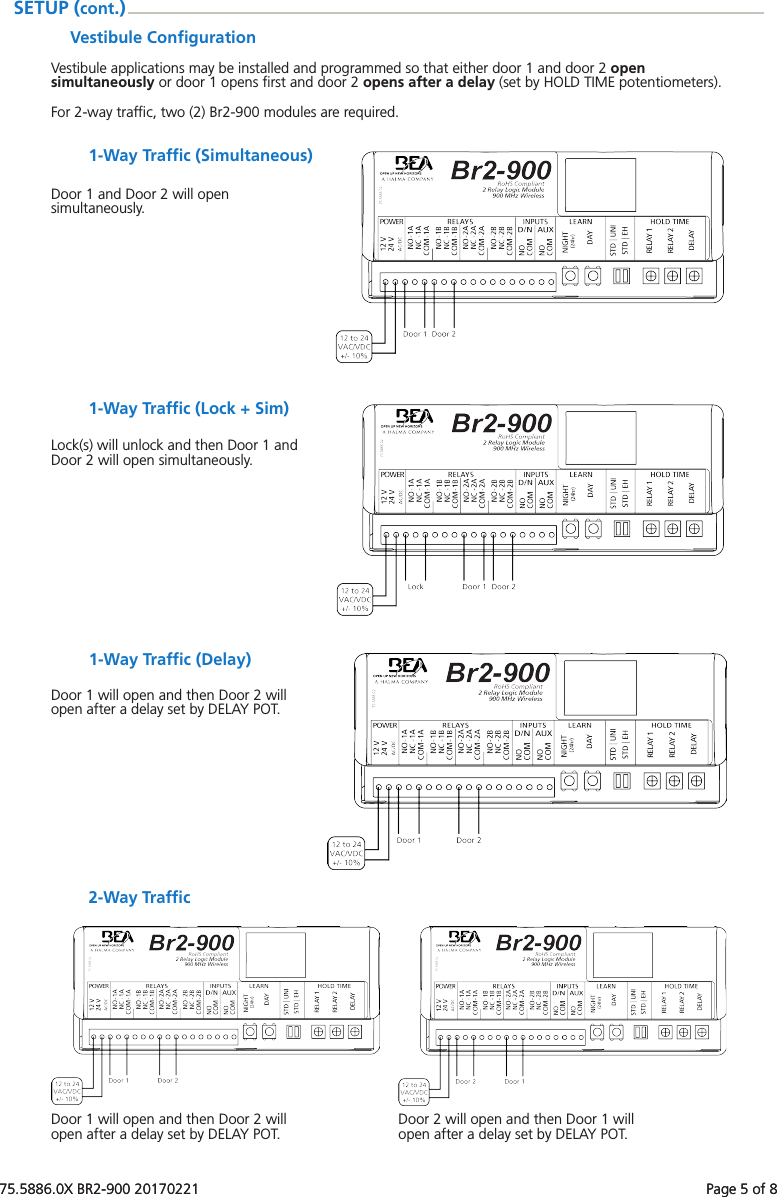
75.5886.0X BR2-900 20170221    Page 5 of 875.5886.0X BR2-900 20170221    Page 5 of 8Vestibule ConfigurationVestibule applications may be installed and programmed so that either door 1 and door 2 open simultaneously or door 1 opens first and door 2 opens after a delay (set by HOLD TIME potentiometers).For 2-way traffic, two (2) Br2-900 modules are required.SETUP (cont.)1-Way Traffic (Simultaneous)Door 1 and Door 2 will open simultaneously.1-Way Traffic (Lock + Sim)Lock(s) will unlock and then Door 1 and Door 2 will open simultaneously.1-Way Traffic (Delay)Door 1 will open and then Door 2 will open after a delay set by DELAY POT.2-Way TrafficDoor 1 will open and then Door 2 will open after a delay set by DELAY POT. Door 2 will open and then Door 1 will open after a delay set by DELAY POT.
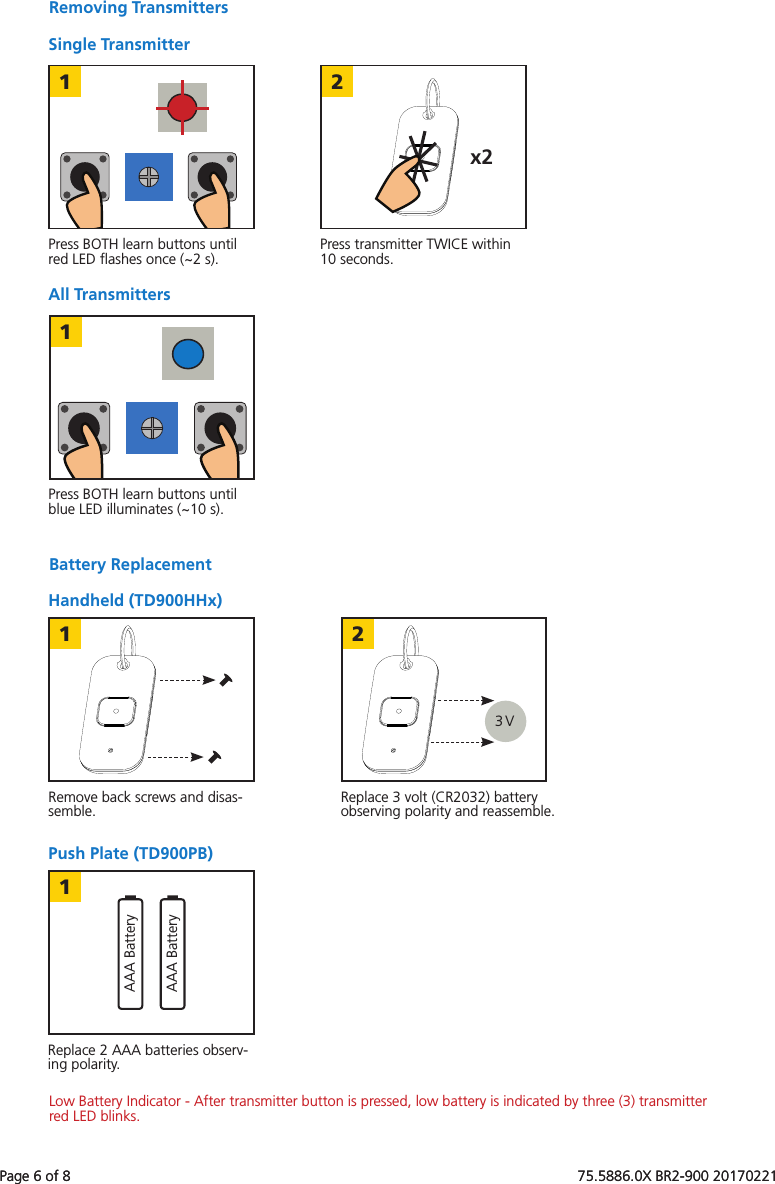
Page 6 of 8   75.5886.0X BR2-900 201702211x22113 V2AAA BatteryAAA Battery1Page 6 of 8   75.5886.0X BR2-900 20170221All TransmittersRemoving TransmittersSingle TransmitterPress BOTH learn buttons until red LED flashes once (~2 s).Press BOTH learn buttons until blue LED illuminates (~10 s).Press transmitter TWICE within 10 seconds.Battery ReplacementPush Plate (TD900PB)Handheld (TD900HHx)Remove back screws and disas-semble.Replace 2 AAA batteries observ-ing polarity.Replace 3 volt (CR2032) battery observing polarity and reassemble.Low Battery Indicator - After transmitter button is pressed, low battery is indicated by three (3) transmitter red LED blinks.
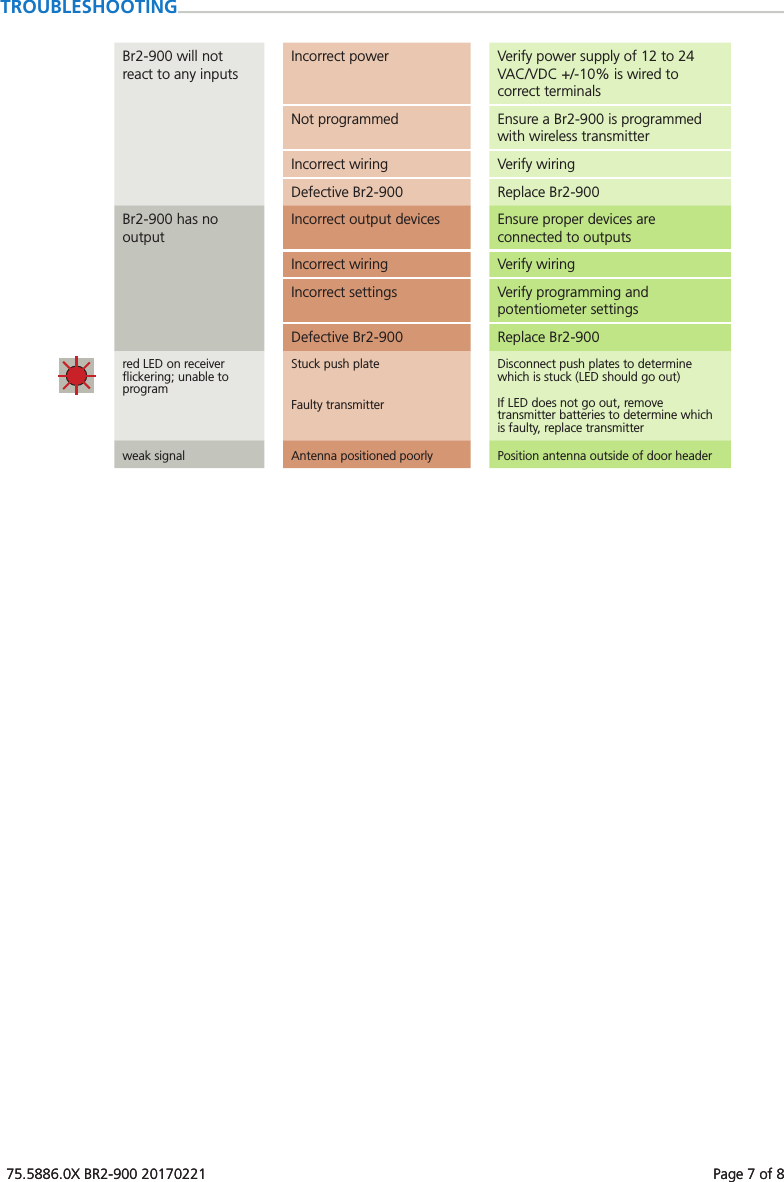
75.5886.0X BR2-900 20170221    Page 7 of 875.5886.0X BR2-900 20170221    Page 7 of 8TROUBLESHOOTINGBr2-900 will not react to any inputsIncorrect power Verify power supply of 12 to 24 VAC/VDC +/-10% is wired to correct terminalsNot programmed Ensure a Br2-900 is programmed with wireless transmitterIncorrect wiring Verify wiringDefective Br2-900 Replace Br2-900Br2-900 has no outputIncorrect output devices Ensure proper devices are connected to outputsIncorrect wiring Verify wiringIncorrect settings Verify programming and potentiometer settingsDefective Br2-900 Replace Br2-900red LED on receiver flickering; unable to programStuck push plate Disconnect push plates to determine which is stuck (LED should go out)Faulty transmitter If LED does not go out, remove transmitter batteries to determine which is faulty, replace transmitterweak signal Antenna positioned poorly Position antenna outside of door header
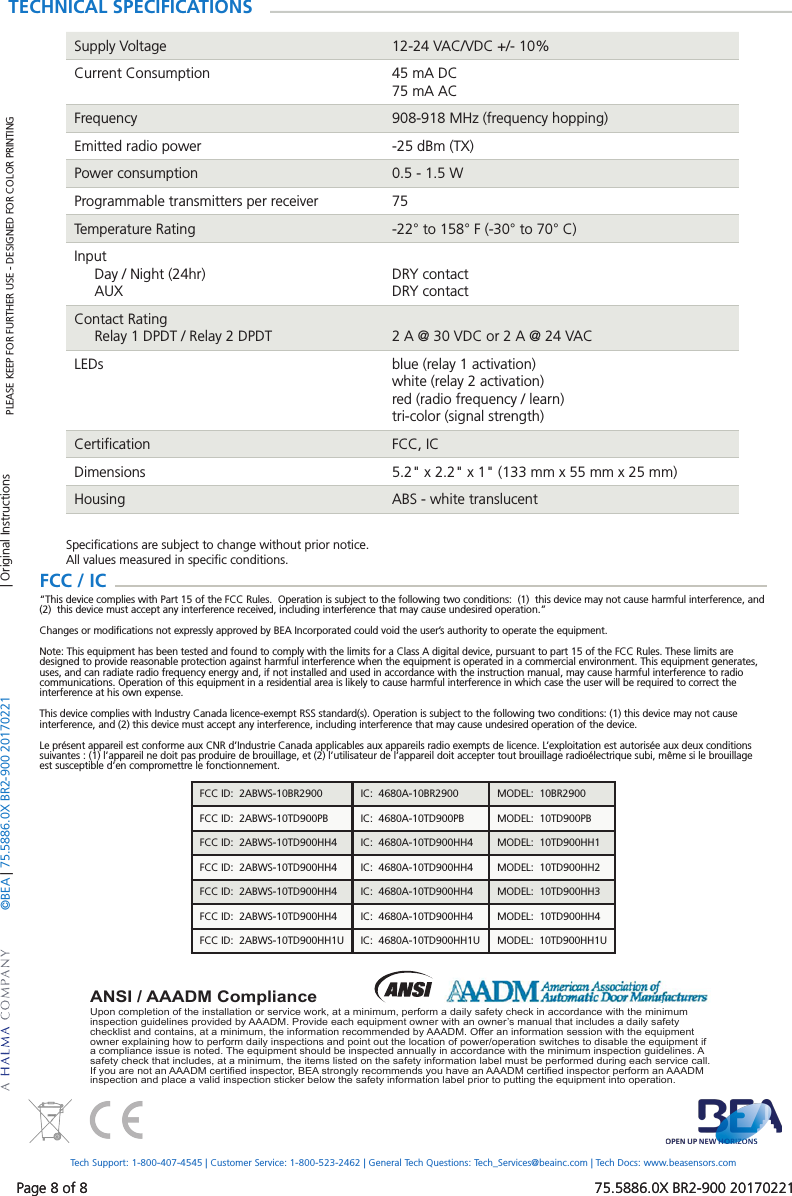
Page 8 of 8   75.5886.0X BR2-900 20170221©BEA | 75.5886.0X BR2-900 20170221Page 8 of 8   75.5886.0X BR2-900 20170221Upon completion of the installation or service work, at a minimum, perform a daily safety check in accordance with the minimum inspection guidelines provided by AAADM. Provide each equipment owner with an owner’s manual that includes a daily safety checklist and contains, at a minimum, the information recommended by AAADM. Offer an information session with the equipment owner explaining how to perform daily inspections and point out the location of power/operation switches to disable the equipment if a compliance issue is noted. The equipment should be inspected annually in accordance with the minimum inspection guidelines. A safety check that includes, at a minimum, the items listed on the safety information label must be performed during each service call. If you are not an AAADM certi ed inspector, BEA strongly recommends you have an AAADM certi ed inspector perform an AAADM inspection and place a valid inspection sticker below the safety information label prior to putting the equipment into operation.ANSI / AAADM ComplianceTECHNICAL SPECIFICATIONSSupply Voltage 12-24 VAC/VDC +/- 10%Current Consumption 45 mA DC75 mA ACFrequency 908-918 MHz (frequency hopping)Emitted radio power -25 dBm (TX)Power consumption 0.5 - 1.5 WProgrammable transmitters per receiver 75Temperature Rating -22° to 158° F (-30° to 70° C)Input     Day / Night (24hr)     AUXDRY contactDRY contactContact Rating     Relay 1 DPDT / Relay 2 DPDT 2 A @ 30 VDC or 2 A @ 24 VACLEDs blue (relay 1 activation)white (relay 2 activation)red (radio frequency / learn)tri-color (signal strength)Certification FCC, ICDimensions 5.2" x 2.2" x 1" (133 mm x 55 mm x 25 mm)Housing ABS - white translucentSpecifications are subject to change without prior notice.All values measured in specific conditions.PLEASE KEEP FOR FURTHER USE - DESIGNED FOR COLOR PRINTINGTech Support: 1-800-407-4545 | Customer Service: 1-800-523-2462 | General Tech Questions: Tech_Services@beainc.com | Tech Docs: www.beasensors.com| Original InstructionsFCC / IC  “This device complies with Part 15 of the FCC Rules.  Operation is subject to the following two conditions:  (1)  this device may not cause harmful interference, and (2)  this device must accept any interference received, including interference that may cause undesired operation.”Changes or modifications not expressly approved by BEA Incorporated could void the user’s authority to operate the equipment.Note: This equipment has been tested and found to comply with the limits for a Class A digital device, pursuant to part 15 of the FCC Rules. These limits are designed to provide reasonable protection against harmful interference when the equipment is operated in a commercial environment. This equipment generates, uses, and can radiate radio frequency energy and, if not installed and used in accordance with the instruction manual, may cause harmful interference to radio communications. Operation of this equipment in a residential area is likely to cause harmful interference in which case the user will be required to correct the interference at his own expense.This device complies with Industry Canada licence-exempt RSS standard(s). Operation is subject to the following two conditions: (1) this device may not cause interference, and (2) this device must accept any interference, including interference that may cause undesired operation of the device.Le présent appareil est conforme aux CNR d’Industrie Canada applicables aux appareils radio exempts de licence. L’exploitation est autorisée aux deux conditions suivantes : (1) l’appareil ne doit pas produire de brouillage, et (2) l’utilisateur de l’appareil doit accepter tout brouillage radioélectrique subi, même si le brouillage est susceptible d’en compromettre le fonctionnement.FCC ID:  2ABWS-10BR2900 IC:  4680A-10BR2900 MODEL:  10BR2900FCC ID:  2ABWS-10TD900PB IC:  4680A-10TD900PB MODEL:  10TD900PBFCC ID:  2ABWS-10TD900HH4 IC:  4680A-10TD900HH4 MODEL:  10TD900HH1FCC ID:  2ABWS-10TD900HH4 IC:  4680A-10TD900HH4 MODEL:  10TD900HH2FCC ID:  2ABWS-10TD900HH4 IC:  4680A-10TD900HH4 MODEL:  10TD900HH3FCC ID:  2ABWS-10TD900HH4 IC:  4680A-10TD900HH4 MODEL:  10TD900HH4FCC ID:  2ABWS-10TD900HH1U IC:  4680A-10TD900HH1U MODEL:  10TD900HH1U

Navigation menu