BEA orporated 10TD9001HH4 Wireless door activation / sequencing device User Manual 75 5858 02 900 MHZ INDUSTRIAL 20160205 indd
BEA Incorporated Wireless door activation / sequencing device 75 5858 02 900 MHZ INDUSTRIAL 20160205 indd
UserManual.wiki
>
BEA orporated
>
10TD9001HH4 User Manual
Users Manual
Navigation menu
Upload a User Manual
Namespaces
Wiki Guide
HTML
PDF
Info
Views
User Manual
Discussion / Help
Navigation
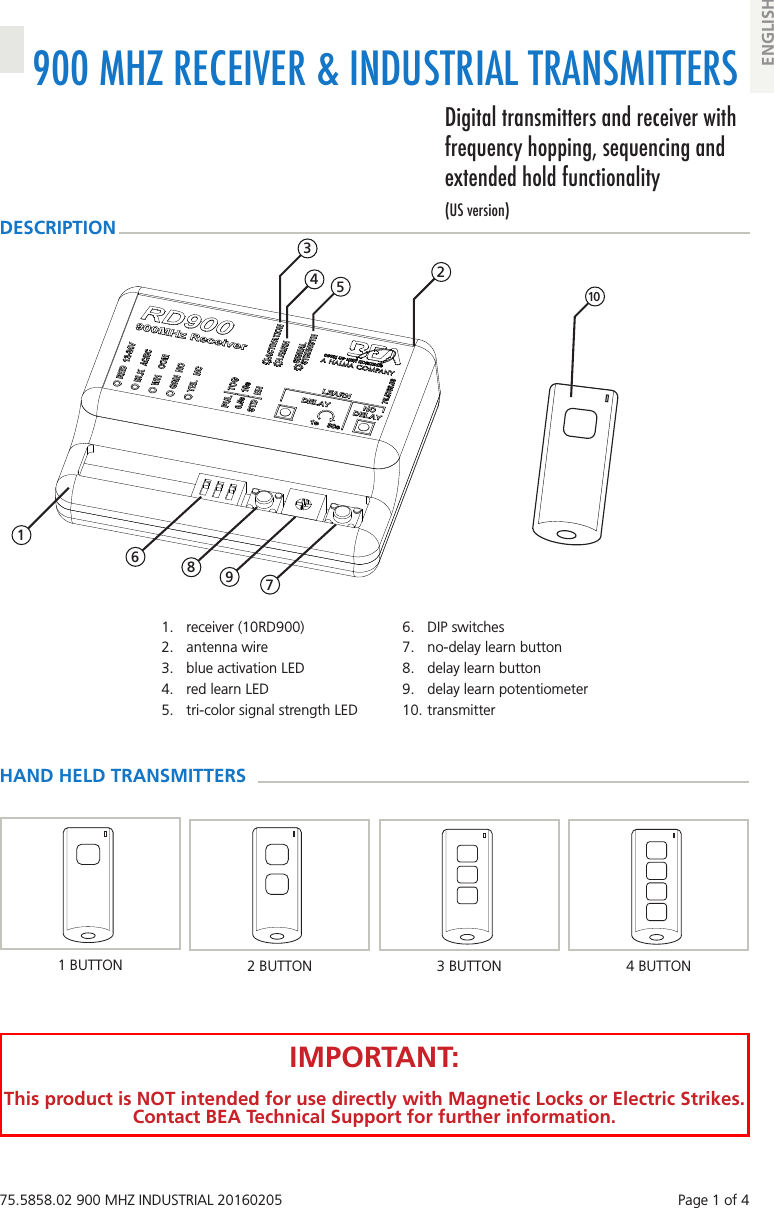
![Page 2 of 4 75.5858.02 900 MHZ INDUSTRIAL 20160205• The device should not be used for purposes other than its intended use. All other uses cannot be guaranteed by the manufacturer of this device. • The installer of the door system is responsible for carrying out a risk assessment and installing this device and the door system in compliance with applicable national and international regulations and standards on door safety. • The manufacturer of this device cannot be held responsible for incorrect installations or inappropriate adjustments of this device.PRECAUTIONS qShut off all power going to header before attempting any wiring procedures. qMaintain a clean & safe environment when working in public areas. qConstantly be aware of pedestrian traffic around the door area. qAlways stop pedestrian traffic through the doorway when performing tests that may result in unexpected reactions by the door. qESD (electrostatic discharge): Circuit boards are vulnerable to damage by electrostatic discharge. Before handling any board ensure you dissipate your body’s ESD charge. qAlways check placement of all wiring before powering up to ensure that moving door parts will not catch any wires and cause damage to equipment. qEnsure compliance with all applicable safety standards (i.e. ANSI A156.10) upon completion of installation. qDO NOT attempt any internal repair of the components. All repairs and/or component replacements must be performed by BEA, Inc. Unauthorized disassembly or repair: 1. May jeopardize personal safety and may expose one to the risk of electrical shock. 2. May adversely affect the safe and reliable performance of the product resulting in a voided warranty.Hand Held ConfigurationINSTALLATIONWiringTERMINAL: 1 2 3 4 5LABEL: 12-24 V 12-24 V COM NO NCWIRE COLOR: red black white green yellowSIGNAL: + voltage - voltage common normally-open normallyclosedDESCRIPTION: power relay contactsSETUPDIP SwitchesDIP STATUS FUNCTION DESCRIPTION1PUL Pulse Relay pressing transmitter activates and holds relay according to DIP 2 and 3TOG Toggle Relay pressing transmitter once activates and holds relay indefinitelypressing transmitter again deactivates relay immediately (no hold)2(PUL only)0.5s 0.5 second hold time relay remains active for 0.5 seconds after transmitter is...pressed [STD] released [EH]10s 10 second hold time relay remains active for 10 seconds after transmitter is...pressed [STD] released [EH]3STD standard holdrelay acts according to DIP 1 and 2(does not matter if transmitter is pressed/released or pressed/held)EH extended holdrelay remains active as long as transmitter is pressed and heldonce released, relay acts according to DIP 1 and 21 2 3ON1 2 3Set DIP switches as desired. Press transmitter twice (blue LED on receiver will illuminate).Press and release desired learn button (red LED on receiver will illuminate)1.NOTES: 1If Learn w/ Delay button is used, adjust potentiometer (1 s to 30 s).](https://usermanual.wiki/BEA-orporated/10TD9001HH4/User-Guide-2904169-Page-2.png)
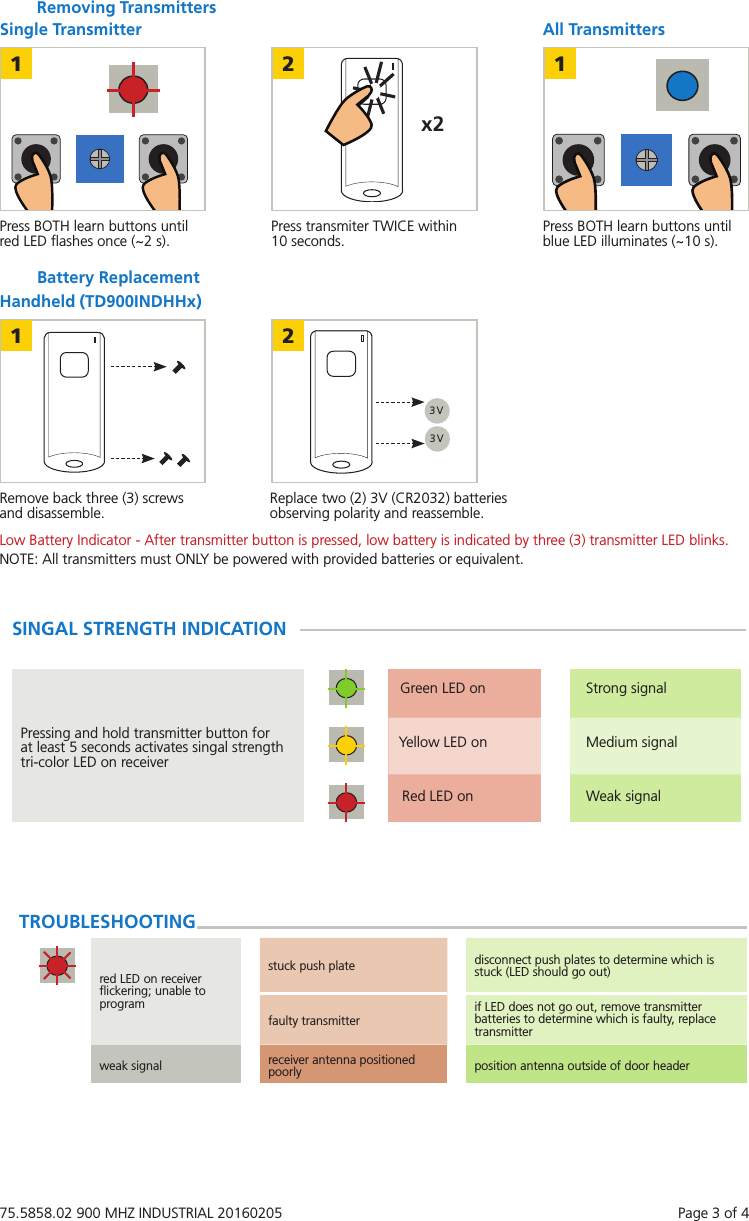
![Page 4 of 4 75.5858.02 900 MHZ INDUSTRIAL 20160205PLEASE KEEP FOR FURTHER USE – DESIGNED FOR COLOR PRINTING©BEA | Original Instructions | 75.5858.02 900 MHZ INDUSTRIAL 20160205TECHNICAL SPECIFICATIONSFrequency: 908-918 MHz (frequency hopping)Emitted radio power: -25 dBm (TX)Power consumption: 13 mA (Transmitter)40mA (Receiver)Supply voltage: 12-24 VAC/DCContact rating: 1.0 A @ 30 VDC0.5 A @ 125 VAC0.3 A @ 60 VDCTemperature range: 14°F to 131°F (-10°C to 55°C)Programmable units per receiver: 74LEDs: red (receiver learn)blue (relay activation)tri-color (signal strength)Dimensions: 2.5” (W) x 2.0” (D) x 0.75” (H) [RD900]1.5” (W) x 3.0” (D) x 0.5” (H) [Transmitter]Transmitter Protection Rate IP65Certification: FCC, ICSpecifications are subject to changes without prior notice.All values measured in specific conditionsFCC / IC “This device complies with Part 15 of the FCC Rules. Operation is subject to the following two conditions: (1) this device may not cause harmful interference, and (2) this device must accept any interference received, including interference that may cause undesired operation.”Changes or modifications not expressly approved by BEA Incorporated could void the user’s authority to operate the equipment.Note: This equipment has been tested and found to comply with the limits for a Class A digital device, pursuant to part 15 of the FCC Rules. These limits are designed to provide reasonable protection against harmful interference when the equipment is operated in a commercial environment. This equipment generates, uses, and can radiate radio frequency energy and, if not installed and used in accordance with the instruction manual, may cause harmful interference to radio communications. Operation of this equipment in a residential area is likely to cause harmful interference in which case the user will be required to correct the interference at his own expense.This device complies with Industry Canada licence-exempt RSS standard(s). Operation is subject to the following two conditions: (1) this device may not cause interference, and (2) this device must accept any interference, including interference that may cause undesired operation of the device.Le présent appareil est conforme aux CNR d’Industrie Canada applicables aux appareils radio exempts de licence. L’exploitation est autorisée aux deux conditions suivantes : (1) l’appareil ne doit pas produire de brouillage, et (2) l’utilisateur de l’appareil doit accepter tout brouillage radioélectrique subi, même si le brouillage est susceptible d’en compromettre le fonctionnement.FCC ID: 2ABWS-10RD900 IC: 4680A-10RD900 MODEL: 10RD900FCC ID: IC: MODEL: 10TD900INDHH1FCC ID: IC: MODEL: 10TD900INDHH2FCC ID: IC: MODEL: 10TD900INDHH3FCC ID: IC: MODEL: 10TD900INDHH4](https://usermanual.wiki/BEA-orporated/10TD9001HH4/User-Guide-2904169-Page-4.png)