BITFINDER AWAIR Air Quality Monitor User Manual

Bitfinder, Inc. Air Quality Monitor

User Manual

` Awair Omni User Manual    Requirements iOS Android System Requirements What’s INSIDE Setup and Installation Awair App Create Awair account Connect the device to app Connect Awair to WiFi network Understand your environment and interests Test and learn Awair Boost Awair Boost Device LED lights Resets Safety Specification Sensors Dimensions Supported Wireless Security Power Consumption System Requirements Wireless Limited Warranty Duration and Coverage Limited Warranty Satisfaction Return Policy Return and Warranty Service Process Scope of and Limitation of Warranty Wood Material Policy Disclaimer of Warranties   Requirements You need to have Wi-Fi network in place and an Awair account to use Awair’s mobile application features.
iOS AWAIR OMNI supports following devices running iOS 8 or later: -iPhone 5 or newer-iPad (3rd generation) or newer-iPad mini (all models)Android  AWAIR OMNI will support Android devices running Jelly Bean 4.3 or later System Requirements Wi-Fi Connection Smartphone or tablet with iOS 8 or later, or Android 4 or later Free Awair account What’s INSIDE AWAIR OMNI Device Quick Start Guide  Type C usb cable (Battery only charger)Adaptor *wall-mount unit (for commercial, Omni)*Accessory stand (for consumer, Boost)
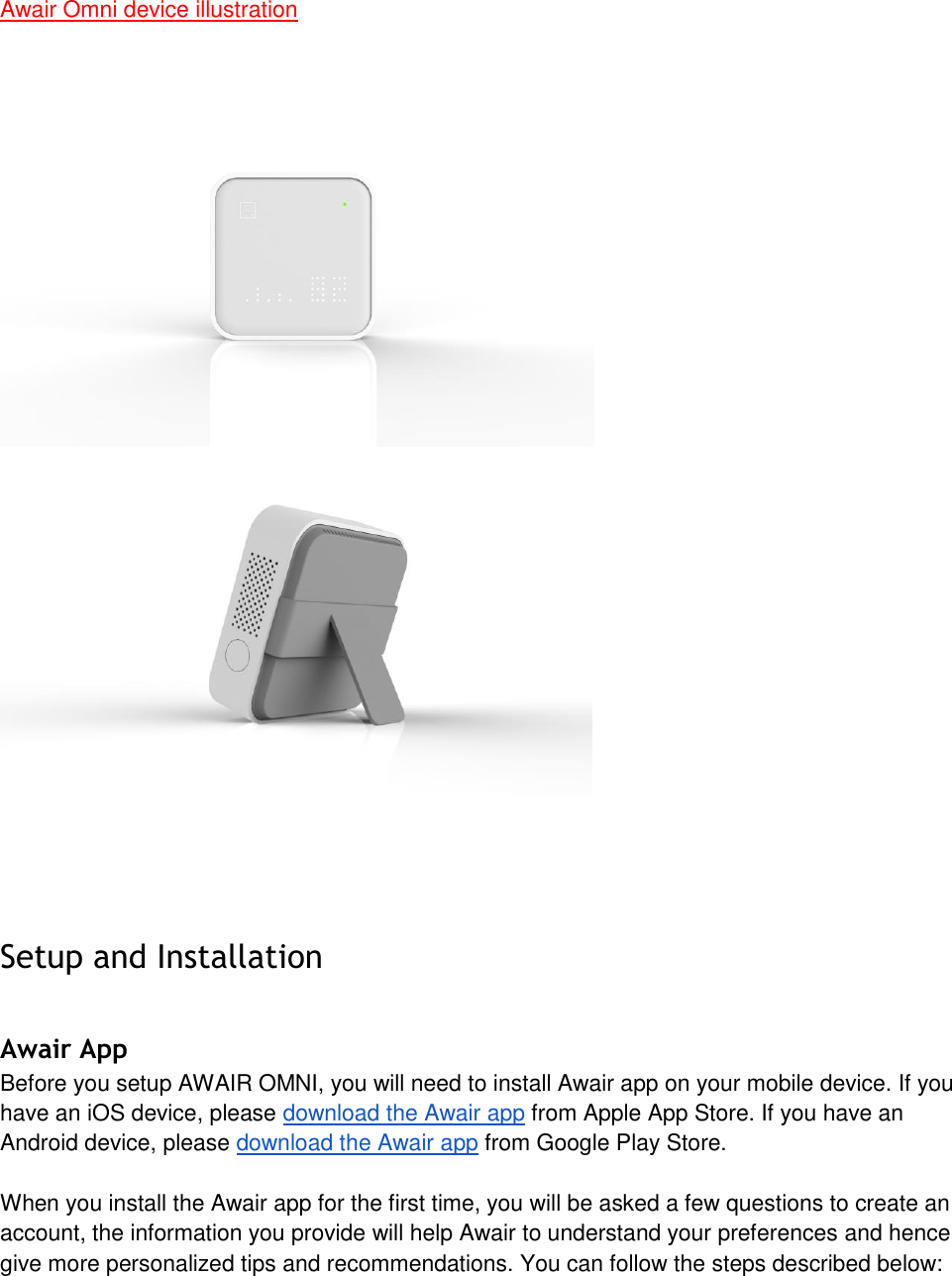
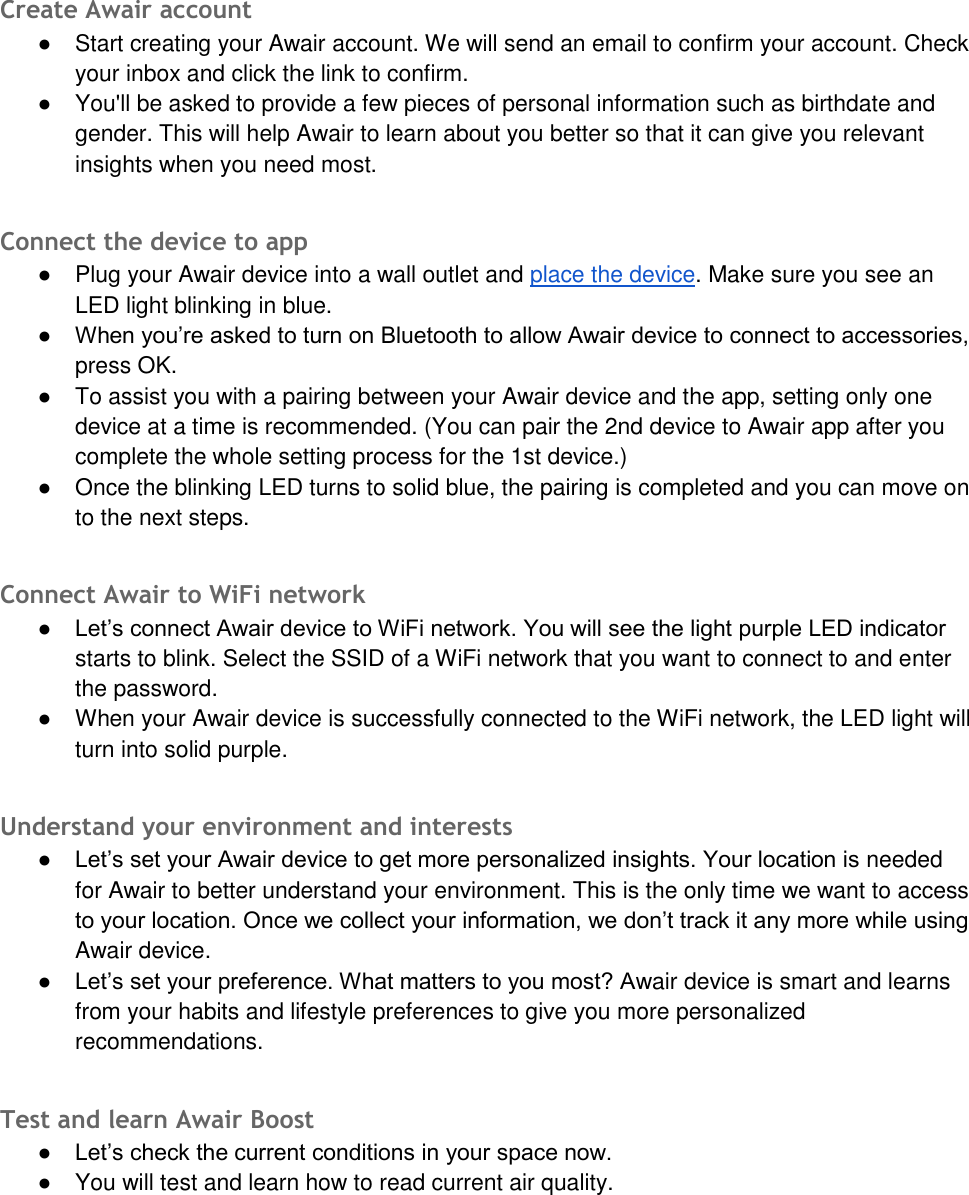
Awair Omni device illustration Setup and Installation Awair App Before you setup AWAIR OMNI, you will need to install Awair app on your mobile device. If you have an iOS device, please download the Awair app from Apple App Store. If you have an Android device, please download the Awair app from Google Play Store. When you install the Awair app for the first time, you will be asked a few questions to create an account, the information you provide will help Awair to understand your preferences and hence give more personalized tips and recommendations. You can follow the steps described below:
Create Awair account ●Start creating your Awair account. We will send an email to confirm your account. Checkyour inbox and click the link to confirm.●You'll be asked to provide a few pieces of personal information such as birthdate andgender. This will help Awair to learn about you better so that it can give you relevantinsights when you need most.Connect the device to app ●Plug your Awair device into a wall outlet and place the device. Make sure you see anLED light blinking in blue.● When you’re asked to turn on Bluetooth to allow Awair device to connect to accessories,press OK.●To assist you with a pairing between your Awair device and the app, setting only onedevice at a time is recommended. (You can pair the 2nd device to Awair app after youcomplete the whole setting process for the 1st device.)●Once the blinking LED turns to solid blue, the pairing is completed and you can move onto the next steps.Connect Awair to WiFi network ● Let’s connect Awair device to WiFi network. You will see the light purple LED indicatorstarts to blink. Select the SSID of a WiFi network that you want to connect to and enterthe password.●When your Awair device is successfully connected to the WiFi network, the LED light willturn into solid purple.Understand your environment and interests ● Let’s set your Awair device to get more personalized insights. Your location is neededfor Awair to better understand your environment. This is the only time we want to accessto your location. Once we collect your information, we don’t track it any more while usingAwair device.● Let’s set your preference. What matters to you most? Awair device is smart and learnsfrom your habits and lifestyle preferences to give you more personalizedrecommendations.Test and learn Awair Boost ● Let’s check the current conditions in your space now.●You will test and learn how to read current air quality.
If you have already another Awair or Awair Glow, set it up from Connect the device to app step. Otherwise, it is all set. Enjoy! AWAIR OMNI Device One AWAIR OMNI covers about 400 sq feet. Generally we recommend one unit per closed wall environment (example: normal sized rooms, large closets, and so on). To stay connected, our app supports an all-in-one view for multiple devices for those who have multiple units in their homes or offices. LED lights The AWAIR OMNI has a set LED lights on the front of the device to indicate status of air quality with colors (green is Good, yellow is Fair, red is Poor) and bar graphs represent each sensor data. There is an option to see more specific number-based sensor data triggered by touch sensitive surface on the front (lower right).    Resets  On the back side of the device, there is a reset button right next to the power connector. Press and hold the reset button for 8 seconds until you see a new passcode and blue LED light on the display of the device. This will delete all information saved for the device. Your account information will not be removed (because it is saved in the server). Safety AWAIR OMNI should be powered with the provided adaptor in the original box. It will not work with accessories from other manufacturers.  Disassembling and opening Awair is dangerous when the power cord is connected to any power outlet. It will void your warranty too.  -Do not insert or allow foreign objects to enter any ventilation or exhaust opening as this maycause an electric shock or fire, or damage the device.*All fire-related safety issue need to be reviewed by experts.Battery related certifications
Capacity and voltage : 2250mAh@3.7V Lithium-Ion Certification CELL : UL1642( Standard for Lithium Batteries ) Pack :  CB( Certification Body ) Transport Certification : UN38.3(  To ensure air transport safety, and to meet customer demand for transport of cargo containing lithium batteries, according to IATA "Dangerous Goods Rules," the relevant provisions of the development of a rechargeable battery operating specifications  )  KC:  CE  *We need to add Battery related items.Specification Sensors - Temperature : 0 to 65°C( 32 to +149°F) for Accuracy range : -40 to 125°C( -40 to +257°F ) for Measurement range - Humidity : 10 to 90% for Accuracy range : 0 to 100% for Measurement range - CO2 : 0 to 5,000 ppm for Measurement range (*for commercial) :  400-5000 ppm ± 75 ppm for Accuracy range -Dust : 0 to 1,000 μg/m3 (*for consumer)- VOCs : 0 to 1000 ppm- Ambient light : 0.96 to 64,000 luxDimensions Width: 98mm Depth: 34mm Height: 98mm Supported Wireless Security WPA, WPA2 Power Consumption Less than 0.05kWh per month System Requirements -Wi-Fi connection- Smartphone or tablet with iOS 7 or later, or Android 4.3 or later
- Awair free accountWireless - Working Wi-Fi connection: 802.11 b/g/n @ 2.4 GHz- Wireless Interconnect: 802.15.4 @ 2.4 GHz- Bluetooth 4.1 @ 2.4 GHz Limited Warranty IMPORTANT: By using AWAIR OMNI (the “Device”) you are agreeing to be bound by the terms of this Limited Warranty set forth below.  If you do not agree to the terms of this Limited Warranty you may return the Device (in its original, unused condition) within thirty days of the date of purchase (or the return period provided by your place of purchase, whichever is longer) for a refund in accordance with our returns policy as set forth in Section 3 of this Limited Warranty. This Limited Warranty gives you specific legal rights. You may also have other legal rights that vary by state, province or jurisdiction. The disclaimers, exclusions, and limitations of liability under this Limited Warranty will not apply to the extent prohibited by applicable law. For a full description of your legal rights you should refer to the laws applicable in your jurisdiction and you may wish to contact a relevant consumer advisory service. Duration and Coverage One (1) year Limited Hardware Warranty. Subject to the additional terms and conditions set forth below, Bitfinder provides the following Limited Warranty only to the person or entity that originally purchased the Device from Bitfinder or from one of its authorized resellers or distributors; Limited Warranty Bitfinder warrants the Device against defects in materials and workmanship under normal use for a period of one (1) year from the date of original purchase and with respect to pre-orders from the date the pre-orders are shipped (“Warranty Period”). If a Device is returned to Bitfinder during the Warranty Period as provided below, and Bitfinder determines that the Device is defective, Bitfinder will either repair or replace the unit with either a new or a refurbished Awair, or refund the original purchase price (less any discounts or promotional codes) in return for the Device, at its option. If the Warranty Period has expired or is otherwise not applicable as per the Scope and Limitation on Warranty (below), we will return the Device to you. More information about this warranty can be found at http://support.getawair.com. Satisfaction Return Policy If you are the original purchaser of the Product and you are not satisfied with this Product for any reason, you may return it in its original condition within thirty (30) days of the original purchase and receive a full refund. To return your product you need to contact customer support
for an RMA number. RMA numbers are valid for 30 days after issuance, product returned after that will be returned to the customer. Return and Warranty Service Process Please review the online help resources at http://support.getawair.com prior to seeking warranty service. To obtain warranty service, you must first obtain a Return Merchandise Authorization (RMA) number from a Customer Support Representative (CSR) at Bitfinder. Customer Support contact information can be found by visiting http://support.getawair.com. Bitfinder may attempt to troubleshoot a warranty-related problem prior to issuing a RMA number. Bitfinder may ask for additional information upon request. Issued RMA numbers remain valid for thirty days from issuance. Once an RMA number is obtained, your Device must be shipped freight prepaid; together with proof of purchase and all accessories, either its original packaging or packaging affording an equal degree of protection, to the Bitfinder authorized distribution facility identified by the CSR. Failure to return any of the accessories may result in a delay and/or result in a credit to Bitfinder or an invoice for the missing accessories. In performing warranty service, Bitfinder may furnish replacement parts on an exchange basis and replaced parts will become the property of Bitfinder. Replacement parts provided by Bitfinder shall be new or refurbished and of comparable quality, and may be a different part that contains compatible features and functions. You will reimburse Bitfinder for the inspection, testing and repair of returned equipment determined by Bitfinder not to be defective or which falls under one of the warranty exclusions described below (as well as pay all shipping and handling charges). In all cases, Bitfinder’s determination as to whether or not the equipment is defective and covered by warranty will be final. Any replacement equipment will be warranted hereunder for remaining period of one (1) year from original purchase or with respect to pre-orders one (1) year from shipment of the pre-order. Bitfinder reserves the right to change the method by which Bitfinder may provide warranty service to you, and your Device’s eligibility to receive a particular method of service. Scope of and Limitation of Warranty  The warranty on this Device is limited to the repair or replacement of defective Devices as described in the Limited Warranty section above. This warranty does not cover customer training and education, installation, set up or adjustment, signal or reception problems. The Awair is not a medical device and has not been submitted for approval by the FDA and Bitfinder makes no medical claims regarding the Awair. This warranty does not cover damage (i) due to acts of God, other forces beyond our reasonable control, such as internet or power outages, wars, riots, terrorism, labor disputes, earthquakes, floods or other events of “force majeure,” accident, misuse, abuse, negligence, commercial use or modification of, or to any part of your Device; (ii) caused by any third party product, service or system, use of the Device for purposes other than for which the Device was designed or intended, abnormal physical or electrical stress, or use in improper environmental conditions, or use of the Device in violation of written instructions provided by Bitfinder (which may be provided at the time of purchase or on its website at http://support.getawair.com). This warranty does not cover defects due to normal wear and tear, scratches, nicks and dents or aging. This warranty does not cover damage due to improper repair, operation or maintenance
or connections to improper voltage supply or, to the extent allowed by law, attempted repair by anyone other than a facility authorized by Bitfinder to service your Bitfinder Device. This warranty does not cover consumable parts (such as batteries). This warranty gives you specific legal rights, and you may also have other rights which vary from state to state (and jurisdiction to jurisdiction). Disclaimer of Warranties  TO THE EXTENT PERMITTED BY LAW, THIS WARRANTY AND THE REMEDIES SET FORTH ARE EXCLUSIVE AND IN LIEU OF ALL OTHER WARRANTIES, REMEDIES AND CONDITIONS, WHETHER ORAL, WRITTEN, STATUTORY, EXPRESS OR IMPLIED. BITFINDER DISCLAIMS ALL STATUTORY AND IMPLIED WARRANTIES, INCLUDING WITHOUT LIMITATION, WARRANTIES OF MERCHANTABILITY AND FITNESS FOR A PARTICULAR PURPOSE AND WARRANTIES AGAINST HIDDEN OR LATENT DEFECTS, TO THE EXTENT PERMITTED BY LAW. IN SO FAR AS SUCH WARRANTIES CANNOT BE DISCLAIMED, BITFINDER LIMITS THE DURATION AND REMEDIES OF SUCH WARRANTIES TO THE DURATION OF THIS EXPRESS WARRANTY AND, AT BITFINDER’S OPTION, THE REPAIR OR REPLACEMENT SERVICES DESCRIBED ABOVE. SOME STATES (COUNTRIES AND PROVINCES) DO NOT ALLOW LIMITATIONS ON HOW LONG AN IMPLIED WARRANTY (OR CONDITION) MAY LAST, SO THE LIMITATION DESCRIBED ABOVE MAY NOT APPLY TO YOU. Limitation of Damages. IN ADDITION TO THE ABOVE WARRANTY DISCLAIMERS, TO THE MAXIMUM EXTENT PERMITTED BY LAW, NEITHER BITFINDER NOR ITS SUPPLIERS SHALL BE RESPONSIBLE OR LIABLE WITH RESPECT TO ANY SUBJECT MATTER OF THIS AGREEMENT OR TERMS OR CONDITIONS RELATED THERETO UNDER ANY BREACH OF CONTRACT, NEGLIGENCE, STRICT LIABILITY OR ANY OTHER THEORY (A) FOR LOSS OR INACCURACY OF DATA OR COST OF PROCUREMENT OF SUBSTITUTE GOODS, SERVICES OR TECHNOLOGY, OR (B) FOR ANY INDIRECT, INCIDENTAL OR CONSEQUENTIAL DAMAGES INCLUDING, BUT NOT LIMITED TO HEALTH CLAIMS, BUSINESS INTERRUPTION, LOSS OF REVENUES AND LOSS OF PROFITS. THE FOREGOING SHALL APPLY EVEN IF BITFINDER HAS BEEN ADVISED OF THE POSSIBILITY OF SUCH DAMAGES. TO THE MAXIMUM EXTENT PERMITTED BY LAW, BITFINDER’S AGGREGATE CUMULATIVE LIABILITY HEREUNDER SHALL NOT EXCEED THE ORIGINAL PURCHASE PRICE PAID FOR THE DEVICE THAT CAUSED SUCH DAMAGE. CERTAIN STATES (COUNTRIES AND PROVINCES) DO NOT ALLOW THE LIMITATION OF LIABILITY FOR INCIDENTAL OR CONSEQUENTIAL DAMAGES, SO THE EXCLUSIONS SET FORTH ABOVE MAY NOT APPLY TO YOU.
Caution. Changes or modifications not expressly approved by the party responsible for compliance could void the user's authority to operate the equipment. This device complies with part 15 of the FCC Rules. Operation is subject to the following two conditions: (1) This device may not cause harmful interference, and (2) this device must accept any interference received, including interference that may cause undesired operation This equipment has been tested and found to comply with the limits for a digital device, pursuant to part 15 of the FCC Rules. These limits are designed to provide reasonable protection against harmful interference in a residential installation. This equipment generates, uses and can radiate radio frequency energy and, if not installed and used in accordance with the instructions, may cause harmful interference to radio communications. However, there is no guarantee that interference will not occur in a particular installation. If this equipment does cause harmful interference to radio or television reception, which can be determined by turning the equipment off and on, the user is encouraged to try to correct the interference by one or more of the following measures: Reorient or relocate the receiving antenna. Increase the separation between the equipment and receiver. Connect the equipment into an outlet on a circuit different from that to which the receiver is connected. Consult the dealer or an experienced radio/TV technician for help. This device complies with FCC radiation exposure limits for an uncontrolled environment. Avoid operating this device at a distance less than 20cm from the user.

Navigation menu