Balboa Instruments SPASIDE1 SPA Monitor Transceiver User Manual Spa Monitor Manual indd

Balboa Instruments, Inc. SPA Monitor Transceiver Spa Monitor Manual indd

Exhibit D Users Manual per 2 1033 b3

BALBOA SPAMONITOROperating  Instructions
IMPORTANT:The user is cautioned that changes not expressly approved by Balboa Instruments, Inc. could void the user’s authority to operate the equipment.Page 2TABLE OF CONTENTSButton Call Outs .................................................................................................................................. 3Mode Operation .................................................................................................................................. 4Sync/Jets Operation ............................................................................................................................ 4Diagnostic Messages .......................................................................................................................... 5ML900 Message Cross-Reference Table for Diagnostic Messages ...................................................6-7ML900 Message Cross-Reference Table for Reminder Messages ...................................................... 7Sounds ................................................................................................................................................ 8Things to Avoid .................................................................................................................................... 8
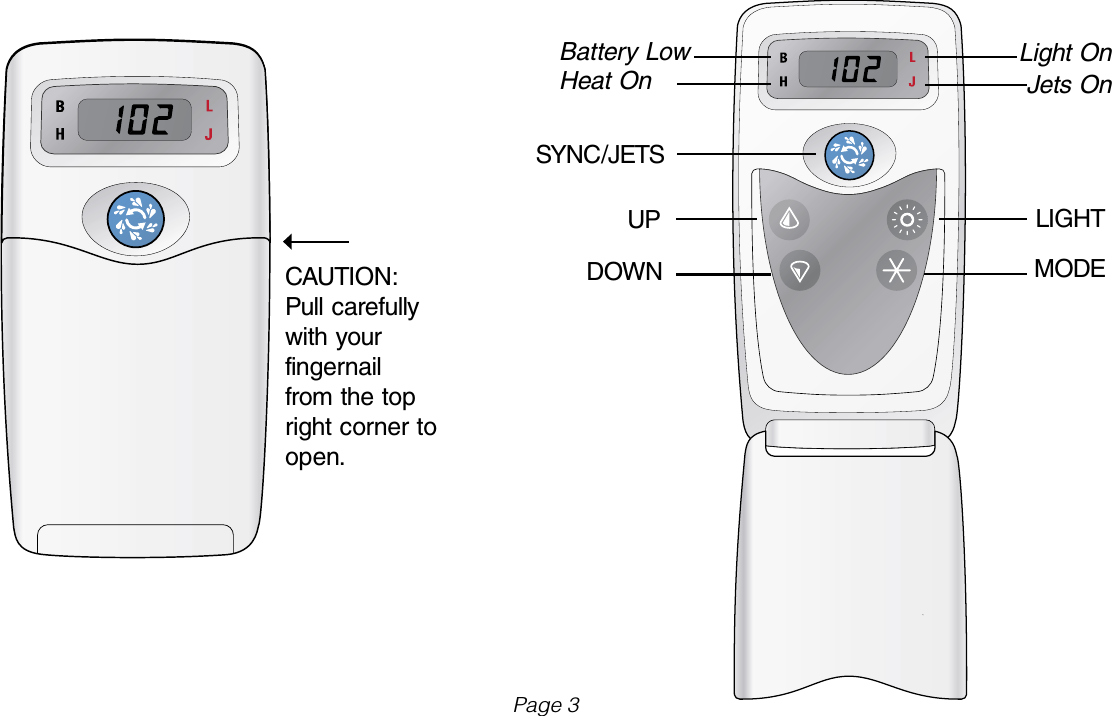
CAUTION:Pull carefully with your fingernail from the top right corner to open.SYNC/JETSUPDOWNLIGHTMODELight OnJets OnBattery LowHeat OnPage 3
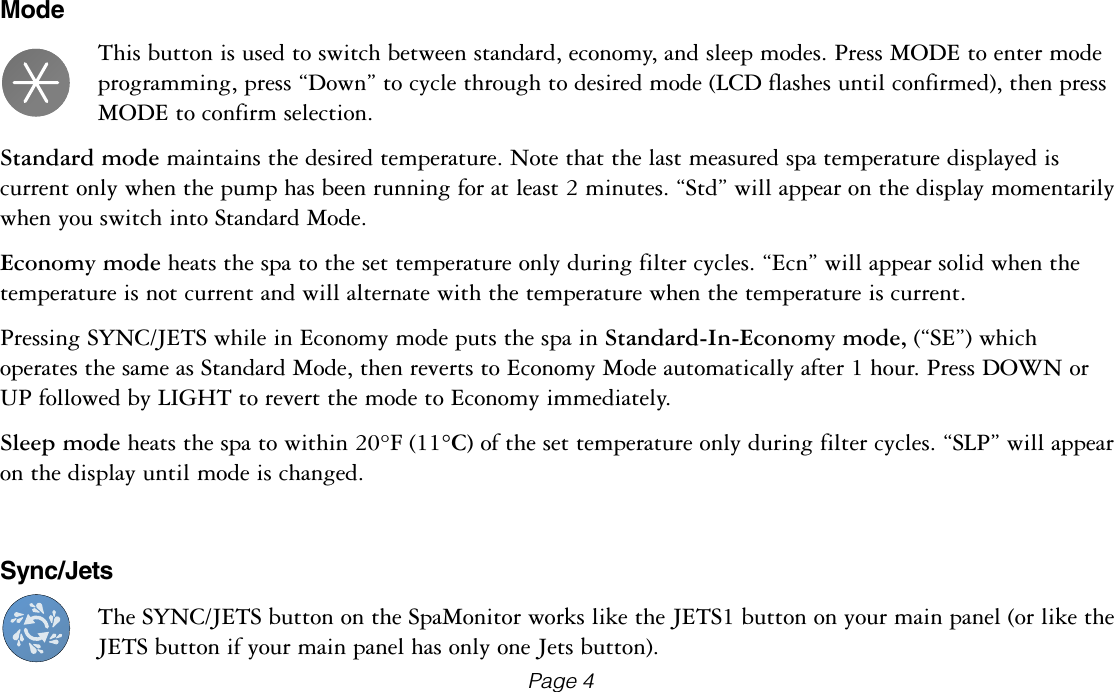
ModeThis button is used to switch between standard, economy, and sleep modes. Press MODE to enter mode programming, press “Down” to cycle through to desired mode (LCD flashes until confirmed), then press MODE to confirm selection.Standard mode maintains the desired temperature. Note that the last measured spa temperature displayed is current only when the pump has been running for at least 2 minutes. “Std” will appear on the display momentarily when you switch into Standard Mode.Economy mode heats the spa to the set temperature only during filter cycles. “Ecn” will appear solid when the temperature is not current and will alternate with the temperature when the temperature is current.Pressing SYNC/JETS while in Economy mode puts the spa in Standard-In-Economy mode, (“SE”) which operates the same as Standard Mode, then reverts to Economy Mode automatically after 1 hour. Press DOWN or UP followed by LIGHT to revert the mode to Economy immediately.Sleep mode heats the spa to within 20°F (11°C) of the set temperature only during filter cycles. “SLP” will appear on the display until mode is changed.Sync/JetsThe SYNC/JETS button on the SpaMonitor works like the JETS1 button on your main panel (or like the JETS button if your main panel has only one Jets button).Page 4
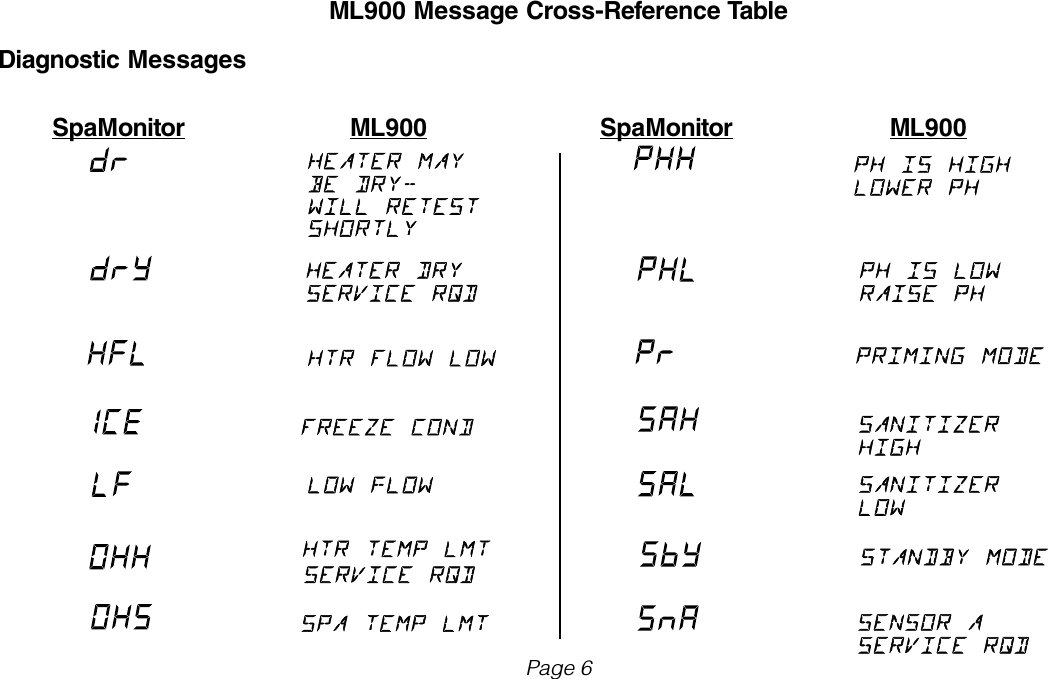
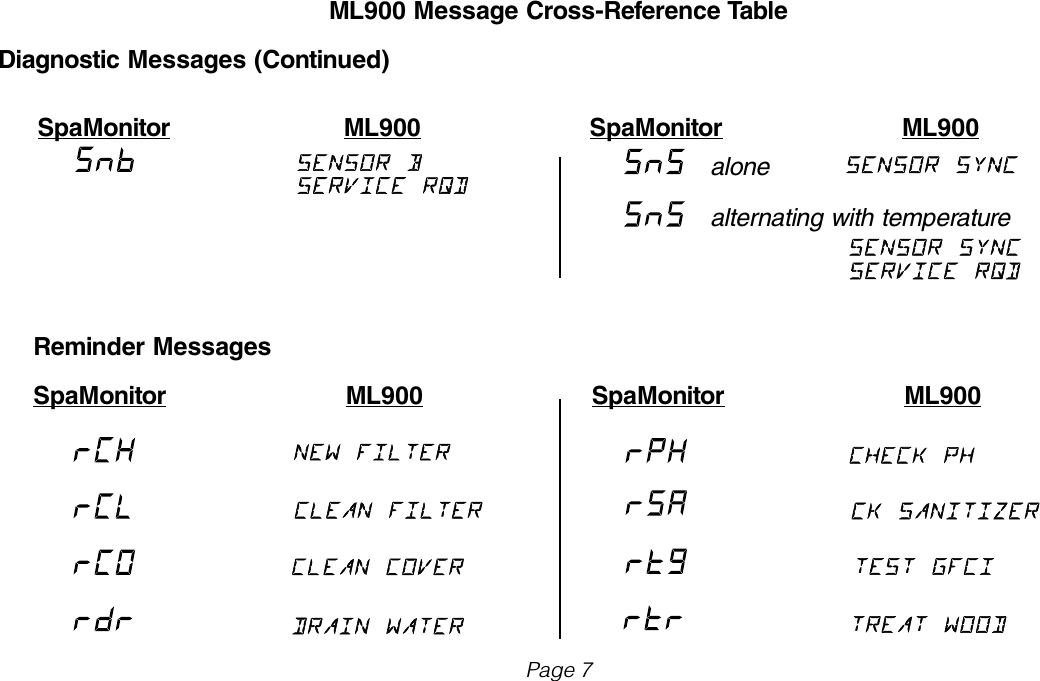
Diagnostic Messages Message Meaning  The spa is operating in Standard Mode.  The spa is operating in Economy Mode.  The spa is operating Standard-in-Economy    Mode.  Sleep Mode has been activated by pressing    a button combination on the user panel.  The spa is operating in Test Mode.      The Spa Monitor is unable to operate      normally in Test Mode.Action RequiredTemperature display is current after pump has been running for at least 2 minutes.“Ecn” will appear solid on the display when the temperature is not current. “Ecn” will alternate with the temperature when the temperature is current. Operates the same as Standard mode, then reverts to Economy mode after 1 hour.  Press MODE to switch directly to Economy mode.“SLP” will appear solid on the display when the temperature is not current. “SLP” will alternate with the temperature when the temperature is current.Contact your distributor or authorized dealer to have the spa switched back to User Mode.Consult your main panel documentation for the meaning and required action that corresponds to any additional three-letter diagnostic or reminder messages that may appear on the SpaMonitor display.  If you use an ML900 main panel, consult the ML900 Cross-Reference Table on the next page to correlate the three-character message on the SpaMonitor with the 12-character message on the ML900.Page 5
ML900 Message Cross-Reference TableDiagnostic Messages  SpaMonitor  ML900  SpaMonitor  ML900Page 6
ML900 Message Cross-Reference TableDiagnostic Messages (Continued)  SpaMonitor  ML900  SpaMonitor  ML900alonealternating with temperatureReminder Messages SpaMonitor  ML900  SpaMonitor  ML900Page 7
SoundsThe Spa Monitor sounds an alarm when it detects the spa offline for more than 3 hours* or when the spa detects a condition that may require your attention (i.e. overheat).  Press any button to reset the alarm.  *The SpaMonitor detects the spa offline when it cannot communicate with the base unit.  This can occur when the Spa Monitor is out of range or if there is a connection or power problem.Things to AvoidBe careful not to press multiple buttons together in normal use.  Certain combinations of buttons put the SpaMonitor into special modes which are covered in the Installation Manual.Page 8

Navigation menu