Be Interactive Co ACTIVESCAN BARCOE SCANNER User Manual ActiveScan user s guide

Be Interactive Co Ltd BARCOE SCANNER ActiveScan user s guide

USERS MANUAL

CompactFlash Laser barcode ScanClass ll Pocket PC software include! Barcode Scanfor Pocket PC seriesIdeal for CompactFlash Slot Pocket PC and Handheld PCUse Pocket PC as anPersonal Digital Terminal
1. CopyrightAll rights reserved. No part of this publication may be reproduced in any form or by any means without permission in writing from Beinteractive Co., Ltd.Specifications, Bundle program and user’s guide are subject to change without prior notice to upgrade.All products and company names mentioned are trademarks or registered trademarks of their respective holders.Copyright ⓒBeinteractive Co., Ltd, 2. WarrantyThis warranty period for this product is one(1) year from the date of product purchase. During the warranty period, Beinteractive will repair or replace the defective product at no charge when furnished with proof of retail purchase, provided that you deliver the product to Beinteractive or to an authorized Beinteractive Agent or distributor.This warranty does not cover the replacement of products, damaged by abuse, accident, misuse or misapplication, nor as a result of service or modification other than by Beinteractive. **    On this guide, Pocket PC, Windows CE are trademark of Microsoft and ActiveScan is trademark of Beinteractive Co., Ltd.All rights reserved. No part of this publication may be reproduced in any form or by any means without permission in writing from Beinteractive Co., Ltd.
   Information to user : Part 15, Paragraph 15.21 and 15.105(b) Changes or modifications not expressly approved by the party responsible for compliance could void the user’s authority to operate the equipment  FCC Notice NOTE : This equipment has been tested and found to comply with the limits for a Class B digital device, pursuant to Part 15 of the FCC Rules. These limits are designed to provide reasonable protection against harmful interference in a residential installation. This equipment generates, uses and can radiate radio frequency energy and, if not installed and used in accordance with the instructions, may cause harmful interference to radio communications. However, there is no guarantee that interference will not occur in a particular installation. If this equipment does cause harmful interference to radio or television reception, which can be determined by turning the equipment off and on, the user is encouraged to try to correct the interference by one or more of the following measures: - Reorient or relocate the receiving antenna. - Increase the separation between the equipment and receiver - Connect the equipment into an outlet on a circuit different from that to which the receiver is connected. - Consult the dealer or an experienced radio/TV technician for help. ----------------------------------------------- This device complies with Part 15 of the FCC Rules. Operation is subject to the following two conditions: (1)this device may not cause harmful interference, and (2) this device must accept any interference received, including interference that may cause undesired operation.
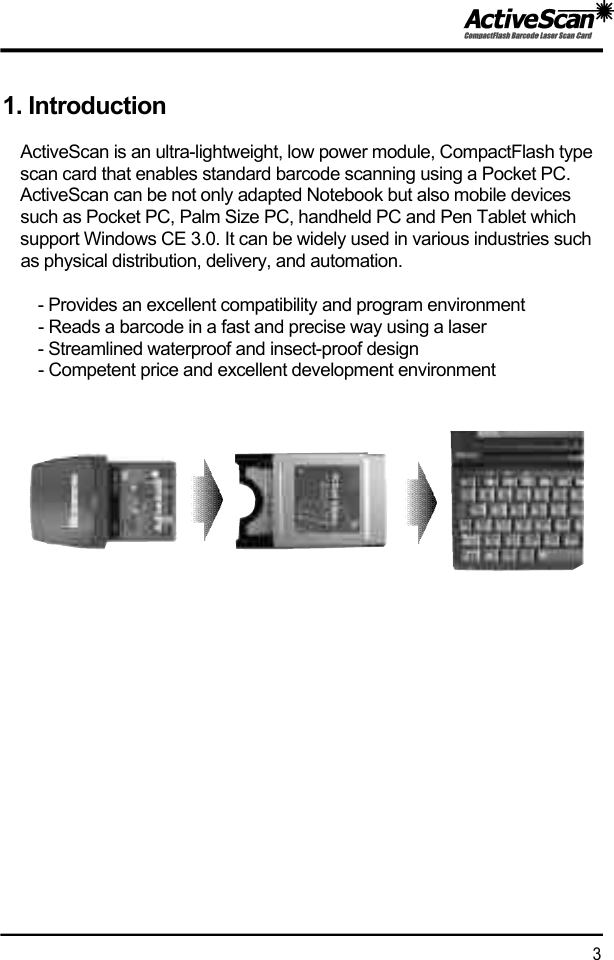
1. IntroductionActiveScan is an ultra-lightweight, low power module, CompactFlash type scan card that enables standard barcode scanning using a Pocket PC. ActiveScan can be not only adapted Notebook but also mobile devices such as Pocket PC, Palm Size PC, handheld PC and Pen Tablet which support Windows CE 3.0. It can be widely used in various industries such as physical distribution, delivery, and automation.- Provides an excellent compatibility and program environment- Reads a barcode in a fast and precise way using a laser- Streamlined waterproof and insect-proof design- Competent price and excellent development environment3
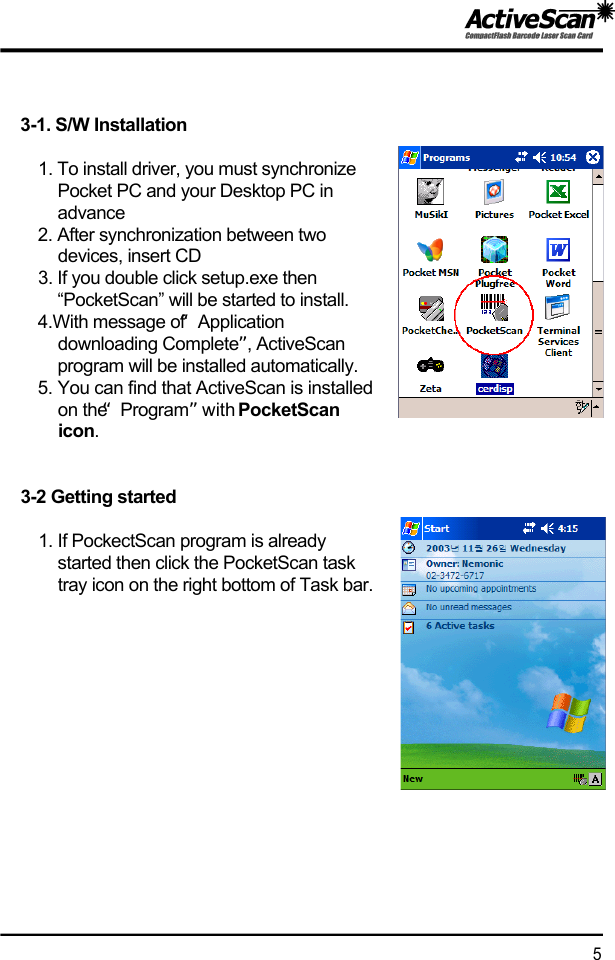
2. Package contentsActiveScan is composed of an ActiveScan Card, User’s guide and Installation CD. Please check the contents. If there is any missing or damages, please contact to purchasing place.3. Installation of ActiveScanBefore install….Please delete any barcode scanning software you may already have installed on your computer. Also delete the PocketScan task tray icon on the right bottom of Task bar.This guide explains based on the Pocket PC 2003 of Microsoft.  There is little bit difference compare to Windows CE 2..1X Palmsize PC and Handheld PC but basic procedure is almost the same. We supply drivers file for Windows CE 3.0, Windows CE.net, HPC 2000 and if you want to know the applications. We”ll supply SDK . If you make an easy to develop application program, please contact us.(SDK is included in the CD, but you’ll need S/N)** webmaster@beinteractive.co.kr                                               4  ActiveScan                   User’s guide                  Installation CDNo card DetectedActiveScan card Detected (Active icon)※PocketScan Task Tray Icons
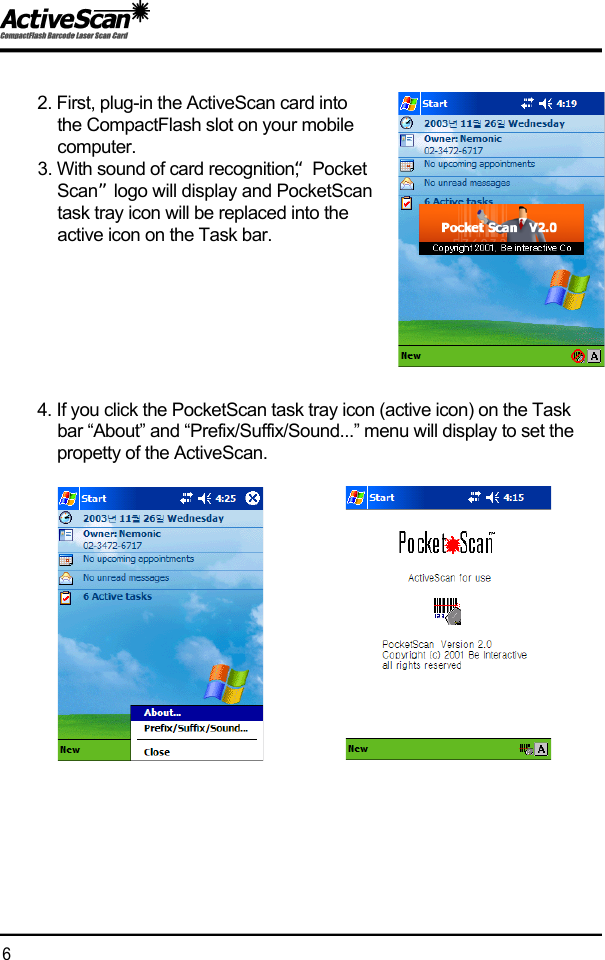
3-1. S/W Installation1. To install driver, you must synchronize Pocket PC and your Desktop PC in a d v a n c e2. After synchronization between two devices, insert CD3. If you double click setup.exe then “PocketScan” will be started to install.4.With message of “Application downloading Complete”, ActiveScan program will be installed automatically.5. You can find that ActiveScan is installedon the “P r o g r a m ”with PocketScan i c o n . 3-2 Getting started1. If PockectScan program is already started then click the PocketScan task tray icon on the right bottom of Task bar.5
2. First, plug-in the ActiveScan card into the CompactFlash slot on your mobile c o m p u t e r .3. With sound of card recognition, “Pocket S c a n ”logo will display and PocketScantask tray icon will be replaced into the active icon on the Task bar.4. If you click the PocketScan task tray icon (active icon) on the Task bar “About” and “Prefix/Suffix/Sound...” menu will display to set the propetty of the ActiveScan.6
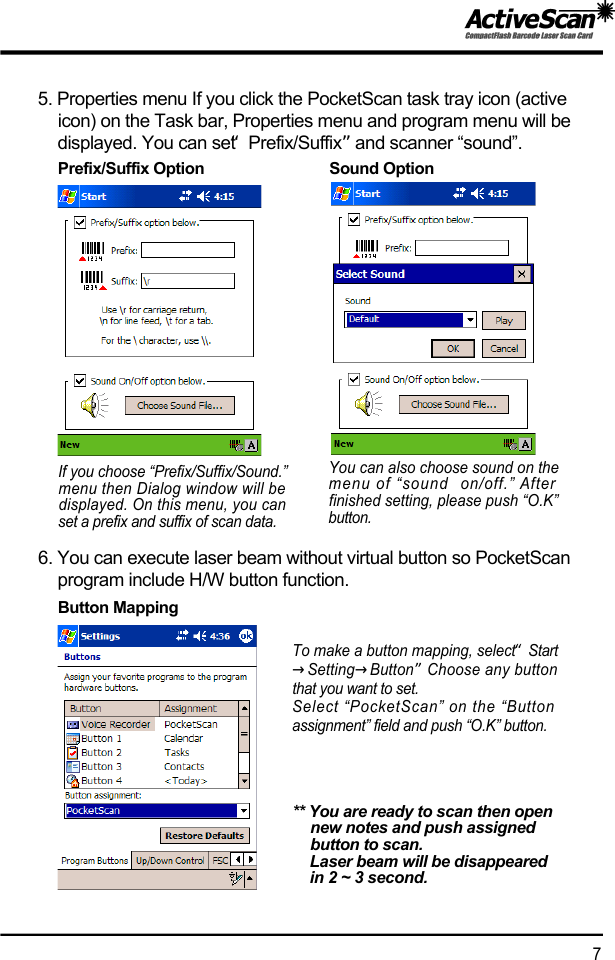
5. Properties menu If you click the PocketScan task tray icon (active icon) on the Task bar, Properties menu and program menu will be displayed. You can set “P r e f i x / S u f f i x ”and scanner “sound”.6. You can execute laser beam without virtual button so PocketScan program include H/W button function.To make a button mapping, select “S t a r t→S e t t i n g→B u t t o n”Choose any buttonthat you want to set.Select “PocketScan” on the “Buttonassignment” field and push “O.K” button.** You are ready to scan then open new notes and push assigned button to scan.Laser beam will be disappeared in 2 ~ 3 second.7If you choose “Prefix/Suffix/Sound.”menu then Dialog window will bedisplayed. On this menu, you canset a prefix and suffix of scan data.You can also choose sound on themenu of “sound  on/off.” Afterfinished setting, please push “O.K”b u t t o n .Prefix/Suffix Option                              Sound OptionButton Mapping
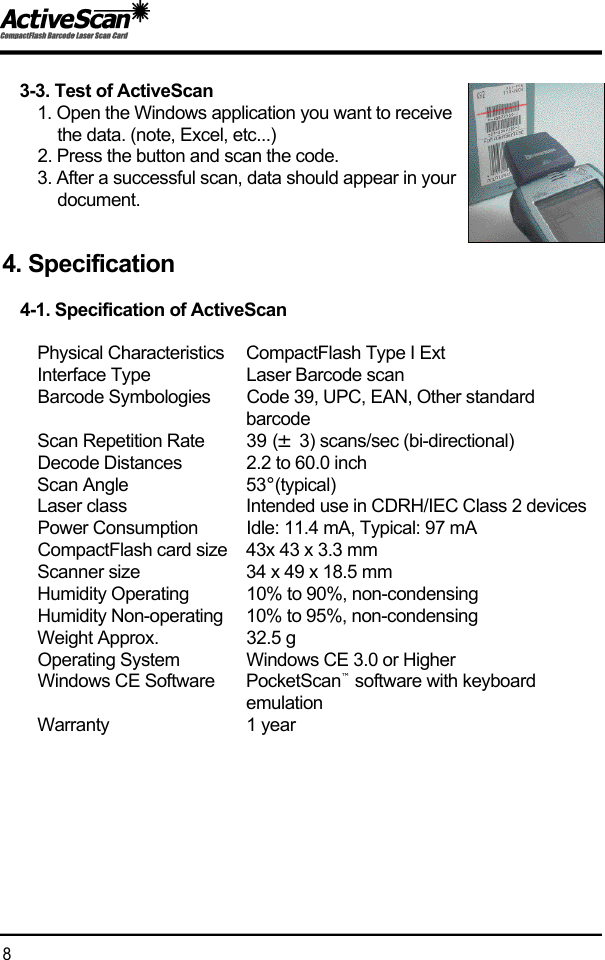
3-3. Test of ActiveScan1. Open the Windows application you want to receive the data. (note, Excel, etc...) 2. Press the button and scan the code.3. After a successful scan, data should appear in your d o c u m e n t .4. Specification4-1. Specification of ActiveScanPhysical Characteristics CompactFlash Type I ExtInterface Type Laser Barcode scanBarcode Symbologies Code 39, UPC, EAN, Other standard b a r c o d eScan Repetition Rate 39 (±3) scans/sec (bi-directional)Decode Distances 2.2 to 60.0 inchScan Angle 5 3°( t y p i c a l )Laser class Intended use in CDRH/IEC Class 2 devicesPower Consumption Idle: 11.4 mA, Typical: 97 mACompactFlash card size 43x 43 x 3.3 mmScanner size 34 x 49 x 18.5 mmHumidity Operating 10% to 90%, non-condensingHumidity Non-operating 10% to 95%, non-condensingWeight Approx.  32.5 gOperating System Windows CE 3.0 or HigherWindows CE Software P o c k e t S c a n ™software with keyboard e m u l a t i o nW a r r a n t y 1 year8
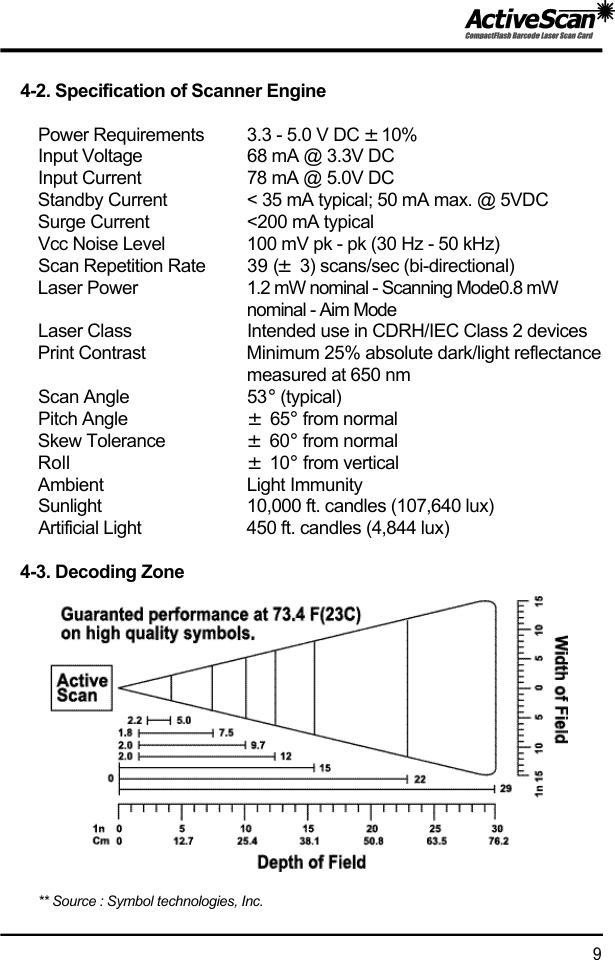
4-2. Specification of Scanner EnginePower Requirements 3.3 - 5.0 V DC ±1 0 %Input Voltage 68 mA @ 3.3V DCInput Current 78 mA @ 5.0V DCStandby Current < 35 mA typical; 50 mA max. @ 5VDCSurge Current <200 mA typicalVcc Noise Level 100 mV pk - pk (30 Hz - 50 kHz)Scan Repetition Rate  39 (±3) scans/sec (bi-directional)Laser Power  1.2 mW nominal - Scanning Mode0.8 mW nominal - Aim ModeLaser Class  Intended use in CDRH/IEC Class 2 devicesPrint Contrast  Minimum 25% absolute dark/light reflectancemeasured at 650 nmScan Angle  5 3°( t y p i c a l )Pitch Angle  ±6 5 °from normal Skew Tolerance  ±6 0°from normal Roll  ±1 0°from vertical Ambient  Light ImmunityS u n l i g h t 10,000 ft. candles (107,640 lux)Artificial Light 450 ft. candles (4,844 lux)   4-3. Decoding Zone     ** Source : Symbol technologies, Inc.9
5. If you have trouble...5-1. Does not recognize the PocketScan (driver) on your mobile computer...  ▶Please check your processor and OS with the driver. Sometimes, They are different each other.▶Please reset the PocketScan on your mobile computer and retry s a n n i n g .5-2. When you press the trigger button, nothing happens...▶Please see “3-2 getting started →5. button mapping”5-3. Does not read the barcode on your mobile computer with ActiveScan.▶Please check your barcode. If it has damaged print it can not work c o r r e c t l y .▶please see the SDK/Symbol-Parameter and print a this parameter.You can set all defaults bar code and enable or disale resetting thed e c o d e .▶For best results, the scanner should we held at an angle of at leastis degress form perpendicular to the surface of the bar cade label.5-4. When you plug-in ActiveScan, it is not working with message of “Unknown card in Socket” ▶Please contat us6. Technical Support6-1. If you have a technical problem while installing or using the ActiveScan card. Please feel free to contact us.- The Driver- Windows version of your mobile computer- SDK6-2. If you are missed the CD. You can download the driver by www.beinteractive.co.kr/eng →click “support”1 0
You can contact Beinteractive the follwing ways ;Web  w w w . b e i n t e r a c t i v e . c o . k re-mail  w e b m a s t e r @ b e i n t e r a c t i v e . c o . k rPhone  8 2 - 2 - 3 4 7 2 - 6 7 1 5Fax  8 2 - 2 - 3 4 7 2 - 7 1 3 3
Ideal for CompactFlash Slot Pocket PC and Handheld PC5FL. Hanseo Bldg., 1582-6, Seocho-Dong, Seocho-Gu, Seoul 137-875, Koreawww.beinteractive.co.kr  “ActiveScan”Power saving Barcode scan card for Pocket PCSupport various environment  for trans,logistics.

Navigation menu