Beijing Choice Electronic Technology A40 Wireless Activity Tracker User Manual

Beijing Choice Electronic Technology Co., Ltd. Wireless Activity Tracker

User Manual

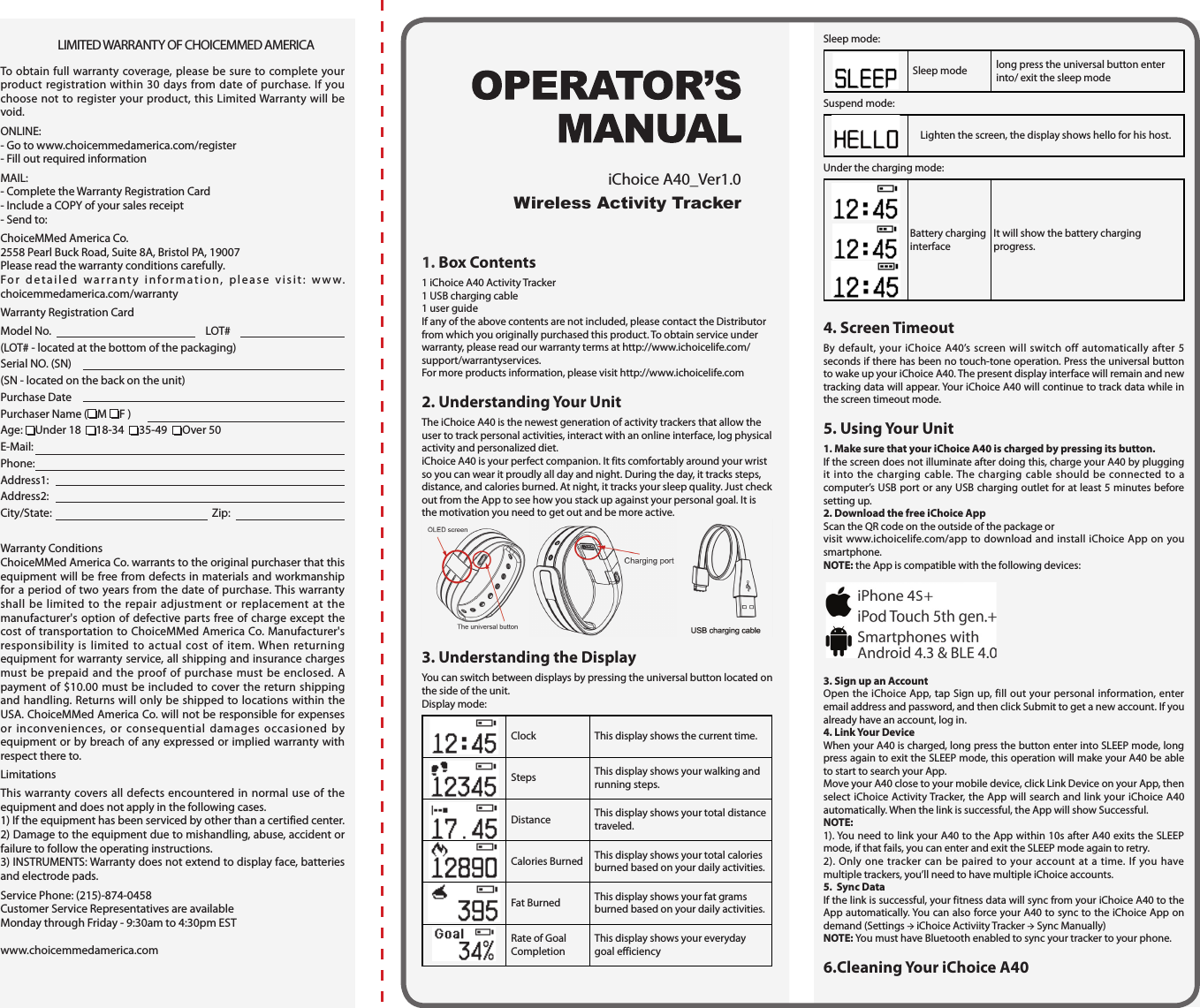
LIMITED WARRANTY OF CHOICEMMED AMERICATo obtain full warranty coverage, please be sure to complete your product registration within 30 days from date of purchase. If you choose not to register your product, this Limited Warranty will be void.ONLINE:- Go to www.choicemmedamerica.com/register- Fill out required informationMAIL:- Complete the Warranty Registration Card- Include a COPY of your sales receipt- Send to:ChoiceMMed America Co.2558 Pearl Buck Road, Suite 8A, Bristol PA, 19007Please read the warranty conditions carefully.For detailed warranty information, please visit: www.choicemmedamerica.com/warrantyWarranty Registration CardModel No.   LOT# (LOT# - located at the bottom of the packaging)Serial NO. (SN) (SN - located on the back on the unit)Purchase DatePurchaser Name ( M  F ) Age:  Under 18   18-34   35-49   Over 50E-Mail: Phone: Address1: Address2:City/State:   Zip:  Warranty ConditionsChoiceMMed America Co. warrants to the original purchaser that this equipment will be free from defects in materials and workmanship for a period of two years from the date of purchase. This warranty shall be limited to the repair adjustment or replacement at the manufacturer's option of defective parts free of charge except the cost of transportation to ChoiceMMed America Co. Manufacturer's responsibility is limited to actual cost of item. When returning equipment for warranty service, all shipping and insurance charges must be prepaid and the proof of purchase must be enclosed. A payment of $10.00 must be included to cover the return shipping and handling. Returns will only be shipped to locations within the USA. ChoiceMMed America Co. will not be responsible for expenses or inconveniences, or consequential damages occasioned by equipment or by breach of any expressed or implied warranty with respect there to.LimitationsThis warranty covers all defects encountered in normal use of the equipment and does not apply in the following cases.1) If the equipment has been serviced by other than a certified center.2) Damage to the equipment due to mishandling, abuse, accident or failure to follow the operating instructions.3) INSTRUMENTS: Warranty does not extend to display face, batteries and electrode pads.Service Phone: (215)-874-0458Customer Service Representatives are available Monday through Friday - 9:30am to 4:30pm ESTwww.choicemmedamerica.com1. Box Contents1 iChoice A40 Activity Tracker 1 USB charging cable1 user guideIf any of the above contents are not included, please contact the Distributor from which you originally purchased this product. To obtain service under warranty, please read our warranty terms at http://www.ichoicelife.com/support/warrantyservices.For more products information, please visit http://www.ichoicelife.com2. Understanding Your UnitThe iChoice A40 is the newest generation of activity trackers that allow the user to track personal activities, interact with an online interface, log physical activity and personalized diet.iChoice A40 is your perfect companion. It fits comfortably around your wrist so you can wear it proudly all day and night. During the day, it tracks steps, distance, and calories burned. At night, it tracks your sleep quality. Just check out from the App to see how you stack up against your personal goal. It is the motivation you need to get out and be more active. 3. Understanding the DisplayYou can switch between displays by pressing the universal button located on the side of the unit.Display mode:Clock This display shows the current time.Steps This display shows your walking and running steps.Distance This display shows your total distance traveled.Calories Burned This display shows your total calories burned based on your daily activities.Fat Burned This display shows your fat grams burned based on your daily activities.Rate of Goal CompletionThis display shows your everyday goal efficiencySleep mode:Sleep mode long press the universal button enter into/ exit the sleep modeSuspend mode:Lighten the screen, the display shows hello for his host.Under the charging mode:  Battery charging interfaceIt will show the battery charging progress.4. Screen TimeoutBy default, your iChoice A40’s screen will switch off automatically after 5 seconds if there has been no touch-tone operation. Press the universal button to wake up your iChoice A40. The present display interface will remain and new tracking data will appear. Your iChoice A40 will continue to track data while in the screen timeout mode.5. Using Your Unit1. Make sure that your iChoice A40 is charged by pressing its button.If the screen does not illuminate after doing this, charge your A40 by plugging it into the charging cable. The charging cable should be connected to a computer’s USB port or any USB charging outlet for at least 5 minutes before setting up.2. Download the free iChoice AppScan the QR code on the outside of the package or visit www.ichoicelife.com/app to download and install iChoice App on you smartphone.NOTE: the App is compatible with the following devices:3. Sign up an AccountOpen the iChoice App, tap Sign up, fill out your personal information, enter email address and password, and then click Submit to get a new account. If you already have an account, log in.4. Link Your DeviceWhen your A40 is charged, long press the button enter into SLEEP mode, long press again to exit the SLEEP mode, this operation will make your A40 be able to start to search your App.Move your A40 close to your mobile device, click Link Device on your App, then select iChoice Activity Tracker, the App will search and link your iChoice A40 automatically. When the link is successful, the App will show Successful.NOTE:1). You need to link your A40 to the App within 10s after A40 exits the SLEEP mode, if that fails, you can enter and exit the SLEEP mode again to retry.2). Only one tracker can be paired to your account at a time. If you have multiple trackers, you’ll need to have multiple iChoice accounts. 5.  Sync DataIf the link is successful, your fitness data will sync from your iChoice A40 to the App automatically. You can also force your A40 to sync to the iChoice App on demand (Settings → iChoice Activiity Tracker → Sync Manually)NOTE: You must have Bluetooth enabled to sync your tracker to your phone.6.Cleaning Your iChoice A40Wireless Activity TrackeriChoice A40_Ver1.0
 ChoiceMMed America Co.Bristol, PAthat may cause undesired operation.  Please take attention that changes or modification not expressly approved by the party responsible for compliance could void the users authority to operate the equipment. Note: This product has been tested and found to comply with the limits for a Class B digital device, pursuant to Part 15 of the FCC Rules. These limits are designed to provide reasonable protection against harmful interference in a residential installation. This product generates, uses, and can radiate radio frequency energy and, if not installed and used in accordance with the instructions, may cause harmful interference to radio communications. However, there is no guarantee that interference will not occur in a particular installation. If this product does cause harmful interference to radio or television reception, which can be determined by turning the equipment off and on, the user is encouraged to try to correct the interference by one or more of the following measures: -Reorient or relocate the receiving antenna. -Increase the separation between the equipment and receiver. -Connect the equipment into an outlet on a circuit different from that to which the receiveris connected. Consult the dealer or an experienced radio/TV technician for help. Please take attention that changes or modification not expressly approved by the party responsible for compliance could void the user’s authority to operate the equipment.                                                                               Distributed By:                                                                                   ChoiceMMed America Corporation                                                                               2558 Peal Buck Road, Suite 8A                                                                               Bristol, PA 19007                                                                               www.choicemmedamerica.com© 2014 ChoiceMMed America Co.ALL RIGHTS RESSERVEDRevised Date: October 15, 2014Wipe your iChoice A40’s surface with a soft dry cloth. When oil and dirt are difficult to remove, a soft dry cloth moistened with clear water or usable neutral solvent to clean surface may be used. Wipe with dry cloth. Do not immerse or splash water into the device. Do not use volatile liquid such as ethanol and or gasoline.7. Battery Life  Your iChoice A40 runs on a chargeable lithium battery. The battery will last 7 days on a full charge with regular use. Battery–low icon will appear when the battery has a low voltage and this indicates that your iChoice A40 will run out of battery life shortly, please charge it asap. 8. Battery ChargeCharge the battery with USB charging cable. Connect the charging cable to a computer’s USB port or any USB charging outlet. The device will be charged fully less than 3h.NOTE: If you charge you iChoice A40 after it has powered off, when your iChoice A40 is charged and you wear it to track again, please make your iChoice A40 to sync with iChoice App one time to make sure iChoice A40 is showing the current time.Charging volage is 5V, working voltage is 3.7V.The USB port only for charging.9. Memory Your iChoice A40 will track and store data for 7 days of details.The unit will overridden old data. To ensure no data is lost, we recommended syncing your unit regularly.10. Unit Specs1. ScreenOLED display 2. Size and weight 9.45“×0.82"×0.43" Lower than 0.05lbs11. Environmental ConditionsOperation Temperature:  5℃ ~ 40℃(41 ℉ ~ 104 ℉)Storage/ transport Temperature:  -20℃ ~ 55℃(-4 ℉ ~ 131 ℉)Ambient humidity:  ≤80%, no condensation in operation;  ≤93%, no condensation in storage/ transportAtmosphere pressure: 86kPa ~ 106kPaNOTE: keep unit in dry conditions. Damp conditions may shorten the life of your unit and even damage the product.12. Frequently Asked Questions1.  Do I have to charge my iChoice A40 before the first use?Press the button to wake up your iChoice A40, if the screen can not be lit up, you must charge your iChoice A40 before using it. 2. How do I adjust the time on my iChoice A40?Download the FREE iChoice App and link your iChoice A40 with the App. The time will update to the current time automatically.3. Does the iChoice A40 show the battery status?When the battery is low, the low battery indicator will appear on the display. The battery lasts about 7-10 days after being fully charged.4. When does my iChoice A40 reset my activity data?The iChoice A40 resets all data to zero everyday at midnight.5. Why is there calorie burned data when I have not done any activities?Calories burned is based on BMR (Basal Metabolic Rate) and will calculate calories burned even if you are not performing any movements.11. FCC DeclarationThis device complies with Part 15 of the FCC Rules. Operation is subject to the following two conditions: (1) This device may not cause harmful interference, and (2) This device must accept any interference received, including interference

Navigation menu