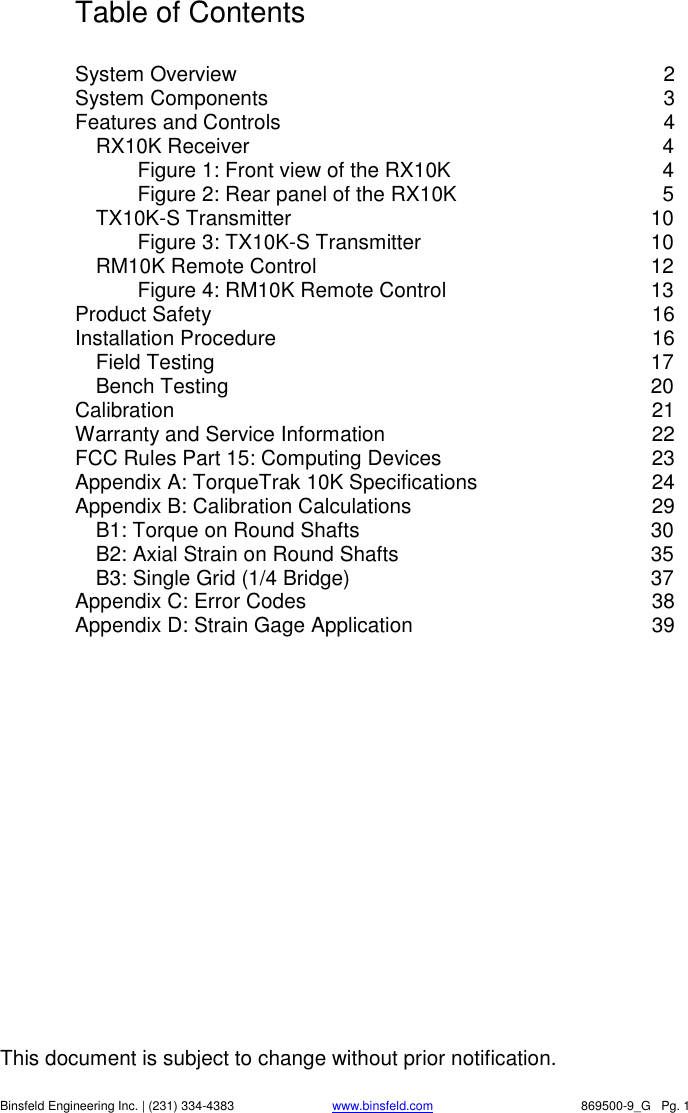
Binsfeld Engineering TX10K-NT TT10K System Transmiter User Manual TorqueTrak 9000

Binsfeld Engineering Inc TT10K System Transmiter TorqueTrak 9000

Users Manual

         TorqueTrak 10K Torque Telemetry System       User’s Guide       869500-9_G
This document is subject to change without prior notification.   Binsfeld Engineering Inc. | (231) 334-4383 www.binsfeld.com   869500-9_G   Pg. 1 Table of Contents  System Overview  2 System Components  3 Features and Controls  4 RX10K Receiver  4 Figure 1: Front view of the RX10K  4 Figure 2: Rear panel of the RX10K  5 TX10K-S Transmitter  10 Figure 3: TX10K-S Transmitter  10 RM10K Remote Control  12 Figure 4: RM10K Remote Control  13 Product Safety  16 Installation Procedure  16 Field Testing  17 Bench Testing  20 Calibration  21 Warranty and Service Information  22 FCC Rules Part 15: Computing Devices  23 Appendix A: TorqueTrak 10K Specifications  24 Appendix B: Calibration Calculations  29 B1: Torque on Round Shafts  30 B2: Axial Strain on Round Shafts  35 B3: Single Grid (1/4 Bridge)  37 Appendix C: Error Codes  38 Appendix D: Strain Gage Application  39
   Binsfeld Engineering Inc. | 231-334-4383                              www.binsfeld.com   869500-9_G   Pg. 2 System Overview  The  TorqueTrak  10K  Torque  Telemetry  System  utilizes  proven digital  RF  technology  to  transmit  a  single  data  signal  (most typically  from  a  strain  gage)  a  distance  of  20  feet  (6  meters)  or more  depending  on  the  environment.    Up  to  16  systems  can operate simultaneously on independent channels.  The system, comprised of three main components, was designed with many user-friendly features.  RX10K Receiver Stable 500Hz frequency response Selectable gain, offset, polarity and channel settings Digital data (RS-232) and analog voltage output signals Multiple level, selectable low pass output filtering Seven unique simulated transmitter inputs Simple keypad and LCD display for easy user interface   TX10K-S Transmitter High signal-to-noise ratio for excellent resolution Low temperature coefficient for accuracy from -25 to 85°C Wide power supply input range from 7 to 18VDC Power Standby mode to extend battery life Two on-board shunt calibration values Status Indicator light to assist in troubleshooting Reinforced housing fits securely on any size shaft Circuit fully encapsulated and shielded from EMI/RFI   RM10K Remote Control (for TX10K-S Transmitter) Change Transmitter setup without tools or removal from shaft Infrared signal transmits up to 20 feet (6 meters) Handheld with a simple keypad   The  TorqueTrak  10K  is  a  robust,  precision  strain  measurement instrument  ideal  for  short-term  data  collection  and  diagnostic testing.    It  is  designed  to  withstand  harsh  field  conditions  with ease-of-use in mind.
   Binsfeld Engineering Inc. | 231-334-4383                              www.binsfeld.com   869500-9_G   Pg. 3 System Components  A standard TorqueTrak 10K Torque Telemetry System includes the following items:  TX10K-S Transmitter Transmitter Antenna RX10K Receiver Receiver Antenna Element Receiver Antenna Magnetic Base with 25ft Cable RM10K Remote Control BH10K Battery Holder 110VAC-12VDC or 220VAC-12VDC Wall Plug Transformer 5-ft DB9 Cable 5-ft 2-Conductor Power Cable 10-ft 4-Conductor Ribbon Cable BS900 Bridge Simulator  Screwdriver 3/32” Hex Wrench BH10K Cover Screws with vibration-resistant coating (2) 9V Battery Connector 9V Lithium Batteries (2) 1 Roll of 1” Fiberglass Reinforced Strapping Tape Butyl Rubber Sheet TT10K User’s Guide TT10K Equipment Case
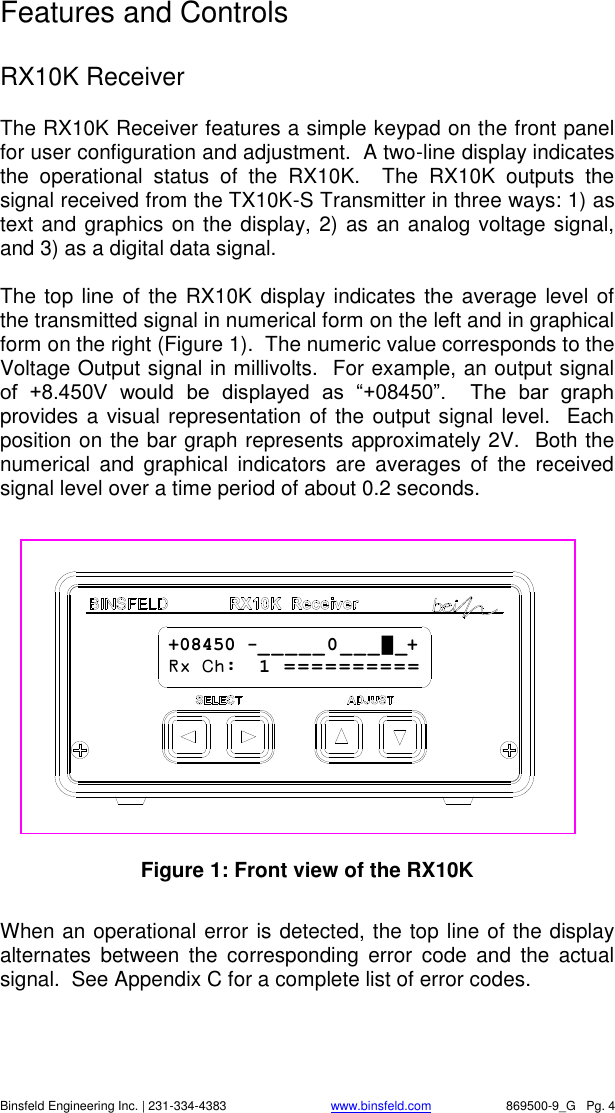
   Binsfeld Engineering Inc. | 231-334-4383                              www.binsfeld.com   869500-9_G   Pg. 4 Features and Controls  RX10K Receiver The RX10K Receiver features a simple keypad on the front panel for user configuration and adjustment.  A two-line display indicates the  operational  status  of  the  RX10K.    The  RX10K  outputs  the signal received from the TX10K-S Transmitter in three ways: 1) as text and graphics on the display, 2) as an analog voltage signal, and 3) as a digital data signal.    The top line of the RX10K display indicates the average  level of the transmitted signal in numerical form on the left and in graphical form on the right (Figure 1).  The numeric value corresponds to the Voltage Output signal in millivolts.  For example, an output signal of  +8.450V  would  be  displayed  as  “+08450”.    The  bar  graph provides a visual representation of the output signal level.  Each position on the bar graph represents approximately 2V.  Both the numerical  and  graphical  indicators  are  averages  of  the  received signal level over a time period of about 0.2 seconds.    Figure 1: Front view of the RX10K  When an operational error is detected, the top line of the display alternates  between  the  corresponding  error  code  and  the  actual signal.  See Appendix C for a complete list of error codes. +08450 -_ _ _ _ _ 0 _ _ _ █ _+ Rx Ch:  1  = = = = = = = = = =
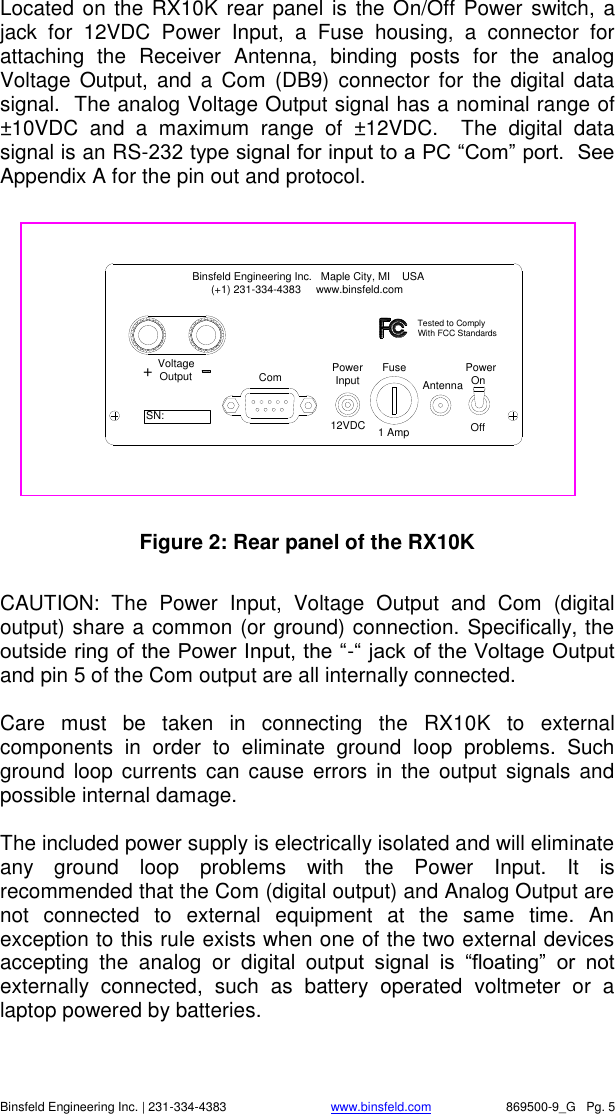
   Binsfeld Engineering Inc. | 231-334-4383                              www.binsfeld.com   869500-9_G   Pg. 5 Located on the RX10K rear panel is the On/Off  Power switch,  a jack  for  12VDC  Power  Input,  a  Fuse  housing,  a  connector  for attaching  the  Receiver  Antenna,  binding  posts  for  the  analog Voltage  Output,  and a Com  (DB9)  connector  for  the  digital  data signal.  The analog Voltage Output signal has a nominal range of ±10VDC  and  a  maximum  range  of  ±12VDC.    The  digital  data signal is an RS-232 type signal for input to a PC “Com” port.  See Appendix A for the pin out and protocol.      Figure 2: Rear panel of the RX10K  CAUTION:  The  Power  Input,  Voltage  Output  and  Com  (digital output) share a common (or ground) connection. Specifically, the outside ring of the Power Input, the “-“ jack of the Voltage Output and pin 5 of the Com output are all internally connected.  Care  must  be  taken  in  connecting  the  RX10K  to  external components  in  order  to  eliminate  ground  loop  problems.  Such ground  loop  currents  can  cause  errors  in the output  signals and possible internal damage.  The included power supply is electrically isolated and will eliminate any  ground  loop  problems  with  the  Power  Input.  It  is recommended that the Com (digital output) and Analog Output are not  connected  to  external  equipment  at  the  same  time.  An exception to this rule exists when one of the two external devices accepting  the  analog  or  digital  output  signal  is  “floating”  or  not externally  connected,  such  as  battery  operated  voltmeter  or  a laptop powered by batteries. Power Input Antenna12VDC 1 AmpFuse OnPowerOffComVoltageOutput+Binsfeld Engineering Inc.   Maple City, MI    USA      (+1) 231-334-4383     www.binsfeld.comTested to ComplyWith FCC StandardsSN:
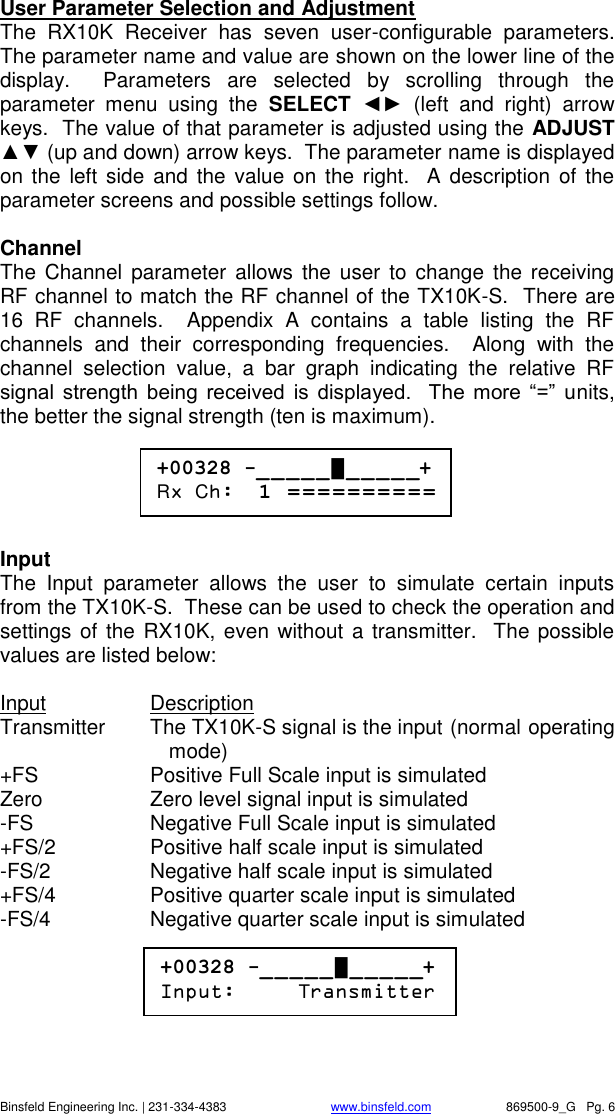
   Binsfeld Engineering Inc. | 231-334-4383                              www.binsfeld.com   869500-9_G   Pg. 6 User Parameter Selection and Adjustment The  RX10K  Receiver  has  seven  user-configurable  parameters.  The parameter name and value are shown on the lower line of the display.    Parameters  are  selected  by  scrolling  through  the parameter  menu  using  the  SELECT  ◄►  (left  and  right)  arrow keys.  The value of that parameter is adjusted using the ADJUST ▲▼ (up and down) arrow keys.  The parameter name is displayed on the left side  and  the  value on the right.   A  description  of the parameter screens and possible settings follow.  Channel The  Channel  parameter allows the user to change  the  receiving RF channel to match the RF channel of the TX10K-S.  There are 16  RF  channels.    Appendix  A  contains  a  table  listing  the  RF channels  and  their  corresponding  frequencies.    Along  with  the channel  selection  value,  a  bar  graph  indicating  the  relative  RF signal  strength  being  received  is  displayed.    The  more  “=”  units, the better the signal strength (ten is maximum).      Input The  Input  parameter  allows  the  user  to  simulate  certain  inputs from the TX10K-S.  These can be used to check the operation and settings of the RX10K, even  without a transmitter.   The possible values are listed below:  Input  Description Transmitter  The TX10K-S signal is the input (normal operating mode) +FS  Positive Full Scale input is simulated Zero  Zero level signal input is simulated -FS  Negative Full Scale input is simulated +FS/2  Positive half scale input is simulated -FS/2  Negative half scale input is simulated +FS/4  Positive quarter scale input is simulated -FS/4  Negative quarter scale input is simulated       +00328 -_ _ _ _ _ █ _ _ _ _ _+ Rx Ch:  1  = = = = = = = = = =  +00328 -_ _ _ _ _ █ _ _ _ _ _+ Input:     Transmitter
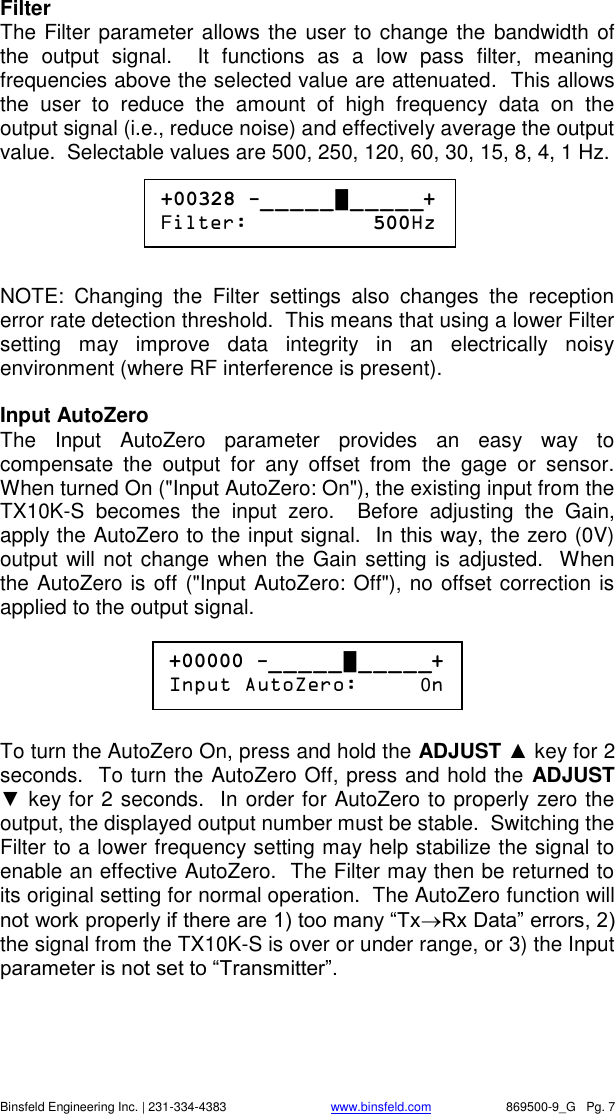
   Binsfeld Engineering Inc. | 231-334-4383                              www.binsfeld.com   869500-9_G   Pg. 7 Filter The Filter parameter allows the user to change the bandwidth of the  output  signal.    It  functions  as  a  low  pass  filter,  meaning frequencies above the selected value are attenuated.  This allows the  user  to  reduce  the  amount  of  high  frequency  data  on  the output signal (i.e., reduce noise) and effectively average the output value.  Selectable values are 500, 250, 120, 60, 30, 15, 8, 4, 1 Hz.       NOTE:  Changing  the  Filter  settings  also  changes  the  reception error rate detection threshold.  This means that using a lower Filter setting  may  improve  data  integrity  in  an  electrically  noisy environment (where RF interference is present).  Input AutoZero The  Input  AutoZero  parameter  provides  an  easy  way  to compensate  the  output  for  any  offset  from  the  gage  or  sensor.  When turned On ("Input AutoZero: On"), the existing input from the TX10K-S  becomes  the  input  zero.    Before  adjusting  the  Gain, apply the AutoZero to the input signal.  In this way, the zero (0V) output will not change when the Gain setting is adjusted.  When the AutoZero is off ("Input AutoZero: Off"), no offset correction is applied to the output signal.        To turn the AutoZero On, press and hold the ADJUST ▲ key for 2 seconds.  To turn the AutoZero Off, press and hold the ADJUST ▼ key for 2 seconds.  In order for AutoZero to properly zero the output, the displayed output number must be stable.  Switching the Filter to a lower frequency setting may help stabilize the signal to enable an effective AutoZero.  The Filter may then be returned to its original setting for normal operation.  The AutoZero function will not work properly if there are 1) too many “TxRx Data” errors, 2) the signal from the TX10K-S is over or under range, or 3) the Input parameter is not set to “Transmitter”.     +00328 -_ _ _ _ _ █ _ _ _ _ _+ Filter:          500Hz  +00000 -_ _ _ _ _ █ _ _ _ _ _+ Input AutoZero:     0n
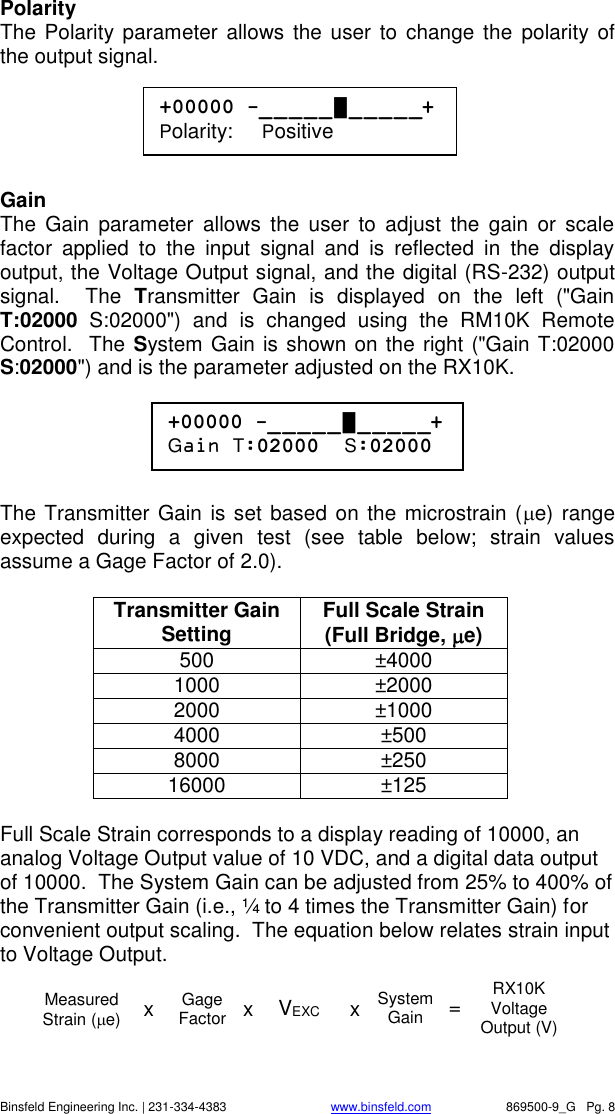
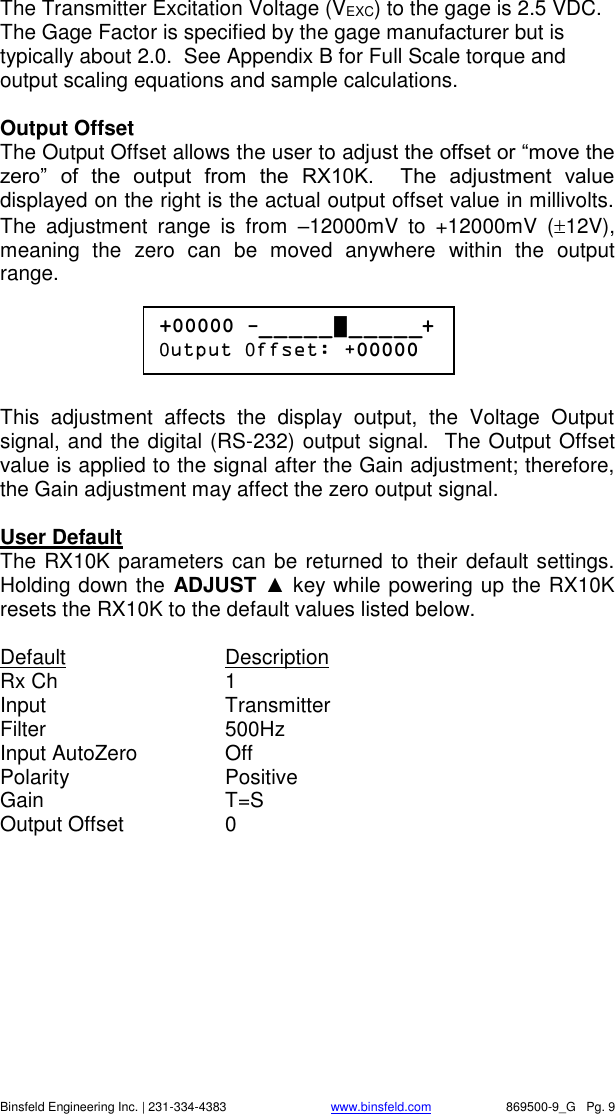
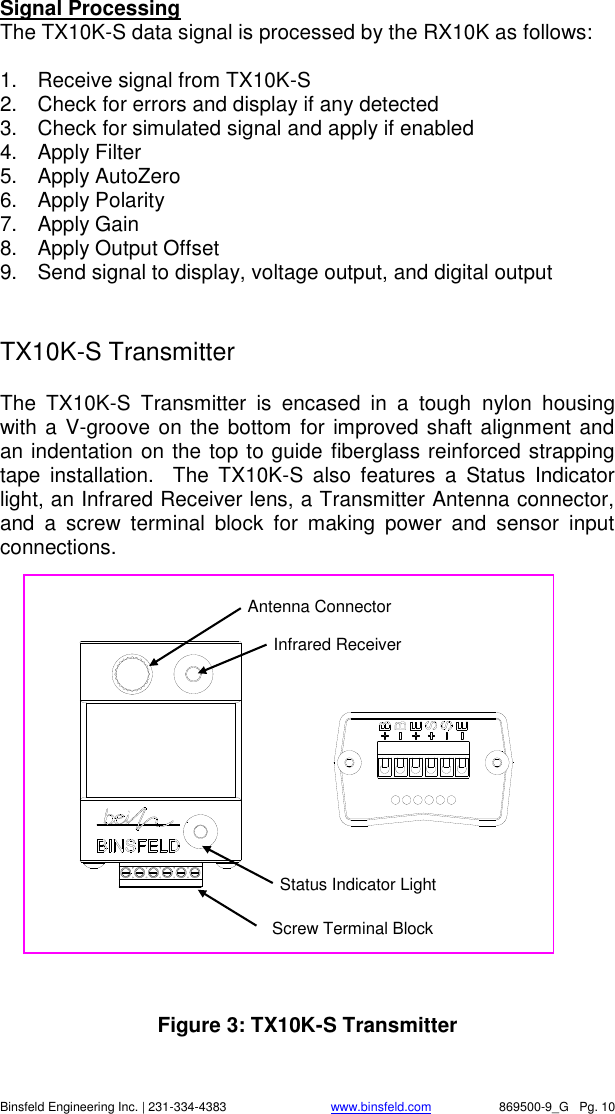
   Binsfeld Engineering Inc. | 231-334-4383                              www.binsfeld.com   869500-9_G   Pg. 8 Polarity The Polarity parameter  allows the user  to  change the  polarity of the output signal.      Gain The  Gain  parameter  allows  the  user  to  adjust  the  gain  or  scale factor  applied  to  the  input  signal  and  is  reflected  in  the  display output, the Voltage Output signal, and the digital (RS-232) output signal.    The  Transmitter  Gain  is  displayed  on  the  left  ("Gain T:02000  S:02000")  and  is  changed  using  the  RM10K  Remote Control.  The System Gain is shown on the right ("Gain T:02000 S:02000") and is the parameter adjusted on the RX10K.        The Transmitter Gain is set based on the microstrain (e) range expected  during  a  given  test  (see  table  below;  strain  values assume a Gage Factor of 2.0).    Transmitter Gain Setting Full Scale Strain (Full Bridge, e) 500 ±4000 1000 ±2000 2000 ±1000 4000 ±500 8000 ±250 16000 ±125  Full Scale Strain corresponds to a display reading of 10000, an analog Voltage Output value of 10 VDC, and a digital data output of 10000.  The System Gain can be adjusted from 25% to 400% of the Transmitter Gain (i.e., ¼ to 4 times the Transmitter Gain) for convenient output scaling.  The equation below relates strain input to Voltage Output.   +00000 -_ _ _ _ _ █ _ _ _ _ _+ Polarity:     Positive +00000 -_ _ _ _ _ █ _ _ _ _ _+ Gain T:02000  S:02000 VEXC System Gain RX10K Voltage Output (V) = Measured Strain (e) x Gage Factor  x x
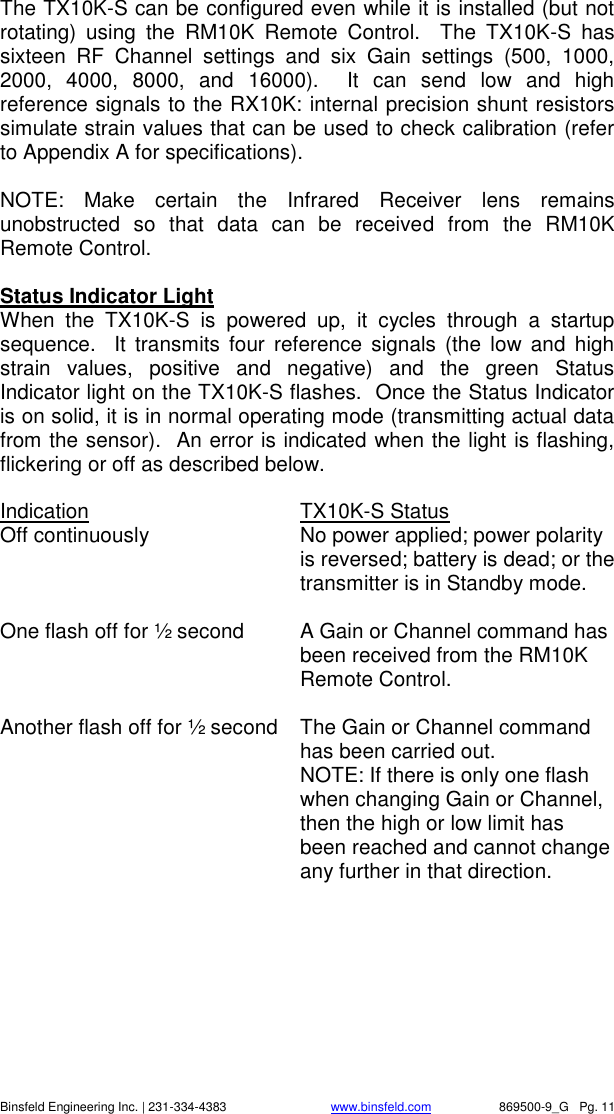
   Binsfeld Engineering Inc. | 231-334-4383                              www.binsfeld.com   869500-9_G   Pg. 9 The Transmitter Excitation Voltage (VEXC) to the gage is 2.5 VDC.  The Gage Factor is specified by the gage manufacturer but is typically about 2.0.  See Appendix B for Full Scale torque and output scaling equations and sample calculations.  Output Offset The Output Offset allows the user to adjust the offset or “move the zero”  of  the  output  from  the  RX10K.    The  adjustment  value displayed on the right is the actual output offset value in millivolts.  The  adjustment  range  is  from  –12000mV  to  +12000mV  (12V), meaning  the  zero  can  be  moved  anywhere  within  the  output range.      This  adjustment  affects  the  display  output,  the  Voltage  Output signal, and the digital (RS-232) output signal.  The Output Offset value is applied to the signal after the Gain adjustment; therefore, the Gain adjustment may affect the zero output signal.   User Default The RX10K parameters can be returned to their default settings.  Holding down the ADJUST ▲ key while powering up the RX10K resets the RX10K to the default values listed below.  Default    Description Rx Ch      1 Input      Transmitter Filter      500Hz Input AutoZero    Off Polarity     Positive Gain      T=S Output Offset    0  +00000 -_ _ _ _ _ █ _ _ _ _ _+ 0utput 0ffset: +00000
   Binsfeld Engineering Inc. | 231-334-4383                              www.binsfeld.com   869500-9_G   Pg. 10 Signal Processing The TX10K-S data signal is processed by the RX10K as follows:  1.  Receive signal from TX10K-S 2.  Check for errors and display if any detected 3.  Check for simulated signal and apply if enabled 4.  Apply Filter 5.  Apply AutoZero 6.  Apply Polarity 7.  Apply Gain 8.  Apply Output Offset 9.  Send signal to display, voltage output, and digital output  TX10K-S Transmitter The  TX10K-S  Transmitter  is  encased  in  a  tough  nylon  housing with a  V-groove on the bottom for improved shaft alignment and an indentation on the top to guide fiberglass reinforced strapping tape  installation.    The  TX10K-S  also  features  a  Status  Indicator light, an Infrared Receiver lens, a Transmitter Antenna connector, and  a  screw  terminal  block  for  making  power  and  sensor  input connections.                Figure 3: TX10K-S Transmitter Antenna Connector Infrared Receiver Status Indicator Light Screw Terminal Block
   Binsfeld Engineering Inc. | 231-334-4383                              www.binsfeld.com   869500-9_G   Pg. 11 The TX10K-S can be configured even while it is installed (but not rotating)  using  the  RM10K  Remote  Control.    The  TX10K-S  has sixteen  RF  Channel  settings  and  six  Gain  settings  (500,  1000, 2000,  4000,  8000,  and  16000).    It  can  send  low  and  high reference signals to the RX10K: internal precision shunt resistors simulate strain values that can be used to check calibration (refer to Appendix A for specifications).      NOTE:  Make  certain  the  Infrared  Receiver  lens  remains unobstructed  so  that  data  can  be  received  from  the  RM10K Remote Control.    Status Indicator Light When  the  TX10K-S  is  powered  up,  it  cycles  through  a  startup sequence.    It  transmits  four  reference  signals  (the  low and  high strain  values,  positive  and  negative)  and  the  green  Status Indicator light on the TX10K-S flashes.  Once the Status Indicator is on solid, it is in normal operating mode (transmitting actual data from the sensor).  An error is indicated when the light is flashing, flickering or off as described below.    Indication      TX10K-S Status Off continuously  No power applied; power polarity is reversed; battery is dead; or the transmitter is in Standby mode.  One flash off for ½ second  A Gain or Channel command has been received from the RM10K Remote Control.  Another flash off for ½ second  The Gain or Channel command has been carried out.   NOTE: If there is only one flash when changing Gain or Channel, then the high or low limit has been reached and cannot change any further in that direction.
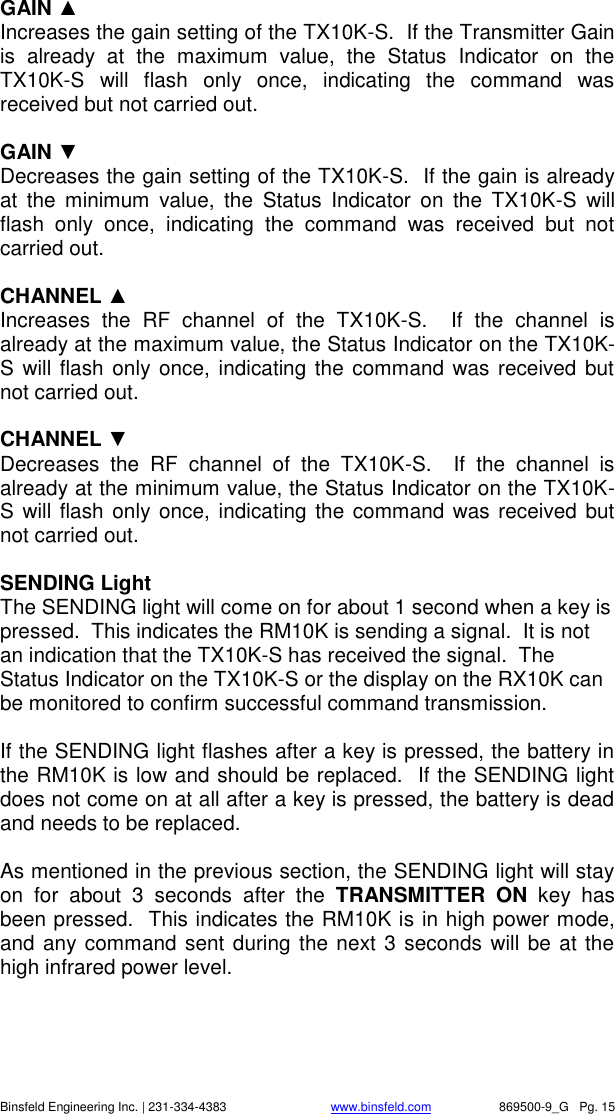
   Binsfeld Engineering Inc. | 231-334-4383                              www.binsfeld.com   869500-9_G   Pg. 12 Fast flash (7 Hz)  The input signal to the TX10K-S is out of range.  Reducing the Gain will increase the input range and may eliminate this problem.  NOTE: If the out-of-range condition is of a short duration, there may only be one or two flashes.  Slow flash (2 Hz)  One of the References (shunts) is enabled.  NOTE: If a signal out of range condition occurs while the Reference is enabled, the light will indicate the out of range condition (fast flash).  Flicker off once every second  The power input voltage is either too high or too low.  NOTE: Improper operation or damage to the transmitter can occur if operated outside its specified power input voltage range.      RM10K Remote Control The handheld RM10K Remote Control allows the user to configure the TX10K-S Transmitter even while it is installed.  The RM10K keypad operates similar to a common TV remote control, emitting an infrared signal through the window on the front of the unit.  Simply point the RM10K at the Infrared Receiver on the TX10K-S and press the proper key to change the configuration.  Both the Infrared Receiver lens and the window on the front of the RM10K need to be kept clean in order to function properly.  NOTE:  The  RM10K  is  designed  to  transmit  commands  to  the transmitter  when  it  is  stationary.    It  will  work  at  slow  rotation speeds, typically less than 100 rpm.
   Binsfeld Engineering Inc. | 231-334-4383                              www.binsfeld.com   869500-9_G   Pg. 13                 Figure 4: RM10K Remote Control  Battery Installation Slide  the  battery  access  cover  on  the  back  of  the  RM10K enclosure in the direction of the arrow to open.  Remove the old battery  if  present.    Install  a  new  9V  battery  and  slide  the  cover back into place.    Operational Distance Settings Typically, the RM10K needs to be within 6 inches (150 mm) of the TX10K-S for the signal to be received.  This normal (low infrared power) mode is intended to reduce the possibility of inadvertently changing  the  configuration  of  the  TX10K-S  by  accidentally pressing  a  key  on  the  RM10K.    It  also  reduces  the  chance  of changing  the  configuration  of  other  transmitters  in  a  multiple-transmitter installation.  The RM10K also has a high infrared power mode.  This mode is useful when access to the TX10K-S is difficult or dangerous.  Line-of-sight distances of 20 feet (6 meters) or more are feasible.  The infrared signal will reflect off bright or shiny surfaces, making non-line-of-sight operation possible in some situations.   To  enable the high infrared power  mode, first press and release the TRANSMITTER ON key and then press the desired function key.    When  the  TRANSMITTER  ON  key  is  pressed,  the  green SENDING light on the RM10K will come on for about 3 seconds.  The  desired  function  key  must  be  pressed  within  this  3-second
   Binsfeld Engineering Inc. | 231-334-4383                              www.binsfeld.com   869500-9_G   Pg. 14 timeframe;  otherwise  the  RM10K  will  revert  back  to  normal (low infrared power) mode.  To send the ON command in high power mode, press the TRANSMITTER ON key twice.    The Infrared Receiver on the TX10K-S has an automatic gain control.  Under bright light, it will become less sensitive, and the operational distance will be decreased.  If the TX10K-S is not receiving commands from the RM10K, try shading the Infrared Receiver from direct, bright light.     RM10K Key Functions    A summary of each of the RM10K key functions and indicator light operation appears below.  TRANSMITTER ON Brings the TX10K-S out of Standby mode or temporarily enables high infrared power mode.  TRANSMITTER STANDBY Switches  the  TX10K-S  into  a  low-power  Standby  mode  to conserve  the  battery.    No  signal is  transmitted  while  in  Standby mode.  The Status Indicator light on the TX10K-S turns off.  The TX10K-S  ignores  all  commands  from  the  RM10K  except TRANSMITTER  ON.    Disconnecting  and  reconnecting  the  9V battery or activating TRANSMITTER ON brings the TX10K-S out of Standby mode.   REFERENCE 1 Activates  the  Reference  1  input  signal  or  shunt  resistor  on  the TX10K-S for 5 seconds.  With a 350Ω gage and 2.0 gage factor, the value simulates input strain equivalent to 100 microstrain in the positive direction.  If this key is held down, the Reference will stay activated.    If  the key is  pressed  again  within  the  5 seconds, the Reference  will  remain  activated  for  another  5  seconds  (see Appendix A.)  REFERENCE 2 Operation  is  the  same  as  Reference  1  but  simulates  a  500 microstrain input in the positive direction with a 350Ω gage and 2.0 Gage Factor (see Appendix A).
   Binsfeld Engineering Inc. | 231-334-4383                              www.binsfeld.com   869500-9_G   Pg. 15 GAIN ▲ Increases the gain setting of the TX10K-S.  If the Transmitter Gain is  already  at  the  maximum  value,  the  Status  Indicator  on  the TX10K-S  will  flash  only  once,  indicating  the  command  was received but not carried out.  GAIN ▼ Decreases the gain setting of the TX10K-S.  If the gain is already at  the  minimum  value,  the  Status  Indicator  on  the  TX10K-S  will flash  only  once,  indicating  the  command  was  received  but  not carried out.  CHANNEL ▲ Increases  the  RF  channel  of  the  TX10K-S.    If  the  channel  is already at the maximum value, the Status Indicator on the TX10K-S will flash only once, indicating the command was received but not carried out.  CHANNEL ▼ Decreases  the  RF  channel  of  the  TX10K-S.    If  the  channel  is already at the minimum value, the Status Indicator on the TX10K-S will flash only once, indicating the command was received but not carried out.  SENDING Light The SENDING light will come on for about 1 second when a key is pressed.  This indicates the RM10K is sending a signal.  It is not an indication that the TX10K-S has received the signal.  The Status Indicator on the TX10K-S or the display on the RX10K can be monitored to confirm successful command transmission.  If the SENDING light flashes after a key is pressed, the battery in the RM10K is low and should be replaced.  If the SENDING light does not come on at all after a key is pressed, the battery is dead and needs to be replaced.  As mentioned in the previous section, the SENDING light will stay on  for  about  3  seconds  after  the  TRANSMITTER  ON  key  has been pressed.  This indicates the RM10K is in high power mode, and any command sent during the next 3 seconds will be  at the high infrared power level.
   Binsfeld Engineering Inc. | 231-334-4383                              www.binsfeld.com   869500-9_G   Pg. 16 Multiple TX10K-S Transmitters When  working  with  multiple  TX10K-S  Transmitters  in  close proximity, the Infrared Receivers may be intentionally covered with an opaque object in order to eliminate an inadvertent configuration change  to  an  adjacent  TX10K-S.    Also,  removing  power (disconnecting  the  battery)  or  putting  the  TX10K-S  in  standby mode will prevent the RM10K from changing the configuration of a transmitter.   Product Safety  The  user  assumes  all  risk  and  liability  for  the  installation  and operation  of  this  equipment.    Each  application  presents  its  own hazards.  Typically, certain system components are strapped to a rotating  shaft.    If  sufficient  care  is  not  taken  to  properly  secure these components or accessories connected to them, they can be flung  from  the  shaft,  causing  damage  to  the  components  or  to property or persons in the vicinity.  Use more than enough tape: 10 or more wraps is not too much.     Installation Procedure  The  TorqueTrak  10K  System  is  designed  for  ease  of  use.    The procedure  for  a  typical  setup  on  a  shaft  for  obtaining  torque measurements is detailed in the Field Testing section below.    It  is  recommended  that  the  user  bench  test  the  instrument  to become  familiar  with  the  various  operational  features  prior  to conducting tests in the field. The BS900 Bridge Simulator and 9V Battery Connector have been provided for this purpose.  See the Bench Testing section for details.
   Binsfeld Engineering Inc. | 231-334-4383                              www.binsfeld.com   869500-9_G   Pg. 17 Field Testing Although  the  settings  of  the  TX10K-S  can  be  changed  during operation  of  the  system,  it  is  best  to  determine  the  appropriate Transmitter Gain setting for a given application prior to installation.  Refer to Appendix B for the relevant calculations.   1.  Attach  sensor  or  strain  gage  to  the  shaft  (or  other  surface) where the desired strain will be measured.  Refer to Appendix D for instructions on strain gage application. 2.  Remove cover from BH10K Battery Housing.  Snap fresh 9V battery onto snaps and place into BH10K.  Secure cover with screws with re-usable vibration-resistant coating.  Make sure that the cover and screws are tightly fastened. NOTE:  The  BH10K  is  most  useful  when  testing  extends beyond  the  life  of  the  battery,  allowing  replacement  without removal  from  the  shaft.    Alternatively,  the  9V  Battery Connector can be used.  In this case, skip step 4.   3.  Screw  Transmitter  Antenna  onto  TX10K-S  Transmitter.  Secure  TX10K-S  and  BH10K  (or  battery)  to  shaft  using fiberglass  reinforced  strapping  tape.    Align  V-groove  on bottom  axially  with  shaft  and  tape  across  indentation  in  top.  Do not  cover TX10K-S Infrared Receiver or  Status Indicator.  Alternatively,  hose  clamps,  machined  collars,  or  other mounting  devices  may  be  used  but  avoid  excessive compression. CAUTION: Be certain all components are fixed firmly to moving surfaces. The Transmitter and battery holder have a groove for the fiberglass reinforced fiberglass reinforced strapping tape, which should be wrapped around at least 10 times (5 times in each direction) to secure the components to the shaft. The open end of the tape should follow shaft rotation.  For extra protection, glue the end of the tape down. When finished with testing cut the tape and remove components. Avoid the risk of being struck by improperly secured objects flung from the machine by standing clear during operation!  NOTE 1:   This method of securing the transmitter and battery holder is for temporary use only. For long term use this tape should be examined frequently for the effects of environmental influences (e.g.: excessive oils) or extreme conditions (e.g.:
   Binsfeld Engineering Inc. | 231-334-4383                              www.binsfeld.com   869500-9_G   Pg. 18 rapid starts/stops, high temperatures). Replace tape as required following the notes in the “CAUTION” previously listed.  NOTE 2:  If the shaft is small (≤1”  or 25 mm), balance might be  an  issue.    In  this  case,  steps  may  have  to  be  taken  to balance the transmitter (TX10K) and the battery and housing (BH10K).  Please discuss this with your Binsfeld Engineering Sales Representative.   4.  Cut an appropriate length of 2-conductor power cable (red & black twisted pair) and strip and tin ends.  Connect red wire to +B on BH10K and to +B on TX10K-S and black wire to -B on BH10K  and  to  -B  on  TX10K-S.    The  Status  Indicator  light should blink several times and then come on solid.  Secure to shaft. NOTE: If testing will not begin for some time, use the RM10K Remote Control to put the TX10K-S in Standby mode to save battery  life.    The  Status  Indicator  light  will  turn  off.    A  fresh battery will last for several days in this mode. 5.  Cut  an  appropriate  length  of  4-conductor  ribbon  cable  (as short as practical to avoid unwanted electrical noise) and strip and  tin  ends.    Solder  to  gage  per  Appendix  D  or  gage manufacturer’s  specification  and  make  appropriate connections to the TX10K-S terminals.  Secure loose cable to shaft. 6.  Connect Receiver Antenna to Antenna connector on the rear panel  of  the  RX10K  Receiver.    Position  magnetic-mount antenna  with  element  installed  near  the  TX10K-S,  typically within 10 feet (3 meters). 7.  Insert connector on AC/DC adapter into Power Input jack on the  RX10K  rear  panel.    Plug  adapter  into  appropriate  AC power source (i.e., wall socket).  Flip the RX10K power switch to On while holding down the ADJUST ▲ key.   NOTE:  This  resets  the  RX10K  parameters  to  their  default settings.  Simply turn On without holding any keys if previously set parameter configurations are desired. 8.  Turn  on the TX10K-S  with  the  RM10K  (if  needed).    Confirm that  Status  Indicator  light  is  on  solid.    Slowly  scroll  through each RX10K channel until it matches TX10K-S channel setting (top  line  will  quit  flashing  and  bottom  line  will  show  the  RF
   Binsfeld Engineering Inc. | 231-334-4383                              www.binsfeld.com   869500-9_G   Pg. 19 signal  strength).    Change  both  units  to  desired  channel  and verify adequate signal strength.  If possible, rotate the TX10K-S  through  complete  range  of  motion  to  verify  strong  signal reception in all orientations. 9.  Scroll  RX10K  display  to  Gain  parameter  screen.    Use  the RM10K  to  configure  the  Transmitter  Gain  to  the  appropriate level. 10. Scroll  RX10K  display  to  Input  AutoZero  parameter  screen.  Apply AutoZero with no load on the shaft to zero-out any initial gage offset.  Press  and hold  ADJUST  ▲ key for 2  seconds until bottom line reads “Input AutoZero: On”.  AutoZero can be reset by turning off and then on again. NOTE:  Once  AutoZero  is  activated,  the  initial  gage  offset  is subtracted  from  the  output,  which  has  a  maximum  range  of ±12 V.  The extra ±2 V overhead above and below Full Scale (±10 V) is provided to help minimize this reduction  in  range.  For  example,  if  the initial  offset  is  1.6  V,  then the  maximum output of the system will be 10.4 V after AutoZero is set.  This still allows for strain measurement up to Full Scale. If before activating AutoZero there is an initial offset of more than 50% of Full Scale, it may be necessary to 1) use a lower Transmitter Gain setting, 2) apply a shunt resistor to balance the  gage,  or  3)  replace  the  strain  gage.    For  further assistance, contact Binsfeld Engineering Inc. 11. Scroll RX10K display to Filter parameter screen.  Set the Filter to the desired level. 12. Scroll  RX10K  display  to  Gain  parameter  screen.    Set  the System  Gain  to  scale  and/or  calibrate  output  based  on calculations  as  demonstrated  in  Appendix  B.    Check calibration by using the RM10K to command the TX10K-S to transmit REFERENCE 1 and/or 2 to the RX10K. 13. Connect  appropriate  recording  device  to  either  the  analog Voltage  Output  terminals  or  digital  Com  (DB9)  connector.  Check the zero and adjust using the Output Offset if needed. 14. The system is now ready to record data.
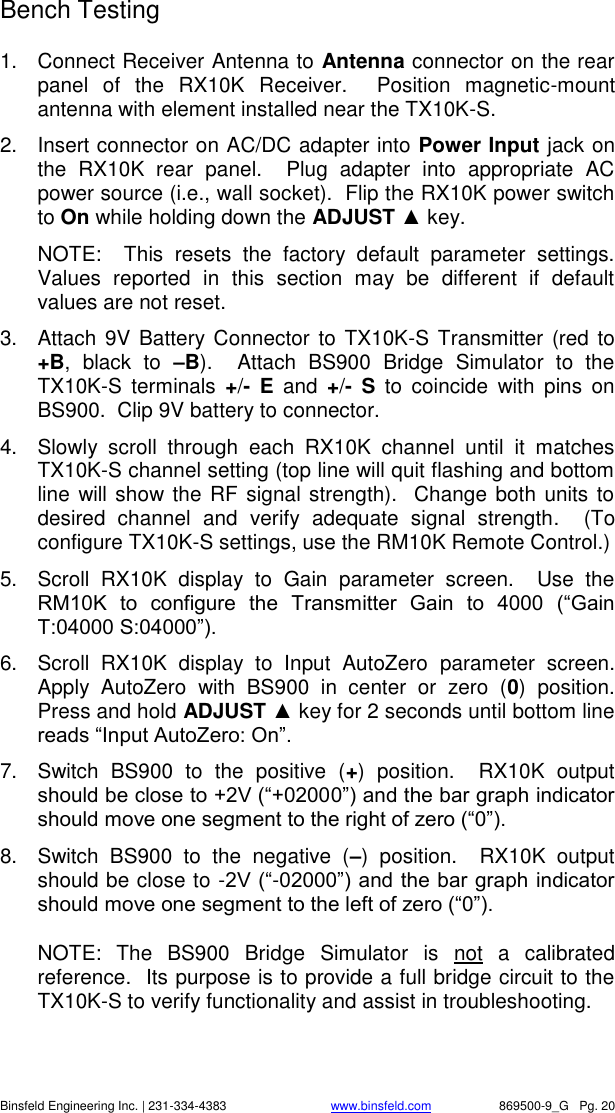
   Binsfeld Engineering Inc. | 231-334-4383                              www.binsfeld.com   869500-9_G   Pg. 20 Bench Testing 1.  Connect Receiver Antenna to Antenna connector on the rear panel  of  the  RX10K  Receiver.    Position  magnetic-mount antenna with element installed near the TX10K-S.  2.  Insert connector on AC/DC adapter into Power Input jack on the  RX10K  rear  panel.    Plug  adapter  into  appropriate  AC power source (i.e., wall socket).  Flip the RX10K power switch to On while holding down the ADJUST ▲ key.   NOTE:    This  resets  the  factory  default  parameter  settings.  Values  reported  in  this  section  may  be  different  if  default values are not reset. 3.  Attach  9V Battery Connector to  TX10K-S Transmitter (red to +B,  black  to  –B).    Attach  BS900  Bridge  Simulator  to  the TX10K-S  terminals  +/-  E  and  +/-  S  to  coincide  with  pins  on BS900.  Clip 9V battery to connector.   4.  Slowly  scroll  through  each  RX10K  channel  until  it  matches TX10K-S channel setting (top line will quit flashing and bottom line will show the RF  signal strength).  Change both units to desired  channel  and  verify  adequate  signal  strength.    (To configure TX10K-S settings, use the RM10K Remote Control.) 5.  Scroll  RX10K  display  to  Gain  parameter  screen.    Use  the RM10K  to  configure  the  Transmitter  Gain  to  4000  (“Gain T:04000 S:04000”). 6.  Scroll  RX10K  display  to  Input  AutoZero  parameter  screen.  Apply  AutoZero  with  BS900  in  center  or  zero  (0)  position.  Press and hold ADJUST ▲ key for 2 seconds until bottom line reads “Input AutoZero: On”.   7.  Switch  BS900  to  the  positive  (+)  position.    RX10K  output should be close to +2V (“+02000”) and the bar graph indicator should move one segment to the right of zero (“0”). 8.  Switch  BS900  to  the  negative  (–)  position.    RX10K  output should be close to -2V (“-02000”) and the bar graph indicator should move one segment to the left of zero (“0”).  NOTE:  The  BS900  Bridge  Simulator  is  not  a  calibrated reference.  Its purpose is to provide a full bridge circuit to the TX10K-S to verify functionality and assist in troubleshooting.
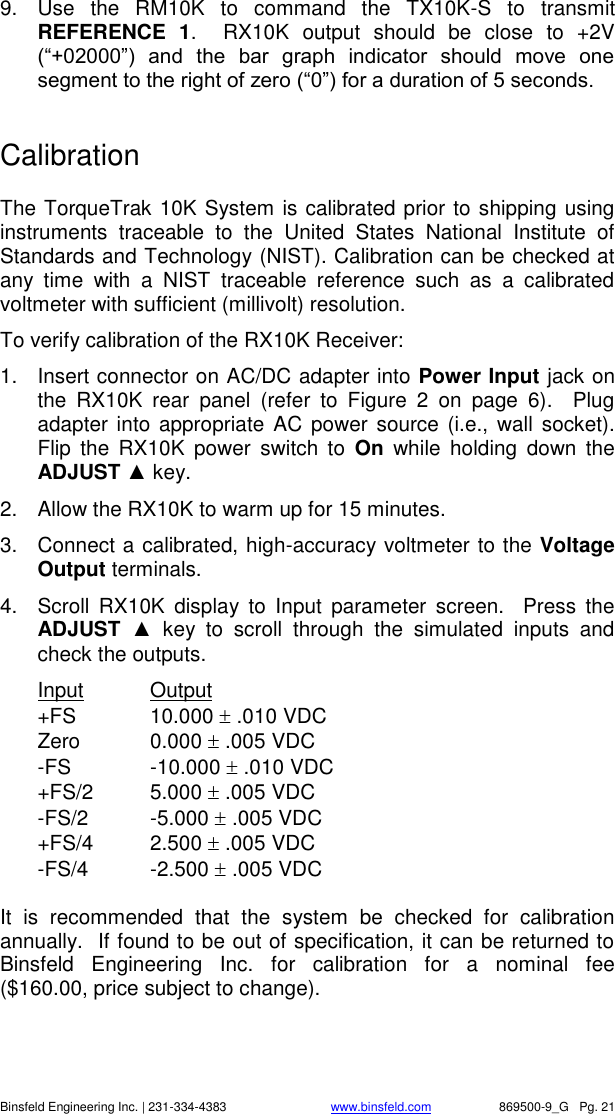
   Binsfeld Engineering Inc. | 231-334-4383                              www.binsfeld.com   869500-9_G   Pg. 21 9.  Use  the  RM10K  to  command  the  TX10K-S  to  transmit REFERENCE  1.    RX10K  output  should  be  close  to  +2V (“+02000”)  and  the  bar  graph  indicator  should  move  one segment to the right of zero (“0”) for a duration of 5 seconds.   Calibration  The TorqueTrak 10K System is calibrated prior to shipping using instruments  traceable  to  the  United  States  National  Institute  of Standards and Technology (NIST). Calibration can be checked at any  time  with  a  NIST  traceable  reference  such  as  a  calibrated voltmeter with sufficient (millivolt) resolution. To verify calibration of the RX10K Receiver: 1.  Insert connector on AC/DC adapter into Power Input jack on the  RX10K  rear  panel  (refer  to  Figure  2  on  page  6).    Plug adapter into appropriate  AC power source (i.e.,  wall  socket).  Flip  the  RX10K  power  switch  to  On  while  holding  down  the ADJUST ▲ key.   2.  Allow the RX10K to warm up for 15 minutes. 3.  Connect a calibrated, high-accuracy voltmeter to the Voltage Output terminals. 4.  Scroll  RX10K  display  to  Input  parameter  screen.    Press  the ADJUST  ▲  key  to  scroll  through  the  simulated  inputs  and check the outputs. Input  Output  +FS  10.000  .010 VDC Zero  0.000  .005 VDC -FS  -10.000  .010 VDC +FS/2  5.000  .005 VDC -FS/2  -5.000  .005 VDC +FS/4  2.500  .005 VDC -FS/4  -2.500  .005 VDC  It  is  recommended  that  the  system  be  checked  for  calibration annually.  If found to be out of specification, it can be returned to Binsfeld  Engineering  Inc.  for  calibration  for  a  nominal  fee ($160.00, price subject to change).
   Binsfeld Engineering Inc. | 231-334-4383                              www.binsfeld.com   869500-9_G   Pg. 22  Warranty and Service Information  LIMITED WARRANTY Binsfeld Engineering Inc. warrants that its products will be free from defective material and workmanship for a period of one year from the date of delivery to the original purchaser and that its products will conform to specifications and standards published by Binsfeld Engineering Inc.  Upon evaluation by Binsfeld Engineering Inc., any product found to be defective will be replaced or repaired at the sole discretion of Binsfeld Engineering Inc.  Our warranty is limited to the foregoing, and does not apply to fuses, paint, or any equipment, which in Binsfeld Engineering’s sole opinion has been subject to misuse, alteration, or abnormal conditions of operation or handling.  This warranty is exclusive and in lieu of all other warranties, expressed or implied, including but not limited to any implied warranty of merchantability or fitness for a particular purpose or use.  Binsfeld Engineering Inc. will not be liable for any special, indirect, incidental or consequential damages or loss, whether in contract, tort, or otherwise.  NOTE (USA only): Some states do not allow limitation of implied warranties, or the exclusion of incidental or consequential damages so the above limitations or exclusions may not apply to you.  This warranty gives you specific legal rights and you may have other rights which vary from state to state.  For service please contact Binsfeld Engineering Inc.:   4571 W. MacFarlane Road   Maple City, MI  49664   Phone: (+1) 231-334-4383   Fax: (+1) 231-334-4903   Internet: www.binsfeld.com Email: sales@binsfeld.com
   Binsfeld Engineering Inc. | 231-334-4383                              www.binsfeld.com   869500-9_G   Pg. 23 FCC Rules Part 15: Computing Devices  TRADE NAME: Torque Telemetry System COMPLIANCE TEST REPORT NUMBERS: B70309A1  Model: RM10K B70321A1  Model: RX10K B70517B1  Model: TX10K COMPLIANCE TEST REPORT DATE:  May 22, 2007 RESPONSIBLE PARTY (IN USA): Stephen Tarsa ADDRESS: 4571 W. MacFarlane Road Maple City, MI  49664 USA TELEPHONE: (+1) 231-334-4383  This equipment has been tested and found to comply with the limits for a Class B digital device, pursuant to part 15 of the FCC Rules.  These limits are  designed  to  provide  reasonable  protection  against  harmful interference in a residential installation.  This equipment generates, uses, and can radiate radio frequency energy and, if not installed and used in accordance with the instructions, may cause harmful interference to radio communications.  However,  there  is  no  guarantee  that  interference  will not occur in a particular installation.  If this equipment does cause harmful interference to radio or television reception, which can be determined by turning the equipment off and on, the user is encouraged to try to correct the interference by one or more of the following measures:    Reorient or relocate the receiving antenna.   Increase the separation between the equipment and the receiver.   Connect the equipment into an outlet on a circuit different from that to which the receiver is connected.   Consult the dealer or an experienced radio/TV technician for help.  In  order  to  maintain  compliance  with  FCC  regulations,  shielded  cables must  be  used  with  this  equipment.    Operation  with  non-approved equipment or unshielded cables is likely to result in interference to radio and TV reception.  The user is cautioned that changes and modifications made to the equipment without approval of manufacturer could void the user’s authority to operate this equipment.  Operation is subject to  the following two conditions: (1) this device may not cause interference, and (2) this device must accept any interference that may cause undesired operation of the device.  I,  the  undersigned,  hereby  declare  that  the  equipment  specified  above conforms to the above requirements.  Place: Maple City, MI    Date: April 14, 2016  Signature:          Stephen Tarsa, CEO
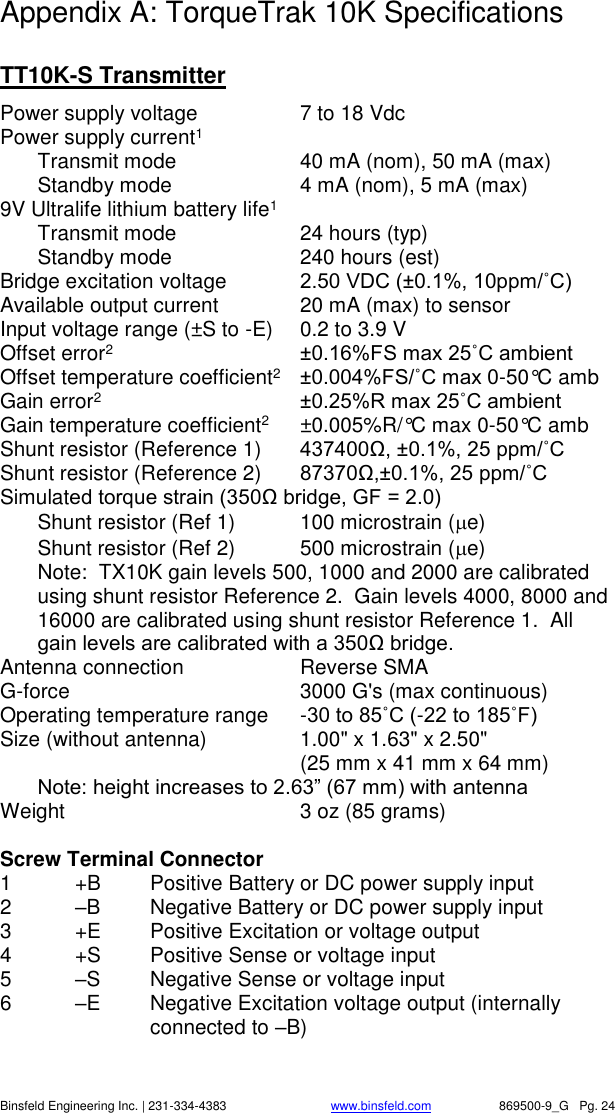
   Binsfeld Engineering Inc. | 231-334-4383                              www.binsfeld.com   869500-9_G   Pg. 24 Appendix A: TorqueTrak 10K Specifications  TT10K-S Transmitter Power supply voltage  7 to 18 Vdc Power supply current1   Transmit mode  40 mA (nom), 50 mA (max)   Standby mode  4 mA (nom), 5 mA (max) 9V Ultralife lithium battery life1    Transmit mode  24 hours (typ)   Standby mode  240 hours (est) Bridge excitation voltage  2.50 VDC (±0.1%, 10ppm/˚C) Available output current  20 mA (max) to sensor Input voltage range (±S to -E)  0.2 to 3.9 V Offset error2 ±0.16%FS max 25˚C ambient Offset temperature coefficient2 ±0.004%FS/˚C max 0-50°C amb Gain error2 ±0.25%R max 25˚C ambient Gain temperature coefficient2  ±0.005%R/°C max 0-50°C amb Shunt resistor (Reference 1)  437400Ω, ±0.1%, 25 ppm/˚C Shunt resistor (Reference 2)  87370Ω,±0.1%, 25 ppm/˚C Simulated torque strain (350Ω bridge, GF = 2.0)   Shunt resistor (Ref 1)  100 microstrain (e)   Shunt resistor (Ref 2)  500 microstrain (e) Note:  TX10K gain levels 500, 1000 and 2000 are calibrated using shunt resistor Reference 2.  Gain levels 4000, 8000 and 16000 are calibrated using shunt resistor Reference 1.  All gain levels are calibrated with a 350Ω bridge. Antenna connection  Reverse SMA G-force   3000 G's (max continuous) Operating temperature range  -30 to 85˚C (-22 to 185˚F) Size (without antenna)  1.00" x 1.63" x 2.50"      (25 mm x 41 mm x 64 mm)  Note: height increases to 2.63” (67 mm) with antenna Weight  3 oz (85 grams)  Screw Terminal Connector 1  +B  Positive Battery or DC power supply input 2  –B  Negative Battery or DC power supply input     3  +E  Positive Excitation or voltage output 4  +S  Positive Sense or voltage input 5  –S  Negative Sense or voltage input 6  –E  Negative Excitation voltage output (internally connected to –B)
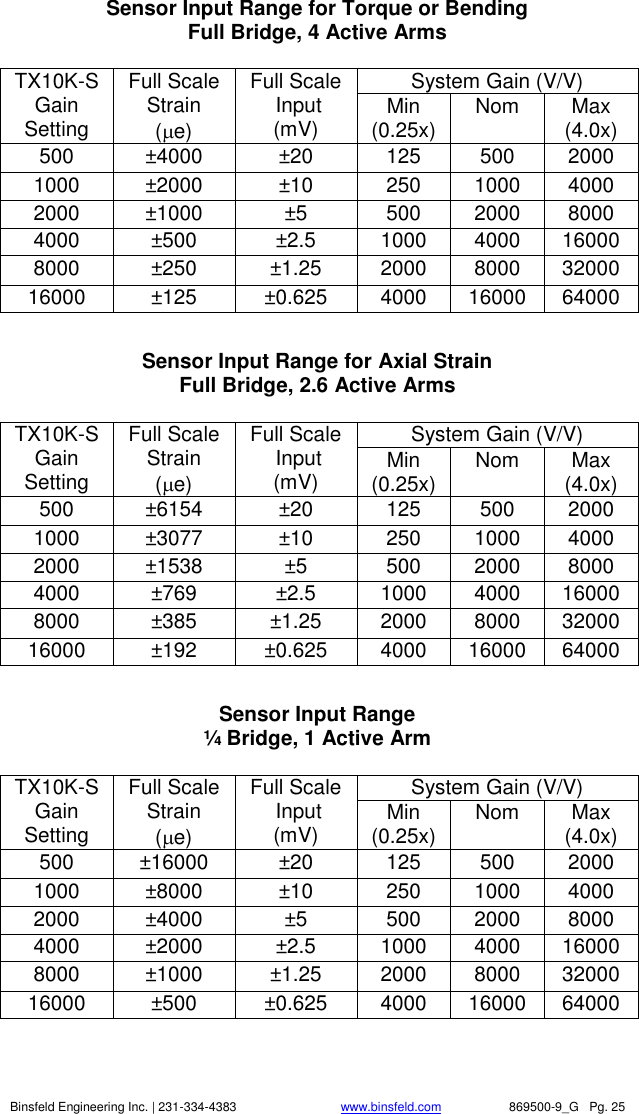
   Binsfeld Engineering Inc. | 231-334-4383                              www.binsfeld.com   869500-9_G   Pg. 25 Sensor Input Range for Torque or Bending Full Bridge, 4 Active Arms  TX10K-S Gain Setting Full Scale Strain  (e) Full Scale  Input (mV) System Gain (V/V) Min (0.25x) Nom Max (4.0x) 500 ±4000 ±20 125 500 2000 1000 ±2000 ±10 250 1000 4000 2000 ±1000 ±5 500 2000 8000 4000 ±500 ±2.5 1000 4000 16000 8000 ±250 ±1.25 2000 8000 32000 16000 ±125 ±0.625 4000 16000 64000  Sensor Input Range for Axial Strain Full Bridge, 2.6 Active Arms  TX10K-S Gain Setting Full Scale Strain  (e) Full Scale  Input (mV) System Gain (V/V) Min (0.25x) Nom Max (4.0x) 500 ±6154 ±20 125 500 2000 1000 ±3077 ±10 250 1000 4000 2000 ±1538 ±5 500 2000 8000 4000 ±769 ±2.5 1000 4000 16000 8000 ±385 ±1.25 2000 8000 32000 16000 ±192 ±0.625 4000 16000 64000  Sensor Input Range ¼ Bridge, 1 Active Arm  TX10K-S Gain Setting Full Scale Strain  (e) Full Scale  Input (mV) System Gain (V/V) Min (0.25x) Nom Max (4.0x) 500 ±16000 ±20 125 500 2000 1000 ±8000 ±10 250 1000 4000 2000 ±4000 ±5 500 2000 8000 4000 ±2000 ±2.5 1000 4000 16000 8000 ±1000 ±1.25 2000 8000 32000 16000 ±500 ±0.625 4000 16000 64000
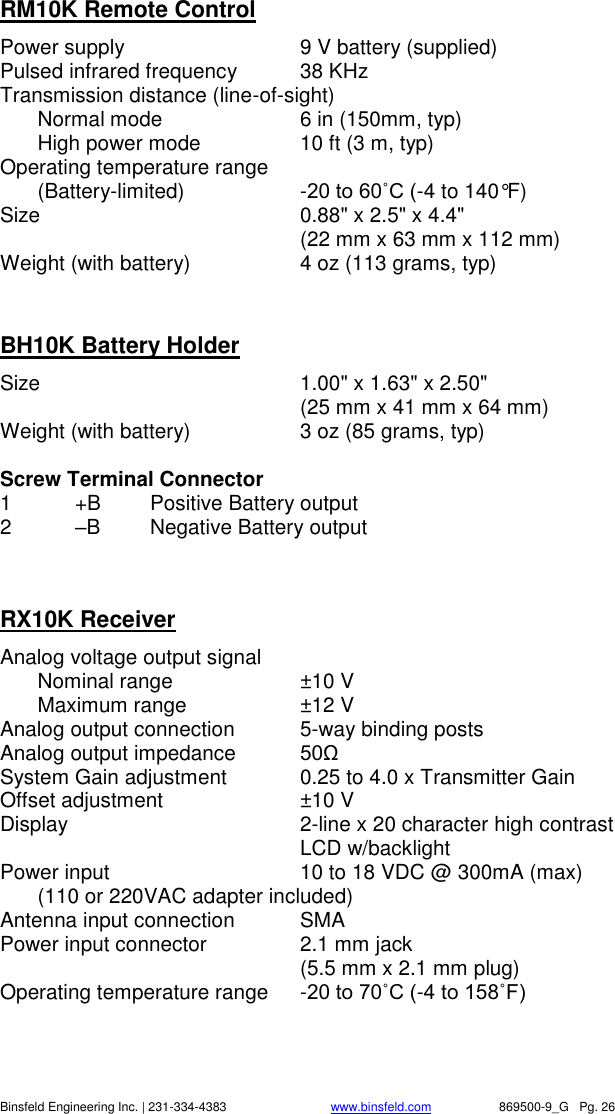
   Binsfeld Engineering Inc. | 231-334-4383                              www.binsfeld.com   869500-9_G   Pg. 26 RM10K Remote Control Power supply  9 V battery (supplied) Pulsed infrared frequency  38 KHz Transmission distance (line-of-sight)     Normal mode  6 in (150mm, typ)   High power mode  10 ft (3 m, typ) Operating temperature range    (Battery-limited)  -20 to 60˚C (-4 to 140°F) Size    0.88" x 2.5" x 4.4"      (22 mm x 63 mm x 112 mm) Weight (with battery)  4 oz (113 grams, typ)   BH10K Battery Holder Size    1.00" x 1.63" x 2.50"      (25 mm x 41 mm x 64 mm) Weight (with battery)  3 oz (85 grams, typ)  Screw Terminal Connector 1  +B  Positive Battery output 2  –B  Negative Battery output   RX10K Receiver Analog voltage output signal   Nominal range  ±10 V   Maximum range  ±12 V Analog output connection  5-way binding posts Analog output impedance  50Ω  System Gain adjustment  0.25 to 4.0 x Transmitter Gain Offset adjustment  ±10 V Display   2-line x 20 character high contrast LCD w/backlight Power input  10 to 18 VDC @ 300mA (max)   (110 or 220VAC adapter included) Antenna input connection  SMA Power input connector  2.1 mm jack     (5.5 mm x 2.1 mm plug) Operating temperature range  -20 to 70˚C (-4 to 158˚F)
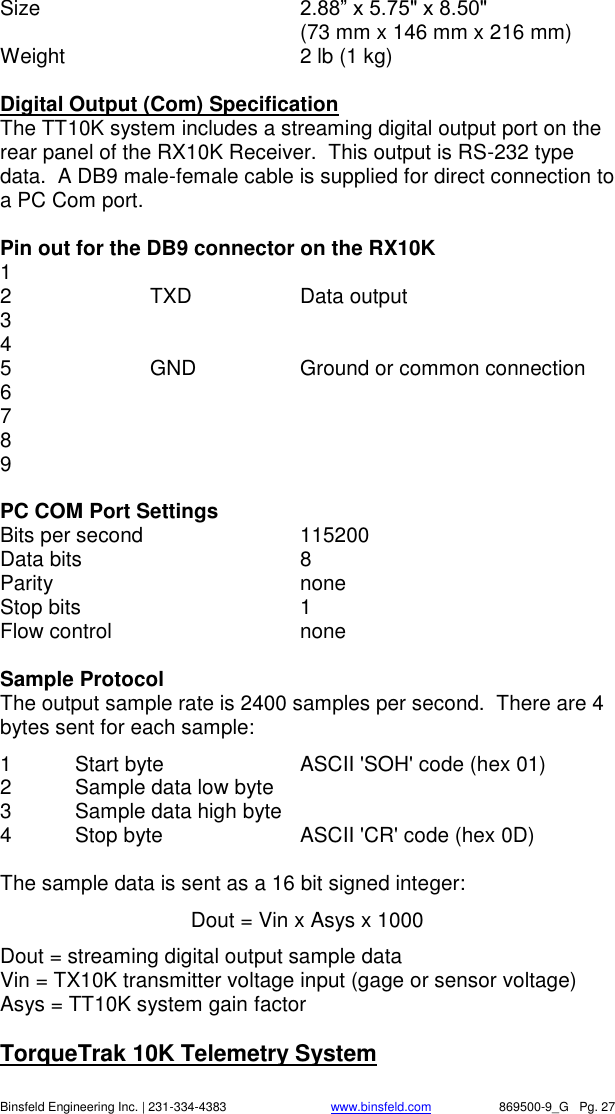
   Binsfeld Engineering Inc. | 231-334-4383                              www.binsfeld.com   869500-9_G   Pg. 27 Size    2.88” x 5.75" x 8.50"     (73 mm x 146 mm x 216 mm) Weight  2 lb (1 kg)  Digital Output (Com) Specification The TT10K system includes a streaming digital output port on the rear panel of the RX10K Receiver.  This output is RS-232 type data.  A DB9 male-female cable is supplied for direct connection to a PC Com port.  Pin out for the DB9 connector on the RX10K 1   2    TXD    Data output 3 4 5    GND    Ground or common connection 6 7 8 9  PC COM Port Settings Bits per second     115200  Data bits      8 Parity        none Stop bits      1 Flow control      none  Sample Protocol The output sample rate is 2400 samples per second.  There are 4 bytes sent for each sample: 1  Start byte     ASCII 'SOH' code (hex 01) 2  Sample data low byte   3  Sample data high byte 4  Stop byte    ASCII 'CR' code (hex 0D)  The sample data is sent as a 16 bit signed integer: Dout = Vin x Asys x 1000 Dout = streaming digital output sample data Vin = TX10K transmitter voltage input (gage or sensor voltage) Asys = TT10K system gain factor   TorqueTrak 10K Telemetry System
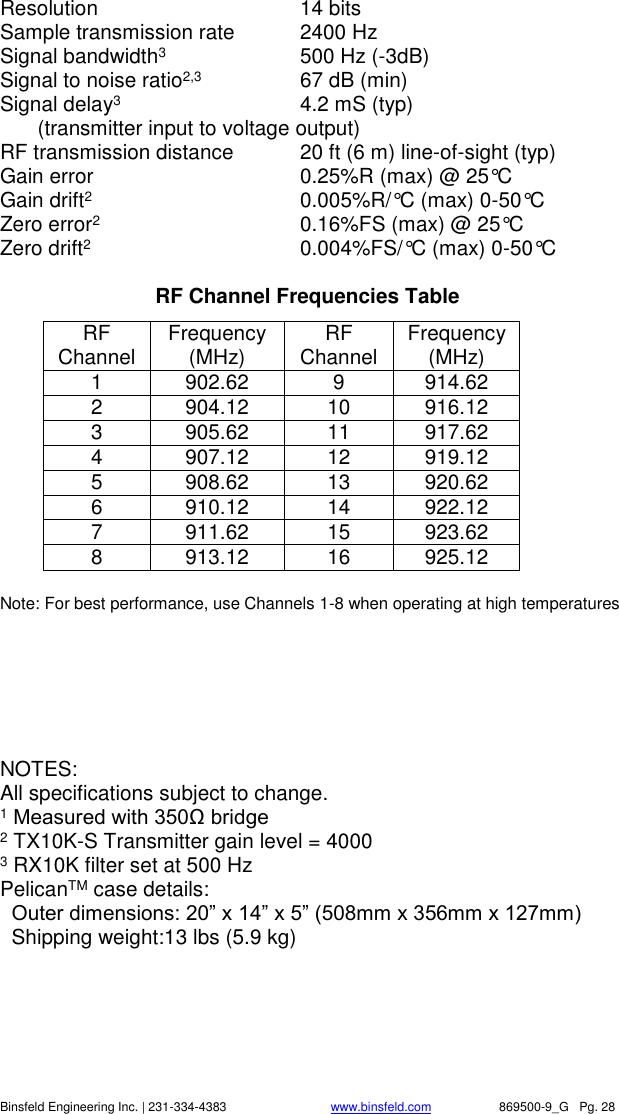
   Binsfeld Engineering Inc. | 231-334-4383                              www.binsfeld.com   869500-9_G   Pg. 28 Resolution  14 bits  Sample transmission rate  2400 Hz Signal bandwidth3  500 Hz (-3dB) Signal to noise ratio2,3  67 dB (min) Signal delay3  4.2 mS (typ)   (transmitter input to voltage output) RF transmission distance  20 ft (6 m) line-of-sight (typ) Gain error      0.25%R (max) @ 25°C Gain drift2  0.005%R/°C (max) 0-50°C Zero error2  0.16%FS (max) @ 25°C Zero drift2  0.004%FS/°C (max) 0-50°C  RF Channel Frequencies Table RF Channel Frequency (MHz) RF Channel Frequency (MHz) 1 902.62 9 914.62 2 904.12 10 916.12 3 905.62 11 917.62 4 907.12 12 919.12 5 908.62 13 920.62 6 910.12 14 922.12 7 911.62 15 923.62 8 913.12 16 925.12  Note: For best performance, use Channels 1-8 when operating at high temperatures       NOTES: All specifications subject to change. 1 Measured with 350Ω bridge 2 TX10K-S Transmitter gain level = 4000 3 RX10K filter set at 500 Hz PelicanTM case details:   Outer dimensions: 20” x 14” x 5” (508mm x 356mm x 127mm)   Shipping weight:13 lbs (5.9 kg)
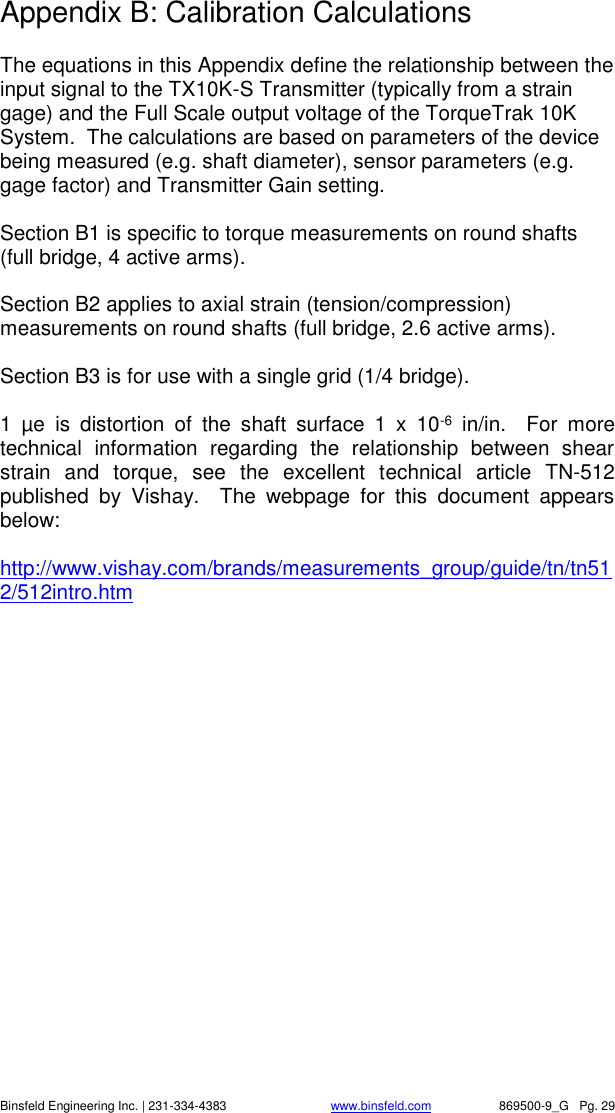
   Binsfeld Engineering Inc. | 231-334-4383                              www.binsfeld.com   869500-9_G   Pg. 29 Appendix B: Calibration Calculations  The equations in this Appendix define the relationship between the input signal to the TX10K-S Transmitter (typically from a strain gage) and the Full Scale output voltage of the TorqueTrak 10K System.  The calculations are based on parameters of the device being measured (e.g. shaft diameter), sensor parameters (e.g. gage factor) and Transmitter Gain setting.  Section B1 is specific to torque measurements on round shafts (full bridge, 4 active arms).  Section B2 applies to axial strain (tension/compression) measurements on round shafts (full bridge, 2.6 active arms).  Section B3 is for use with a single grid (1/4 bridge).  1  µe  is  distortion  of  the  shaft  surface  1  x  10-6  in/in.    For  more technical  information  regarding  the  relationship  between  shear strain  and  torque,  see  the  excellent  technical  article  TN-512 published  by  Vishay.    The  webpage  for  this  document  appears below:  http://www.vishay.com/brands/measurements_group/guide/tn/tn512/512intro.htm
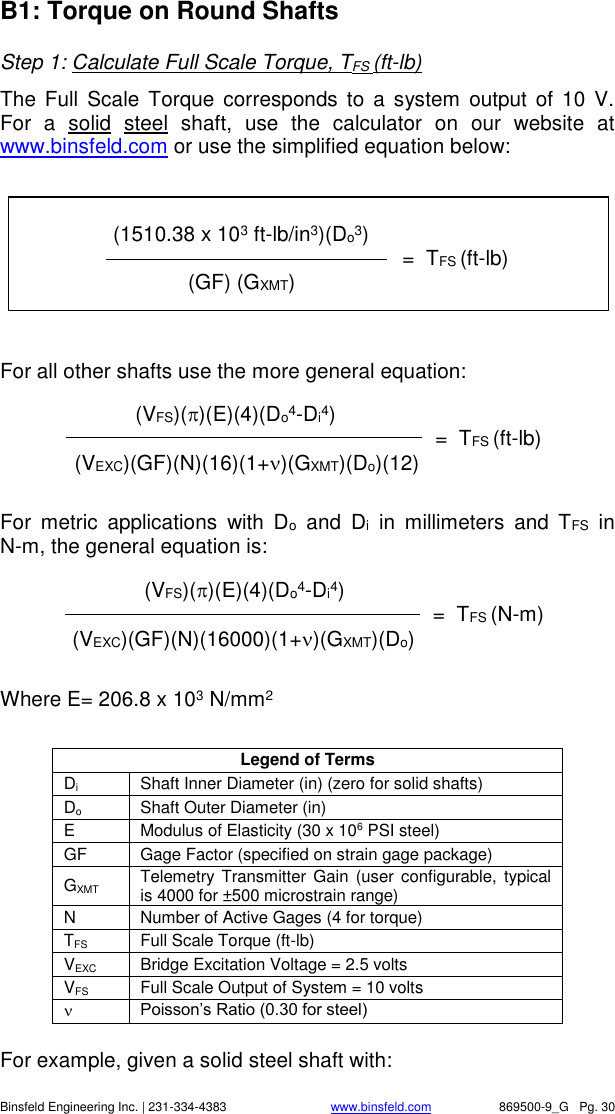
   Binsfeld Engineering Inc. | 231-334-4383                              www.binsfeld.com   869500-9_G   Pg. 30        (VFS)()(E)(4)(Do4-Di4)                =  TFS (N-m) (VEXC)(GF)(N)(16000)(1+)(GXMT)(Do)   B1: Torque on Round Shafts Step 1: Calculate Full Scale Torque, TFS (ft-lb)  The  Full  Scale  Torque  corresponds to a system  output  of  10  V.  For  a  solid  steel  shaft,  use  the  calculator  on  our  website  at www.binsfeld.com or use the simplified equation below:    For all other shafts use the more general equation:  For  metric  applications  with  Do  and  Di  in  millimeters  and  TFS  in N-m, the general equation is:      Where E= 206.8 x 10³ N/mm2  Legend of Terms Di Shaft Inner Diameter (in) (zero for solid shafts) Do Shaft Outer Diameter (in)  E Modulus of Elasticity (30 x 106 PSI steel) GF Gage Factor (specified on strain gage package) GXMT Telemetry Transmitter  Gain  (user  configurable, typical is 4000 for ±500 microstrain range) N Number of Active Gages (4 for torque) TFS Full Scale Torque (ft-lb) VEXC Bridge Excitation Voltage = 2.5 volts VFS Full Scale Output of System = 10 volts  Poisson’s Ratio (0.30 for steel)  For example, given a solid steel shaft with:                 (1510.38 x 103 ft-lb/in3)(Do3)                                           =  TFS (ft-lb)      (GF) (GXMT)                      (VFS)()(E)(4)(Do4-Di4)                            =  TFS (ft-lb)   (VEXC)(GF)(N)(16)(1+)(GXMT)(Do)(12)
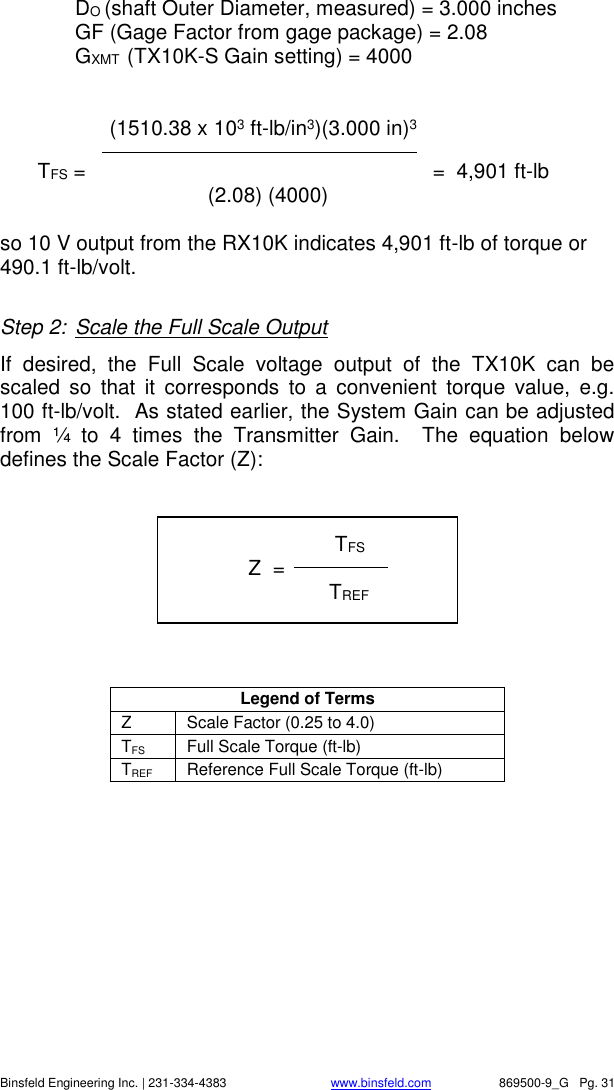
   Binsfeld Engineering Inc. | 231-334-4383                              www.binsfeld.com   869500-9_G   Pg. 31  DO (shaft Outer Diameter, measured) = 3.000 inches  GF (Gage Factor from gage package) = 2.08 GXMT  (TX10K-S Gain setting) = 4000               (1510.38 x 103 ft-lb/in3)(3.000 in)3  TFS =                          =  4,901 ft-lb           (2.08) (4000)      so 10 V output from the RX10K indicates 4,901 ft-lb of torque or 490.1 ft-lb/volt.  Step 2:  Scale the Full Scale Output If  desired,  the  Full  Scale  voltage  output  of  the  TX10K  can  be scaled  so  that  it  corresponds  to  a  convenient  torque  value,  e.g. 100 ft-lb/volt.  As stated earlier, the System Gain can be adjusted from  ¼  to  4  times  the  Transmitter  Gain.    The  equation  below defines the Scale Factor (Z):          Legend of Terms Z Scale Factor (0.25 to 4.0) TFS Full Scale Torque (ft-lb) TREF Reference Full Scale Torque (ft-lb)                TFS              Z  =     TREF
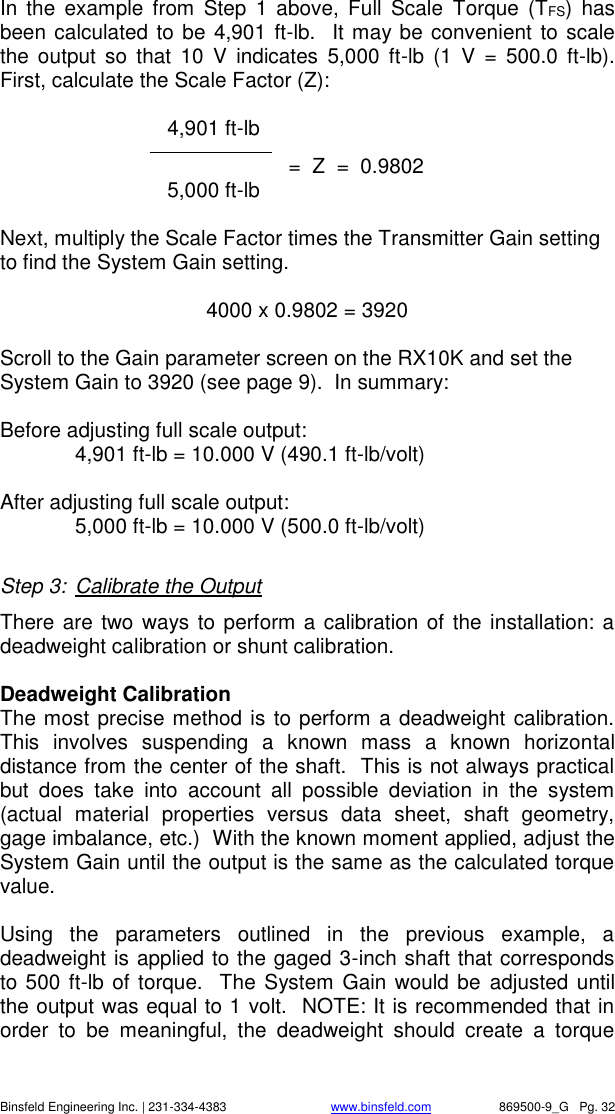
   Binsfeld Engineering Inc. | 231-334-4383                              www.binsfeld.com   869500-9_G   Pg. 32 In  the  example  from  Step  1  above,  Full  Scale  Torque  (TFS)  has been calculated to be 4,901 ft-lb.  It may be convenient to scale the  output  so  that  10  V  indicates  5,000  ft-lb  (1  V  =  500.0  ft-lb).  First, calculate the Scale Factor (Z):     4,901 ft-lb                =  Z  =  0.9802    5,000 ft-lb  Next, multiply the Scale Factor times the Transmitter Gain setting to find the System Gain setting.    4000 x 0.9802 = 3920  Scroll to the Gain parameter screen on the RX10K and set the System Gain to 3920 (see page 9).  In summary:   Before adjusting full scale output: 4,901 ft-lb = 10.000 V (490.1 ft-lb/volt)  After adjusting full scale output:   5,000 ft-lb = 10.000 V (500.0 ft-lb/volt)  Step 3:  Calibrate the Output There are two ways to perform a calibration of the installation: a deadweight calibration or shunt calibration.    Deadweight Calibration The most precise method is to perform a deadweight calibration.  This  involves  suspending  a  known  mass  a  known  horizontal distance from the center of the shaft.  This is not always practical but  does  take  into  account  all  possible  deviation  in  the  system (actual  material  properties  versus  data  sheet,  shaft  geometry, gage imbalance, etc.)  With the known moment applied, adjust the System Gain until the output is the same as the calculated torque value.    Using  the  parameters  outlined  in  the  previous  example,  a deadweight is applied to the gaged 3-inch shaft that corresponds to 500 ft-lb of torque.  The System Gain would be  adjusted until the output was equal to 1 volt.  NOTE: It is recommended that in order  to  be  meaningful,  the  deadweight  should  create  a  torque
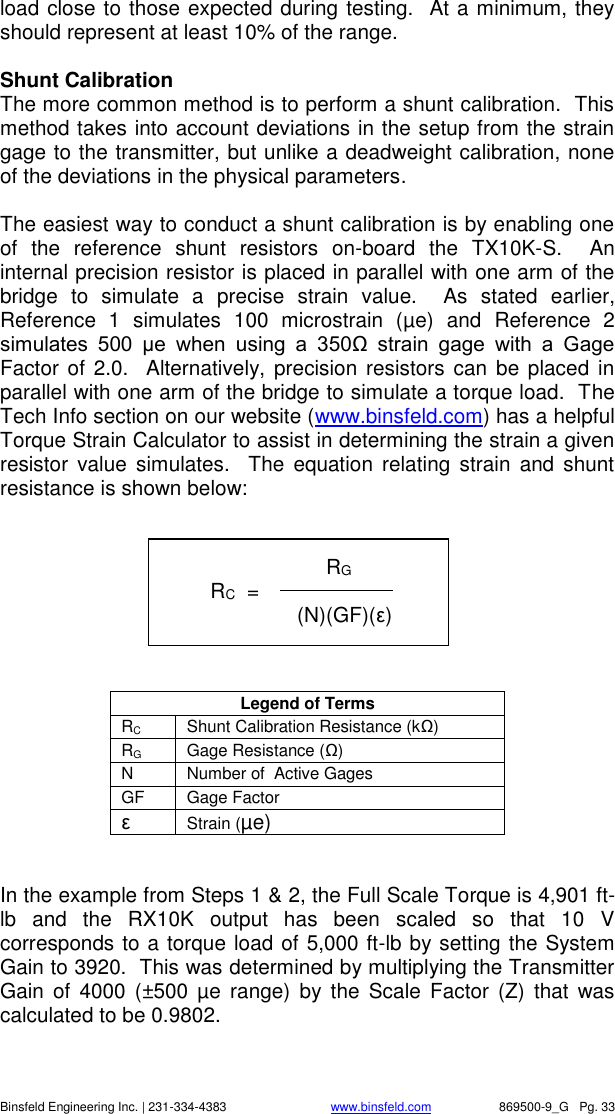
   Binsfeld Engineering Inc. | 231-334-4383                              www.binsfeld.com   869500-9_G   Pg. 33 load close to those expected during testing.  At a minimum, they should represent at least 10% of the range.  Shunt Calibration The more common method is to perform a shunt calibration.  This method takes into account deviations in the setup from the strain gage to the transmitter, but unlike a deadweight calibration, none of the deviations in the physical parameters.  The easiest way to conduct a shunt calibration is by enabling one of  the  reference  shunt  resistors  on-board  the  TX10K-S.    An internal precision resistor is placed in parallel with one arm of the bridge  to  simulate  a  precise  strain  value.    As  stated  earlier, Reference  1  simulates  100  microstrain  (µe)  and  Reference  2 simulates  500  µe  when  using  a  350Ω  strain  gage  with  a  Gage Factor of 2.0.   Alternatively, precision  resistors can  be placed in parallel with one arm of the bridge to simulate a torque load.  The Tech Info section on our website (www.binsfeld.com) has a helpful Torque Strain Calculator to assist in determining the strain a given resistor  value  simulates.    The  equation relating  strain  and  shunt resistance is shown below:         Legend of Terms RC Shunt Calibration Resistance (kΩ) RG Gage Resistance (Ω) N Number of  Active Gages GF Gage Factor ε Strain (µe)   In the example from Steps 1 & 2, the Full Scale Torque is 4,901 ft-lb  and  the  RX10K  output  has  been  scaled  so  that  10  V corresponds to a torque load of 5,000 ft-lb by setting the System Gain to 3920.  This was determined by multiplying the Transmitter Gain  of  4000  (±500  µe  range)  by  the  Scale  Factor  (Z)  that was calculated to be 0.9802.                   RG         RC  =             (N)(GF)(ε)
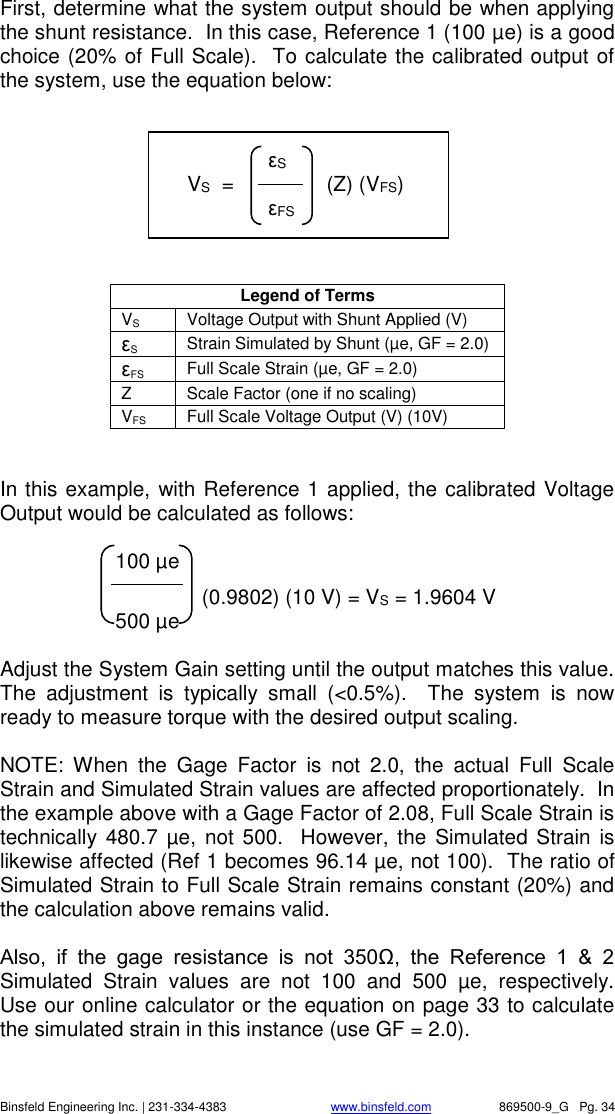
   Binsfeld Engineering Inc. | 231-334-4383                              www.binsfeld.com   869500-9_G   Pg. 34 First, determine what the system output should be when applying the shunt resistance.  In this case, Reference 1 (100 µe) is a good choice (20% of Full Scale).  To calculate the calibrated output of the system, use the equation below:         Legend of Terms VS Voltage Output with Shunt Applied (V) εS Strain Simulated by Shunt (µe, GF = 2.0) εFS Full Scale Strain (µe, GF = 2.0) Z Scale Factor (one if no scaling) VFS Full Scale Voltage Output (V) (10V)   In this example, with Reference 1 applied, the calibrated Voltage Output would be calculated as follows:         100 µe              (0.9802) (10 V) = VS = 1.9604 V         500 µe  Adjust the System Gain setting until the output matches this value.  The  adjustment  is  typically  small  (<0.5%).    The  system  is  now ready to measure torque with the desired output scaling.  NOTE:  When  the  Gage  Factor  is  not  2.0,  the  actual  Full  Scale Strain and Simulated Strain values are affected proportionately.  In the example above with a Gage Factor of 2.08, Full Scale Strain is technically  480.7 µe, not 500.  However, the Simulated Strain is likewise affected (Ref 1 becomes 96.14 µe, not 100).  The ratio of Simulated Strain to Full Scale Strain remains constant (20%) and the calculation above remains valid.     Also,  if  the  gage  resistance  is  not  350Ω,  the  Reference  1  &  2 Simulated  Strain  values  are  not  100  and  500  µe,  respectively.  Use our online calculator or the equation on page 33 to calculate the simulated strain in this instance (use GF = 2.0).        εS     VS  =                (Z) (VFS)      εFS
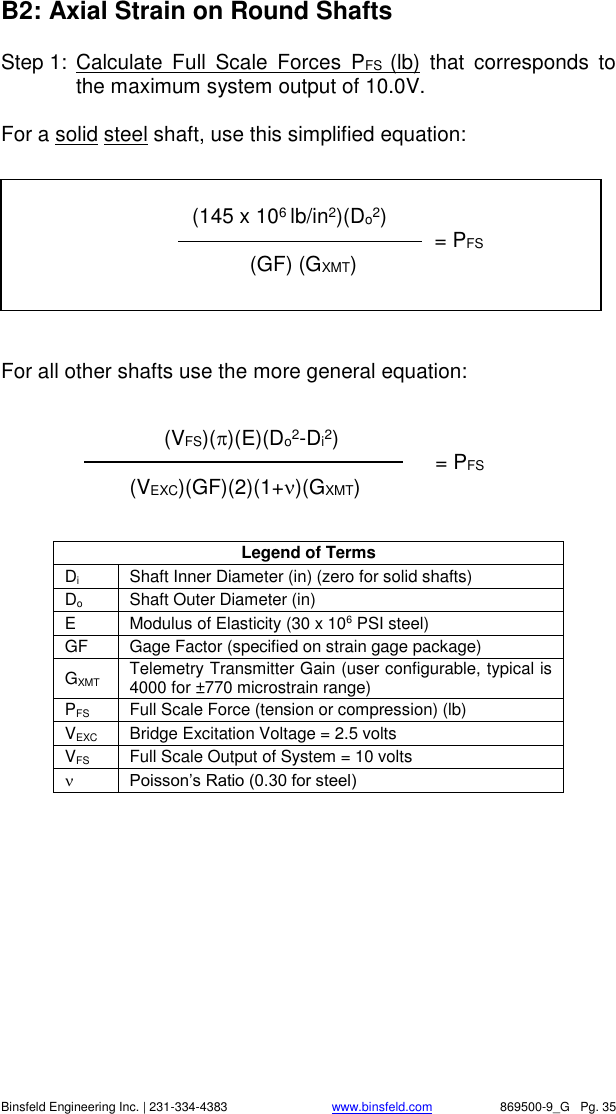
   Binsfeld Engineering Inc. | 231-334-4383                              www.binsfeld.com   869500-9_G   Pg. 35 B2: Axial Strain on Round Shafts Step 1:  Calculate  Full  Scale  Forces  PFS  (lb)  that  corresponds  to the maximum system output of 10.0V.  For a solid steel shaft, use this simplified equation:    For all other shafts use the more general equation:   Legend of Terms Di Shaft Inner Diameter (in) (zero for solid shafts) Do Shaft Outer Diameter (in)  E Modulus of Elasticity (30 x 106 PSI steel) GF Gage Factor (specified on strain gage package) GXMT Telemetry Transmitter Gain (user configurable, typical is 4000 for ±770 microstrain range) PFS Full Scale Force (tension or compression) (lb) VEXC Bridge Excitation Voltage = 2.5 volts VFS Full Scale Output of System = 10 volts  Poisson’s Ratio (0.30 for steel)          (VFS)()(E)(Do2-Di2)             = PFS (VEXC)(GF)(2)(1+)(GXMT)                   (145 x 106 lb/in2)(Do2)           = PFS     (GF) (GXMT)
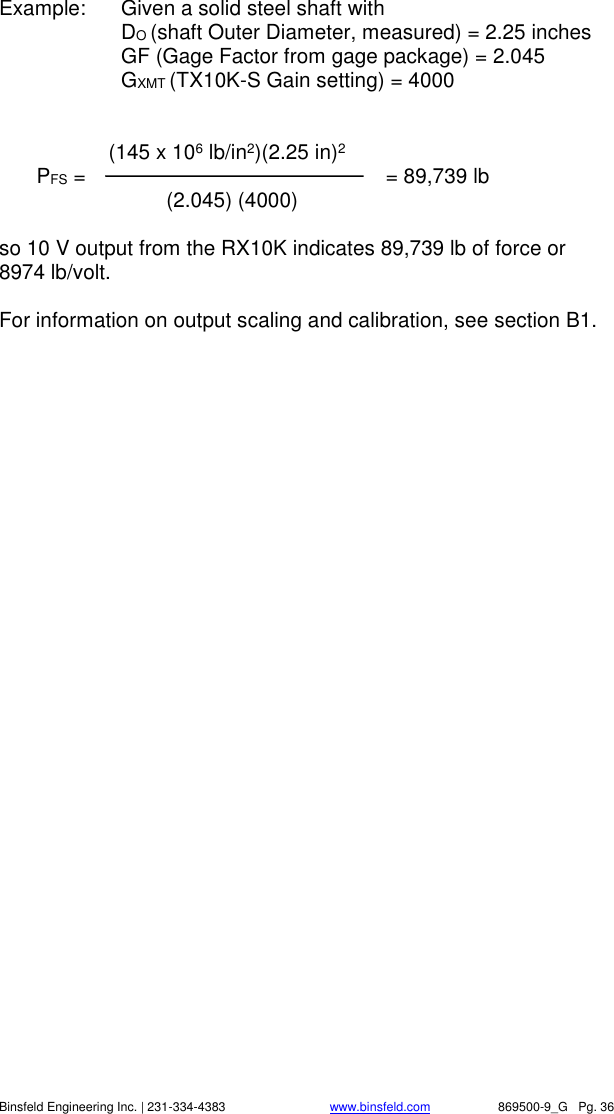
   Binsfeld Engineering Inc. | 231-334-4383                              www.binsfeld.com   869500-9_G   Pg. 36 Example:  Given a solid steel shaft with     DO (shaft Outer Diameter, measured) = 2.25 inches   GF (Gage Factor from gage package) = 2.045   GXMT (TX10K-S Gain setting) = 4000          (145 x 106 lb/in2)(2.25 in)2  PFS =                      = 89,739 lb    (2.045) (4000)     so 10 V output from the RX10K indicates 89,739 lb of force or 8974 lb/volt.  For information on output scaling and calibration, see section B1.
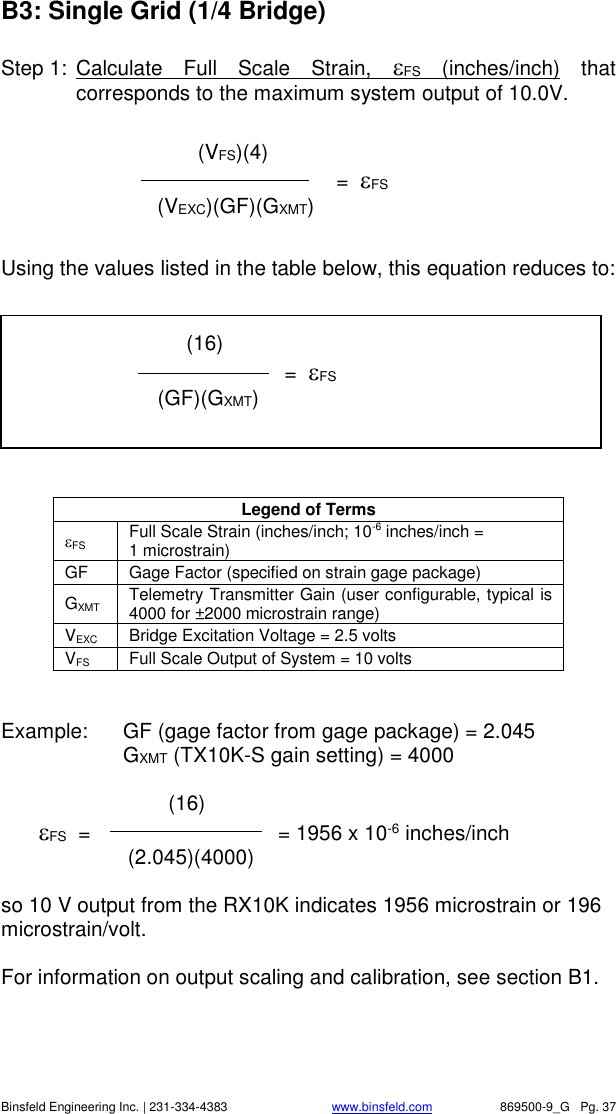
   Binsfeld Engineering Inc. | 231-334-4383                              www.binsfeld.com   869500-9_G   Pg. 37 B3: Single Grid (1/4 Bridge) Step 1:  Calculate  Full  Scale  Strain,  FS  (inches/inch)  that corresponds to the maximum system output of 10.0V.   Using the values listed in the table below, this equation reduces to:    Legend of Terms FS Full Scale Strain (inches/inch; 10-6 inches/inch =  1 microstrain) GF Gage Factor (specified on strain gage package) GXMT Telemetry Transmitter Gain (user configurable, typical is 4000 for ±2000 microstrain range) VEXC Bridge Excitation Voltage = 2.5 volts VFS Full Scale Output of System = 10 volts   Example:  GF (gage factor from gage package) = 2.045   GXMT (TX10K-S gain setting) = 4000          (16)  FS  =              = 1956 x 10-6 inches/inch          (2.045)(4000)      so 10 V output from the RX10K indicates 1956 microstrain or 196 microstrain/volt.  For information on output scaling and calibration, see section B1.              (VFS)(4)           =  FS      (VEXC)(GF)(GXMT)             (16)           =  FS  (GF)(GXMT)
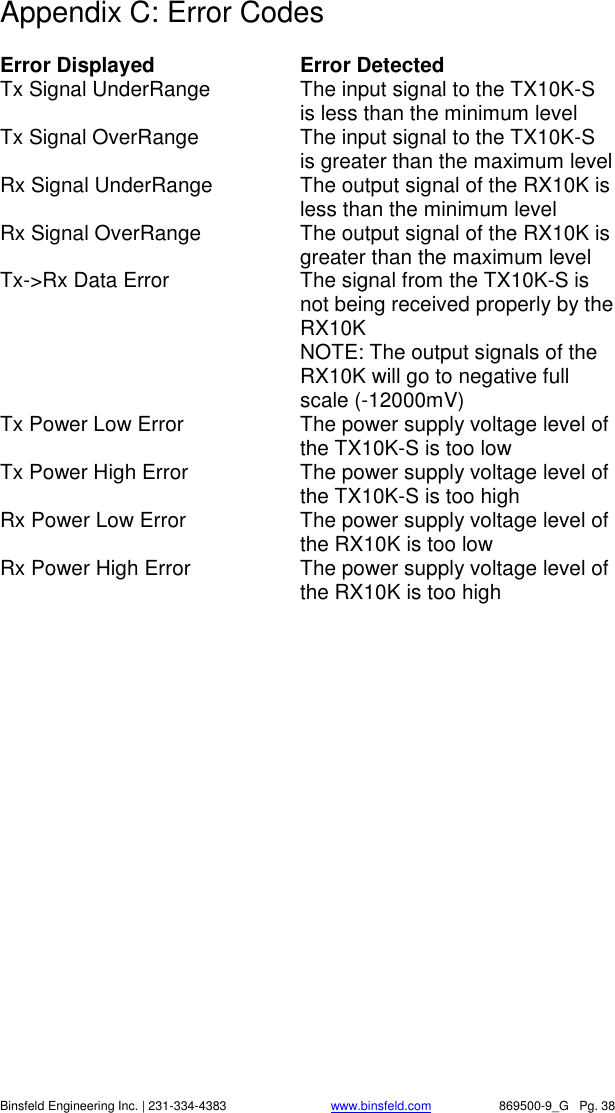
   Binsfeld Engineering Inc. | 231-334-4383                              www.binsfeld.com   869500-9_G   Pg. 38 Appendix C: Error Codes  Error Displayed    Error Detected Tx Signal UnderRange  The input signal to the TX10K-S is less than the minimum level Tx Signal OverRange  The input signal to the TX10K-S is greater than the maximum level Rx Signal UnderRange  The output signal of the RX10K is less than the minimum level Rx Signal OverRange  The output signal of the RX10K is greater than the maximum level Tx->Rx Data Error  The signal from the TX10K-S is not being received properly by the RX10K   NOTE: The output signals of the RX10K will go to negative full scale (-12000mV) Tx Power Low Error  The power supply voltage level of the TX10K-S is too low Tx Power High Error  The power supply voltage level of the TX10K-S is too high Rx Power Low Error  The power supply voltage level of the RX10K is too low Rx Power High Error  The power supply voltage level of the RX10K is too high
   Binsfeld Engineering Inc. | 231-334-4383                              www.binsfeld.com   869500-9_G   Pg. 39 Appendix D: Strain Gage Application  (Also refer to instruction bulletin B-127-12 provided with GAK-2-200 Strain Gage Application Kit from Vishay Measurements Group, Inc., Raleigh, NC, 919-365-3800, www.measurementsgroup.com.)  PREPARING THE SURFACE  1.  A 3-inch square area will be used for gaging. Scrape off any paint or other coatings and inspect shaft for oil residue. If necessary, use a degreasing solution or isopropyl alcohol to remove.  2.  Rough sand the gaging area with 220 grit paper. Finish the sanding procedure by wetting the gaging area with M-Prep Conditioner A and the wetted surface with 400 grit paper provided. Rinse by squirting with M-Prep Conditioner A. Wipe the area dry with tissue taking care to wipe in only one direction. Each time you wipe use a clean area of the tissue to eliminate contamination.  3.  Rinse shaft this time by squirting with M-Prep Neutralizer 5A. Wipe the gaging area dry with a clean tissue, wiping in only one direction and using clean area of tissue with each wipe. Do not allow any solution to dry on the surface as this may leave a contaminating film which can reduce bonding. Surface is now prepared for bonding.  MARKING THE SHAFT FOR GAGE ALIGNMENT  4.  The gage needs to be perpendicular to the shaft axis. In general, this can be accomplished by eye since misalignment of less than 4 degrees will not generate significant errors. For higher precision, we recommend two methods for marking the shaft: a)  Use a machinist square and permanent marker or scribe for perpendicular and parallel lines; or b)  Cut a strip of graph paper greater than the circumference of the shaft. Tape it to the shaft while lining up the edges. Mark desired gage position with a scribe or permanent marker.
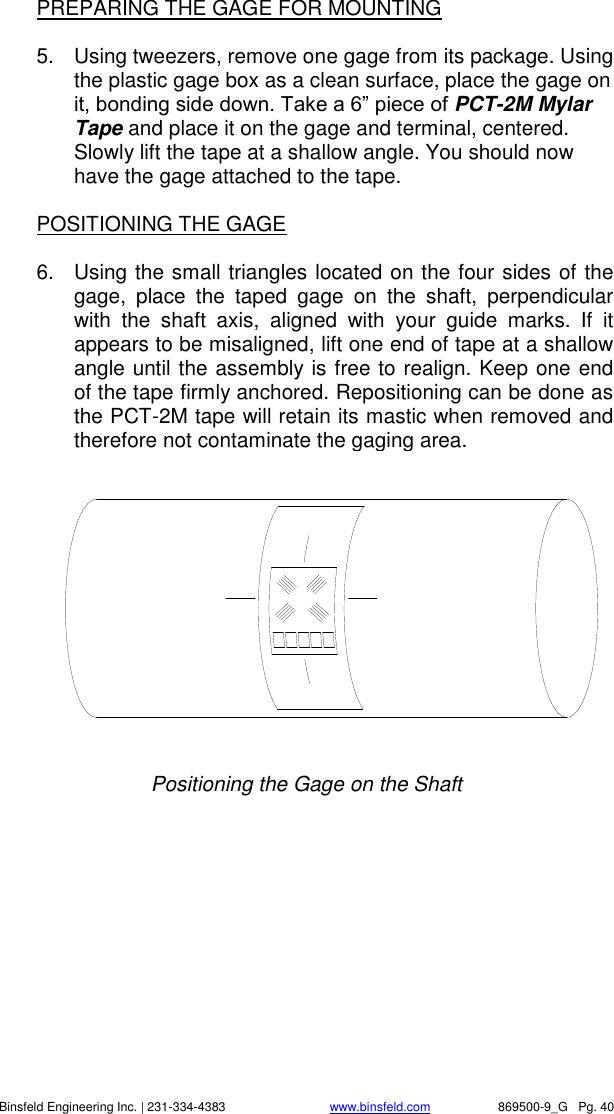
   Binsfeld Engineering Inc. | 231-334-4383                              www.binsfeld.com   869500-9_G   Pg. 40 PREPARING THE GAGE FOR MOUNTING  5.  Using tweezers, remove one gage from its package. Using the plastic gage box as a clean surface, place the gage on it, bonding side down. Take a 6” piece of PCT-2M Mylar Tape and place it on the gage and terminal, centered. Slowly lift the tape at a shallow angle. You should now have the gage attached to the tape.  POSITIONING THE GAGE  6.  Using the small triangles located on the four sides of the gage,  place  the  taped  gage  on  the  shaft,  perpendicular with  the  shaft  axis,  aligned  with  your  guide  marks.  If  it appears to be misaligned, lift one end of tape at a shallow angle until the assembly is free to realign. Keep one end of the tape firmly anchored. Repositioning can be done as the PCT-2M tape will retain its mastic when removed and therefore not contaminate the gaging area.   Positioning the Gage on the Shaft
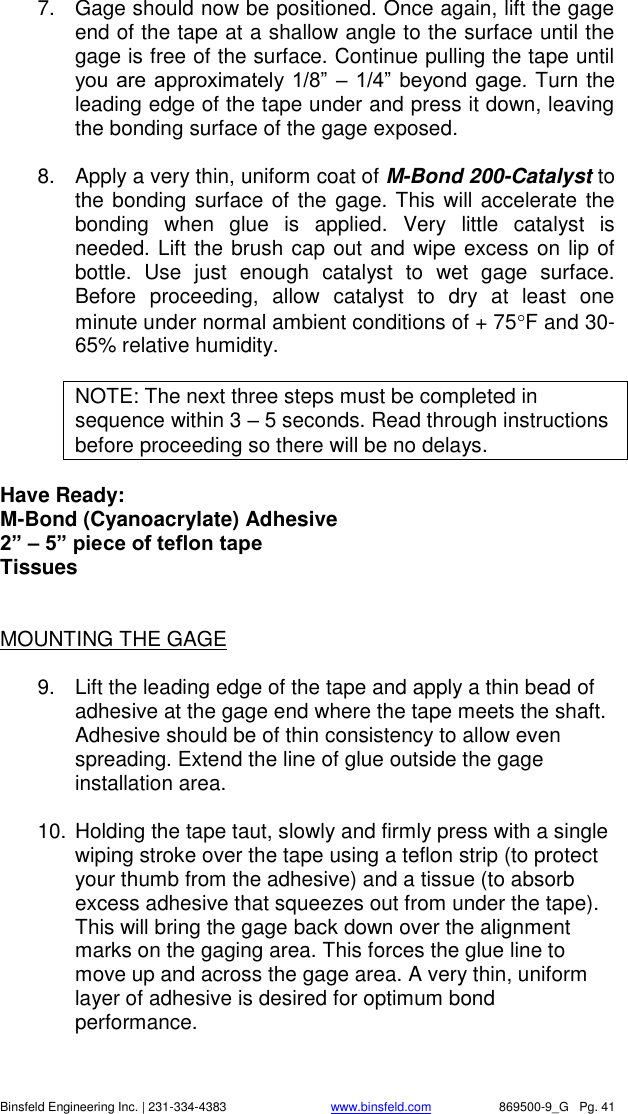
   Binsfeld Engineering Inc. | 231-334-4383                              www.binsfeld.com   869500-9_G   Pg. 41 7.  Gage should now be positioned. Once again, lift the gage end of the tape at a shallow angle to the surface until the gage is free of the surface. Continue pulling the tape until you are approximately 1/8” – 1/4” beyond gage. Turn the leading edge of the tape under and press it down, leaving the bonding surface of the gage exposed.   8.  Apply a very thin, uniform coat of M-Bond 200-Catalyst to the bonding surface of the gage. This will accelerate the bonding  when  glue  is  applied.  Very  little  catalyst  is needed. Lift the brush cap out and wipe excess on lip of bottle.  Use  just  enough  catalyst  to  wet  gage  surface. Before  proceeding,  allow  catalyst  to  dry  at  least  one minute under normal ambient conditions of + 75F and 30-65% relative humidity.  NOTE: The next three steps must be completed in sequence within 3 – 5 seconds. Read through instructions before proceeding so there will be no delays.  Have Ready: M-Bond (Cyanoacrylate) Adhesive 2” – 5” piece of teflon tape Tissues   MOUNTING THE GAGE  9.  Lift the leading edge of the tape and apply a thin bead of adhesive at the gage end where the tape meets the shaft. Adhesive should be of thin consistency to allow even spreading. Extend the line of glue outside the gage installation area.  10. Holding the tape taut, slowly and firmly press with a single wiping stroke over the tape using a teflon strip (to protect your thumb from the adhesive) and a tissue (to absorb excess adhesive that squeezes out from under the tape). This will bring the gage back down over the alignment marks on the gaging area. This forces the glue line to move up and across the gage area. A very thin, uniform layer of adhesive is desired for optimum bond performance.
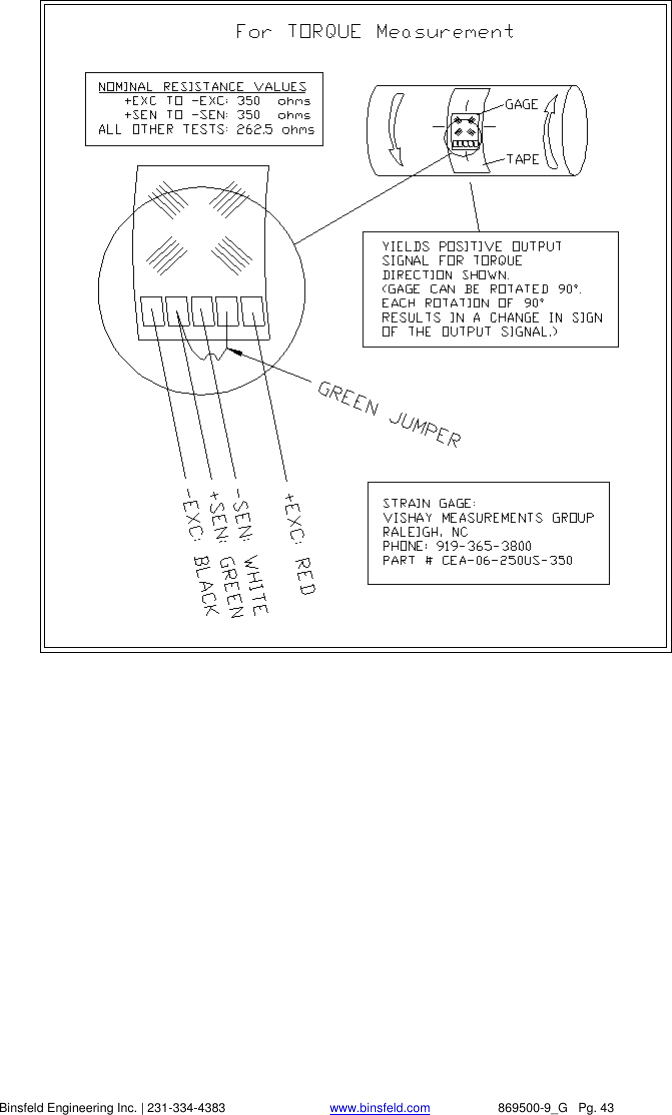
   Binsfeld Engineering Inc. | 231-334-4383                              www.binsfeld.com   869500-9_G   Pg. 42 11. Immediately, using your thumb, apply firm pressure to the taped gage by rolling your thumb over the gage area. Hold the pressure for at least one minute. In low humidity conditions (below 30%) or if ambient temperature is below + 70 F, pressure application time may have to be extended to several minutes.  12. Leave the mylar tape on an additional five minutes to allow total drying then slowly peel the tape back directly over itself, holding it close to the shaft while peeling. This will prevent damage to the gages. It is not necessary to remove the tape immediately after installation. It offers some protection for the gaged surface and may be left until wiring the gage.   WIRING THE GAGE   13. Tin each solder pad with a solder dot. (It is helpful to polish the solder tabs, e.g. with a fiberglass scratch brush or mild abrasive, before soldering.) Trim and tin the ends of the 4-conductor ribbon wire. Solder the lead wires to the gage by placing the tinned lead onto the solder dot and pressing it down with the hot soldering iron. Note: For single-stamp torque gages, a short jumper is required between solder pads 2 and 4 as shown in the diagram on the next page  14. Use the rosin solvent to clean excess solder rosin from the gage after wiring. Brush the gage pads with the solvent and dab with a clean tissue.  15. Paint the gage area (including the solder pads) with M-Coat A polyurethane and allow to air dry 15 minutes. This protects the gage from moisture and dirt. To further protect the gage, cover with a 1.5 inch square patch of rubber sheet and a piece of M-Coat FA-2 aluminum foil tape (optional) then wrap with electrical tape.
   Binsfeld Engineering Inc. | 231-334-4383                              www.binsfeld.com   869500-9_G   Pg. 43

Navigation menu