BlueExpert Technology BES102 Bluetooth Stereo Headset User Manual Revised Manual

BlueExpert Technology Corp. Bluetooth Stereo Headset Revised Manual

Revised Manual

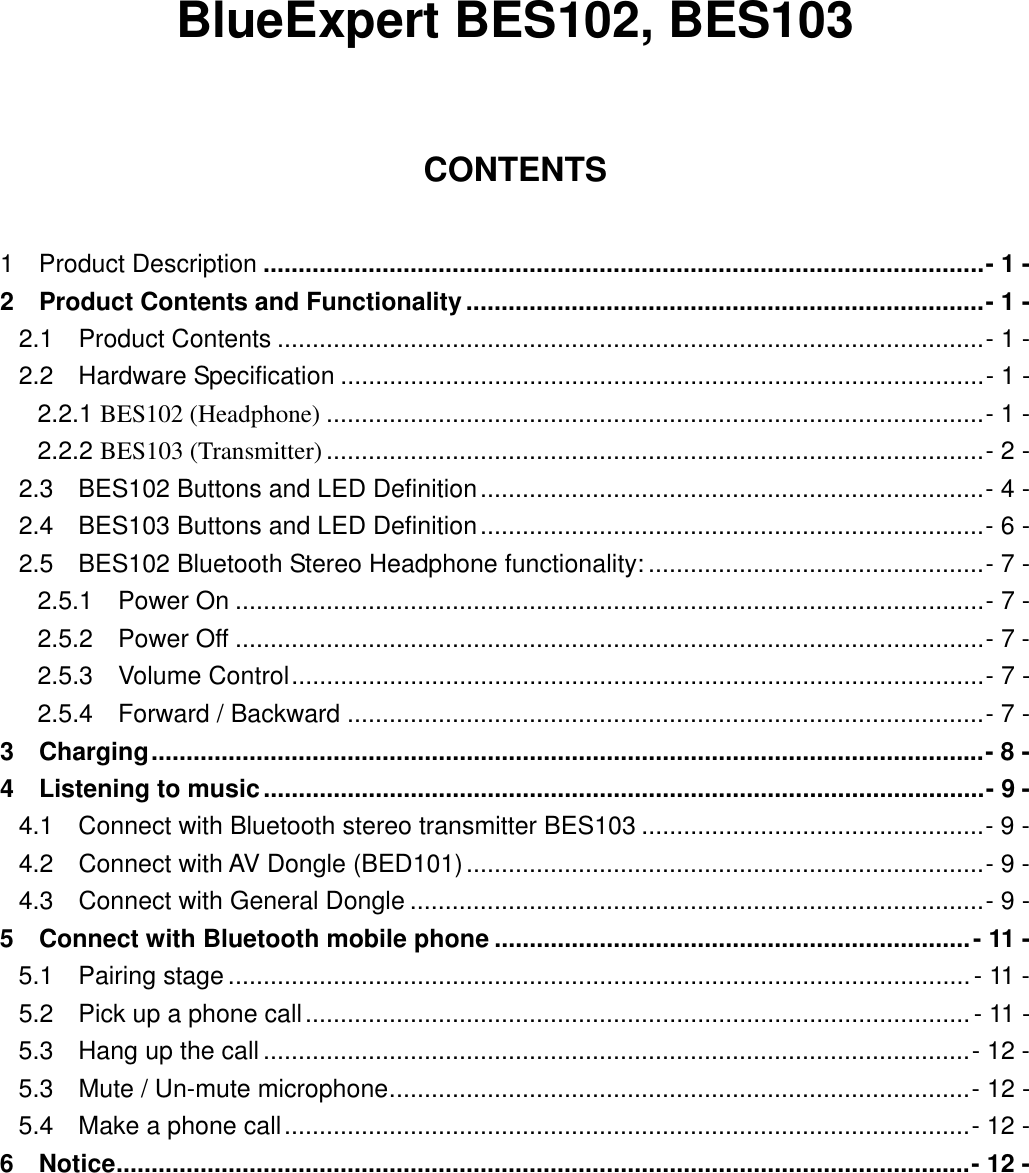
  BlueExpert BES102, BES103  CONTENTS  1  Product Description .......................................................................................................- 1 - 2    Product Contents and Functionality..........................................................................- 1 - 2.1  Product Contents .....................................................................................................- 1 - 2.2  Hardware Specification ............................................................................................- 1 - 2.2.1 BES102 (Headphone) ..............................................................................................- 1 - 2.2.2 BES103 (Transmitter) ..............................................................................................- 2 - 2.3    BES102 Buttons and LED Definition........................................................................- 4 - 2.4    BES103 Buttons and LED Definition........................................................................- 6 - 2.5    BES102 Bluetooth Stereo Headphone functionality: ................................................- 7 - 2.5.1  Power On ...........................................................................................................- 7 - 2.5.2  Power Off ...........................................................................................................- 7 - 2.5.3  Volume Control...................................................................................................- 7 - 2.5.4  Forward / Backward ...........................................................................................- 7 - 3  Charging.......................................................................................................................- 8 - 4  Listening to music.......................................................................................................- 9 - 4.1    Connect with Bluetooth stereo transmitter BES103 .................................................- 9 - 4.2  Connect with AV Dongle (BED101)..........................................................................- 9 - 4.3  Connect with General Dongle ..................................................................................- 9 - 5  Connect with Bluetooth mobile phone ....................................................................- 11 - 5.1  Pairing stage ..........................................................................................................- 11 - 5.2  Pick up a phone call...............................................................................................- 11 - 5.3  Hang up the call .....................................................................................................- 12 - 5.3  Mute / Un-mute microphone...................................................................................- 12 - 5.4  Make a phone call..................................................................................................- 12 - 6  Notice..........................................................................................................................- 12 -
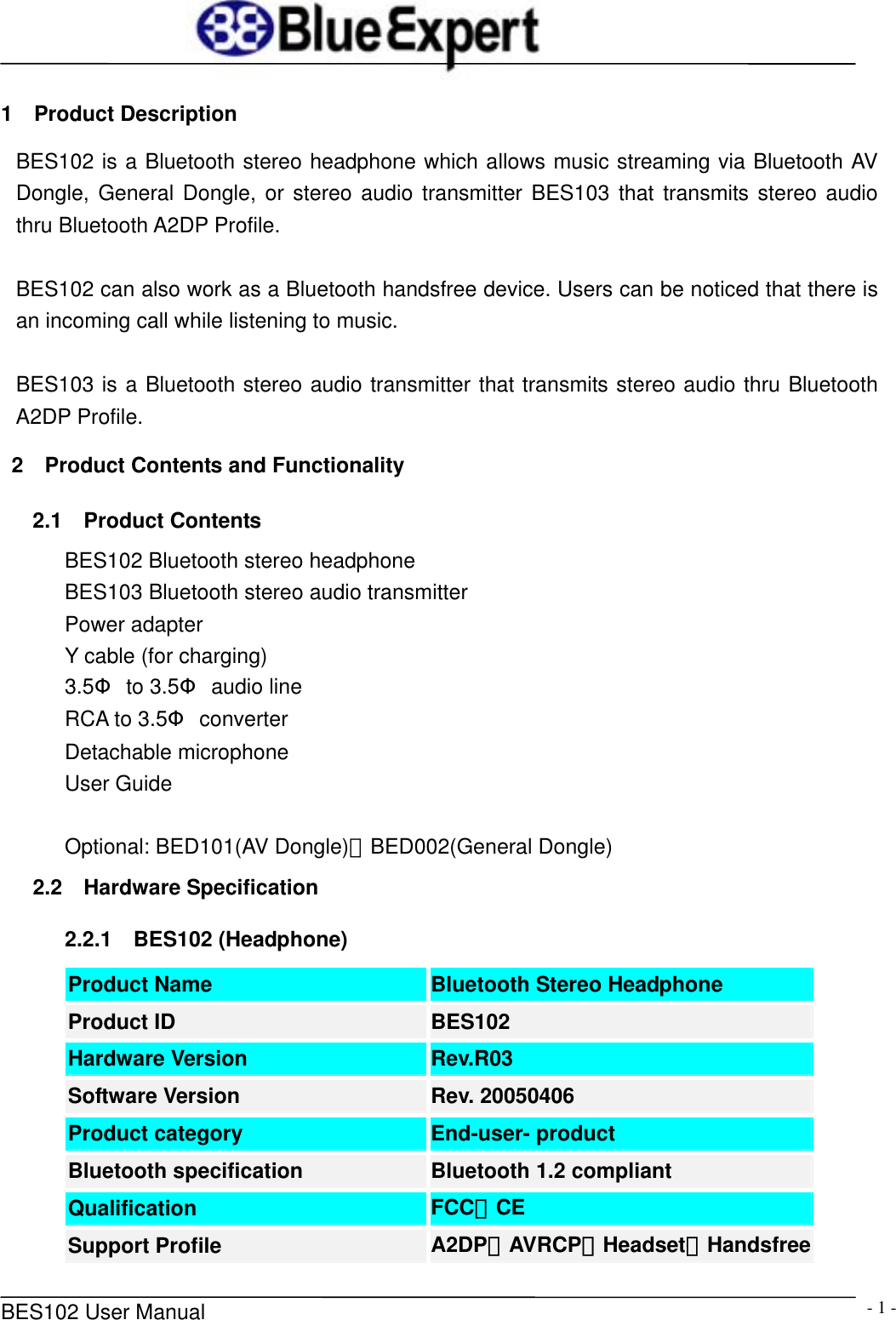
     BES102 User Manual  - 1 -1  Product Description BES102 is a Bluetooth stereo headphone which allows music streaming via Bluetooth AV Dongle, General Dongle, or stereo audio transmitter BES103 that transmits stereo audio thru Bluetooth A2DP Profile.  BES102 can also work as a Bluetooth handsfree device. Users can be noticed that there is an incoming call while listening to music.    BES103 is a Bluetooth stereo audio transmitter that transmits stereo audio thru Bluetooth A2DP Profile.  2  Product Contents and Functionality 2.1  Product Contents BES102 Bluetooth stereo headphone BES103 Bluetooth stereo audio transmitter Power adapter Y cable (for charging) 3.5Φ to 3.5Φ audio line RCA to 3.5Φ converter Detachable microphone User Guide  Optional: BED101(AV Dongle)、BED002(General Dongle) 2.2  Hardware Specification 2.2.1  BES102 (Headphone) Product Name  Bluetooth Stereo Headphone Product ID  BES102 Hardware Version  Rev.R03 Software Version  Rev. 20050406 Product category  End-user- product Bluetooth specification  Bluetooth 1.2 compliant Qualification  FCC、CE Support Profile  A2DP、AVRCP、Headset、Handsfree
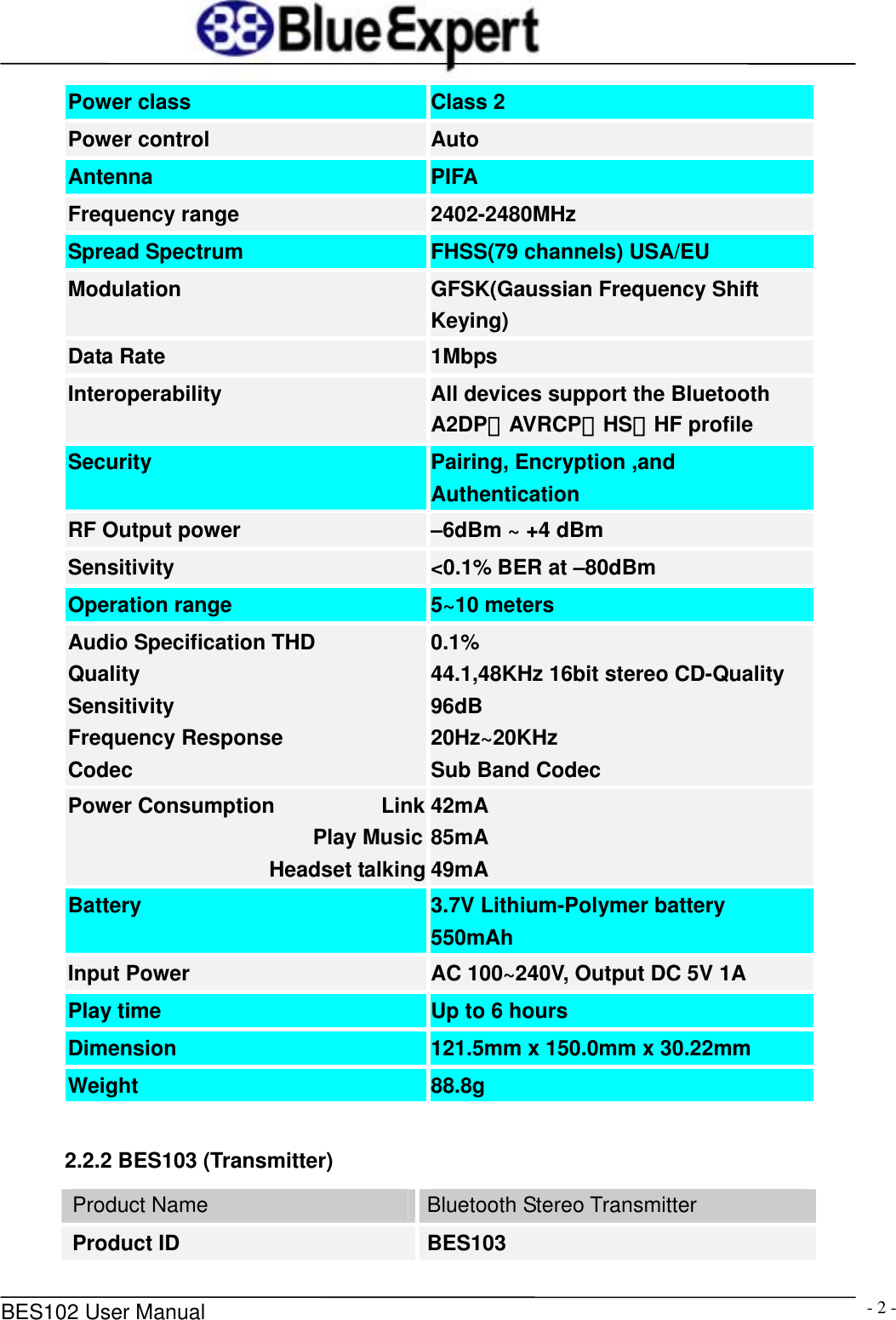
     BES102 User Manual  - 2 -Power class  Class 2 Power control  Auto Antenna  PIFA Frequency range  2402-2480MHz Spread Spectrum  FHSS(79 channels) USA/EU Modulation  GFSK(Gaussian Frequency Shift Keying) Data Rate  1Mbps Interoperability  All devices support the Bluetooth A2DP、AVRCP、HS、HF profile Security  Pairing, Encryption ,and Authentication RF Output power  –6dBm ~ +4 dBm Sensitivity  <0.1% BER at –80dBm Operation range  5~10 meters Audio Specification THD Quality Sensitivity Frequency Response Codec 0.1% 44.1,48KHz 16bit stereo CD-Quality 96dB 20Hz~20KHz Sub Band Codec Power Consumption          Link                       Play MusicHeadset talking42mA 85mA 49mA Battery  3.7V Lithium-Polymer battery 550mAh Input Power  AC 100~240V, Output DC 5V 1A Play time  Up to 6 hours Dimension  121.5mm x 150.0mm x 30.22mm Weight  88.8g      2.2.2 BES103 (Transmitter) Product Name  Bluetooth Stereo Transmitter Product ID  BES103
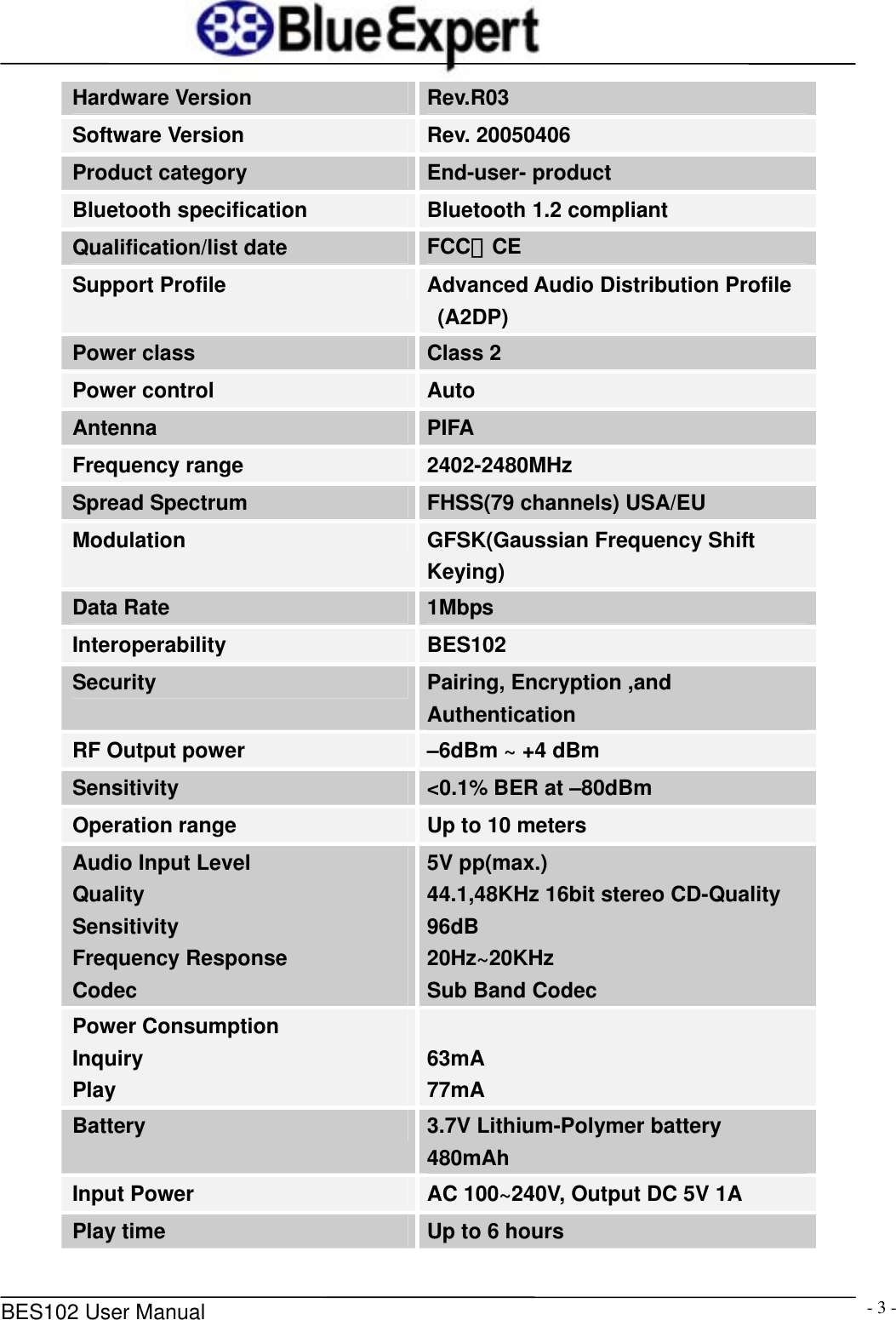
     BES102 User Manual  - 3 -Hardware Version  Rev.R03 Software Version  Rev. 20050406 Product category  End-user- product Bluetooth specification  Bluetooth 1.2 compliant Qualification/list date  FCC、CE Support Profile  Advanced Audio Distribution Profile (A2DP) Power class  Class 2 Power control  Auto Antenna  PIFA Frequency range  2402-2480MHz Spread Spectrum  FHSS(79 channels) USA/EU Modulation  GFSK(Gaussian Frequency Shift Keying) Data Rate  1Mbps Interoperability  BES102 Security  Pairing, Encryption ,and Authentication RF Output power  –6dBm ~ +4 dBm Sensitivity  <0.1% BER at –80dBm Operation range  Up to 10 meters Audio Input Level Quality Sensitivity Frequency Response Codec 5V pp(max.) 44.1,48KHz 16bit stereo CD-Quality 96dB 20Hz~20KHz Sub Band Codec Power Consumption       Inquiry                          Play  63mA 77mA Battery  3.7V Lithium-Polymer battery 480mAh Input Power  AC 100~240V, Output DC 5V 1A Play time  Up to 6 hours
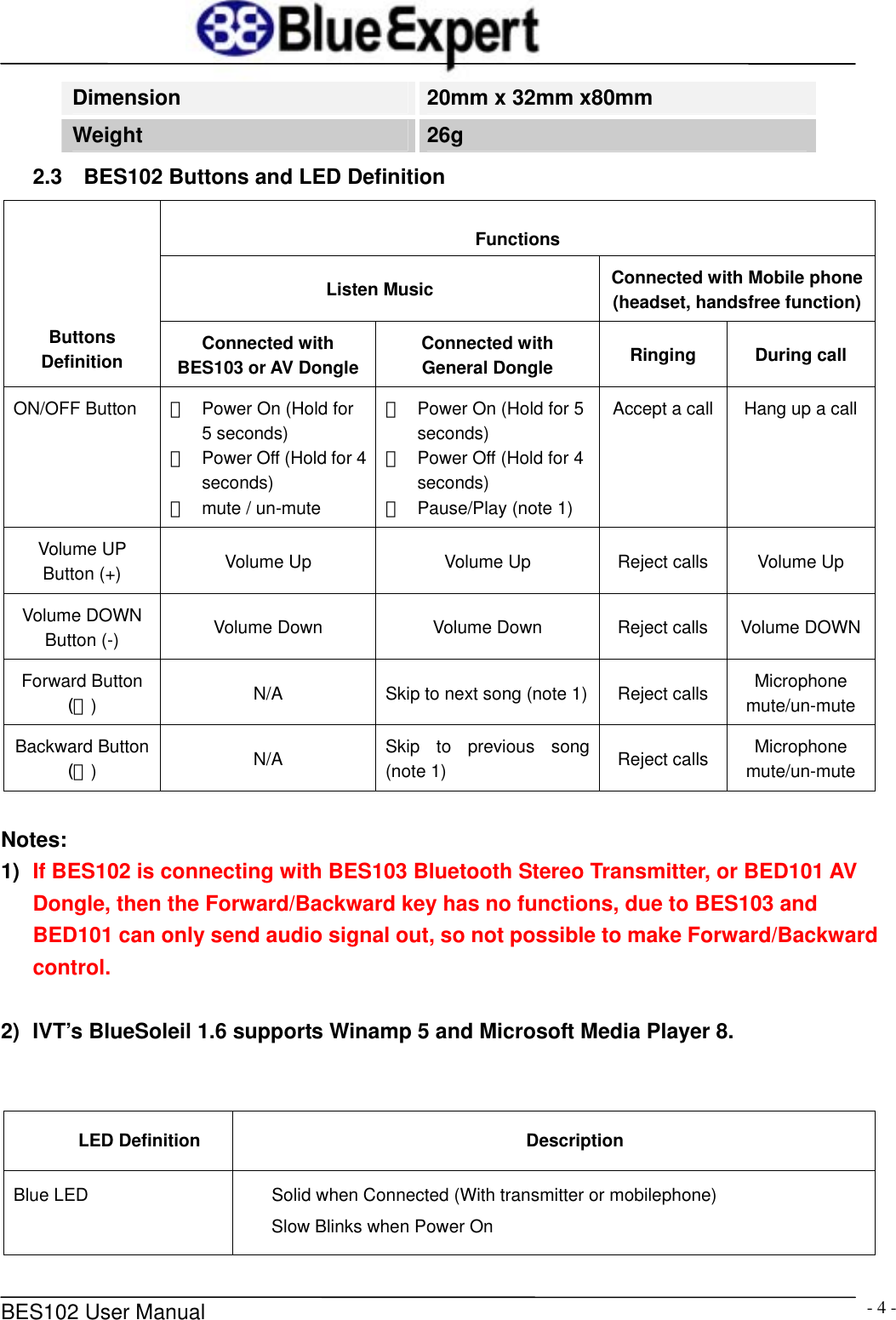
     BES102 User Manual  - 4 -Dimension  20mm x 32mm x80mm Weight  26g 2.3  BES102 Buttons and LED Definition Functions Listen Music  Connected with Mobile phone (headset, handsfree function)Buttons Definition  Connected with BES103 or AV Dongle Connected with General Dongle  Ringing During call ON/OFF Button  *  Power On (Hold for 5 seconds) *  Power Off (Hold for 4 seconds) *  mute / un-mute *  Power On (Hold for 5 seconds) *  Power Off (Hold for 4 seconds) *  Pause/Play (note 1) Accept a call  Hang up a call Volume UP Button (+)  Volume Up  Volume Up  Reject calls  Volume Up Volume DOWN Button (-)  Volume Down  Volume Down  Reject calls  Volume DOWNForward Button (>)  N/A  Skip to next song (note 1) Reject calls  Microphone mute/un-mute Backward Button (<)  N/A  Skip to previous song (note 1)  Reject calls  Microphone mute/un-mute  Notes: 1)  If BES102 is connecting with BES103 Bluetooth Stereo Transmitter, or BED101 AV Dongle, then the Forward/Backward key has no functions, due to BES103 and BED101 can only send audio signal out, so not possible to make Forward/Backward control.     2)  IVT’s BlueSoleil 1.6 supports Winamp 5 and Microsoft Media Player 8.   LED Definition  Description Blue LED  Solid when Connected (With transmitter or mobilephone) Slow Blinks when Power On
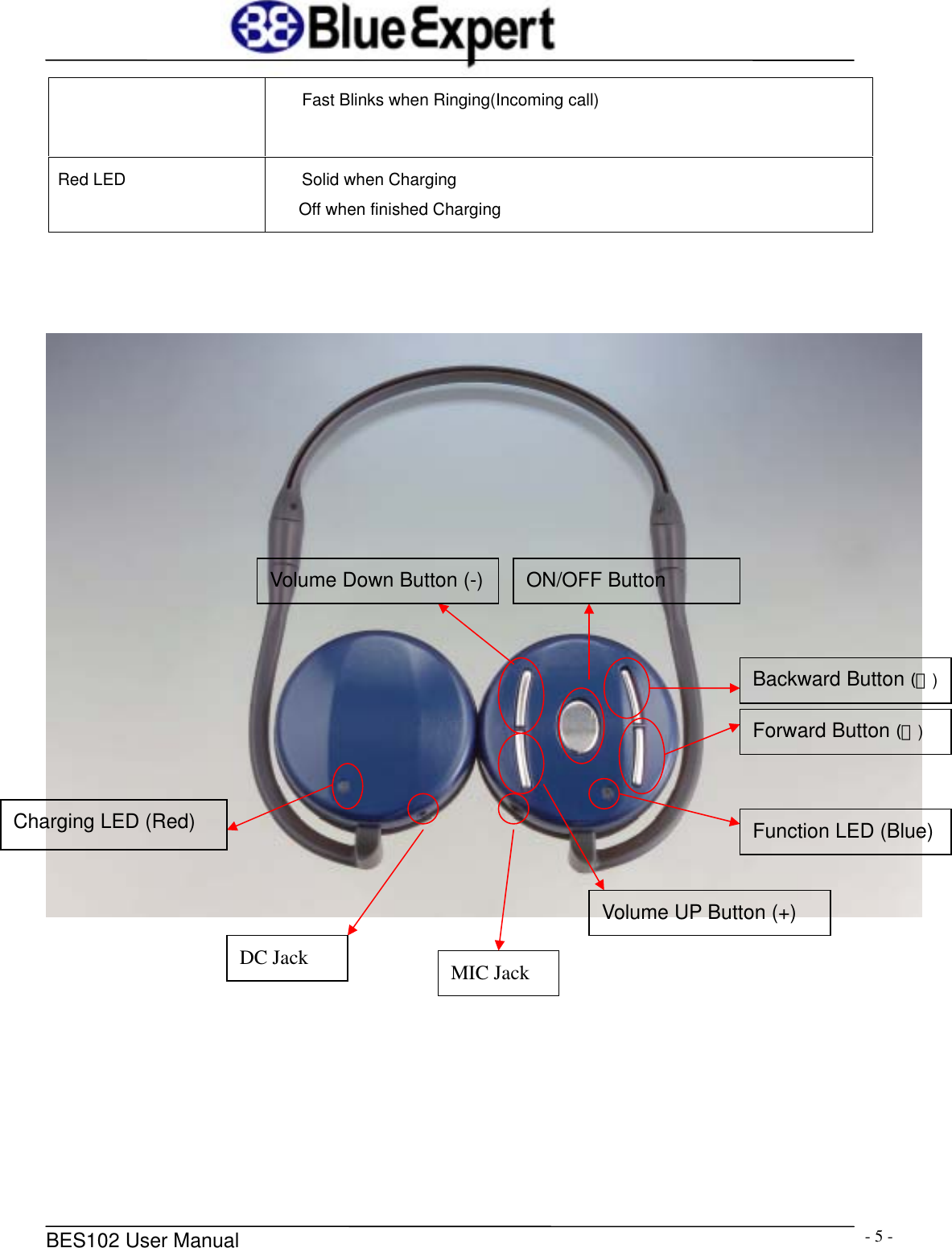
     BES102 User Manual  - 5 -Fast Blinks when Ringing(Incoming call) Red LED  Solid when Charging    Off when finished Charging                 Charging LED (Red) Forward Button (>) Backward Button (<)Function LED (Blue) ON/OFF Button Volume Down Button (-)Volume UP Button (+) DC Jack  MIC Jack
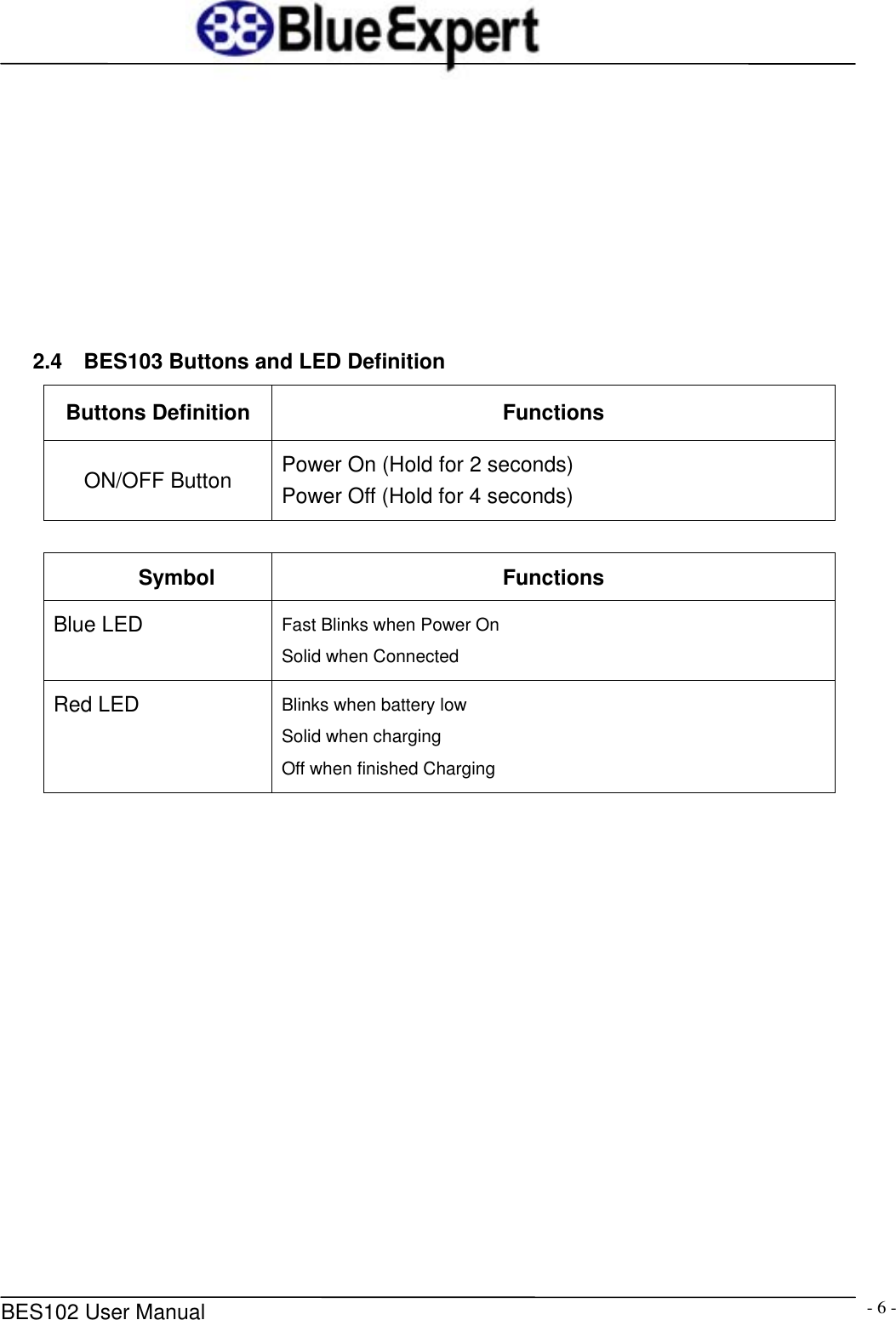
     BES102 User Manual  - 6 -        2.4    BES103 Buttons and LED Definition Buttons Definition  Functions ON/OFF Button  Power On (Hold for 2 seconds) Power Off (Hold for 4 seconds)   Symbol Functions Blue LED  Fast Blinks when Power On Solid when Connected Red LED  Blinks when battery low Solid when charging Off when finished Charging
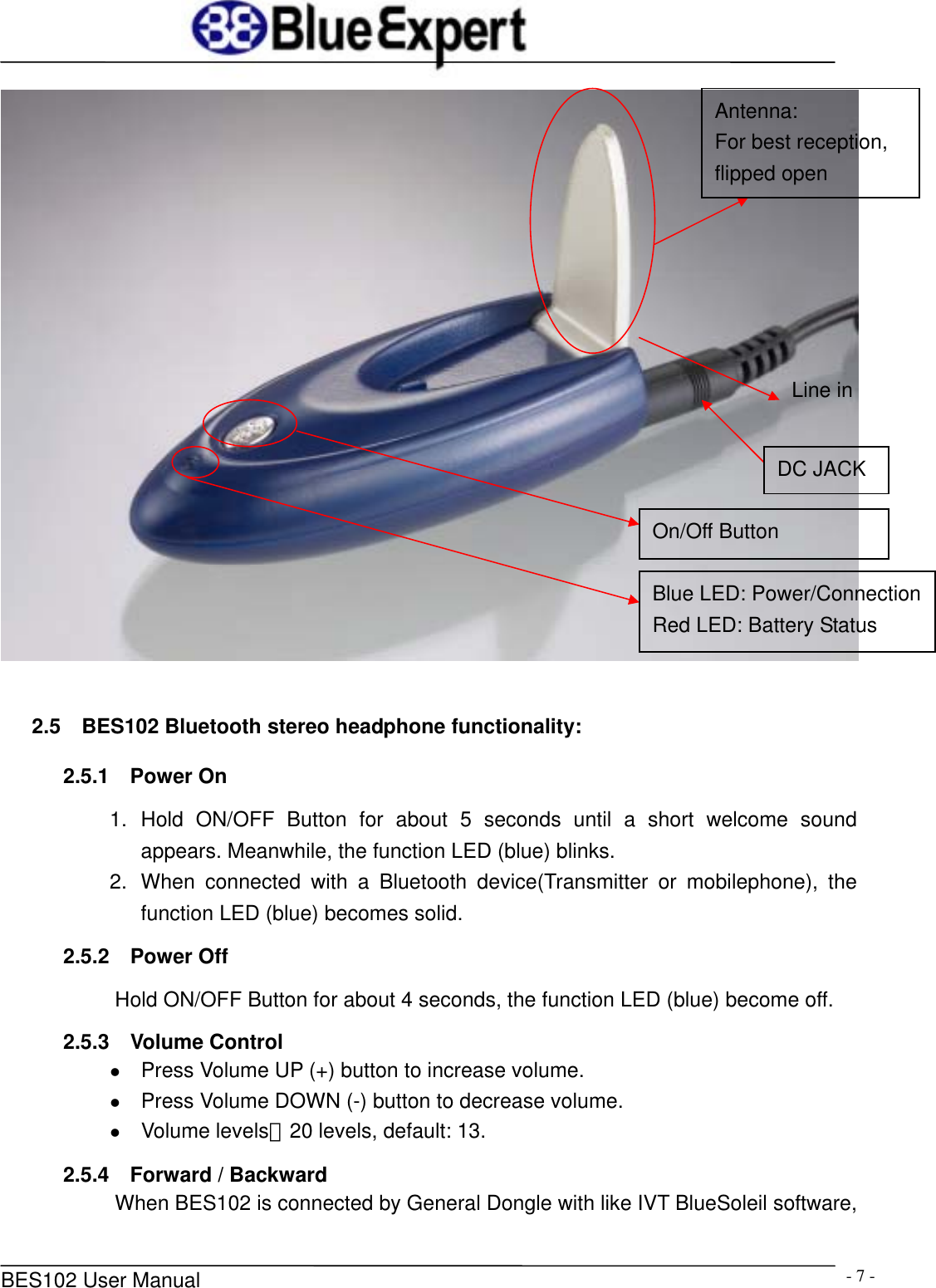
     BES102 User Manual  - 7 -  2.5  BES102 Bluetooth stereo headphone functionality: 2.5.1  Power On 1. Hold ON/OFF Button for about 5 seconds until a short welcome sound appears. Meanwhile, the function LED (blue) blinks. 2.  When connected with a Bluetooth device(Transmitter or mobilephone), the function LED (blue) becomes solid. 2.5.2  Power Off Hold ON/OFF Button for about 4 seconds, the function LED (blue) become off. 2.5.3  Volume Control z Press Volume UP (+) button to increase volume. z Press Volume DOWN (-) button to decrease volume. z Volume levels:20 levels, default: 13.   2.5.4    Forward / Backward When BES102 is connected by General Dongle with like IVT BlueSoleil software, Antenna: For best reception,   flipped open On/Off Button Blue LED: Power/ConnectionRed LED: Battery Status DC JACK Line in
     BES102 User Manual  - 8 -users can skip next/previous song via Forward (>) / Backward (<) button. 3  Charging BES102 & BES103 are embedded with a rechargeable Lithium Polymar battery. The embedded battery is not fully charged when packaged. Therefore, before using the BES102 & BES103 at the first time, please charge the battery with the enclosed 5.0V DC power adapter. Charging Reminder: 1.  It takes 1.5 to 2 hours to fully recharge the battery.   2.  Provided `1 to 2 converter’ is for charge the BES102 and BES103 at the same time. 3.  While the battery is charging, Charging LED lights up in solid state. 4.  When finished charging, Charging LED turns off. 5.  BES102 & BES103 will be reset when plugged with power adapter, thus users can force them to be reset if they are abnormal. 6.  While the battery is charging, users can still use BES102 & BES103 by pressing the ON/OFF button to power them on.  Note:  BES102:If users hear beeps with 5 seconds time gap while using BES102, it means the battery is low and requires charging as soon as possible or it will power off automatically after 100 seconds. BES103:If Red LED blinks, it means the battery is low and requires charging as soon as possible or it will power off automatically after 100 seconds.
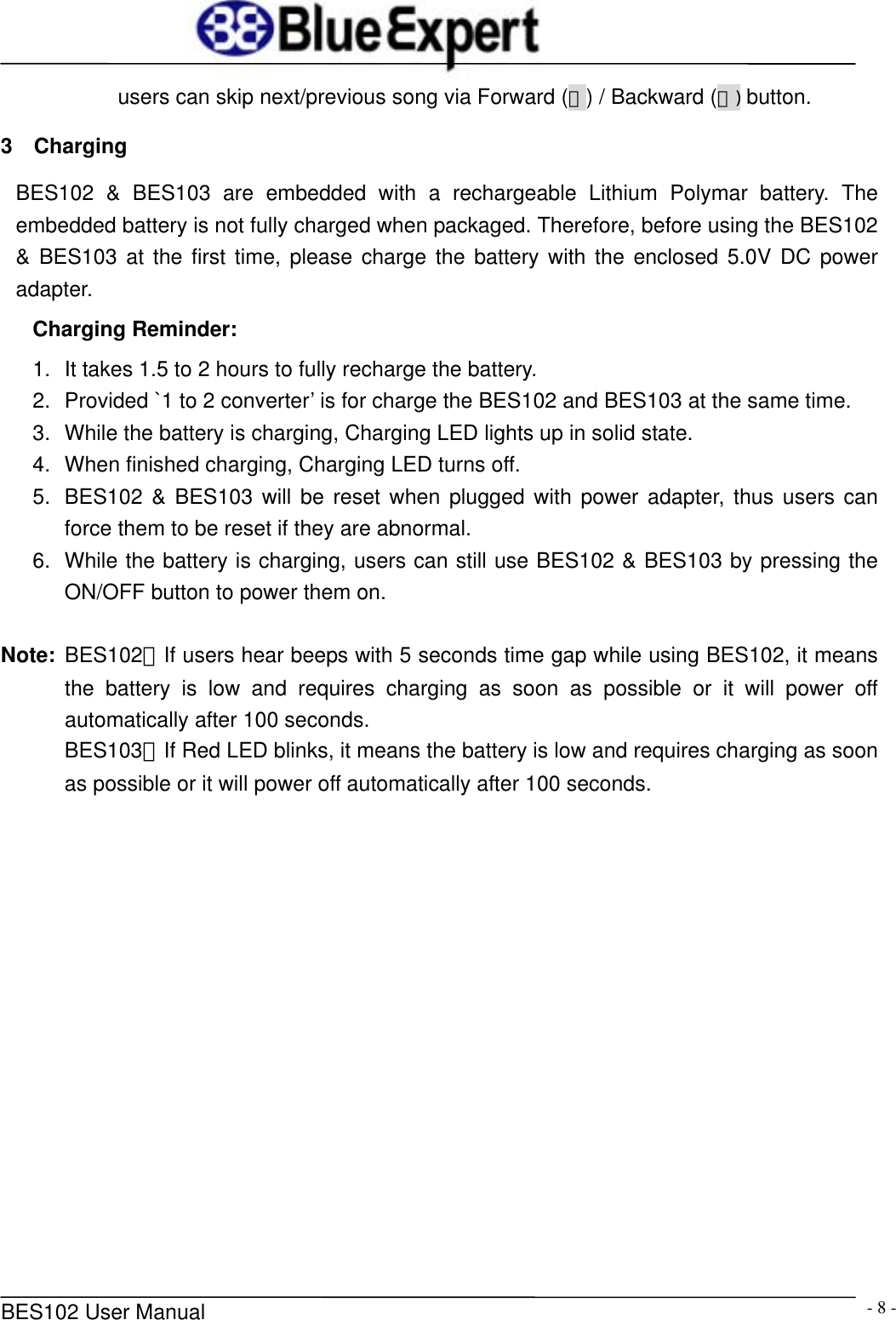
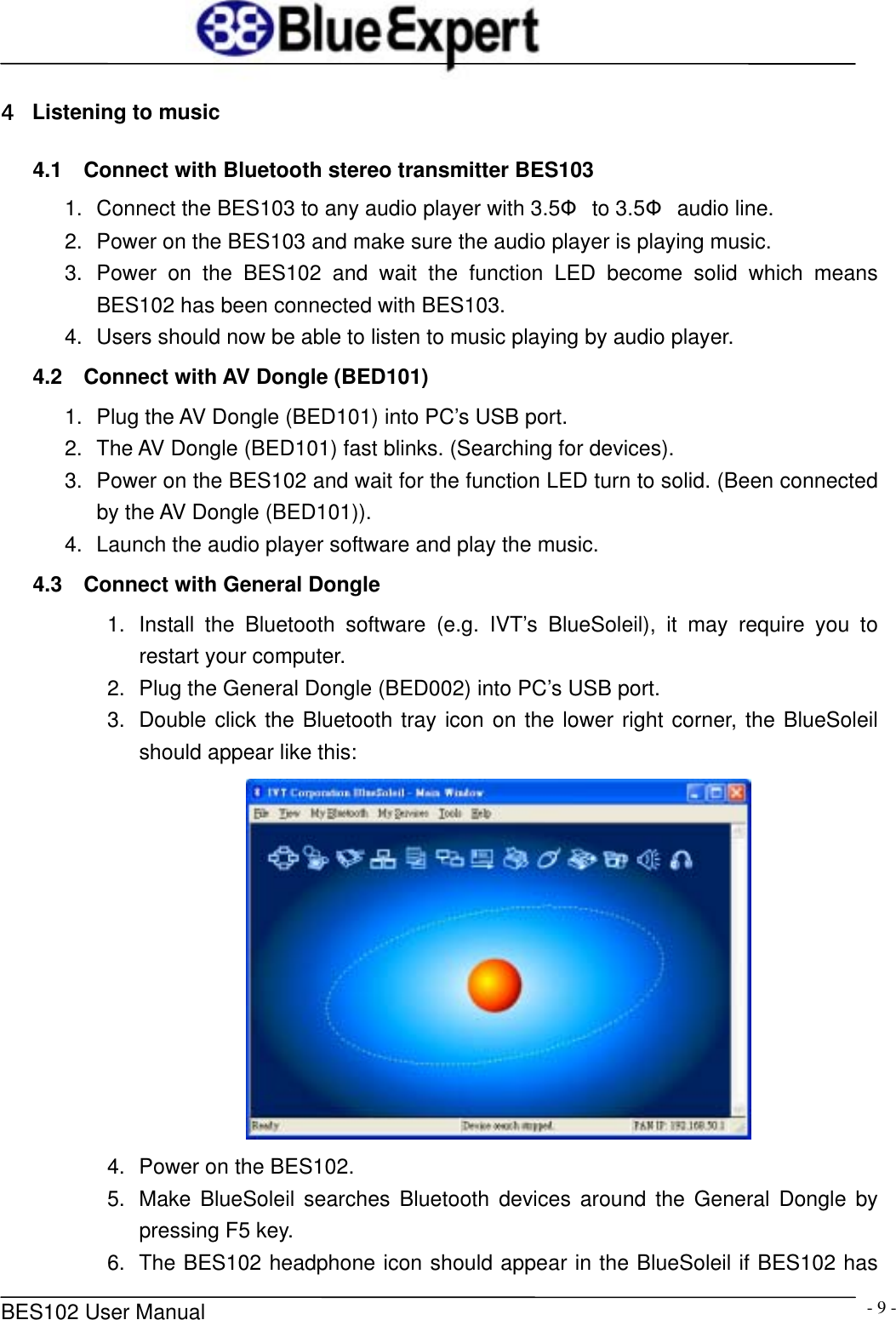
     BES102 User Manual  - 9 -4  Listening to music 4.1  Connect with Bluetooth stereo transmitter BES103 1.  Connect the BES103 to any audio player with 3.5Φ to 3.5Φ audio line. 2.  Power on the BES103 and make sure the audio player is playing music. 3. Power on the BES102 and wait the function LED become solid which means BES102 has been connected with BES103. 4.  Users should now be able to listen to music playing by audio player. 4.2  Connect with AV Dongle (BED101) 1.  Plug the AV Dongle (BED101) into PC’s USB port. 2.  The AV Dongle (BED101) fast blinks. (Searching for devices). 3.  Power on the BES102 and wait for the function LED turn to solid. (Been connected by the AV Dongle (BED101)). 4.  Launch the audio player software and play the music. 4.3  Connect with General Dongle 1.  Install the Bluetooth software (e.g. IVT’s BlueSoleil), it may require you to restart your computer. 2.  Plug the General Dongle (BED002) into PC’s USB port. 3.  Double click the Bluetooth tray icon on the lower right corner, the BlueSoleil should appear like this:  4.  Power on the BES102. 5.  Make BlueSoleil searches Bluetooth devices around the General Dongle by pressing F5 key. 6.  The BES102 headphone icon should appear in the BlueSoleil if BES102 has
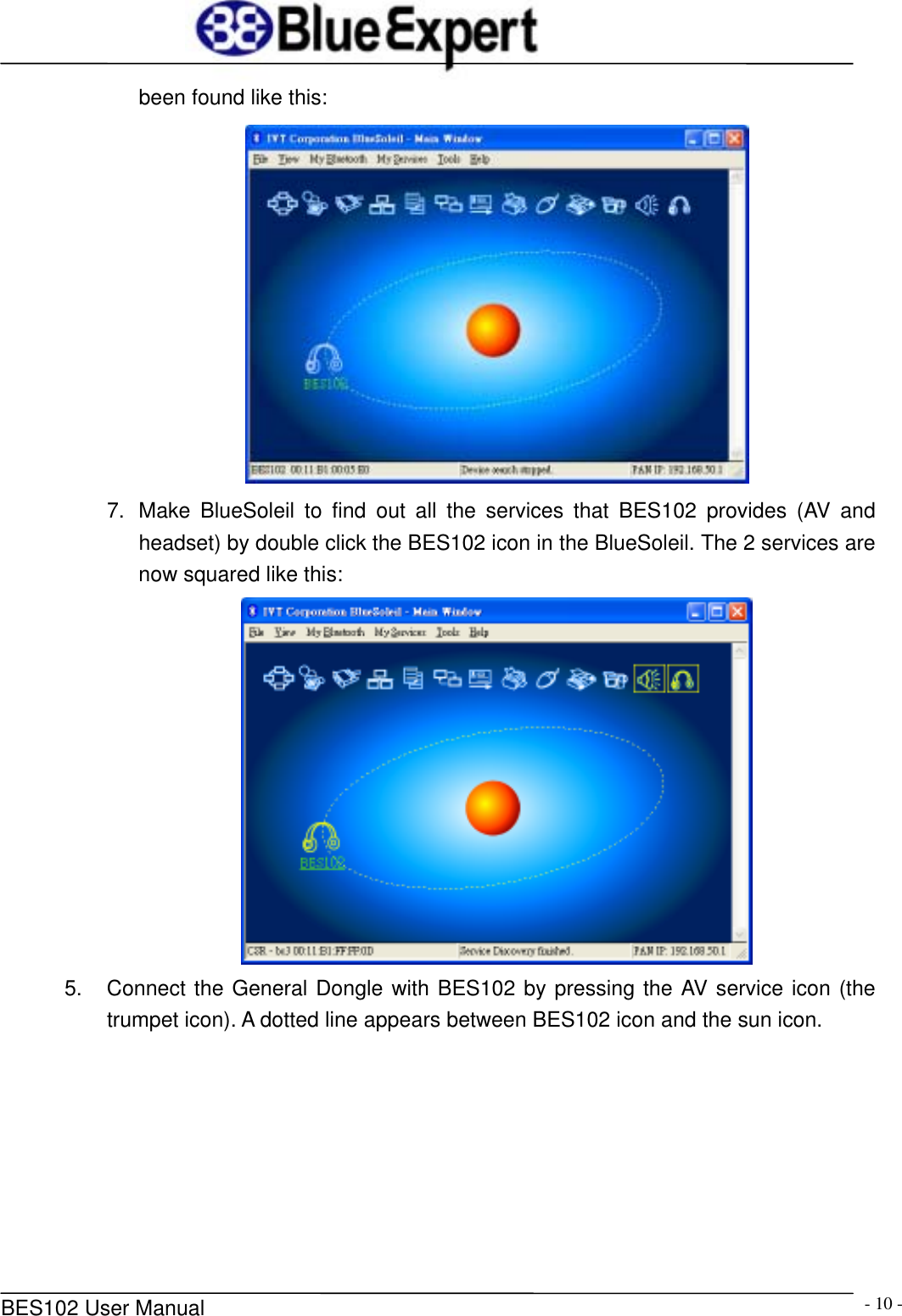
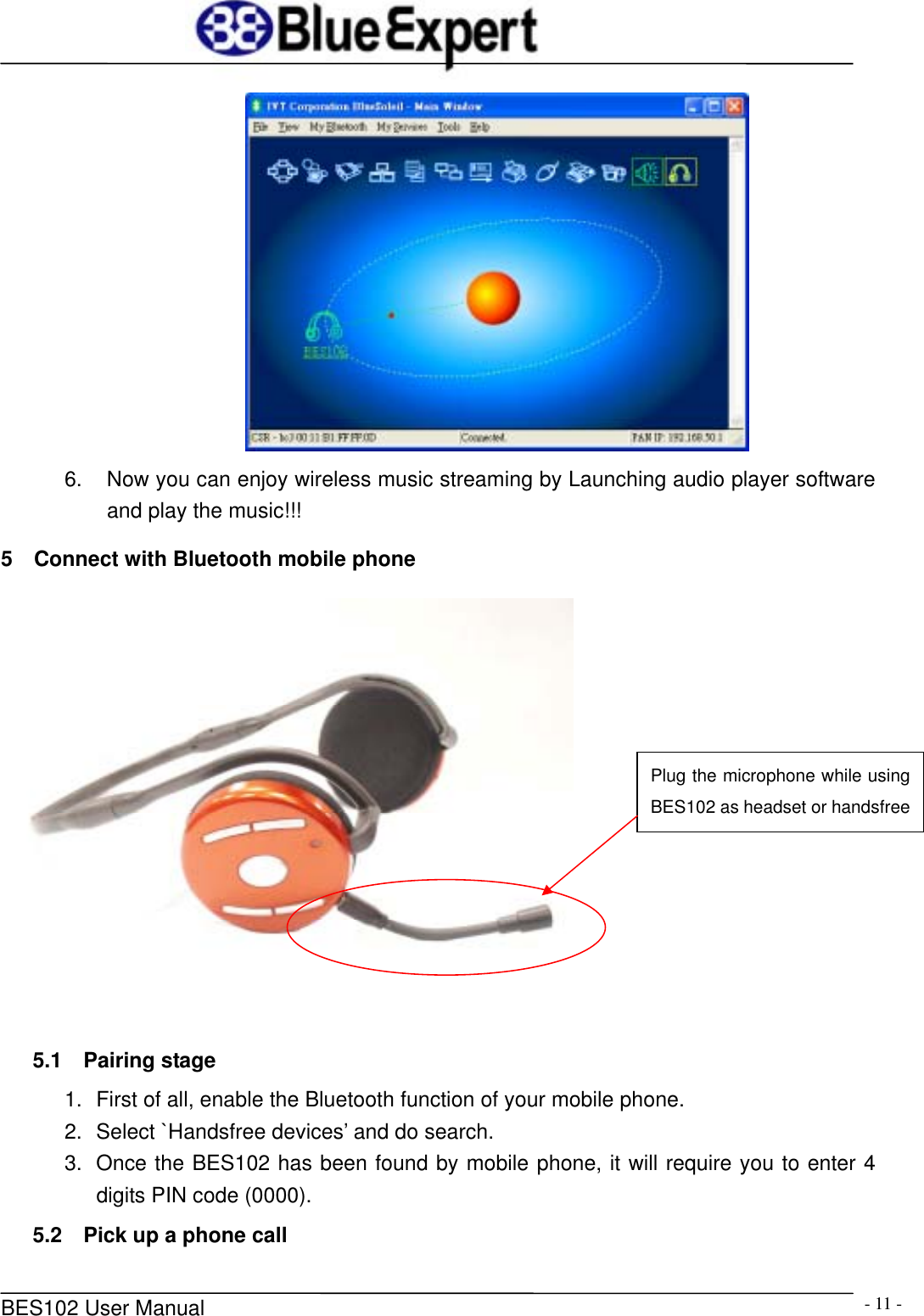
     BES102 User Manual  - 10 -been found like this:  7.  Make BlueSoleil to find out all the services that BES102 provides (AV and headset) by double click the BES102 icon in the BlueSoleil. The 2 services are now squared like this:    5.  Connect the General Dongle with BES102 by pressing the AV service icon (the trumpet icon). A dotted line appears between BES102 icon and the sun icon.
     BES102 User Manual  - 11 - 6.  Now you can enjoy wireless music streaming by Launching audio player software and play the music!!! 5    Connect with Bluetooth mobile phone    5.1  Pairing stage 1.  First of all, enable the Bluetooth function of your mobile phone. 2.  Select `Handsfree devices’ and do search. 3.  Once the BES102 has been found by mobile phone, it will require you to enter 4 digits PIN code (0000). 5.2  Pick up a phone call Plug the microphone while using BES102 as headset or handsfree
     BES102 User Manual  - 12 -1.  Users will hear the ring tone if there is a incoming call. 2.  Press the ON/OFF button once to pick up the incoming call, or press the other buttons to reject the incoming call. 5.3  Hang up the call Press the ON/OFF button again to hang up the call if you pressed the ON/OFF button to accept the call previously. 5.3    Mute / Un-mute microphone z While you are talking on the phone, you can press the “Forward” or “Backward” button to mute the microphone. z press the “Forward” or “Backward” button again to un-mute. 5.4  Make a phone call Dial the number normally on your mobile phone, then use BES102 as a handsfree device to talk.          6  Notice 1.  If you want the BES102 to work as handsfree device while you are listening to music, you need first of all pair the BES102 with your Bluetooth mobile phone. 2.  If the devices are abnormal, you can force them to be reset by plugged with power adapter.
     BES102 User Manual  - 13 -          This equipment complies with FCC radiation exposure limits set forth for an uncontrolled environment. End users must follow the specific operating instructions for satisfying RF exposure compliance. This transmitter must not be co-located or operating in conjunction with any other antenna or transmitter.   Notice: Any changes or modification not expressly approved by the party responsible could void the user’s authority to operate the device   This equipment complies with FCC radiation exposure limits set forth for an uncontrolled environment.    End users must follow the specific operating instructions for satisfying RF exposure compliance.    This transmitter must not be co-located or operating in conjunction with any other antenna or transmitter. Notice: Any changes or modification not expressly approved by the party responsible could void the user’s authority to operate the device  This device complies with part 15 of the FCC Rules. Operation is subject to the following two conditions: (1) This device may not cause harmful interference, and (2) this device must accept any interference received, including interference that may cause undesired operation

Navigation menu