Boxx TV ATOMLITE Wireless video sender User Manual

Boxx TV Ltd. Wireless video sender

User Manual

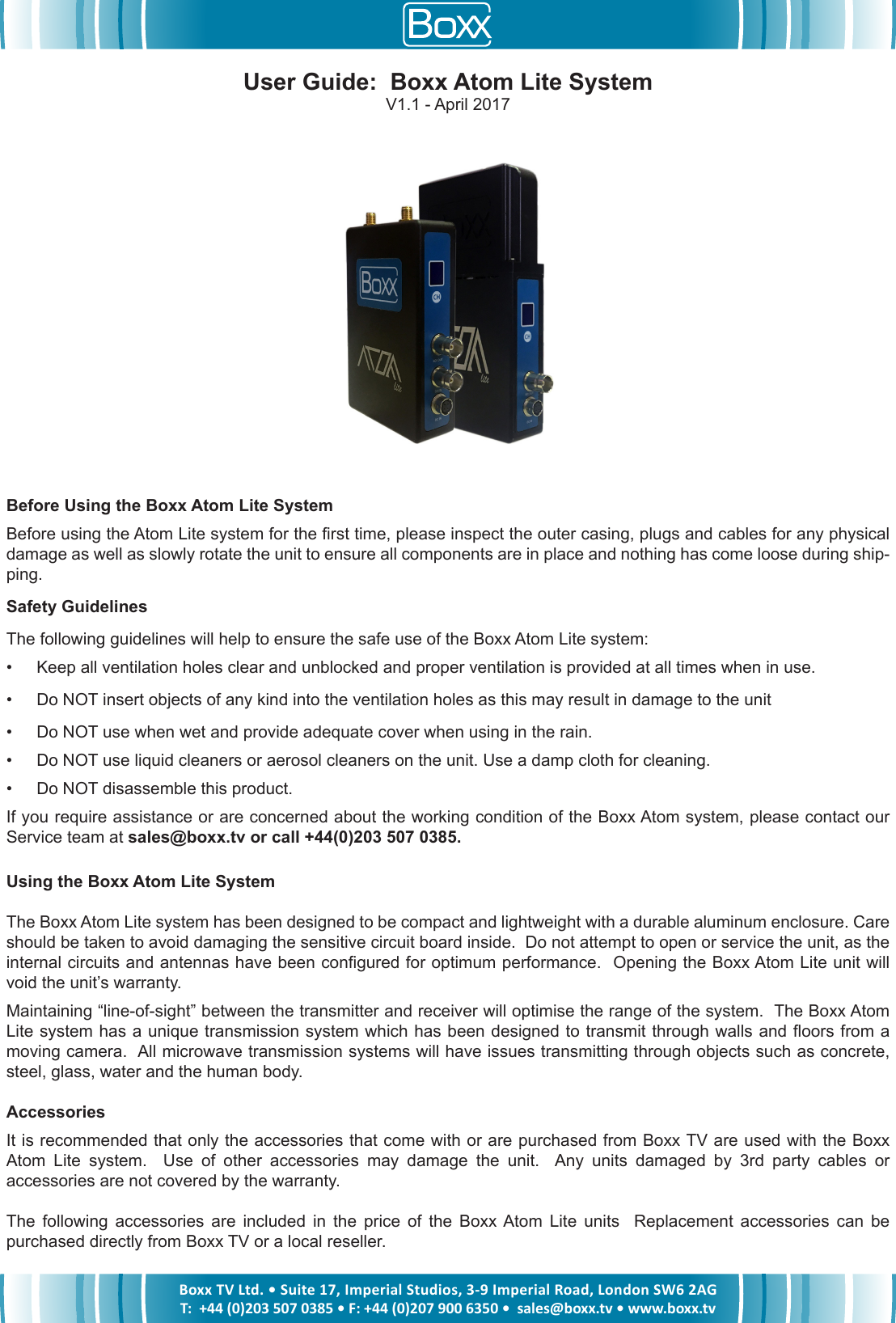
Boxx TV Ltd. • Suite 17, Imperial Studios, 3-9 Imperial Road, London SW6 2AGT:  +44 (0)203 507 0385 • F: +44 (0)207 900 6350 •  sales@boxx.tv • www.boxx.tvBefore Using the Boxx Atom Lite SystemBefore using the Atom Lite system for the rst time, please inspect the outer casing, plugs and cables for any physical damage as well as slowly rotate the unit to ensure all components are in place and nothing has come loose during ship-ping.Safety GuidelinesThe following guidelines will help to ensure the safe use of the Boxx Atom Lite system:•  Keep all ventilation holes clear and unblocked and proper ventilation is provided at all times when in use.•  Do NOT insert objects of any kind into the ventilation holes as this may result in damage to the unit•  Do NOT use when wet and provide adequate cover when using in the rain.•  Do NOT use liquid cleaners or aerosol cleaners on the unit. Use a damp cloth for cleaning.•  Do NOT disassemble this product.If you require assistance or are concerned about the working condition of the Boxx Atom system, please contact our Service team at sales@boxx.tv or call +44(0)203 507 0385.Using the Boxx Atom Lite SystemThe Boxx Atom Lite system has been designed to be compact and lightweight with a durable aluminum enclosure. Care should be taken to avoid damaging the sensitive circuit board inside.  Do not attempt to open or service the unit, as the internal circuits and antennas have been congured for optimum performance.  Opening the Boxx Atom Lite unit will void the unit’s warranty.Maintaining “line-of-sight” between the transmitter and receiver will optimise the range of the system.  The Boxx Atom Lite system has a unique transmission system which has been designed to transmit through walls and oors from a moving camera.  All microwave transmission systems will have issues transmitting through objects such as concrete, steel, glass, water and the human body.AccessoriesIt is recommended that only the accessories that come with or are purchased from Boxx TV are used with the Boxx Atom  Lite  system.    Use  of  other  accessories  may  damage  the  unit.    Any  units  damaged  by  3rd  party  cables  or accessories are not covered by the warranty.The  following  accessories  are  included  in  the  price  of  the  Boxx Atom  Lite  units    Replacement  accessories  can  be purchased directly from Boxx TV or a local reseller.User Guide:  Boxx Atom Lite SystemV1.1 - April 2017
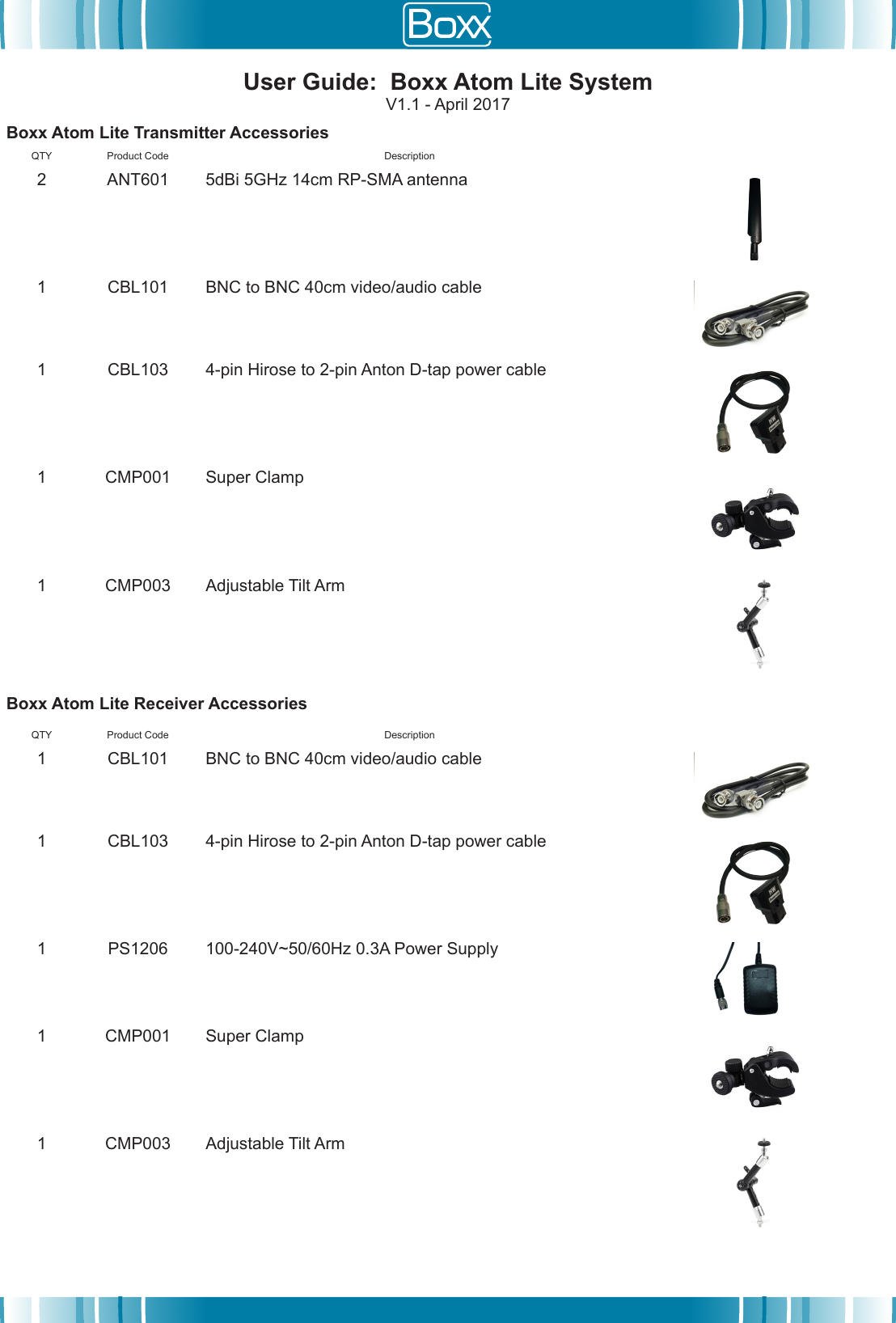
User Guide:  Boxx Atom Lite SystemV1.1 - April 2017Boxx Atom Lite Transmitter AccessoriesQTY Product Code Description2 ANT601 5dBi 5GHz 14cm RP-SMA antenna1 CBL101 BNC to BNC 40cm video/audio cable1 CBL103 4-pin Hirose to 2-pin Anton D-tap power cable1 CMP001 Super Clamp1 CMP003 Adjustable Tilt ArmBoxx Atom Lite Receiver AccessoriesQTY Product Code Description1 CBL101 BNC to BNC 40cm video/audio cable1 CBL103 4-pin Hirose to 2-pin Anton D-tap power cable1 PS1206 100-240V~50/60Hz 0.3A Power Supply1 CMP001 Super Clamp1 CMP003 Adjustable Tilt Arm
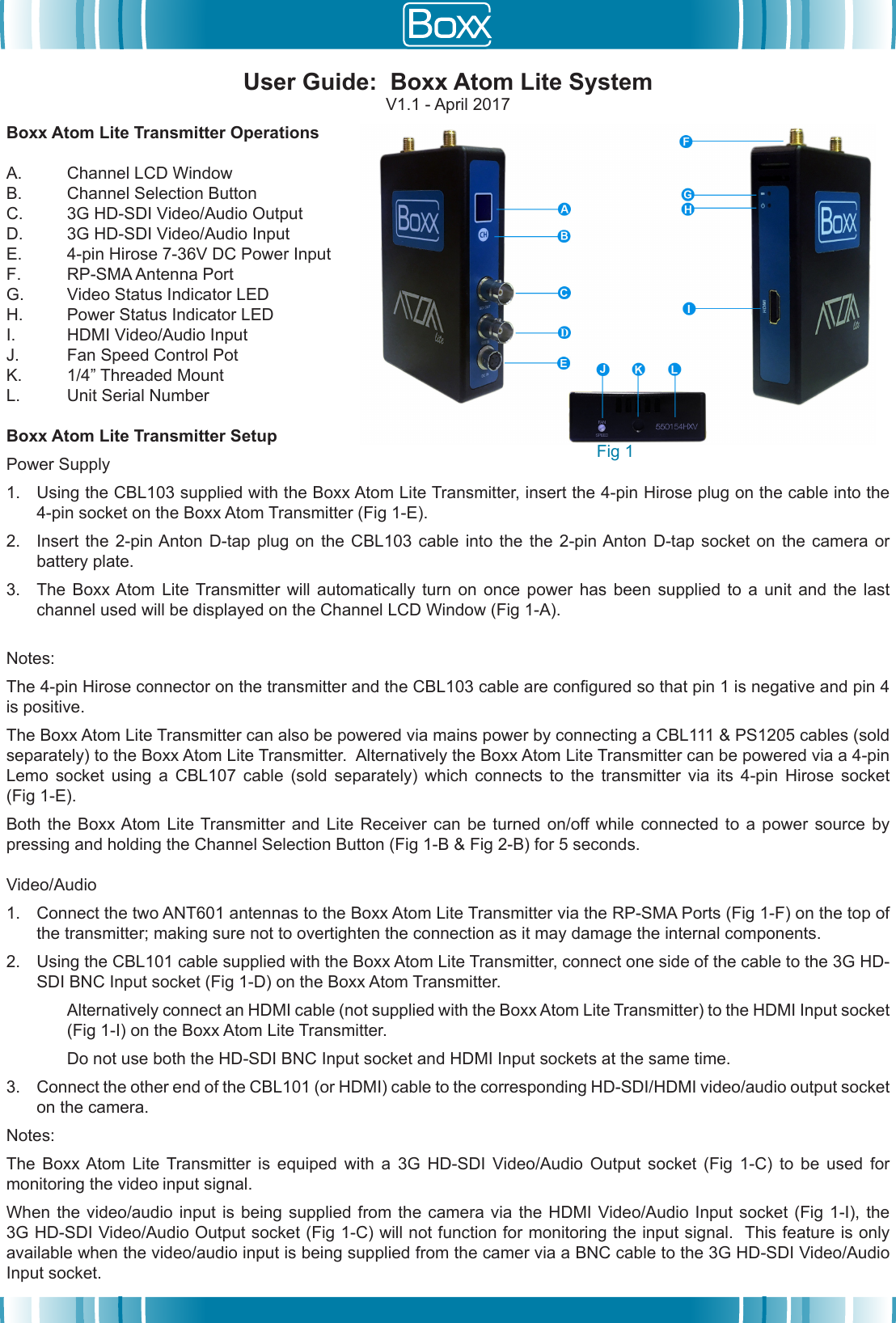
Boxx Atom Lite Transmitter OperationsA. Channel LCD WindowB. Channel Selection ButtonC. 3G HD-SDI Video/Audio OutputD. 3G HD-SDI Video/Audio InputE. 4-pin Hirose 7-36V DC Power InputF. RP-SMA Antenna PortG. Video Status Indicator LEDH. Power Status Indicator LEDI. HDMI Video/Audio InputJ. Fan Speed Control PotK. 1/4” Threaded MountL. Unit Serial NumberBoxx Atom Lite Transmitter SetupPower Supply 1. Using the CBL103 supplied with the Boxx Atom Lite Transmitter, insert the 4-pin Hirose plug on the cable into the4-pin socket on the Boxx Atom Transmitter (Fig 1-E).2. Insert the  2-pin Anton  D-tap plug on  the CBL103 cable  into the  the 2-pin Anton D-tap  socket on  the camera  orbattery plate.3. The  Boxx Atom  Lite Transmitter  will automatically  turn on  once power  has been  supplied to  a unit  and the  lastchannel used will be displayed on the Channel LCD Window (Fig 1-A).Notes:  The 4-pin Hirose connector on the transmitter and the CBL103 cable are congured so that pin 1 is negative and pin 4 is positive.The Boxx Atom Lite Transmitter can also be powered via mains power by connecting a CBL111 & PS1205 cables (sold separately) to the Boxx Atom Lite Transmitter.  Alternatively the Boxx Atom Lite Transmitter can be powered via a 4-pin Lemo  socket  using  a  CBL107  cable  (sold  separately)  which  connects  to  the  transmitter  via  its  4-pin  Hirose  socket (Fig 1-E).Both  the  Boxx Atom  Lite Transmitter and  Lite  Receiver can  be  turned on/off while  connected to  a  power source  by pressing and holding the Channel Selection Button (Fig 1-B & Fig 2-B) for 5 seconds.Video/Audio1. Connect the two ANT601 antennas to the Boxx Atom Lite Transmitter via the RP-SMA Ports (Fig 1-F) on the top ofthe transmitter; making sure not to overtighten the connection as it may damage the internal components.2. Using the CBL101 cable supplied with the Boxx Atom Lite Transmitter, connect one side of the cable to the 3G HD-SDI BNC Input socket (Fig 1-D) on the Boxx Atom Transmitter.Alternatively connect an HDMI cable (not supplied with the Boxx Atom Lite Transmitter) to the HDMI Input socket (Fig 1-I) on the Boxx Atom Lite Transmitter.Do not use both the HD-SDI BNC Input socket and HDMI Input sockets at the same time.3. Connect the other end of the CBL101 (or HDMI) cable to the corresponding HD-SDI/HDMI video/audio output socketon the camera.Notes:The  Boxx Atom  Lite  Transmitter  is  equiped  with  a  3G  HD-SDI  Video/Audio  Output  socket  (Fig  1-C)  to  be  used  for monitoring the video input signal.  When the video/audio  input  is being  supplied  from  the camera  via  the HDMI  Video/Audio Input socket  (Fig  1-I), the 3G HD-SDI Video/Audio Output socket (Fig 1-C) will not function for monitoring the input signal.  This feature is only available when the video/audio input is being supplied from the camer via a BNC cable to the 3G HD-SDI Video/Audio Input socket.User Guide:  Boxx Atom Lite SystemV1.1 - April 2017Fig 1
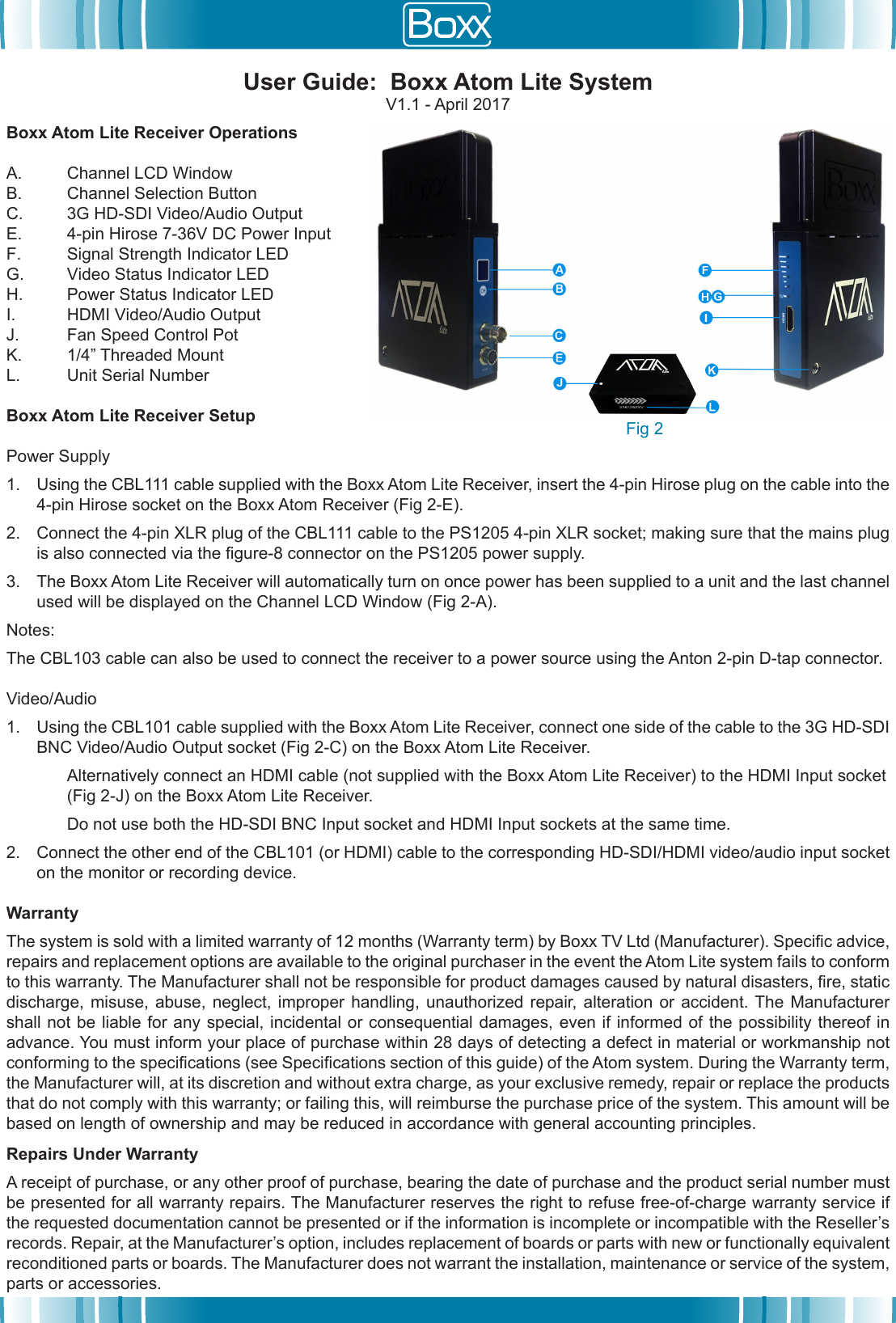
Boxx Atom Lite Receiver OperationsA. Channel LCD WindowB. Channel Selection ButtonC. 3G HD-SDI Video/Audio OutputE. 4-pin Hirose 7-36V DC Power InputF. Signal Strength Indicator LEDG. Video Status Indicator LEDH. Power Status Indicator LEDI. HDMI Video/Audio OutputJ. Fan Speed Control PotK. 1/4” Threaded MountL. Unit Serial NumberBoxx Atom Lite Receiver SetupPower Supply1. Using the CBL111 cable supplied with the Boxx Atom Lite Receiver, insert the 4-pin Hirose plug on the cable into the4-pin Hirose socket on the Boxx Atom Receiver (Fig 2-E).2. Connect the 4-pin XLR plug of the CBL111 cable to the PS1205 4-pin XLR socket; making sure that the mains plugis also connected via the gure-8 connector on the PS1205 power supply.3. The Boxx Atom Lite Receiver will automatically turn on once power has been supplied to a unit and the last channelused will be displayed on the Channel LCD Window (Fig 2-A).Notes:The CBL103 cable can also be used to connect the receiver to a power source using the Anton 2-pin D-tap connector.Video/Audio1. Using the CBL101 cable supplied with the Boxx Atom Lite Receiver, connect one side of the cable to the 3G HD-SDIBNC Video/Audio Output socket (Fig 2-C) on the Boxx Atom Lite Receiver.Alternatively connect an HDMI cable (not supplied with the Boxx Atom Lite Receiver) to the HDMI Input socket (Fig 2-J) on the Boxx Atom Lite Receiver.Do not use both the HD-SDI BNC Input socket and HDMI Input sockets at the same time.2. Connect the other end of the CBL101 (or HDMI) cable to the corresponding HD-SDI/HDMI video/audio input socketon the monitor or recording device.WarrantyThe system is sold with a limited warranty of 12 months (Warranty term) by Boxx TV Ltd (Manufacturer). Specic advice, repairs and replacement options are available to the original purchaser in the event the Atom Lite system fails to conform to this warranty. The Manufacturer shall not be responsible for product damages caused by natural disasters, re, static discharge, misuse,  abuse, neglect,  improper handling, unauthorized  repair,  alteration  or accident. The Manufacturer shall not be liable for any special, incidental or consequential damages, even if informed of the possibility thereof in advance. You must inform your place of purchase within 28 days of detecting a defect in material or workmanship not conforming to the specications (see Specications section of this guide) of the Atom system. During the Warranty term, the Manufacturer will, at its discretion and without extra charge, as your exclusive remedy, repair or replace the products that do not comply with this warranty; or failing this, will reimburse the purchase price of the system. This amount will be based on length of ownership and may be reduced in accordance with general accounting principles.Repairs Under WarrantyA receipt of purchase, or any other proof of purchase, bearing the date of purchase and the product serial number must be presented for all warranty repairs. The Manufacturer reserves the right to refuse free-of-charge warranty service if the requested documentation cannot be presented or if the information is incomplete or incompatible with the Reseller’s records. Repair, at the Manufacturer’s option, includes replacement of boards or parts with new or functionally equivalent reconditioned parts or boards. The Manufacturer does not warrant the installation, maintenance or service of the system, parts or accessories.User Guide:  Boxx Atom Lite SystemV1.1 - April 2017Fig 2
Warning StatementThis equipment has been tested and found to comply with the limits for a Class B digital device, pursuant to part 15 of the FCC Rules. These limits are designed to provide reasonable protection against harmful interference in a residential installation. This equipment generates, uses and can radiate radio frequency energy and, if not installed and used in accordance with the instructions, may cause harmful interference to radio communications. However, there is no guarantee that interference will not occur in a particular installation. If this equipment does cause harmful interference to radio or television reception, which can be determined by turning the equipment off and on, the user is encouraged to try to correct the interference by one or more of the following measures:• Reorient or relocate the receiving antenna.• Increase the separation between the equipment and receiver.• Connect the equipment into an outlet on a circuit different from that to which thereceiver is connected.• Consult the dealer or an experienced radio/TV technician for help.Caution: Any changes or modifications to this device not explicitly approved by manufacturer could void your authority to operate this equipment.This device complies with part 15 of the FCC Rules. Operation is subject to the following two conditions: (1) This device may not cause harmful interference, and (2) this device must accept any interference received, including interference that may cause undesired operation.To comply with FCC RF exposure compliance requirements, this grant is applicable to only mobile configurations. The antennas used for this transmitter must be installed to provide a separation distance of at least 20 cm from all persons and must not be co-located or operating in conjunction with any other antenna or transmitter.We, Boxx TV Ltd. Hereby declared frequency stability is better than 20ppm which ensures that the signal remains in the allocated bands under all operational conditions .User Guide:  Boxx Atom Lite SystemV1.1 - April 2017

Navigation menu