BridgeWave Communications GE60 Microwave Link User Manual Installation Operation Manual

BridgeWave Communications, Inc. Microwave Link Installation Operation Manual

Contents

User Manual 1 of 2

   1 of 46  making connections in a high-speed world  The BridgeWave E60 product line Wireless Ethernet Links in the 60GHz Band Model AR60, FE60, GE60 & AR60X, FE60X, GE60X    Installation Manual  P/N 580-00507 Revision 1 July 2005
TM        GE60 Installation Manual 580-00507, rev 1 2 of 46   Copyright Notice & Disclaimer  Copyright © 2004 BridgeWave Communications. All rights reserved. Printed in the USA No portion of this publication may be reproduced, copied, or distributed without the written consent of BridgeWave Communications. BridgeWave reserves the right to update or change the material in this publication at any time without notice. BridgeWave has made every effort to ensure that the information and the instructions contained in the publication are adequate and is not responsible for any errors or omissions due to typing, printing, or editing of this document. Purchasers of BridgeWave products should make their own evaluation to determine the suitability of each such product for their specific application. BridgeWave’s obligations regarding the use or application of its products shall be limited to those commitments to the purchaser set forth in its Standard Terms and Conditions of Sale for a delivered product. This publication has been prepared for professional and properly trained personnel, and the customer assumes full responsibility when using the information herein.  Statement of Warranty  BridgeWave warrants each standard BridgeWave Product sold by it to be free of defects in material and workmanship under conditions of normal use for twelve (12) months from date of shipment thereof to Buyer.  Repair or, at BridgeWave’s option, replacement of defective parts shall be the sole and exclusive remedy under this limited warranty; provided that BridgeWave may, as an alternative, elect to refund the purchase price amortized on a straight-line basis over a period of three (3) years from the date of shipment. All warranty replacement or repair of parts shall be limited to equipment malfunctions, which, in the sole opinion of BridgeWave, are due or traceable to defects in original materials or workmanship.   In the event Buyer believes that Products do not conform to the limited warranty of this Section, Buyer shall pay for the shipping and insurance of such Product to BridgeWave.  If BridgeWave determines in its sole opinion that such Products do not conform to the limited warranty, then BridgeWave shall pay for the shipping and insurance of repaired or replacement Products to Buyer.  However, in the event that BridgeWave determines in its sole opinion that such Products conform to the limited warranty, Buyer shall pay for shipping and insurance of such Products back to Buyer.
TM        GE60 Installation Manual 580-00507, rev 1 3 of 46   All obligations of BridgeWave under this limited warranty shall cease in the event of abuse, accident, alteration, misuse or neglect of the Product.  In-warranty repaired or replaced parts are warranted only for the remaining unexpired portion of the original warranty period applicable to the repaired or replaced parts.  REASONABLE CARE MUST BE USED TO AVOID HAZARDS.  BRIDGEWAVE EXPRESSLY DISCLAIMS RESPONSIBILITY FOR LOSS OR DAMAGE CAUSED BY USE OF ITS PRODUCTS OTHER THAN IN ACCORDANCE WITH PROPER OPERATING PROCEDURES.  THE FOREGOING LIMITED WARRANTY FOR BRIDGEWAVE PRODUCTS IS EXPRESSLY IN LIEU OF, AND EXCLUDES ALL OTHER EXPRESS OR IMPLIED WARRANTIES, INCLUDING BUT NOT LIMITED TO WARRANTIES OF MERCHANTABILITY AND OF FITNESS FOR PARTICULAR PURPOSE, USE OR APPLICATION, AND ALL OTHER OBLIGATIONS OR LIABILITIES ON THE PART OF BRIDGEWAVE, UNLESS SUCH OTHER WARRANTIES, OBLIGATIONS OR LIABILITIES ARE EXPRESSLY AGREED TO IN WRITING BY BRIDGEWAVE.  Statements made by any person, including the representatives of BridgeWave, which are inconsistent or in conflict with the terms of these warranties shall not be binding upon BridgeWave unless expressly reduced to writing and approved by an officer of BridgeWave. Product Compatibility  While every effort has been made to verify operation of this product with many different communications products and networks, BridgeWave makes no claim of compatibility between its products and other vendors’ equipment. It is assumed that users have thoroughly evaluated this product’s performance in the communications environment in which it will be used. Safety  CAUTION, WARNING, and DANGER statements have been strategically placed in the text to alert personnel of possible hazards. These statements must be closely observed. The following general safety precautions must be observed during all phases of operation and service of the products covered in this manual. Failure to comply with these precautions or with specific warnings elsewhere in this manual willfully violates standards of design, manufacture, and intended use of the product. BridgeWave assumes no liability for the customer’s failure to comply with these requirements.
TM        GE60 Installation Manual 580-00507, rev 1 4 of 46   •  The BridgeWave 60GHz product line meets all applicable FCC safety requirements for radio equipment; however, it is best to avoid prolonged, unnecessary exposure to the front of the radio while it is operating.  The exposure one would receive from aligning the radio is not harmful to humans. •  The outdoor equipment must be properly grounded to provide some protection against voltage surges and built-up static charges. In the event of a short circuit, grounding reduces the risk of electrical shock.  For installations in the U.S.A., refer to Articles 810830 of the National Electrical Code, ANSI/NFPA No. 70, for information with respect to proper grounding and applicable lightning protection for DC cables.  For installations in all other countries, implement protection in accordance with the safety standards and regulatory requirements of the country where the equipment is to be installed. •  Do not install or operate this equipment in the presence of flammable gases or fumes. Operation of any electrical instrument in such an environment constitutes a definite safety hazard. •  Do not install substitute parts or perform any unauthorized modification to the equipment. Changes or modifications not expressly approved by BridgeWave can void the user’s authority to operate the equipment. Regulatory Information This device complies with part 15 of the FCC Rules.   Operation is subject to the following two conditions: (1)  This device may not cause harmful interference, and,  (2)  This device must accept any interference that may cause undesired operation. Equipment Precautions Water and Moisture - The E60 product line is designed to withstand moisture conditions typically encountered when installed outdoors.  Power Sources - This product should only be operated with the type of power source provided by BridgeWave Communications Inc.
TM        GE60 Installation Manual 580-00507, rev 1 5 of 46   Table of Contents  Section#   Page #  Copyright Notice & Disclaimer2   Statement of Warranty  2  Product Compatibility  3  Safety  3   Regulatory Information & Equipment Precautions  4   Table of Contents  5 1  Introduction 6 1.1  Purpose of Manual  6 1.2  Prior Knowledge and Manual Conventions  6 1.3  Contact Information & RMA  7 2  Site Planning  8 2.1 General  8 2.2 Equipment Checklist  8 2.3  Line of Sight  8 2.4  Link Distance  9  2.5 Antenna Location  12 2.6 Cabling  12 2.7  Grounding and Lightning Protection  13 2.8 Environmental  14 2.9  Simple Network Diagram  15 3  Installation 16 3.1 General  16 3.2  Equipment Packing and Unpacking   156 3.3 Equipment Inventory E60  17 3.3.1 Equipment Inventory E60X  18 3.4 Installation Tools  19 3.5  Radio Mount Installation E60 products  20 3.5.1  Antenna Mount Installation E60X products  24 3.6 Radio Installation E60  27 3.6.1  Antenna and Radio Installation E60X  29 3.7 Cable Installation  33 3.8  Antenna Alignment E60 Systems  36 3.8.1  Turning on E60X systems  39 3.9 Test Cable  41 4  Operation of E60 products & configuration of network equipment  43 4.1  Configuring Network Equipment  44 4.2  Check port statistics  44 5  Troubleshooting 45
TM        GE60 Installation Manual 580-00507, rev 1 6 of 46   1 Introduction 1.1  Purpose of Manual The information in this manual is directed to persons who must perform or coordinate the tasks associated with the process of installing wireless communication devices, and planning communication network applications. 1.2 Prior Knowledge This manual assumes the operator has at least basic experience with and an understanding of wireless technology and some familiarity with configuring and operating networking equipment. Preferably, the person installing this equipment fully understands the information covered in this manual prior to attempting these procedures.  DANGER!  Indicates that personal injury can result if the user does not comply with the given instruction. A DANGER statement will describe the potential hazard, its possible consequences, and the steps to perform to avoid personal injury.  WARNING!  Indicates that serious damage to the equipment can result if the user does not comply with the given instruction. A WARNING statement will describe the potential hazard, its possible consequences, and the steps to perform to avoid serious equipment damage.  CAUTION!  Indicates that equipment damage, process failure, and/or loss of data can result if the user does not comply with the given instruction. A CAUTION statement will describe the potential hazard, its possible consequences, and the steps to perform to avoid equipment damage, process failure, and/or loss of data.  NOTE:  Provides supplementary information to emphasize a point or procedure, or provides a tip for easier operation.
TM        GE60 Installation Manual 580-00507, rev 1 7 of 46   1.3 Contact Information Technical Assistance and Customer Service BridgeWave distributors are authorized local service providers and are responsible for immediate customer support. If problems are not resolved, contact BridgeWave Customer Service for assistance:   Santa Clara, CA USA  Tel:  408.567.6906  Fax:  408.567.0775  Email: support@bridgewave.com  Return Material Authorization (RMA) Should BridgeWave equipment have to be returned for repair or replacement, an RMA number must be obtained from BridgeWave or the local BridgeWave distributor. When returning equipment, be sure to write the RMA number on the outside of the shipping carton.
TM        GE60 Installation Manual 580-00507, rev 1 8 of 46   2 Site Planning 2.1 General Before the start of an installation a survey should be conducted of the proposed area of the site(s). The survey personnel should be fully familiar with the details required to install the an E60 radio system. •  FE60 and FE60X radios transport Fast Ethernet over the wireless connection (100Mbps full duplex) •  GE60 and GE60X radios transport Gigabit Ethernet over the wireless connection (1000Mbps full duplex) •  AR60 and AR60X radios have an adaptive rate over the wireless connection, depending on the fade margin in the link the radio will transmit either Gigabit Ethernet or Fast Ethernet over the air 2.2 Equipment Checklist The survey team will need the following equipment: •  Binoculars •  GPS Navigation Device •  Tape Measure •  Site Survey Report Form 2.3  Line of Sight (LOS) The E60 Wireless Ethernet link requires Line-of-Sight for proper operation.  Fortunately, the links are relatively short and obstructions in the path can easily be identified. Binoculars can ease viewing in poor light conditions. The planning should include an investigation into future building plans that could block the LOS path, and other long-term incremental obstructions such as trees. Intermittent obstructions such as aircraft at a nearby airport should also be considered. The following table details the minimum clearance needed from obstacles near the path in order to ensure the radios will operate properly.
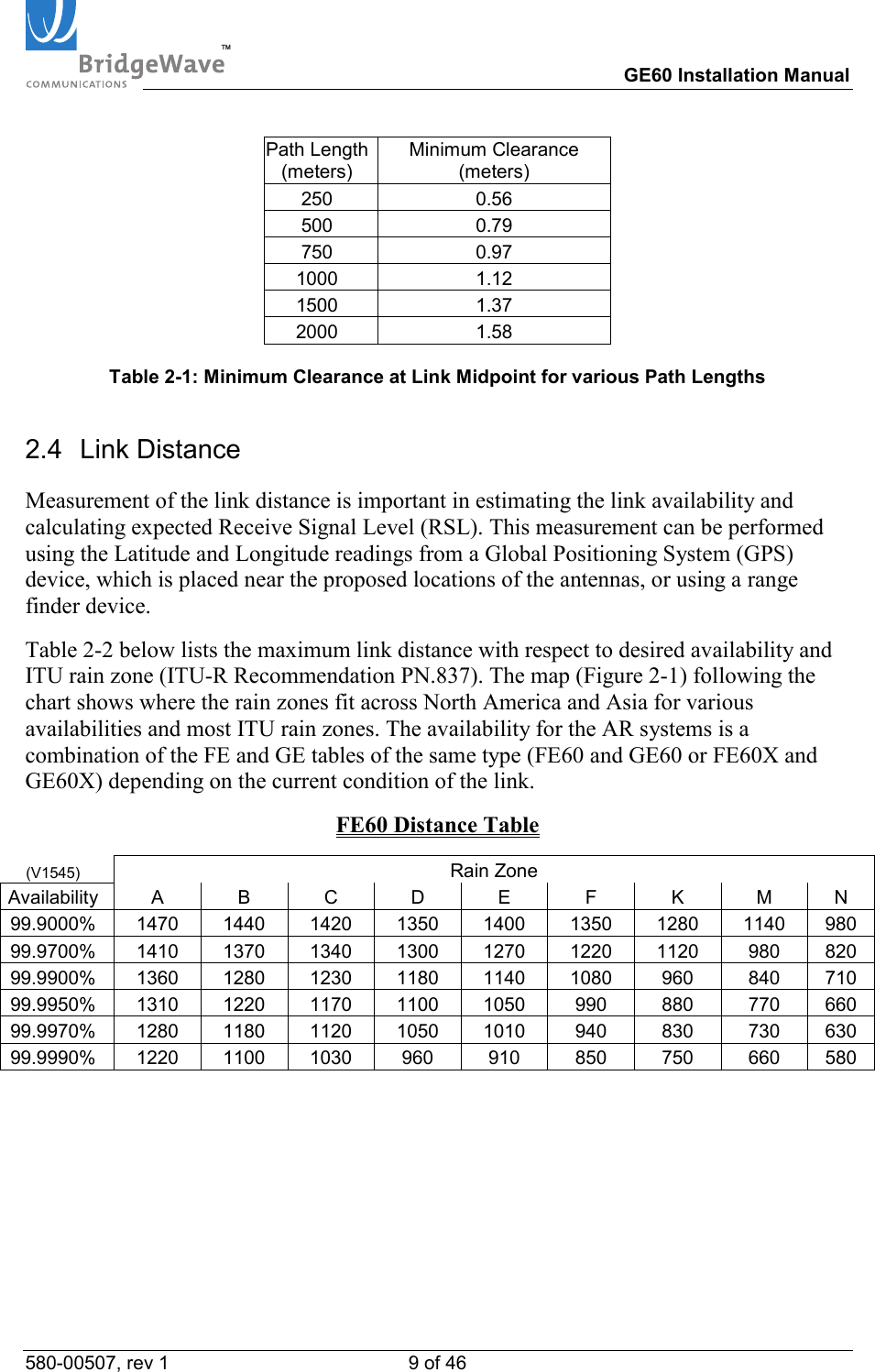
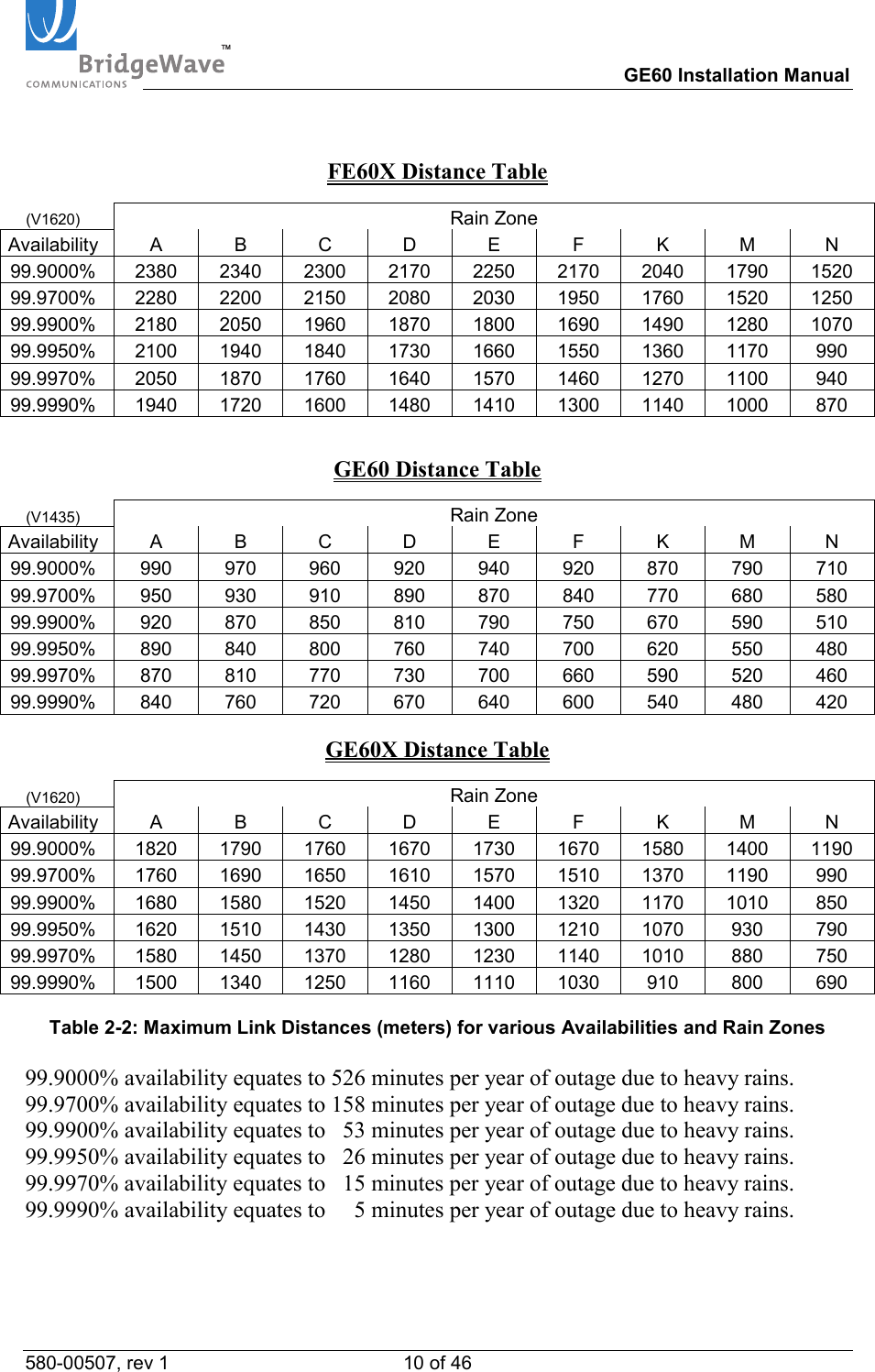
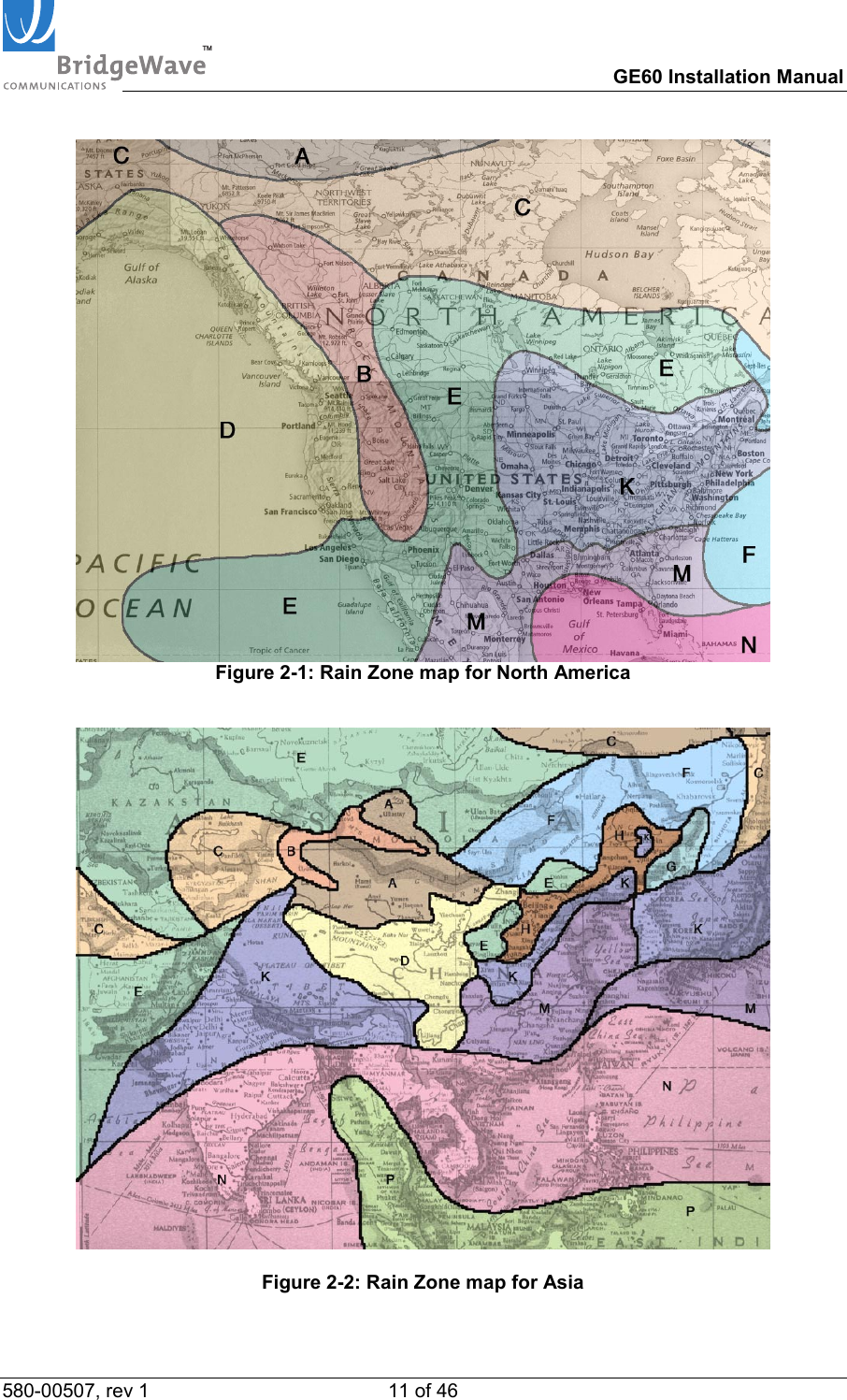
TM        GE60 Installation Manual 580-00507, rev 1 9 of 46   Path Length (meters) Minimum Clearance (meters) 250 0.56 500 0.79 750 0.97 1000 1.12 1500 1.37 2000 1.58  Table 2-1: Minimum Clearance at Link Midpoint for various Path Lengths 2.4 Link Distance Measurement of the link distance is important in estimating the link availability and calculating expected Receive Signal Level (RSL). This measurement can be performed using the Latitude and Longitude readings from a Global Positioning System (GPS) device, which is placed near the proposed locations of the antennas, or using a range finder device. Table 2-2 below lists the maximum link distance with respect to desired availability and ITU rain zone (ITU-R Recommendation PN.837). The map (Figure 2-1) following the chart shows where the rain zones fit across North America and Asia for various availabilities and most ITU rain zones. The availability for the AR systems is a combination of the FE and GE tables of the same type (FE60 and GE60 or FE60X and GE60X) depending on the current condition of the link. FE60 Distance Table (V1545)  Rain Zone Availability A  B  C  D  E  F  K  M  N 99.9000% 1470 1440 1420 1350 1400 1350 1280 1140 980 99.9700% 1410 1370 1340 1300 1270 1220 1120  980 820 99.9900% 1360 1280 1230 1180 1140 1080  960  840 710 99.9950% 1310 1220 1170 1100 1050  990  880  770 660 99.9970% 1280 1180 1120 1050 1010  940  830  730 630 99.9990% 1220 1100 1030 960 910 850 750 660 580
TM        GE60 Installation Manual 580-00507, rev 1 10 of 46    FE60X Distance Table (V1620)  Rain Zone Availability A B C D E F K M N 99.9000% 2380 2340 2300 2170 2250 2170 2040 1790 1520 99.9700% 2280 2200 2150 2080 2030 1950 1760 1520 1250 99.9900% 2180 2050 1960 1870 1800 1690 1490 1280 1070 99.9950% 2100 1940 1840 1730 1660 1550 1360 1170  990 99.9970% 2050 1870 1760 1640 1570 1460 1270 1100  940 99.9990% 1940 1720 1600 1480 1410 1300 1140 1000  870  GE60 Distance Table (V1435)  Rain Zone Availability A B C D E F K M N 99.9000% 990 970 960 920 940 920 870 790 710 99.9700% 950 930 910 890 870 840 770 680 580 99.9900% 920 870 850 810 790 750 670 590 510 99.9950% 890 840 800 760 740 700 620 550 480 99.9970% 870 810 770 730 700 660 590 520 460 99.9990% 840 760 720 670 640 600 540 480 420  GE60X Distance Table (V1620)  Rain Zone Availability A B C D E F K M N 99.9000% 1820 1790 1760 1670 1730 1670 1580 1400 1190 99.9700% 1760 1690 1650 1610 1570 1510 1370 1190  990 99.9900% 1680 1580 1520 1450 1400 1320 1170 1010  850 99.9950% 1620 1510 1430 1350 1300 1210 1070  930  790 99.9970% 1580 1450 1370 1280 1230 1140 1010  880  750 99.9990% 1500 1340 1250 1160 1110 1030  910  800  690  Table 2-2: Maximum Link Distances (meters) for various Availabilities and Rain Zones  99.9000% availability equates to 526 minutes per year of outage due to heavy rains. 99.9700% availability equates to 158 minutes per year of outage due to heavy rains. 99.9900% availability equates to   53 minutes per year of outage due to heavy rains. 99.9950% availability equates to   26 minutes per year of outage due to heavy rains. 99.9970% availability equates to   15 minutes per year of outage due to heavy rains. 99.9990% availability equates to     5 minutes per year of outage due to heavy rains.
TM        GE60 Installation Manual 580-00507, rev 1 11 of 46    Figure 2-1: Rain Zone map for North America     Figure 2-2: Rain Zone map for Asia
TM        GE60 Installation Manual 580-00507, rev 1 12 of 46   2.5 Antenna Location The optimum location for the antennas must be determined. The ideal location should provide for ease of erecting and mounting the antenna, as well as unimpeded Line-Of-Site (LOS) to the other site. The following factors should be taken into account: •  Type of mounting—wall or pole •  Location where the fiber and DC power wiring will enter/exit the building •  Length of cable runs •  Grounding connection points •  Obstructions •  Accessibility 2.6 Cabling The installation site should be inspected to determine the run paths for the fiber cable and power cable from the radio equipment to the termination point. Locations for roof penetration should be identified. The routing and securing of all cables should conform to all applicable codes and requirements. Depending on the likelihood of damage due to foot traffic or equipment movement, cabling conduit may be required. The maximum cable run length as specified for the equipment being installed must not be exceeded.   The radio requires an LC type connectors on a pair of simplex multi-mode fibers to properly connect to the radio and the users network equipment.  Single-mode fiber is not a current option supported by the radio. The network equipment end of the fibers should be terminated with connectors that match the network equipment fiber interface.  Fiber Cable Length  Cable Type Up to 270 meters  62.5/125 µm Up to 500 meters  50/125 µm  Table 2-3: Fiber Cable Types  All radios in the E60 product line include a 100-240 VAC power adaptor suitable for indoor operation that converts the AC voltage from the standard electrical outlet in the wall to DC voltage.  Our radio requires a minimum of 15.0 VDC (24.0 VDC maximum) up the power cable to the radio to function properly. When planning the cable run from the indoor mounted AC power adaptor to the radio unit, it is critical to use the cable gauge (AWG) indicated below to ensure adequate voltage at the radio.  The electrical cable that is used outside the building must be outdoor rated (i.e., weather-protected) providing a single pair of wires necessary to power the equipment.  The required DC power cable is 12 gauge, 2 wire (i.e., 12/2) rated for outdoor use.
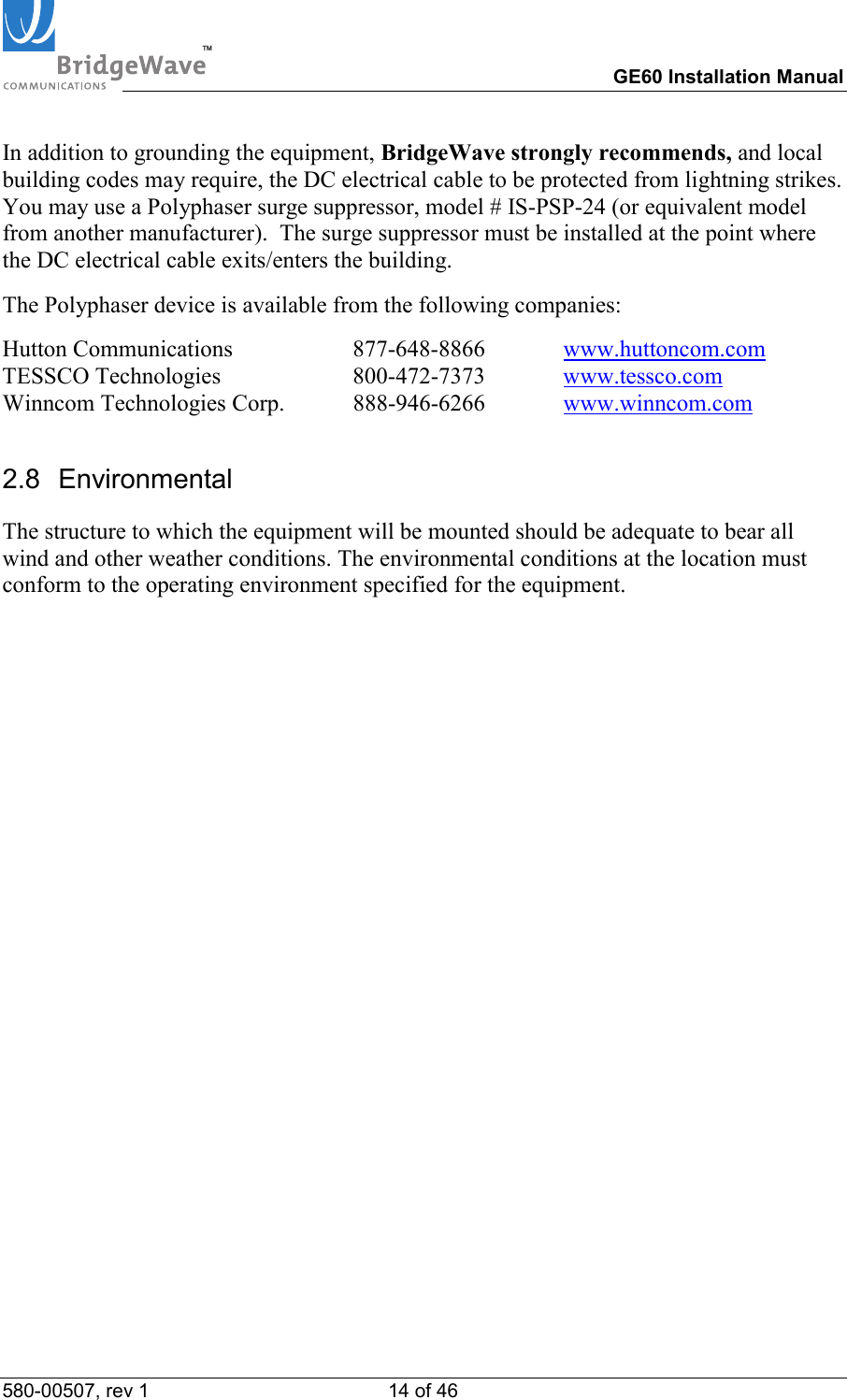
TM        GE60 Installation Manual 580-00507, rev 1 13 of 46     Minimum Cable Size DC Cable Length  Outside Diameter of DC Cable Jacket (min-max)* Conductor size Up to 250 meters 0.17  –  0.45 inches (4.3 – 11.9 mm) 12 AWG                (4mm2)  Table 2-4: Minimum DC Cable Size  *Note:  Specification is for the outdoor weather-protected portion of the DC cable entering the radio enclosure.  The indoor portion of the DC cable must comply with local building and/or electrical codes in your area.  Figure 2-3: 12-gauge DC power cable with crimp connectors 2.7  Grounding & Lightning Protection WARNING! Proper grounding of the outdoor equipment reduces electromagnetic interference, provides lightning protection, and protects against electrical discharge. The source and connection points for the building-to-earth ground in the vicinity of the antenna location should be determined.  It is recommended to integrate the radio ground into the building ground utilizing the pole mount hardware. For wall or ungrounded pole mounts connect a grounding wire to the grounding point on the radio. Select the size of the ground wire based on the National Electrical Code.   Figure 2-3 (left) details a standard 12-gauge wire that has been fitted with the power connectors (provided) for the radio’s internal power supply necessary to mate with the provided power cord.  A standard crimping/splicing tool (not provided) is required to terminate the power connectors onto the 12-gauge cable required for use with the E60 products.
TM        GE60 Installation Manual 580-00507, rev 1 14 of 46   In addition to grounding the equipment, BridgeWave strongly recommends, and local building codes may require, the DC electrical cable to be protected from lightning strikes.  You may use a Polyphaser surge suppressor, model # IS-PSP-24 (or equivalent model from another manufacturer).  The surge suppressor must be installed at the point where the DC electrical cable exits/enters the building. The Polyphaser device is available from the following companies: Hutton Communications     877-648-8866  www.huttoncom.com TESSCO Technologies                       800-472-7373  www.tessco.com Winncom Technologies Corp.  888-946-6266  www.winncom.com 2.8 Environmental The structure to which the equipment will be mounted should be adequate to bear all wind and other weather conditions. The environmental conditions at the location must conform to the operating environment specified for the equipment.
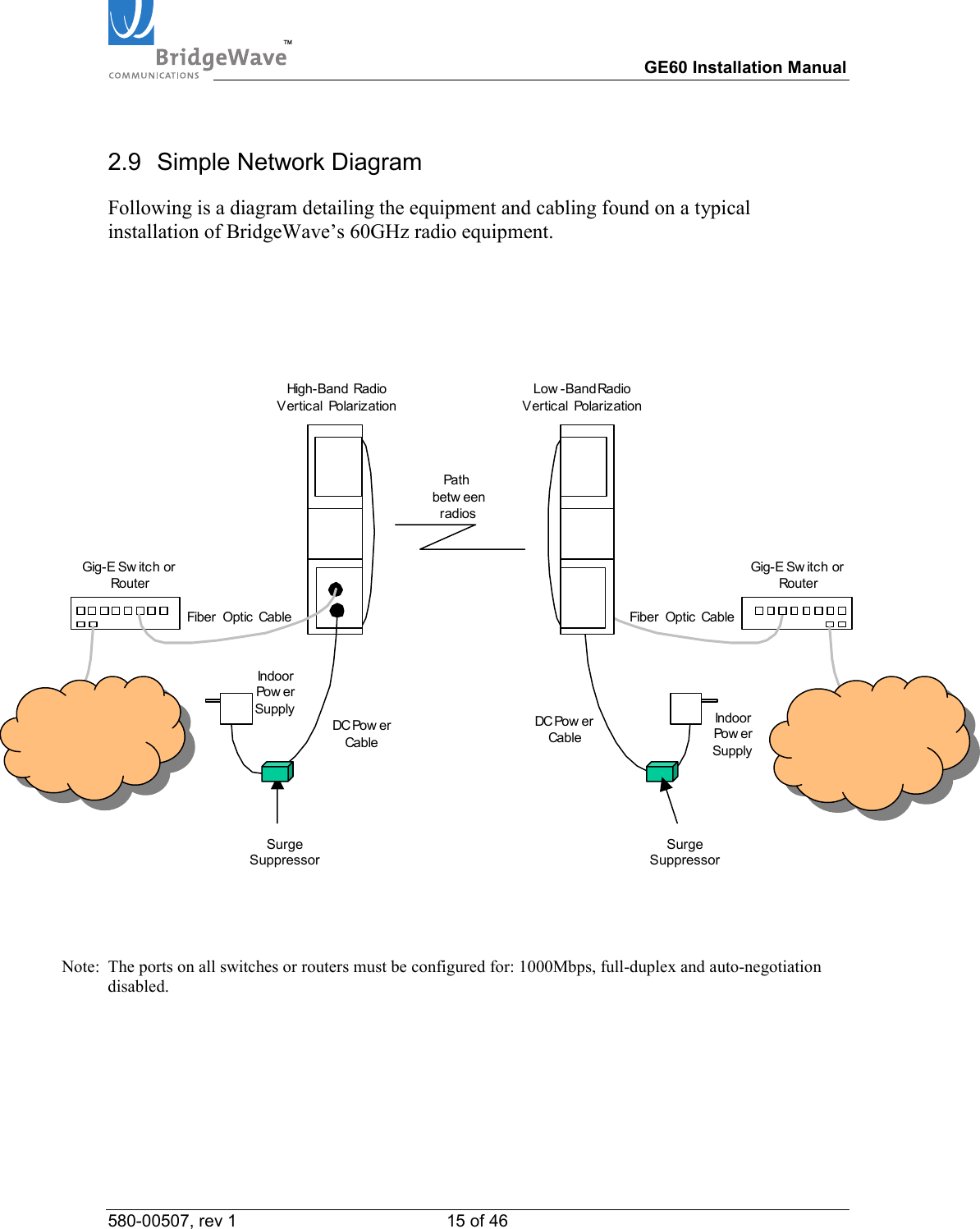
TM        GE60 Installation Manual 580-00507, rev 1 15 of 46   2.9  Simple Network Diagram Following is a diagram detailing the equipment and cabling found on a typical installation of BridgeWave’s 60GHz radio equipment.    LAN/WANLAN/WANHigh-Band RadioVertical PolarizationLow -Band RadioVertical PolarizationGig-E Sw itc h orRouterGig-E Sw itch orRouterFiber  Optic Cable Fiber  Optic CableDC Pow erCableDC Pow erCablePa t hbetw eenradiosIndoorPow e rSupply IndoorPow e rSupply     Note:  The ports on all switches or routers must be configured for: 1000Mbps, full-duplex and auto-negotiation disabled. Surge Suppressor Surge Suppressor

Navigation menu