Bron Elektronik RFS2216 WIRELESS FLASH TRIGGER TRANSCEIVER User Manual

Bron Elektronik AG WIRELESS FLASH TRIGGER TRANSCEIVER Users Manual

Contents

Users Manual

SCOPE OF DELIVERY   Figure:  1  Case 3  Micro-USB In 4  Sync In/Out 5  Top hot shoe for accessories 6  "test" key 7  Status indicator 8  Display 9  "ST" key (studio channel setting) 10  "HS" key (HS on/off and setting) 11  "LP" key (lamp channel setting)) 12  Scrolling wheel (for various settings) 13  Main switch (on/off) 14  Modelling light (on/off) 15  Synch cable to camera 16  2 batteries, AA      BRONCOLOR RADIO FREQUENCY SYSTEM 2.2  Before use We are very pleased you have chosen one of our RFS 2.2 transceiver units. If used properly, it will render you many years of good service. Please read the information contained in these operating instructions carefully. They contain important details on the use, safety and maintenance of the device. Keep these operating instructions in a safe place and pass them on to further users if necessary  With the radio system broncolor RFS 2.2 you can trigger and operate by remote control broncolor units, which are equipped with an integrated RFS 2 interface.  With the additional HS function, HS-compatible broncolor flash units, in combination with a suitable camera, can be set to use the shortest possible shutter speeds (down to 1/8000 s).  The transceiver can be operated in either of two modes. As supplied, the transceiver operates as a transmitter.   1.  RFS 2.2 TRANSCEIVER AS TRANSMITTER  The RFS 2.2 transceiver operates as a remote control or radio flash trigger for one or more broncolor power packs or monolights equipped with an RFS 2 or 2.1 interface. Power packs or monolights not equipped with an RFS 2 or 2.1 interface can be operated by connecting an RFS 2.2 Transceiver (as receiver) - see Chapter 9.  All devices, whether with a built-in RFS 2 or an external RFS 2.2 receiver are compatible. If several RFS 2 units are to communicate with each other, they must be set to the same studio address. RFS 2 units with the same studio address can be remote-controlled simultaneously. By using different studio addresses, several groups of devices can be reliably operated independently of each other.  Flash synchronisation takes place either via the hot shoe, or using the camera’s sync contact. The operating distance is up to 50 m in the open air, or up to 30 m in a building. The transmitter is fitted with two AA batteries.
Attention! Although this radio system allows up to 99 studio addresses, the number of channels that is effectively available is restricted by the RFS 2 flash unit to be controlled.  For further instructions, please see the operating instructions for the flash unit concerned.   2.  OPERATION  > Keys The unit has three menu keys, a scrolling wheel, a "test" key and two slide switches, one for modelling light and one to switch the unit on and off.   > Duration of key presses A short press of a key is one that takes less than one second, a long press is longer than one second.   Overview of key functions  Key Operation Function executed Comments     test Press key briefly Triggers a test flash  test Long press of key and switch unit on Unit settings (see Chapter 6)  ST Press key briefly Opens the studio menu and confirms the setting Studio Energy Turn the scrolling wheel to set the studio energy ST Press key for longer Opens the studio menu and confirms the setting Studio Turn the scrolling wheel to set the studio channel HS Press key briefly Opens the HS menu and confirms the setting Turn the scrolling wheel to switch the HS function on or off HS Press key for longer Opens the HS menu and confirms the setting HSMA (HS Manual Adjust) Using the scrolling wheel the optimum flash triggering point can be selected manually LP Press key briefly Opens the lamp menu and confirms the setting lamp energy Turn the scrolling wheel to set the lamp energy LP Press key briefly again Changes the lamp channel  Turn the scrolling wheel to set the energy of the selected lamp LP Press key for longer Opens the lamp menu and confirms the setting Number of lamps Turn the scrolling wheel to set the maximum number of lamps per studio     ON/OFF Slide Switches the unit on and off  MODELLING LIGHT Slide Switches the modelling light on or off      Automatic switch off  After 10 minutes, the unit switches automatically to energy-saving mode. Press any key to reactivate the unit.   3.  SETTING STUDIO ADDRESSES  The transceiver must have the same studio address as the flash units used. First set the studio address you want to use on the flash units, and then synchronise the RFS 2.2 transmitter.
To set the studio address (studio channel), please proceed as follows:  1)  Press the "ST" key for longer to enter the studio channel menu. 2)  Set the studio address with the scrolling wheel as required (01 to 99). 3)  Save the setting with a short press on the "ST" key. The unit synchronises with the lamps.   4.  SETTING THE LAMP CHANNEL  With the RFS 2.2 transceiver, you can define and set the individual lamp outputs on the flash unit as you wish as well as adjust the maximum number of lamps per studio.   To set the lamp address, please proceed as follows:  1)  Press the "LP" key briefly to enter the lamp setting menu. 2)  Set the lamp address with a short press on the "LP" key (several times if necessary).  To set the number of lamps used in your studio, please proceed as follows:  1)  Press the "LP" key for longer to enter the lamp setting menu. 2)  Set the number of lamps used in your studio with the scrolling wheel as required (01 to 40). 3)  Save the setting with a short press on the “LP” key.   5.  ENERGY CONTROL  5.1  Preparation  Longer press on key "ST": Turn the scrolling wheel as appropriate to change the studio channel up or down. Confirm the selection by a short press on key “ST”.  The RFS 2.2 transceiver allows you to change the energy setting of all RFS 2 flash units that are set to the same studio address (in the “ST” menu) and to change the output of individual lamp channels (in the “LP” menu).  The output can be adjusted in 1/10 and full f-stop steps.  5.2  Menu "ST"  Short press on key "ST": Turn the scrolling wheel upwards to increase the total energy of all units. This takes place in 1/10 f-stop steps. Confirm the selection by a short press on key “ST”.  Short press on key "ST": Turn the scrolling wheel downwards to reduce the total energy of all units. This takes place in 1/10 f-stop steps. Confirm the selection by a short press on key “ST”.  5.3  Menu "LP"  Short press on key "LP": Turn the scrolling wheel upwards to increase the energy of selected units. This takes place in 1/10 f-stop steps. Confirm the selection by a short press on key “LP”.  Short press on key "LP": Turn the scrolling wheel downwards to reduce the energy of selected units. This takes place in 1/10 f-stop steps. Confirm the selection by a short press on key “LP”.
6.   HS  6.1.    Menu “HS”   The HS mode enables short exposure times (down to 1/8000 s) on the camera in combination with HS-compatible flash units.   Operating HS functions  -  Mount a camera-compatible RFS 2.2 on the unit -  Switch on the RFS 2 / HS-compatible broncolor flash unit  -  Activate the RFS function on the flash unit -  Activate HS mode on the RFS 2.2. The flash unit switches automatically to HS mode  HS on/off: Press the “HS” key briefly. Turn the scrolling wheel up or down. HS mode switches on and off. Confirm the selection by a short press on key “HS”.  6.2.  Menu "HSMA"  When HS is active, HSMA (HS Manual Adjust) improves the exposure to suit the camera model being used. The purpose of HSMA mode is to override the automatic HS flash trigger. The automatically calculated shutter release is cancelled.   The delay of the flash trigger signal (HSMA) depends on the camera, and so is different from model to model. The transmitters are factory set to work correctly with most models of a given brand, however if you should notice a black bar across the exposed image you should utilize the HSMA function to adjust the timing until the black bar is no longer visible in the exposed image.  Longer press on key "HS" for HSMA (HS Manual Adjust): turn the scrolling wheel up or down. In this way HSMA mode can be set individually. Confirm the selection by a short press on key “HS”.    7.  UNIT SETTINGS (c.fn)  Operation  -  Switch the RFS 2.2 unit off (slide main switch to "off") -  Press and hold the "test" key and simultaneously switch on the RFS 2.2 (slide main switch to "on") -  Turn the scrolling wheel until you reach the desired function -  Mark the function with the "LP" key (set) -  Use the scrolling wheel to determine the property  -  Press "LP" to confirm selection (back)  Display Function Selection Description c.fn-00 transceiver transmitter receiver  Transmitter mode Receiver mode c.fn-01 PC sync output input Select sync connection as output or input  When unit is in receiver mode, the PC port will be automatically set as output  When unit is in transmitter mode, the PC port will be automatically set as input
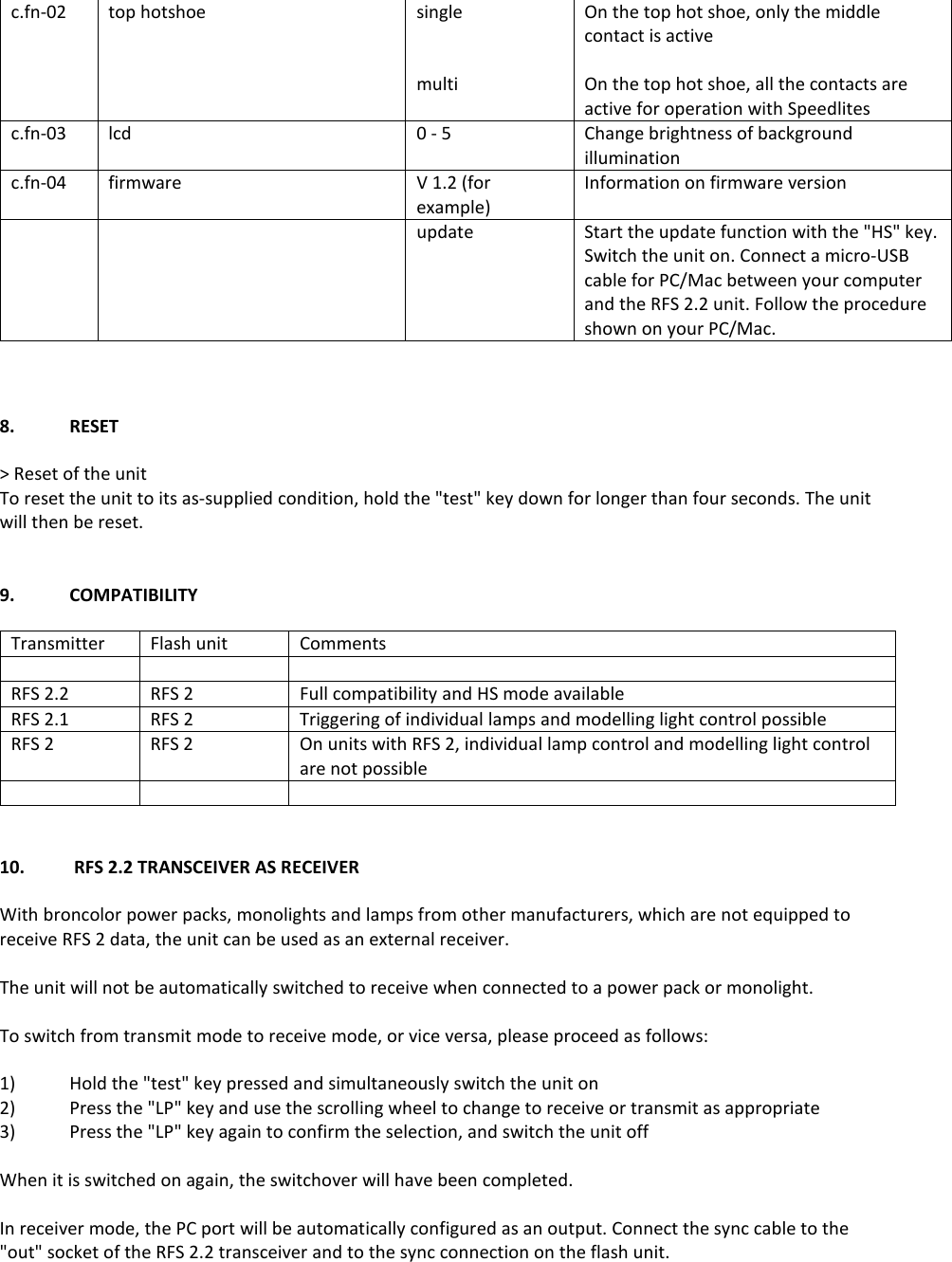
c.fn-02 top hotshoe single   multi On the top hot shoe, only the middle contact is active  On the top hot shoe, all the contacts are active for operation with Speedlites c.fn-03 lcd 0 - 5 Change brightness of background illumination c.fn-04 firmware  V 1.2 (for example) Information on firmware version   update Start the update function with the "HS" key. Switch the unit on. Connect a micro-USB cable for PC/Mac between your computer and the RFS 2.2 unit. Follow the procedure shown on your PC/Mac.    8.  RESET  > Reset of the unit To reset the unit to its as-supplied condition, hold the "test" key down for longer than four seconds. The unit will then be reset.   9.  COMPATIBILITY  Transmitter Flash unit Comments    RFS 2.2 RFS 2 Full compatibility and HS mode available RFS 2.1 RFS 2 Triggering of individual lamps and modelling light control possible RFS 2 RFS 2 On units with RFS 2, individual lamp control and modelling light control are not possible      10.   RFS 2.2 TRANSCEIVER AS RECEIVER  With broncolor power packs, monolights and lamps from other manufacturers, which are not equipped to receive RFS 2 data, the unit can be used as an external receiver.  The unit will not be automatically switched to receive when connected to a power pack or monolight.  To switch from transmit mode to receive mode, or vice versa, please proceed as follows:  1)  Hold the "test" key pressed and simultaneously switch the unit on 2)  Press the "LP" key and use the scrolling wheel to change to receive or transmit as appropriate 3)  Press the "LP" key again to confirm the selection, and switch the unit off  When it is switched on again, the switchover will have been completed.  In receiver mode, the PC port will be automatically configured as an output. Connect the sync cable to the "out" socket of the RFS 2.2 transceiver and to the sync connection on the flash unit.
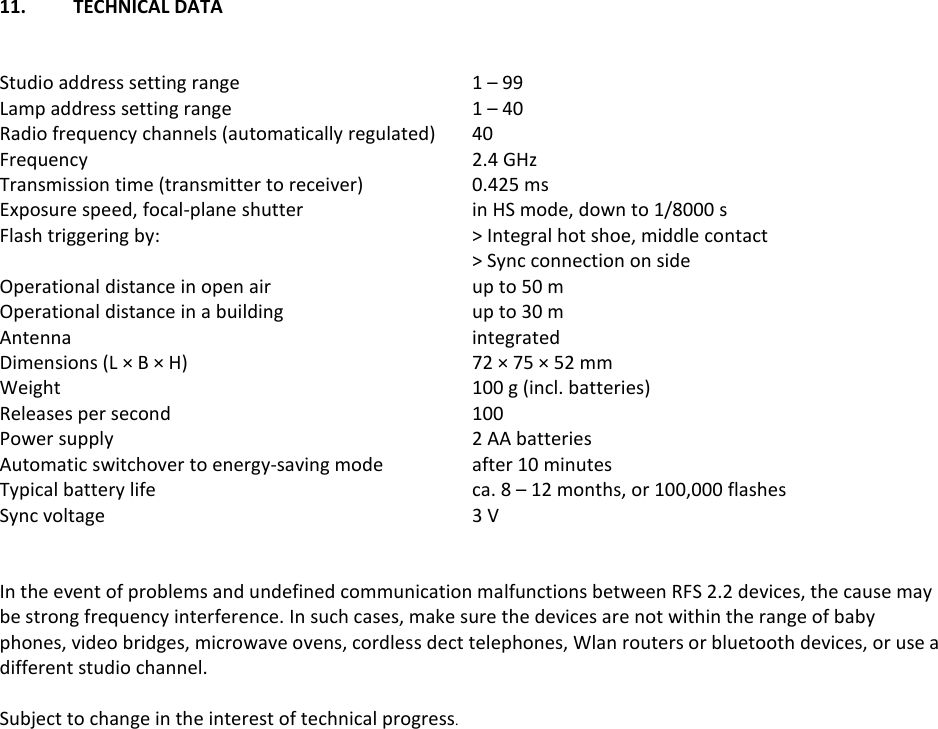
11.  TECHNICAL DATA    Studio address setting range  1 – 99 Lamp address setting range  1 – 40 Radio frequency channels (automatically regulated)  40 Frequency  2.4 GHz Transmission time (transmitter to receiver)  0.425 ms Exposure speed, focal-plane shutter  in HS mode, down to 1/8000 s Flash triggering by:  > Integral hot shoe, middle contact   > Sync connection on side Operational distance in open air  up to 50 m Operational distance in a building  up to 30 m Antenna  integrated Dimensions (L × B × H) 72 × 75 × 52 mm Weight  100 g (incl. batteries) Releases per second  100 Power supply  2 AA batteries Automatic switchover to energy-saving mode  after 10 minutes Typical battery life  ca. 8 – 12 months, or 100,000 flashes Sync voltage  3 V   In the event of problems and undefined communication malfunctions between RFS 2.2 devices, the cause may be strong frequency interference. In such cases, make sure the devices are not within the range of baby phones, video bridges, microwave ovens, cordless dect telephones, Wlan routers or bluetooth devices, or use a different studio channel.  Subject to change in the interest of technical progress.
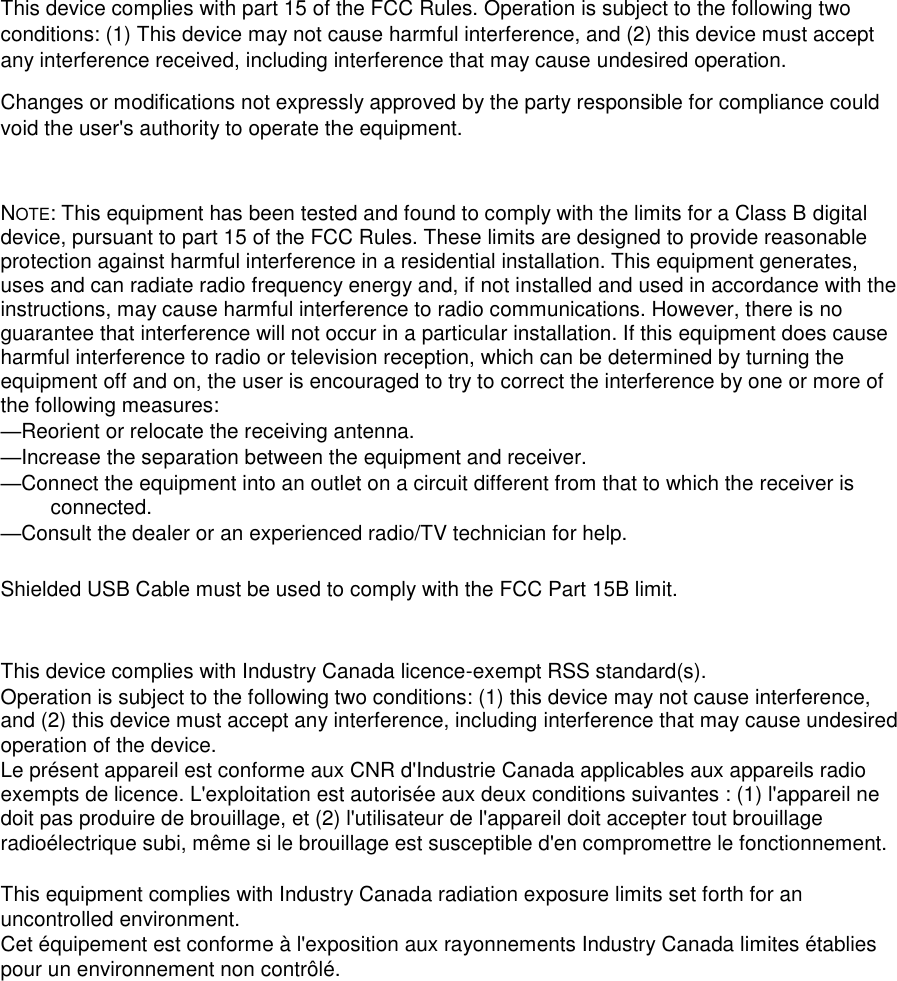
 This device complies with part 15 of the FCC Rules. Operation is subject to the following two conditions: (1) This device may not cause harmful interference, and (2) this device must accept any interference received, including interference that may cause undesired operation. Changes or modifications not expressly approved by the party responsible for compliance could void the user's authority to operate the equipment.  NOTE: This equipment has been tested and found to comply with the limits for a Class B digital device, pursuant to part 15 of the FCC Rules. These limits are designed to provide reasonable protection against harmful interference in a residential installation. This equipment generates, uses and can radiate radio frequency energy and, if not installed and used in accordance with the instructions, may cause harmful interference to radio communications. However, there is no guarantee that interference will not occur in a particular installation. If this equipment does cause harmful interference to radio or television reception, which can be determined by turning the equipment off and on, the user is encouraged to try to correct the interference by one or more of the following measures: —Reorient or relocate the receiving antenna. —Increase the separation between the equipment and receiver. —Connect the equipment into an outlet on a circuit different from that to which the receiver is connected. —Consult the dealer or an experienced radio/TV technician for help.  Shielded USB Cable must be used to comply with the FCC Part 15B limit.   This device complies with Industry Canada licence-exempt RSS standard(s). Operation is subject to the following two conditions: (1) this device may not cause interference, and (2) this device must accept any interference, including interference that may cause undesired operation of the device. Le présent appareil est conforme aux CNR d'Industrie Canada applicables aux appareils radio exempts de licence. L'exploitation est autorisée aux deux conditions suivantes : (1) l'appareil ne doit pas produire de brouillage, et (2) l'utilisateur de l'appareil doit accepter tout brouillage radioélectrique subi, même si le brouillage est susceptible d'en compromettre le fonctionnement.  This equipment complies with Industry Canada radiation exposure limits set forth for an uncontrolled environment.  Cet équipement est conforme à l'exposition aux rayonnements Industry Canada limites établies pour un environnement non contrôlé.

Navigation menu