CLEVER BRIGHT BSEM-12 BLUETOOTH STEREO EARBUDS WITH BUILT-IN MIC User Manual

CLEVER BRIGHT INTERNATIONAL (H.K.) LTD. BLUETOOTH STEREO EARBUDS WITH BUILT-IN MIC Users Manual

User manual

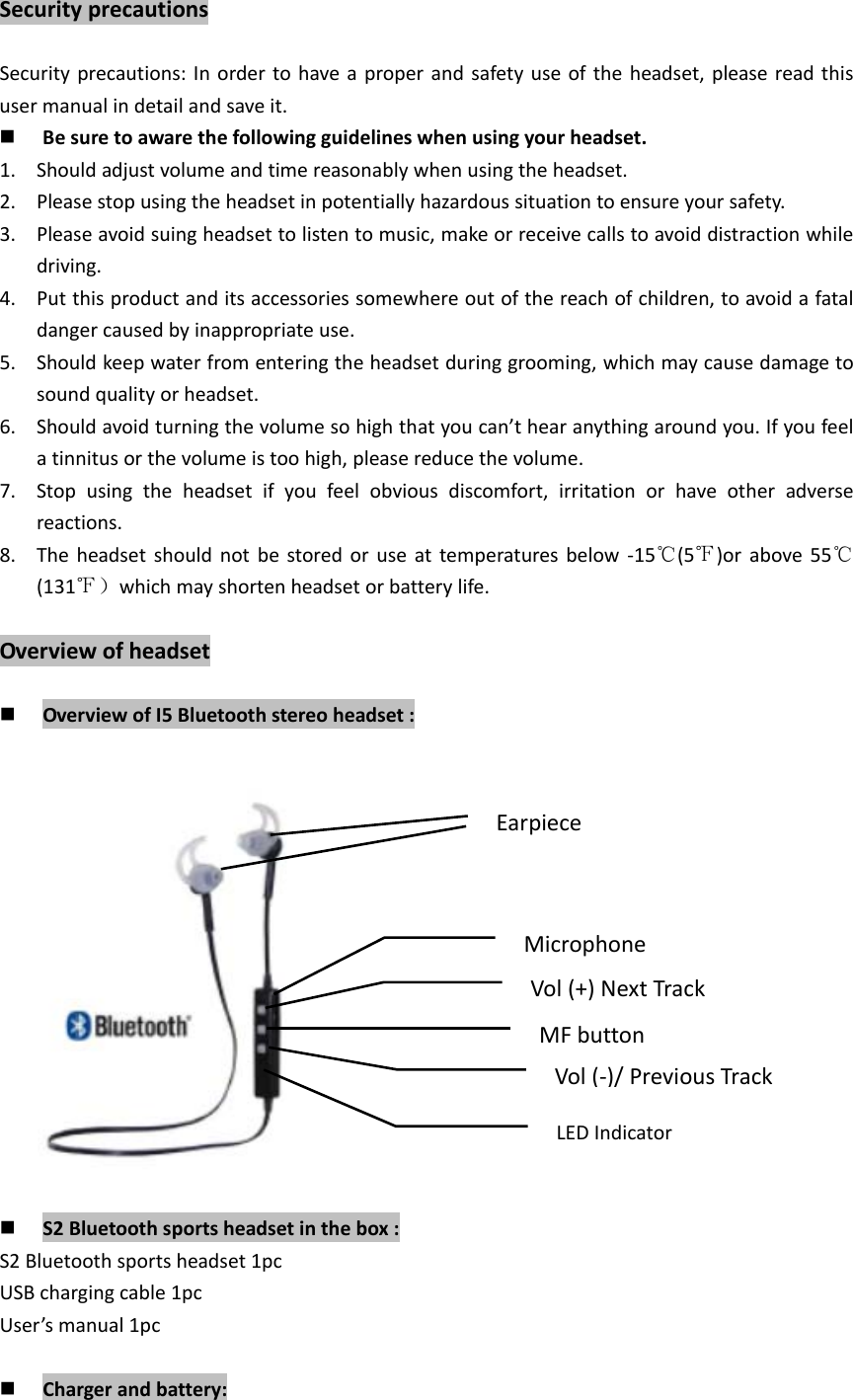
SecurityprecautionsSecurityprecautions:Inordertohaveaproperandsafetyuseoftheheadset,pleasereadthisusermanualindetailandsaveit. Besuretoawarethefollowingguidelineswhenusingyourheadset.1. Shouldadjustvolumeandtimereasonablywhenusingtheheadset.2. Pleasestopusingtheheadsetinpotentiallyhazardoussituationtoensureyoursafety.3. Pleaseavoidsuingheadsettolistentomusic,makeorreceivecallstoavoiddistractionwhiledriving.4. Putthisproductanditsaccessoriessomewhereoutofthereachofchildren,toavoidafataldangercausedbyinappropriateuse.5. Shouldkeepwaterfromenteringtheheadsetduringgrooming,whichmaycausedamagetosoundqualityorheadset.6. Shouldavoidturningthevolumesohighthatyoucan’thearanythingaroundyou.Ifyoufeelatinnitusorthevolumeistoohigh,pleasereducethevolume.7. Stopusingtheheadsetifyoufeelobviousdiscomfort,irritationorhaveotheradversereactions.8. Theheadsetshouldnotbestoredoruseattemperaturesbelow‐15℃(5℉)orabove55℃(131℉)whichmayshortenheadsetorbatterylife.Overviewofheadset OverviewofI5Bluetoothstereoheadset: S2Bluetoothsportsheadsetinthebox:S2Bluetoothsportsheadset1pcUSBchargingcable1pcUser’smanual1pc Chargerandbattery:EarpieceMicrophoneVol(+)NextTrackMFbuttonVol(‐)/PreviousTrackLEDIndicator
PleasecheckthechargingcableisoriginalornotbeforechargingtheBluetoothheadset.Warning:MustuseoriginalchargecabletochargefortheBluetoothheadset,otherwiseitmaydamagetheheadset.Thus,voltageofchargermustbe5V,electriccurrentexceed100mA(5V/100mA).HandsFreeCharging:Thisheadsetusesanon‐detachablebuilt‐inrechargeablebattery.Inordertopreventdamageoftheheadset,pleasedonotremovethebattery.1. Beforecharging,makesuretheheadsethasbeenswitchedoff.2. PlugUSBcableintothechargingportofheadset;plugtheothersideofUSBcableintoUSBchargerorotherchargingdevice.Chargingwillstartandtheredlightremainsbrightontheheadset.3. Chargingtimeofheadsettakesapproximatelyupto1.5–2hours,bluelightremainsbrightorredlightswitchoffafterchargingcompleted. Pairingmode:KeeppresstheMFbuttonuntilblueandredlightsblinkalternatively. Reconnectionmode:KeeppresstheMFbuttonuntilbluelightblinks. SwitchoffKeeppresstheMFbuttonuntilredlightblinks. Pairyourheadsetwithyourmobilephone:1. Keepthedistancebetweentheheadsetandmobilephonewithin1meter.Thecloser,thebetter.2. KeeppresstheMFbuttonuntilblueandredlightsblinkalternatively.,enteredtopairingmode.3. InitiateBluetoothfunctionofmobilephone(orotherdeviceneededtobeconnected).Then“S2”willbeshownonyourphone.4. Select“S2”(somemobilephonesneedyoutoinputPIN“0000”aspassword)andtheheadsetwillautomaticallyconnectwithyourmobilephone.※Attention:Generally,thereare120secondsatmaximumtopairheadsetwithyourmobilephone,ortheheadsetwillpoweroffautomaticallywhenthelightgoesout.Pleaseretrysteps1to4topairagainifyouroperationdoesn’twork. Disconnecttheheadsetwithyourmobilephone:Switchofftheheadset.OrclosetheBluetoothfunctionofyourmobilephone.Ortaketheheadsetfromthephonetomorethan20m(60ft)away. Reconnectthepairedheadsetwithyourmobilephone:1. Keepdistanceoftheheadsetandmobilephonewithin1meter.Thecloser,thebetter.2. Switchontheheadset,andensuretheheadsetentersintoreconnectionmodewhenthebluelightblinks.3. SwitchonBluetoothsearchfunctioninyourmobilephoneofotherdeviceneededtobe
connected.Thentheheadsetwillautomaticallyreconnectwiththemobilephonewhichhasconnectedlasttime. Pairyourheadsetwithtwomobilephone:1. Keepdistancebetweentheheadsetandmobilephone1(orotherdeviceneededtobeconnected)within1meter.Thecloser,thebetter.2. Ensurethattheheadsetentersintopairingmode.Theblueandredlightsblinkalternatively.3. SwitchonBluetoothsearchfunctionofphone1,thenpairheadsetwithphone1.4. TurnofftheBluetoothfunctioninyourphone1andtheheadset.5. Restarttheheadsetandensuretheheadsetenterstopairingmode.InitiateBluetoothfunctioninyourphone2andconnectitwiththeheadset.6. TurnontheBluetoothsearchfunctioninyourphone1andconnectitwiththepairedheadset.Thentheheadsetwillconnectwithtwomobilephonesatthesametime. Answerincomingcall:PresstheMFbuttononcetoanswerthecall.Oruseyourmobilephonetoanswerit. Voicecommand:Theheadsetwillissue“YES”or“NO”whenthereisanincomingcall.Speak“YES”toansweritor“NO”torejectit. Hangupcall:PresstheMFbuttononceoruseyourmobilephonetohangupyourcall. Rejectacall:Whenthereisanincomingcall,theheadsetwillissueasound,keeppressingtheMFbuttonforaround2seconds,thenreleaseoruseyoumobilephonetorejectthecall. Voicedialing:(Pleasemakesureyourmobilephonesupportsthisfunction)KeeppressingtheMFbuttonfor2seconds,thenrelease,yourmobilephonewillenterintothevoicedialinginterface. Lastcallredialing:Double–clicktheMFbutton. Voiceswitch:(EnglishandChinese)Underparingmode,keeppresstheMFbuttonandVOL(‐)atthesametimetoachieveit. Three–waycalling:(Pleasemakesurewhetheryourphonesupportsthisfunction)1. Whenmobilephone1isinconversation,therecomesacallfrommobilephone2;pressingtheMFbuttononce.Andyoucananswerthecallfrommobilephone2,andtheconversationofmobilephone1willbedropped.2. Whenmobilephone1isinconversation,therecomesacallfrommobilephone2;pressingtheMFbuttonfor2seconds.Youcananswerthecallfrommobilephone2;andkeeptheconversationofmobilephone1.3. Whenmobilephone1isinconversation,youcankeeppressingtheMFbuttonforaround2seconds.Theheadsetwillbeswitchedbacktomobilephone1.4. Whenmobilephone2isinconversationandthemobilephone1isreserved.PresstheMFbuttononce,youcananswerthecallformobilephone1,andtheconversationofmobilephone2willbedropped. Musicplay/pause:PresstheMFbuttononcetoplay/pausemusic.
 Volumeadjustment/Musicselection:KeeppressestheVOL(+)andVOL(‐)toadjustvolume.PressVOL(+)andVOL(‐)oncetoselectprevioustrackornexttrack.FAQ:1. Headsetcannotpairwithmobilephone.Ans:pleasecheckwhetheryourheadsetisinpairingmodeorreconnectionmode,checkwhetherBluetoothsearchfunctionofyoumobilephonehasbeenopened.Thus,checkyourmobiledevice’sBluetoothmenuanddelete/forgettheheadset,reconnecttheheadsetfollowinginstructionsofusermanual.2. Headsetcannotbeswitchon.Ans:Pleasecheckthebatterystatusofyourheadset.3. CanIchangebatteryfortheheadset?Ans:No,thisheadsetuseabuilt–innon–detachableLi–Polymerbattery,itcannotberemoved.4. CanIuseheadsetwhiledriving?Ans:Forsafetyreason,westronglyrecommendnottouseover–earheadsettoavoiddistractionwhiledriving.5. Headsetdisconnectwithyourmobilephonewithin10meter.Ans:PleasecheckifthereismetalorothermaterialwithinrelativelycloserangemayinterfereBluetoothconnection,asBluetoothisaradiotechnologythatissensitivetoobjectsbetweentheheadsetandtheconnecteddevice.6. Cannothearingasoundfromyourcomputerormobilephone.Ans:PleasecheckwhethertheoutputchannelofyourcomputerisBluetoothAudioDeviceandBluetoothfunctionofyourcomputersupportA2DPprofile.Andpleasecheckvolumeofyourheadset,andcomputer/mobilephone.7. CannotusetheheadsettocontrolvolumeorselecttrackofAPPofyourmobilephone.TechnicalSpecificationAns:SoftwaresettingsofAPPmaybevariedledtosomefunctionsoftheAPPmaynotcontrolbytheheadset Specification: Bluetoothversion:BluetoothV3.0 Frequencyrange:2.4GHz–2.48GHz Operatingdistance:upto10m(freespace) Standbytime:upto180hrs Talking/music–playingtime:about5hours Chargingtime:about2hours Bluetoothprofiles:A2DP、AVRCP、HSP、Hfp Frequencyresponse:20Hz–20kHz Operationaltemperature:‐10to50℃
Techn icalspecificationsaresubjecttochangewithoutnotice,weapologizeforanyinconvenience.FCCSTATEMENTThisdevicecomplieswithPart15oftheFCCRules.Operationissubjecttothefollowingtwoconditions:1.Thisdevicemaynotcauseharmfulinterference.2.Thisdevicemustacceptanyinterferencereceived,includinginterferencethatmaycauseundesiredoperation.Changesormodificationsnotexpresslyapprovedbythepartyresponsibleforcompliancecouldvoidtheuser'sauthoritytooperatetheequipment.RadiationExposureStatement:ThisequipmentcomplieswithFCCradiationexposurerequirement.ThedevicecanbeusedinportableexposureconditionwithoutRFstriction

Navigation menu