CLEVER BRIGHT BTAT-12 BLUETOOTH STEREO STAY-FIT EARBUDS with built-in mic User Manual

CLEVER BRIGHT INTERNATIONAL (H.K.) LTD. BLUETOOTH STEREO STAY-FIT EARBUDS with built-in mic

User manual

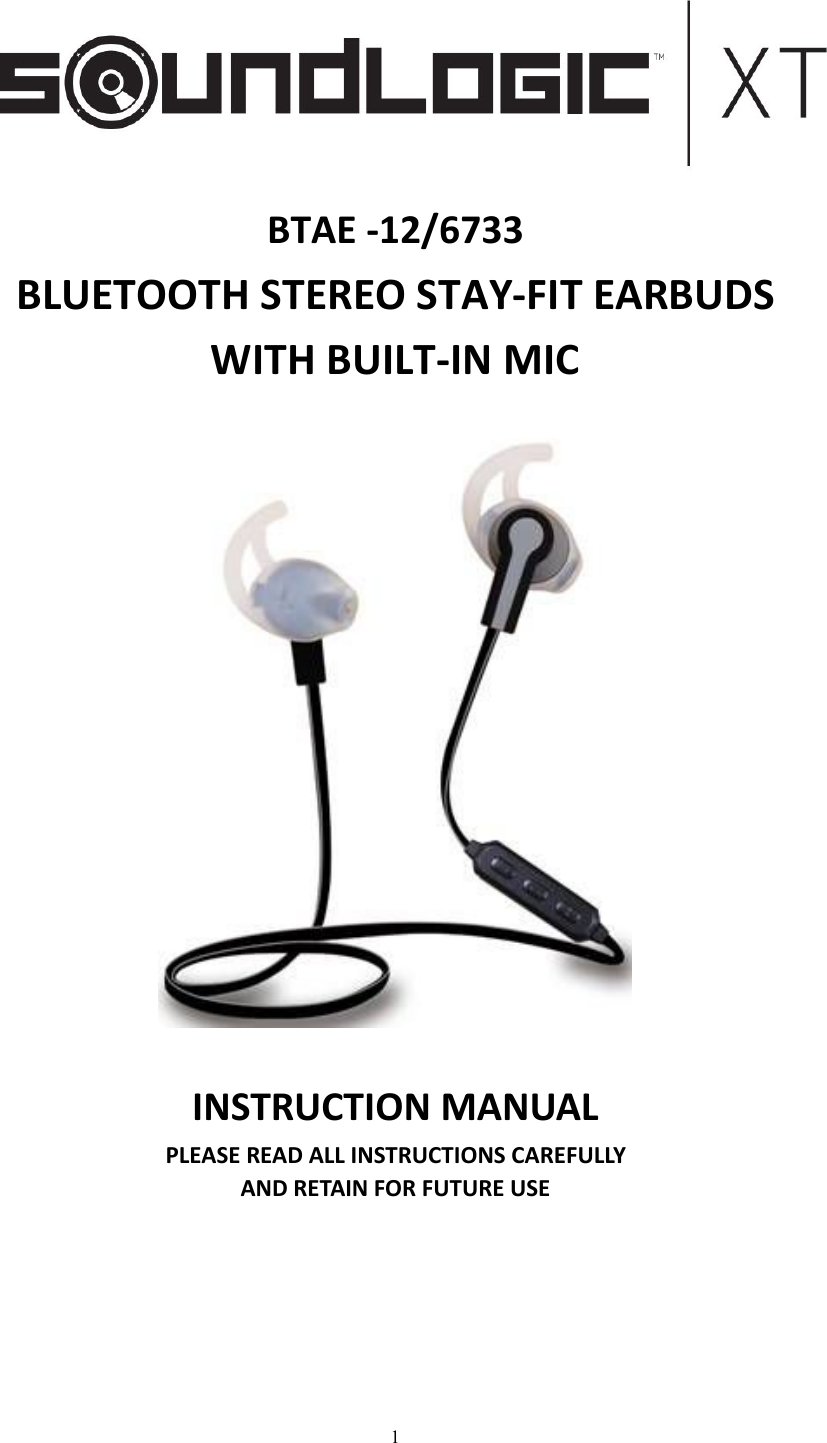
1BTAE -12/6733BLUETOOTH STEREO STAY-FIT EARBUDSWITH BUILT-IN MICINSTRUCTION MANUALPLEASE READ ALL INSTRUCTIONS CAREFULLYAND RETAIN FOR FUTURE USE
2Getting startedRemove the product from the box.Remove any packaging from the product.Please retain all packaging after you have checked and counted all the parts and the contentsagainst the list.Package ContentsBluetooth Stereo Sports EarbudsUSB charging cable2 different sizes of silicon tips includedInstruction ManualKey FeaturesEnjoy music wirelessly via Bluetooth technologyStereo SoundUSB Rechargeable (USB Cable Included)Built-in MicrophoneEasy to switch between calls and music, you will not miss the incoming call whilst listening tomusicAnswer & end a call at click of a buttonBuilt-in Volume & Media Control (pause/play)Connects to previously connected device automaticallySafety InstructionsKeep the unit away from heat sources, direct sunlight, humidity, water and any other liquids.Do not operate the unit if it has been exposed to water, moisture or any other liquids to preventagainst electric shock, explosion and/or injury to yourself and damage to the unit.Do not use the unit if it has been dropped or damaged in any way.Repairs to electrical equipment should only be performed by a qualified electrician. Improper repairsmay place the user at serious risk.Do not use the unit with wet hands.Do not put objects into any of the openings.Keep the unit free from dust, lint etc.Do not use this unit for anything other than its intended use.Keep the unit out of reach of children.This product is not a toy.Do not use the handset at excessive volume levels, as damage to hearing may occur.
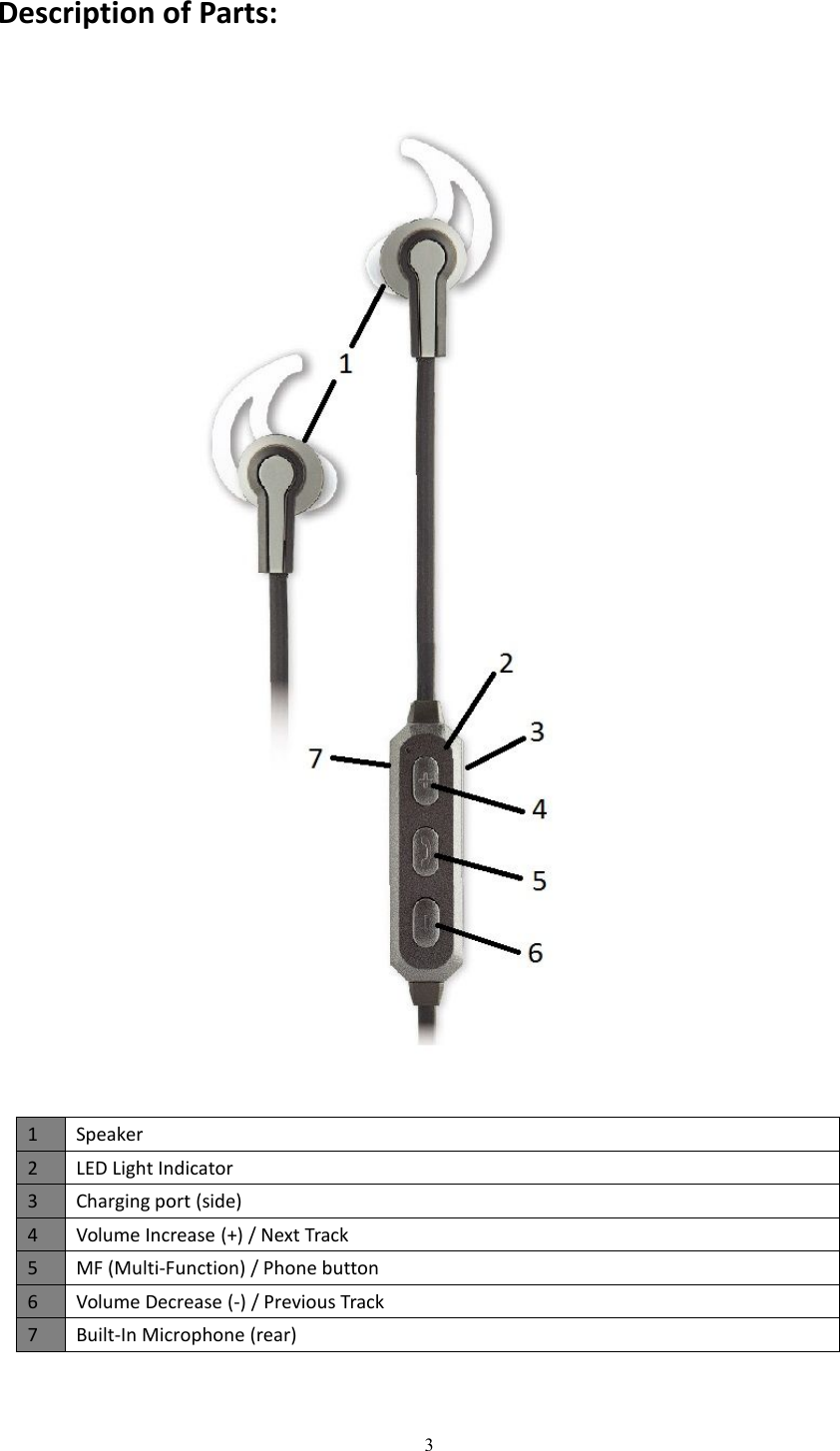
3Description of Parts:1Speaker2LED Light Indicator3Charging port (side)4Volume Increase (+) / Next Track5MF (Multi-Function) / Phone button6Volume Decrease (-) / Previous Track7Built-In Microphone (rear)
4INSTRUCTIONS FOR USECharging InstructionsThe Bluetooth Earbuds come with a built in rechargeable battery. Before using it for the first time werecommend you charge the battery fully. Only use the supplied USB Cord to charge the BluetoothEarbuds. Please charge for about 2 hours.Connect the USB charging cable to a computer USB port and the Micro USB plug to the charging portof the device. The Red LED light turns on while the device is charging. It takes around 2 hours for theunit to fully charge. When the battery is fully charged, it will change to Blue LED light.Switching on/off the devicePress and hold the MF button for 4-6 seconds to turn ON or OFF the device with sound message‘Power On’ or ‘Power Off’ correspondingly.Pairing the device with Bluetooth devices (phone or music device)Ensure the device is turned off, then press and hold the MF button for 4-6 seconds to turn on withsound message ‘Power On, Pairing’, and the LED flashes red and blue. Place the Bluetooth Earbudsand Bluetooth device (phone or music device) so that they are no further than 3 feet apart;Activate the Bluetooth function on your Bluetooth device (phone or music device). Please refer to themanufacturer’s instructions for instructions on enabling Bluetooth on your device.Once you have activated Bluetooth on your device, select the “SL BT EARBUDS” from the list ofavailable Bluetooth devices.If required, enter the password ‘0000’ to confirm & finalize pairing.Once paired successful, beep sound with message ’Connected’ will be heard and the LED flashes blue.You can now start to use the device.Please note pairing mode on the device will last for up to 30 minutes. If no devices are paired within30 minutes the device will power off automatically.If pairing is unsuccessful, turn off the device first and then re-pair following the above steps.Once you have paired the Bluetooth Earbuds with a device, the Earbuds will remember this device andwill pair automatically when the device’s Bluetooth is activated and in range. You do not need tore-pair any previously connected devices.The Bluetooth Earbuds will attempt to automatically connect to the last device it was paired withwhen switched on. If you want to pair it with a new device, please follow the steps outlined above.Once the Bluetooth Earbuds is paired with your device the music will transmit through the BluetoothEarbuds. Please refer to your device’s user manual for further information.
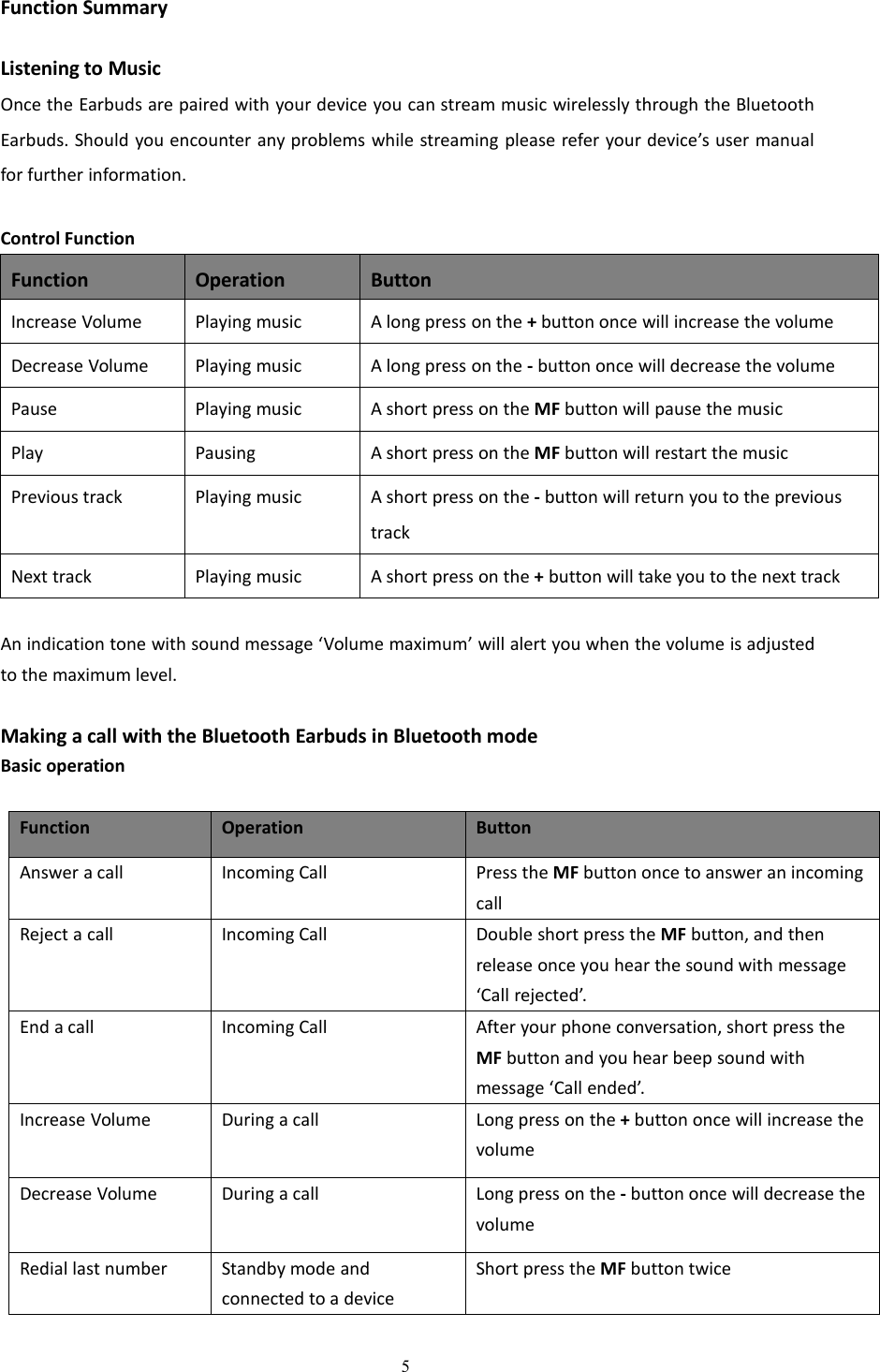
5Function SummaryListening to MusicOnce the Earbuds are paired with your device you can stream music wirelessly through the BluetoothEarbuds. Should you encounter any problems while streaming please refer your device’s user manualfor further information.Control FunctionFunctionOperationButtonIncrease VolumePlaying musicA long press on the +button once will increase the volumeDecrease VolumePlaying musicA long press on the -button once will decrease the volumePausePlaying musicA short press on the MF button will pause the musicPlayPausingA short press on the MF button will restart the musicPrevious trackPlaying musicA short press on the -button will return you to the previoustrackNext trackPlaying musicA short press on the +button will take you to the next trackAn indication tone with sound message ‘Volume maximum’ will alert you when the volume is adjustedto the maximum level.Making a call with the Bluetooth Earbuds in Bluetooth modeBasic operationFunctionOperationButtonAnswer a callIncoming CallPress the MF button once to answer an incomingcallReject a callIncoming CallDouble short press the MF button, and thenrelease once you hear the sound with message‘Call rejected’.End a callIncoming CallAfter your phone conversation, short press theMF button and you hear beep sound withmessage ‘Call ended’.Increase VolumeDuring a callLong press on the +button once will increase thevolumeDecrease VolumeDuring a callLong press on the -button once will decrease thevolumeRedial last numberStandby mode andconnected to a deviceShort press the MF button twice
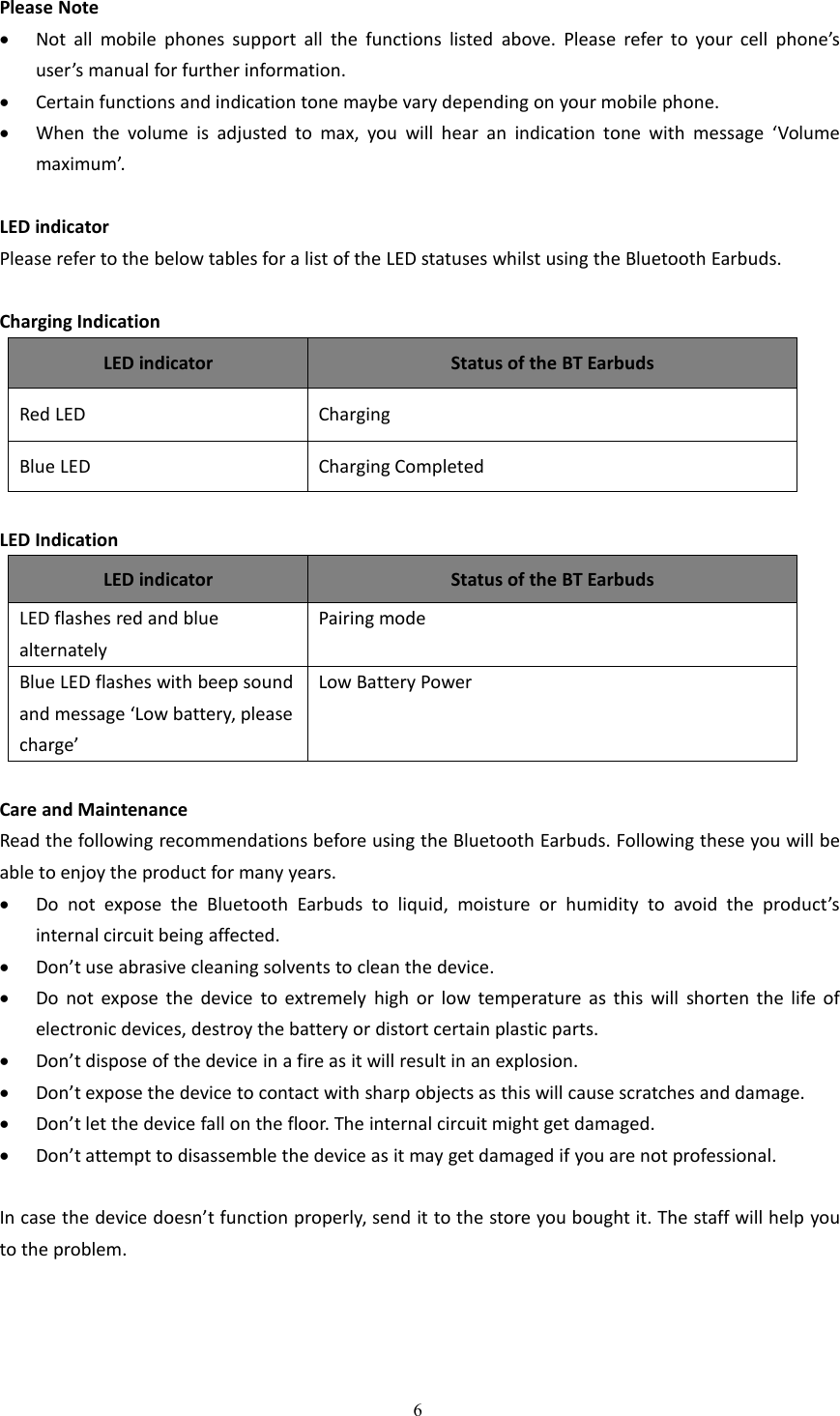
6Please NoteNot all mobile phones support all the functions listed above. Please refer to your cell phone’suser’s manual for further information.Certain functions and indication tone maybe vary depending on your mobile phone.When the volume is adjusted to max, you will hear an indication tone with message ‘Volumemaximum’.LED indicatorPlease refer to the below tables for a list of the LED statuses whilst using the Bluetooth Earbuds.Charging IndicationLED indicatorStatus of the BT EarbudsRed LEDChargingBlue LEDCharging CompletedLED IndicationLED indicatorStatus of the BT EarbudsLED flashes red and bluealternatelyPairing modeBlue LED flashes with beep soundand message ‘Low battery, pleasecharge’Low Battery PowerCare and MaintenanceRead the following recommendations before using the Bluetooth Earbuds. Following these you will beable to enjoy the product for many years.Do not expose the Bluetooth Earbuds to liquid, moisture or humidity to avoid the product’sinternal circuit being affected.Don’t use abrasive cleaning solvents to clean the device.Do not expose the device to extremely high or low temperature as this will shorten the life ofelectronic devices, destroy the battery or distort certain plastic parts.Don’t dispose of the device in a fire as it will result in an explosion.Don’t expose the device to contact with sharp objects as this will cause scratches and damage.Don’t let the device fall on the floor. The internal circuit might get damaged.Don’t attempt to disassemble the device as it may get damaged if you are not professional.In case the device doesn’t function properly, send it to the store you bought it. The staff will help youto the problem.
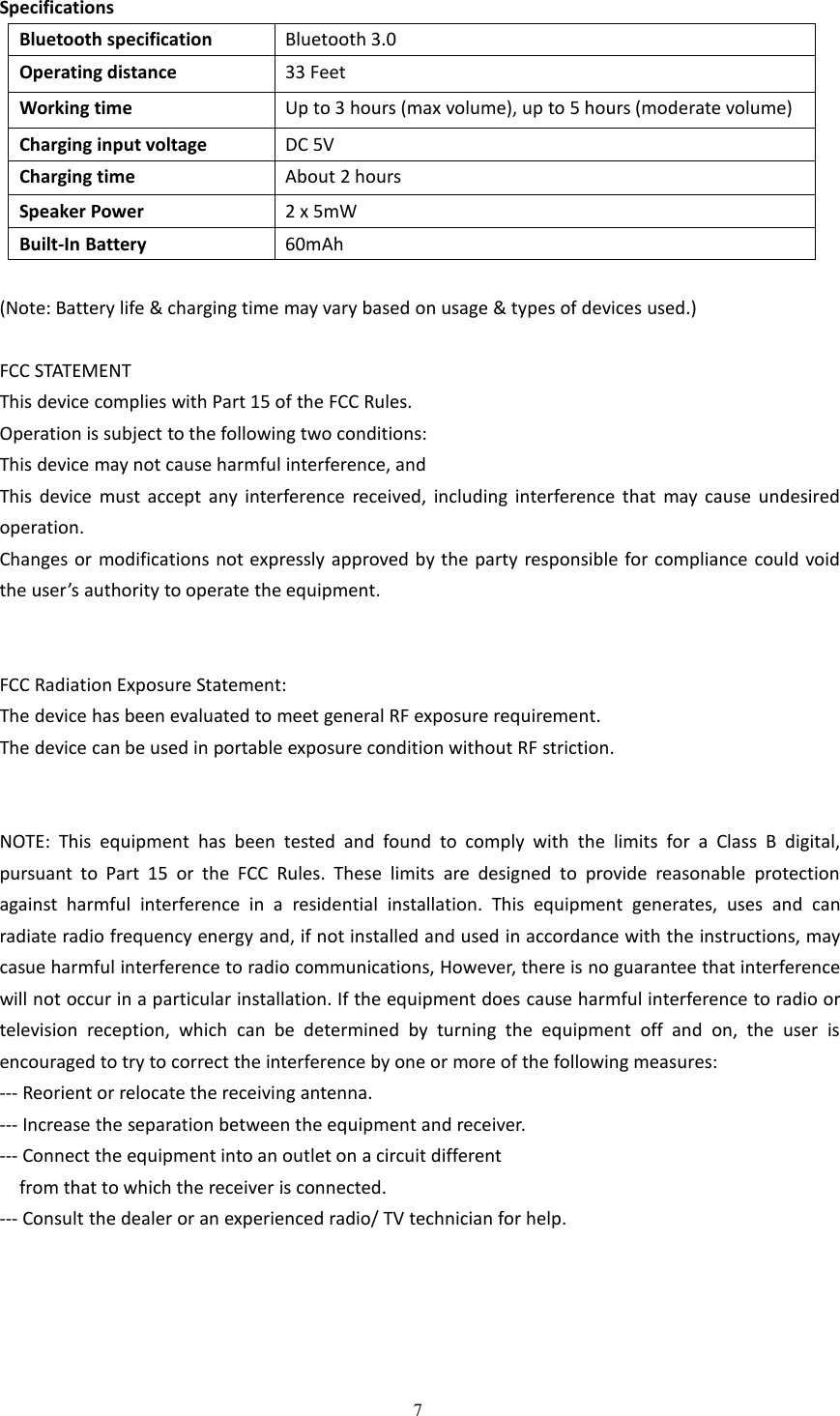
7SpecificationsBluetooth specificationBluetooth 3.0Operating distance33 FeetWorking timeUp to 3 hours (max volume), up to 5 hours (moderate volume)Charging input voltageDC 5VCharging timeAbout 2 hoursSpeaker Power2 x 5mWBuilt-In Battery60mAh(Note: Battery life & charging time may vary based on usage & types of devices used.)FCC STATEMENTThis device complies with Part 15 of the FCC Rules.Operation is subject to the following two conditions:This device may not cause harmful interference, andThis device must accept any interference received, including interference that may cause undesiredoperation.Changes or modifications not expressly approved by the party responsible for compliance could voidthe user’s authority to operate the equipment.FCC Radiation Exposure Statement:The device has been evaluated to meet general RF exposure requirement.The device can be used in portable exposure condition without RF striction.NOTE: This equipment has been tested and found to comply with the limits for a Class B digital,pursuant to Part 15 or the FCC Rules. These limits are designed to provide reasonable protectionagainst harmful interference in a residential installation. This equipment generates, uses and canradiate radio frequency energy and, if not installed and used in accordance with the instructions, maycasue harmful interference to radio communications, However, there is no guarantee that interferencewill not occur in a particular installation. If the equipment does cause harmful interference to radio ortelevision reception, which can be determined by turning the equipment off and on, the user isencouraged to try to correct the interference by one or more of the following measures:--- Reorient or relocate the receiving antenna.--- Increase the separation between the equipment and receiver.--- Connect the equipment into an outlet on a circuit differentfrom that to which the receiver is connected.--- Consult the dealer or an experienced radio/ TV technician for help.
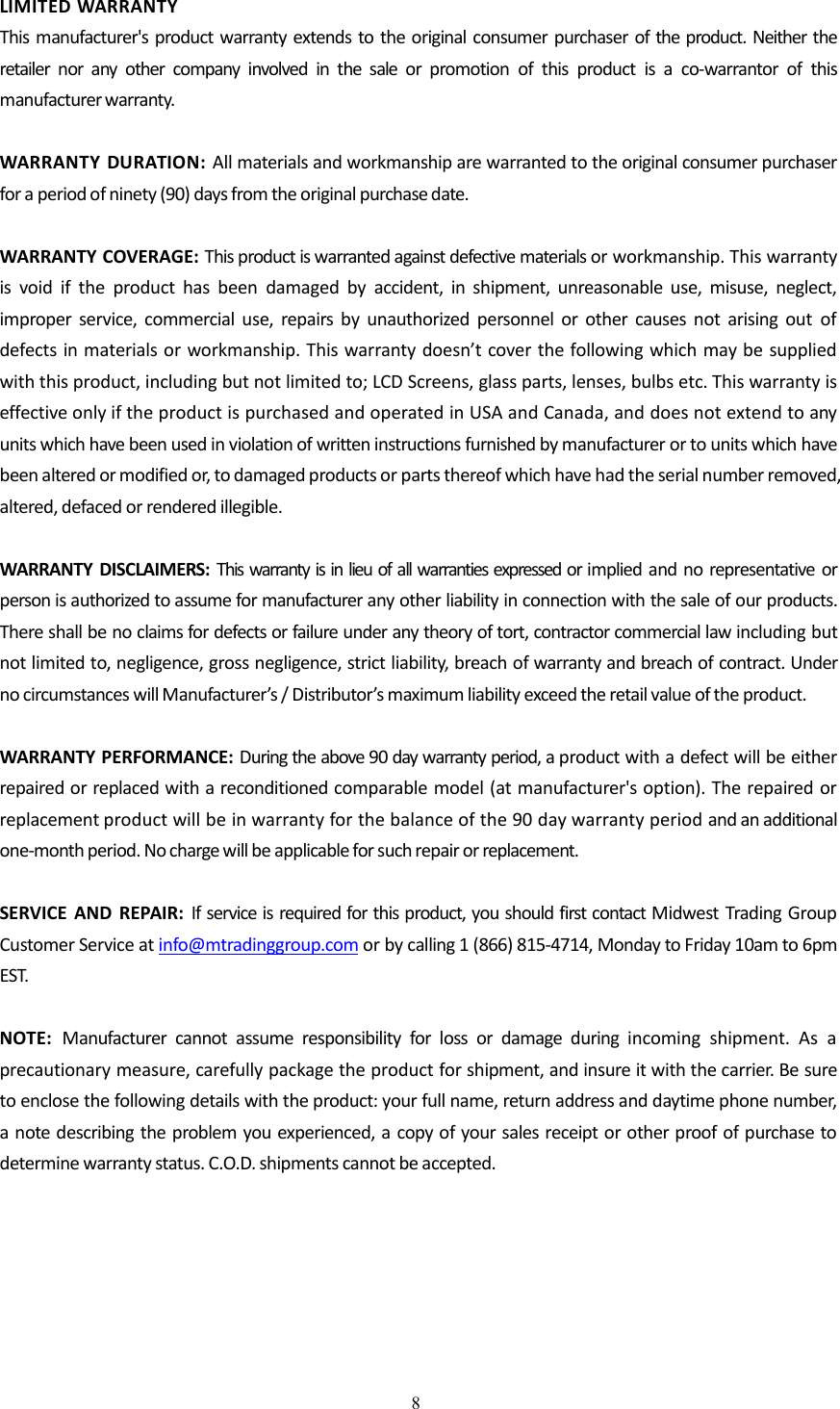
8LIMITED WARRANTYThis manufacturer's product warranty extends to the original consumer purchaser of the product. Neither theretailer nor any other company involved in the sale or promotion of this product is a co-warrantor of thismanufacturer warranty.WARRANTY DURATION: All materials and workmanship are warranted to the original consumer purchaserfor a period of ninety (90) days from the original purchase date.WARRANTY COVERAGE: This product is warranted against defective materials or workmanship. This warrantyis void if the product has been damaged by accident, in shipment, unreasonable use, misuse, neglect,improper service, commercial use, repairs by unauthorized personnel or other causes not arising out ofdefects in materials or workmanship. This warranty doesn’t cover the following which may be suppliedwith this product, including but not limited to; LCD Screens, glass parts, lenses, bulbs etc. This warranty iseffective only if the product is purchased and operated in USA and Canada, and does not extend to anyunits which have been used in violation of written instructions furnished by manufacturer or to units which havebeen altered or modified or, to damaged products or parts thereof which have had the serial number removed,altered, defaced or rendered illegible.WARRANTY DISCLAIMERS: This warranty is in lieu of all warranties expressed or implied and no representative orperson is authorized to assume for manufacturer any other liability in connection with the sale of our products.There shall be no claims for defects or failure under any theory of tort, contractor commercial law including butnot limited to, negligence, gross negligence, strict liability, breach of warranty and breach of contract. Underno circumstances will Manufacturer’s / Distributor’s maximum liability exceed the retail value of the product.WARRANTY PERFORMANCE: During the above 90 day warranty period, a product with a defect will be eitherrepaired or replaced with a reconditioned comparable model (at manufacturer's option). The repaired orreplacement product will be in warranty for the balance of the 90 day warranty period and an additionalone-month period. No charge will be applicable for such repair or replacement.SERVICE AND REPAIR: If service is required for this product, you should first contact Midwest Trading GroupCustomer Service at info@mtradinggroup.com or by calling 1 (866) 815-4714, Monday to Friday 10am to 6pmEST.NOTE: Manufacturer cannot assume responsibility for loss or damage during incoming shipment. As aprecautionary measure, carefully package the product for shipment, and insure it with the carrier. Be sureto enclose the following details with the product: your full name, return address and daytime phone number,a note describing the problem you experienced, a copy of your sales receipt or other proof of purchase todetermine warranty status. C.O.D. shipments cannot be accepted.

Navigation menu