CONTOUR VAMWL UNIMOUSE-WL User Manual BW User Guide 17x5 0100617 FINAL wireless

CONTOUR (GUANGZHOU) DESIGN, INC. UNIMOUSE-WL BW User Guide 17x5 0100617 FINAL wireless

User Manual

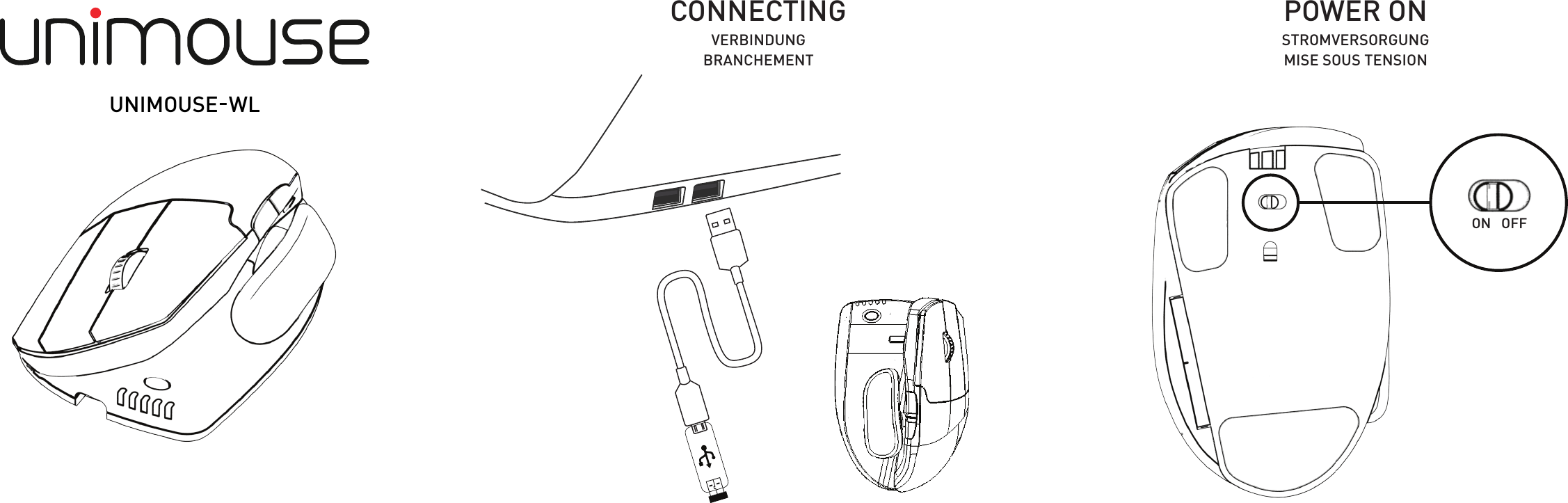
ON   OFFCONNECTING POWER ONSTROMVERSORGUNGMISE SOUS TENSIONVERBINDUNGBRANCHEMENTUNIMOUSE  WL -
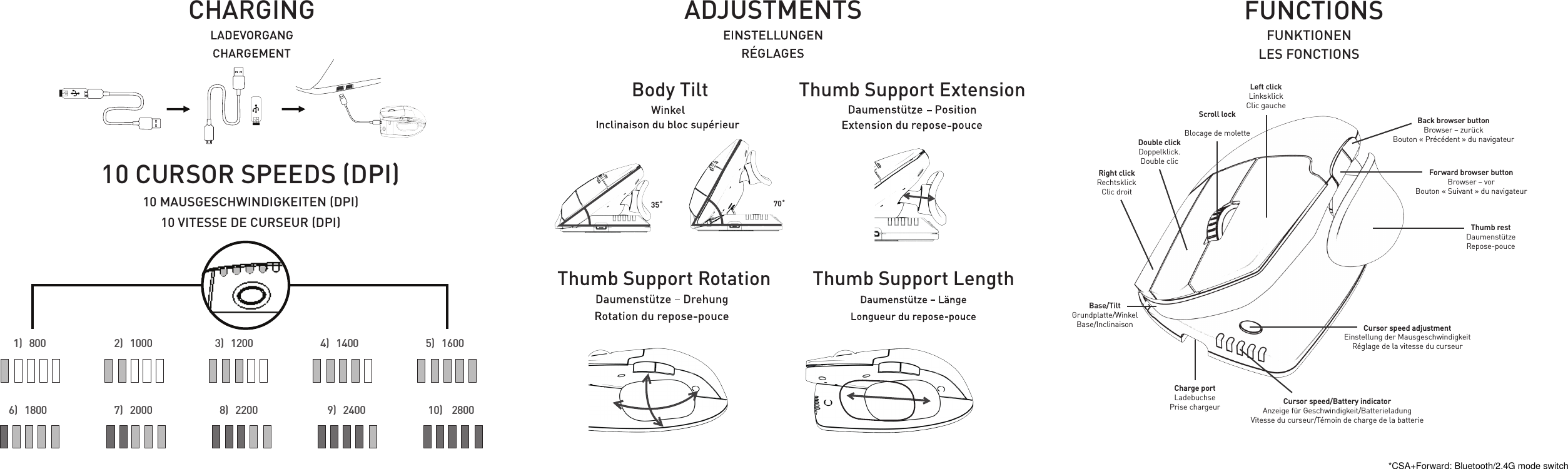
  1)   800           2)   1000                           3)   1200                4)   1400                     5)   1600 6)   1800           7)   2000             8)   2200                    9)   2400                      10)    2800 ADJUSTMENTSCHARGING10 CURSOR SPEEDS (DPI)35˚ 70˚Body TiltThumb Support RotationThumb Support ExtensionThumb Support Length10 MAUSGESCHWINDIGKEITEN (DPI)10 VITESSE DE CURSEUR (DPI)Cursor speed/Battery indicatorAnzeige für Geschwindigkeit/BatterieladungVitesse du curseur/Témoin de charge de la batterieCharge portLadebuchsePrise chargeurThumb restDaumenstützeRepose-pouceBase/TiltGrundplatte/WinkelBase/InclinaisonRight clickRechtsklick Clic droitDouble clickDoppelklick.Double clicScroll lockBlocage de moletteLeft clickLinksklickClic gaucheCursor speed adjustmentEinstellung der MausgeschwindigkeitRéglage de la vitesse du curseurForward browser buttonBrowser – vorBouton « Suivant » du navigateurBack browser buttonBrowser – zurückBouton « Précédent » du navigateurFUNCTIONSFUNKTIONENLES FONCTIONS*CSA+Forward: Bluetooth/2.4G mode switch
For more information please visit:www.contourdesign.comContour Design, Inc. 10 Industrial DriveWindham, New Hampshire 03087, USAPhone: (603) 893-4556Email: ergoinfo@contourdesign.comContour Design Nordic A/SInternational HouseCenter Boulevard 52300 Copenhagen S. DenmarkPhone: +45 32 46 11 20Email: info@contour-design.comTested to comply with FCC and IC standards  FCC StatementThis equipment has been tested and found to comply with the limits for a Class B digital device, pursuant to Part 15 of the FCC Rules. These limits are designed to provide reasonable protection against harmful interference in a residential installation. This equipment generates uses and can radiate radio frequency energy and, if not installed and used in accordance with the instructions, may cause harmful interference to radio communications. However, there is no guarantee that interference will not occur in a particular installation. If this equipment does cause harmful interference to radio or television reception, which can be determined by turning the equipment off and on, the user is encouraged to try to correct the interference by one or more of the following measures:- Reorient or relocate the receiving antenna.- Increase the separation between the equipment and receiver.- Connect the equipment into an outlet on a circuit different from that to which the receiver is connected.- Consult the dealer or an experienced radio/TV technician for help.This device complies with part 15 of the FCC rules. Operation is subject to the following two conditions (1) this device may not cause harmful interference, and (2) this device must accept any interference received, including interference that may cause undesired operation.IC StatementThis device complies with Industry Canada’s licence-exempt RSSs. Operation is subject to the following two conditions: (1) This device may not cause interference; and (2) This device must accept any interference, including interference that may cause undesired operation of the device. Le présent appareil est conforme aux CNR d’Industrie Canada applicable aux appareils radio exempts de licence. L’exploitation est autorisée aux deux conditions suivantes : (1) l’appareil ne doit pas produire de brouillage,et (2) l’utilisateur de l’appareil doit accepter tout brouillage radioélectrique subi, même si le brouillage est susceptible d’en compromettre le fonctionnementWarrantyIf there is a functional defect due to faulty manufacturing, we will replace the product. This warranty does not cover damage that results from misuse of the product. Attention!If you attempt to dismantle your RollerMouse, you will invalidate your warranty.

Navigation menu