Capital Prospect PR318 Remote control/Security Device Transceiver User Manual mPR318

Capital Prospect Ltd Remote control/Security Device Transceiver mPR318

Contents

User manual_revised1

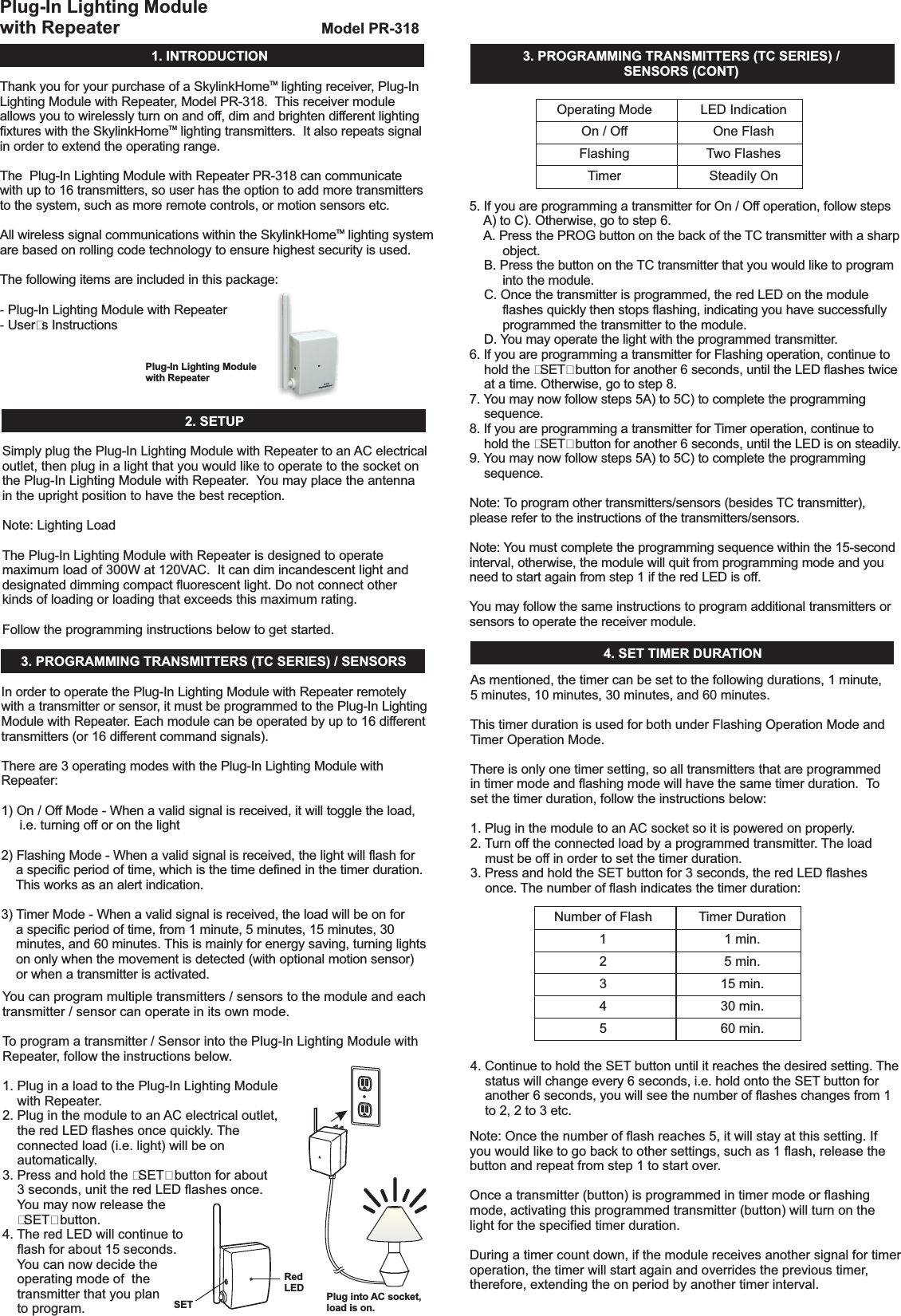
1.INTRODUCTIONPlug-In Lighting Modulewith RepeaterRedLED Plug into AC socket,load is on.SETModelPR-318Thank you for your purchase of a Skylink lighting receiver, Plug-InLighting Module with Repeater, Model PR-318. This receiver moduleallows you to wirelessly turn on and off, dim and brighten different lightingfixtures with the Skylink lighting transmitters. It also repeats signalin order to extend the operating range.The Plug-In Lighting Module with Repeater PR-318 can communicatewith up to 16 transmitters, so user has the option to add more transmittersto the system, such as more remote controls, or motion sensors etc.All wireless signal communications within the Skylink lighting systemare based on rolling code technology to ensure highest security is used.User’s InstructionsHomeHomeHomeThe following items are included in this package:Plug-In Lighting Module with RepeaterTMTMTM--2.SETUPPlug-InLightingModulewithRepeaterSimplyplugthePlug-InLightingModulewithRepeatertoan ACelectricaloutlet,thenpluginalightthatyouwouldliketooperatetothesocketonthePlug-InLightingModulewithRepeater. Youmayplacetheantennaintheuprightpositiontohavethebestreception.Followtheprogramminginstructionsbelowtogetstarted.Plug-InLightingModulewithRepeaterNote:LightingLoadThe isdesignedtooperatemaximumloadof300Wat120VAC.Itcandimincandescentlightanddesignateddimmingcompactfluorescentlight.Donotconnectotherkindsofloadingorloadingthatexceedsthismaximumrating.3. PROGRAMMINGTRANSMITTERS(TCSERIES)/SENSORS 4.SETTIMERDURATION3. PROGRAMMINGTRANSMITTERS(TCSERIES)/SENSORS(CONT)In order to operate the Plug-In Lighting Module with Repeater remotelywith a transmitter or sensor, it must be programmed to the Plug-In LightingModule with Repeater. Each module can be operated by up to 16 differenttransmitters (or 16 different command signals).There are 3 operating modes with the Plug-In Lighting Module withRepeater:1) On / Off Mode - When a valid signal is received, it will toggle the load,i.e. turning off or on the light2) Flashing Mode - When a valid signal is received, the light will flash fora specific period of time, which is the time defined in the timer duration.This works as an alert indication.3) Timer Mode - When a valid signal is received, the load will be on fora specific period of time, from 1 minute, 5 minutes, 15 minutes, 30minutes, and 60 minutes. This is mainly for energy saving, turning lightson only when the movement is detected (with optional motion sensor)or when a transmitter is activated.Youcanprogrammultipletransmitters/sensorstothemoduleandeachtransmitter/sensorcanoperateinitsownmode.Toprogramatransmitter/SensorintothePlug-InLightingModulewithRepeater,followtheinstructionsbelow.1.PluginaloadtothePlug-InLightingModulewithRepeater.2.Pluginthemoduletoan ACelectricaloutlet,theredLEDflashesoncequickly. Theconnectedload(i.e.light)willbeonautomatically.3.Pressandholdthe“SET”buttonforabout3seconds,unittheredLEDflashesonce.Youmaynowreleasethe“SET”button.4. TheredLEDwillcontinuetoflashforabout15seconds.Youcannowdecidetheoperatingmodeofthetransmitterthatyouplantoprogram.OperatingModeOn/OffFlashingTimerNumberofFlash12345LEDIndicationOneFlashTwoFlashesSteadilyOnTimerDuration1min.5 min.15min.30min.60min.5. If you are programming a transmitter for On / Off operation, follow stepsA) to C). Otherwise, go to step 6.A. Press the PROG button on the back of the TC transmitter with a sharpobject.B. Press the button on the TC transmitter that you would like to programinto the module.C. Once the transmitter is programmed, the red LED on the moduleflashes quickly then stops flashing, indicating you have successfullyprogrammed the transmitter to the module.D. You may operate the light with the programmed transmitter.6. If you are programming a transmitter for Flashing operation, continue tohold the “SET” button for another 6 seconds, until the LED flashes twiceat a time.7. You may now follow steps 5A) to 5C) to complete the programmingsequence.8. If you are programming a transmitter for Timer operation,hold the “SET” button for another 6 seconds, until the LED is on steadily.9. You may now follow steps 5A) to 5C) to complete the programmingsequence.Note: You must complete the programming sequence within the 15-secondinterval, otherwise, the module will quit from programming mode and youneed to start again from step 1 if the red LED is off.You may follow the same instructions to program additional transmitters orsensors to operate the receiver module.Otherwise, go to step 8.continue toNote: To program other transmitters/sensors (besides TC transmitter),please refer to the instructions of the transmitters/sensors.As mentioned, the timer can be set to the following durations, 1 minute,5 minutes, 10 minutes, 30 minutes, and 60 minutes.There is only one timer setting, so all transmitters that are programmedin timer mode and flashing mode will have the same timer duration. Toset the timer duration, follow the instructions below:1. Plug in the module to an AC socket so it is powered on properly.2. Turn off the connected load by a programmed transmitter. The loadmust be off in order to set the timer duration.3. Press and hold the SET button for 3 seconds, the red LED flashesonce. The number of flash indicates the timer duration:4. Continue to hold the SET button until it reaches the desired setting. Thestatus will change every 6 seconds, i.e. hold onto the SET button foranother 6 seconds, you will see the number of flashes changes from 1to 2, 2 to 3 etc.This timer duration is used for both under Flashing Operation Mode andTimer Operation Mode.Note:Oncethenumberofflashreaches5,itwillstayatthissetting.Ifyouwouldliketogobacktoothersettings,suchas1flash,releasethebuttonandrepeatfromstep1tostartover.Onceatransmitter(button)isprogrammedintimermodeorflashingmode,activatingthisprogrammedtransmitter(button)willturnonthelightforthespecifiedtimerduration.Duringatimercountdown,ifthemodulereceivesanothersignalfortimeroperation,thetimerwillstartagainandoverridestheprevioustimer,therefore,extendingtheonperiodbyanothertimerinterval.
5. OPERATINGMODESThe cancontrolthelightin2differentoperatingmodes.1)On/OffMode- Allowsoperatingthelighteitheronandoff,withoutdimmingfunction.2)DimmingMode- Allowsoperatingthelightinon,offanddimming(dim/brighten)modes.Lightmustbeeitherincandescentlightanddesignateddimmingcompactfluorescentlight.ThefactorydefaultoperatingmodeisOn/Offmode.However,ifyourlightisdimmable,youmaychangetheoperatingmodetoDimmingMode. Tochangetheoperatingmodes,pleasefollowtheinstructionsbelow.1. Turnonthelightbytheprogrammedtransmitter.2.Pressandholdontoabuttononthetransmitterthatisprogrammedtothemodulefor10seconds.3. Thelightwillflash.Ifitflashesonce,thatmeansitisinOn/OffMode.Ifthelightflashestwice,thatmeansitisinDimmingMode.4.Repeatingstep3abovewilltogglethesettingbetweenOn/OffModeandDimmingMode.Plug-InLightingModulewithRepeater6.ON/OFFOPERATIONThe PR-318 allows on / off operation,when the programmed button is activate, it will transmit a signal to toggleits current status. For example, if a signal is received when the light is off,that signal will turn on the light.Plug-In Lighting Module with RepeaterNote:When used with Compact Fluorescent Light, if there is flickering when youswitch off the light, it is recommended you replace a different CompactFluorescent Light with higher quality.7.BRIGHTNESSCONTROL OPERATION8.FLASHINGOPERATINGMODEBesidesturningonandoffthelight,youmayalsocontrolthebrightnessofthelightifthereceivermoduleandthelightbulbisdimmable,i.e.eitherincandescentlightanddesignateddimmingcompactfluorescentlight.Tochangethebrightness,firstturnonthelight.Pressandholdtheprogrammedbuttononthetransmitterwillchangeitsbrightness.Holdontothebuttonuntilthedesiredbrightnessisreached,thenreleasethebutton.Pressandholdthesamebuttonagainonthetransmittertochangethebrightnessagainintheoppositeway(i.e.Dimtobrightenorbrightentodim),untilthedesiredbrightnessisreached,thenreleasethebutton.10.ZONEOPERATION10.ZONEOPERATION(CONT)ZoneOperationOn/OffA ZoneCommandallowsyoutooperatemultiplelightsatthesametimeinthesamezone. YoumayturnOnorOffazone.Toactivatethezonecommand,simplypress“ZoneOn”or“ZoneOff”,thenthezonenumber.Pressing[ZoneOn]then[1]willturnonalllightsinzone1.Pressing[ZoneOff]then[3]willturnoffalllightsinzone3.ZoneOperationBrightnessControlYoucanalsochangethebrightnessofallthelightsinthatzone,ifthereceivermodulesandlightsconnectedaredimmable.[ZoneOn]representsincreaseinbrightnesslevel,i.e.Brightening[ZoneOff]representsdecreaseinbrightnesslevel,i.e.DimmingPress[ZoneOn]thenhold[1]willbrightenalllightsinzone1,releasethebuttonatthedesiredbrightnessleveloritwillstopuntiltheyareatthemaximumbrightness.Press[ZoneOff]thenhold[1]willdimalllightsinzone1,releasethebuttonatthedesiredbrightnessleveloritwillstopuntiltheyareattheminimumbrightness.11. ERASINGTRANSMITTERSFROMTHEMODULE12.REPEATERYoumayeraseatransmitterorsensorfromthemodule,butyoucannoteraseaspecificdevice,youmusteraseallthewirelessdevices,thenprogramtheonesyouwanttokeep.Followtheinstructionsbelowtoeraseprogrammedtransmitters/sensors.1.PoweroffthePlug-InLightingModulewithRepeaterbyremovingitfromthe ACsocket.2.PressandholdtheSET button,whileholdingontotheSET button,pluginthemoduletoan ACsocket.3. TheredLEDwillbeonfirst,thenflashesrapidlyfor1second.4. YoumayreleasetheSET button,thelightconnectedtothemoduleisnowon,indicatingyouhavesuccessfullyerasedallthedevicesfromthelightingreceiver.5. Youmayremovethemodulefromthesockettopoweritoffcompletely.Press and hold the SETbutton while pluggingit in to an AC socketThePlug-InLightingModulewithRepeatercanalsorepeatwirelesssignalsfromotherSkylink lightingsystemdevices. Thisincreasestheoperatingdistanceoreliminatesdeadspots.HomeTMAsageneralruleofthumb,ifyouareexperiencingdeadspots,youmayplacethePlug-InLightingModulewithRepeaterinthemiddleofthehousetoseeifyoucaneliminatethedeadspots.Ifso,youcanleavethePlug-InLightingModulewithRepeaterinthemiddleofthehouse.Ifthedeadspotstillexceeds,youcanplacethePlug-InLightingModulewithRepeatersomewherebetweenthetransmitterandthereceiveruntilyouexperiencenodeadspots.Youcanhaveamaximumnumberof3repeatersoperatinginonepremises.However,unlessitisnecessary,itissuggestedtokeepthenumberofrepeatertoasfewaspossibletoreducethenumberofwirelesssignals.IfatransmitterorasensorisprogrammedtothePlug-InLightingModulewithRepeaterundertheflashingmode,whenthattransmitterisactivated,thelightconnectedwillflashforthepredeterminedtimerinterval. Afterthetimerinterval,thelightwillbeoff.9.TIMEROPERATINGMODEIfatransmitterorasensorisprogrammedtothePlug-InLightingModulewithRepeaterunderthetimermode,whenthattransmitterisactivated,thelightconnectedwillbeonforthepredeterminedtimerinterval. Afterthetimerinterval,thelightwillbeoff.TC TransmitterRepeaterrepeating signal1st PR-318 2nd PR-318Receiving signalProgrammingZoneCommandEnter[ZoneOn]+[ZoneNumber]duringstep5Boftheprogrammingsequence(ensureon/offoperatingmodeisselected),theZoneCommandsignalwouldbeprogrammed.Repeatthisstepforallthereceivermodulesinthesamezone.
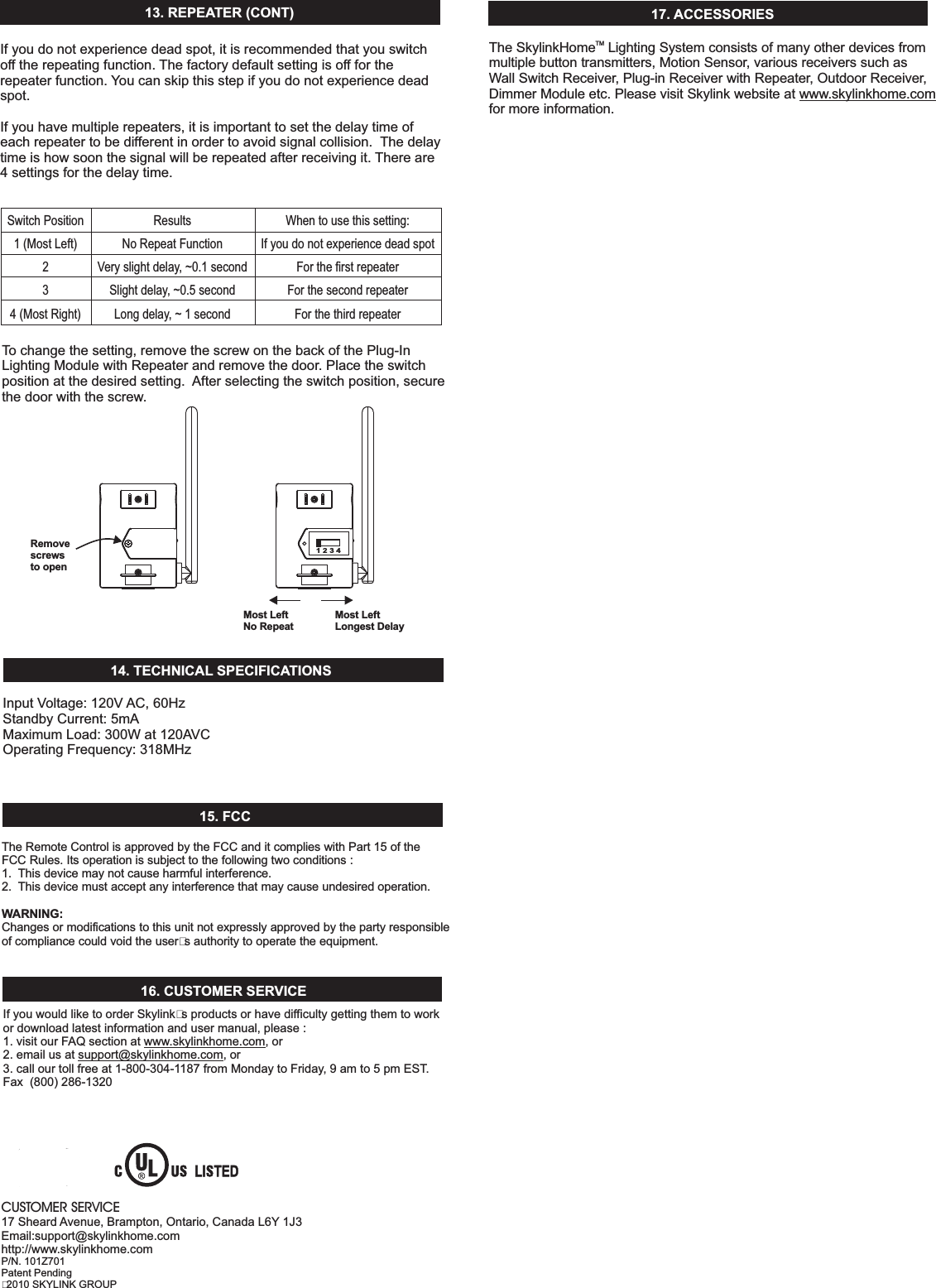
13.REPEATER(CONT)SwitchPosition1(MostLeft)4(MostRight)23ResultsNoRepeatFunctionVeryslightdelay,~0.1secondSlightdelay,~0.5secondLongdelay,~1secondWhentousethissetting:IfyoudonotexperiencedeadspotForthefirstrepeaterForthesecondrepeaterForthethirdrepeaterTochangethesetting,removethescrewonthebackofthePlug-InLightingModulewithRepeaterandremovethedoor.Placetheswitchpositionatthedesiredsetting. Afterselectingtheswitchposition,securethedoorwiththescrew.InputVoltage:120V AC,60HzStandbyCurrent:5mAMaximumLoad:300Wat120AVCOperatingFrequency:318MHz14. TECHNICAL SPECIFICATIONS15.FCCTheRemoteControlisapprovedbytheFCCanditcomplieswithPart15oftheFCCRules.Itsoperationissubjecttothefollowingtwoconditions:1. Thisdevicemaynotcauseharmfulinterference.2. Thisdevicemustacceptanyinterferencethatmaycauseundesiredoperation.Changesormodificationstothisunitnotexpresslyapprovedbythepartyresponsibleofcompliancecouldvoidtheuser’sauthoritytooperatetheequipment.WARNING:16.CUSTOMERSERVICEIfyouwouldliketoorderSkylink’sproductsorhavedifficultygettingthemtoworkordownloadlatestinformationandusermanual,please:1.visitourFAQsectionat ,or2.emailusat ,or3.callourtollfreeat1-800-304-1187fromMondaytoFriday,9amto5pmEST.Fax(800)286-1320www.skylinkhome.comsupport@skylinkhome.com17. ACCESSORIESCUSTOMERSERVICE17Sheard Avenue,Brampton,Ontario,CanadaL6Y 1J3Email:support@skylinkhome.comhttp://www.skylinkhome.comP/N.101Z701PatentPending©2010SKYLINKGROUPRemovescrewsto openMost LeftNo Repeat1234TheSkylink LightingSystemconsistsofmanyotherdevicesfrommultiplebuttontransmitters,MotionSensor,variousreceiverssuchasWallSwitchReceiver,Plug-inReceiverwithRepeater,OutdoorReceiver,DimmerModuleetc.PleasevisitSkylinkwebsiteatformoreinformation.www.skylinkhome.comHomeTMMost LeftLongest DelayIfyoudonotexperiencedeadspot,itisrecommendedthatyouswitchofftherepeatingfunction. Thefactorydefaultsettingisofffortherepeaterfunction. Youcanskipthisstepifyoudonotexperiencedeadspot.Ifyouhavemultiplerepeaters,itisimportanttosetthedelaytimeofeachrepeatertobedifferentinordertoavoidsignalcollision. Thedelaytimeishowsoonthesignalwillberepeatedafterreceivingit. Thereare4settingsforthedelaytime.

Navigation menu