Cicor Deutschland 01MONILOG MONI LOG EnDaL smart User Manual 15 EnDaL smart UserMan

SMT&Hybrid; GmbH MONI LOG EnDaL smart 15 EnDaL smart UserMan

15_EnDaL_smart_UserMan

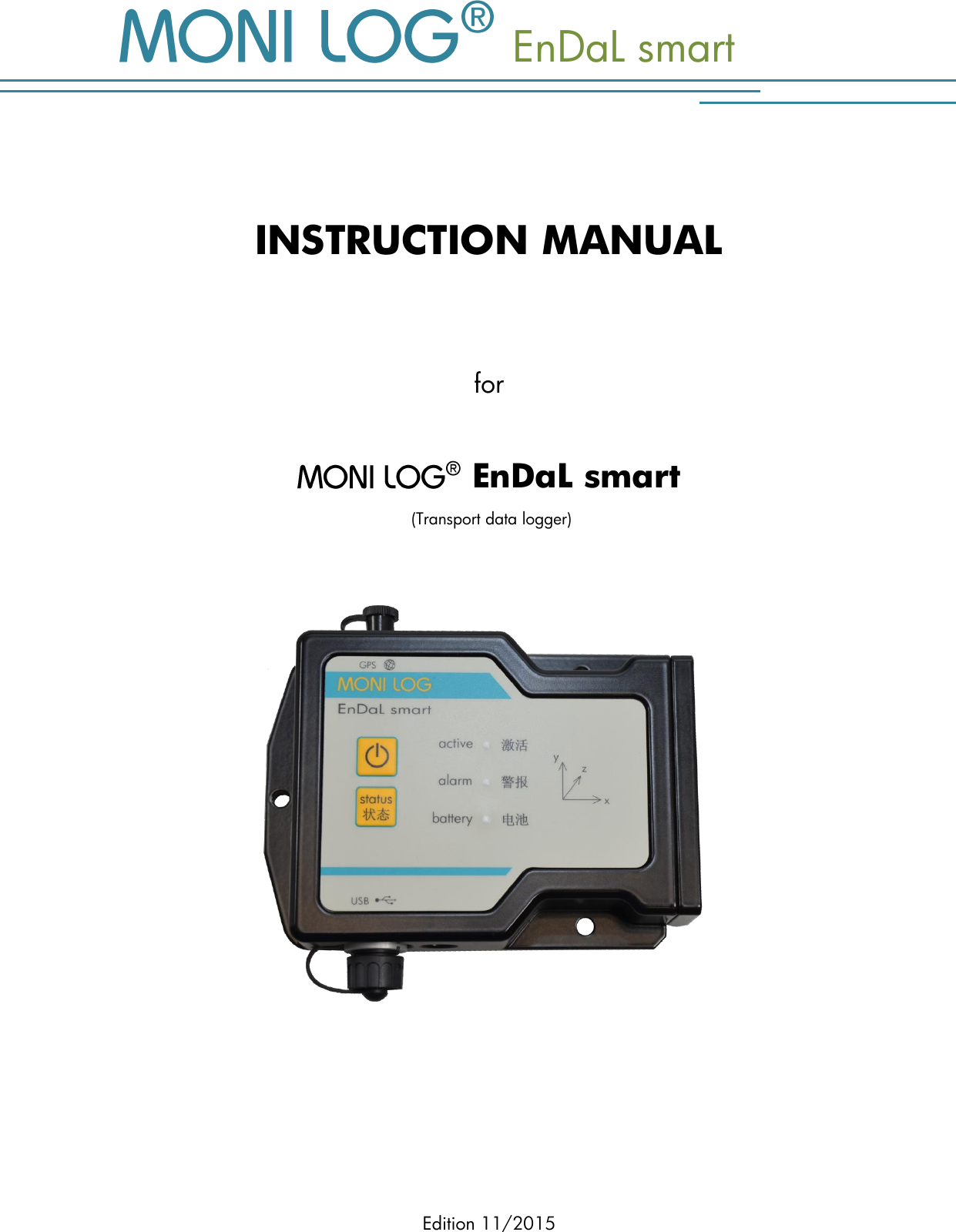
  EnDaL smart Edition 11/2015   INSTRUCTION MANUAL   for    EnDaL smart  (Transport data logger)
  EnDaL smart  PRODUCT CERTIFICATION - 1 - P R OD U CT  C ERTI F ICATION   This device complies with part 15 of the FCC Rules. Operation is subject to the following two conditions: (1) This device may not cause harmful interference, and (2) this device must accept any interference received, including interference that may cause undesired operation. Modifications not expressly approved by this company could void the user's authority to operate the equipment.  This equipment has been tested and found to comply with the limits for a Class A digital device, pursuant to part 15 of the FCC Rules. These limits are designed to provide reasonable protection against harmful interference when the equipment is operated in a commercial environment. This equipment generates, uses, and can radiate radio frequency energy and, if not installed and used in accordance with the instruction manual, may cause harmful interference to radio communications. Operation of this equipment in a residential area is likely to cause harmful interference in which case the user will be required to correct the interference at his own expense.   This device complies with Industry Canada’s RSS-310. Operation is subject to the condition that this device must not cause harmful interference and must accept any interference, including interference that may cause undesired operation of the device.  Cet appareil est conforme à la norme RSS-310 d'Industrie Canada. L'opération est soumise à la condition que ce dispositif ne doit pas causer d'interférence nuisible et doit accepter toute interférence, y compris les interférences qui peuvent entraîner un mauvais fonctionnement de l'appareil.   This EXPERTISE is issued in accordance with the Directive 1999/5/EC of the European Parliament and Council on radio equipment and telecommunications terminal equipment and mutual recognition of their conformity dated 9th March 1999 and is only valid in conjunction with following annex: -1- (2 pages)  This device has been designed to operate with the antennas listed below (see Technical Parameter). Antennas not included in this list are strictly prohibited for use with this device. The required antenna impedance is 50 ohms.To reduce potential radio interference to other users, the antenna type and its gain should be so chosen that the equivalent isotropically radiated power (e.i.r.p.) is not more than that permitted for successful communication. Cet appareil a été conçu pour fonctionner avec les antennes énumérées ci-dessous (voir 2. Paramètres techniques). Les antennes n’étant pas énumérées dans cette liste sont strictement interdites pour une utilisation en combinaison avec cet appareil. L'impédance de l’antenne requise est de 50 ohms. Afin de réduire les interférences radio potentielles pour les autres utilisateurs, le type d'antenne doit être choisi afin que la puissance isotrope équivalente (e.i.r.p.) ne soit pas supérieure à celle permise pour réaliser une communication stable.
TABLE OF CONTENTS   EnDaL smart   - 2 - T A B L E   OF CONTENTS PRODUCT CERTIFICATION .................................................................................. 1 TABLE OF CONTENTS ........................................................................................ 2 1. INTRODUCTION ...................................................................................... 4 1.1 SCOPE OF DELIVERY .................................................................................................... 4 1.2 FUNKTIONALITY ......................................................................................................... 5 1.3 ENVIRONMENTAL AND SAFETY INSTRUCTIONS ................................................................... 7 2. TECHNICAL PARAMETERS ......................................................................... 8 3. DEVICE DESCRIPTION OF    ENDAL SMART .................................. 10 3.1 DEVICE SETUP / DEVICE VIEW ...................................................................................... 10 3.2 OPERATION OF THE  ® ENDAL SMART ............................................................... 11 3.3 MEANING OF THE LED STATUSES ................................................................................. 12 3.4 DEVICE RUNTIME AND BATTERY CHANGE ....................................................................... 15 3.5 MOUNTING INFORMATION ........................................................................................ 17 4. PC SOFTWARE –   ANALYZER ................................................... 18 4.1 INSTALLATION ......................................................................................................... 18 4.1.1 General software installation ....................................................................................... 18 4.1.2 USB driver ................................................................................................................ 19 4.2 GENERAL USE OF THE PC SOFTWARE ........................................................................... 20 4.2.1 Establishing the device connection ................................................................................ 20 4.2.2 File area ................................................................................................................... 21 4.2.3 Message window (Log) ............................................................................................... 21 4.2.4 View of the measurement data ..................................................................................... 22 4.3 ENDAL SMART…. ................................................................................... 24 4 . 3 . 1  R e a d i n g   o u t   s t a t u s ,   c o n f i g u r a t i o n   a n d   m e a s u r e m e n t   d a t a  ..................... 24 4.3.2 Overview window ...................................................................................................... 25 4.3.3 Status and thresholds .................................................................................................. 26 4.3.4 System events ............................................................................................................ 29 4.3.5 Logging periods ......................................................................................................... 30 4.3.6 Synchronous data graphs ............................................................................................ 31 4.3.7 Inclination curves ....................................................................................................... 33
  EnDaL smart  TABLE OF CONTENTS - 3 - 4.3.8 Alarm events .............................................................................................................. 34 4.3.9 Shock events and shock curves ..................................................................................... 35 4.3.10 GPS position determination .......................................................................................... 38 4.3.11 Configuration of the   EnDaL smart ................................................................ 42
INTRODUCTION   EnDaL smart   - 4 - 1. IN TRODUCTIO N  1.1 S C O P E   O F   D E L I V E R Y  Thank you  for having chosen the    EnDaL smart. Scope of delivery1 (standard):     EnDaL smart,  incl.  2  x  R14,  alkaline  or  lithium  batteries  according  to  your requirement  Installation CD  Configuration software „   Analyzer“ with integrated software help  Driver for USB interface  Operating instruction in electronic form (PDF)  Hard copy of the operating instruction  USB 2.0 interface cable (type A ↔ type Mini AB)  GPS antenna        In order to be able to further optimise our products for the respective applications, we are always open to suggestions and change requests on your part.   1) The scope of delivery can deviate from the standard due to special contract agreements!
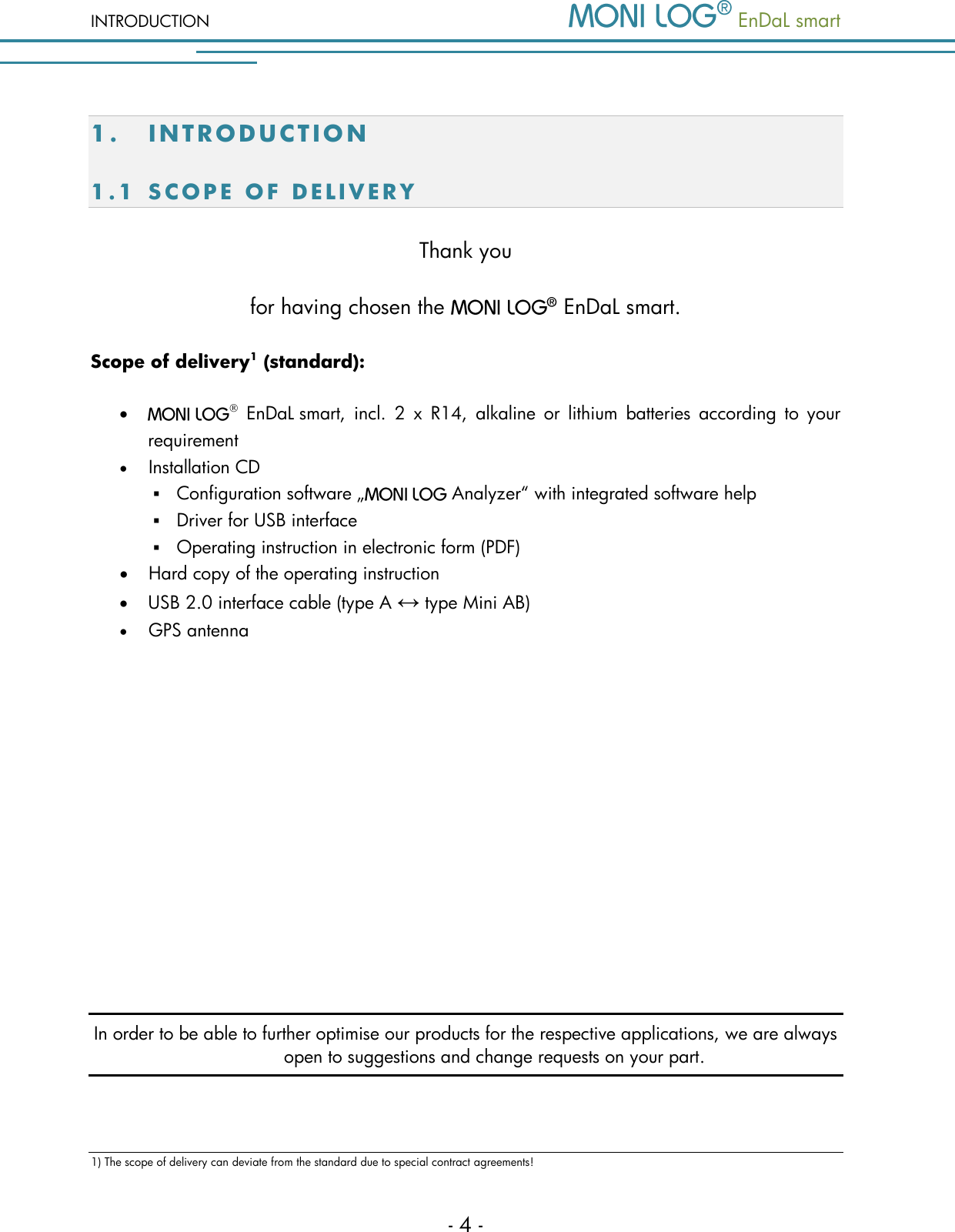
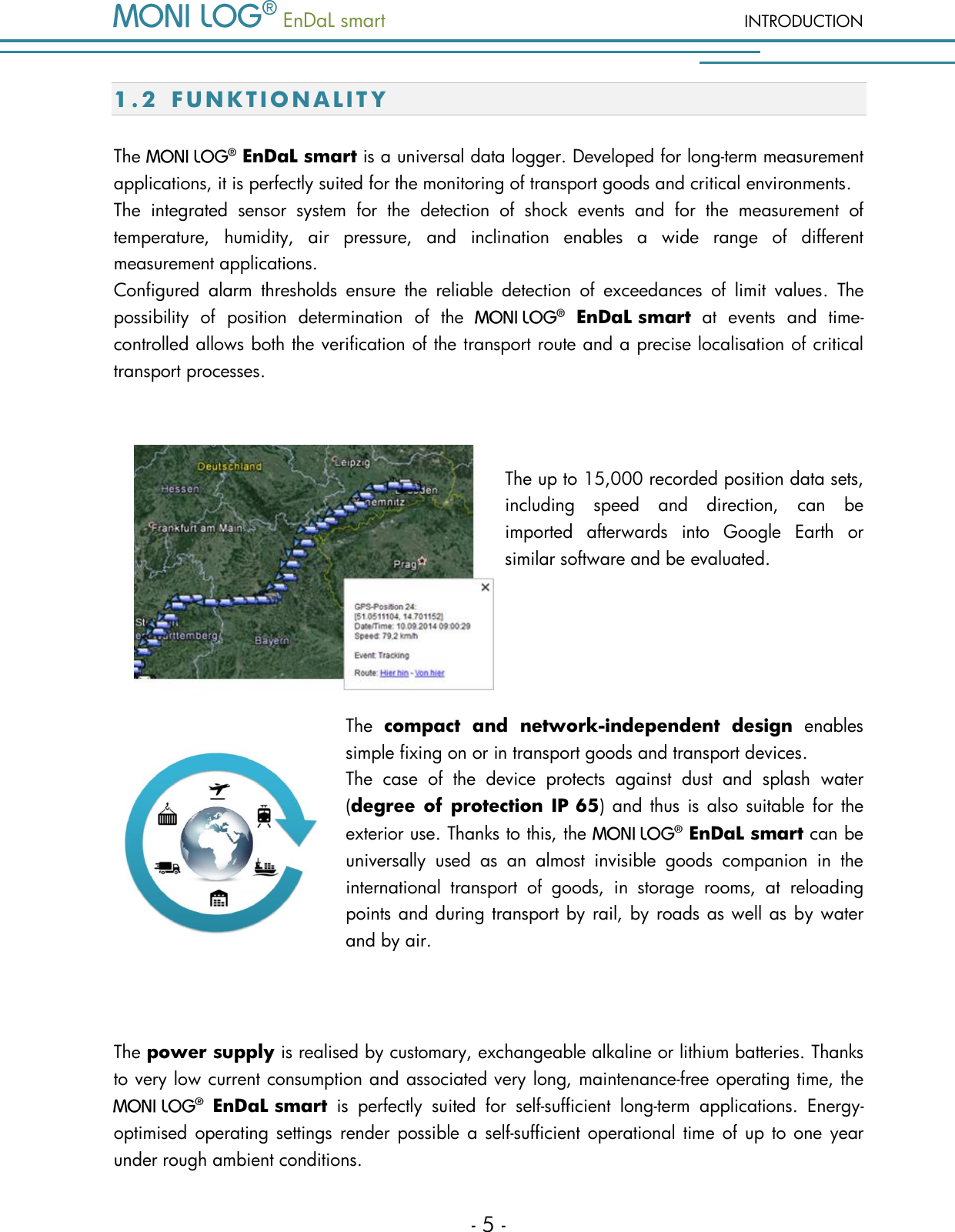
  EnDaL smart  INTRODUCTION - 5 - 1.2 F U N K T I O N A L I T Y  The    EnDaL smart is a universal data logger. Developed for long-term measurement applications, it is perfectly suited for the monitoring of transport goods and critical environments.  The  integrated  sensor  system  for  the  detection  of  shock  events  and  for  the  measurement  of temperature,  humidity,  air  pressure,  and  inclination  enables  a  wide  range  of  different measurement applications.   Configured  alarm  thresholds  ensure  the  reliable  detection  of  exceedances  of  limit  values.  The possibility  of  position  determination  of  the    EnDaL smart  at  events  and  time-controlled allows both the verification of the transport route and a precise localisation of critical transport processes.  The up to 15,000 recorded position data sets, including  speed  and  direction,  can  be imported  afterwards  into  Google  Earth  or similar software and be evaluated.   The  compact  and  network-independent  design  enables simple fixing on or in transport goods and transport devices.    The  case  of  the  device  protects  against  dust  and  splash  water (degree of protection IP 65)  and  thus  is also suitable for  the exterior use. Thanks to this, the    EnDaL smart can be universally  used  as  an  almost  invisible  goods  companion  in  the international  transport  of  goods,  in  storage  rooms,  at  reloading points and during transport by rail, by roads as well as by water and by air.  The power supply is realised by customary, exchangeable alkaline or lithium batteries. Thanks to very low current consumption and associated very long, maintenance-free operating time, the   EnDaL smart  is  perfectly  suited  for  self-sufficient  long-term  applications.  Energy-optimised operating settings render possible  a self-sufficient operational time of up  to one year under rough ambient conditions.
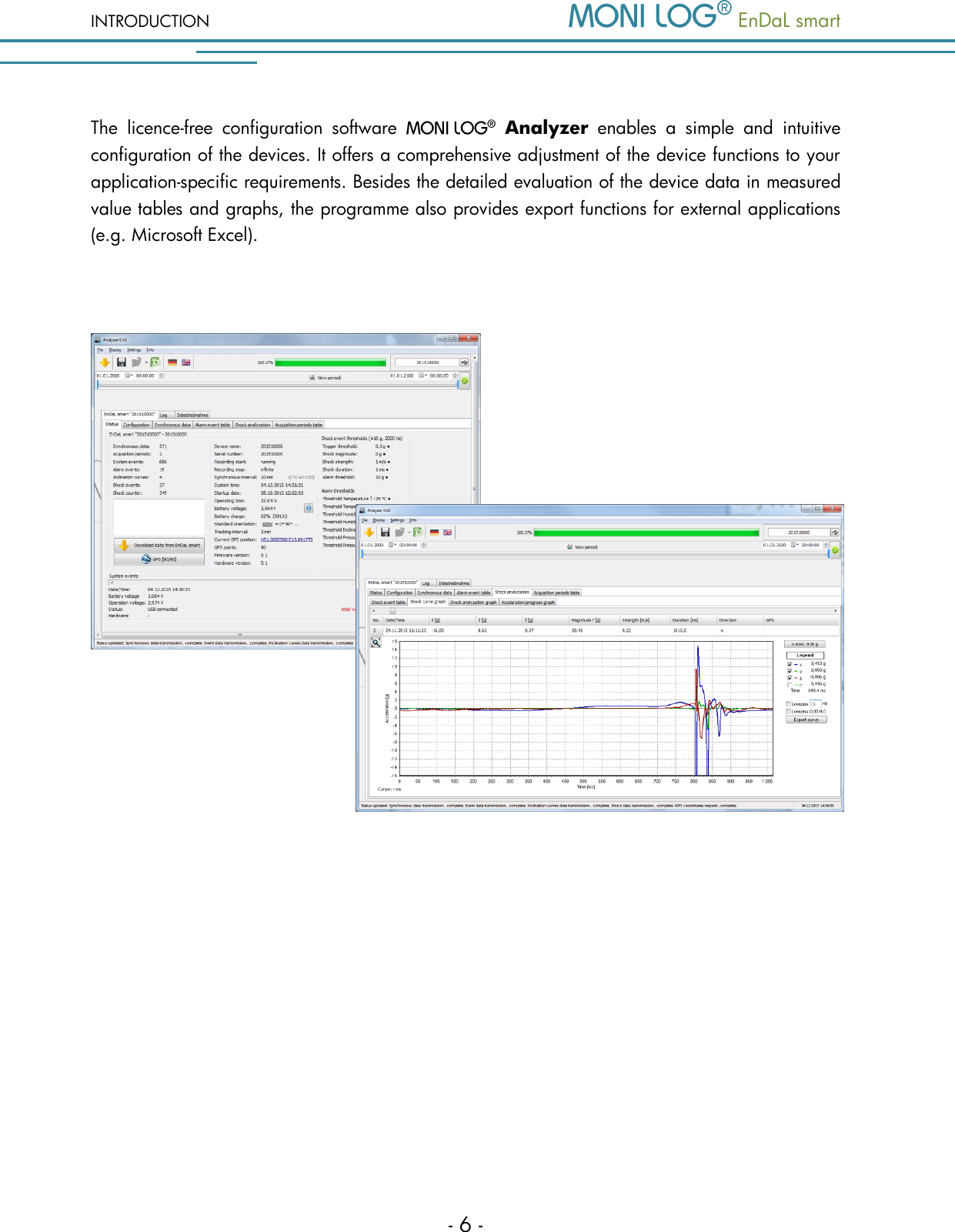
INTRODUCTION   EnDaL smart   - 6 - The  licence-free  configuration  software    Analyzer  enables  a  simple  and  intuitive configuration of the devices. It offers a comprehensive adjustment of the device functions to your application-specific requirements. Besides the detailed evaluation of the device data in measured value tables and graphs, the programme also provides export functions for external applications (e.g. Microsoft Excel).
  EnDaL smart  INTRODUCTION - 7 - 1.3 E N V I R O N M E N T A L   A ND S A F E T Y   INS T R U C T I O N S  Environment & disposal The     EnDaL smart  contains,  excluding  the  internal  batteries,  no  corrosive  or environmentally damaging substances.  Used  batteries  must  be  immediately  removed  from  the  device  and  be  disposed  of  in  an environmentally  friendly  manner,  according  to  the  applicable  legislation.  Lithium  batteries  are hazardous waste. Battery operation The  power  supply  is  ensured  in  the     EnDaL smart  by  means  of  2  exchangeable alkaline or lithium batteries (type C|R14). These can be bought in specialized stores according to the specification stated in the instruction manual. When lithium batteries are  used on transport, the    EnDaL smart must be labelled as hazardous  material  of  class  9,  according  to  the  Worldwide  UN  classification.  The  transport conditions resulting due to this must be taken into account!  Please take into account that when using alternative battery types the functionality of the device cannot be guaranteed in the entire specified temperature range from -40 to 85 °C. ATTENTION! Use only intrinsically safe batteries.  In case of non-compliance with the national regulations/laws applicable in the handling of lithium batteries, any liability and warranty claim becomes void! Decommissioning In case of decommissioning the devices must be properly switched off and all batteries must be removed from the cases and be disposed of in an environmentally friendly manner.
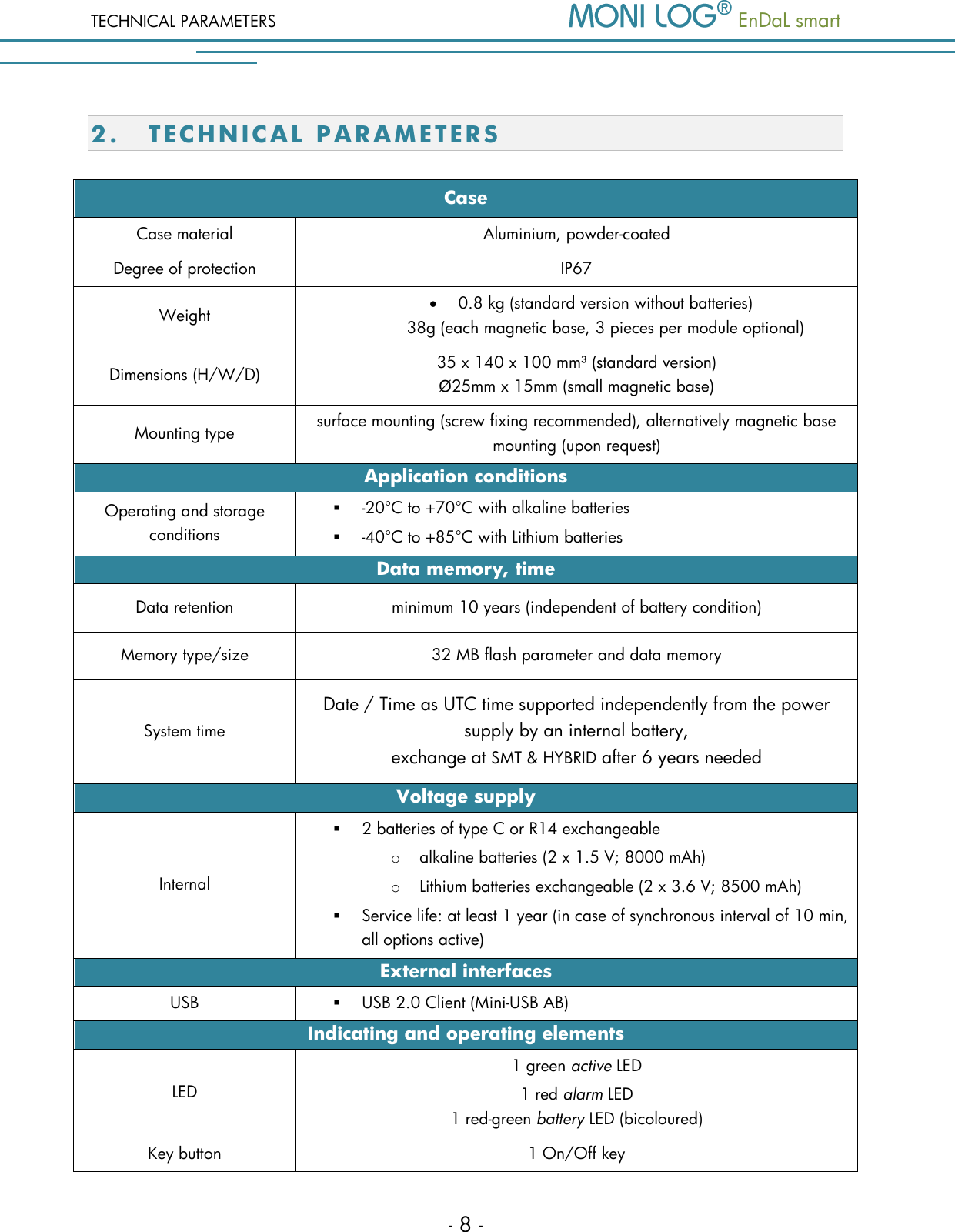
TECHNICAL PARAMETERS   EnDaL smart   - 8 - 2. T E C H N I C AL PARAMETE R S  Case Case material Aluminium, powder-coated Degree of protection IP67 Weight  0.8 kg (standard version without batteries) 38g (each magnetic base, 3 pieces per module optional) Dimensions (H/W/D) 35 x 140 x 100 mm³ (standard version) Ø25mm x 15mm (small magnetic base) Mounting type surface mounting (screw fixing recommended), alternatively magnetic base mounting (upon request) Application conditions Operating and storage conditions   -20°C to +70°C with alkaline batteries  -40°C to +85°C with Lithium batteries  Data memory, time Data retention minimum 10 years (independent of battery condition) Memory type/size 32 MB flash parameter and data memory System time Date / Time as UTC time supported independently from the power supply by an internal battery, exchange at SMT & HYBRID after 6 years needed Voltage supply Internal  2 batteries of type C or R14 exchangeable o alkaline batteries (2 x 1.5 V; 8000 mAh) o Lithium batteries exchangeable (2 x 3.6 V; 8500 mAh)  Service life: at least 1 year (in case of synchronous interval of 10 min, all options active) External interfaces USB  USB 2.0 Client (Mini-USB AB) Indicating and operating elements LED 1 green active LED  1 red alarm LED  1 red-green battery LED (bicoloured) Key button 1 On/Off key
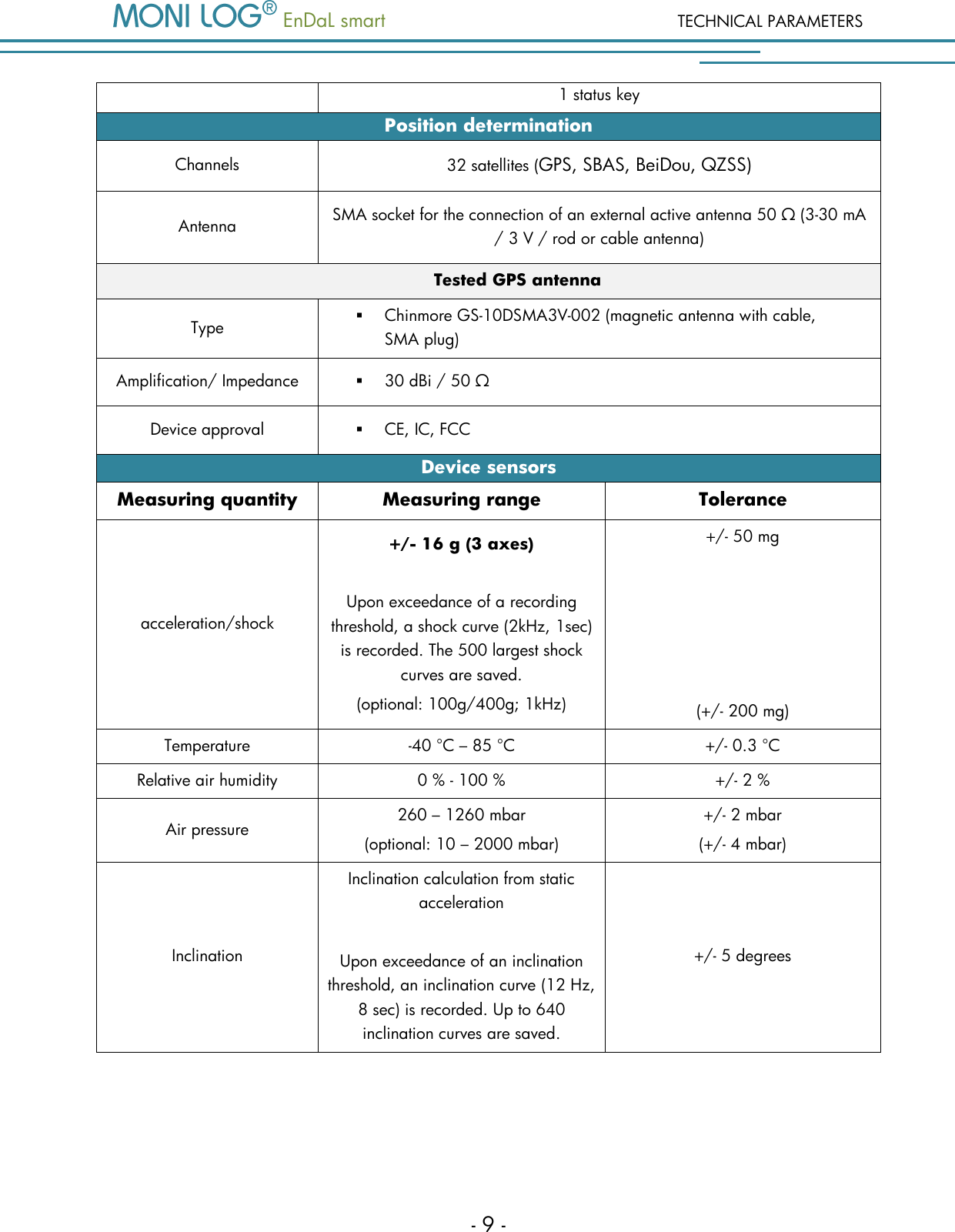
  EnDaL smart  TECHNICAL PARAMETERS - 9 - 1 status key Position determination Channels 32 satellites (GPS, SBAS, BeiDou, QZSS) Antenna SMA socket for the connection of an external active antenna 50 Ω (3-30 mA / 3 V / rod or cable antenna) Tested GPS antenna Type  Chinmore GS-10DSMA3V-002 (magnetic antenna with cable,  SMA plug) Amplification/ Impedance  30 dBi / 50 Ω Device approval  CE, IC, FCC Device sensors Measuring quantity Measuring range Tolerance acceleration/shock +/- 16 g (3 axes)  Upon exceedance of a recording threshold, a shock curve (2kHz, 1sec) is recorded. The 500 largest shock curves are saved. (optional: 100g/400g; 1kHz) +/- 50 mg      (+/- 200 mg) Temperature -40 °C – 85 °C +/- 0.3 °C Relative air humidity 0 % - 100 % +/- 2 % Air pressure 260 – 1260 mbar (optional: 10 – 2000 mbar) +/- 2 mbar (+/- 4 mbar) Inclination Inclination calculation from static acceleration  Upon exceedance of an inclination threshold, an inclination curve (12 Hz, 8 sec) is recorded. Up to 640 inclination curves are saved. +/- 5 degrees
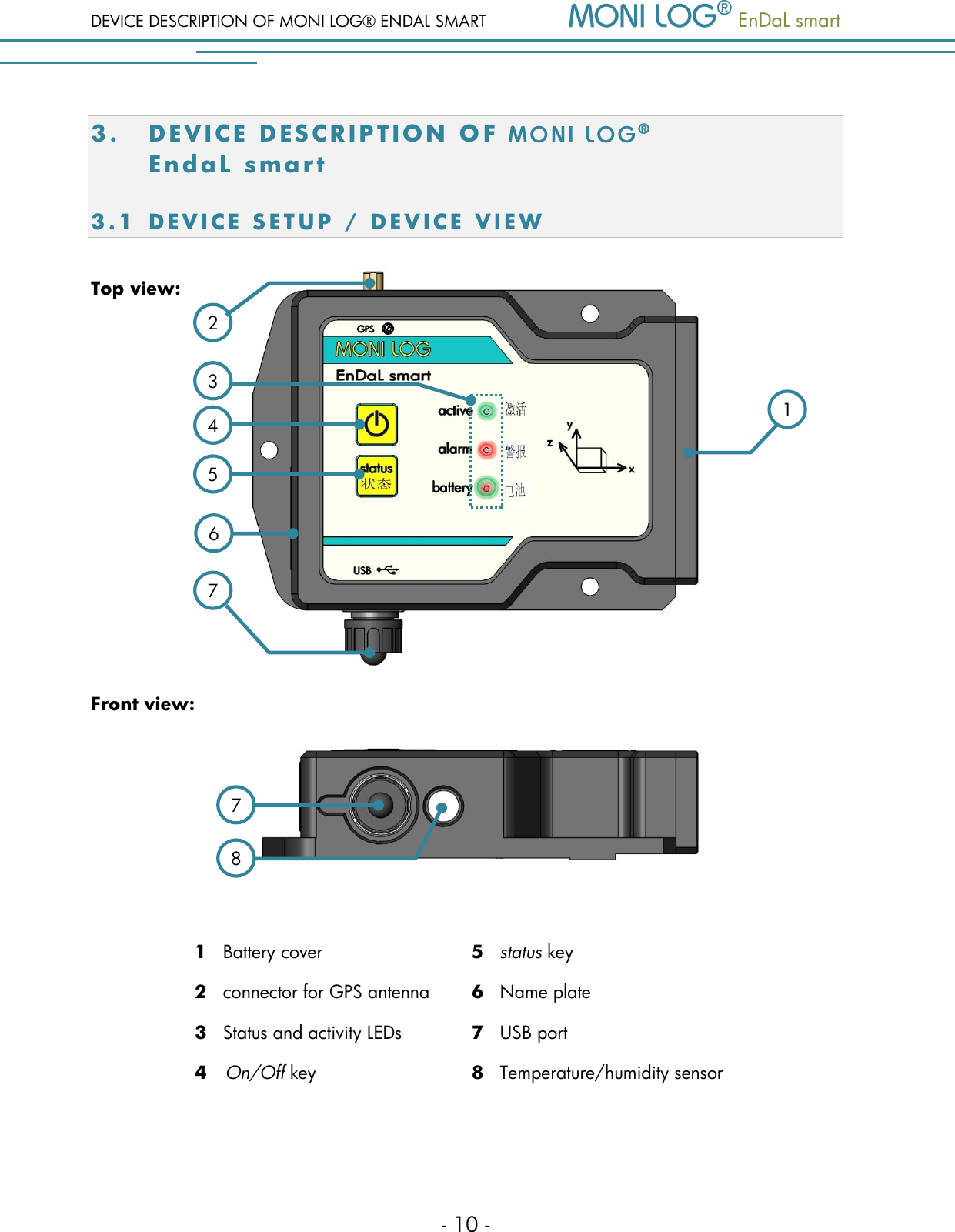
DEVICE DESCRIPTION OF MONI LOG® ENDAL SMART   EnDaL smart   - 10 - 3. DEVICE DES C R I P T I O N   O F     E n d aL  sma rt 3.1 D E V I C E   S E T U P   / D E V I C E   V I E W  Top view:       Front view:    1   Battery cover 5   status key 2   connector for GPS antenna 6   Name plate 3   Status and activity LEDs 7   USB port  4   On/Off key  8   Temperature/humidity sensor     1 2 8 7 6 3 7 4 5
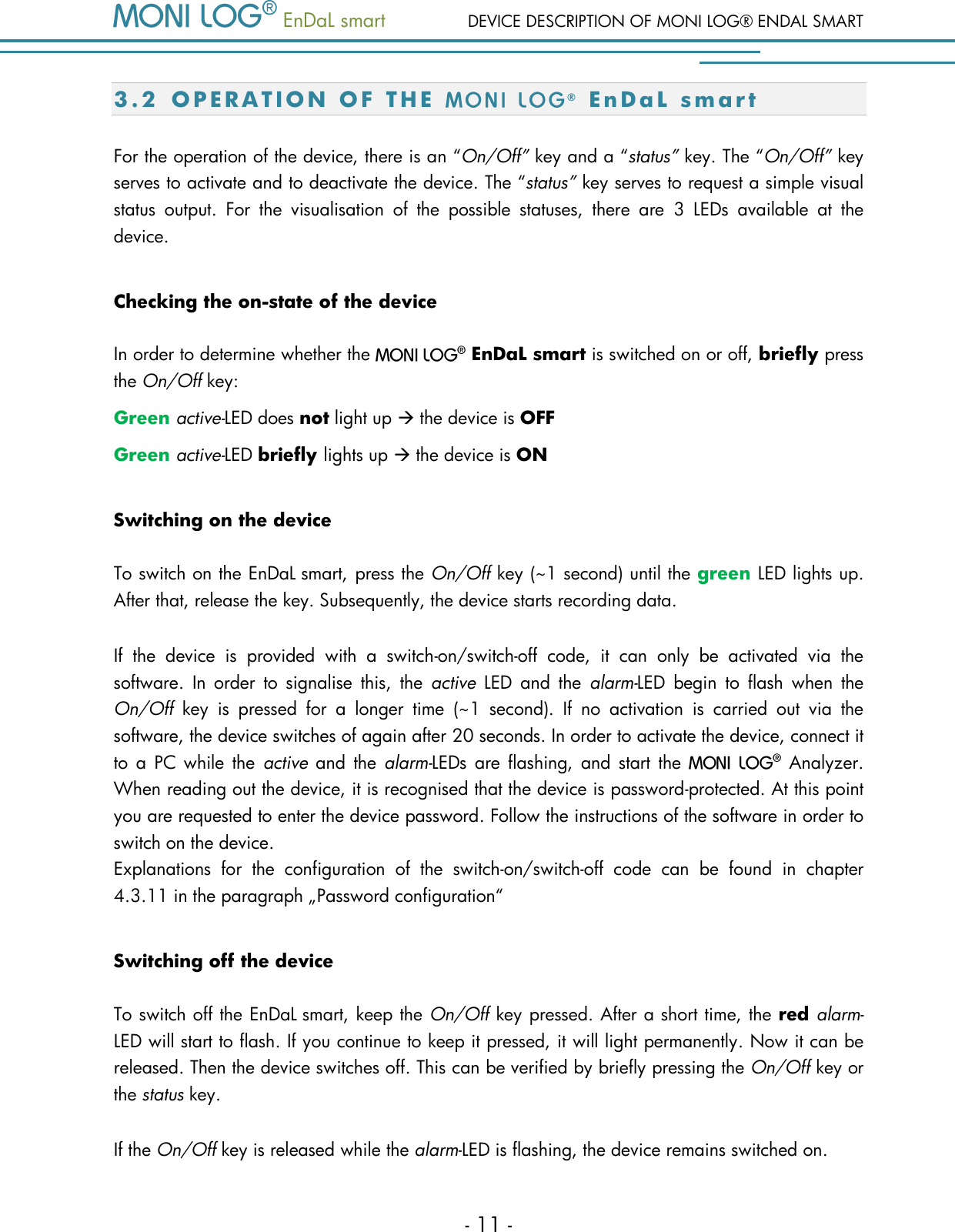
  EnDaL smart  DEVICE DESCRIPTION OF MONI LOG® ENDAL SMART - 11 - 3.2 O P E R A T I O N   O F   T H E   ®  E n D a L   s m a r t  For the operation of the device, there is an “On/Off” key and a “status” key. The “On/Off” key serves to activate and to deactivate the device. The “status” key serves to request a simple visual status  output.  For  the  visualisation  of  the  possible  statuses,  there  are  3  LEDs  available  at  the device.  Checking the on-state of the device  In order to determine whether the    EnDaL smart is switched on or off, briefly press the On/Off key: Green active-LED does not light up  the device is OFF Green active-LED briefly lights up  the device is ON Switching on the device To switch on the EnDaL smart, press the On/Off key (~1 second) until the green LED lights up. After that, release the key. Subsequently, the device starts recording data.  If  the  device  is  provided  with  a  switch-on/switch-off  code,  it  can  only  be  activated  via  the software.  In  order  to  signalise  this,  the  active  LED  and  the  alarm-LED  begin  to  flash  when  the On/Off  key  is  pressed  for  a  longer  time  (~1  second).  If  no  activation  is  carried  out  via  the software, the device switches of again after 20 seconds. In order to activate the device, connect it to  a  PC  while  the  active  and  the  alarm-LEDs  are flashing, and start  the    Analyzer. When reading out the device, it is recognised that the device is password-protected. At this point you are requested to enter the device password. Follow the instructions of the software in order to switch on the device.   Explanations  for  the  configuration  of  the  switch-on/switch-off  code  can  be  found  in  chapter 4.3.11 in the paragraph „Password configuration“ Switching off the device To switch off the EnDaL smart, keep the On/Off key pressed. After a short time, the red alarm-LED will start to flash. If you continue to keep it pressed, it will light permanently. Now it can be released. Then the device switches off. This can be verified by briefly pressing the On/Off key or the status key.  If the On/Off key is released while the alarm-LED is flashing, the device remains switched on.
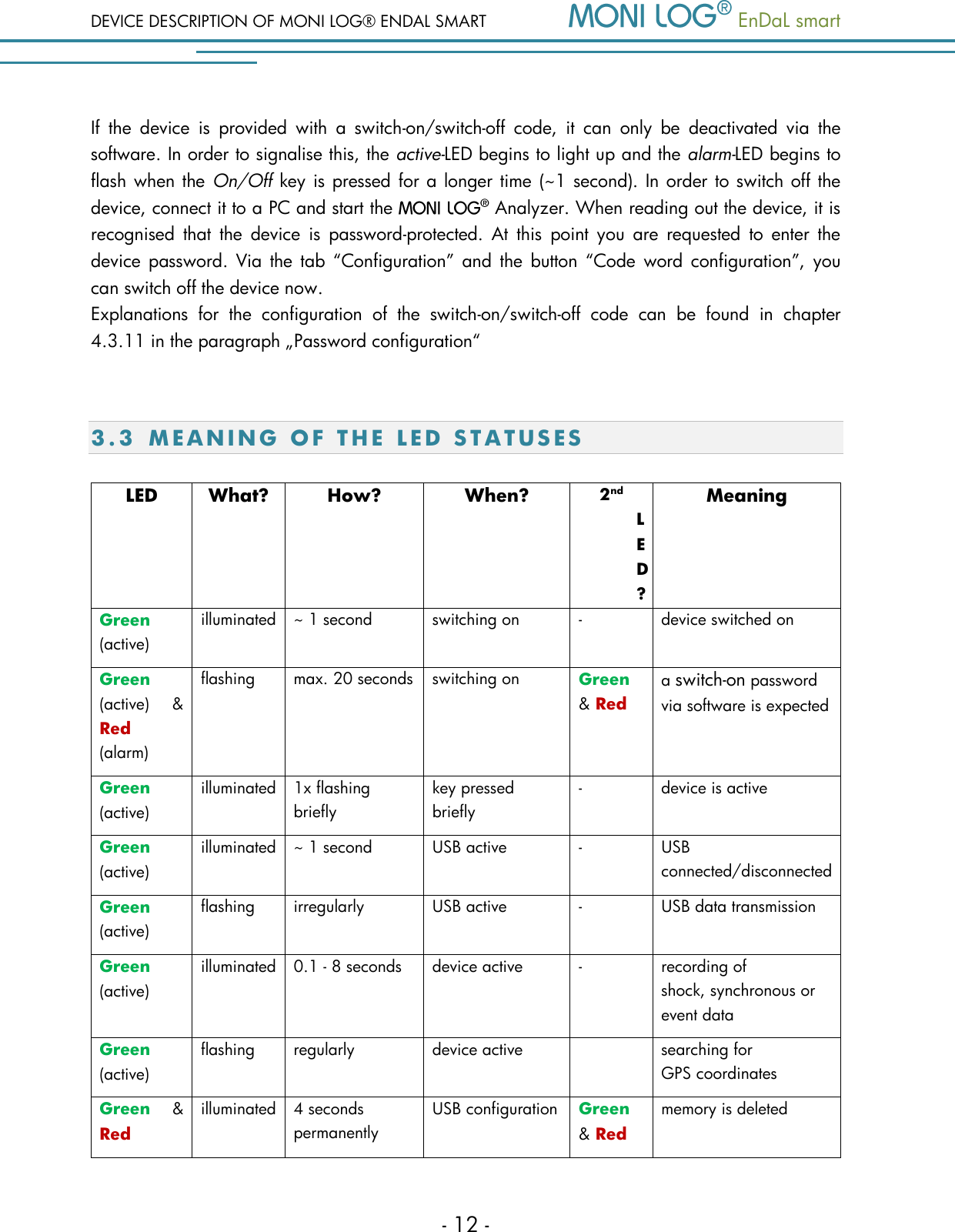
DEVICE DESCRIPTION OF MONI LOG® ENDAL SMART   EnDaL smart   - 12 - If  the  device  is  provided  with  a  switch-on/switch-off  code,  it  can  only  be  deactivated  via  the software. In order to signalise this, the active-LED begins to light up and the alarm-LED begins to flash when the On/Off key is pressed for a longer time  (~1 second). In order to switch off the device, connect it to a PC and start the   Analyzer. When reading out the device, it is recognised  that  the  device  is  password-protected.  At  this  point  you  are  requested  to  enter  the device  password.  Via  the tab  “Configuration” and the button  “Code word  configuration”,  you can switch off the device now.   Explanations  for  the  configuration  of  the  switch-on/switch-off  code  can  be  found  in  chapter 4.3.11 in the paragraph „Password configuration“  3.3 M E A N I N G   O F   T H E   LED  S T A T U S E S  LED What? How? When? 2nd LED? Meaning Green (active) illuminated ~ 1 second switching on - device switched on  Green (active) & Red (alarm) flashing max. 20 seconds switching on Green & Red a switch-on password via software is expected Green (active) illuminated 1x flashing briefly key pressed briefly - device is active Green (active) illuminated ~ 1 second USB active - USB connected/disconnected Green (active) flashing irregularly USB active - USB data transmission Green (active) illuminated 0.1 - 8 seconds device active - recording of  shock, synchronous or event data Green (active) flashing regularly device active  searching for GPS coordinates Green  & Red illuminated 4 seconds permanently USB configuration Green & Red memory is deleted
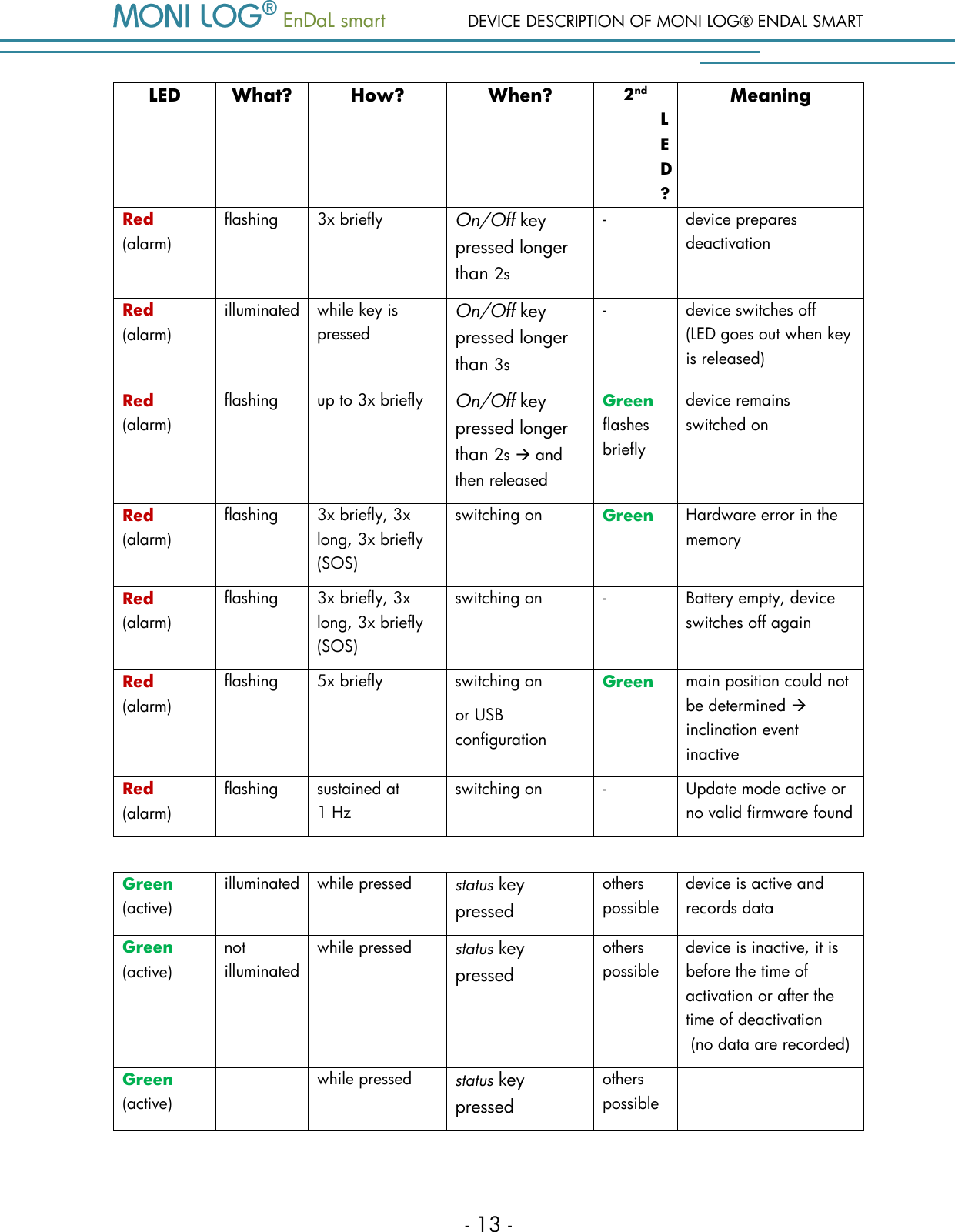
  EnDaL smart  DEVICE DESCRIPTION OF MONI LOG® ENDAL SMART - 13 - LED What? How? When? 2nd LED? Meaning Red (alarm) flashing 3x briefly On/Off key pressed longer than 2s - device prepares deactivation Red (alarm) illuminated while key is pressed On/Off key pressed longer than 3s - device switches off (LED goes out when key is released) Red (alarm) flashing up to 3x briefly On/Off key pressed longer than 2s  and then released Green flashes briefly device remains switched on Red (alarm) flashing 3x briefly, 3x long, 3x briefly (SOS) switching on Green Hardware error in the memory  Red (alarm) flashing 3x briefly, 3x long, 3x briefly (SOS) switching on - Battery empty, device switches off again  Red (alarm) flashing 5x briefly switching on or USB configuration Green  main position could not be determined  inclination event inactive Red (alarm) flashing sustained at 1 Hz switching on - Update mode active or no valid firmware found       Green (active) illuminated while pressed status key pressed others possible device is active and records data Green (active) not illuminated while pressed status key pressed others possible device is inactive, it is before the time of activation or after the time of deactivation   (no data are recorded) Green (active)  while pressed status key pressed others possible
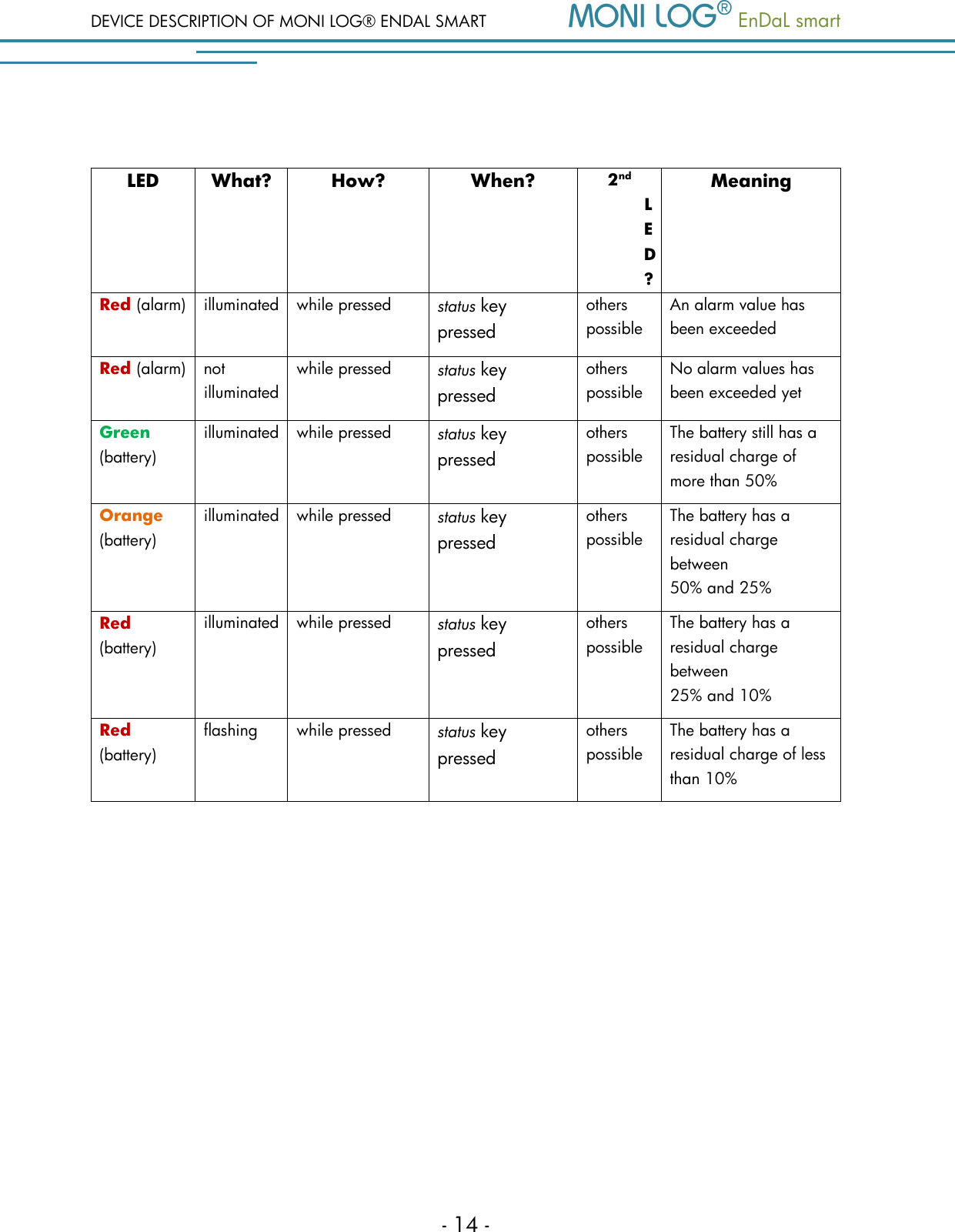
DEVICE DESCRIPTION OF MONI LOG® ENDAL SMART   EnDaL smart   - 14 -  LED What? How? When? 2nd LED? Meaning Red (alarm) illuminated while pressed status key pressed others possible An alarm value has been exceeded  Red (alarm) not illuminated while pressed status key pressed others possible No alarm values has been exceeded yet  Green (battery) illuminated while pressed status key pressed others possible The battery still has a residual charge of more than 50%  Orange (battery) illuminated while pressed status key pressed others possible The battery has a residual charge between  50% and 25%  Red (battery) illuminated while pressed status key pressed others possible The battery has a residual charge between  25% and 10%  Red (battery) flashing while pressed status key pressed others possible The battery has a residual charge of less than 10%
  EnDaL smart  DEVICE DESCRIPTION OF MONI LOG® ENDAL SMART - 15 - 3.4 D E V I C E   R U N T I M E   A ND B A T T E R Y   C H A N G E  Device runtime The device runtime of the    EnDaL smart depends on the set measurement parameters. Here,  the  interval  setting  of  the  GPS  position  determination  is  the  key  factor.  The  connection between device runtime and GPS or synchronous interval is illustrated in the following figure:  Figure 1: Estimation of the device runtime in dependence on the synchronous interval   0100200300400500600110 100 1000runtime [days] Synchronous interval[min] Use with internal GPS-receiver Use with inclination measurement Use without any syncronous measurement
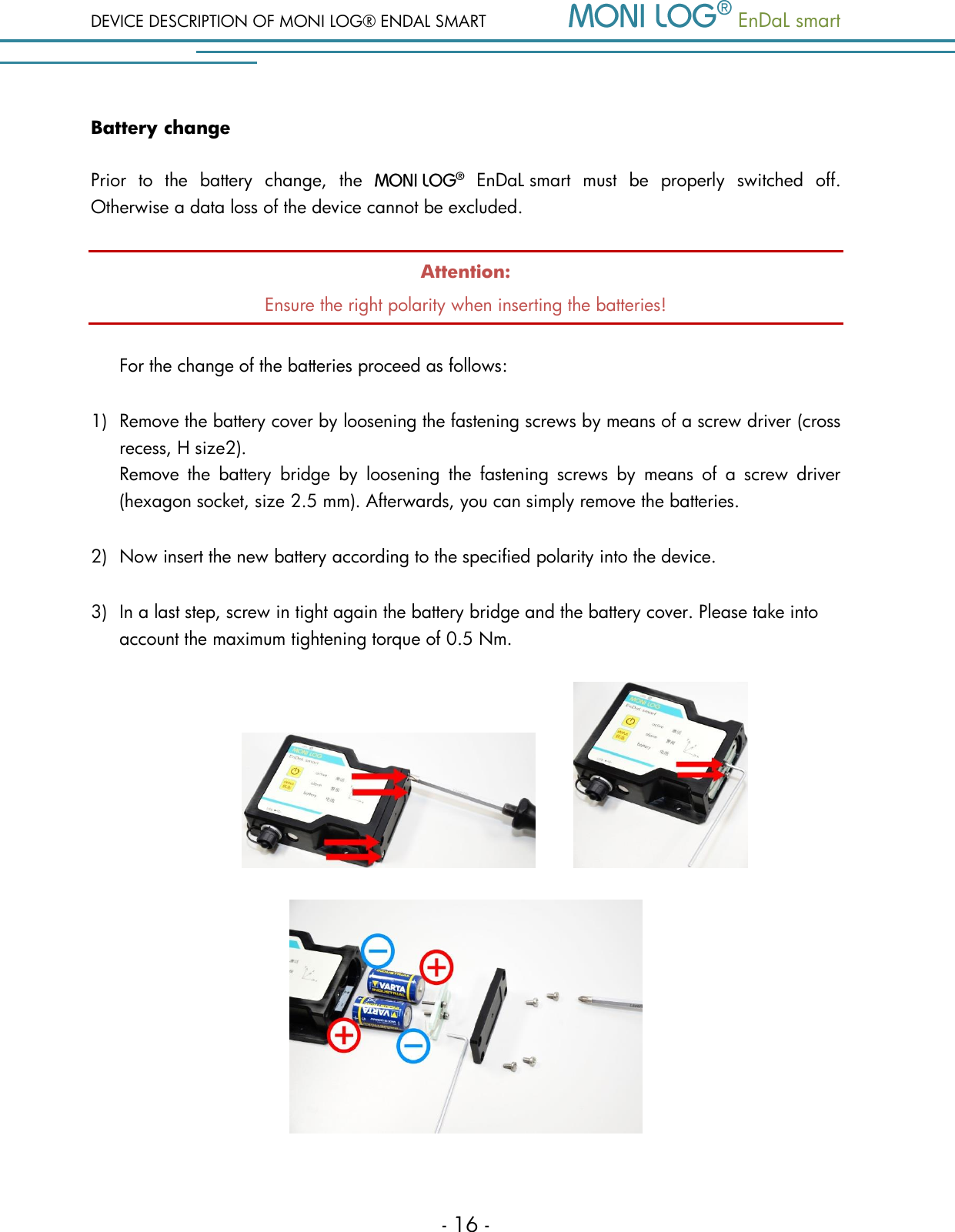
DEVICE DESCRIPTION OF MONI LOG® ENDAL SMART   EnDaL smart   - 16 - Battery change Prior  to  the  battery  change,  the     EnDaL smart  must  be  properly  switched  off. Otherwise a data loss of the device cannot be excluded. Attention: Ensure the right polarity when inserting the batteries!  For the change of the batteries proceed as follows:  1) Remove the battery cover by loosening the fastening screws by means of a screw driver (cross recess, H size2).    Remove  the  battery  bridge  by  loosening  the  fastening  screws  by  means  of  a  screw  driver (hexagon socket, size 2.5 mm). Afterwards, you can simply remove the batteries. 2) Now insert the new battery according to the specified polarity into the device.  3) In a last step, screw in tight again the battery bridge and the battery cover. Please take into account the maximum tightening torque of 0.5 Nm.
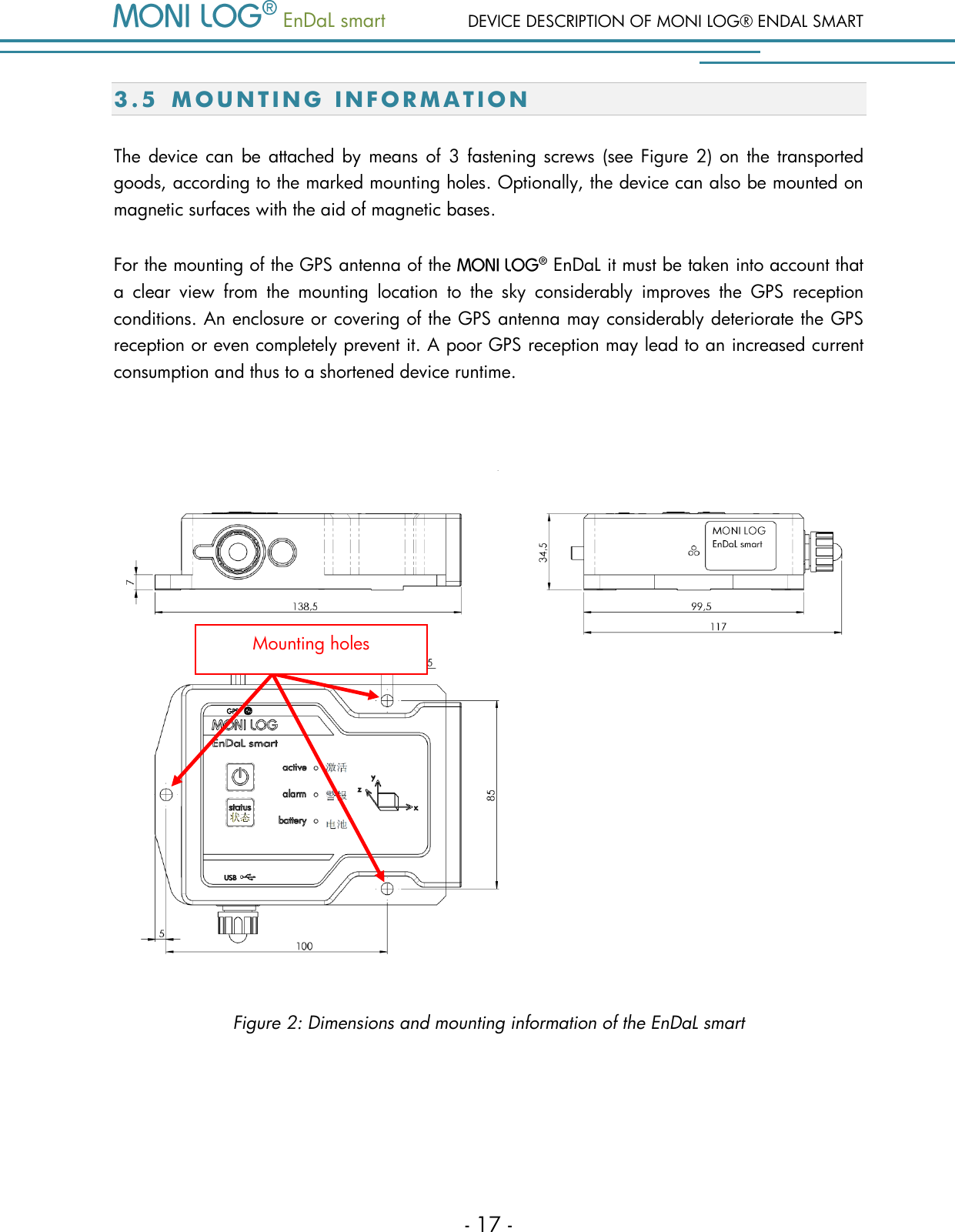
  EnDaL smart  DEVICE DESCRIPTION OF MONI LOG® ENDAL SMART - 17 - 3.5 MOUNT I N G   I N F O R M A T I O N  The  device can  be attached by means  of  3  fastening screws  (see Figure 2)  on the transported goods, according to the marked mounting holes. Optionally, the device can also be mounted on magnetic surfaces with the aid of magnetic bases. For the mounting of the GPS antenna of the    EnDaL it must be taken into account that a  clear  view  from  the  mounting  location  to  the  sky  considerably  improves  the  GPS  reception conditions. An enclosure or covering of the GPS antenna may considerably deteriorate the GPS reception or even completely prevent it. A poor GPS reception may lead to an increased current consumption and thus to a shortened device runtime.     Figure 2: Dimensions and mounting information of the EnDaL smart   Mounting holes
PC SOFTWARE – MONI LOG® ANALYZER   EnDaL smart   - 18 - 4. PC SOFTWAR E   –    A N A L YZ ER  The  software    Analyzer  can  be  used  both  for  the  readout  and  configuration  of  the   EnDaL smart and other    devices. It is intended for the display and analysis of the recorded data in tabular and graphic form. Furthermore, data sets can be saved locally on your PC or loaded from your PC. 4.1 I N S T A L L A T I O N  4 . 1 . 1  G e n e r a l   s o f t w a r e   i n s t a l l a t i o n  The supplied CD contains the installation of the Software    Analyzer. Please start the installation by double-clicking on the file „setup.exe“, and follow the instructions. Together with the installation of the evaluation software    Analyzer, the required USB device drive is installed. If the installation of the USB driver was not successful, the driver can be installed manually. Please refer to chapter 4.1.2 .
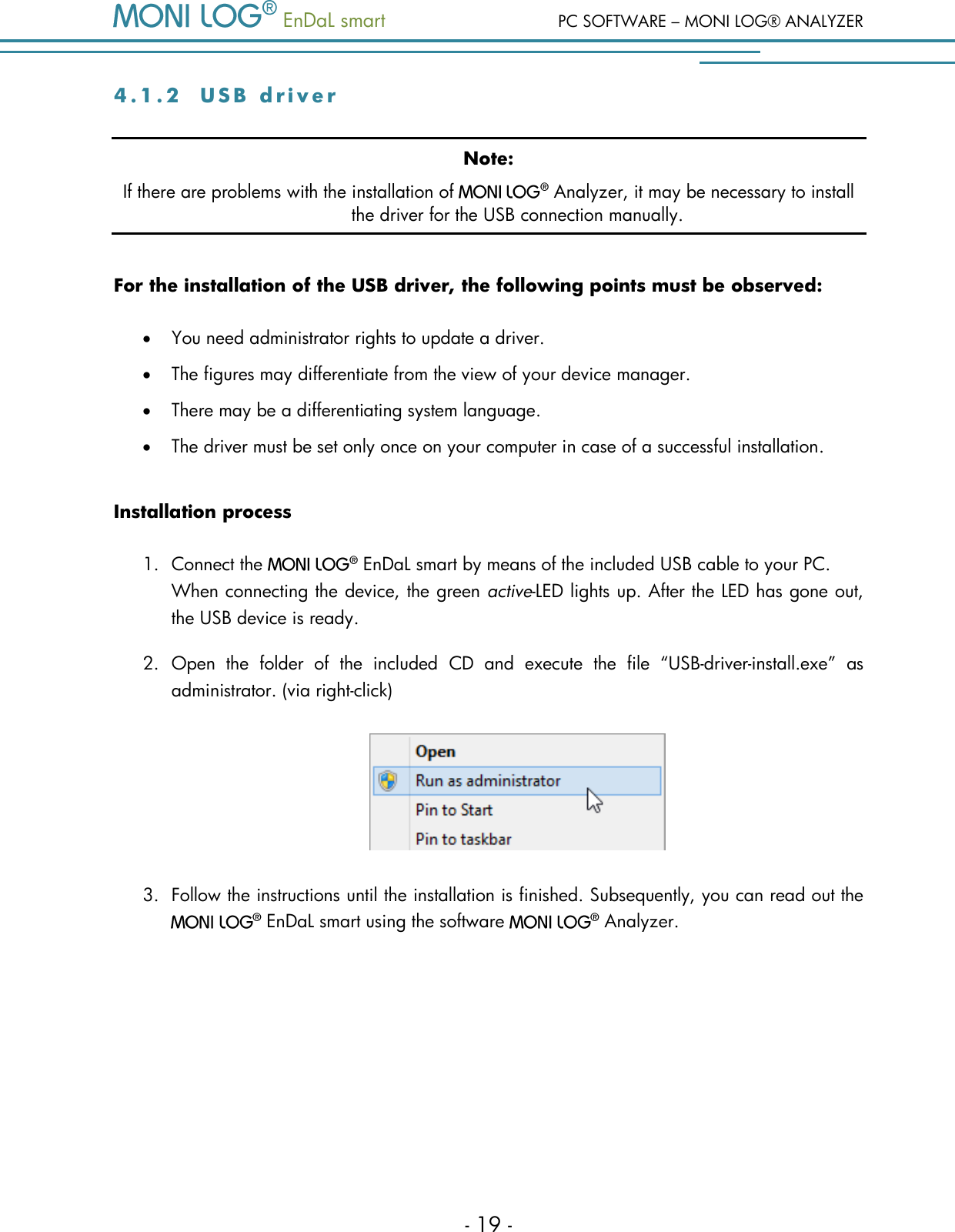
  EnDaL smart  PC SOFTWARE – MONI LOG® ANALYZER - 19 - 4 . 1 . 2  U S B   d r i v e r  Note: If there are problems with the installation of    Analyzer, it may be necessary to install the driver for the USB connection manually. For the installation of the USB driver, the following points must be observed:  You need administrator rights to update a driver.  The figures may differentiate from the view of your device manager.  There may be a differentiating system language.  The driver must be set only once on your computer in case of a successful installation. Installation process 1. Connect the    EnDaL smart by means of the included USB cable to your PC.  When connecting the device, the green active-LED lights up. After the LED has gone out, the USB device is ready. 2. Open  the  folder  of  the  included  CD  and  execute  the  file  “USB-driver-install.exe”  as administrator. (via right-click)  3. Follow the instructions until the installation is finished. Subsequently, you can read out the   EnDaL smart using the software    Analyzer.
PC SOFTWARE – MONI LOG® ANALYZER   EnDaL smart   - 20 - 4.2 G E N E R A L   U S E   O F   T H E   PC  S O F T W A R E  4 . 2 . 1  E s t a b l i s h i n g   t h e   d e v i c e   c o n n e c t i o n  When the  device driver is installed and a device is connected via USB, the connection will be established automatically as a rule upon start of the evaluation software. If the evaluation programme has already been active before plugging the device, move the mouse in the area [COM-Port] (Figure 3). The connection is established automatically. If you would like to connect a device at another COM-Port, click onto the USB symbol and select it in the selection window (see for this Figure 4).        Figure 3: No connection  select COM-Port         Figure 4: USB connection window: currently connected to COM15  COM16 also available  In case of connection problems: If no connection can be established to the device, select the  Refresh button (blue double arrow) and disconnect the USB cable from the  device. Afterwards, reconnect it with the USB cable.
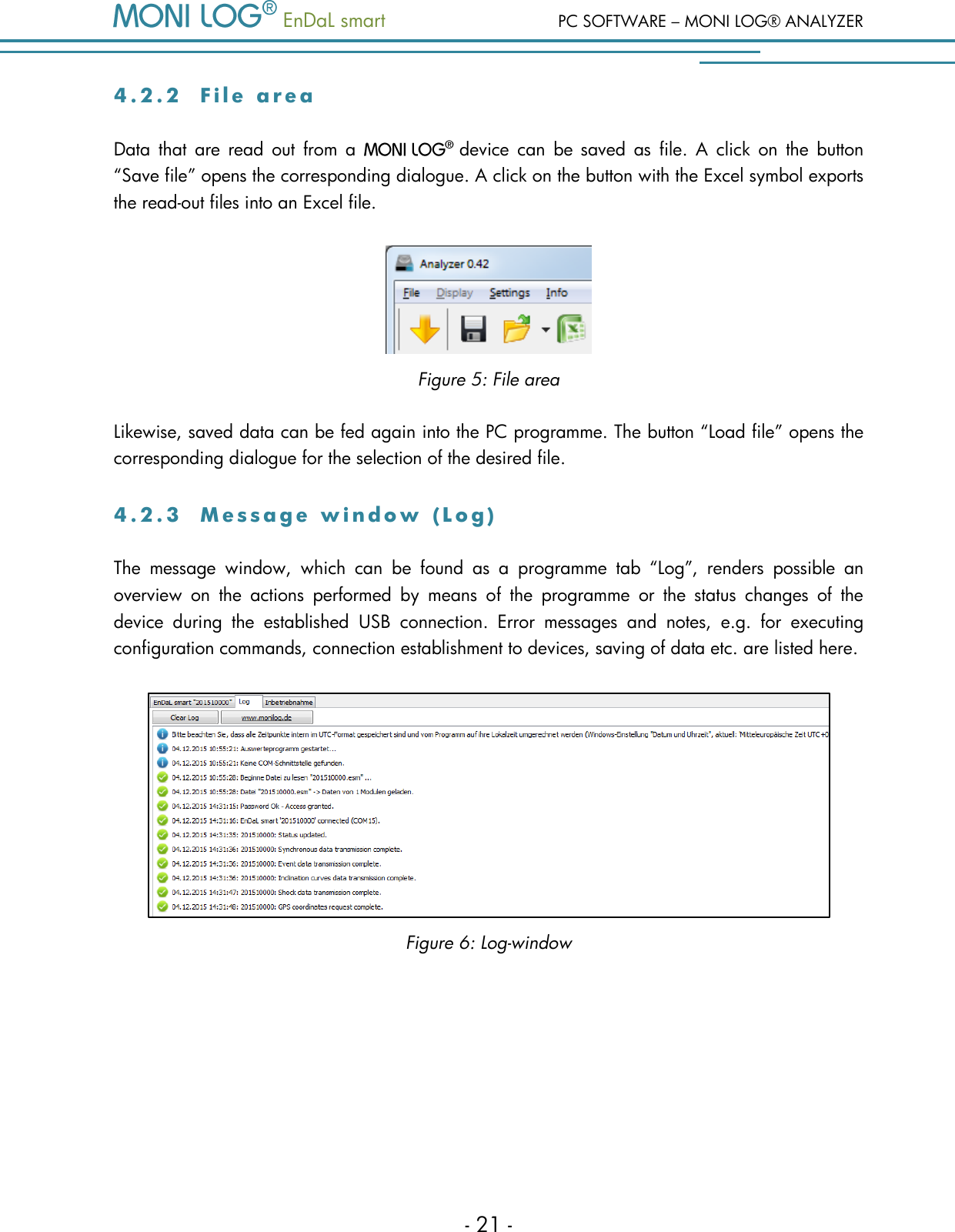
  EnDaL smart  PC SOFTWARE – MONI LOG® ANALYZER - 21 - 4 . 2 . 2  F i l e   a r e a  Data  that  are  read  out  from  a   device  can  be  saved  as  file.  A  click  on  the  button “Save file” opens the corresponding dialogue. A click on the button with the Excel symbol exports the read-out files into an Excel file.  Figure 5: File area Likewise, saved data can be fed again into the PC programme. The button “Load file” opens the corresponding dialogue for the selection of the desired file. 4 . 2 . 3  M e s s a g e   w i n d o w   ( L o g )  The  message  window,  which  can  be  found  as  a  programme  tab  “Log”,  renders  possible  an overview  on  the  actions  performed  by  means  of  the  programme  or  the  status  changes  of  the device  during  the  established  USB  connection.  Error  messages  and  notes,  e.g.  for  executing configuration commands, connection establishment to devices, saving of data etc. are listed here.  Figure 6: Log-window
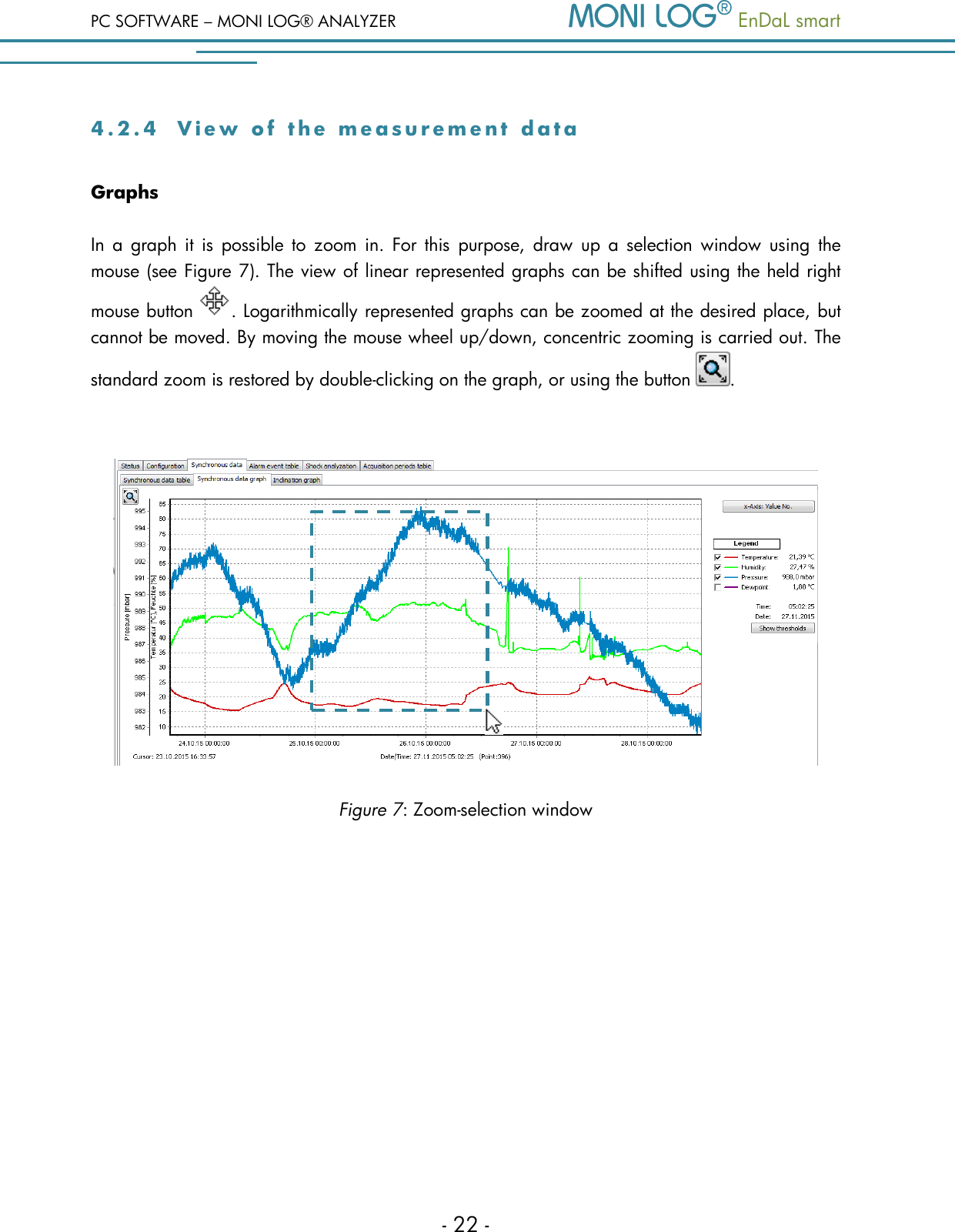
PC SOFTWARE – MONI LOG® ANALYZER   EnDaL smart   - 22 - 4 . 2 . 4  V i e w   o f   t h e   m e a s u r e m e n t   d a t a  Graphs In  a  graph  it is  possible  to  zoom  in. For  this  purpose,  draw  up  a  selection  window  using  the mouse (see Figure 7). The view of linear represented graphs can be shifted using the held right mouse button  . Logarithmically represented graphs can be zoomed at the desired place, but cannot be moved. By moving the mouse wheel up/down, concentric zooming is carried out. The standard zoom is restored by double-clicking on the graph, or using the button  .   Figure 7: Zoom-selection window
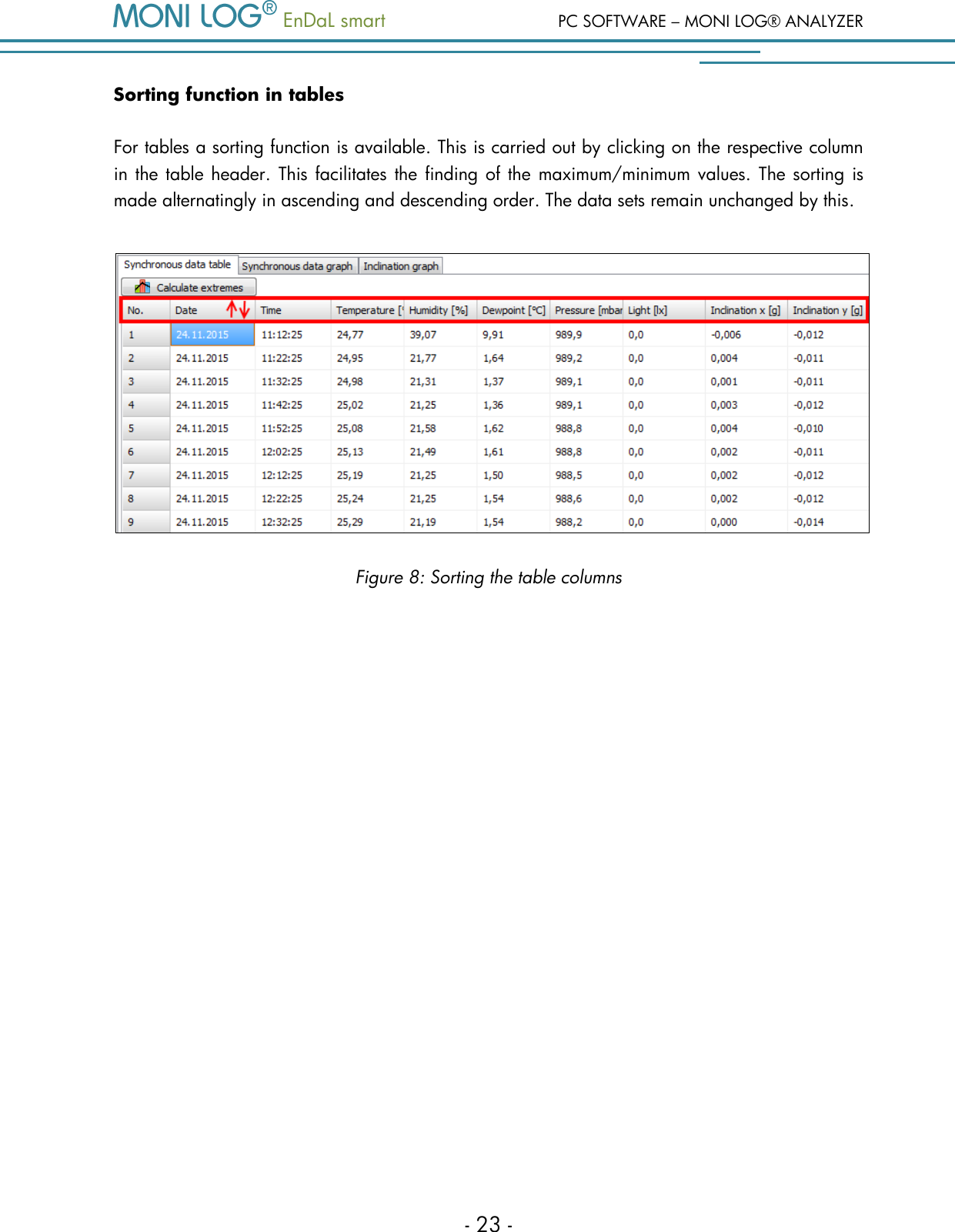
  EnDaL smart  PC SOFTWARE – MONI LOG® ANALYZER - 23 - Sorting function in tables For tables a sorting function is available. This is carried out by clicking on the respective column in the table header. This facilitates the finding of the  maximum/minimum values. The sorting is made alternatingly in ascending and descending order. The data sets remain unchanged by this.    Figure 8: Sorting the table columns
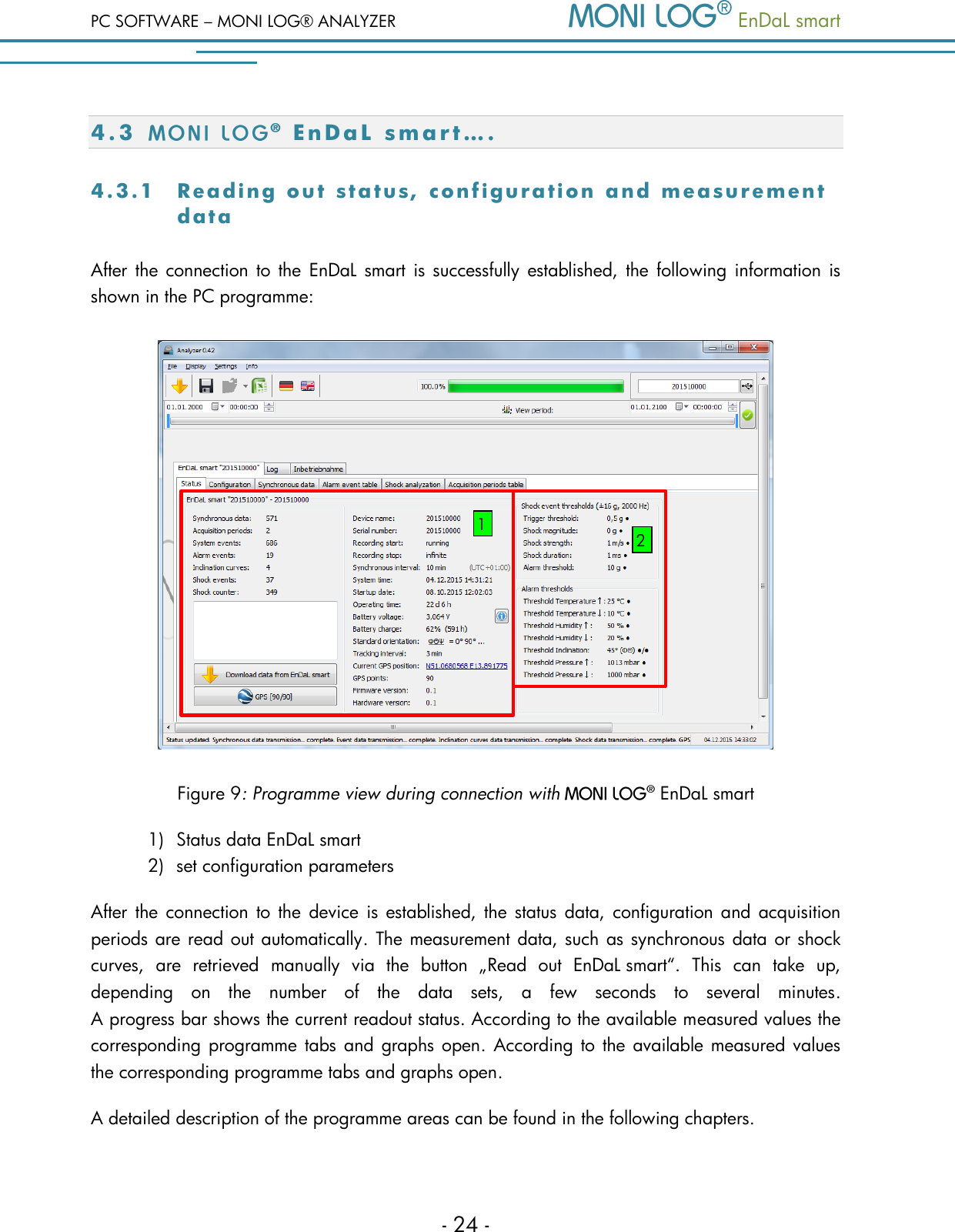
PC SOFTWARE – MONI LOG® ANALYZER   EnDaL smart   - 24 - 4.3 E n D a L   s m a r t …. 4 .3 .1  Readi n g  out   stat u s , conf i g urati o n  and   measu r ement data  After the connection  to  the  EnDaL smart is successfully established, the  following information  is shown in the PC programme:   Figure 9: Programme view during connection with    EnDaL smart  1) Status data EnDaL smart  2) set configuration parameters After the connection  to the device is  established, the  status  data,  configuration and  acquisition periods are read out automatically. The measurement data, such as synchronous data or shock curves,  are  retrieved  manually  via  the  button  „Read  out  EnDaL smart“.  This  can  take  up, depending  on  the  number  of  the  data  sets,  a  few  seconds  to  several  minutes.  A progress bar shows the current readout status. According to the available measured values the corresponding programme tabs and  graphs open.  According to the available measured values the corresponding programme tabs and graphs open. A detailed description of the programme areas can be found in the following chapters. 1 2
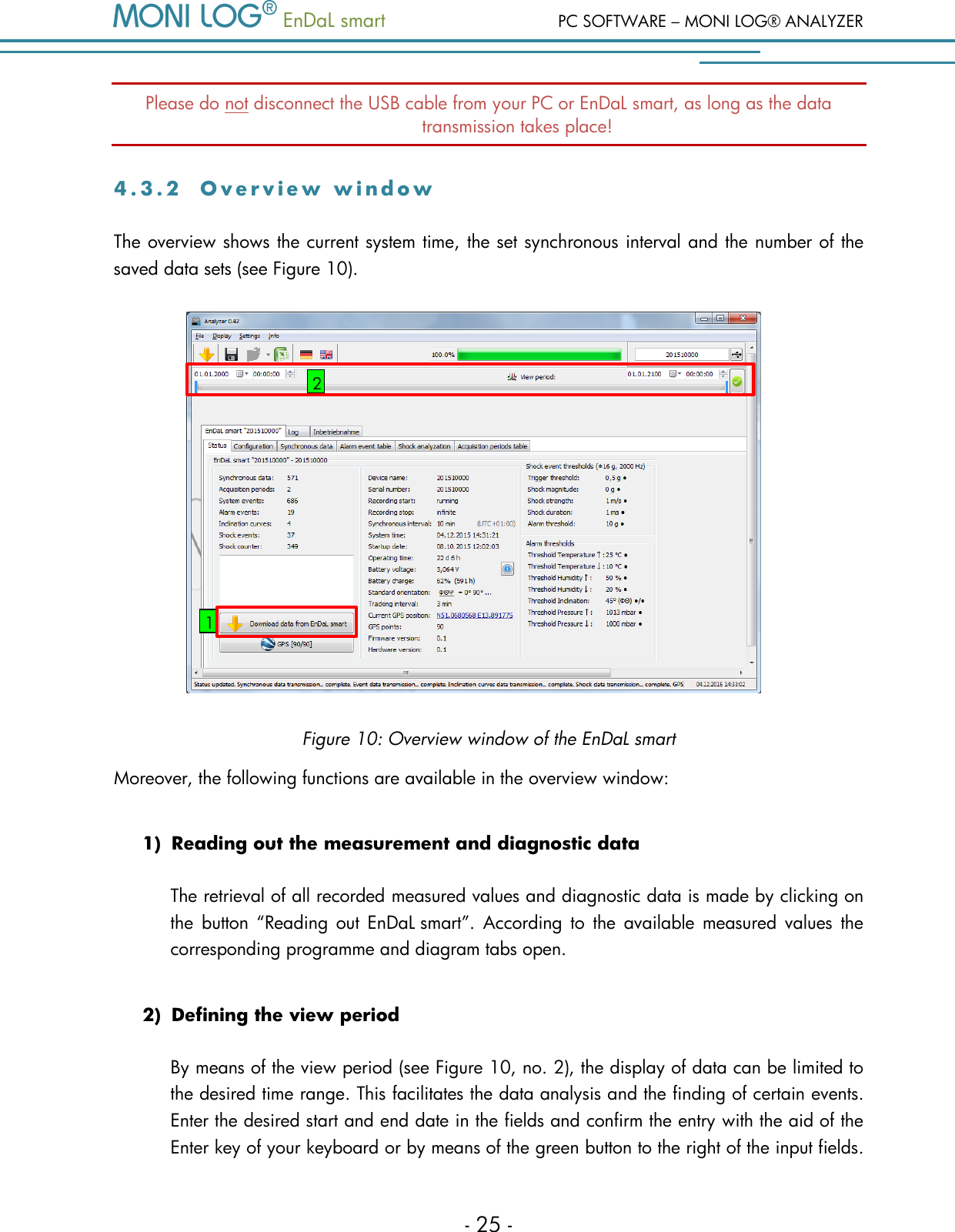
  EnDaL smart  PC SOFTWARE – MONI LOG® ANALYZER - 25 - Please do not disconnect the USB cable from your PC or EnDaL smart, as long as the data transmission takes place! 4 . 3 . 2  O v e r v i e w   w i n d o w  The overview shows the current system time, the set synchronous interval and the number of the saved data sets (see Figure 10).   Figure 10: Overview window of the EnDaL smart Moreover, the following functions are available in the overview window: 1) Reading out the measurement and diagnostic data The retrieval of all recorded measured values and diagnostic data is made by clicking on the  button  “Reading  out  EnDaL smart”.  According  to  the  available measured values  the corresponding programme and diagram tabs open.  2) Defining the view period  By means of the view period (see Figure 10, no. 2), the display of data can be limited to the desired time range. This facilitates the data analysis and the finding of certain events. Enter the desired start and end date in the fields and confirm the entry with the aid of the Enter key of your keyboard or by means of the green button to the right of the input fields. 1 2
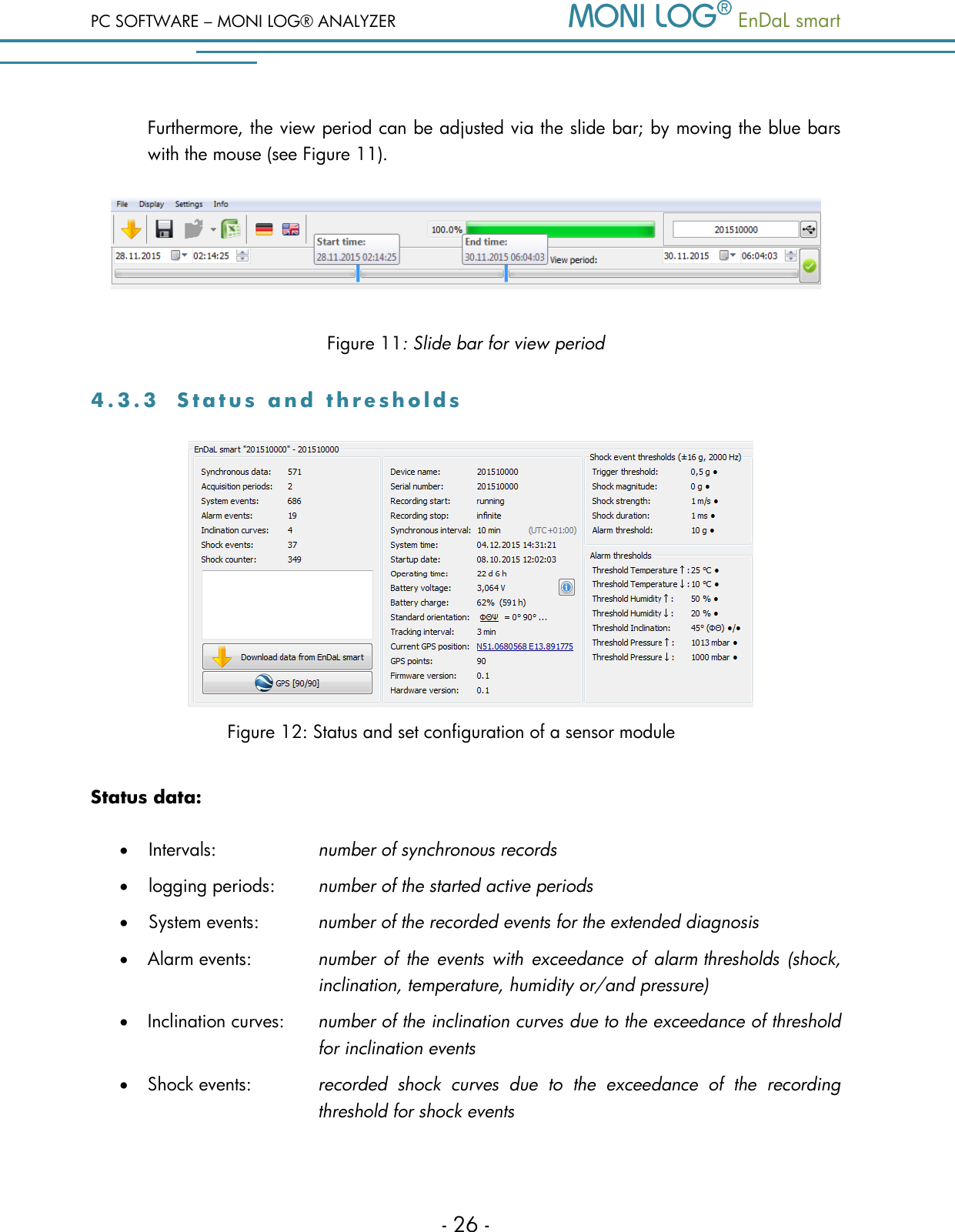
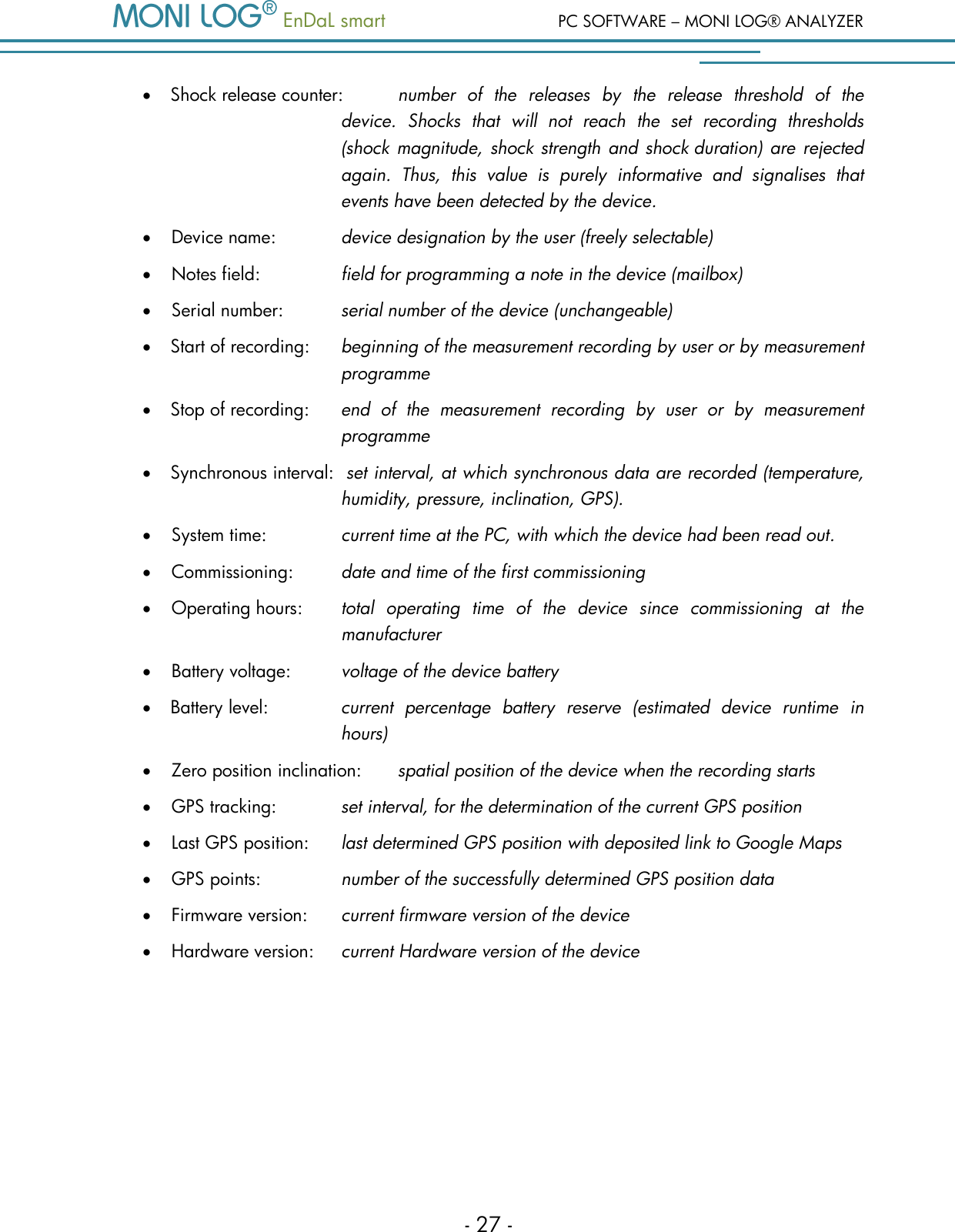
PC SOFTWARE – MONI LOG® ANALYZER   EnDaL smart   - 26 - Furthermore, the view period can be adjusted via the slide bar; by moving the blue bars with the mouse (see Figure 11).  Figure 11: Slide bar for view period 4 . 3 . 3  S t a t u s   a n d   t h r e s h o l d s           Figure 12: Status and set configuration of a sensor module Status data:  Intervals:    number of synchronous records  logging periods:  number of the started active periods  System events:  number of the recorded events for the extended diagnosis  Alarm events: number of  the  events with exceedance  of  alarm thresholds (shock, inclination, temperature, humidity or/and pressure)  Inclination curves:  number of the inclination curves due to the exceedance of threshold for inclination events  Shock events:  recorded  shock  curves  due  to  the  exceedance  of  the  recording threshold for shock events
  EnDaL smart  PC SOFTWARE – MONI LOG® ANALYZER - 27 -  Shock release counter:  number  of  the  releases  by  the  release  threshold  of  the device.  Shocks  that  will  not  reach  the  set  recording  thresholds (shock magnitude,  shock strength and shock duration) are rejected again.  Thus,  this  value  is  purely  informative  and  signalises  that events have been detected by the device.  Device name:    device designation by the user (freely selectable)  Notes field:    field for programming a note in the device (mailbox)  Serial number:  serial number of the device (unchangeable)  Start of recording:  beginning of the measurement recording by user or by measurement programme  Stop of recording:  end  of  the  measurement  recording  by  user  or  by  measurement programme  Synchronous interval:  set interval, at which synchronous data are recorded (temperature, humidity, pressure, inclination, GPS).  System time:    current time at the PC, with which the device had been read out.  Commissioning:  date and time of the first commissioning  Operating hours:  total  operating  time  of  the  device  since  commissioning  at  the        manufacturer  Battery voltage:  voltage of the device battery  Battery level:  current  percentage  battery  reserve  (estimated  device  runtime  in hours)  Zero position inclination:  spatial position of the device when the recording starts  GPS tracking:   set interval, for the determination of the current GPS position  Last GPS position:  last determined GPS position with deposited link to Google Maps  GPS points:    number of the successfully determined GPS position data  Firmware version:  current firmware version of the device  Hardware version:  current Hardware version of the device
PC SOFTWARE – MONI LOG® ANALYZER   EnDaL smart   - 28 - Shock event thresholds:  Release threshold:  acceleration value, above which the scanning is activated  Recording threshold shock magnitude:  minimal amplitude of the acceleration (storage criterion)  Recording threshold shock strength:  minimal „area below the curve“ (storage criterion)  Recording threshold shock duration:  minimal duration of the event (storage criterion)  Shock alarm threshold:  acceleration value, above which an alarm event is created  Memory criterion:  The  shock  event  must  reach  at  least  the  stated  values  to befit  for  memory.  This  serves  to  hide  the  insignificantly small shock events and in this way not to load excessively memory and transmission path (Bluetooth & E-Mail).  Filled circle • : event active  Non-filled circle º :  event not active Event/alarm thresholds:  Temperature upper/lower:  Upon exceedance/falling below, an event is created   Humidity upper/lower:  Upon exceedance/falling below, an event is created  Inclination/inclination curve:  If the device tilts from its zero position by the stated angle          (e.g. 30°), an event is created.                Inclination curves record the course of the tilting over a          period of some seconds.  Pressure upper/lower:  Upon  exceedance/falling  below  of  the  values,  an  event  is          created  Notes on inclination events: As  the  inclination  is  naturally  superimposed  with  other  movements  and  put  under general scatterings, the minimum threshold is limited to an angle of 5°. The scanning is carried out with 12 Hz during a timeframe of 3 seconds; i.e., a faster tilting cannot be detected under certain circumstances.
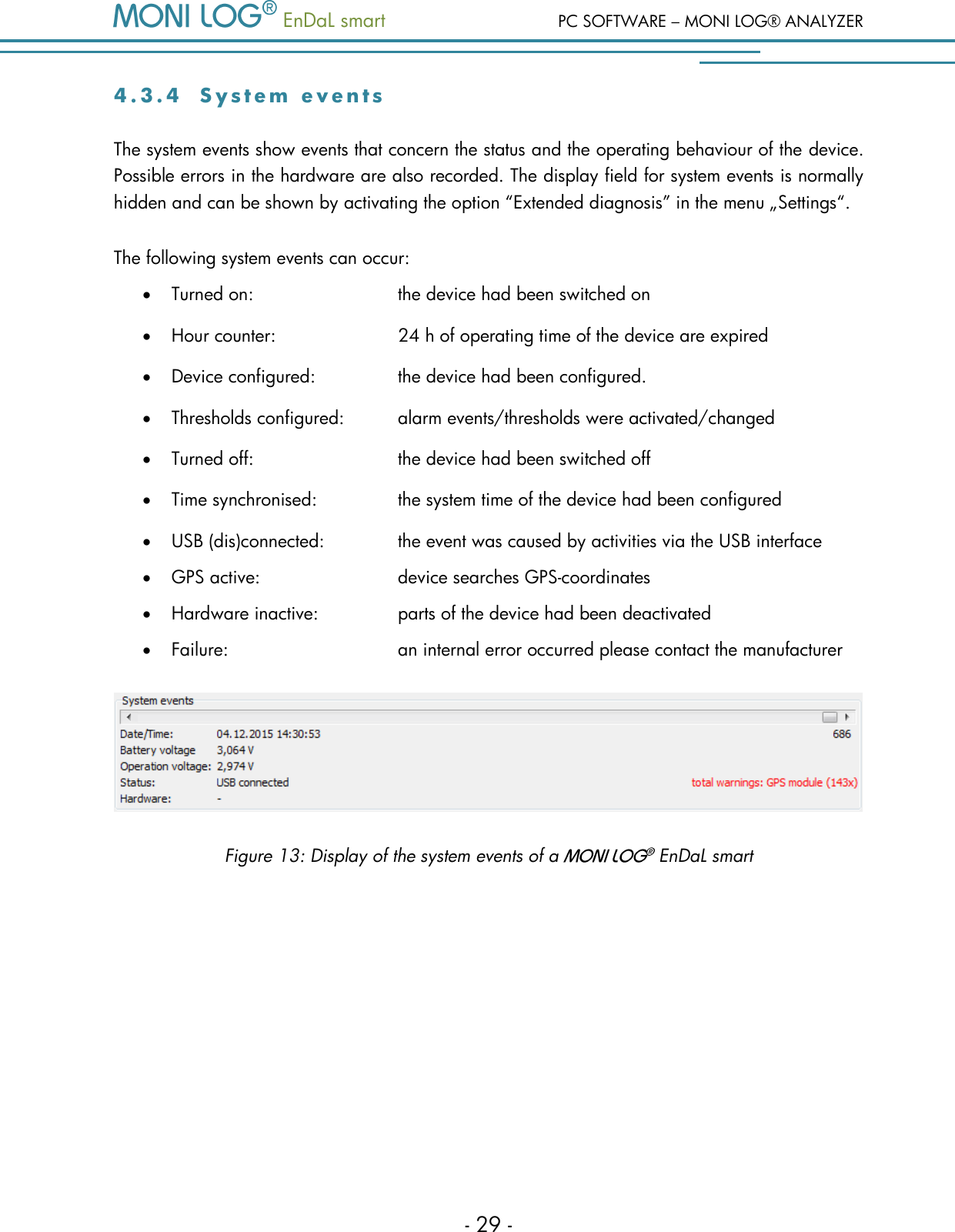
  EnDaL smart  PC SOFTWARE – MONI LOG® ANALYZER - 29 - 4 . 3 . 4  S y s t e m   e v e n t s  The system events show events that concern the status and the operating behaviour of the device. Possible errors in the hardware are also recorded. The display field for system events is normally hidden and can be shown by activating the option “Extended diagnosis” in the menu „Settings“. The following system events can occur:  Turned on:       the device had been switched on  Hour counter:      24 h of operating time of the device are expired  Device configured:     the device had been configured.  Thresholds configured:  alarm events/thresholds were activated/changed  Turned off:       the device had been switched off  Time synchronised:     the system time of the device had been configured  USB (dis)connected:     the event was caused by activities via the USB interface  GPS active:      device searches GPS-coordinates  Hardware inactive:    parts of the device had been deactivated  Failure:      an internal error occurred please contact the manufacturer  Figure 13: Display of the system events of a    EnDaL smart
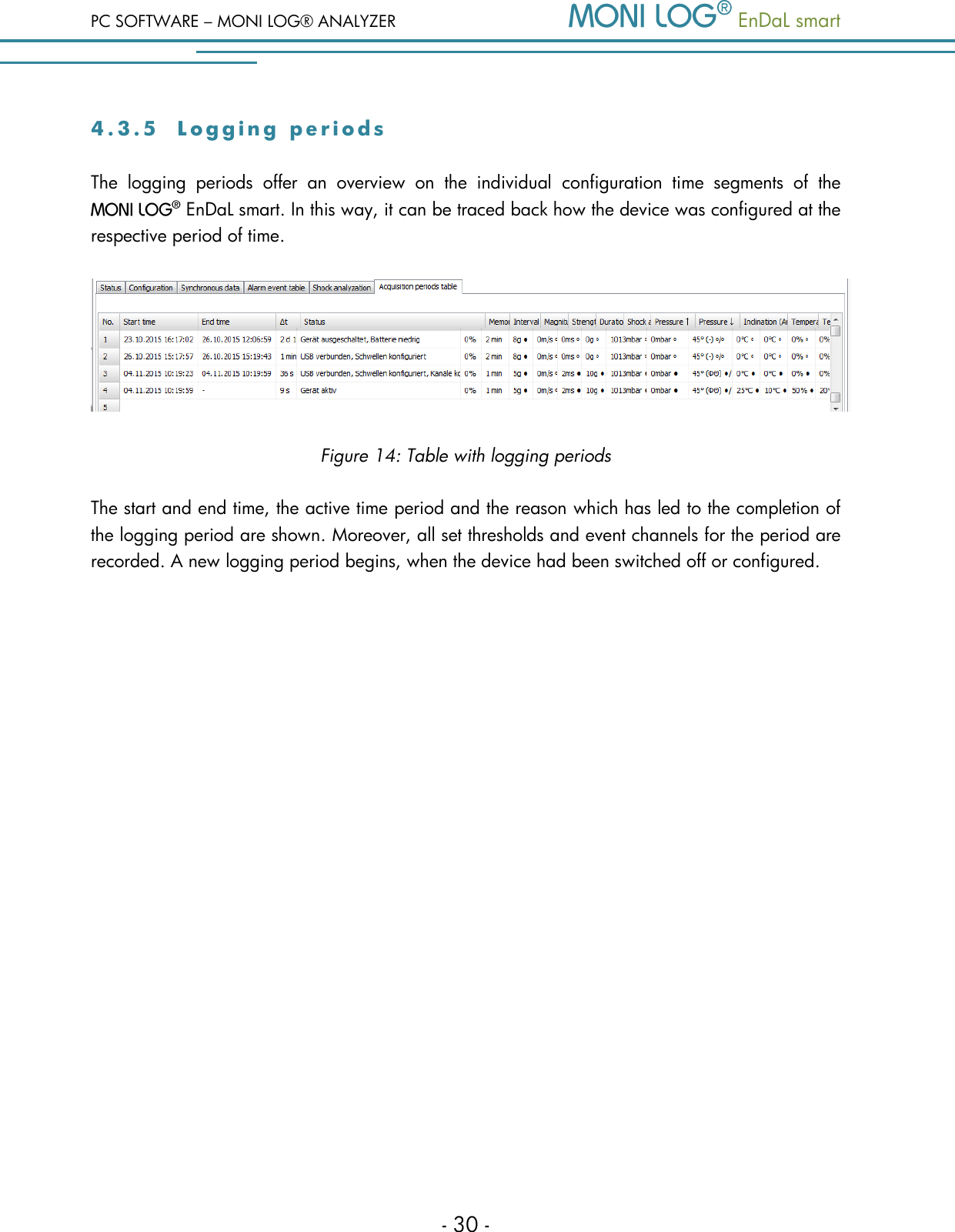
PC SOFTWARE – MONI LOG® ANALYZER   EnDaL smart   - 30 - 4 . 3 . 5  L o g g i n g   p e r i o d s  The  logging  periods  offer  an  overview  on  the  individual  configuration  time  segments  of  the   EnDaL smart. In this way, it can be traced back how the device was configured at the respective period of time.  Figure 14: Table with logging periods The start and end time, the active time period and the reason which has led to the completion of the logging period are shown. Moreover, all set thresholds and event channels for the period are recorded. A new logging period begins, when the device had been switched off or configured.
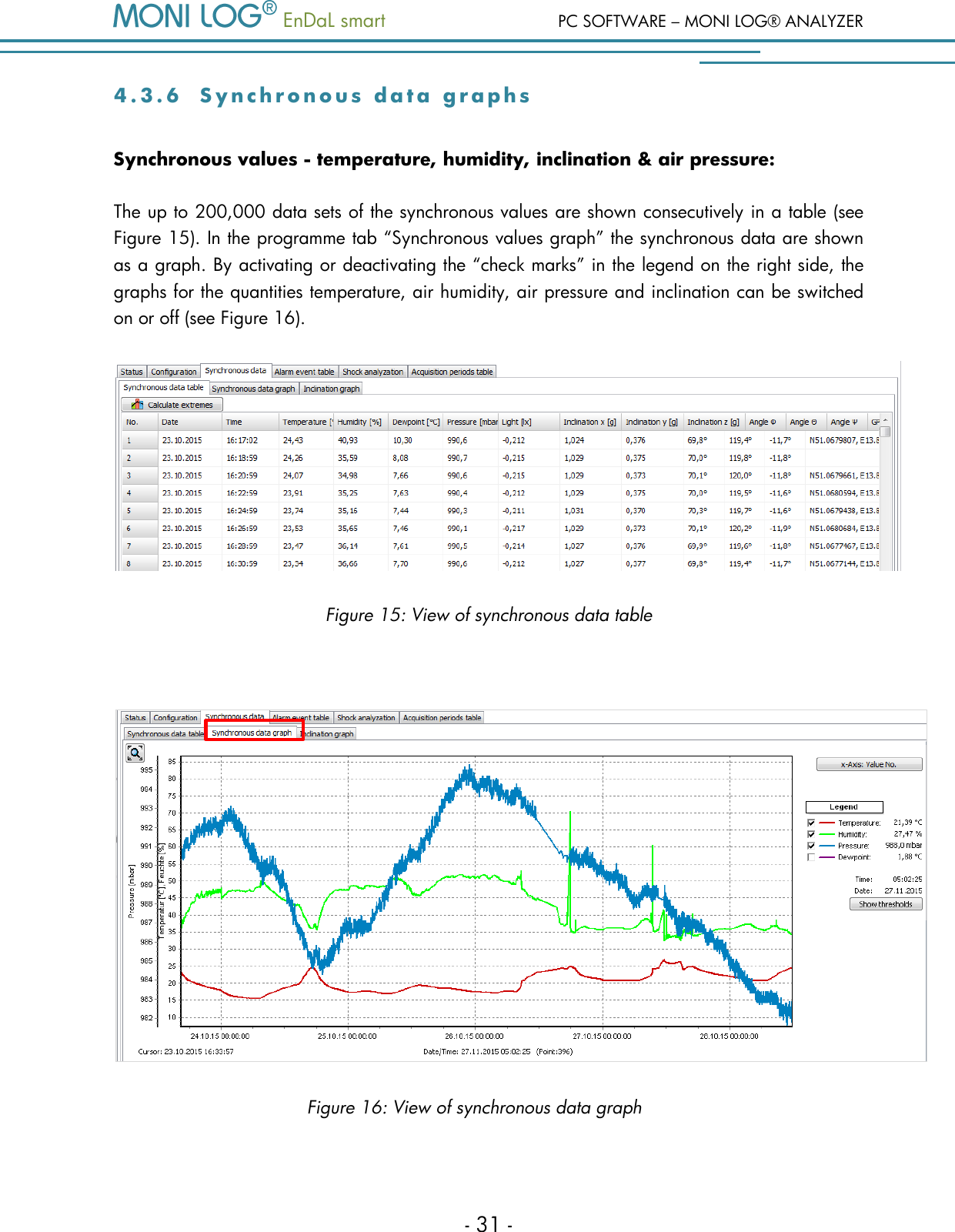
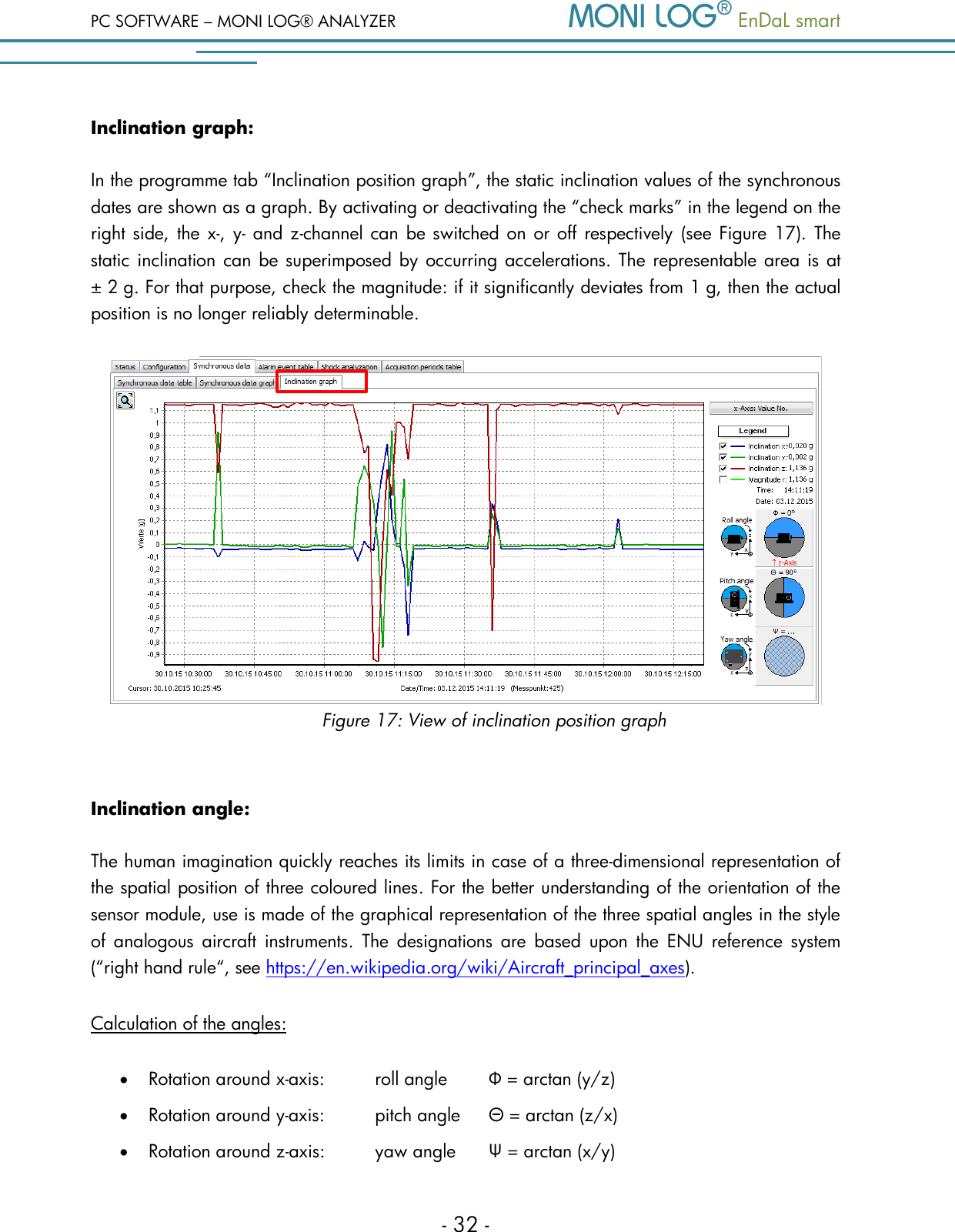
  EnDaL smart  PC SOFTWARE – MONI LOG® ANALYZER - 31 - 4 . 3 . 6  S y n c h r o n o u s   d a t a   g r a p h s  Synchronous values - temperature, humidity, inclination & air pressure: The up to 200,000 data sets of the synchronous values are shown consecutively in a table (see Figure 15). In the programme tab “Synchronous values graph” the synchronous data are shown as a graph. By activating or deactivating the “check marks” in the legend on the right side, the graphs for the quantities temperature, air humidity, air pressure and inclination can be switched on or off (see Figure 16).  Figure 15: View of synchronous data table   Figure 16: View of synchronous data graph
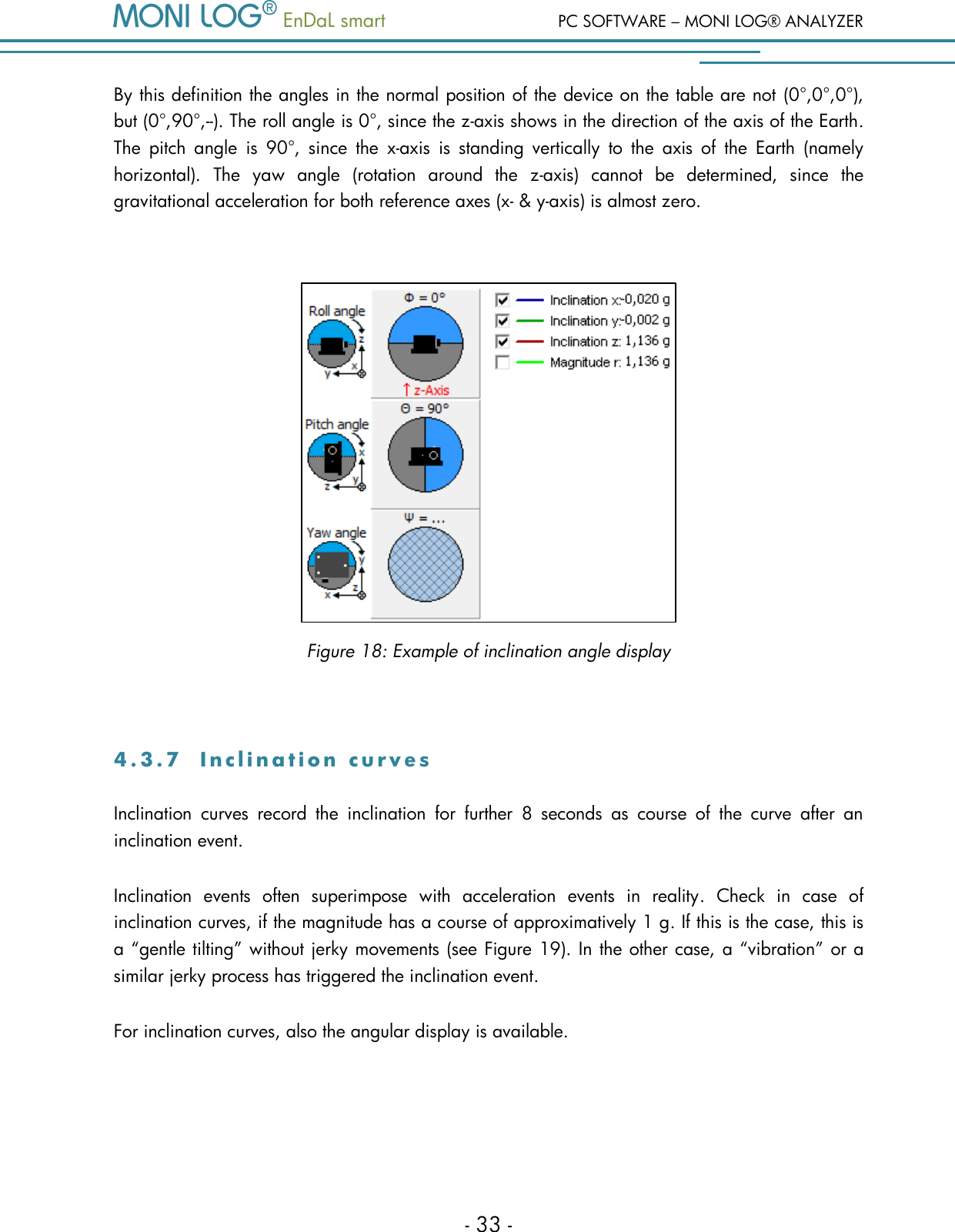
PC SOFTWARE – MONI LOG® ANALYZER   EnDaL smart   - 32 - Inclination graph: In the programme tab “Inclination position graph”, the static inclination values of the synchronous dates are shown as a graph. By activating or deactivating the “check marks” in the legend on the right side, the x-, y- and z-channel can  be switched on or off respectively  (see Figure 17).  The static inclination can be superimposed by occurring accelerations. The representable area is at ± 2 g. For that purpose, check the magnitude: if it significantly deviates from 1 g, then the actual position is no longer reliably determinable.  Figure 17: View of inclination position graph  Inclination angle: The human imagination quickly reaches its limits in case of a three-dimensional representation of the spatial position of three coloured lines. For the better understanding of the orientation of the sensor module, use is made of the graphical representation of the three spatial angles in the style of  analogous  aircraft instruments.  The  designations  are  based  upon  the  ENU  reference  system (“right hand rule“, see https://en.wikipedia.org/wiki/Aircraft_principal_axes).  Calculation of the angles:  Rotation around x-axis:   roll angle   Φ = arctan (y/z)  Rotation around y-axis:   pitch angle   Θ = arctan (z/x)  Rotation around z-axis:   yaw angle   Ψ = arctan (x/y)
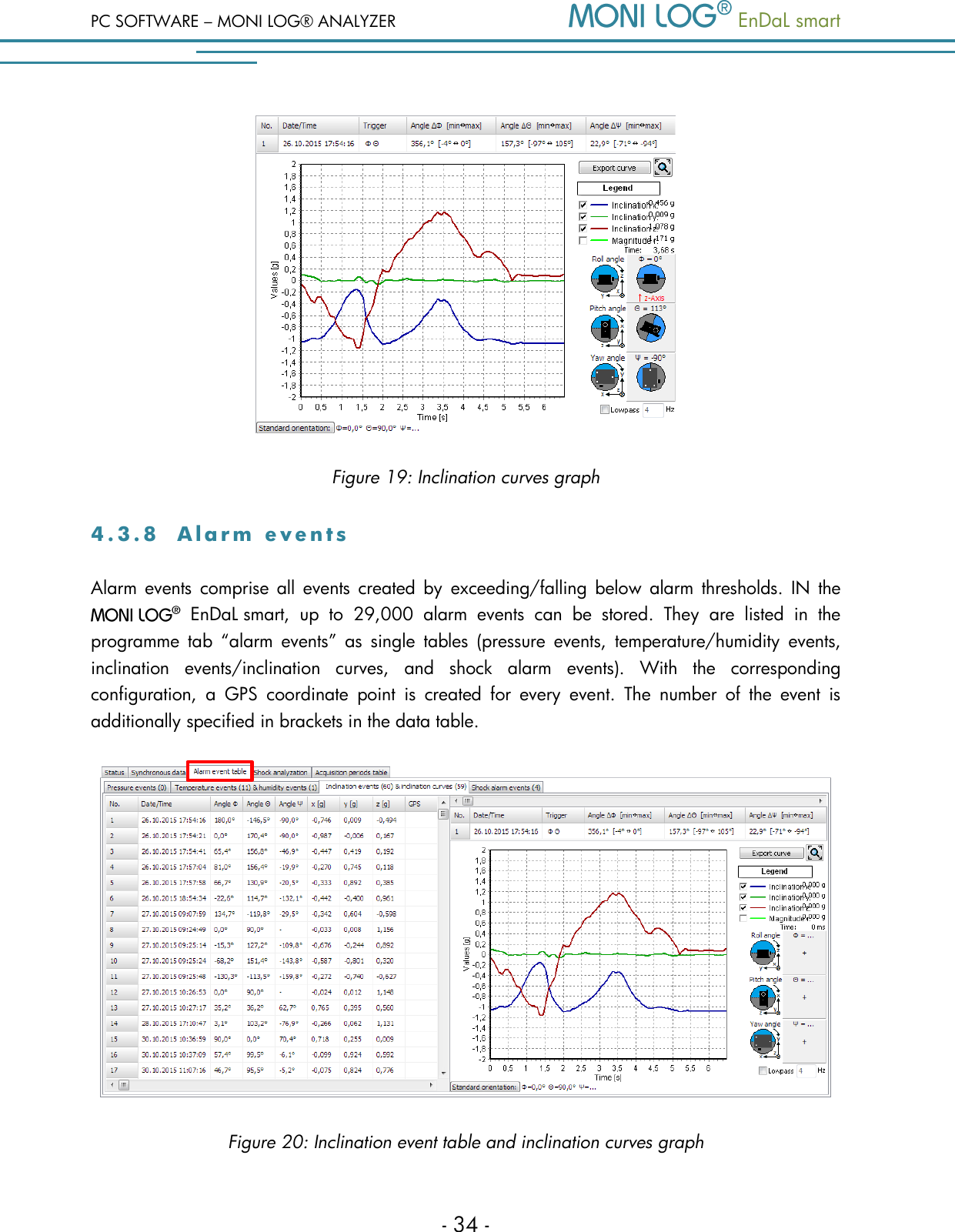
  EnDaL smart  PC SOFTWARE – MONI LOG® ANALYZER - 33 - By this definition the angles in the normal position of the device on the table are not  (0°,0°,0°), but (0°,90°,--). The roll angle is 0°, since the z-axis shows in the direction of the axis of the Earth. The  pitch  angle  is  90°,  since  the  x-axis  is  standing  vertically  to  the  axis  of  the  Earth  (namely horizontal).  The  yaw  angle  (rotation  around  the  z-axis)  cannot  be  determined,  since  the gravitational acceleration for both reference axes (x- & y-axis) is almost zero.     Figure 18: Example of inclination angle display  4 . 3 . 7  I n c l i n a t i o n   c u r v e s  Inclination  curves  record  the  inclination  for  further  8  seconds  as  course  of  the  curve  after  an inclination event.  Inclination  events  often  superimpose  with  acceleration  events  in  reality.  Check  in  case  of inclination curves, if the magnitude has a course of approximatively 1 g. If this is the case, this is a “gentle tilting” without jerky movements (see Figure 19). In the other case, a “vibration” or a similar jerky process has triggered the inclination event. For inclination curves, also the angular display is available.
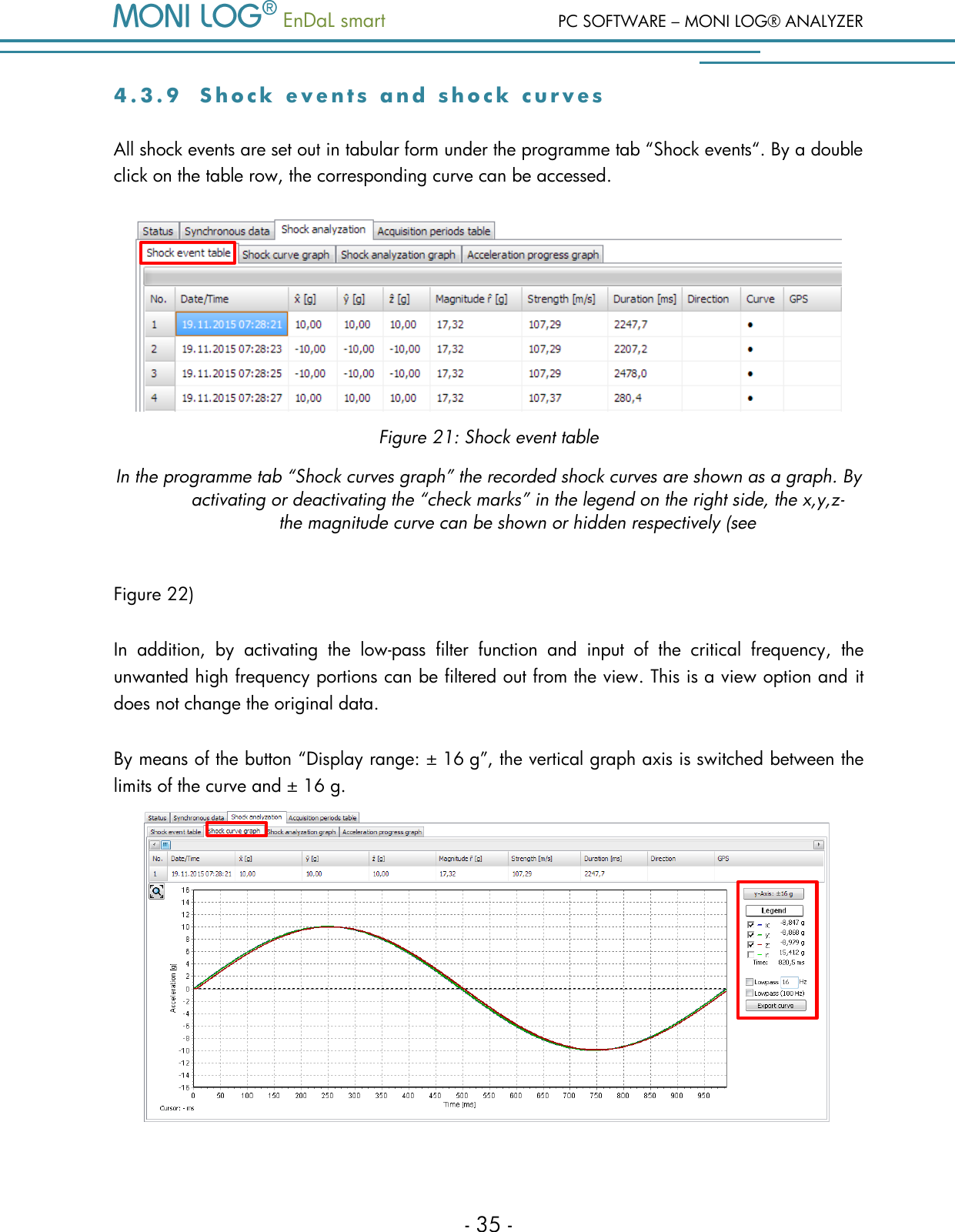
PC SOFTWARE – MONI LOG® ANALYZER   EnDaL smart   - 34 -  Figure 19: Inclination curves graph 4 . 3 . 8  A l a r m   e v e n t s  Alarm  events  comprise  all  events  created by  exceeding/falling  below  alarm  thresholds. IN  the    EnDaL smart,  up  to  29,000  alarm  events  can  be  stored.  They  are  listed  in  the programme  tab  “alarm  events” as  single  tables  (pressure  events,  temperature/humidity  events, inclination  events/inclination  curves,  and  shock  alarm  events).  With  the  corresponding configuration,  a  GPS  coordinate  point  is  created  for  every  event.  The  number  of  the  event  is additionally specified in brackets in the data table.  Figure 20: Inclination event table and inclination curves graph
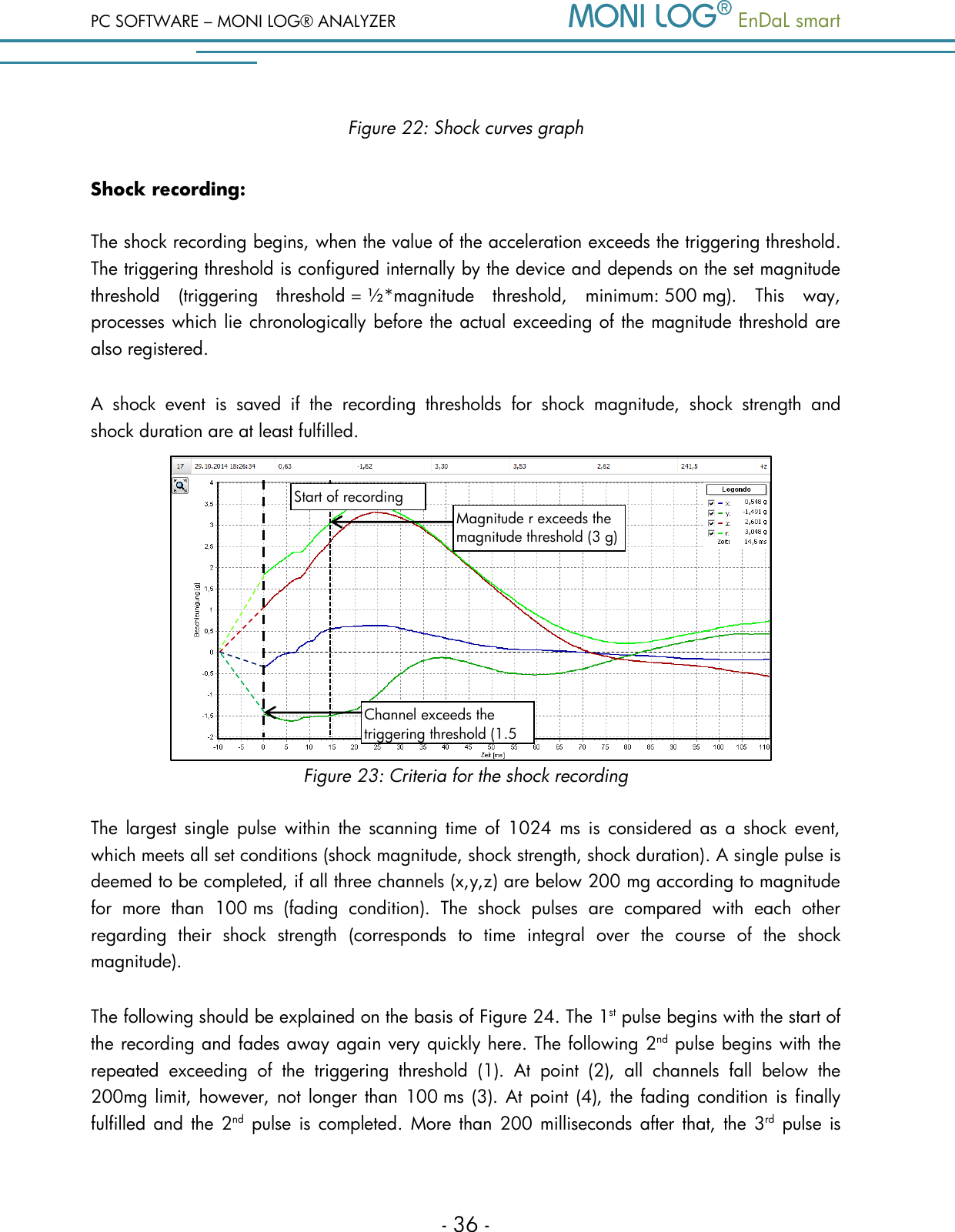
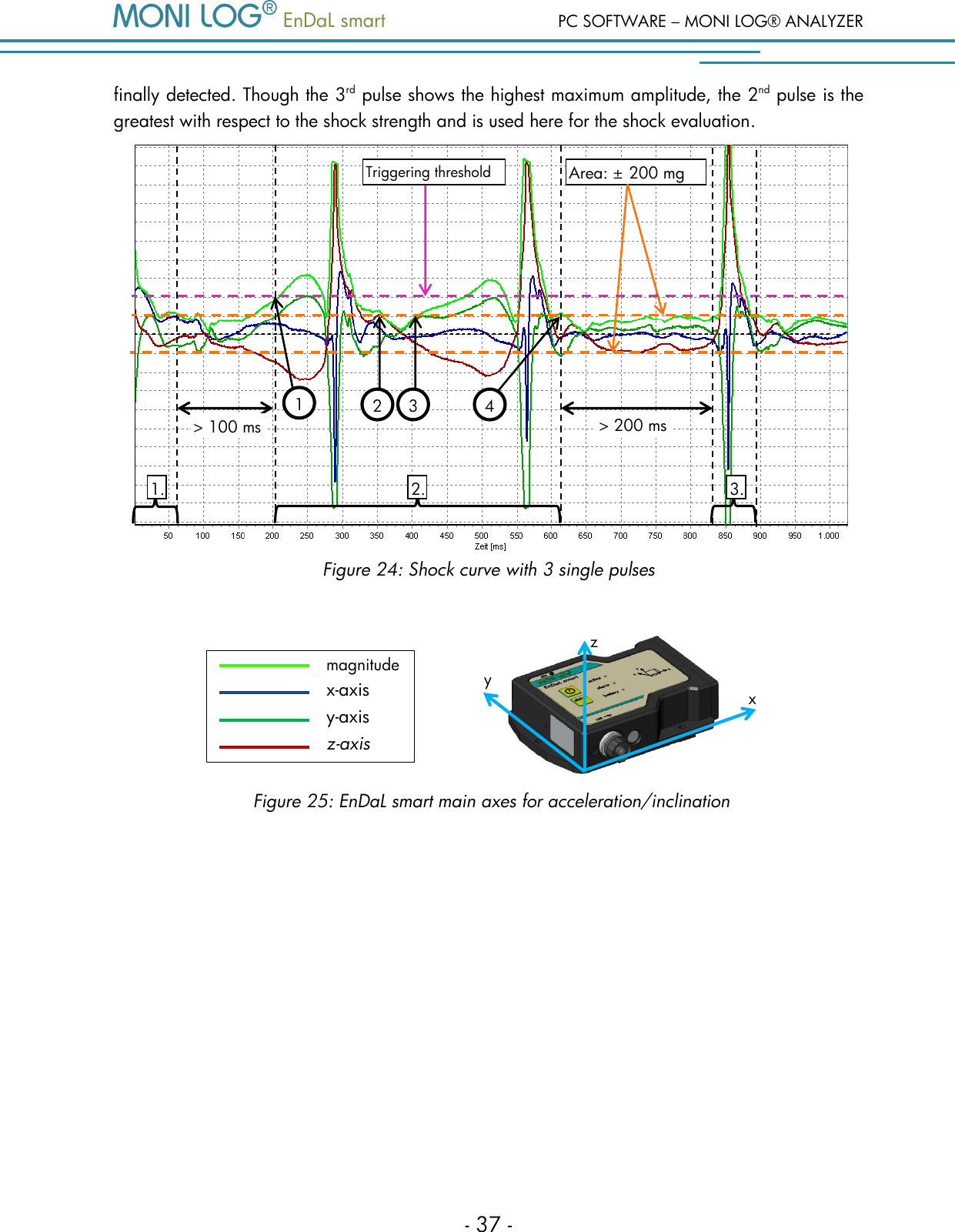
  EnDaL smart  PC SOFTWARE – MONI LOG® ANALYZER - 35 - 4 . 3 . 9  S h o c k   e v e n t s   a n d   s h o c k   c u r v e s  All shock events are set out in tabular form under the programme tab “Shock events“. By a double click on the table row, the corresponding curve can be accessed.   Figure 21: Shock event table In the programme tab “Shock curves graph” the recorded shock curves are shown as a graph. By activating or deactivating the “check marks” in the legend on the right side, the x,y,z-the magnitude curve can be shown or hidden respectively (see  Figure 22) In  addition,  by  activating  the  low-pass  filter  function  and  input  of  the  critical  frequency,  the unwanted high frequency portions can be filtered out from the view. This is a view option and it does not change the original data.  By means of the button “Display range: ± 16 g”, the vertical graph axis is switched between the limits of the curve and ± 16 g.
PC SOFTWARE – MONI LOG® ANALYZER   EnDaL smart   - 36 - Figure 22: Shock curves graph Shock recording: The shock recording begins, when the value of the acceleration exceeds the triggering threshold. The triggering threshold is configured internally by the device and depends on the set magnitude threshold  (triggering  threshold = ½*magnitude  threshold,  minimum: 500 mg).  This  way, processes which lie chronologically before the actual exceeding of the magnitude threshold are also registered.  A  shock  event  is  saved  if  the  recording  thresholds  for  shock  magnitude,  shock  strength  and shock duration are at least fulfilled.             Figure 23: Criteria for the shock recording The  largest  single  pulse  within  the scanning time  of  1024  ms  is  considered as  a  shock  event, which meets all set conditions (shock magnitude, shock strength, shock duration). A single pulse is deemed to be completed, if all three channels (x,y,z) are below 200 mg according to magnitude for  more  than  100 ms  (fading  condition).  The  shock  pulses  are  compared  with  each  other regarding  their  shock  strength  (corresponds  to  time  integral  over  the  course  of  the  shock magnitude).  The following should be explained on the basis of Figure 24. The 1st pulse begins with the start of the recording and fades away again very quickly here. The following 2nd pulse begins with the repeated  exceeding  of  the  triggering  threshold  (1).  At  point  (2),  all  channels  fall  below  the 200mg limit, however, not longer than 100 ms (3). At point (4), the fading condition is  finally fulfilled and the  2nd pulse is  completed.  More than  200 milliseconds after  that,  the 3rd pulse is Magnitude r exceeds the magnitude threshold (3 g) Channel exceeds the triggering threshold (1.5 g) Start of recording
  EnDaL smart  PC SOFTWARE – MONI LOG® ANALYZER - 37 - finally detected. Though the 3rd pulse shows the highest maximum amplitude, the 2nd pulse is the greatest with respect to the shock strength and is used here for the shock evaluation.  Figure 24: Shock curve with 3 single pulses        Area: ± 200 mg 1. 2. 3. Triggering threshold > 100 ms > 200 ms 44 34 24 14 1 2 3 y z x magnitude x-axis y-axis z-axis Figure 25: EnDaL smart main axes for acceleration/inclination
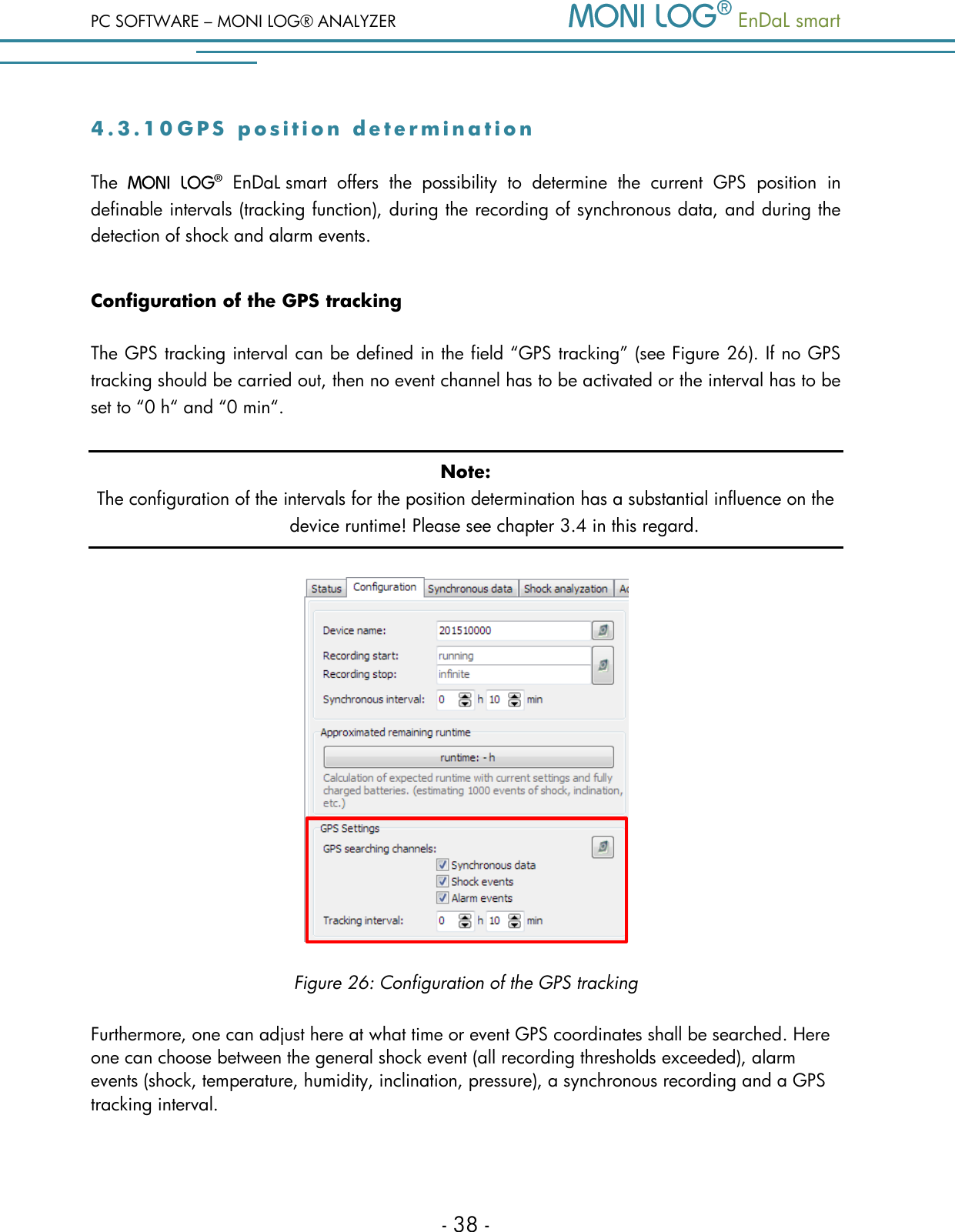
PC SOFTWARE – MONI LOG® ANALYZER   EnDaL smart   - 38 - 4 . 3 . 1 0  G P S   p o s i t i o n   d e t e r m i n a t i o n  The    EnDaL smart  offers  the  possibility  to  determine  the  current  GPS  position  in definable intervals (tracking function), during the recording of synchronous data, and during the detection of shock and alarm events. Configuration of the GPS tracking The GPS tracking interval can be defined in the field “GPS tracking” (see Figure 26). If no GPS tracking should be carried out, then no event channel has to be activated or the interval has to be set to “0 h“ and “0 min“. Note: The configuration of the intervals for the position determination has a substantial influence on the device runtime! Please see chapter 3.4 in this regard.  Figure 26: Configuration of the GPS tracking Furthermore, one can adjust here at what time or event GPS coordinates shall be searched. Here one can choose between the general shock event (all recording thresholds exceeded), alarm events (shock, temperature, humidity, inclination, pressure), a synchronous recording and a GPS tracking interval.
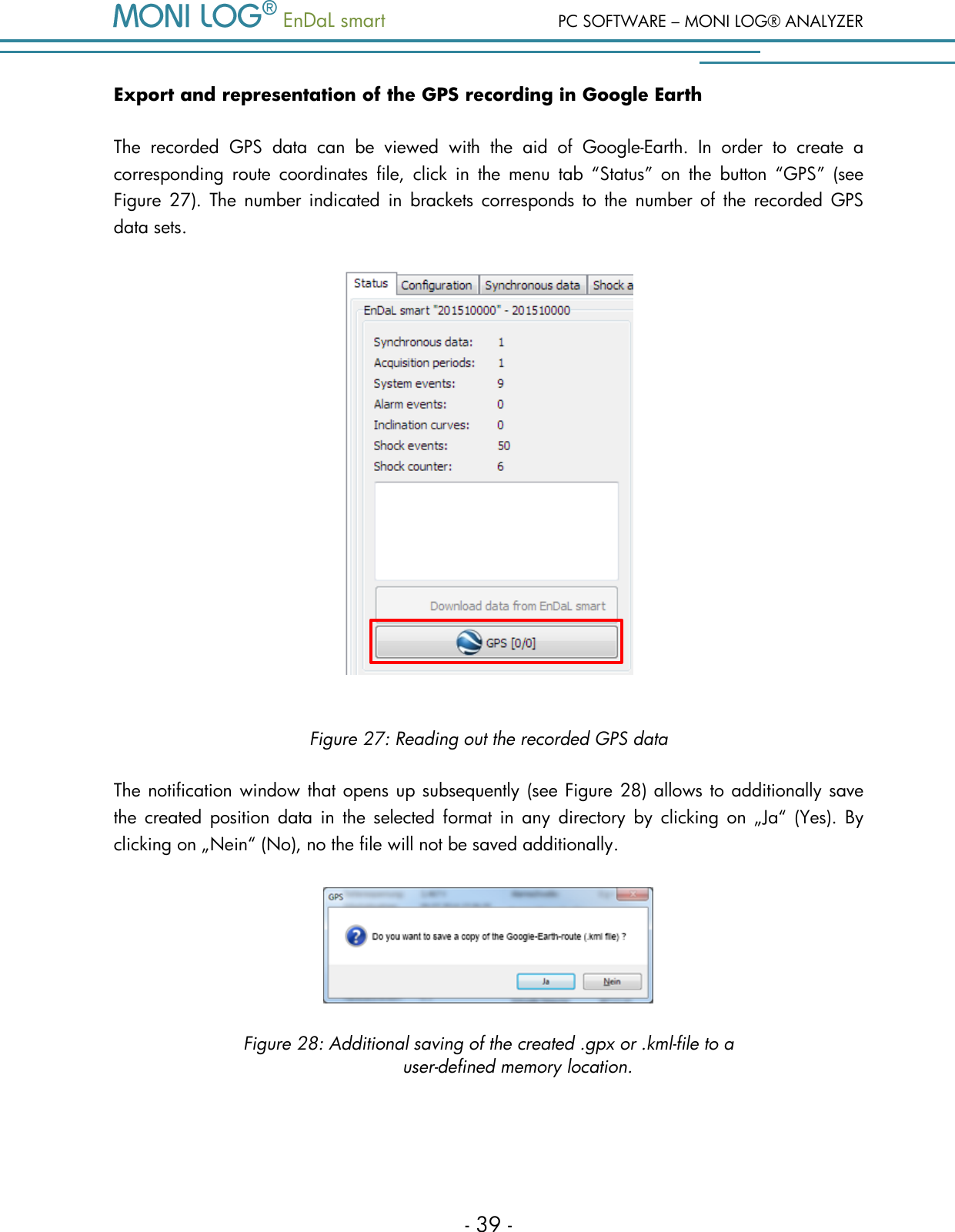
  EnDaL smart  PC SOFTWARE – MONI LOG® ANALYZER - 39 - Export and representation of the GPS recording in Google Earth The  recorded  GPS  data  can  be  viewed  with  the  aid  of  Google-Earth.  In  order  to  create  a corresponding  route  coordinates  file,  click  in  the  menu  tab  “Status”  on  the  button  “GPS”  (see Figure 27).  The  number indicated in  brackets corresponds  to  the  number of  the  recorded  GPS data sets.   Figure 27: Reading out the recorded GPS data The notification window that opens up subsequently (see Figure 28) allows to additionally save the  created  position  data  in  the  selected format  in  any  directory  by  clicking  on  „Ja“  (Yes).  By clicking on „Nein“ (No), no the file will not be saved additionally.   Figure 28: Additional saving of the created .gpx or .kml-file to a  user-defined memory location.
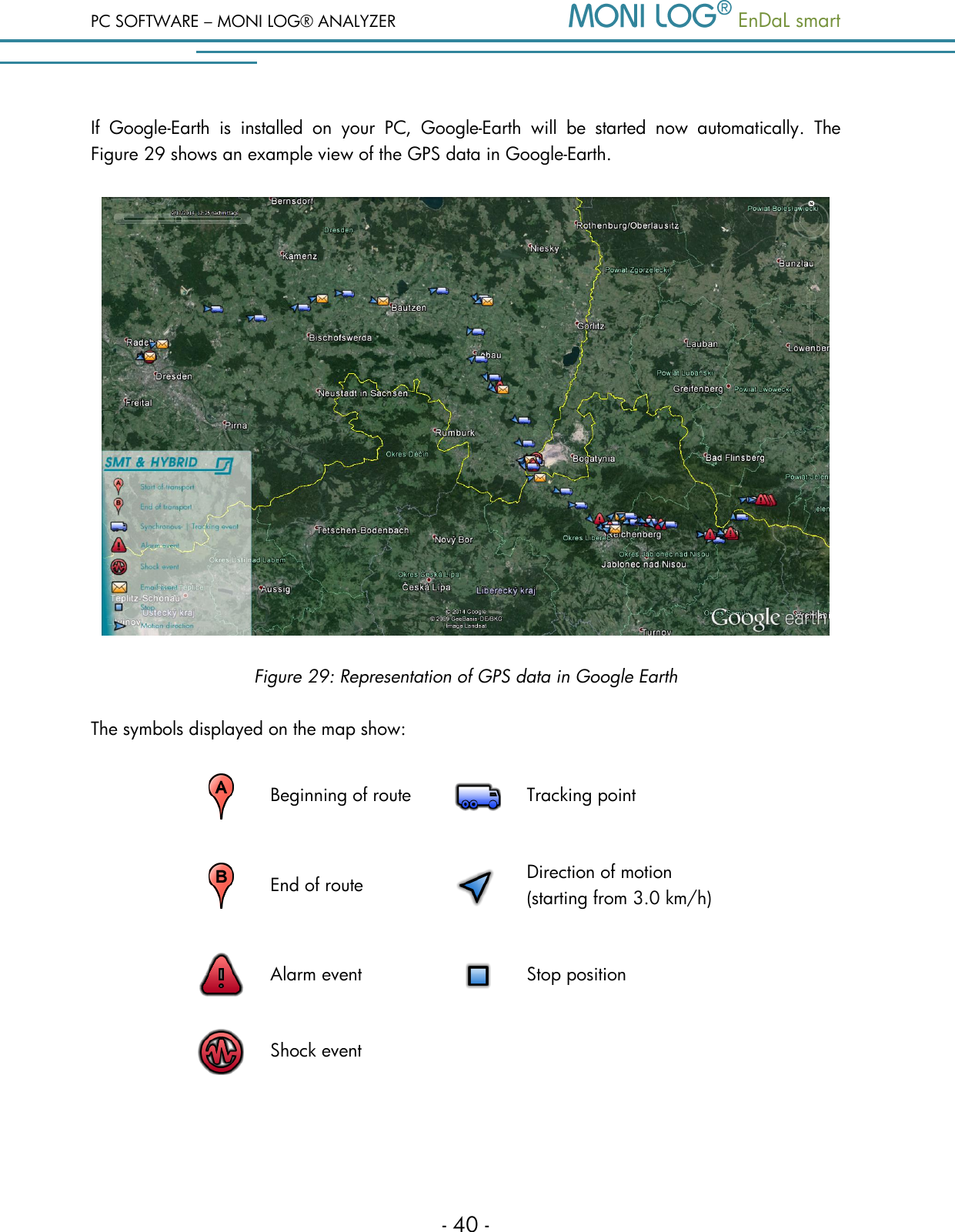
PC SOFTWARE – MONI LOG® ANALYZER   EnDaL smart   - 40 - If  Google-Earth  is  installed  on  your  PC,  Google-Earth  will  be  started  now  automatically.  The Figure 29 shows an example view of the GPS data in Google-Earth.  Figure 29: Representation of GPS data in Google Earth The symbols displayed on the map show:  Beginning of route  Tracking point  End of route  Direction of motion (starting from 3.0 km/h)  Alarm event  Stop position  Shock event
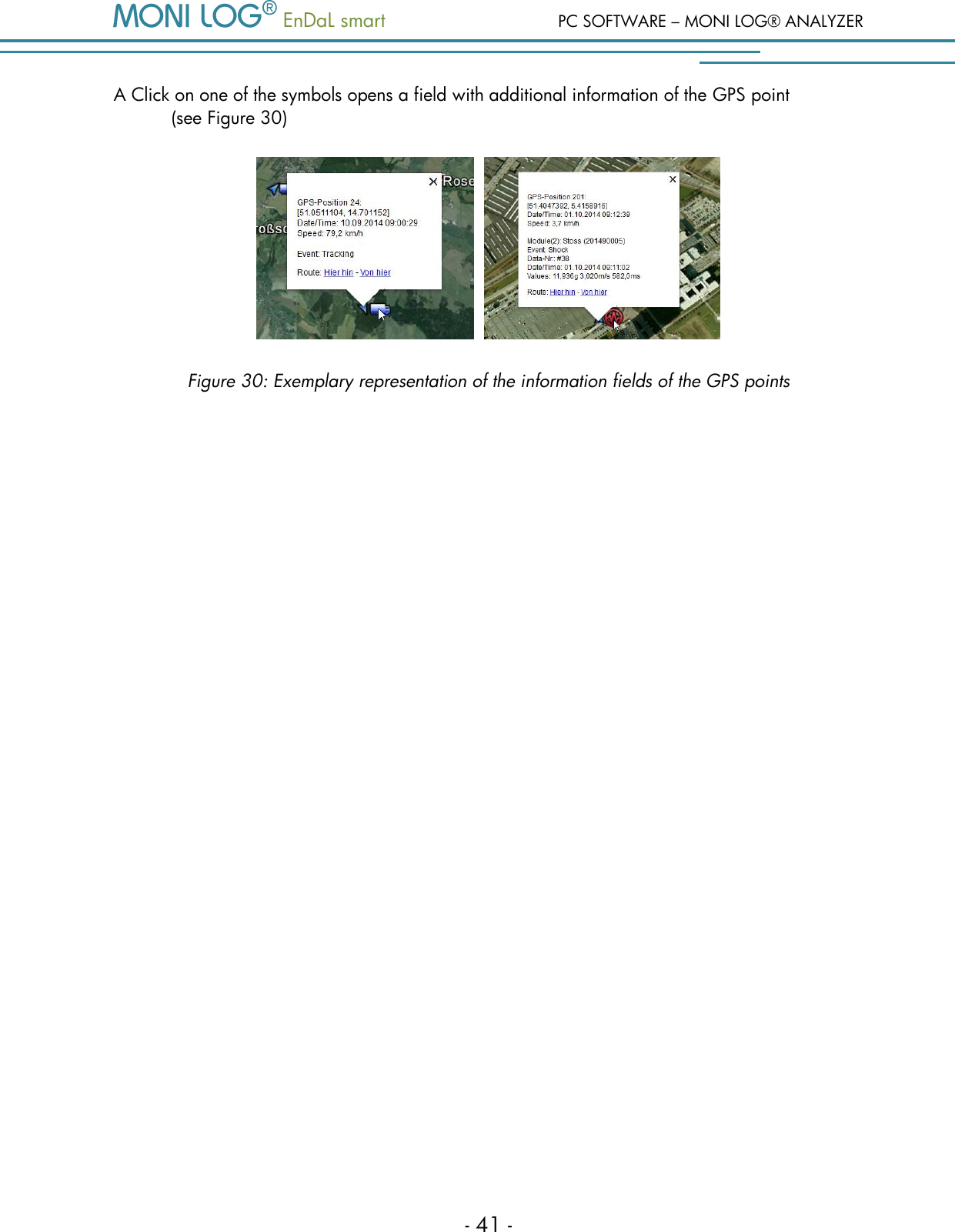
  EnDaL smart  PC SOFTWARE – MONI LOG® ANALYZER - 41 - A Click on one of the symbols opens a field with additional information of the GPS point  (see Figure 30)     Figure 30: Exemplary representation of the information fields of the GPS points
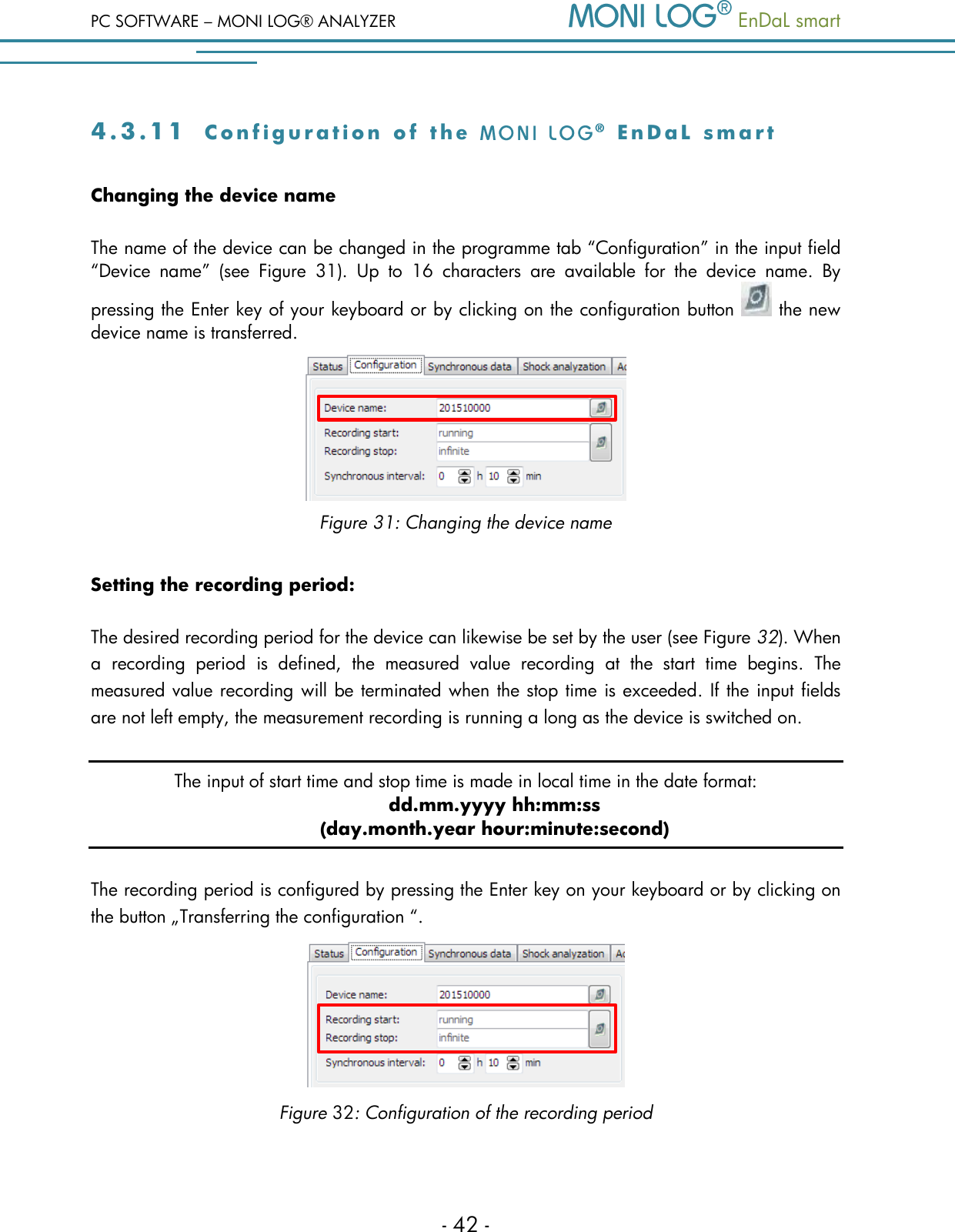
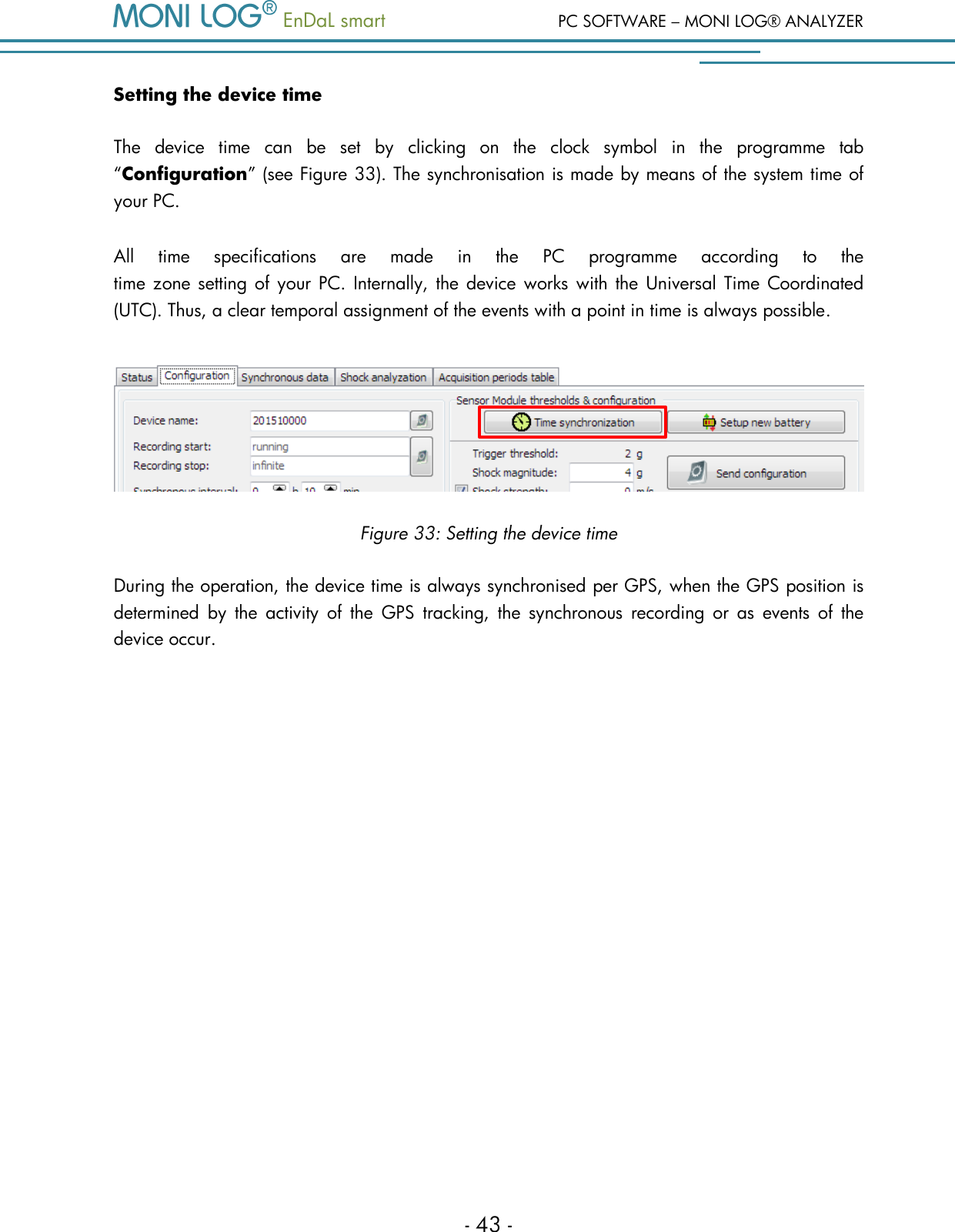
PC SOFTWARE – MONI LOG® ANALYZER   EnDaL smart   - 42 - 4 . 3 . 1 1  C o n f i g u r a t i o n   o f   t h e     E n D a L   s m a r t  Changing the device name The name of the device can be changed in the programme tab “Configuration” in the input field “Device  name”  (see  Figure  31).  Up  to  16  characters  are  available  for  the  device  name.  By pressing the Enter key of your keyboard or by clicking on the configuration button   the new device name is transferred.  Figure 31: Changing the device name  Setting the recording period: The desired recording period for the device can likewise be set by the user (see Figure 32). When a  recording  period  is  defined,  the  measured  value  recording  at  the  start  time  begins.  The measured value recording will be terminated when the stop time is exceeded. If the input fields are not left empty, the measurement recording is running a long as the device is switched on. The input of start time and stop time is made in local time in the date format:  dd.mm.yyyy hh:mm:ss (day.month.year hour:minute:second) The recording period is configured by pressing the Enter key on your keyboard or by clicking on the button „Transferring the configuration “.  Figure 32: Configuration of the recording period
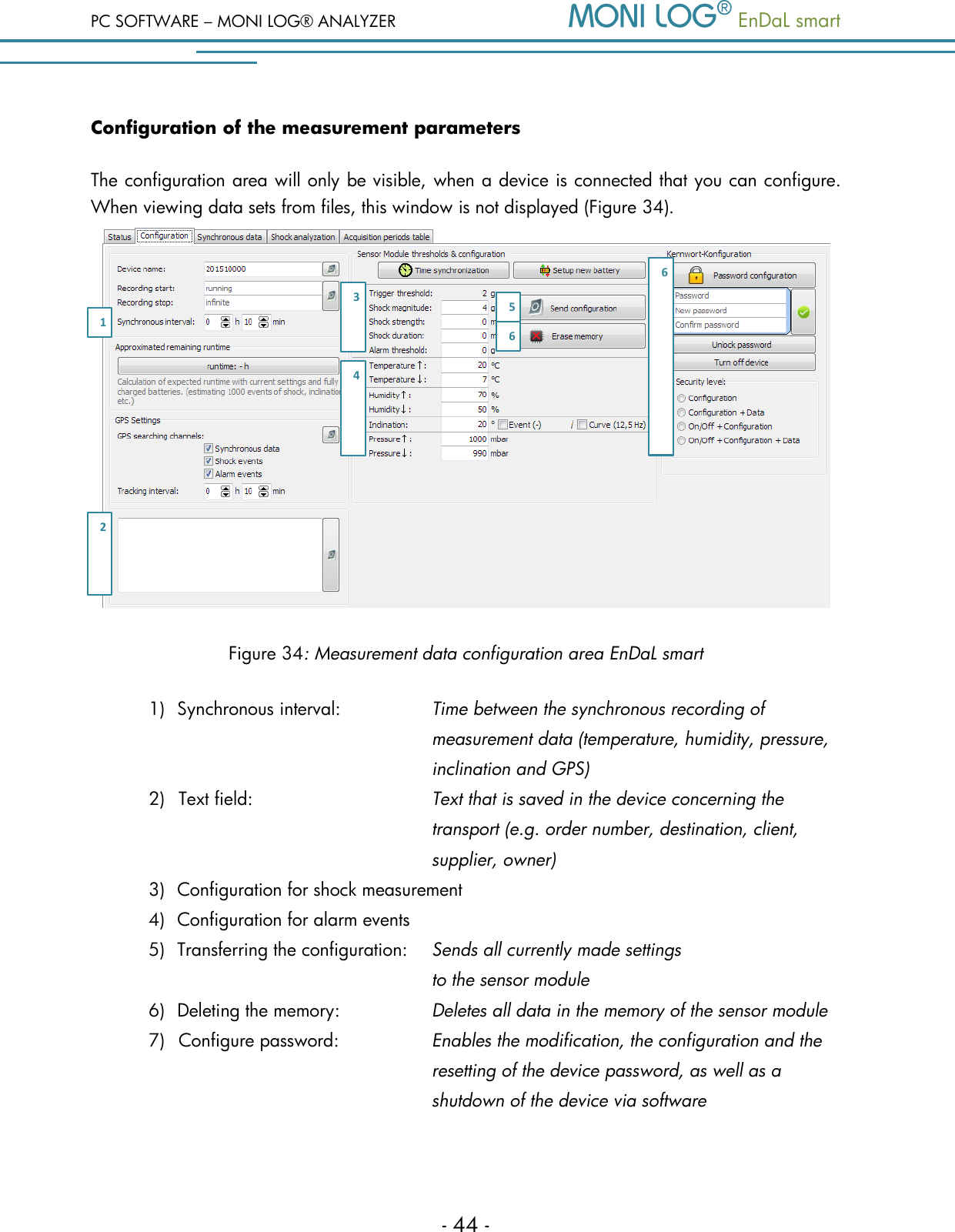
  EnDaL smart  PC SOFTWARE – MONI LOG® ANALYZER - 43 - Setting the device time The  device  time  can  be  set  by  clicking  on  the  clock  symbol  in  the  programme  tab “Configuration” (see Figure 33). The synchronisation is made by means of the system time of your PC.  All  time  specifications  are  made  in  the  PC  programme  according  to  the  time zone setting of  your PC. Internally, the  device works with the  Universal Time  Coordinated (UTC). Thus, a clear temporal assignment of the events with a point in time is always possible.  Figure 33: Setting the device time During the operation, the device time is always synchronised per GPS, when the GPS position is determined  by  the  activity  of  the  GPS  tracking,  the  synchronous  recording  or  as  events  of  the device occur.
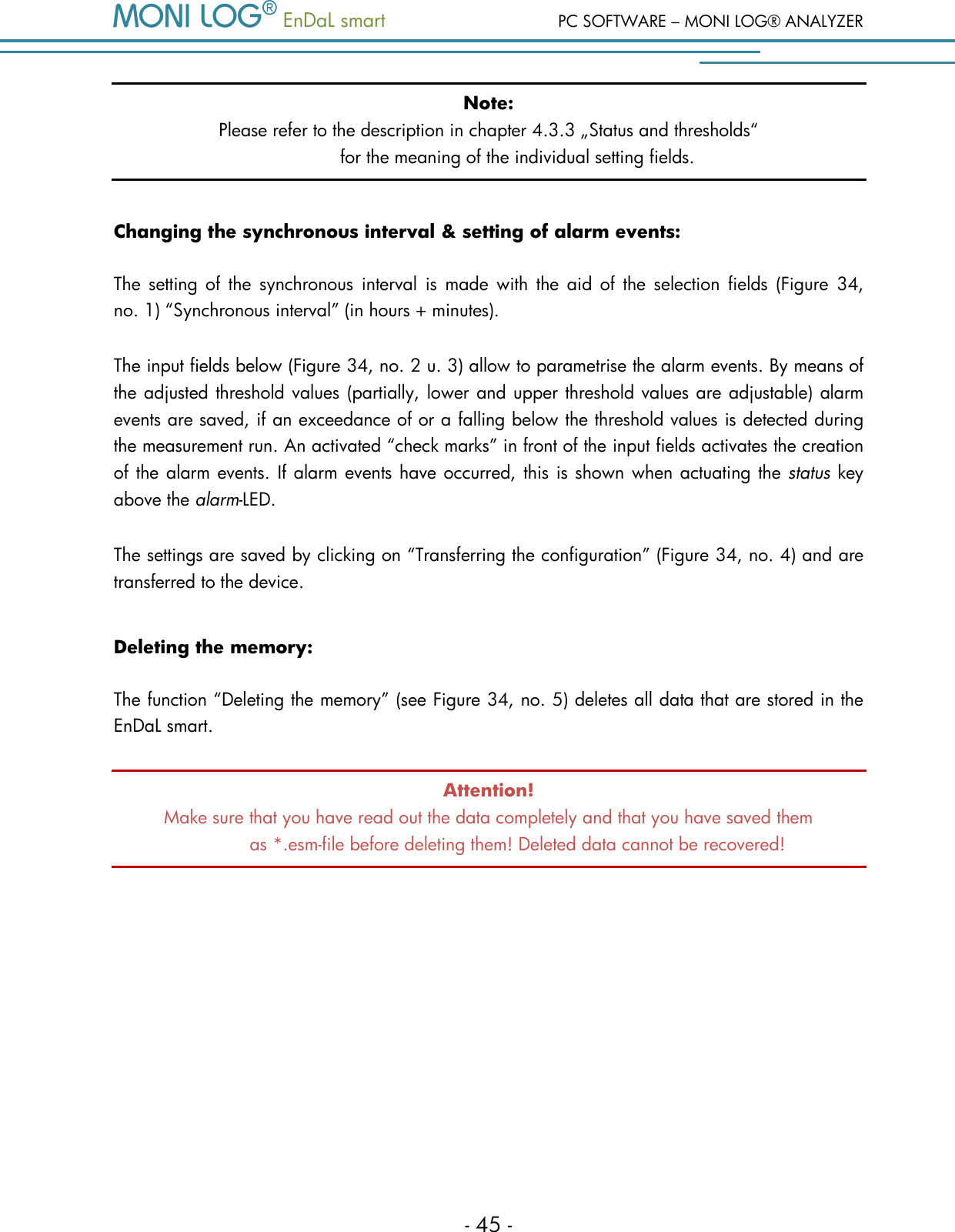
PC SOFTWARE – MONI LOG® ANALYZER   EnDaL smart   - 44 - Configuration of the measurement parameters The configuration area will only be visible, when a device is connected that you can configure. When viewing data sets from files, this window is not displayed (Figure 34).  Figure 34: Measurement data configuration area EnDaL smart 1) Synchronous interval:     Time between the synchronous recording of             measurement data (temperature, humidity, pressure,             inclination and GPS) 2) Text field:  Text that is saved in the device concerning the transport (e.g. order number, destination, client, supplier, owner) 3) Configuration for shock measurement  4) Configuration for alarm events 5) Transferring the configuration:  Sends all currently made settings             to the sensor module 6) Deleting the memory:    Deletes all data in the memory of the sensor module 7) Configure password:  Enables the modification, the configuration and the resetting of the device password, as well as a shutdown of the device via software  1 2 3 4 5 6 6
  EnDaL smart  PC SOFTWARE – MONI LOG® ANALYZER - 45 - Note: Please refer to the description in chapter 4.3.3 „Status and thresholds“  for the meaning of the individual setting fields.  Changing the synchronous interval & setting of alarm events: The  setting  of  the  synchronous  interval  is  made with  the  aid  of the  selection  fields  (Figure  34,  no. 1) “Synchronous interval” (in hours + minutes).  The input fields below (Figure 34, no. 2 u. 3) allow to parametrise the alarm events. By means of the adjusted threshold values (partially, lower and upper threshold values are adjustable) alarm events are saved, if an exceedance of or a falling below the threshold values is detected during the measurement run. An activated “check marks” in front of the input fields activates the creation of the alarm events. If alarm events have occurred, this is shown when actuating the status key above the alarm-LED. The settings are saved by clicking on “Transferring the configuration” (Figure 34, no. 4) and are transferred to the device.  Deleting the memory: The function “Deleting the memory” (see Figure 34, no. 5) deletes all data that are stored in the EnDaL smart.  Attention! Make sure that you have read out the data completely and that you have saved them  as *.esm-file before deleting them! Deleted data cannot be recovered!
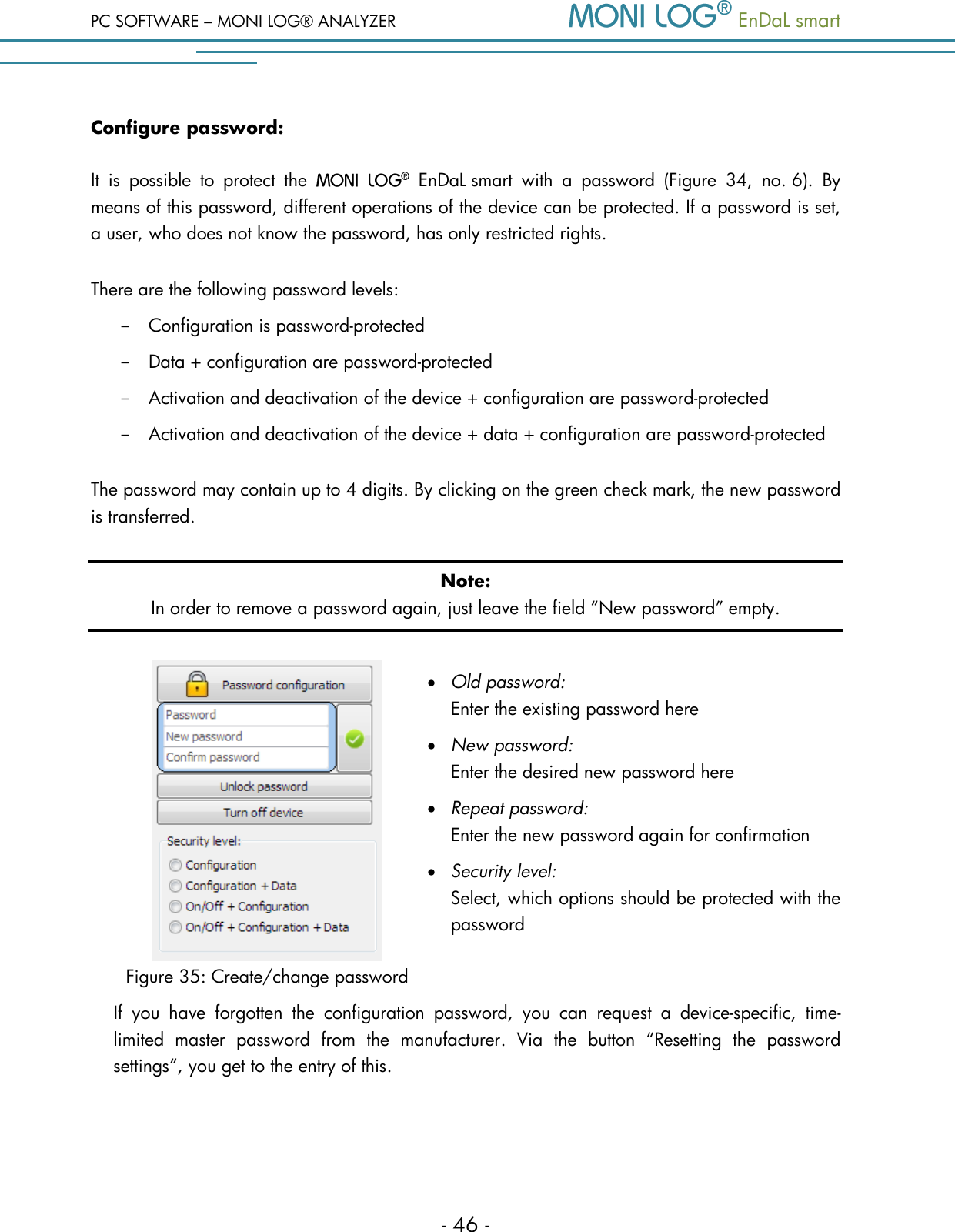
PC SOFTWARE – MONI LOG® ANALYZER   EnDaL smart   - 46 - Configure password: It  is  possible  to  protect  the    EnDaL smart  with  a  password  (Figure  34,  no. 6).  By means of this password, different operations of the device can be protected. If a password is set, a user, who does not know the password, has only restricted rights. There are the following password levels: - Configuration is password-protected - Data + configuration are password-protected - Activation and deactivation of the device + configuration are password-protected - Activation and deactivation of the device + data + configuration are password-protected The password may contain up to 4 digits. By clicking on the green check mark, the new password is transferred. Note: In order to remove a password again, just leave the field “New password” empty.   Figure 35: Create/change password  Old password:    Enter the existing password here  New password:    Enter the desired new password here  Repeat password:   Enter the new password again for confirmation   Security level:    Select, which options should be protected with the password   If  you  have  forgotten  the  configuration  password,  you  can  request  a  device-specific,  time-limited  master  password  from  the  manufacturer.  Via  the  button  “Resetting  the  password settings“, you get to the entry of this.
  EnDaL smart  PC SOFTWARE – MONI LOG® ANALYZER - 47 - W A RR AN TY  CE R TI F ICATE   EnDaL smart Against submission  of this warranty certificate we  grant  a 12-month warranty from the  date of delivery for the above instrument.  In case of deficiencies we first have the right of rectification, either rectification of the deficiency or  subsequent  delivery.  Should  the  rectification  fail,  and  only  then,  we  will  take  back  the instrument and reimburse the purchase price. Any further warranty claims shall be excluded. This warranty covers all faults that impair the proper functioning of the instrument due to technical defects of individual components or assemblies. Batteries and rechargeable batteries as expendables are not covered by this warranty. This  warranty  will  only  be  granted  if  the  instrument  has  been  used  properly  for  its  intended purpose. Any  attempts of  the warrantee or  third  persons to  repair the instruments or  to  intervene in any other way exclude warranty claims.  Any mechanical damage which is the result of undue stress also excludes warranty claims.  We will immediately notify the warrantee of any repair work excluded from warranty coverage. If the instrument is sent in together with the warranty certificate, this will be considered as a repair order for the elimination of all damage.  The warrantee can exclude partial services.  In case of any malfunctions of the instrument, please state the serial no. You can find it on type label or on the logs when evaluating your data.  SMT & HYBRID GmbH      Telephone:  +49 351 / 266 13 0 An der Prießnitzaue 22      Fax.:    +49 351 / 266 13 10 D – 01328 Dresden        Email:   info@smt-hybrid.de GERMANY  Copyright The software is protected under the amended copyright law. Copies (with the exception of backup copies) may only be made after express permission by SMT & HYBRID. Google and Google Earth are trademarks of the Google company.

Navigation menu