Comar Systems CSB200 Class B AIS Transponder User Manual CSB200 R3 1

Comar Systems Ltd Class B AIS Transponder CSB200 R3 1

User manual

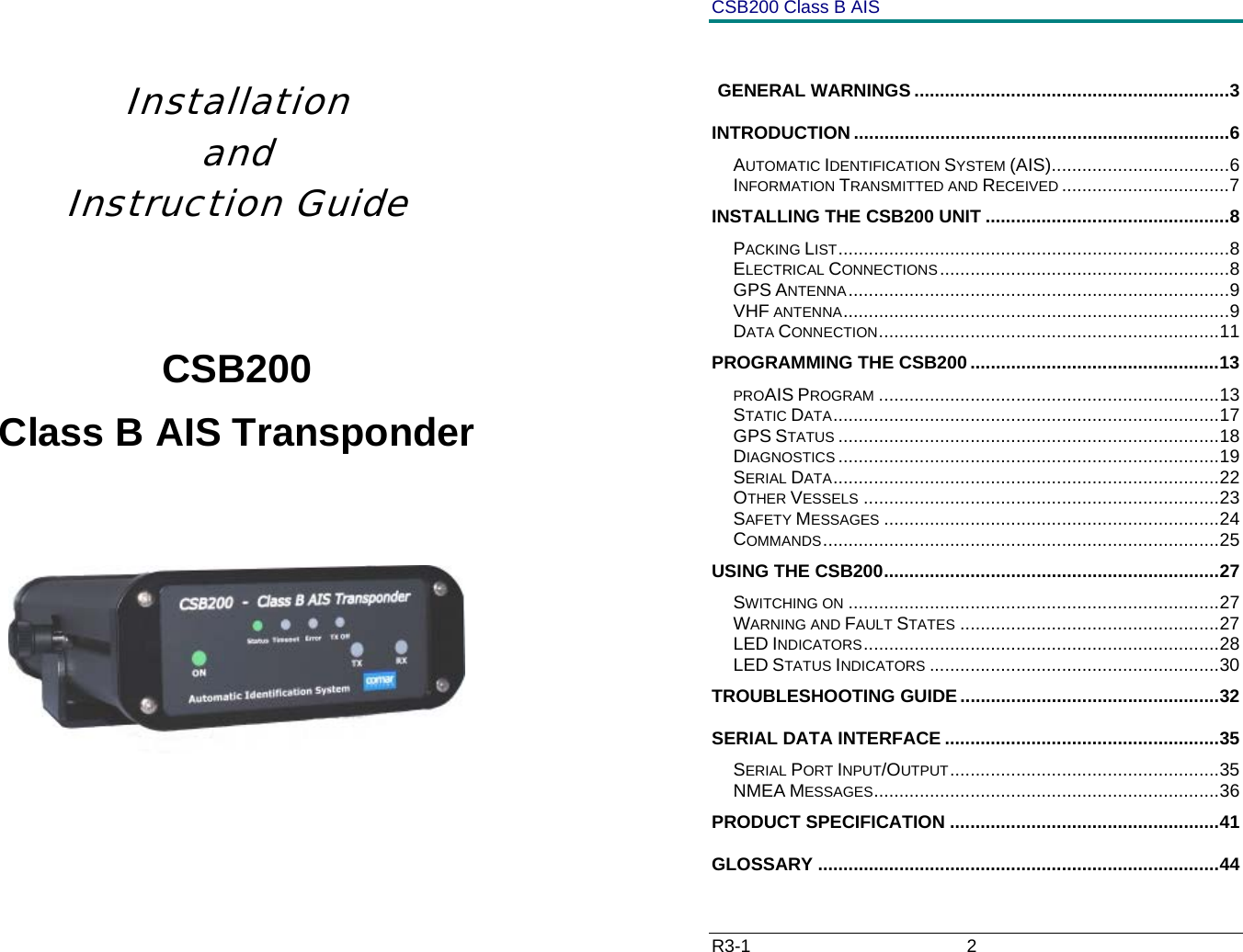
    Installation    and Instruction Guide   CSB200 Class B AIS Transponder       CSB200 Class B AIS R3-1                             2           GENERAL WARNINGS ..............................................................3 INTRODUCTION ..........................................................................6 AUTOMATIC IDENTIFICATION SYSTEM (AIS)...................................6 INFORMATION TRANSMITTED AND RECEIVED .................................7 INSTALLING THE CSB200 UNIT ................................................8 PACKING LIST.............................................................................8 ELECTRICAL CONNECTIONS.........................................................8 GPS ANTENNA...........................................................................9 VHF ANTENNA............................................................................9 DATA CONNECTION...................................................................11 PROGRAMMING THE CSB200.................................................13 PROAIS PROGRAM ...................................................................13 STATIC DATA............................................................................17 GPS STATUS ...........................................................................18 DIAGNOSTICS ...........................................................................19 SERIAL DATA............................................................................22 OTHER VESSELS ......................................................................23 SAFETY MESSAGES ..................................................................24 COMMANDS..............................................................................25 USING THE CSB200..................................................................27 SWITCHING ON .........................................................................27 WARNING AND FAULT STATES ...................................................27 LED INDICATORS......................................................................28 LED STATUS INDICATORS .........................................................30 TROUBLESHOOTING GUIDE...................................................32 SERIAL DATA INTERFACE ......................................................35 SERIAL PORT INPUT/OUTPUT.....................................................35 NMEA MESSAGES....................................................................36 PRODUCT SPECIFICATION .....................................................41 GLOSSARY ...............................................................................44
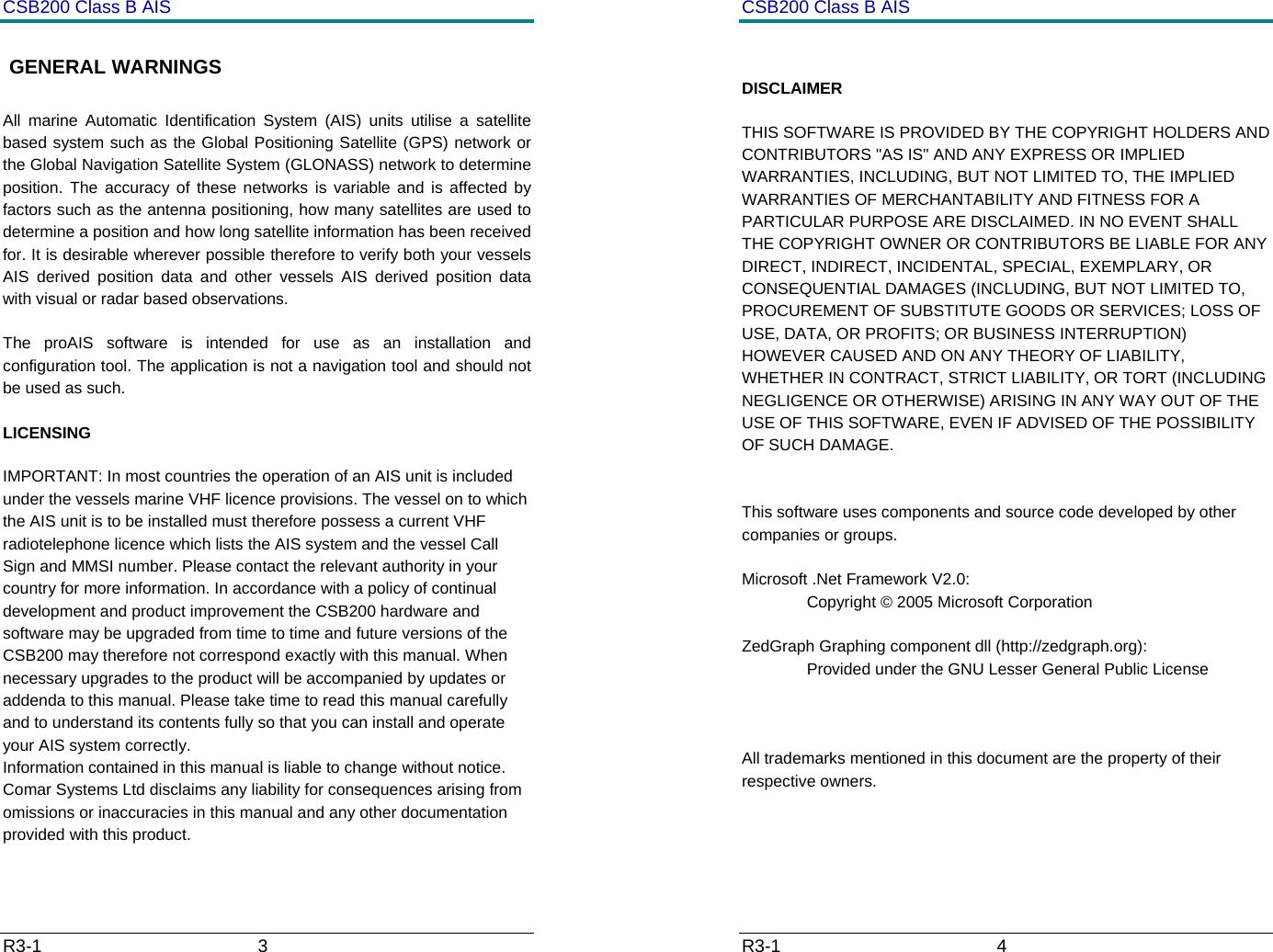
CSB200 Class B AIS R3-1                             3          GENERAL WARNINGS All marine Automatic Identification System (AIS) units utilise a satellite based system such as the Global Positioning Satellite (GPS) network or the Global Navigation Satellite System (GLONASS) network to determine position. The accuracy of these networks is variable and is affected by factors such as the antenna positioning, how many satellites are used to determine a position and how long satellite information has been received for. It is desirable wherever possible therefore to verify both your vessels AIS derived position data and other vessels AIS derived position data with visual or radar based observations.  The proAIS software is intended for use as an installation and configuration tool. The application is not a navigation tool and should not be used as such.  LICENSING IMPORTANT: In most countries the operation of an AIS unit is included under the vessels marine VHF licence provisions. The vessel on to which the AIS unit is to be installed must therefore possess a current VHF radiotelephone licence which lists the AIS system and the vessel Call Sign and MMSI number. Please contact the relevant authority in your country for more information. In accordance with a policy of continual development and product improvement the CSB200 hardware and software may be upgraded from time to time and future versions of the CSB200 may therefore not correspond exactly with this manual. When necessary upgrades to the product will be accompanied by updates or addenda to this manual. Please take time to read this manual carefully and to understand its contents fully so that you can install and operate your AIS system correctly. Information contained in this manual is liable to change without notice. Comar Systems Ltd disclaims any liability for consequences arising from omissions or inaccuracies in this manual and any other documentation provided with this product.  CSB200 Class B AIS R3-1                             4           DISCLAIMER THIS SOFTWARE IS PROVIDED BY THE COPYRIGHT HOLDERS AND CONTRIBUTORS "AS IS" AND ANY EXPRESS OR IMPLIED WARRANTIES, INCLUDING, BUT NOT LIMITED TO, THE IMPLIED WARRANTIES OF MERCHANTABILITY AND FITNESS FOR A PARTICULAR PURPOSE ARE DISCLAIMED. IN NO EVENT SHALL THE COPYRIGHT OWNER OR CONTRIBUTORS BE LIABLE FOR ANY DIRECT, INDIRECT, INCIDENTAL, SPECIAL, EXEMPLARY, OR CONSEQUENTIAL DAMAGES (INCLUDING, BUT NOT LIMITED TO, PROCUREMENT OF SUBSTITUTE GOODS OR SERVICES; LOSS OF USE, DATA, OR PROFITS; OR BUSINESS INTERRUPTION) HOWEVER CAUSED AND ON ANY THEORY OF LIABILITY, WHETHER IN CONTRACT, STRICT LIABILITY, OR TORT (INCLUDING NEGLIGENCE OR OTHERWISE) ARISING IN ANY WAY OUT OF THE USE OF THIS SOFTWARE, EVEN IF ADVISED OF THE POSSIBILITY OF SUCH DAMAGE.   This software uses components and source code developed by other companies or groups.  Microsoft .Net Framework V2.0:   Copyright © 2005 Microsoft Corporation  ZedGraph Graphing component dll (http://zedgraph.org):   Provided under the GNU Lesser General Public License     All trademarks mentioned in this document are the property of their respective owners.
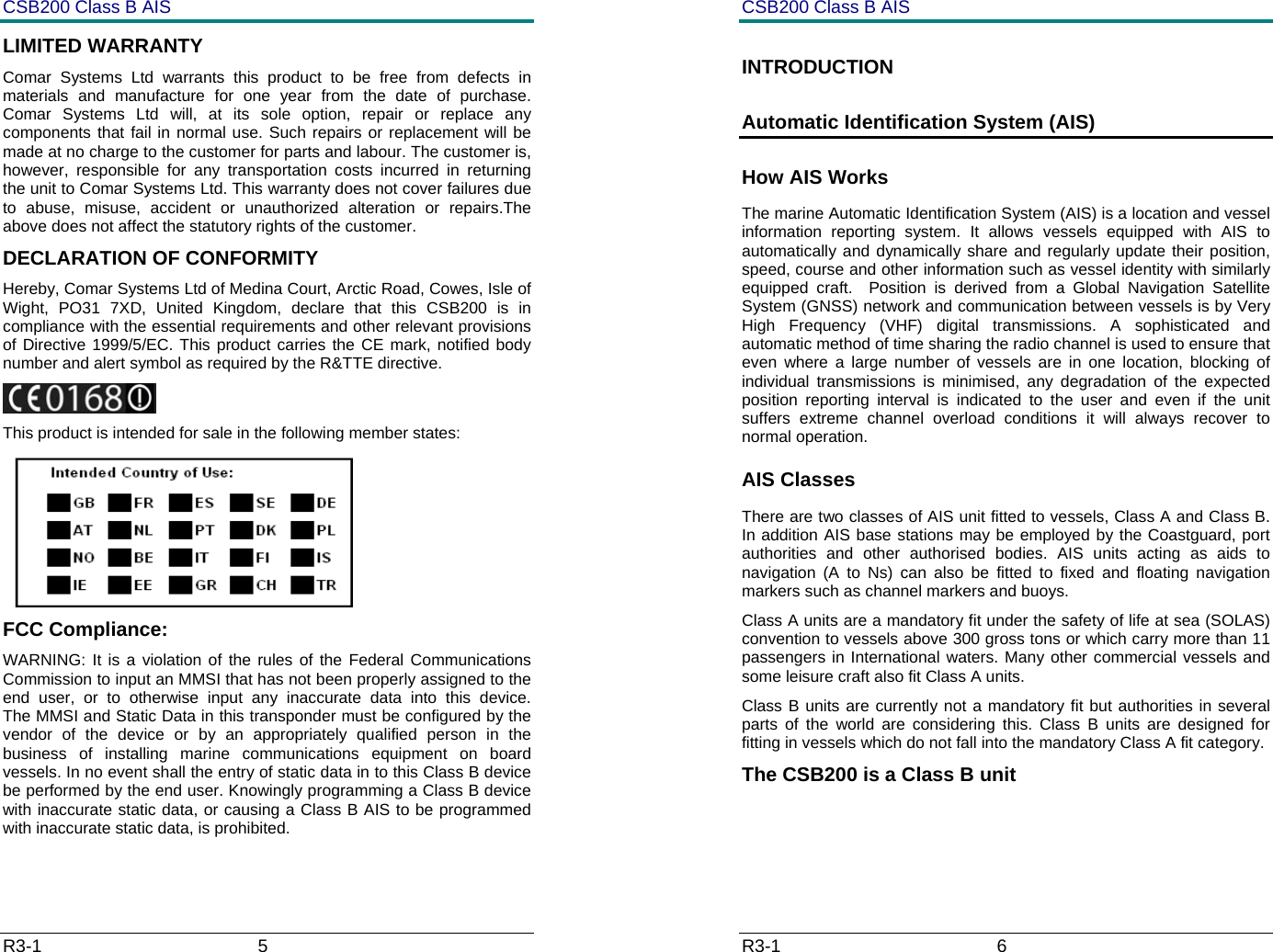
CSB200 Class B AIS R3-1                             5         LIMITED WARRANTY Comar Systems Ltd warrants this product to be free from defects in materials and manufacture for one year from the date of purchase. Comar Systems Ltd will, at its sole option, repair or replace any components that fail in normal use. Such repairs or replacement will be made at no charge to the customer for parts and labour. The customer is, however, responsible for any transportation costs incurred in returning the unit to Comar Systems Ltd. This warranty does not cover failures due to abuse, misuse, accident or unauthorized alteration or repairs.The above does not affect the statutory rights of the customer. DECLARATION OF CONFORMITY Hereby, Comar Systems Ltd of Medina Court, Arctic Road, Cowes, Isle of Wight, PO31 7XD, United Kingdom, declare that this CSB200 is in compliance with the essential requirements and other relevant provisions of Directive 1999/5/EC. This product carries the CE mark, notified body number and alert symbol as required by the R&TTE directive.  This product is intended for sale in the following member states:  FCC Compliance: WARNING: It is a violation of the rules of the Federal Communications Commission to input an MMSI that has not been properly assigned to the end user, or to otherwise input any inaccurate data into this device.      The MMSI and Static Data in this transponder must be configured by the vendor of the device or by an appropriately qualified person in the business of installing marine communications equipment on board vessels. In no event shall the entry of static data in to this Class B device be performed by the end user. Knowingly programming a Class B device with inaccurate static data, or causing a Class B AIS to be programmed with inaccurate static data, is prohibited.  CSB200 Class B AIS R3-1                             6         INTRODUCTION Automatic Identification System (AIS) How AIS Works The marine Automatic Identification System (AIS) is a location and vessel information reporting system. It allows vessels equipped with AIS to automatically and dynamically share and regularly update their position, speed, course and other information such as vessel identity with similarly equipped craft.  Position is derived from a Global Navigation Satellite System (GNSS) network and communication between vessels is by Very High Frequency (VHF) digital transmissions. A sophisticated and automatic method of time sharing the radio channel is used to ensure that even where a large number of vessels are in one location, blocking of individual transmissions is minimised, any degradation of the expected position reporting interval is indicated to the user and even if the unit suffers extreme channel overload conditions it will always recover to normal operation. AIS Classes There are two classes of AIS unit fitted to vessels, Class A and Class B. In addition AIS base stations may be employed by the Coastguard, port authorities and other authorised bodies. AIS units acting as aids to navigation (A to Ns) can also be fitted to fixed and floating navigation markers such as channel markers and buoys. Class A units are a mandatory fit under the safety of life at sea (SOLAS) convention to vessels above 300 gross tons or which carry more than 11 passengers in International waters. Many other commercial vessels and some leisure craft also fit Class A units. Class B units are currently not a mandatory fit but authorities in several parts of the world are considering this. Class B units are designed for fitting in vessels which do not fall into the mandatory Class A fit category. The CSB200 is a Class B unit
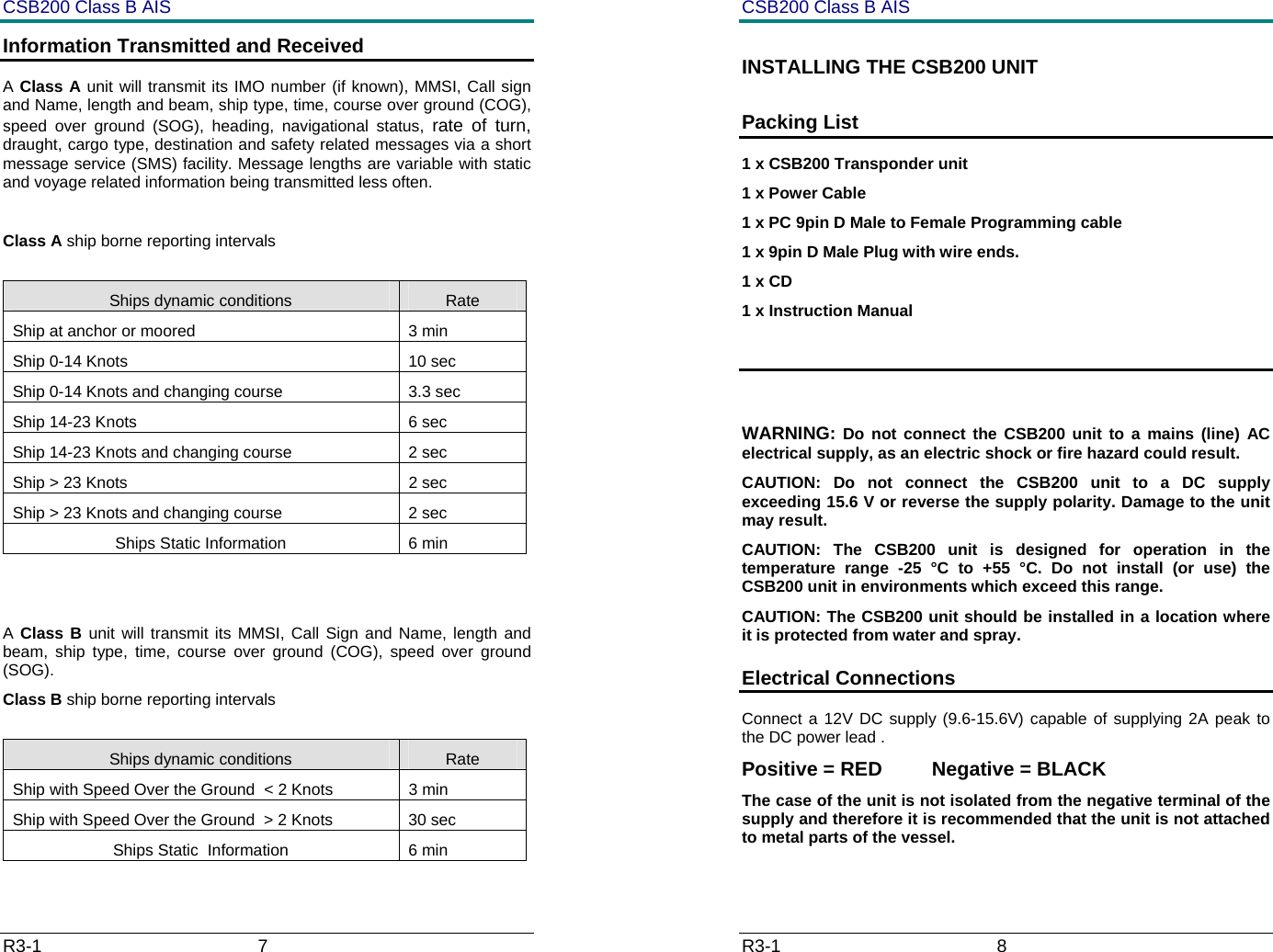
CSB200 Class B AIS R3-1                             7         Information Transmitted and Received A Class A unit will transmit its IMO number (if known), MMSI, Call sign and Name, length and beam, ship type, time, course over ground (COG), speed over ground (SOG), heading, navigational status, rate of turn, draught, cargo type, destination and safety related messages via a short message service (SMS) facility. Message lengths are variable with static and voyage related information being transmitted less often.  Class A ship borne reporting intervals  Ships dynamic conditions  Rate Ship at anchor or moored  3 min Ship 0-14 Knots  10 sec Ship 0-14 Knots and changing course  3.3 sec Ship 14-23 Knots  6 sec Ship 14-23 Knots and changing course  2 sec Ship > 23 Knots  2 sec Ship > 23 Knots and changing course  2 sec Ships Static Information  6 min   A Class B unit will transmit its MMSI, Call Sign and Name, length and beam, ship type, time, course over ground (COG), speed over ground (SOG). Class B ship borne reporting intervals  Ships dynamic conditions  Rate Ship with Speed Over the Ground  < 2 Knots  3 min Ship with Speed Over the Ground  > 2 Knots  30 sec Ships Static  Information  6 min CSB200 Class B AIS R3-1                             8         INSTALLING THE CSB200 UNIT Packing List 1 x CSB200 Transponder unit 1 x Power Cable 1 x PC 9pin D Male to Female Programming cable 1 x 9pin D Male Plug with wire ends. 1 x CD 1 x Instruction Manual   WARNING: Do not connect the CSB200 unit to a mains (line) AC electrical supply, as an electric shock or fire hazard could result. CAUTION: Do not connect the CSB200 unit to a DC supply exceeding 15.6 V or reverse the supply polarity. Damage to the unit may result. CAUTION: The CSB200 unit is designed for operation in the temperature range -25 °C to +55 °C. Do not install (or use) the CSB200 unit in environments which exceed this range. CAUTION: The CSB200 unit should be installed in a location where it is protected from water and spray. Electrical Connections  Connect a 12V DC supply (9.6-15.6V) capable of supplying 2A peak to the DC power lead . Positive = RED         Negative = BLACK  The case of the unit is not isolated from the negative terminal of the supply and therefore it is recommended that the unit is not attached to metal parts of the vessel.
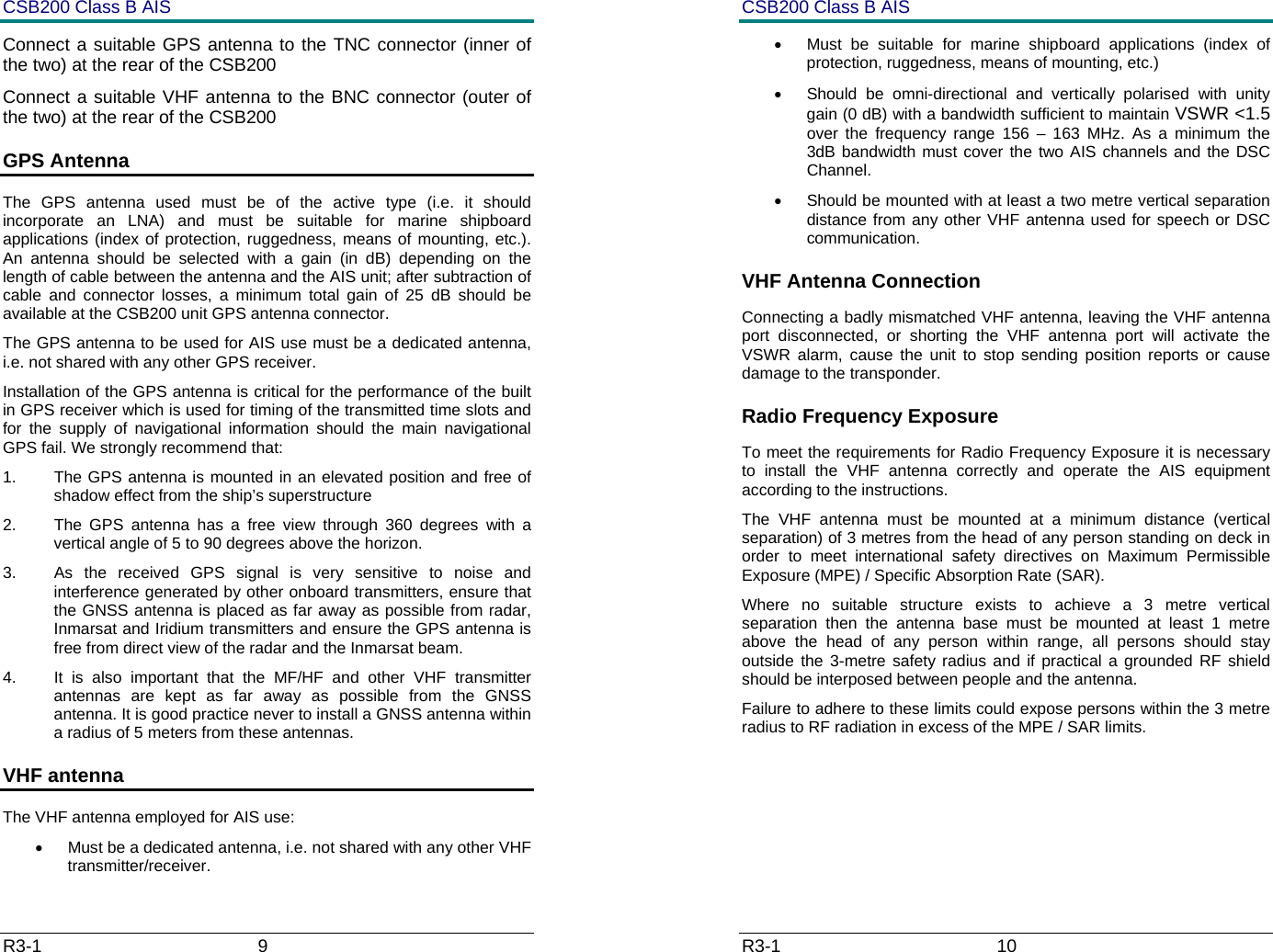
CSB200 Class B AIS R3-1                             9         Connect a suitable GPS antenna to the TNC connector (inner of the two) at the rear of the CSB200 Connect a suitable VHF antenna to the BNC connector (outer of the two) at the rear of the CSB200 GPS Antenna The GPS antenna used must be of the active type (i.e. it should incorporate an LNA) and must be suitable for marine shipboard applications (index of protection, ruggedness, means of mounting, etc.).  An antenna should be selected with a gain (in dB) depending on the length of cable between the antenna and the AIS unit; after subtraction of cable and connector losses, a minimum total gain of 25 dB should be available at the CSB200 unit GPS antenna connector. The GPS antenna to be used for AIS use must be a dedicated antenna, i.e. not shared with any other GPS receiver. Installation of the GPS antenna is critical for the performance of the built in GPS receiver which is used for timing of the transmitted time slots and for the supply of navigational information should the main navigational GPS fail. We strongly recommend that: 1.  The GPS antenna is mounted in an elevated position and free of shadow effect from the ship’s superstructure 2.  The GPS antenna has a free view through 360 degrees with a vertical angle of 5 to 90 degrees above the horizon. 3.  As the received GPS signal is very sensitive to noise and interference generated by other onboard transmitters, ensure that the GNSS antenna is placed as far away as possible from radar, Inmarsat and Iridium transmitters and ensure the GPS antenna is free from direct view of the radar and the Inmarsat beam.  4.  It is also important that the MF/HF and other VHF transmitter antennas are kept as far away as possible from the GNSS antenna. It is good practice never to install a GNSS antenna within a radius of 5 meters from these antennas. VHF antenna  The VHF antenna employed for AIS use: •  Must be a dedicated antenna, i.e. not shared with any other VHF transmitter/receiver. CSB200 Class B AIS R3-1                             10         •  Must be suitable for marine shipboard applications (index of protection, ruggedness, means of mounting, etc.)  •  Should be omni-directional and vertically polarised with unity gain (0 dB) with a bandwidth sufficient to maintain VSWR <1.5 over the frequency range 156 – 163 MHz. As a minimum the 3dB bandwidth must cover the two AIS channels and the DSC              Channel. •  Should be mounted with at least a two metre vertical separation distance from any other VHF antenna used for speech or DSC communication.  VHF Antenna Connection Connecting a badly mismatched VHF antenna, leaving the VHF antenna port disconnected, or shorting the VHF antenna port will activate the VSWR alarm, cause the unit to stop sending position reports or cause damage to the transponder. Radio Frequency Exposure  To meet the requirements for Radio Frequency Exposure it is necessary to install the VHF antenna correctly and operate the AIS equipment according to the instructions. The VHF antenna must be mounted at a minimum distance (vertical separation) of 3 metres from the head of any person standing on deck in order to meet international safety directives on Maximum Permissible Exposure (MPE) / Specific Absorption Rate (SAR). Where no suitable structure exists to achieve a 3 metre vertical separation then the antenna base must be mounted at least 1 metre above the head of any person within range, all persons should stay outside the 3-metre safety radius and if practical a grounded RF shield should be interposed between people and the antenna. Failure to adhere to these limits could expose persons within the 3 metre radius to RF radiation in excess of the MPE / SAR limits.
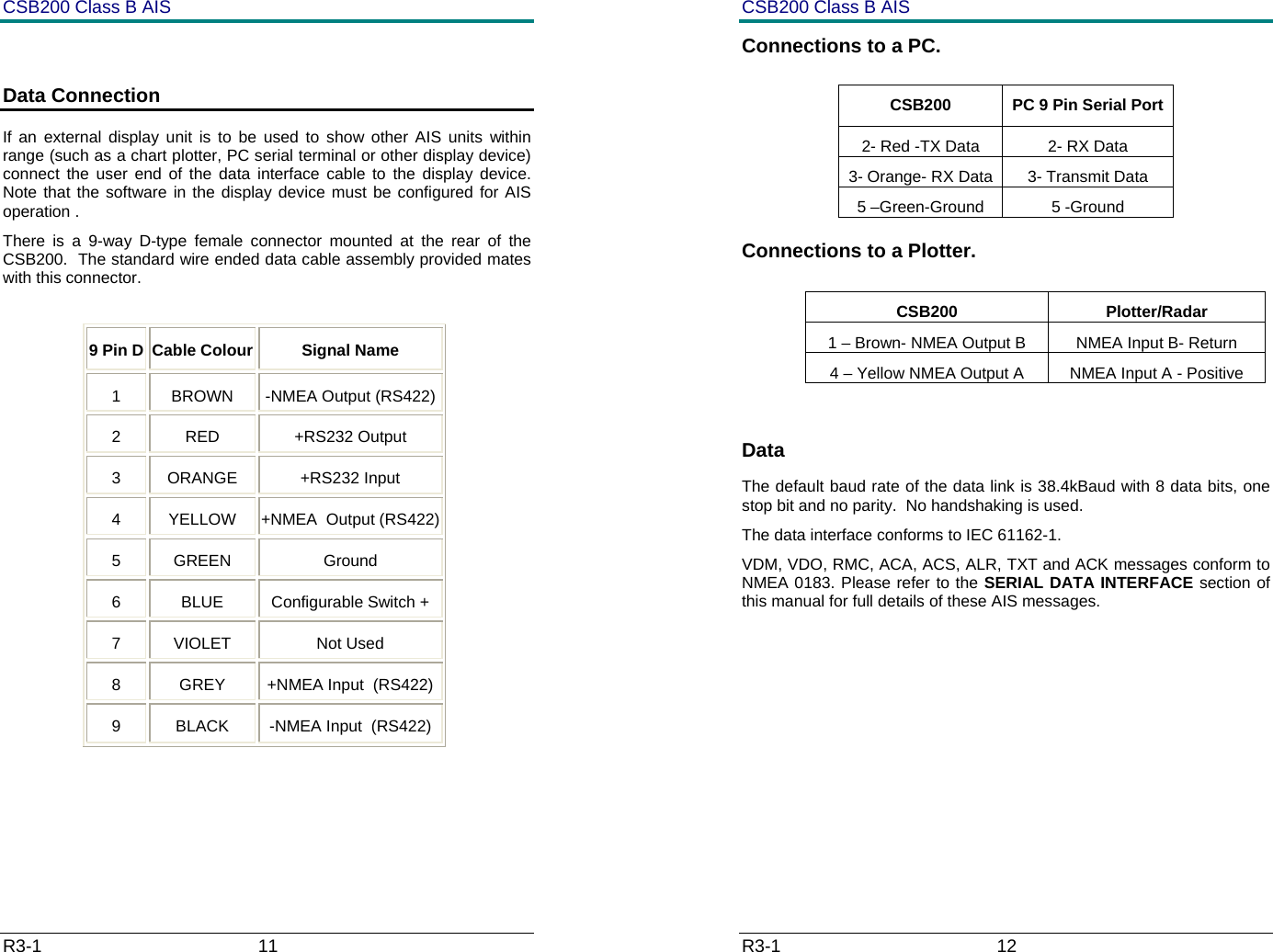
CSB200 Class B AIS R3-1                             11          Data Connection If an external display unit is to be used to show other AIS units within range (such as a chart plotter, PC serial terminal or other display device) connect the user end of the data interface cable to the display device. Note that the software in the display device must be configured for AIS operation . There is a 9-way D-type female connector mounted at the rear of the CSB200.  The standard wire ended data cable assembly provided mates with this connector.  9 Pin D Cable Colour Signal Name 1 BROWN -NMEA Output (RS422) 2 RED  +RS232 Output 3 ORANGE  +RS232 Input 4  YELLOW  +NMEA  Output (RS422)5 GREEN  Ground 6 BLUE Configurable Switch + 7 VIOLET  Not Used 8 GREY +NMEA Input  (RS422) 9  BLACK  -NMEA Input  (RS422) CSB200 Class B AIS R3-1                             12         Connections to a PC.   Connections to a Plotter.   CSB200 Plotter/Radar 1 – Brown- NMEA Output B  NMEA Input B- Return 4 – Yellow NMEA Output A  NMEA Input A - Positive  Data The default baud rate of the data link is 38.4kBaud with 8 data bits, one stop bit and no parity.  No handshaking is used. The data interface conforms to IEC 61162-1. VDM, VDO, RMC, ACA, ACS, ALR, TXT and ACK messages conform to NMEA 0183. Please refer to the SERIAL DATA INTERFACE section of this manual for full details of these AIS messages.  CSB200  PC 9 Pin Serial Port 2- Red -TX Data  2- RX Data 3- Orange- RX Data  3- Transmit Data 5 –Green-Ground  5 -Ground
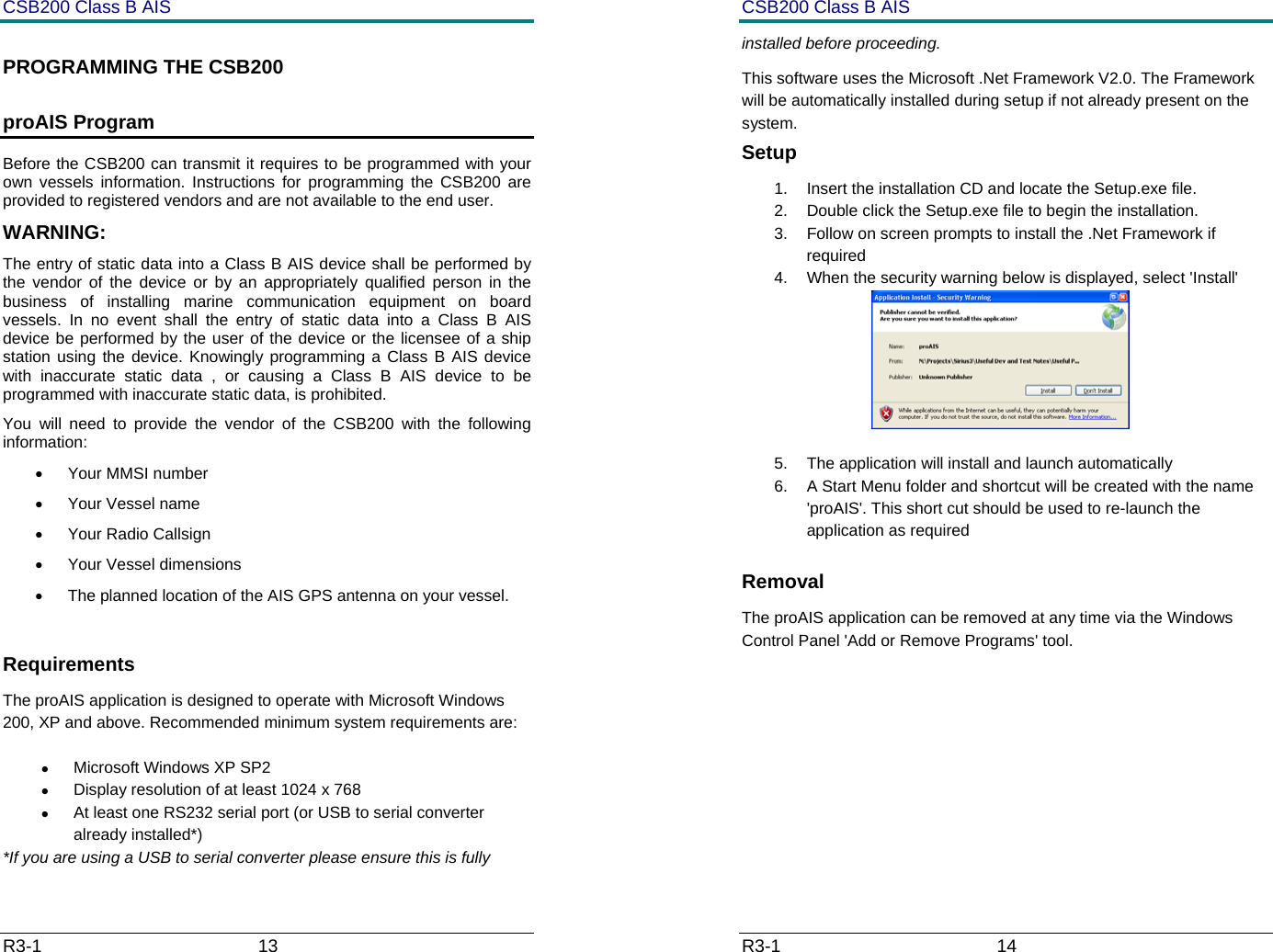
CSB200 Class B AIS R3-1                             13         PROGRAMMING THE CSB200 proAIS Program Before the CSB200 can transmit it requires to be programmed with your own vessels information. Instructions for programming the CSB200 are provided to registered vendors and are not available to the end user. WARNING: The entry of static data into a Class B AIS device shall be performed by the vendor of the device or by an appropriately qualified person in the business of installing marine communication equipment on board vessels. In no event shall the entry of static data into a Class B AIS device be performed by the user of the device or the licensee of a ship station using the device. Knowingly programming a Class B AIS device with inaccurate static data , or causing a Class B AIS device to be programmed with inaccurate static data, is prohibited. You will need to provide the vendor of the CSB200 with the following information: • Your MMSI number • Your Vessel name • Your Radio Callsign • Your Vessel dimensions •  The planned location of the AIS GPS antenna on your vessel.  Requirements The proAIS application is designed to operate with Microsoft Windows 200, XP and above. Recommended minimum system requirements are: • Microsoft Windows XP SP2 •  Display resolution of at least 1024 x 768 •  At least one RS232 serial port (or USB to serial converter already installed*) *If you are using a USB to serial converter please ensure this is fully CSB200 Class B AIS R3-1                             14         installed before proceeding.  This software uses the Microsoft .Net Framework V2.0. The Framework will be automatically installed during setup if not already present on the system. Setup 1.  Insert the installation CD and locate the Setup.exe file. 2.  Double click the Setup.exe file to begin the installation.  3.  Follow on screen prompts to install the .Net Framework if required 4.  When the security warning below is displayed, select 'Install'  5.  The application will install and launch automatically 6.  A Start Menu folder and shortcut will be created with the name 'proAIS'. This short cut should be used to re-launch the application as required Removal The proAIS application can be removed at any time via the Windows Control Panel 'Add or Remove Programs' tool.
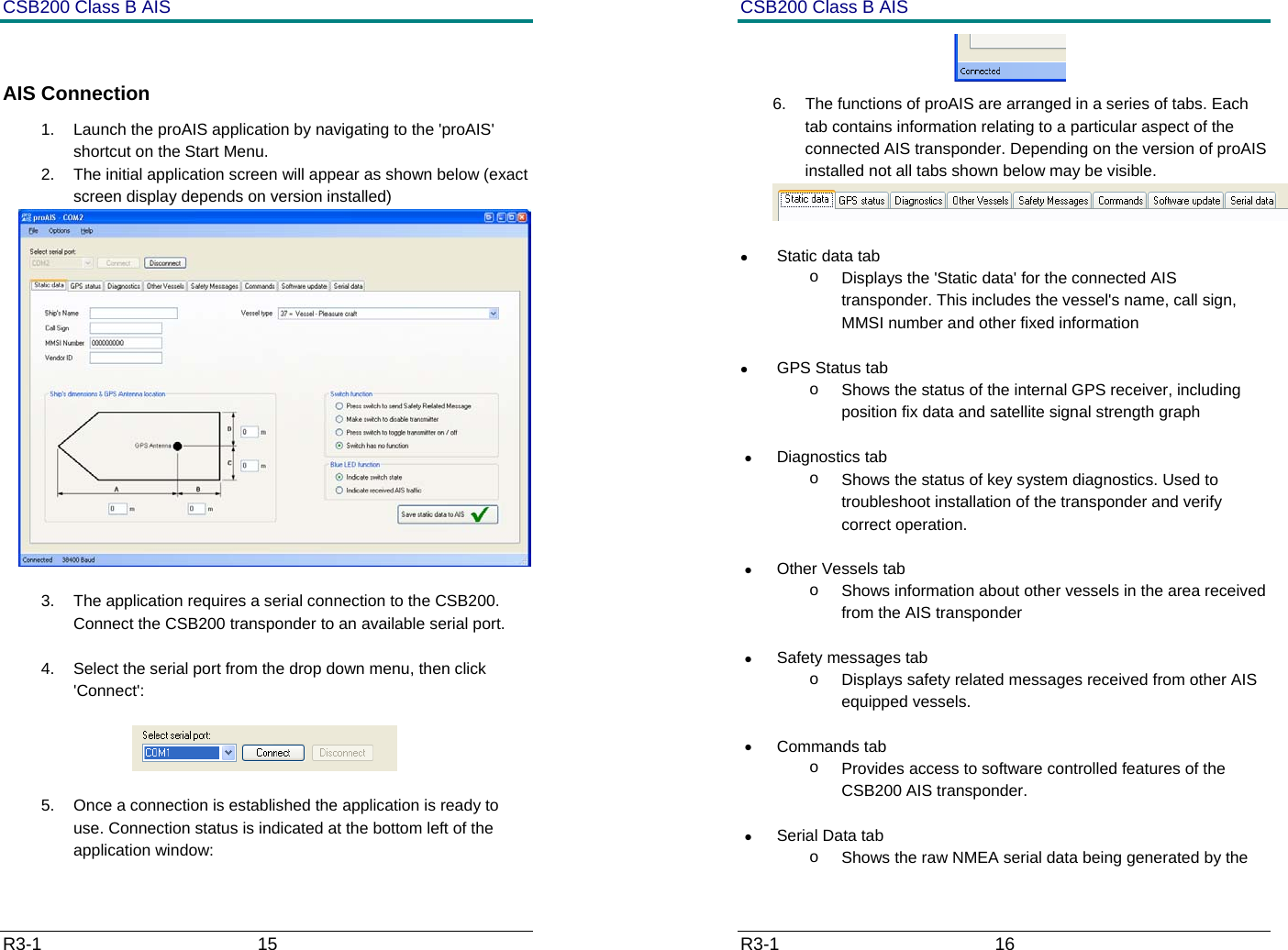
CSB200 Class B AIS R3-1                             15          AIS Connection 1.  Launch the proAIS application by navigating to the 'proAIS' shortcut on the Start Menu. 2.  The initial application screen will appear as shown below (exact screen display depends on version installed)   3.  The application requires a serial connection to the CSB200. Connect the CSB200 transponder to an available serial port.  4.  Select the serial port from the drop down menu, then click 'Connect':                   5.  Once a connection is established the application is ready to use. Connection status is indicated at the bottom left of the application window: CSB200 Class B AIS R3-1                             16          6.  The functions of proAIS are arranged in a series of tabs. Each tab contains information relating to a particular aspect of the connected AIS transponder. Depending on the version of proAIS installed not all tabs shown below may be visible.   • Static data tab o  Displays the 'Static data' for the connected AIS transponder. This includes the vessel's name, call sign, MMSI number and other fixed information  •  GPS Status tab o  Shows the status of the internal GPS receiver, including position fix data and satellite signal strength graph  • Diagnostics tab o  Shows the status of key system diagnostics. Used to troubleshoot installation of the transponder and verify correct operation. • Other Vessels tab o  Shows information about other vessels in the area received from the AIS transponder •  Safety messages tab o  Displays safety related messages received from other AIS equipped vessels. • Commands tab o  Provides access to software controlled features of the CSB200 AIS transponder.  •  Serial Data tab o  Shows the raw NMEA serial data being generated by the
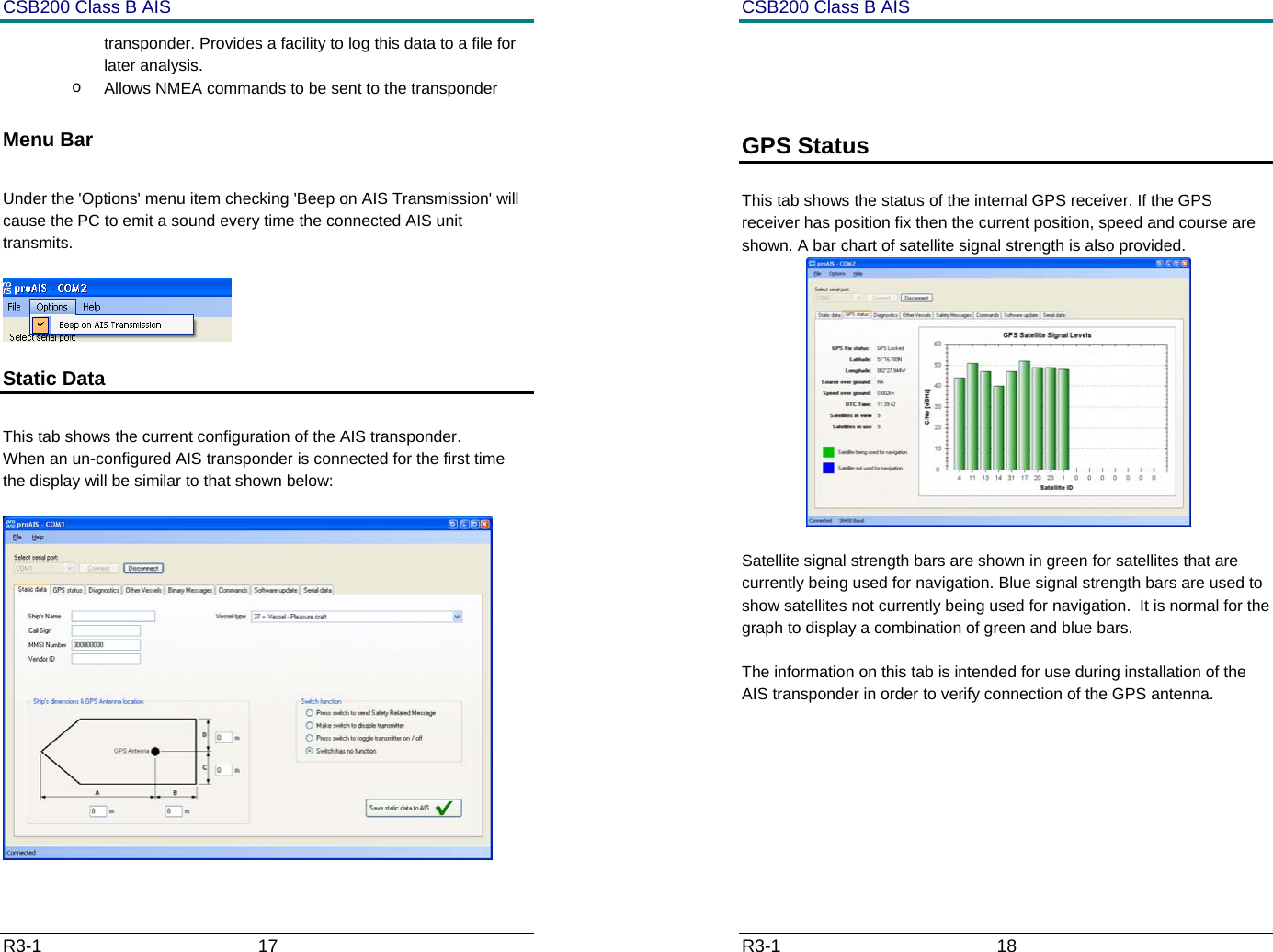
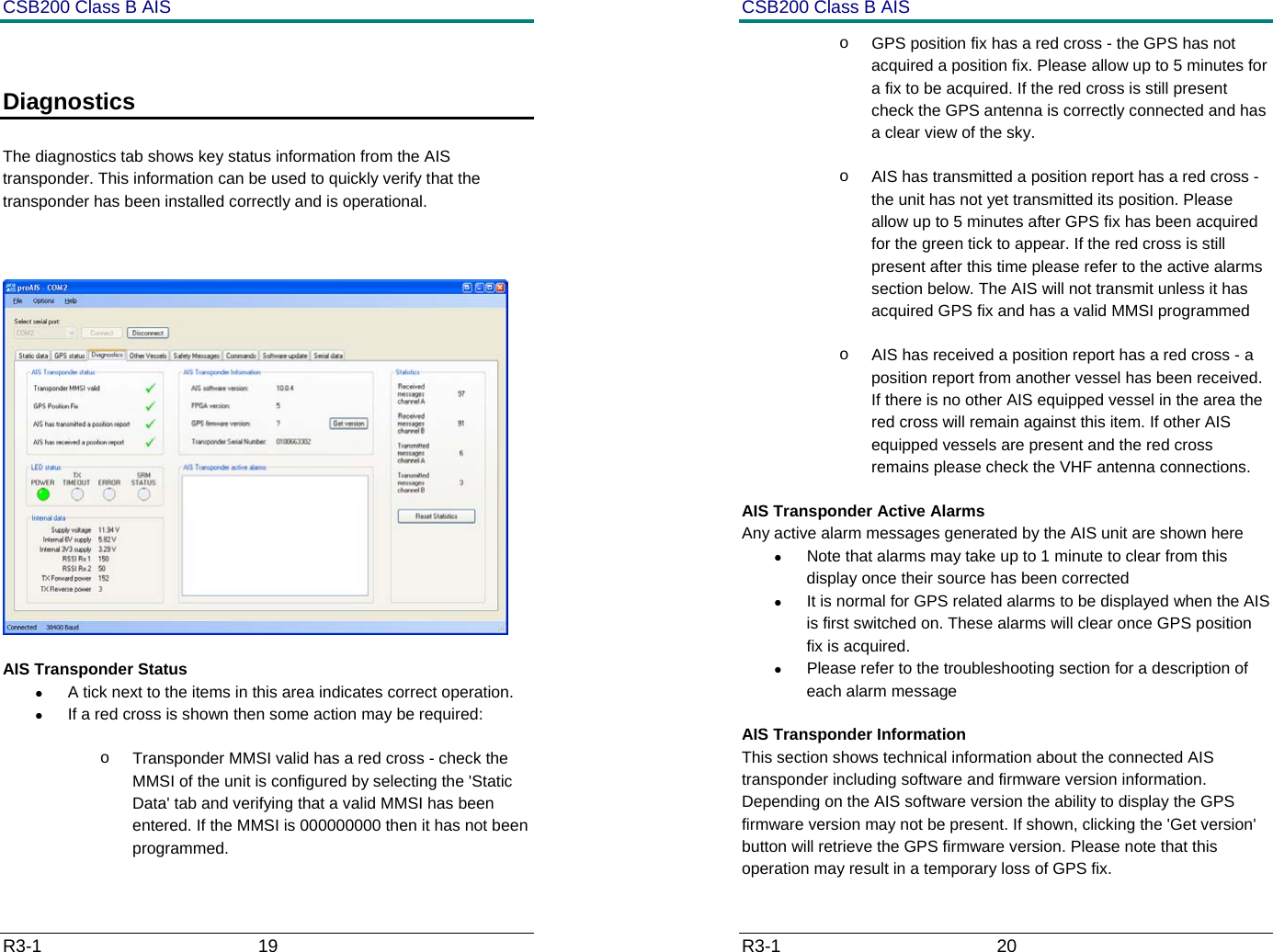
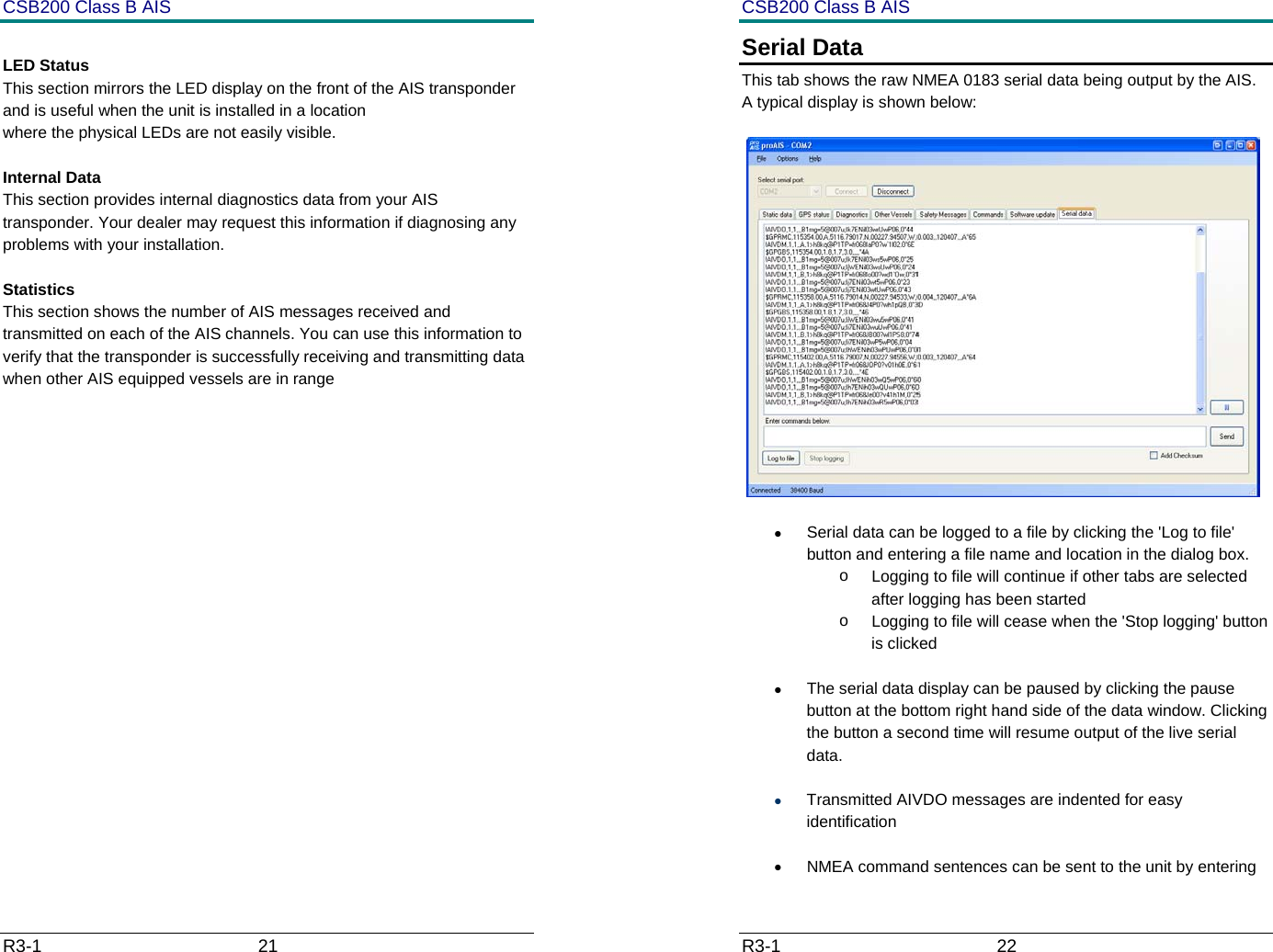
CSB200 Class B AIS R3-1                             17         transponder. Provides a facility to log this data to a file for later analysis. o  Allows NMEA commands to be sent to the transponder  Menu Bar  Under the 'Options' menu item checking 'Beep on AIS Transmission' will cause the PC to emit a sound every time the connected AIS unit transmits.   Static Data   This tab shows the current configuration of the AIS transponder. When an un-configured AIS transponder is connected for the first time the display will be similar to that shown below:   CSB200 Class B AIS R3-1                             18           GPS Status   This tab shows the status of the internal GPS receiver. If the GPS receiver has position fix then the current position, speed and course are shown. A bar chart of satellite signal strength is also provided.  Satellite signal strength bars are shown in green for satellites that are currently being used for navigation. Blue signal strength bars are used to show satellites not currently being used for navigation.  It is normal for the graph to display a combination of green and blue bars. The information on this tab is intended for use during installation of the AIS transponder in order to verify connection of the GPS antenna.
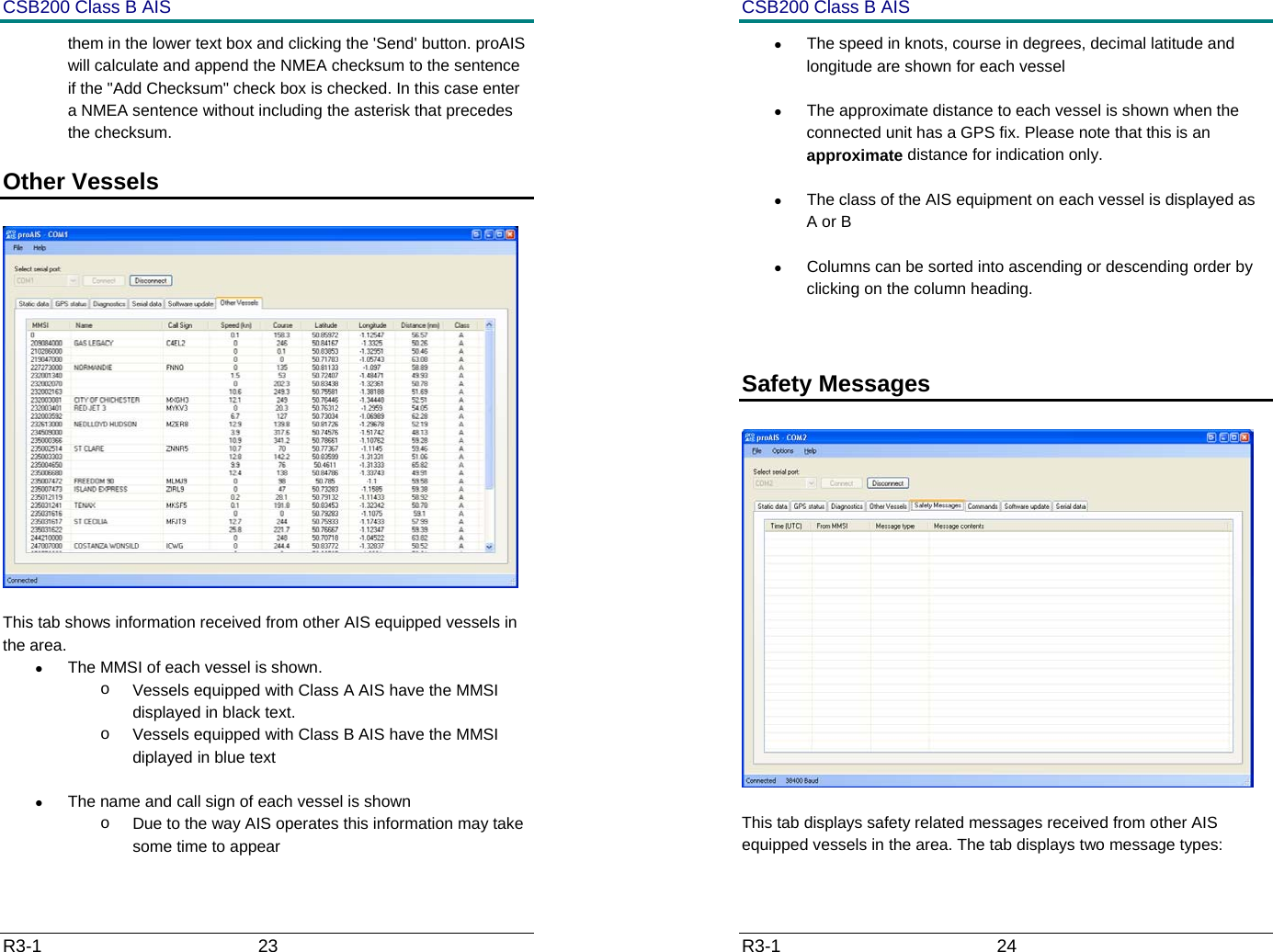
CSB200 Class B AIS R3-1                             19          Diagnostics   The diagnostics tab shows key status information from the AIS transponder. This information can be used to quickly verify that the transponder has been installed correctly and is operational.    AIS Transponder Status •  A tick next to the items in this area indicates correct operation. •  If a red cross is shown then some action may be required: o  Transponder MMSI valid has a red cross - check the MMSI of the unit is configured by selecting the 'Static Data' tab and verifying that a valid MMSI has been entered. If the MMSI is 000000000 then it has not been programmed. CSB200 Class B AIS R3-1                             20         o  GPS position fix has a red cross - the GPS has not acquired a position fix. Please allow up to 5 minutes for a fix to be acquired. If the red cross is still present check the GPS antenna is correctly connected and has a clear view of the sky. o  AIS has transmitted a position report has a red cross - the unit has not yet transmitted its position. Please allow up to 5 minutes after GPS fix has been acquired for the green tick to appear. If the red cross is still present after this time please refer to the active alarms section below. The AIS will not transmit unless it has acquired GPS fix and has a valid MMSI programmed  o  AIS has received a position report has a red cross - a position report from another vessel has been received. If there is no other AIS equipped vessel in the area the red cross will remain against this item. If other AIS equipped vessels are present and the red cross remains please check the VHF antenna connections. AIS Transponder Active Alarms Any active alarm messages generated by the AIS unit are shown here •  Note that alarms may take up to 1 minute to clear from this display once their source has been corrected •  It is normal for GPS related alarms to be displayed when the AIS is first switched on. These alarms will clear once GPS position fix is acquired. •  Please refer to the troubleshooting section for a description of each alarm message AIS Transponder Information This section shows technical information about the connected AIS transponder including software and firmware version information. Depending on the AIS software version the ability to display the GPS firmware version may not be present. If shown, clicking the 'Get version' button will retrieve the GPS firmware version. Please note that this operation may result in a temporary loss of GPS fix.
CSB200 Class B AIS R3-1                             21          LED Status This section mirrors the LED display on the front of the AIS transponder and is useful when the unit is installed in a location  where the physical LEDs are not easily visible.  Internal Data This section provides internal diagnostics data from your AIS transponder. Your dealer may request this information if diagnosing any problems with your installation.  Statistics This section shows the number of AIS messages received and transmitted on each of the AIS channels. You can use this information to verify that the transponder is successfully receiving and transmitting data when other AIS equipped vessels are in range            CSB200 Class B AIS R3-1                             22         Serial Data This tab shows the raw NMEA 0183 serial data being output by the AIS. A typical display is shown below:   •  Serial data can be logged to a file by clicking the 'Log to file' button and entering a file name and location in the dialog box.  o  Logging to file will continue if other tabs are selected after logging has been started o  Logging to file will cease when the 'Stop logging' button is clicked •  The serial data display can be paused by clicking the pause button at the bottom right hand side of the data window. Clicking the button a second time will resume output of the live serial data. • Transmitted AIVDO messages are indented for easy identification •  NMEA command sentences can be sent to the unit by entering
CSB200 Class B AIS R3-1                             23         them in the lower text box and clicking the 'Send' button. proAIS will calculate and append the NMEA checksum to the sentence if the "Add Checksum" check box is checked. In this case enter a NMEA sentence without including the asterisk that precedes the checksum. Other Vessels     This tab shows information received from other AIS equipped vessels in the area. •  The MMSI of each vessel is shown.  o  Vessels equipped with Class A AIS have the MMSI displayed in black text.  o  Vessels equipped with Class B AIS have the MMSI diplayed in blue text •  The name and call sign of each vessel is shown o  Due to the way AIS operates this information may take some time to appear CSB200 Class B AIS R3-1                             24         •  The speed in knots, course in degrees, decimal latitude and longitude are shown for each vessel •  The approximate distance to each vessel is shown when the connected unit has a GPS fix. Please note that this is an approximate distance for indication only. •  The class of the AIS equipment on each vessel is displayed as A or B •  Columns can be sorted into ascending or descending order by clicking on the column heading.  Safety Messages     This tab displays safety related messages received from other AIS equipped vessels in the area. The tab displays two message types:
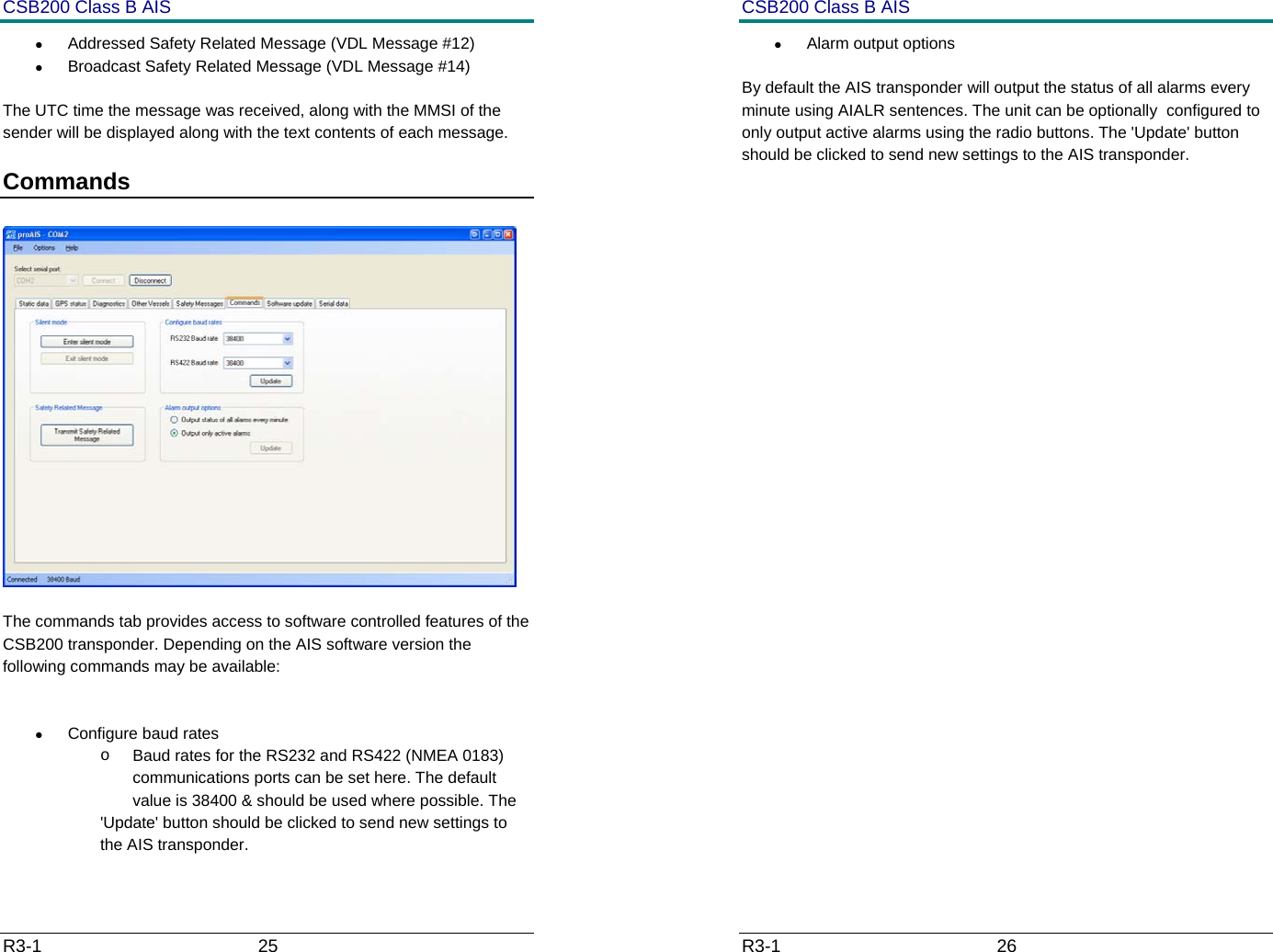
CSB200 Class B AIS R3-1                             25         •  Addressed Safety Related Message (VDL Message #12) •  Broadcast Safety Related Message (VDL Message #14) The UTC time the message was received, along with the MMSI of the sender will be displayed along with the text contents of each message. Commands     The commands tab provides access to software controlled features of the CSB200 transponder. Depending on the AIS software version the following commands may be available:  •  Configure baud rates o  Baud rates for the RS232 and RS422 (NMEA 0183) communications ports can be set here. The default value is 38400 & should be used where possible. The  'Update' button should be clicked to send new settings to the AIS transponder. CSB200 Class B AIS R3-1                             26         • Alarm output options By default the AIS transponder will output the status of all alarms every minute using AIALR sentences. The unit can be optionally  configured to only output active alarms using the radio buttons. The 'Update' button should be clicked to send new settings to the AIS transponder.
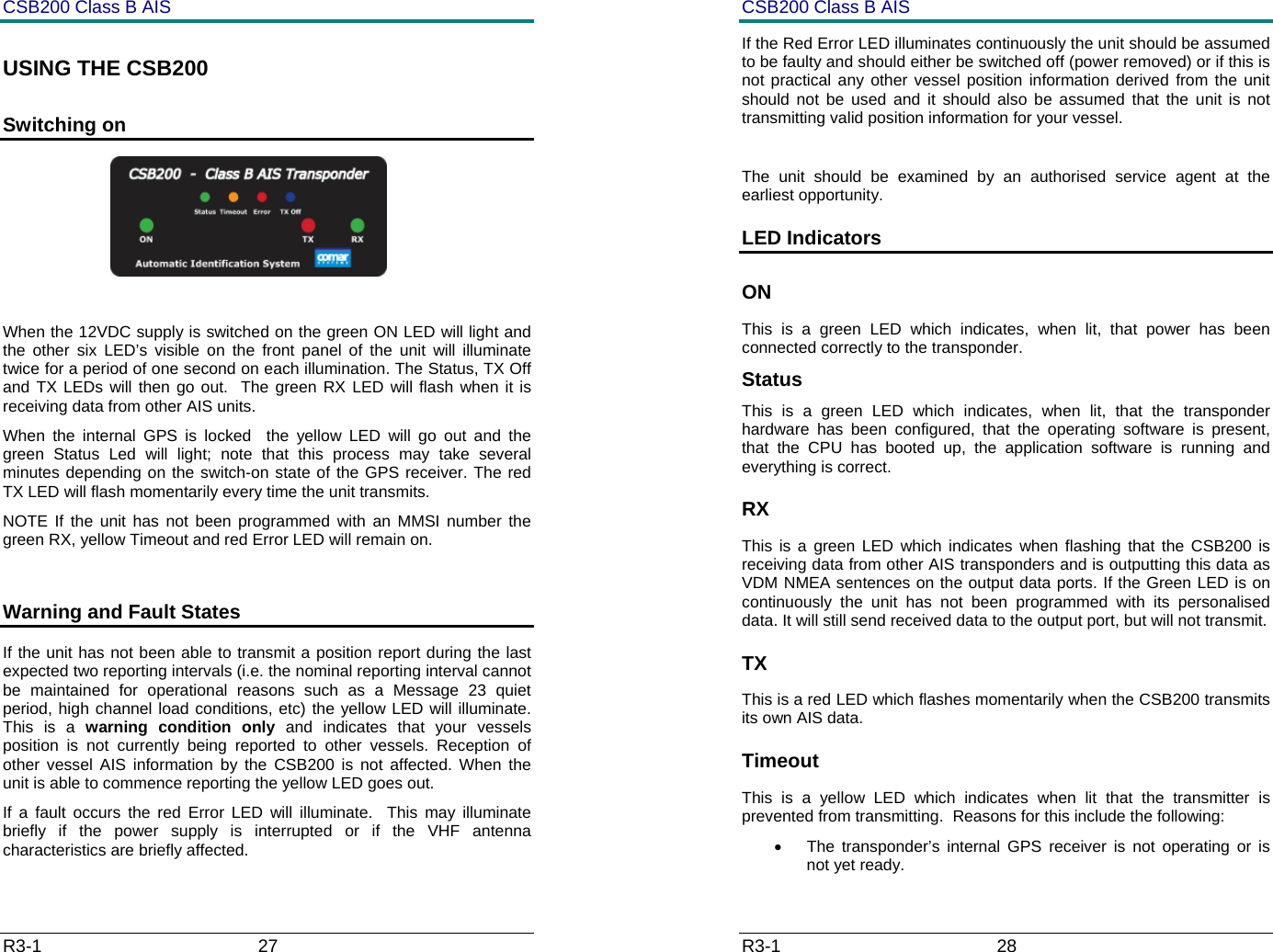
CSB200 Class B AIS R3-1                             27         USING THE CSB200 Switching on                                               When the 12VDC supply is switched on the green ON LED will light and the other six LED’s visible on the front panel of the unit will illuminate twice for a period of one second on each illumination. The Status, TX Off  and TX LEDs will then go out.  The green RX LED will flash when it is receiving data from other AIS units.  When the internal GPS is locked  the yellow LED will go out and the green Status Led will light; note that this process may take several minutes depending on the switch-on state of the GPS receiver. The red TX LED will flash momentarily every time the unit transmits. NOTE If the unit has not been programmed with an MMSI number the green RX, yellow Timeout and red Error LED will remain on.  Warning and Fault States If the unit has not been able to transmit a position report during the last expected two reporting intervals (i.e. the nominal reporting interval cannot be maintained for operational reasons such as a Message 23 quiet period, high channel load conditions, etc) the yellow LED will illuminate. This is a warning condition only and indicates that your vessels position is not currently being reported to other vessels. Reception of other vessel AIS information by the CSB200 is not affected. When the unit is able to commence reporting the yellow LED goes out.   If a fault occurs the red Error LED will illuminate.  This may illuminate briefly if the power supply is interrupted or if the VHF antenna characteristics are briefly affected.   CSB200 Class B AIS R3-1                             28         If the Red Error LED illuminates continuously the unit should be assumed to be faulty and should either be switched off (power removed) or if this is not practical any other vessel position information derived from the unit should not be used and it should also be assumed that the unit is not transmitting valid position information for your vessel.  The unit should be examined by an authorised service agent at the earliest opportunity. LED Indicators ON This is a green LED which indicates, when lit, that power has been connected correctly to the transponder. Status This is a green LED which indicates, when lit, that the transponder hardware has been configured, that the operating software is present, that the CPU has booted up, the application software is running and everything is correct.  RX This is a green LED which indicates when flashing that the CSB200 is receiving data from other AIS transponders and is outputting this data as VDM NMEA sentences on the output data ports. If the Green LED is on continuously the unit has not been programmed with its personalised data. It will still send received data to the output port, but will not transmit. TX This is a red LED which flashes momentarily when the CSB200 transmits its own AIS data. Timeout This is a yellow LED which indicates when lit that the transmitter is prevented from transmitting.  Reasons for this include the following: •  The transponder’s internal GPS receiver is not operating or is not yet ready.
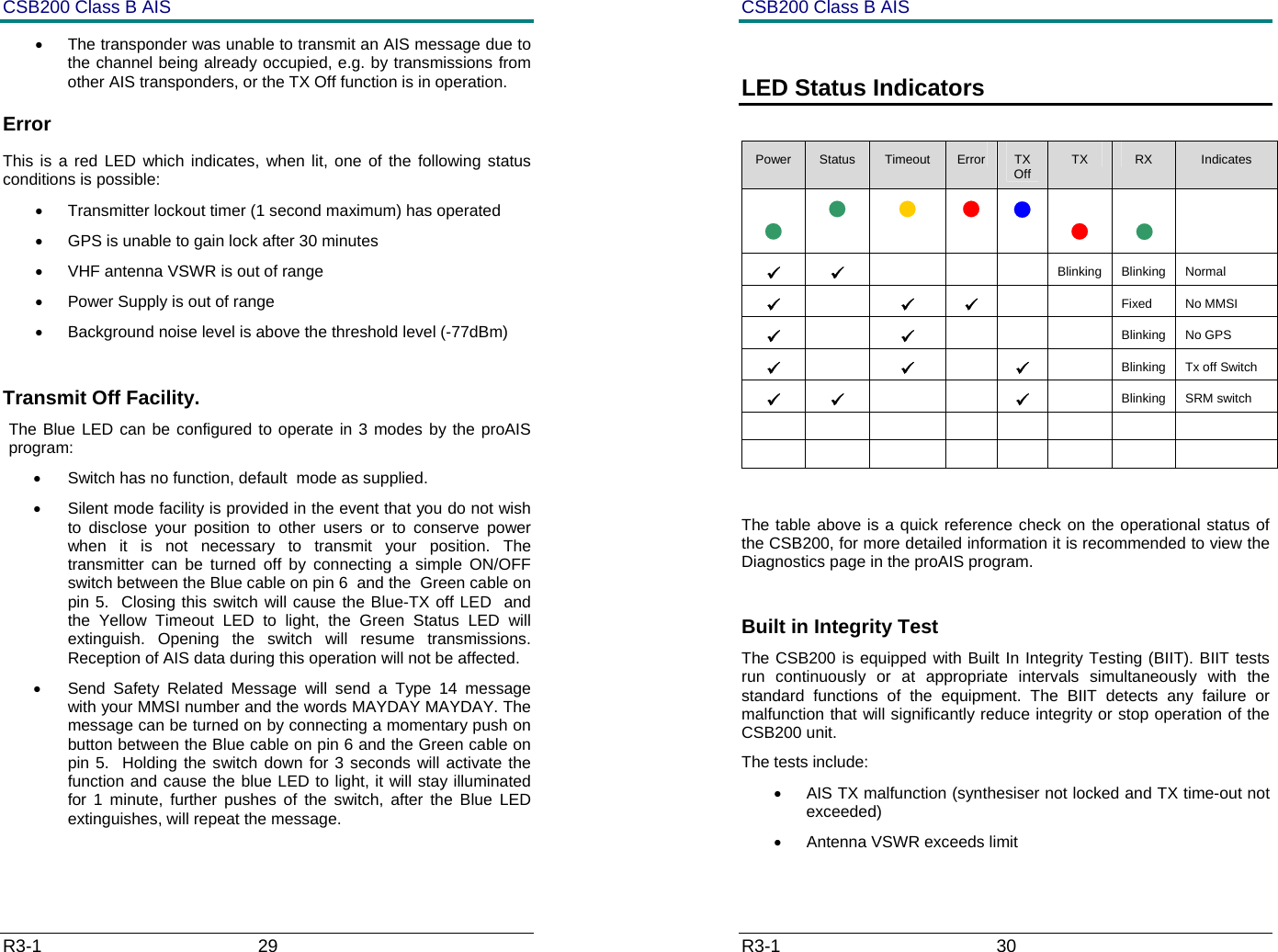
CSB200 Class B AIS R3-1                             29         •  The transponder was unable to transmit an AIS message due to the channel being already occupied, e.g. by transmissions from other AIS transponders, or the TX Off function is in operation. Error This is a red LED which indicates, when lit, one of the following status conditions is possible: •  Transmitter lockout timer (1 second maximum) has operated •  GPS is unable to gain lock after 30 minutes •  VHF antenna VSWR is out of range •  Power Supply is out of range •  Background noise level is above the threshold level (-77dBm)  Transmit Off Facility. The Blue LED can be configured to operate in 3 modes by the proAIS program: •  Switch has no function, default  mode as supplied. •  Silent mode facility is provided in the event that you do not wish to disclose your position to other users or to conserve power when it is not necessary to transmit your position. The transmitter can be turned off by connecting a simple ON/OFF switch between the Blue cable on pin 6  and the  Green cable on pin 5.  Closing this switch will cause the Blue-TX off LED  and the Yellow Timeout LED to light, the Green Status LED will extinguish. Opening the switch will resume transmissions. Reception of AIS data during this operation will not be affected.  •  Send Safety Related Message will send a Type 14 message with your MMSI number and the words MAYDAY MAYDAY. The message can be turned on by connecting a momentary push on button between the Blue cable on pin 6 and the Green cable on pin 5.  Holding the switch down for 3 seconds will activate the function and cause the blue LED to light, it will stay illuminated for 1 minute, further pushes of the switch, after the Blue LED extinguishes, will repeat the message.  CSB200 Class B AIS R3-1                             30          LED Status Indicators  Power  Status  Timeout  Error  TX Off  TX  RX  Indicates          9 9    Blinking Blinking Normal 9  9 9   Fixed No MMSI 9  9    Blinking No GPS 9  9  9   Blinking  Tx off Switch 9 9   9  Blinking SRM switch                    The table above is a quick reference check on the operational status of the CSB200, for more detailed information it is recommended to view the Diagnostics page in the proAIS program.  Built in Integrity Test The CSB200 is equipped with Built In Integrity Testing (BIIT). BIIT tests run continuously or at appropriate intervals simultaneously with the standard functions of the equipment. The BIIT detects any failure or malfunction that will significantly reduce integrity or stop operation of the CSB200 unit.  The tests include: •  AIS TX malfunction (synthesiser not locked and TX time-out not exceeded) •  Antenna VSWR exceeds limit
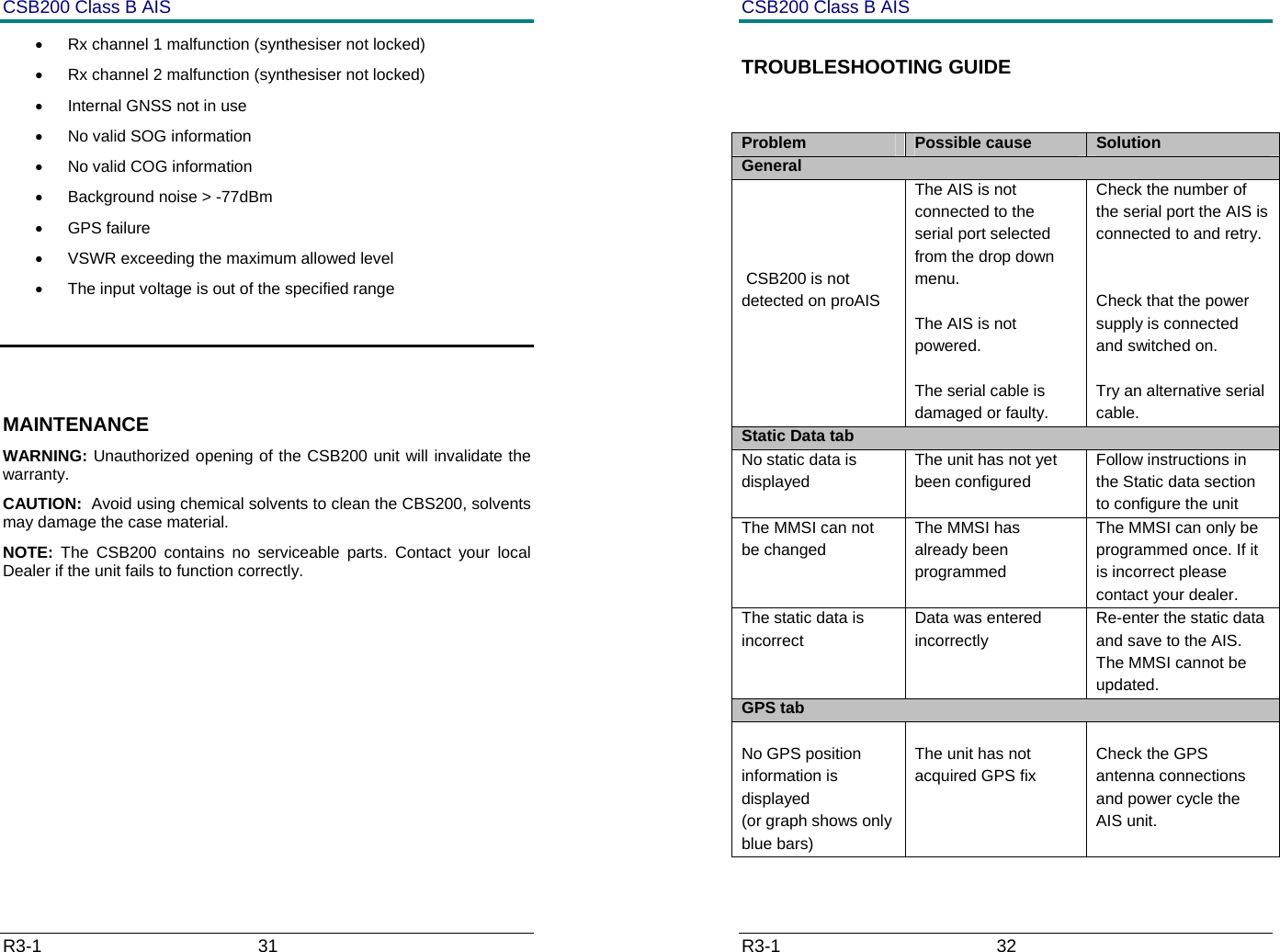
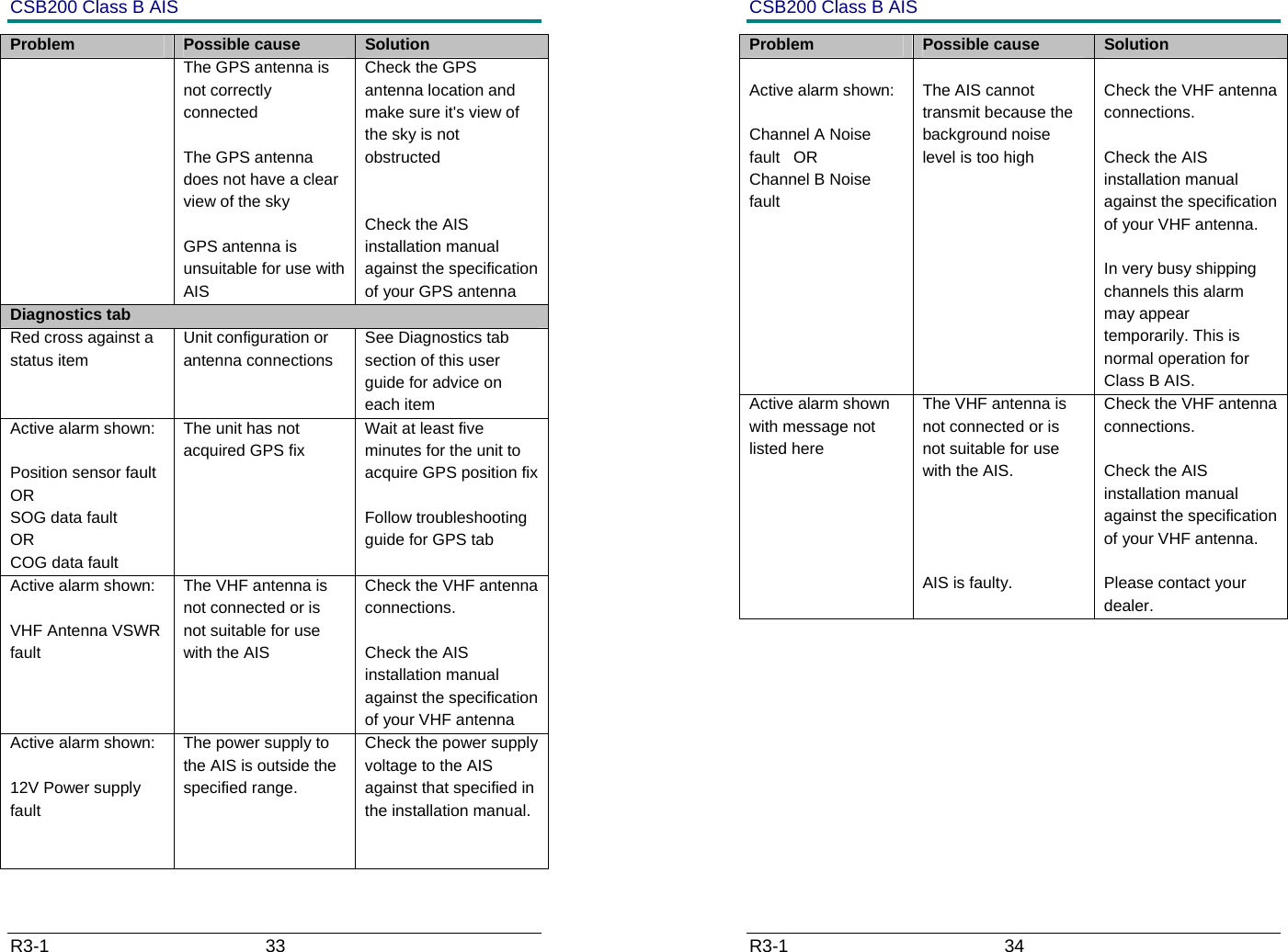
CSB200 Class B AIS R3-1                             31         •  Rx channel 1 malfunction (synthesiser not locked) •  Rx channel 2 malfunction (synthesiser not locked) •  Internal GNSS not in use •  No valid SOG information •  No valid COG information •  Background noise > -77dBm • GPS failure •  VSWR exceeding the maximum allowed level  •  The input voltage is out of the specified range   MAINTENANCE WARNING: Unauthorized opening of the CSB200 unit will invalidate the warranty. CAUTION:  Avoid using chemical solvents to clean the CBS200, solvents may damage the case material. NOTE:  The CSB200 contains no serviceable parts. Contact your local Dealer if the unit fails to function correctly.  CSB200 Class B AIS R3-1                             32         TROUBLESHOOTING GUIDE  Problem  Possible cause  Solution General      CSB200 is not detected on proAIS The AIS is not connected to the serial port selected from the drop down menu.  The AIS is not powered.  The serial cable is damaged or faulty. Check the number of the serial port the AIS is connected to and retry.   Check that the power supply is connected and switched on.  Try an alternative serial cable. Static Data tab No static data is displayed The unit has not yet been configured Follow instructions in the Static data section to configure the unit The MMSI can not be changed The MMSI has already been programmed The MMSI can only be programmed once. If it is incorrect please contact your dealer. The static data is incorrect Data was entered incorrectly Re-enter the static data and save to the AIS. The MMSI cannot be updated. GPS tab  No GPS position information is displayed (or graph shows only blue bars)  The unit has not acquired GPS fix     Check the GPS antenna connections and power cycle the AIS unit.
CSB200 Class B AIS R3-1                             33         Problem  Possible cause  Solution The GPS antenna is not correctly connected  The GPS antenna does not have a clear view of the sky  GPS antenna is unsuitable for use with AIS Check the GPS antenna location and make sure it's view of the sky is not obstructed   Check the AIS installation manual against the specification of your GPS antenna Diagnostics tab Red cross against a status item Unit configuration or antenna connections See Diagnostics tab section of this user guide for advice on each item Active alarm shown:  Position sensor fault   OR SOG data fault           OR COG data fault            The unit has not acquired GPS fix  Wait at least five minutes for the unit to acquire GPS position fix  Follow troubleshooting guide for GPS tab Active alarm shown:  VHF Antenna VSWR fault The VHF antenna is not connected or is not suitable for use with the AIS Check the VHF antenna connections.  Check the AIS installation manual against the specification of your VHF antenna Active alarm shown:  12V Power supply fault The power supply to the AIS is outside the specified range. Check the power supply voltage to the AIS against that specified in the installation manual.   CSB200 Class B AIS R3-1                             34         Problem  Possible cause  Solution  Active alarm shown:  Channel A Noise fault   OR Channel B Noise fault   The AIS cannot transmit because the background noise level is too high  Check the VHF antenna connections.  Check the AIS installation manual against the specification of your VHF antenna.  In very busy shipping channels this alarm may appear temporarily. This is normal operation for Class B AIS. Active alarm shown with message not listed here The VHF antenna is not connected or is not suitable for use with the AIS.     AIS is faulty. Check the VHF antenna connections.  Check the AIS installation manual against the specification of your VHF antenna.  Please contact your dealer.
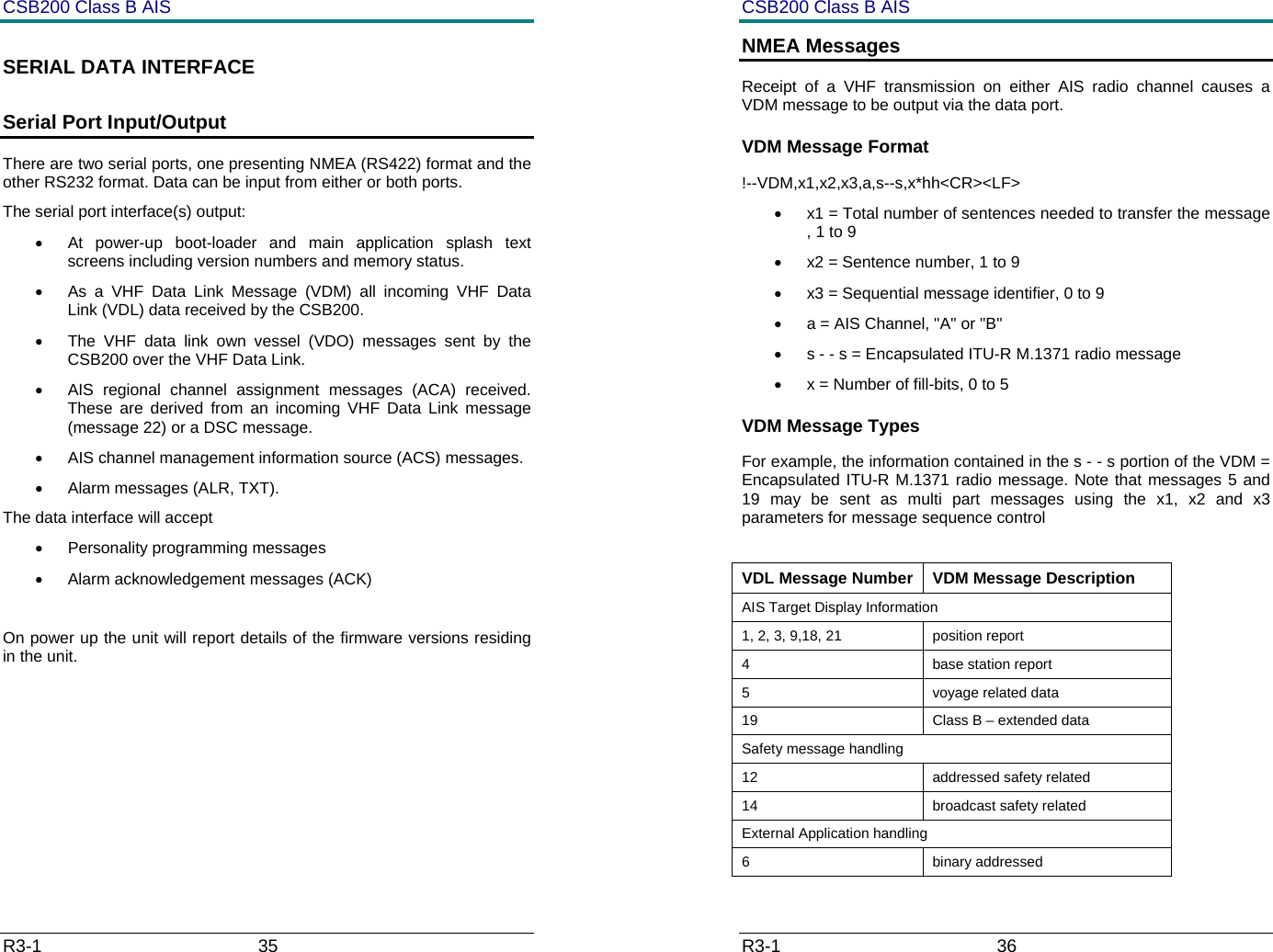
CSB200 Class B AIS R3-1                             35         SERIAL DATA INTERFACE  Serial Port Input/Output There are two serial ports, one presenting NMEA (RS422) format and the other RS232 format. Data can be input from either or both ports. The serial port interface(s) output:  •  At power-up boot-loader and main application splash text screens including version numbers and memory status. •  As a VHF Data Link Message (VDM) all incoming VHF Data Link (VDL) data received by the CSB200. •  The VHF data link own vessel (VDO) messages sent by the CSB200 over the VHF Data Link.  •  AIS regional channel assignment messages (ACA) received. These are derived from an incoming VHF Data Link message (message 22) or a DSC message. •  AIS channel management information source (ACS) messages. • Alarm messages (ALR, TXT). The data interface will accept •  Personality programming messages •  Alarm acknowledgement messages (ACK)  On power up the unit will report details of the firmware versions residing in the unit.         CSB200 Class B AIS R3-1                             36         NMEA Messages Receipt of a VHF transmission on either AIS radio channel causes a VDM message to be output via the data port.  VDM Message Format !--VDM,x1,x2,x3,a,s--s,x*hh<CR><LF> •  x1 = Total number of sentences needed to transfer the message , 1 to 9 •  x2 = Sentence number, 1 to 9 •  x3 = Sequential message identifier, 0 to 9 •  a = AIS Channel, "A" or "B" •  s - - s = Encapsulated ITU-R M.1371 radio message  •  x = Number of fill-bits, 0 to 5 VDM Message Types    For example, the information contained in the s - - s portion of the VDM = Encapsulated ITU-R M.1371 radio message. Note that messages 5 and 19 may be sent as multi part messages using the x1, x2 and x3 parameters for message sequence control  VDL Message Number  VDM Message Description AIS Target Display Information 1, 2, 3, 9,18, 21  position report 4 base station report 5  voyage related data 19  Class B – extended data Safety message handling 12 addressed safety related 14 broadcast safety related External Application handling 6 binary addressed
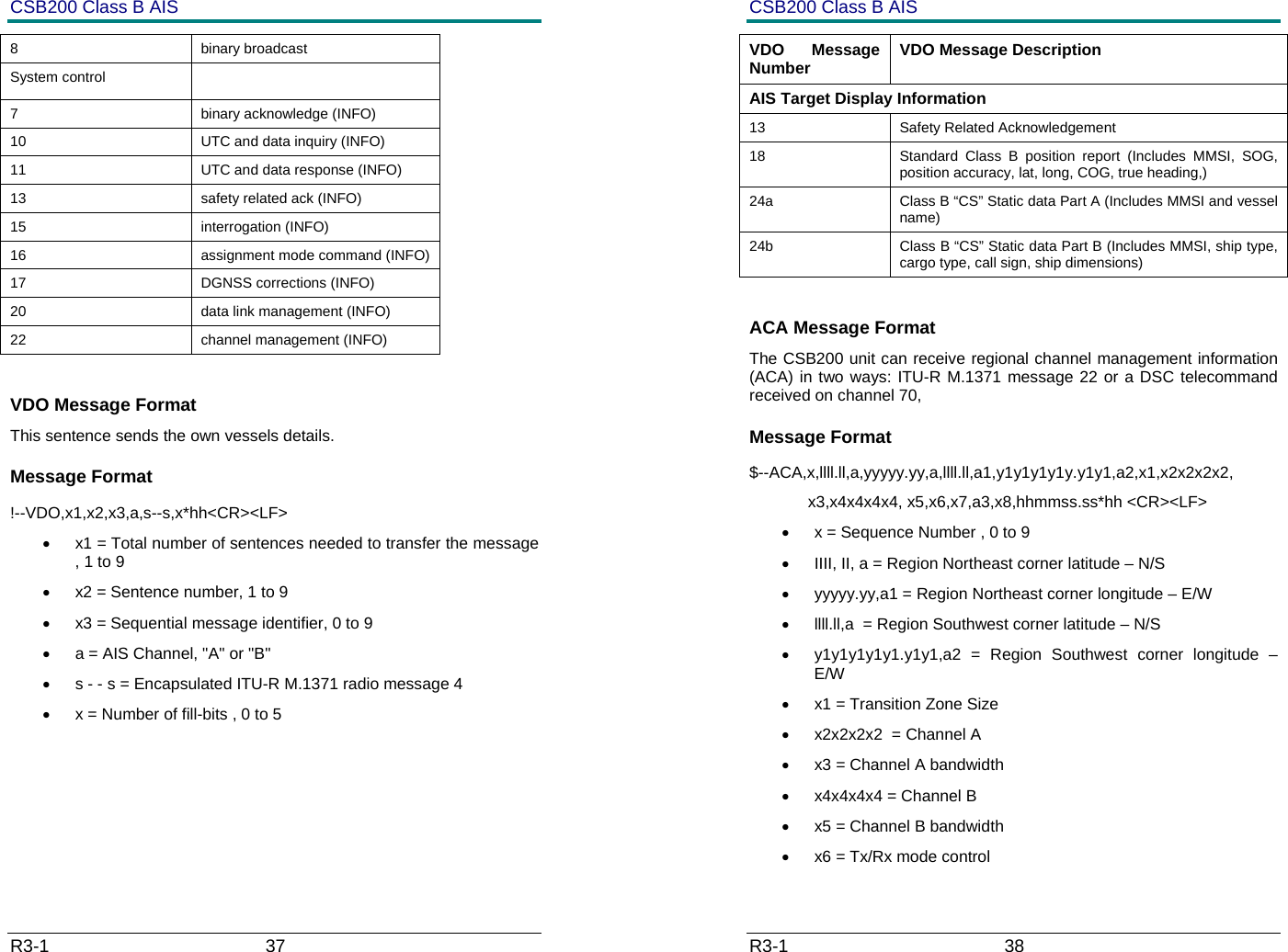
CSB200 Class B AIS R3-1                             37         8 binary broadcast System control   7  binary acknowledge (INFO) 10  UTC and data inquiry (INFO) 11  UTC and data response (INFO) 13  safety related ack (INFO) 15 interrogation (INFO) 16  assignment mode command (INFO) 17  DGNSS corrections (INFO) 20  data link management (INFO) 22  channel management (INFO)  VDO Message Format This sentence sends the own vessels details. Message Format !--VDO,x1,x2,x3,a,s--s,x*hh<CR><LF> •  x1 = Total number of sentences needed to transfer the message , 1 to 9 •  x2 = Sentence number, 1 to 9 •  x3 = Sequential message identifier, 0 to 9 •  a = AIS Channel, "A" or "B" •  s - - s = Encapsulated ITU-R M.1371 radio message 4 •  x = Number of fill-bits , 0 to 5 CSB200 Class B AIS R3-1                             38         VDO Message Number  VDO Message Description AIS Target Display Information 13 Safety Related Acknowledgement 18  Standard Class B position report (Includes MMSI, SOG, position accuracy, lat, long, COG, true heading,) 24a  Class B “CS” Static data Part A (Includes MMSI and vessel name) 24b  Class B “CS” Static data Part B (Includes MMSI, ship type, cargo type, call sign, ship dimensions)  ACA Message Format The CSB200 unit can receive regional channel management information (ACA) in two ways: ITU-R M.1371 message 22 or a DSC telecommand received on channel 70,  Message Format $--ACA,x,llll.ll,a,yyyyy.yy,a,llll.ll,a1,y1y1y1y1y.y1y1,a2,x1,x2x2x2x2,              x3,x4x4x4x4, x5,x6,x7,a3,x8,hhmmss.ss*hh <CR><LF> •  x = Sequence Number , 0 to 9 •  IIII, II, a = Region Northeast corner latitude – N/S •  yyyyy.yy,a1 = Region Northeast corner longitude – E/W •  llll.ll,a  = Region Southwest corner latitude – N/S •  y1y1y1y1y1.y1y1,a2 = Region Southwest corner longitude – E/W •  x1 = Transition Zone Size  •  x2x2x2x2  = Channel A  •  x3 = Channel A bandwidth  •  x4x4x4x4 = Channel B  •  x5 = Channel B bandwidth  •  x6 = Tx/Rx mode control
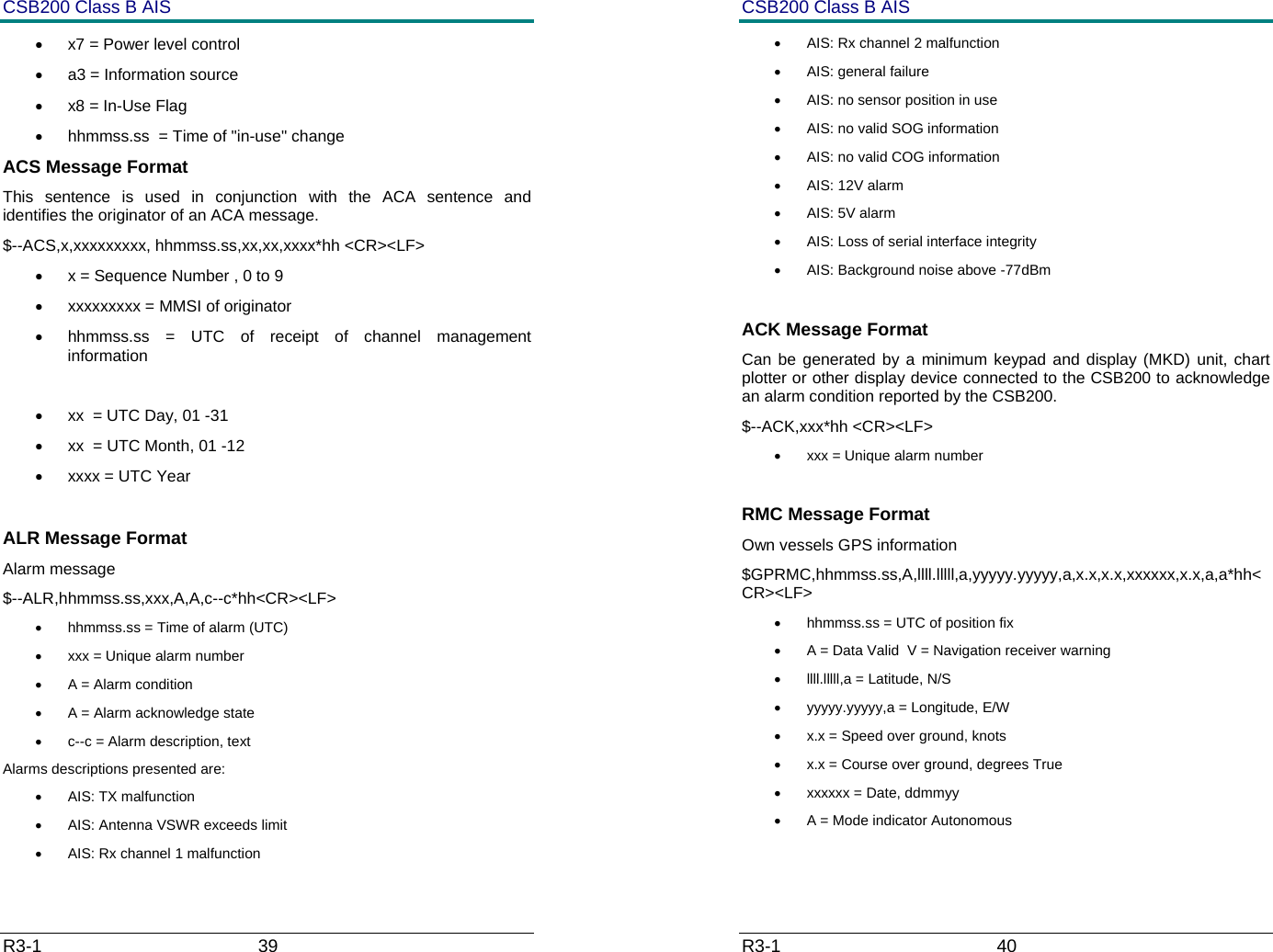
CSB200 Class B AIS R3-1                             39         •  x7 = Power level control  •  a3 = Information source  •  x8 = In-Use Flag  •  hhmmss.ss  = Time of "in-use" change  ACS Message Format This sentence is used in conjunction with the ACA sentence and identifies the originator of an ACA message. $--ACS,x,xxxxxxxxx, hhmmss.ss,xx,xx,xxxx*hh <CR><LF> •  x = Sequence Number , 0 to 9 •  xxxxxxxxx = MMSI of originator •  hhmmss.ss = UTC of receipt of channel management information  •  xx  = UTC Day, 01 -31 •  xx  = UTC Month, 01 -12 •  xxxx = UTC Year   ALR Message Format  Alarm message $--ALR,hhmmss.ss,xxx,A,A,c--c*hh<CR><LF> •  hhmmss.ss = Time of alarm (UTC) •  xxx = Unique alarm number •  A = Alarm condition •  A = Alarm acknowledge state •  c--c = Alarm description, text Alarms descriptions presented are: • AIS: TX malfunction •  AIS: Antenna VSWR exceeds limit •  AIS: Rx channel 1 malfunction CSB200 Class B AIS R3-1                             40         •  AIS: Rx channel 2 malfunction •  AIS: general failure •  AIS: no sensor position in use •  AIS: no valid SOG information •  AIS: no valid COG information • AIS: 12V alarm •  AIS: 5V alarm •  AIS: Loss of serial interface integrity •  AIS: Background noise above -77dBm  ACK Message Format Can be generated by a minimum keypad and display (MKD) unit, chart plotter or other display device connected to the CSB200 to acknowledge an alarm condition reported by the CSB200. $--ACK,xxx*hh <CR><LF> •  xxx = Unique alarm number  RMC Message Format Own vessels GPS information $GPRMC,hhmmss.ss,A,llll.lllll,a,yyyyy.yyyyy,a,x.x,x.x,xxxxxx,x.x,a,a*hh<CR><LF> •  hhmmss.ss = UTC of position fix •  A = Data Valid  V = Navigation receiver warning •  llll.lllll,a = Latitude, N/S •  yyyyy.yyyyy,a = Longitude, E/W •  x.x = Speed over ground, knots •  x.x = Course over ground, degrees True •  xxxxxx = Date, ddmmyy •  A = Mode indicator Autonomous
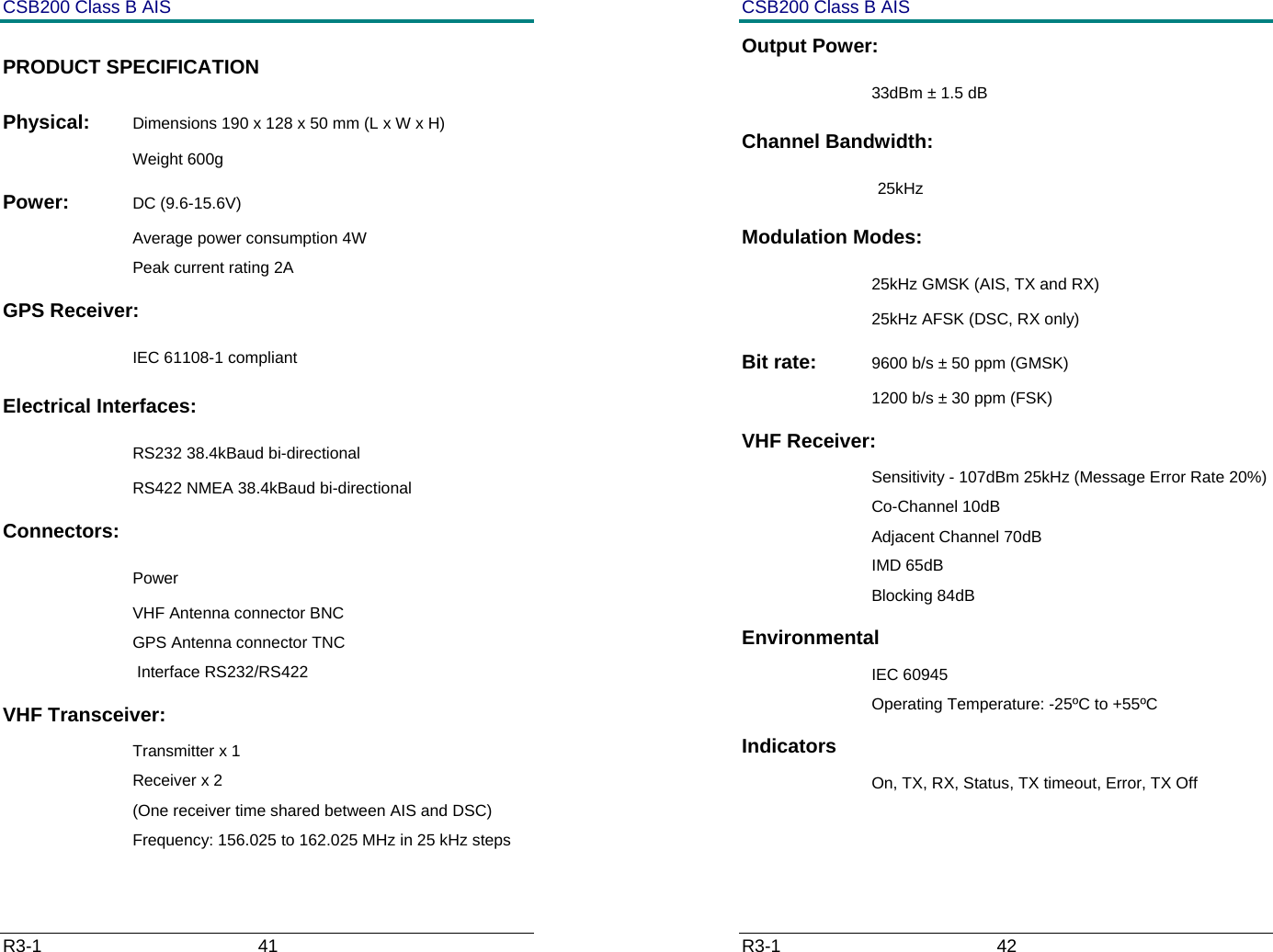
CSB200 Class B AIS R3-1                             41         PRODUCT SPECIFICATION Physical:  Dimensions 190 x 128 x 50 mm (L x W x H) Weight 600g Power:  DC (9.6-15.6V) Average power consumption 4W Peak current rating 2A GPS Receiver:   IEC 61108-1 compliant Electrical Interfaces:    RS232 38.4kBaud bi-directional RS422 NMEA 38.4kBaud bi-directional Connectors:    Power VHF Antenna connector BNC GPS Antenna connector TNC  Interface RS232/RS422 VHF Transceiver: Transmitter x 1 Receiver x 2  (One receiver time shared between AIS and DSC) Frequency: 156.025 to 162.025 MHz in 25 kHz steps CSB200 Class B AIS R3-1                             42         Output Power:   33dBm ± 1.5 dB Channel Bandwidth:  25kHz Modulation Modes:   25kHz GMSK (AIS, TX and RX) 25kHz AFSK (DSC, RX only) Bit rate:  9600 b/s ± 50 ppm (GMSK) 1200 b/s ± 30 ppm (FSK) VHF Receiver: Sensitivity - 107dBm 25kHz (Message Error Rate 20%) Co-Channel 10dB Adjacent Channel 70dB IMD 65dB Blocking 84dB Environmental IEC 60945 Operating Temperature: -25ºC to +55ºC Indicators On, TX, RX, Status, TX timeout, Error, TX Off
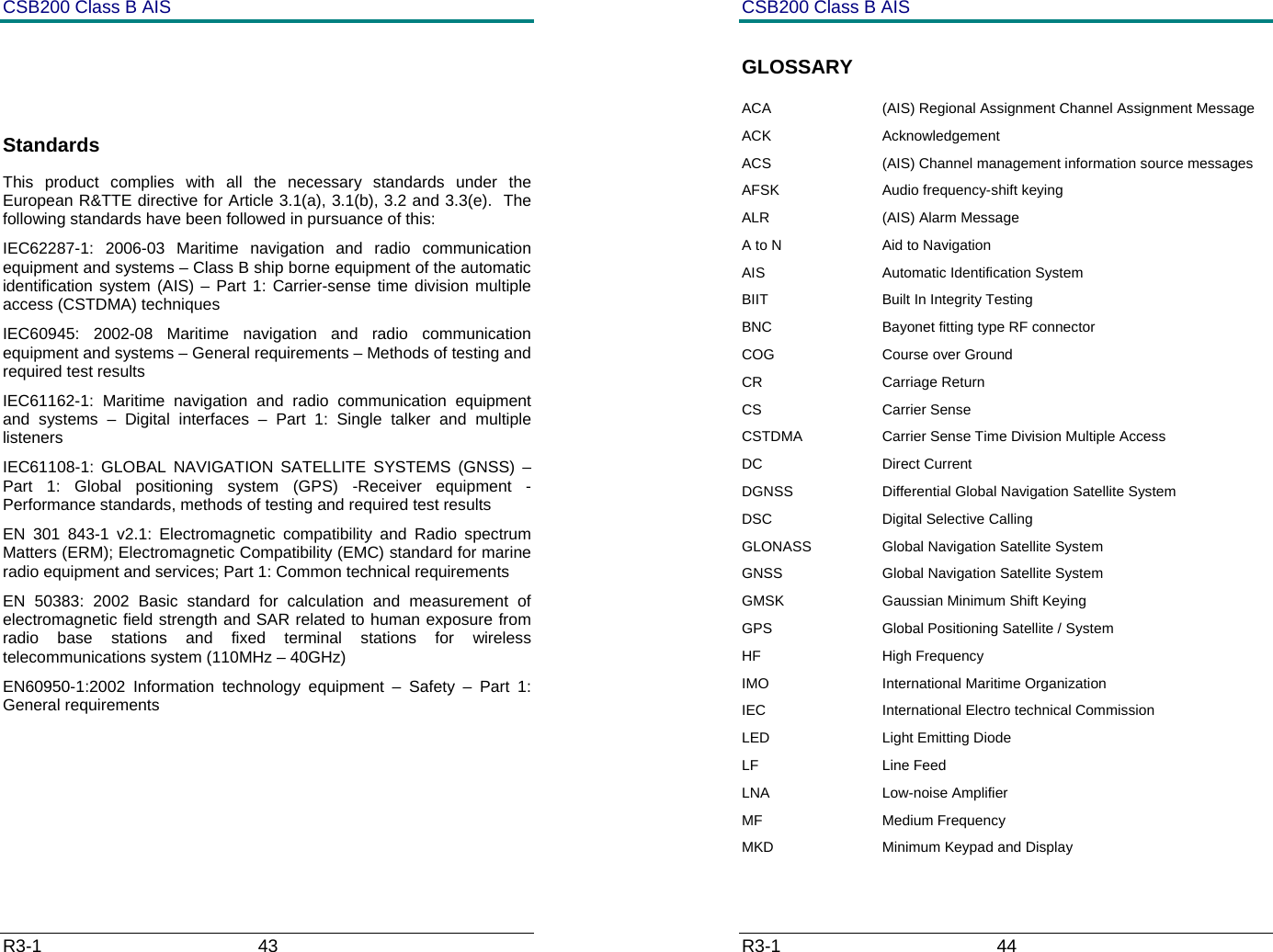
CSB200 Class B AIS R3-1                             43           Standards This product complies with all the necessary standards under the European R&TTE directive for Article 3.1(a), 3.1(b), 3.2 and 3.3(e).  The following standards have been followed in pursuance of this: IEC62287-1: 2006-03 Maritime navigation and radio communication equipment and systems – Class B ship borne equipment of the automatic identification system (AIS) – Part 1: Carrier-sense time division multiple access (CSTDMA) techniques IEC60945: 2002-08 Maritime navigation and radio communication equipment and systems – General requirements – Methods of testing and required test results IEC61162-1: Maritime navigation and radio communication equipment and systems – Digital interfaces – Part 1: Single talker and multiple listeners IEC61108-1: GLOBAL NAVIGATION SATELLITE SYSTEMS (GNSS) – Part 1: Global positioning system (GPS) -Receiver equipment - Performance standards, methods of testing and required test results EN 301 843-1 v2.1: Electromagnetic compatibility and Radio spectrum Matters (ERM); Electromagnetic Compatibility (EMC) standard for marine radio equipment and services; Part 1: Common technical requirements EN 50383: 2002 Basic standard for calculation and measurement of electromagnetic field strength and SAR related to human exposure from radio base stations and fixed terminal stations for wireless telecommunications system (110MHz – 40GHz) EN60950-1:2002 Information technology equipment – Safety – Part 1: General requirements     CSB200 Class B AIS R3-1                             44         GLOSSARY ACA  (AIS) Regional Assignment Channel Assignment Message  ACK Acknowledgement ACS  (AIS) Channel management information source messages AFSK  Audio frequency-shift keying ALR (AIS) Alarm Message A to N  Aid to Navigation AIS Automatic Identification System BIIT  Built In Integrity Testing BNC  Bayonet fitting type RF connector COG  Course over Ground CR Carriage Return CS Carrier Sense CSTDMA  Carrier Sense Time Division Multiple Access  DC Direct Current DGNSS  Differential Global Navigation Satellite System DSC Digital Selective Calling GLONASS  Global Navigation Satellite System GNSS  Global Navigation Satellite System GMSK  Gaussian Minimum Shift Keying GPS  Global Positioning Satellite / System HF High Frequency IMO  International Maritime Organization IEC  International Electro technical Commission LED  Light Emitting Diode LF Line Feed LNA   Low-noise Amplifier MF Medium Frequency MKD  Minimum Keypad and Display
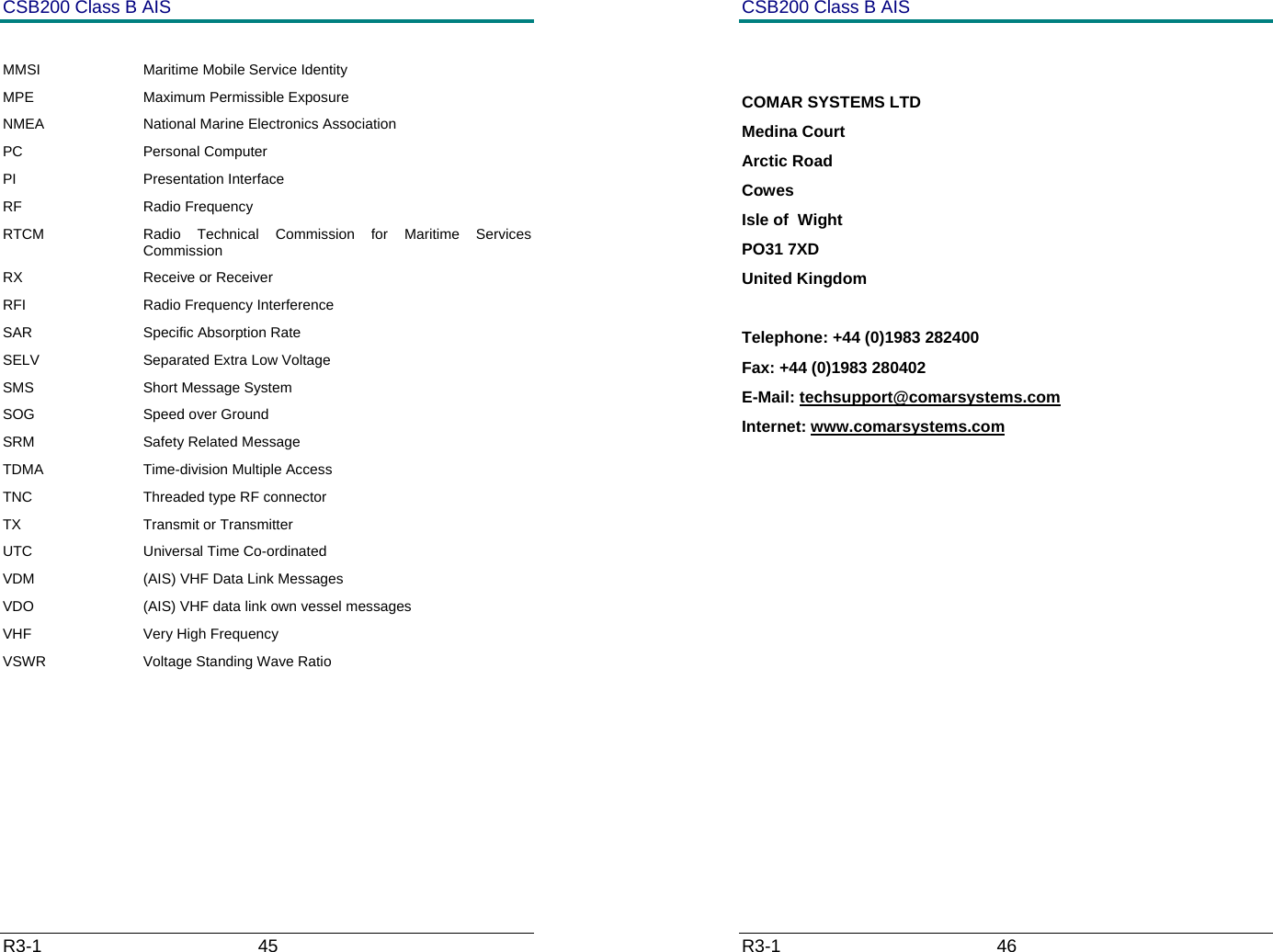
CSB200 Class B AIS R3-1                             45          MMSI  Maritime Mobile Service Identity MPE Maximum Permissible Exposure NMEA  National Marine Electronics Association PC Personal Computer PI Presentation Interface RF Radio Frequency RTCM  Radio Technical Commission for Maritime Services Commission RX Receive or Receiver RFI  Radio Frequency Interference SAR Specific Absorption Rate SELV  Separated Extra Low Voltage SMS Short Message System SOG Speed over Ground SRM Safety Related Message TDMA  Time-division Multiple Access TNC  Threaded type RF connector TX Transmit or Transmitter UTC Universal Time Co-ordinated VDM  (AIS) VHF Data Link Messages VDO  (AIS) VHF data link own vessel messages VHF  Very High Frequency VSWR  Voltage Standing Wave Ratio       CSB200 Class B AIS R3-1                             46           COMAR SYSTEMS LTD Medina Court Arctic Road Cowes Isle of  Wight PO31 7XD United Kingdom  Telephone: +44 (0)1983 282400 Fax: +44 (0)1983 280402 E-Mail: techsupport@comarsystems.com Internet: www.comarsystems.com
CSB200 Class B AIS R3-1                             47

Navigation menu