Country Mate Technology CAHBTEP01 Bluetooth Earpods User Manual NS CAHBTEP01 QSG ai

Country Mate Technology Ltd Bluetooth Earpods NS CAHBTEP01 QSG ai

Contents

Users Manual - 2 of 2

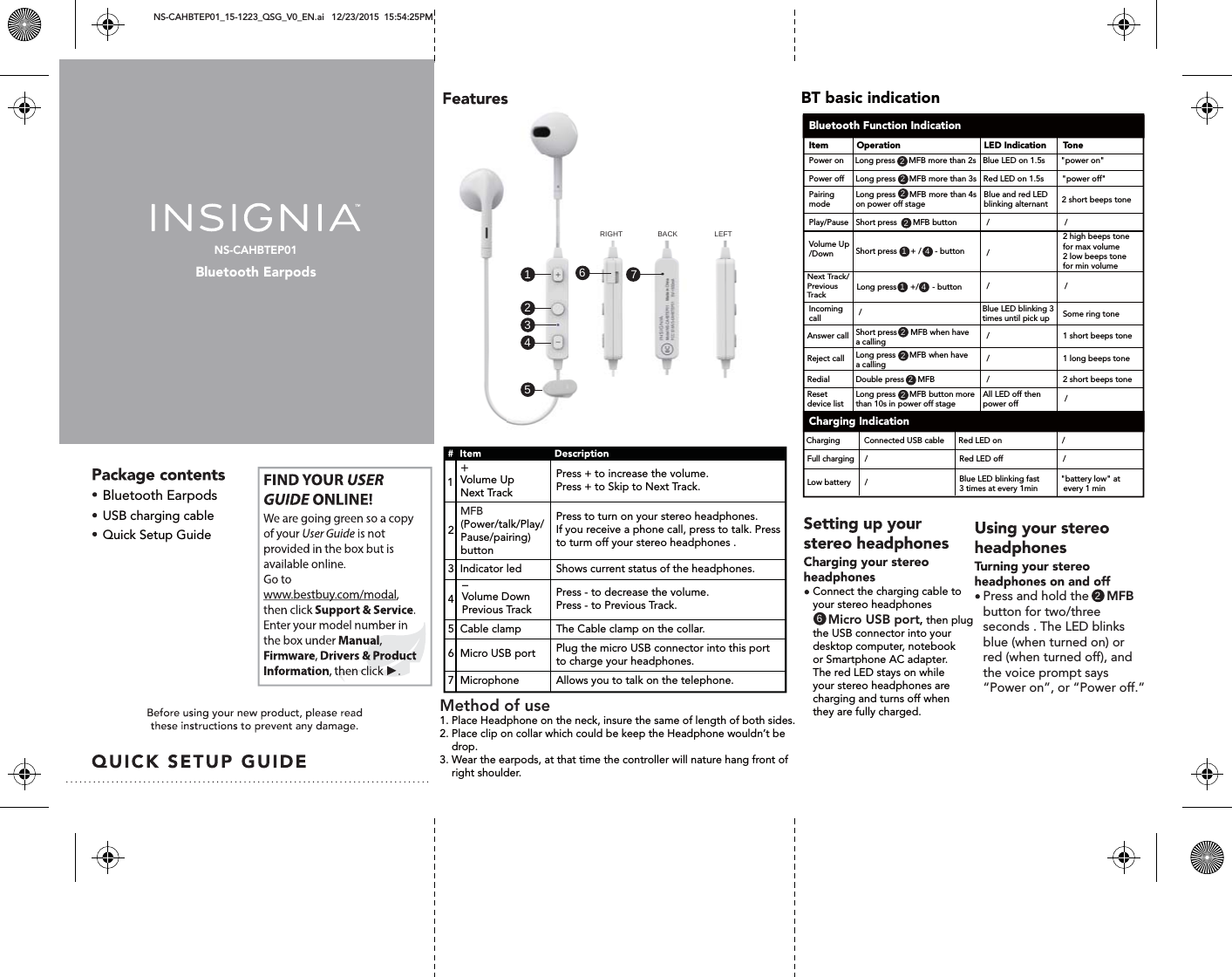
NS-CAHBTEP01Bluetooth EarpodsNS-CAHBTEP01_15-1223_QSG_V0_EN.ai   12/23/2015  15:54:25PM Bluetooth EarpodsVolume UpNext Track    USB charging cableQuick Setup Guide1431 41466517222222222RIGHT BACK LEFTPress + to increase the volume.Press + to Skip to Next Track.   Volume Down Previous Track    Next Track/Previous Track               2   1Press - to decrease the volume.Press - to Previous Track.5  Cable clampThe Cable clamp on the collar.6  Micro USB portPlug the micro USB connector into this port to charge your headphones.7  MicrophoneAllows you to talk on the telephone.  (Power/talk/Play/Pause/pairing)buttonPress to turn on your stereo headphones. If you receive a phone call, press to talk. Pressto turm off your stereo headphones .  3  Indicator led Shows current status of the headphones.Connect the charging cable toyour stereo headphones           Micro USB port, then plug the USB connector into your desktop computer, notebook or Smartphone AC adapter.The red LED stays on while your stereo headphones are charging and turns off whenthey are fully charged.MFB+-2Press and hold the     MFB button for two/three seconds . The LED blinks blue (when turned on) orred (when turned off), andthe voice prompt says “Power on”, or “Power off.”BT basic indicationBluetooth Function IndicationCharging IndicationItemPower on     Long press      MFB more than 2s   Blue LED on 1.5s       "power on"Power off     Long press      MFB more than 3s   Red LED on 1.5s        "power off"Pairing mode Play/PauseLong press      MFB more than 4s on power off stageShort press       MFB button  Blue and red LED  blinking alternant////Blue LED blinking 3 times until pick up///Volume Up/DownIncoming callAnswer callSome ring tone1 short beeps toneShort press      + /      - button Long press      +/      - buttonShort press      MFB when have a calling/Reject call 1 long beeps toneLong press      MFB when have a calling/Redial 2 short beeps toneDouble press      MFBRed LED onRed LED offCharging /Connected USB cableFull charging //Blue LED blinking fast3 times at every 1minLow battery "battery low" at  every 1 min/All LED off then power offReset device listLong press      MFB button more than 10s in power off stage/2 high beeps tone for max volume2 low beeps tone for min volume2 short beeps toneOperation LED Indication ToneMethod of use 1. Place Headphone on the neck, insure the same of length of both sides.2. Place clip on collar which could be keep the Headphone wouldn’t be     drop.3. Wear the earpods, at that time the controller will nature hang front of     right shoulder. 4
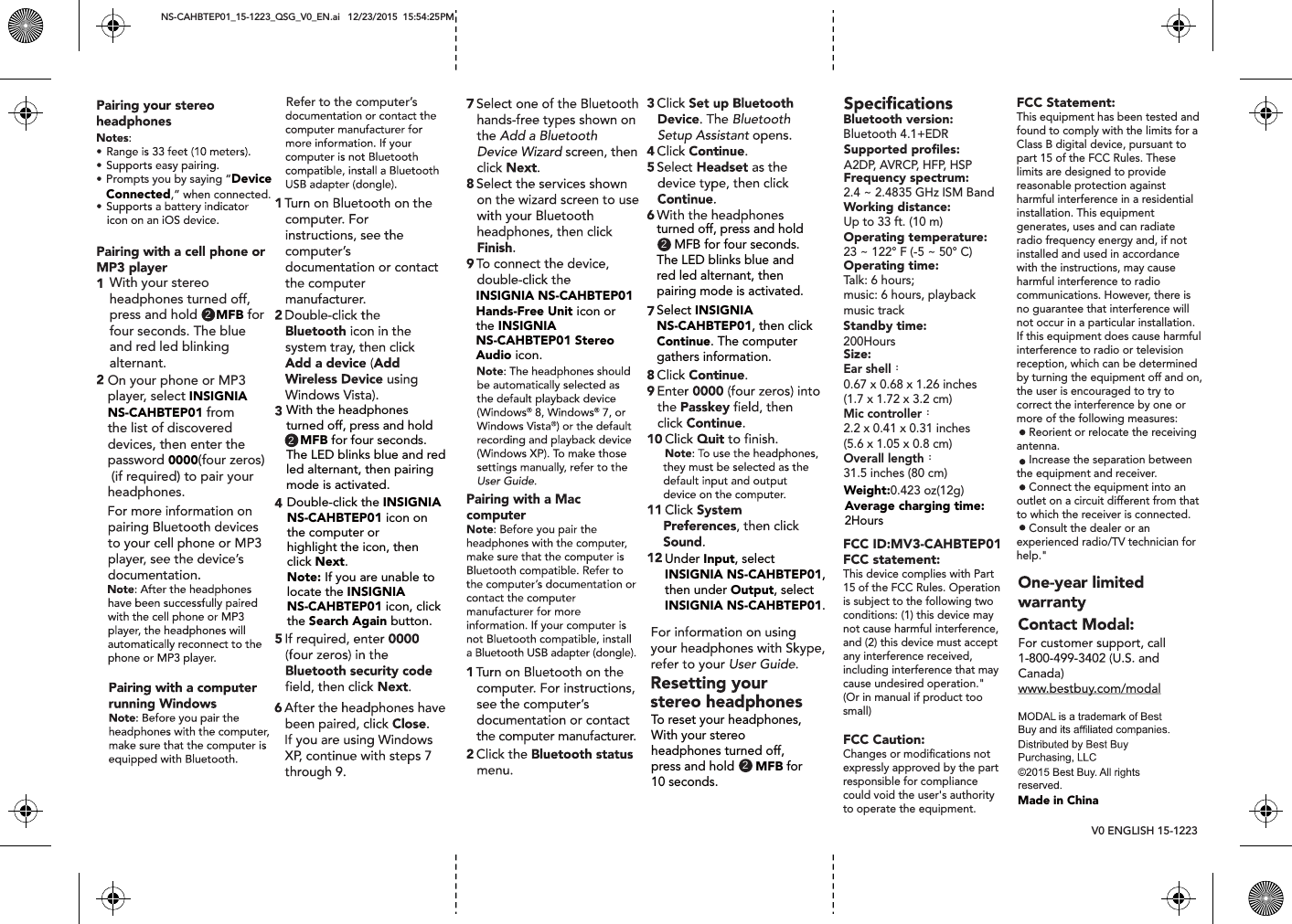
NS-CAHBTEP01_15-1223_QSG_V0_EN.ai   12/23/2015  15:54:25PM V0 ENGLISH 15-1223 Prompts you by saying “Device Connected,” when connected.With your stereo headphones turned off, press and hold     MFB for four seconds. The blueand red led blinking alternant.On your phone or MP3 player, select INSIGNIA NS-CAHBTEP01 from the list of discovered devices, then enter the password 0000(four zeros) (if required) to pair your headphones.With the headphones turned off, press and hold    MFB for four seconds. The LED blinks blue and redled alternant, then pairingmode is activated.22Double-click the INSIGNIA NS-CAHBTEP01 icon onthe computer or highlight the icon, thenclick Next.Note: If you are unable to locate the INSIGNIA NS-CAHBTEP01 icon, clickthe Search Again button.Refer to the computer’sINSIGNIA NS-CAHBTEP01Hands-Free Unit icon or the INSIGNIA NS-CAHBTEP01 Stereo Audio icon.2turned off, press and hold      MFB for four seconds. The LED blinks blue andred led alternant, then pairing mode is activated.Select INSIGNIA NS-CAHBTEP01, then clickContinue. The computer gathers information.Under Input, selectINSIGNIA NS-CAHBTEP01,then under Output, select INSIGNIA NS-CAHBTEP01.2To reset your headphones, With your stereo headphones turned off, press and hold      MFB for 10 seconds.Average charging time:2HoursWeight:0.423 oz(12g)Standby time:200HoursBluetooth version: Bluetooth 4.1+EDRSupported profiles:A2DP, AVRCP, HFP, HSPFrequency spectrum:2.4 ~ 2.4835 GHz ISM BandWorking distance:Up to 33 ft. (10 m)Operating temperature:23 ~ 122° F (-5 ~ 50° C)Operating time:Talk: 6 hours;music: 6 hours, playback music trackSize:Ear shell:0.67 x 0.68 x 1.26 inches(1.7 x 1.72 x 3.2 cm)Mic controller:2.2 x 0.41 x 0.31 inches(5.6 x 1.05 x 0.8 cm)Overall length:31.5 inches (80 cm)Made in ChinaFCC ID:MV3-CAHBTEP01FCC statement: This device complies with Part 15 of the FCC Rules. Operation is subject to the following two conditions: (1) this device may not cause harmful interference, and (2) this device must accept any interference received, including interference that may cause undesired operation."(Or in manual if product too small)FCC Caution:Changes or modifications not expressly approved by the part responsible for compliance could void the user's authority to operate the equipment.FCC Statement:This equipment has been tested and found to comply with the limits for a Class B digital device, pursuant to part 15 of the FCC Rules. These limits are designed to provide reasonable protection against harmful interference in a residential installation. This equipment generates, uses and can radiate radio frequency energy and, if not installed and used in accordance with the instructions, may cause harmful interference to radio communications. However, there is no guarantee that interference will not occur in a particular installation. If this equipment does cause harmful interference to radio or television reception, which can be determined by turning the equipment off and on, the user is encouraged to try to correct the interference by one or more of the following measures:    Reorient or relocate the receiving antenna.    Increase the separation between the equipment and receiver.    Connect the equipment into an outlet on a circuit different from that to which the receiver is connected.    Consult the dealer or an experienced radio/TV technician for help."

Navigation menu