Cubic Global Tracking Solutions RSU3 Asset Tracking Equipment User Manual NGWC Mesh Network User Guide

Cubic Global Tracking Solutions Asset Tracking Equipment NGWC Mesh Network User Guide

User Manual

               RSU-3 User Guide November 14, 2010            Cubic Global Tracking Solutions 2570 West El Camino Real, Suite 100 Mountain View, CA 94040 USA http://www.impeva.com
Copyright © 2010 by Cubic GTS 2   RSU-3 User Guide Cubic GTS Proprietary and Company Confidential Information      Notice of Ownership Use of this information shall be limited to persons having a need to know, within the appropriate project organizations, as defined within the nondisclosure agreement (NDA) between Cubic Global Tracking Solutions and its customers. Disclosure of the material in this document to outside organizations shall only be made with the written consent of an authorized Cubic GTS  corporate officer. This document contains information that is considered proprietary and confidential to Cubic Global Tracking Solutions (CGTS).  No information contained in this document may be released, re-printed, or redistributed without the permission of CGTS. The information contained in this document is subject to change without notice. If you have questions or comments about this document, please direct them to info.cgts@cubic.com. Copyright © 2010 by Cubic GTS Revision History Revision Date Author(s) Notes 1.0 11/14/10 Bryan Shah Initial release.
Copyright © 2009-2010 by Cubic GTS RSU-3 User Guide   3     Cubic GTS Proprietary and Company Confidential Information    1 Table of Contents 2 REGULATORY COMPLIANCE ........................................................................................................ 4 3 INTRODUCTION TO THE CGTS MESH NETWORK ................................................................. 5 3.1 REMOTE SENSOR UNIT.............................................................................................................................. 5 3.2 CGTS MESH NETWORK OVERVIEW ......................................................................................................... 5 3.3 THE DEVICE MANAGEMENT CENTER ..................................................................................................... 5 3.4 CGTS MESH NETWORK OPERATION ....................................................................................................... 5 3.4.1 RSU Network Processes ......................................................................................................................... 6 4 REMOTE SENSOR UNIT .................................................................................................................. 7 4.1 RSU .............................................................................................................................................................. 7 4.2 RSU LEDS ................................................................................................................................................... 7 4.3 RSU SAMPLING AND REPORTING BEHAVIOR ........................................................................................ 7 4.4 INSTALLING A RSU .................................................................................................................................... 8 4.5 CONFIGURING A RSU ................................................................................................................................. 8 4.6 MAINTAINING A RSU................................................................................................................................. 8 4.6.1 Replacing a RSU Battery ....................................................................................................................... 8 4.7 RSU 2.4GHZ ANTENNA PATTERN ......................................................................................................... 8 4.8 RSU SENSOR CHARACTERISTICS ............................................................................................................. 9
Copyright © 2010 by Cubic GTS 4   RSU-3 User Guide Cubic GTS Proprietary and Company Confidential Information      2 Regulatory Compliance FCC STATEMENT: This equipment has been tested and found to comply with the limits for a Class A digital device, pursuant to part 15 of the FCC Rules. These limits are designed to provide reasonable protection against harmful interference when the equipment is operated in a commercial environment. This equipment generates, uses, and can radiate radio frequency energy and, if not installed and used in accordance with the instruction manual, may cause harmful interference to radio communications. Operation of this equipment in a residential area is likely to cause harmful interference in which case the user will be required to correct the interference at his/her own expense. Changes or modifications not expressly approved by Cubic Global Tracking Solutions for compliance could void the user’s authority to operate the equipment. EUROPEAN UNION: This product complies with the R&TTE Directive and the EMC Directive (89/336/EEC) issued by the Commission of the European Community This product has been tested to verify compliance to the following European Standards: EN 300 328 – Technical Requirements for Radio Equipment EN 301 489 –EMC Emissions and Immunity INDUSTRY CANADA: This Class A digital apparatus complies with Canadian ICES-003. Cet appareil numérique de la classe A est conforme à  la norme NMB-003 du Canada.
Copyright © 2009-2010 by Cubic GTS RSU-3 User Guide   5     Cubic GTS Proprietary and Company Confidential Information  3 Introduction to the CGTS mesh network The CGTS mesh network enables end-to-end security and management of your mobile assets through continuous monitoring and near real-time reporting.  Cubic GTS designed the Next Generation Wireless Communication for Logistics Applications (NGWC) mesh network to meet the U.S. Army NGWC requirements. The Overview section explains the CGTS mesh network operation. 3.1 Remote Sensor Unit The Remote Sensor Unit (RSU) provides identification, security and sensor monitoring. The remote sensor can measure temperature, humidity, motion, light, battery charge, shock, and door state. A RSU also provides connectivity for other RSUs through the mesh network. For more information about the RSU, see the Remote Sensor Unit section.  3.2 CGTS mesh network Overview CGTS mesh network connects RSUs that act as remote sensing units to a web based Device Management Center (DMC). The DMC collects information from the RSUs and stores the data on the server. You can use the web access to the DMC to manage the mesh network. Data is communicated securely between the RSUs and the DMC in encrypted packets, and the DMC provides secure management of the collected data. A gateway between the RSUs and the DMC provides communication between the RF network of RSUs and the Internet. The RSUs communicate using the CGTS proprietary protocol stack based on IEEE 802.15.4 physical layer at 2.4 GHz using all 16 channels.  3.3 The Device Management Center The Device Management Center (DMC) is located at a Cubic GTS facility. The DMC provides the following services:   Secure storage on the DMC for data that is transmitted securely from CGTS mesh network devices.   Secure system management of the CGTS mesh network.   Worldwide health monitoring of the RSUs in the CGTS mesh network.   Event notification to individuals via email or short messaging service (SMS).   Software upgrade of deployed devices (future functionality). 3.4 CGTS mesh network Operation The mesh network that is formed by the Remote Sensor Units (RSUs) and the gateways operates independently of the Internet connection that forms the link between the gateways and the Device Management Center (DMC). This section describes the foundation of the mesh network operation between the gateways and the RSUs. The CGTS mesh network allows for multiple paths between the RSUs and the gateways in the network. Because the data path through the network is non-deterministic, the CGTS mesh network is an ad hoc network.
Copyright © 2010 by Cubic GTS 6   RSU-3 User Guide Cubic GTS Proprietary and Company Confidential Information      3.4.1 RSU Network Processes The RSU software performs the following three tasks:   Searching, or scanning, for the presence of neighboring RSUs or gateways.   Announcing, or beaconing, the presence of this RSU.   Performing scheduled communication with other RSUs or sinks.
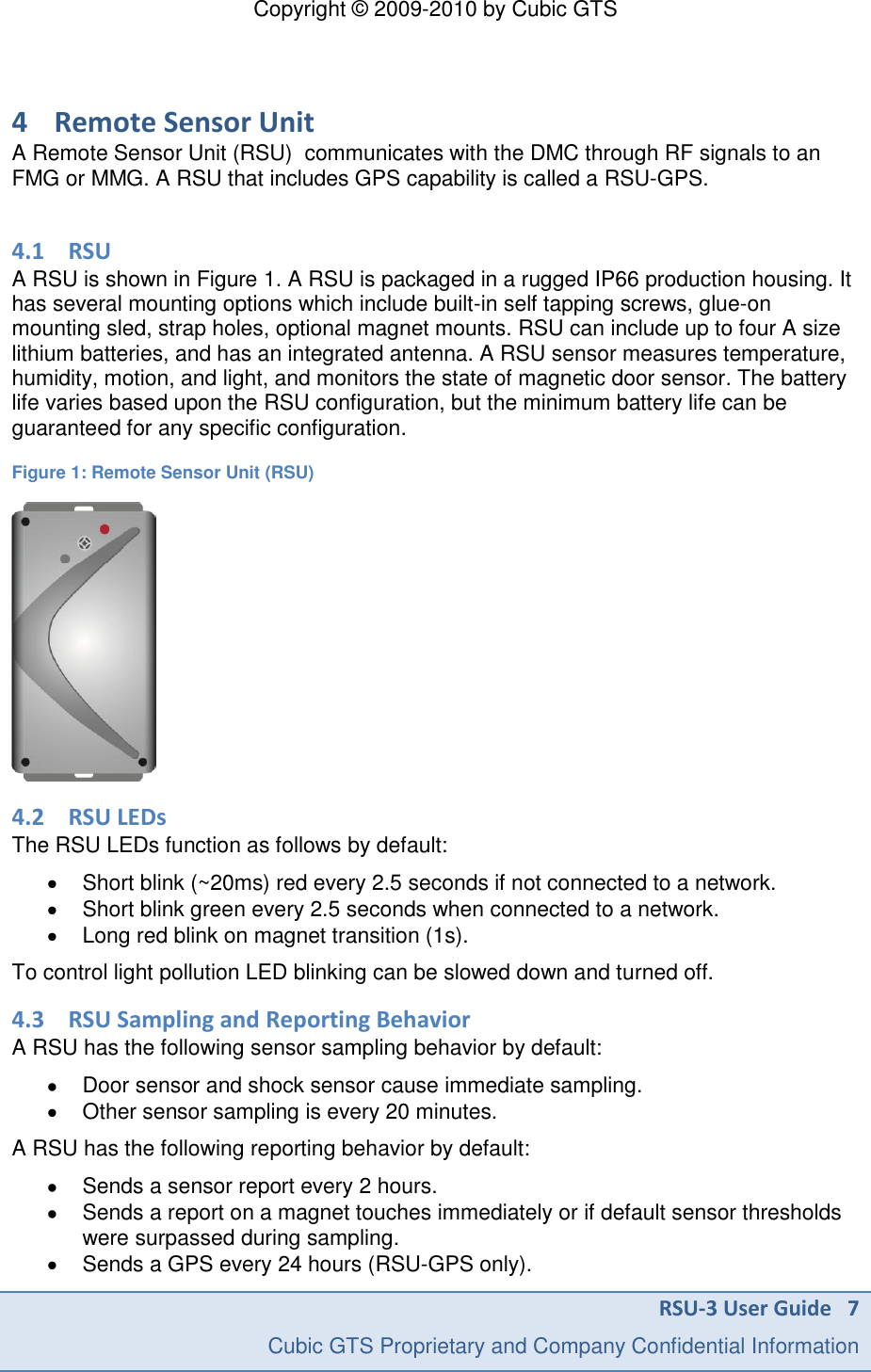
Copyright © 2009-2010 by Cubic GTS RSU-3 User Guide   7     Cubic GTS Proprietary and Company Confidential Information  4 Remote Sensor Unit A Remote Sensor Unit (RSU)  communicates with the DMC through RF signals to an FMG or MMG. A RSU that includes GPS capability is called a RSU-GPS.  4.1 RSU A RSU is shown in Figure 1. A RSU is packaged in a rugged IP66 production housing. It has several mounting options which include built-in self tapping screws, glue-on mounting sled, strap holes, optional magnet mounts. RSU can include up to four A size lithium batteries, and has an integrated antenna. A RSU sensor measures temperature, humidity, motion, and light, and monitors the state of magnetic door sensor. The battery life varies based upon the RSU configuration, but the minimum battery life can be guaranteed for any specific configuration.  Figure 1: Remote Sensor Unit (RSU)  4.2 RSU LEDs The RSU LEDs function as follows by default:   Short blink (~20ms) red every 2.5 seconds if not connected to a network.   Short blink green every 2.5 seconds when connected to a network.   Long red blink on magnet transition (1s). To control light pollution LED blinking can be slowed down and turned off. 4.3 RSU Sampling and Reporting Behavior A RSU has the following sensor sampling behavior by default:   Door sensor and shock sensor cause immediate sampling.   Other sensor sampling is every 20 minutes.  A RSU has the following reporting behavior by default:   Sends a sensor report every 2 hours.   Sends a report on a magnet touches immediately or if default sensor thresholds were surpassed during sampling.    Sends a GPS every 24 hours (RSU-GPS only).
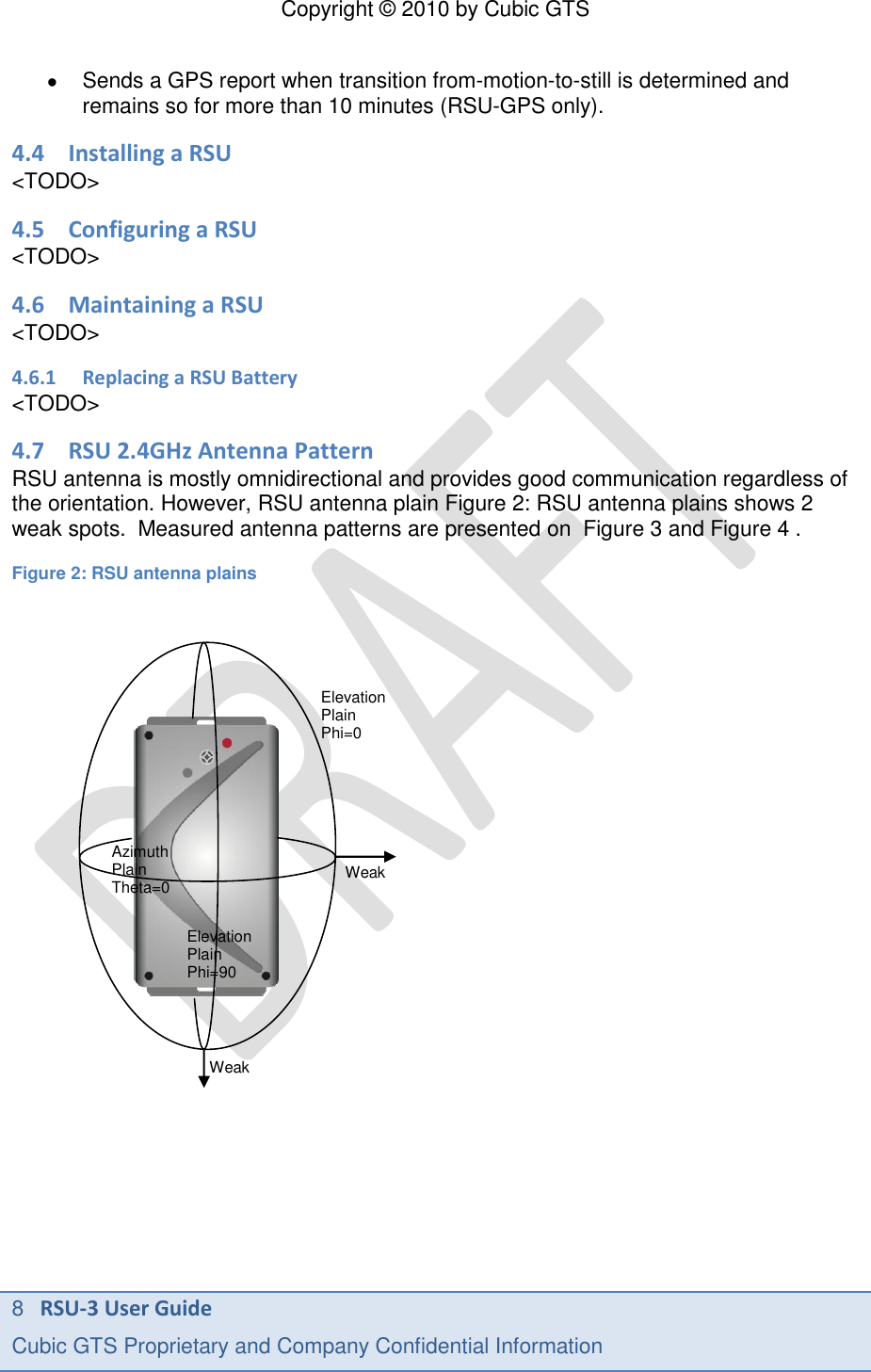
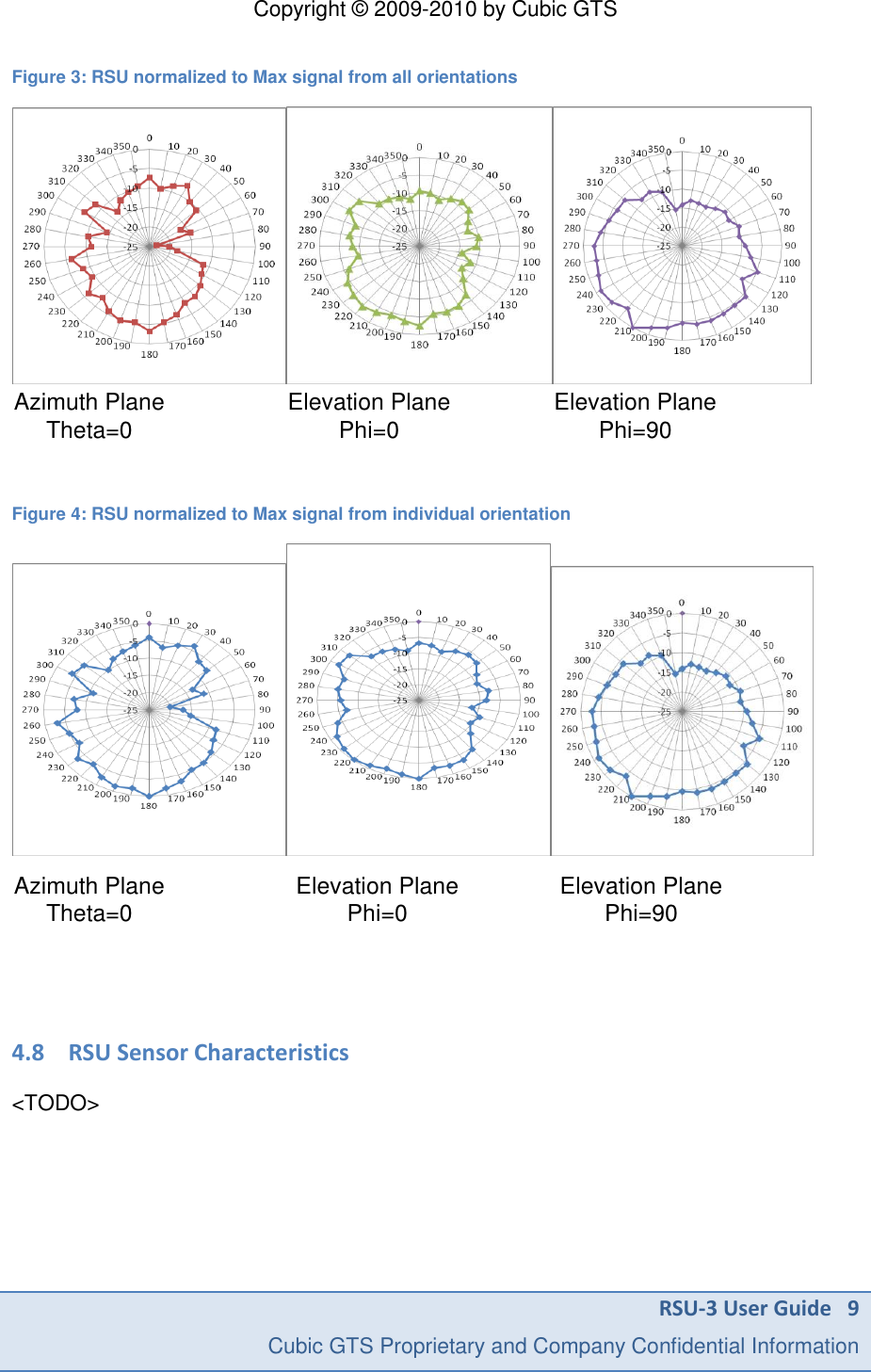
Copyright © 2010 by Cubic GTS 8   RSU-3 User Guide Cubic GTS Proprietary and Company Confidential Information        Sends a GPS report when transition from-motion-to-still is determined and remains so for more than 10 minutes (RSU-GPS only). 4.4 Installing a RSU <TODO> 4.5 Configuring a RSU <TODO> 4.6 Maintaining a RSU <TODO> 4.6.1 Replacing a RSU Battery <TODO> 4.7 RSU 2.4GHz Antenna Pattern RSU antenna is mostly omnidirectional and provides good communication regardless of the orientation. However, RSU antenna plain Figure 2: RSU antenna plains shows 2 weak spots.  Measured antenna patterns are presented on  Figure 3 and Figure 4 .   Figure 2: RSU antenna plains                                   Azimuth Plain Theta=0 Elevation Plain Phi=90 Elevation Plain Phi=0 Weak Weak
Copyright © 2009-2010 by Cubic GTS RSU-3 User Guide   9     Cubic GTS Proprietary and Company Confidential Information  Figure 3: RSU normalized to Max signal from all orientations       Azimuth PlaneTheta=0                        Elevation PlanePhi=0                    Elevation PlanePhi=90  Figure 4: RSU normalized to Max signal from individual orientation  Azimuth PlaneTheta=0                     Elevation PlanePhi=0                Elevation PlanePhi=90   4.8 RSU Sensor Characteristics  <TODO>

Navigation menu