CyberData 010835-010914 LiteScape SPAR User Manual

CyberData Corporation LiteScape SPAR

Contents

Manual Guide

 Litescape SPAR (Secure Personal Authentication Reader)Operations GuidePart #010835Litescape Corporation2555 Garden RoadMonterey, CA 93940(831) 373-2601930221A
Litescape Corporation 930221A Operations GuideLitescape SPAR Operations Guide 930221APart # 010835COPYRIGHT NOTICE:© 2008, Litescape Corporation, ALL RIGHTS RESERVED. This manual and related materials are the copyrighted property of Litescape Corporation. No part of this manual or related materials may be reproduced or transmitted, in any form or by any means (except for internal use by licensed customers), without prior express written permission of Litescape Corporation. This manual, and the products, software, firmware, and/or hardware described in this manual are the property of Litescape Corporation, provided under the terms of an agreement between Litescape Corporation and recipient of this manual, and their use is subject to that agreement and its terms.DISCLAIMER: Except as expressly and specifically stated in a written agreement executed by Litescape Corporation, Litescape Corporation makes no representation or warranty, express or implied, including any warranty or merchantability or fitness for any purpose, with respect to this manual or the products, software, firmware, and/or hardware described herein, and Litescape Corporation assumes no liability for damages or claims resulting from any use of this manual or such products, software, firmware, and/or hardware. Litescape Corporation reserves the right to make changes, without notice, to this manual and to any such product, software, firmware, and/or hardware.OPEN SOURCE STATEMENT: Certain software components included in LiteScape products are subject to the GNU General Public License (GPL) and Lesser GNU General Public License (LGPL) “open source” or “free software” licenses. Some of this Open Source Software may be owned by third parties. Open Source Software is not subject to the terms and conditions of the LiteScape COPYRIGHT NOTICE or software licenses. Your right to copy, modify, and distribute any Open Source Software is determined by the terms of the GPL, LGPL, or third party, according to who licenses that software.Software or firmware developed by Litescape that is unrelated to Open Source Software is copyrighted by LiteScape, subject to the terms of LiteScape licenses, and may not be copied, modified, reverse-engineered, or otherwise altered without explicit written permission from LiteScape Corporation.TRADEMARK NOTICE: Litescape Corporation and the Litescape Corporation logos are trademarks of Litescape Corporation. Other product names, trademarks, and service marks may be the trademarks or registered trademarks of their respective owners.Corporate HeadquartersLiteScape Technologies, Inc.1000 Bridge Parkway, Suite 200Redwood Shores, CA 94065Phone: 650-227-0220Fax: 650-227-0226www.LiteScape.comSalesPhone: 650-227-0220Email: info@LiteScape.comTechnical SupportPhone: 800-617-0917Email: support@LiteScape.comProduct Service and RMAsPhone: 800-617-0917
Litescape Corporation 930221A Operations GuideImportant Safety Instructions1. Read these instructions.2. Keep these instructions.3. Heed all warnings.4. Follow all instructions.5. Do not use this apparatus near water.6. Clean only with dry cloth.7. Do not install near any heat sources such as radiators, heat registers, stoves, or other apparatus (including amplifiers) that produce heat.8. Do not defeat the safety purpose of the polarized or grounding-type plug. A polarized plug has two blades with one wider than the other. A grounding type plug has two blades and a third grounding prong. The wide blade or the third prong are provided for your safety. If the provided plug does not fit into your outlet, consult an electrician for replacement of the obsolete outlet.9. Protect the power cord from being walked on or pinched particularly at plugs, convenience receptacles, and the point where they exit from the apparatus.10. Only use attachments/accessories specified by the manufacturer.11. Refer all servicing to qualified service personnel. Servicing is required when the apparatus has been damaged in any way, such as power-supply cord or plug is damaged, liquid has been spilled or objects have fallen into the apparatus, the apparatus has been exposed to rain or moisture, does not operate normally, or has been dropped.
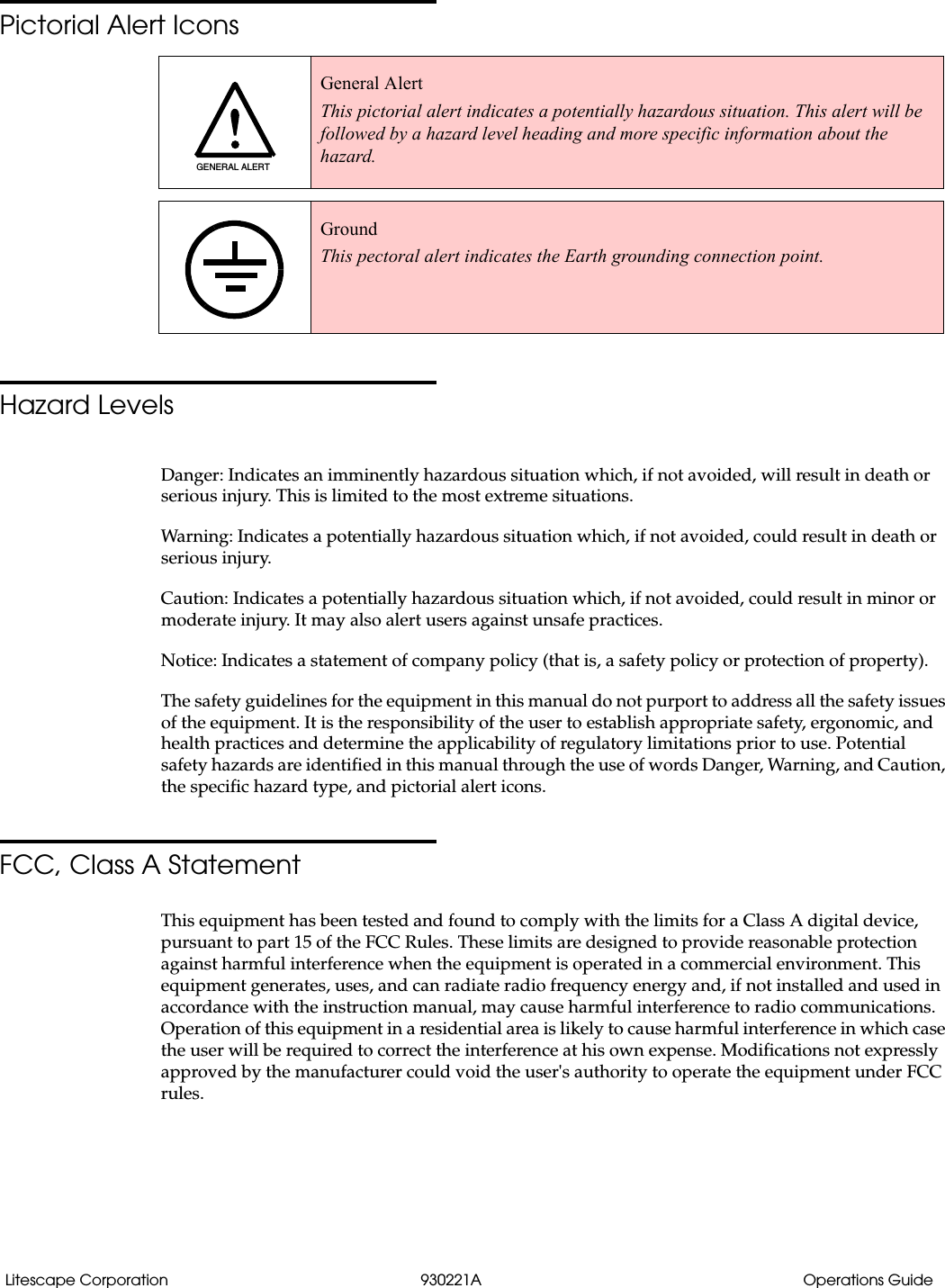
Litescape Corporation 930221A Operations GuidePictorial Alert IconsHazard LevelsDanger: Indicates an imminently hazardous situation which, if not avoided, will result in death or serious injury. This is limited to the most extreme situations.Warning: Indicates a potentially hazardous situation which, if not avoided, could result in death or serious injury.Caution: Indicates a potentially hazardous situation which, if not avoided, could result in minor or moderate injury. It may also alert users against unsafe practices.Notice: Indicates a statement of company policy (that is, a safety policy or protection of property).The safety guidelines for the equipment in this manual do not purport to address all the safety issues of the equipment. It is the responsibility of the user to establish appropriate safety, ergonomic, and health practices and determine the applicability of regulatory limitations prior to use. Potential safety hazards are identified in this manual through the use of words Danger, Warning, and Caution, the specific hazard type, and pictorial alert icons.FCC, Class A StatementThis equipment has been tested and found to comply with the limits for a Class A digital device, pursuant to part 15 of the FCC Rules. These limits are designed to provide reasonable protection against harmful interference when the equipment is operated in a commercial environment. This equipment generates, uses, and can radiate radio frequency energy and, if not installed and used in accordance with the instruction manual, may cause harmful interference to radio communications. Operation of this equipment in a residential area is likely to cause harmful interference in which case the user will be required to correct the interference at his own expense. Modifications not expressly approved by the manufacturer could void the user's authority to operate the equipment under FCC rules. General AlertThis pictorial alert indicates a potentially hazardous situation. This alert will be followed by a hazard level heading and more specific information about the hazard.GroundThis pectoral alert indicates the Earth grounding connection point.GENERAL ALERT
Litescape Corporation 930221A Operations GuideRevision HistoryRevision Date Released Description of ChangesA 5/14/2008 This is the first release of this manual.
Litescape Corporation 930221A Operations Guide
iOperations Guide 930221A Litescape CorporationContentsChapter 1 Product Overview  11.1 Parts of the LiteScape SPAR ..................................................................................................................11.2 Typical System Installation ...................................................................................................................21.3 Product Features .....................................................................................................................................21.4 Product Specifications  ...........................................................................................................................3Chapter 2 Installing the LiteScape SPAR  52.1 Using the Optional 48 Volt Power Supply Wiring  ............................................................................6Chapter 3 Mounting the LiteScape SPAR to a Cisco Phone Stand  73.1 Mounting the LiteScape SPAR to a Cisco Phone Stand ....................................................................7Chapter 4 Using the LiteScape SPAR  94.1 How to Swipe a Magnetic Card ...........................................................................................................94.2 How to Swipe an RFID-Tagged Card ................................................................................................104.3 How to Swipe a Fingerprint  ............................................................................................................... 11Index 13
Litescape Corporation 930221A Operations Guide ii
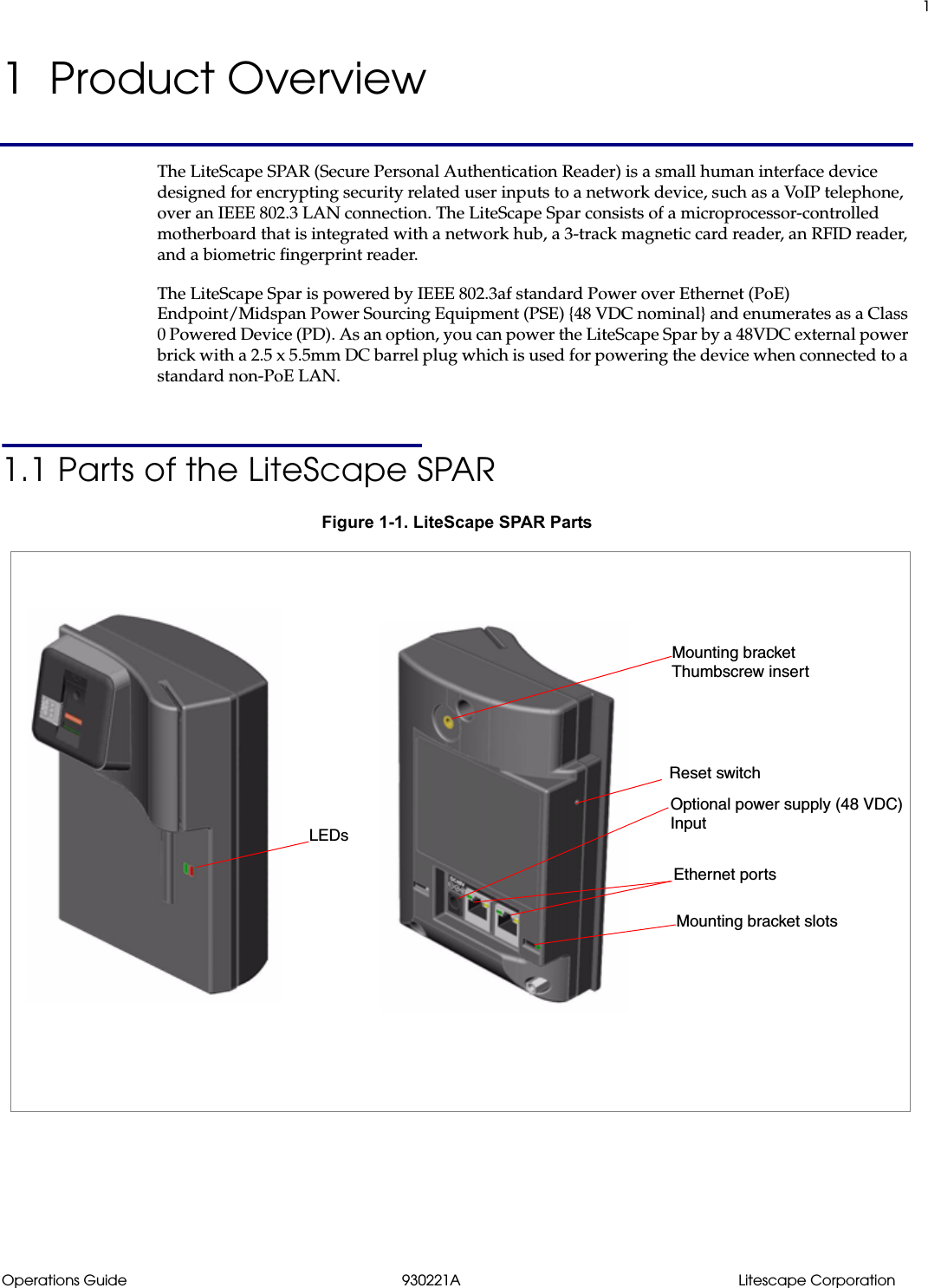
1Operations Guide 930221A Litescape Corporation1  Product OverviewThe LiteScape SPAR (Secure Personal Authentication Reader) is a small human interface device designed for encrypting security related user inputs to a network device, such as a VoIP telephone, over an IEEE 802.3 LAN connection. The LiteScape Spar consists of a microprocessor-controlled motherboard that is integrated with a network hub, a 3-track magnetic card reader, an RFID reader, and a biometric fingerprint reader.The LiteScape Spar is powered by IEEE 802.3af standard Power over Ethernet (PoE) Endpoint/Midspan Power Sourcing Equipment (PSE) {48 VDC nominal} and enumerates as a Class 0 Powered Device (PD). As an option, you can power the LiteScape Spar by a 48VDC external power brick with a 2.5 x 5.5mm DC barrel plug which is used for powering the device when connected to a standard non-PoE LAN.1.1 Parts of the LiteScape SPARFigure 1-1. LiteScape SPAR PartsReset switchLEDsEthernet portsOptional power supply (48 VDC)Mounting bracket Mounting bracket slotsThumbscrew insertInput
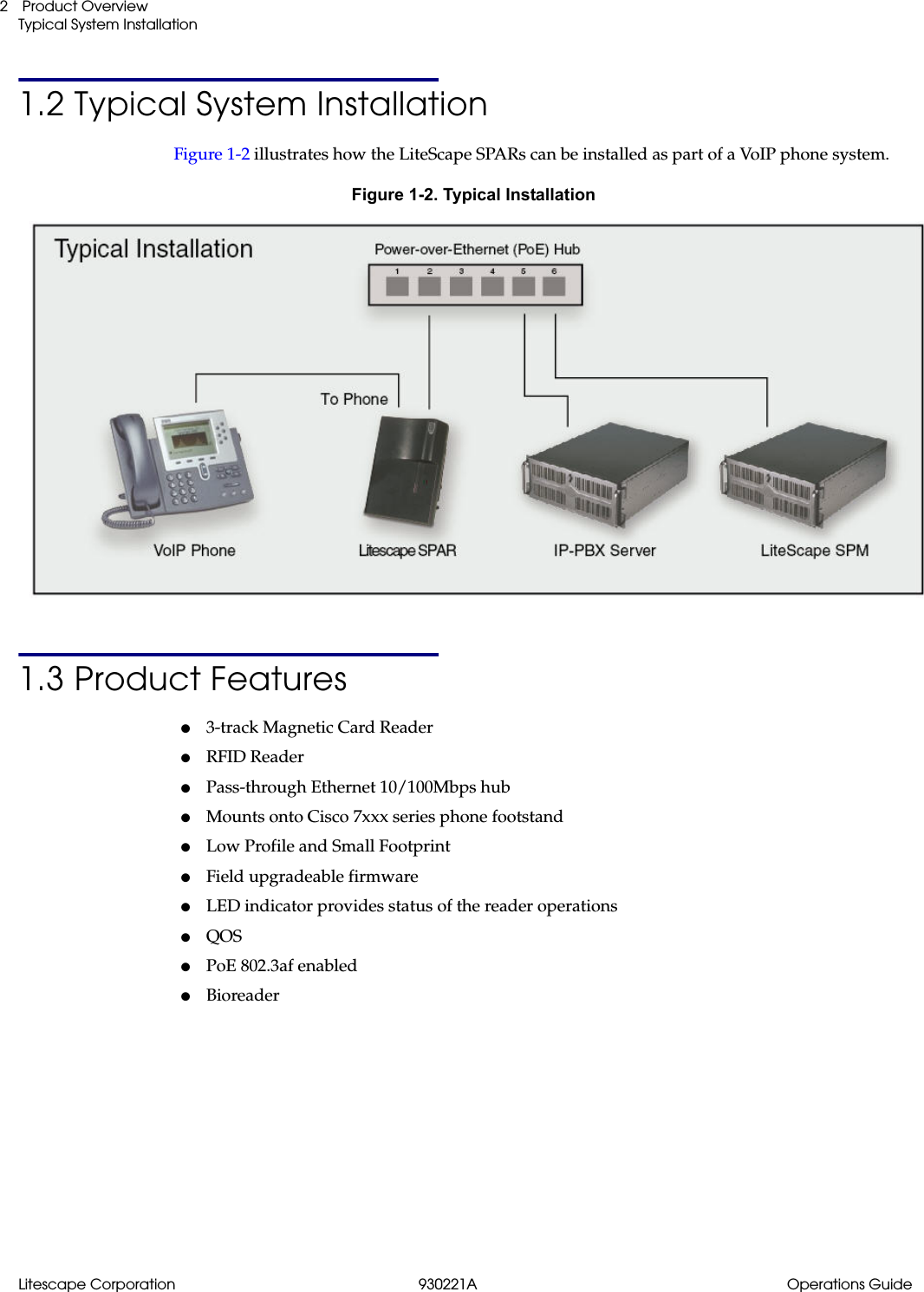
Litescape Corporation 930221A Operations Guide Product OverviewTypical System Installation21.2 Typical System InstallationFigure 1-2 illustrates how the LiteScape SPARs can be installed as part of a VoIP phone system.Figure 1-2. Typical Installation1.3 Product Features●3-track Magnetic Card Reader●RFID Reader●Pass-through Ethernet 10/100Mbps hub●Mounts onto Cisco 7xxx series phone footstand●Low Profile and Small Footprint●Field upgradeable firmware●LED indicator provides status of the reader operations●QOS●PoE 802.3af enabled●Bioreader
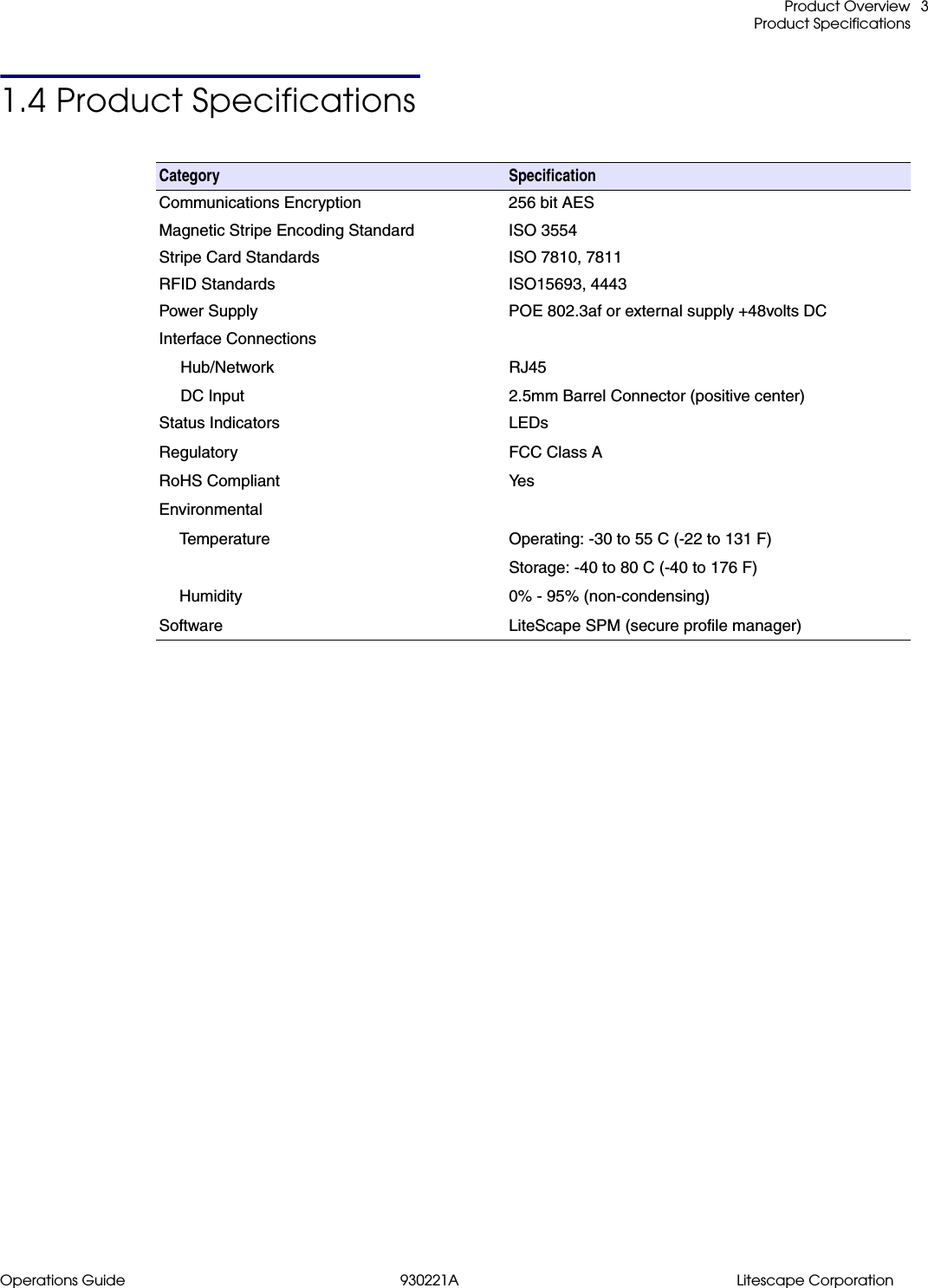
 Product OverviewProduct SpecificationsOperations Guide 930221A Litescape Corporation31.4 Product SpecificationsCategory  SpecificationCommunications Encryption 256 bit AESMagnetic Stripe Encoding Standard ISO 3554Stripe Card Standards ISO 7810, 7811RFID Standards ISO15693, 4443Power Supply POE 802.3af or external supply +48volts DCInterface ConnectionsHub/NetworkDC InputRJ452.5mm Barrel Connector (positive center)Status IndicatorsRegulatoryRoHS CompliantEnvironmentalTemperatureHumiditySoftwareLEDsFCC Class AYe sOperating: -30 to 55 C (-22 to 131 F)Storage: -40 to 80 C (-40 to 176 F)0% - 95% (non-condensing)LiteScape SPM (secure profile manager)
Litescape Corporation 930221A Operations Guide Product OverviewProduct Specifications4
5Operations Guide 930221A Litescape Corporation2 Installing the LiteScape SPARUse Figure 2-1 to see how to install the LiteScape SPAR.Figure 2-1. Installing the LiteScape SPAROptional power supply (48 VDC) inputHub Out to PhoneFrom Network (RJ 45, PoE 802.3af)
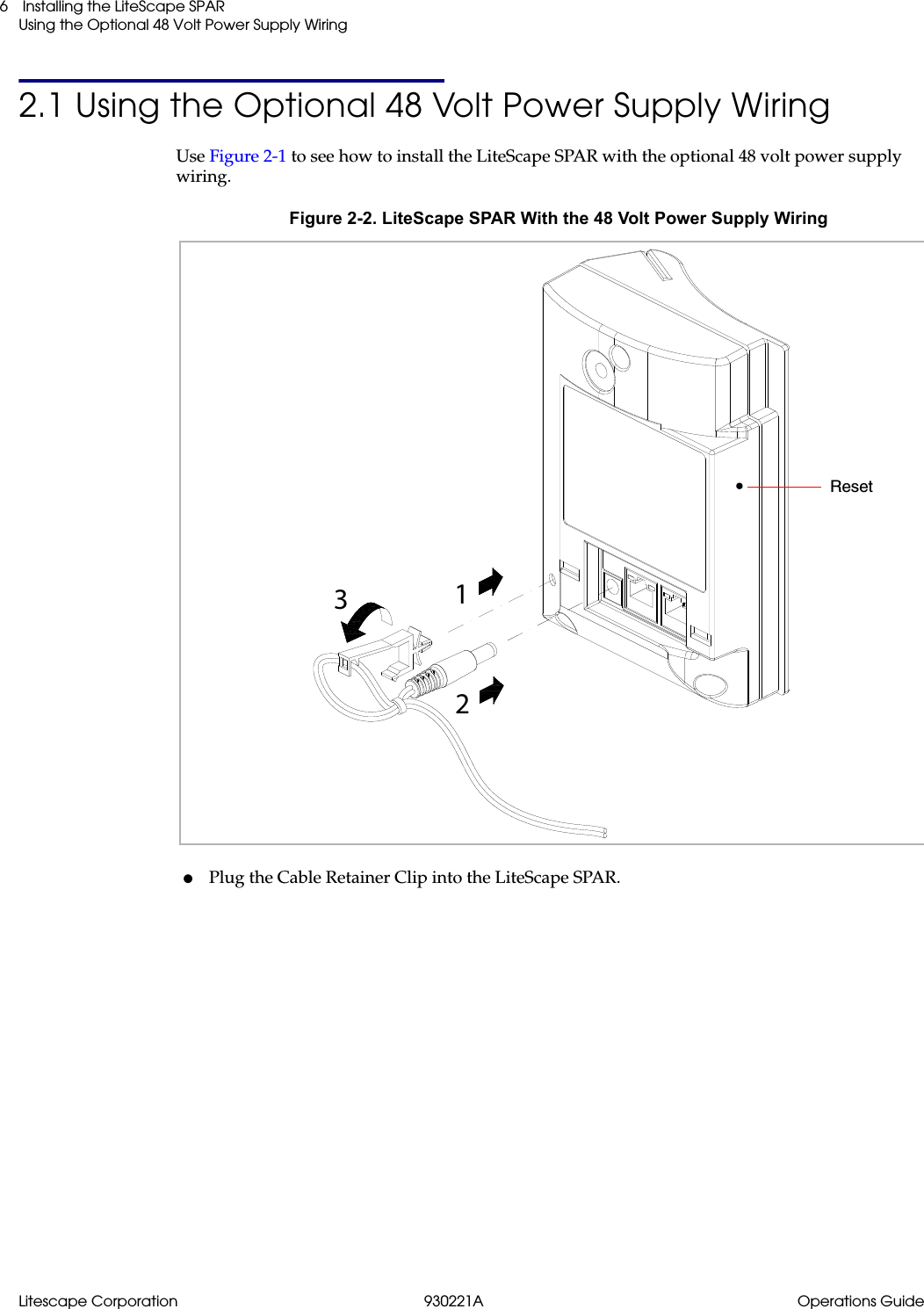
Litescape Corporation 930221A Operations Guide Installing the LiteScape SPARUsing the Optional 48 Volt Power Supply Wiring62.1 Using the Optional 48 Volt Power Supply WiringUse Figure 2-1 to see how to install the LiteScape SPAR with the optional 48 volt power supply wiring.Figure 2-2. LiteScape SPAR With the 48 Volt Power Supply Wiring●Plug the Cable Retainer Clip into the LiteScape SPAR.123Reset
7Operations Guide 930221A Litescape Corporation3 Mounting the LiteScape SPAR to a Cisco Phone Stand3.1 Mounting the LiteScape SPAR to a Cisco Phone Stand1. Position the LiteScape SPAR into the Cisco Foot Stand.Figure 3-1. Mounting the LiteScape SPAR2. Secure the LiteScape SPAR to the Cisco Foot Stand with the M4 thumb screw.Figure 3-2. Mounting the LiteScape SPAR* The CP-SINGLFOOTSTAND is a single module footstand for the following Cisco Phones:Cisco Unified IP Phones 7960G (CP-7960G), 7961G (CP-7961G) , 7970G (CP-7970G) and 7971G-GE (CP-7971G-)M4 thumb screwCP-SINGLEFOOTSTAND*
Litescape Corporation 930221A Operations Guide Mounting the LiteScape SPAR to a Cisco Phone StandMounting the LiteScape SPAR to a Cisco Phone Stand8Figure 3-3. Mounting the LiteScape SPAR
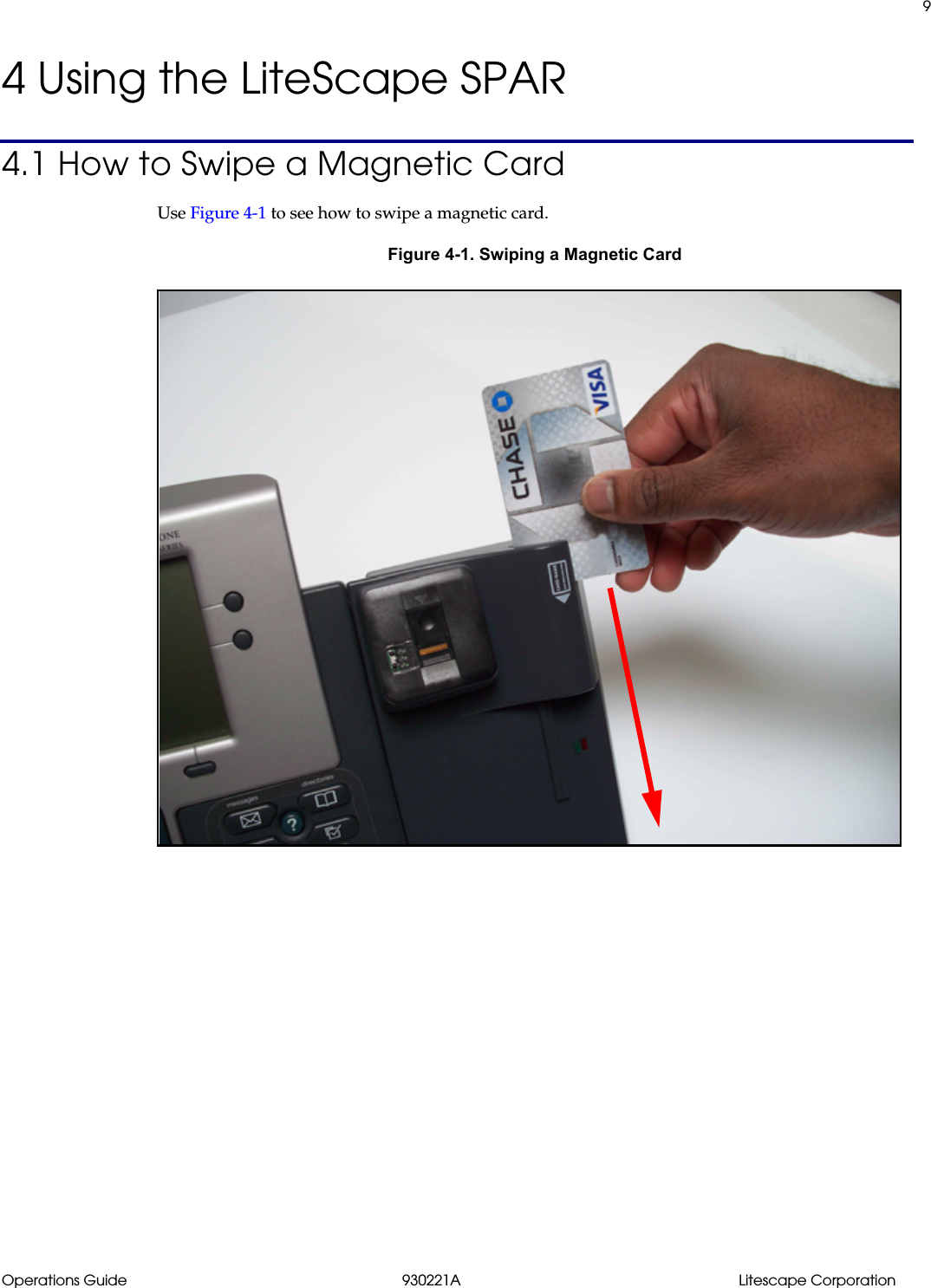
9Operations Guide 930221A Litescape Corporation4 Using the LiteScape SPAR4.1 How to Swipe a Magnetic CardUse Figure 4-1 to see how to swipe a magnetic card.Figure 4-1. Swiping a Magnetic Card
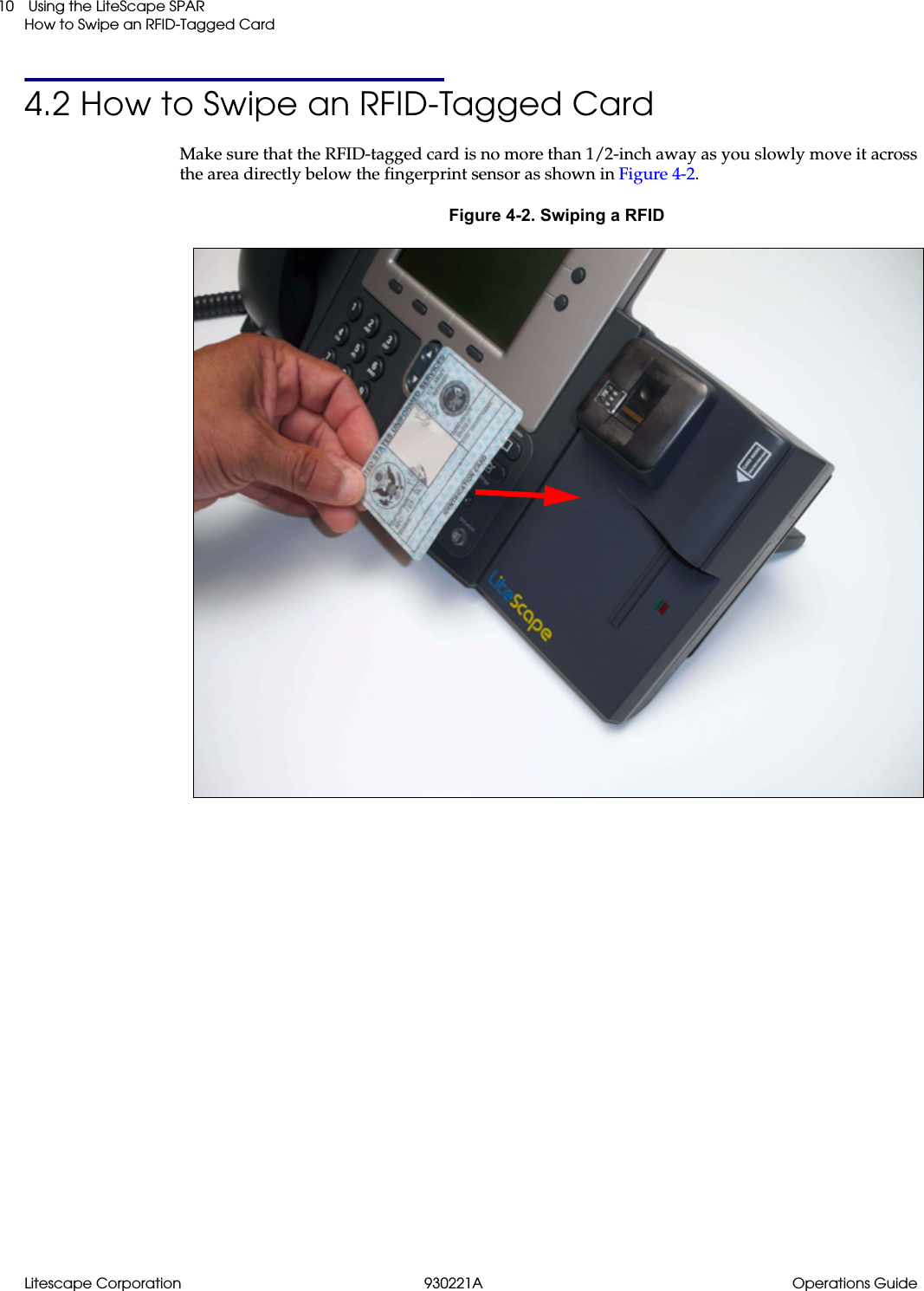
Litescape Corporation 930221A Operations Guide Using the LiteScape SPARHow to Swipe an RFID-Tagged Card104.2 How to Swipe an RFID-Tagged CardMake sure that the RFID-tagged card is no more than 1/2-inch away as you slowly move it across the area directly below the fingerprint sensor as shown in Figure 4-2.Figure 4-2. Swiping a RFID
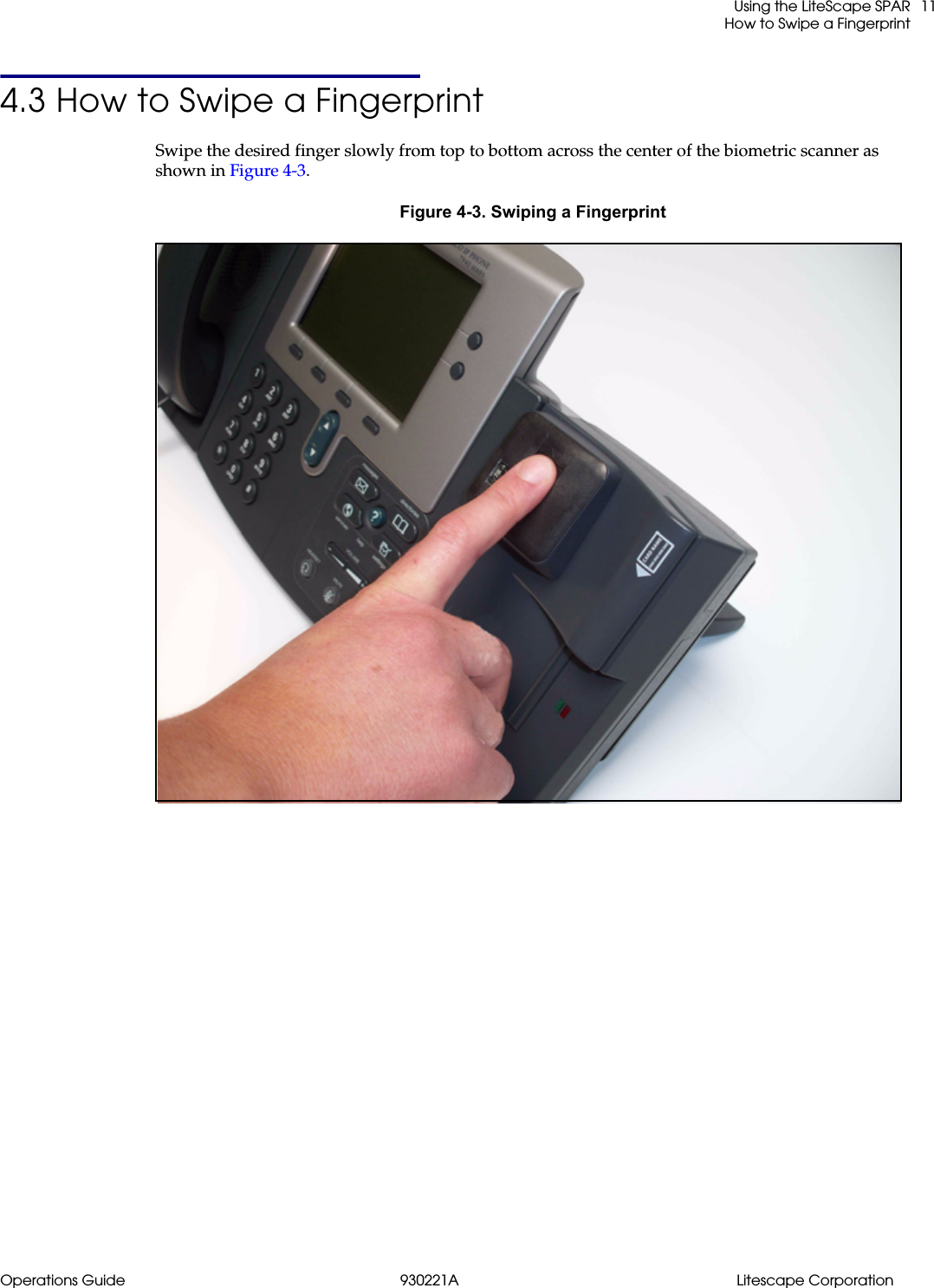
 Using the LiteScape SPARHow to Swipe a FingerprintOperations Guide 930221A Litescape Corporation114.3 How to Swipe a FingerprintSwipe the desired finger slowly from top to bottom across the center of the biometric scanner as shown in Figure 4-3.Figure 4-3. Swiping a Fingerprint
Litescape Corporation 930221A Operations Guide Using the LiteScape SPARHow to Swipe a Fingerprint12
Operations Guide 930221A Litescape Corporation13IndexCcisco phone stand, mounting 7Ffingerprint, swiping 11Iinstallation 2, 5, 7, 8installation, 48 volt power supply 6Llitescape SPAR, parts 1Mmagnetic card, swiping 9mounting 7Pproduct features 2product overview 1product features 2product specifications 3product specifications 3RRFID, swiping 10
Litescape Corporation 930221A Operations Guide14

Navigation menu