DEI Sales Definitive Technology HPNC Wireless Bluetooth over-ear headphone User Manual D Symphony1 MN HBP2966 indd

DEI Sales Inc. dba Definitive Technology Wireless Bluetooth over-ear headphone D Symphony1 MN HBP2966 indd

Contents

User Manual 2
1Date Drawing #File NameScale   Drawn ByColorPaperFinishProcessNotesArtwork13 May 2014HBP2966D_Symphony1_MN_ HBP2966.pdf157mmW X 142mmHKTS2/2 Self cover PMS 299 and BlackSmooth 148 gsm/98 brightnessSatin/semi-gloss finishOffset lithography Self-coverTitleblock does not PrintSaddle StichedDigital file Revision  Date DescriptionTitleblock Does NOT Print
Symphony1Setup Guide
2
Symphony1Congratulations on your purchase of Denitive Technology’s  Symphony 1 headphones. We’ve engineered these over-ear  headphones so your listening experience is spectacular no matter the listening environment. We’re sure you’ll enjoy the audiophile-grade performance the Symphony 1 offers.Advanced features such as Bluetooth® connectivity with aptX® and Active Noise Cancellation (ANC) create a sophisticated and pristine listening environment. Precision-built and assembled with premium materials like aluminum and soft leather provide a t and nish that Denitive Technology owners have come to expect. Taken together, Symphony1 represents the ultimate expression for what a high-performance, luxury headphone can be.
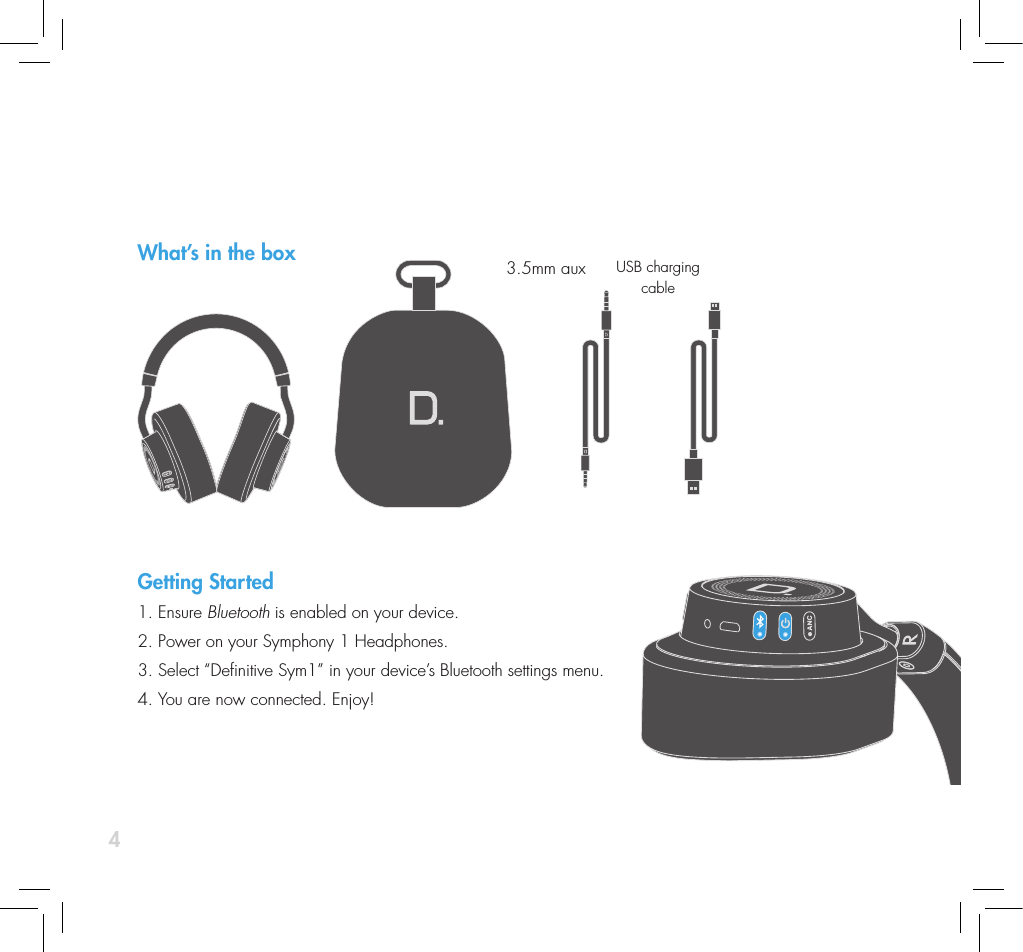
4What’s in the boxGetting Started1. Ensure Bluetooth is enabled on your device.2. Power on your Symphony 1 Headphones.  3. Select “Denitive Sym1” in your device’s Bluetooth settings menu. 4. You are now connected. Enjoy!3.5mm aux USB charging cable
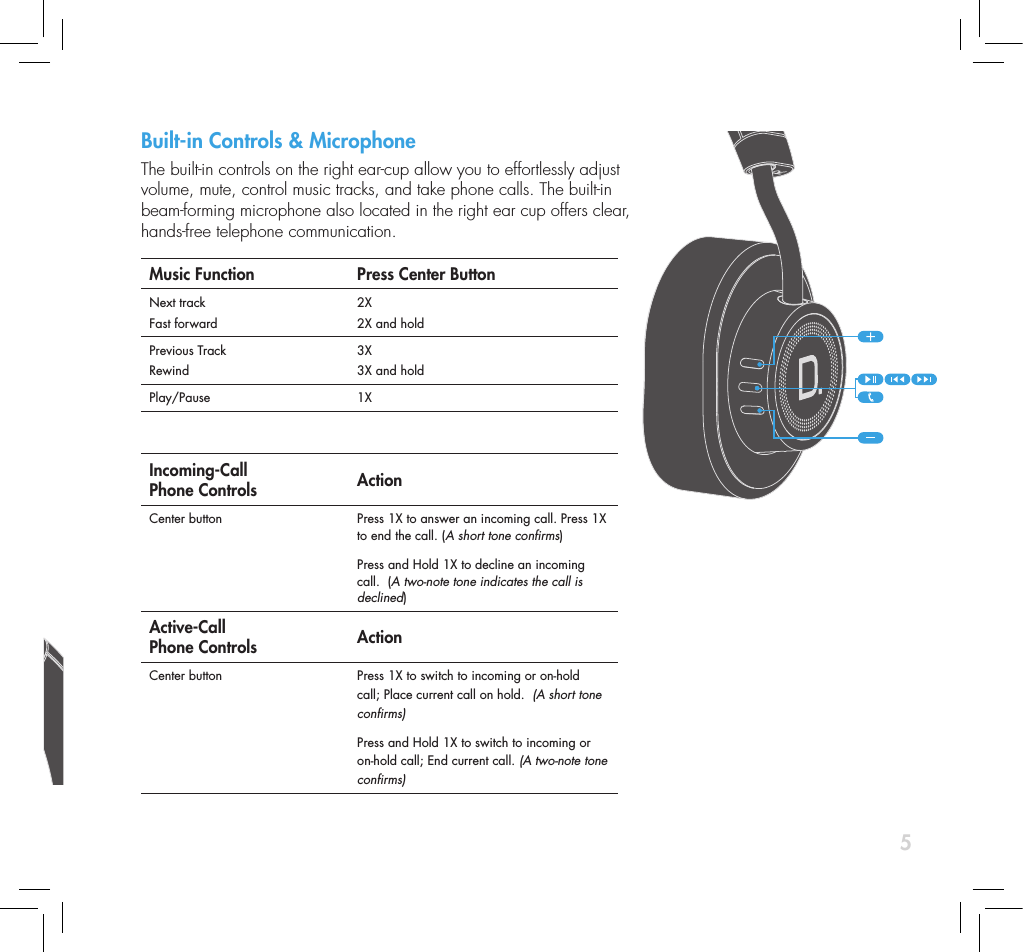
5Built-in Controls & Microphone The built-in controls on the right ear-cup allow you to effortlessly adjust  volume, mute, control music tracks, and take phone calls. The built-in  beam-forming microphone also located in the right ear cup offers clear,  hands-free telephone communication.Music Function Press Center ButtonNext trackFast forward2X2X and holdPrevious TrackRewind3X3X and holdPlay/Pause 1X  Incoming-Call  Phone Controls ActionCenter button  Press 1X to answer an incoming call. Press 1X to end the call. (A short tone conrms)Press and Hold 1X to decline an incoming call.  (A two-note tone indicates the call is declined)Active-Call  Phone Controls ActionCenter button  Press 1X to switch to incoming or on-hold call; Place current call on hold.  (A short tone conrms)Press and Hold 1X to switch to incoming or on-hold call; End current call. (A two-note tone conrms)What’s in the boxGetting Started1. Ensure Bluetooth is enabled on your device.2. Power on your Symphony 1 Headphones.  3. Select “Denitive Sym1” in your device’s Bluetooth settings menu. 4. You are now connected. Enjoy!
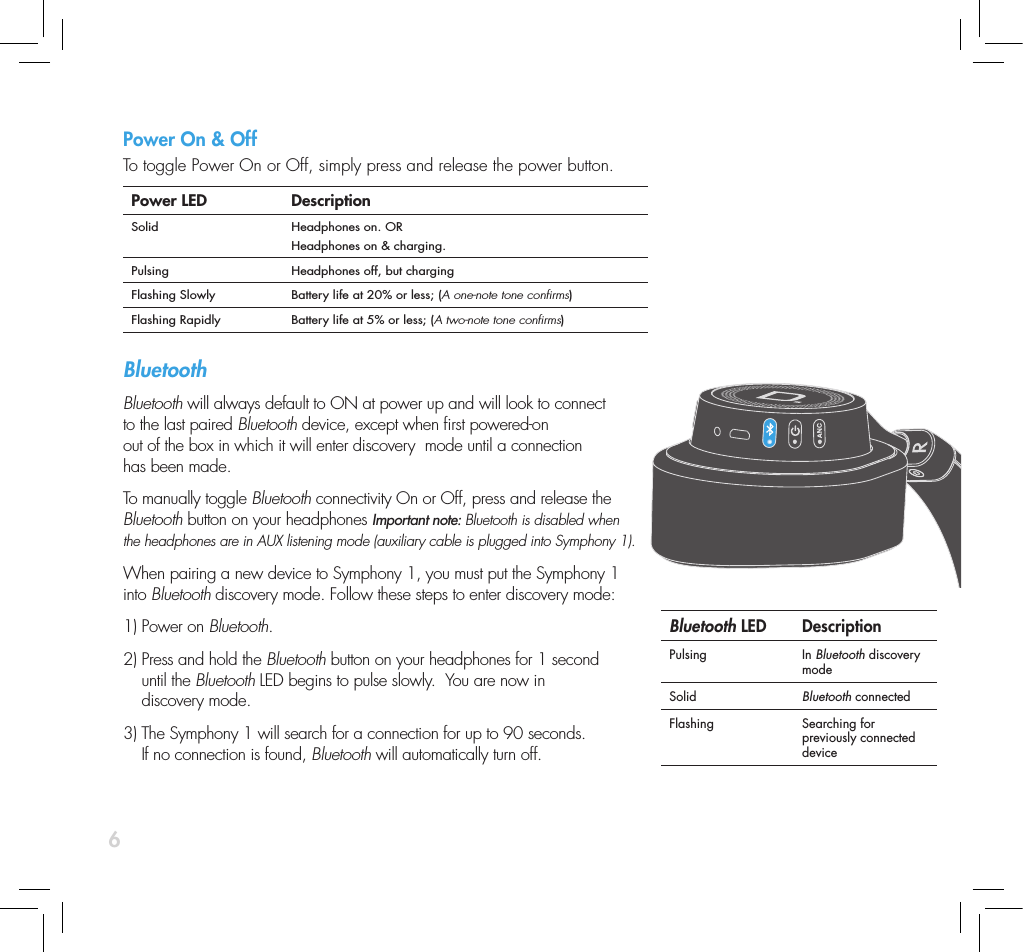
6Power On & OffTo toggle Power On or Off, simply press and release the power button.  Power LED DescriptionSolid Headphones on. ORHeadphones on & charging.Pulsing Headphones off, but chargingFlashing Slowly Battery life at 20% or less; (A one-note tone conrms)Flashing Rapidly Battery life at 5% or less; (A two-note tone conrms)Bluetooth Bluetooth will always default to ON at power up and will look to connect to the last paired Bluetooth device, except when rst powered-on out of the box in which it will enter discovery  mode until a connection has been made.To manually toggle Bluetooth connectivity On or Off, press and release the Bluetooth button on your headphones Important note: Bluetooth is disabled when the headphones are in AUX listening mode (auxiliary cable is plugged into Symphony 1).  When pairing a new device to Symphony 1, you must put the Symphony 1 into Bluetooth discovery mode. Follow these steps to enter discovery mode:1) Power on Bluetooth. 2)  Press and hold the Bluetooth button on your headphones for 1 second  until the Bluetooth LED begins to pulse slowly.  You are now in  discovery mode. 3)  The Symphony 1 will search for a connection for up to 90 seconds.  If no connection is found, Bluetooth will automatically turn off. Bluetooth LED DescriptionPulsing In Bluetooth discovery modeSolid Bluetooth connectedFlashing Searching for previously connected device
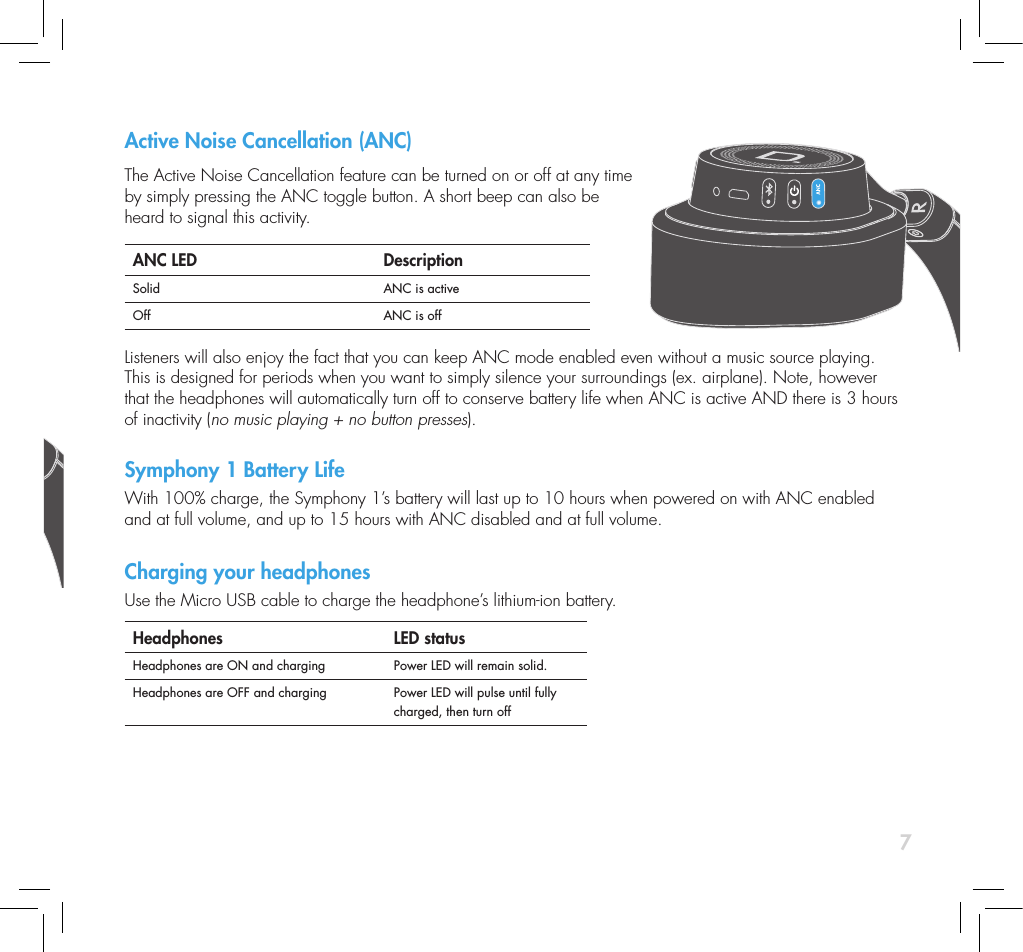
7Active Noise Cancellation (ANC) The Active Noise Cancellation feature can be turned on or off at any time by simply pressing the ANC toggle button. A short beep can also be  heard to signal this activity.ANC LED DescriptionSolid ANC is activeOff ANC is off Listeners will also enjoy the fact that you can keep ANC mode enabled even without a music source playing. This is designed for periods when you want to simply silence your surroundings (ex. airplane). Note, however that the headphones will automatically turn off to conserve battery life when ANC is active AND there is 3 hours of inactivity (no music playing + no button presses). Symphony 1 Battery LifeWith 100% charge, the Symphony 1’s battery will last up to 10 hours when powered on with ANC enabled and at full volume, and up to 15 hours with ANC disabled and at full volume. Charging your headphones Use the Micro USB cable to charge the headphone’s lithium-ion battery.Headphones  LED statusHeadphones are ON and charging Power LED will remain solid.Headphones are OFF and charging Power LED will pulse until fully charged, then turn offPower On & OffTo toggle Power On or Off, simply press and release the power button.  Power LED DescriptionSolid Headphones on. ORHeadphones on & charging.Pulsing Headphones off, but chargingFlashing Slowly Battery life at 20% or less; (A one-note tone conrms)Flashing Rapidly Battery life at 5% or less; (A two-note tone conrms)Bluetooth Bluetooth will always default to ON at power up and will look to connect to the last paired Bluetooth device, except when rst powered-on out of the box in which it will enter discovery  mode until a connection has been made.To manually toggle Bluetooth connectivity On or Off, press and release the Bluetooth button on your headphones Important note: Bluetooth is disabled when the headphones are in AUX listening mode (auxiliary cable is plugged into Symphony 1).  When pairing a new device to Symphony 1, you must put the Symphony 1 into Bluetooth discovery mode. Follow these steps to enter discovery mode:1) Power on Bluetooth. 2)  Press and hold the Bluetooth button on your headphones for 1 second  until the Bluetooth LED begins to pulse slowly.  You are now in  discovery mode. 3)  The Symphony 1 will search for a connection for up to 90 seconds.  If no connection is found, Bluetooth will automatically turn off. Bluetooth LED DescriptionPulsing In Bluetooth discovery modeSolid Bluetooth connectedFlashing Searching for previously connected device
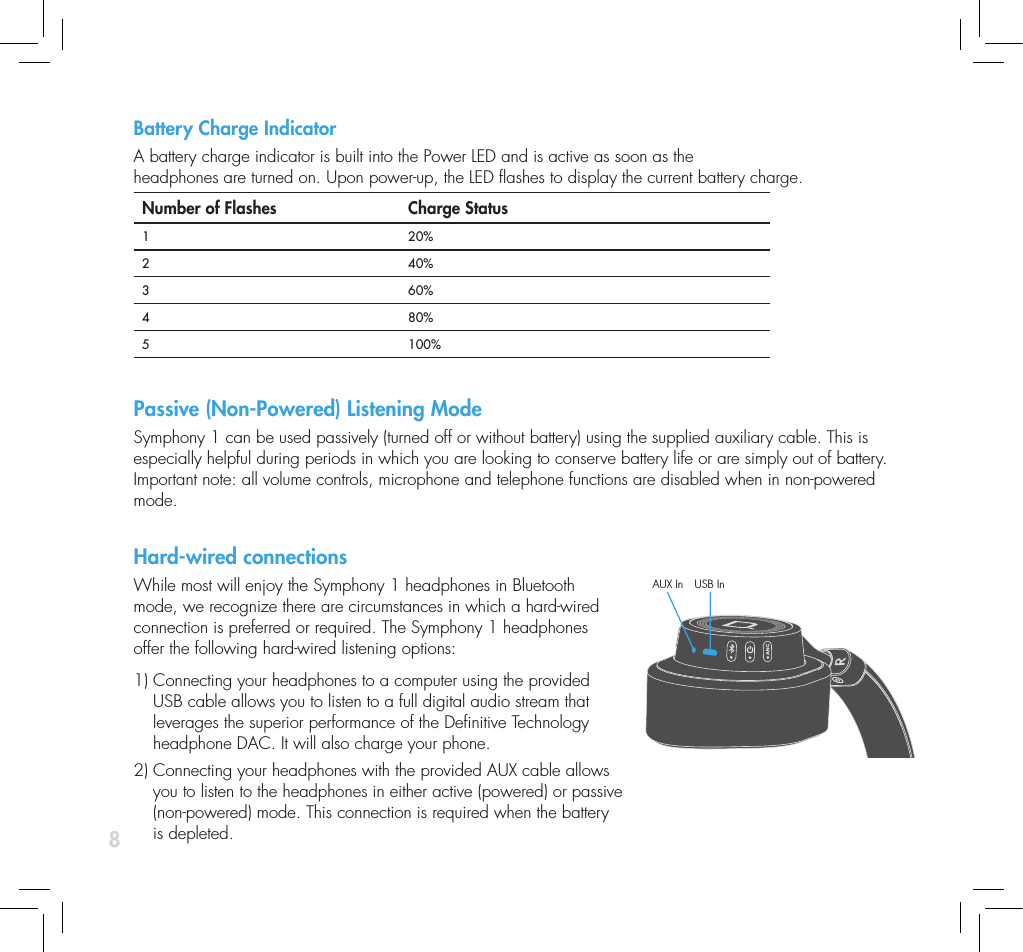
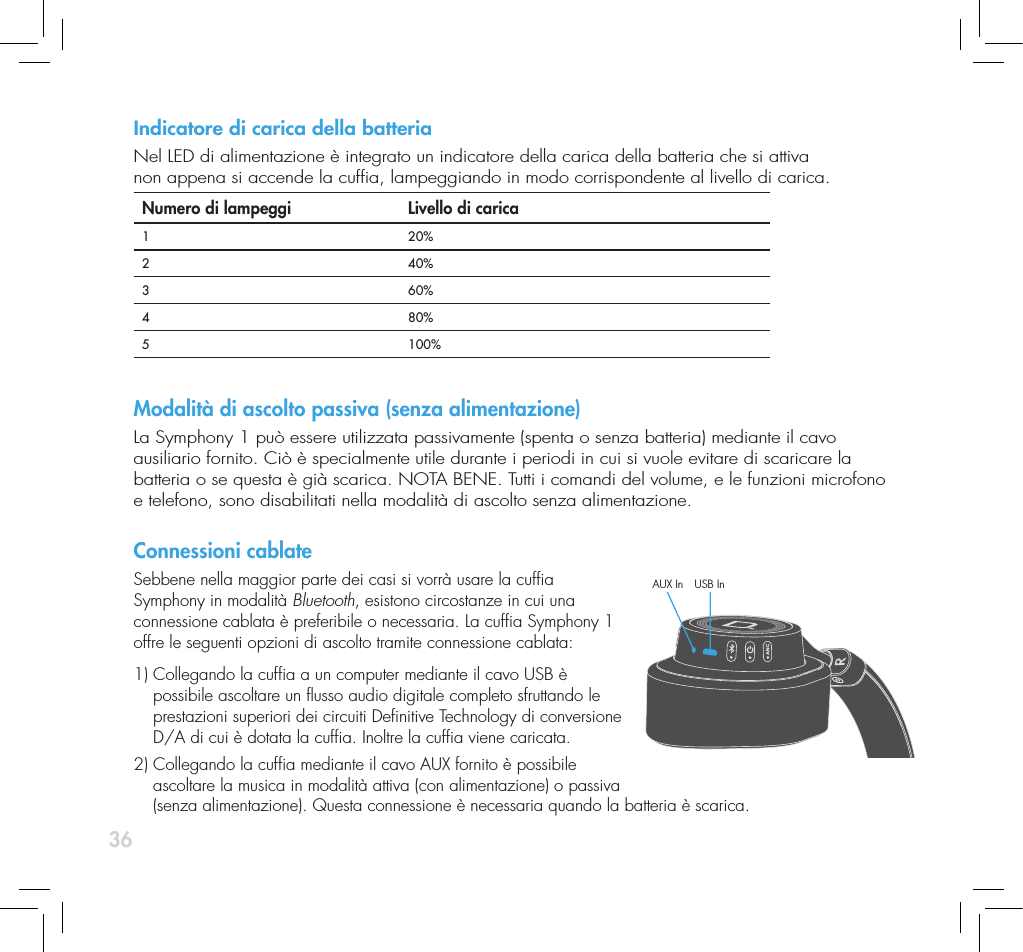
8Battery Charge Indicator A battery charge indicator is built into the Power LED and is active as soon as the  headphones are turned on. Upon power-up, the LED ashes to display the current battery charge. Number of Flashes  Charge Status1 20%2 40%3 60%4  80%5 100%Passive (Non-Powered) Listening ModeSymphony 1 can be used passively (turned off or without battery) using the supplied auxiliary cable. This is especially helpful during periods in which you are looking to conserve battery life or are simply out of battery. Important note: all volume controls, microphone and telephone functions are disabled when in non-powered mode. Hard-wired connectionsWhile most will enjoy the Symphony 1 headphones in Bluetooth mode, we recognize there are circumstances in which a hard-wired connection is preferred or required. The Symphony 1 headphones offer the following hard-wired listening options:   1)  Connecting your headphones to a computer using the provided USB cable allows you to listen to a full digital audio stream that leverages the superior performance of the Denitive Technology headphone DAC. It will also charge your phone.2)  Connecting your headphones with the provided AUX cable allows you to listen to the headphones in either active (powered) or passive  (non-powered) mode. This connection is required when the battery  is depleted.AUX In USB In
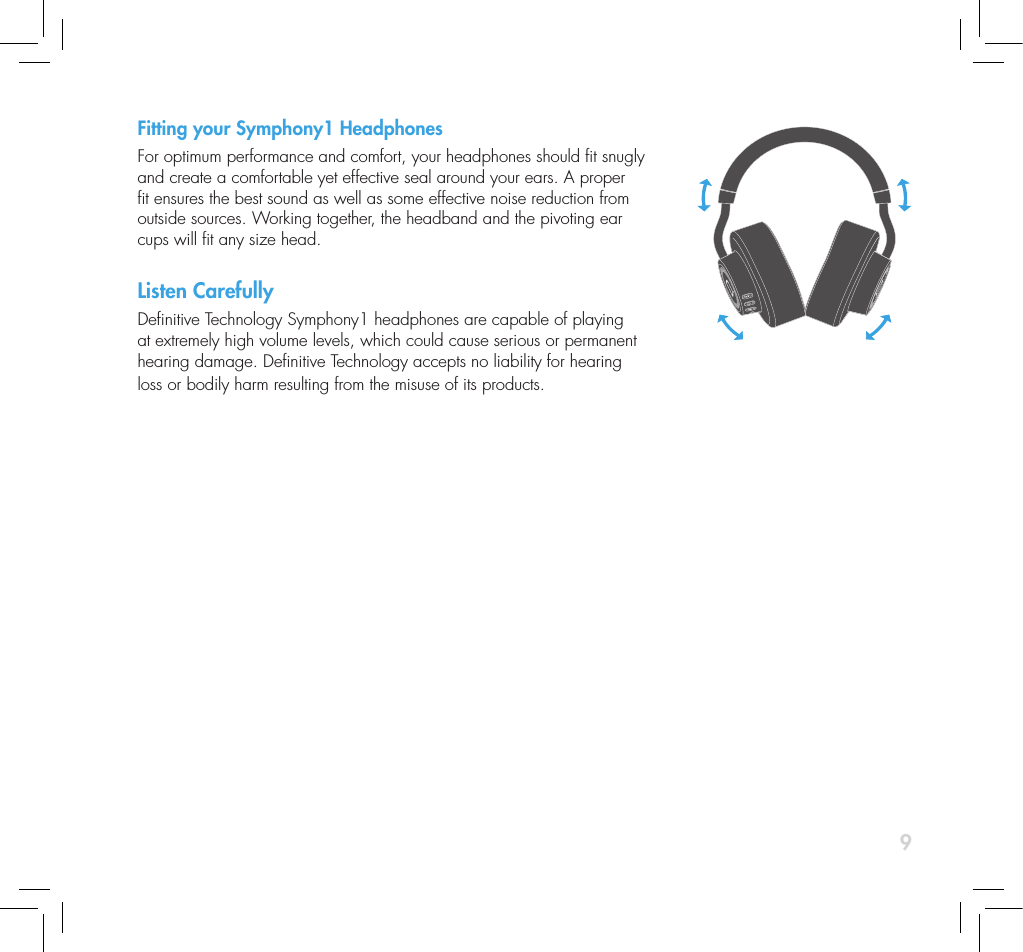
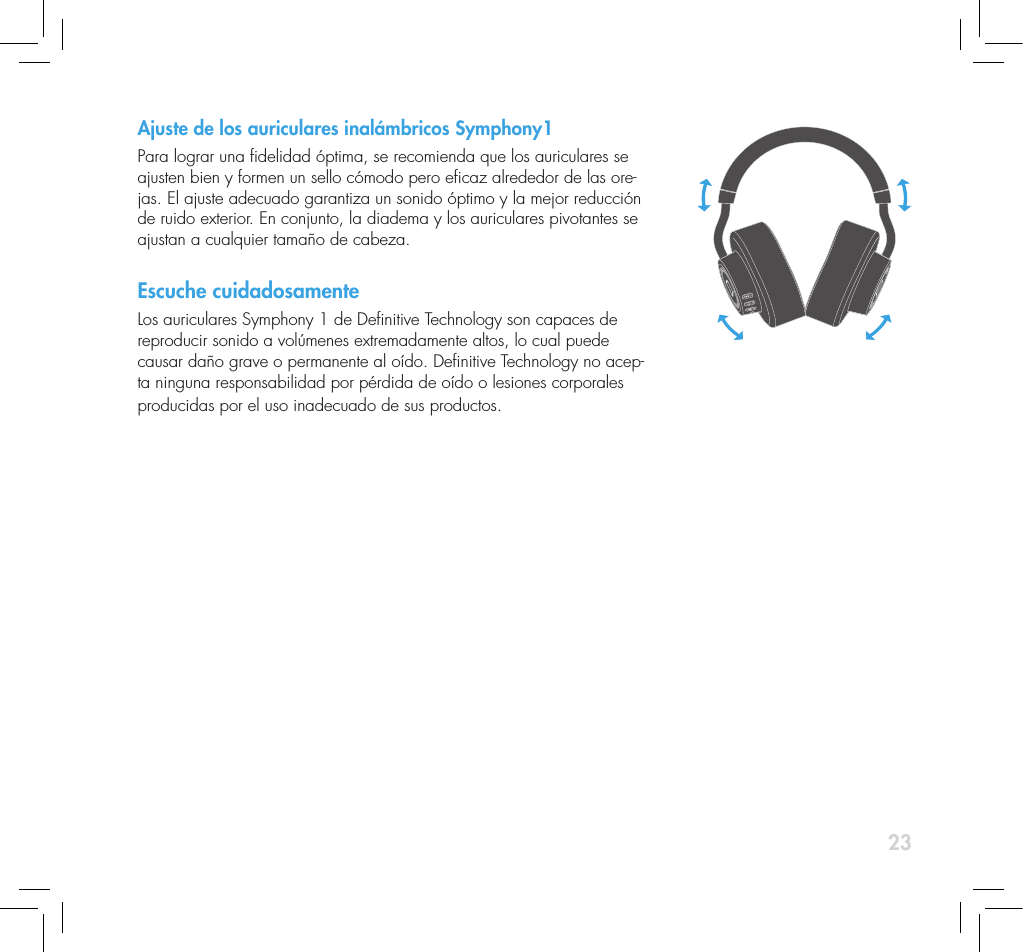
9Fitting your Symphony1 HeadphonesFor optimum performance and comfort, your headphones should t snugly and create a comfortable yet effective seal around your ears. A proper t ensures the best sound as well as some effective noise reduction from outside sources. Working together, the headband and the pivoting ear cups will t any size head.Listen CarefullyDenitive Technology Symphony1 headphones are capable of playing at extremely high volume levels, which could cause serious or permanent hearing damage. Denitive Technology accepts no liability for hearing loss or bodily harm resulting from the misuse of its products.
10ServiceService and warranty work on your Denitive product will normally be performed by Denitive Technology or your local dealer. If, however, you wish to return the product to us, please contact us rst, describing the  problem and requesting proper authorization. Please note: Denitive phone and email technical support is offered only in English. Product ServicingThe address given in this booklet is the address of our ofces. Under no circumstances should headphones be shipped to our ofces or returned without contacting us rst and obtaining return authorization  e-mail: info@DenitiveTech.comTechnical AssistanceIf you have any questions, please contact the Denitive Technology dealer you purchased your product from. If they are unable to help you, please contact us directly. (800) 228-7148 (North America), 01 (410) 363-7148 (International), email: info@DenitiveTech.comContact Us DirectlyDenitive Technology 11433 Cronridge Drive, Suite K Owings Mills, MD 21117 USA Call: 800-228-7148 Visit: www.DenitiveTech.com Email: info@DenitiveTech
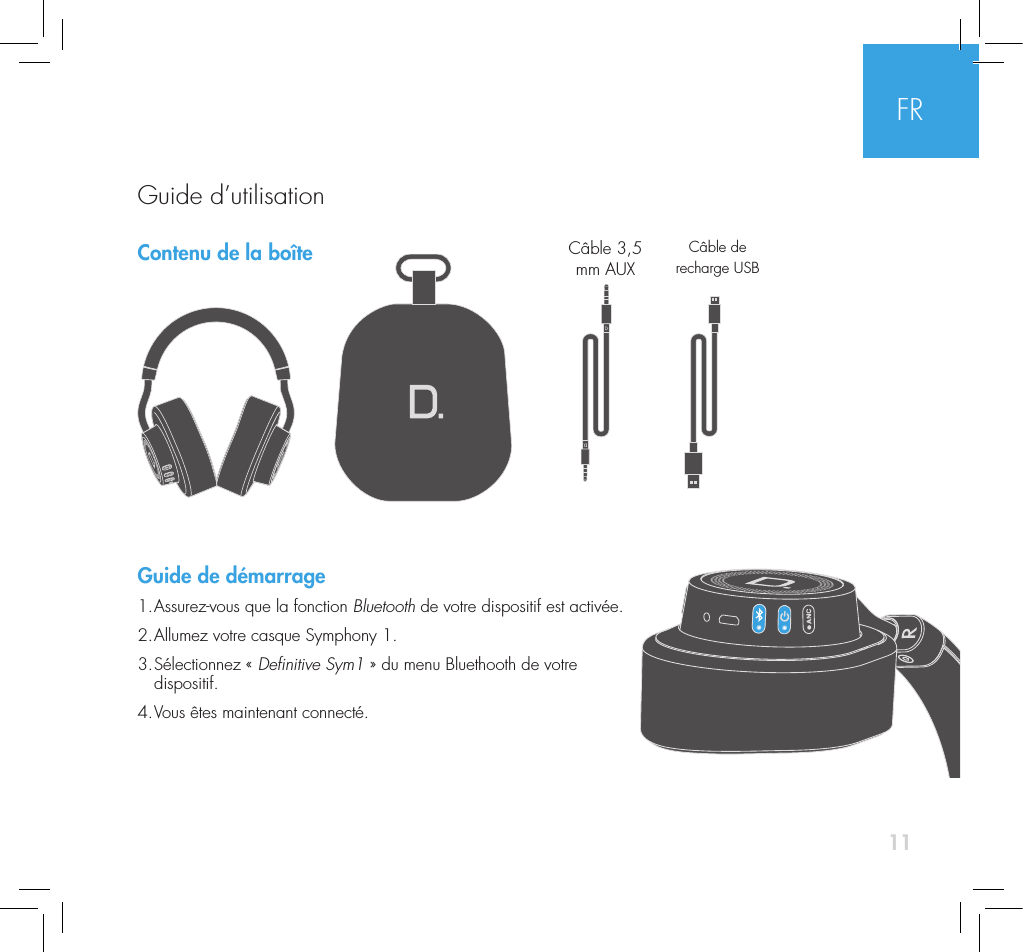
11Contenu de la boîte Guide de démarrage1. Assurez-vous que la fonction Bluetooth de votre dispositif est activée.2. Allumez votre casque Symphony 1.3.  Sélectionnez  «  Denitive Sym1 » du menu Bluethooth de votre  dispositif.4. Vous êtes maintenant connecté. Câble 3,5 mm AUXCâble de recharge USBFRGuide d’utilisation
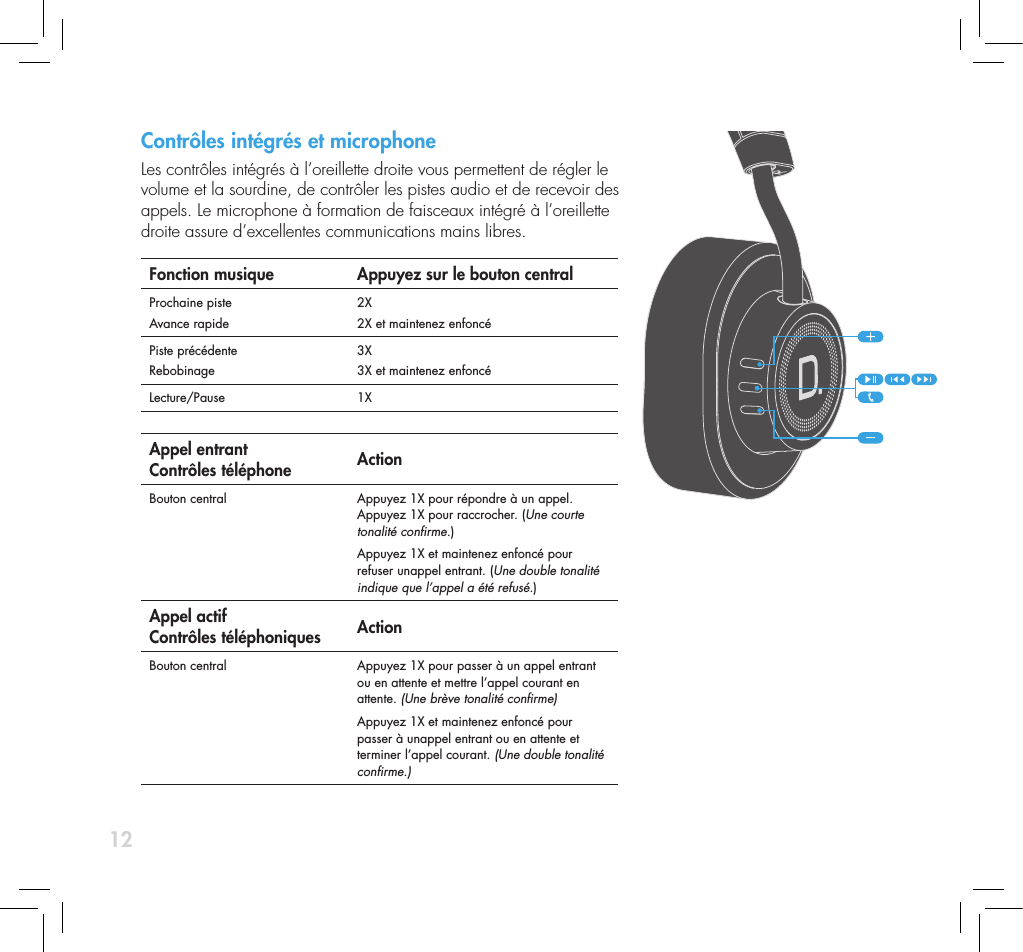
12Contrôles intégrés et microphone Les contrôles intégrés à l’oreillette droite vous permettent de régler le  volume et la sourdine, de contrôler les pistes audio et de recevoir des  appels. Le microphone à formation de faisceaux intégré à l’oreillette  droite assure d’excellentes communications mains libres. Fonction musique Appuyez sur le bouton centralProchaine pisteAvance rapide2X2X et maintenez enfoncé Piste précédenteRebobinage3X3X et maintenez enfoncéLecture/Pause 1X Appel entrant Contrôles téléphone ActionBouton central  Appuyez 1X pour répondre à un appel. Appuyez 1X pour raccrocher. (Une courte tonalité conrme.)Appuyez 1X et maintenez enfoncé pour refuser unappel entrant. (Une double tonalité indique que l’appel a été refusé.) Appel actif Contrôles téléphoniques ActionBouton central Appuyez 1X pour passer à un appel entrant ou en attente et mettre l’appel courant en attente. (Une brève tonalité conrme)Appuyez 1X et maintenez enfoncé pour passer à unappel entrant ou en attente et terminer l’appel courant. (Une double tonalité conrme.)
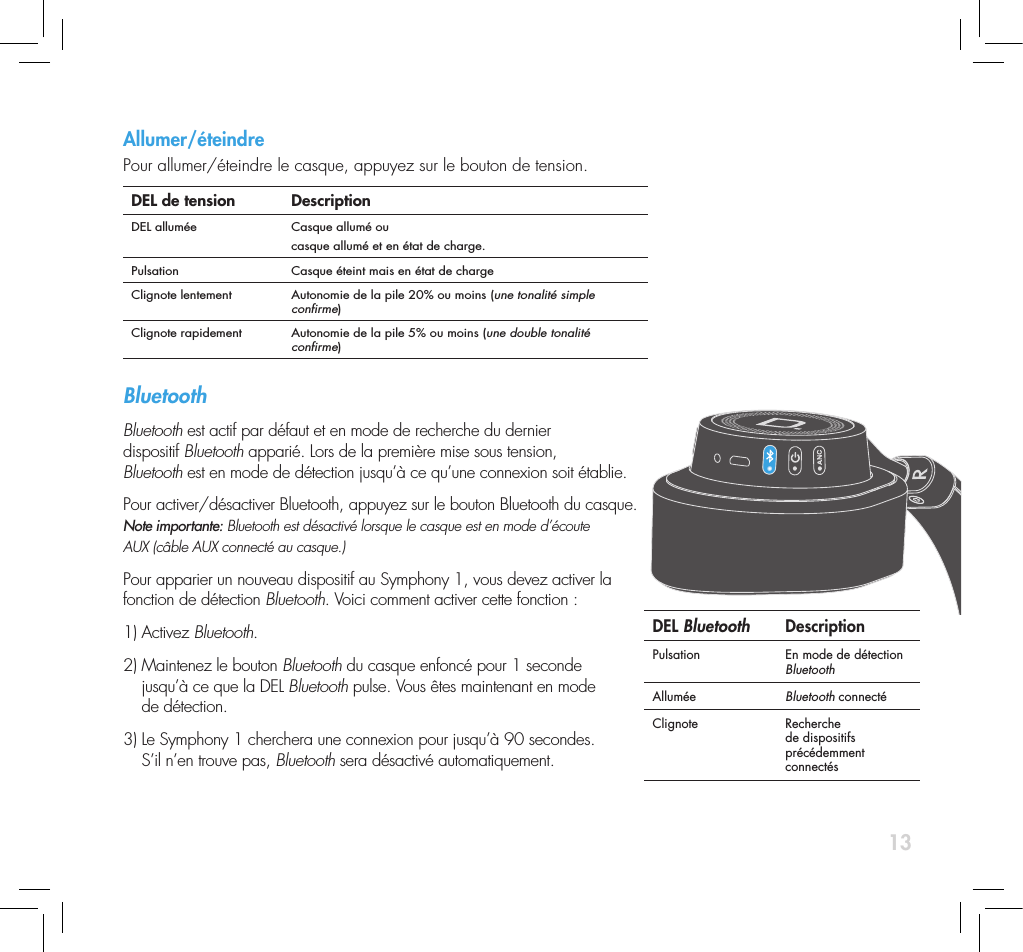
13Contrôles intégrés et microphone Les contrôles intégrés à l’oreillette droite vous permettent de régler le  volume et la sourdine, de contrôler les pistes audio et de recevoir des  appels. Le microphone à formation de faisceaux intégré à l’oreillette  droite assure d’excellentes communications mains libres. Fonction musique Appuyez sur le bouton centralProchaine pisteAvance rapide2X2X et maintenez enfoncé Piste précédenteRebobinage3X3X et maintenez enfoncéLecture/Pause 1X Appel entrant Contrôles téléphone ActionBouton central  Appuyez 1X pour répondre à un appel. Appuyez 1X pour raccrocher. (Une courte tonalité conrme.)Appuyez 1X et maintenez enfoncé pour refuser unappel entrant. (Une double tonalité indique que l’appel a été refusé.) Appel actif Contrôles téléphoniques ActionBouton central Appuyez 1X pour passer à un appel entrant ou en attente et mettre l’appel courant en attente. (Une brève tonalité conrme)Appuyez 1X et maintenez enfoncé pour passer à unappel entrant ou en attente et terminer l’appel courant. (Une double tonalité conrme.)Allumer/éteindrePour allumer/éteindre le casque, appuyez sur le bouton de tension.  DEL de tension DescriptionDEL allumée Casque allumé ou casque allumé et en état de charge.Pulsation Casque éteint mais en état de chargeClignote lentement Autonomie de la pile 20% ou moins (une tonalité simple conrme)Clignote rapidement Autonomie de la pile 5% ou moins (une double tonalité conrme)Bluetooth Bluetooth est actif par défaut et en mode de recherche du dernier  dispositif Bluetooth apparié. Lors de la première mise sous tension,  Bluetooth est en mode de détection jusqu’à ce qu’une connexion soit établie. Pour activer/désactiver Bluetooth, appuyez sur le bouton Bluetooth du casque.  Note importante: Bluetooth est désactivé lorsque le casque est en mode d’écoute  AUX (câble AUX connecté au casque.)    Pour apparier un nouveau dispositif au Symphony 1, vous devez activer la  fonction de détection Bluetooth. Voici comment activer cette fonction : 1) Activez Bluetooth.2)  Maintenez le bouton Bluetooth du casque enfoncé pour 1 seconde  jusqu’à ce que la DEL Bluetooth pulse. Vous êtes maintenant en mode  de détection.3)  Le Symphony 1 cherchera une connexion pour jusqu’à 90 secondes. S’il n’en trouve pas, Bluetooth sera désactivé automatiquement. DEL Bluetooth DescriptionPulsation En mode de détection BluetoothAllumée Bluetooth connectéClignote Recherche de dispositifs précédemment connectés
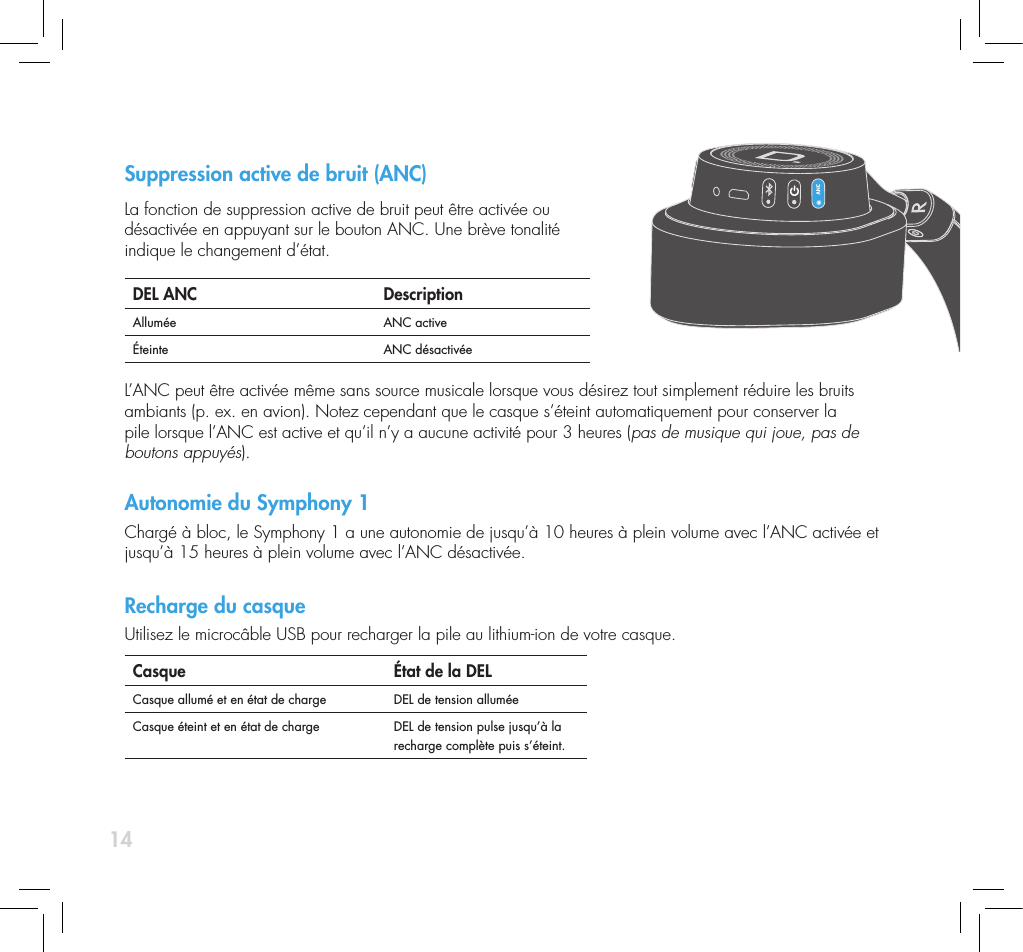
14Suppression active de bruit (ANC) La fonction de suppression active de bruit peut être activée ou  désactivée en appuyant sur le bouton ANC. Une brève tonalité  indique le changement d’état. DEL ANC DescriptionAllumée ANC activeÉteinte ANC désactivée L’ANC peut être activée même sans source musicale lorsque vous désirez tout simplement réduire les bruits ambiants (p. ex. en avion). Notez cependant que le casque s’éteint automatiquement pour conserver la  pile lorsque l’ANC est active et qu’il n’y a aucune activité pour 3 heures (pas de musique qui joue, pas de boutons appuyés).Autonomie du Symphony 1Chargé à bloc, le Symphony 1 a une autonomie de jusqu’à 10 heures à plein volume avec l’ANC activée et jusqu’à 15 heures à plein volume avec l’ANC désactivée. Recharge du casqueUtilisez le microcâble USB pour recharger la pile au lithium-ion de votre casque.Casque  État de la DELCasque allumé et en état de charge DEL de tension alluméeCasque éteint et en état de charge DEL de tension pulse jusqu’à la recharge complète puis s’éteint.
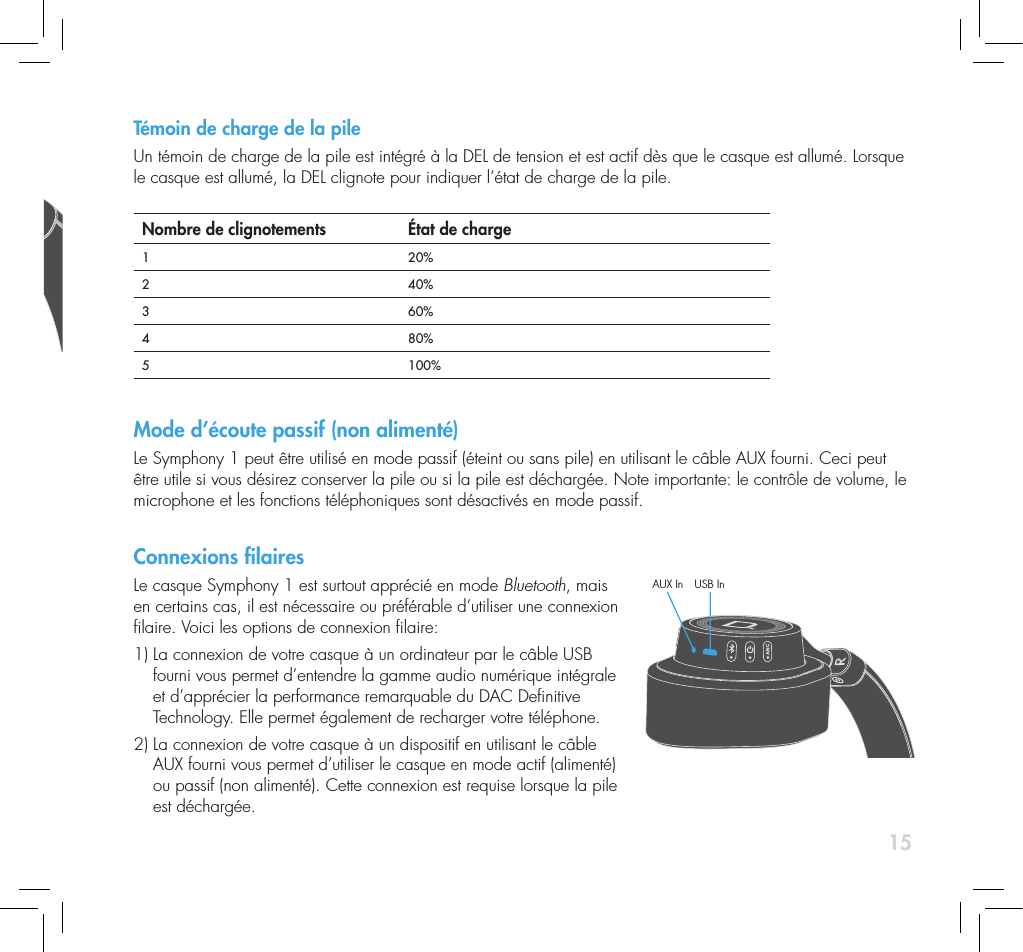
15Témoin de charge de la pile Un témoin de charge de la pile est intégré à la DEL de tension et est actif dès que le casque est allumé. Lorsque le casque est allumé, la DEL clignote pour indiquer l’état de charge de la pile.   Nombre de clignotements État de charge1 20%2 40%3 60%4  80%5 100%Mode d’écoute passif (non alimenté)Le Symphony 1 peut être utilisé en mode passif (éteint ou sans pile) en utilisant le câble AUX fourni. Ceci peut être utile si vous désirez conserver la pile ou si la pile est déchargée. Note importante: le contrôle de volume, le microphone et les fonctions téléphoniques sont désactivés en mode passif.Connexions lairesLe casque Symphony 1 est surtout apprécié en mode Bluetooth, mais en certains cas, il est nécessaire ou préférable d’utiliser une connexion laire. Voici les options de connexion laire:1)  La connexion de votre casque à un ordinateur par le câble USB fourni vous permet d’entendre la gamme audio numérique intégrale et d’apprécier la performance remarquable du DAC Denitive  Technology. Elle permet également de recharger votre téléphone. 2)  La connexion de votre casque à un dispositif en utilisant le câble AUX fourni vous permet d’utiliser le casque en mode actif (alimenté) ou passif (non alimenté). Cette connexion est requise lorsque la pile  est déchargée. AUX In USB In
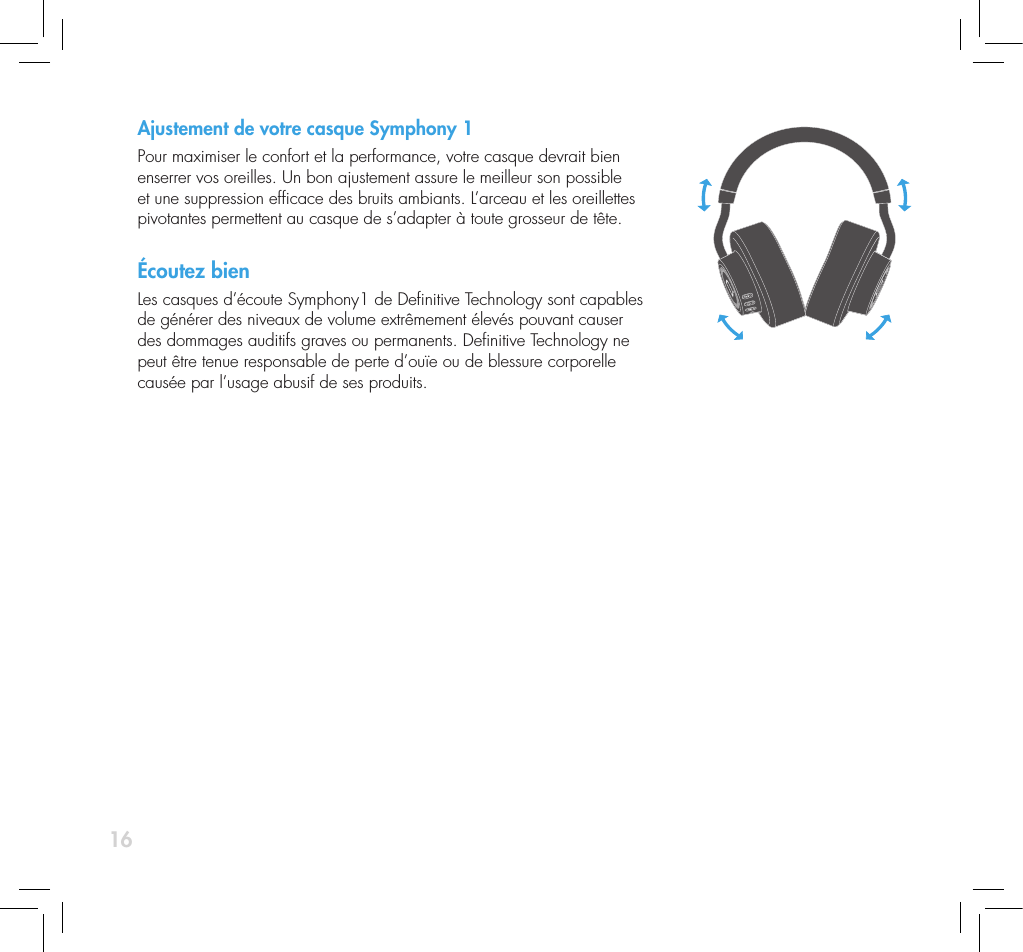
16Ajustement de votre casque Symphony 1Pour maximiser le confort et la performance, votre casque devrait bien enserrer vos oreilles. Un bon ajustement assure le meilleur son possible et une suppression efcace des bruits ambiants. L’arceau et les oreillettes pivotantes permettent au casque de s’adapter à toute grosseur de tête.Écoutez bienLes casques d’écoute Symphony1 de Denitive Technology sont capables de générer des niveaux de volume extrêmement élevés pouvant causer des dommages auditifs graves ou permanents. Denitive Technology ne peut être tenue responsable de perte d’ouïe ou de blessure corporelle causée par l’usage abusif de ses produits.
17ServiceLe service et les réparations sous garantie de votre produit Denitive seront normalement effectués par votre  détaillant ou importateur Denitive Technology. Cependant, si vous désirez nous retourner le produit,  communiquez d’abord avec nous pour nous décrire le problème et obtenir une autorisation. Notez que le  soutien technique Denitive par téléphone ou par courriel n’est offert qu’en anglais. Service des produitsVeuillez noter que l’adresse inscrite dans ce guide est celle de nos bureaux. Un casque d’écoute ne devrait jamais être expédié à nos bureaux ou retourné sans nous avoir préalablement contactés et avoir obtenu une autorisation de retour de marchandise. Courriel : info@DenitiveTech.comAssistance techniqueSi vous avez des questions, veuillez contacter le détaillant Denitive Technology de qui vous avez acheté le produit. S’il ne peut pas vous aider, communiquez directement avec nous. (800) 228.7148 (Amérique du Nord) ou 01 (410) 363.7148 (international). Courriel : info@DenitiveTech.comContactez-nous directementDenitive Technology 11433 Cronridge Drive, Suite K Owings Mills, MD 21117, USA Tél. : 800-228-7148 Visitez : www.DenitiveTech.com Courriel : info@DenitiveTech
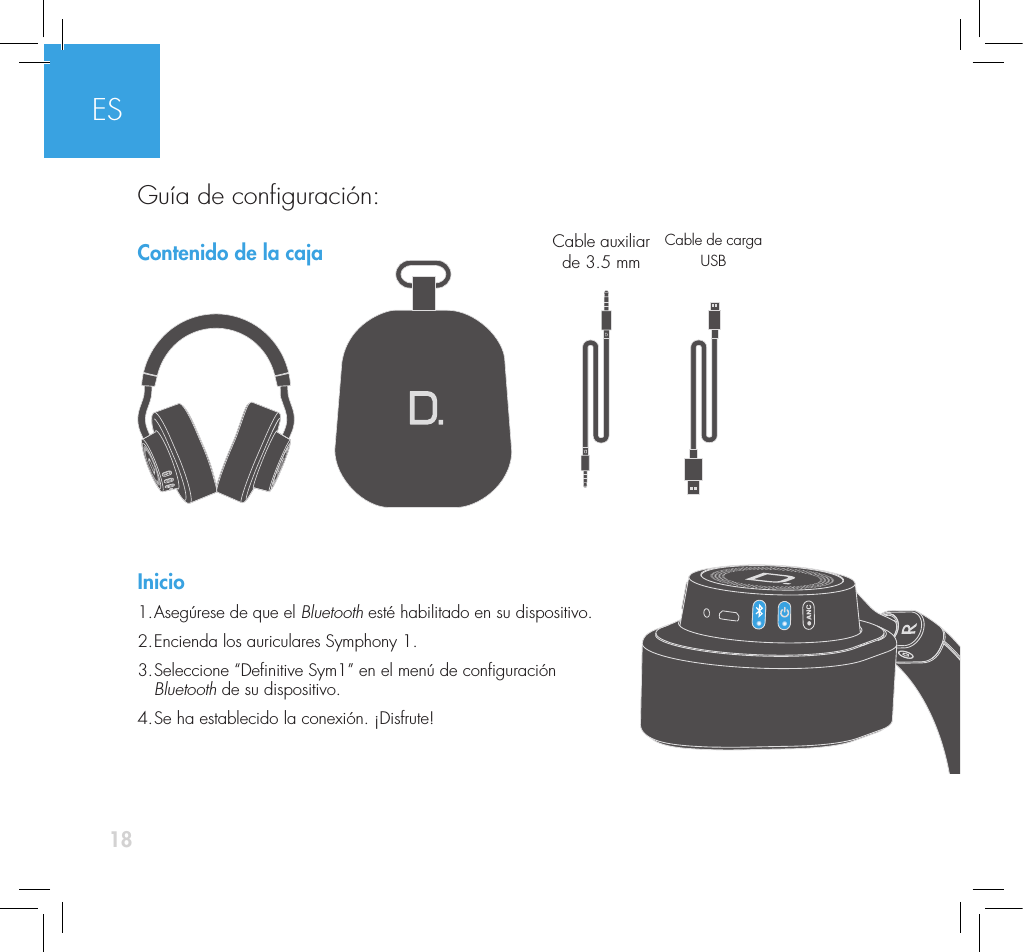
18Contenido de la cajaInicio1. Asegúrese de que el Bluetooth esté habilitado en su dispositivo. 2. Encienda los auriculares Symphony 1. 3.  Seleccione “Denitive Sym1” en el menú de conguración  Bluetooth de su dispositivo. 4. Se ha establecido la conexión. ¡Disfrute!Cable auxiliar de 3.5 mm Cable de carga USBESGuía de conguración:
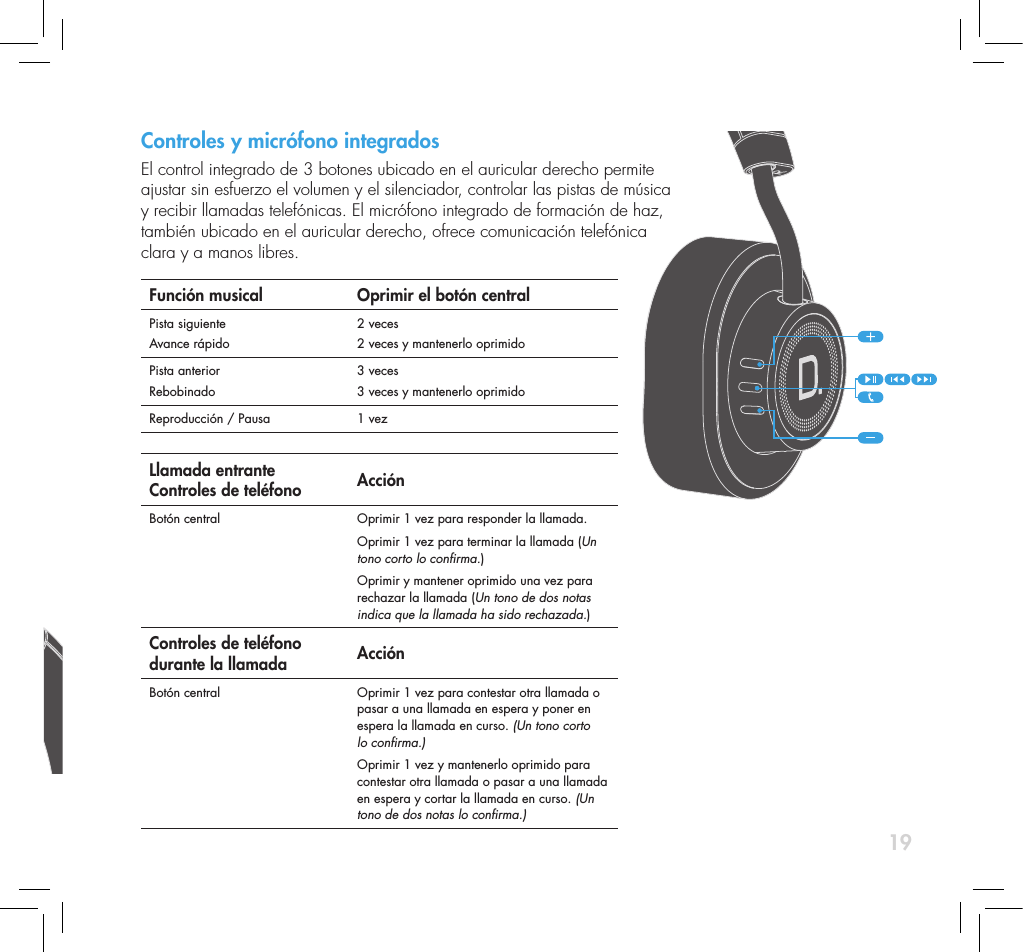
19Controles y micrófono integrados  El control integrado de 3 botones ubicado en el auricular derecho permite  ajustar sin esfuerzo el volumen y el silenciador, controlar las pistas de música  y recibir llamadas telefónicas. El micrófono integrado de formación de haz,  también ubicado en el auricular derecho, ofrece comunicación telefónica  clara y a manos libres.Función musical Oprimir el botón centralPista siguiente Avance rápido 2 veces2 veces y mantenerlo oprimidoPista anterior Rebobinado 3 veces3 veces y mantenerlo oprimidoReproducción / Pausa 1 vez Llamada entrante Controles de teléfono AcciónBotón central Oprimir 1 vez para responder la llamada.Oprimir 1 vez para terminar la llamada (Un tono corto lo conrma.)Oprimir y mantener oprimido una vez para rechazar la llamada (Un tono de dos notas indica que la llamada ha sido rechazada.)Controles de teléfono durante la llamada AcciónBotón central Oprimir 1 vez para contestar otra llamada o pasar a una llamada en espera y poner en espera la llamada en curso. (Un tono corto lo conrma.)Oprimir 1 vez y mantenerlo oprimido para contestar otra llamada o pasar a una llamada en espera y cortar la llamada en curso. (Un tono de dos notas lo conrma.)
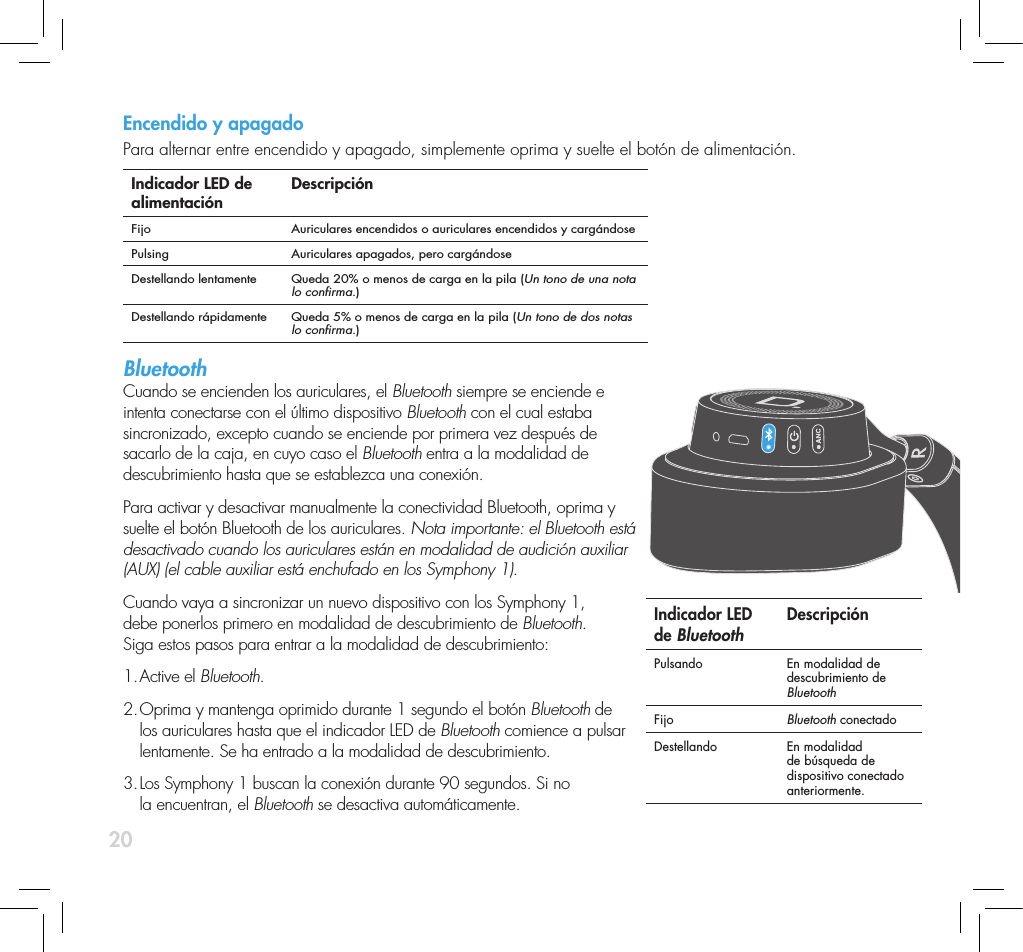
20Encendido y apagadoPara alternar entre encendido y apagado, simplemente oprima y suelte el botón de alimentación.  Indicador LED de alimentación DescripciónFijo Auriculares encendidos o auriculares encendidos y cargándosePulsing Auriculares apagados, pero cargándoseDestellando lentamente  Queda 20% o menos de carga en la pila (Un tono de una nota lo conrma.)Destellando rápidamente Queda 5% o menos de carga en la pila (Un tono de dos notas lo conrma.) Bluetooth  Cuando se encienden los auriculares, el Bluetooth siempre se enciende e intenta conectarse con el último dispositivo Bluetooth con el cual estaba sincronizado, excepto cuando se enciende por primera vez después de sacarlo de la caja, en cuyo caso el Bluetooth entra a la modalidad de descubrimiento hasta que se establezca una conexión.Para activar y desactivar manualmente la conectividad Bluetooth, oprima y suelte el botón Bluetooth de los auriculares. Nota importante: el Bluetooth está desactivado cuando los auriculares están en modalidad de audición auxiliar (AUX) (el cable auxiliar está enchufado en los Symphony 1).Cuando vaya a sincronizar un nuevo dispositivo con los Symphony 1,  debe ponerlos primero en modalidad de descubrimiento de Bluetooth.  Siga estos pasos para entrar a la modalidad de descubrimiento:1. Active  el  Bluetooth.2.  Oprima y mantenga oprimido durante 1 segundo el botón Bluetooth de  los auriculares hasta que el indicador LED de Bluetooth comience a pulsar  lentamente. Se ha entrado a la modalidad de descubrimiento.3.  Los Symphony 1 buscan la conexión durante 90 segundos. Si no  la encuentran, el Bluetooth se desactiva automáticamente. Indicador LED de Bluetooth Descripción Pulsando En modalidad de descubrimiento de Bluetooth Fijo Bluetooth conectado Destellando En modalidad de búsqueda de dispositivo conectado anteriormente.
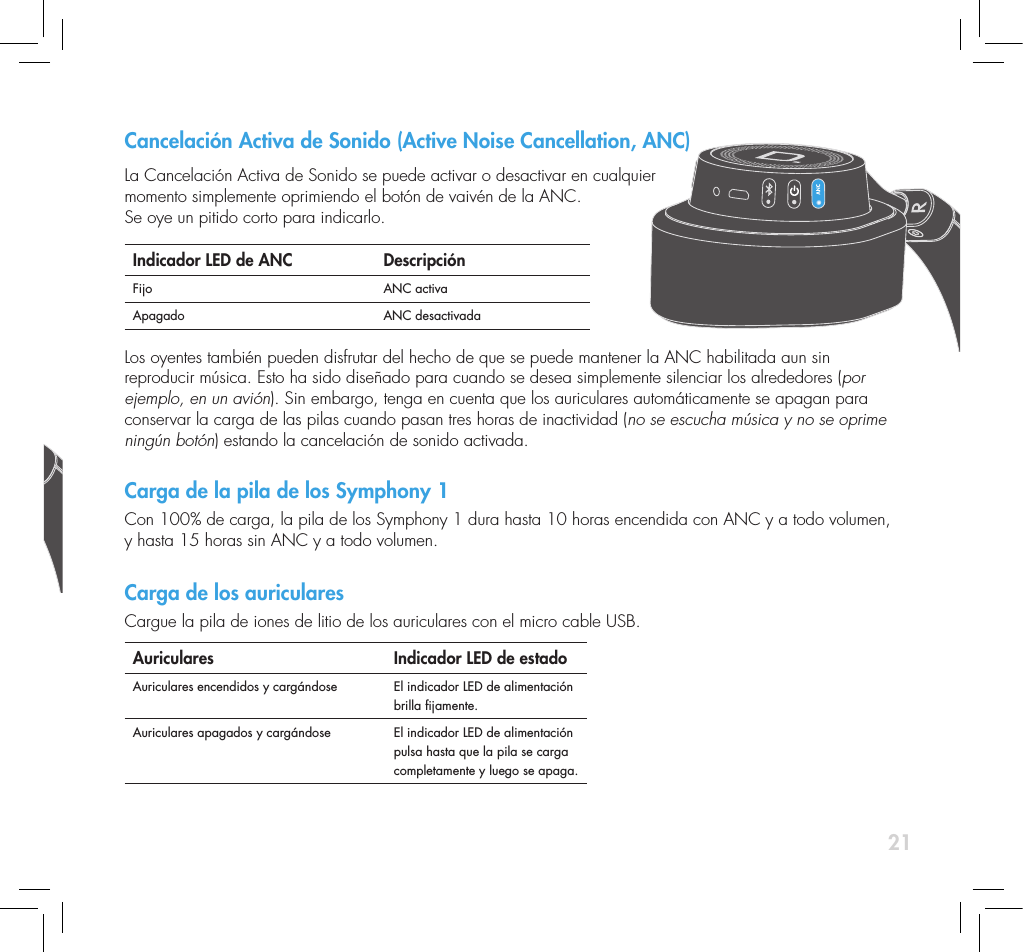
21Cancelación Activa de Sonido (Active Noise Cancellation, ANC) La Cancelación Activa de Sonido se puede activar o desactivar en cualquier  momento simplemente oprimiendo el botón de vaivén de la ANC.  Se oye un pitido corto para indicarlo.Indicador LED de ANC DescripciónFijo ANC activaApagado ANC desactivada Los oyentes también pueden disfrutar del hecho de que se puede mantener la ANC habilitada aun sin reproducir música. Esto ha sido diseñado para cuando se desea simplemente silenciar los alrededores (por ejemplo, en un avión). Sin embargo, tenga en cuenta que los auriculares automáticamente se apagan para conservar la carga de las pilas cuando pasan tres horas de inactividad (no se escucha música y no se oprime ningún botón) estando la cancelación de sonido activada. Carga de la pila de los Symphony 1Con 100% de carga, la pila de los Symphony 1 dura hasta 10 horas encendida con ANC y a todo volumen, y hasta 15 horas sin ANC y a todo volumen. Carga de los auricularesCargue la pila de iones de litio de los auriculares con el micro cable USB.Auriculares Indicador LED de estado Auriculares encendidos y cargándose  El indicador LED de alimentación brilla jamente.Auriculares apagados y cargándose El indicador LED de alimentación pulsa hasta que la pila se carga completamente y luego se apaga.
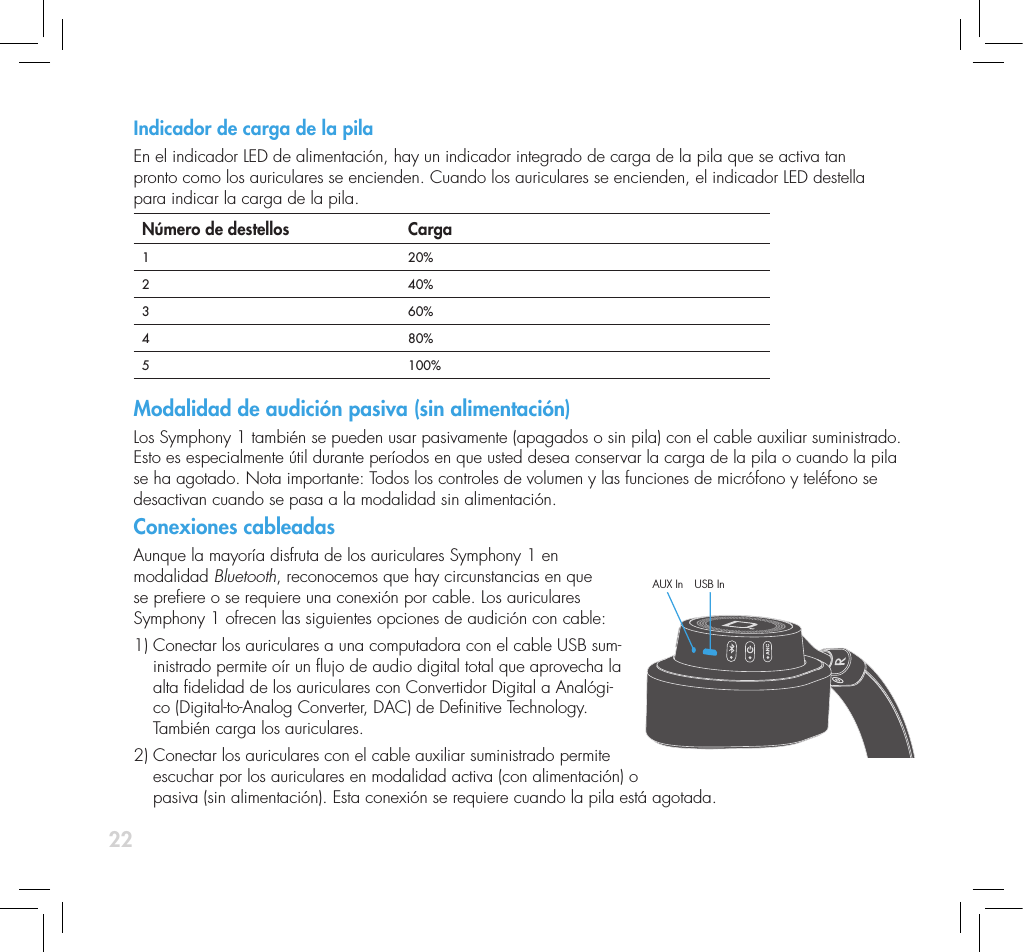
22Indicador de carga de la pila En el indicador LED de alimentación, hay un indicador integrado de carga de la pila que se activa tan  pronto como los auriculares se encienden. Cuando los auriculares se encienden, el indicador LED destella  para indicar la carga de la pila. Número de destellos Carga1 20%2 40%3 60%4  80%5 100%Modalidad de audición pasiva (sin alimentación)Los Symphony 1 también se pueden usar pasivamente (apagados o sin pila) con el cable auxiliar suministrado. Esto es especialmente útil durante períodos en que usted desea conservar la carga de la pila o cuando la pila se ha agotado. Nota importante: Todos los controles de volumen y las funciones de micrófono y teléfono se desactivan cuando se pasa a la modalidad sin alimentación. Conexiones cableadasAunque la mayoría disfruta de los auriculares Symphony 1 en  modalidad Bluetooth, reconocemos que hay circunstancias en que  se preere o se requiere una conexión por cable. Los auriculares  Symphony 1 ofrecen las siguientes opciones de audición con cable: 1)  Conectar los auriculares a una computadora con el cable USB sum-inistrado permite oír un ujo de audio digital total que aprovecha la alta delidad de los auriculares con Convertidor Digital a Analógi-co (Digital-to-Analog Converter, DAC) de Denitive Technology. También carga los auriculares.2)  Conectar los auriculares con el cable auxiliar suministrado permite  escuchar por los auriculares en modalidad activa (con alimentación) o  pasiva (sin alimentación). Esta conexión se requiere cuando la pila está agotada.AUX In USB In
23Ajuste de los auriculares inalámbricos Symphony1Para lograr una delidad óptima, se recomienda que los auriculares se ajusten bien y formen un sello cómodo pero ecaz alrededor de las ore-jas. El ajuste adecuado garantiza un sonido óptimo y la mejor reducción de ruido exterior. En conjunto, la diadema y los auriculares pivotantes se ajustan a cualquier tamaño de cabeza.Escuche cuidadosamenteLos auriculares Symphony 1 de Denitive Technology son capaces de reproducir sonido a volúmenes extremadamente altos, lo cual puede causar daño grave o permanente al oído. Denitive Technology no acep-ta ninguna responsabilidad por pérdida de oído o lesiones corporales producidas por el uso inadecuado de sus productos.
24ServicioNormalmente, el servicio y el trabajo bajo garantía de sus productos Denitive los realiza el distribuidor local de Denitive Technology. Sin embargo, si desea enviarnos el producto, comuníquese con nosotros primero para describir el problema y para solicitar autorización apropiada. Nota: El apoyo técnico por teléfono y por correo electrónico de Denitive se ofrece solo en inglés. Servicio del productoLa dirección que se da en este folleto es la dirección de nuestras ocinas. Bajo ninguna circunstancia se deben enviar auriculares a nuestras ocinas sin comunicarse con nosotros primero y obtener una autorización de devo-lución. Correo electrónico: info@DenitiveTech.comAsistencia técnicaSi tiene preguntas, comuníquese con el distribuidor de Denitive Technology a quien le compró el producto. Si no pueden ayudarle, comuníquese directamente con nosotros llamando al (800) 228-7148 (EE.UU. y Canadá) o al 01 (410) 363-7148 (International) o enviando un mensaje de correo electrónico a info@DenitiveTech.comComuníquese con nosotros directamenteDenitive Technology11433 Cronridge Drive, Suite KOwings Mills, MD 21117 USATeléfono: 800-228-7148Internet: www.DenitiveTech.comCorreo electrónico: info@DenitiveTech
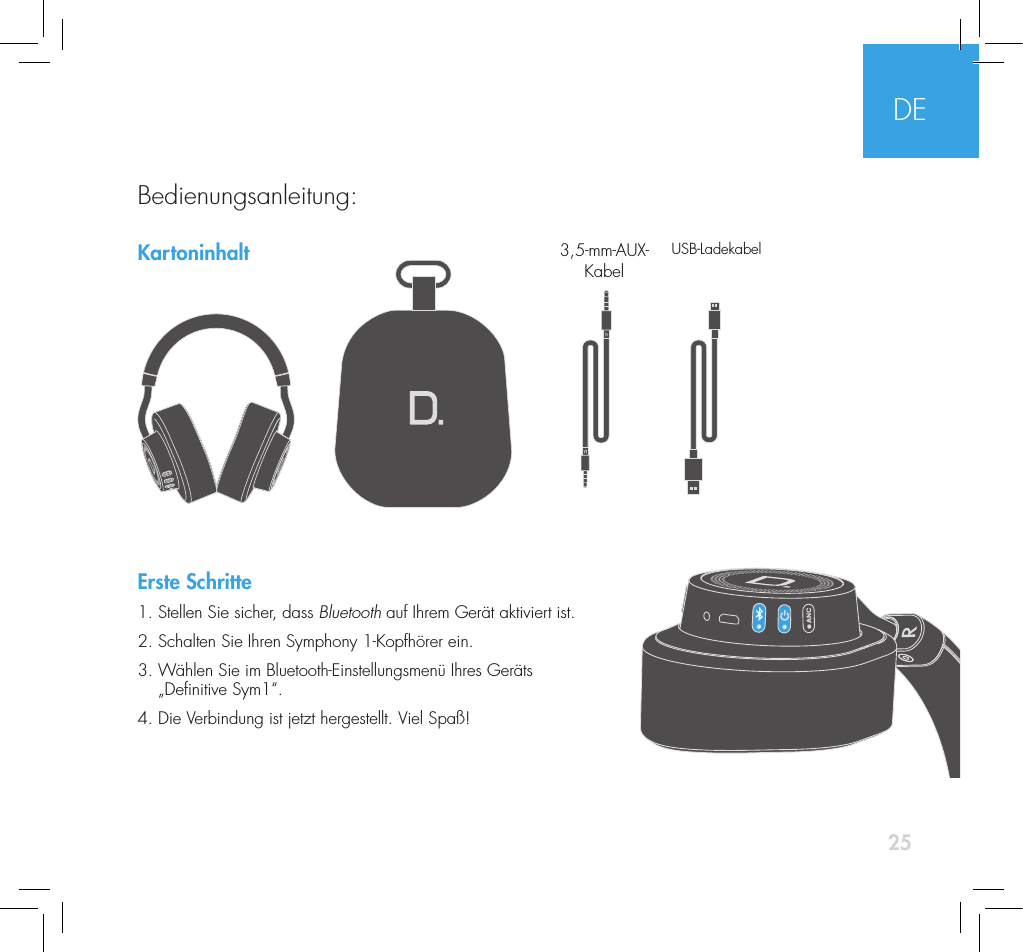
25KartoninhaltErste Schritte1. Stellen Sie sicher, dass Bluetooth auf Ihrem Gerät aktiviert ist.2. Schalten Sie Ihren Symphony 1-Kopfhörer ein.  3.  Wählen Sie im Bluetooth-Einstellungsmenü Ihres Geräts  „Denitive Sym1“. 4. Die Verbindung ist jetzt hergestellt. Viel Spaß!3,5-mm-AUX-Kabel USB-LadekabelDEBedienungsanleitung:
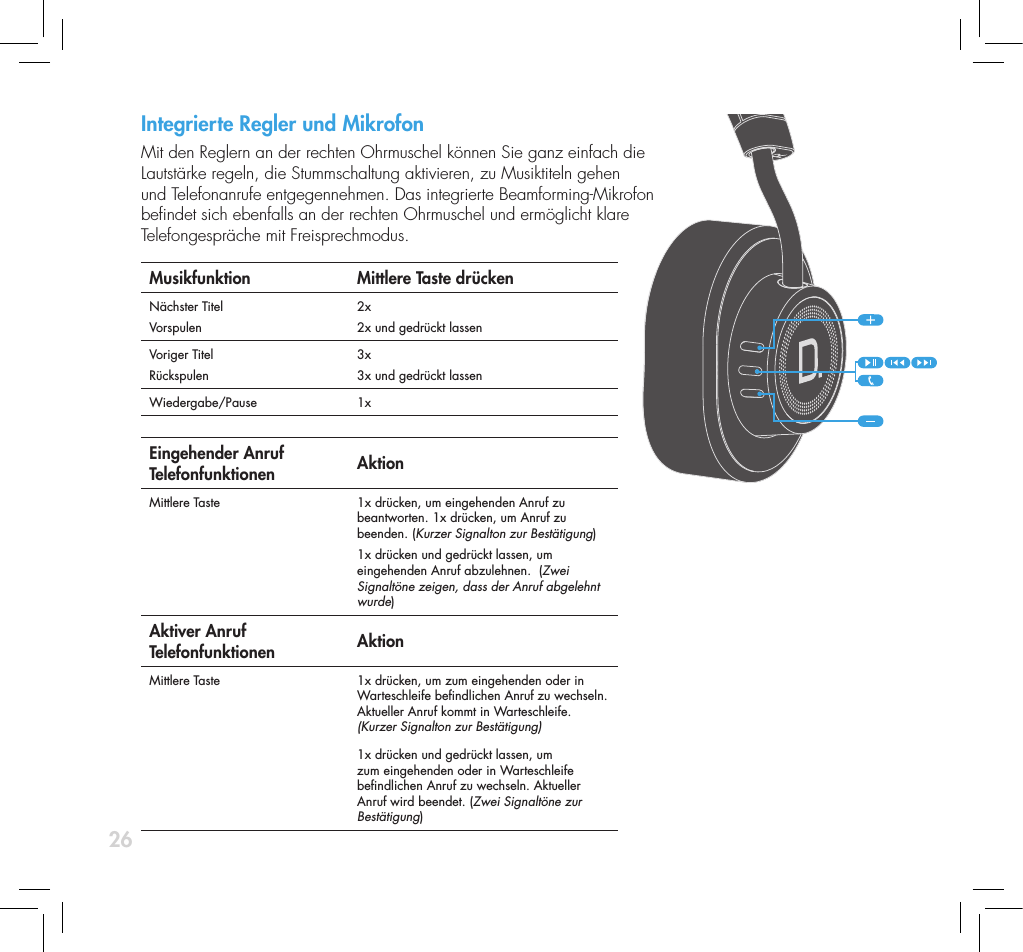
26Integrierte Regler und Mikrofon   Mit den Reglern an der rechten Ohrmuschel können Sie ganz einfach die  Lautstärke regeln, die Stummschaltung aktivieren, zu Musiktiteln gehen  und Telefonanrufe entgegennehmen. Das integrierte Beamforming-Mikrofon  bendet sich ebenfalls an der rechten Ohrmuschel und ermöglicht klare  Telefongespräche mit Freisprechmodus.Musikfunktion Mittlere Taste drückenNächster TitelVorspulen2x2x und gedrückt lassenVoriger TitelRückspulen3x3x und gedrückt lassenWiedergabe/Pause 1x Eingehender Anruf  Telefonfunktionen  AktionMittlere Taste  1x drücken, um eingehenden Anruf zu beantworten. 1x drücken, um Anruf zu beenden. (Kurzer Signalton zur Bestätigung)1x drücken und gedrückt lassen, um eingehenden Anruf abzulehnen.  (Zwei Signaltöne zeigen, dass der Anruf abgelehnt wurde)Aktiver Anruf  Telefonfunktionen AktionMittlere Taste  1x drücken, um zum eingehenden oder in Warteschleife bendlichen Anruf zu wechseln. Aktueller Anruf kommt in Warteschleife.  (Kurzer Signalton zur Bestätigung)1x drücken und gedrückt lassen, um zum eingehenden oder in Warteschleife bendlichen Anruf zu wechseln. Aktueller Anruf wird beendet. (Zwei Signaltöne zur Bestätigung)
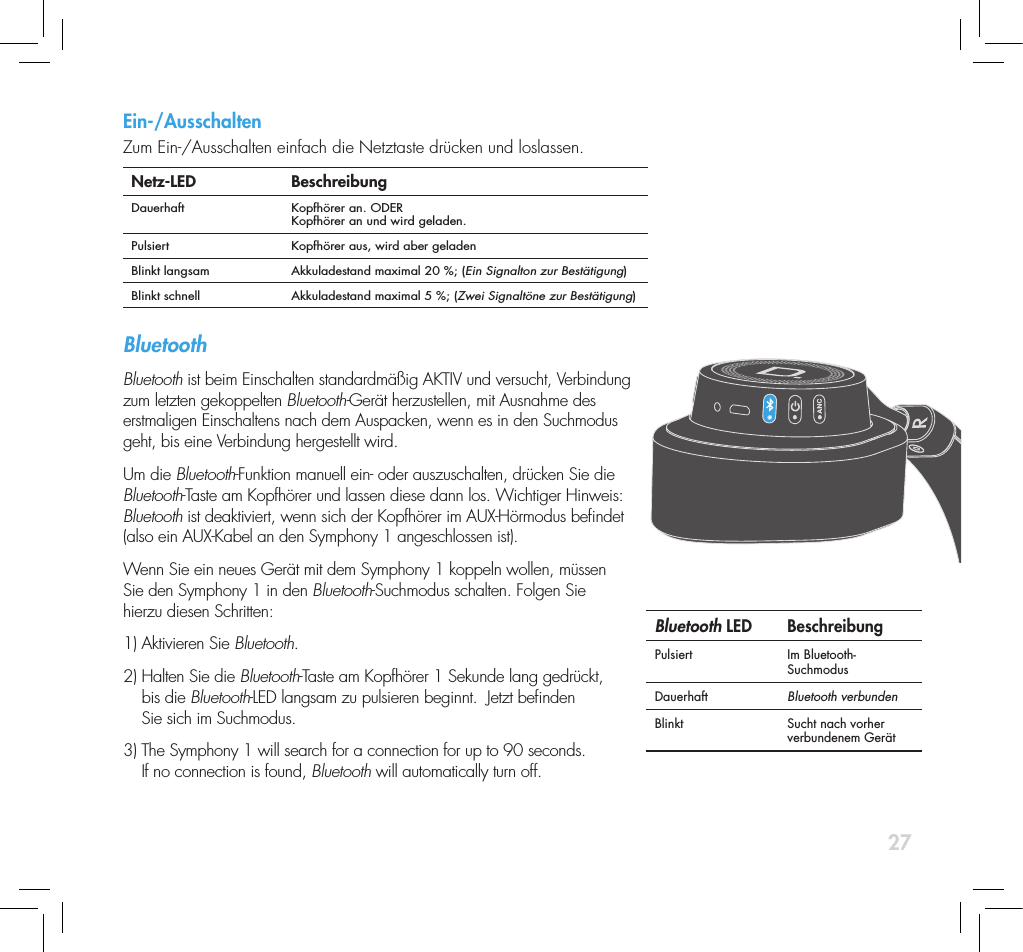
27Integrierte Regler und Mikrofon   Mit den Reglern an der rechten Ohrmuschel können Sie ganz einfach die  Lautstärke regeln, die Stummschaltung aktivieren, zu Musiktiteln gehen  und Telefonanrufe entgegennehmen. Das integrierte Beamforming-Mikrofon  bendet sich ebenfalls an der rechten Ohrmuschel und ermöglicht klare  Telefongespräche mit Freisprechmodus.Musikfunktion Mittlere Taste drückenNächster TitelVorspulen2x2x und gedrückt lassenVoriger TitelRückspulen3x3x und gedrückt lassenWiedergabe/Pause 1x Eingehender Anruf  Telefonfunktionen  AktionMittlere Taste  1x drücken, um eingehenden Anruf zu beantworten. 1x drücken, um Anruf zu beenden. (Kurzer Signalton zur Bestätigung)1x drücken und gedrückt lassen, um eingehenden Anruf abzulehnen.  (Zwei Signaltöne zeigen, dass der Anruf abgelehnt wurde)Aktiver Anruf  Telefonfunktionen AktionMittlere Taste  1x drücken, um zum eingehenden oder in Warteschleife bendlichen Anruf zu wechseln. Aktueller Anruf kommt in Warteschleife.  (Kurzer Signalton zur Bestätigung)1x drücken und gedrückt lassen, um zum eingehenden oder in Warteschleife bendlichen Anruf zu wechseln. Aktueller Anruf wird beendet. (Zwei Signaltöne zur Bestätigung)Ein-/AusschaltenZum Ein-/Ausschalten einfach die Netztaste drücken und loslassen.   Netz-LED BeschreibungDauerhaft Kopfhörer an. ODER Kopfhörer an und wird geladen.Pulsiert Kopfhörer aus, wird aber geladenBlinkt langsam Akkuladestand maximal 20 %; (Ein Signalton zur Bestätigung)Blinkt schnell Akkuladestand maximal 5 %; (Zwei Signaltöne zur Bestätigung)Bluetooth Bluetooth ist beim Einschalten standardmäßig AKTIV und versucht, Verbindung zum letzten gekoppelten Bluetooth-Gerät herzustellen, mit Ausnahme des erstmaligen Einschaltens nach dem Auspacken, wenn es in den Suchmodus geht, bis eine Verbindung hergestellt wird.Um die Bluetooth-Funktion manuell ein- oder auszuschalten, drücken Sie die Bluetooth-Taste am Kopfhörer und lassen diese dann los. Wichtiger Hinweis: Bluetooth ist deaktiviert, wenn sich der Kopfhörer im AUX-Hörmodus bendet (also ein AUX-Kabel an den Symphony 1 angeschlossen ist).  Wenn Sie ein neues Gerät mit dem Symphony 1 koppeln wollen, müssen  Sie den Symphony 1 in den Bluetooth-Suchmodus schalten. Folgen Sie  hierzu diesen Schritten:1) Aktivieren Sie Bluetooth. 2)  Halten Sie die Bluetooth-Taste am Kopfhörer 1 Sekunde lang gedrückt,  bis die Bluetooth-LED langsam zu pulsieren beginnt.  Jetzt benden  Sie sich im Suchmodus. 3)  The Symphony 1 will search for a connection for up to 90 seconds.  If no connection is found, Bluetooth will automatically turn off. Bluetooth LED BeschreibungPulsiert Im Bluetooth-SuchmodusDauerhaft Bluetooth verbundenBlinkt Sucht nach vorher verbundenem Gerät
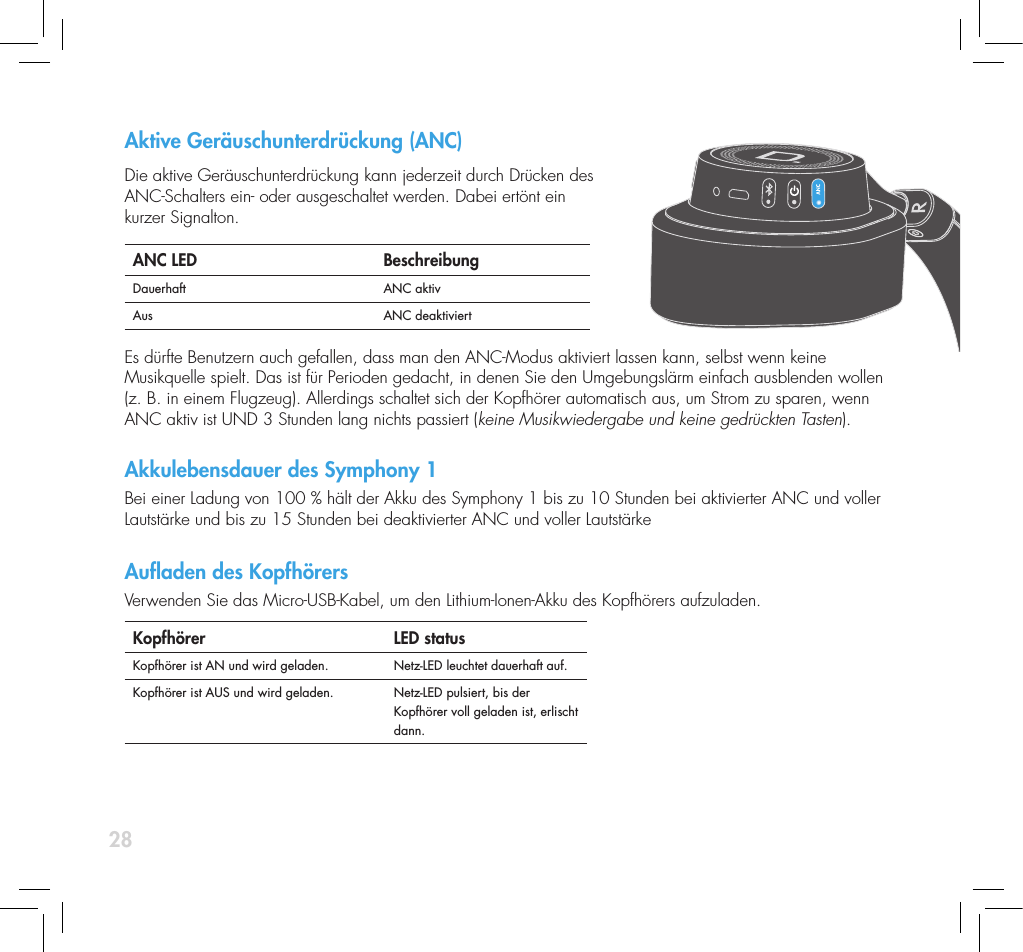
28Aktive Geräuschunterdrückung (ANC) Die aktive Geräuschunterdrückung kann jederzeit durch Drücken des  ANC-Schalters ein- oder ausgeschaltet werden. Dabei ertönt ein  kurzer Signalton.ANC LED BeschreibungDauerhaft ANC aktivAus ANC deaktiviert Es dürfte Benutzern auch gefallen, dass man den ANC-Modus aktiviert lassen kann, selbst wenn keine Musikquelle spielt. Das ist für Perioden gedacht, in denen Sie den Umgebungslärm einfach ausblenden wollen (z. B. in einem Flugzeug). Allerdings schaltet sich der Kopfhörer automatisch aus, um Strom zu sparen, wenn ANC aktiv ist UND 3 Stunden lang nichts passiert (keine Musikwiedergabe und keine gedrückten Tasten). Akkulebensdauer des Symphony 1Bei einer Ladung von 100 % hält der Akku des Symphony 1 bis zu 10 Stunden bei aktivierter ANC und voller Lautstärke und bis zu 15 Stunden bei deaktivierter ANC und voller LautstärkeAuaden des Kopfhörers Verwenden Sie das Micro-USB-Kabel, um den Lithium-Ionen-Akku des Kopfhörers aufzuladen.Kopfhörer   LED statusKopfhörer ist AN und wird geladen. Netz-LED leuchtet dauerhaft auf.Kopfhörer ist AUS und wird geladen. Netz-LED pulsiert, bis der Kopfhörer voll geladen ist, erlischt dann.
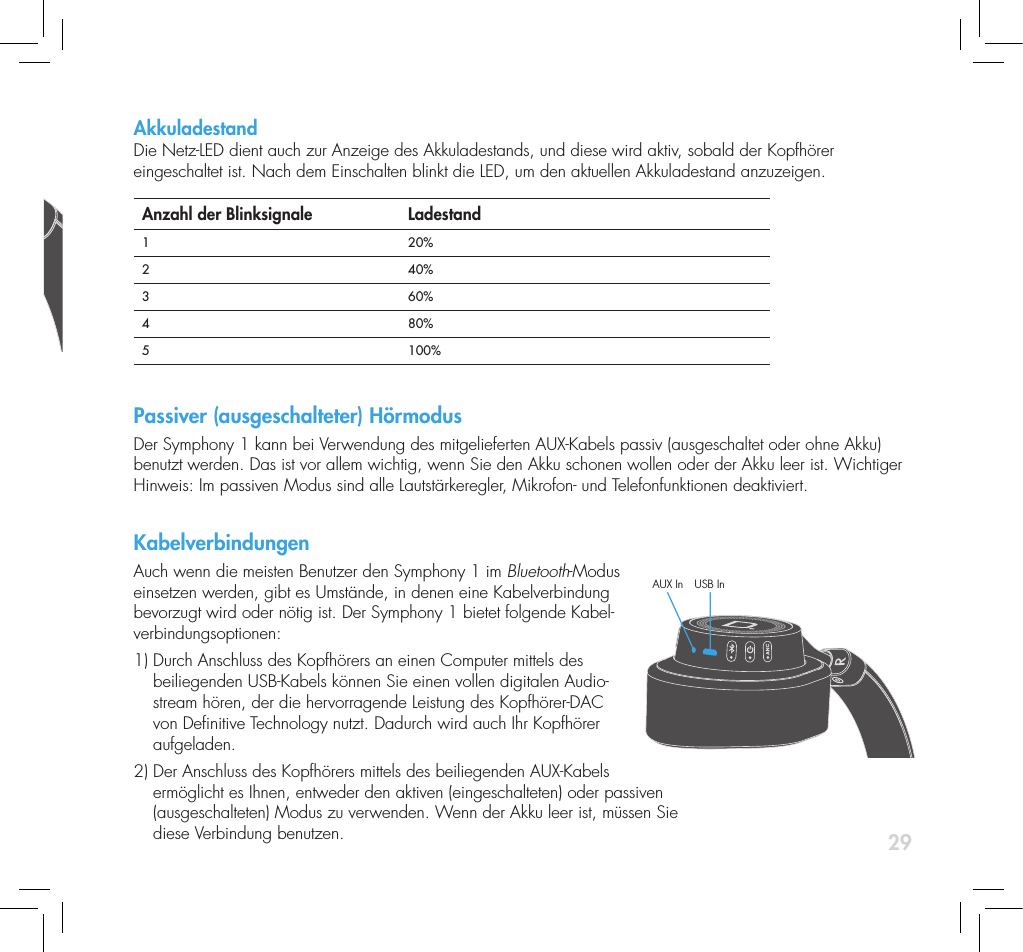
29Akkuladestand Die Netz-LED dient auch zur Anzeige des Akkuladestands, und diese wird aktiv, sobald der Kopfhörer eingeschaltet ist. Nach dem Einschalten blinkt die LED, um den aktuellen Akkuladestand anzuzeigen. Anzahl der Blinksignale  Ladestand1 20%2 40%3 60%4  80%5 100%Passiver (ausgeschalteter) HörmodusDer Symphony 1 kann bei Verwendung des mitgelieferten AUX-Kabels passiv (ausgeschaltet oder ohne Akku) benutzt werden. Das ist vor allem wichtig, wenn Sie den Akku schonen wollen oder der Akku leer ist. Wichtiger Hinweis: Im passiven Modus sind alle Lautstärkeregler, Mikrofon- und Telefonfunktionen deaktiviert. KabelverbindungenAuch wenn die meisten Benutzer den Symphony 1 im Bluetooth-Modus einsetzen werden, gibt es Umstände, in denen eine Kabelverbindung bevorzugt wird oder nötig ist. Der Symphony 1 bietet folgende Kabel-verbindungsoptionen:   1)  Durch Anschluss des Kopfhörers an einen Computer mittels des beiliegenden USB-Kabels können Sie einen vollen digitalen Audio-stream hören, der die hervorragende Leistung des Kopfhörer-DAC von Denitive Technology nutzt. Dadurch wird auch Ihr Kopfhörer aufgeladen.2)  Der Anschluss des Kopfhörers mittels des beiliegenden AUX-Kabels ermöglicht es Ihnen, entweder den aktiven (eingeschalteten) oder passiven  (ausgeschalteten) Modus zu verwenden. Wenn der Akku leer ist, müssen Sie  diese Verbindung benutzen.AUX In USB In
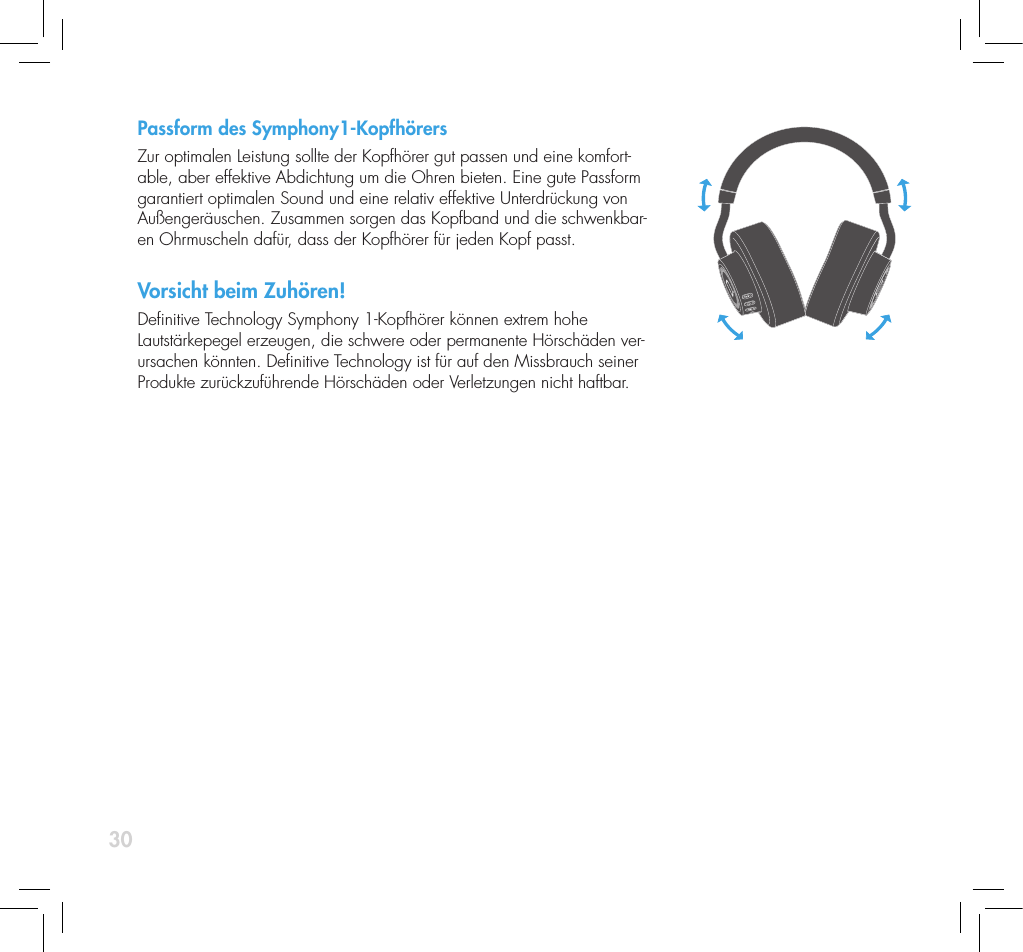
30Passform des Symphony1-KopfhörersZur optimalen Leistung sollte der Kopfhörer gut passen und eine komfort-able, aber effektive Abdichtung um die Ohren bieten. Eine gute Passform garantiert optimalen Sound und eine relativ effektive Unterdrückung von Außengeräuschen. Zusammen sorgen das Kopfband und die schwenkbar-en Ohrmuscheln dafür, dass der Kopfhörer für jeden Kopf passt.Vorsicht beim Zuhören!Denitive Technology Symphony 1-Kopfhörer können extrem hohe Lautstärkepegel erzeugen, die schwere oder permanente Hörschäden ver-ursachen könnten. Denitive Technology ist für auf den Missbrauch seiner Produkte zurückzuführende Hörschäden oder Verletzungen nicht haftbar.
31ServiceService- und Garantiearbeiten an Ihrem Denitive-Produkt werden üblicherweise von Denitive Technology oder Ihrem örtlichen Fachhändler übernommen. Wenn Sie das Produkt jedoch an uns zurücksenden wollen, wenden Sie sich bitte erst an uns, beschreiben Sie das Problem und bitten Sie um die entsprechende Autorisierung. Hin-weis: Der technische Telefon- und E-Mail-Kundendienst von Denitive wird nur auf Englisch angeboten.  ProduktbetreuungDie in dieser Broschüre angegebene Adresse ist die Adresse unseres Büros. Kopfhörer sollten unter keinen Um-ständen an unsere Büroadresse gesendet werden, bevor Sie uns kontaktiert und eine Rücksendenummer erhalten haben. E-Mail:  info@DenitiveTech.comTechnischer KundendienstWenn Sie Fragen haben, wenden Sie sich bitte an den Denitive Technology-Fachhändler, bei dem Sie das Produkt erworben haben. Wenn dieser Ihnen nicht helfen kann, wenden Sie sich bitte direkt an uns. (800) 228-7148 (Nordamerika), 01 (410) 363-7148 (international), E-Mail: info@DenitiveTech.comDirekte KontaktaufnahmeDenitive Technology11433 Cronridge Drive, Suite KOwings Mills, MD 21117, USATelefon: 800-228-7148Internet: www.DenitiveTech.comE-Mail: info@DenitiveTech
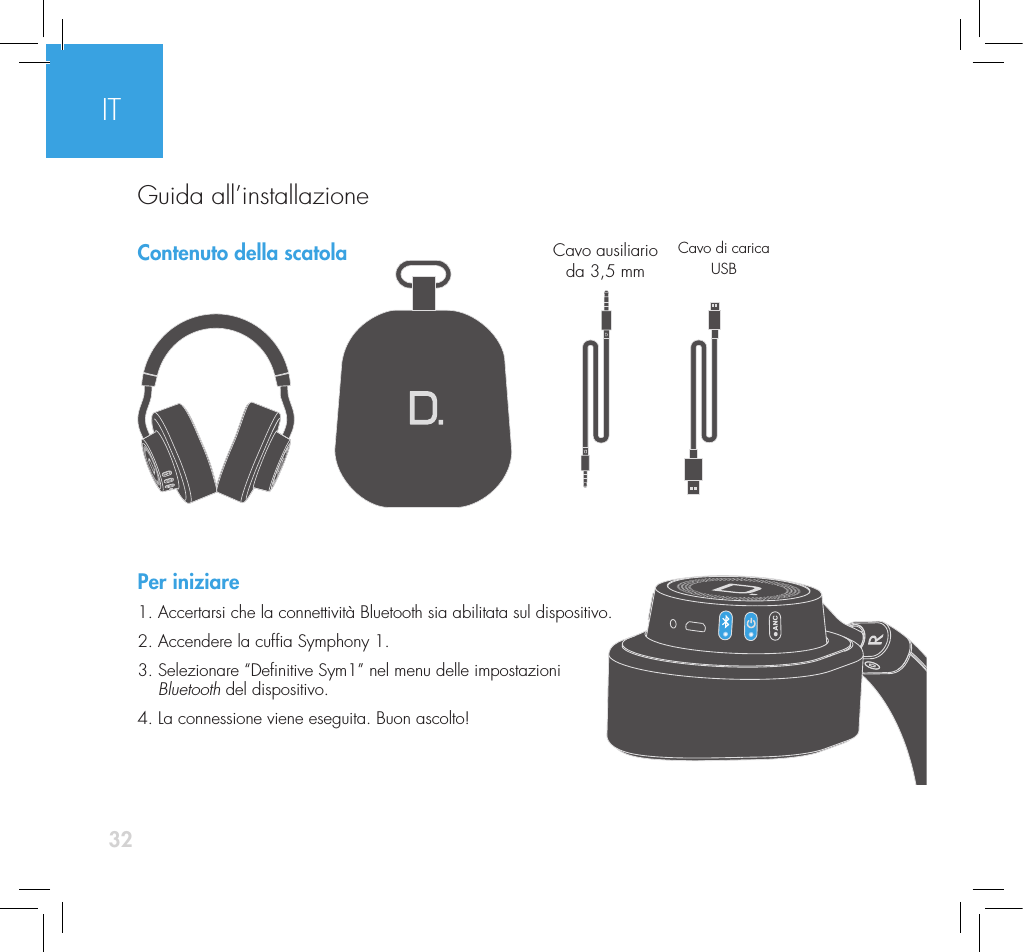
32Contenuto della scatolaPer iniziare1. Accertarsi che la connettività Bluetooth sia abilitata sul dispositivo.2. Accendere la cufa Symphony 1. 3.  Selezionare “Denitive Sym1” nel menu delle impostazioni  Bluetooth del dispositivo. 4. La connessione viene eseguita. Buon ascolto!Cavo ausiliario  da 3,5 mmCavo di carica USBITGuida all’installazione
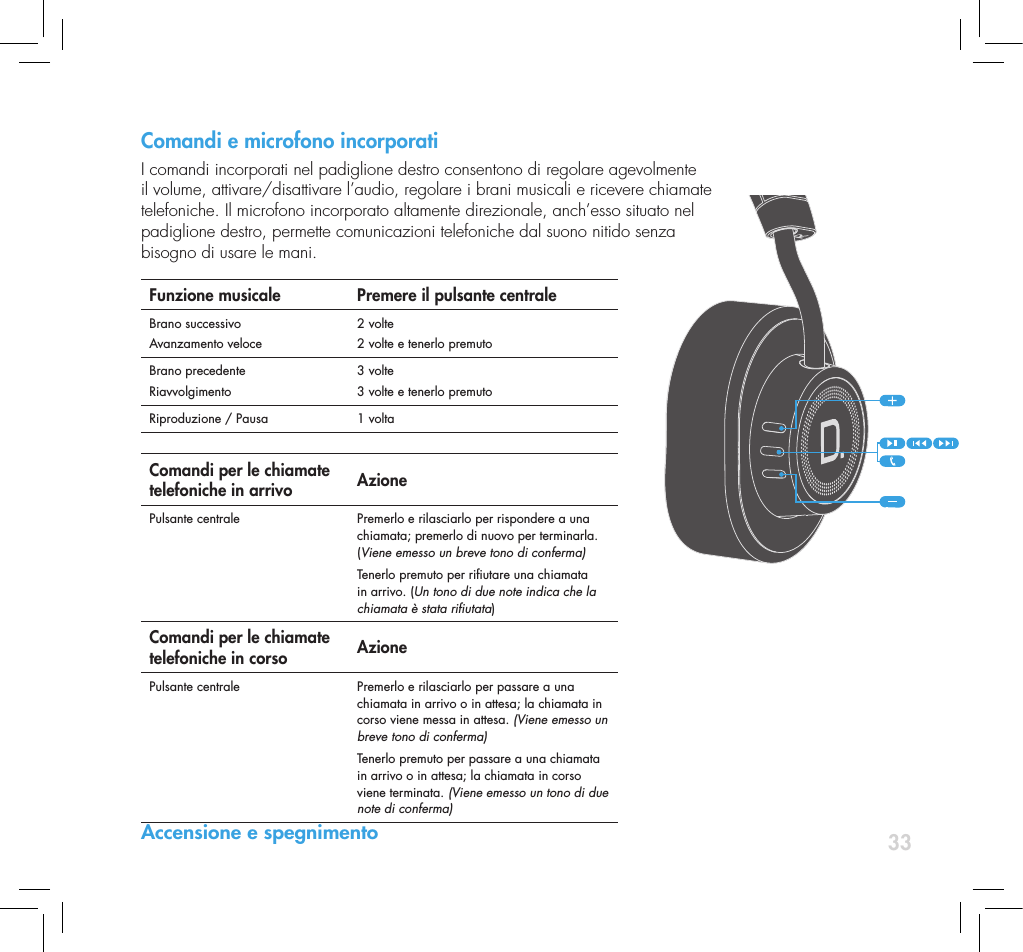
33Comandi e microfono incorporati I comandi incorporati nel padiglione destro consentono di regolare agevolmente  il volume, attivare/disattivare l’audio, regolare i brani musicali e ricevere chiamate telefoniche. Il microfono incorporato altamente direzionale, anch’esso situato nel  padiglione destro, permette comunicazioni telefoniche dal suono nitido senza  bisogno di usare le mani.Funzione musicale Premere il pulsante centraleBrano successivoAvanzamento veloce2 volte2 volte e tenerlo premutoBrano precedenteRiavvolgimento3 volte3 volte e tenerlo premutoRiproduzione / Pausa 1 volta Comandi per le chiamate telefoniche in arrivo AzionePulsante centrale  Premerlo e rilasciarlo per rispondere a una chiamata; premerlo di nuovo per terminarla. (Viene emesso un breve tono di conferma)Tenerlo premuto per riutare una chiamata in arrivo. (Un tono di due note indica che la chiamata è stata riutata)Comandi per le chiamate telefoniche in corso AzionePulsante centrale   Premerlo e rilasciarlo per passare a una chiamata in arrivo o in attesa; la chiamata in corso viene messa in attesa. (Viene emesso un breve tono di conferma)Tenerlo premuto per passare a una chiamata in arrivo o in attesa; la chiamata in corso viene terminata. (Viene emesso un tono di due note di conferma)Accensione e spegnimento
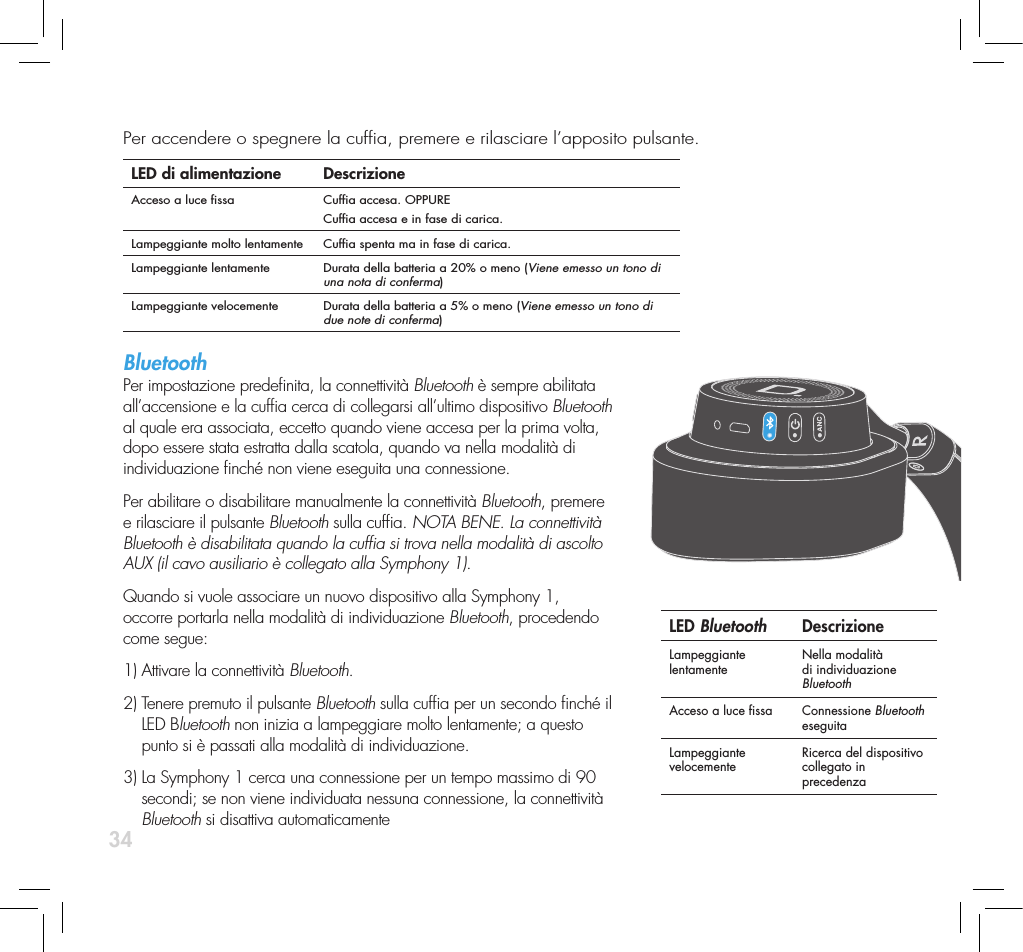
34Per accendere o spegnere la cufa, premere e rilasciare l’apposito pulsante.   LED di alimentazione DescrizioneAcceso a luce ssa Cufa accesa. OPPURECufa accesa e in fase di carica.Lampeggiante molto lentamente Cufa spenta ma in fase di carica.Lampeggiante lentamente Durata della batteria a 20% o meno (Viene emesso un tono di una nota di conferma)Lampeggiante velocemente Durata della batteria a 5% o meno (Viene emesso un tono di due note di conferma)Bluetooth Per impostazione predenita, la connettività Bluetooth è sempre abilitata  all’accensione e la cufa cerca di collegarsi all’ultimo dispositivo Bluetooth  al quale era associata, eccetto quando viene accesa per la prima volta,  dopo essere stata estratta dalla scatola, quando va nella modalità di  individuazione nché non viene eseguita una connessione.Per abilitare o disabilitare manualmente la connettività Bluetooth, premere  e rilasciare il pulsante Bluetooth sulla cufa. NOTA BENE. La connettività  Bluetooth è disabilitata quando la cufa si trova nella modalità di ascolto  AUX (il cavo ausiliario è collegato alla Symphony 1). Quando si vuole associare un nuovo dispositivo alla Symphony 1,  occorre portarla nella modalità di individuazione Bluetooth, procedendo  come segue:1) Attivare la connettività Bluetooth. 2)  Tenere premuto il pulsante Bluetooth sulla cufa per un secondo nché il  LED Bluetooth non inizia a lampeggiare molto lentamente; a questo  punto si è passati alla modalità di individuazione. 3)  La Symphony 1 cerca una connessione per un tempo massimo di 90  secondi; se non viene individuata nessuna connessione, la connettività  Bluetooth si disattiva automaticamenteLED Bluetooth DescrizioneLampeggiante lentamente Nella modalità di individuazione BluetoothAcceso a luce ssa Connessione Bluetooth eseguitaLampeggiante velocemente Ricerca del dispositivo collegato in precedenza
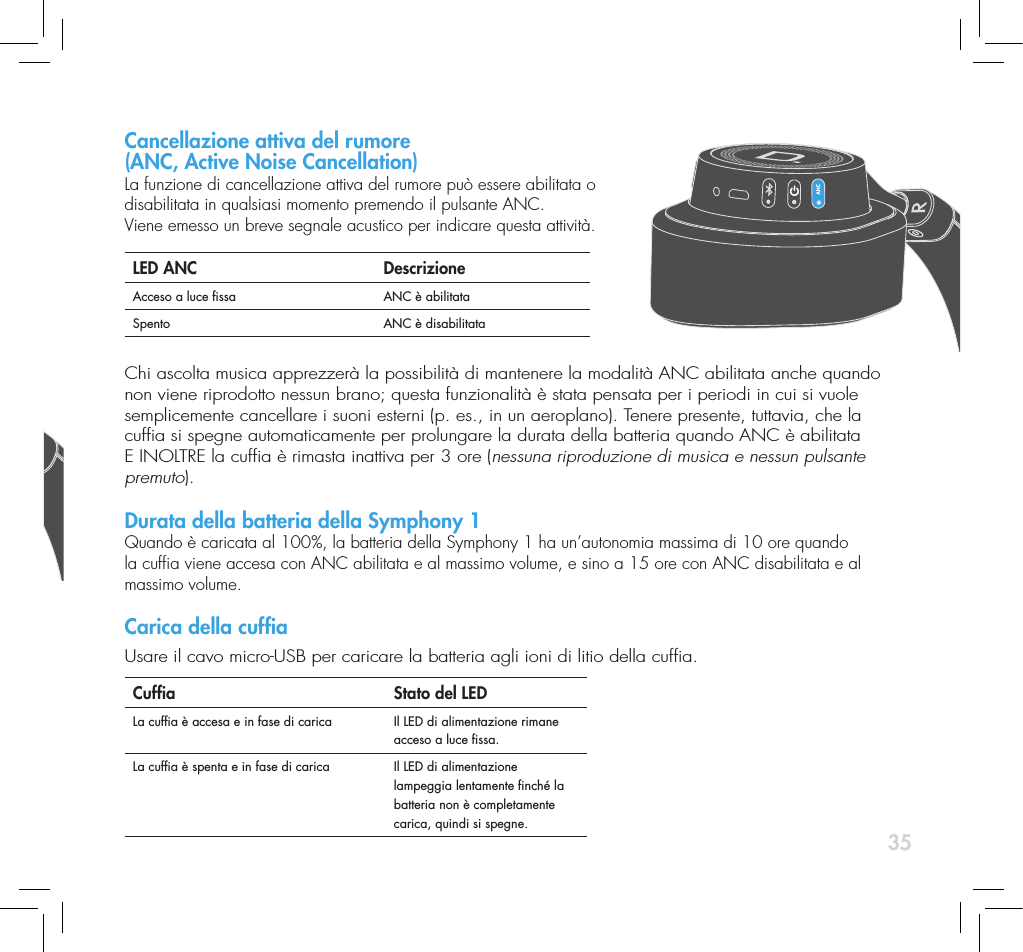
35Per accendere o spegnere la cufa, premere e rilasciare l’apposito pulsante.   LED di alimentazione DescrizioneAcceso a luce ssa Cufa accesa. OPPURECufa accesa e in fase di carica.Lampeggiante molto lentamente Cufa spenta ma in fase di carica.Lampeggiante lentamente Durata della batteria a 20% o meno (Viene emesso un tono di una nota di conferma)Lampeggiante velocemente Durata della batteria a 5% o meno (Viene emesso un tono di due note di conferma)Bluetooth Per impostazione predenita, la connettività Bluetooth è sempre abilitata  all’accensione e la cufa cerca di collegarsi all’ultimo dispositivo Bluetooth  al quale era associata, eccetto quando viene accesa per la prima volta,  dopo essere stata estratta dalla scatola, quando va nella modalità di  individuazione nché non viene eseguita una connessione.Per abilitare o disabilitare manualmente la connettività Bluetooth, premere  e rilasciare il pulsante Bluetooth sulla cufa. NOTA BENE. La connettività  Bluetooth è disabilitata quando la cufa si trova nella modalità di ascolto  AUX (il cavo ausiliario è collegato alla Symphony 1). Quando si vuole associare un nuovo dispositivo alla Symphony 1,  occorre portarla nella modalità di individuazione Bluetooth, procedendo  come segue:1) Attivare la connettività Bluetooth. 2)  Tenere premuto il pulsante Bluetooth sulla cufa per un secondo nché il  LED Bluetooth non inizia a lampeggiare molto lentamente; a questo  punto si è passati alla modalità di individuazione. 3)  La Symphony 1 cerca una connessione per un tempo massimo di 90  secondi; se non viene individuata nessuna connessione, la connettività  Bluetooth si disattiva automaticamenteLED Bluetooth DescrizioneLampeggiante lentamente Nella modalità di individuazione BluetoothAcceso a luce ssa Connessione Bluetooth eseguitaLampeggiante velocemente Ricerca del dispositivo collegato in precedenzaCancellazione attiva del rumore  (ANC, Active Noise Cancellation)  La funzione di cancellazione attiva del rumore può essere abilitata o  disabilitata in qualsiasi momento premendo il pulsante ANC.  Viene emesso un breve segnale acustico per indicare questa attività.LED ANC DescrizioneAcceso a luce ssa ANC è abilitataSpento ANC è disabilitataChi ascolta musica apprezzerà la possibilità di mantenere la modalità ANC abilitata anche quando non viene riprodotto nessun brano; questa funzionalità è stata pensata per i periodi in cui si vuole semplicemente cancellare i suoni esterni (p. es., in un aeroplano). Tenere presente, tuttavia, che la cufa si spegne automaticamente per prolungare la durata della batteria quando ANC è abilitata E INOLTRE la cufa è rimasta inattiva per 3 ore (nessuna riproduzione di musica e nessun pulsante premuto).  Durata della batteria della Symphony 1 Quando è caricata al 100%, la batteria della Symphony 1 ha un’autonomia massima di 10 ore quando la cufa viene accesa con ANC abilitata e al massimo volume, e sino a 15 ore con ANC disabilitata e al massimo volume. Carica della cufa Usare il cavo micro-USB per caricare la batteria agli ioni di litio della cufa.Cufa   Stato del LEDLa cufa è accesa e in fase di carica Il LED di alimentazione rimane acceso a luce ssa.La cufa è spenta e in fase di carica Il LED di alimentazione lampeggia lentamente nché la batteria non è completamente carica, quindi si spegne.
36Indicatore di carica della batteria  Nel LED di alimentazione è integrato un indicatore della carica della batteria che si attiva  non appena si accende la cufa, lampeggiando in modo corrispondente al livello di carica.  Numero di lampeggi  Livello di carica1 20%2 40%3 60%4  80%5 100%Modalità di ascolto passiva (senza alimentazione)La Symphony 1 può essere utilizzata passivamente (spenta o senza batteria) mediante il cavo ausiliario fornito. Ciò è specialmente utile durante i periodi in cui si vuole evitare di scaricare la batteria o se questa è già scarica. NOTA BENE. Tutti i comandi del volume, e le funzioni microfono  e telefono, sono disabilitati nella modalità di ascolto senza alimentazione. Connessioni cablateSebbene nella maggior parte dei casi si vorrà usare la cufa  Symphony in modalità Bluetooth, esistono circostanze in cui una connessione cablata è preferibile o necessaria. La cufa Symphony 1 offre le seguenti opzioni di ascolto tramite connessione cablata:    1)  Collegando la cufa a un computer mediante il cavo USB è possibile ascoltare un usso audio digitale completo sfruttando le prestazioni superiori dei circuiti Denitive Technology di conversione D/A di cui è dotata la cufa. Inoltre la cufa viene caricata.2)  Collegando la cufa mediante il cavo AUX fornito è possibile  ascoltare la musica in modalità attiva (con alimentazione) o passiva  (senza alimentazione). Questa connessione è necessaria quando la batteria è scarica.AUX In USB In
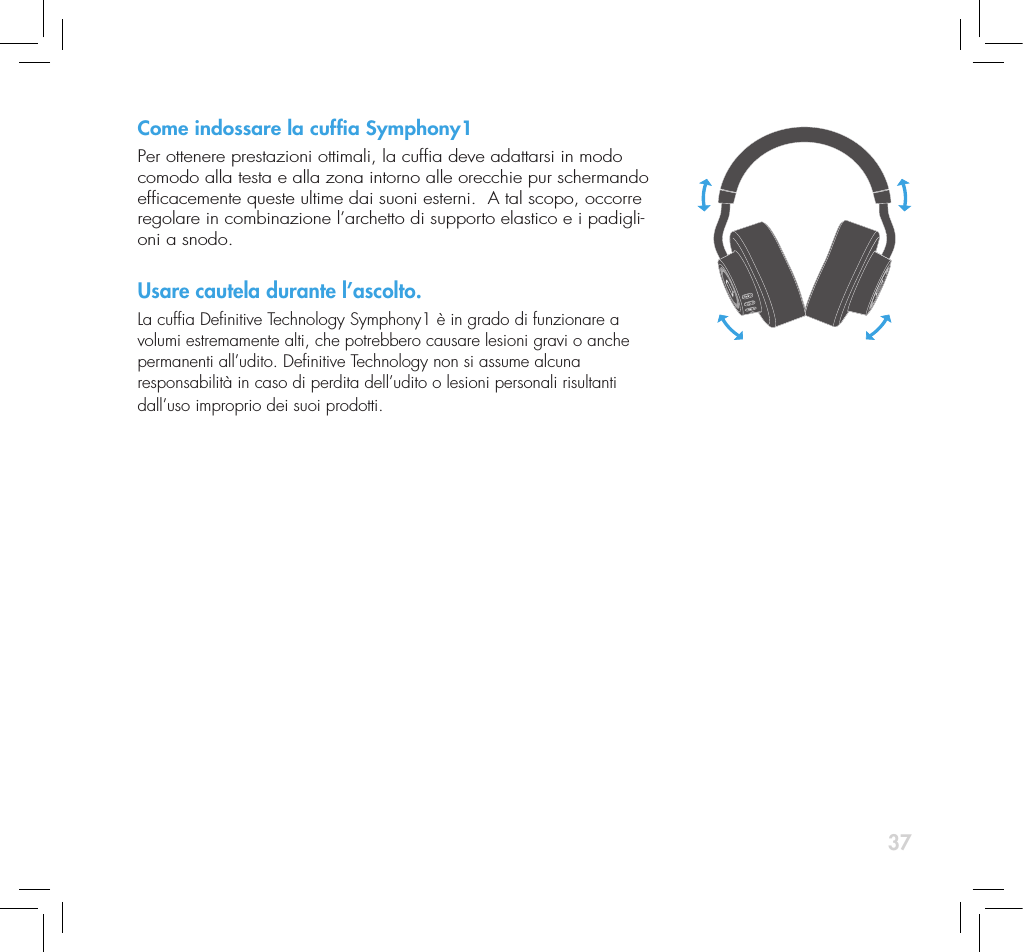
37Come indossare la cufa Symphony1Per ottenere prestazioni ottimali, la cufa deve adattarsi in modo comodo alla testa e alla zona intorno alle orecchie pur schermando efcacemente queste ultime dai suoni esterni.  A tal scopo, occorre regolare in combinazione l’archetto di supporto elastico e i padigli-oni a snodo.Usare cautela durante l’ascolto.La cufa Denitive Technology Symphony1 è in grado di funzionare a volumi estremamente alti, che potrebbero causare lesioni gravi o anche permanenti all’udito. Denitive Technology non si assume alcuna  responsabilità in caso di perdita dell’udito o lesioni personali risultanti dall’uso improprio dei suoi prodotti.
38ManutenzioneLe operazioni di manutenzione o interventi in garanzia sul prodotto Denitive normalmente vengono eseguiti dal rivenditore Denitive Technology. Se, tuttavia, si desidera restituire il prodotto a Denitive Technology, contattarci prima, descrivendo il problema e richiedendo l’apposita autorizzazione. NOTA BENE. Denitive offre assisten-za telefonica e per e-mail solo in inglese.  Manutenzione del prodottoL’indirizzo riportato nella presente guida è quello dei nostri ufci. In nessun caso la cufa deve essere spedita ai nostri ufci o restituita senza averci prima contattato e ottenuto l’autorizzazione alla restituzione. L’indirizzo e-mail è: info@DenitiveTech.comAssistenza tecnicaPer eventuali domande rivolgersi al rivenditore Denitive Technology da cui si è acquistato il prodotto. Se procedendo in tal modo non si riesce a ottenere assistenza, contattarci direttamente: (800) 228-7148 (Nord America), +1 (410) 363-7148 (da tutti gli altri Paesi), e-mail: info@DenitiveTech.comPer contattarci direttamenteDenitive Technology11433 Cronridge Drive, Suite KOwings Mills, MD 21117 USATelefono: 800-228-7148Visitare: www.DenitiveTech.comE-mail: info@DenitiveTech
39
Denitive Technology 11433 Cronridge Dr. Owings Mills, MD 21117 (410)363-7148 (800) 228-7148 www.denitivetech.com

Navigation menu