DEI Sales Definitive Technology WAMPLIFIER wireless amplifier User Manual D WAmpSetupGuide3071 indd

DEI Sales Inc. dba Definitive Technology wireless amplifier D WAmpSetupGuide3071 indd

User manual

Setup GuideStudio9AmpAdapt
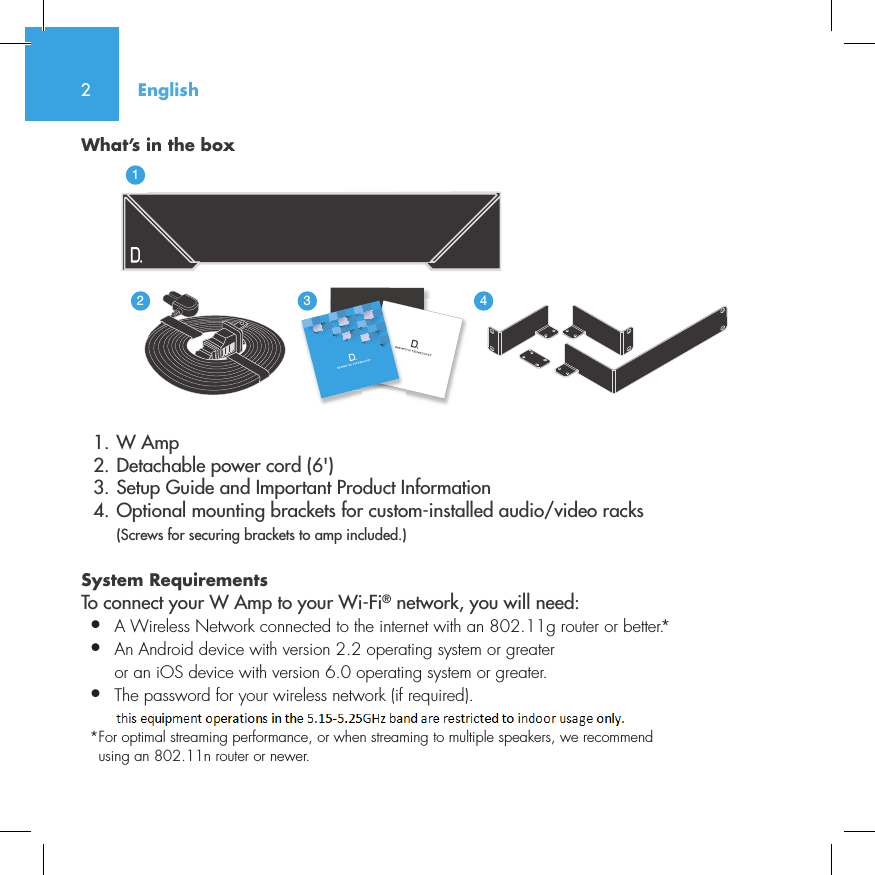
2What’s in the box  1. W Amp  2. Detachable power cord (6')  3. Setup Guide and Important Product Information  4. Optional mounting brackets for custom-installed audio/video racks (Screws for securing brackets to amp included.)System Requirements To connect your W Amp to your Wi-Fi® network, you will need:•  A Wireless Network connected to the internet with an 802.11g router or better.*•   An Android device with version 2.2 operating system or greateror an iOS device with version 6.0 operating system or greater.•  The password for your wireless network (if required).* For optimal streaming performance, or when streaming to multiple speakers, we recommend using an 802.11n router or newer.English3235642114NetAmpNetAdapt
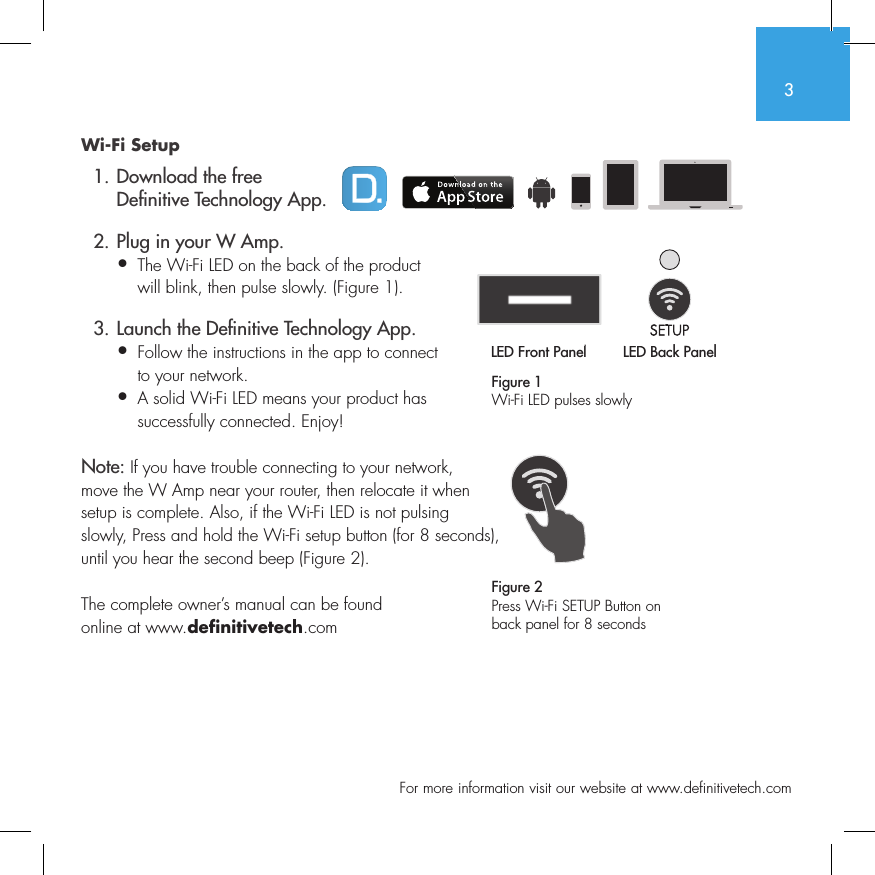
3  For more information visit our website at www.definitivetech.comWi-Fi Setup  1. Download the free     De nitive Technology App.  2. Plug in your W Amp.•  The Wi-Fi LED on the back of the product   will blink, then pulse slowly. (Figure 1).  3. Launch the De nitive Technology App.•  Follow the instructions in the app to connect   to your network.•   A solid Wi-Fi LED means your product has successfully connected. Enjoy!Note: If you have trouble connecting to your network, move the W Amp near your router, then relocate it when setup is complete. Also, if the Wi-Fi LED is not pulsing slowly, Press and hold the Wi-Fi setup button (for 8 seconds), until you hear the second beep (Figure 2).The complete owner’s manual can be found online at www.definitivetech.comFigure 1Wi-Fi LED pulses slowlyLED Front Panel LED Back Panel1 2 3 456LED Front PanelLED Back Panel1 2 3 456Figure 2Press Wi-Fi SETUP Button on back panel for 8 seconds
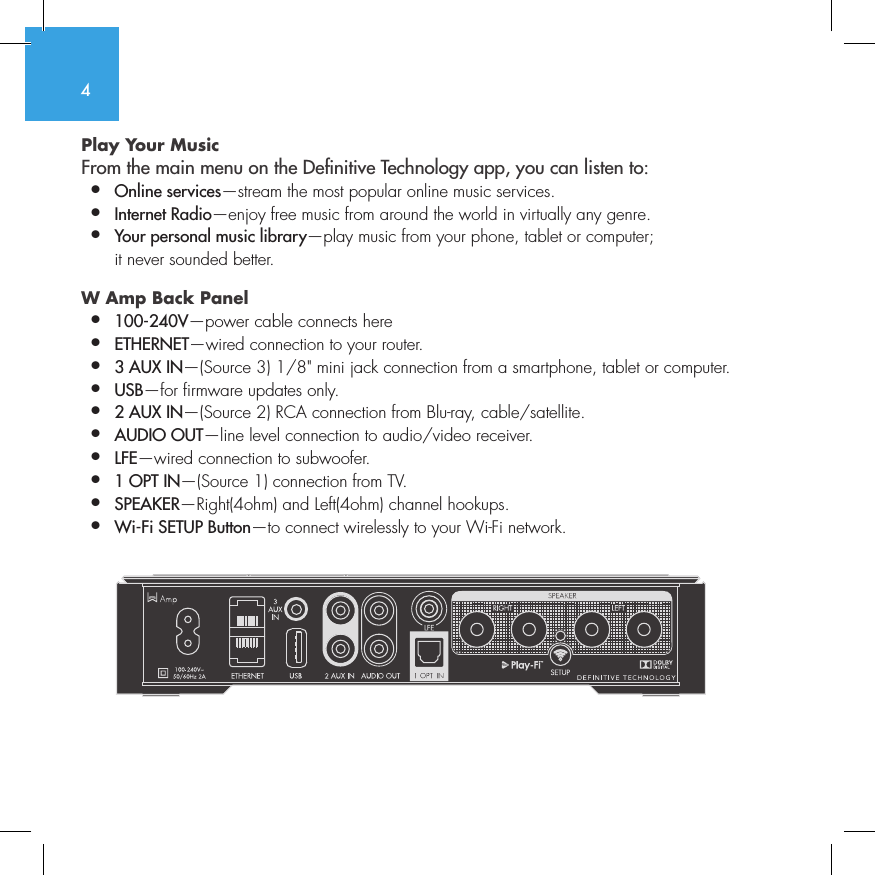
4Play Your Music From the main menu on the Denitive Technology app, you can listen to:•  Online services—stream the most popular online music services.•   Internet  Radio—enjoy free music from around the world in virtually any genre.•  Your personal music library—play music from your phone, tablet or computer;    it never sounded better.W Amp Back Panel •  100-240V—power cable connects here•  ETHERNET—wired connection to your router.•  3 AUX IN—(Source 3) 1/8" mini jack connection from a smartphone, tablet or computer.•  USB—for firmware updates only.•  2 AUX IN—(Source 2) RCA connection from Blu-ray, cable/satellite.•  AUDIO OUT—line level connection to audio/video receiver.•  LFE—wired connection to subwoofer.•  1 OPT IN—(Source 1) connection from TV.•  SPEAKER—Right(4ohm) and Left(4ohm) channel hookups.•  Wi-Fi SETUP Button—to connect wirelessly to your Wi-Fi network.          SUB OUT
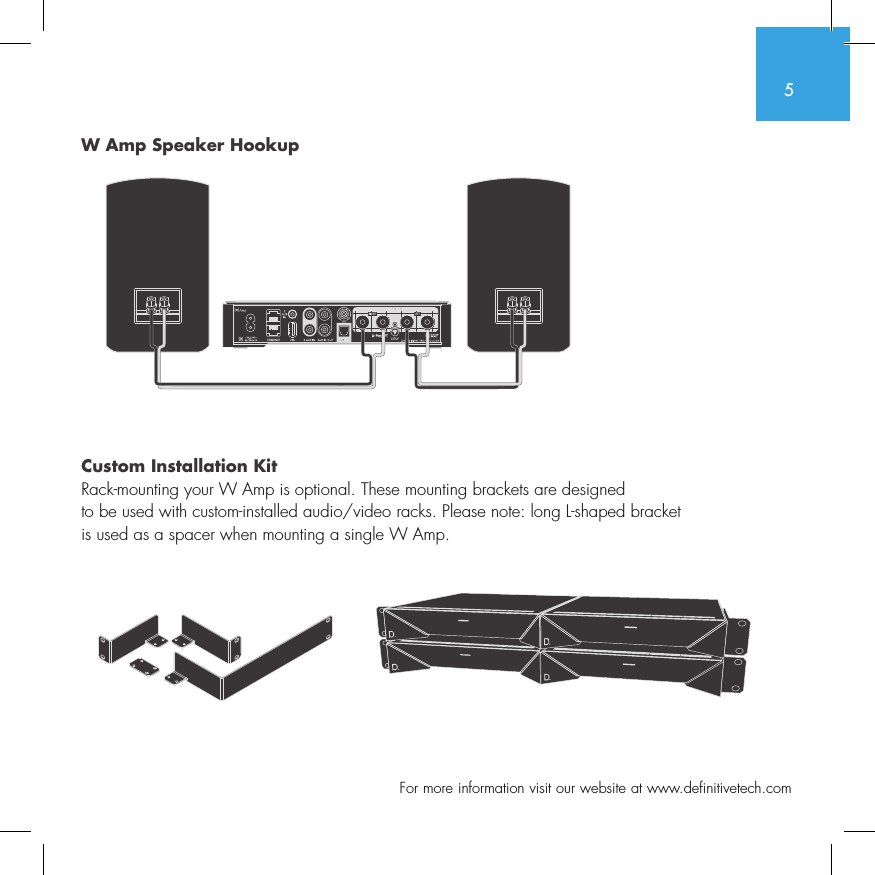
5  For more information visit our website at www.definitivetech.comW Amp Speaker Hookup Custom Installation KitRack-mounting your W Amp is optional. These mounting brackets are designed  to be used with custom-installed audio/video racks. Please note: long L-shaped bracket  is used as a spacer when mounting a single W Amp. SUB OUT
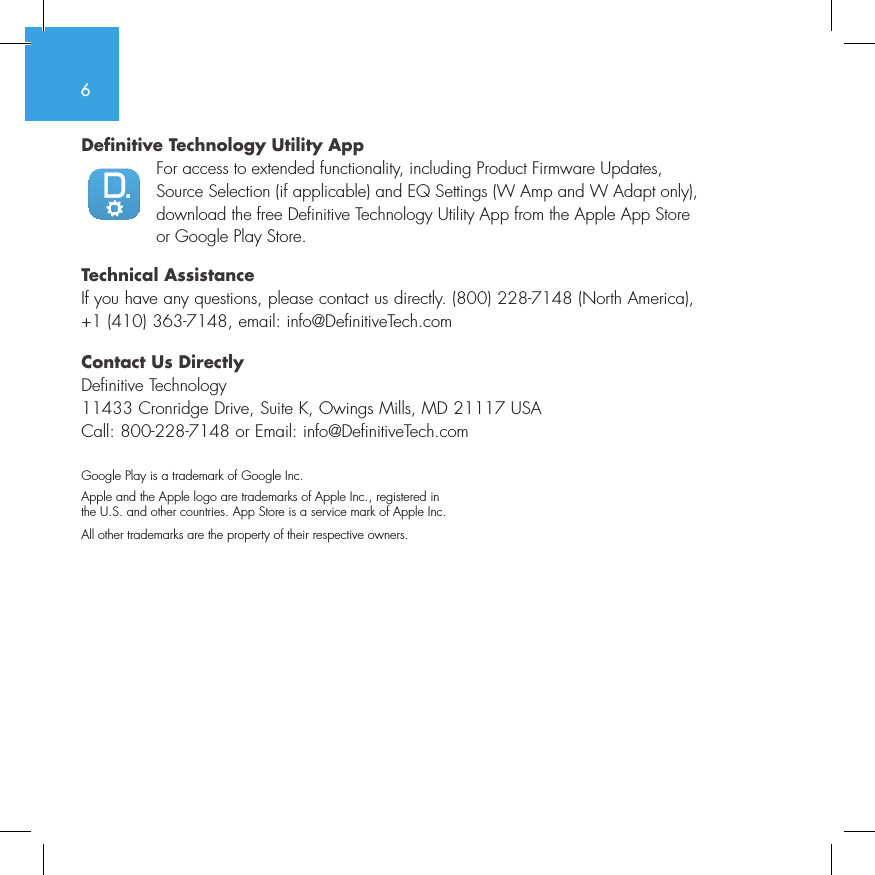
6Definitive Technology Utility AppFor access to extended functionality, including Product Firmware Updates, Source Selection (if applicable) and EQ Settings (W Amp and W Adapt only), download the free Definitive Technology Utility App from the Apple App Store or Google Play Store.Technical AssistanceIf you have any questions, please contact us directly. (800) 228-7148 (North America), +1 (410) 363-7148, email: info@DefinitiveTech.comContact Us DirectlyDefinitive Technology11433 Cronridge Drive, Suite K, Owings Mills, MD 21117 USACall: 800-228-7148 or Email: info@DefinitiveTech.comGoogle Play is a trademark of Google Inc.Apple and the Apple logo are trademarks of Apple Inc., registered in  the U.S. and other countries. App Store is a service mark of Apple Inc.All other trademarks are the property of their respective owners.
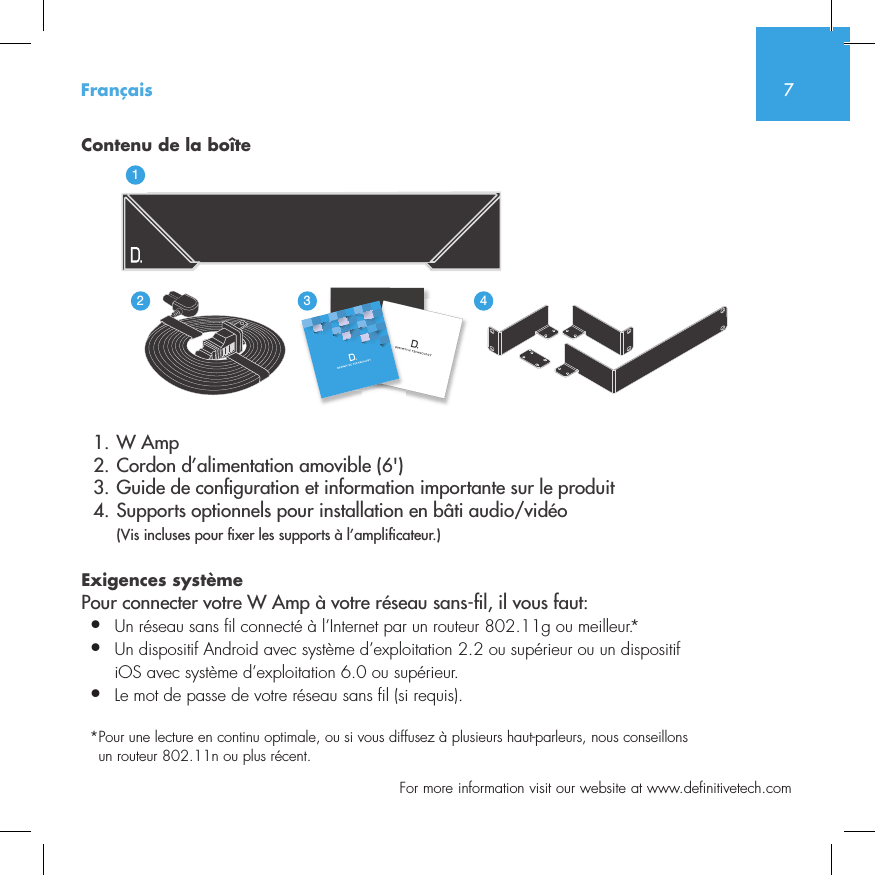
7  For more information visit our website at www.definitivetech.comContenu de la boîte  1. W Amp  2. Cordon d’alimentation amovible (6')  3. Guide de con guration et information importante sur le produit  4. Supports optionnels pour installation en bâti audio/vidéo (Vis incluses pour  xer les supports à l’ampli cateur.)Exigences systèmePour connecter votre W Amp à votre réseau sans- l, il vous faut:•  Un réseau sans fil connecté à l’Internet par un routeur 802.11g ou meilleur.*•   Un dispositif Android avec système d’exploitation 2.2 ou supérieur ou un dispositif iOS avec système d’exploitation 6.0 ou supérieur.•  Le mot de passe de votre réseau sans fil (si requis).* Pour une lecture en continu optimale, ou si vous diffusez à plusieurs haut-parleurs, nous conseillons un routeur 802.11n ou plus récent.Français3235642114NetAmpNetAdapt
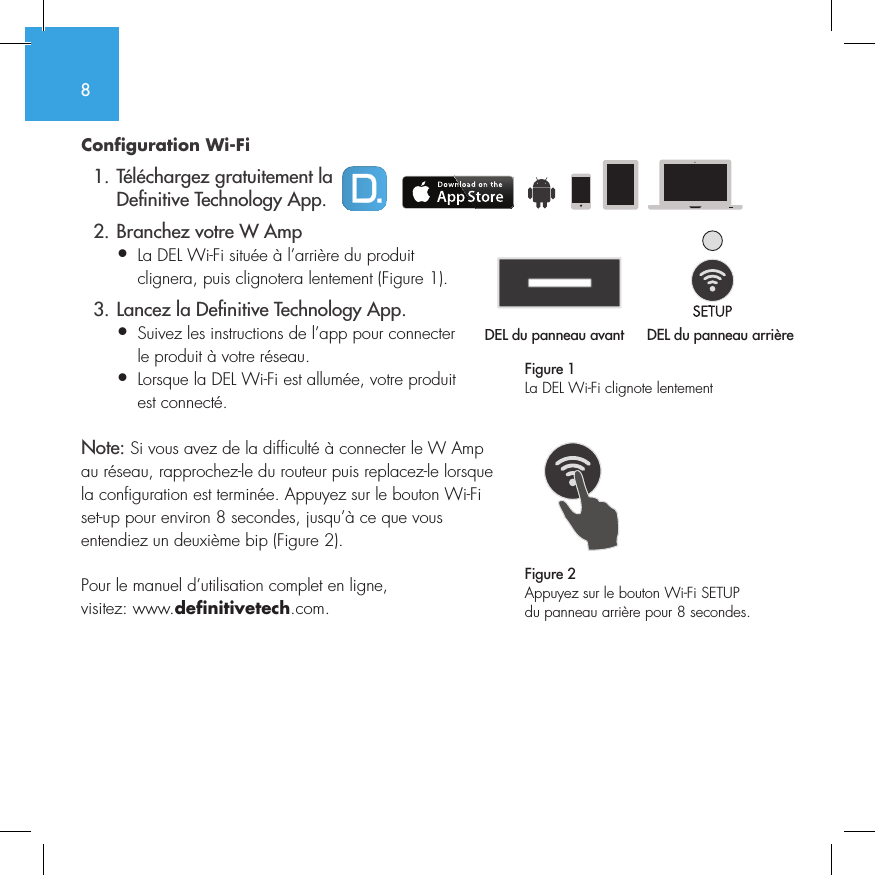
8Configuration Wi-Fi   1. Téléchargez gratuitement la     De nitive Technology App.  2. Branchez votre W Amp•  La DEL Wi-Fi située à l’arrière du produit   clignera, puis clignotera lentement (Figure 1).  3. Lancez la De nitive Technology App.•  Suivez les instructions de l’app pour connecter   le produit à votre réseau.•  Lorsque la DEL Wi-Fi est allumée, votre produit   est connecté. Note: Si vous avez de la difficulté à connecter le W Amp au réseau, rapprochez-le du routeur puis replacez-le lorsque la configuration est terminée. Appuyez sur le bouton Wi-Fi set-up pour environ 8 secondes, jusqu’à ce que vous entendiez un deuxième bip (Figure 2).Pour le manuel d’utilisation complet en ligne, visitez: www.definitivetech.com.Figure 1La DEL Wi-Fi clignote lentementDEL du panneau avant  DEL du panneau arrière1 2 3 456DEL du panneau avant 1 2 3 4561 2 3 456Figure 2Appuyez sur le bouton Wi-Fi SETUP du panneau arrière pour 8 secondes.
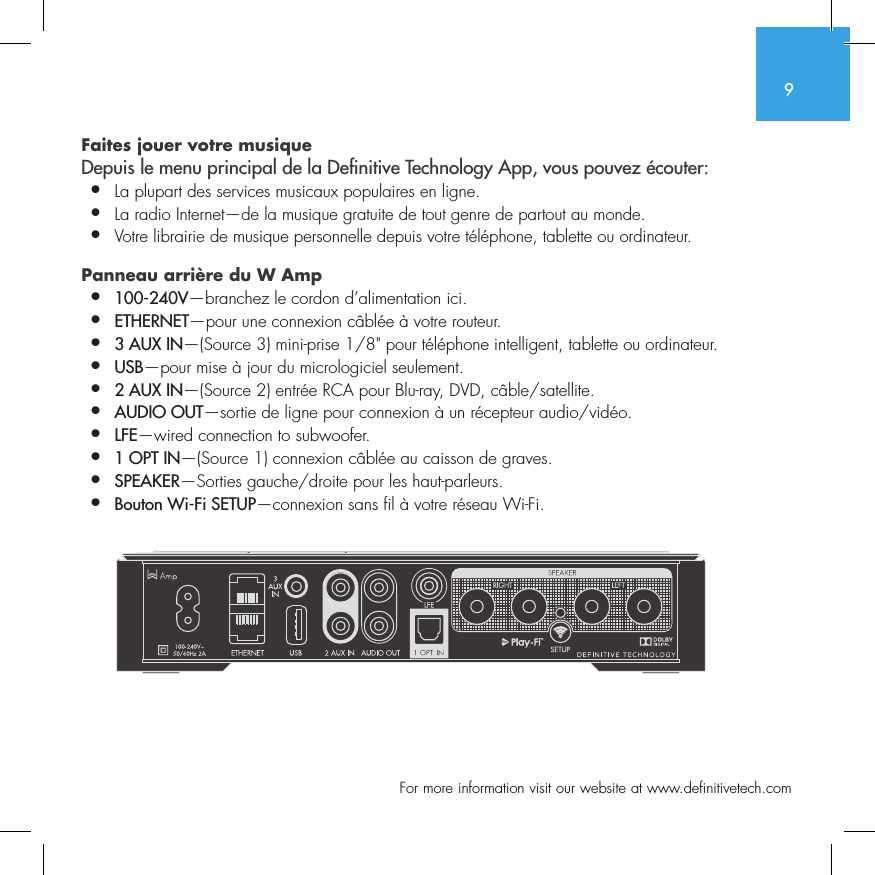
9  For more information visit our website at www.definitivetech.comFaites jouer votre musique  Depuis le menu principal de la De nitive Technology App, vous pouvez écouter:•  La plupart des services musicaux populaires en ligne.•  La radio Internet—de la musique gratuite de tout genre de partout au monde.•  Votre librairie de musique personnelle depuis votre téléphone, tablette ou ordinateur. Panneau arrière du W Amp  •  100-240V—branchez le cordon d’alimentation ici.•  ETHERNET—pour une connexion câblée à votre routeur.•  3 AUX IN—(Source 3) mini-prise 1/8" pour téléphone intelligent, tablette ou ordinateur.•  USB—pour mise à jour du micrologiciel seulement.•  2 AUX IN—(Source 2) entrée RCA pour Blu-ray, DVD, câble/satellite.•  AUDIO OUT—sortie de ligne pour connexion à un récepteur audio/vidéo.•  LFE—wired connection to subwoofer.•  1 OPT IN—(Source 1) connexion câblée au caisson de graves.•  SPEAKER—Sorties gauche/droite pour les haut-parleurs.•  Bouton Wi-Fi SETUP—connexion sans fil à votre réseau Wi-Fi.SUB OUT
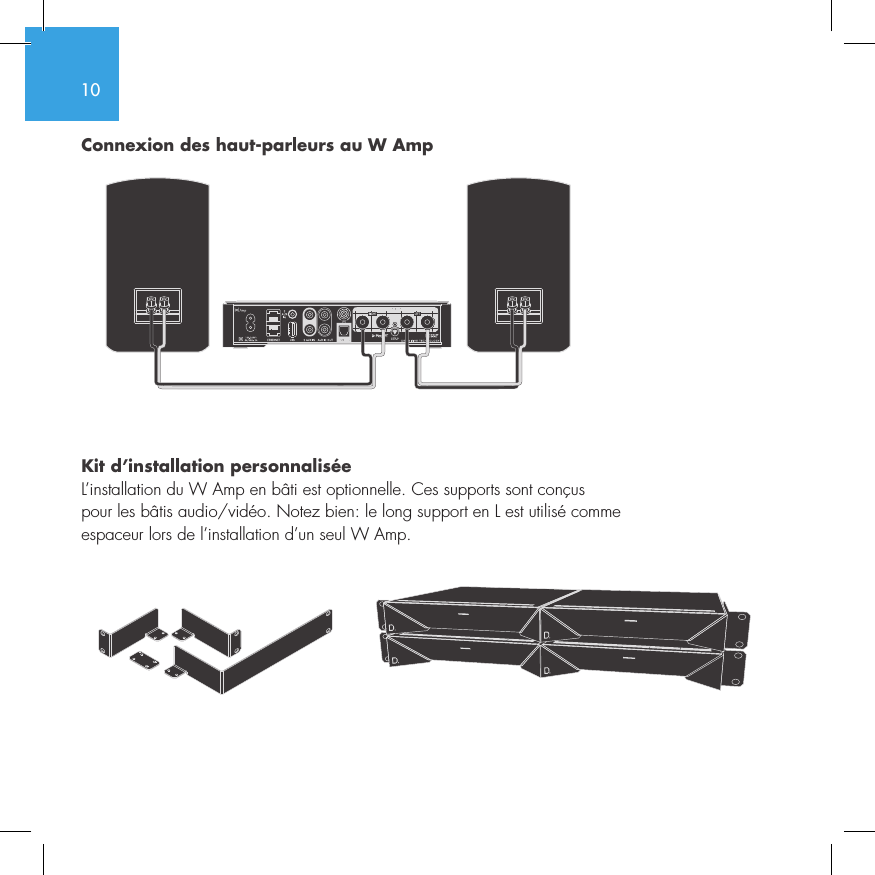
10Connexion des haut-parleurs au W Amp Kit d’installation personnaliséeL’installation du W Amp en bâti est optionnelle. Ces supports sont conçus  pour les bâtis audio/vidéo. Notez bien: le long support en L est utilisé comme  espaceur lors de l’installation d’un seul W Amp. SUB OUT
11  For more information visit our website at www.definitivetech.comLa Definitive Technology Utility App Pour des fonctions additionnelles, comme des mises à jour du micrologiciel, un sélecteur de source (s’il y a lieu), et un égalisateur (W Amp et W Adapt seulement), téléchargez gratuitement la Definitive Technology Utility App de l’App Store ou du Google Play Store.Asistance techniqueSi vous avez des questions, contactez-nous: (800) 228-7148 (Amérique du Nord), +1 (410) 363-7148, courriel: info@DefinitiveTech.comContactez-nousDefinitive Technology11433 Cronridge Drive, Suite K, Owings Mills, MD 21117 USATél.: +1 (410) 363-7148 Courriel: info@DefinitiveTech.comGoogle Play est une marque de commerce de Google Inc.Apple et le logo Apple sont des marques de commerce de Apple Inc. enregistrées aux É.-U. et en d’autres pays. App Store est une marque de service de Apple Inc..Toute autre marque de commerce appartient aux sociétés qui en sont respectivement détentrices.
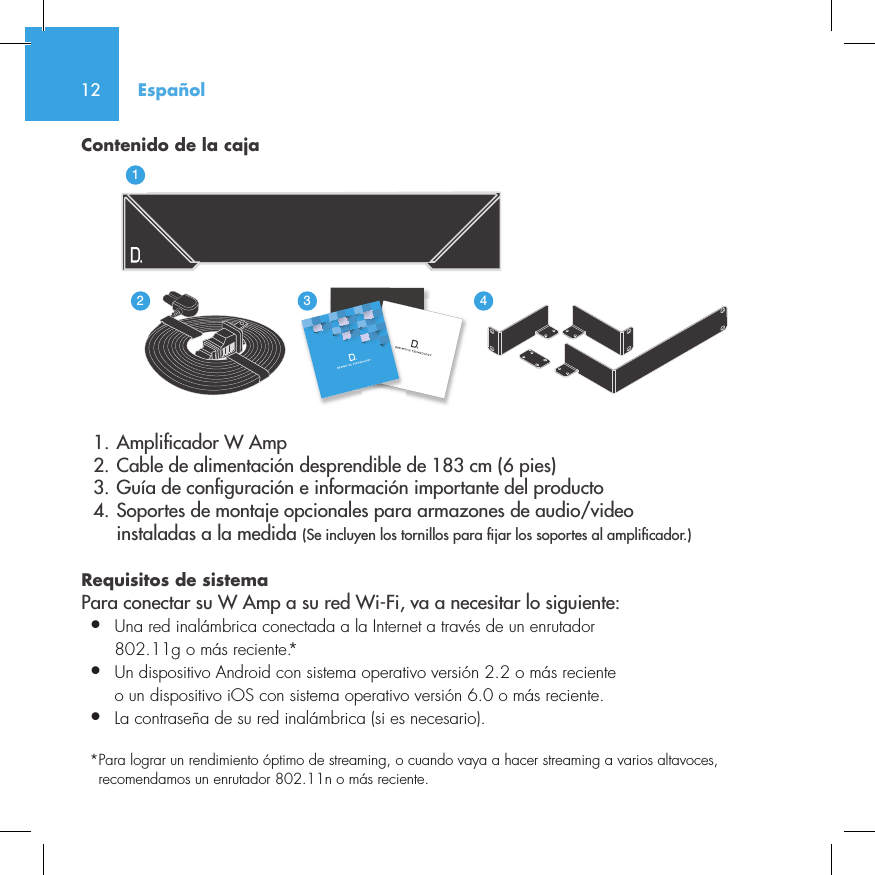
12Contenido de la caja  1. Ampli cador W Amp  2. Cable de alimentación desprendible de 183 cm (6 pies)  3. Guía de con guración e información importante del producto  4. Soportes de montaje opcionales para armazones de audio/video     instaladas a la medida (Se incluyen los tornillos para  jar los soportes al ampli cador.)Requisitos de sistema Para conectar su W Amp a su red Wi-Fi, va a necesitar lo siguiente:•  Una red inalámbrica conectada a la Internet a través de un enrutador   802.11g o más reciente.*•   Un dispositivo Android con sistema operativo versión 2.2 o más reciente o un dispositivo iOS con sistema operativo versión 6.0 o más reciente.•  La contraseña de su red inalámbrica (si es necesario).*  Para lograr un rendimiento óptimo de streaming, o cuando vaya a hacer streaming a varios altavoces, recomendamos un enrutador 802.11n o más reciente.Español3235642114NetAmpNetAdapt
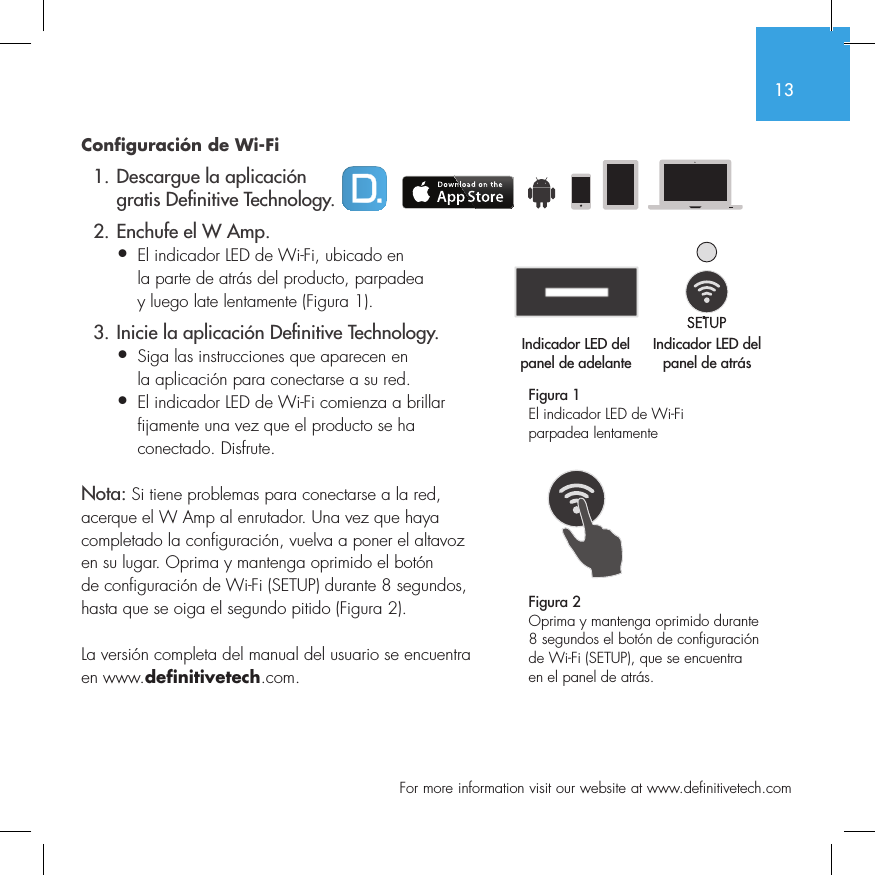
13  For more information visit our website at www.definitivetech.comConfiguración de Wi-Fi  1. Descargue la aplicación     gratis De nitive Technology.  2. Enchufe el W Amp.•  El indicador LED de Wi-Fi, ubicado en   la parte de atrás del producto, parpadea   y luego late lentamente (Figura 1).  3. Inicie la aplicación De nitive Technology.•  Siga las instrucciones que aparecen en   la aplicación para conectarse a su red.•   El indicador LED de Wi-Fi comienza a brillar fijamente una vez que el producto se ha conectado. Disfrute.Nota: Si tiene problemas para conectarse a la red, acerque el W Amp al enrutador. Una vez que haya completado la configuración, vuelva a poner el altavoz en su lugar. Oprima y mantenga oprimido el botón de configuración de Wi-Fi (SETUP) durante 8 segundos, hasta que se oiga el segundo pitido (Figura 2).La versión completa del manual del usuario se encuentra en www.definitivetech.com.Figura 1El indicador LED de Wi-Fi parpadea lentamente Indicador LED del panel de adelanteIndicador LED del panel de atrás1 2 3 456Indicador LED del Indicador LED del 1 2 3 456Figura 2Oprima y mantenga oprimido durante 8 segundos el botón de configuración de Wi-Fi (SETUP), que se encuentra en el panel de atrás.
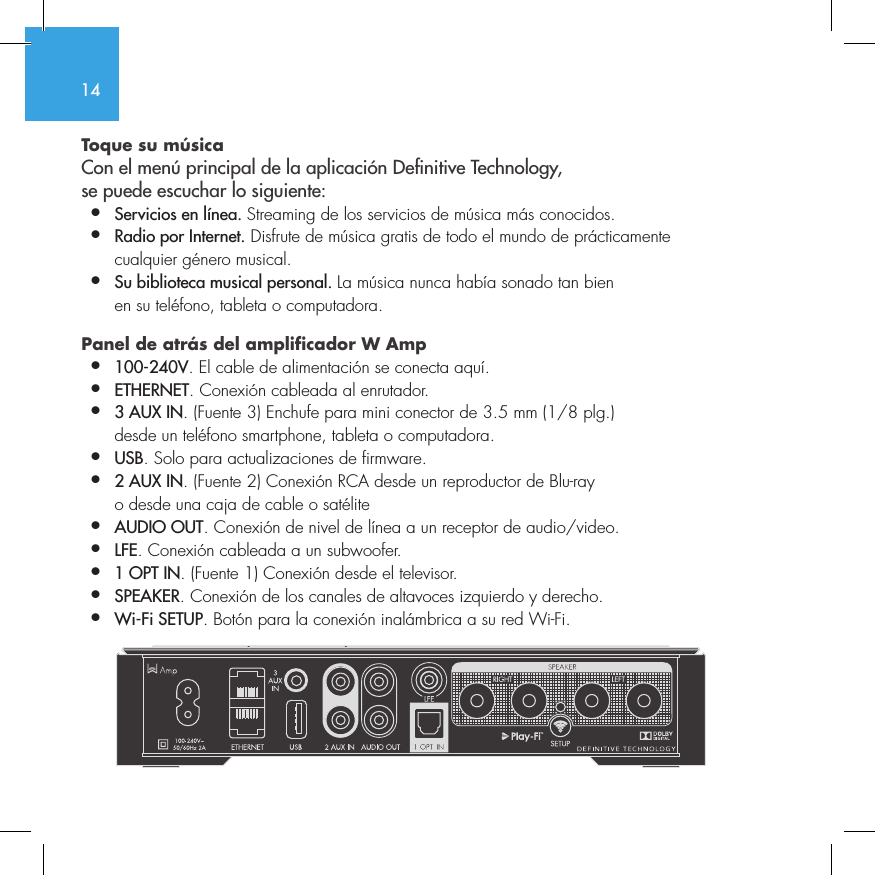
14Toque su música Con el menú principal de la aplicación Denitive Technology,  se puede escuchar lo siguiente:•  Servicios en línea. Streaming de los servicios de música más conocidos.•  Radio por Internet. Disfrute de música gratis de todo el mundo de prácticamente    cualquier género musical.•  Su biblioteca musical personal. La música nunca había sonado tan bien    en su teléfono, tableta o computadora.Panel de atrás del amplificador W Amp •  100-240V. El cable de alimentación se conecta aquí.•  ETHERNET. Conexión cableada al enrutador.•  3 AUX IN. (Fuente 3) Enchufe para mini conector de 3.5 mm (1/8 plg.)    desde un teléfono smartphone, tableta o computadora.•  USB. Solo para actualizaciones de firmware.•  2 AUX IN. (Fuente 2) Conexión RCA desde un reproductor de Blu-ray    o desde una caja de cable o satélite•  AUDIO OUT. Conexión de nivel de línea a un receptor de audio/video.•  LFE. Conexión cableada a un subwoofer.•  1 OPT IN. (Fuente 1) Conexión desde el televisor.•  SPEAKER. Conexión de los canales de altavoces izquierdo y derecho.•  Wi-Fi SETUP. Botón para la conexión inalámbrica a su red Wi-Fi.       SUB OUT
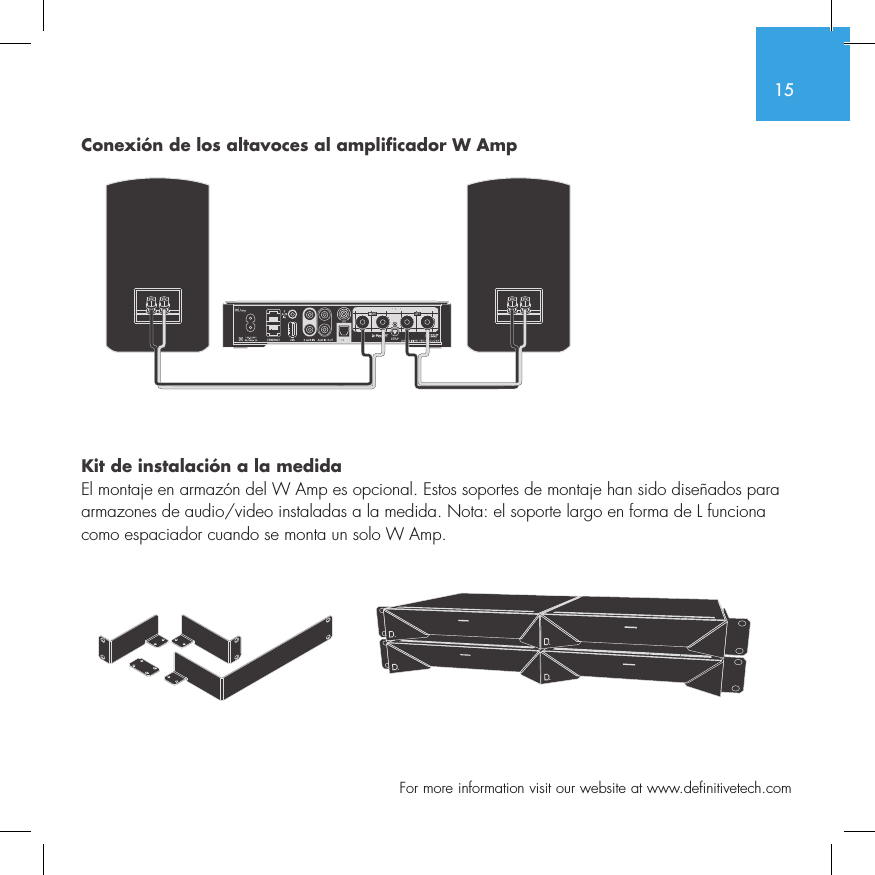
15  For more information visit our website at www.definitivetech.comConexión de los altavoces al amplificador W Amp Kit de instalación a la medidaEl montaje en armazón del W Amp es opcional. Estos soportes de montaje han sido diseñados para armazones de audio/video instaladas a la medida. Nota: el soporte largo en forma de L funciona como espaciador cuando se monta un solo W Amp. SUB OUT
16Aplicación de servicios de Definitive TechnologyPara tener acceso a más funciones, tales como actualizaciones de firmware del producto, selección de fuentes (si corresponde) y configuraciones de ecualización (solo W Amp y W Adapt), descargue la aplicación de servicios gratuita de Definitive Technology de las tiendas en línea Apple App Store o Google Play.Asistencia técnicaSi tiene preguntas, comuníquese con nosotros directamente. (800) 228-7148 (América del Norte), +1 (410) 363-7148, correo electrónico: info@DefinitiveTech.comComuníquese con nosotros directamenteDefinitive Technology11433 Cronridge Drive, Suite K, Owings Mills, MD 21117 USATeléfono: +1 (410) 363-7148 correo electrónico: info@DefinitiveTech.comGoogle Play es una marca comercial de Google Inc.Apple y el logotipo Apple son marcas comerciales de Apple Inc., registradas en EE.UU. y en otros países. App Store es una marca de servicio de Apple Inc.Todas las otras marcas comerciales son propiedad de sus respectivos dueños.
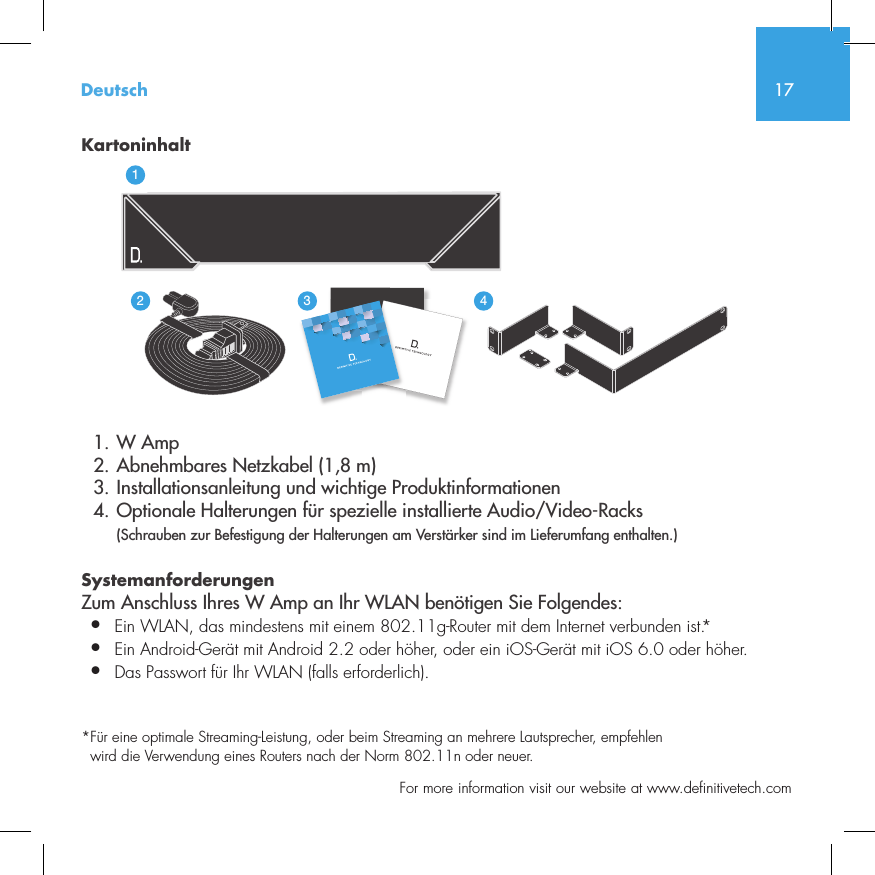
17  For more information visit our website at www.definitivetech.comKartoninhalt  1. W Amp  2. Abnehmbares Netzkabel (1,8 m)  3. Installationsanleitung und wichtige Produktinformationen  4. Optionale Halterungen für spezielle installierte Audio/Video-Racks (Schrauben zur Befestigung der Halterungen am Verstärker sind im Lieferumfang enthalten.)Systemanforderungen Zum Anschluss Ihres W Amp an Ihr WLAN benötigen Sie Folgendes:•  Ein WLAN, das mindestens mit einem 802.11g-Router mit dem Internet verbunden ist.*•   Ein Android-Gerät mit Android 2.2 oder höher, oder ein iOS-Gerät mit iOS 6.0 oder höher. •  Das Passwort für Ihr WLAN (falls erforderlich).* Für eine optimale Streaming-Leistung, oder beim Streaming an mehrere Lautsprecher, empfehlen wird die Verwendung eines Routers nach der Norm 802.11n oder neuer.Deutsch3235642114NetAmpNetAdapt
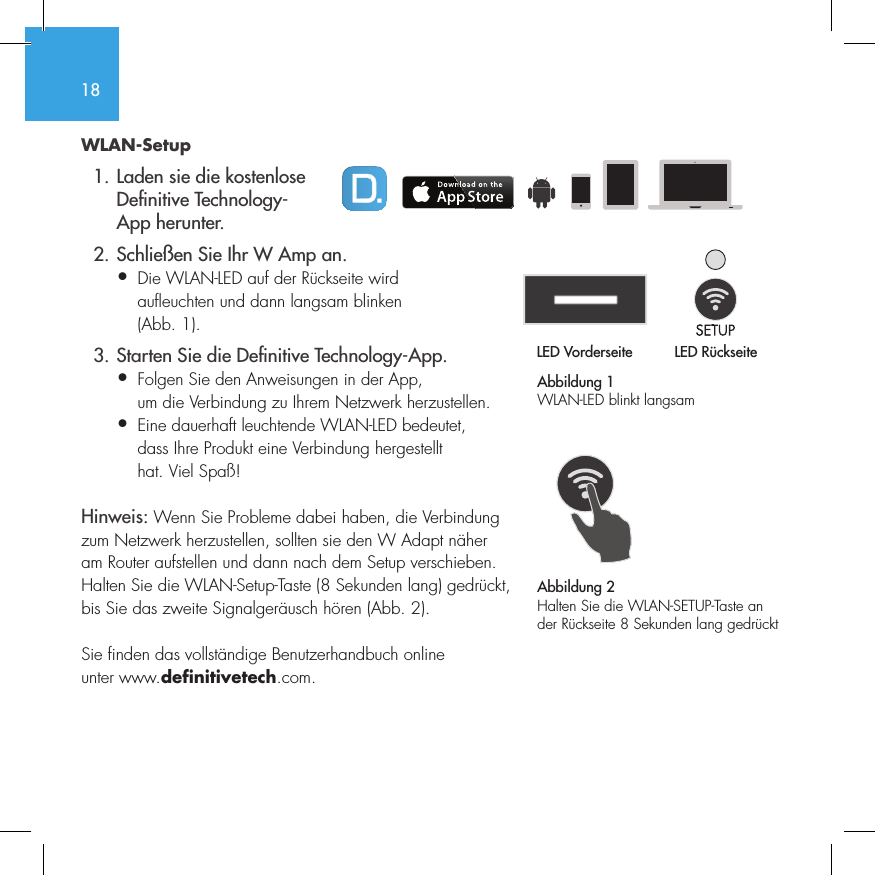
18WLAN-Setup  1. Laden sie die kostenlose     De nitive Technology-    App herunter.  2. Schließen Sie Ihr W Amp an.•  Die WLAN-LED auf der Rückseite wird   aufleuchten und dann langsam blinken   (Abb. 1).  3. Starten Sie die De nitive Technology-App.•  Folgen Sie den Anweisungen in der App,   um die Verbindung zu Ihrem Netzwerk herzustellen.•   Eine dauerhaft leuchtende WLAN-LED bedeutet, dass Ihre Produkt eine Verbindung hergestellt hat. Viel Spaß!Hinweis: Wenn Sie Probleme dabei haben, die Verbindung zum Netzwerk herzustellen, sollten sie den W Adapt näher am Router aufstellen und dann nach dem Setup verschieben. Halten Sie die WLAN-Setup-Taste (8 Sekunden lang) gedrückt, bis Sie das zweite Signalgeräusch hören (Abb. 2).Sie finden das vollständige Benutzerhandbuch online unter www.definitivetech.com.Abbildung 1WLAN-LED blinkt langsamLED Vorderseite LED Rückseite1 2 3 456LED VorderseiteLED Rückseite1 2 3 456Abbildung 2Halten Sie die WLAN-SETUP-Taste an der Rückseite 8 Sekunden lang gedrückt
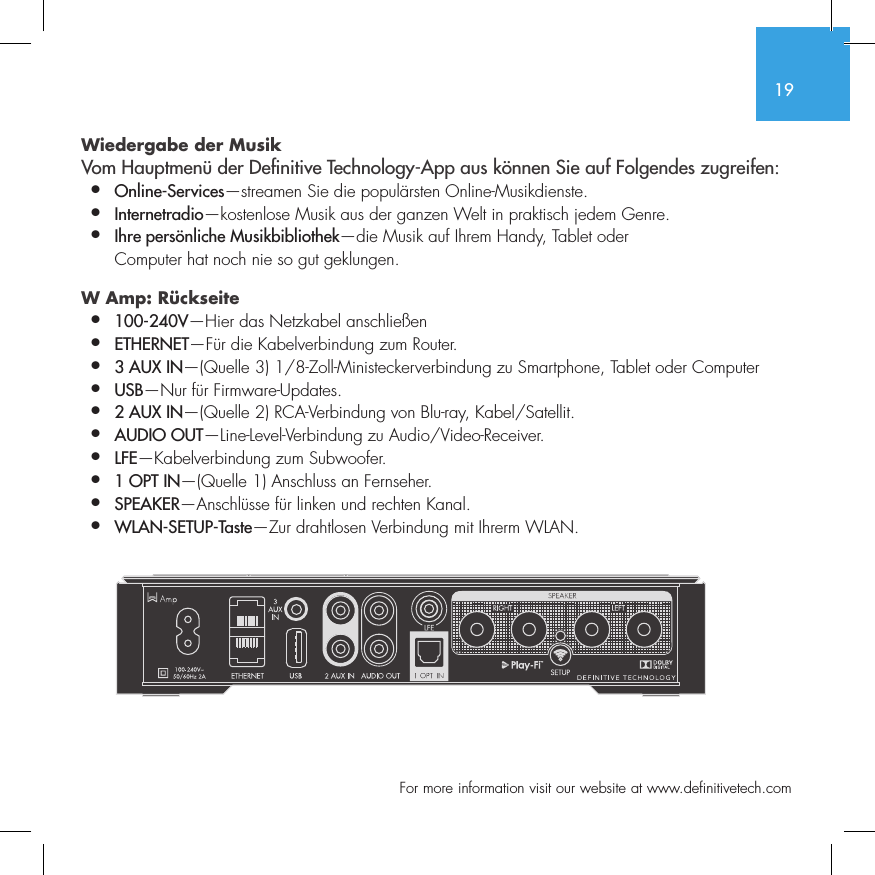
19  For more information visit our website at www.definitivetech.comWiedergabe der Musik Vom Hauptmenü der De nitive Technology-App aus können Sie auf Folgendes zugreifen:•  Online-Services—streamen Sie die populärsten Online-Musikdienste.•   Internetradio—kostenlose Musik aus der ganzen Welt in praktisch jedem Genre.•  Ihre persönliche Musikbibliothek—die Musik auf Ihrem Handy, Tablet oder   Computer hat noch nie so gut geklungen.W Amp: Rückseite •  100-240V—Hier das Netzkabel anschließen•  ETHERNET—Für die Kabelverbindung zum Router.•  3 AUX IN—(Quelle 3) 1/8-Zoll-Ministeckerverbindung zu Smartphone, Tablet oder Computer•  USB—Nur für Firmware-Updates.•  2 AUX IN—(Quelle 2) RCA-Verbindung von Blu-ray, Kabel/Satellit.•  AUDIO OUT—Line-Level-Verbindung zu Audio/Video-Receiver.•  LFE—Kabelverbindung zum Subwoofer.•  1 OPT IN—(Quelle 1) Anschluss an Fernseher.•  SPEAKER—Anschlüsse für linken und rechten Kanal.•  WLAN-SETUP-Taste—Zur drahtlosen Verbindung mit Ihrerm WLAN.SUB OUT
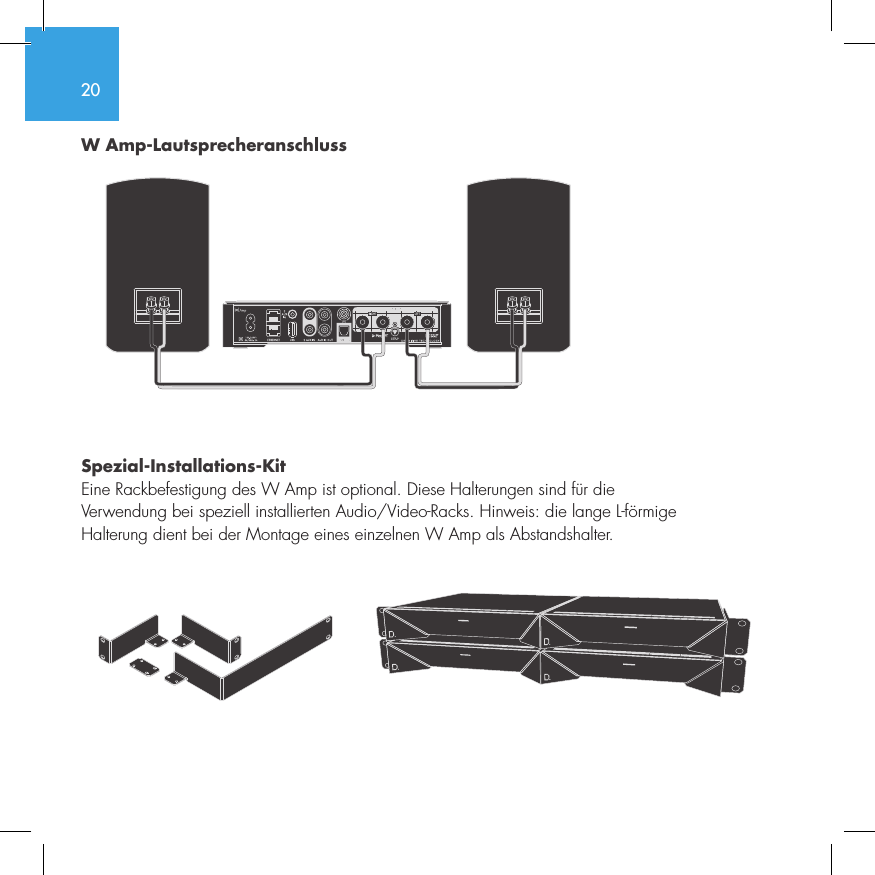
20W Amp-Lautsprecheranschluss Spezial-Installations-KitEine Rackbefestigung des W Amp ist optional. Diese Halterungen sind für die  Verwendung bei speziell installierten Audio/Video-Racks. Hinweis: die lange L-förmige  Halterung dient bei der Montage eines einzelnen W Amp als Abstandshalter. SUB OUT
21  For more information visit our website at www.definitivetech.comDefinitive Technology Utility App Um auf weitere Funktionen, wie Updates für die Produkt-Firmware, ggf. Auswahl der Audioquelle und EQ-Einstellungen (nur für W Amp und W Adapt) zuzugreifen, können Sie die kostenlose Definitive Technology Utility App aus dem Apple App Store oder Google Play Store herunterladen.Technischer KundendienstWenn Sie Fragen haben, wenden Sie sich bitte direkt an uns. (800) 228-7148 (Nordamerika), +1 (410) 363-7148, E-Mail: info@DefinitiveTech.comDirekte KontaktaufnahmeDefinitive Technology11433 Cronridge Drive, Suite K, Owings Mills, MD 21117 USATelefon: +1 (410) 363-7148 oder E-Mail: info@DefinitiveTech.comGoogle Play ist eine Marke von Google Inc.Apple und das Apple-Logo sind in den USA und anderen Ländern eingetragene Marken von Apple Inc. App Store ist eine Dienstleistungsmarke von Apple Inc. Alle anderen Marken sind das Eigentum der jeweiligen Inhaber.
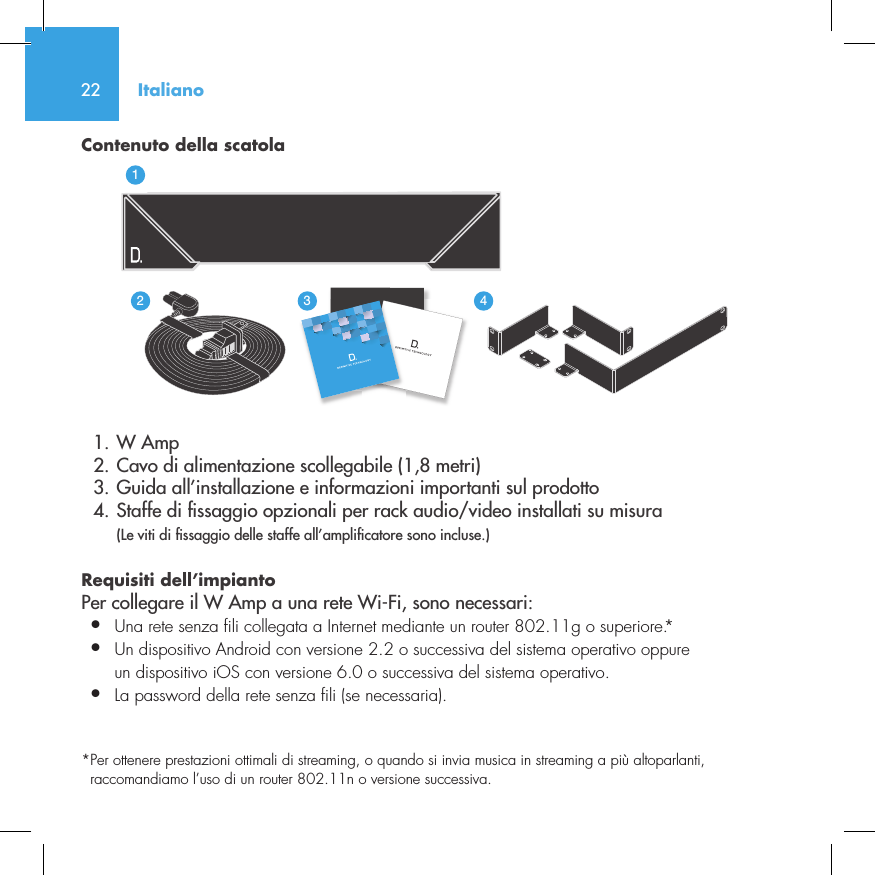
22Contenuto della scatola  1. W Amp  2. Cavo di alimentazione scollegabile (1,8 metri)  3. Guida all’installazione e informazioni importanti sul prodotto  4. Staffe di  ssaggio opzionali per rack audio/video installati su misura  (Le viti di  ssaggio delle staffe all’ampli catore sono incluse.)Requisiti dell’impianto Per collegare il W Amp a una rete Wi-Fi, sono necessari:•  Una rete senza fili collegata a Internet mediante un router 802.11g o superiore.*•  Un dispositivo Android con versione 2.2 o successiva del sistema operativo oppure   un dispositivo iOS con versione 6.0 o successiva del sistema operativo.•  La password della rete senza fili (se necessaria).*  Per ottenere prestazioni ottimali di streaming, o quando si invia musica in streaming a più altoparlanti, raccomandiamo l’uso di un router 802.11n o versione successiva.Italiano3235642114NetAmpNetAdapt
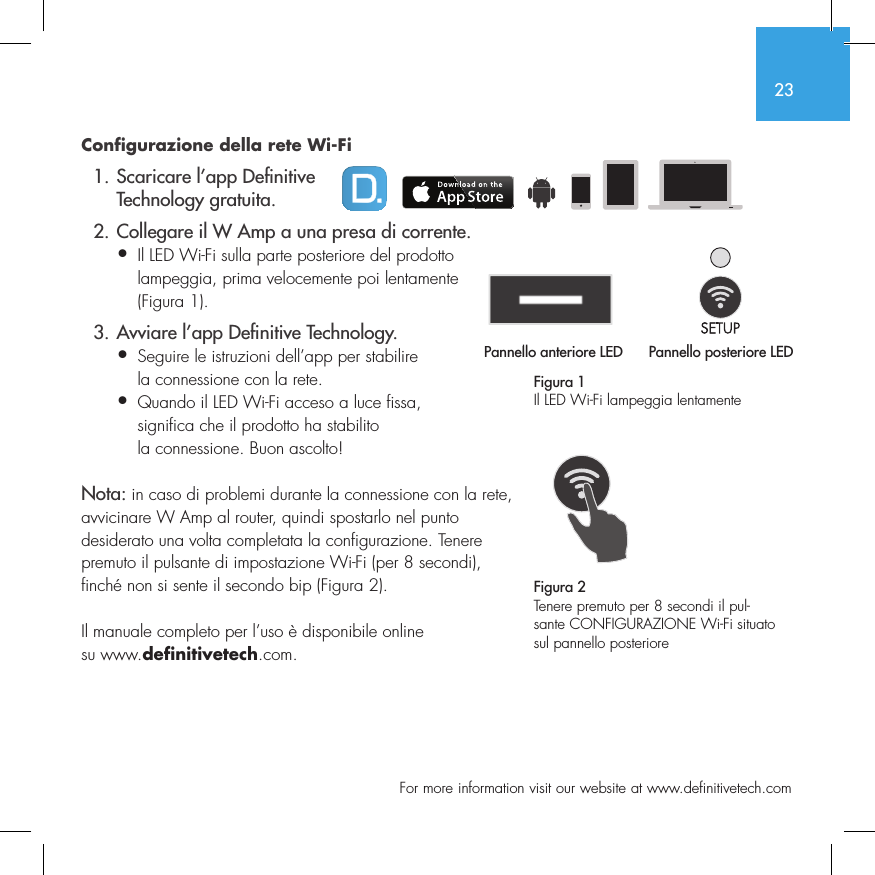
23  For more information visit our website at www.definitivetech.comConfigurazione della rete Wi-Fi  1. Scaricare l’app De nitive     Technology gratuita.  2. Collegare il W Amp a una presa di corrente.•  Il LED Wi-Fi sulla parte posteriore del prodotto   lampeggia, prima velocemente poi lentamente   (Figura 1).  3. Avviare l’app De nitive Technology.•  Seguire le istruzioni dell’app per stabilire   la connessione con la rete.•  Quando il LED Wi-Fi acceso a luce fissa,   significa che il prodotto ha stabilito   la connessione. Buon ascolto!Nota: in caso di problemi durante la connessione con la rete, avvicinare W Amp al router, quindi spostarlo nel punto desiderato una volta completata la configurazione. Tenere premuto il pulsante di impostazione Wi-Fi (per 8 secondi), finché non si sente il secondo bip (Figura 2).Il manuale completo per l’uso è disponibile online su www.definitivetech.com.Figura 1Il LED Wi-Fi lampeggia lentamentePannello anteriore LED Pannello posteriore LED1 2 3 456Pannello anteriore LED1 2 3 4561 2 3 456Figura 2Tenere premuto per 8 secondi il pul-sante CONFIGURAZIONE Wi-Fi situato sul pannello posteriore
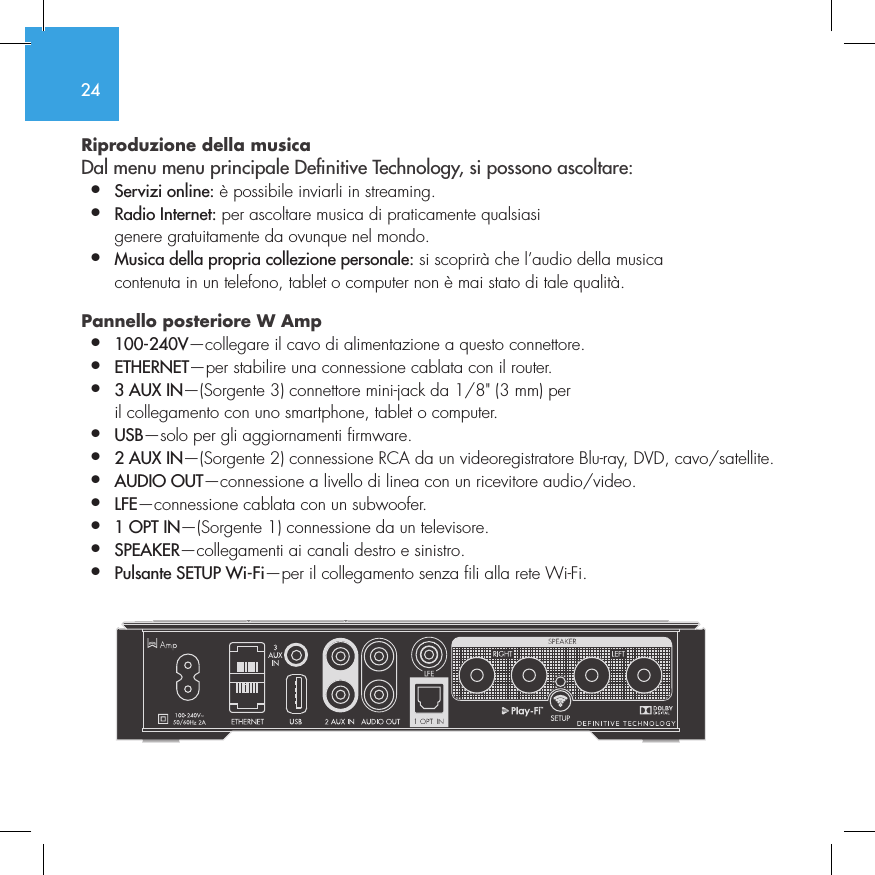
24Riproduzione della musica  Dal menu menu principale Denitive Technology, si possono ascoltare:•  Servizi online: è possibile inviarli in streaming.•  Radio Internet: per ascoltare musica di praticamente qualsiasi    genere gratuitamente da ovunque nel mondo.•  Musica della propria collezione personale: si scoprirà che l’audio della musica    contenuta in un telefono, tablet o computer non è mai stato di tale qualità.Pannello posteriore W Amp •  100-240V—collegare il cavo di alimentazione a questo connettore.•  ETHERNET—per stabilire una connessione cablata con il router.•  3 AUX IN—(Sorgente 3) connettore mini-jack da 1/8" (3 mm) per    il collegamento con uno smartphone, tablet o computer.•  USB—solo per gli aggiornamenti firmware.•  2 AUX IN—(Sorgente 2) connessione RCA da un videoregistratore Blu-ray, DVD, cavo/satellite.•  AUDIO OUT—connessione a livello di linea con un ricevitore audio/video.•  LFE—connessione cablata con un subwoofer.•  1 OPT IN—(Sorgente 1) connessione da un televisore.•  SPEAKER—collegamenti ai canali destro e sinistro.•  Pulsante SETUP Wi-Fi—per il collegamento senza fili alla rete Wi-Fi.         SUB OUT
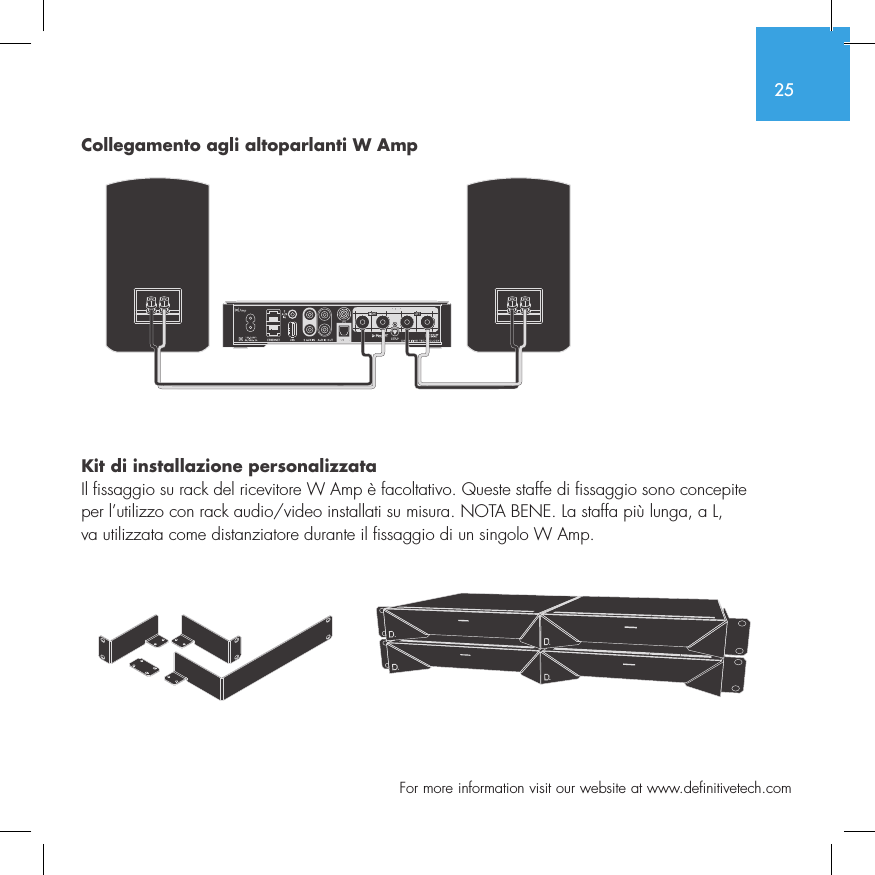
25  For more information visit our website at www.definitivetech.comCollegamento agli altoparlanti W Amp Kit di installazione personalizzataIl fissaggio su rack del ricevitore W Amp è facoltativo. Queste staffe di fissaggio sono concepite  per l’utilizzo con rack audio/video installati su misura. NOTA BENE. La staffa più lunga, a L,  va utilizzata come distanziatore durante il fissaggio di un singolo W Amp.  SUB OUT
26App Definitive Technology Utility  Per accedere a funzionalità avanzate–aggiornamenti sul firmware del prodotto, selezione della sorgente audio (se pertinente) e impostazioni di equalizzazione (solo W Amp e W Adapt)–scaricare l’app gratuita Definitive Technology Utility da Apple App Store o da Google Play.Assistenza tecnicaPer eventuali domande, possibile contattarci direttamente: (800) 228-7148 (Nord America), +1 (410) 363-7148 (in tutto il mondo), e-mail: info@DefinitiveTech.comPer contattarci direttamenteDefinitive Technology11433 Cronridge Drive, Suite K, Owings Mills, MD 21117 USATelefono: +1 (410) 363-7148 (Nord America) o e-mail: info@DefinitiveTech.comGoogle Play è un marchio di Google Inc.Apple e il logo Apple sono marchi di Apple Inc., registrati negli Stati Uniti e in altri Paesi. App Store è un marchio di servizio di Apple Inc. Tutti gli altri marchi sono di proprietà dei rispettivi titolari.
De nitive Technology11433 Cronridge Dr.Owings Mills, MD 21117(410) 363-7148(800) 228-7148www.de nitivetech.com HBP3071

Navigation menu