DXY Technology 1001 Bluetooth Smart Watch User Manual HWATCH W1L1 Use Manual Eng Chi

DXY Technology Co.,Ltd. Bluetooth Smart Watch HWATCH W1L1 Use Manual Eng Chi

User Manual

01 02   HWATCH L1/W1 The devices in HWATCH L1/W1 standard package include: 1. HWATCH L1/W1 fashionable female smart watch.2. Specification3. Warranty card and warranty policies4. Certificate of quality  Note:  If the watch battery has no power, please replace            CR2330 standard button battery.Material ListHWATCH L1/W1Welcome to use HWATCH L1/W1 smart watch. HWATCH L1/W1 is the first fashionable and smart watch for female made by DXY Technology. Like other models under HWATCH L1/W1 series, it is a trans-boundary product combining traditional watch process and technical intelligence. HWATCH L1/W1 has soft curve, reliable material and stable performance. It is L1 embedded with VS-grade real diamond, W1 embedded with colorful crystal. which makes HWATCH L1/W1 shine. Like you, it looks so beautiful, tender and strong. The pointer on dial plate follows the rotation of Ronda quartz movement. HWATCH L1/W1 is quietly recording and analyzing your exercise and sleep. It can also conduct UV inspection if needed. By this, you know well about your daily routine. To select HWATCH L1/W1 means the selection of long-term high-quality and smart watch from HWatch as well as the selection of H health mobile phone applications under the cooperation of many professional institutions. While monitoring daily parameters, daily health diary can be formed, making health a part of your fashion. From now on, you can open up a new life chapter which ishealthy, beautiful and fashionable with HWATCH L1/W1.
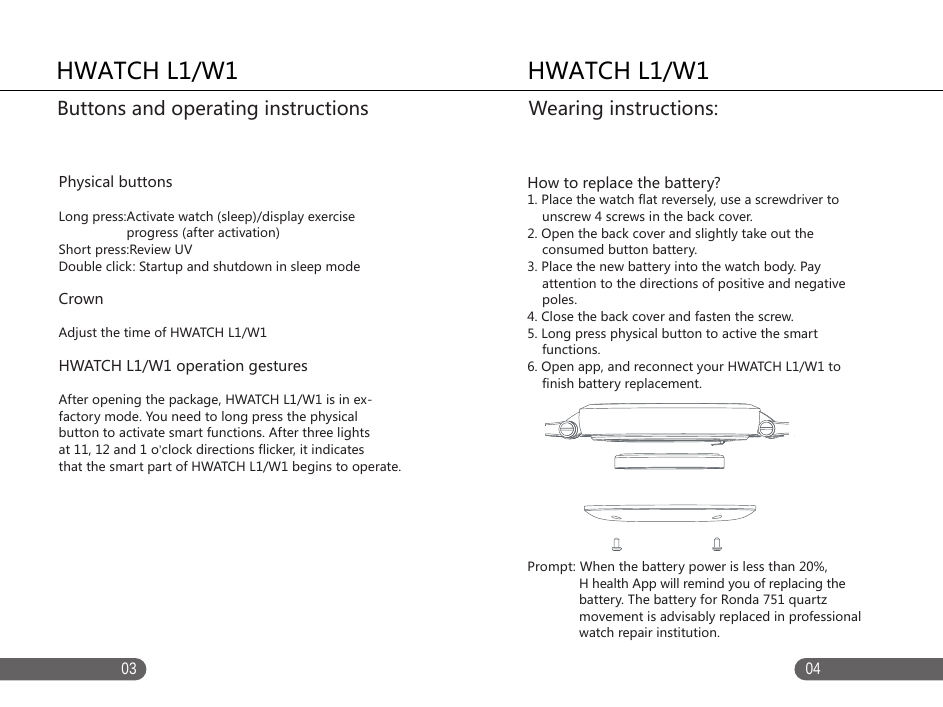
   0403HWATCH L1/W1   Physical buttonsLong press:Activate watch (sleep)/display exercise                    progress (after activation)Short press:Review UVDouble click: Startup and shutdown in sleep modeCrown Adjust the time of HWATCH L1/W1HWATCH L1/W1 operation gesturesAfter opening the package, HWATCH L1/W1 is in ex-factory mode. You need to long press the physical button to activate smart functions. After three lights at 11, 12 and 1 o’clock directions flicker, it indicatesthat the smart part of HWATCH L1/W1 begins to operate.Buttons and operating instructions   HWATCH L1/W1  How to replace the battery?1. Place the watch flat reversely, use a screwdriver to     unscrew 4 screws in the back cover. 2. Open the back cover and slightly take out the     consumed button battery. 3. Place the new battery into the watch body. Pay     attention to the directions of positive and negative     poles. 4. Close the back cover and fasten the screw. 5. Long press physical button to active the smart     functions. 6. Open app, and reconnect your HWATCH L1/W1 to     finish battery replacement. Prompt: When the battery power is less than 20%,               H health App will remind you of replacing the               battery. The battery for Ronda 751 quartz               movement is advisably replaced in professional               watch repair institution. Wearing instructions:
0605Adaptive devicesHWATCH L1/W1 is compatible with mobile phone based on Bluetooth 4.0 hardware device. Before connecting your device, please ensure that your device has downloaded App: H healthAdaptive operating systemiOS7.0 and above versionAndroid4.3 and above versionAdaptive device modeliOS platform: iPhone 4s/5/5S/6/6 Plus Android platform: MEIZU MX3/4, Samsung S4/S5, MI M3/M4, Hammer mobile phone T1, one plus mobile phoneInstallation of H health H health is a smart watch under HWATCH L1/W1After dedicated mobile phone administration software is used to connect H Health and HWATCH L1/W1, it can help you administer watch, have a real-time review on exercise health data report, analyze and conduct UVI detection, and record daily routine on the timeline of H Health. Note: For more device support, please keep concerning           about our website: http://www.hwatch.cnYou can search “H health” by accessing App Store, Google Play Store or other application markets, download and install H health App for free. You can also scan QR code in the following diagram to download and install it. H health use and synchronizationConnect to watch Operate H health on mobile phone. Please register and bind your HWATCH L1/W1 according to the prompt. If you have an account, please login it directly. After logging in, you can synchronize and update the  data by pull-down manner. Prompt:  If App is installed in iPad, please search and               download it in iPhone item. HWATCH L1/W1Mobile sync instructionHWATCH L1/W1Mobile sync instruction
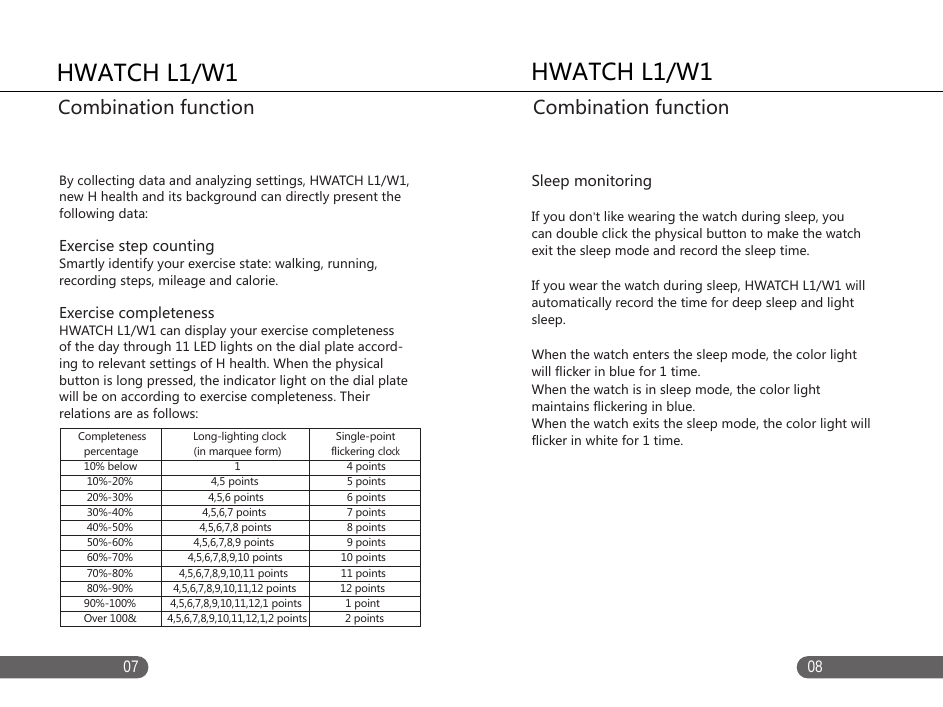
0807By collecting data and analyzing settings, HWATCH L1/W1, new H health and its background can directly present the following data: Exercise step counting Smartly identify your exercise state: walking, running, recording steps, mileage and calorie.Exercise completenessHWATCH L1/W1 can display your exercise completeness of the day through 11 LED lights on the dial plate accord-ing to relevant settings of H health. When the physical button is long pressed, the indicator light on the dial plate will be on according to exercise completeness. Their relations are as follows: Sleep monitoring If you don’t like wearing the watch during sleep, you can double click the physical button to make the watch exit the sleep mode and record the sleep time. If you wear the watch during sleep, HWATCH L1/W1 will automatically record the time for deep sleep and light sleep. When the watch enters the sleep mode, the color light will flicker in blue for 1 time. When the watch is in sleep mode, the color light maintains flickering in blue. When the watch exits the sleep mode, the color light will flicker in white for 1 time.HWATCH L1/W1Combination functionHWATCH L1/W1Combination function     Completeness                Long-lighting clock                 Single-point        percentage                   (in marquee form)                 flickering clock        10% below                                  1                      4 points        10%-20%                           4,5 points                      5 points        20%-30%                          4,5,6 points                      6 points        30%-40%                        4,5,6,7 points                      7 points        40%-50%                       4,5,6,7,8 points                      8 points        50%-60%                     4,5,6,7,8,9 points                      9 points        60%-70%                   4,5,6,7,8,9,10 points                    10 points        70%-80%                4,5,6,7,8,9,10,11 points                   11 points        80%-90%              4,5,6,7,8,9,10,11,12 points               12 points       90%-100%            4,5,6,7,8,9,10,11,12,1 points               1 point       Over 100&           4,5,6,7,8,9,10,11,12,1,2 points             2 points
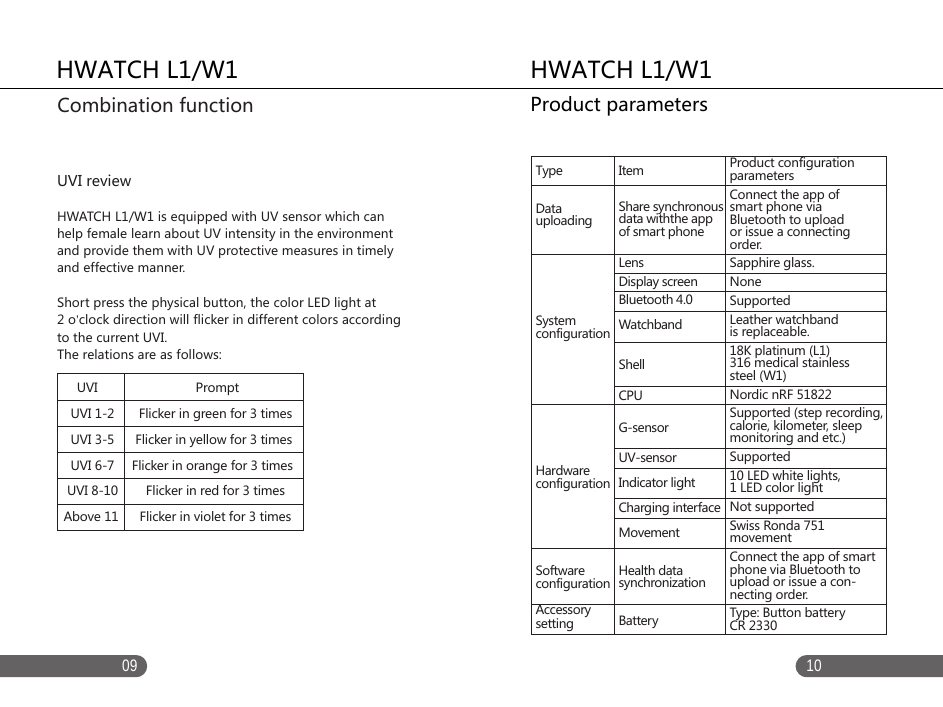
1009UVI reviewHWATCH L1/W1 is equipped with UV sensor which can help female learn about UV intensity in the environment and provide them with UV protective measures in timely and effective manner. Short press the physical button, the color LED light at 2 o’clock direction will flicker in different colors according to the current UVI. The relations are as follows:HWATCH L1/W1Product parametersHWATCH L1/W1Combination functionTypeDatauploadingSystemconfigurationHardwareconfigurationSoftware configurationAccessory settingItemShare synchronous data withthe app of smart phoneLensDisplay screenBluetooth 4.0WatchbandShellCPUG-sensor  UV-sensorIndicator lightCharging interfaceMovementHealth data synchronizationBatteryProduct configuration parametersConnect the app of smart phone via Bluetooth to upload or issue a connecting order.Sapphire glass.NoneSupportedLeather watchband is replaceable.18K platinum (L1)316 medical stainless steel (W1) Nordic nRF 51822Supported (step recording, calorie, kilometer, sleep monitoring and etc.)Supported10 LED white lights, 1 LED color light Not supportedSwiss Ronda 751 movementConnect the app of smart phone via Bluetooth to upload or issue a con-necting order. Type: Button battery CR 2330      UVI                            Prompt   UVI 1-2       Flicker in green for 3 times  UVI 3-5      Flicker in yellow for 3 times  UVI 6-7     Flicker in orange for 3 times UVI 8-10        Flicker in red for 3 timesAbove 11      Flicker in violet for 3 times

Navigation menu