Direction Technology DTC-CX280 Cycle computer User Manual Bion A609 Instruction Manual 20160309

Direction Technology Co., Ltd. Cycle computer Bion A609 Instruction Manual 20160309

Users Manual

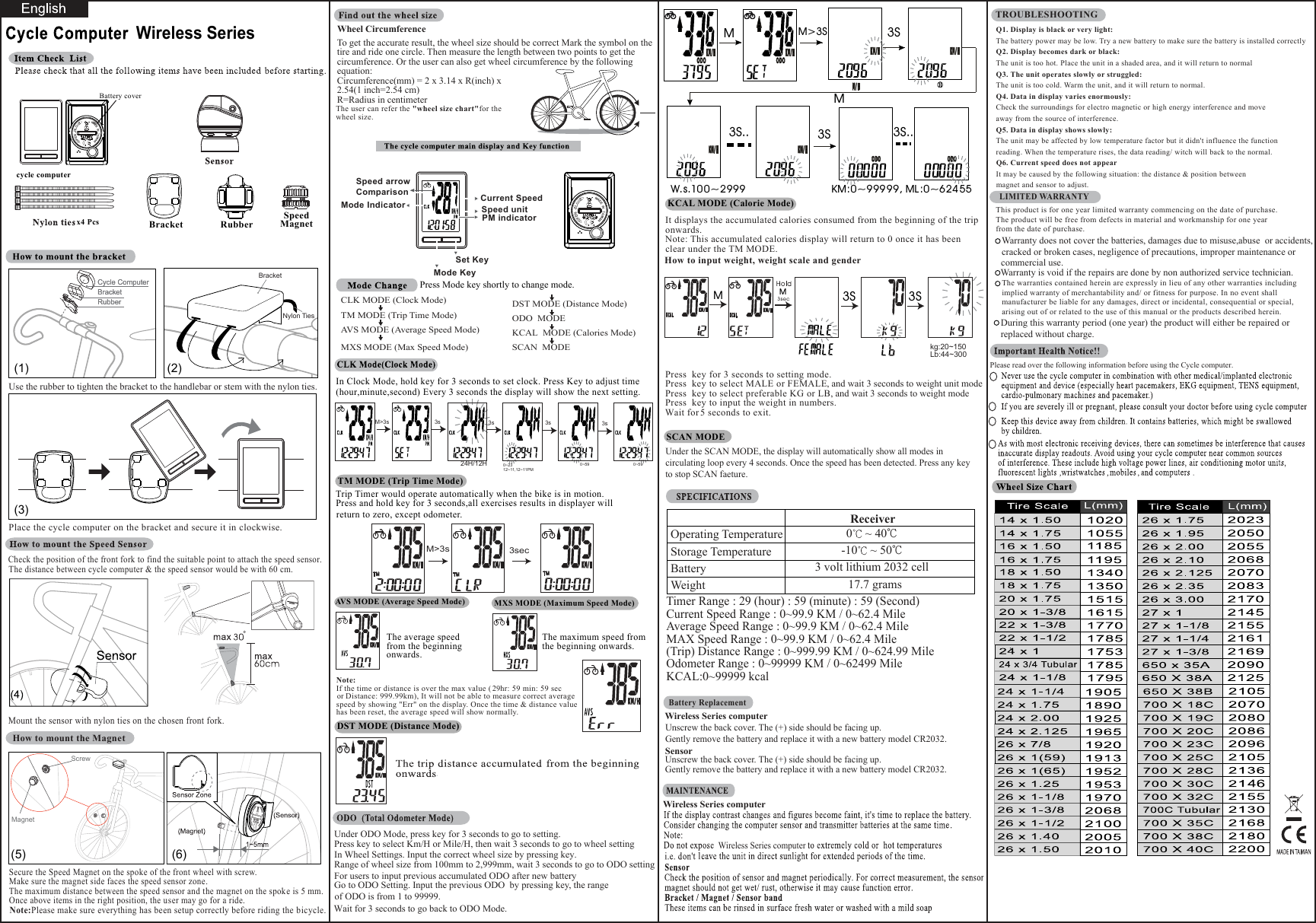
Wireless SeriesWarranty does not cover the batteries, damages due to misuse,abuse  or accidents,cracked or broken cases, negligence of precautions, improper maintenance or LIMITED WARRANTY Wireless Series computerUnscrew the back cover. The (+) side should be facing up.Gently remove the battery and replace it with a new battery model CR2032.Under the SCAN MODE, the display will automatically show all modes in circulating loop every 4 seconds. Once the speed has been detected. Press any keyto stop SCAN faeture..ReceiverOperating TemperatureStorage TemperatureBatteryWeight 17.7 grams0~ 40℃-10 ~ 50℃3 volt lithium 2032 cellTimer Range : 29 (hour) : 59 (minute) : 59 (Second)Current Speed Range : 0~99.9 KM / 0~62.4 MileAverage Speed Range : 0~99.9 KM / 0~62.4 MileMAX Speed Range : 0~99.9 KM / 0~62.4 Mile(Trip) Distance Range : 0~999.99 KM / 0~624.99 MileOdometer Range : 0~99999 KM / 0~62499 MileKCAL:0~99999 kcalWheel CircumferenceTo get the accurate result, the wheel size should be correct Mark the symbol on the tire and ride one circle. Then measure the length between two points to get the circumference. Or the user can also get wheel circumference by the following equation:Circumference(mm) = 2 x 3.14 x R(inch) x 2.54(1 inch=2.54 cm)R=Radius in centimeterPress Mode key shortly to change mode.CLK MODE (Clock Mode)TM MODE (Trip Time Mode) AVS MODE (Average Speed Mode) MXS MODE (Max Speed Mode)DST MODE (Distance Mode)AVS MODE (Average Speed Mode)The average speedfrom the beginning onwards.MXS MODE (Maximum Speed Mode)DST MODE (Distance Mode)The user can refer the "wheel size chart"for thewheel size.The maximum speed fromthe beginning onwards.Note:If the time or distance is over the max value ( 29 hr: 59 min: 59 secor Distance: 999.99km), It will not be able to measure correct average speed by showing "Err" on the display. Once the time & distance value has been reset, the average speed will show normally.KCAL MODE (Calorie Mode)SCAN MODEIt displays the accumulated calories consumed from the beginning of the triponwards.Note: This accumulated calories display will return to 0 once it has been clear under the TM MODE.How to input weight, weight scale and genderPress  key for 3 seconds to setting mode.Press  key to select MALE or FEMALE, and wait 3 seconds to weight unit modePress  key to select preferable KG or LB, and wait 3 seconds to weight modePress  key to input the weight in numbers.  Wait for 5 seconds to exit.This product is for one year limited warranty commencing on the date of purchase.The product will be free from defects in material and workmanship for one yearfrom the date of purchase.Battery ReplacementQ1. Display is black or very light:The battery power may be low. Try a new battery to make sure the battery is installed correctlyQ2. Display becomes dark or black:The unit is too hot. Place the unit in a shaded area, and it will return to normalQ3. The unit operates slowly or struggled:The unit is too cold. Warm the unit, and it will return to normal.Q4. Data in display varies enormously:Check the surroundings for electro magnetic or high energy interference and move away from the source of interference.Q5. Data in display shows slowly:The unit may be affected by low temperature factor but it didn't influence the function  reading. When the temperature rises, the data reading/ witch will back to the normal.Q6. Current speed does not appearIt may be caused by the following situation: the distance & position between magnet and sensor to adjust.TROUBLESHOOTINGODO  MODE KCAL  MODE (Calories Mode) SCAN  MODE    Trip Timer would operate automatically when the bike is in motion. Press and hold key for 3 seconds,all exercises results in displayer will return to zero, except odometer.TM MODE (Trip Time Mode)3sec3S3S3S 3S3S.. 3S..MMMM>3SMW. s.10 0 ~299 9Under ODO Mode, press key for 3 seconds to go to setting.Press key to select Km/H or Mile/H, then wait 3 seconds to go to wheel settingIn Wheel Settings. Input the correct wheel size by pressing key. Range of wheel size from 100mm to 2,999mm, wait 3 seconds to go to ODO settingFor users to input previous accumulated ODO after new battery Go to ODO Setting. Input the previous ODO  by pressing key, the range KM :0~999 9 9, ML :0~6 24 55kg:20~150Lb:44~300SensorUnscrew the back cover. The (+) side should be facing up.Gently remove the battery and replace it with a new battery model CR2032.TM TM TMIn Clock Mode, hold key for 3 seconds to set clock. Press Key to adjust time (hour,minute,second) Every 3 seconds the display will show the next setting.M>3sPlease read over the following information before using the Cycle computer.Warranty is void if the repairs are done by non authorized service technician.The warranties contained herein are expressly in lieu of any other warranties includingimplied warranty of merchantability and/ or fitness for purpose. In no event shallmanufacturer be liable for any damages, direct or incidental, consequential or special,arising out of or related to the use of this manual or the products described herein. During this warranty period (one year) the product will either be repaired or replaced without charge.commercial use.M>3s 3s 3s 3s 3sof ODO is from 1 to 99999.Wait for 3 seconds to go back to ODO Mode.24H/12H 0~2312~11,12~11PM0~59 0~59 Wireless Series computer Wireless Series computerBracketNylon Ties(2)(1)RubberBracketCycle ComputerRubberBracketCycle ComputerUse the rubber to tighten the bracket to the handlebar or stem with the nylon ties.Place the cycle computer on the bracket and secure it in clockwise.Check the position of the front fork to find the suitable point to attach the speed sensor.  The distance between cycle computer & the speed sensor would be with 60 cm. Mount the sensor with nylon ties on the chosen front fork. How to mount the MagnetNote:Please make sure everything has been setup correctly before riding the bicycle.Secure the Speed Magnet on the spoke of the front wheel with screw.Make sure the magnet side faces the speed sensor zone.The maximum distance between the speed sensor and the magnet on the spok e is 5 mm. Once above items in the right position, the user may go for a ride.(3)(5)MagnetScrew(6)cycle computer Battery coverx4 Pcs SpeedMagnetRubberBracketMode KeySet KeyCurrent SpeedPM indicatorSpeed unit Mode IndicatorSpeed arrow Comparison

Navigation menu