DowroSciences 11033689 RFID Tag Locator User Manual USERS MANUAL

Dow AgroSciences LLC RFID Tag Locator USERS MANUAL

USERS MANUAL

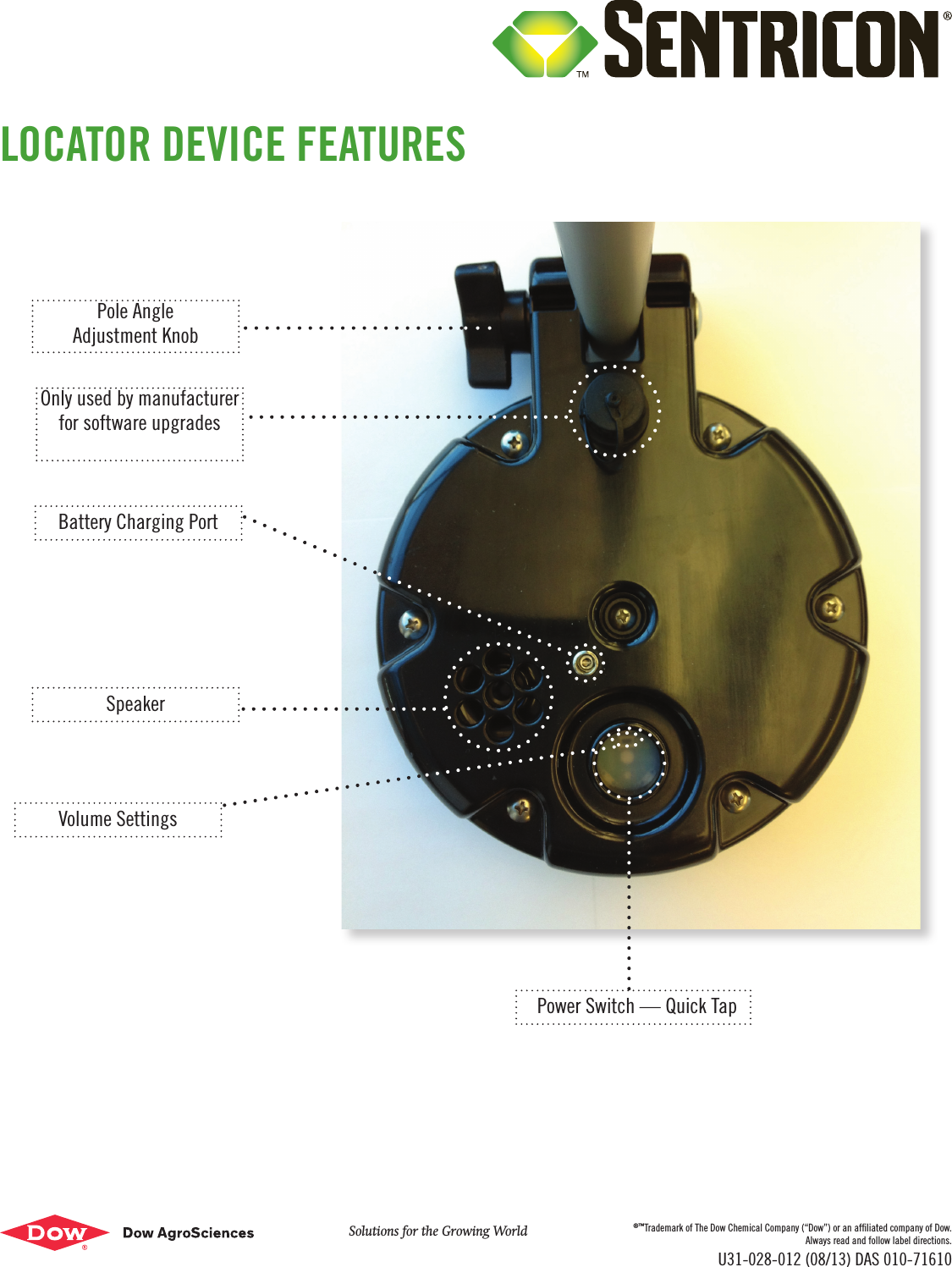
The Locator Device was designed to locate stations for the Sentricon® System that are utilizing Always Active™ technology LID top caps or ESP® technology Transensors. The Locator device will only nd or locate a station — it will not identify the station or determine its status.New features of the Locator include:  – Auto hibernate – saves battery life – Adjustable pole length and angle with ergonomic arm rest – technician comfort – Power switch – quick tap  – No exposed wires – fewer repairs – Lighter weight – 2 lbs, easily ts in an equipment bucket or attaches to a belt clip. When You Get the Locator1.  Ensure the batteries are fully charged by charging the device overnight. The charger is included in the box. 2.  Watch the “How-to-Use” video on the “product resources” section of the AO Resource Center (www.aoresourcecenter.com).3.  Test the device in the ofce to make sure it works properly before going to a job site. On & OffTo turn the device on, lightly tap the power switch (see photo). There is no “off” button. The device will automatically turn off after 2 ½ minutes of inactivity.VolumeThere are 3 volume settings. To control the volume, use a soft pointed tool, like a pen cap, to push the volume switch (see photo). To mufe the volume, place a piece of tape over the speaker which can also prevent debris from entering the speaker area. Light Colors – Flickering white – close to a station – Solid white – directly above a station – Flashing Green – device is on – Yellow – battery is charging (light will turn off when battery is fully charged)Pole Adjustments The length of the pole can be adjusted by loosening the adjustment knob and shortening or lengthening the telescopic pole.  The angle of the pole can be adjusted by loosening and then tightening the knob on the end of the pole (see photo). Battery The device is designed to read 800 (or 35 average size homes) Always Active LID top caps and ESP Transensors before a recharge is needed. However, it is recommended to recharge the Locator every night after use. The 3 batteries are designed to last multiple years, and can only be replaced by the manufacturer. Taking the unit apart will void the warranty. MoistureThe Locator is built to be water resistant, but it is not water proof. It’s recommended to utilize a protective covering, like a shower cap, when its being used in the rain or in heavy dew. RepairsFor any repairs or maintenance issues, please call 1-800-888-5511 option 1.NOTE: This equipment has been tested and found to comply with the limits for a Class B digital device, pursuant to part 15 of the FCC Rules. These limits are designed to provide reasonable protection against harmful interference in a residential installation. This equipment generates, uses and can radiate radio frequency energy and, if not installed and used in accordance with the instructions, may cause harmful interference to radio communications. However, there is no guarantee that interference will not occur in a particular installation. If this equipment does cause harmful interference to radio or television reception, which can be determined by turning the equipment off and on, the user is encouraged to try to correct the interference by one or more of the following measures: – Reorient or relocate the receiving antenna. – Increase the separation between the equipment and receiver. – Connect the equipment into an outlet on a circuit different from that to which the receiver – is connected. – Consult the dealer or an experienced radio/ TV technician for help.FCC Radiation Exposure StatementThis equipment complies with FCC radiation exposure limits set forth for an uncontrolled environment.  This equipment should be installed and operated with minimum distance 20cm between the radiator and your body.  Any changes or modications not expressly approved by the party responsible for compliance could void the user’s authority to operate this equipment.LOCATOR DEVICE INFORMATION AND USE DIRECTIONS
Battery Charging PortSpeakerVolume SettingsPower Switch — Quick TapPole AngleAdjustment KnobOnly used by manufacturer for software upgradesLOCATOR DEVICE FEATURESSolutions for the Growing World ®™Trademark of The Dow Chemical Company (“Dow”) or an afliated company of Dow.Always read and follow label directions.U31-028-012 (08/13) DAS 010-71610

Navigation menu