Dwyer Instruments UHH0032011 Base Universal Handheld Module User Manual SSS 1000

Dwyer Instruments, Inc. Base Universal Handheld Module SSS 1000

Users Manual

Model UHH - Universal Handheld Test InstrumentSpecifications - Installation and Operating InstructionsBulletin TE-UHHDWYER INSTRUMENTS, INC. Phone: 219/879-8000 www.dwyer-inst.comP.O. BOX 373 • MICHIGAN CITY, INDIANA 46361, U.S.A.  Fax: 219/872-9057 e-mail: info@dwyer-inst.comUHH SPECIFICATIONS Languages: German, Spanish, Italian,English, Portuguese.Display: OLED, color 240 x 320.Temperature Limits: 5 to 125°F (-15to 51°C); Note: When using wireless    function: 20 to 125°F (-6 to 51°C).Battery Charging Limits: 32 to 113°F(0 to 45°C).Resolution: 1 FPM, 0.1 MPS, 0.1CFM & M3/HR; 0.1°F & °C; RH 0.1%.Units Air Velocity:  FPM, MPH, KN,M/H, M/S K/H, FPS.Units Flow: CFM, M3/HR, M3/S, GPM,GPH, GPD, LPS, LPM, LPH.Units Temperature: °F, °C.Handle Enclosure: Thermoplasticelastomer over polycarbonate.   Maximum Wireless Distance: 50’(15 m)Power Requirements: Rechargeablelithium ion polymer via USB.Weight: 10 oz (283 g).Supplied With:AQTI: Soft case; USB cable/ charger; Hand strap; AQTIP: Soft case; Hard case; USB cable/charger; Hand strap, 2GB SD card.Agency Approval: CE, EN 1000-4-2,EN 1000-4-3, EN 1000-4-4, EN 1000-4-5,  EN 1000-4-6, EN 1000-4-11, EN300 328, EN 300 328, EN 300 328,EN 300 328, EN 300 328, EN 50371,EN 300 328 with CE approvedcharger, RoHS; Note: Intended to beoperated with power cables less than3 m in length *FCC Compliance.THERMO ANEMOMETER PROBESPECIFICATIONSService: Air velocity and temperatureof clean, dry air.Temperature Limits: Process: -20 to 200°F (-29 to 93°C); Ambient: 5 to 125°F (-15 to 51°C).Battery Charging Limits: 32 to 113°F(0 to 45°C).Range Air Velocity: 0 to 6000 FPM (0to 30 m/s).Accuracy Air Velocity: ±3% FSwithin temperature range of 40 to 90°F(4 to 32°C).Range Volumetric Air Flow: 999,999in selected flow units.Range Temperature: -40 to 212°F (-40 to 100°C).Accuracy Temperature: ±0.5°F(±0.28°C).Power Requirements: Rechargeablelithium ion polymer via USB. Wirelessprobes only. Do not operate wirelessprobes while connected to the batterycharger.Handle Enclosure: Thermoplasticelastomer over polycarbonate. Probe Length: 8˝ (203 mm) insertion.Cable Length: 28˝ (71 cm) retracted,6 ft (183 cm) extended.Supplied With: Wrist strap.Agency Approval: CE, EN 1000-4-2,EN 1000-4-3, EN 1000-4-4, EN 1000-4-5,  EN 1000-4-6, EN 1000-4-11, EN300 328, EN 300 328, EN 300 328,EN 300 328, EN 300 328, EN 50371,EN 300 328 with CE approved chargerRoHS; Note: Intended to be operatedwith power cables less than 3 m inlength *FCC Compliance.HUMIDITY/TEMPERATURE PROBESPECIFICATIONSService: Humidity and temperaturedetection in clean air.Temperature Limits: Process: -40 to 176°F (-40 to 80°C); Ambient: 5 to 125°F (-15 to 51°C).Battery Charging Limits: 32 to 113°F(0 to 45°C).Range Relative Humidity: 0 to 100%(non-condensing).Accuracy Relative Humidity: ±2%FS over 10 to 90% @ 77°F (25°C).Range Temperature: -20 to 140°F  (-28 to 60°C).Accuracy Temperature: ±0.9°F @72°F (±0.3°C @ 25°C).Power Requirements: Rechargeablelithium ion polymer via USB. Wirelessprobes only. Do not operate wirelessprobes while connected to the batterycharger.Handle Enclosure: Thermoplasticelastomer over polycarbonate. Probe Length: 8˝ (203 mm) insertion.Cable Length: 28˝ (71 cm) retracted,6 ft (183 cm) extended.Supplied With: Wrist strap.Agency Approval: CE, EN 1000-4-2,EN 1000-4-3, EN 1000-4-4, EN 1000-4-5,  EN 1000-4-6, EN 1000-4-11, EN300 328, EN 300 328, EN 300 328,EN 300 328, EN 300 328, EN 50371,EN 300 328 with CE approvedcharger, RoHS; Note: Intended to beoperated with power cables less than3 m in length *FCC Compliance.3.038[77.17 mm]2.169[55.09 mm]8.508[216.11 mm]The  Model  UHH  Universal  Handheld  Test  Instrument  is  a  highly  versatileinstrument that offers the utmost flexibility and ease of user operation by havingthe capacity to work with a variety of Dwyer Instruments, Inc. compatible sensingmodules  and  probes.  Additional  wired  and  wireless  probes  or  modules  areinstantly  recognized  by  the  UHH  without  any  user  reprogramming  or  alteration,allowing  seemless  sensor  addition,  upgrade  or  replacement.  See  the  DwyerInstruments, Inc.  catalog  or website www.dwyer-inst.com for  available  packagesand  sensors.  The  Universal  Handheld  offers  a  slew  of  features  that  enable  atechnician to  quickly set  up  and intuitively  navigate through their  daily activities.Data  is  stored  via  the  internal  memory  or  separate  SD  card  in  various  auto  ormanual  logging  operations.  Logged  files  can  be  quickly  transferred  to  a  devicethrough a USB cable or by a portable SD card. The display can operate in standardnumerical  meter  mode,  gauge  mode  with  analog  needle  and  bar  graph,  gaugemode  with  additional  pass/fail  operation  zones,  and  strip  chart  mode  whichenables a simplified visual tracking of the process. The four button directional plusenter button  combined with  the  three soft  key buttons aligning  to correspondingscreen functions allow for quick navigation through the four main operation menus.The rugged  plastic case  with protective  thermo-plastic over-mold  along with  thedust-shielding rubber caps permit the unit to handle abuse and properly withstanddusty  environments.  The  base  UHH  includes  an  integral  molded  compartment,that securely holds wireless modules. The storage compartment offers convenienttransportation of a module with the base instrument during testing. A flexible handstrap included with every UHH provides means for the base handheld to be safelyconnected to  a belt, pipe,  ladder or  similar  structure freeing  the  user's hands  tofocus on the sampling test. A 6-pin connector enables one wired probe at a timeto be plugged in to the base instrument without worry of becoming disconnectedduring sampling. The  rechargeable battery  via the  included  USB cable  provideslong  term  operation  to  last  through  several  days  work. At  just  under  10  oz,  thecompact  UHH  base  is  lightweight.  Included  in  the  standard  series  kits  is  a  softcarrying case  which secures the  provided  accessories and  test  probe. The  Pro-Series provides the addition of a rugged hard case with foam cut-outs that securesexisting as well as  additional test sensors and accessories.*Wireless Guidelines in Accordance with FCC:Changes not expressly approved by Dwyer Instruments Inc. could void the user'sauthority to operate the equipment.This product complies with FCC OET Bulletin 65 radiation exposure limits set forthfor an uncontrolled environment.Pursuant  to  FCC  15.21  of  the  FCC  rules,  changes  not  expressly  approved  byDwyer  Instruments,  Inc.  might  cause  harmful  interference  and  void  the  FCCauthorization to operate this product.Canadian Government Guidelines:Operation is subject to the following two conditions: (1) This device may not causeharmful  interference  and  (2)  this  device  must  accept  any  interference  received,including interference that may cause undesired operation.INFORMATION TO THE USERPower Output: 6 mWOperating Frequency: 2.4 GHz  Operating Channel: 11Operating Mode: IEEE 802.15.4, Zigbee, Direct Sequence Spread SpectrumData Rate: Up to 250 kbpsIntended Use: Industrial/commercial HVACAntenna Connection: Internal only, non-tunableFront View Side ViewTE-UHH_SSS-1000  8/16/11  9:11 AM  Page 1
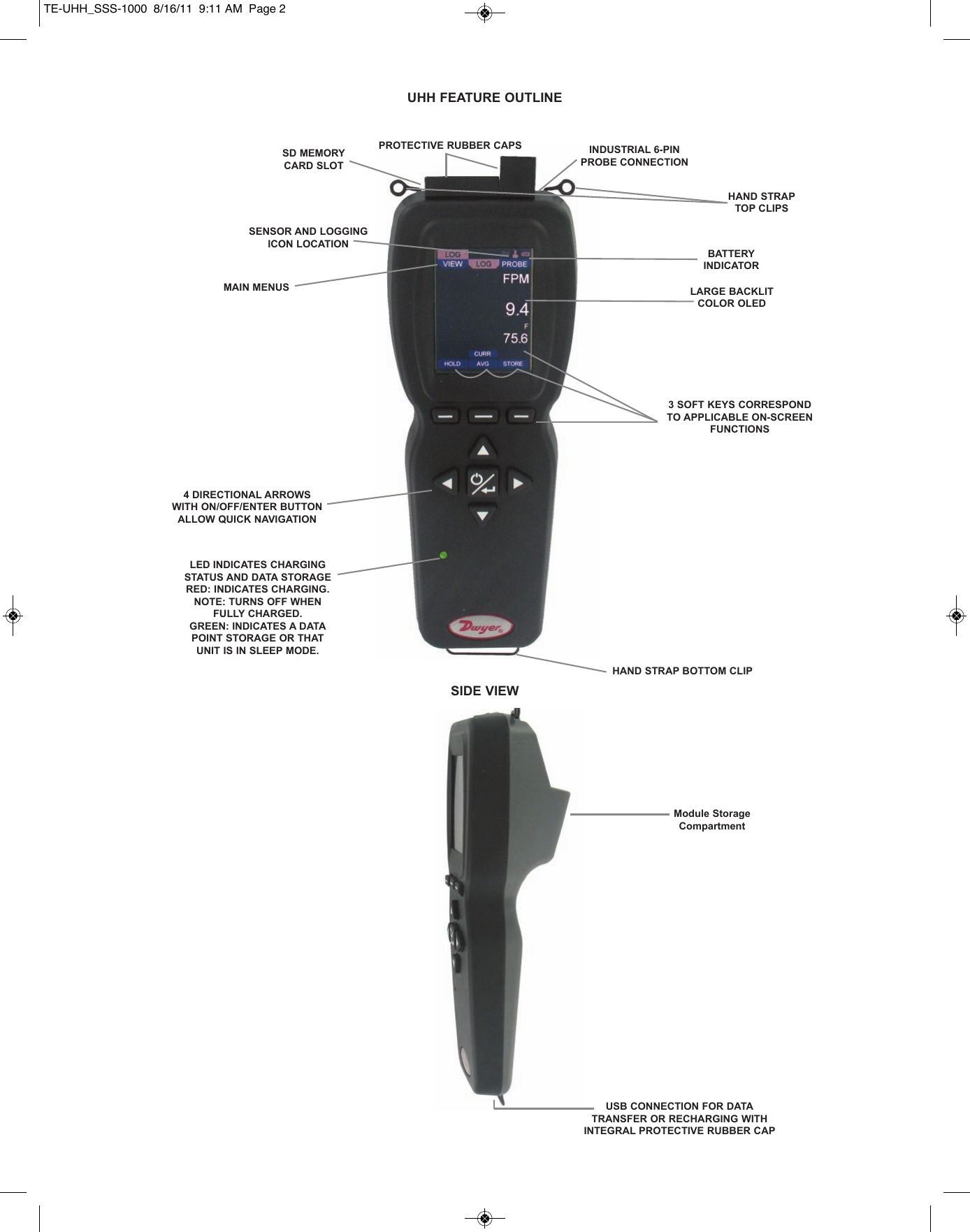
UHH FEATURE OUTLINESD MEMORYCARD SLOTPROTECTIVE RUBBER CAPSSENSOR AND LOGGINGICON LOCATIONMAIN MENUSINDUSTRIAL 6-PINPROBE CONNECTIONHAND STRAPTOP CLIPSBATTERY INDICATORLARGE BACKLITCOLOR OLED3 SOFT KEYS CORRESPONDTO APPLICABLE ON-SCREENFUNCTIONS4 DIRECTIONAL ARROWSWITH ON/OFF/ENTER BUTTONALLOW QUICK NAVIGATIONLED INDICATES CHARGINGSTATUS AND DATA STORAGERED: INDICATES CHARGING.NOTE: TURNS OFF WHENFULLY CHARGED.GREEN: INDICATES A DATAPOINT STORAGE OR THATUNIT IS IN SLEEP MODE.HAND STRAP BOTTOM CLIPUSB CONNECTION FOR DATATRANSFER OR RECHARGING WITHINTEGRAL PROTECTIVE RUBBER CAPSIDE VIEWModule StorageCompartmentTE-UHH_SSS-1000  8/16/11  9:11 AM  Page 2
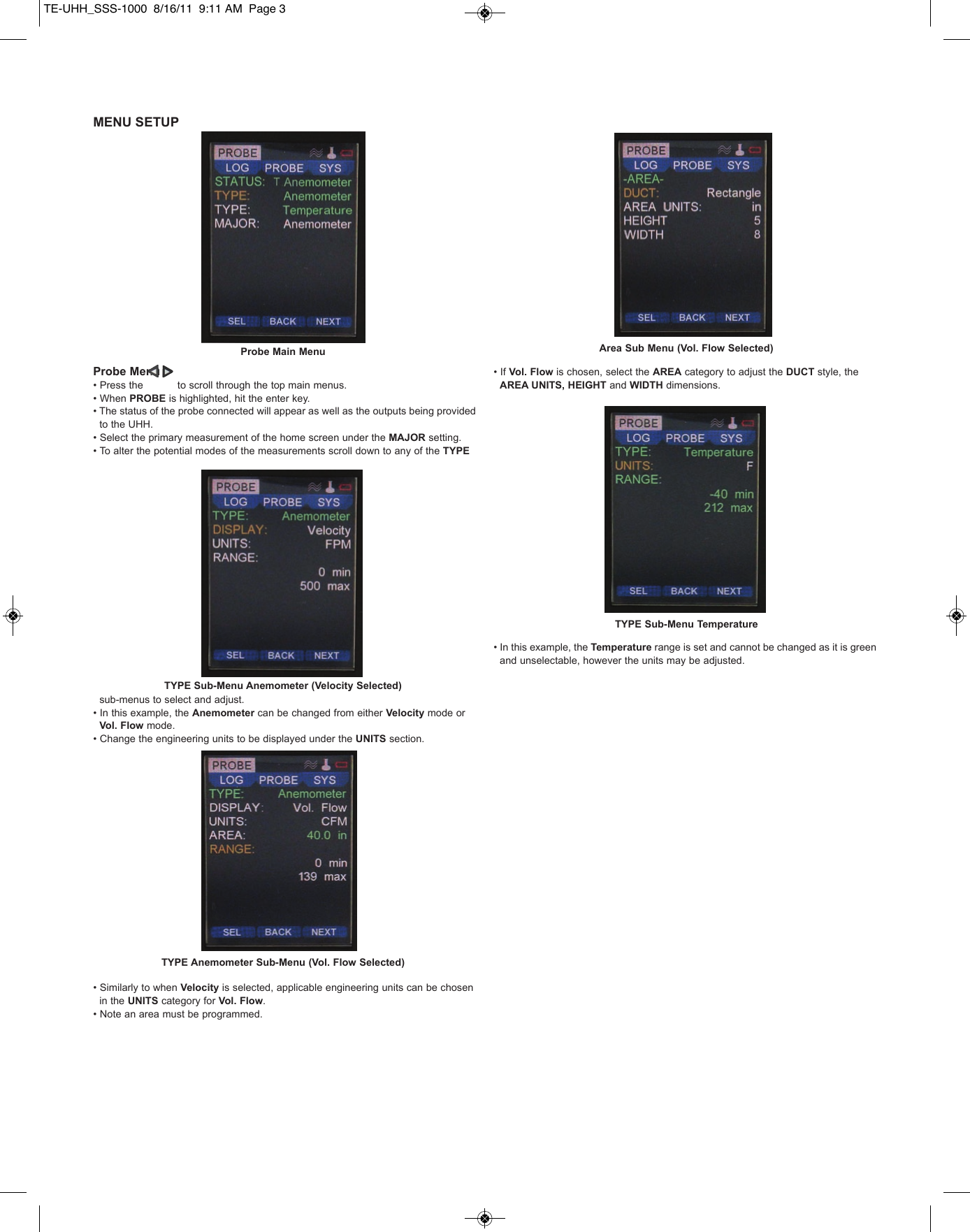
MENU SETUPProbe Menu• Press the           to scroll through the top main menus.• When PROBE is highlighted, hit the enter key.• The status of the probe connected will appear as well as the outputs being provided to the UHH.• Select the primary measurement of the home screen under the MAJOR setting.• To alter the potential modes of the measurements scroll down to any of the TYPEsub-menus to select and adjust.• In this example, the Anemometer can be changed from either Velocity mode or Vol. Flow mode.• Change the engineering units to be displayed under the UNITS section.• Similarly to when Velocity is selected, applicable engineering units can be chosen in the UNITS category for Vol. Flow.• Note an area must be programmed.• If Vol. Flow is chosen, select the AREA category to adjust the DUCT style, the AREA UNITS, HEIGHT and WIDTH dimensions.• In this example, the Temperature range is set and cannot be changed as it is green and unselectable, however the units may be adjusted. Probe Main MenuTYPE Sub-Menu Anemometer (Velocity Selected)TYPE Anemometer Sub-Menu (Vol. Flow Selected)TYPE Sub-Menu TemperatureArea Sub Menu (Vol. Flow Selected)TE-UHH_SSS-1000  8/16/11  9:11 AM  Page 3
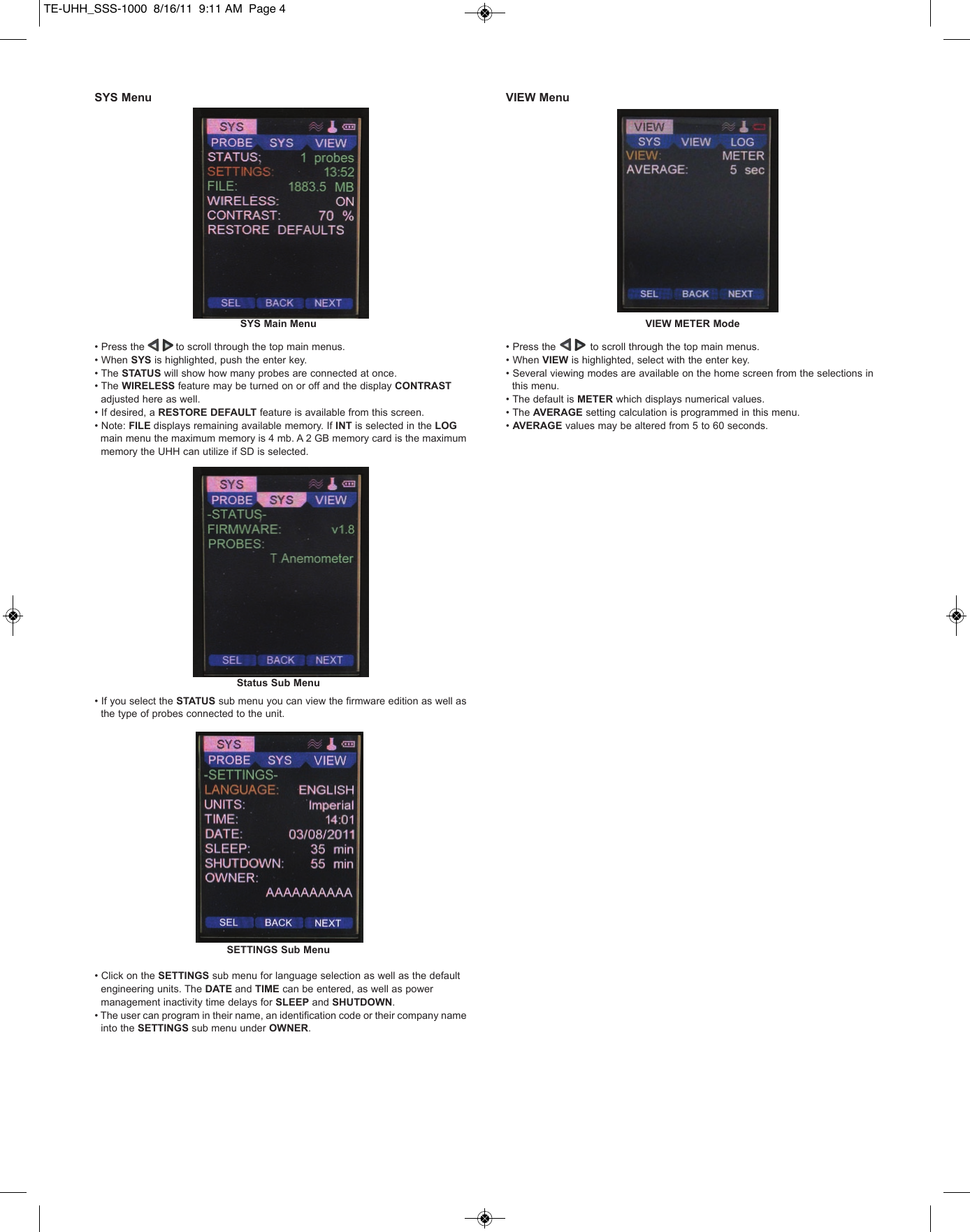
SYS Menu• Press the          to scroll through the top main menus.• When SYS is highlighted, push the enter key.• The STATUS will show how many probes are connected at once.• The WIRELESS feature may be turned on or off and the display CONTRASTadjusted here as well.• If desired, a RESTORE DEFAULT feature is available from this screen.• Note: FILE displays remaining available memory. If INT is selected in the LOGmain menu the maximum memory is 4 mb. A 2 GB memory card is the maximum memory the UHH can utilize if SD is selected. • If you select the STATUS sub menu you can view the firmware edition as well as the type of probes connected to the unit.• Click on the SETTINGS sub menu for language selection as well as the default engineering units. The DATE and TIME can be entered, as well as power management inactivity time delays for SLEEP and SHUTDOWN. • The user can program in their name, an identification code or their company name into the SETTINGS sub menu under OWNER.VIEW Menu• Press the           to scroll through the top main menus.• When VIEW is highlighted, select with the enter key.• Several viewing modes are available on the home screen from the selections in this menu.• The default is METER which displays numerical values.• The AVERAGE setting calculation is programmed in this menu.• AVERAGE values may be altered from 5 to 60 seconds.SYS Main MenuStatus Sub MenuSETTINGS Sub MenuVIEW METER ModeTE-UHH_SSS-1000  8/16/11  9:11 AM  Page 4
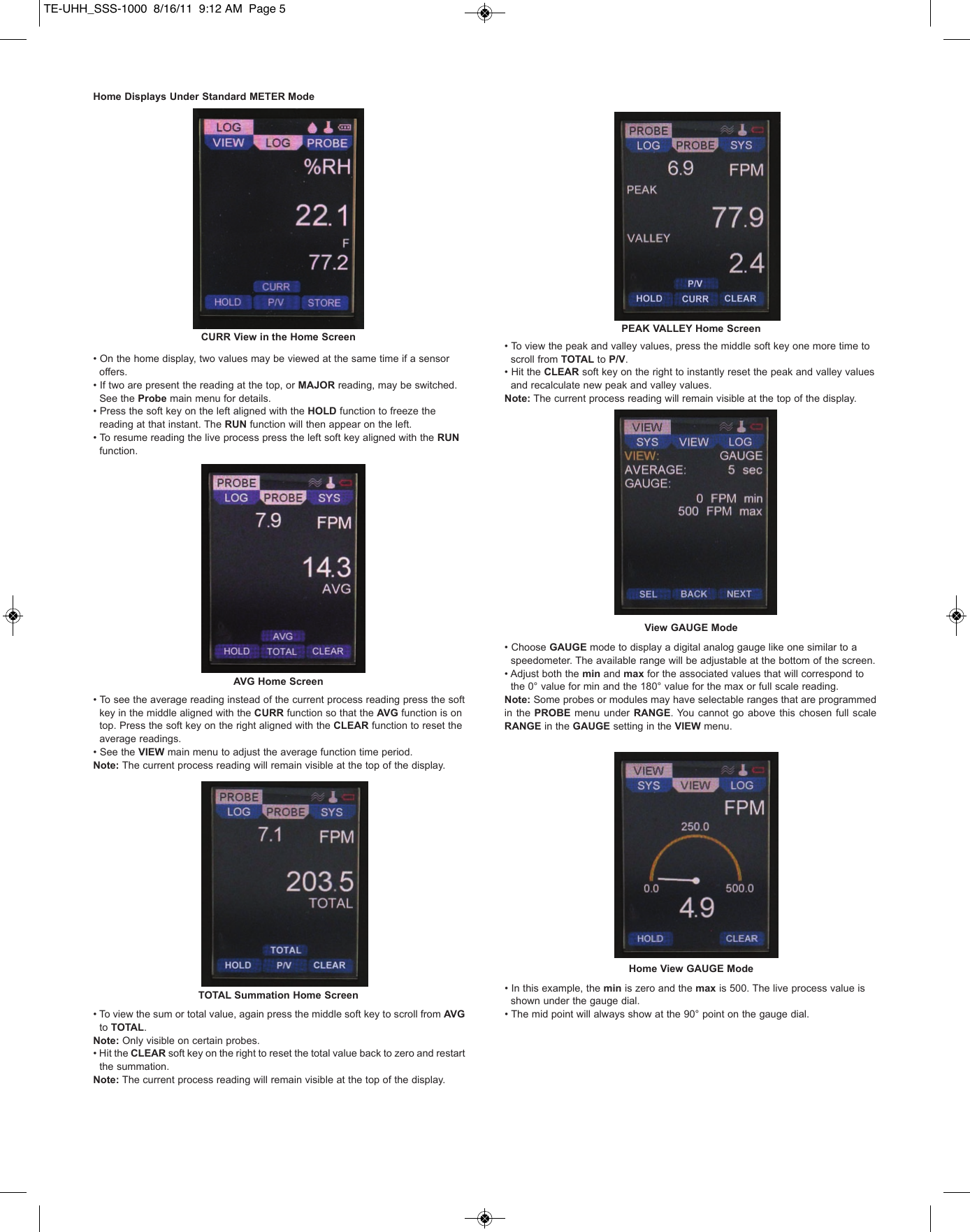
Home Displays Under Standard METER Mode• On the home display, two values may be viewed at the same time if a sensor offers.   • If two are present the reading at the top, or MAJOR reading, may be switched. See the Probe main menu for details.• Press the soft key on the left aligned with the HOLD function to freeze the reading at that instant. The RUN function will then appear on the left. • To resume reading the live process press the left soft key aligned with the RUNfunction.• To see the average reading instead of the current process reading press the soft key in the middle aligned with the CURR function so that the AVG function is on   top. Press the soft key on the right aligned with the CLEAR function to reset the average readings.  • See the VIEW main menu to adjust the average function time period.Note: The current process reading will remain visible at the top of the display.• To view the sum or total value, again press the middle soft key to scroll from AVG to TOTAL.Note: Only visible on certain probes.• Hit the CLEAR soft key on the right to reset the total value back to zero and restart      the summation. Note: The current process reading will remain visible at the top of the display.• To view the peak and valley values, press the middle soft key one more time to scroll from TOTAL to P/V. • Hit the CLEAR soft key on the right to instantly reset the peak and valley values and recalculate new peak and valley values.Note: The current process reading will remain visible at the top of the display.• Choose GAUGE mode to display a digital analog gauge like one similar to a speedometer. The available range will be adjustable at the bottom of the screen. • Adjust both the min and max for the associated values that will correspond to the 0° value for min and the 180° value for the max or full scale reading. Note: Some probes or modules may have selectable ranges that are programmedin the PROBE menu  under RANGE. You  cannot  go above this chosen  full scaleRANGE in the GAUGE setting in the VIEW menu. • In this example, the min is zero and the max is 500. The live process value is shown under the gauge dial.• The mid point will always show at the 90° point on the gauge dial.CURR View in the Home ScreenAVG Home ScreenTOTAL Summation Home ScreenPEAK VALLEY Home ScreenView GAUGE ModeHome View GAUGE ModeTE-UHH_SSS-1000  8/16/11  9:12 AM  Page 5
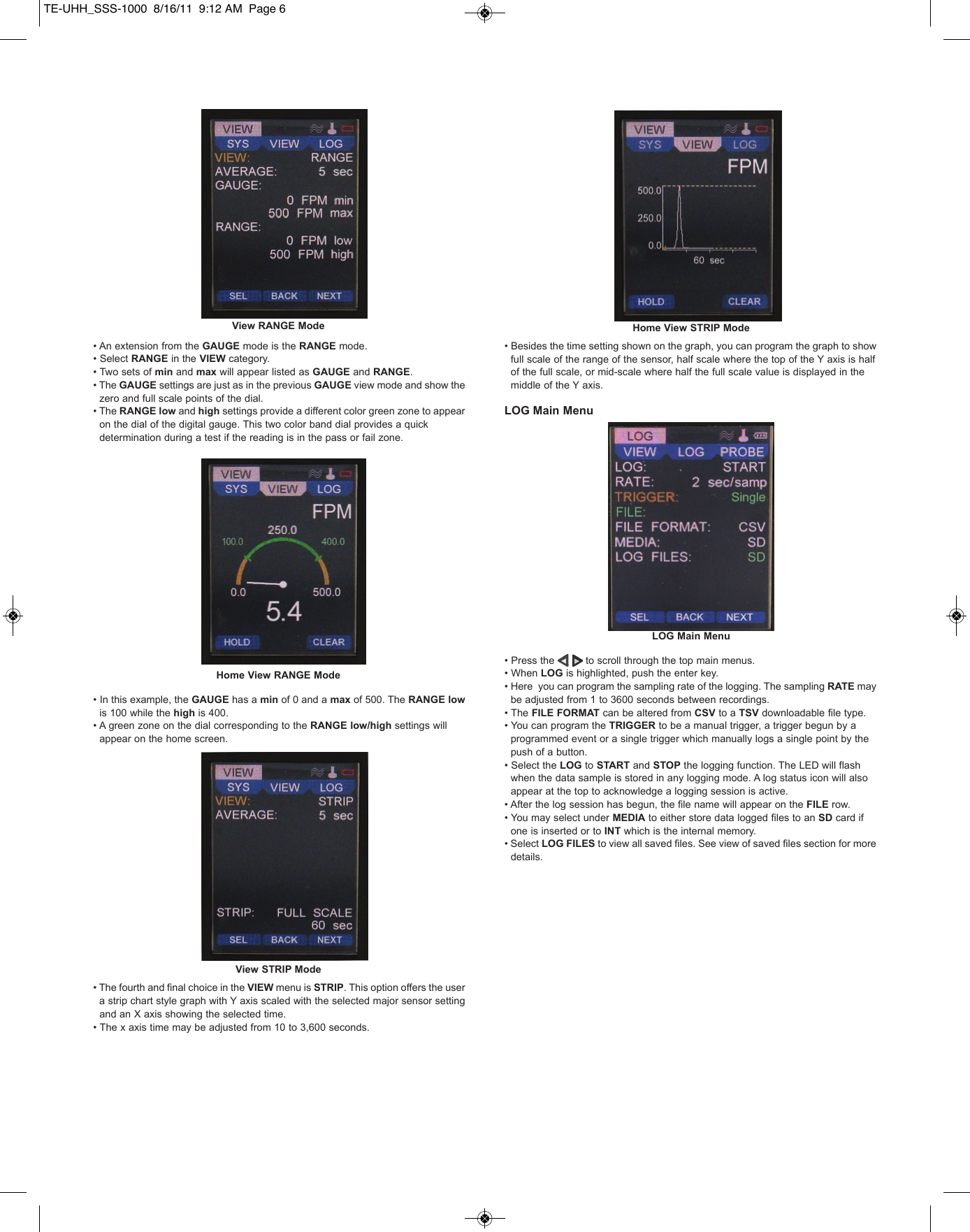
• An extension from the GAUGE mode is the RANGE mode. • Select RANGE in the VIEW category. • Two sets of min and max will appear listed as GAUGE and RANGE. • The GAUGE settings are just as in the previous GAUGE view mode and show the zero and full scale points of the dial. • The RANGE low and high settings provide a different color green zone to appear on the dial of the digital gauge. This two color band dial provides a quick determination during a test if the reading is in the pass or fail zone.• In this example, the GAUGE has a min of 0 and a max of 500. The RANGE lowis 100 while the high is 400. • A green zone on the dial corresponding to the RANGE low/high settings will appear on the home screen.• The fourth and final choice in the VIEW menu is STRIP. This option offers the user a strip chart style graph with Y axis scaled with the selected major sensor setting and an X axis showing the selected time. • The x axis time may be adjusted from 10 to 3,600 seconds. • Besides the time setting shown on the graph, you can program the graph to show full scale of the range of the sensor, half scale where the top of the Y axis is half of the full scale, or mid-scale where half the full scale value is displayed in the middle of the Y axis. LOG Main Menu• Press the          to scroll through the top main menus. • When LOG is highlighted, push the enter key.• Here  you can program the sampling rate of the logging. The sampling RATE may be adjusted from 1 to 3600 seconds between recordings. • The FILE FORMAT can be altered from CSV to a TSV downloadable file type.• You can program the TRIGGER to be a manual trigger, a trigger begun by a programmed event or a single trigger which manually logs a single point by the push of a button.• Select the LOG to START and STOP the logging function. The LED will flash when the data sample is stored in any logging mode. A log status icon will also appear at the top to acknowledge a logging session is active.• After the log session has begun, the file name will appear on the FILE row.• You may select under MEDIA to either store data logged files to an SD card if one is inserted or to INT which is the internal memory.• Select LOG FILES to view all saved files. See view of saved files section for more details. View RANGE ModeHome View RANGE ModeView STRIP ModeLOG Main MenuHome View STRIP ModeTE-UHH_SSS-1000  8/16/11  9:12 AM  Page 6
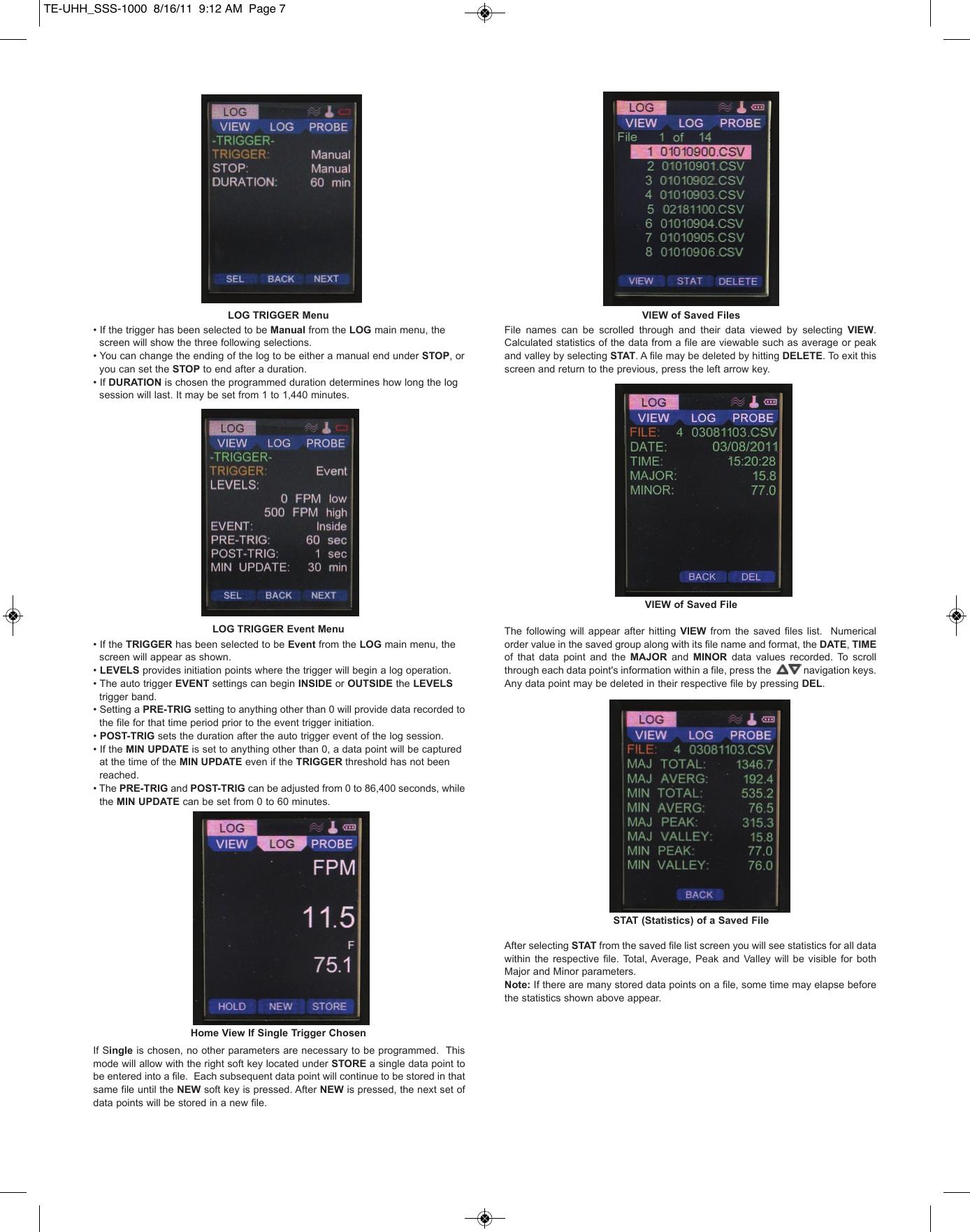
• If the trigger has been selected to be Manual from the LOG main menu, the screen will show the three following selections. • You can change the ending of the log to be either a manual end under STOP, or   you can set the STOP to end after a duration.     • If DURATION is chosen the programmed duration determines how long the log session will last. It may be set from 1 to 1,440 minutes.• If the TRIGGER has been selected to be Event from the LOG main menu, the screen will appear as shown. • LEVELS provides initiation points where the trigger will begin a log operation. • The auto trigger EVENT settings can begin INSIDE or OUTSIDE the LEVELS trigger band. • Setting a PRE-TRIG setting to anything other than 0 will provide data recorded to the file for that time period prior to the event trigger initiation. • POST-TRIG sets the duration after the auto trigger event of the log session. • If the MIN UPDATE is set to anything other than 0, a data point will be captured at the time of the MIN UPDATE even if the TRIGGER threshold has not been reached.• The PRE-TRIG and POST-TRIG can be adjusted from 0 to 86,400 seconds, while the MIN UPDATE can be set from 0 to 60 minutes.If Single is chosen, no other parameters are necessary to be programmed.  Thismode will allow with the right soft key located under STORE a single data point tobe entered into a file.  Each subsequent data point will continue to be stored in thatsame file until the NEW soft key is pressed. After NEW is pressed, the next set ofdata points will be stored in a new file.File  names  can  be  scrolled  through  and  their  data  viewed  by  selecting  VIEW.Calculated statistics of the data from a file are viewable such as average or peakand valley by selecting STAT. A file may be deleted by hitting DELETE. To exit thisscreen and return to the previous, press the left arrow key.The  following  will  appear  after  hitting  VIEW from the  saved  files  list.   Numericalorder value in the saved group along with its file name and format, the DATE, TIMEof  that  data  point  and  the  MAJOR and  MINOR data  values  recorded.  To  scrollthrough each data point's information within a file, press the            navigation keys.Any data point may be deleted in their respective file by pressing DEL.After selecting STAT from the saved file list screen you will see statistics for all datawithin  the  respective  file.  Total, Average,  Peak and  Valley  will  be  visible  for  bothMajor and Minor parameters.Note: If there are many stored data points on a file, some time may elapse beforethe statistics shown above appear.LOG TRIGGER MenuLOG TRIGGER Event MenuHome View If Single Trigger ChosenVIEW of Saved FilesVIEW of Saved FileSTAT (Statistics) of a Saved FileTE-UHH_SSS-1000  8/16/11  9:12 AM  Page 7
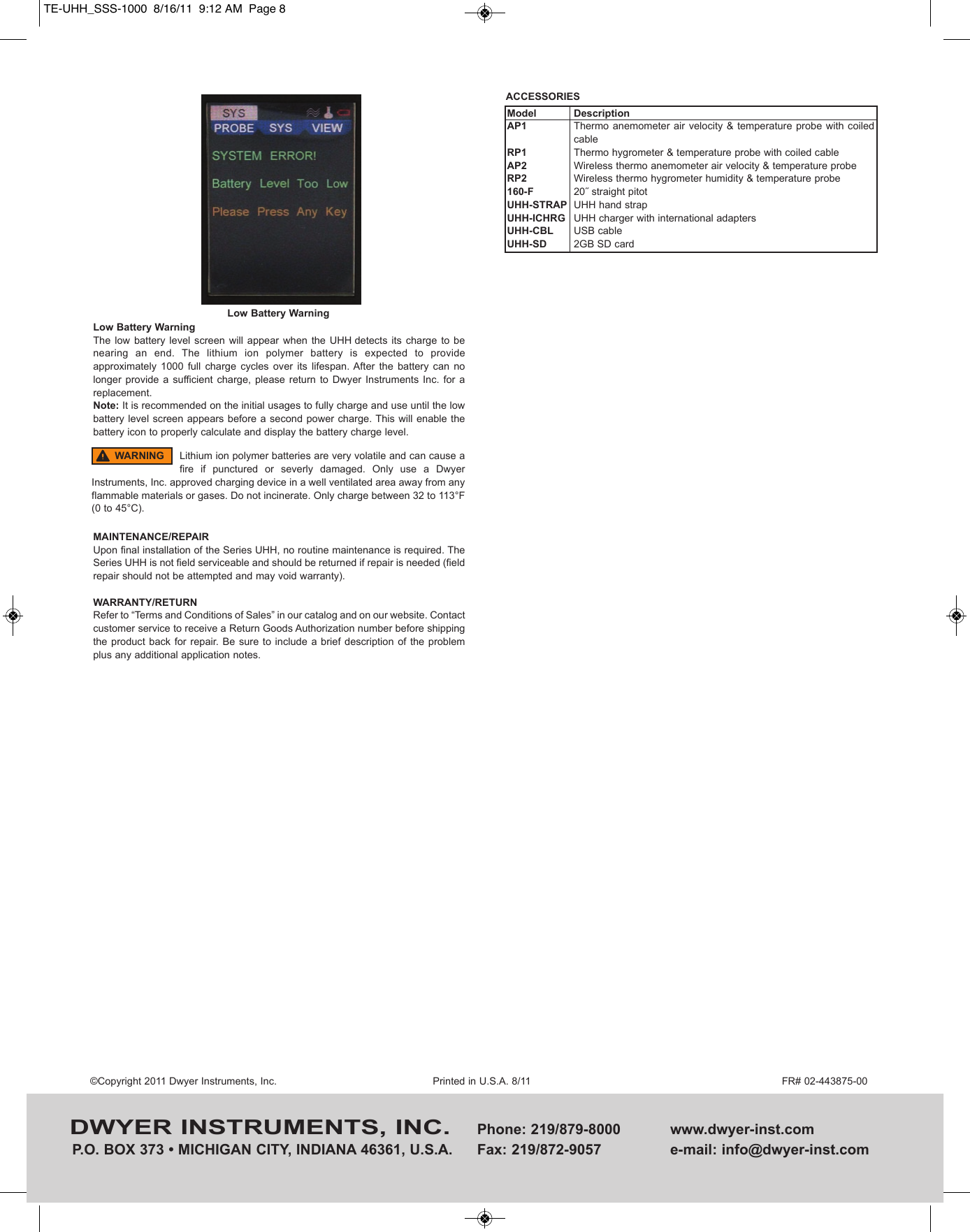
Low Battery WarningThe  low  battery  level screen  will  appear  when  the UHH detects  its  charge  to  benearing  an  end.  The  lithium  ion  polymer  battery  is  expected  to  provideapproximately  1000  full  charge  cycles  over  its  lifespan. After  the  battery  can  nolonger  provide a  sufficient charge,  please  return  to  Dwyer  Instruments  Inc.  for  areplacement. Note: It is recommended on the initial usages to fully charge and use until the lowbattery level screen appears before a second power charge. This will enable thebattery icon to properly calculate and display the battery charge level.MAINTENANCE/REPAIRUpon final installation of the Series UHH, no routine maintenance is required. TheSeries UHH is not field serviceable and should be returned if repair is needed (fieldrepair should not be attempted and may void warranty).WARRANTY/RETURNRefer to “Terms and Conditions of Sales” in our catalog and on our website. Contactcustomer service to receive a Return Goods Authorization number before shippingthe product  back  for repair. Be  sure to include  a brief description  of  the problemplus any additional application notes.DWYER INSTRUMENTS, INC. Phone: 219/879-8000 www.dwyer-inst.comP.O. BOX 373 • MICHIGAN CITY, INDIANA 46361, U.S.A.  Fax: 219/872-9057 e-mail: info@dwyer-inst.com©Copyright 2011 Dwyer Instruments, Inc. Printed in U.S.A. 8/11 FR# 02-443875-00Low Battery WarningLithium ion polymer batteries are very volatile and can cause afire  if  punctured  or  severly  damaged.  Only  use  a  DwyerInstruments, Inc. approved charging device in a well ventilated area away from anyflammable materials or gases. Do not incinerate. Only charge between 32 to 113°F(0 to 45°C).WARNINGACCESSORIESModelAP1RP1AP2RP2160-FUHH-STRAPUHH-ICHRGUHH-CBLUHH-SDDescriptionThermo anemometer air velocity &  temperature  probe with  coiledcableThermo hygrometer & temperature probe with coiled cableWireless thermo anemometer air velocity & temperature probeWireless thermo hygrometer humidity & temperature probe20˝ straight pitotUHH hand strapUHH charger with international adaptersUSB cable2GB SD cardTE-UHH_SSS-1000  8/16/11  9:12 AM  Page 8

Navigation menu