E Power 7198-33 Bluetooth speaker User Manual

E-Power Limited Bluetooth speaker Users Manual

User Manual

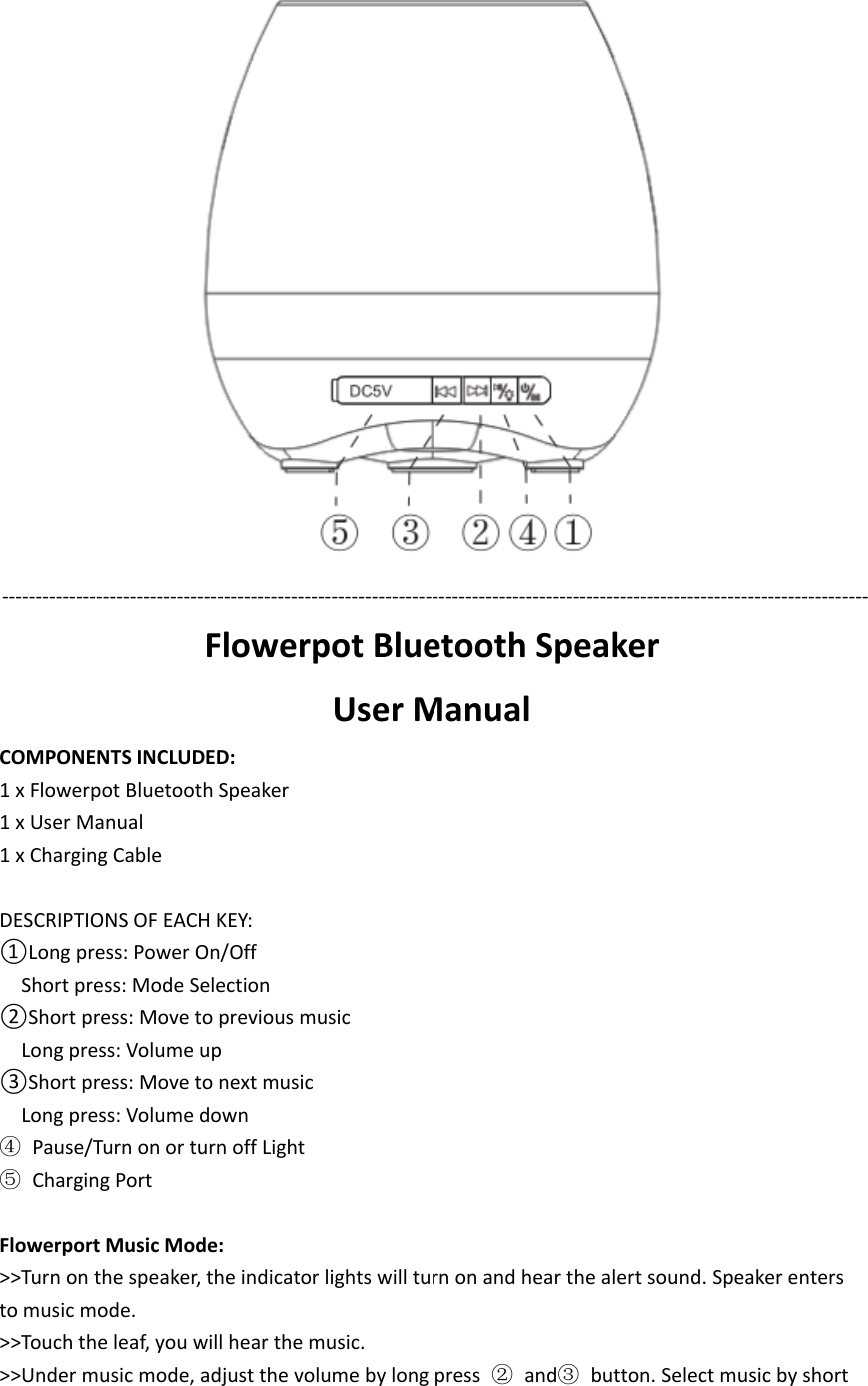
‐‐‐‐‐‐‐‐‐‐‐‐‐‐‐‐‐‐‐‐‐‐‐‐‐‐‐‐‐‐‐‐‐‐‐‐‐‐‐‐‐‐‐‐‐‐‐‐‐‐‐‐‐‐‐‐‐‐‐‐‐‐‐‐‐‐‐‐‐‐‐‐‐‐‐‐‐‐‐‐‐‐‐‐‐‐‐‐‐‐‐‐‐‐‐‐‐‐‐‐‐‐‐‐‐‐‐‐‐‐‐‐‐‐‐‐‐‐‐‐‐‐‐‐‐‐‐‐‐Flowerpot Bluetooth SpeakerUser ManualCOMPONENTS INCLUDED:1 x Flowerpot Bluetooth Speaker1xUserManual1 x Charging CableDESCRIPTIONS OF EACH KEY:①Long press: Power On/OffShort press: Mode Selection②Short press: Move to previous musicLong press: Volume up③Short press: Move to next musicLong press: Volume down④Pause/Turn on or turn off Light⑤Charging PortFlowerport Music Mode:>>Turn on the speaker, the indicator lights will turn on and hear the alert sound. Speaker entersto music mode.>>Touch the leaf, you will hear the music.>>Under music mode, adjust the volume by long press ②and③button. Select music by short
press ②and ③button.Light Mode:>>Press ①button to select the light mode.>>Touch the leaf, the LED light color will be changed. There is no voice under light mode.BLUETOOTH SPEAKER OPERATION:>>Turn on the speaker, Press ①button to select Bluetooth mode. Blue indicator light will flashrapidly to detect nearby Bluetooth enabled devices.>> Look for “music” appear on the list of Bluetooth devices from your device. Type Password“0000” or “1234” if requested.>>Once unit is successfully paired and connected. Blue lights turn off.>>Under bluetooth mode, adjust the volume by long press ②and③button. Select music byshort press ②and ③button.
FCC STATEMENT :This device complies with Part 15 of the FCC Rules. Operation is subject to the followingtwo conditions:(1) This device may not cause harmful interference, and(2) This device must accept any interference received, including interference that maycause undesired operation.Warning: Changes or modifications not expressly approved by the party responsible forcompliance could void the user's authority to operate the equipment.NOTE: This equipment has been tested and found to comply with the limits for a Class Bdigital device, pursuant to Part 15 of the FCC Rules. These limits are designed to providereasonable protection against harmful interference in a residential installation. Thisequipment generates uses and can radiate radio frequency energy and, if not installedand used in accordance with the instructions, may cause harmful interference to radiocommunications. However, there is no guarantee that interference will not occur in aparticular installation. If this equipment does cause harmful interference to radio ortelevision reception, which can be determined by turning the equipment off and on, theuser is encouraged to try to correct the interference by one or more of the followingmeasures: Reorient or relocate the receiving antenna. Increase the separation between the equipment and receiver. Connect the equipment into an outlet on a circuit different from that to which thereceiver is connected. Consult the dealer or an experienced radio/TV technician for help.RF warning statement:The device has been evaluated to meet general RF exposure requirement. The devicecan be used in portable exposure condition without restriction.

Navigation menu