EMOI LIFESTYLE H0035 Smart Aroma Diffuser Lamp Speaker User Manual H0035 12

EMOI LIFESTYLE CO., LTD Smart Aroma Diffuser Lamp Speaker H0035 12

User Manual

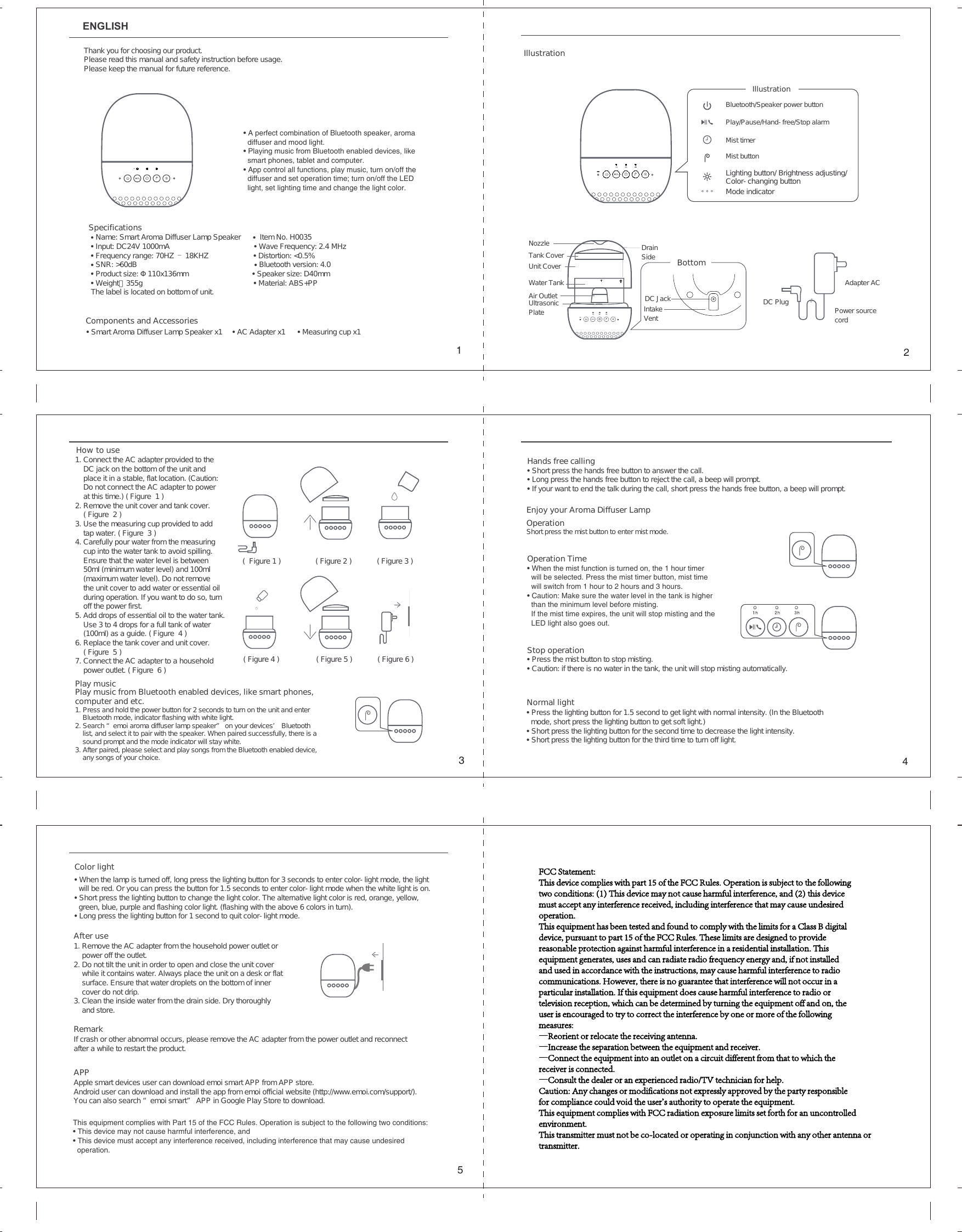
ENGLISHAfter use1. Remove the AC adapter from the household power outlet or power off the outlet.2. Do not tilt the unit in order to open and close the unit cover while it contains water. Always place the unit on a desk or flatsurface. Ensure that water droplets on the bottom of inner cover do not drip.3. Clean the inside water from the drain side. Dry thoroughly and store.APPApple smart devices user can download emoi smart APP from APP store.Android user can download and install the app from emoi official website (http://www.emoi.com/support/). You can also search “emoi smart” APP in Google Play Store to download. RemarkIf crash or other abnormal occurs, please remove the AC adapter from the power outlet and reconnect after a while to restart the product.Color light • When the lamp is turned off, long press the lighting button for 3 seconds to enter color-light mode, the light will be red. Or you can press the button for 1.5 seconds to enter color-light mode when the white light is on.• Short press the lighting button to change the light color. The alternative light color is red, orange, yellow, green, blue, purple and flashing color light. (flashing with the above 6 colors in turn).• Long press the lighting button for 1 second to quit color-light mode.Normal light• Press the lighting button for 1.5 second to get light with normal intensity. (In the Bluetooth   mode, short press the lighting button to get soft light.)• Short press the lighting button for the second time to decrease the light intensity. • Short press the lighting button for the third time to turn off light.Operation Time • When the mist function is turned on, the 1 hour timer   will be selected. Press the mist timer button, mist time   will switch from 1 hour to 2 hours and 3 hours.• Caution: Make sure the water level in the tank is higher   than the minimum level before misting.  If the mist time expires, the unit will stop misting and the   LED light also goes out.Stop operation• Press the mist button to stop misting. • Caution: if there is no water in the tank, the unit will stop misting automatically.• A perfect combination of Bluetooth speaker, aroma diffuser and mood light.• Playing music from Bluetooth enabled devices, like smart phones, tablet and computer.• App control all functions, play music, turn on/off the diffuser and set operation time; turn on/off the LED light, set lighting time and change the light color.Thank you for choosing our product. Please read this manual and safety instruction before usage.Please keep the manual for future reference.SpecificationsComponents and Accessories• Name: Smart Aroma Diffuser Lamp Speaker      •  Item No. H0035 • Input: DC24V 1000mA • Wave Frequency: 2.4 MHz• Frequency range: 70HZ – 18KHZ • Distortion: <0.5%• SNR: >60dB • Bluetooth version: 4.0• Product size: Φ110x136mm • Speaker size: D40mm• Weight:355g • Material: ABS+PP The label is located on bottom of unit.• Smart Aroma Diffuser Lamp Speaker x1     • AC Adapter x1      • Measuring cup x1Play musicHow to use1. Connect the AC adapter provided to the     DC jack on the bottom of the unit and     place it in a stable, flat location. (Caution:     Do not connect the AC adapter to power     at this time.) ( Figure  1 )2. Remove the unit cover and tank cover.    ( Figure  2 )3. Use the measuring cup provided to add     tap water. ( Figure  3 )4. Carefully pour water from the measuring     cup into the water tank to avoid spilling.     Ensure that the water level is between     50ml (minimum water level) and 100ml     (maximum water level). Do not remove     the unit cover to add water or essential oil     during operation. If you want to do so, turn     off the power first.5. Add drops of essential oil to the water tank.     Use 3 to 4 drops for a full tank of water     (100ml) as a guide. ( Figure  4 )6. Replace the tank cover and unit cover.     ( Figure  5 )7. Connect the AC adapter to a household     power outlet. ( Figure  6 )Play music from Bluetooth enabled devices, like smart phones, computer and etc.1. Press and hold the power button for 2 seconds to turn on the unit and enter     Bluetooth mode, indicator flashing with white light.2. Search “emoi aroma diffuser lamp speaker” on your devices’ Bluetooth     list, and select it to pair with the speaker. When paired successfully, there is a     sound prompt and the mode indicator will stay white.3. After paired, please select and play songs from the Bluetooth enabled device,     any songs of your choice.Enjoy your Aroma Diffuser Lamp Operation Short press the mist button to enter mist mode.Hands free calling• Short press the hands free button to answer the call.• Long press the hands free button to reject the call, a beep will prompt.• If your want to end the talk during the call, short press the hands free button, a beep will prompt.(  Figure 1 ) ( Figure 2 ) ( Figure 3 )( Figure 4 ) ( Figure 5 ) ( Figure 6 )IllustrationDC JackIntake VentDC PlugAdapter ACPower source cordDrain SideUltrasonic PlateWater TankAir OutletNozzleUnit CoverTank CoverMode indicatorBottomIllustrationBluetooth/Speaker power buttonPlay/Pause/Hand-free/Stop alarmMist timer Mist buttonLighting button/ Brightness adjusting/ Color-changing button12543This equipment complies with Part 15 of the FCC Rules. Operation is subject to the following two conditions:• This device may not cause harmful interference, and• This device must accept any interference received, including interference that may cause undesired operation.FCC Statement:This device complies with part 15 of the FCC Rules. Operation is subject to the followingtwo conditions: (1) This device may not cause harmful interference, and (2) this devicemust accept any interference received, including interference that may cause undesiredoperation.This equipment has been tested and found to comply with the limits for a Class B digitaldevice, pursuant to part 15 of the FCC Rules. These limits are designed to providereasonable protection against harmful interference in a residential installation. Thisequipment generates, uses and can radiate radio frequency energy and, if not installedand used in accordance with the instructions, may cause harmful interference to radiocommunications. However, there is no guarantee that interference will not occur in aparticular installation. If this equipment does cause harmful interference to radio ortelevision reception, which can be determined by turning the equipment off and on, theuser is encouraged to try to correct the interference by one or more of the followingmeasures:—Reorient or relocate the receiving antenna.—Increase the separation between the equipment and receiver.—Connect the equipment into an outlet on a circuit different from that to which thereceiver is connected.—Consult the dealer or an experienced radio/TV technician for help.Caution: Any changes or modifications not expressly approved by the party responsiblefor compliance could void the user's authority to operate the equipment.This equipment complies with FCC radiation exposure limits set forth for an uncontrolled environment.This transmitter must not be co-located or operating in conjunction with any other antenna ortransmitter.

Navigation menu