ENUSTECH KLAT7-BR BLUETOOTH HANDS-FREE KIT User Manual User s manual KlaT7 20100126

ENUSTECH BLUETOOTH HANDS-FREE KIT User s manual KlaT7 20100126

Users Manual

 User’s Manual   KlaT 7                                    1 of 19                      Confidential Proprietary            User’s Manual [KlaT 7]
 User’s Manual   KlaT 7                                    2 of 19                      Confidential Proprietary   REVISION HISTORY  Version  Date  Name  Revision History 00.10  June 26, 2009  OJ Sim  Initial release Non Graphic version
 User’s Manual   KlaT 7                                    3 of 19                      Confidential Proprietary    CONTENTS  1 GETTING STARTED..................................................................................... 4 1.1 CAR KIT PACKAGE LAYOUT ........................................................................ 4 1.2 INSTALLATION........................................................................................... 5 1.3 CONNECTING THE REMOTE CONTROLLER TO THE BRAIN BOX ........................ 6 1.4 ESTABLISHING A CONNECTION WITH YOUR PHONE........................................ 7 1.5 VOICE COMMAND ...................................................................................... 9 2 USING THE CAR KIT ................................................................................. 10 2.1 OPERATION ............................................................................................ 10 2.2 SETTING................................................................................................. 13 3 SPECIAL FEATURES TO ACCESS SERVICE IN USA ............................. 14 4 APPENDIX.................................................................................................. 15 5 SAFETY AND GENERAL INFORMATION ................................................. 16
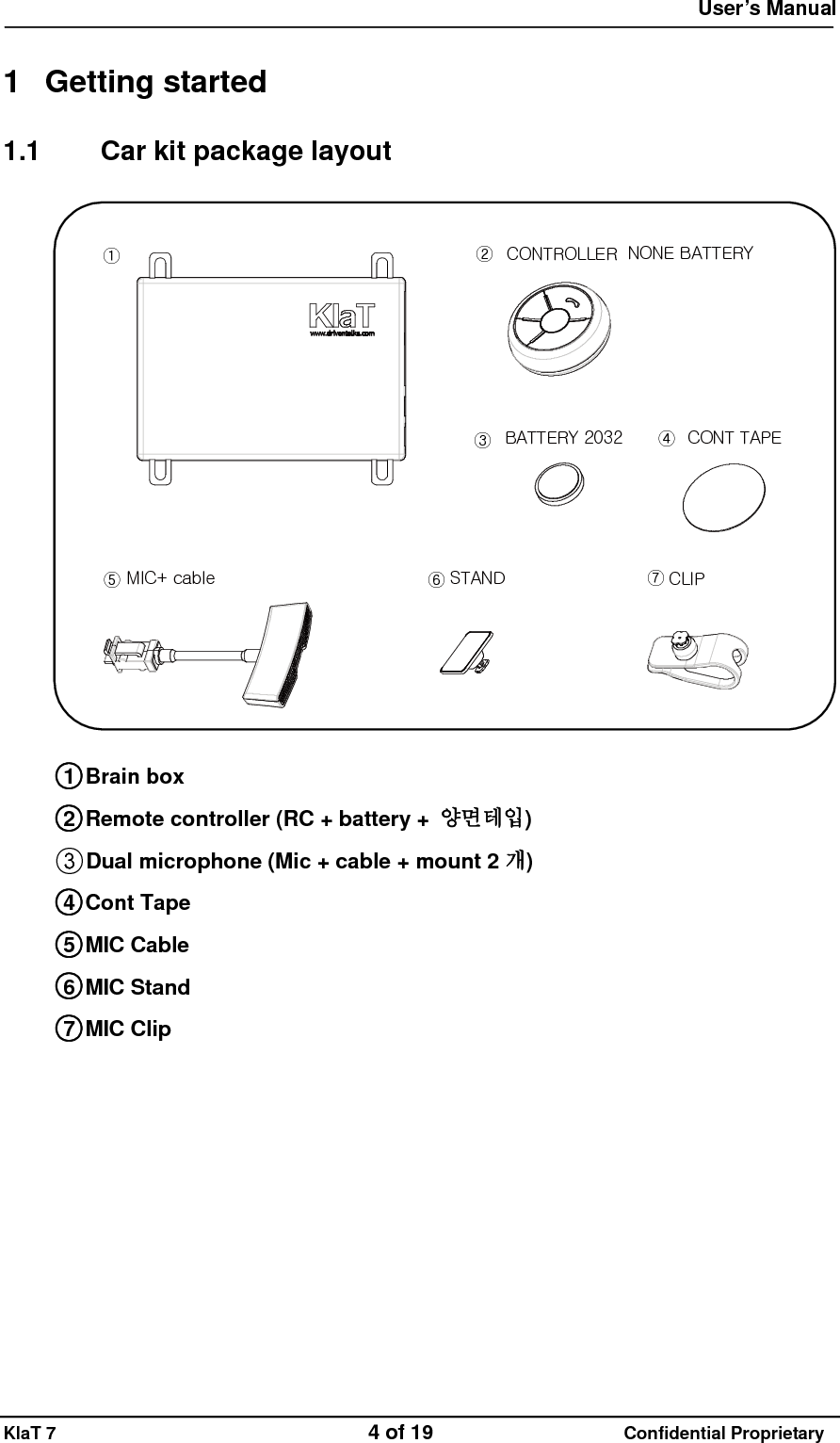
 User’s Manual   KlaT 7                                    4 of 19                      Confidential Proprietary  1 Getting started 1.1  Car kit package layout MIC+ cable STAND CLIPCONT TAPEBATTERY 2032①②③④⑤⑥⑦NONE BATTERYCONTROLLER  ○1 Brain box ○2 Remote controller (RC + battery +  양면테입) ○3Dual microphone (Mic + cable + mount 2 개) ○4 Cont Tape ○5 MIC Cable ○6 MIC Stand ○7 MIC Clip
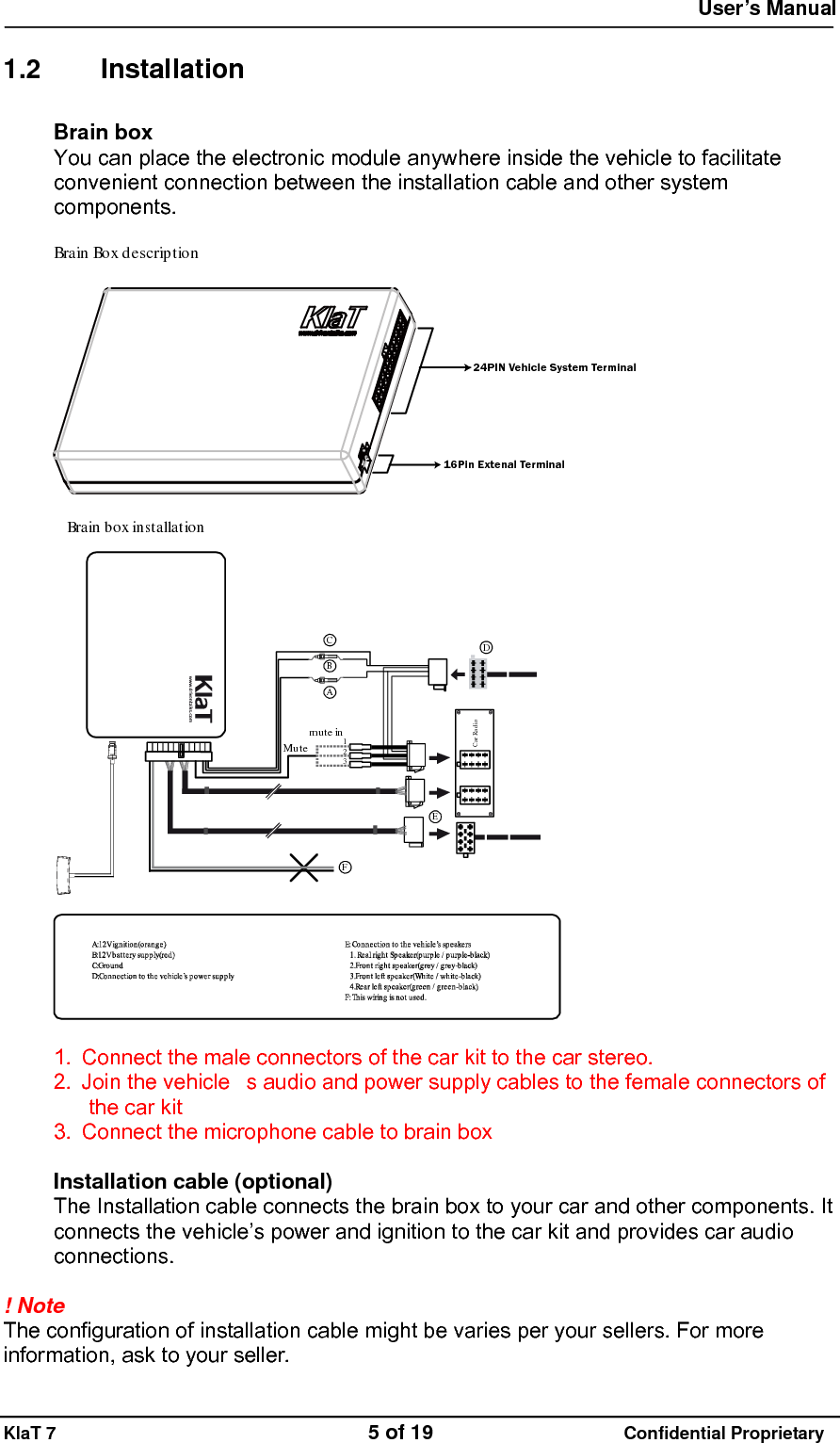
 User’s Manual   KlaT 7                                    5 of 19                      Confidential Proprietary  1.2 Installation Brain box You can place the electronic module anywhere inside the vehicle to facilitate convenient connection between the installation cable and other system components.  Brain Boxdescription24PIN Vehicle System Terminal16Pin Extenal Terminal  BrainboxinstallationCar Rad ioAmute in123MuteBCDEF  1.  Connect the male connectors of the car kit to the car stereo. 2.  Join the vehicles audio and power supply cables to the female connectors of the car kit 3.  Connect the microphone cable to brain box  Installation cable (optional) The Installation cable connects the brain box to your car and other components. It connects the vehicle’s power and ignition to the car kit and provides car audio connections.  ! Note  The configuration of installation cable might be varies per your sellers. For more information, ask to your seller.
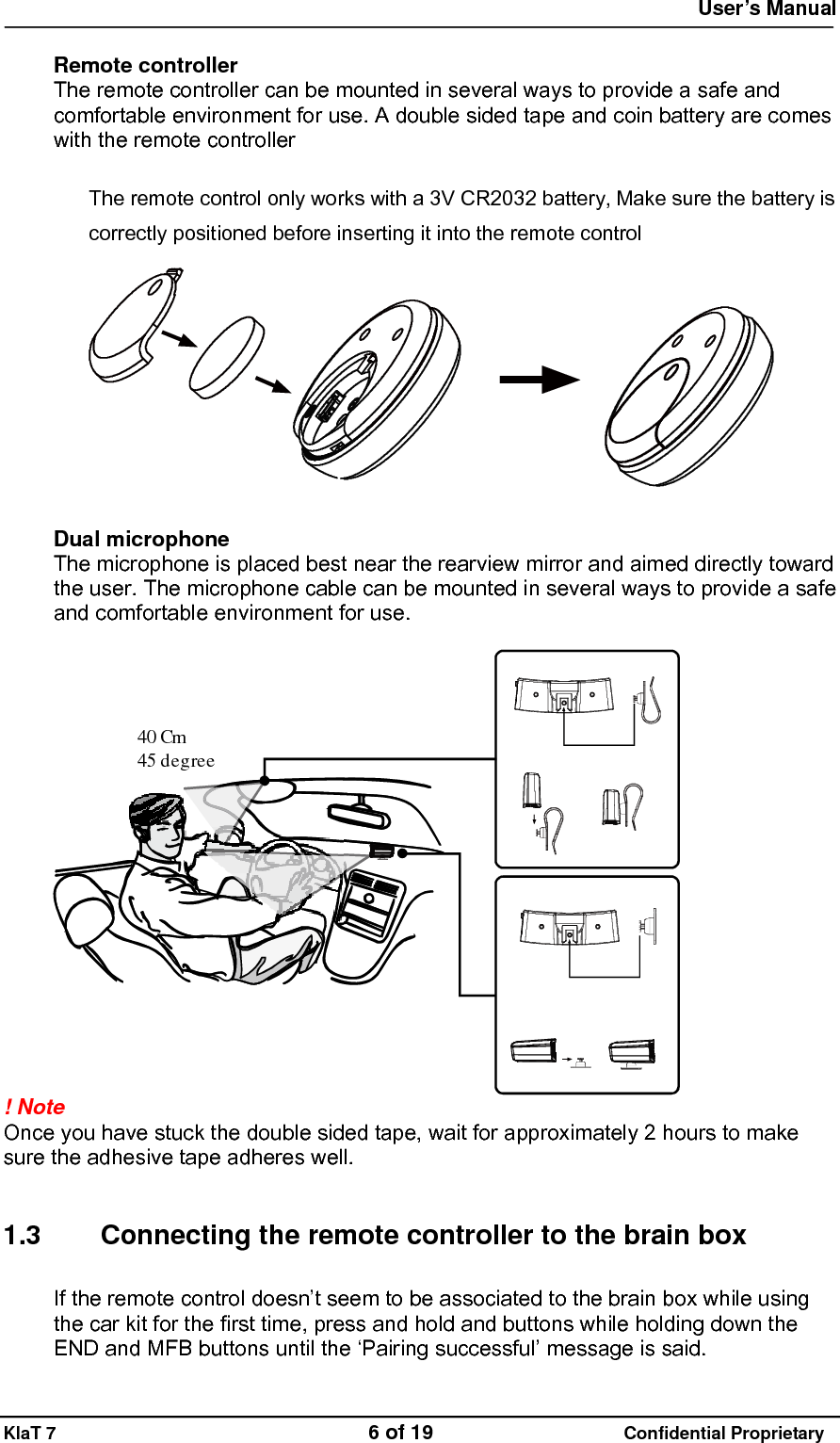
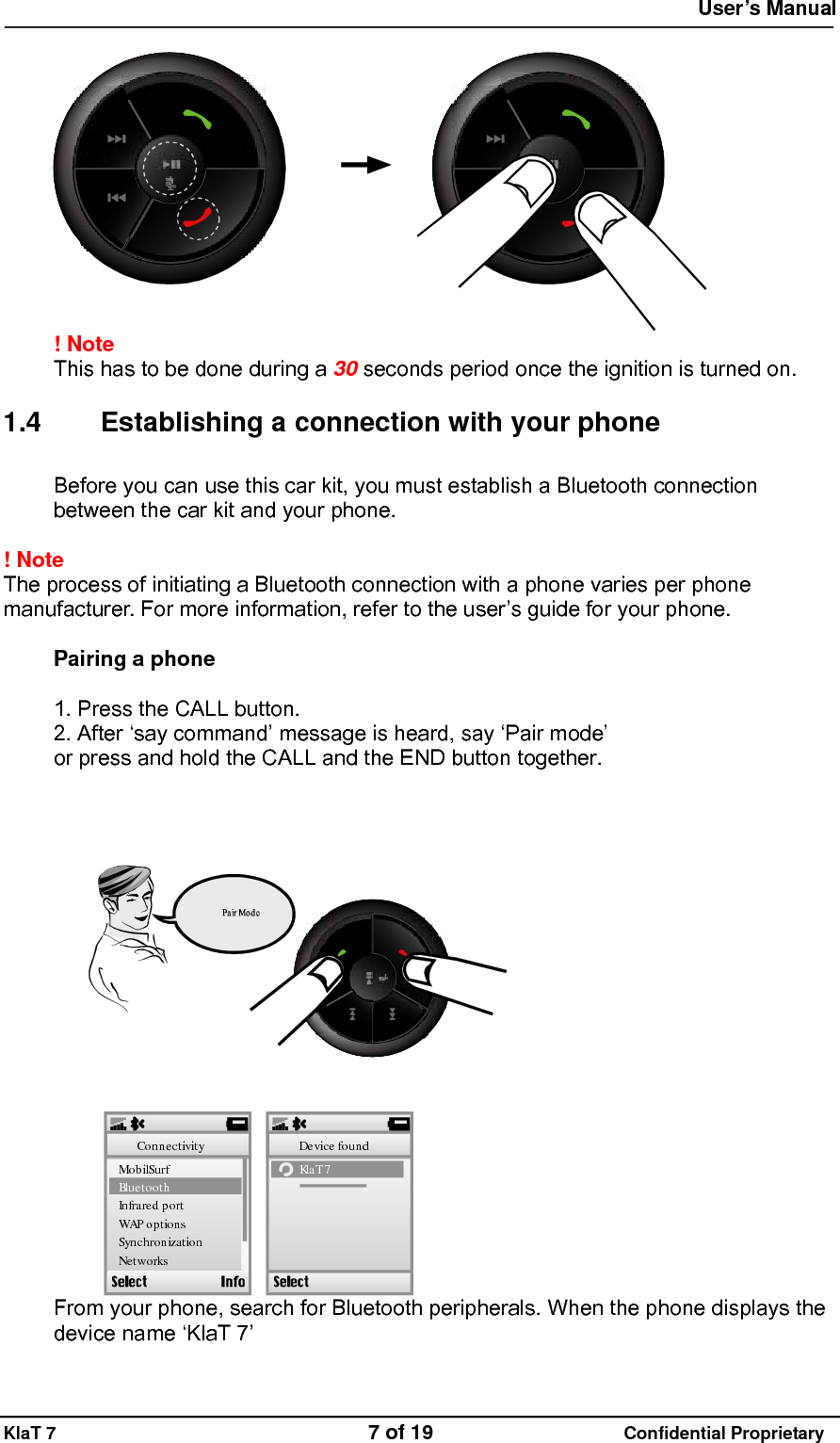
 User’s Manual   KlaT 7                                    6 of 19                      Confidential Proprietary  Remote controller The remote controller can be mounted in several ways to provide a safe and comfortable environment for use. A double sided tape and coin battery are comes with the remote controller  The remote control only works with a 3V CR2032 battery, Make sure the battery is correctly positioned before inserting it into the remote control   Dual microphone The microphone is placed best near the rearview mirror and aimed directly toward the user. The microphone cable can be mounted in several ways to provide a safe and comfortable environment for use.  45 degree40 Cm ! Note  Once you have stuck the double sided tape, wait for approximately 2 hours to make sure the adhesive tape adheres well.   1.3  Connecting the remote controller to the brain box If the remote control doesn’t seem to be associated to the brain box while using the car kit for the first time, press and hold and buttons while holding down the END and MFB buttons until the ‘Pairing successful’ message is said.
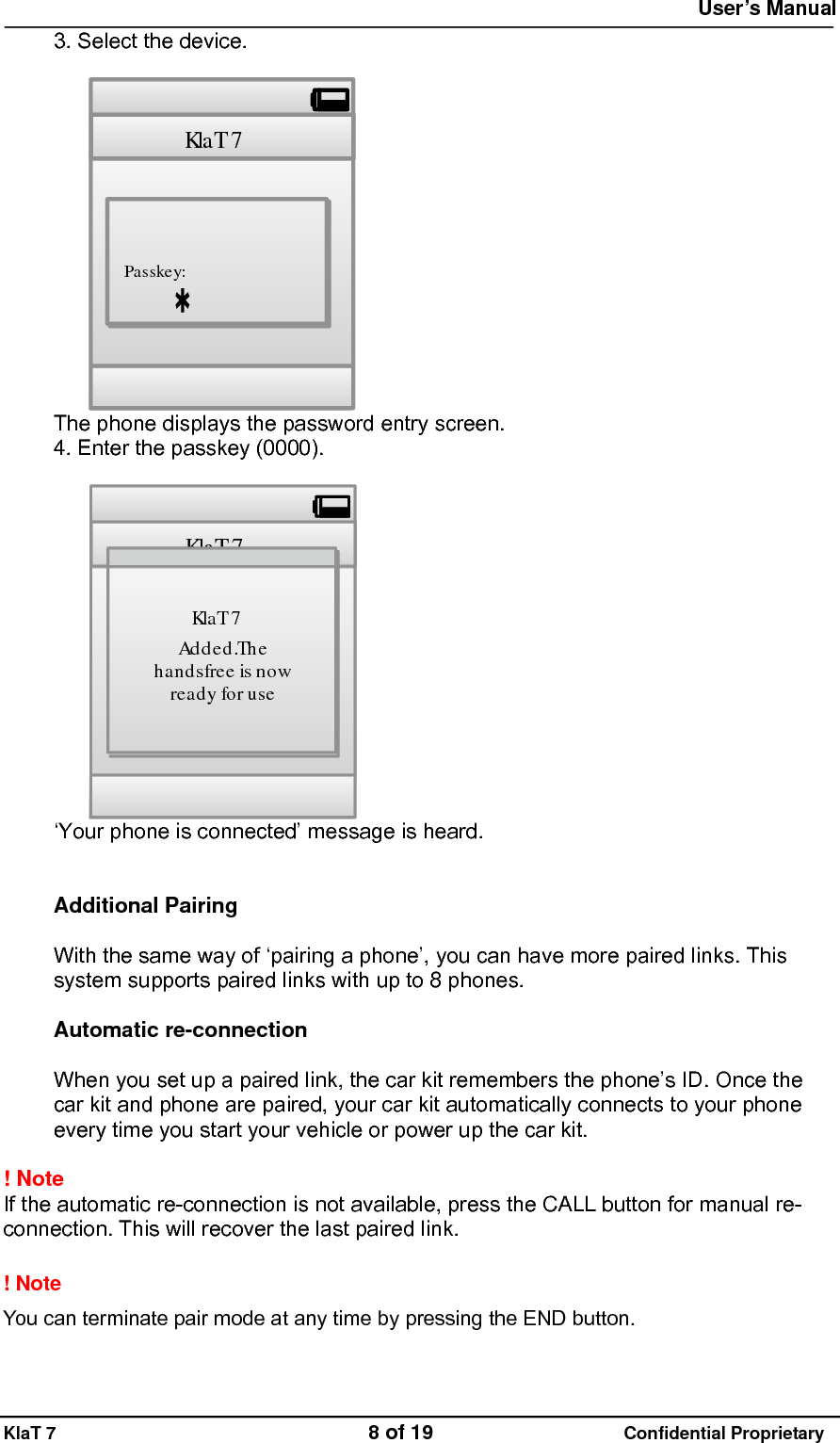
 User’s Manual   KlaT 7                                    7 of 19                      Confidential Proprietary   ! Note  This has to be done during a 30 seconds period once the ignition is turned on.  1.4  Establishing a connection with your phone Before you can use this car kit, you must establish a Bluetooth connection between the car kit and your phone.  ! Note  The process of initiating a Bluetooth connection with a phone varies per phone manufacturer. For more information, refer to the user’s guide for your phone.  Pairing a phone  1. Press the CALL button. 2. After ‘say command’ message is heard, say ‘Pair mode’ or press and hold the CALL and the END button together.  Kla T 7Device foundMo b ilSu rfBluetoothIn fr are d p o rtWAPoptionsSynchronizationNetworksConnectivity From your phone, search for Bluetooth peripherals. When the phone displays the device name ‘KlaT 7’
 User’s Manual   KlaT 7                                    8 of 19                      Confidential Proprietary 3. Select the device.  Kla T 7Passkey: The phone displays the password entry screen. 4. Enter the passkey (0000).  Kla T 7Kla T 7Ad d e d .Th ehandsfree is nowready foruse ‘Your phone is connected’ message is heard.   Additional Pairing  With the same way of ‘pairing a phone’, you can have more paired links. This system supports paired links with up to 8 phones.  Automatic re-connection  When you set up a paired link, the car kit remembers the phone’s ID. Once the car kit and phone are paired, your car kit automatically connects to your phone every time you start your vehicle or power up the car kit.  ! Note  If the automatic re-connection is not available, press the CALL button for manual re-connection. This will recover the last paired link.  ! Note   You can terminate pair mode at any time by pressing the END button.
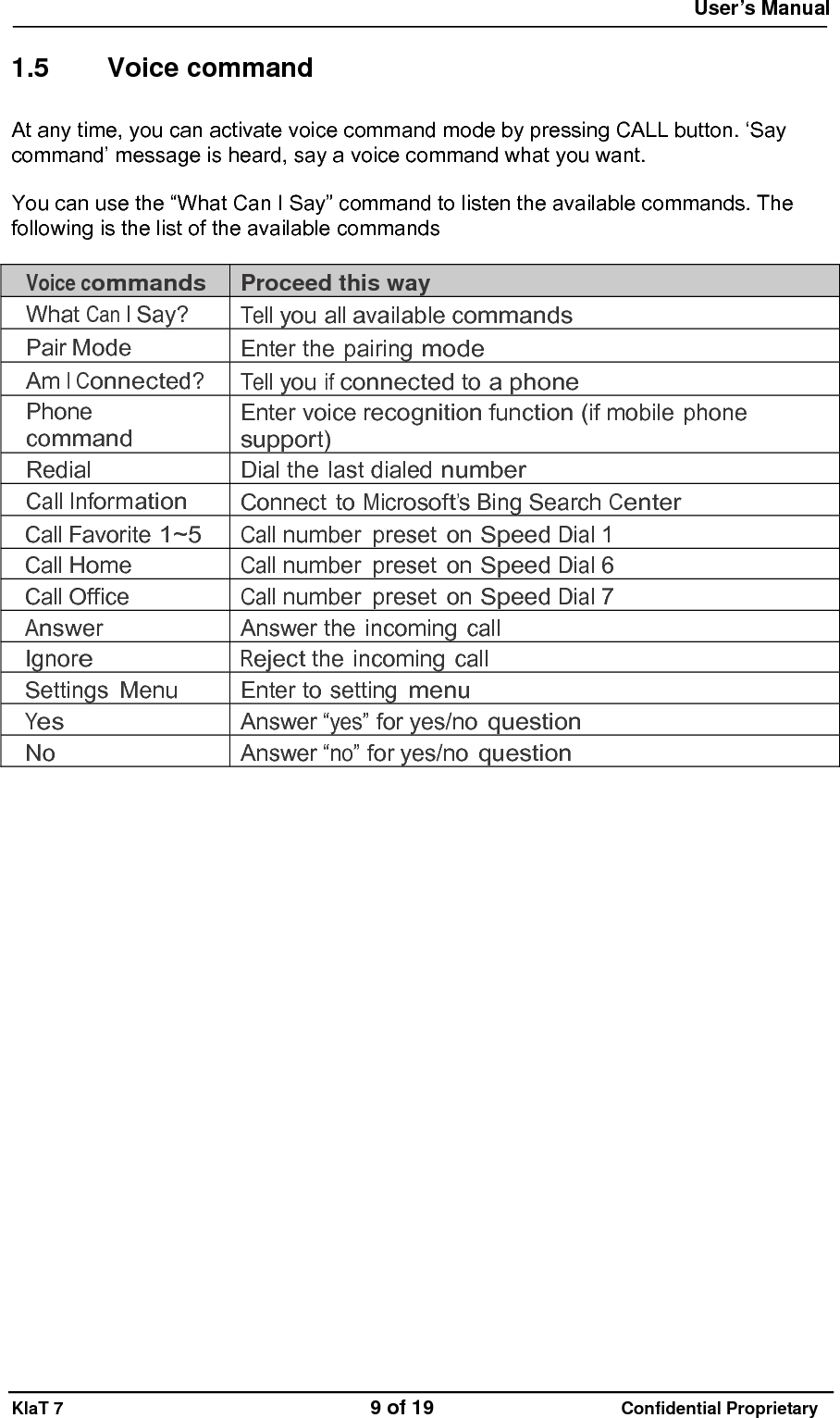
 User’s Manual   KlaT 7                                    9 of 19                      Confidential Proprietary  1.5 Voice command At any time, you can activate voice command mode by pressing CALL button. ‘Say command’ message is heard, say a voice command what you want.  You can use the “What Can I Say” command to listen the available commands. The following is the list of the available commands  Voice commands Proceed this way What Can I Say? Tell you all available commands Pair Mode Enter the pairing mode Am I Connected? Tell you if connected to a phone Phone  command Enter voice recognition function (if mobile phone support) Redial Dial the last dialed number Call Information Connect to Microsoft’s Bing Search Center Call Favorite 1~5 Call number preset on Speed Dial 1 Call Home Call number preset on Speed Dial 6 Call Office Call number preset on Speed Dial 7 Answer Answer the incoming call Ignore Reject the incoming call Settings Menu Enter to setting menu Yes Answer “yes” for yes/no question No Answer “no” for yes/no question
 User’s Manual   KlaT 7                                    10 of 19                      Confidential Proprietary  2  Using the car kit 2.1 Operation Adjusting the volume  Use the wheel during a call to adjust the volume.  WheelVolume up WheelVolume down  Making a Call with the Car Kit  You can place a call with the car kit in these ways:  •    Use the Quick voice dial command. 1.  Press the CALL button 2.  When ‘Say command’ message is heard, say any Quick voice dial. You can choice among 7 Quick voice dials ‘call home, call office, call favorite 1~5’ 3.  The car kit dial the number saved on each Quick voice dial address.  ! Note Refer to ‘3.3 setting’ of this document. You can save the number you want on each Quick voice dial address.  •    Use the Redial voice command. 1.  Press the CALL button 2.  When ‘Say command’ message is heard, say ‘redial’ 3.  The car kit redial the last number
 User’s Manual   KlaT 7                                    11 of 19                      Confidential Proprietary  •    Use last number redial by pressing CALL button 1.  Press and hold the CALL button 2.  The car kit redial the last number  ! Note   When connected, all of these calls are handsfree. You can terminate calls at any time by pressing the END button.   Receiving a call with the car kit  1 . Answering a call   •  Press the CALL button to answer an incoming call. •  After ‘call from call ID’ message is heard, Say ‘answer’    2. Ignoring a call • Press the END button to ignore an incoming call. •  After ‘call from call ID’ message is heard, say ‘ignore’  Using the car kit while on a call  You can place a call with the car kit in these ways:  •  Transferring a call 1.  During a call, if you want to continue the conversation on your phone (privacy mode), press the CALL button. The call is transferred to the phone. 2.  If you want to switch back to the kit (handsfree mode), press the CALL button again •  Muting a call 1.  To mute the microphone during a call, press the mute button. You can still hear your caller’s voice. 2.  To un-mute the microphone, press the mute button again.  •  Call waiting 1.  Press the CALL button to accept the second incoming call. The first call is automatically put on hold. 2.  Press the END button to decline the second incoming call. You can also hang up directly from your phone. 3.  Press the CALL button to switch from a call to another.
 User’s Manual   KlaT 7                                    12 of 19                      Confidential Proprietary  ! Note   When connected, all of these calls are handsfree. You can terminate calls at any time by pressing the END button.  ! Note   Please refer to setting menu of this document about quick voice dial command. You can save dial number on each quick voice dial address.  Phone command  This activates the voice recognition mode of your phone, if your phone support. 1.  Press the CALL button 2.  When ‘Say command’ message is heard, say ‘phone command’. 3.  The voice control mode of your phone is activated  ! Note  The voice recognition mode varies per phone manufacturer. For more information, refer to the user’s guide for your phone.  Music  You can use the car kit to listen to songs stored on your phone. Your mobile phone must support the Bluetooth A2DP profile.  • Play / Pause / Resume a song 1.  Press MFB button to play a song 2.  To pause the music, press MFB button when music is playing. 3.  Press MFB button again to playback.  • Escape music mode 1.  Press and hold MFB button for 1sec.  • Previous / Next song 1. Press the    button, to the previous song. 2. Press the    button, to the next song.  • Rewind / Fast forward 1.  Press and hold the    button for rewinding 2.  Press and hold the    button for fast forwarding.   ! Note  The features of supporting the Bluetooth A2DP profile varies per phone manufacturer. For more information, refer to the user’s guide for your phone.
 User’s Manual   KlaT 7                                    13 of 19                      Confidential Proprietary  2.2 Setting  Enter setting menu 1. Press CALL button 2.  After ‘Say command’ message is heard, say ‘settings menu’ 3.  The car kit says ‘You can say incoming call announcement, save favorite’, say ‘incoming call announcement’ after the message  Quick voice dial setting Under setting menu, you can save a phone number on the car kit.  Enable or disable incoming call announcement Under setting menu, you enable or disable the Incoming call ID.  Software upgrade You can upgrade the software of the car kit. Visit to ‘www.driventalks.com’ and download the latest software and manual.
 User’s Manual   KlaT 7                                    14 of 19                      Confidential Proprietary  3  Special features to access service in USA 1. Call information  You can say ‘Call Information’ to search for local and business listings with Bing™ 411.    Find news, directions, restaurant    locations, weather forecasts, movie showtimes, and more.  2. Text message  You can say ‘Text message’ to use voice to text service. You can send SMS, e-mail and more by using your voice. For more information, visit to ‘www.driventalks.com’.   ! Note   The features mentioned on this page are only available in USA.
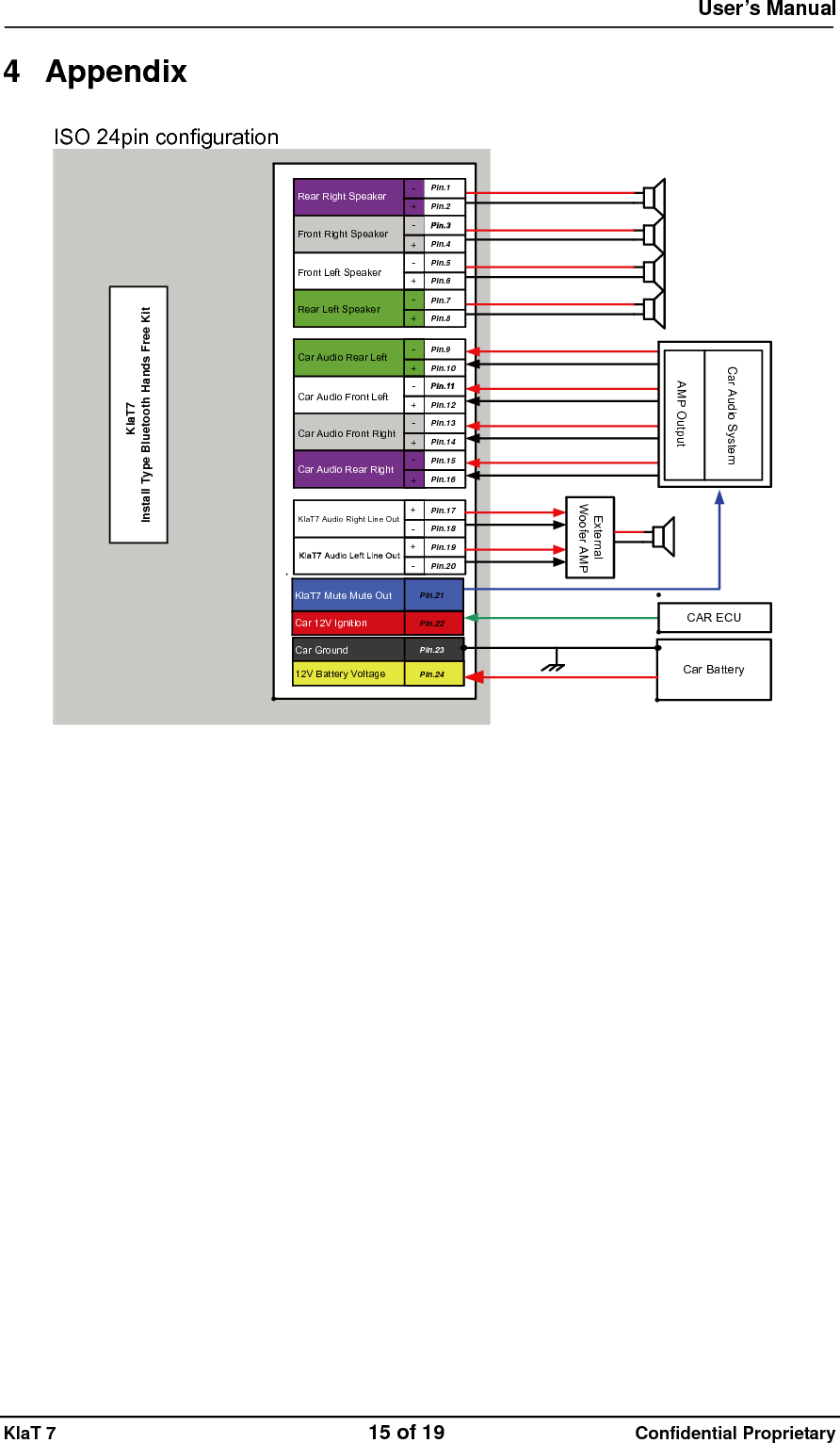
 User’s Manual   KlaT 7                                    15 of 19                      Confidential Proprietary  4 Appendix ISO 24pin configuration Car BatteryFront Right SpeakerRear Right SpeakerCar Audio Rear LeftCar Audio Rear Right-+-+-+-+-+-+-+-+KlaT7AudioRightLineOut+-+-Car 12V IgnitionKlaT7MuteMuteOutCar GroundKlaT7Install Type Bluetooth Hands Free KitCAR ECUAMP OutputExternalWoofer AMPCar Audio SystemFront Left SpeakerRear Left SpeakerPin.1Pin.2Pin.4Pin.5Pin.6Pin.7Pin.8Pin.9Pin.10Pin.12Pin.13Pin.14Pin.15Pin.16Pin.17Pin.18Pin.19Pin.20Car Audio Front LeftCar Audio Front RightPin.21Pin.22Pin.23Pin.2412V Battery Voltage
 User’s Manual   KlaT 7                                    16 of 19                      Confidential Proprietary  5  Safety and general information For the efficient and safe operation of the car kit, observe these manual-lines.  1. Qualified installer We advise only qualified personnel should install this car kit. If necessary, contact the vehicle manufacturer for air bag information specific to the vehicle.  2. Air bag All air bag inflates with great force. Do not place objects, including both installed and portable wireless equipment, in the area over the air bag or in the air bag development area. If in-vehicle wireless equipment is improperly installed and the air bag inflates, serious injury could result.  3. Installation Mount components securely on strong surfaces to prevent shifting that could cause injury or interfere with safe vehicle operation. Always use the supplied mounting hardware  Mounted components and attached wires or cables must not interfere with seating or leg space.  4. Hearing Aids   It may interfere with certain hearing aids. In the event of such interference you may consult the hearing manufacturer to discuss alternatives.  5. Other Medical Devices If you use any other medical devices, please consult a physician or the manufacturer of the medical devices to determine if they are adequately shielded from external RF energy. Your physician may be able to assist you in obtaining this information. Always check the regulations of the healthcare facilities, which generally request that all mobiles are switched off on entry.
 User’s Manual   KlaT 7                                    17 of 19                      Confidential Proprietary  Certification and Safety approvals  This product is CE marked according to the provisions of the R&TTE Directive (99/5/EC). We declare that this product is in compliance with the essential requirements and other relevant provisions of Directive 1999/5/EC. For further information, please refer to website.  FCC Information to User This equipment has been tested and found to comply with the limits for a Class B digital device, pursuant to Part 15 of the FCC Rules. These limits are designed to provide reasonable protection against harmful interference in a residential installation. This equipment generates, uses and can radiate radio frequency energy and, if not installed and used in accordance with the instructions, may cause harmful interference to radio communications. However, there is no guarantee that interference will not occur in a particular installation. If this equipment does cause harmful interference to radio or television reception, which can be determined by turning the equipment off and on, the user is encouraged to try to correct the interference by one of the following measures: • Reorient or relocate the receiving antenna. • Increase the separation between the equipment and receiver. • Connect the equipment into an outlet on a circuit different from that to which the receiver is con-nected. • Consult the dealer or an experienced radio/TV technician for help.  Caution Modifications not expressly approved by the party responsible for compliance could void the user’s authority to operate the equipment.  FCC Compliance Information : This device complies with Part 15 of the FCC Rules. Operation is subject to the following two conditions: (1) This device may not cause harmful interference, and (2) this device must accept any interference received, including interference that may cause undesired operation  Note on environmental protection:  After the implementation of the European Directive 2002/96/EU in the national legal system, the following applies: Electrical and electronic devices may not be disposed of with domestic waste. Consumers are obliged by law to return electrical and electronic devices at the end of their service lives to the public collecting points set up for this purpose    or point of sale. Details to this are defined by the national law of the respective country. This symbol on the product, the instruction manual or the package indicates that a product is subject to these regulations. By recycling, reusing the materials or other forms of utilizing old devices, you are making an important contribution to protecting our environment.
 User’s Manual   KlaT 7                                    18 of 19                      Confidential Proprietary  Sales contact List
 User’s Manual   KlaT 7                                    19 of 19                      Confidential Proprietary  Warranty contents

Navigation menu