ETEK TECHNOLOGY TD5612DCII MODEM User Manual TD 56000III EN

ETEK TECHNOLOGY(SHENZHEN) CO., LTD. MODEM TD 56000III EN

User Manual

7''&,,Modem User's Manual
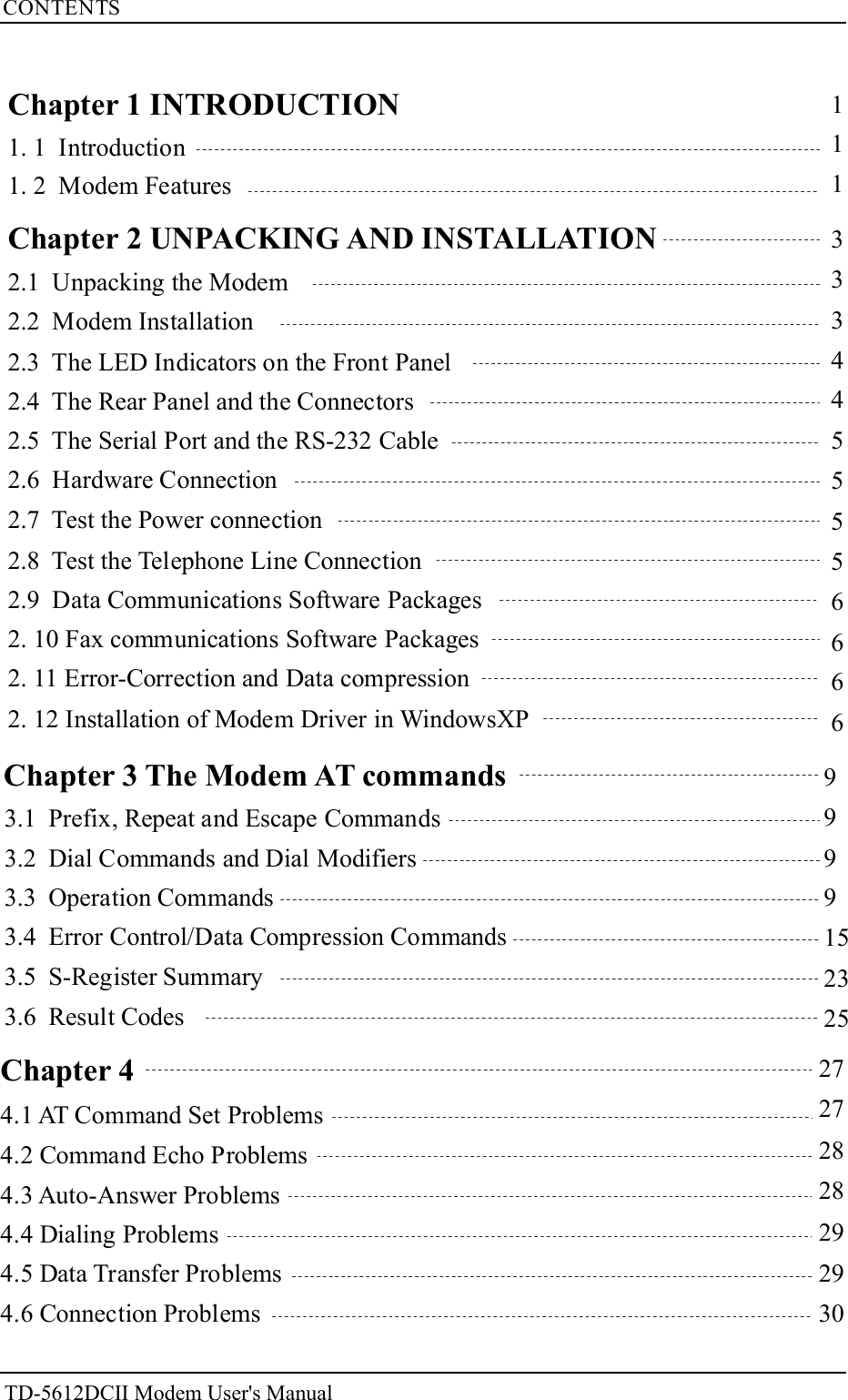
CONTENTS27272828292930111Chapter 1 INTRODUCTION1. 1 Introduction1. 2 Modem Features2.1 Unpacking the Modem2.2 Modem Installation2.3 The LED Indicators on the Front Panel2.4 The Rear Panel and the Connectors2.5 The Serial Port and the RS-232 Cable2.6 Hardware Connection2.7 Test the Power connection2.8 Test the Telephone Line Connection2.9 Data Communications Software Packages2. 10 Fax communications Software Packages2. 11 Error-Correction and Data compression2. 12 Installation of Modem Driver in WindowsXP3334455556666Chapter 2 UNPACKING AND INSTALLATION99991523253.1 Prefix, Repeat and Escape Commands3.2 Dial Commands and Dial Modifiers3.3 Operation Commands3.4 Error Control/Data Compression Commands3.5 S-Register Summary3.6 Result CodesChapter 3 The Modem AT commandsTD-5612DCII Modem User's ManualChapter 44.1 AT Command Set Problems4.2 Command Echo Problems4.5 Data Transfer Problems4.6 Connection Problems4.3 Auto-Answer Problems4.4 Dialing Problems
ETEK TECHNOLOGY (SHENZHEN) Co., Ltd. does not assume any liability arisingout of the application or use any products, circuit, or software described herein,neither does it convey any license under its patent rights nor the patent rights of others.ETEK TECHNOLOGY (SHENZHEN)Co., Ltd. Further reserves the right to makeimprovements to the product described in this manual at any time and withoutnotice.About Your ModemAbout This ManualThis manual describes the use of your data/fax modem and givesinstruction for its installation and operation.TD-5612DCIITrademarks:Hayes is a trademark of Hayes Microcomputer Products. IncCrosstalk is a trademark of Mircostuf Inc.Microphone li is a trademake of Software VenturesProcomm is a trademark of datastorm Technologies, Inc.Micro Networking Protocol, MNP are trademarks of Microcom IncBTLZ is a trademark of British TelecommunicationsHomefax2 is a trademark of Hong Kong Telecom.V.FC and V. Fast Class are trademarks of Rockwell Int'l Corp.Other names are trademarks of their respective holders.Modem User's Manual2005 ETEK  TECHNOLOGY (SHENZHEN) CO., LTD.Congratulations on the purchase of your TD-5612DCII modem one of premier high-performance products. The TD-5612DCII modem is world renown forits ability to maintain ultra high speeds and clear, quality connections whilecommunicating around the globe.RTD-5612DCII Modem User's ManualTD-5612DCII Modem User's Manual
1Chapter 1 INTRODUCTIONThis chapter describes modem introduction and Features.1. 1 Introductionmodem is a powerful tool which uses a telephone line to link yourcomputer with other computers. Once linked, you can exchange information withdatabases, bulletin boards, and other computer users.is proud to be part of your journey through today's globalcommunications network.1. 2 Modem FeaturesTable 1-1 Data Operation ModesTD-5612DCIIStandard Bit Rate [bps]Bell 103Bell 212V.21V.22V.22 bisV.23V.32V.32bisV.34V.90V.92 upstreamV.92 downstream3001200 Rx/75 Tx or 75 Rx/1200 Tx30012002400 or 120012009600 or 480014400,12000,9600,7200,or 480033600,32100,28800,26400,24000,21600,19200,16800,14400,12000,9600,7200,4800, or 240056000,54667,53333,52000,50667,49333,48000,46667,45333,44000,42667,41333,40000,38667,37333,36000,34667,33333,32000,30667,29333,2800048000,46667,45333,44000,42667,41333,40000,38667,37333,36000,34667,33333,32000,30667,29333,28000,26667,25333,2400056000,54667,53333,52000,50667,49333,48000,46667,45333,44000,42667,41333,40000,38667,37333,36000,34667,33333,32000,30667,29333,28000Chapter 1 INTRODUCTIONTD-5612DCII Modem User's ManualCompatible with BELL 103, 212A standards and ITU V.92 V.90 V.34V.32BIS V.32 V.22BIS V.22 V.21 Bell 212 103 recommendations.The TD-5612DCII modem is a high performance universal modemcapable of transmission speed up to 56Kbps full-duplex on a 2-wire dial-upline. Universal compatibility covers a broad range of ITU-T and BELLstandards.Various operation modes that can be achieved are as follows:、 、 、、 、 、 、 、 ,
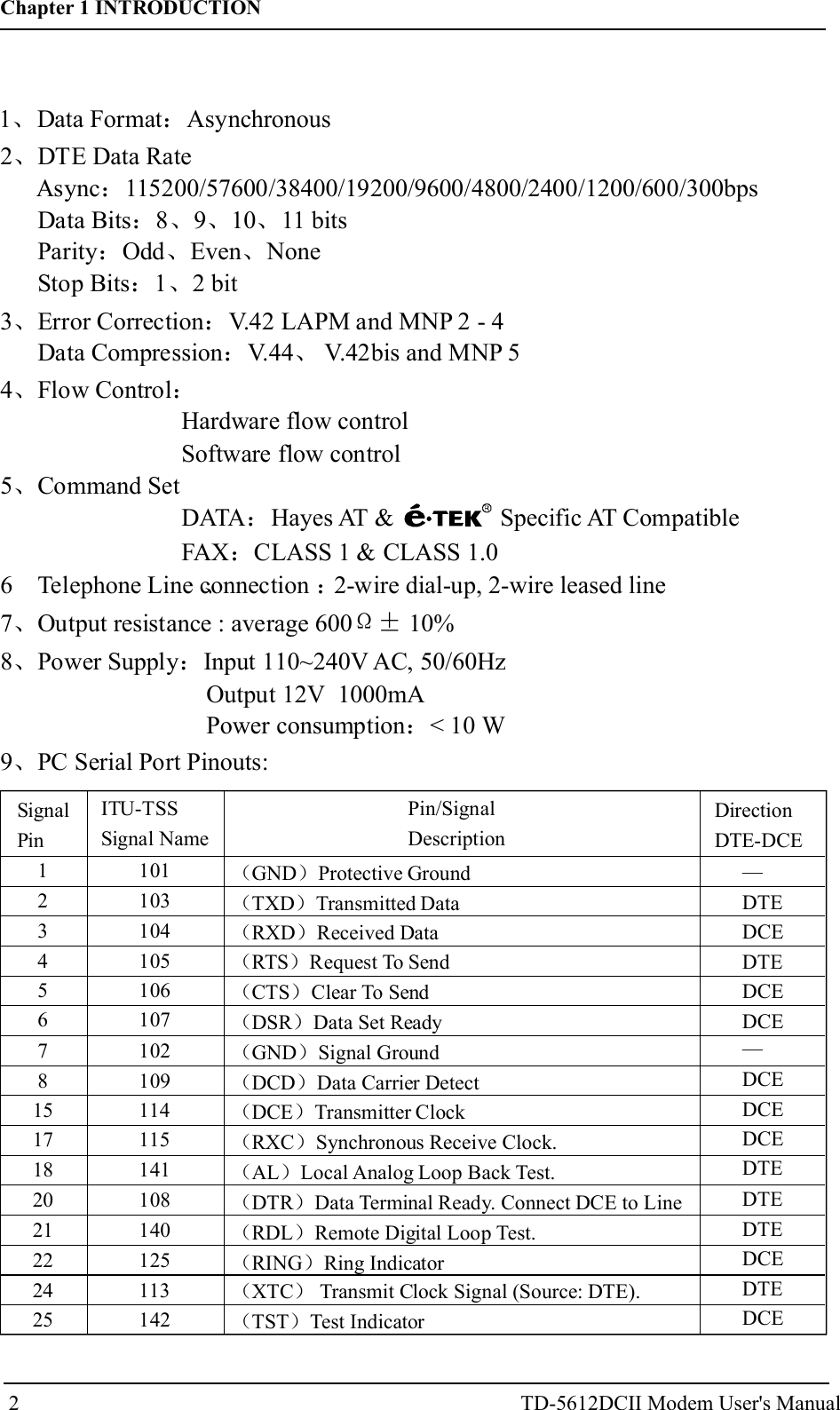
22 DTE Data Rate、Async 115200/57600/38400/19200/9600/4800/2400/1200/600/300bpsData Bits 8 9 10 11 bitsParity Odd Even NoneStop Bits 1 2 bit:: 、 、 、: 、 、: 、3 Error Correction V.42 LAPM and MNP 2 - 4、 :Data Compression V.44 V.42bis and MNP 5: 、4 Flow Control、 :Hardware flow controlSoftware flow control7 Output resistance : average 600 10%、Ω±9 PC Serial Port Pinouts:、5 Command Set、DATA Hayes AT & Specific AT CompatibleFAX CLASS 1 & CLASS 1.0::SignalPinDirectionDTE-DCEPin/SignalDescriptionITU-TSSSignal Name123456781517182021222425101103104105106107102109114115141108140125113142( )( )( )( )( )( )( )( )( )( )( )( )( )( )( )( )GND Protective GroundTXD Transmitted DataRXD Received DataRTS Request To SendCTS Clear To SendDSR Data Set ReadyGND Signal GroundDCD Data Carrier DetectDCE Transmitter ClockRXC Synchronous Receive Clock.AL Local Analog Loop Back Test.DTR Data Terminal Ready. Connect DCE to LineRDL Remote Digital Loop Test.RING Ring IndicatorXTC Transmit Clock Signal (Source: DTE).TST Test IndicatorDTEDCEDTEDCEDCEDCEDCEDCEDTEDTEDTEDCEDTEDCE——TD-5612DCII Modem User's Manual6 Telephone Line connection 2-wire dial-up, 2-wire leased line、 :8 Power Supply Input 110~240V AC, 50/60HzOutput 12V  1000mA  Power consumption < 10 W、 ::Chapter 1 INTRODUCTION1 Data Format Asynchronous、 :
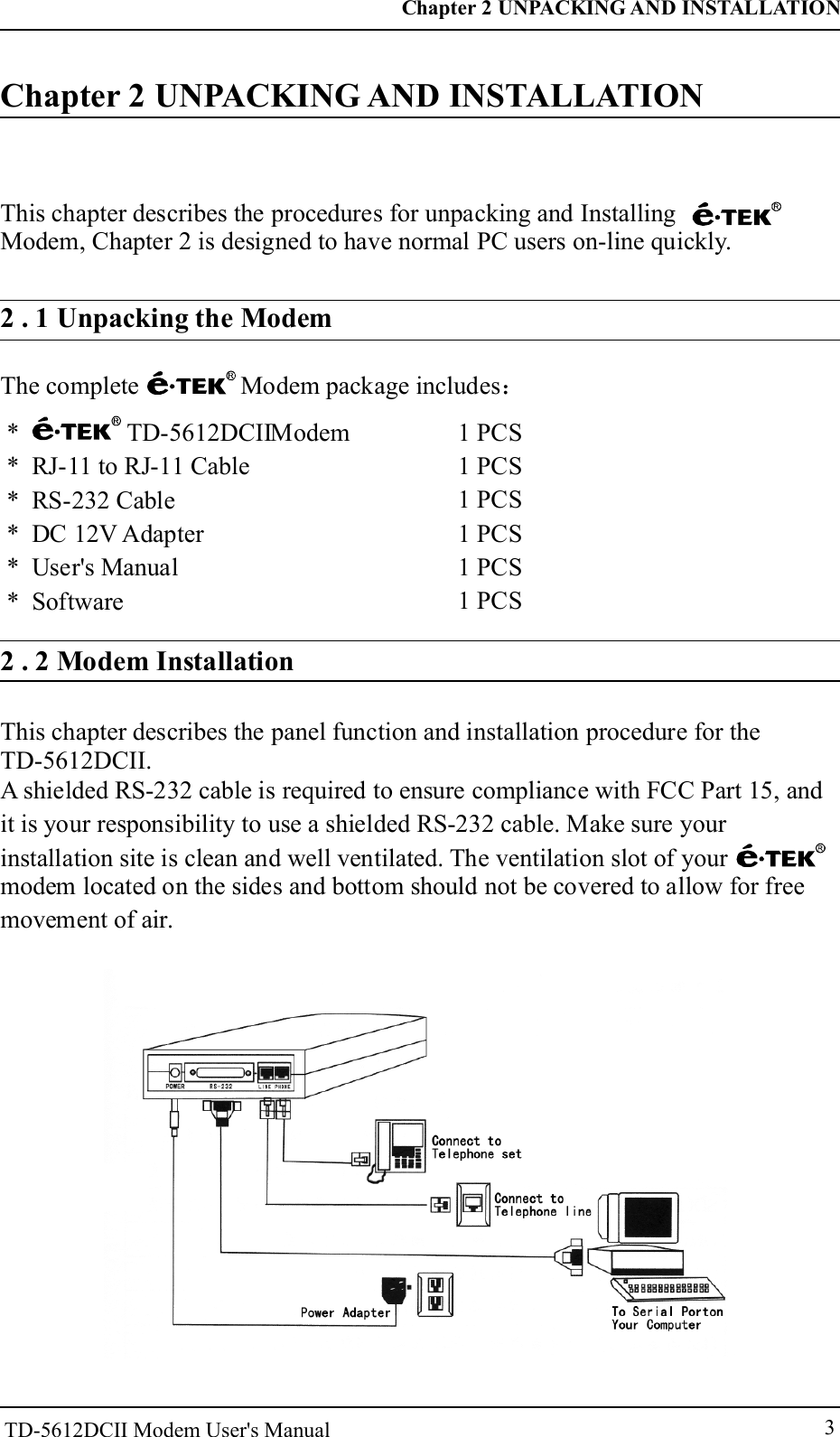
3Chapter 2 UNPACKING AND INSTALLATIONThis chapter describes the procedures for unpacking and InstallingModem, Chapter 2 is designed to have normal PC users on-line quickly.2 . 1 Unpacking the ModemThe complete Modem package includes:* TD-    Modem* RJ-11 to RJ-11 Cable* RS-232 Cable* DC 12V Adapter* User's Manual* Software5612DCII         1 PCS1 PCS1 PCS1 PCS1 PCS1 PCS2 . 2 Modem InstallationChapter 2 UNPACKING AND INSTALLATIONThis chapter describes the panel function and installation procedure for the TD-5612DCII.A shielded RS-232 cable is required to ensure compliance with FCC Part 15, andit is your responsibility to use a shielded RS-232 cable. Make sure yourinstallation site is clean and well ventilated. The ventilation slot of yourmodem located on the sides and bottom should not be covered to allow for freemovement of air.TD-5612DCII Modem User's Manual
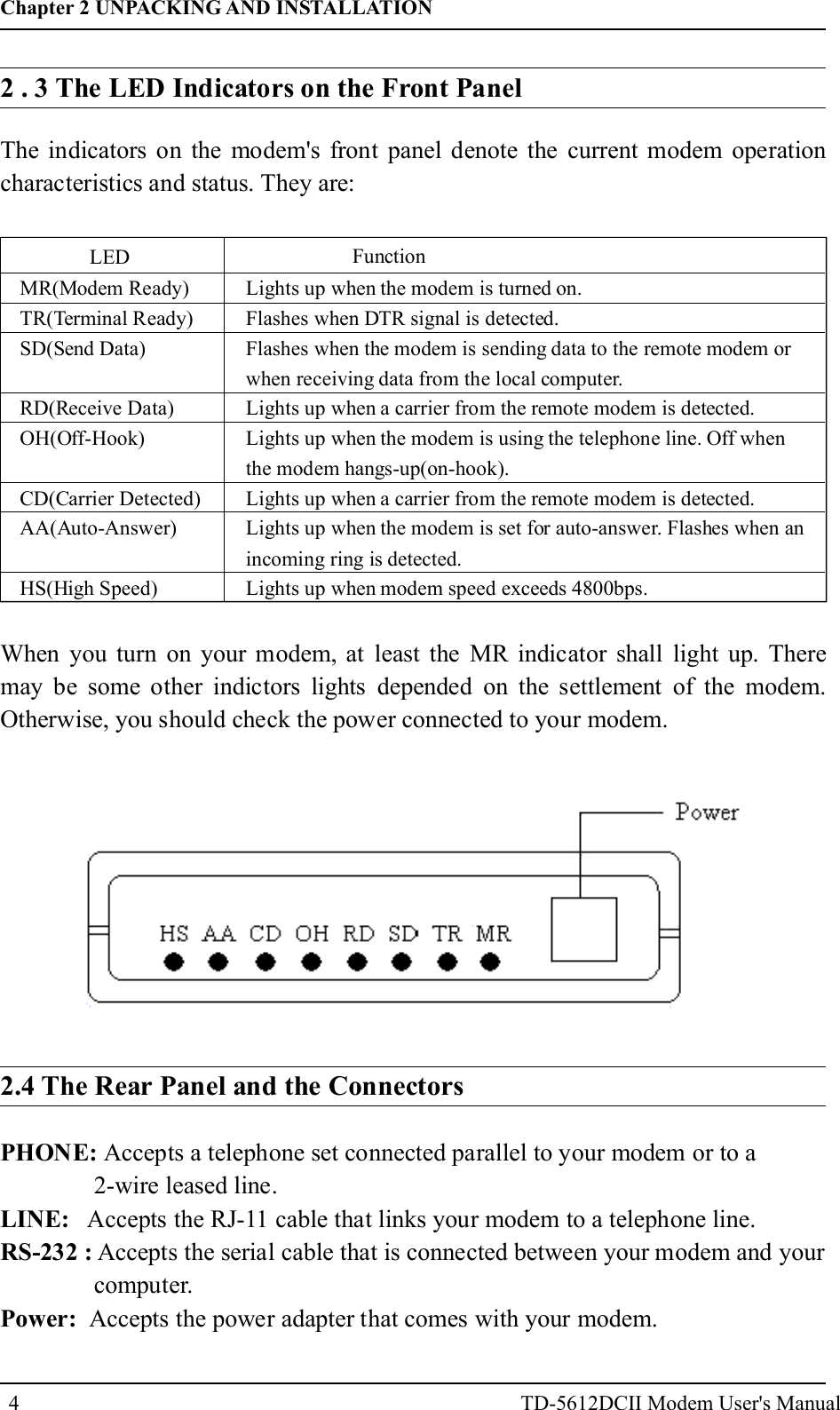
42 . 3 The LED Indicators on the Front PanelThe indicators on the modem's front panel denote the current modem operationcharacteristics and status. They are:LED FunctionMR(Modem Ready)TR(Terminal Ready)SD(Send Data)RD(Receive Data)OH(Off-Hook)CD(Carrier Detected)AA(Auto-Answer)HS(High Speed)Lights up when the modem is turned on.Flashes when DTR signal is detected.Flashes when the modem is sending data to the remote modem orwhen receiving data from the local computer.Lights up when a carrier from the remote modem is detected.Lights up when the modem is using the telephone line. Off whenthe modem hangs-up(on-hook).Lights up when a carrier from the remote modem is detected.Lights up when the modem is set for auto-answer. Flashes when anincoming ring is detected.Lights up when modem speed exceeds 4800bps.When you turn on your modem, at least the MR indicator shall light up. Theremay be some other indictors lights depended on the settlement of the modem.Otherwise, you should check the power connected to your modem.2.4 The Rear Panel and the ConnectorsPHONE:LINE:RS-232 :Power:Accepts a telephone set connected parallel to your modem or to a2-wire leased line.Accepts the RJ-11 cable that links your modem to a telephone line.Accepts the serial cable that is connected between your modem and yourcomputer.Accepts the power adapter that comes with your modem.Chapter 2 UNPACKING AND INSTALLATIONTD-5612DCII Modem User's Manual
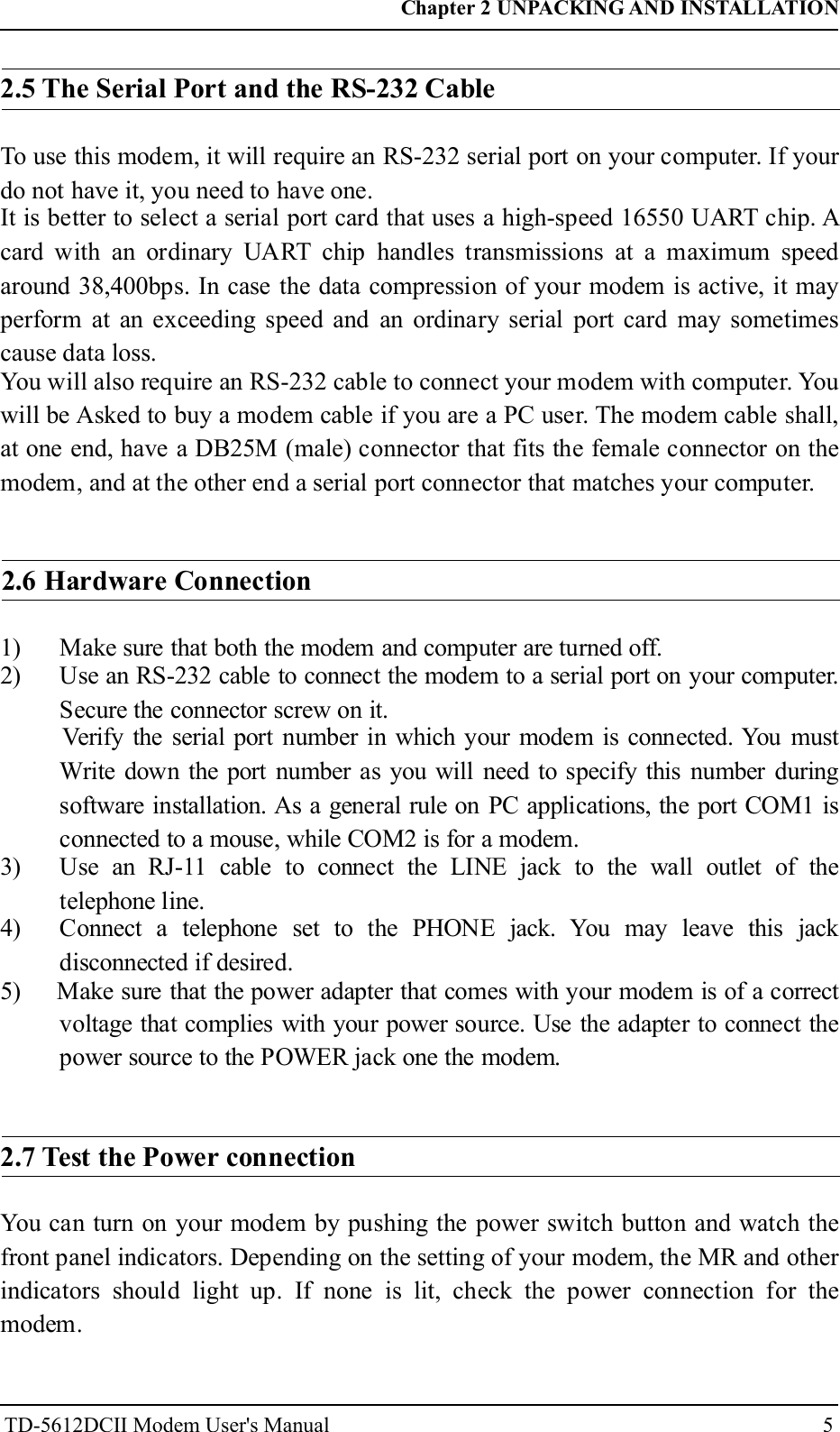
52.5 The Serial Port and the RS-232 CableTo use this modem, it will require an RS-232 serial port on your computer. If yourdo not have it, you need to have one.It is better to select a serial port card that uses a high-speed 16550 UART chip. Acard with an ordinary UART chip handles transmissions at a maximum speedaround 38,400bps. In case the data compression of your modem is active, it mayperform at an exceeding speed and an ordinary serial port card may sometimescause data loss.You will also require an RS-232 cable to connect your modem with computer. Youwill be Asked to buy a modem cable if you are a PC user. The modem cable shall,at one end, have a DB25M (male) connector that fits the female connector on themodem, and at the other end a serial port connector that matches your computer.2.6 Hardware Connection1) Make sure that both the modem and computer are turned off.2) Use an RS-232 cable to connect the modem to a serial port on your computer.Secure the connector screw on it.Verify the serial port number in which your modem is connected. You mustWrite down the port number as you will need to specify this number duringsoftware installation. As a general rule on PC applications, the port COM1 isconnected to a mouse, while COM2 is for a modem.3) Use an RJ-11 cable to connect the LINE jack to the wall outlet of thetelephone line.4) Connect a telephone set to the PHONE jack. You may leave this jackdisconnected if desired.5) Make sure that the power adapter that comes with your modem is of a correctvoltage that complies with your power source. Use the adapter to connect thepower source to the POWER jack one the modem.2.7 Test the Power connectionYou can turn on your modem by pushing the power switch button and watch thefront panel indicators. Depending on the setting of your modem, the MR and otherindicators should light up. If none is lit, check the power connection for themodem.Chapter 2 UNPACKING AND INSTALLATIONTD-5612DCII Modem User's Manual
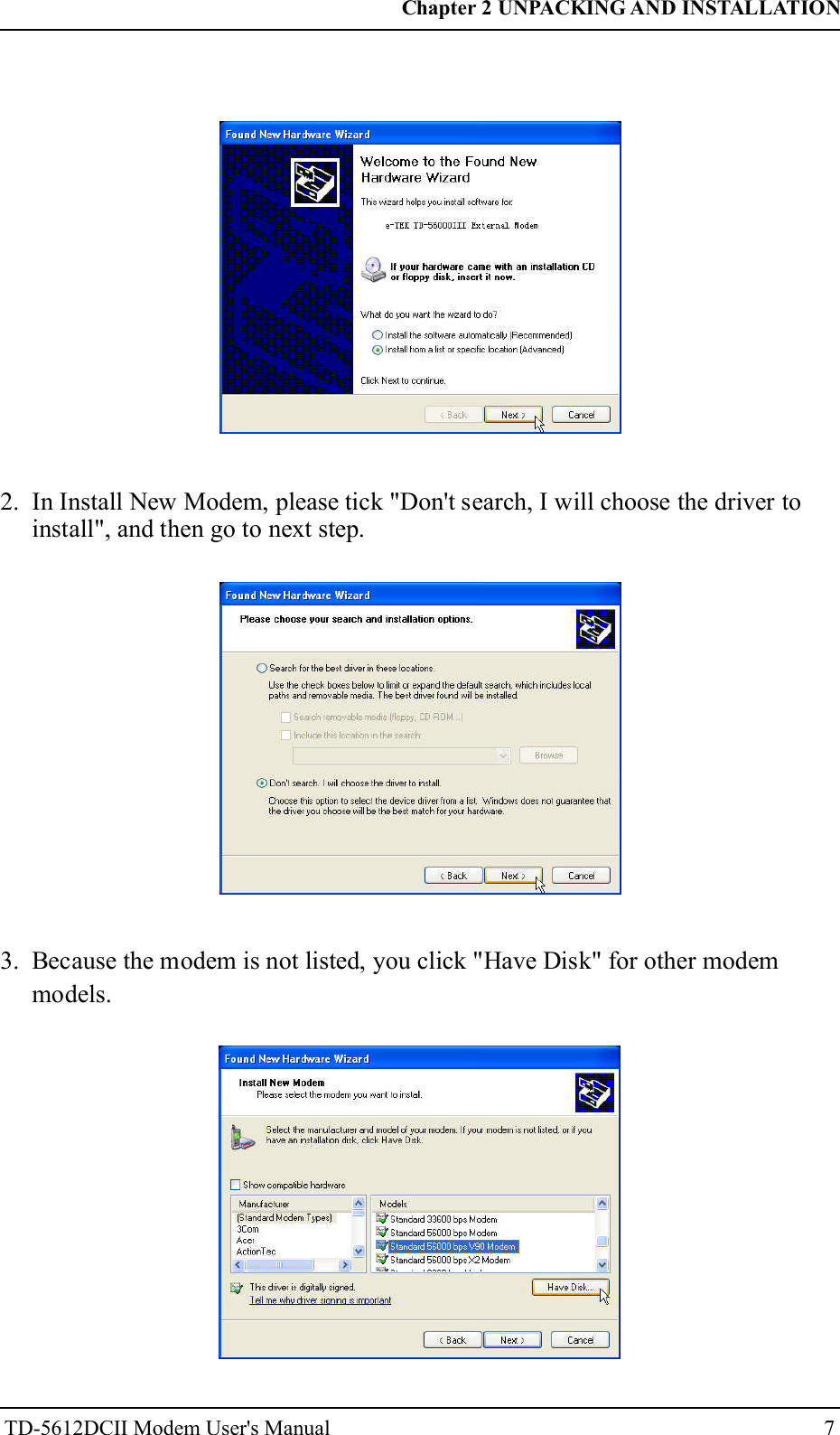
6Once a telephone set is connected, you may test the line quality and connectionsby lifting the telephone handset, listening for a clear dial tone, and making severaltelephone calls. The calls should go through well and the sound loud and clear.Otherwise, the line may be poor or have a faulty connection.2.9 Data Communications Software PackagesYour modem follows the industrial standard in the modem command set. As aresult, most of the popular communications software packages off-the-shelf willwork with it. You should select a software package according to your applicationrequirement.Most popular communications software are provided with the configurationnamed Initial-String or Dialing-Prefix. It is wise to check, one by one, thecommands in this string as they will be sent to determine the modemcharacteristics each time prior to dialing.2.10 Fax communications Software PackagesSimilar to data communication applications, you interact with the modem throughthe fax communications software.Your modem supports Class 1& Class 1.0 command set.2.11 Error-Correction and Data compressionYour modem supports the industrial standards of V.42 LAPM MNP 2-4 andV.44 V.42bis MNP 5 for error-correction and data compression (ECDC).Both standards are capable of error-correction as well. The modem will re-transmit a faulty data block when an error is detected while receiving.、、 、2.12 Installation of Modem Driver in Win owsXPd1. Windows XP "Found New Hardware Wizard". Please tick "Install from a list orspecific location", and then go to next step.Chapter 2 UNPACKING AND INSTALLATIONTD-5612DCII Modem User's Manual2.8 Test the Telephone Line Connection
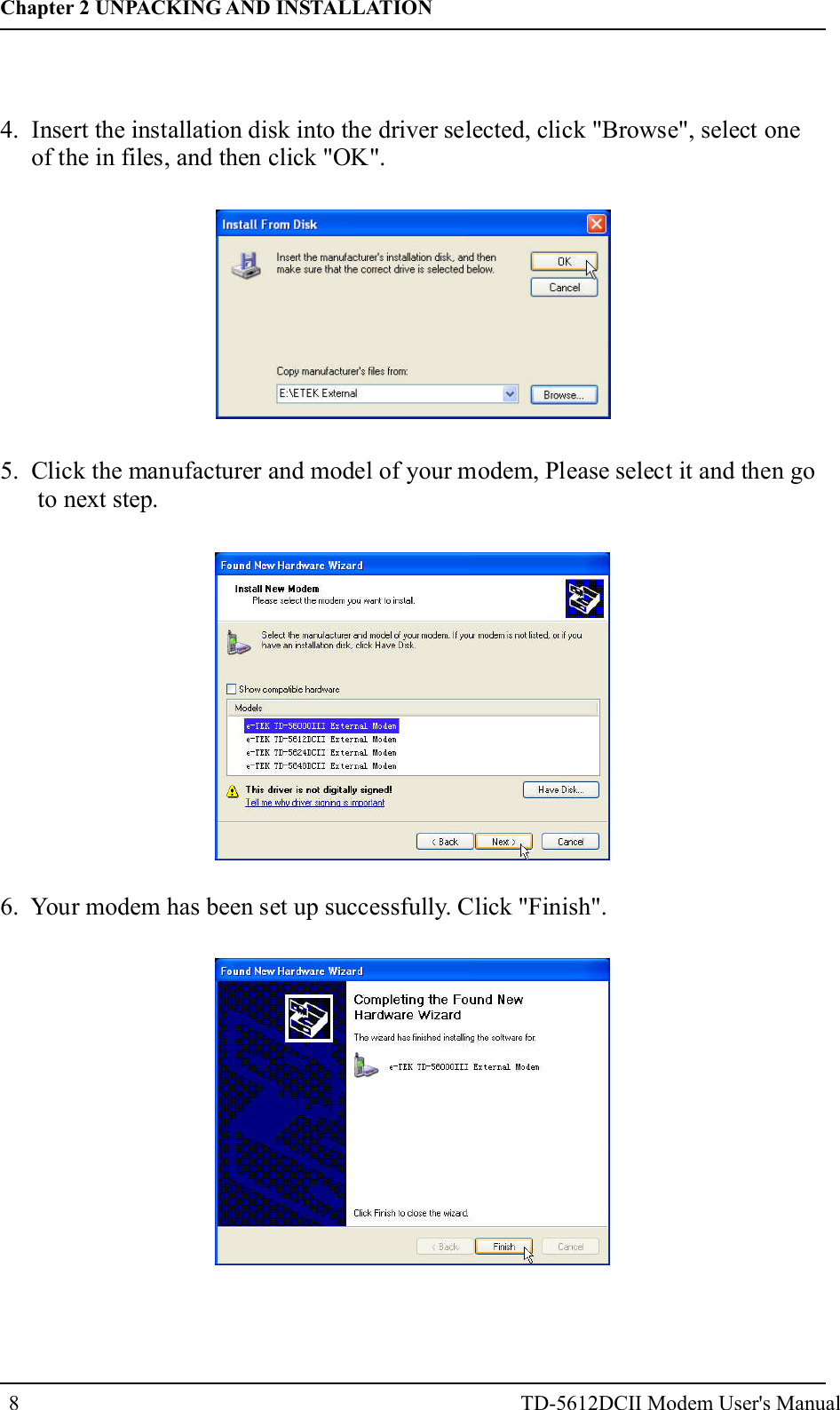
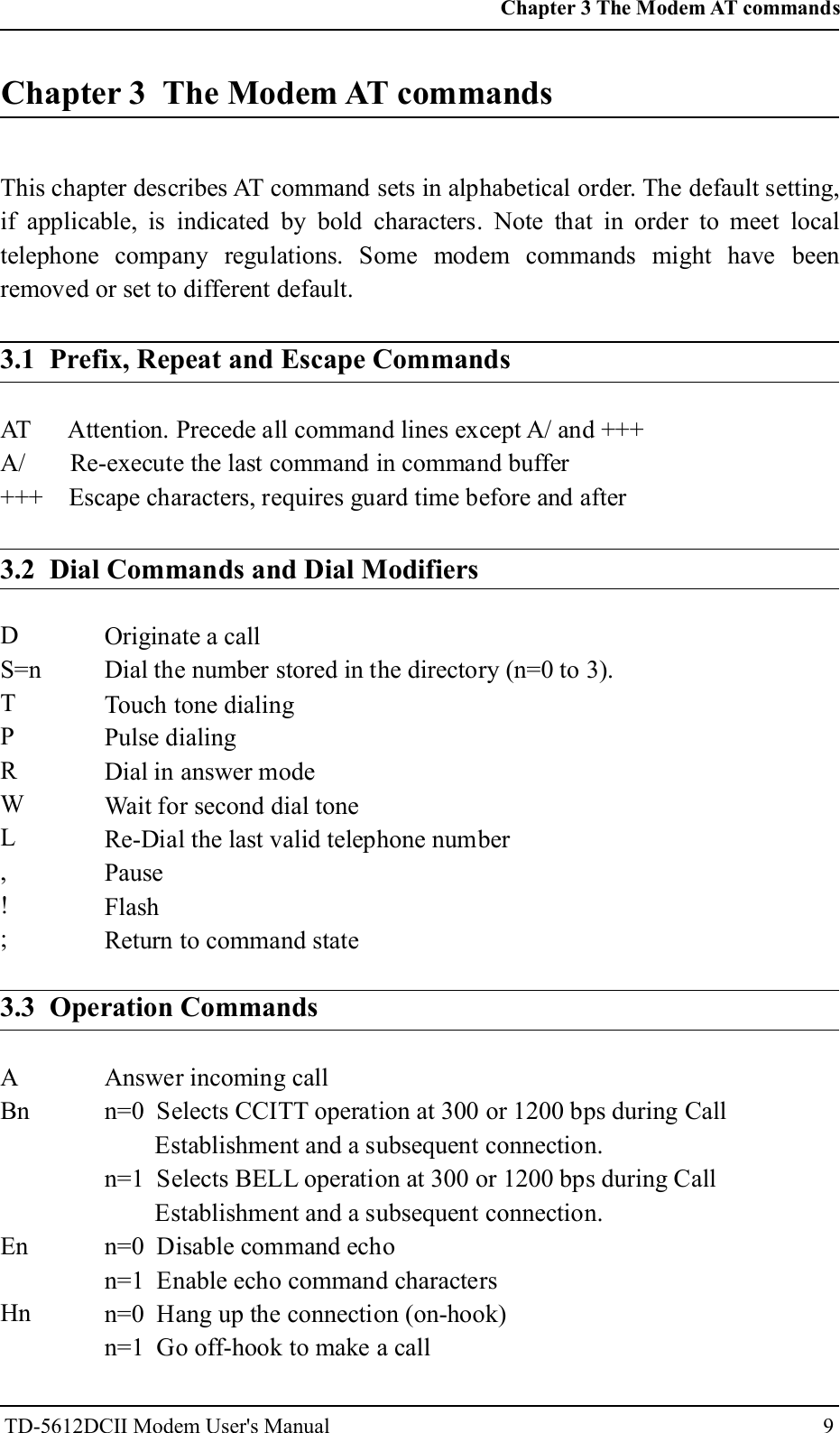
72. In Install New Modem, please tick "Don't search, I will choose the driver toinstall", and then go to next step.3. Because the modem is not listed, you click "Have Disk" for other modemmodels.Chapter 2 UNPACKING AND INSTALLATIONTD-5612DCII Modem User's Manual
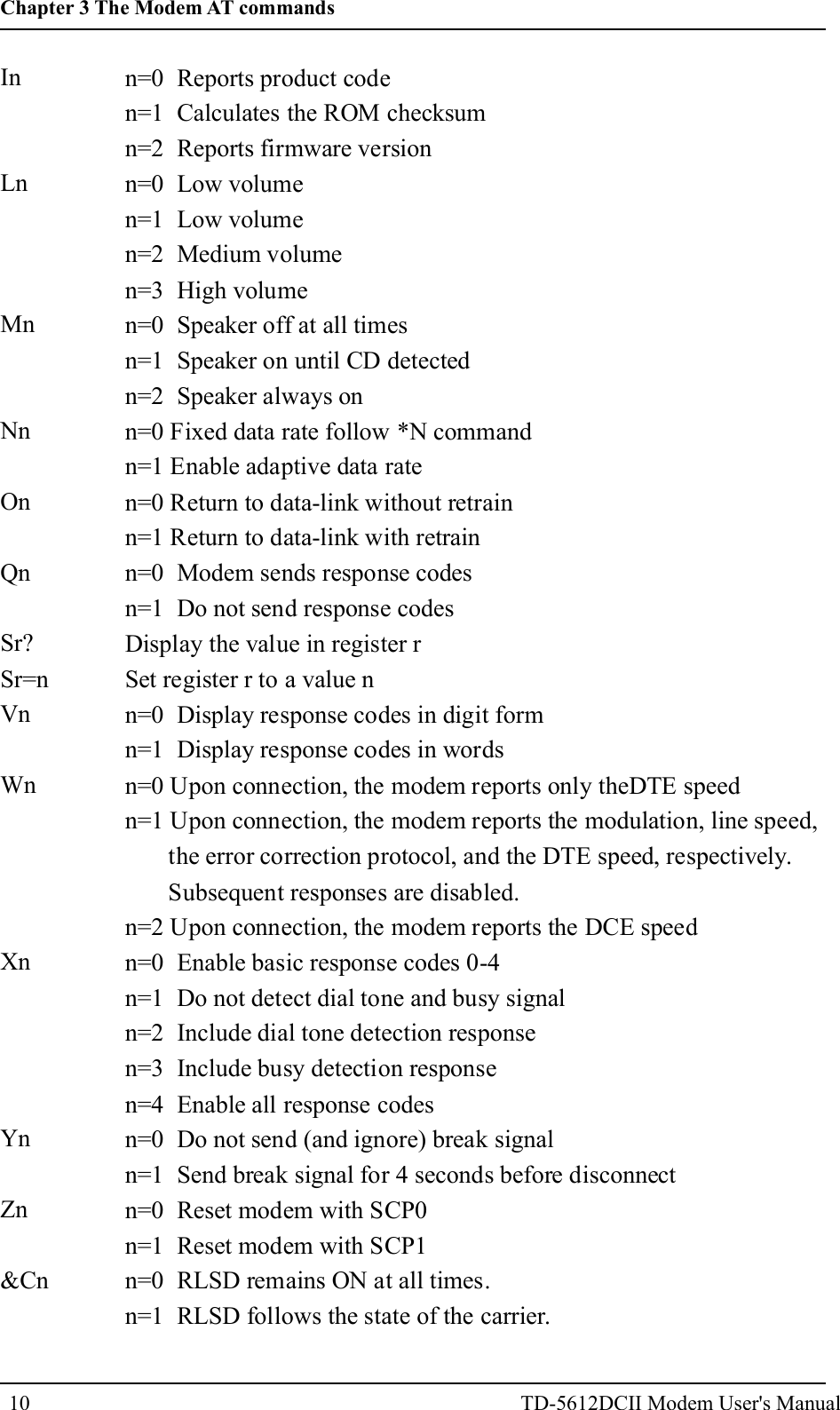
84. Insert the installation disk into the driver selected, click "Browse", select oneof the in files, and then click "OK".5. Click the manufacturer and model of your modem, Please select it and then goto next step.6. Your modem has been set up successfully. Click "Finish".Chapter 2 UNPACKING AND INSTALLATIONTD-5612DCII Modem User's Manual
9Chapter 3 The Modem AT commandsThis chapter describes AT command sets in alphabetical order. The default setting,if applicable, is indicated by bold characters. Note that in order to meet localtelephone company regulations. Some modem commands might have beenremoved or set to different default.3.1 Prefix, Repeat and Escape CommandsAT Attention. Precede all command lines except A/ and +++A/ Re-execute the last command in command buffer+++ Escape characters, requires guard time before and after3.2 Dial Commands and Dial ModifiersDS=nTPRWL,!;Originate a callDial the number stored in the directory (n=0 to 3).Touch tone dialingPulse dialingDial in answer modeWait for second dial toneRe-Dial the last valid telephone numberPauseFlashReturn to command state3.3 Operation CommandsABnEnHnAnswer incoming calln=0 Selects CCITT operation at 300 or 1200 bps during CallEstablishment and a subsequent connection.n=1 Selects BELL operation at 300 or 1200 bps during CallEstablishment and a subsequent connection.n=0 Disable command echon=1 Enable echo command charactersn=0 Hang up the connection (on-hook)n=1 Go off-hook to make a callChapter 3 The Modem AT commandsTD-5612DCII Modem User's Manual
10InLnMnNnOnQnSr?Sr=nVnWnXnYnZn&Cnn=0 Reports product coden=1 Calculates the ROM checksumn=2 Reports firmware versionn=0 Low volumen=1 Low volumen=2 Medium volumen=3 High volumen=0 Speaker off at all timesn=1 Speaker on until CD detectedn=2 Speaker always onn=0 Fixed data rate follow *N commandn=1 Enable adaptive data raten=0 Return to data-link without retrainn=1 Return to data-link with retrainn=0 Modem sends response codesn=1 Do not send response codesDisplay the value in register rSet register r to a value nn=0 Display response codes in digit formn=1 Display response codes in wordsn=0 Upon connection, the modem reports only theDTE speedn=1 Upon connection, the modem reports the modulation, line speed,the error correction protocol, and the DTE speed, respectively.Subsequent responses are disabled.n=2 Upon connection, the modem reports the DCE speedn=0 Enable basic response codes 0-4n=1 Do not detect dial tone and busy signaln=2 Include dial tone detection responsen=3 Include busy detection responsen=4 Enable all response codesn=0 Do not send (and ignore) break signaln=1 Send break signal for 4 seconds before disconnectn=0 Reset modem with SCP0n=1 Reset modem with SCP1n=0 RLSD remains ON at all times.n=1 RLSD follows the state of the carrier.Chapter 3 The Modem AT commandsTD-5612DCII Modem User's Manual
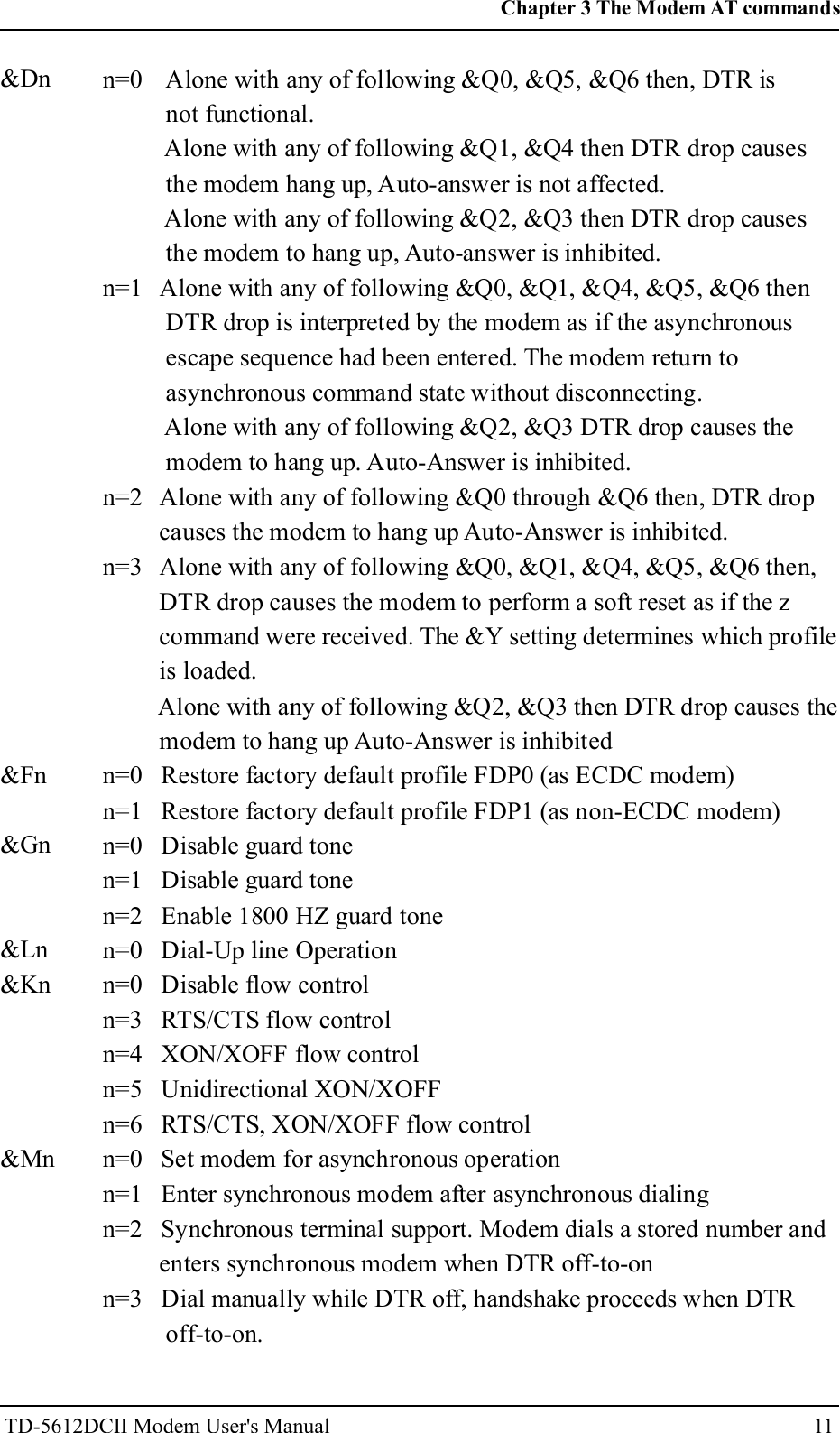
11n=0 Alone with any of following &Q0, &Q5, &Q6 then, DTR isnot functional.Alone with any of following &Q1, &Q4 then DTR drop causesthe modem hang up, Auto-answer is not affected.Alone with any of following &Q2, &Q3 then DTR drop causesthe modem to hang up, Auto-answer is inhibited.n=1 Alone with any of following &Q0, &Q1, &Q4, &Q5, &Q6 thenDTR drop is interpreted by the modem as if the asynchronousescape sequence had been entered. The modem return toasynchronous command state without disconnecting.Alone with any of following &Q2, &Q3 DTR drop causes themodem to hang up. Auto-Answer is inhibited.n=2 Alone with any of following &Q0 through &Q6 then, DTR dropcauses the modem to hang up Auto-Answer is inhibited.n=3 Alone with any of following &Q0, &Q1, &Q4, &Q5, &Q6 then,DTR drop causes the modem to perform a soft reset as if the zcommand were received. The &Y setting determines which profileis loaded.Alone with any of following &Q2, &Q3 then DTR drop causes themodem to hang up Auto-Answer is inhibitedn=0 Restore factory default profile FDP0 (as ECDC modem)n=1 Restore factory default profile FDP1 (as non-ECDC modem)n=0 Disable guard tonen=1 Disable guard tonen=2 Enable 1800 HZ guard tonen=0 Dial-Up line Operationn=0 Disable flow controln=3 RTS/CTS flow controln=4 XON/XOFF flow controln=5 Unidirectional XON/XOFFn=6 RTS/CTS, XON/XOFF flow controln=0 Set modem for asynchronous operationn=1 Enter synchronous modem after asynchronous dialingn=2 Synchronous terminal support. Modem dials a stored number andenters synchronous modem when DTR off-to-onn=3 Dial manually while DTR off, handshake proceeds when DTRoff-to-on.&Dn&Fn&Gn&Ln&Kn&MnChapter 3 The Modem AT commandsTD-5612DCII Modem User's Manual
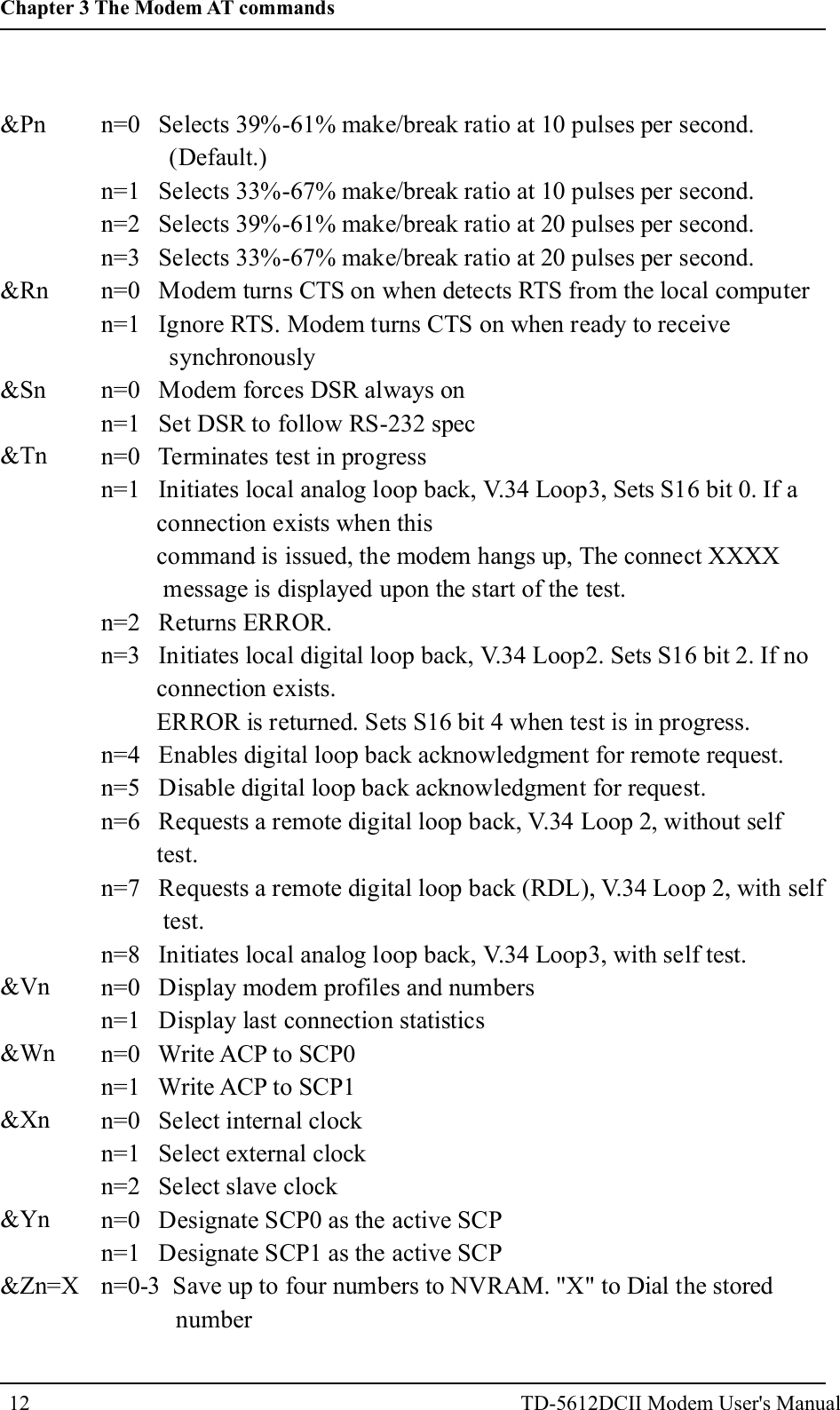
&Pn&Rn&Sn&Tn&Vn&Wn&Xn&Yn&Zn=Xn=0 Selects 39%-61% make/break ratio at 10 pulses per second.(Default.)n=1 Selects 33%-67% make/break ratio at 10 pulses per second.n=2 Selects 39%-61% make/break ratio at 20 pulses per second.n=3 Selects 33%-67% make/break ratio at 20 pulses per second.n=0 Modem turns CTS on when detects RTS from the local computern=1 Ignore RTS. Modem turns CTS on when ready to receivesynchronouslyn=0 Modem forces DSR always onn=1 Set DSR to follow RS-232 specn=0 Terminates test in progressn=1 Initiates local analog loop back, V.34 Loop3, Sets S16 bit 0. If aconnection exists when thiscommand is issued, the modem hangs up, The connect XXXXmessage is displayed upon the start of the test.n=2 Returns ERROR.n=3 Initiates local digital loop back, V.34 Loop2. Sets S16 bit 2. If noconnection exists.ERROR is returned. Sets S16 bit 4 when test is in progress.n=4 Enables digital loop back acknowledgment for remote request.n=5 Disable digital loop back acknowledgment for request.n=6 Requests a remote digital loop back, V.34 Loop 2, without selftest.n=7 Requests a remote digital loop back (RDL), V.34 Loop 2, with selftest.n=8 Initiates local analog loop back, V.34 Loop3, with self test.n=0 Display modem profiles and numbersn=1 Display last connection statisticsn=0 Write ACP to SCP0n=1 Write ACP to SCP1n=0 Select internal clockn=1 Select external clockn=2 Select slave clockn=0 Designate SCP0 as the active SCPn=1 Designate SCP1 as the active SCPn=0-3 Save up to four numbers to NVRAM. "X" to Dial the storednumber12Chapter 3 The Modem AT commandsTD-5612DCII Modem User's Manual
Note: &X, &Mn: for Sync mode only.+IPR+MSSyntax:Fixed DTE RateSpecifies the DTE-modem interface operation rate in bits/s. Theavailable rates are: 0, 300, 1200, 2400,4800, 9600, 19200, 38400, 57600, 115200bits/sExample: AT+IPR=9600Modulation SelectionThis extended-format compound parameter controls the manner ofoperation of the modulation capabilities in the modem. It accepts sixsubparameters.+MS=[<carrier>[,<automode>[,<min_tx_rate>[,<max_tx_rate>[,<min_rx_rate> [,<max_rx_rate>]]]]]]Where possible <carrier>, <min_tx_rate>, <max_tx_rate>, <min_rx_rate>, and max_rx_rate>values are listed in Table .ModulationBell 103Bell 212V.21V.22V.22 bisV.23V.32V.32bisV.34V.90V.92 upstreamV.92 downstream<carrier>B103B212V21V22V22BV23CV32V32BV34V90V92V92Possible (<min_rx_rate>, <min_rx_rate>, (<min_tx_rate>),and <max_tx_rate>) Rates (bps)3001200 Rx/75 Tx or 75 Rx/1200 Tx30012002400 or 120012009600 or 480014400,12000,9600,7200,or 480033600,32100,28800,26400,24000,21600,19200,16800,14400,12000,9600,7200,4800, or 240056000,54667,53333,52000,50667,49333,48000,46667,45333,44000,42667,41333,40000,38667,37333,36000,34667,33333,32000,30667,29333,2800048000,46667,45333,44000,42667,41333,40000,38667,37333,36000,34667,33333,32000,30667,29333,28000,26667,25333,2400056000,54667,53333,52000,50667,49333,48000,46667,45333,44000,42667,41333,40000,38667,37333,36000,34667,33333,32000,30667,29333,2800013Chapter 3 The Modem AT commandsTD-5612DCII Modem User's Manual
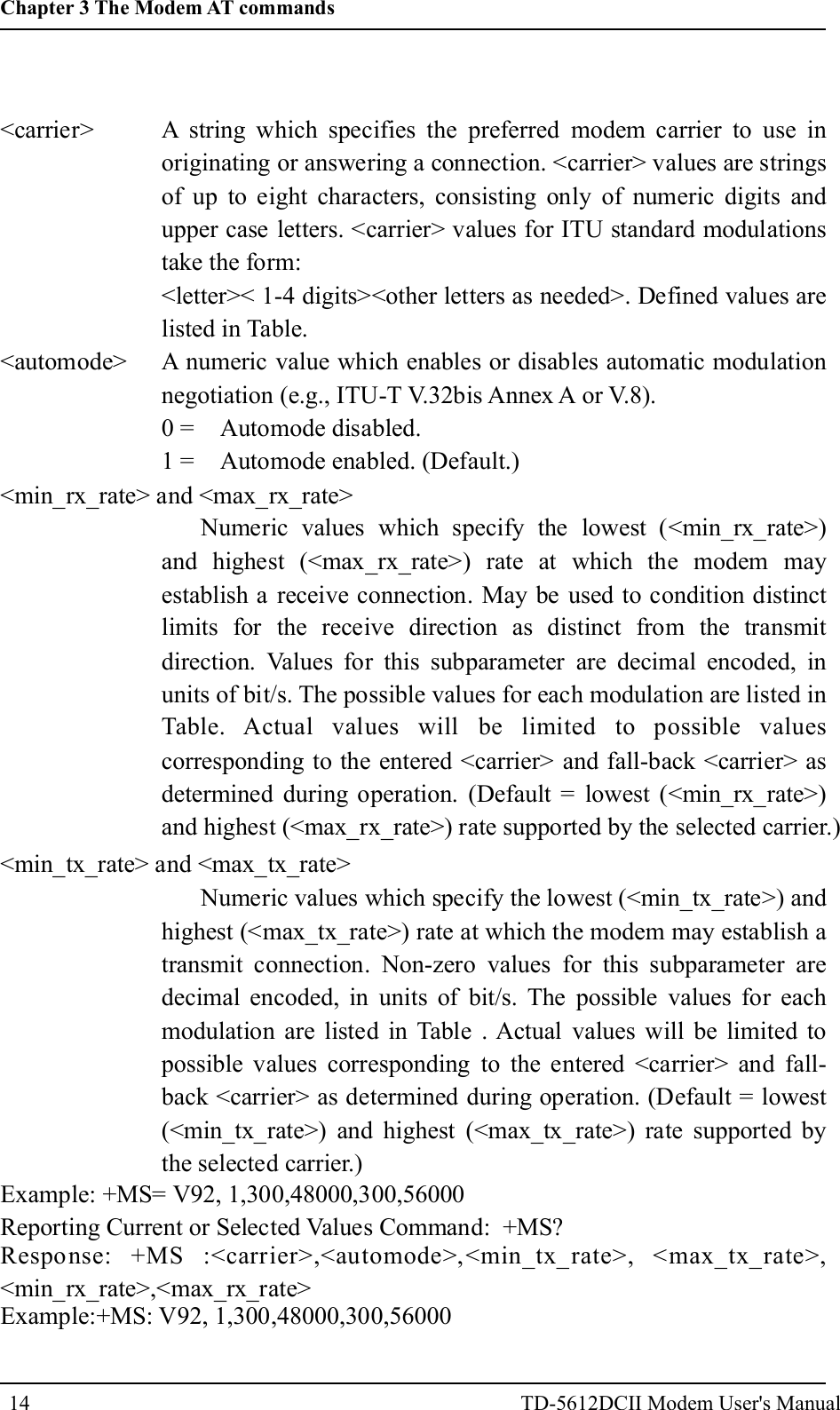
<carrier><automode><min_rx_rate> and <max_rx_rate>A string which specifies the preferred modem carrier to use inoriginating or answering a connection. <carrier> values are stringsof up to eight characters, consisting only of numeric digits andupper case letters. <carrier> values for ITU standard modulationstake the form:<letter>< 1-4 digits><other letters as needed>. Defined values arelisted in Table.A numeric value which enables or disables automatic modulationnegotiation (e.g., ITU-T V.32bis Annex A or V.8).0 = Automode disabled.1 = Automode enabled. (Default.)Numeric values which specify the lowest (<min_rx_rate>)and highest (<max_rx_rate>) rate at which the modem mayestablish a receive connection. May be used to condition distinctlimits for the receive direction as distinct from the transmitdirection. Values for this subparameter are decimal encoded, inunits of bit/s. The possible values for each modulation are listed inTable. Actual values will be limited to possible valuescorresponding to the entered <carrier> and fall-back <carrier> asdetermined during operation. (Default = lowest (<min_rx_rate>)and highest (<max_rx_rate>) rate supported by the selected carrier.)<min_tx_rate> and <max_tx_rate>Numeric values which specify the lowest (<min_tx_rate>) andhighest (<max_tx_rate>) rate at which the modem may establish atransmit connection. Non-zero values for this subparameter aredecimal encoded, in units of bit/s. The possible values for eachmodulation are listed in Table . Actual values will be limited topossible values corresponding to the entered <carrier> and fall-back <carrier> as determined during operation. (Default = lowest(<min_tx_rate>) and highest (<max_tx_rate>) rate supported bythe selected carrier.)Example: +MS= V92, 1,300,48000,300,56000Reporting Current or Selected Values Command: +MS?Response: +MS :<carrier>,<automode>,<min_tx_rate>, <max_tx_rate>,<min_rx_rate>,<max_rx_rate>Example:+MS: V92, 1,300,48000,300,5600014Chapter 3 The Modem AT commandsTD-5612DCII Modem User's Manual
Reporting Supported Range of Parameter Values Command: +MS=?Response:+MS: (< carrier> range),(<automode> range),(<min_tx_rate> range),(<max_tx_rate> range), (<min_rx_rate> range), (<max_rx_rate> range)Example :+MS:(B103,B212,V21 ,V22,V22B,V23C,V32,V32B,V34, V90, V92),(0,1),(300-33600),(300-48000),(300-56000),(300-56000)3.4 Error Control/Data Compression Commands+ES - Error Control and Synchronous Mode SelectionThis extended-format command specifies the initial requested mode ofoperation when the modem is operating as the originator, optionally specifiesthe acceptable fallback mode of operation when the modem is operating asthe originator, and optionally specifies the acceptable fallback mode ofoperation when the modem is operating as the answerer. It accepts threenumeric subparameters:Syntax+ES=[<orig_rqst>[,<orig_fbk>[,<ans_fbk>]]]Defined Values<orig_rqst><orig_fbk>Decimal number which specifies the initial requested mode ofoperation when the modem is operating as the originator. The optionsare:0 Initiate call with Direct Mode.1 Initiate call with Normal Mode (also referred to as Buffered Mode)only.2 Initiate V.42 without Detection Phase. If V.8 is in use, disable V.42Detection Phase.3 Initiate V.42 with Detection Phase. (Default.)4 Initiate MNP.6 Initiate V.80 Synchronous Access Mode when connection iscompleted, and Data State is entered. (See +ESA and +ITFcommands.)7 Initiate Frame Tunneling Mode when connection is complete, andData Mode is entered.Decimal number which specifies the acceptable fallback mode ofoperation when the modem is operating as the originator.15Chapter 3 The Modem AT commandsTD-5612DCII Modem User's Manual
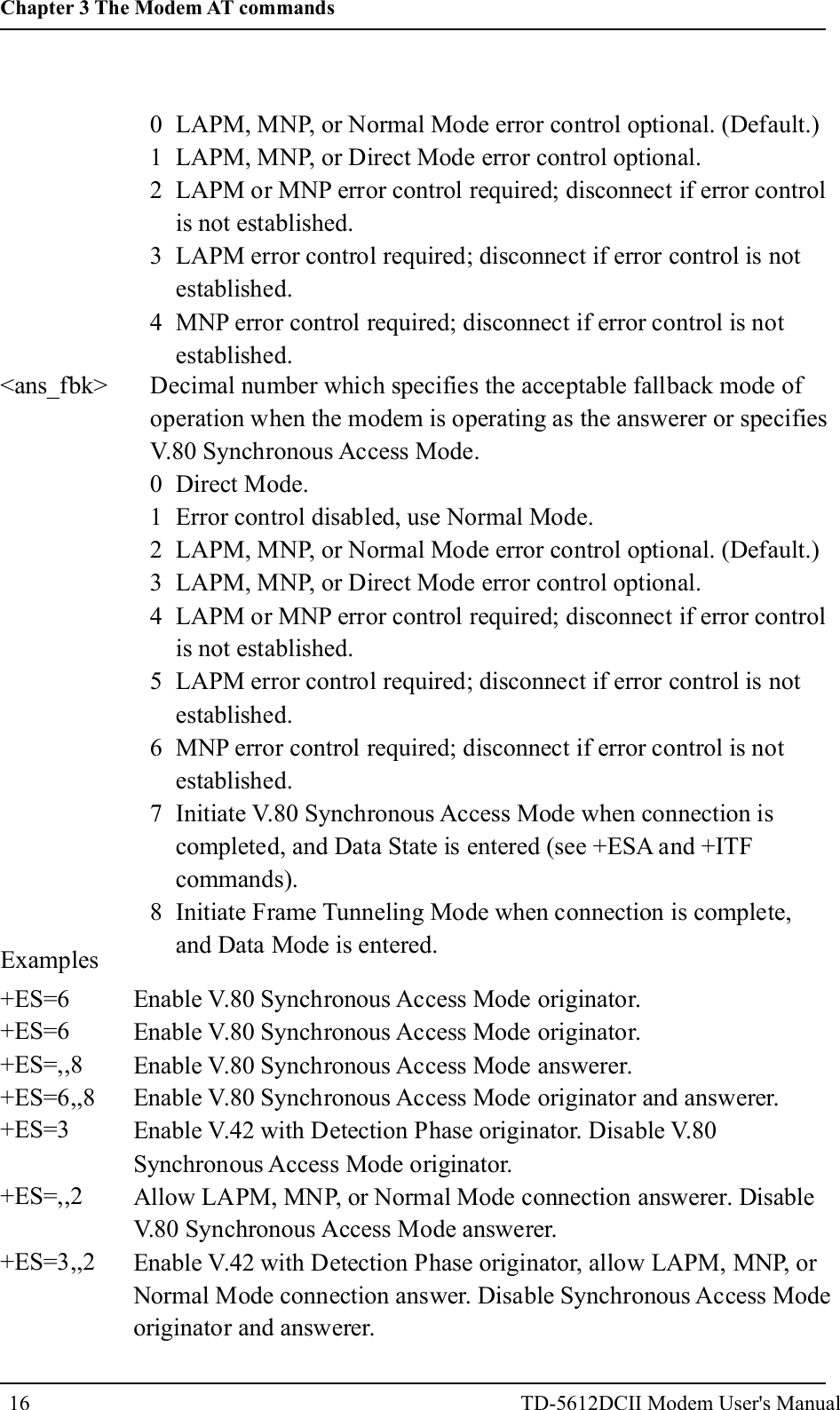
0 LAPM, MNP, or Normal Mode error control optional. (Default.)1 LAPM, MNP, or Direct Mode error control optional.2 LAPM or MNP error control required; disconnect if error controlis not established.3 LAPM error control required; disconnect if error control is notestablished.4 MNP error control required; disconnect if error control is notestablished.<ans_fbk> Decimal number which specifies the acceptable fallback mode ofoperation when the modem is operating as the answerer or specifiesV.80 Synchronous Access Mode.0 Direct Mode.1 Error control disabled, use Normal Mode.2 LAPM, MNP, or Normal Mode error control optional. (Default.)3 LAPM, MNP, or Direct Mode error control optional.4 LAPM or MNP error control required; disconnect if error controlis not established.5 LAPM error control required; disconnect if error control is notestablished.6 MNP error control required; disconnect if error control is notestablished.7 Initiate V.80 Synchronous Access Mode when connection iscompleted, and Data State is entered (see +ESA and +ITFcommands).8 Initiate Frame Tunneling Mode when connection is complete,and Data Mode is entered.Examples+ES=6+ES=6+ES=,,8+ES=6,,8+ES=3+ES=,,2+ES=3,,2Enable V.80 Synchronous Access Mode originator.Enable V.80 Synchronous Access Mode originator.Enable V.80 Synchronous Access Mode answerer.Enable V.80 Synchronous Access Mode originator and answerer.Enable V.42 with Detection Phase originator. Disable V.80Synchronous Access Mode originator.Allow LAPM, MNP, or Normal Mode connection answerer. DisableV.80 Synchronous Access Mode answerer.Enable V.42 with Detection Phase originator, allow LAPM, MNP, orNormal Mode connection answer. Disable Synchronous Access Modeoriginator and answerer.16Chapter 3 The Modem AT commandsTD-5612DCII Modem User's Manual
+EB - Break Handling in Error Control OperationThis extended-format compound parameter controls the break handling inV.42 operation. It accepts three numeric subparameters:Syntax+EB=[<break_selection>[,<timed>[,<default_length>]]]Defined Values<break_selection><timed><default_length>Decimal number 0 specifying that break is to be ignored, i.e.,not signaled to remote DCE.Decimal number 0 specifying that any transmitted V.42 L -SIGNAL will not indicate break signal lengthDecimal number 0 specifying that break is not delivered to theDTE.+ESR - Selective RepeatThis extended-format numeric parameter controls the use of the selectiverepeat (SREJ) option in V.42.Syntax+ESR=[<value>]Decimal number 0 specifying that SREJ is not used.+EFCS - 32-bit Frame Check SequenceThis extended-format numeric parameter controls the use of the 16-bit or32-bit frame check sequence (FCS) option in V.42.Syntax +EFCS=[<value>]Defined Values<value>Decimal number 0 specifying the use of the 16-bit FCS specified in V.42.+ER - Error Control ReportingThis extended-format numeric parameter controls whether or not theextended-format +ER: intermediate result code is transmitted from themodem to the DTE.S95 bit 3 is reset to 0 for +ER=0 and is set to a 1 for +ER=1. The morerecent setting of +ER or S95 bit 3, and the W command setting, determinesthe actual error control result code reporting (see S95 Parameter and WCommand).Syntax+ER=[<value>]Defined Values17Chapter 3 The Modem AT commandsTD-5612DCII Modem User's Manual
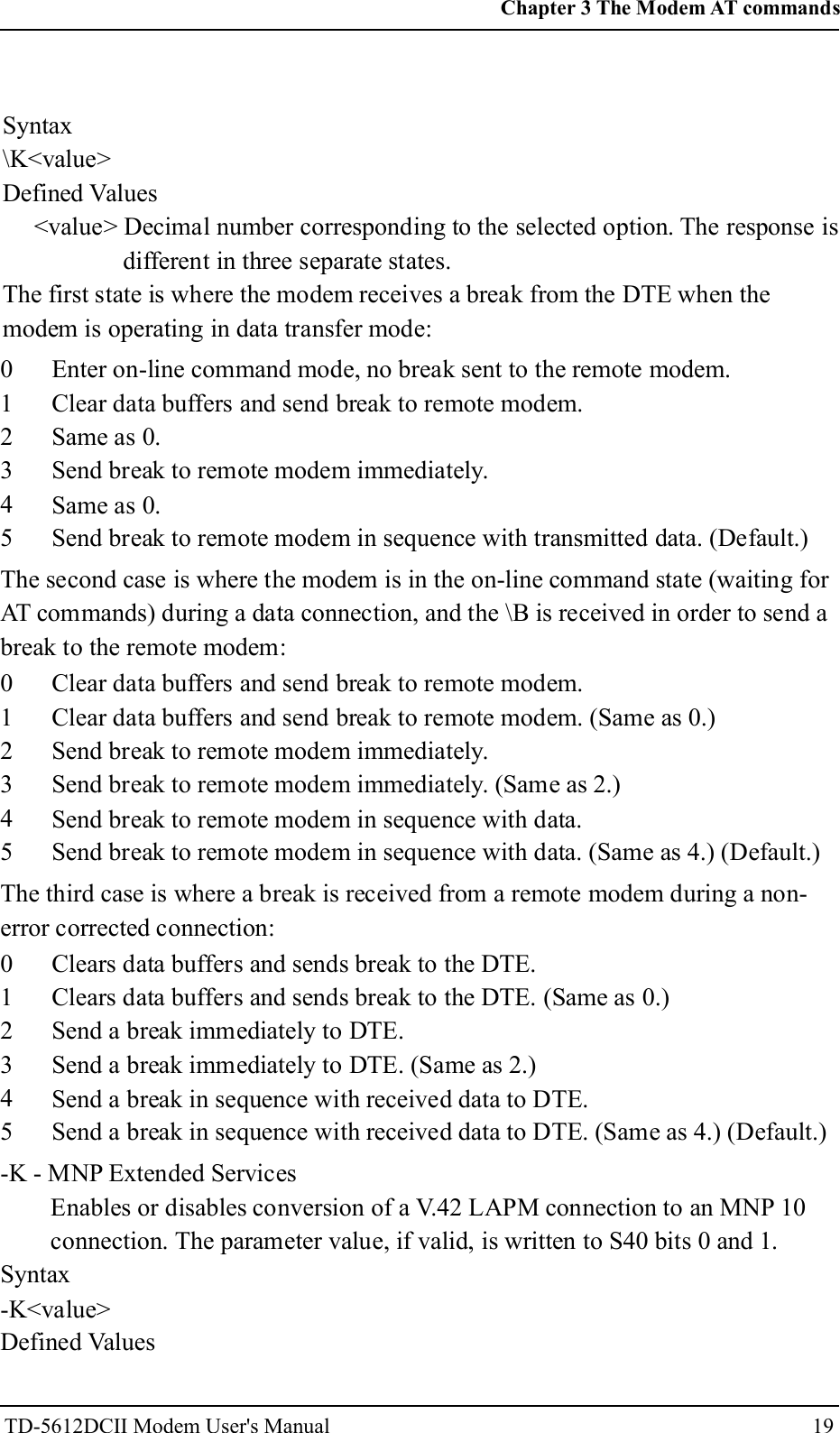
<value> A decimal number corresponding to the selected error control option:0 =Error control reporting disabled (no +ER intermediate result codetransmitted).1 =Error control reporting enabled (+ER intermediate result codetransmitted).+ETBM - Call Termination Buffer ManagementThis extended-format compound parameter controls the handling of dataremaining in modem buffers upon call termination. It accepts threenumeric subparameters:Syntax+ETBM=[<pending_TD>[,<pending_RD>[,<timer>]]]Defined Values<pending_TD><pending_RD><timer>Decimal number 0 specifying that disconnect will occurimmediately and all buffered transmit data will be discardedwhen the local DTE requests call disconnection.Decimal number 0 specifying that disconnect will occurimmediately and all buffered receive data will be discarded whenthe local DTE requests call disconnection.Decimal number 0 specifying that the modem will not attempt todeliver the buffered data before abandoning the attempt anddiscarding remaining data.\B - Transmit Break to RemoteIn non-error correction mode, the modem will transmit a break signal to theremote modem with a length in multiples of 100 ms according to parameterspecified. If a number in excess of 9 is entered, 9 is used. The commandworks in conjunction with the \K command.Syntax\B<value>Defined Values<value>Decimal number corresponding to the selected option.1-9Break length in 100 ms units. (Default = 3.) (Non-error corrected mode only.)\K - Break ControlControls the response of the modem to a break received from the DTE or theremote modem or the \B command. The parameter value, if valid, is written to S40bits 3, 4, and 5.18Chapter 3 The Modem AT commandsTD-5612DCII Modem User's Manual
Syntax\K<value>Defined Values<value> Decimal number corresponding to the selected option. The response isdifferent in three separate states.The first state is where the modem receives a break from the DTE when themodem is operating in data transfer mode:012345Enter on-line command mode, no break sent to the remote modem.Clear data buffers and send break to remote modem.Same as 0.Send break to remote modem immediately.Same as 0.Send break to remote modem in sequence with transmitted data. (Default.)The second case is where the modem is in the on-line command state (waiting forAT commands) during a data connection, and the \B is received in order to send abreak to the remote modem:012345Clear data buffers and send break to remote modem.Clear data buffers and send break to remote modem. (Same as 0.)Send break to remote modem immediately.Send break to remote modem immediately. (Same as 2.)Send break to remote modem in sequence with data.Send break to remote modem in sequence with data. (Same as 4.) (Default.)The third case is where a break is received from a remote modem during a non-error corrected connection:012345Clears data buffers and sends break to the DTE.Clears data buffers and sends break to the DTE. (Same as 0.)Send a break immediately to DTE.Send a break immediately to DTE. (Same as 2.)Send a break in sequence with received data to DTE.Send a break in sequence with received data to DTE. (Same as 4.) (Default.)-K - MNP Extended ServicesEnables or disables conversion of a V.42 LAPM connection to an MNP 10connection. The parameter value, if valid, is written to S40 bits 0 and 1.Syntax-K<value>Defined Values19Chapter 3 The Modem AT commandsTD-5612DCII Modem User's Manual
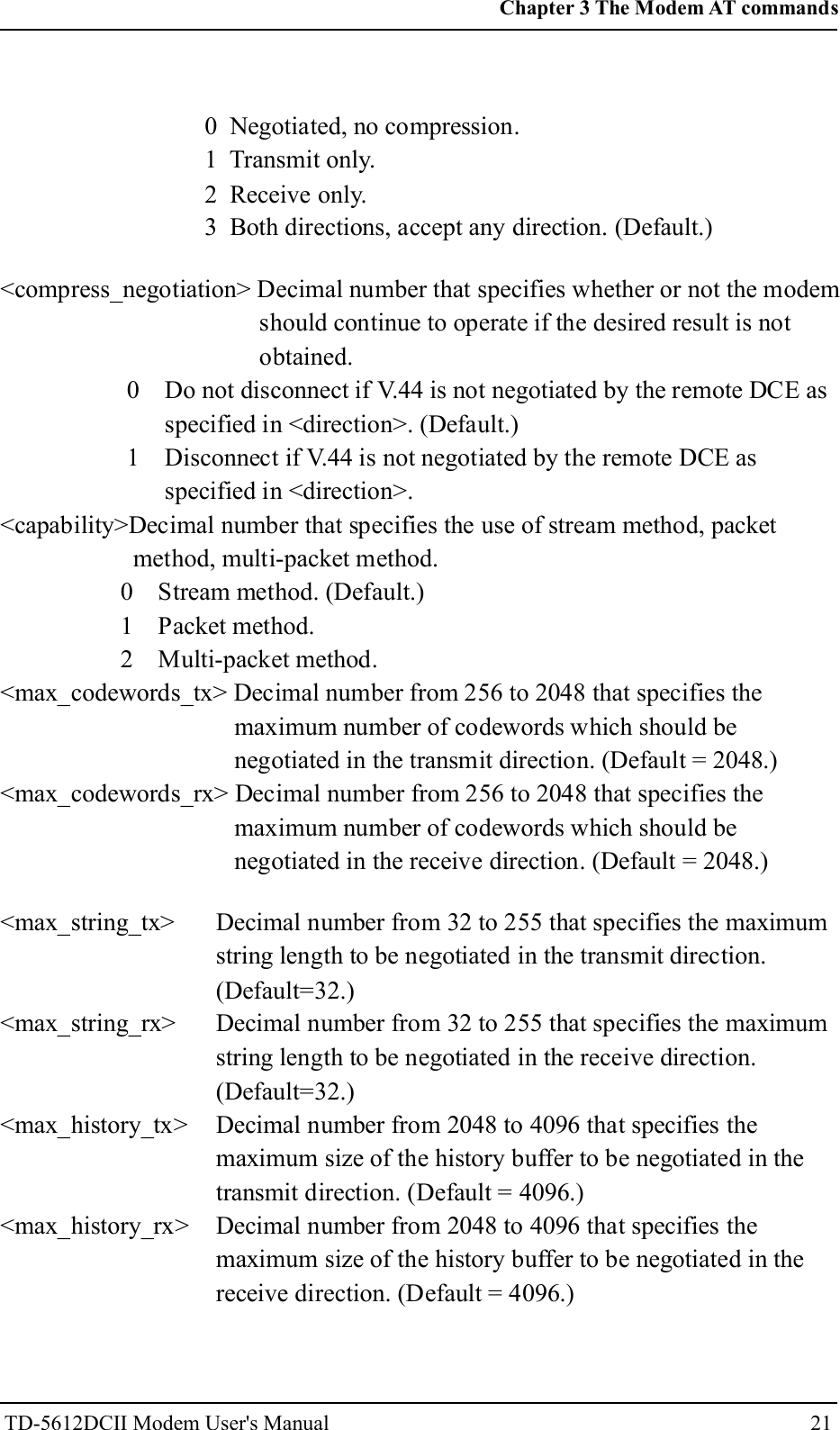
<value>Decimal number corresponding to the selected option.0 Disables V.42 LAPM to MNP 10 conversion. (Default.)1 Enables V.42 LAPM to MNP 10 conversion.2 Enables V.42 LAPM to MNP 10 conversion; inhibits MNP Extended Servicesinitiation during V.42 LAPM answer mode detection phase.+DS - Data CompressionThis extended-format compound parameter controls the V.42bis datacompression function if provided in the modem. It accepts four numericsubparameters:Syntax+DS=[<direction>[,<compr_neg>[,<max_dict>[,<max_string>]]]] Defined Values<direction><compr_neg><max_dict><max_string>Specifies the desired direction(s) of operation of the datacompression function; from the DTE point of view.0 Negotiated; no compression (V.42bis P0=0).3 both directions, accept any direction (V.42bis P0=11). (Default.)Specifies whether or not the modem should continue to operate ifthe desired result is not obtained.0 Do not disconnect if V.42bis is not negotiated by the remotemodem as specified in <direction>.Specifies the maximum number of dictionary entries (2048 entries)which should be negotiated (may be used by the DTE to limit thecodeword size transmitted, based on its knowledge of the natureof the data to be transmitted).Specifies the maximum string length (32 bytes) to be negotiated(V.42bis P2).+DS44 - V.44 Compression SelectThis extended-format compound parameter controls the V.44 data compressionfunction.Syntax+DS44=[<direction>[,< compress_negotiation >[,<capability>[,<max_codewords_tx> [,<max_codewords_rx>[,<max_string_tx>[,<max_string_rx>[,<max_history_tx> [,<max_history_rx>]]]]]]]]]Defined Values<direction> Decimal number that specifies the desired direction(s) ofoperation of the data compression function; from the DTE pointof view.20Chapter 3 The Modem AT commandsTD-5612DCII Modem User's Manual
0 Negotiated, no compression.1 Transmit only.2 Receive only.3 Both directions, accept any direction. (Default.)<compress_negotiation> Decimal number that specifies whether or not the modemshould continue to operate if the desired result is notobtained.0 Do not disconnect if V.44 is not negotiated by the remote DCE asspecified in <direction>. (Default.)1 Disconnect if V.44 is not negotiated by the remote DCE asspecified in <direction>.<capability>Decimal number that specifies the use of stream method, packetmethod, multi-packet method.0 Stream method. (Default.)1 Packet method.2 Multi-packet method.<max_codewords_tx> Decimal number from 256 to 2048 that specifies themaximum number of codewords which should benegotiated in the transmit direction. (Default = 2048.)<max_codewords_rx> Decimal number from 256 to 2048 that specifies themaximum number of codewords which should benegotiated in the receive direction. (Default = 2048.)<max_string_tx><max_string_rx><max_history_tx><max_history_rx>Decimal number from 32 to 255 that specifies the maximumstring length to be negotiated in the transmit direction.(Default=32.)Decimal number from 32 to 255 that specifies the maximumstring length to be negotiated in the receive direction.(Default=32.)Decimal number from 2048 to 4096 that specifies themaximum size of the history buffer to be negotiated in thetransmit direction. (Default = 4096.)Decimal number from 2048 to 4096 that specifies themaximum size of the history buffer to be negotiated in thereceive direction. (Default = 4096.)21Chapter 3 The Modem AT commandsTD-5612DCII Modem User's Manual
+DR - Data Compression ReportingThis extended-format numeric parameter controls whether or not theextended-format +DR: intermediate result code is transmitted from themodem to the DTE.S95 bit 5 is reset to 0 for +DR=0 and is set to a 1 for +DR=1. The morerecent setting of +DR or S95 bit 5, and the W command setting, determinesthe actual data compression result code reporting (see S95 Parameter and WCommand).Syntax+DR=[<value>]Defined Values<value> decimal number corresponding to the selected option:0 Data compression reporting disabled (no +DR result codetransmitted).1 Data compression reporting enabled (+DR result code transmitted).(Default.)%C - Enable/Disable Data CompressionEnables or disables data compression negotiation. The modem can onlyperform data compression on an error corrected link. The parameter value, ifvalid, is written to S41 bits 0 and 1.Syntax%C<value>Defined Values<value> Decimal number corresponding to the selected option.0 Disables data compression. Resets S46 bit 1.1 Enables MNP 5 data compression negotiation. Resets S46 bit 1.2 Enables V.42 bis data compression. Sets S46 bit 1.3 Enables both V.42 bis and MNP 5 data compression. Sets S46 bit 1.(Default.)22Chapter 3 The Modem AT commandsTD-5612DCII Modem User's Manual
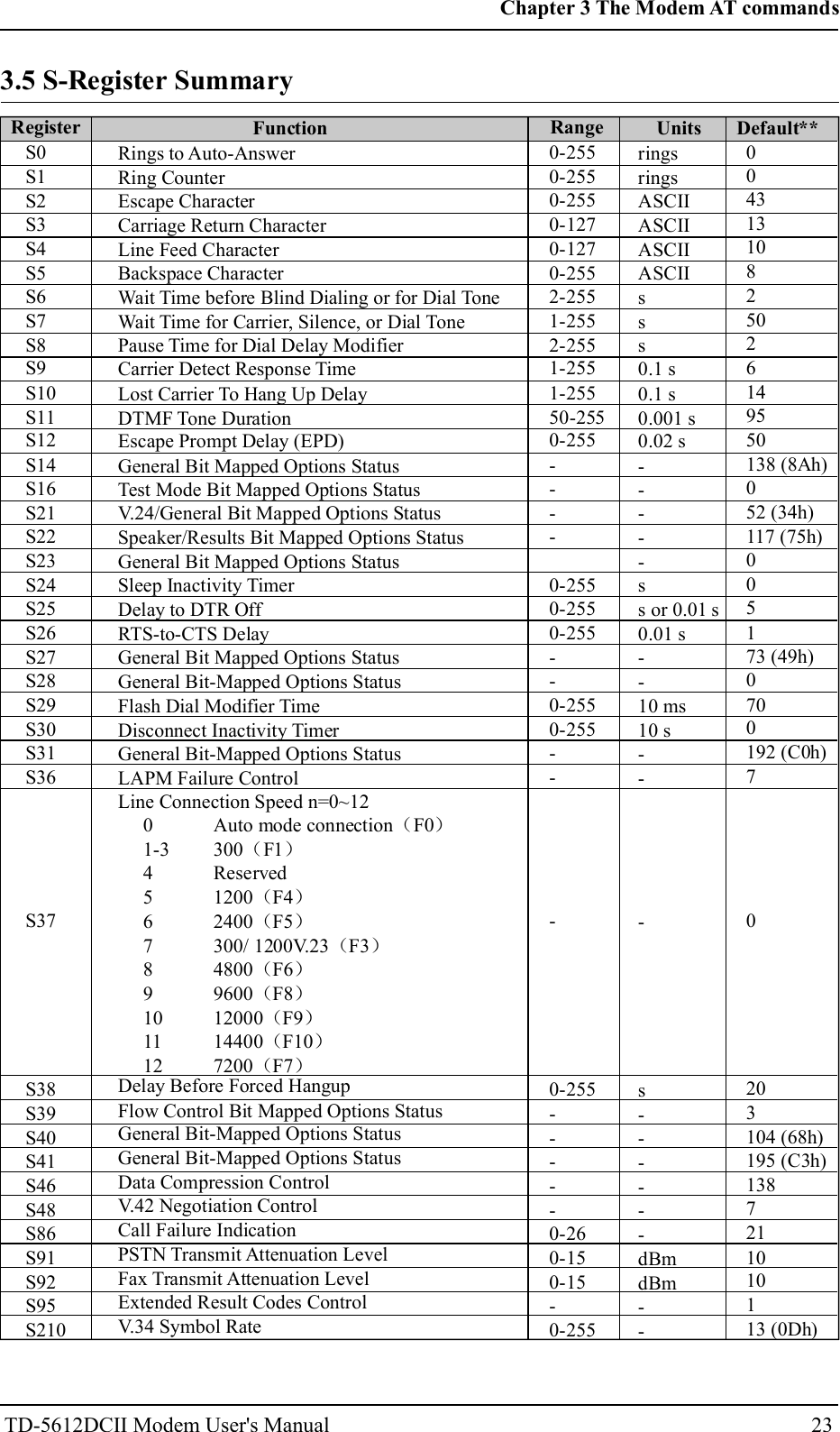
S0S1S2S3S4S5S6S7S8S9S10S11S12S14S16S21S22S23S24S25S26S27S28S29S30S31S36S37S38S39S40S41S46S48S86S91S92S95S210Rings to Auto-AnswerRing CounterEscape CharacterCarriage Return CharacterLine Feed CharacterBackspace CharacterWait Time before Blind Dialing or for Dial ToneWait Time for Carrier, Silence, or Dial TonePause Time for Dial Delay ModifierCarrier Detect Response TimeLost Carrier To Hang Up DelayDTMF Tone DurationEscape Prompt Delay (EPD)General Bit Mapped Options StatusTest Mode Bit Mapped Options StatusV.24/General Bit Mapped Options StatusSpeaker/Results Bit Mapped Options StatusGeneral Bit Mapped Options StatusSleep Inactivity TimerDelay to DTR OffRTS-to-CTS DelayGeneral Bit Mapped Options StatusGeneral Bit-Mapped Options StatusFlash Dial Modifier TimeDisconnect Inactivity TimerGeneral Bit-Mapped Options StatusLAPM Failure Control0-2550-2550-2550-1270-1270-2552-2551-2552-2551-2551-25550-2550-255----0-2550-2550-255--0-2550-255---0-255-----0-260-150-15-0-255ringsringsASCIIASCIIASCIIASCIIsss0.1 s0.1 s0.001 s0.02 s-----ss or 0.01 s0.01 s--10 ms10 s---s------dBmdBm--00431310825026149550138 (8Ah)052 (34h)117 (75h)005173 (49h)0700192 (C0h)70203104 (68h)195 (C3h)1387211010113 (0Dh)Register Function Range Units Default**Line Connection Speed n=0~12Auto mode connection F0300 F1Reserved1200 F42400 F5300/ 1200V.23 F34800 F69600 F812000 F914400 F107200 F7( )( )( )( )( )( )( )( )( )( )01-3456789101112Delay Before Forced HangupFlow Control Bit Mapped Options StatusGeneral Bit-Mapped Options StatusGeneral Bit-Mapped Options StatusData Compression ControlV.42 Negotiation ControlCall Failure IndicationPSTN Transmit Attenuation LevelFax Transmit Attenuation LevelExtended Result Codes ControlV.34 Symbol Rate23Chapter 3 The Modem AT commandsTD-5612DCII Modem User's Manual3.5 S-Register Summary
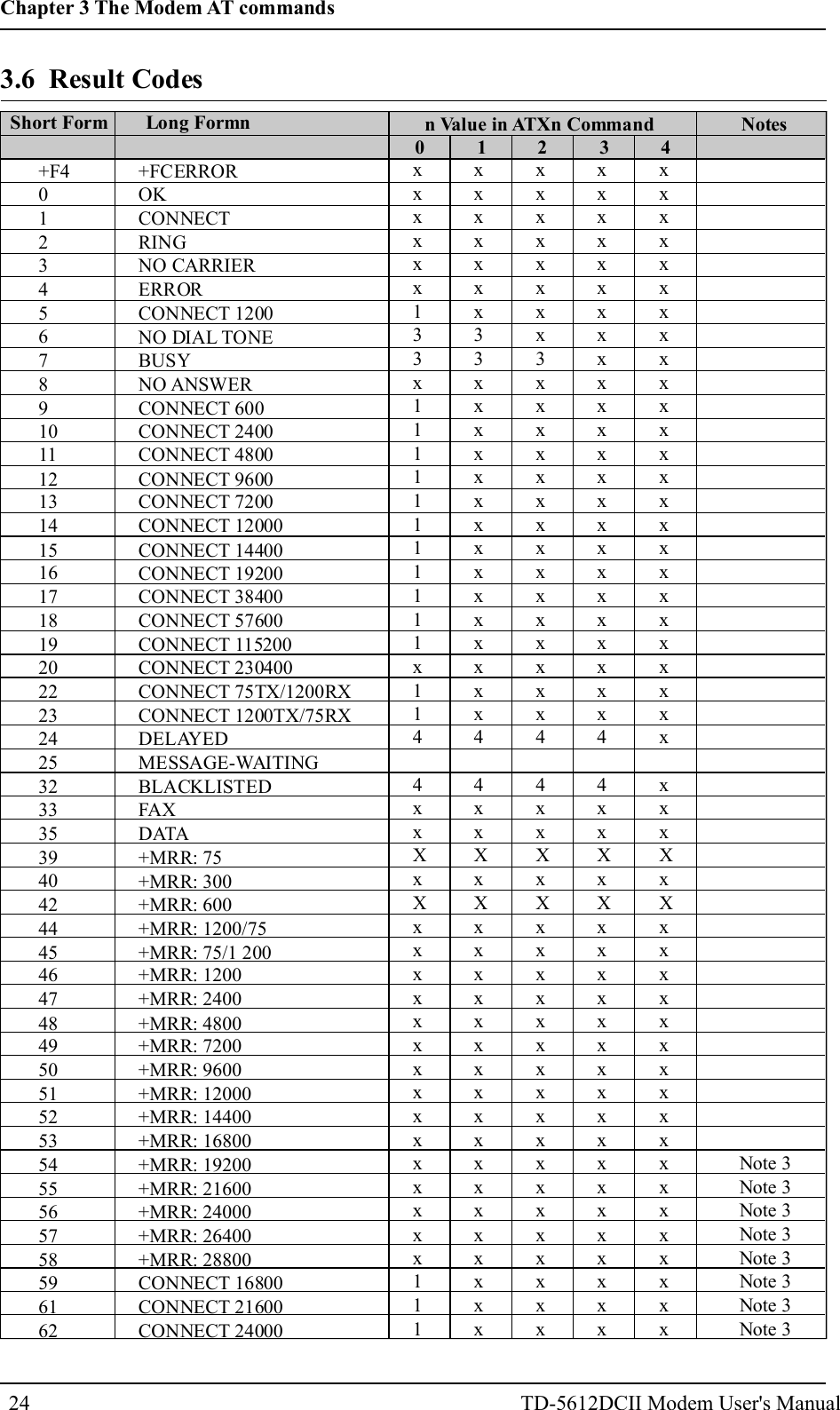
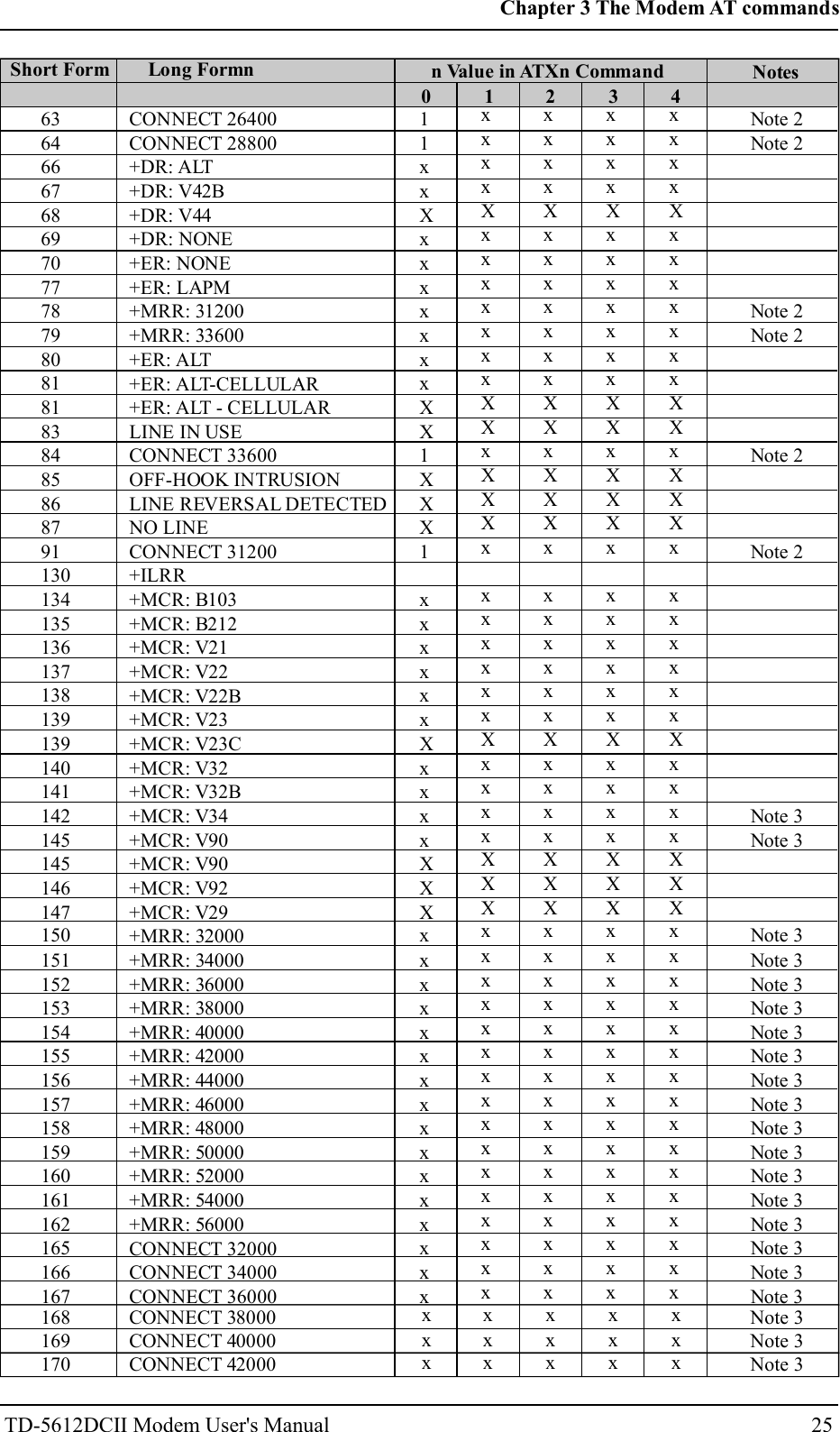
3.6 Result CodesShort Form Long Formn n Value in ATXn Command Notes0 1 2 3 4+F40123456789101112131415161718192022232425323335394042444546474849505152535455565758596162+FCERROROKCONNECTRINGNO CARRIERERRORCONNECT 1200NO DIAL TONEBUSYNO ANSWERCONNECT 600CONNECT 2400CONNECT 4800CONNECT 9600CONNECT 7200CONNECT 12000CONNECT 14400CONNECT 19200CONNECT 38400CONNECT 57600CONNECT 115200CONNECT 230400CONNECT 75TX/1200RXCONNECT 1200TX/75RXDELAYEDMESSAGE-WAITINGBLACKLISTEDFAXDATA+MRR: 75+MRR: 300+MRR: 600+MRR: 1200/75+MRR: 75/1 200+MRR: 1200+MRR: 2400+MRR: 4800+MRR: 7200+MRR: 9600+MRR: 12000+MRR: 14400+MRR: 16800+MRR: 19200+MRR: 21600+MRR: 24000+MRR: 26400+MRR: 28800CONNECT 16800CONNECT 21600CONNECT 24000xxxxxx133x11111111111x1144xxXxXxxxxxxxxxxxxxxx111xxxxxxx33xxxxxxxxxxxxxxx44xxXxXxxxxxxxxxxxxxxxxxxxxxxxxxx3xxxxxxxxxxxxxxx44xxXxXxxxxxxxxxxxxxxxxxxxxxxxxxxxxxxxxxxxxxxxxxx44xxXxXxxxxxxxxxxxxxxxxxxxxxxxxxxxxxxxxxxxxxxxxxxxxxxXxXxxxxxxxxxxxxxxxxxxNote 3Note 3Note 3Note 3Note 3Note 3Note 3Note 324Chapter 3 The Modem AT commandsTD-5612DCII Modem User's Manual
Short Form Long Formn n Value in ATXn Command Notes0 1 2 3 463646667686970777879808181838485868791130134135136137138139139140141142145145146147150151152153154155156157158159160161162165166167CONNECT 26400CONNECT 28800+DR: ALT+DR: V42B+DR: V44+DR: NONE+ER: NONE+ER: LAPM+MRR: 31200+MRR: 33600+ER: ALT+ER: ALT-CELLULAR+ER: ALT - CELLULARLINE IN USECONNECT 33600OFF-HOOK INTRUSIONLINE REVERSAL DETECTEDNO LINECONNECT 31200+ILRR+MCR: B103+MCR: B212+MCR: V21+MCR: V22+MCR: V22B+MCR: V23+MCR: V23C+MCR: V32+MCR: V32B+MCR: V34+MCR: V90+MCR: V90+MCR: V92+MCR: V29+MRR: 32000+MRR: 34000+MRR: 36000+MRR: 38000+MRR: 40000+MRR: 42000+MRR: 44000+MRR: 46000+MRR: 48000+MRR: 50000+MRR: 52000+MRR: 54000+MRR: 56000CONNECT 32000CONNECT 34000CONNECT 3600011xxXxxxxxxxXX1XXX1xxxxxxXxxxxXXXxxxxxxxxxxxxxxxxxxxxXxxxxxxxXXxXXXxxxxxxxXxxxxXXXxxxxxxxxxxxxxxxxxxxxXxxxxxxxXXxXXXxxxxxxxXxxxxXXXxxxxxxxxxxxxxxxxxxxxXxxxxxxxXXxXXXxxxxxxxXxxxxXXXxxxxxxxxxxxxxxxxxxxxXxxxxxxxXXxXXXxxxxxxxXxxxxXXXxxxxxxxxxxxxxxxxNote 2Note 2Note 2Note 2Note 2Note 2Note 3Note 3Note 3Note 3Note 3Note 3Note 3Note 3Note 3Note 3Note 3Note 3Note 3Note 3Note 3Note 3Note 3Note 3168169CONNECT 38000CONNECT 40000xxxxxxxxxxNote 3Note 325Chapter 3 The Modem AT commandsTD-5612DCII Modem User's Manual170 CONNECT 42000 x x x x x Note 3
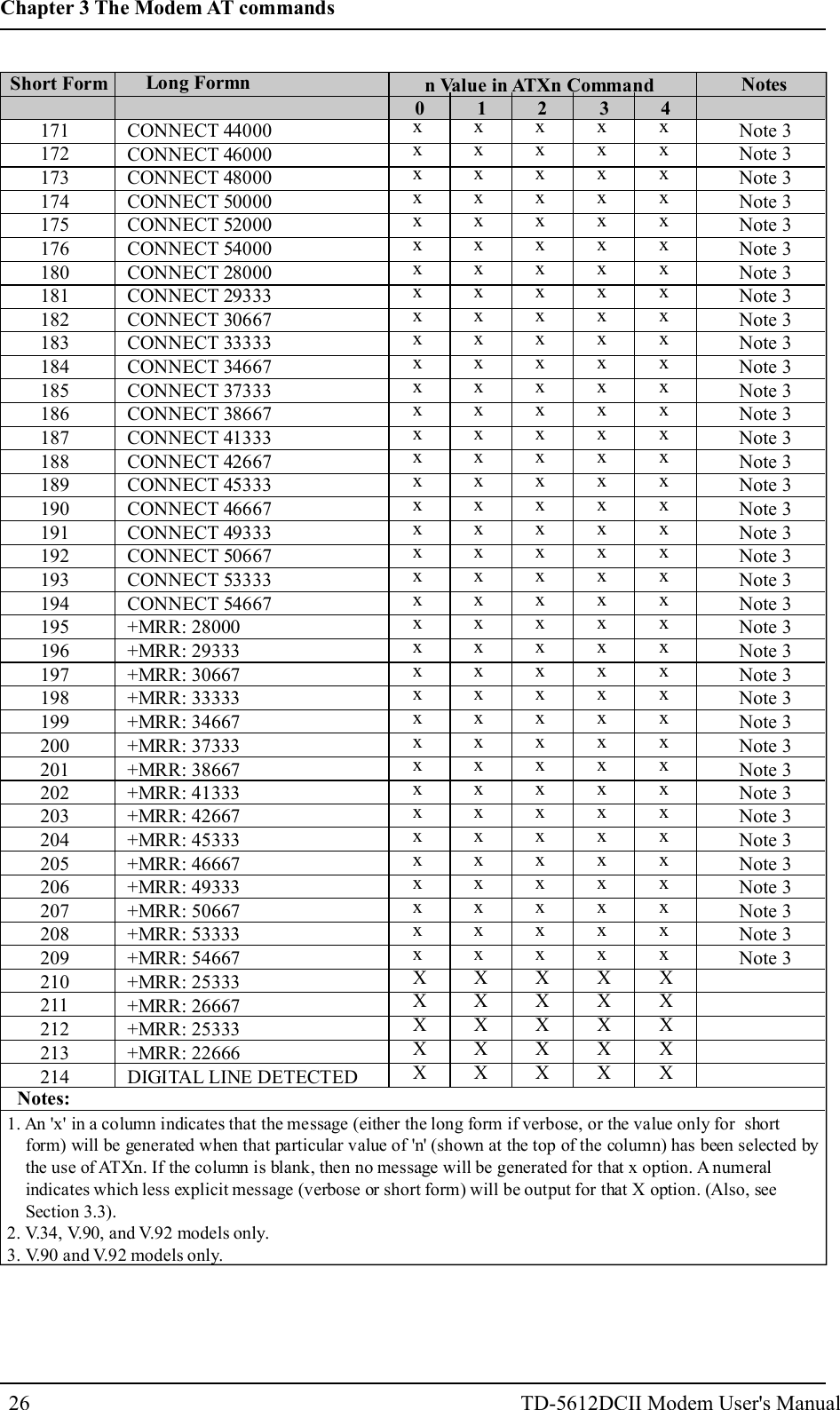
Short Form Long Formn n Value in ATXn Command Notes0 1 2 3 4171172173174175176180181182183184185186187188189190191192193194195196197198199200201202203204205206207208209210211212213214CONNECT 44000CONNECT 46000CONNECT 48000CONNECT 50000CONNECT 52000CONNECT 54000CONNECT 28000CONNECT 29333CONNECT 30667CONNECT 33333CONNECT 34667CONNECT 37333CONNECT 38667CONNECT 41333CONNECT 42667CONNECT 45333CONNECT 46667CONNECT 49333CONNECT 50667CONNECT 53333CONNECT 54667+MRR: 28000+MRR: 29333+MRR: 30667+MRR: 33333+MRR: 34667+MRR: 37333+MRR: 38667+MRR: 41333+MRR: 42667+MRR: 45333+MRR: 46667+MRR: 49333+MRR: 50667+MRR: 53333+MRR: 54667+MRR: 25333+MRR: 26667+MRR: 25333+MRR: 22666DIGITAL LINE DETECTEDxxxxxxxxxxxxxxxxxxxxxxxxxxxxxxxxxxxxXXXXXxxxxxxxxxxxxxxxxxxxxxxxxxxxxxxxxxxxxXXXXXxxxxxxxxxxxxxxxxxxxxxxxxxxxxxxxxxxxxXXXXXxxxxxxxxxxxxxxxxxxxxxxxxxxxxxxxxxxxxXXXXXxxxxxxxxxxxxxxxxxxxxxxxxxxxxxxxxxxxxXXXXXNote 3Note 3Note 3Note 3Note 3Note 3Note 3Note 3Note 3Note 3Note 3Note 3Note 3Note 3Note 3Note 3Note 3Note 3Note 3Note 3Note 3Note 3Note 3Note 3Note 3Note 3Note 3Note 3Note 3Note 3Note 3Note 3Note 3Note 3Note 3Note 3Notes:1. An 'x' in a column indicates that the message (either the long form if verbose, or the value only for shortform) will be generated when that particular value of 'n' (shown at the top of the column) has been selected bythe use of ATXn. If the column is blank, then no message will be generated for that x option. A numeralindicates which less explicit message (verbose or short form) will be output for that X option. (Also, seeSection 3.3).2. V.34, V.90, and V.92 models only.3. V.90 and V.92 models only.26Chapter 3 The Modem AT commandsTD-5612DCII Modem User's Manual
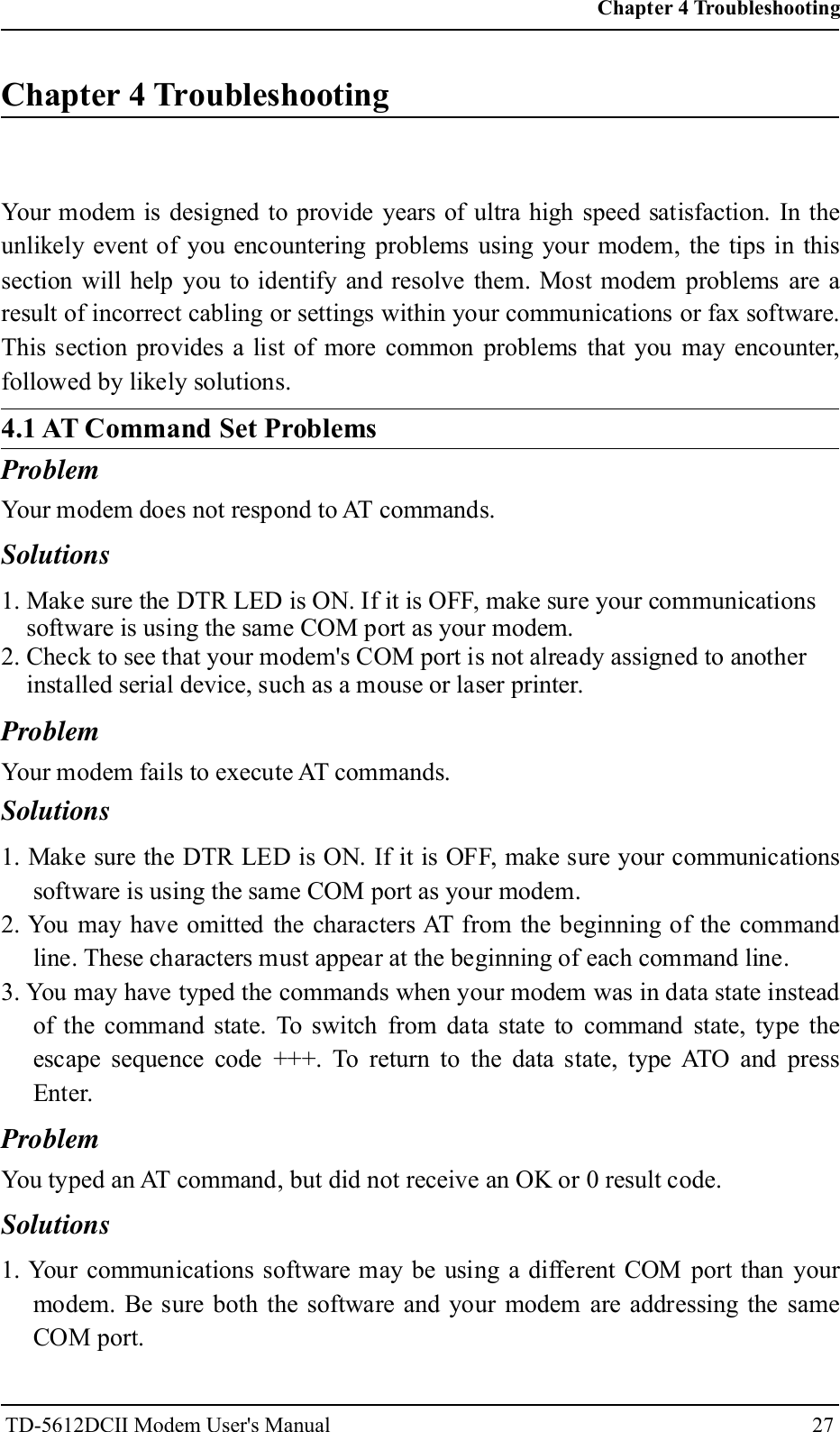
Chapter 4 TroubleshootingYour modem is designed to provide years of ultra high speed satisfaction. In theunlikely event of you encountering problems using your modem, the tips in thissection will help you to identify and resolve them. Most modem problems are aresult of incorrect cabling or settings within your communications or fax software.This section provides a list of more common problems that you may encounter,followed by likely solutions.ProblemYour modem does not respond to AT commands.Solutions1. Make sure the DTR LED is ON. If it is OFF, make sure your communicationssoftware is using the same COM port as your modem.2. Check to see that your modem's COM port is not already assigned to anotherinstalled serial device, such as a mouse or laser printer.ProblemYour modem fails to execute AT commands.Solutions1. Make sure the DTR LED is ON. If it is OFF, make sure your communicationssoftware is using the same COM port as your modem.2. You may have omitted the characters AT from the beginning of the commandline. These characters must appear at the beginning of each command line.3. You may have typed the commands when your modem was in data state insteadof the command state. To switch from data state to command state, type theescape sequence code +++. To return to the data state, type ATO and pressEnter.ProblemYou typed an AT command, but did not receive an OK or 0 result code.Solutions1. Your communications software may be using a different COM port than yourmodem. Be sure both the software and your modem are addressing the sameCOM port.Chapter 4 Troubleshooting27TD-5612DCII Modem User's Manual4.1 AT Command Set Problems
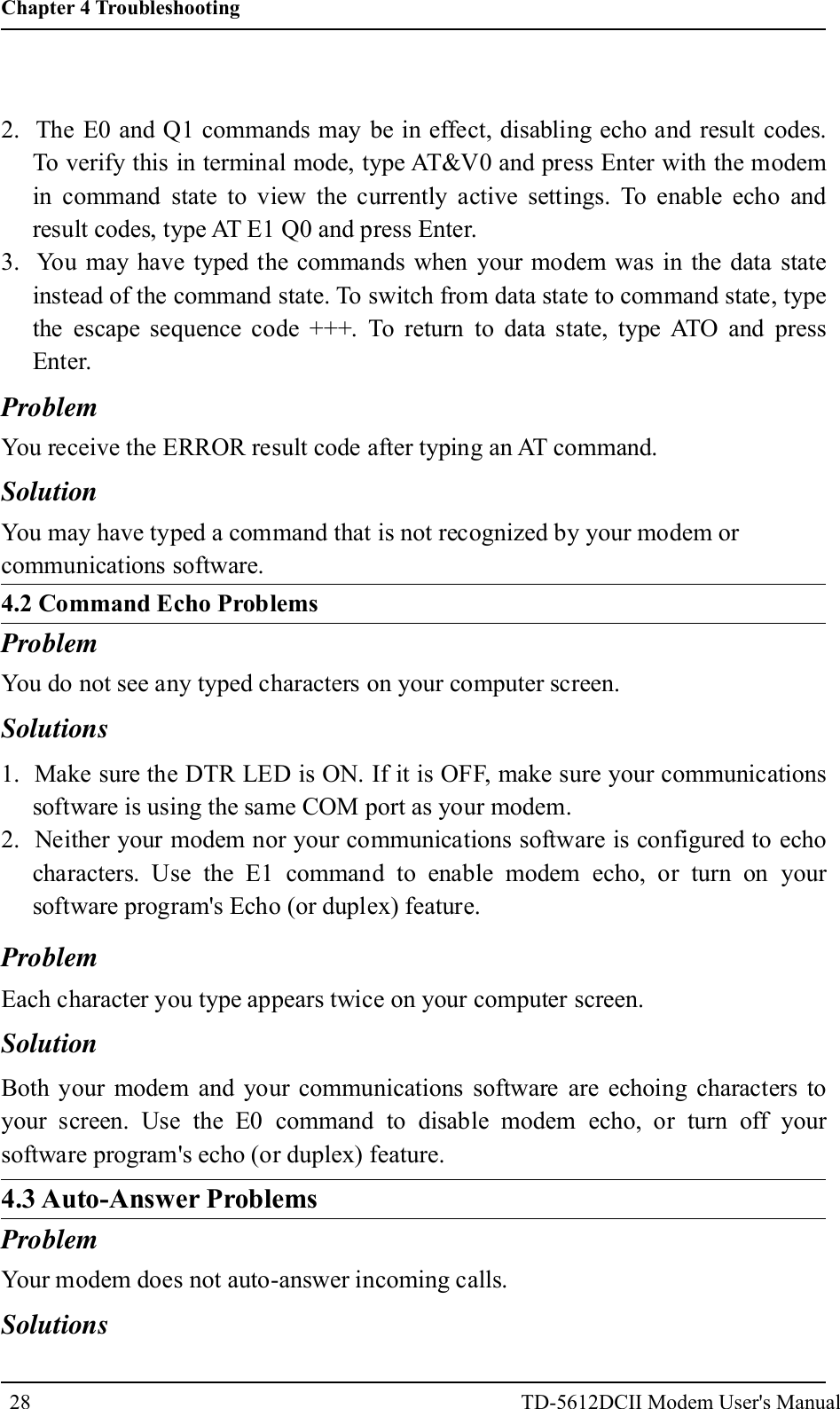
2. The E0 and Q1 commands may be in effect, disabling echo and result codes.To verify this in terminal mode, type AT&V0 and press Enter with the modemin command state to view the currently active settings. To enable echo andresult codes, type AT E1 Q0 and press Enter.3. You may have typed the commands when your modem was in the data stateinstead of the command state. To switch from data state to command state, typethe escape sequence code +++. To return to data state, type ATO and pressEnter.ProblemYou receive the ERROR result code after typing an AT command.SolutionYou may have typed a command that is not recognized by your modem orcommunications software.4.2 Command Echo ProblemsProblemYou do not see any typed characters on your computer screen.Solutions281. Make sure the DTR LED is ON. If it is OFF, make sure your communicationssoftware is using the same COM port as your modem.2. Neither your modem nor your communications software is configured to echocharacters. Use the E1 command to enable modem echo, or turn on yoursoftware program's Echo (or duplex) feature.ProblemEach character you type appears twice on your computer screen.SolutionBoth your modem and your communications software are echoing characters toyour screen. Use the E0 command to disable modem echo, or turn off yoursoftware program's echo (or duplex) feature.4.3 Auto-Answer ProblemsProblemYour modem does not auto-answer incoming calls.SolutionsChapter 4 TroubleshootingTD-5612DCII Modem User's Manual
29Problem1. Make sure the supplied telephone cable is connected to your modem's LINEjack and not the PHONE jack.2. Your modem may not be set up for auto-answer. With the modem in commandstate, type ATS0=1 and press Enter to have the modem answer on the firstincoming ring To auto-answer after a specific number of rings, replace 1 with avalue up to 255. Do not assign a value of 0, which turns off auto-answer,unless your software can respond to the modem's RING result codes.3. Check that the DTR LED is ON, and that the AA LED flickers with eachincoming ring. If the LEDs do not respond in this way, refer to youUser's Manual.4. Set &D0 and auto answer, if your modem is not connected to RS232 or DTR isnot ready.When you receive a phone call, your modem immediately seizes control of thetelephone line.SolutionYour modem may be configured for auto-answering. To disable auto-answer, typeATS0=0 and press Enter with the modem in command state.4.4 Dialing ProblemsProblemYour modem does not dial calls.Solutions1. Make sure the supplied telephone cable is connected to your modem's LINEjack and not the PHONE jack.2. You are using touchtone dialing on a line that requires pulse dialing. Changeyour communications software to use pulse dialing.3. Unplug the telephone line cable from the computer and connect it directly to atelephone handset. Check for dial tone. If there is none, the problem is in thetelephone line. Call the service provider.4.5 Data Transfer ProblemsProblemYou can make a data connection with a remote modem, but encounter frequenterrors during data transfers.Chapter 4 TroubleshootingTD-5612DCII Modem User's Manual
Solutions1. Re-dial the call. (The telephone connection may be poor.)2. Your modem and communications software may be configured for differentflow control methods. Be sure your modem and software are both usinghardware (RTS/CTS) flow control or software (XON/XOFF) flow control.3. To verify that your modem and communications software are using the sameflow control method, type AT&T8 and press the Enter key with your modem inthe command state. You should see a smooth "stair-stepping" ASCII testpattern flowing diagonally across your screen.4.6 Connection ProblemsProblemYour modem disconnects while communicating with a remote system.Solutions1. The remote system may have hung up. Type ATI2 and press Enter to view thelink status report, which will include the reason for the disconnect. Forinformation on understanding this report, refer to your User's Manual.You may have subscribed to Call Waiting and received an incoming call thatinterrupted your data connection. See your telephone directory for information ondisabling Call Waiting.30Chapter 4 TroubleshootingTD-5612DCII Modem User's Manual
                                                TD-5612DCII Modem User's Manual                                                  31                                                              FCC STATEMENT 1.  This device complies with Part 15 of the FCC Rules. Operation is subject to the following two conditions: (1) This device may not cause harmful interference, and (2) This device must accept any interference received, including interference that may cause undesired operation. 2. Changes or modifications not expressly approved by the party responsible for compliance could void the user’s authority to operate the equipment.   NOTE: This equipment has been tested and found to comply with the limits for a Class B digital, pursuant to Part 15 or the FCC Rules. These limits are designed to provide reasonable protection against harmful interference in a residential installation. This equipment generates, uses and can radiate radio frequency energy and, if not installed and used in accordance with the instructions, may casue harmful interference to radio communications, However, there is no guarantee that interference will not occur in a particular installation. If the equipment does cause harmful interference to radio or television reception, which can be determined by turning the equipment off and on, the user is encouraged to try to correct the interference by one or more of the following measures: --- Reorient or relocate the receiving antenna. --- Increase the separation between the equipment and receiver. --- Connect the equipment into an outlet on a circuit different     from that to which the receiver is connected. --- Consult the dealer or an experienced radio/ TV technician for help.

Navigation menu