EU3C SCND502B1232 PART 15 CLASS B COMPUTING PERIPHERAL User Manual

EU3C COMPANY LIMITED PART 15 CLASS B COMPUTING PERIPHERAL Users Manual

Users Manual

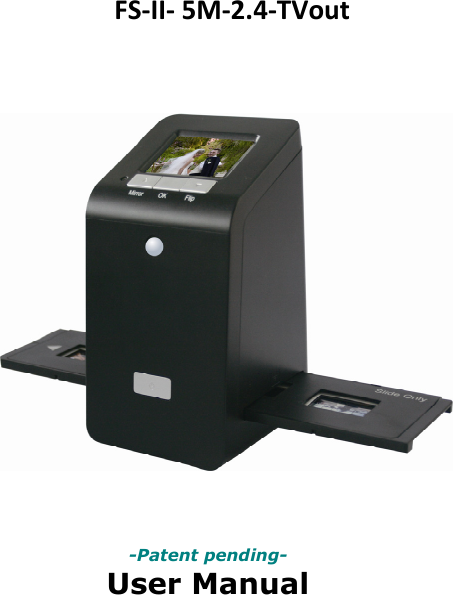
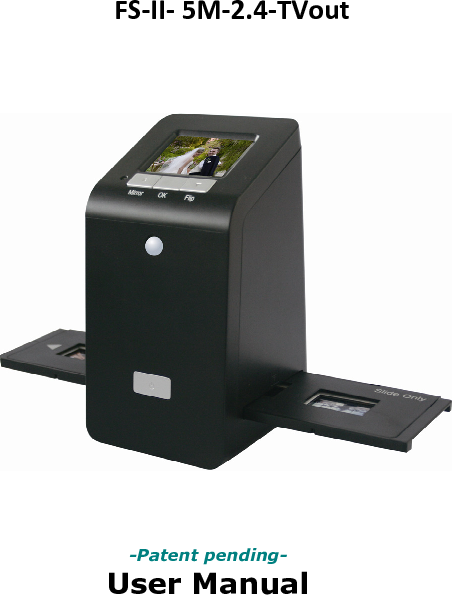
FS-II- 5M-2.4-TVout                    -Patent pending- User Manual
                           Version 1.05 April 2011   
-1-  IndexI.UnpackFilmScan35‐II......................................................2II.Installfilmintothefilmholder........................................3III.QuickStart.......................................................................7IV.OperationGuide............................................................12V.Specification..................................................................32
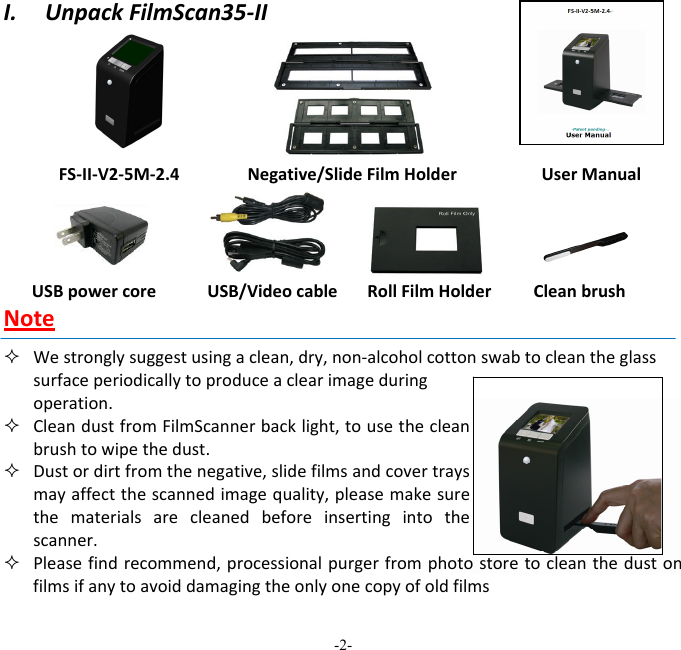
-2-  I.UnpackFilmScan35‐IIFS‐II‐V2‐5M‐2.4Negative/SlideFilmHolderUserManualUSBpowercoreUSB/VideocableRollFilmHolderCleanbrushNote Westronglysuggestusingaclean,dry,non‐alcoholcottonswabtocleantheglasssurfaceperiodicallytoproduceaclearimageduringoperation.  CleandustfromFilmScannerbacklight,tousethecleanbrushtowipethedust. Dustordirtfromthenegative,slidefilmsandcovertraysmayaffectthescannedimagequality,pleasemakesurethematerialsarecleanedbeforeinsertingintothescanner. Pleasefindrecommend,processionalpurgerfromphotostoretocleanthedustonfilmsifanytoavoiddamagingtheonlyonecopyofoldfilms
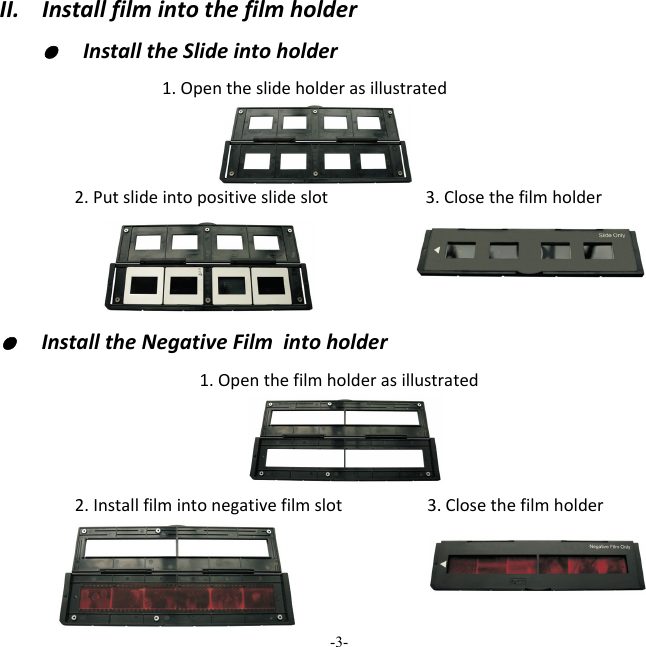
-3-  II.Installfilmintothefilmholder●  InstalltheSlideintoholder1.Opentheslideholderasillustrated2.Putslideintopositiveslideslot 3.Closethefilmholder ●  InstalltheNegativeFilmintoholder1.Openthefilmholderasillustrated2.Installfilmintonegativefilmslot3.Closethefilmholder
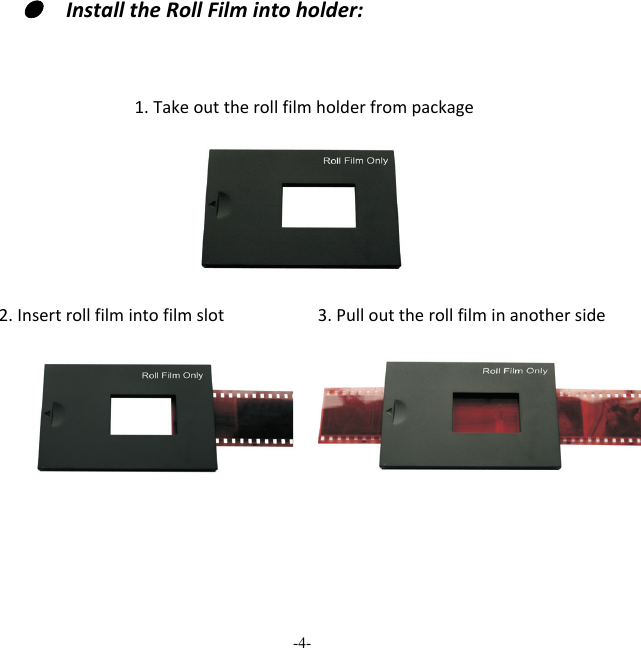
-4-  ●  InstalltheRollFilmintoholder:1.Takeouttherollfilmholderfrompackage2.Insertrollfilmintofilmslot3.Pullouttherollfilminanotherside 
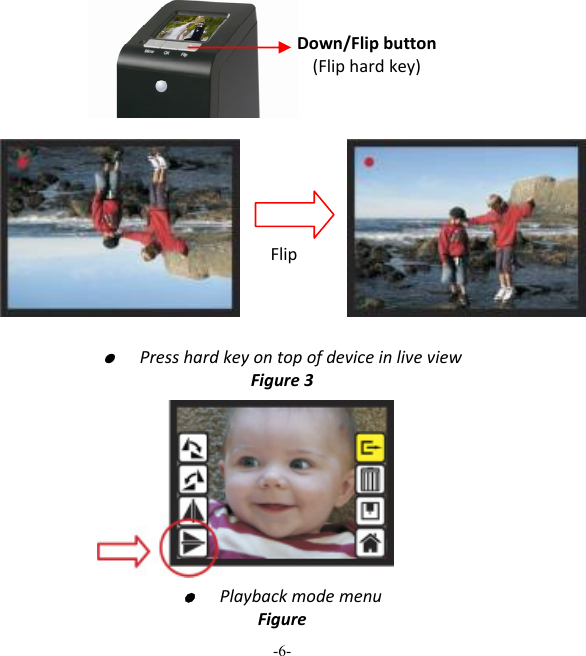
-5-  Note Toavoidmirrorimage,followtheserialnumbers(fromlefttoright)ontopoffilmwheninstallnegativefilmintoholder Iftheimageisupsidedown[seefig.2],theimagecanbecorrectedbyFlipfunctioninhardkeyofdevicebeforecapture,orenterplaybackeditmenuaftercapture[seefig.3.4].Figure1Figure2
-6-  ●  PresshardkeyontopofdeviceinliveviewFigure3  ●  PlaybackmodemenuFigureDown/Flipbutton(Fliphardkey)Flip
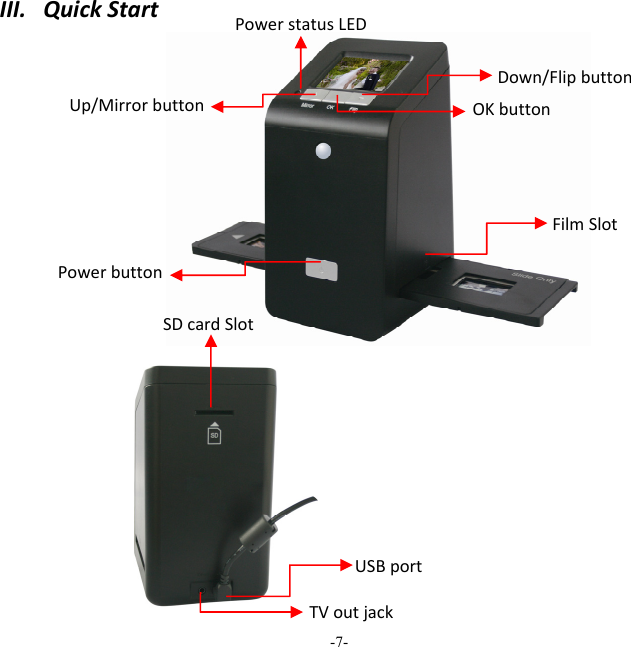
-7-  III.QuickStartUp/MirrorbuttonFilmSlotOKbuttonSDcardSlotDown/FlipbuttonUSBportTVoutjackPowerstatusLEDPowerbutton
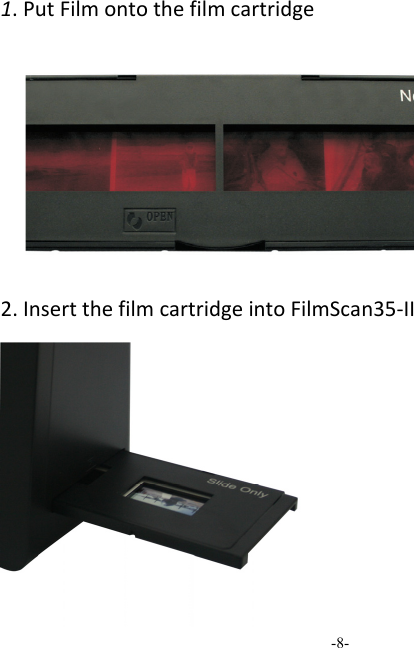
-8-  1.PutFilmontothefilmcartridge2.InsertthefilmcartridgeintoFilmScan35‐II
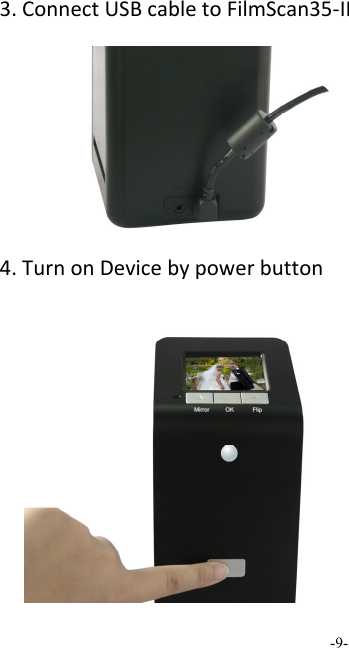
-9-  3.ConnectUSBcabletoFilmScan35‐II4.TurnonDevicebypowerbutton
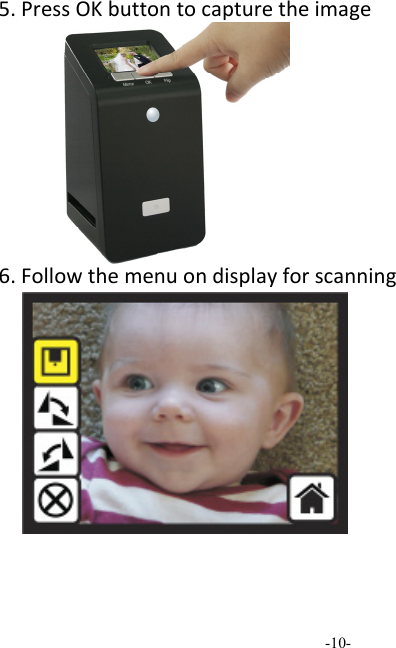
-10-  5.PressOKbuttontocapturetheimage6.Followthemenuondisplayforscanning
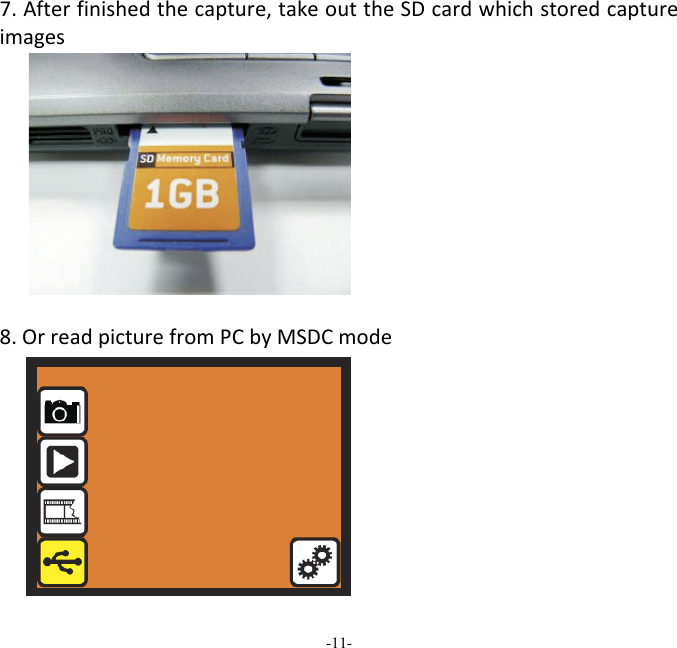
-11-  7.Afterfinishedthecapture,takeouttheSDcardwhichstoredcaptureimages8.OrreadpicturefromPCbyMSDCmode
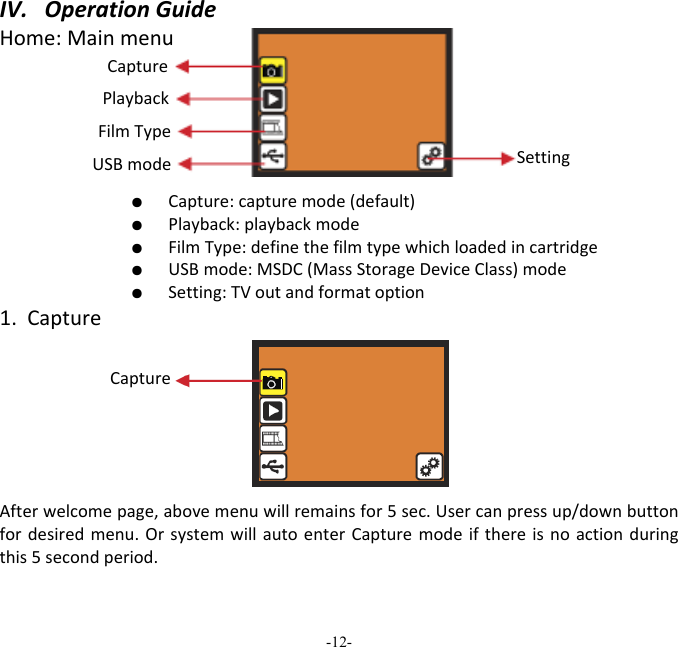
-12-  IV.OperationGuideHome:Mainmenu   ●  Capture:capturemode(default)  ●  Playback:playbackmode  ●  FilmType:definethefilmtypewhichloadedincartridge  ●  USBmode:MSDC(MassStorageDeviceClass)mode  ●  Setting:TVoutandformatoption1.CaptureAfterwelcomepage,abovemenuwillremainsfor5sec.Usercanpressup/downbuttonfordesiredmenu.OrsystemwillautoenterCapturemodeifthereisnoactionduringthis5secondperiod.Capture Playback FilmType USBmode SettingCapture
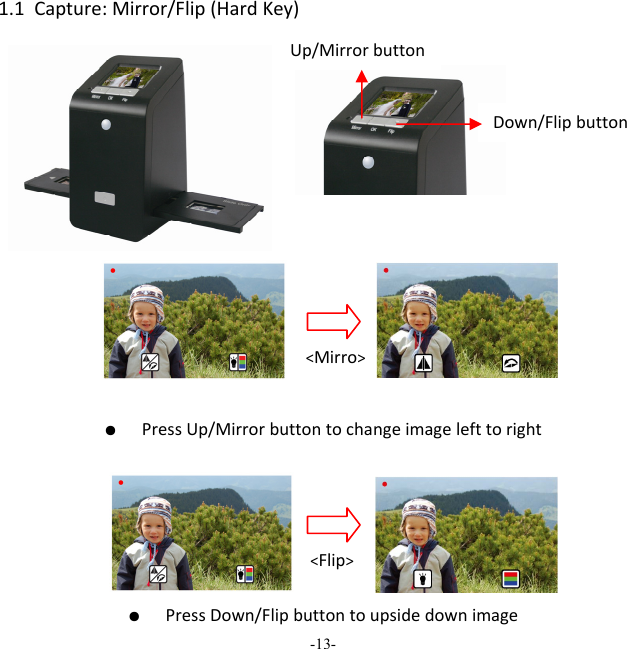
-13-  1.1Capture:Mirror/Flip(HardKey)●  PressUp/Mirrorbuttontochangeimagelefttoright          ●  PressDown/FlipbuttontoupsidedownimageUp/Mirrorbutton Down/Flipbutton<Mirro><Flip>
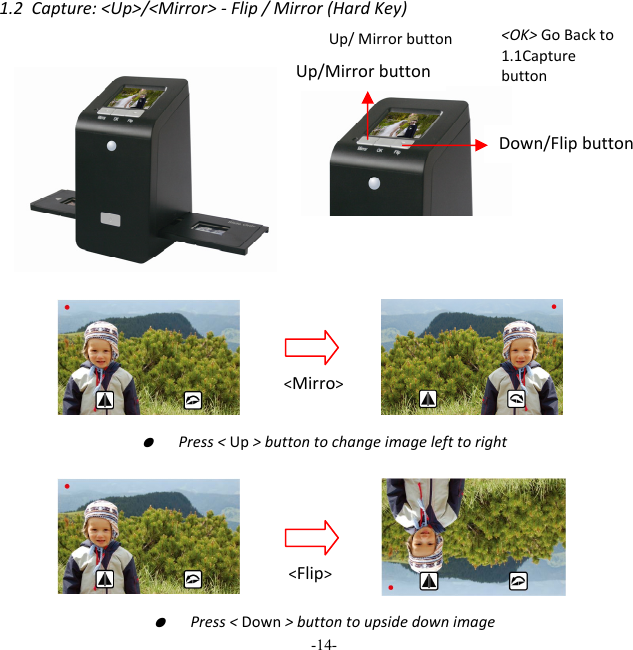
-14-  1.2Capture:<Up>/<Mirror>‐Flip/Mirror(HardKey)●  Press<Up>buttontochangeimagelefttoright●  Press<Down>buttontoupsidedownimageUp/Mirrorbutton Down/Flipbutton<OK> GoBackto1.1Capturebutton Up/ Mirror button <Mirro><Flip>
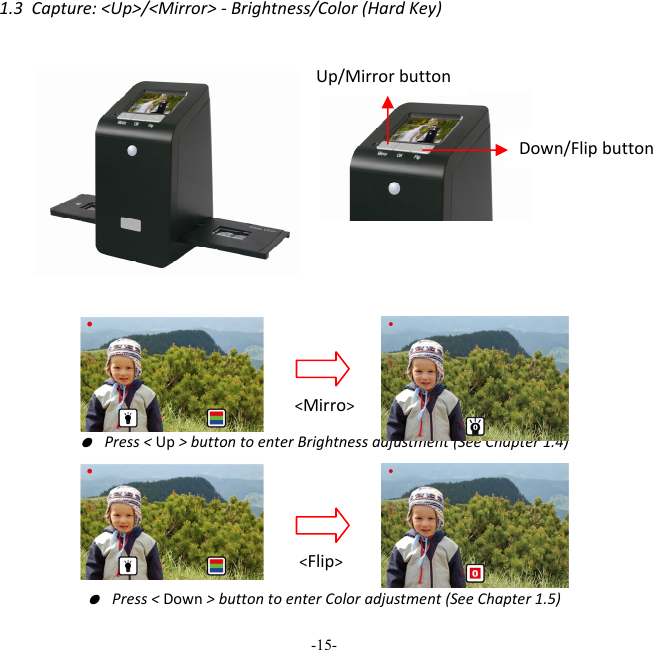
-15-  1.3Capture:<Up>/<Mirror>‐Brightness/Color(HardKey)● Press<Up>buttontoenterBrightnessadjustment(SeeChapter1.4)● Press<Down>buttontoenterColoradjustment(SeeChapter1.5)Up/Mirrorbutton Down/Flipbutton<Mirro><Flip>
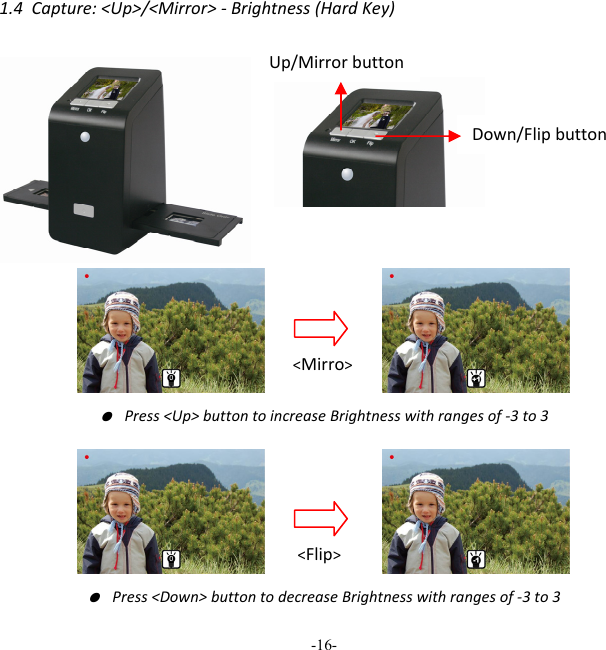
-16-  1.4Capture:<Up>/<Mirror>‐Brightness(HardKey)● Press<Up>buttontoincreaseBrightnesswithrangesof‐3to3● Press<Down>buttontodecreaseBrightnesswithrangesof‐3to3Up/Mirrorbutton Down/Flipbutton<Mirro><Flip>
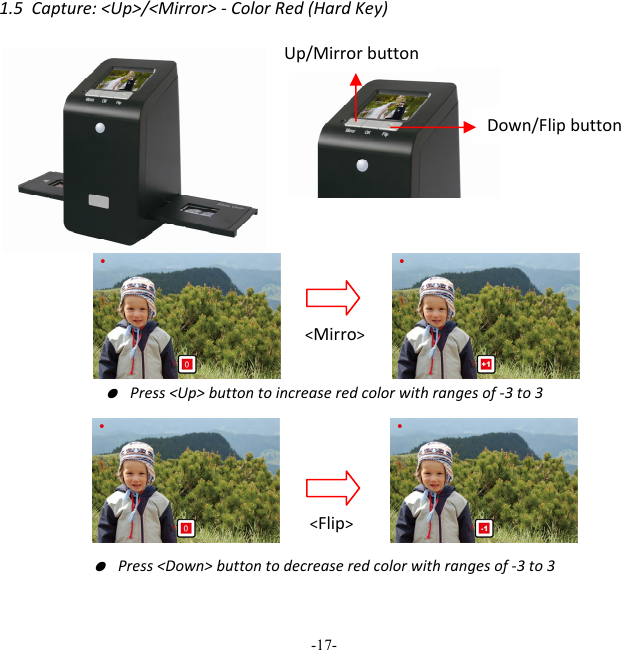
-17-  1.5Capture:<Up>/<Mirror>‐ColorRed(HardKey)● Press<Up>buttontoincreaseredcolorwithrangesof‐3to3● Press<Down>buttontodecreaseredcolorwithrangesof‐3to3Up/Mirrorbutton Down/Flipbutton<Mirro><Flip>
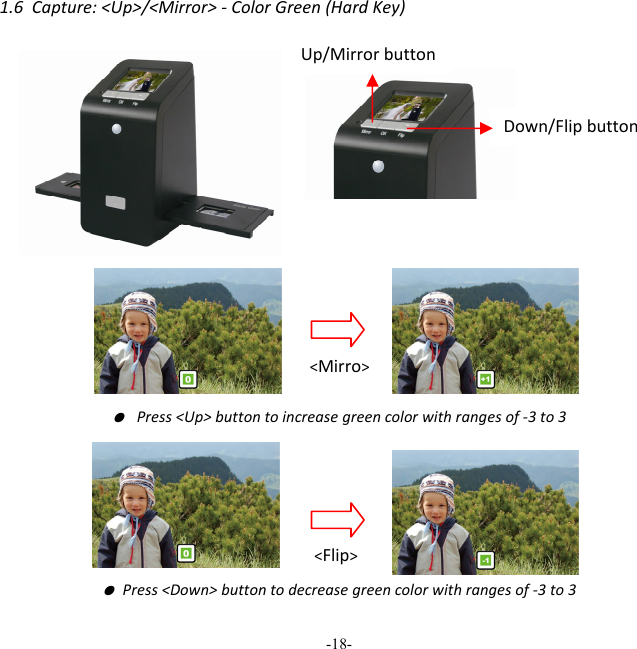
-18-  1.6Capture:<Up>/<Mirror>‐ColorGreen(HardKey)  ● Press<Up>buttontoincreasegreencolorwithrangesof‐3to3● Press<Down>buttontodecreasegreencolorwithrangesof‐3to3Up/Mirrorbutton Down/Flipbutton<Mirro><Flip>
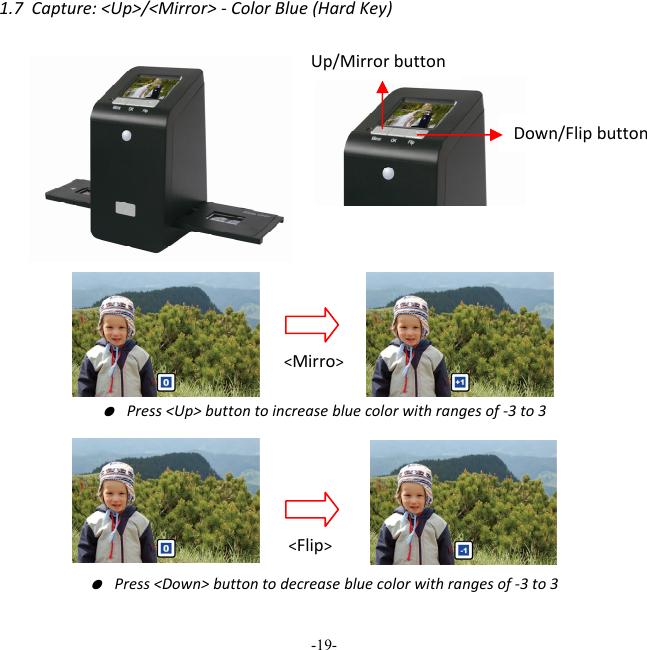
-19-  1.7Capture:<Up>/<Mirror>‐ColorBlue(HardKey)● Press<Up>buttontoincreasebluecolorwithrangesof‐3to3● Press<Down>buttontodecreasebluecolorwithrangesof‐3to3Up/Mirrorbutton Down/Flipbutton<Mirro><Flip>
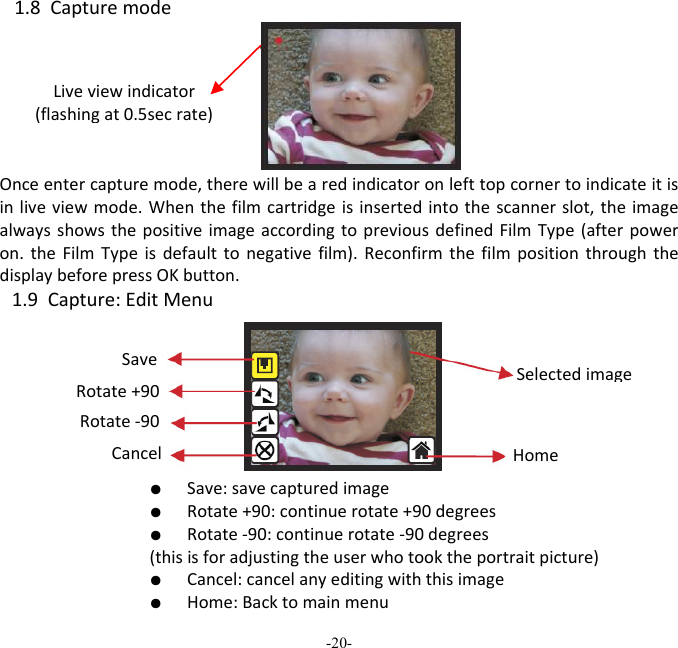
-20-  1.8CapturemodeOnceentercapturemode,therewillbearedindicatoronlefttopcornertoindicateitisinliveviewmode.Whenthefilmcartridgeisinsertedintothescannerslot,theimagealwaysshowsthepositiveimageaccordingtopreviousdefinedFilmType(afterpoweron.theFilmTypeisdefaulttonegativefilm).ReconfirmthefilmpositionthroughthedisplaybeforepressOKbutton.1.9Capture:EditMenu  ●  Save:savecapturedimage  ●  Rotate+90:continuerotate+90degrees  ●  Rotate‐90:continuerotate‐90degrees(thisisforadjustingtheuserwhotooktheportraitpicture)  ●  Cancel:cancelanyeditingwiththisimage  ●  Home:BacktomainmenuLiveviewindicator(flashingat0.5secrate)SaveRotate+90Cancel Rotate‐90HomeSelectedimage
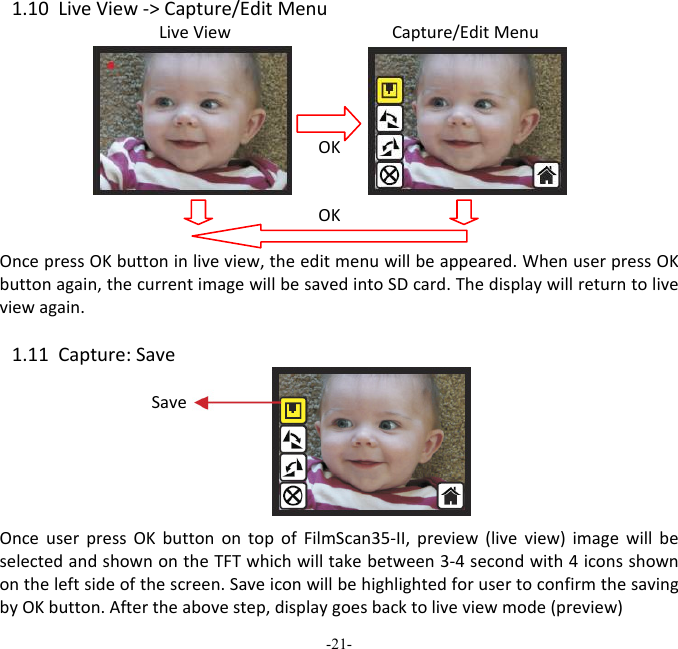
-21-  1.10LiveView‐>Capture/EditMenuLiveViewCapture/EditMenuOKOKOncepressOKbuttoninliveview,theeditmenuwillbeappeared.WhenuserpressOKbuttonagain,thecurrentimagewillbesavedintoSDcard.Thedisplaywillreturntoliveviewagain.1.11Capture:SaveOnceuserpressOKbuttonontopofFilmScan35‐II,preview(liveview)imagewillbeselectedandshownontheTFTwhichwilltakebetween3‐4secondwith4iconsshownontheleftsideofthescreen.SaveiconwillbehighlightedforusertoconfirmthesavingbyOKbutton.Aftertheabovestep,displaygoesbacktoliveviewmode(preview)Save
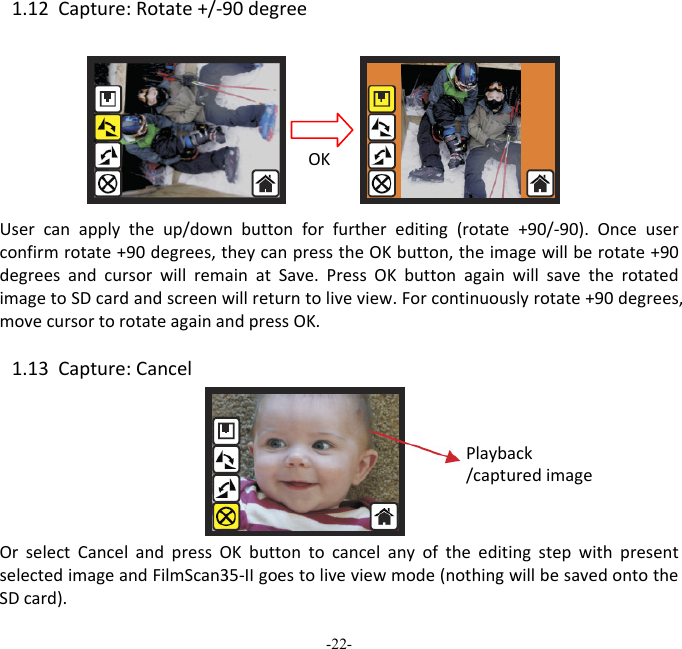
-22-  1.12Capture:Rotate+/‐90degreeUsercanapplytheup/downbuttonforfurtherediting(rotate+90/‐90).Onceuserconfirmrotate+90degrees,theycanpresstheOKbutton,theimagewillberotate+90degreesandcursorwillremainatSave.PressOKbuttonagainwillsavetherotatedimagetoSDcardandscreenwillreturntoliveview.Forcontinuouslyrotate+90degrees,movecursortorotateagainandpressOK.1.13Capture:CancelOrselectCancelandpressOKbuttontocancelanyoftheeditingstepwithpresentselectedimageandFilmScan35‐IIgoestoliveviewmode(nothingwillbesavedontotheSDcard).OKPlayback/capturedimage
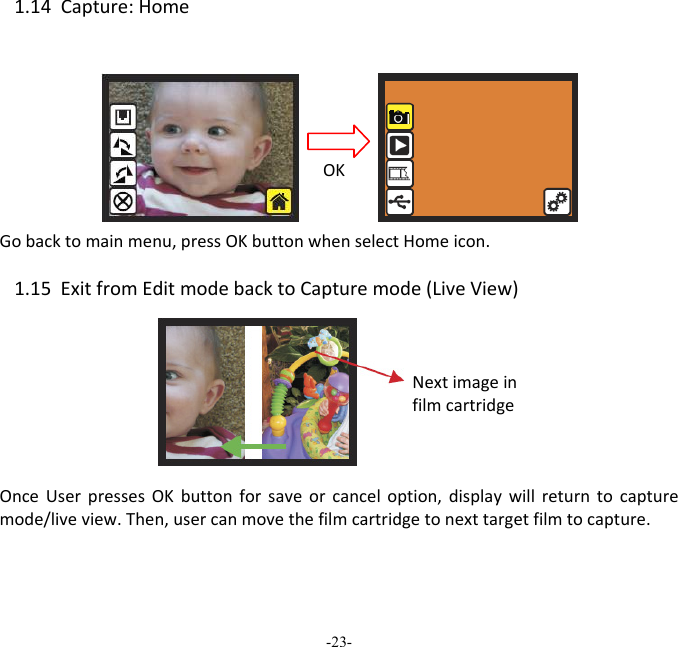
-23-  1.14Capture:HomeGobacktomainmenu,pressOKbuttonwhenselectHomeicon.1.15ExitfromEditmodebacktoCapturemode(LiveView)OnceUserpressesOKbuttonforsaveorcanceloption,displaywillreturntocapturemode/liveview.Then,usercanmovethefilmcartridgetonexttargetfilmtocapture.   NextimageinfilmcartridgeOK
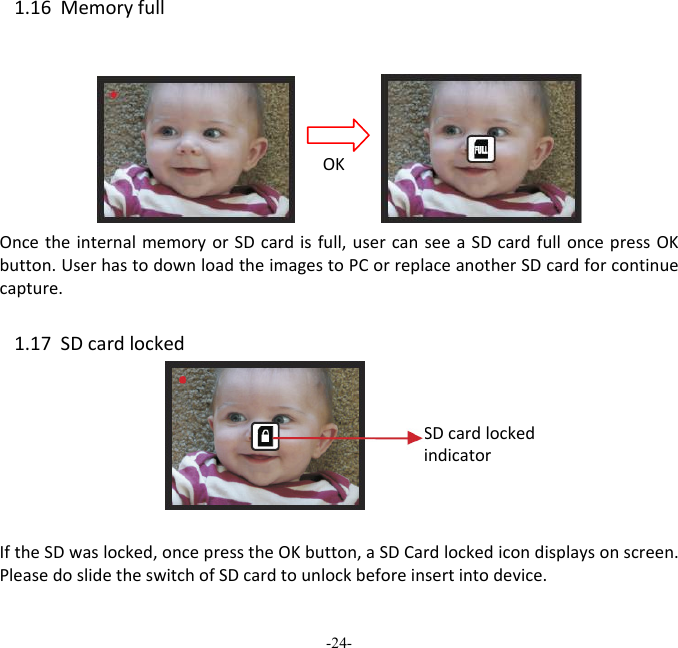
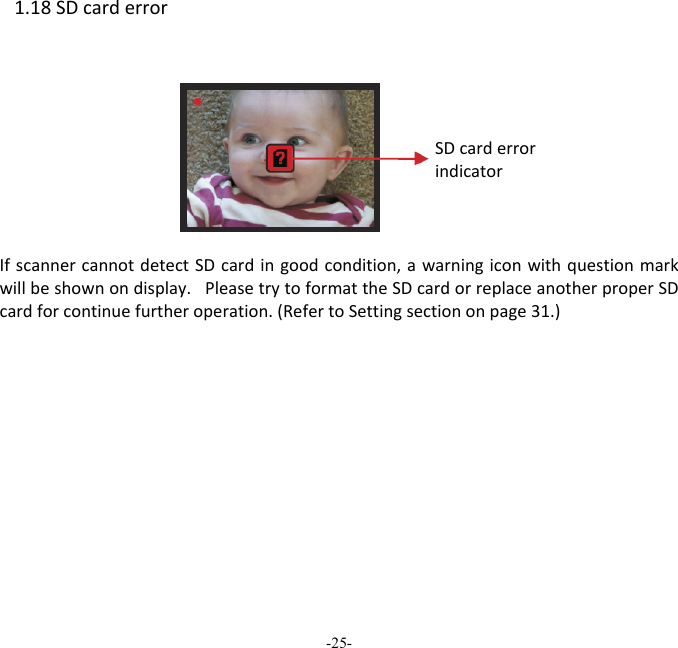
-24-  1.16MemoryfullOncetheinternalmemoryorSDcardisfull,usercanseeaSDcardfulloncepressOKbutton.UserhastodownloadtheimagestoPCorreplaceanotherSDcardforcontinuecapture. 1.17SDcardlocked IftheSDwaslocked,oncepresstheOKbutton,aSDCardlockedicondisplaysonscreen.PleasedoslidetheswitchofSDcardtounlockbeforeinsertintodevice.OKSDcardlockedindicator
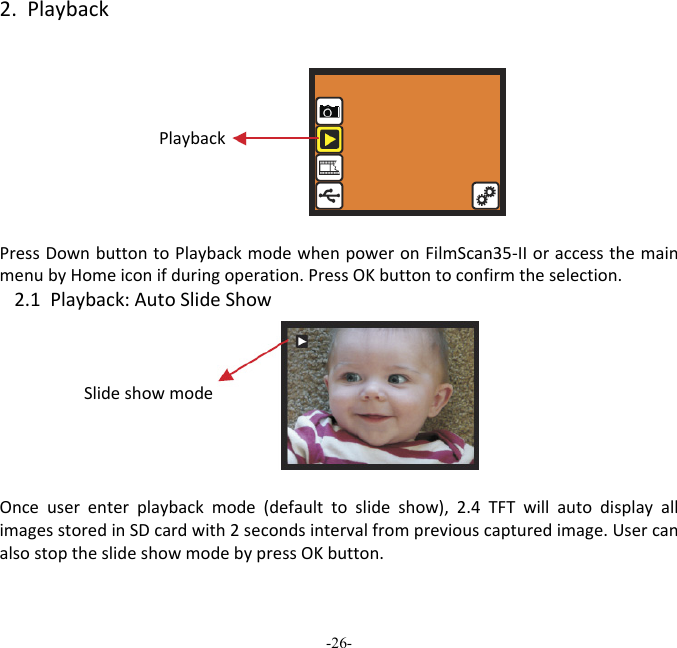
-25-  1.18SDcarderrorIfscannercannotdetectSDcardingoodcondition,awarningiconwithquestionmarkwillbeshownondisplay.PleasetrytoformattheSDcardorreplaceanotherproperSDcardforcontinuefurtheroperation.(RefertoSettingsectiononpage31.)          FULL SDcarderrorindicator
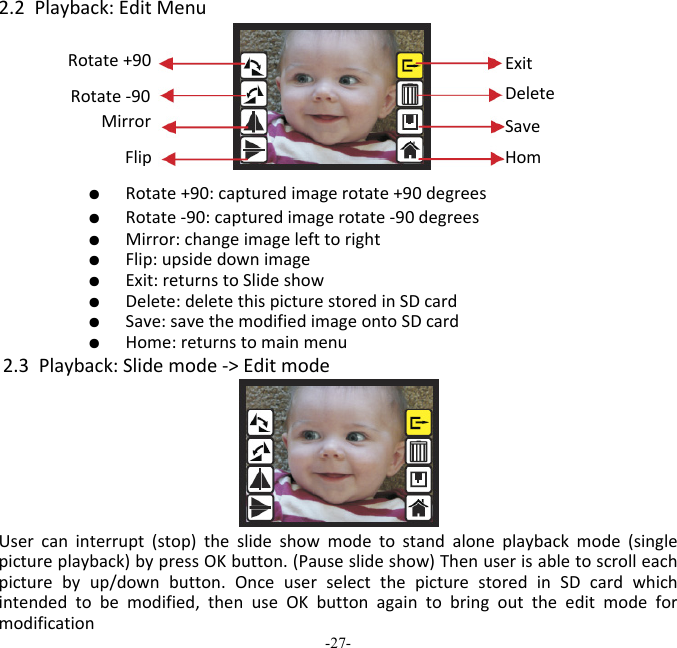
-26-  2.PlaybackPlaybackPressDownbuttontoPlaybackmodewhenpoweronFilmScan35‐IIoraccessthemainmenubyHomeiconifduringoperation.PressOKbuttontoconfirmtheselection.2.1Playback:AutoSlideShowSlideshowmodeOnceuserenterplaybackmode(defaulttoslideshow),2.4TFTwillautodisplayallimagesstoredinSDcardwith2secondsintervalfrompreviouscapturedimage.UsercanalsostoptheslideshowmodebypressOKbutton. 
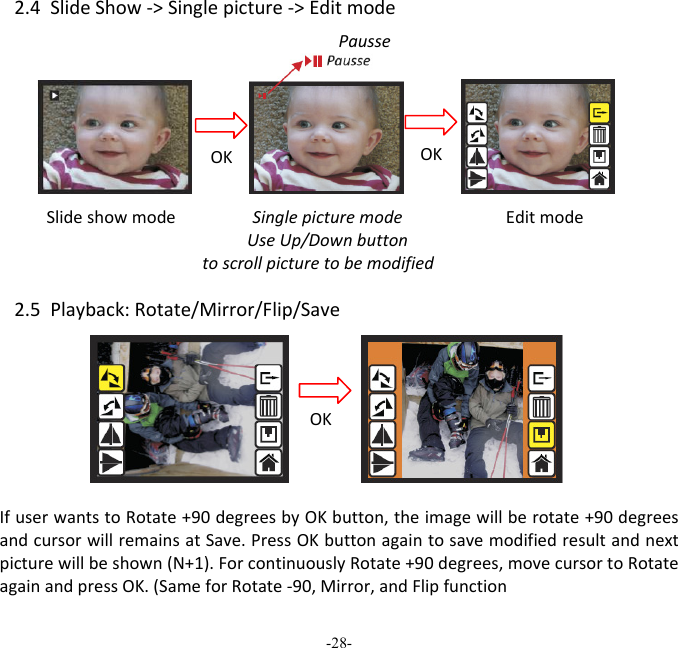
-27-  2.2Playback:EditMenu   ●  Rotate+90:capturedimagerotate+90degrees   ●  Rotate‐90:capturedimagerotate‐90degrees   ●  Mirror:changeimagelefttoright   ●  Flip:upsidedownimage   ●  Exit:returnstoSlideshow   ●  Delete:deletethispicturestoredinSDcard   ●  Save:savethemodifiedimageontoSDcard   ●  Home:returnstomainmenu2.3Playback:Slidemode‐>EditmodeUsercaninterrupt(stop)theslideshowmodetostandaloneplaybackmode(singlepictureplayback)bypressOKbutton.(Pauseslideshow)Thenuserisabletoscrolleachpicturebyup/downbutton.OnceuserselectthepicturestoredinSDcardwhichintendedtobemodified,thenuseOKbuttonagaintobringouttheeditmodeformodificationSaveHomRotate+90 ExitDeleteRotate‐90 Mirror Flip
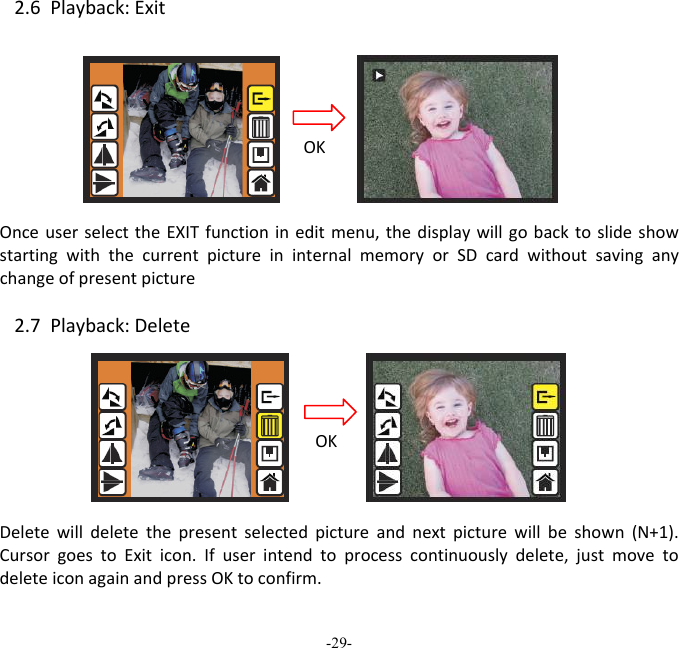
-28-  2.4SlideShow‐>Singlepicture‐>EditmodeSlideshowmodeEditmode2.5Playback:Rotate/Mirror/Flip/SaveIfuserwantstoRotate+90degreesbyOKbutton,theimagewillberotate+90degreesandcursorwillremainsatSave.PressOKbuttonagaintosavemodifiedresultandnextpicturewillbeshown(N+1).ForcontinuouslyRotate+90degrees,movecursortoRotateagainandpressOK.(SameforRotate‐90,Mirror,andFlipfunctionPausseOK OK SinglepicturemodeUseUp/Downbuttontoscrollpicturetobemodified OK
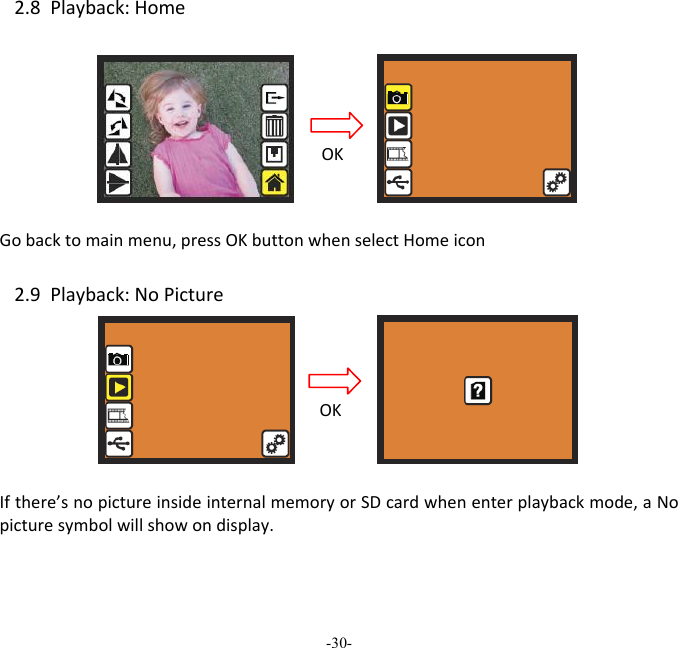
-29-  2.6Playback:ExitOnceuserselecttheEXITfunctionineditmenu,thedisplaywillgobacktoslideshowstartingwiththecurrentpictureininternalmemoryorSDcardwithoutsavinganychangeofpresentpicture 2.7Playback:DeleteDeletewilldeletethepresentselectedpictureandnextpicturewillbeshown(N+1).CursorgoestoExiticon.Ifuserintendtoprocesscontinuouslydelete,justmovetodeleteiconagainandpressOKtoconfirm.OKOK
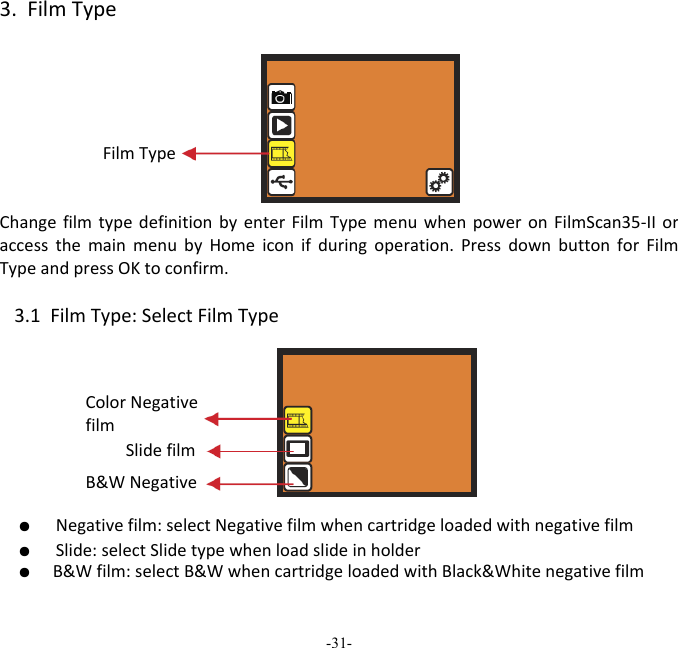
-30-  2.8Playback:HomeGobacktomainmenu,pressOKbuttonwhenselectHomeicon2.9Playback:NoPictureIfthere’snopictureinsideinternalmemoryorSDcardwhenenterplaybackmode,aNopicturesymbolwillshowondisplay.OKOK
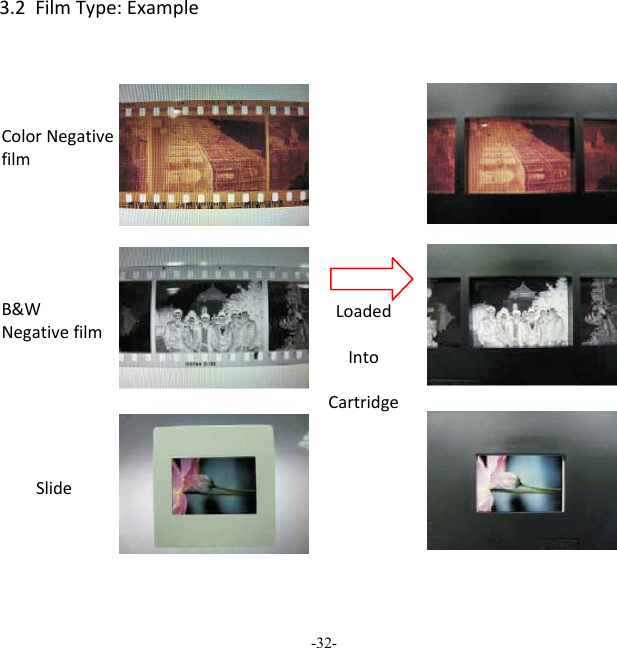
-31-  3.FilmTypeFilmTypeChangefilmtypedefinitionbyenterFilmTypemenuwhenpoweronFilmScan35‐IIoraccessthemainmenubyHomeiconifduringoperation.PressdownbuttonforFilmTypeandpressOKtoconfirm.3.1FilmType:SelectFilmType ●  Negativefilm:selectNegativefilmwhencartridgeloadedwithnegativefilm●  Slide:selectSlidetypewhenloadslideinholder●  B&Wfilm:selectB&WwhencartridgeloadedwithBlack&WhitenegativefilmSlidefilm B&WNegative ColorNegativefilm
-32-  3.2FilmType:ExampleColorNegativefilm B&WNegativefilm Slide LoadedIntoCartridge
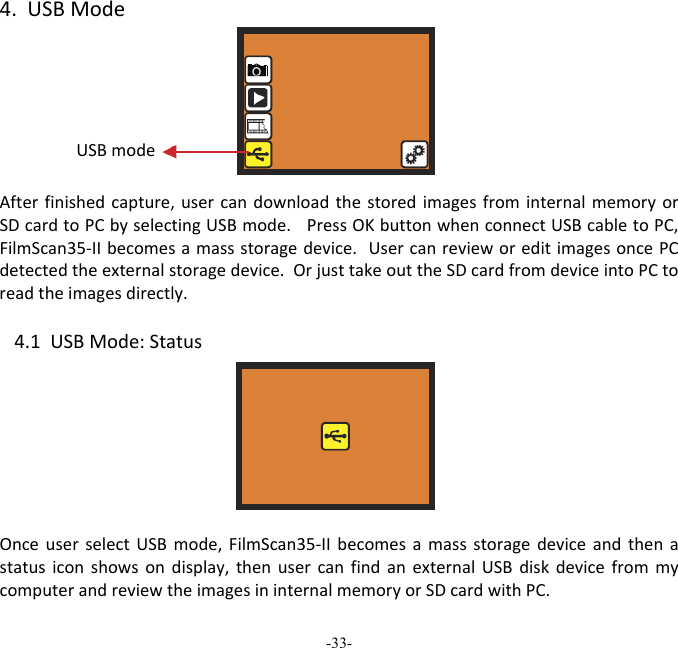
-33-  4.USBModeAfterfinishedcapture,usercandownloadthestoredimagesfrominternalmemoryorSDcardtoPCbyselectingUSBmode.PressOKbuttonwhenconnectUSBcabletoPC,FilmScan35‐IIbecomesamassstoragedevice.UsercanrevieworeditimagesoncePCdetectedtheexternalstoragedevice.OrjusttakeouttheSDcardfromdeviceintoPCtoreadtheimagesdirectly. 4.1USBMode:StatusOnceuserselectUSBmode,FilmScan35‐IIbecomesamassstoragedeviceandthenastatusiconshowsondisplay,thenusercanfindanexternalUSBdiskdevicefrommycomputerandreviewtheimagesininternalmemoryorSDcardwithPC.  USBmode
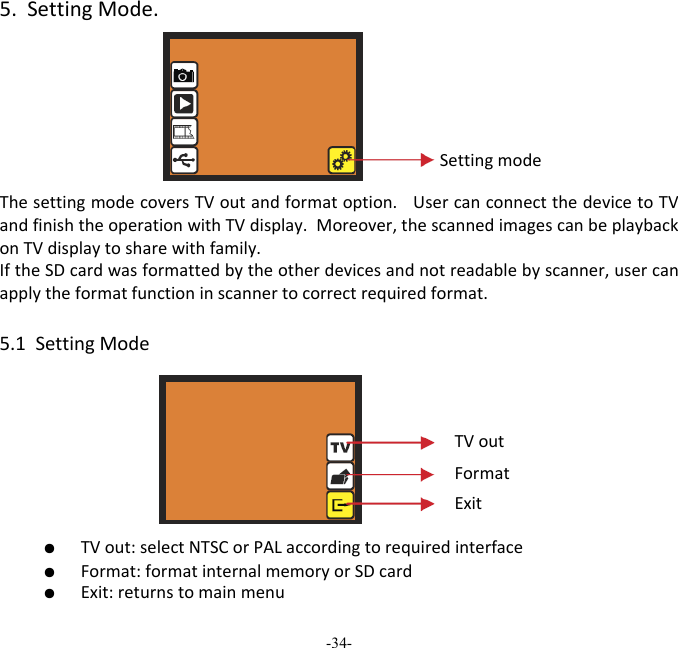
-34-  5.SettingMode.ThesettingmodecoversTVoutandformatoption.UsercanconnectthedevicetoTVandfinishtheoperationwithTVdisplay.Moreover,thescannedimagescanbeplaybackonTVdisplaytosharewithfamily. IftheSDcardwasformattedbytheotherdevicesandnotreadablebyscanner,usercanapplytheformatfunctioninscannertocorrectrequiredformat. 5.1SettingMode ●  TVout:selectNTSCorPALaccordingtorequiredinterface ●  Format:formatinternalmemoryorSDcard ●  Exit:returnstomainmenuSettingmodeTVoutFormatExit
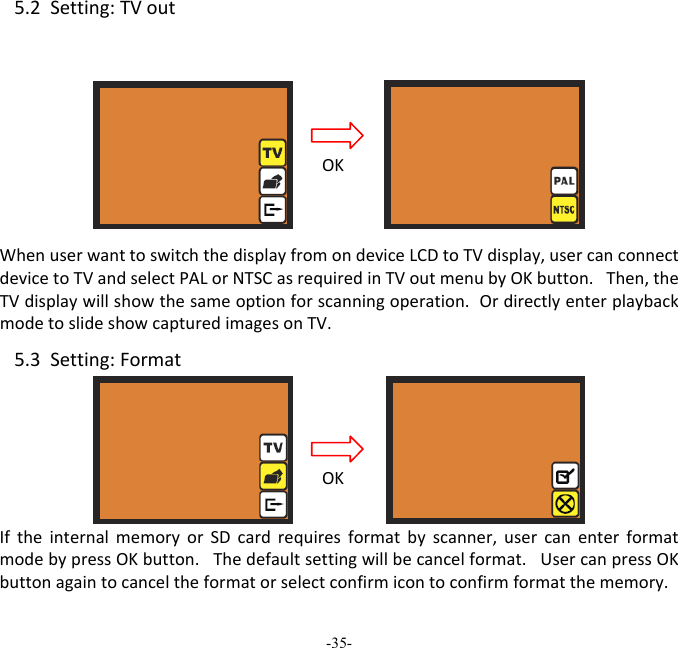
-35-  5.2Setting:TVout WhenuserwanttoswitchthedisplayfromondeviceLCDtoTVdisplay,usercanconnectdevicetoTVandselectPALorNTSCasrequiredinTVoutmenubyOKbutton.Then,theTVdisplaywillshowthesameoptionforscanningoperation.OrdirectlyenterplaybackmodetoslideshowcapturedimagesonTV. 5.3Setting:FormatIftheinternalmemoryorSDcardrequiresformatbyscanner,usercanenterformatmodebypressOKbutton.Thedefaultsettingwillbecancelformat.UsercanpressOKbuttonagaintocanceltheformatorselectconfirmicontoconfirmformatthememory.OKOK
-36-  NoteIfthere’snoSDcardinsidedevice,theinternalmemorywillbeformattedonceprocessFormat.Instead,ifSDcardisinsertedindevice,SDcardwillbeformatted.Goodbyepage
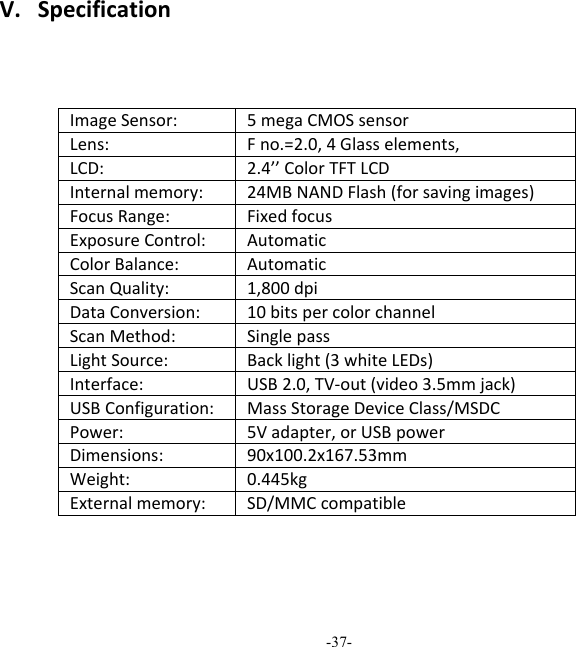
-37-  V.SpecificationImageSensor:5megaCMOSsensor Lens:Fno.=2.0,4Glasselements,LCD:2.4’’ColorTFTLCDInternalmemory:24MBNANDFlash(forsavingimages) FocusRange:FixedfocusExposureControl:AutomaticColorBalance:AutomaticScanQuality:1,800dpiDataConversion:10bitspercolorchannelScanMethod:SinglepassLightSource:Backlight(3whiteLEDs)Interface:USB2.0,TV‐out(video3.5mmjack) USBConfiguration:MassStorageDeviceClass/MSDCPower:5Vadapter,orUSBpowerDimensions:90x100.2x167.53mmWeight:0.445kgExternalmemory:SD/MMCcompatible
NOTE  THE MANUFACTURER IS NOT RESPONSIBLE FOR ANY RADIO OR TV INTERFERENCE CAUSED BY UNAUTHORIZED MODIFICATIONS TO THIS EQUIPMENT. SUCH MODIFICATIONS COULD VOID THE USER AUTHORITY TO OPERATE THE EQUIPMENT.  This equipment has been tested and found to comply with the limits for a Class B digital device, pursuant to part 15 of the FCC Rules. These limits are designed to provide reasonable protecon against harmful interference in a residenal installaon. This equipment generates, uses and can radiate radio frequency energy and, if not installed and used in accordance with the instrucons, may cause harmful interference to radio communicaons. However, there is no guarantee that interference will not occur in a parcular installaon. If this equipment does cause harmful interference to radio or television recepon, which can be determined by turning the equipment off and on, the user is encouraged to try to correct the interference by one or more of the following measures:  - Reorient or relocate the receiving antenna.  - Increase the separaon between the equipment and receiver.  - Connect the equipment into an outlet on a circuit different from that to which the receiver is connected.  - Consult the dealer or an experienced radio/TV technician for help.  - Modificaons not expressly approved by the manufacturer could void the user's authority to operate the equipment under FCC rules.    -38-

Navigation menu