EVERBEST MACHINERY INDUSTRY DT-989 Digital Multimeter User Manual

SHENZHEN EVERBEST MACHINERY INDUSTRY CO.,LTD. Digital Multimeter Users Manual

User manual.pdf

Please read this manual before switching the unit on.Important safety information inside.True RMS DigitalMultimeterUser ManualTrue RMS DigitalMultimeterUser Manual
True RMS Digital Multimeter User Manual
3True RMS Digital Multimeter User ManualContents1. Introduction............................................................................................2. Safety.....................................................................................................3. Safety Instructions..................................................................................4. Feature...................................................................................................5. Measure Function...................................................................................6. Default Display........................................................................................7. Setup Options.........................................................................................8. Specifications.........................................................................................Page446710182329
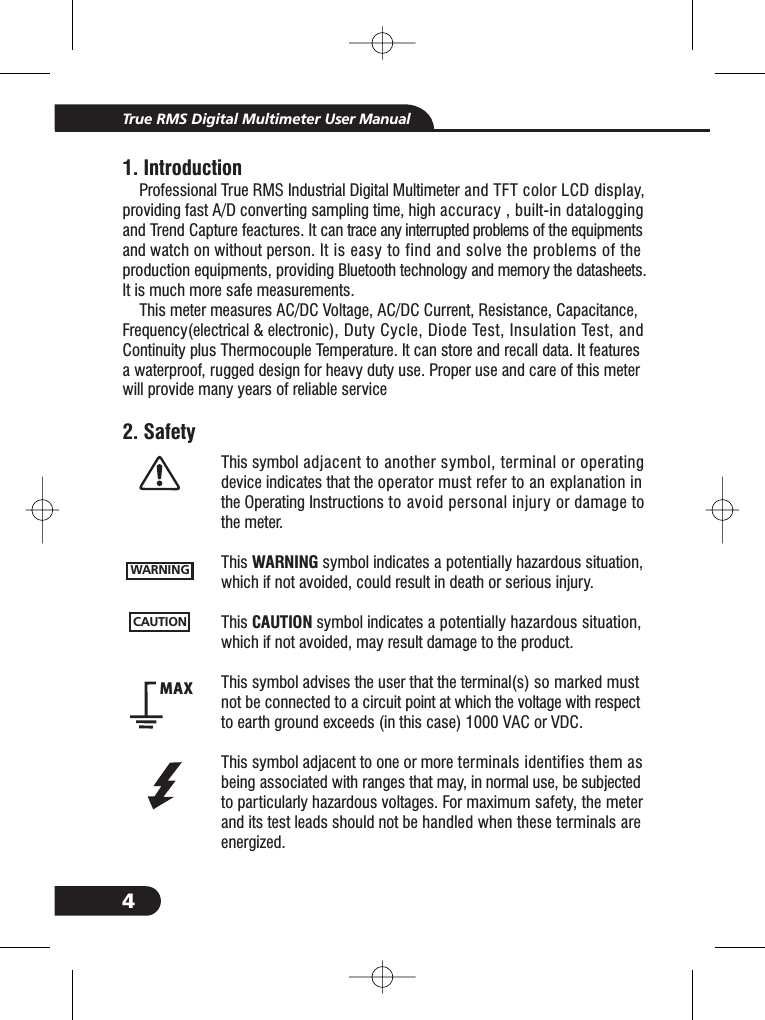
41. IntroductionProfessional True RMS Industrial Digital Multimeter and TFT color LCD display,providing fast A/D converting sampling time, high accuracy , built-in dataloggingand Trend Capture feactures. It can trace any interrupted problems of the equipmentsand watch on without person. It is easy to find and solve the problems of theproduction equipments, providing Bluetooth technology and memory the datasheets.It is much more safe measurements.This meter measures AC/DC Voltage, AC/DC Current, Resistance, Capacitance,Frequency(electrical & electronic), Duty Cycle, Diode Test, Insulation Test, andContinuity plus Thermocouple Temperature. It can store and recall data. It featuresa waterproof, rugged design for heavy duty use. Proper use and care of this meterwill provide many years of reliable service2. SafetyTrue RMS Digital Multimeter User ManualWARNINGCAUTIONMAXThis symbol adjacent to another symbol, terminal or operatingdevice indicates that the operator must refer to an explanation inthe Operating Instructions to avoid personal injury or damage tothe meter.This symbol indicates a potentially hazardous situation,which if not avoided, could result in death or serious injury.This symbol indicates a potentially hazardous situation,which if not avoided, may result damage to the product.This symbol advises the user that the terminal(s) so marked mustnot be connected to a circuit point at which the voltage with respectto earth ground exceeds (in this case) 1000 VAC or VDC.This symbol adjacent to one or more terminals identifies them asbeing associated with ranges that may, in normal use, be subjectedto particularly hazardous voltages. For maximum safety, the meterand its test leads should not be handled when these terminals areenergized.WARNINGCAUTION
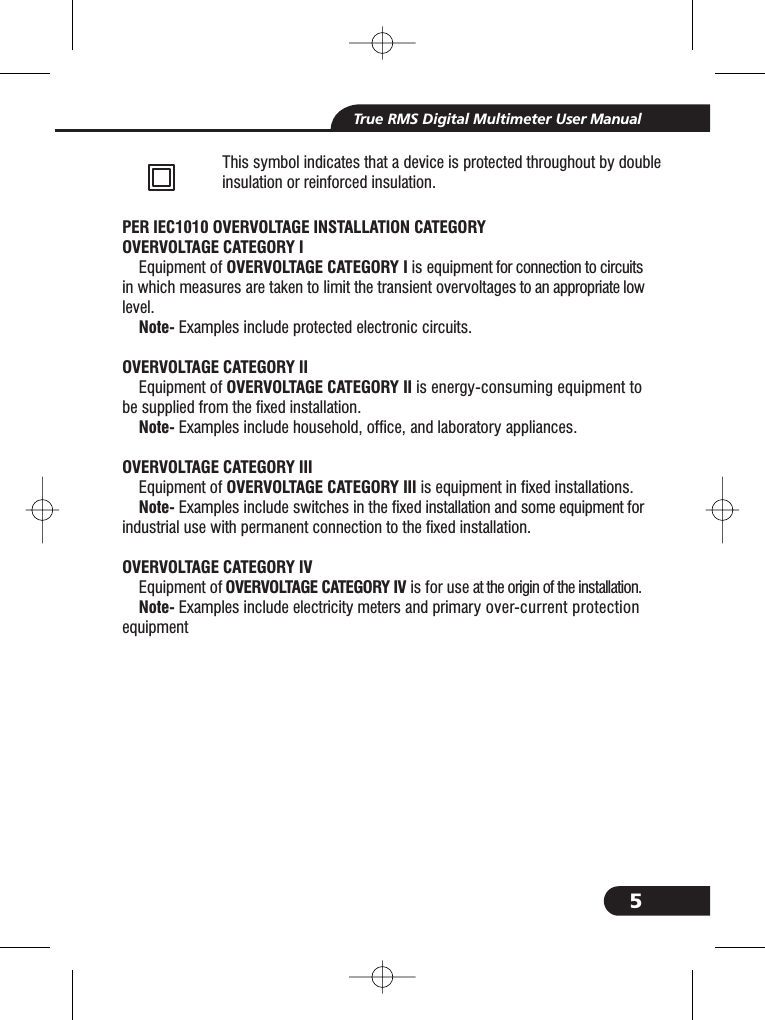
5True RMS Digital Multimeter User ManualThis symbol indicates that a device is protected throughout by doubleinsulation or reinforced insulation.PER IEC1010 OVERVOLTAGE INSTALLATION CATEGORYOVERVOLTAGE CATEGORY IOVERVOLTAGE CATEGORY INote-OVERVOLTAGE CATEGORY IIOVERVOLTAGE CATEGORY IINote-OVERVOLTAGE CATEGORY IIIOVERVOLTAGE CATEGORY IIINote-OVERVOLTAGE CATEGORY IVOVERVOLTAGE CATEGORY IVNote-Equipment of is equipment for connection to circuitsin which measures are taken to limit the transient overvoltages to an appropriate lowlevel.Examples include protected electronic circuits.Equipment of is energy-consuming equipment tobe supplied from the fixed installation.Examples include household, office, and laboratory appliances.Equipment of is equipment in fixed installations.Examples include switches in the fixed installation and some equipment forindustrial use with permanent connection to the fixed installation.Equipment of is for use at the origin of the installation.Examples include electricity meters and primary over-current protectionequipment
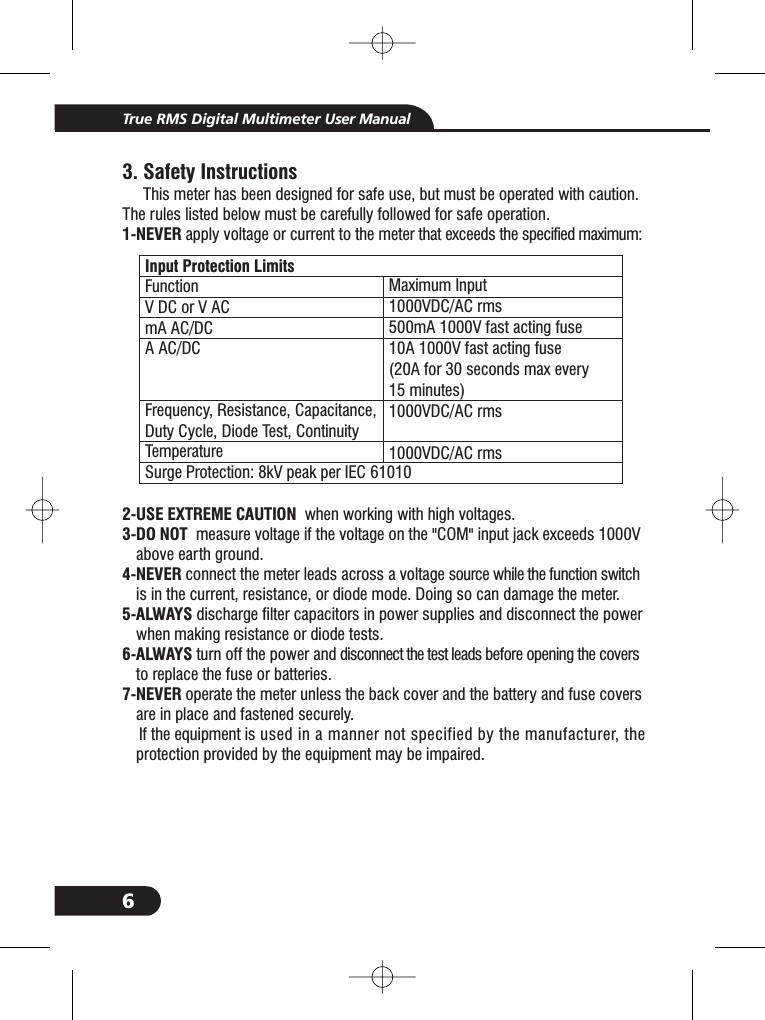
6Input Protection LimitsFunctionVDCorVACmA AC/DCA AC/DCFrequency, Resistance, Capacitance,Duty Cycle, Diode Test, ContinuityTemperatureSurge Protection: 8kV peak per IEC 61010Maximum Input1000VDC/AC rms500mA 1000V fast acting fuse10A 1000V fast acting fuse(20A for 30 seconds max every15 minutes)1000VDC/AC rms1000VDC/AC rms3. Safety InstructionsThis meter has been designed for safe use, but must be operated with caution.The rules listed below must be carefully followed for safe operation.apply voltage or current to the meter that exceeds the specified maximum:when working with high voltages.measure voltage if the voltage on the "COM" input jack exceeds 1000Vabove earth ground.connect the meter leads across a voltage source while the function switchis in the current, resistance, or diode mode. Doing so can damage the meter.discharge filter capacitors in power supplies and disconnect the powerwhen making resistance or diode tests.turn off the power and disconnect the test leads before opening the coversto replace the fuse or batteries.operate the meter unless the back cover and the battery and fuse coversare in place and fastened securely.If the equipment is used in a manner not specified by the manufacturer, theprotection provided by the equipment may be impaired.1-NEVER2-USE EXTREME CAUTION3-DO NOT4-NEVER5-ALWAYS6-ALWAYS7-NEVER3-3-3-3-3-3-True RMS Digital Multimeter User Manual
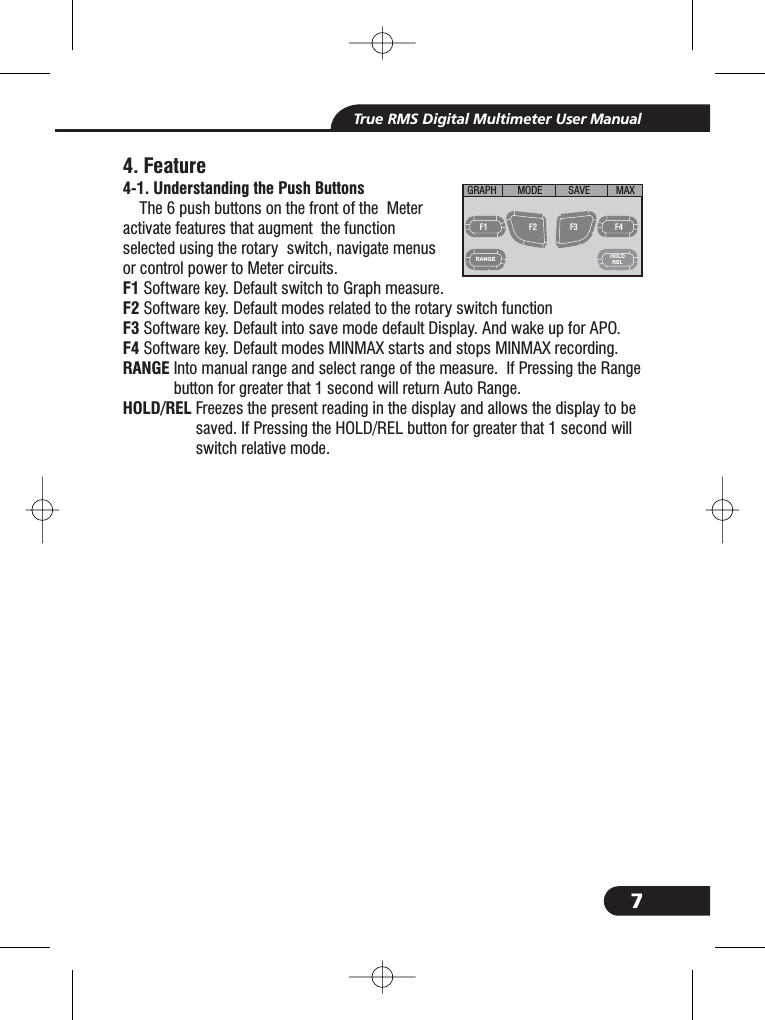
7True RMS Digital Multimeter User ManualHOLDRELRANGE4. FeatureThe 6 push buttons on the front of the Meteractivate features that augment the functionusing the rotary switch, navigate menuspower to Meter circuits.Software key. Default switch to Graph measure.Software key. Default modes related to the rotary switch functionSoftware key. Default into save mode default Display. And wake up for APO.Software key. Default modes MINMAX starts and stops MINMAX recording.Into manual range and select range of the measure. If Pressing the Rangebutton for greater that 1 second will return Auto Range.Freezes the present reading in the display and allows the display to besaved. If Pressing the HOLD/REL button for greater that 1 second willswitch relative mode.4-1. Understanding the Push ButtonsF1F2F3F4RANGEHOLD/RELselectedor controlRANGEHOLD/RELHOLD/RELGRAPH MODE SAVE MAXF1 F2 F3 F4
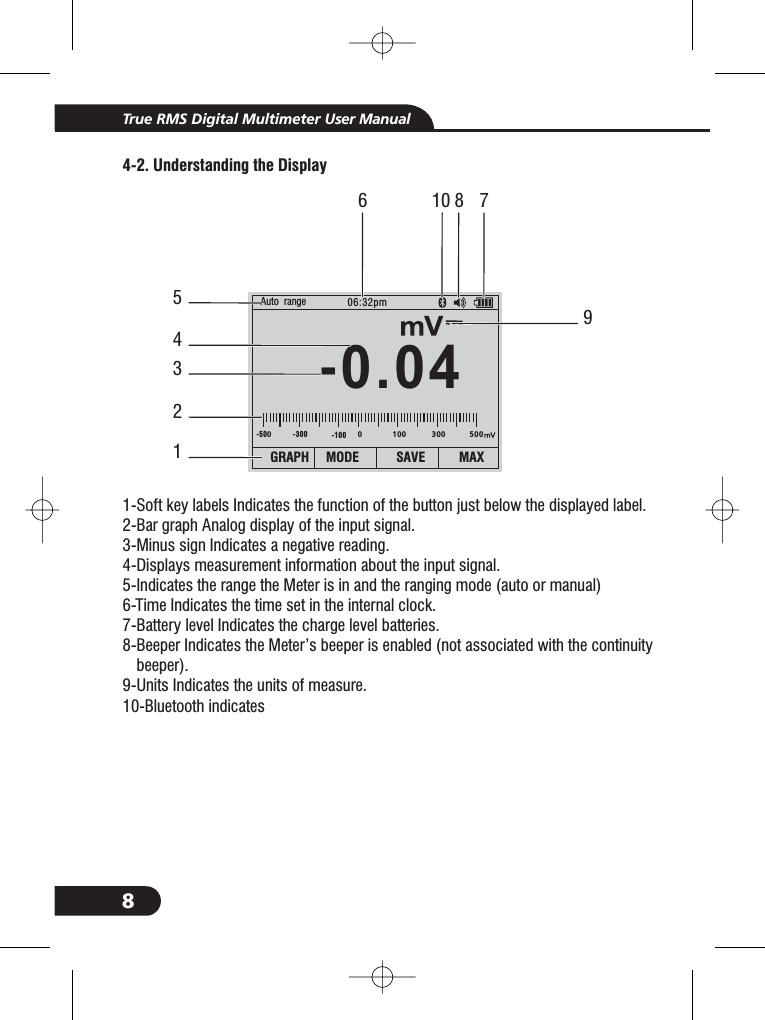
8True RMS Digital Multimeter User Manual4-2. Understanding the Display1-Soft key labels Indicates the function of the button just below the displayed label.2-Bar graph Analog display of the input signal.3-Minus sign Indicates a negative reading.4-Displays measurement information about the input signal.5-Indicates the range the Meter is in and the ranging mode (auto or manual)6-Time Indicates the time set in the internal clock.7-Battery level Indicates the charge level batteries.8-Beeper Indicates the Meter’s beeper is enabled (not associated with the continuitybeeper).9-Units Indicates the units of measure.8--.400Auto range 06:32pmGRAPH MODE SAVE MAX-500-300 -100 0 100 300 50053214896 71010-Bluetooth indicates
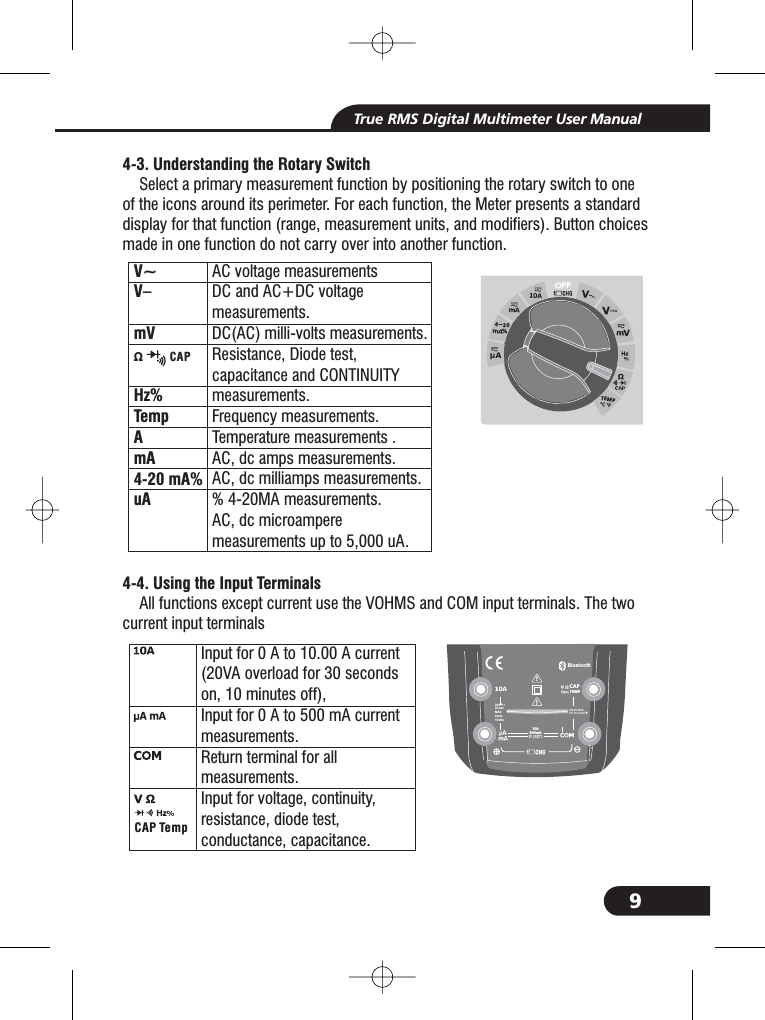
9True RMS Digital Multimeter User Manual4-3. Understanding the Rotary Switch4-4. Using the Input TerminalsSelect a primary measurement function by positioning the rotary switch to oneof the icons around its perimeter. For each function, the Meter presents a standarddisplay for that function (range, measurement units, and modifiers). Button choicesmade in one function do not carry over into another function.All functions except current use the VOHMS and COM input terminals. The twocurrent input terminalsInput for0Ato10.00 A current(20VA overload for 30 secondson, 10 minutes off),Input for0Ato500mAcurrentmeasurements.Return terminal for allmeasurements.Input for voltage, continuity,resistance, diode test,conductance, capacitance.CAP TempBluetooth20A fo r30 secMAXevery15 minTEMPCAPV~V–mVHzTempAmA4-20 mA%uA%AC voltage measurementsDC and AC+DC voltagemeasurements.DC(AC) milli-volts measurements.Resistance, Diode test,capacitance and CONTINUITYmeasurements.Frequency measurements.Temperature measurements .AC, dc amps measurements.AC, dc milliamps measurements.% 4-20MA measurements.AC, dc microampereup to 5,000 A.measurements uΩ CAP4~20%TEMP°C °F10A800mA
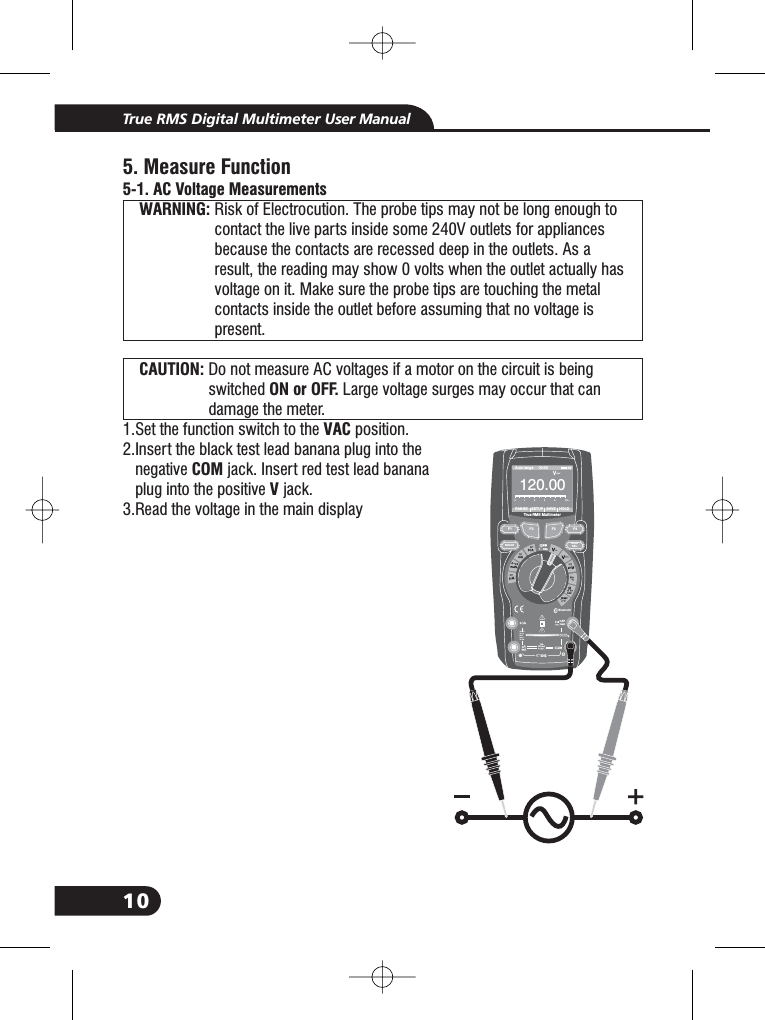
10True RMS Digital Multimeter User Manual5. Measure Function5-1. AC Voltage MeasurementsWARNING:CAUTION:ON or OFF.VACCOMVRisk of Electrocution. The probe tips may not be long enough tocontact the live parts inside some 240V outlets for appliancesbecause the contacts are recessed deep in the outlets. As aresult, the reading may show 0 volts when the outlet actually hasvoltage on it. Make sure the probe tips are touching the metalcontacts inside the outlet before assuming that no voltage ispresent.Do not measure AC voltages if a motor on the circuit is beingswitched Large voltage surges may occur that candamage the meter.1.Set the function switch to the position.2.Insert the black test lead banana plug into thenegative jack. Insert red test lead bananaplug into the positive jack.3.Read the voltage in the main display2.2.WARNING:WARNING:WARNING:WARNING:WARNING:WARNING:CAUTION:CAUTION:Bluetooth20Afo r30secMAXevery15minTEMPCAPF1HOLDRELRANGE4~20%TEMP°C °FRANGE SETUP SAVE HOLDAuto range 00:00True RMS Multimeter12 00. 0V~012345V~F2 F3 F410A800mA
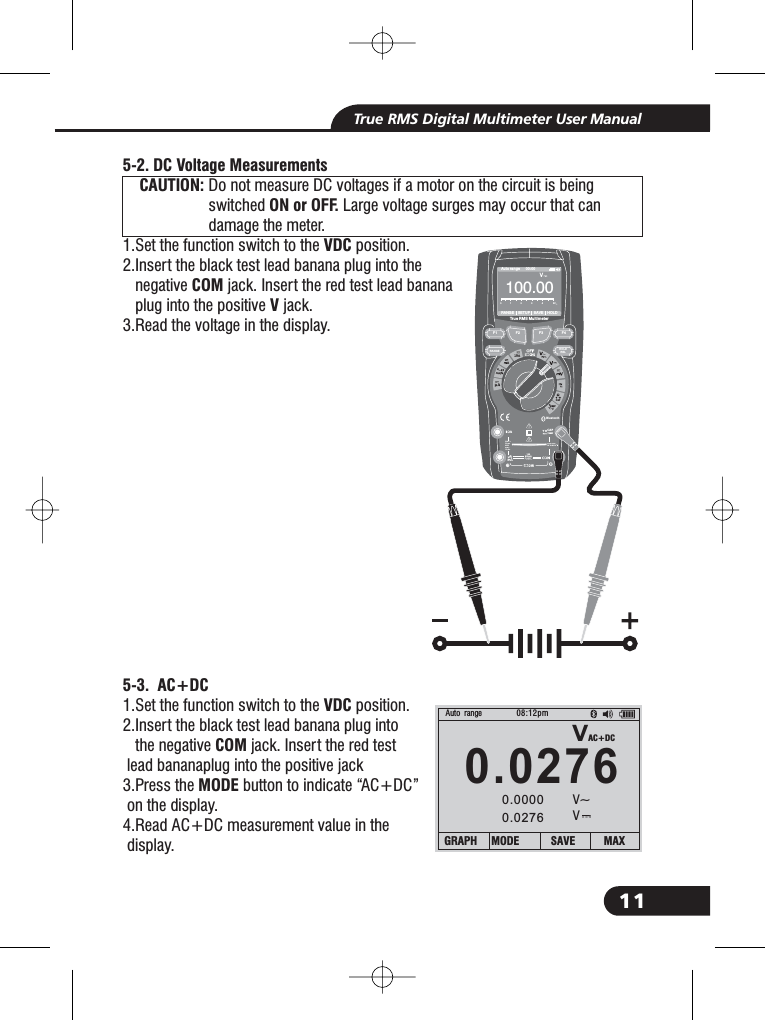
11True RMS Digital Multimeter User Manual5-2. DC Voltage MeasurementsCAUTION:ON or OFF.VDCCOMV5-3. AC+DCVDCCOMMODEDo not measure DC voltages if a motor on the circuit is beingswitched Large voltage surges may occur that candamage the meter.1.Set the function switch to the position.2.Insert the black test lead banana plug into thenegative jack. Insert the red test lead bananaplug into the positive jack.3.Read the voltage in the display.1.Set the function switch to the position.2.Insert the black test lead banana plug intothe negative jack. Insert the red testlead bananaplug into the positive jack3.Press the button to indicate “AC+DC”on the display.4.Read AC+DC measurement value in thedisplay.2.2.1.CAUTION:CAUTION:Bluetooth20Afo r30secMAXevery15minTEMPCAP4~20%TEMP°C °FRANGESETUPSAVEHOLDAuto range 00:00True RMS Multimeter100 0.0V012345VCAPVAC+DC0.027608:12pm0.00000.0276Auto rangeV~VGRAPH MODE SAVE MAXF1HOLDRELRANGEF2 F3 F410A800mA
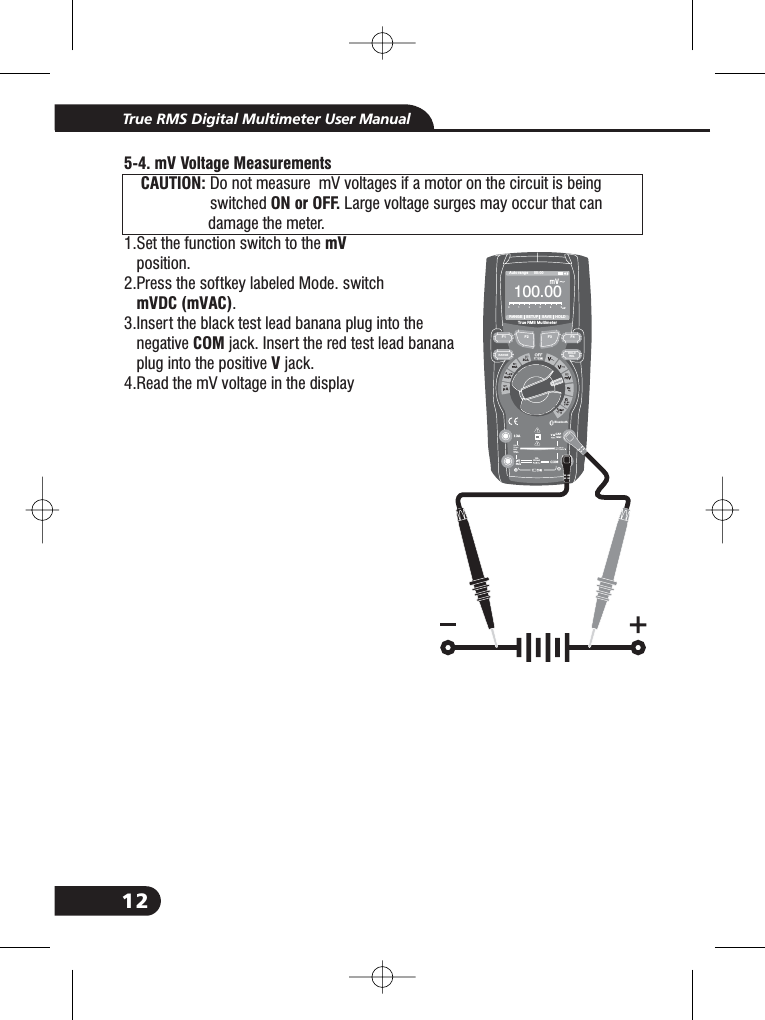
125-4. mV Voltage MeasurementsCAUTION:ON or OFF.mVmVDC (mVAC)COMVDo not measure mV voltages if a motor on the circuit is beingswitched Large voltage surges may occur that candamage the meter.1.Set the function switch to theposition.2.Press the softkey labeled Mode. switch.3.Insert the black test lead banana plug into thenegative jack. Insert the red test lead bananaplug into the positive jack.4.Read the mV voltage in the displayCAUTION:CAUTION:3.3.True RMS Digital Multimeter User ManualBluetooth20Afo r30secMAXevery15minTEMPCAP4~20%TEMP°C °FRANGE SETUP SAVE HOLDAuto range 00:00True RMS Multimeter10 00. 0012345CAPF1HOLDRELRANGEF2 F3 F410A800mA
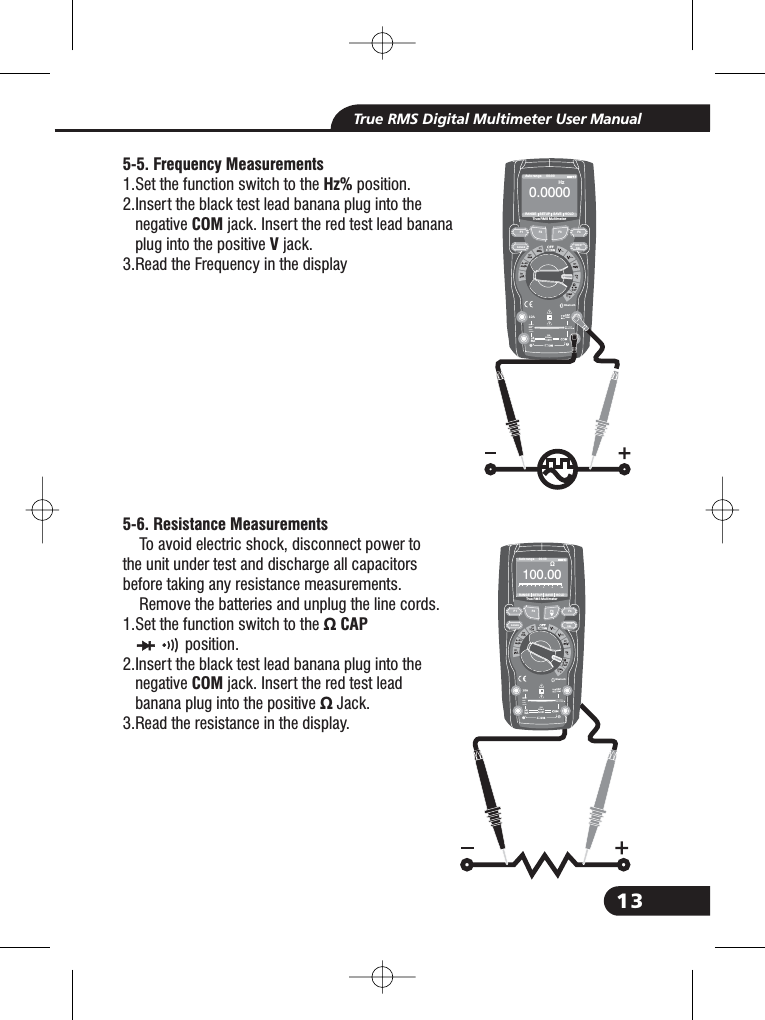
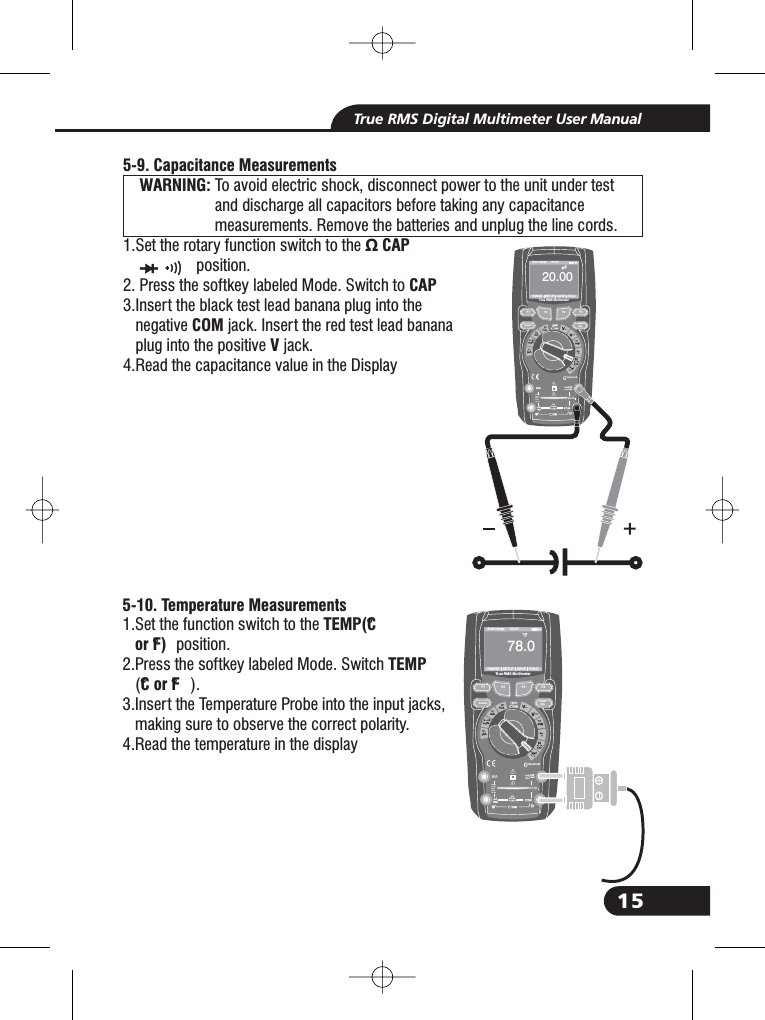
13True RMS Digital Multimeter User Manual5-5. Frequency MeasurementsHz%COMV5-6. Resistance Measurements1.Set the function switch to the position.2.Insert the black test lead banana plug into thenegative jack. Insert the red test lead bananaplug into the positive jack.3.Read the Frequency in the displayTo avoid electric shock, disconnect power tothe unit under test and discharge all capacitorsbefore taking any resistance measurements.Remove the batteries and unplug the line cords.1.Set the function switch to the Ω CAPCOMΩposition.2.Insert the black test lead banana plug into thenegative jack. Insert the red test leadbanana plug into the positive Jack.3.Read the resistance in the display.2.2.2.2.Bluetooth20Afo r30secMAXevery15minTEMPCAP4~20%TEMP°C°FRANGE SETUP SAVE HOLDAuto range 00:00TrueRMS Multimeter0. 0000HzF1HOLDRELRANGEF2 F3 F410A800mABluetooth20Afo r30secMAXevery15minTEMPCAP4~20%TEMP°C°FRANGE SETUP SAVE HOLDAuto range 00:00TrueRMS Multimeter10 00. 0Ω012345ΩF1HOLDRELRANGEF2 F3 F410A800mA
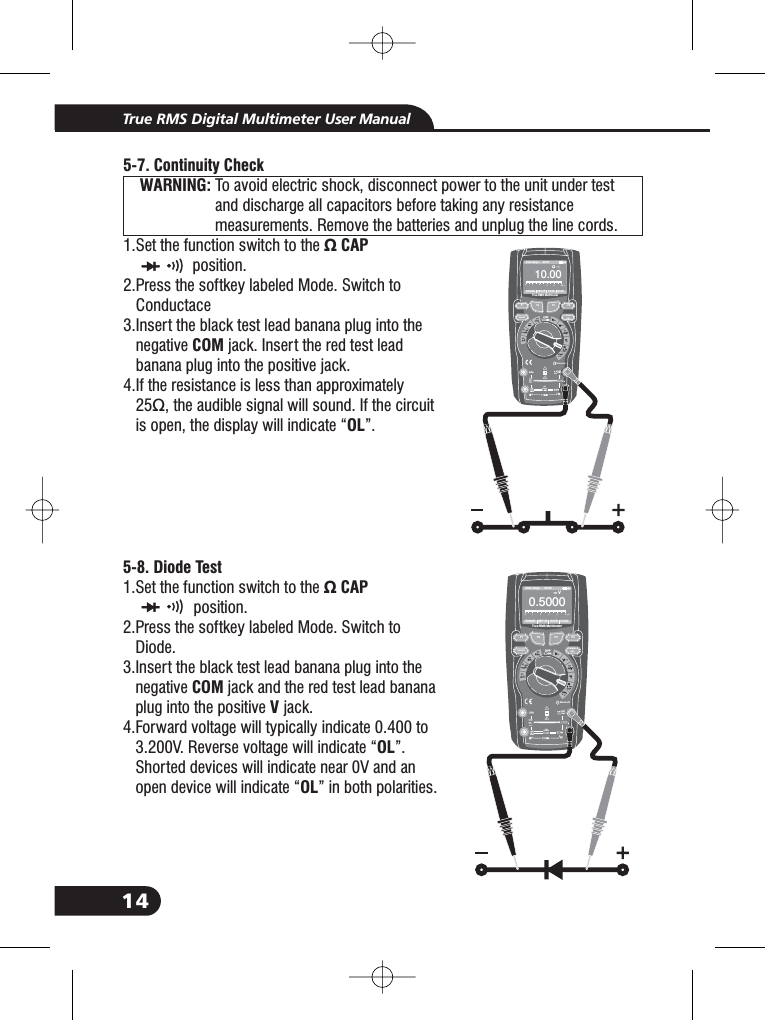
14True RMS Digital Multimeter User Manual57- . Continuity CheckWARNING:Ω CAPCOMOLTo avoid electric shock, disconnect power to the unit under testand discharge all capacitors before taking any resistancemeasurements. Remove the batteries and unplug the line cords.1.Set the function switch to theposition.2.Press the softkey labeled Mode. Switch toC3.Insert the black test lead banana plug into thenegative jack. Insert the red test leadbanana plug into the positive jack.4.If the resistance is less than approximately25Ω, the audible signal will sound. If the circuitis open, the display will indicate “ ”.onductaceΩ CAP2.3.3.3.3.WARNING:WARNING:Bluetooth20Afor30secMAXevery15minTEMPCAP4~20%TEMP°C°FRANGE SETUP SAVE HOLDAuto range 00:00TrueRMS Multimeter010. 00Ω012345195-8. Diode TestCAPCOMVOLOL1.Set the function switch to theposition.2.Press the softkey labeled Mode. Switch toDiode.3.Insert the black test lead banana plug into thenegative jack and the red test lead bananaplug into the positive jack.4.Forward voltage will typically indicate 0.400 to3.200V. Reverse voltage will indicate “ ”.devices will indicate near 0V and anwill indicate “ ” in both polarities.Shortedopen deviceΩ2.3.3.3.3.3.F1HOLDRELRANGEF2 F3 F4Ω10A800mABluetooth20Afor30secMAXevery15minTEMPCAP4~20%TEMP°C°FRANGE SETUP SAVE HOLDAuto range 00:00TrueRMS Multimeter0. 0005V012345F1HOLDRELRANGEF2 F3 F4V10A800mA
15True RMS Digital Multimeter User ManualBluetooth20Afor30secMAXevery15minTEMPCAP4~20%TEMP°C°FRANGE SETUP SAVE HOLDAuto range 00:00TrueRMS Multimeter020. 00μF-9. Capacitance MeasurementsWARNING:5To avoid electric shock, disconnect power to the unit under testand discharge all capacitors before taking any capacitancemeasurements. Remove the batteries and unplug the line cords.1.Set the rotary function switch to the Ω CAPposition.2. Press the softkey labeled Mode. Switch to3.Insert the black test lead banana plug into thenegative jack. Insert the red test lead bananaplug into the positive jack.4.Read the capacitance value in the DisplayCAPCOMVWARNING:WARNING:Ω CAP3.3.510- . Temperature MeasurementsTEMP(°Cor °F)TEMP°Cor°F1.Set the function switch to theposition.2.Press the softkey labeled Mode. Switch().3.Insert the Temperature Probe into the input jacks,making sure to observe the correct polarity.4.Read the temper ture in the displaya1.1.1.F1HOLDRELRANGEF2 F3 F410A800mABluetooth20Afo r30secMAXevery15minTEMPCAP4~20%TEMP°C°FRANGE SETUP SAVE HOLDAuto range 00:00TrueRMS Multimeter0078 0.°FF1HOLDRELRANGEF2 F3 F410A800mA
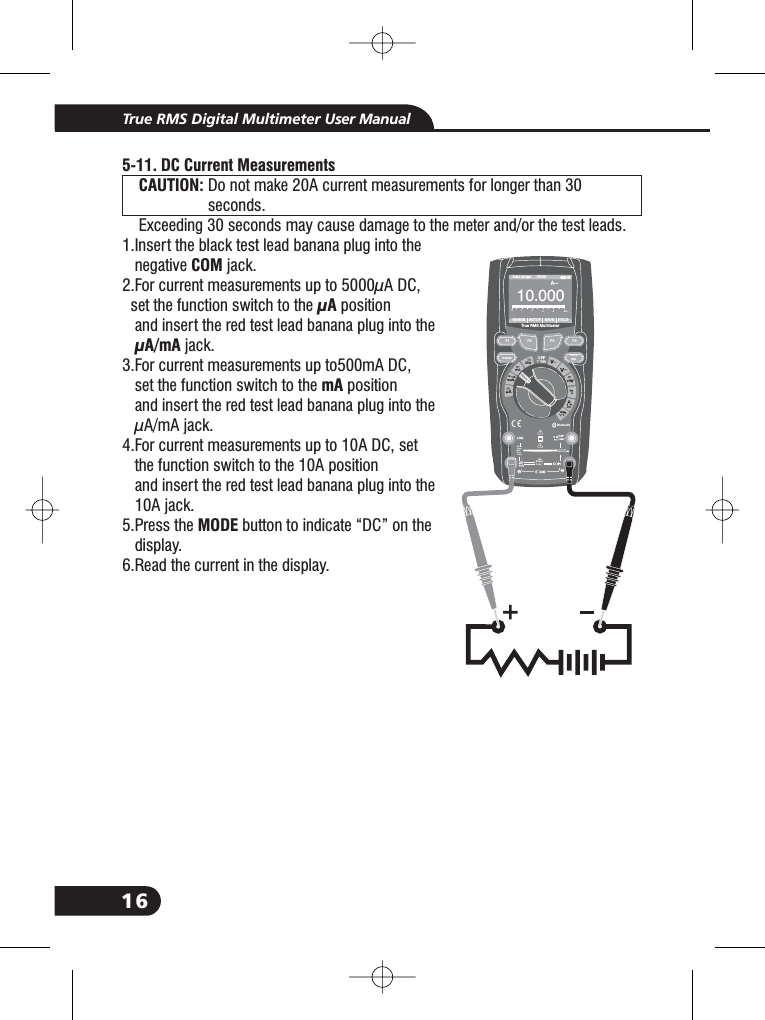
16True RMS Digital Multimeter User ManualBluetooth20Afo r30secMAXevery15minTEMPCAP4~20%TEMP°C °FRANGE SETUP SAVE HOLDAuto range 00:00True RMS Multimeter100. 00A~0123455-11. DC Current MeasurementsCAUTION:COMμAμA/mAmAMODEDo not make 20A current measurements for longer than 30seconds.Exceeding 30 seconds may cause damage to the meter and/or the test leads.1.Insert the black test lead banana plug into thenegative jack.2.For current measurements up to 5000μA DC,set the function switch to the positionand insert the red test lead banana plug into thejack.3.For current measurements up to500mA DC,set the function switch to the positionand insert the red test lead banana plug into theμA/mA jack.4.For current measurements up to 10A DC, setthe function switch to the 10A positionand insert the red test lead banana plug into the10A jack.5.Press the button to indicate “DC” on thedisplay.6.Read the current in the display.1.1.1.1.1.1.1.1.1.1.1.CAUTION:F1HOLDRELRANGEF2 F3 F4A~10A800mA
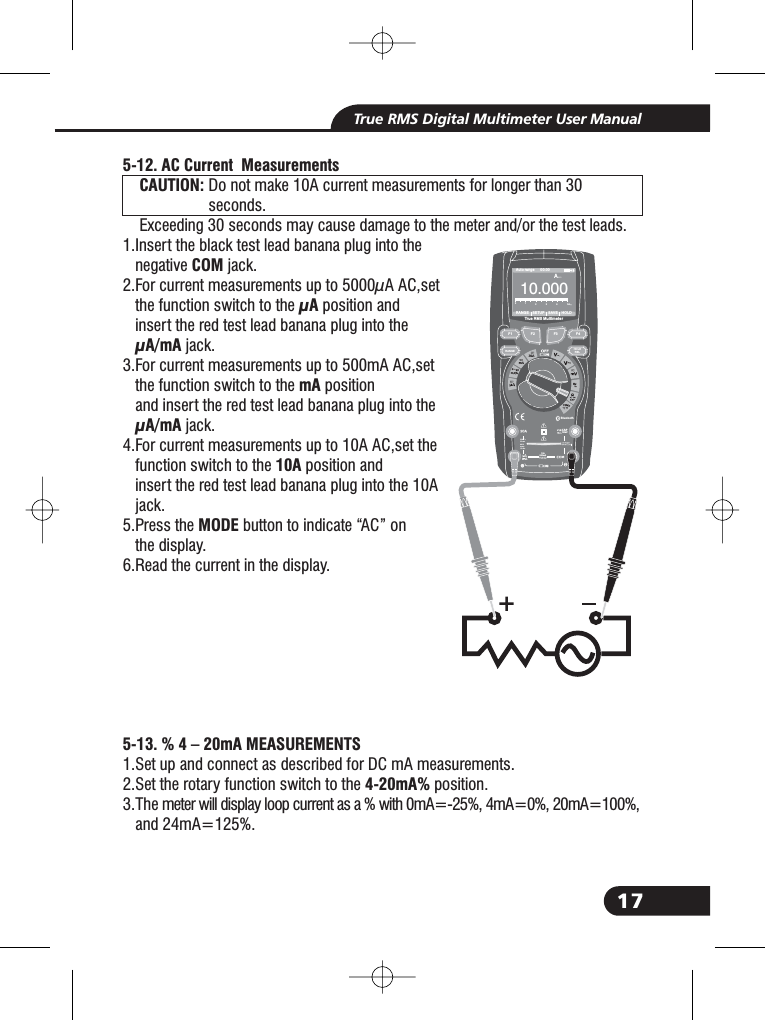
17True RMS Digital Multimeter User Manual5-12. AC Current MeasurementsCAUTION:COMμAμA/mAmAμA/mA10AMODE5-13. % 4 – 20mA MEASUREMENTS4-20mA%Do not make 10A current measurements for longer than 30seconds.Exceeding 30 seconds may cause damage to the meter and/or the test leads.1.Insert the black test lead banana plug into thenegative jack.2.For current measurements up to 5000μA AC,setthe function switch to the position andinsert the red test lead banana plug into thejack.3.For current measurements up to 500mA AC,setthe function switch to the positionand insert the red test lead banana plug into thejack.4.For current measurements up to 10A AC,set thefunction switch to the position andinsert the red test lead banana plug into the 10Ajack.5.Press the button to indicate “AC” onthe display.6.Read the current in the display.1.Set up and connect as described for DC mA measurements.2.Set the rotary function switch to the position.3.The meter will display loop current as a % with 0mA=-25%, 4mA=0%, 20mA=100%,and 24mA=125%.1.1.1.1.1.1.1.1.1.1.5.3.CAUTION:Bluetooth20Afo r30secMAXevery15minTEMPCAP4~20%TEMP°C °FRANGE SETUP SAVE HOLDAuto range 00:00True RMS Multimeter100. 00A012345AF1HOLDRELRANGEF2 F3 F410A800mA
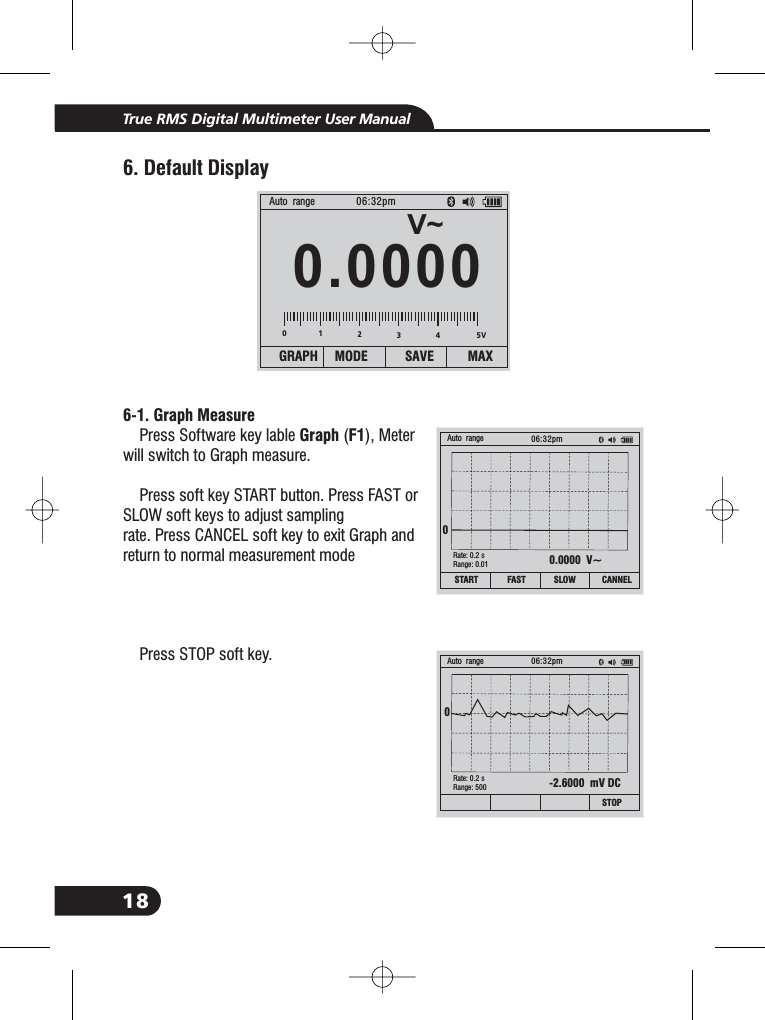
18True RMS Digital Multimeter User Manual6. Default Display6-1. Graph MeasureGraph F1Press Software key lable ( ), Meterwill switch to Graph measure.Press soft key START button. Press FAST orSLOW soft keys to adjust samplingrate. Press CANCEL soft key to exit Graph andreturn to normal measurement modePress STOP soft key.V~0 000.0Auto range 06:32pmGRAPH MODE SAVE MAX0.0000 V~SLOW CANNELFASTAuto range 06:32pm0Rate: 0.2 sRange: 0.01START012345V-2.6000 mV DCSTOPAuto range 06:32pm0Rate: 0.2 sRange: 500
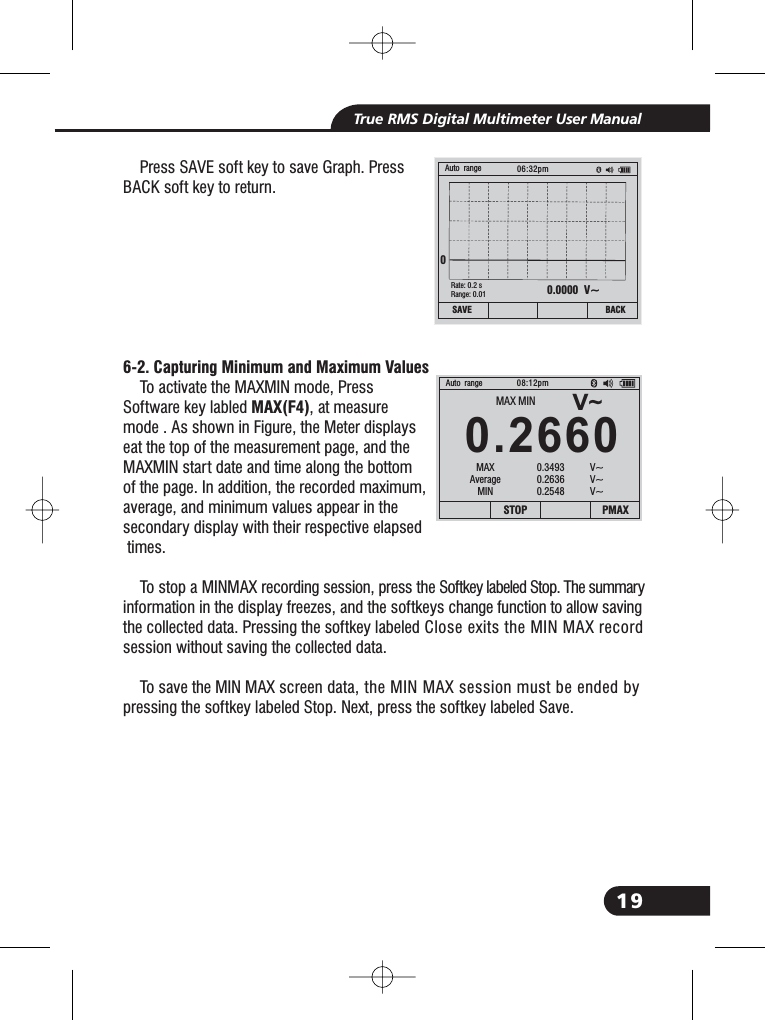
19True RMS Digital Multimeter User ManualPress SAVE soft key to save Graph. PressBACK soft key to return.To activate the MAXMIN mode, PressSoftware key labled , at measuremode . As shown in Figure, the Meter displayseat the top of the measurement page, and theMAXMIN start date and time along the bottomof the page. In addition, the recorded maximum,average, and minimum values appear in thesecondary display with their respective elapsedtimes.To stop a MINMAX recording session, press the Softkey labeled Stop. The summaryinformation in the display freezes, and the softkeys change function to allow savingthe collected data. Pressing the softkey labeled Close exits the MIN MAX recordsession without saving the collected data.To save the MIN MAX screen data, the MIN MAX session must be ended bypressing the softkey labeled Stop. Next, press the softkey labeled Save.6-2. Capturing Minimum and Maximum ValuesMAX(F4)0.0000 V~BACKAuto range 06:32pm0Rate: 0.2 sRange: 0.01SAVEV~0.2660Auto range08:12pmSTOP PMAXMAX MINMAXAverageMIN0.3493 V~0.2636 V~0.2548 V~
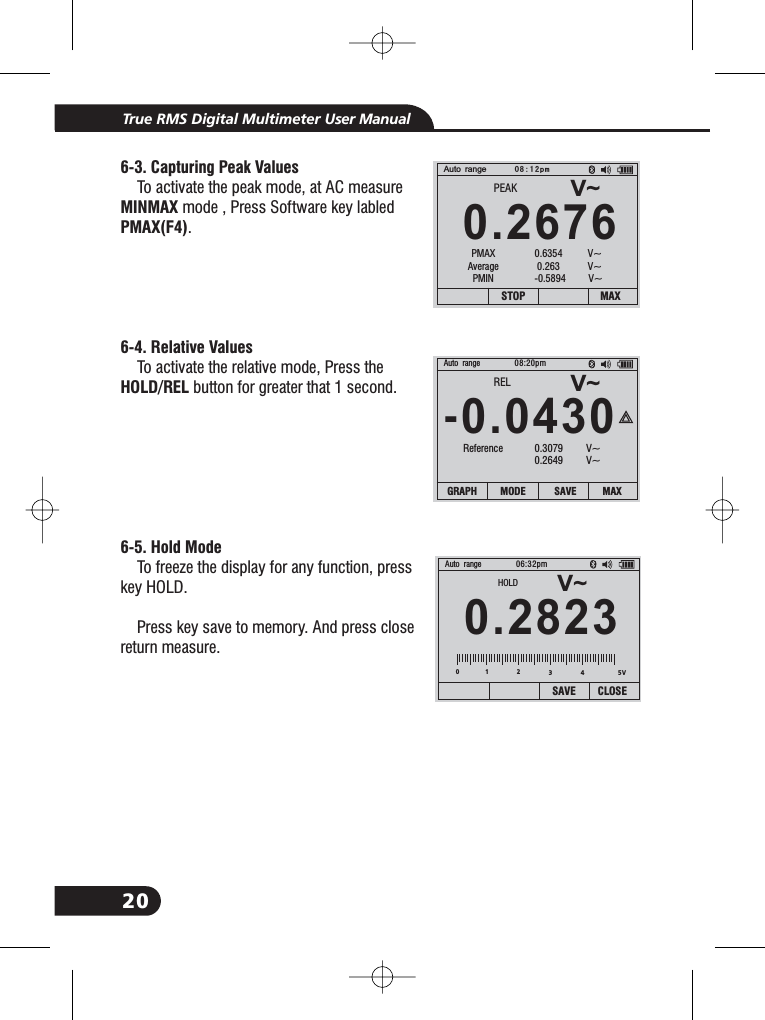
20True RMS Digital Multimeter User Manual6-3. Capturing Peak ValuesMINMAXPMAX(F4)6-4. Relative ValuesHOLD/REL6-5. Hold ModeTo activate the peak mode, at AC measuremode , Press Software key labled.To activate the relative mode, Press thebutton for greater that 1 second.To freeze the display for any function, presskey HOLD.Press key save to memory. And press closereturn measure.V~0.2676Auto range08:12pmSTOP MAXPEAKPMAXAveragePMIN0.6354 V~0.263 V~-0.5894 V~V~-.04300Auto range 08:20pmRELReference 0.3079 V~0.2649 V~GRAPH MODE SAVE MAXV~0.2823Auto range 06:32pmSAVE CLOSE012345VHOLD
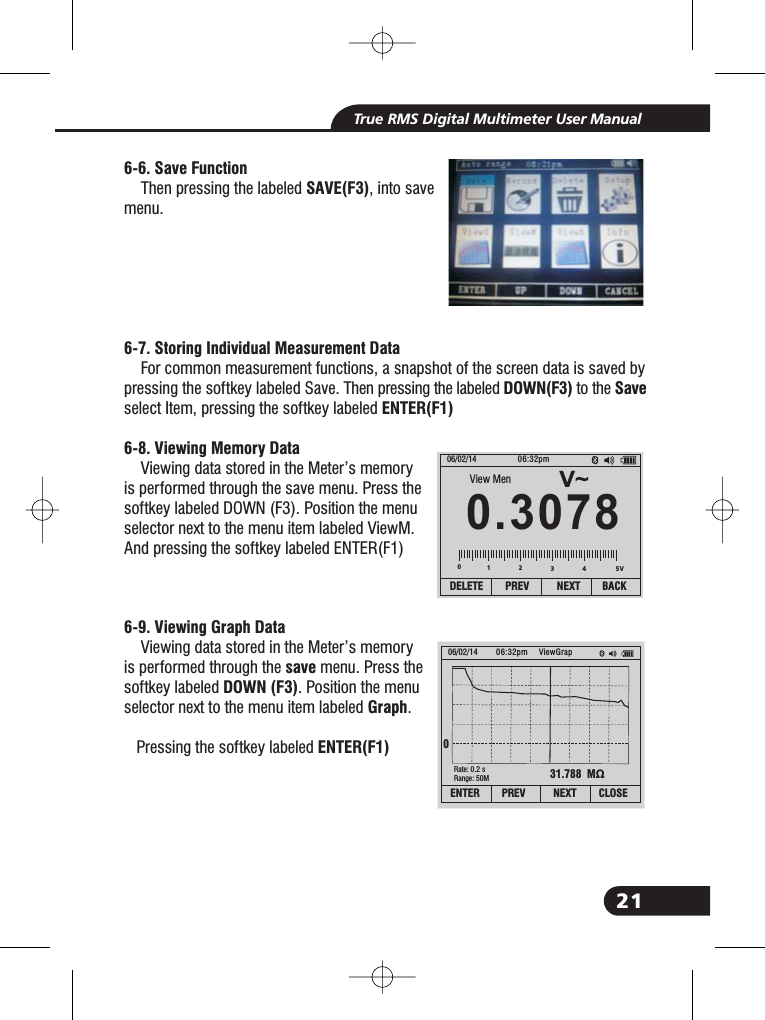
21True RMS Digital Multimeter User Manual6-6. Save FunctionSAVE(F3)6-7. Storing Individual Measurement DataDOWN(F3) SaveENTER(F1)6-8. Viewing Memory Data6-9. Viewing Graph DatasaveDOWN (F3)GraphENTER(F1)Then pressing the labeled , into savemenu.For common measurement functions, a snapshot of the screen data is saved bypressing the softkey labeled Save. Then pressing the labeled to theselect Item, pressing the softkey labeledViewing data stored in the Meter’s memoryis performed through the save menu. Press thesoftkey labeled DOWN (F3). Position the menuselector next to the menu item labeled ViewM.And pressing the softkey labeled ENTER(F1)Viewing data stored in the Meter’s memoryis performed through the menu. Press thesoftkey labeled . Position the menuselector next to the menu item labeled .Pressing the softkey labeledV~0.307806/02/14 06:32pmDELETE PREV NEXT BACK01234View Men31.788 MΩ06/02/14 06:32pm0Rate: 0.2 sRange: 50MViewGrapENTER PREV NEXT CLOSE5V
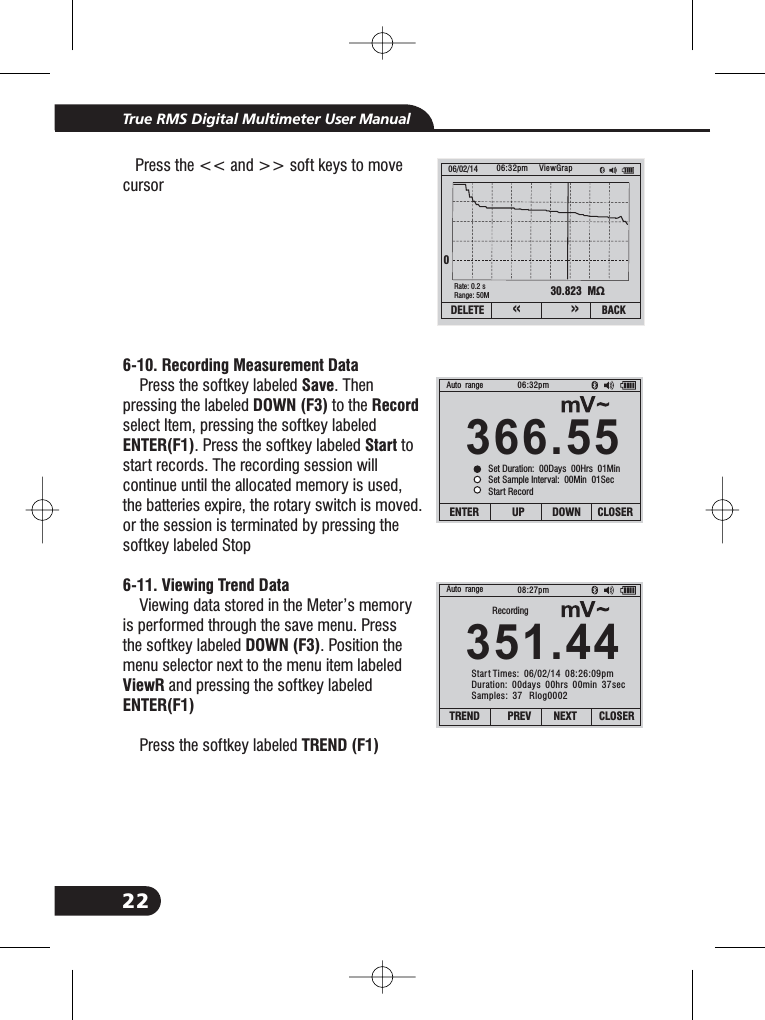
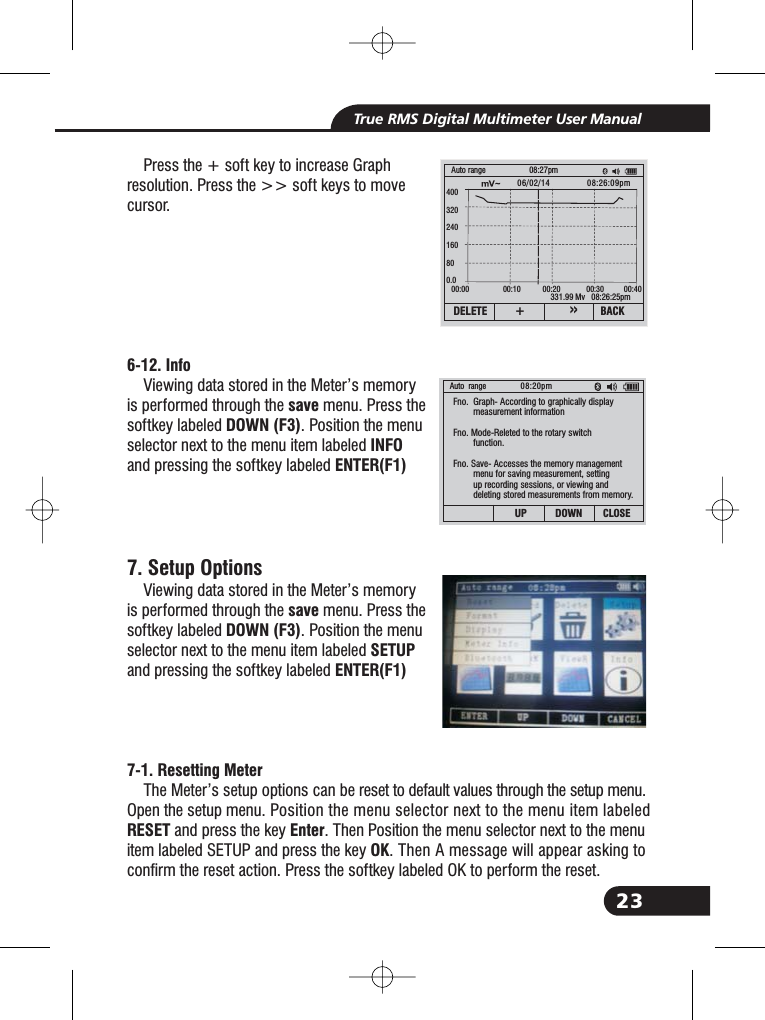
22True RMS Digital Multimeter User Manual6-10. Recording Measurement DataSaveDOWN (F3) RecordENTER(F1) Start6-11. Viewing Trend DataDOWN (F3)ViewRENTER(F1)TREND (F1)Press the << and >> soft keys to movecursorPress the softkey labeled . Thenpressing the labeled to theselect Item, pressing the softkey labeled. Press the softkey labeled tostart records. The recording session willcontinue until the allocated memory is used,the batteries expire, the rotary switch is moved.or the session is terminated by pressing thesoftkey labeled StopViewing data stored in the Meter’s memoryis performed through the save menu. Pressthe softkey labeled . Position themenu selector next to the menu item labeledand pressing the softkey labeledPress the softkey labeled30.823 MΩ06/02/14 06:32pm0Rate: 0.2 sRange: 50MViewGrapDELETE BACK«»366.55Auto range 06:32pmENTER UP DOWN CLOSERSet Duration: 00Days 00Hrs 01MinSet Sample Interval: 00Min 01SecStart Record351.44Auto range 08:27pmTREND PREV NEXT CLOSERRecordingStart Times: 06/02/14 08:26:09pmDuration: 00days 00hrs 00min 37secSamples: 37 Rlog0002
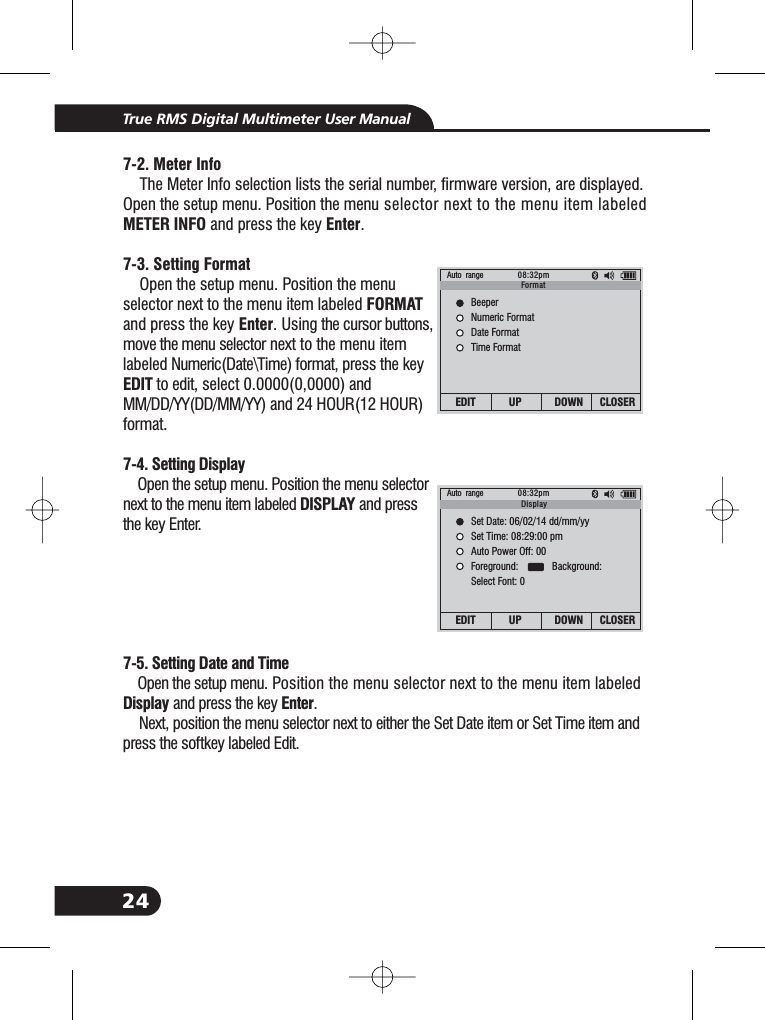
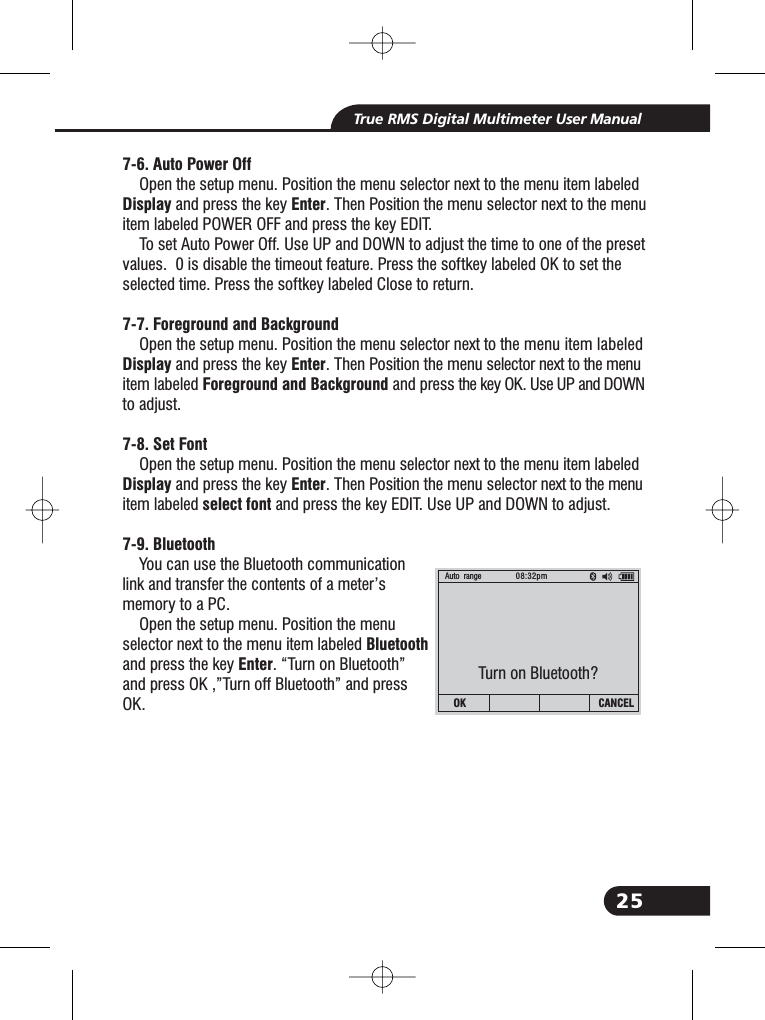
23True RMS Digital Multimeter User ManualPress the + soft key to increase Graphresolution. Press the >> soft keys to movecursor.Viewing data stored in the Meter’s memoryis performed through the menu. Press thesoftkey labeled . Position the menuselector next to the menu item labeledand pressing the softkey labeledViewing data stored in the Meter’s memoryis performed through the menu. Press thesoftkey labeled . Position the menuselector next to the menu item labeledand pressing the softkey labeledThe Meter’s setup options can be reset to default values through the setup menu.Open the setup menu. Position the menu selector next to the menu item labeledand press the key . Then Position the menu selector next to the menuitem labeled SETUP and press the key . Then A message will appear asking toconfirm the reset action. Press the softkey labeled OK to perform the reset.6-12. InfosaveDOWN (F3)INFOENTER(F1)saveDOWN (F3)SETUPENTER(F1)7-1. Resetting MeterRESET EnterOK7. Setup Options331.99 Mv 08:26:25pmAuto range 08:27pmDELETE BACK+»400320240160800.000:00 00:10 00:20 00:30 00:4006/02/14 08:26:09pmAuto range 08:20pmUP DOWN CLOSEFno. Graph- According to graphically displaymeasurement informationFno. Mode-Releted to the rotary switchfunction.Fno. Save- Accesses the memory managementmenu for saving measurement, settingup recording sessions, or viewing anddeleting stored measurements from memory.Fno.Fno.Fno.Fno.Fno.
24True RMS Digital Multimeter User Manual7-2. Meter InfoMETER INFO Enter7-3. Setting FormatFORMATEnterEDIT7-4. Setting DisplayDISPLAY7-5. Setting Date and TimeDisplay EnterThe Meter Info selection lists the serial number, firmware version, are displayed.Open the setup menu. Position the menu selector next to the menu item labeledand press the key .Open the setup menu. Position the menuselector next to the menu item labeledand press the key . Using the cursor buttons,move the menu selector next to the menu itemlabeled Numeric(Date\Time) format, press the keyto edit, select 0.0000(0,0000) andMM/DD/YY(DD/MM/YY) and 24 HOUR(12 HOUR)format.Open the setup menu. Position the menu selectornext to the menu item labeled and pressthe key Enter.Open the setup menu. Position the menu selector next to the menu item labeledand press the key .Next, position the menu selector next to either the Set Date item or Set Time item andpress the softkey labeled Edit.Auto range 08:32pmEDIT UP DOWN CLOSERBeeperNumeric FormatDate FormatTime FormatFormatAuto range 08:32pmEDIT UP DOWN CLOSERSet Date: 06/02/14 dd/mm/yySet Time: 08:29:00 pmAuto Power Off: 00Foreground: Background:Select Font: 0Display
25True RMS Digital Multimeter User Manual7-6. Auto Power OffDisplay Enter7-7. Foreground and BackgroundDisplay EnterForeground and Background7-8. Set FontDisplay Enterselect font7-9. BluetoothBluetoothEnterOpen the setup menu. Position the menu selector next to the menu item labeledand press the key . Then Position the menu selector next to the menuitem labeled POWER OFF and press the key EDIT.To set Auto Power Off. Use UP and DOWN to adjust the time to one of the presetvalues. 0 is disable the timeout feature. Press the softkey labeled OK to set theselected time. Press the softkey labeled Close to return.Open the setup menu. Position the menu selector next to the menu item labeledand press the key . Then Position the menu selector next to the menuitem labeled and press the key OK. Use UP and DOWNto adjust.Open the setup menu. Position the menu selector next to the menu item labeledand press the key . Then Position the menu selector next to the menuitem labeled and press the key EDIT. Use UP and DOWN to adjust.You can use the Bluetooth communicationlink and transfer the contents of a meter’smemory to a PC.Open the setup menu. Position the menuselector next to the menu item labeledand press the key . “Turn on Bluetooth”and press OK ,”Turn off Bluetooth” and pressOK.Auto range 08:32pmOK CANCELTurn on Bluetooth?
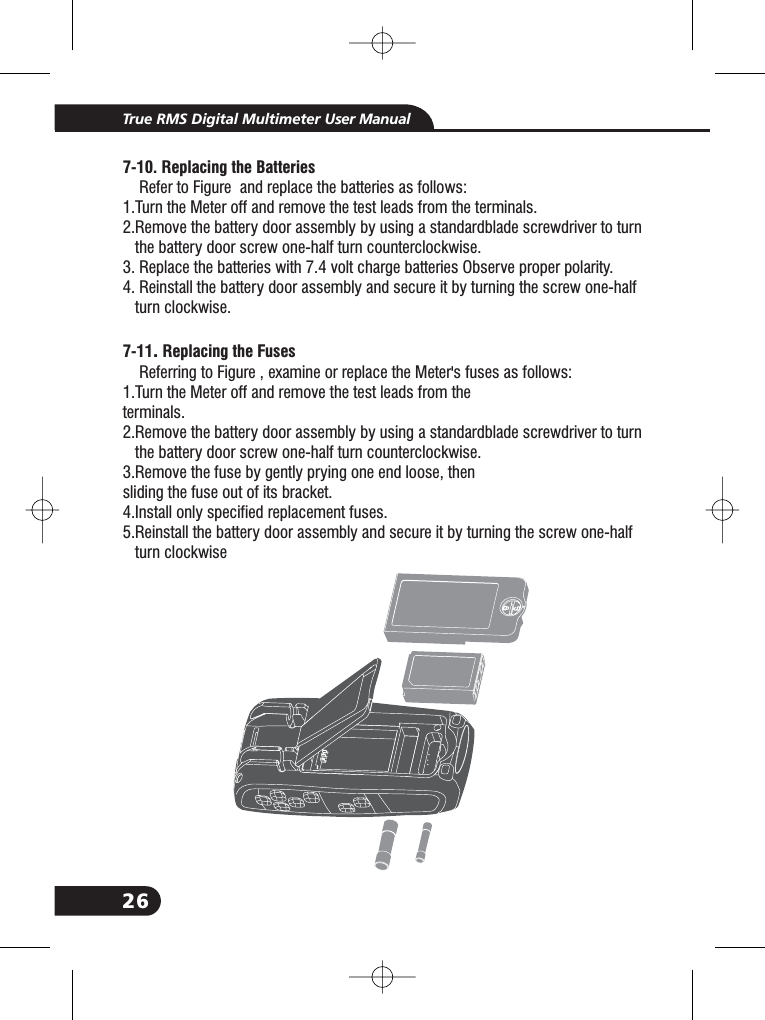
26True RMS Digital Multimeter User Manual7- .7-10 Replacing the Batteries11 Replacing the FusesRefer to Figure and replace the batteries as follows:1.Turn the Meter off and remove the test leads from the terminals.2.Remove the battery door assembly by using a standardblade screwdriver to turnthe battery door screw one-half turn counterclockwise.3. Replace the batteries with 7.4 volt charge batteries Observe proper polarity.4. Reinstall the battery door assembly and secure it by turning the screw one-halfturn clockwise.Referring to Figure , examine or replace the Meter's fuses as follows:1.Turn the Meter off and remove the test leads from theterminals.2.Remove the battery door assembly by using a standardblade screwdriver to turnthe battery door screw one-half turn counterclockwise.3.Remove the fuse by gently prying one end loose, thensliding the fuse out of its bracket.4.Install only specified replacement fuses.5.Reinstall the battery door assembly and secure it by turning the screw one-halfturn clockwise.2.2.2.2.
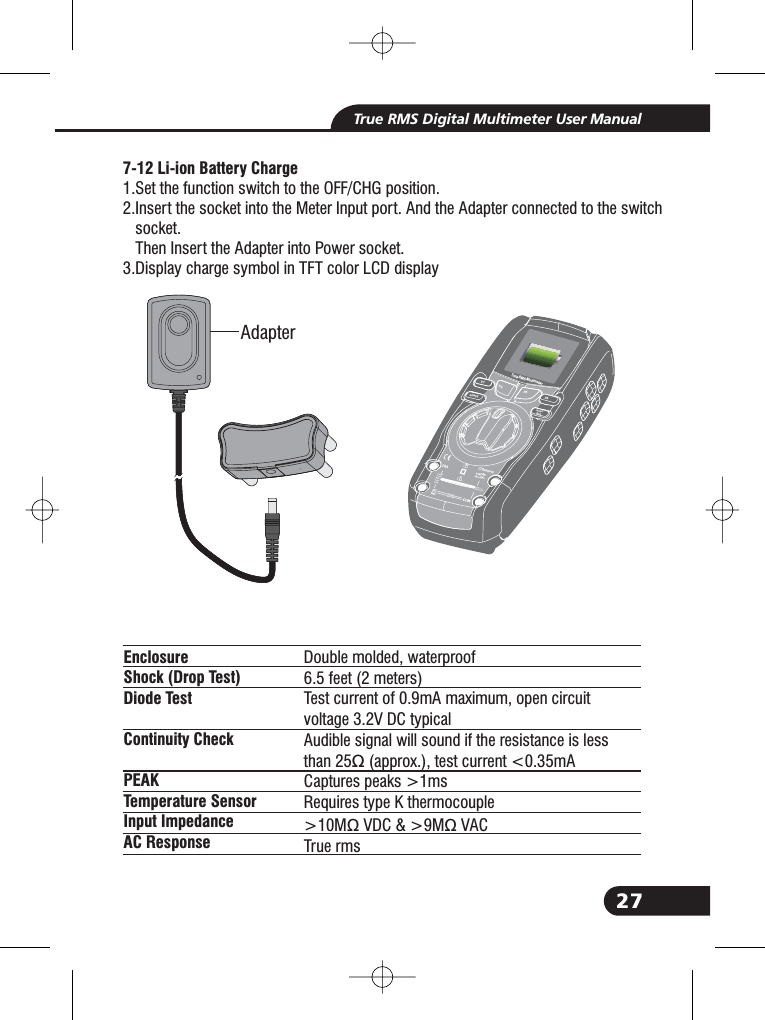
27True RMS Digital Multimeter User Manual7-12 Li-ion Battery Charge1.Set the function switch to the OFF/CHG position.2.Insert the socket into the Meter Input port. And the Adapter connected to the switchsocket.Then Insert the Adapter into Power socket.3.Display charge symbol in TFT color LCD display2.2.EnclosureShock (Drop Test)Diode TestContinuity CheckPEAKTemperature SensorInput ImpedanceAC ResponseDouble molded, waterproof6.5 feet (2 meters)Test current of 0.9mA maximum, open circuitvoltage 3.2V DC typicalAudible signal will sound if the resistance is lessthan 25 (approx.), test current <0.35mACaptures peaks >1msRequires type K thermocouple>10M VDC & >9M VACTrue rmsΩΩΩAdapterTru e RMS MultimeterF1HOLDRELRANGEF2 F3 F4Bluetooth520Afor30secMAXevery15minTEMPCAP
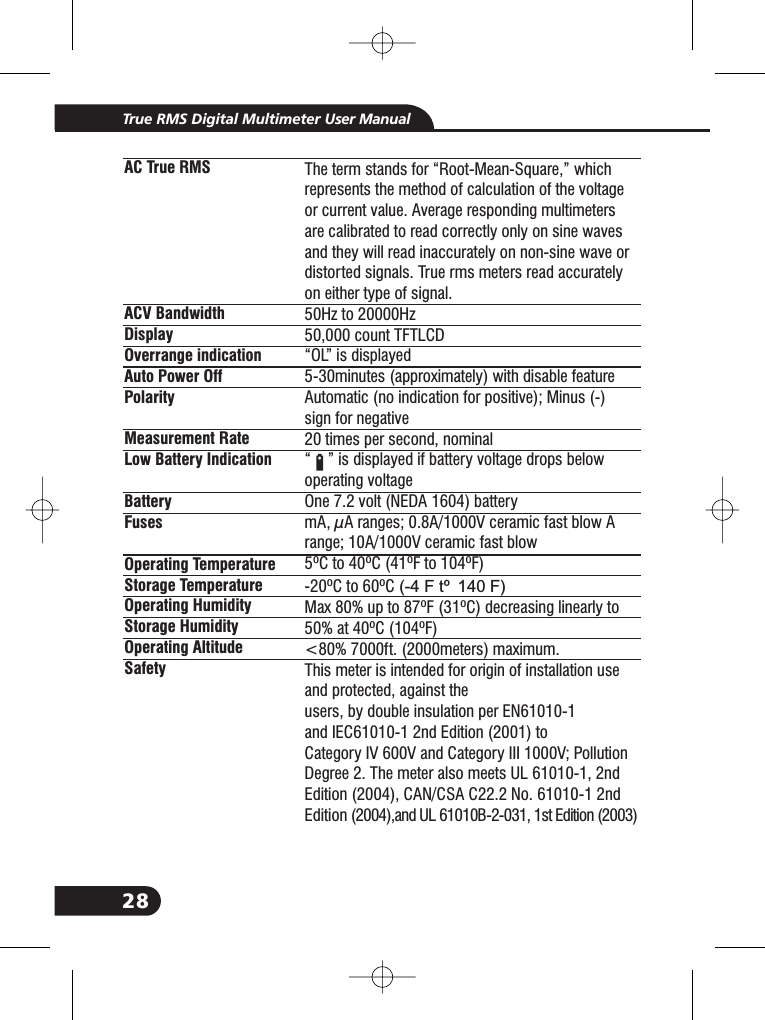
28True RMS Digital Multimeter User ManualAC True RMSACV BandwidthDisplayOverrange indicationAuto Power OffPolarityMeasurement RateLow Battery IndicationBatteryFusesOperating TemperatureStorage TemperatureOperating HumidityStorage HumidityOperating AltitudeSafetyThe term stands for “Root-Mean-Square,” whichrepresents the method of calculation of the voltageor current value. Average responding multimetersare calibrated to read correctly only on sine wavesand they will read inaccurately on non-sine wave ordistorted signals. True rms meters read accuratelyon either type of signal.50Hz to 20000Hz50,000 count TFTLCD“OL” is displayed5-30minutes (approximately) with disable featureAutomatic (no indication for positive); Minus (-)sign for negative20 times per second, nominal“ ” is displayed if battery voltage drops belowoperating voltageOne 7.2 volt (NEDA 1604) batterymA, μA ranges; 0.8A/1000V ceramic fast blow Arange; 10A/1000V ceramic fast blow5ºC to 40ºC (41ºF to 104ºF)-20ºC to 60ºCMax 80% up to 87ºF (31ºC) decreasing linearly to50% at 40ºC (104ºF)<80% 7000ft. (2000meters) maximum.This meter is intended for origin of installation useand protected, against theusers, by double insulation per EN61010-1and IEC61010-1 2nd Edition (2001) toCategory IV 600V and Category III 1000V; PollutionDegree 2. The meter also meets UL 61010-1, 2ndEdition (2004), CAN/CSA C22.2 No. 61010-1 2ndEdition (2004),and UL 61010B-2-031, 1st Edition (2003)(-4 F to 140 F)
29True RMS Digital Multimeter User Manual8. SpecificationsRange500mV5V50V500V1000VResolution0.01mV0.0001V0.001V0.01V0.1V50/60HZ±0.5%+5ACVoltage<1KHZ±1.0%+5±1.5%+10<5kHZ±3.0%+5±3.5%+10unspecified<20KHZ[1]±5.5%+20unspecifiedunspecifiedRange500mV[1]5V50V500V1000VResolution0.01mV0.0001V0.001V0.01V0.1VAccuracy(0.1% + 5digits)(0.05% + 5digits)(0.05% + 5digits)(0.05% + 5digits)(0.1% + 5)DC Voltage[1] When using the relative mode (REL Q) to compensate for offsets.FunctionRange500 [1]5k50k500k5M50MΩΩΩΩΩΩResolution0.010.0001k0.001k0.01k0.0001M0.001MΩΩΩΩΩΩAccuracy0.20%+100.20%+50.20%+50.50%+50.50%+52.0%+10FunctionResistance[1] When using the relative mode (REL Q) to compensate for offsets.5V50V500V1000V0.0001V0.001V0.01V0.1V<1KHZ(1.2% + 20)(AC+DC) <5KHZ(3.0% + 20)[1] upper 10 % of range,
30True RMS Digital Multimeter User ManualRange-200 to 1350˚C1. Does not include error of the thermocouple probe.2. Accuracy specification assumes ambient temperaturestable to ±1˚C.3. Use a long time, reading will increase 2 ˚C.500μA5000μA50mA500mA10A500μA5000μA50mA500mA10A(20A: 30 sec max with reduced accuracy)All AC current ranges are specified from 5% of range to100% of range5nF[1]50nF500nF5μF50μF500μF10mF[1] With a film capacitor or better, using relative mode(REL ) to zero residual.ΔResolution0.1˚C0.01 A0.1 A0.001mA0.01mA0.001A0.01 A0.1 A0.001mA0.01mA0.001A0.001nF0.01nF0.1nF0.001 F0.01 F0.1 F0.01mFμμμμμμμAccuracy±(1.0% reading + 3.0°C)±(1.0% reading +5.4°F)(probe accuracy not included)±0.2%+5±0.2%+5±0.2%+5±0.3%+8±0.5%+8<1KHZ±(0.8% + 5)±(1.5% + 20)±(1.5% + 8)±(1.0% + 8)±(1.5% + 8)±(1.0% + 8)±(1.5% + 8)±(2.5% + 20)FunctionTemp(type-K)DC CurrentAC CurrentCapacitance<5KHZ±(3% + 5)
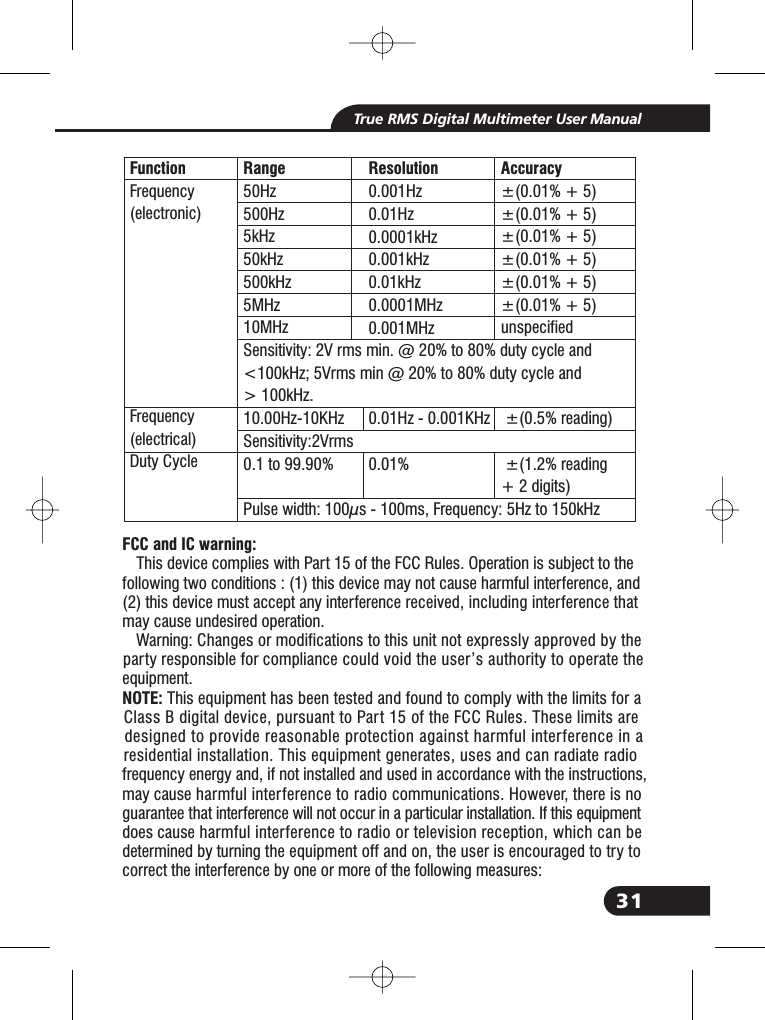
31True RMS Digital Multimeter User ManualRange50Hz500Hz5kHz50kHz500kHz5MHz10MHzSensitivity: 2V rms min. @ 20% to 80% duty cycle and<100kHz; 5Vrms min @ 20% to 80% duty cycle and> 100kHz.10.00Hz-10KHzSensitivity:2Vrms0.1 to 99.90%Pulse width: 100μs - 100ms, Frequency: 5Hz to 150kHzResolution0.001Hz0.01Hz0.0001kHz0.001kHz0.01kHz0.0001MHz0.001MHz0.01Hz - 0.001KHz0.01%Accuracy±(0.01% + 5)±(0.01% + 5)±(0.01% + 5)±(0.01% + 5)±(0.01% + 5)±(0.01% + 5)unspecified±(0.5% reading)±(1.2% reading+ 2 digits)FunctionFrequency(electronic)Frequency(electrical)Duty CycleFCC and IC warning:NOTE:This device complies with Part 15 of the FCC Rules. Operation is subject to thefollowing two conditions : (1) this device may not cause harmful interference, and(2) this device must accept any interference received, including interference thatmay cause undesired operation.Warning: Changes or modifications to this unit not expressly approved by theparty responsible for compliance could void the user’s authority to operate theequipment.This equipment has been tested and found to comply with the limits for aClass B digital device, pursuant to Part 15 of the FCC Rules. These limits aredesigned to provide reasonable protection against harmful interference in aresidential installation. This equipment generates, uses and can radiate radiofrequency energy and, if not installed and used in accordance with the instructions,may cause harmful interference to radio communications. However, there is noguarantee that interference will not occur in a particular installation. If this equipmentdoes cause harmful interference to radio or television reception, which can bedetermined by turning the equipment off and on, the user is encouraged to try tocorrect the interference by one or more of the following measures:
This device complies with FCC and Industry Canada RF radiation exposure limits set forth for general population (uncontrolled exposure).Rev.151027True RMS Digital Multimeter User ManualReorient or relocate the receiving antenna.Increase the separation between the equipment and receiver.Connect the equipment into an outlet on a circuit different from that to which thereceiver is connected.Consult the dealer or an experienced radio/TV technician for helpThis device complies with Industry Canada licence-exempt RSS standard(s).Operation is subject to the following two conditions: (1) this device may not causeinterference, and (2) this device must accept any interference, including interferencethat may cause undesired operation of the device.Under Industry Canada regulations, this radio transmitter may only operate usingan antenna of a type and maximum (or lesser) gain approved for the transmitter byIndustry Canada. To reduce potential radio interference to other users, the antennatype and its gain should be so chosen that the equivalent isotropically radiated power(e.i.r.p.) is not more than that necessary for successful communication.Conformémentà la réglementationd'Industrie Canada, le présent émetteurradiopeutfonctionner avec uneantenne d'un type et d'un gain maximal (ouinf érieur)approuvé pour l'émetteur par Industrie Canada. Dans le but de réduire les risquesde brouillage radioélectriqueàl'intention des autresutilisateurs, il fautchoisir le typed'antenne et son gain de sorteque la puissance isotroperayonn ée équivalente(p.i.r.e.) ne dépasse pas l'intensité nécessaireà l'établissement d'une communicationsatisfaisante.Le présent appareilestconforme aux CNR d'Industrie Canada applicables auxappareils radio exempts de licence. L'exploitationestautorisé e aux deuxconditionssuivantes : (1) l'appareil ne doit pas produire de brouillage, et (2) l'utilisateurde l'appareildoit accepter tout brouillage radioélectriquesubi,même si le brouillageestsusceptible d'encompromettre le fonctionnementThis device must not be collocated or operating in conjunction with any other antenna or transmitter.

Navigation menu